display MERCEDES-BENZ GLE-CLASS SUV 2016 Owner's Manual
[x] Cancel search | Manufacturer: MERCEDES-BENZ, Model Year: 2016, Model line: GLE-CLASS SUV, Model: MERCEDES-BENZ GLE-CLASS SUV 2016Pages: 450, PDF Size: 10.52 MB
Page 24 of 450
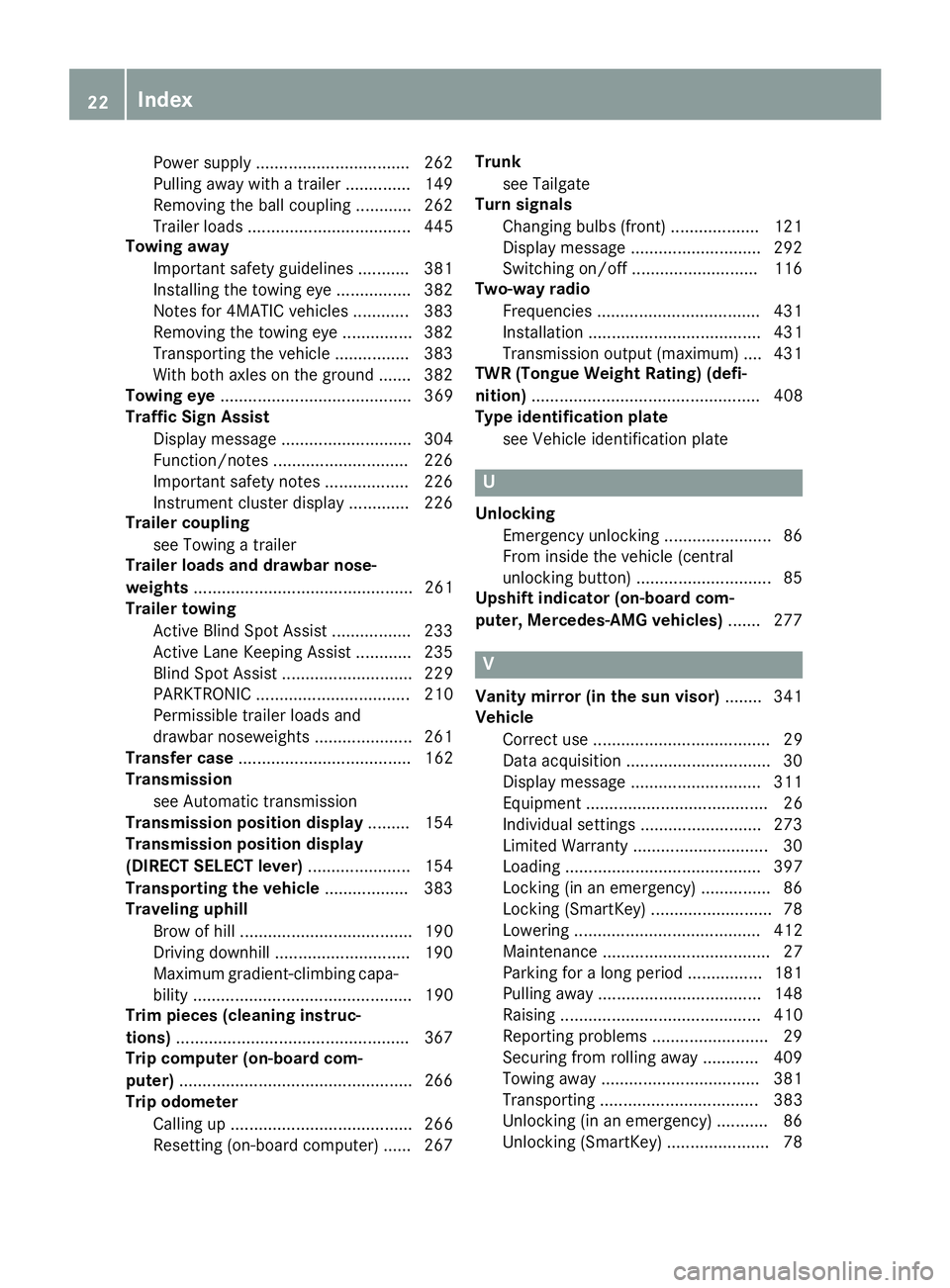
Power supply ................................. 262
Pulling away with a trailer .............. 149
Removing the ball coupling ............ 262
Trailer loads ................................... 445
Towing away
Important safety guidelines ........... 381
Installing the towing eye ................3 82
Notes for 4MATIC vehicles ............ 383
Removing the towing eye ...............3 82
Transporting the vehicle ................ 383
With both axles on the ground ....... 382
Towing eye ......................................... 369
Traffic Sign Assist
Display message ............................ 304
Function/notes .............................2 26
Important safety notes .................. 226
Instrument cluster display ............. 226
Trailer coupling
see Towing a trailer
Trailer loads and drawbar nose-
weights ............................................... 261
Trailer towing
Active Blind Spot Assist ................. 233
Active Lane Keeping Assist ............ 235
Blind Spot Assist ............................ 229
PARKTRONIC ................................. 210
Permissible trailer loads and
drawbar noseweights ..................... 261
Transfer case ..................................... 162
Transmission
see Automatic transmission
Transmission position display ......... 154
Transmission position display
(DIRECT SELECT lever) ......................154
Transporting the vehicle .................. 383
Traveling uphill
Brow of hill ..................................... 190
Driving downhill .............................1 90
Maximum gradient-climbing capa-
bility ............................................... 190
Trim pieces (cleaning instruc-
tions) ..................................................3 67
Trip computer (on-board com-
puter) ..................................................2 66
Trip odometer
Calling up ....................................... 266
Resetting (on-board computer) ...... 267 Trunk
see Tailgate
Turn signals
Changing bul bs (front) ................... 121
Di
splay message ............................ 292
Switching on/off ........................... 116
Two-way radio
Frequencies ................................... 431
Installation ..................................... 431
Transmission output (maximum) .... 431
TWR (Tongue Weight Rating) (defi-
nition) ................................................. 408
Type identification plate
see Vehicle identification plate
U
UnlockingEmergency unlocking ....................... 86
From inside the vehicle (central
unlocking button) .............................8 5
Upshift indicator (on-board com-
puter, Mercedes-AMG vehicles) .......277
V
Vanity mirror (in the sun visor) ........341
Vehicle
Correct use ...................................... 29
Data acquisition ............................... 30
Display message ............................ 311
Equipment ....................................... 26
Individual settings .......................... 273
Limited Warranty .............................3 0
Loading .......................................... 397
Locking (in an emergency) ............... 86
Locking (SmartKey) .......................... 78
Lowering ........................................ 412
Maintenance .................................... 27
Parking for a long period ................ 181
Pulling away ................................... 148
Raising ........................................... 410
Reporting problems ......................... 29
Securing from rolling away ............ 409
Towing away .................................. 381
Transporting .................................. 383
Unlocking (in an emergency) ........... 86
Unlocking (SmartKey) ...................... 78
22Index
Page 25 of 450
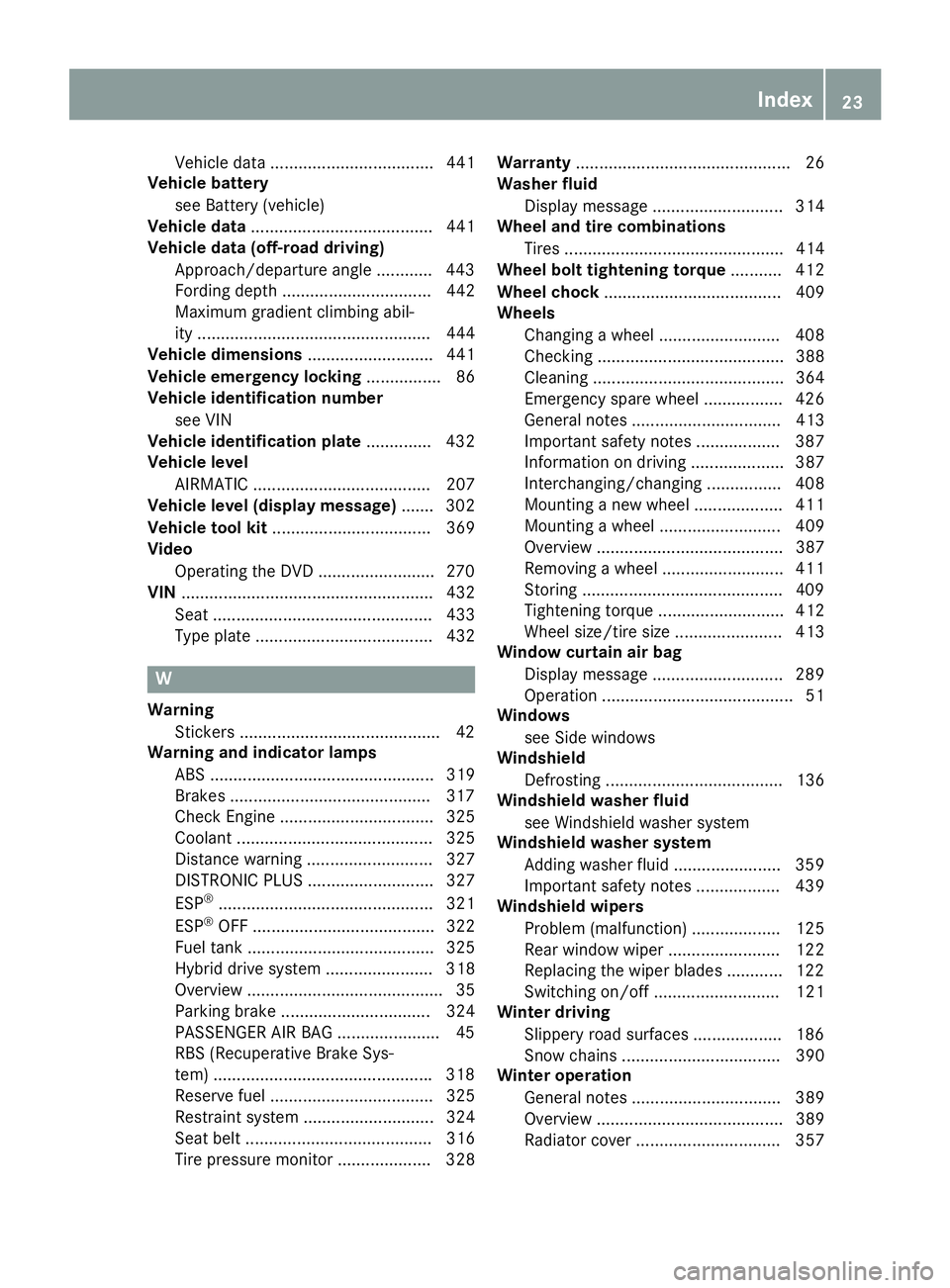
Vehicle data ................................... 441
Vehicle battery
see Battery (vehicle)
Vehicle data ....................................... 441
Vehicle data (off-road driving)
Approach/departure angle ............ 443
Fording depth ................................ 442
Maximum gradient climbing abil-
ity .................................................. 444
Vehicle dimensions ........................... 441
Vehicle emergency locking ................ 86
Vehicle identification number
see VIN
Vehicle identification plate .............. 432
Vehicle level
AIRMATIC ...................................... 207
Vehicle level (display message) ....... 302
Vehicle tool kit .................................. 369
Video
Operating the DVD .........................2 70
VIN ...................................................... 432
Seat ............................................... 433
Type plate ...................................... 432
W
Warning Stickers ...........................................4 2
Warning and indicator lamps
ABS ................................................ 319
Brakes ...........................................3 17
Check Engine ................................. 325
Coolant .......................................... 325
Distance warning ........................... 327
DISTRONIC PLUS ........................... 327
ESP
®.............................................. 321
ESP®OFF ....................................... 322
Fuel tank ........................................ 325
Hybrid drive system ....................... 318
Overview .......................................... 35
Parking brake ................................ 324
PASSENGER AIR BAG ......................4 5
RBS (Recuperative Brake Sys -
tem) .............................................. .318
Reserve fuel ................................... 325
Restraint system ............................ 324
Seat belt ........................................ 316
Tire pressure monitor .................... 328 Warranty
.............................................. 26
Washer fluid
Display message ............................ 314
Wheel and tire combinations
Tires ............................................... 414
Wheel bolt tightening torque ........... 412
Wheel chock ...................................... 409
Wheels
Changing a wheel .......................... 408
Checking ........................................ 388
Cleaning ......................................... 364
Emergency spare wheel ................. 426
General notes ................................ 413
Important safety notes .................. 387
Information on driving .................... 387
Interchanging/changing ................ 408
Mounting a new wheel ................... 411
Mounting a wheel .......................... 409
Overview ........................................ 387
Removing a wheel .......................... 411
Storing ...........................................4 09
Tightening torque ........................... 412
Wheel size/tire si
ze ....................... 413
Window curtain air bag
Display message ............................ 289
Operation ......................................... 51
Windows
see Side windows
Windshield
Defrosting ...................................... 136
Windshield washer fluid
see Windshield washer system
Windshield washer system
Adding washer fluid ....................... 359
Important safety notes .................. 439
Windshield wipers
Problem (malfunction) ................... 125
Rear window wiper ........................ 122
Replacing the wiper blades ............ 122
Switching on/off ........................... 121
Winter driving
Slippery road surfaces ................... 186
Snow chains .................................. 390
Winter operation
General notes ................................ 389
Overview ........................................ 389
Radiator cover ............................... 357
Index23
Page 36 of 450
Instrument cluster
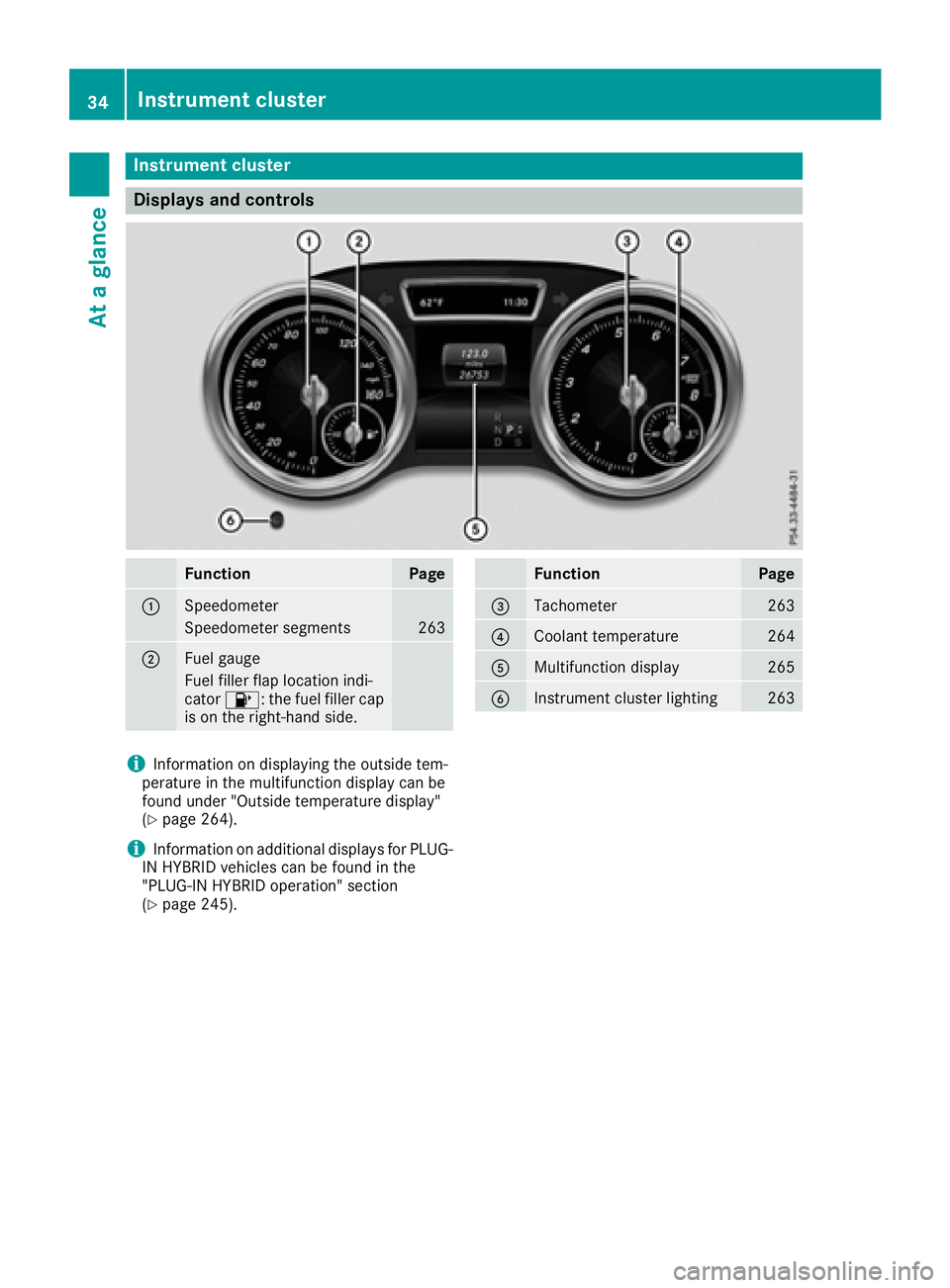
Displays and controls
FunctionPage
:Speedometer
Speedometer segments263
;Fue lgauge
Fue lfiller flap location indi-
cator 8: thefuel filler cap
is on th eright-hand side .
FunctionPage
=Tachometer263
?Coolan ttemperature26 4
AMultifunction display265
BInstrumen tcluste rlighting26 3
iInformation on displayin gth eoutside tem-
peratur ein th emultifunction display can be
foun dunder "Outside temperature display"
(
Ypage 264).
iInformation on additional displays for PLUG-
IN HYBRID vehicles can be foun din th e
"PLUG-I NHYBRID operation "section
(
Ypage 245).
34Instrument cluster
At a glance
Page 38 of 450
Multifunction steering wheel
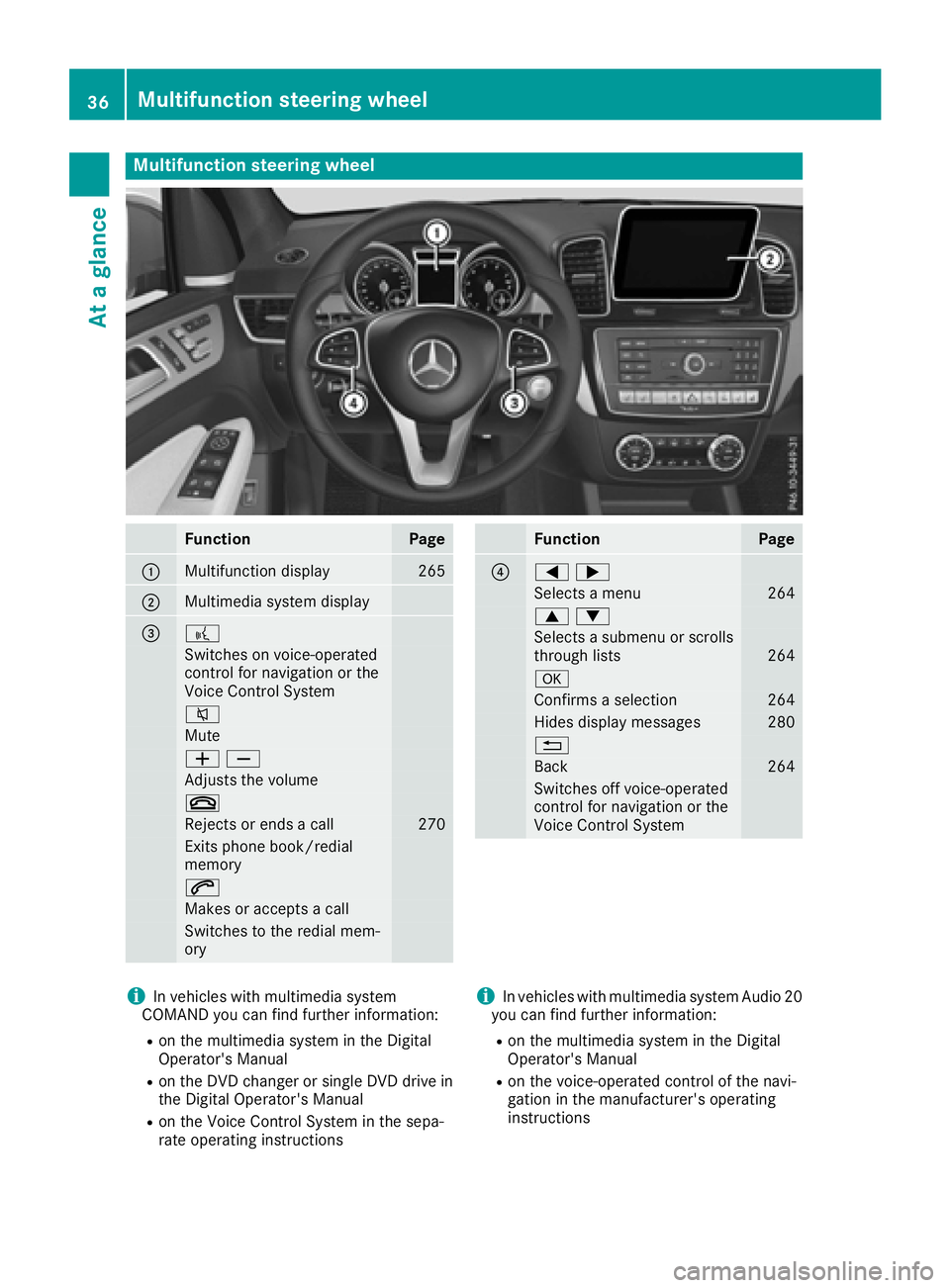
FunctionPage
:Multifunction display265
;Multimedia system display
=?
Switches on voice-operated
control for navigation or the
Voice Control System
8
Mute
WX
Adjusts the volume
~
Rejects or ends a call270
Exits phone book/redial
memory
6
Makes or accepts a call
Switches to the redial mem-
ory
FunctionPage
?=;
Selects a menu264
9:
Selects a submenu or scrolls
through lists264
a
Confirms a selection264
Hides display messages280
%
Back264
Switches off voice-operated
control for navigation or the
Voice Control System
iIn vehicles with multimedia system
COMAND you can find further information:
Ron the multimedia system in the Digital
Operator's Manual
Ron the DVD changer or single DVD drive in
the Digital Operator's Manual
Ron the Voice Control System in the sepa-
rate operating instructions
iIn vehicles with multimedia system Audio 20
you can find further information:
Ron the multimedia system in the Digital
Operator's Manual
Ron the voice-operated control of the navi-
gation in the manufacturer's operating
instructions
36Multifunction steering wheel
At a glance
Page 40 of 450
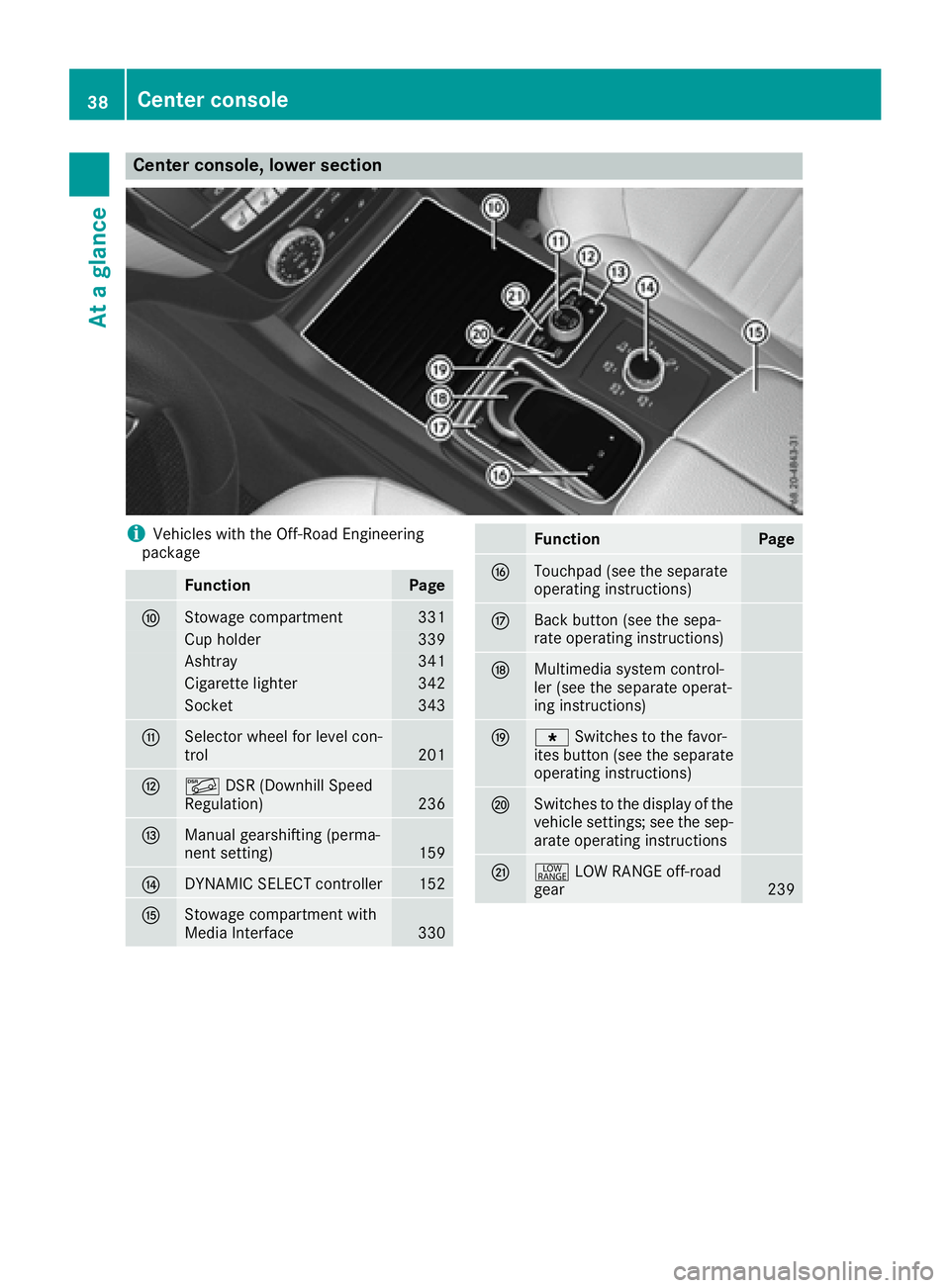
Center console, lower section
iVehicles with the Off-Road Engineering
package
FunctionPage
FStowage compartment331
Cup holder339
Ashtray341
Cigarette lighter342
Socket343
GSelector wheel for level con-
trol201
HÃ DSR (Downhill Speed
Regulation)236
IManual gearshifting (perma-
nent setting)159
JDYNAMIC SELECT controller152
KStowage compartment with
Media Interface330
FunctionPage
LTouchpad (see the separate
operating instructions)
MBack button (see the sepa-
rate operating instructions)
NMultimedia system control-
ler (see the separate operat-
ing instructions)
Og Switches to the favor-
ites button (see the separate
operating instructions)
PSwitches to the display of the
vehicle settings; see the sep-
arate operating instructions
Q+ LOW RANGE off-road
gear239
38Center console
At a glance
Page 41 of 450
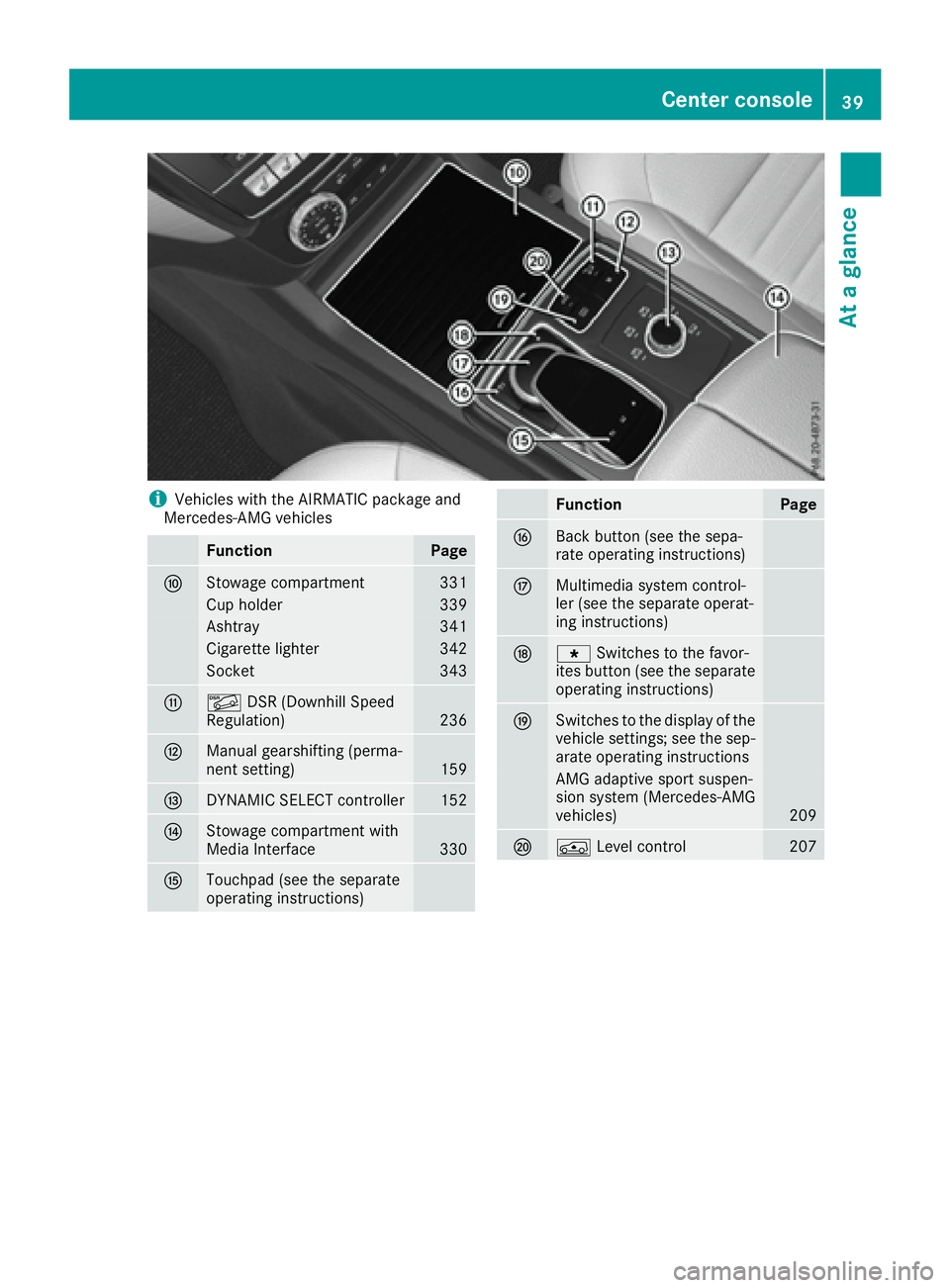
iVehicles with the AIRMATIC package and
Mercedes-AMG vehicles
FunctionPage
FStowage compartment331
Cup holder339
Ashtray341
Cigarette lighter342
Socket343
GÃ DSR (Downhill Speed
Regulation)236
HManual gearshifting (perma-
nent setting)159
IDYNAMIC SELECT controller152
JStowage compartment with
Media Interface330
KTouchpad (see the separate
operating instructions)
FunctionPage
LBack button (see the sepa-
rate operating instructions)
MMultimedia system control-
ler (see the separate operat-
ing instructions)
Ng Switches to the favor-
ites button (see the separate
operating instructions)
OSwitches to the display of the
vehicle settings; see the sep-
arate operating instructions
AMG adaptive sport suspen-
sion system (Mercedes-AMG
vehicles)
209
PÁ Level control207
Center console39
At a glance
Page 47 of 450
This poses an increased risk of injury or evenfatal injury.
Never modify parts of the restraint system.
Never tamper with the wiring, the electronic
components or their software.
If it is necessary to modify an air bag system to
accommodate a person with disabilities, con-
tact an authorized Mercedes-Benz Center for
details. USA only: for further information con-
tact our Customer Assistance Center at
1-800-FOR-MERCedes (1‑800‑367‑6372).
Restraint system warning lamp
The functions of the restraint system are
checked after the ignition is switched on and at
regular intervals while the engine is running.
Therefore, malfunctions can be detected in
good time.
The 6 restraint system warning lamp in the
instrument cluster lights up when the ignition is
switched on. It goes out no later than a few sec-
onds after the vehicle is started. The compo-
nents of the restraint system are in operational
readiness.
A malfunction has occurred if the 6restraint
system warning lamp:
Rdoes not light up after the ignition is switched
on
Rdoes not go out after a few seconds with the
engine running
Rlights up again while the engine is running
All vehicles, except hybrid vehicles:
GWARNING
If restraint system is malfunctioning, restraint
system components may be triggered unin-
tentionally or might not be triggered at all in
the event of an accident with a high rate of
vehicle deceleration. This can affect the Emer- gency Tensioning Device or air bag, for exam-
ple. This poses an increased risk of injury or
even fatal injury.
Have the restraint system checked and
repaired in a qualified specialist workshop as
soon as possible.
Hybrid vehicles:
GDANGER
If the restraint system is malfunctioning, indi- vidual restraint system components may be
triggered unintentionally or might not be trig-
gered at all in the event of an accident with a
high rate of vehicle deceleration. This could
affect Emergency Tensioning Devices or air
bags, for example. The vehicle's high-voltage
electrical system may also not be deactivated
as intended in the event of an accident. You
could suffer an electric shock if you touch the
damaged components of the vehicle's high-
voltage electrical system. This poses an
increased risk of injury or even fatal injury.
Have the restraint system checked and
repaired immediately at a qualified specialist
workshop. Immediately switch off the ignition
and remove the SmartKey from the ignition
lock after an accident.
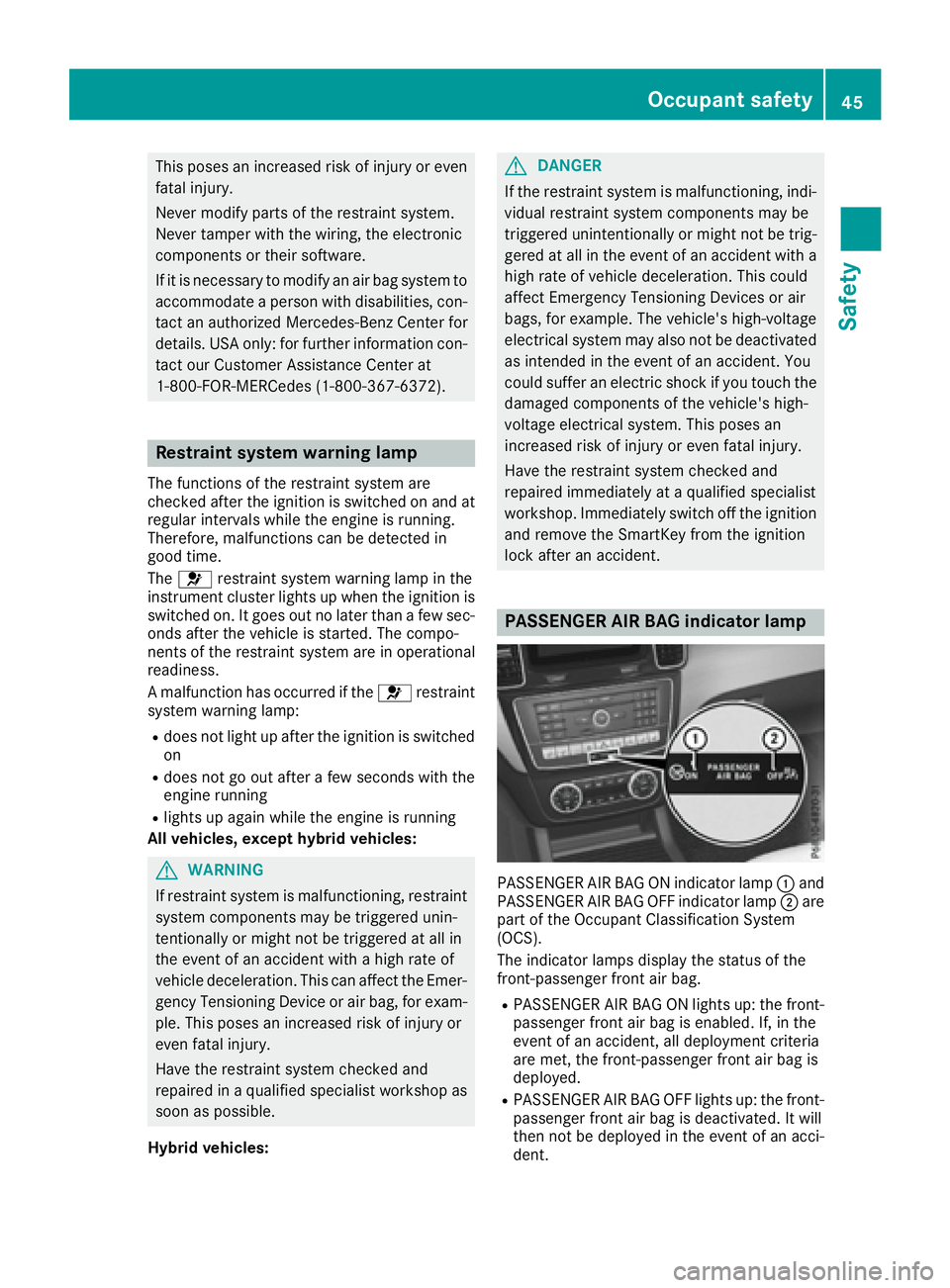
PASSENGER AIR BAG indicator lamp
PASSENGER AIR BAG ON indicator lamp :and
PASSENGER AIR BAG OFF indicator lamp ;are
part of the Occupant Classification System
(OCS).
The indicator lamps display the status of the
front-passenger front air bag.
RPASSENGER AIR BAG ON lights up: the front-
passenger front air bag is enabled. If, in the
event of an accident, all deployment criteria
are met, the front-passenger front air bag is
deployed.
RPASSENGER AIR BAG OFF lights up: the front-
passenger front air bag is deactivated. It will
then not be deployed in the event of an acci-
dent.
Occupant safety45
Safety
Z
Page 54 of 450
Occupant Classification System
(OCS)
Introduction
The Occupant Classification System (OCS) cat-
egorizes the person in the front-passenger seat.
Depending on that result, the front-passenger
front air bag is either enabled or deactivated.
The system does not deactivate:
Rthe side impact air bag
Rthe window curtain air bag
Rthe Emergency Tensioning Devices
In the following situation, the side impact air bag
and the Emergency Tensioning Device are deac- tivated:
ROCS has not categorized the person on the
front-passenger seat as an adult or a person
of corresponding stature and
Rthe seat belt tongue of the seat belt is not
inserted into the front-passenger seat belt
buckle
Prerequisites
To be classified correctly, the front passenger
must sit:
Rwith the seat belt fastened correctly
Rin an almost upright position with their back
against the seat backrest
Rwith their feet resting on the floor, if possible
If the front passenger does not observe these
conditions, OCS may produce a false classifica-
tion, e.g. because the front passenger:
Rtransfers their weight by supporting them-
selves on a vehicle armrest
Rsits in such a way that their weight is raised
from the seat cushion
If it is absolutely necessary to install a child
restraint system on the front-passenger seat, be
sure to observe the correct positioning of the
child restraint system. Never place objects
under or behind the child restraint system, e.g.
cushions. The entire base of the child restraint
system must always rest on the seat cushion of
the front-passenger seat. The backrest of the
forward-facing child restraint system must lie as
flat as possible against the backrest of the front-
passenger seat.
The child restraint system must not touch the
roof or be subjected to a load by the head restraint. Adjust the angle of the seat backrest
and the head restraint position accordingly.
Only then can OCS be guaranteed to function
correctly. Always observe the child restraint sys-
tem manufacturer's installation instructions.
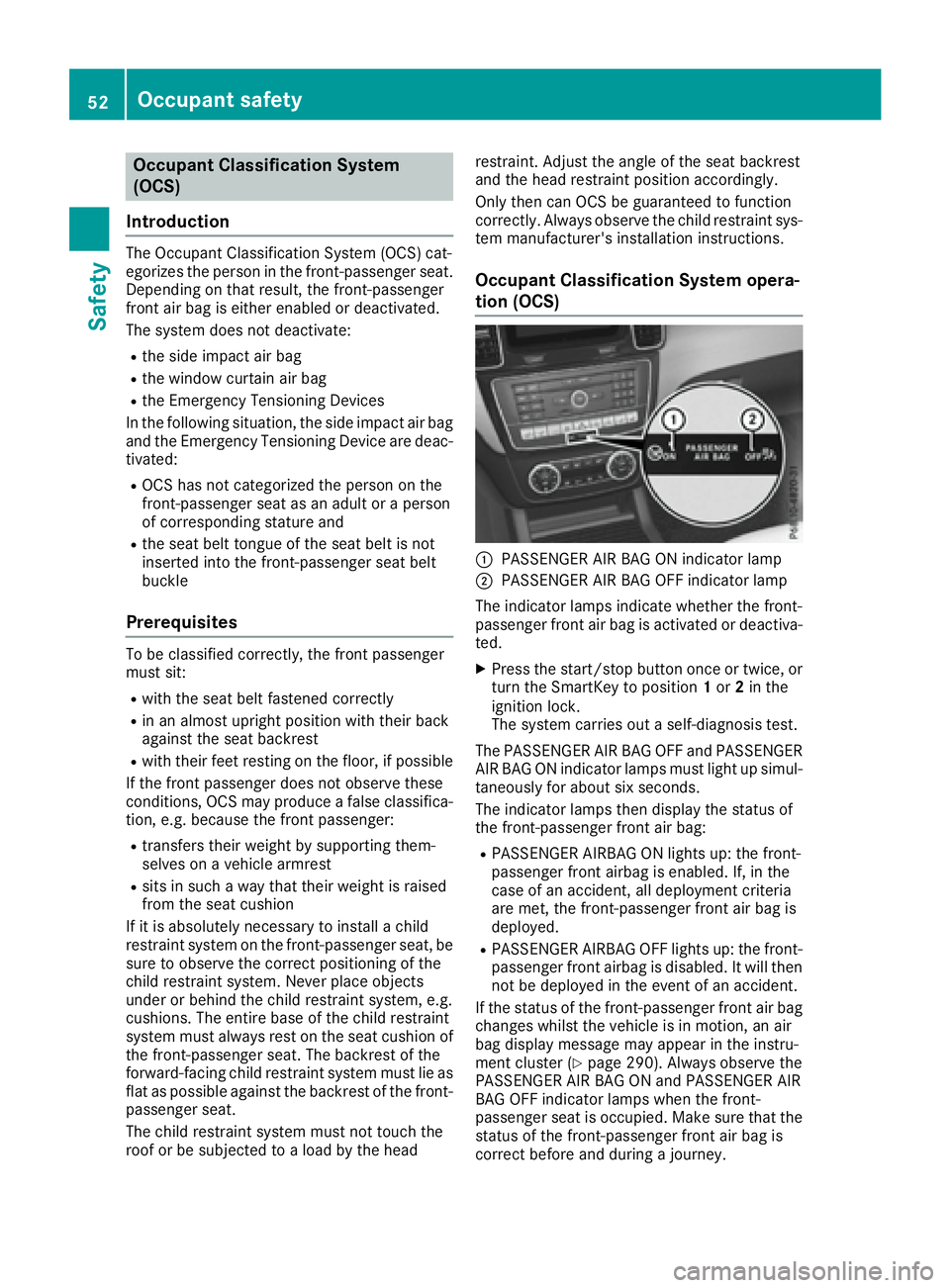
Occupant Classification System opera-
tion (OCS)
:PASSENGER AIR BAG ON indicator lamp
;PASSENGER AIR BAG OFF indicator lamp
The indicator lamps indicate whether the front-
passenger front air bag is activated or deactiva-
ted.
XPress the start/stop button once or twice, or
turn the SmartKey to position 1or 2in the
ignition lock.
The system carries out a self-diagnosis test.
The PASSENGER AIR BAG OFF and PASSENGER
AIR BAG ON indicator lamps must light up simul-
taneously for about six seconds.
The indicator lamps then display the status of
the front-passenger front air bag:
RPASSENGER AIRBAG ON lights up: the front-
passenger front airbag is enabled. If, in the
case of an accident, all deployment criteria
are met, the front-passenger front air bag is
deployed.
RPASSENGER AIRBAG OFF lights up: the front-
passenger front airbag is disabled. It will then
not be deployed in the event of an accident.
If the status of the front-passenger front air bag
changes whilst the vehicle is in motion, an air
bag display message may appear in the instru-
ment cluster (
Ypage 290). Always observe the
PASSENGER AIR BAG ON and PASSENGER AIR
BAG OFF indicator lamps when the front-
passenger seat is occupied. Make sure that the
status of the front-passenger front air bag is
correct before and during a journey.
52Occupant safety
Safety
Page 57 of 450
passenger seat may not be used. Do not
install a child restraint system on the front-
passenger seat. Have the Occupant Classifi-
cation System (OCS) checked and repaired
immediately at a qualified specialist work-
shop.
GWARNING
Objects between the seat surface and the
child restraint system could affect OCS oper- ation. This could result in the front-passenger
air bag not functioning as intended during an
accident. This poses an increased risk of
injury or even fatal injury.
Do not place any objects between the seat
surface and the child restraint system. The
entire base of the child restraint system must
always rest on the seat cushion of the front-
passenger seat. The backrest of the forward-
facing child restraint system must, as far as
possible, be resting on the backrest of the
front-passenger seat. Always comply with the
child restraint system manufacturer's instal-
lation instructions.
After the system self-test, the PASSENGER AIR
BAG OFF or PASSENGER AIR BAG ON indicator
lamp displays the status of the front-passenger
front air bag (
Ypage 52).
For more information about the OCS, see "Prob-
lems with the Occupant Classification System"
(
Ypage 56).
Occupant safety55
Safety
Z
Page 71 of 450
XKeep the brake pedal depressed until the
emergency braking situation is over.
ABS prevents the wheels from locking.
BAS PLUS is deactivated and the brakes func-
tion as usual again, if:
Ryou release the brake pedal.
Rthere is no longer a risk of collision.
Rno obstacle is detected in front of your vehi-
cle.
Ryou depress the accelerator pedal.
Ryou activate kickdown.
COLLISION PREVENTION ASSIST
PLUS
General information
iObserve the "Important safety notes" sec-
tion (Ypage 66).
COLLISION PREVENTION ASSIST PLUS consists
of a distance warning function with an autono-
mous braking function and adaptive Brake
Assist.
COLLISION PREVENTION ASSIST PLUS can help
you to minimize the risk of a front-end collision
with a vehicle ahead or reduce the effects of
such a collision.
If COLLISION PREVENTION ASSIST PLUS
detects that there is a risk of a collision, you will
be warned visually and acoustically. If you do not
react to the visual and audible collision warning,
autonomous braking can be initiated in critical
situations. If you apply the brake yourself in a
critical situation, the COLLISION PREVENTION
ASSIST PLUS adaptive Brake Assist assists you.
Important safety notes
In particular, the detection of obstacles can be
impaired if:
Rthere is dirt on the sensors or anything else
covering the sensors
Rthere is snow or heavy rain
Rthere is interference by other radar sources
Rthere are strong radar reflections, for exam-
ple in parking garages
Ra narrow vehicle traveling in front, e.g. a
motorbike
Ra vehicle traveling in front on a different line
Rnew vehicles or after a service on the COLLI-
SION PREVENTION ASSIST PLUS system
Observe the notes in the section on breaking-
in (
Ypage 144).
Following damage to the front end of the vehicle,
have the configuration and operation of the
radar sensor checked at a qualified specialist
workshop. This also applies to collisions at slow
speeds where there is no visible damage to the
front of the vehicle.
Switching on/off
The COLLISION PREVENTION ASSIST PLUS is
automatically active after switching on the igni-
tion.
You can activate or deactivate COLLISION PRE-
VENTION ASSIST PLUS in the on-board com-
puter (
Ypage 272). When deactivated, the dis-
tance warning function and the autonomous
braking function are also deactivated.
If COLLISION PREVENTION ASSIST PLUS is
deactivated, the æsymbol appears in the
assistance graphics display.
Distance warning function
General information
The distance warning function can help you to
minimize the risk of a front-end collision with a
vehicle ahead or reduce the effects of such a
collision. If the distance warning function
detects that there is a risk of a collision, you will
be warned visually and acoustically.
Important safety notes
iObserve the "Important safety notes" sec-
tion for driving safety systems (Ypage 66).
GWARNING
The distance warning function does not react:
Rto people or animals
Rto oncoming vehicles
Rto crossing traffic
Rwhen cornering
Thus, the distance warning function cannot
provide a warning in all critical situations.
There is a risk of an accident.
Driving safety systems69
Safety
Z