tailgate MERCEDES-BENZ GLE COUPE 2019 Owner's Manual
[x] Cancel search | Manufacturer: MERCEDES-BENZ, Model Year: 2019, Model line: GLE COUPE, Model: MERCEDES-BENZ GLE COUPE 2019Pages: 370, PDF Size: 11.22 MB
Page 12 of 370
Brakes ........................................... 149
Break-in period .............................. 126
Downhill gradient ........................... 149
Drinking and driving ....................... 147
Driving in winter ............................. 151
Driving on flooded roads ................ 151
Driving on sand .............................. 154
Driving on wet roads ...................... 150
Driving over obstacles ................... 154
Exhaust check ............................... 147
Fuel ................................................ 147
General .......................................... 147
Hydroplaning ................................. 150
Icy road surfaces ........................... 151
Limited braking efficiency on sal-
ted roads ....................................... 150
Off-road driving .............................. 153
Off-road fording ............................. 151
Snow chains .................................. 329
The first 1000 miles (1500 km) ..... 126
Tire ruts ........................................ .154
Towing a trailer .............................. 200
Traveling uphill ............................... 155
Wet road surface ........................... 150
DSR (Downhill Speed Regulation)
Display message ............................ 240
Function/notes ............................ .167
DVD video
Operating (on-board computer) ..... 214
see also Digital Operator's Man-
ual ................................................. .264
DYNAMIC SELECT controller
Automatic transmission ................. 134 E
EASY-ENTRY feature Activating/deactivating ................. 219
Function/notes ............................ .101
EASY-EXIT feature
Crash-responsive ........................... 101
Function/notes ............................ .101
Switching on/off ........................... 219
EASY-PACK cargo compartment
management system ........................ 278
EBD (electronic brake force distri-
bution)
Display message ............................ 226 Function/notes ................................ 69
ECO display
Function/notes ............................ .148
On-board computer ....................... 212
ECO start/stop function
Automatic engine start .................. 132
Automatic engine switch-off .......... 131
Deactivating/activating ................. 132
General information ....................... 131
Important safety notes .................. 131
Introduction ................................... 131
Electronic Stability Program
see ESP ®
(Electronic Stability Program)
Emergency
Automatic measures after an acci-
dent ................................................. 57
Emergency release
Driver's door ................................... .81
Vehicle .............................................81
Emergency spare wheel
General note s ................................ 353
Im portant safety notes .................. 353
Removing .......................................3 54
Storage location ............................ 354
Stowing .......................................... 354
Emergency Tensioning Devices
Activation ......................................... 54
Emergency unlocking
Tailgate ............................................ 85
Emissions control
Service and warranty information .... 27
Engine
Check Engine warning lamp ........... 259
Display message ............................ 236
ECO start/stop function ................ 131
Engine number ............................... 359
Irregular running ............................ 133
Jump-starting ................................. 318
Starting (important safety notes) ... 128
Starting problems .......................... 133
Starting the engine with the
SmartKey ....................................... 129
Starting via smartphone ................ 129
Starting with KEYLESS-GO ............. 129
Switching off .................................. 144
Tow-starting (vehicle) ..................... 324
Engine electronics
Problem (malfunction) ................... 133 10
Index
Page 19 of 370
Radio
Selecting a station ......................... 214
Radio mode
see also Digital Operator's Man-
ual .................................................. 264
Radio-wave reception/transmis-
sion in the vehicle
Declaration of conformity ................ 29
Rain closing feature (panorama
roof with power tilt/sliding panel) .... 91
REACH Regulation ............................... 30
Reading lamp ..................................... 110
Rear bench seat
Folding forwards/back .................. 276
Rear compartment
Setting the air vents ...................... 125
Setting the temperature ................ 120
Rear fog lamp
Display messag e............................ 235
Switching on/of f........................... 107
Rear Seat Entertainment System
AUX jacks ...................................... 271
AUX jacks CD/DVD drive .............. 271
Rear seats
Adjusting ......................................... 97
Rear view camera
Cleaning instructions ..................... 305
Display in the multimedia system .. 181
Function/note s............................. 180
Switching on/of f........................... 181
Rear window defroster
Problem (malfunction) ................... 123
Switching on/of f........................... 123
Rear-view mirror
Anti-glare (manual) ........................ 102
Dipping (automatic) ....................... 103
Reflective safety jacket .................... 309
Refrigerant (air-conditioning sys-
tem)
Important safety notes .................. 363
Refueling
Fuel gaug e....................................... 36
Important safety notes .................. 142
Refueling process .......................... 142
see Fuel
Remote control
Garage door opener ....................... 292 Replacing bulbs
General notes ................................ 111
Reporting safety defects .................... 31
Rescue card ......................................... 31
Reserve (fuel tank)
see Fuel
Reserve fuel
Display message ............................ 238
Warning lamp ................................. 259
Residual heat (climate control) ........ 123
Restraint system
Display message ............................ 231
Introduction ..................................... 42
Warning lamp ................................. 259
Warning lamp (function) ................... 43
Reversing feature
Panorama sliding sunroo f................ 90
Roller sunblind ................................. 91
Side windows ................................... 86
Tailgate ............................................ 82
Reversing lamps (display mes-
sage) ................................................... 235
Roadside Assistance (breakdown) .... 28
Roller sunblind
Panorama roof with power tilt/
sliding panel ..................................... 91
Roof carrier ........................................ 279
Roof lining and carpets (cleaning
guidelines) ......................................... 308
Roof load (maximum) ........................ 364
Route (navigation)
see Route guidance (navigation)
Route guidance
see also Digital Operator's Man-
ual .................................................. 264
Route guidance (navigation) ............ 212
Route guidance active ...................... 213 S
Safety Children in the vehicle ..................... 57
see Occupant safety
see Operating safety
SD card
Inserting ........................................ 270
Inserting/removing ........................ 270
Removing ....................................... 270 Index
17
Page 22 of 370
T
Tachometer ........................................ 208
Tailgate
Display message ............................ 248
Emergency unlocking ....................... 85
Important safety notes .................... 82
Limiting the opening angle ............... 85
Opening dimensions ...................... 364
Opening/closing (automatically
from inside) ...................................... 84
Opening/closing (automatically
from outside) ................................... 83
Opening/closing (from outside) ....... 82
Tank content
Fuel gauge ....................................... 36
Technical data
Capacities ...................................... 359
Drawbar load (maximum) ............... 367
Information .................................... 357
Tires/wheels ................................. 352
Trailer load s................................... 367
Vehicle data ................................... 364
Telephone
Accepting a call (multifunction
steering wheel) .............................. 215
Authorizing a mobile phone (con-
necting) ......................................... 268
Authorizing a mobile phone via the device manager (connecting )......... 269
Connecting a mobile phone
(device manager) ........................... 269
Connecting a mobile phone (gen-
eral information) ............................ 268
Display message ............................ 249
Menu (on-board computer) ............ 214
Number from the phone book ........ 215
Redialing ........................................ 215
Rejecting/ending a call ................. 215
see also Digital Operator's Man-
ual .................................................. 264
Temperature
Coolant (display in the instrumentcluster) .......................................... 209
Coolant (on-board computer,
Mercedes-AMG vehicles) ............... 220
Engine oil (on-board computer,
Mercedes-AMG vehicles) ............... 220 Outside temperature ...................... 208
Setting (climate control )................ 120
Transmission oil (on-board com-
puter, Mercedes-AMG vehicles) ..... 220
Through-loading feature ................... 275
Timing (RACETIMER) ......................... 221
Tire pressure
Calling up (on-board computer) ..... 334
Checking manually ........................ 333
Display message ............................ 245
Maximum ....................................... 333
Not reached (TIREFIT) .................... 313
Notes ............................................. 332
Reached (TIREFIT) .......................... 314
Recommended ............................... 330
Tire pressure loss warning system
General notes ................................ 333
Important safety notes .................. 334
Restarting ...................................... 334
Tire pressure monitor
Checking the tire pressure elec-
tronically ........................................ 336
Function/note s............................. 334
General notes ................................ 334
Important safety notes .................. 335
Radio type approval for the tire
pressure monitor ........................... 337
Restarting ...................................... 337
Warning lamp ................................. 263
Warning message .......................... 336
Tire pressure table ............................ 331
Tire-change tool kit ........................... 310
TIREFIT kit
Important safety notes .................. 312
Storage location ............................ 310
Tire pressure not reached .............. 313
Tire pressure reached .................... 314
Using ............................................. 312
Tires
Aspect ratio (definition) ................. 347
Average weight of the vehicle
occupants (definition) .................... 345
Bar (definition) ............................... 345
Changing a whee l.......................... 347
Characteristics .............................. 345
Checking ........................................ 327
Curb weight (definition) ................. 346
Definition of terms ......................... 345 20
Index
Page 24 of 370
Installing the towing eye ................ 322
Notes for 4MATIC vehicles ............ 324
Removing the towing eye ............... 322
Transporting the vehicle ................ 323
With both axles on the ground ....... 322
Towing eye .........................................3 10
Traffic reports
see also Digital Operator's Man-
ual ................................................. .264
Traffic Sign Assist
Activating/deactivating the warn-ing function ................................... .216
Display message ............................ 240
Function/notes ............................ .190
Important safety notes .................. 190
Instrument cluster display ............. 190
Trailer coupling
see Towing a trailer
Trailer loads and drawbar nose-
weights ............................................... 204
Trailer towing
Active Blind Spot Assist ................. 197
Active Lane Keeping Assist ............ 199
Blind Spot Assist ............................ 193
Permissible trailer loads and
drawbar noseweights ..................... 204
Transfer case ..................................... 141
Transmission
see Automatic transmission
Transmission position display ......... 136
Transporting the vehicle .................. 323
Traveling uphill
Brow of hill ..................................... 155
Driving downhill ............................ .155
Maximum gradient-climbing capa-
bility ............................................... 155
Trim pieces (cleaning instruc-
tions) ................................................. .307
Trip computer (on-board com-
puter) ................................................. .211
Trip odometer
Calling up ....................................... 211
Resetting (on-board computer) ...... 212
Trunk
see Tailgate
Trunk load (maximum) ......................364 Turn signals
Display message ............................ 235
Switching on/off ........................... 107
Two-way radio
Frequencies ................................... 357
Installation ..................................... 357
Transmission output (maximum ).... 357
TWR (Tongue Weight Rating) (defi-
nition) ................................................. 347
Type identification plate
see Vehicle identification plate U
Unlocking Emergency unlocking ....................... 81
From inside the vehicle (central
unlocking button) ............................. 80
Upshift indicator (on-board com-
puter, Mercedes-AMG vehicles) ....... 220
USB devices
Connecting to the Media Inter-
face ............................................... 271 V
Vanity mirror (in the sun visor) ........ 282
Vehicle
Correct use ...................................... 30
Data acquisition ............................... 31
Display message ............................ 247
Equipment ....................................... 27
Individual settings .......................... 217
Limited Warranty ............................. 31
Loading .......................................... 337
Locking (in an emergency) ............... 81
Locking (SmartKey) .......................... 74
Lowering ........................................ 351
Maintenance .................................... 28
Operating safety .............................. 29
Parking .......................................... 144
Parking for a long period ................ 147
Pulling away ................................... 130
Raising ........................................... 349
REACH Regulation ........................... 30
Reporting problems ......................... 31
Securing from rolling away ............ 349
Towing away .................................. 321 22
Index
Page 75 of 370
No steering assistance is provided from STEER
CONTROL, if:
R ESP ®
is deactivated
R ESP ®
is malfunctioning
R the steering is malfunctioning
If ESP ®
is malfunctioning, you will be assisted
further by the electrical power steering. Protection against theft
Immobilizer
X To activate with the SmartKey: remove the
SmartKey from the ignition lock.
X To activate with KEYLESS-GO: switch the
ignition off and open the driver's door.
X To deactivate: switch on the ignition.
The immobilizer prevents your vehicle from
being started without the correct SmartKey.
When leaving the vehicle, always take the
SmartKey with you and lock the vehicle. Anyone
can start the engine if a valid SmartKey has been left inside the vehicle.
i The immobilizer is always deactivated when
you start the engine.
In the event that the engine cannot be started (yet the vehicle's battery is charged), the sys-
tem is not operational. Contact an authorized Mercedes-Benz Center or call
1-800 FOR-MERCEDES (in the USA) or
1-800-387-0100 (in Canada). ATA (anti-theft alarm system) X
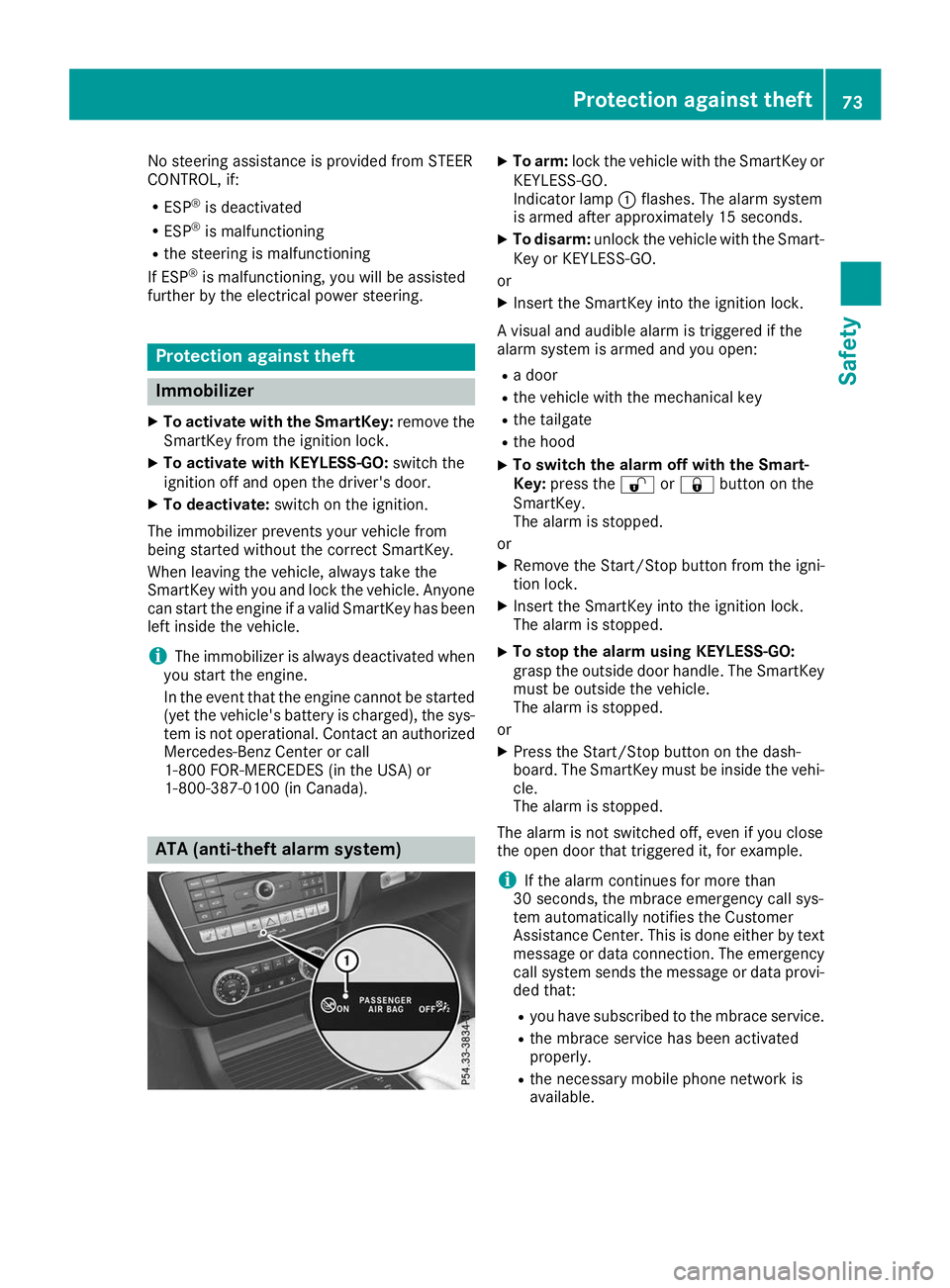
To arm: lock the vehicle with the SmartKey or
KEYLESS-GO.
Indicator lamp 0043flashes. The alarm system
is armed after approximately 15 seconds.
X To disarm: unlock the vehicle with the Smart-
Key or KEYLESS-GO.
or X Insert the SmartKey into the ignition lock.
A visual and audible alarm is triggered if the
alarm system is armed and you open: R a door
R the vehicle with the mechanical key
R the tailgate
R the hood
X To switch the alarm off with the Smart-
Key:
press the 0036or0037 button on the
SmartKey.
The alarm is stopped.
or
X Remove the Start/Stop button from the igni-
tion lock.
X Insert the SmartKey into the ignition lock.
The alarm is stopped.
X To stop the alarm using KEYLESS-GO:
grasp the outside door handle. The SmartKey
must be outside the vehicle.
The alarm is stopped.
or
X Press the Start/Stop button on the dash-
board. The SmartKey must be inside the vehi-
cle.
The alarm is stopped.
The alarm is not switched off, even if you close
the open door that triggered it, for example.
i If the alarm continues for more than
30 seconds, the mbrace emergency call sys-
tem automatically notifies the Customer
Assistance Center. This is done either by text
message or data connection. The emergency call system sends the message or data provi-
ded that:
R you have subscribed to the mbrace service.
R the mbrace service has been activated
properly.
R the necessary mobile phone network is
available. Protection against theft
73Safety Z
Page 76 of 370
SmartKey
Important safety notes
G
WARNING
If children are left unsupervised in the vehicle, they could:
R open the doors, thus endangering other
people or road users.
R get out and disrupt traffic.
R operate the vehicle's equipment.
Additionally, children could set the vehicle in
motion if, for example, they:
R release the parking brake.
R shifting the automatic transmission out of
park position P
R Start the engine.
There is a risk of an accident and injury.
When leaving the vehicle, always take the
SmartKey with you and lock the vehicle. Never
leave children or animals unattended in the
vehicle. Always keep the SmartKey out of
reach of children. G
WARNING
If you attach heavy or large objects to the
SmartKey, the SmartKey could be uninten-
tionally turned in the ignition lock. This could
cause the engine to be switched off. There is a risk of an accident.
Do not attach any heavy or large objects to the
SmartKey. Remove any bulky key rings before
inserting the SmartKey into the ignition lock.
! Keep the SmartKey away from strong mag-
netic fields. Otherwise, the remote control
function could be affected.
Strong magnetic fields can occur in the vicin- ity of powerful electrical installations.
Do not keep the SmartKey: R with electronic devices, e.g. a mobile phone
or another SmartKey.
R with metallic objects, e.g. coins or metal foil.
R inside metallic objects, e.g. a metal case.
This can affect the functionality of the Smart- Key. Do not keep the KEYLESS-GO or KEYLESS-GO
Start function key in the temperature-controlled
cup holder. Otherwise, the KEYLESS-GO or KEY- LESS-GO Start function key will not be detected.
Vehicles with KEYLESS-GO start function: do
not keep the SmartKey in the cargo compart-
ment. Otherwise, the SmartKey may not be
detected, e.g. when starting the engine using
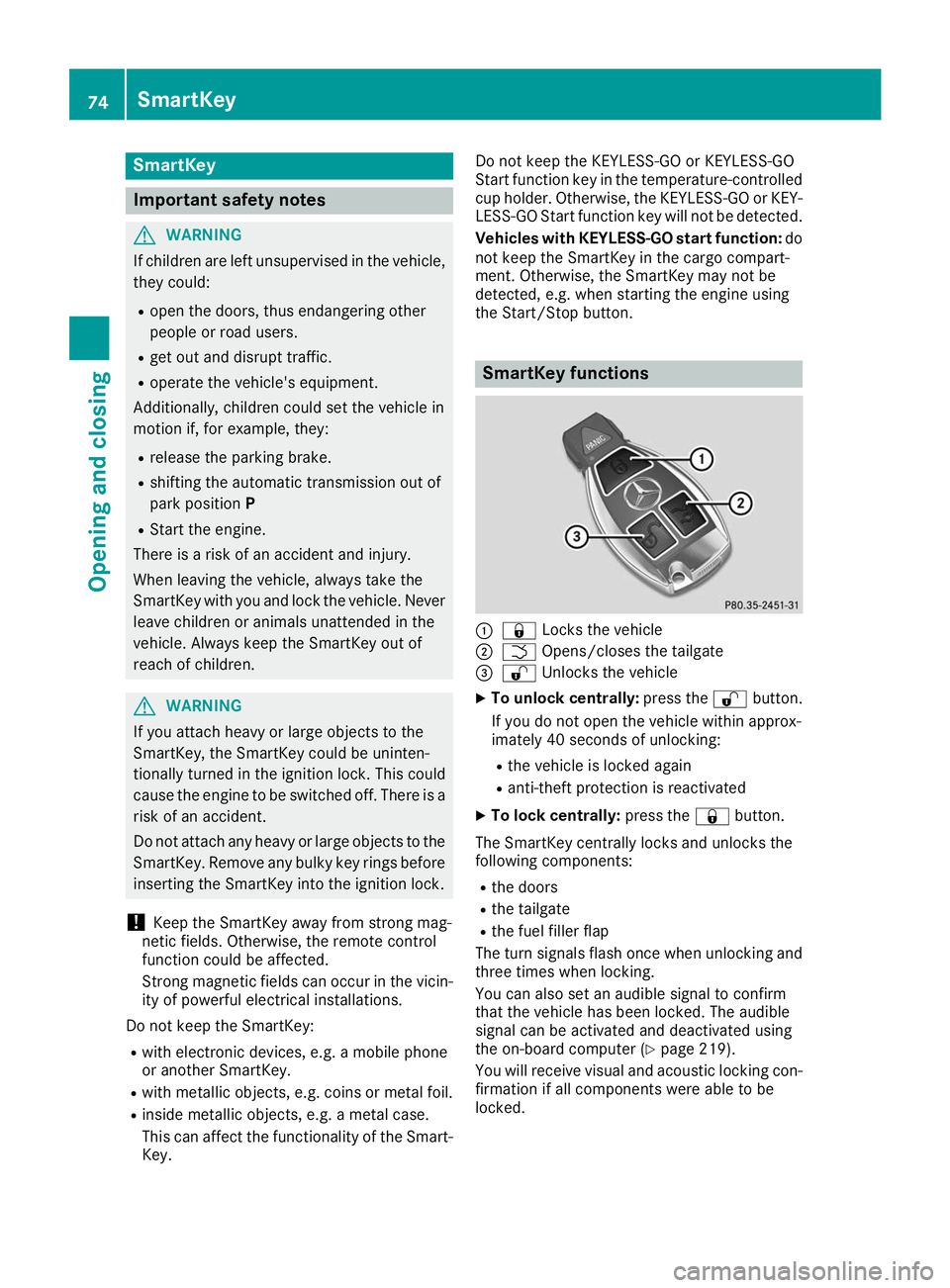
the Start/Stop button. SmartKey functions
0043
0037 Locks the vehicle
0044 0054 Opens/closes the tailgate
0087 0036 Unlocks the vehicle
X To unlock centrally: press the0036button.
If you do not open the vehicle within approx-
imately 40 seconds of unlocking:
R the vehicle is locked again
R anti-theft protection is reactivated
X To lock centrally: press the0037button.
The SmartKey centrally locks and unlocks the
following components:
R the doors
R the tailgate
R the fuel filler flap
The turn signals flash once when unlocking and three times when locking.
You can also set an audible signal to confirm
that the vehicle has been locked. The audible
signal can be activated and deactivated using
the on-board computer (Y page 219).
You will receive visual and acoustic locking con-
firmation if all components were able to be
locked. 74
SmartKeyOpening and closing
Page 77 of 370
If activated in the multimedia system, the loca-
tor lighting also lights up in the dark (see the
Digital Operator's Manual).
X To open the tailgate automatically from
outside the vehicle: press and hold the0054
button until the tailgate opens.
Vehicles with KEYLESS-GO: X To close the tailgate automatically from
outside the vehicle:
if the SmartKey is loca-
ted in the immediate vicinity of the vehicle,
press the 0054button on the SmartKey.
When the tailgate closes you can then release
the button. KEYLESS-GO
General notes Bear in mind that the engine can be started by
any of the vehicle occupants if there is a KEY-
LESS-GO key in the vehicle (Y page 129).
Locking/unlocking centrally You can start, lock or unlock the vehicle using
KEYLESS-GO. To do this, you only need carry the
SmartKey with you. You can combine the func-
tions of KEYLESS-GO with those of a conven-
tional SmartKey. Unlock the vehicle by using
KEYLESS-GO, for instance, and lock it using the 0037 button on the SmartKey.
The driver's door and the door at which the han- dle is used, must both be closed. The SmartKey
must be outside the vehicle. When locking or
unlocking with KEYLESS-GO, the distance
between the SmartKey and the corresponding
door handle must not be greater than 3 ft (1 m).
KEYLESS-GO checks whether a valid SmartKey
is in the vehicle by periodically establishing a
radio connection between the vehicle and the
SmartKey. This happens:
R when starting the engine
R while driving
R when the external door handles are touched
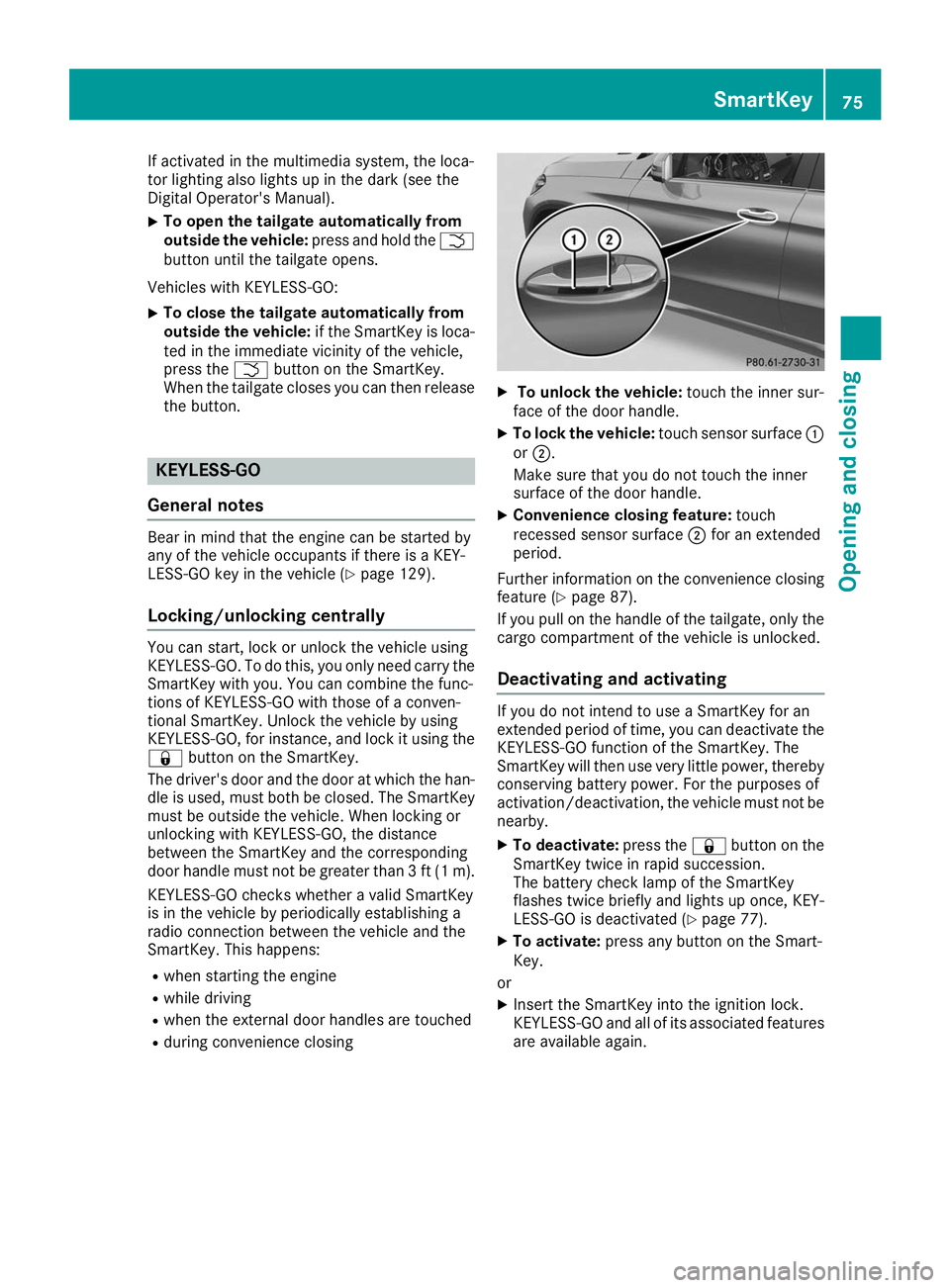
R during convenience closing X
To unlock the vehicle: touch the inner sur-
face of the door handle.
X To lock the vehicle: touch sensor surface 0043
or 0044.
Make sure that you do not touch the inner
surface of the door handle.
X Convenience closing feature: touch
recessed sensor surface 0044for an extended
period.
Further information on the convenience closing
feature (Y page 87).
If you pull on the handle of the tailgate, only the cargo compartment of the vehicle is unlocked.
Deactivating and activating If you do not intend to use a SmartKey for an
extended period of time, you can deactivate the
KEYLESS-GO function of the SmartKey. The
SmartKey will then use very little power, thereby conserving battery power. For the purposes of
activation/deactivation, the vehicle must not be
nearby.
X To deactivate: press the0037button on the
SmartKey twice in rapid succession.
The battery check lamp of the SmartKey
flashes twice briefly and lights up once, KEY-
LESS-GO is deactivated (Y page 77).
X To activate: press any button on the Smart-
Key.
or X Insert the SmartKey into the ignition lock.
KEYLESS-GO and all of its associated features
are available again. SmartKey
75Opening and closing Z
Page 84 of 370
Cargo compartment
Important safety notes
G
DANGER
Combustion engines emit poisonous exhaust
gases such as carbon monoxide. Exhaust
gases can enter the vehicle interior if the tail- gate is open while the engine is running, espe-cially if the vehicle is in motion. There is a risk of poisoning.
Always switch off the engine before opening
the tailgate. Never drive with the tailgate
open. G
WARNING
If objects, luggage or loads are not secured or not secured sufficiently, they could slip, tip
over or be flung around and thereby hit vehicle
occupants. There is a risk of injury, particu-
larly in the event of sudden braking or a sud-
den change in direction.
Always store objects so that they cannot be
flung around. Secure objects, luggage or
loads against slipping or tipping before the
journey.
! The tailgate swings upwards and to the rear
when opened. Therefore, make sure that
there is sufficient clearance above and behind
the tailgate.
The opening dimensions of the tailgate can be
found in the "Vehicle data" section
(Y page 364).
You should preferably place luggage or loads in the cargo compartment. Observe the loading
guidelines (Y page 272).
Do not leave the SmartKey in the cargo com-
partment. You could otherwise lock yourself
out.
You can:
R close the tailgate manually from outside
R open and close the tailgate automatically
from outside
R open and close the tailgate automatically
from inside
R limit the opening angle of the tailgate
R unlock the tailgate from inside with the emer-
gency release Tailgate reversing feature
The tailgate is equipped with automatic obstacle detection with reversing feature. If a solid objectblocks or restricts the tailgate when automati-
cally opening or closing, this procedure is stop-
ped. If the tailgate is stopped during the closing procedure, it will open again automatically. The
automatic obstacle recognition with reversing
feature is only an aid. It is not a substitute for
your attentiveness when opening and closing
the tailgate. G
WARNING
The reversing feature does not respond:
R to soft, light and thin objects, e.g. fingers
R over the last 00C2in (8 mm) of the closing
movement
The reversing feature cannot prevent some-
one from becoming trapped in these situa-
tions in particular. There is a risk of injury.
Make sure that no body parts are in close
proximity during the closing procedure.
If somebody becomes trapped:
R press the 0054button on the SmartKey, or
R pull or press the remote operating switch
on the driver's door or
R press the closing or locking button on the
tailgate or
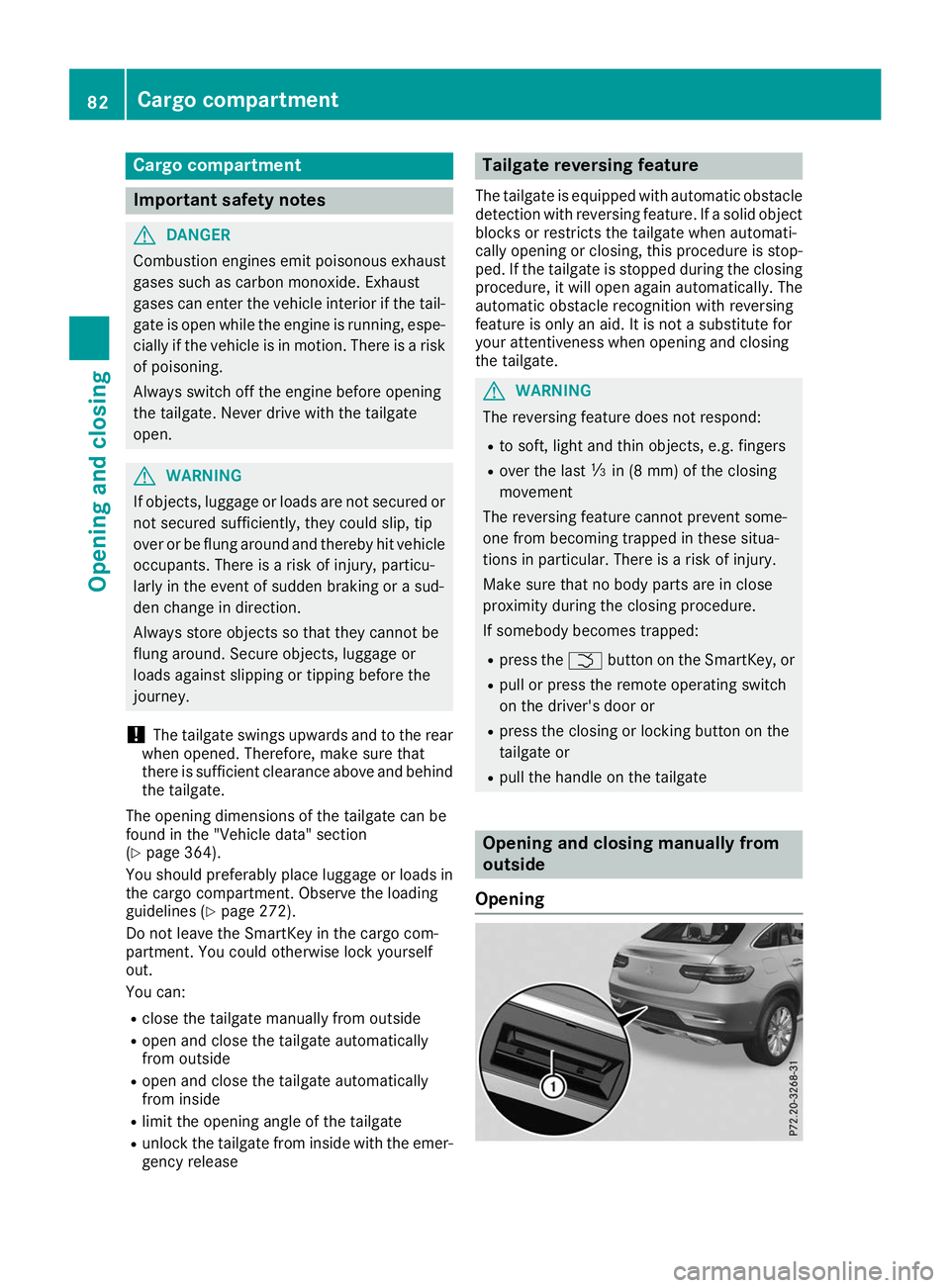
R pull the handle on the tailgate Opening and closing manually from
outside
Opening 82
Cargo compartmentOpening and closing
Page 85 of 370
X
Press the 0036button on the SmartKey.
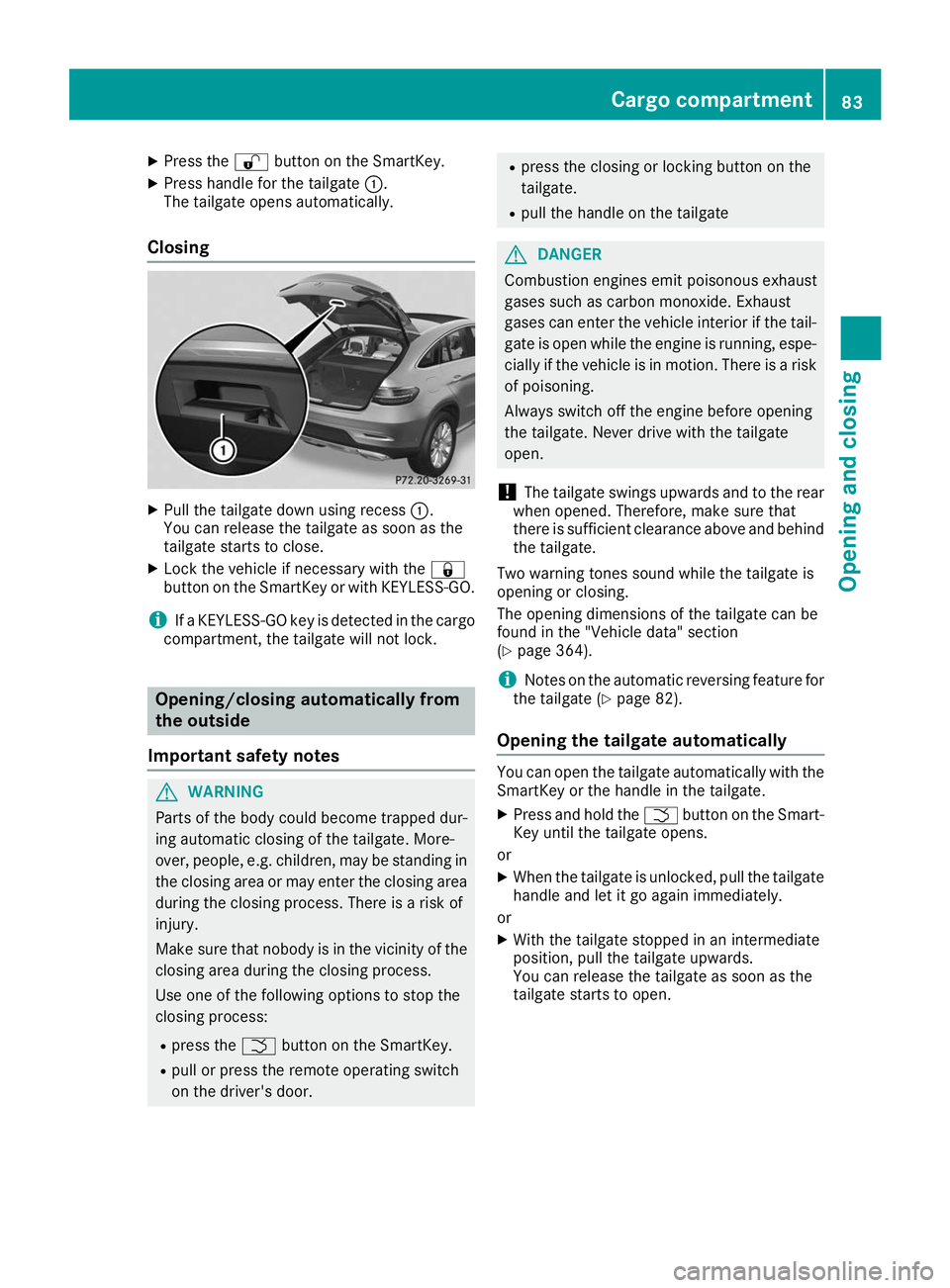
X Press handle for the tailgate 0043.
The tailgate opens automatically.
Closing X
Pull the tailgate down using recess 0043.
You can release the tailgate as soon as the
tailgate starts to close.
X Lock the vehicle if necessary with the 0037
button on the SmartKey or with KEYLESS-GO.
i If a KEYLESS-GO key is detected in the cargo
compartment, the tailgate will not lock. Opening/closing automatically from
the outside
Important safety notes G
WARNING
Parts of the body could become trapped dur-
ing automatic closing of the tailgate. More-
over, people, e.g. children, may be standing in the closing area or may enter the closing area
during the closing process. There is a risk of
injury.
Make sure that nobody is in the vicinity of the closing area during the closing process.
Use one of the following options to stop the
closing process:
R press the 0054button on the SmartKey.
R pull or press the remote operating switch
on the driver's door. R
press the closing or locking button on the
tailgate.
R pull the handle on the tailgate G
DANGER
Combustion engines emit poisonous exhaust
gases such as carbon monoxide. Exhaust
gases can enter the vehicle interior if the tail- gate is open while the engine is running, espe-cially if the vehicle is in motion. There is a risk of poisoning.
Always switch off the engine before opening
the tailgate. Never drive with the tailgate
open.
! The tailgate swings upwards and to the rear
when opened. Therefore, make sure that
there is sufficient clearance above and behind
the tailgate.
Two warning tones sound while the tailgate is
opening or closing.
The opening dimensions of the tailgate can be
found in the "Vehicle data" section
(Y page 364).
i Notes on the automatic reversing feature for
the tailgate (Y page 82).
Opening the tailgate automatically You can open the tailgate automatically with the
SmartKey or the handle in the tailgate.
X Press and hold the 0054button on the Smart-
Key until the tailgate opens.
or X When the tailgate is unlocked, pull the tailgate
handle and let it go again immediately.
or
X With the tailgate stopped in an intermediate
position, pull the tailgate upwards.
You can release the tailgate as soon as the
tailgate starts to open. Cargo compartment
83Opening and closing Z
Page 86 of 370
Closing the tailgate automatically
X
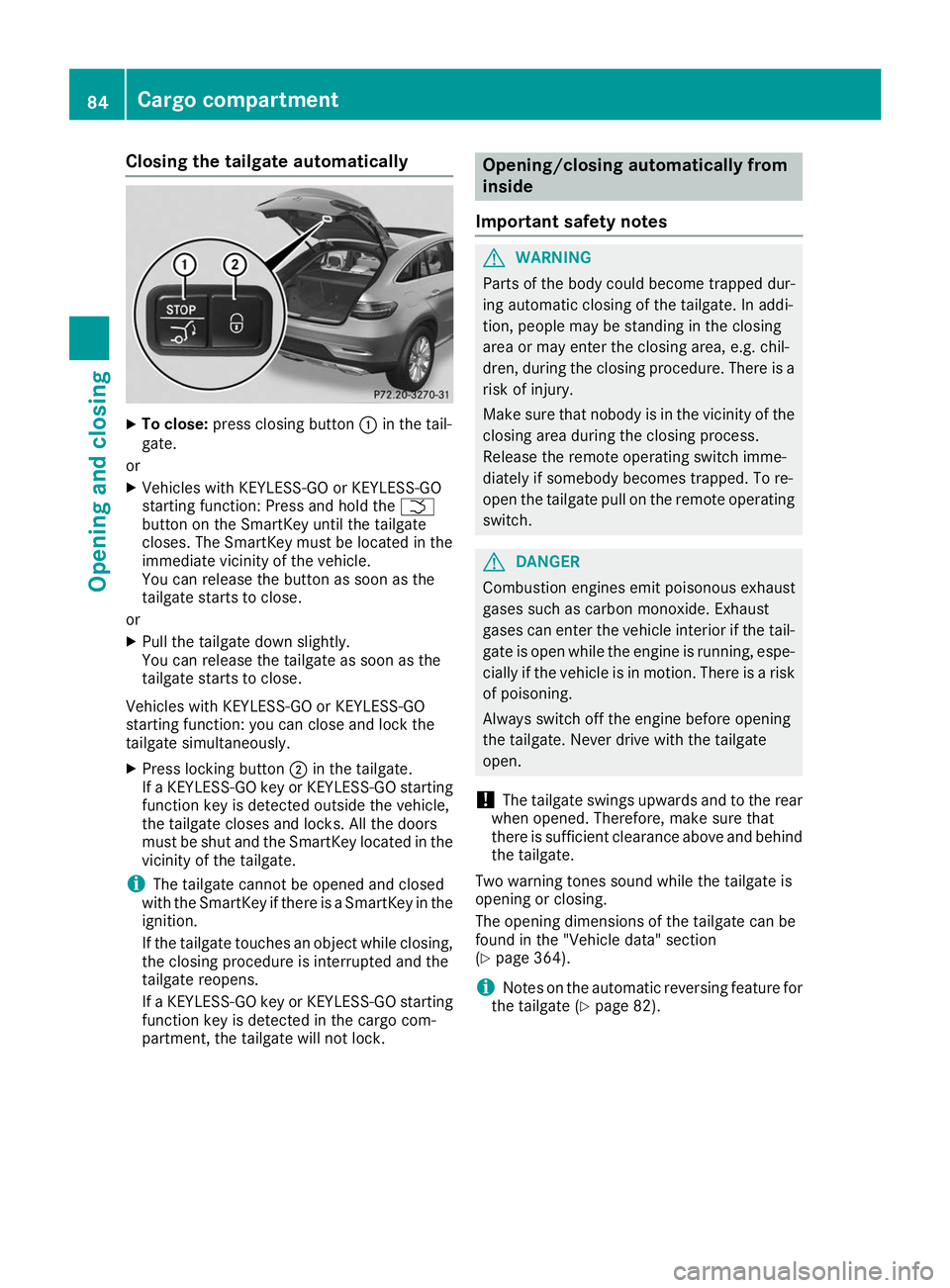
To close: press closing button 0043in the tail-
gate.
or
X Vehicles with KEYLESS-GO or KEYLESS-GO
starting function: Press and hold the 0054
button on the SmartKey until the tailgate
closes. The SmartKey must be located in the
immediate vicinity of the vehicle.
You can release the button as soon as the
tailgate starts to close.
or X Pull the tailgate down slightly.
You can release the tailgate as soon as the
tailgate starts to close.
Vehicles with KEYLESS-GO or KEYLESS-GO
starting function: you can close and lock the
tailgate simultaneously.
X Press locking button 0044in the tailgate.
If a KEYLESS-GO key or KEYLESS-GO starting
function key is detected outside the vehicle,
the tailgate closes and locks. All the doors
must be shut and the SmartKey located in the vicinity of the tailgate.
i The tailgate cannot be opened and closed
with the SmartKey if there is a SmartKey in the
ignition.
If the tailgate touches an object while closing, the closing procedure is interrupted and the
tailgate reopens.
If a KEYLESS-GO key or KEYLESS-GO starting
function key is detected in the cargo com-
partment, the tailgate will not lock. Opening/closing automatically from
inside
Important safety notes G
WARNING
Parts of the body could become trapped dur-
ing automatic closing of the tailgate. In addi-
tion, people may be standing in the closing
area or may enter the closing area, e.g. chil-
dren, during the closing procedure. There is a risk of injury.
Make sure that nobody is in the vicinity of theclosing area during the closing process.
Release the remote operating switch imme-
diately if somebody becomes trapped. To re-
open the tailgate pull on the remote operating
switch. G
DANGER
Combustion engines emit poisonous exhaust
gases such as carbon monoxide. Exhaust
gases can enter the vehicle interior if the tail- gate is open while the engine is running, espe-cially if the vehicle is in motion. There is a risk of poisoning.
Always switch off the engine before opening
the tailgate. Never drive with the tailgate
open.
! The tailgate swings upwards and to the rear
when opened. Therefore, make sure that
there is sufficient clearance above and behind
the tailgate.
Two warning tones sound while the tailgate is
opening or closing.
The opening dimensions of the tailgate can be
found in the "Vehicle data" section
(Y page 364).
i Notes on the automatic reversing feature for
the tailgate (Y page 82).84
Cargo compartmentOpening and closing