change time MERCEDES-BENZ GLE COUPE 2020 Owner's Manual
[x] Cancel search | Manufacturer: MERCEDES-BENZ, Model Year: 2020, Model line: GLE COUPE, Model: MERCEDES-BENZ GLE COUPE 2020Pages: 757, PDF Size: 11.84 MB
Page 245 of 757
The sy
stem may also be impaired or may not
function in thefo llowing situations:
R The sensors in there ar bumper are dirty,
damaged or co veredby ast icke r or ice and
sno w,forex ample.
R The exterior lighting is malfunctioning.
% The Active Lane Change Assi stsensors
adjust automatically while a cer tain dis tance
is being driven af terth eve hicle has been
delivered. Active Lane Change Assi stis
una vailable or only partially available during
th is teach-in process, no ar row appears next
to theØ Active Steering Assist symbol
when the turn signal indicator is activated.
Ac tivating/deactivating Active Lane Change
Assi st
Multimedia sy stem:
4 © 5
Settings 5
Assistance
5 Active Lane Change Assist #
Activate or deacti vate the function.
Fu nction of Active Eme rgency Stop Assist
If th e driver continually ignores the visual or
acoustic warning toput their hands on thesteer‐ ing wheel,
theBeginning emergency stop mes‐
sage appears in the multifunction displa y.Ifthe
driver still does not respond, Active Dis tance
Assi stDISTRONIC reduces the speed. The vehi‐
cle is decelerated in stages toast andstill.
Depending on the count ry, at speeds below
60 km/h the hazard warning lights switch on
automaticall y.
When theve hicle is stationar y,thefo llowing
actions are car ried out:
R theve hicle is secured with the electric park‐
ing brake
R Active Dis tance Assi stDISTRONIC is ended
R theve hicle is unloc ked
R if possible, an emer gency call is placed to
th e Mercedes-Benz emer gency call centre
The driver can cancel the deceleration at any
time byper form ing one of thefo llowing actions:
R steering
R braking or accelerating
R pressing a steering-wheel button
R operating Touch Control R
activating or deactivating Active Dis tance
Assi stDISTRONIC Fu
nction of Active Traf fic Jam Assist %
Active Traf fic Jam Assi stis countr y-depend‐
ent and only available forve hicles with the
Driving Assi stance Plus Package.
Ac tive Traf fic Jam Assi sthelps you when in traf‐
fi c jams on multi-lane roads with separate car ria‐
ge wa ys by automatically pulling away within up
to 60 seconds and with mode rate steering
manoeuvres. It orients itself using theve hicle in
front and lane markings. Active Traf fic Jam
Assi stautomatically main tains a safe dis tance
from theve hicle in front and vehicles cutting in.
Ac tive Traf fic Jam Assi strequ iresyou, as the
driver, tokeep your hands on thesteering wheel
at all times so that you are able tointer vene at
any time tocor rect the course of theve hicle and
ke ep it in lane.
Ac tive Traf fic Jam Assi stis only an aid. The driver
is responsible forke eping a safe dis tance tothe
ve hicle in front, forve hicle speed and for braking
in good time. 242
Driving and pa rking
Page 246 of 757
Ac
tive Traf fic Jam Assi stactivates automatically
when all of thefo llowing conditions are me t:
R You are in a traf fic jam on a mo torw ay or
high-speed major road.
R Active Dis tance Assi stDISTRONIC is
switched on and acti ve (/page 234).
R Active Brake Assi stisavailable
(/ page 219).
R Active Steering Assist is switched on and
active (/ page240).
R Active Traf fic Jam Assi stis activated
(/ page 243).
R You are tra velling no fasterthan 60 km/h.
The following symbol is displa yed in the instru‐
ment clus ter when the sy stem is active: Sy
stem limits
The sy stem limitations of Active Dis tance Assi st
DISTRONIC and Active Steering Assist apply to
Ac tive Traf fic Jam Assi st (/ page 238). Ac
tivating/deactivating Active Traf fic Jam
Assist Multimedia sy
stem:
4 © 5
Settings 5
Quick access #
Select .
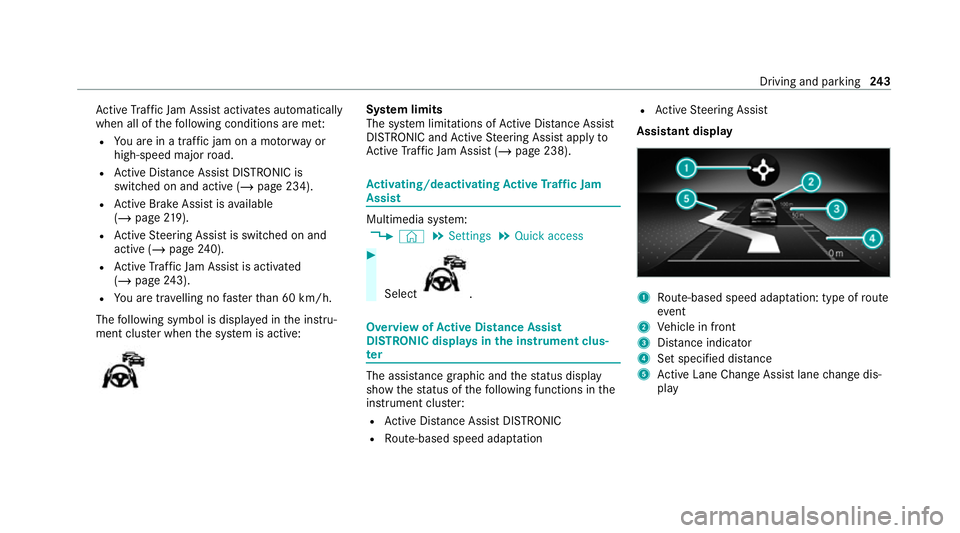
Overview of
Active Di stance Assist
DISTRO NIC displa ysinthe instrument clus‐
ter The assis
tance graphic and thest atus display
show thest atus of thefo llowing functions in the
instrument clus ter:
R Active Dis tance Assi stDISTRONIC
R Route-based speed adap tation R
Active Steering Assist
Assistant display 1
Route-based speed adap tation: type of route
eve nt
2 Vehicle in front
3 Distance indica tor
4 Set specified di stance
5 Active Lane Change Assi stlane change dis‐
play Driving and parking
243
Page 270 of 757
Ad
justing the articulation angle of the trailer #
Select ¸.
The articulation angle can be changed on the
media display or on theto uchpad. #
Swipe left or right tochange the articulation
angle.
% The maximum articulation angle depends on
the length of the trailer. This is calculated by
th e sy stem bydriving theve hicle forw ards,
including cornering. Before the length of the
trailer has been calculated, the maximum
articulation angle is appr oximately 23°. The
longer the trailer is, the higher the maximum
articulation angle (max. appr oximately 60°). #
Set the desired articulation angle.
When the articulation angle entered has been
re ached, the dr awbar is loc kedby the sy stem so
th at the angle is maintained.
Ac tivating the stra ightening manoeuvre #
Select º.
The sy stem calculates the articulation angle
in such a wayth at the direction of the trailer at
the time of activation is maintained. There
is a short counter steering mo vement of the
trailer while theve hicle is reve rsed, which
th en guides it back tothe desired line. In this
wa y,theve hicle is aligned stra ight with the
trailer and, at the same time, the direction of
th e trailer is maintained. Re
versing camera Fu
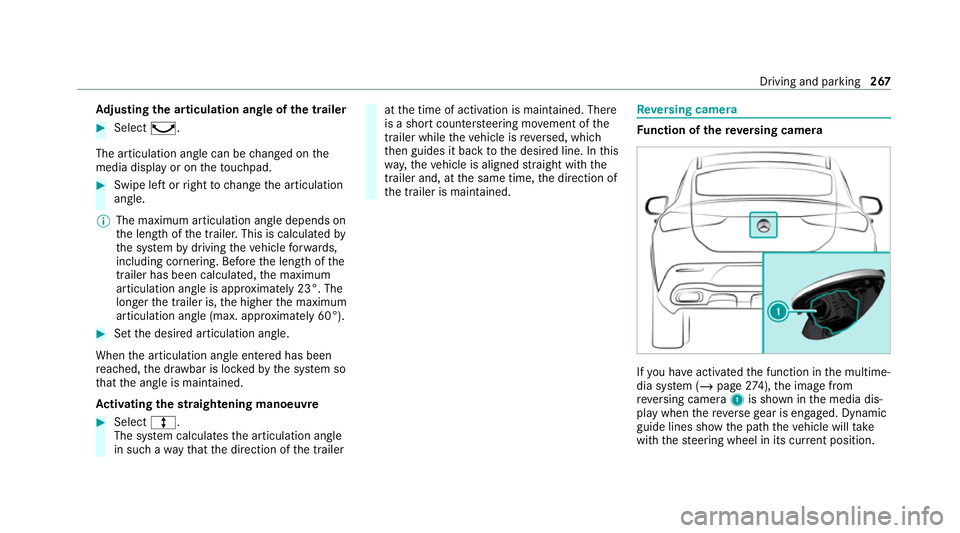
nction of there ve rsing camera If
yo u ha veactivated the function in the multime‐
dia sy stem (/ page274), the image from
re ve rsing camera 1is shown in the media dis‐
play when there ve rsege ar is engaged. Dynamic
guide lines show the path theve hicle will take
with thesteering wheel in its cur rent position. Driving and pa
rking 267
Page 272 of 757
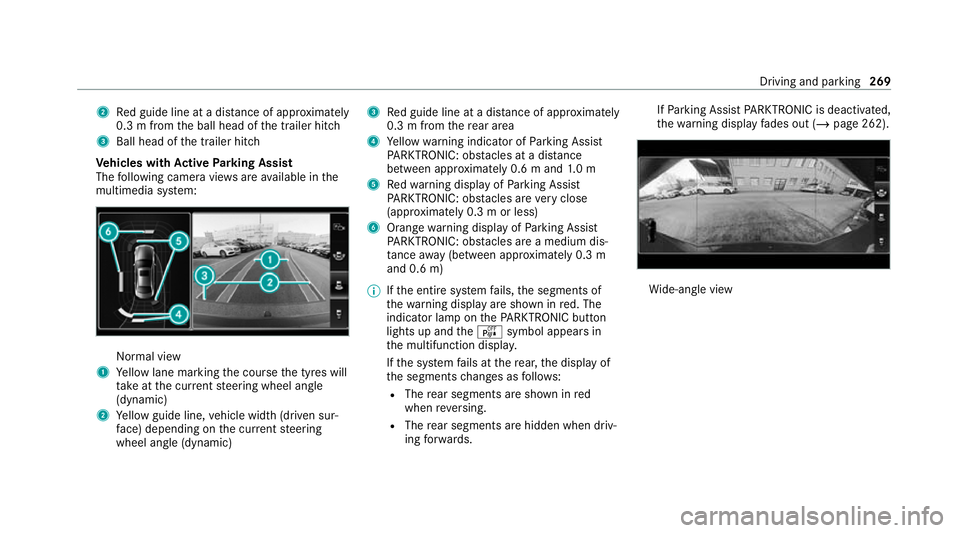
2
Red guide line at a dis tance of appr oximately
0.3 m from the ball head of the trailer hitch
3 Ball head of the trailer hitch
Ve hicles with Active Parking Assist
The following camera vie wsare available in the
multimedia sy stem: Normal view
1 Yellow lane marking the course the tyres will
ta ke atthe cur rent steering wheel angle
(dynamic)
2 Yellow guide line, vehicle width (driven sur‐
fa ce) depending on the cur rent steering
wheel angle (dynamic) 3
Red guide line at a dis tance of appr oximately
0.3 m from there ar area
4 Yellow warning indicator of Parking Assist
PA RKTRONIC: obstacles at a dis tance
between appr oximately 0.6 m and 1.0 m
5 Redwa rning display of Parking Assist
PA RKTRONIC: obstacles are very close
(appr oximately 0.3 m or less)
6 Orange warning display of Parking Assist
PA RKTRONIC: obstacles are a medium dis‐
ta nce away (between appr oximately 0.3 m
and 0.6 m)
% Ifth e entire sy stem fails, the segments of
th ewa rning display are shown in red. The
indicator lamp on thePA RKTRONIC but ton
lights up and theé symbol appears in
th e multifunction displa y.
If th e sy stem fails at there ar, the display of
th e segments changes as follo ws:
R The rear segments are shown in red
when reve rsing.
R The rear segments are hidden when driv‐
ing forw ards. If
Pa rking Assist PARKTRONIC is deacti vated,
th ewa rning display fades out (/ page 262). Wi
de-angle view Driving and parking
269
Page 282 of 757
cle
message appea rsinthe media displa y. A
wa rning tone and thefo llowing display in the
media display prom ptyouto take ove r control of
th eve hicle: Yo
u ha vetoaccelerate, brake, steer and change
ge ar yourself again.
Fu nction of Drive Away Assist
Drive AwayAssi stcan reduce the se verity of an
impact when pulling away. If an obs tacle is
de tected in the direction of tr avel, theve hicle's
speed is brief lyreduced toappr ox. 2 km/h. If a
critical situation is de tected, theÉ symbol
appears in the media displa y. &
WARNING Risk of accident caused by
limited de tection per form ance of Drive
Aw ayAssi st
Drive AwayAssi stcannot al ways clearly iden‐
tify objects and traf fic situations. In su
chcases, Drive AwayAssi stmight:
R Warnyou without reason and limit the
ve hicle speed.
R Not warnyou or not limit theve hicle
speed. #
Alw ays pay careful attention tothe traf‐
fi c situation; do not rely on Drive Away
Assi stalone. #
Be prepared tobrake or swer veas nec‐
essar y,prov ided the tra ffic situation
permits and that it is safe totake eva‐
sive action. Drive
AwayAssi stis only an aid. It is not a sub‐
st itute foryo ur attention tothe sur roundings.
The responsibility for safe manoeuvring and
parking remains with you. Make sure that no
persons, animals or objects etc. are in the
manoeuvring range.
A risk of a collision may arise in thefo llowing sit‐
uations, forex ample:
R Ifth e driver mixes up the accelera tor and
brake pedals. R
Ifth e wrong gear is selec ted.
Drive AwayAssi stis active under thefo llowing
conditions:
R IfPa rking Assist PARKTRONIC is activated.
R Every time thege ar is changed to005E or005B
when theve hicle is at a standstill.
R Ifth e de tected obs tacle is less than appr ox.
1. 0 m away.
R Ifth e manoeuvring assis tant function is acti‐
va ted in the multimedia sy stem.
Sy stem limits
The per form ance of Drive AwayAssi stis limited
on inclines.
When driving with a trailer, Drive AwayAssi stis
not available.
% Also obse rveth e sy stem limits of Parking
Assist PARKTRONIC (/ page 260).
Fu nction of Cross Traf fic Alert
% Also read the instructions on Blind Spot
Assist (/ page 286). Driving and parking
279
Page 287 of 757
Tr
af fic Sign Assist Fu
nction of Traf fic Sign Assist Tr
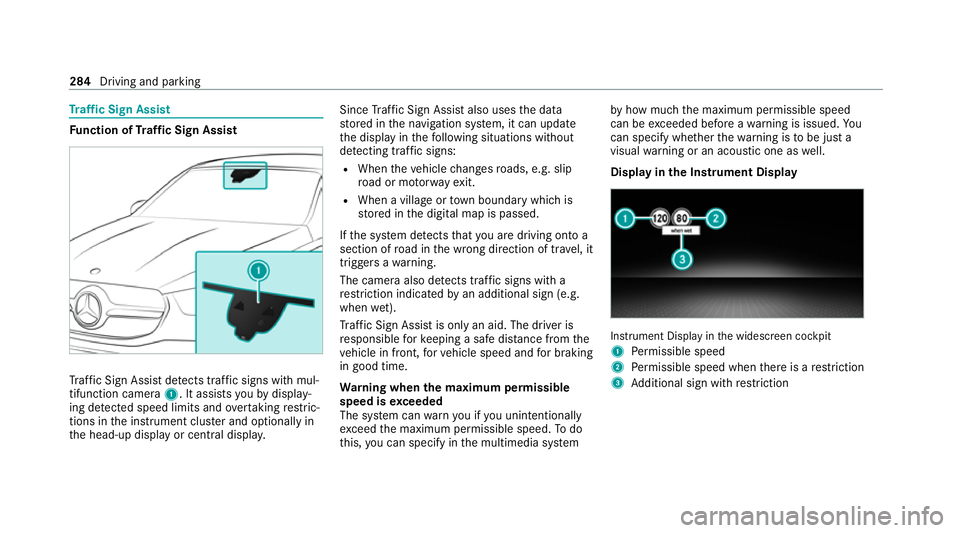
af fic Sign Assi stdetects traf fic signs wi thmul‐
tifunction camera 1. It assistsyo uby display‐
ing de tected speed limits and overtaking restric‐
tions in the instrument clus ter and optionally in
th e head-up display or cent ral displa y. Since
Traf fic Sign Assi stalso uses the data
st ored in the navigation sy stem, it can update
th e display in thefo llowing situations without
de tecting traf fic signs:
R When theve hicle changes roads, e.g. slip
ro ad or mo torw ay ex it.
R When a village or town boundary which is
st ored in the digital map is passed.
If th e sy stem de tects that you are driving on to a
section of road in the wrong direction of tr avel, it
triggers a warning.
The camera also de tects traf fic signs wi th a
re striction indicated byan additional sign (e.g.
when wet).
Tr af fic Sign Assi stis only an aid. The driver is
re sponsible forke eping a safe dis tance from the
ve hicle in front, forve hicle speed and for braking
in good time.
Wa rning when the maximum permissible
speed is exceeded
The sy stem can warnyou if you unin tentionally
exc eed the maximum permissible speed. Todo
th is, you can specify in the multimedia sy stem by
how much the maximum permissible speed
can be exceeded before a warning is issued. Yo u
can specify whe ther thewa rning is tobe just a
visual warning or an acoustic one as well.
Display in the Instrument Display In
stru ment Display in the widescreen cockpit
1 Perm issible speed
2 Perm issible speed when there is a restriction
3 Additional sign with restriction 284
Driving and pa rking
Page 294 of 757
A lane-co
rrecting brake application also occurs
in theSensitive setting in thefo llowing situa‐
tions:
R Active Lane Keeping Assist de tects a solid
lane marking.
R A front wheel drives overth is lane marking.
Sy stem limits
No lane-cor recting brake application occu rsin
th efo llowing situations:
R You clear lyand actively steer, brake or accel‐
erate.
R You ha veswitched on the turn signal indica‐
to r (dependent on the situation).
R A driving saf ety sy stem inter venes, su chas
ESP ®
,Ac tive Brake Assi stor Active Blind
Spot Assi st.
R You ha veadop ted a sporty driving style with
high cornering speeds or high rates of accel‐
eration.
R When ESP ®
is deactivated. R
When driving with a trailer, the electrical con‐
nection tothe trailer has been cor rectly
es tablished.
R If a loss of tyre pressure or a defective tyre
has been de tected and displ ayed.
The sy stem may be impaired or may not function
in thefo llowing situations:
R Ifth ere is poor visibility, e.g. due toinsuf fi‐
cient illumination of thero ad, if there are
highly variable shade conditions or in rain,
sno w,fog or heavy spr ay.
R Ifth ere is glare, e.g. from oncoming traf fic,
th e sun or reflections.
R Ifth e windscreen in the area of the multi‐
function camera is dirty, or if the camera is
mis ted up, damaged or co vered.
R Ifth ere are no lane markings, or se veral
unclear lane markings are present for one
lane, e.g. around roadwor ks.
R Ifth e lane markings are worn, dark or cov‐
ered. R
The dis tance totheve hicle in front is too
short and thus the lane markings cann otbe
de tected.
R Ifth e lane markings change quickl y,e.g.
lanes branch off, cross one ano ther or
mer ge.
R Ifth e car riag ewa y is very nar row and wind‐
ing.
Ve hicles without Driving Assistance Pack‐
age or Driving Assistance Plus Package:
Ac tive Lane Keeping Assist uses radar sensors
to monitor se veral areas around theve hicle. If
th era dar sensors in there ar bumper are dirty or
co vered with sno w,the sy stem may be impaired
or may not function. If an obs tacle in the lane in
which you are driving has been de tected, no
lane-cor recting brake application occu rs.
Ac tivating/deactivating Active Lane Keeping
Assist
Multimedia sy stem:
4 © 5
Settings 5
Quick access
5 Active Lane Keeping Assist #
Activate or deacti vate the function. Driving and parking
291
Page 297 of 757
Obser
vethe information on the displa yson the
instrument clus ter:
R Indicator and warning lamps(/ page 689)
R Display messages (/ page 632)Fo
lding the ball neck in/out fully electrically
(multimedia sy stem) &
WARNING Risk of accident due tothe
ball neck not being engaged
If th e ball neck is not engaged, the trailer
may come loose. #
Alw ays engage the ball neck as descri‐
bed. *
NO
TEDama getothe all-electric trailer
hitch due toadditional pressure The all-electric trailer hit
chcould be mechan‐
ically damaged byapplying additional pres‐
sure when the ball neck is being extended or
re tracted. #
Do not ma kethe ball neck extend/
re tract faster by applying additional
pressure. Re
quirements:
R The vehicle is secured against rolling away.
R The swivel range is clear.
R The trailer cables or adap ter plugs ha vebeen
re mo ved.
Multimedia sy stem:
4 © 5
Settings 5
Quick access
Extending the ball coupling fully electrically #
Select Ü.
The Trailer coupling extending… display mes‐
sage will appear on the multifunction displa y.
The ball coupling will extend ful lyelectrically. #
Wait until the ball coupling has loc ked in
place.
If th e ball neck is not securely loc ked in place,
th eCheck trailer hitch lock display message will
appear on the multifunction displa y.Re
tracting the ball coupling ful lyelectrically #
Select Ü.
The Trailer coupling extending… display mes‐
sage will appear on the multifunction displa y.
The ball coupling will retract fully electrically. #
Wait until the ball coupling has loc ked in
place.
If th e ball neck is not securely loc ked in place,
th eCheck trailer hitch lock display message will
appear on the multifunction displa y. Coupling up/uncoupling a trailer
&
WARNING Risk of inju ryfrom theve hicle
le ve l being changed
Ve hicles with le vel control sy stem: the
ve hicle le vel may be changed unin tentional ly,
e.g. by ot her persons. You may become trap‐
ped if you couple up or uncouple a trailer
while theve hicle le vel is changing. In addi‐
tion, other people could become trapped if
th eir limbs are between theve hicle body and
th e tyres or underneath theve hicle. 294
Driving and parking
Page 311 of 757
Tr
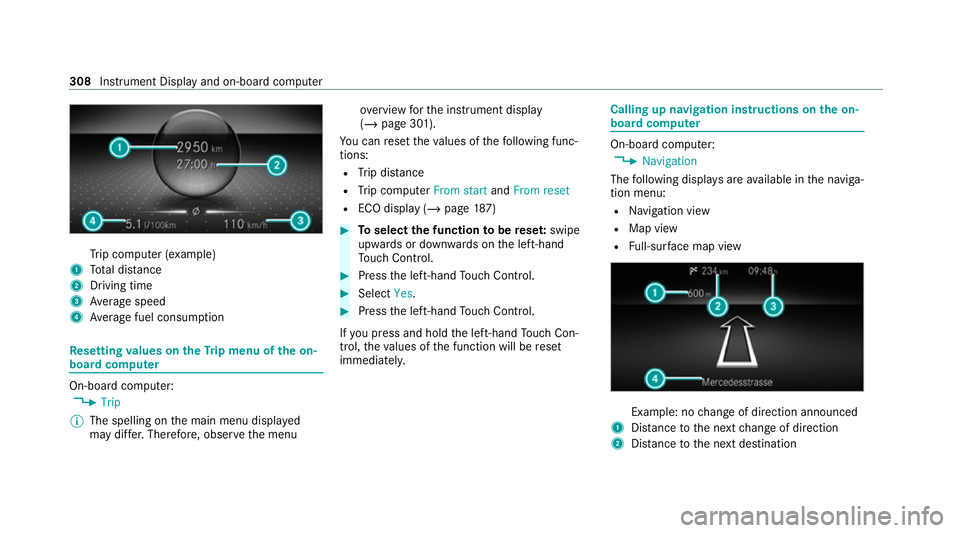
ip computer (e xamp le)
1 Total dis tance
2 Driving time
3 Average speed
4 Average fuel consum ption Re
setting values on theTr ip menu of the on-
board compu terOn-board computer:
4 Trip
% The spelling on the main menu displa yed
may dif fer. Therefore, obser vethe menu ove
rview forth e instrument display
(/ page 301).
Yo u can reset theva lues of thefo llowing func‐
tions:
R Trip dis tance
R Trip computer From startandFrom reset
R ECO display (/ page187) #
Toselect the function tobe rese t:swipe
upwards or down wards on the left-hand
To uch Control. #
Press the left-hand Touch Control. #
Select Yes. #
Press the left-hand Touch Control.
If yo u press and hold the left-hand Touch Con‐
trol, theva lues of the function will be reset
immediatel y. Calling up navigation instructions on
the on-
board compu ter On-board computer:
4 Navigation
The following displa ysare available in the naviga‐
tion menu:
R Navigation view
R Map view
R Full-sur face map view Example: no
change of direction announced
1 Distance tothe next change of direction
2 Distance tothe next destination 308
Instrument Display and on-board computer
Page 312 of 757
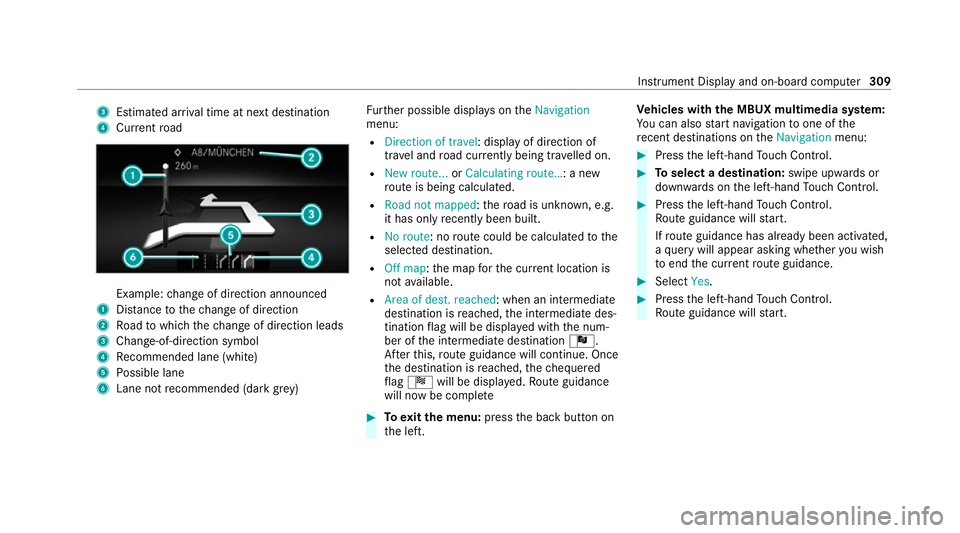
3
Estima ted ar riva l time at next destination
4 Current road Example:
change of direction announced
1 Distance tothech ange of direction
2 Road towhich thech ange of direction leads
3 Chan ge-of-direction symbol
4 Recommended lane (white)
5 Possible lane
6 Lane not recommended (da rkgrey) Fu
rther possible displa yson theNavigation
menu:
R Direction of travel: display of direction of
tra vel and road cur rently being tr avelled on.
R New route... orCalculating route… : a new
ro ute is being calculated.
R Road not mapped :th ero ad is unknown, e.g.
it has on lyrecently been built.
R No route: no route could be calculated tothe
selected destination.
R Off map: the map forth e cur rent location is
not available.
R Area of dest. reached: when an intermediate
destination is reached, the intermediate des‐
tination flag will be displa yed with the num‐
ber of the intermediate destination Î.
Af terth is, route guidance will continue. Once
th e destination is reached, thech equered
fl ag Í will be displa yed. Ro ute guidance
will now be co mplete #
Toexitth e menu: pressthe back button on
th e left. Ve
hicles with the MBUX multimedia sy stem:
Yo u can also start navigation toone of the
re cent destinations on theNavigation menu: #
Press the left-hand Touch Control. #
Toselect a destination: swipe upwards or
down wards on the left-hand Touch Control. #
Press the left-hand Touch Control.
Ro ute guidance will start.
If ro ute guidance has already been activated,
a qu ery will appear asking whe ther you wish
to end the cur rent route guidance. #
Select Yes. #
Press the left-hand Touch Control.
Ro ute guidance will start. In
stru ment Display and on-board computer 309