change time MERCEDES-BENZ GLE COUPE 2020 Repair Manual
[x] Cancel search | Manufacturer: MERCEDES-BENZ, Model Year: 2020, Model line: GLE COUPE, Model: MERCEDES-BENZ GLE COUPE 2020Pages: 757, PDF Size: 11.84 MB
Page 516 of 757
Ac
tivating multi-coloured lighting #
Select Multi-colour. #
Select a colour programme.
Ac tivating multi-coloured animation #
Activate Multi-colour animat..
The chosen colour programme will change at
predefined inter vals.
Ad justing the brightness #
Select Brightness . #
Toactivate brightness for zones: switch
Brightness zones on or off.
If Brightness zones is switched on,the zones
can be set individually. #
Set the zones.
Setting the colour ef fects #
Select Effects. #
Swit chWelcome orClimate on or off.
% Further information on theto pic of setting
ambiance light (/ page149). Setting
the language in there ar passenger
comp artment Re
ar Seat En tertainment Sy stem:
4 © 5
Settings 5
System
5 Language #
Set the language. Selecting sy
stem settings in there ar com‐
partment Re
ar Seat En tertainment Sy stem:
4 © 5
Settings 5
System
Ad justing the brightness #
Select Display. #
Adjust the brightness.
Connecting a device in the device manager #
Select Device Manager. #
Select a device that is tobe connec ted.
Headphones and headsets are connec ted
with there ar displa y. Mobile phones and
other devices are con‐
nected with the multimedia sy stem. Na
vigation Switching on navigation in
there ar comp art‐
ment
Re ar Seat En tertainment Sy stem:
4 © 5
Navigation (Navigation)
The map appears and sho ws the current vehicle
position. #
Select an option in the navigation menu.
The following options are available on there ar
displa y,forex ample:
R Entering the destination and transfer ring this
to the multimedia sy stem using Send to Car
Navigation
R Setting the map scale.
R Moving the map and rotating the map.
R Showing route information.
R Installing the online map update forre gions.
This option is not available in all countries. MBUX multimedia sy
stem 513
Page 540 of 757
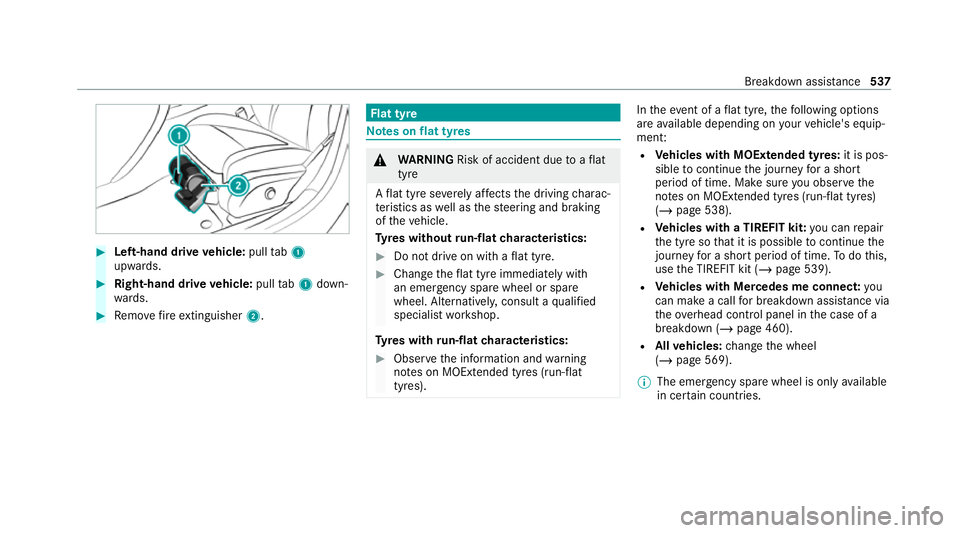
#
Left-hand drive vehicle: pulltab1
upwards. #
Right-hand drive vehicle: pulltab1 down‐
wa rds. #
Remo vefire extinguisher 2. Flat tyre
Note
s onflat tyres &
WARNING Risk of accident due toaflat
tyre
A flat tyre se verely affects the driving charac‐
te rist ics as well as thesteering and braking
of theve hicle.
Ty res without run-flat characteristics: #
Do not drive on with a flat tyre. #
Chan getheflat tyre immediately with
an emer gency spa rewheel or spare
wheel. Alternativel y,consult a qualified
specialist workshop.
Ty res with run-flat characteristics: #
Obse rveth e information and warning
no tes on MOExtended tyres (run-flat
tyres). In
theeve nt of a flat tyre, thefo llowing options
are available depending on your vehicle's equip‐
ment:
R Vehicles with MOExtended tyres: it is pos‐
sible tocontinue the journey for a short
period of time. Make sure you obse rvethe
no tes on MOExtended tyres (run-flat tyres)
(/ page 538).
R Vehicles with a TIREFIT kit: you can repair
th e tyre so that it is possible tocontinue the
jou rney for a short period of time. Todo this,
use the TIREFIT kit (/ page 539).
R Vehicles with Mercedes me connect: you
can make a call for breakdown assi stance via
th eov erhead control panel in the case of a
breakdown (/ page 460).
R Allvehicles: change the wheel
(/ page 569).
% The emer gency spa rewheel is only available
in cer tain countries. Breakdown assis
tance 537
Page 573 of 757
Re
moving and fitting hub caps Re
quirements:
R The vehicle is prepared for a wheel change
(/ page 569).
Pla stic hub cap #
Toremo ve:turn the cent recover of the hub
cap anti-clockwise and remo vethe hub cap. #
Tofit: make sure that the cent recover of the
hub cap is turned anti-clockwise. #
Position the hub cap and turn the cent re
co ver clockwise until the hub cap engages
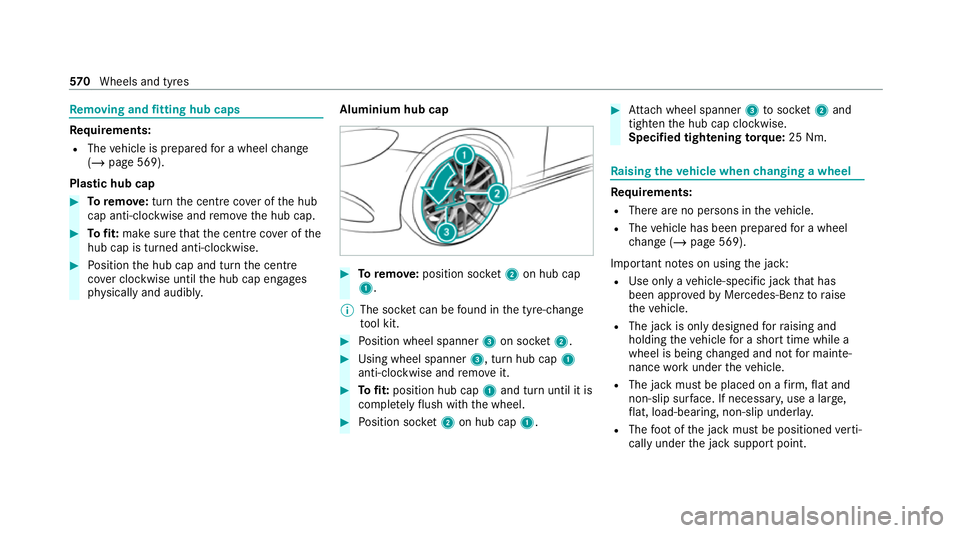
ph ysically and audibly. Aluminium hub cap #
Toremo ve:position soc ket2 on hub cap
1.
% The soc ket can be found in the tyre-change
to ol kit. #
Position wheel spanner 3on soc ket2. #
Using wheel spanner 3, turn hub cap1
anti-clo ckwise and remo veit. #
Tofit: position hub cap 1and turn until it is
comple tely flush with the wheel. #
Position soc ket2 on hub cap 1. #
Attach wheel spanner 3tosoc ket2 and
tighten the hub cap clockwise.
Specified tightening torq ue: 25 Nm. Ra
ising theve hicle when changing a wheel Re
quirements:
R There are no persons in theve hicle.
R The vehicle has been prepared for a wheel
ch ange (/ page 569).
Important no tes on using the jack:
R Use only a vehicle-specific jack that has
been appr ovedby Mercedes-Benz toraise
th eve hicle.
R The jack is only designed forra ising and
holding theve hicle for a short time while a
wheel is being changed and not for mainte‐
nance workunder theve hicle.
R The jack must be placed on a firm ,fl at and
non-slip sur face. If necessar y,use a lar ge,
fl at, load-bearing, non-slip unde rlay.
R The foot ofthe jack must be positioned verti‐
cally under the jack support point. 57 0
Wheels and tyres
Page 626 of 757
Engine oil
Note
s on engine oil
Obser vethe no tes on operating fluids
(/ page 617). *
NO
TEEngine dama gecaused byan
incor rect oil filter, incor rect oil or addi‐
tives #
Do not use engine oils or oil filters
which do not cor respond tothe specifi‐
cations explicitly prescribed forthe
service inter vals. #
Do not alter the engine oil or oil filter in
order toachie velonger change inter vals
th an presc ribed. #
Do not use additives. #
Have the engine oil rene we d at regular
inter vals. Mercedes-Benz
recommends that you ha vethe
oil change car ried out at a qualified specialist
wo rkshop.
Only Mercedes-Benz appr oved engine oils may
be used in Mercedes-Benz engines.
Fu rther information on engine oil and oil filters is
av ailable at thefo llowing locations:
R inthe Mercedes-Benz Specifications for
Operating Fluids byentering the designation
- at https://be vo.mercedes-benz.com
- inthe Mercedes-Benz BeVo app
R at a qualified specialist workshop
Pe trol engines: for cer tain countries, dif fere nt
engine oils can be used in conjunction wi th
re duced maintenance inter vals. %
Further information on dif fere nt engine oils
can be ob tained at a qualified specialist
wo rkshop.
Quality and capacity of engine oil
Missing values werenot available at the time of
going topress.
MB- Freigabe or MB -Appr oval Pe
trol engine sE ngine oil specifica‐
tions
All models MB-Fr
eigabe or MB -Appr oval Diesel engine
sEngine oil specifica‐
tions
All models %
Ifth e engine oils lis ted in theta ble are not
av ailable, you may add a maximum of
1. 0 litr e ofthefo llowing engine oils once
onl y. Te
ch nical da ta623
Page 627 of 757
Engine oils
for one-time filling only in exceptional
cases:
R petrol engines: MB-Freigabe or MB-Appr oval
R diesel engines:
The following values referto an oil change,
including the oil filter.
Missing values werenot available at the time of
going topress.
Re placement amount Mode
lR eplacement
amount
All models Note
s on brake fluid Obser
vethe no tes on operating fluids
(/ page 617). &
WARNING Risk of an accident due to
va pour poc kets form ing in the brake sys‐
tem
The brake fluid constantly absorbs moisture
from the air. This lo wersthe boiling point of
th e brake fluid. If the boiling point is too lo w,
va pour poc kets may form inthe brake sys‐
te m when the brakes are applied hard.
This impairs the braking ef fect. #
Have the brake fluid rene we d at the
specified inter vals. Ha
ve the brake fluid regularly replaced at a
qu alified specialist workshop.
Only use a brake fluid appr ovedby Mercedes-
Benz according toMB-F reigabe or MB-Appr oval
33 1.0.
Yo u can obtain fur ther information on brake fluid
in thefo llowing places:
R inthe Mercedes-Benz Specifications for
Operating Fluids
- at https://be vo.mercedes-benz.com
- inthe Mercedes-Benz BeVo app R
at a qualified specialist workshop Coolant
Note
s on coolant
Obser vethe no tes on operating fluids
(/ page 617). &
WARNING Risk offire ‑ and inju ryfrom
antifreeze
If antifreeze comes into contact with hot
component parts in the engine compart‐
ment, it may ignite. #
Allow the engine tocool down before
yo uto p up the antif reeze. #
Make sure that no antifreeze spills out
next tothefiller opening. #
Thoroughly clean the antif reeze from
component parts before starting the
ve hicle. 624
Tech nical da ta
Page 708 of 757
1,
2, 3 ...
4MATIC ..................................................... 197
Fu nction .............................................. 197
12 V battery
see Battery (vehicle)
12 V so cket
see Soc ket (12 V)
48 V on-board electrical sy stem
Operating saf ety .................................... 24
230 V soc ket
see Soc ket (230 V)
360° Camera ............................................ 271
Care .................................................... .531
Fu nction .............................................. 271
Opening the camera co ver (r eve rsing
camera) .............................................. .274
Selecting a view ................................... 274
Switching au tomatic operation
on/off (r eversing camera) .................. .274 A
A/C function Activating/deactivating (MBUX mul‐
timedia sy stem) ................................... 161
Switching on/off (control panel) .......... 161
ABS (Anti-lock Braking Sy stem) ............ .213
Ac celeration
see Kickdown
Ac cess data
Setting (Blue tooth®
) .............................4 75
Setting (car telephony) ........................ .476
Ac cident and breakdown manage‐
ment
Mercedes me connect ........................ .465
Ac oustic locking verification signal
Ac tivating/deactivating ......................... 80
Ac tivating/deactivating automatic
vo lume adjustment
Burmes ter®
sur round sound sy stem ... 505
Ac tive Blind Spot Assi st......................... 286
Ac tivating/deactivating ...................... .289
Brake application ................................. 288
Fu nction .............................................. 286 Sy
stem limitations ...............................2 86
Tr ailer operation .................................. 288
Ac tive Brake Assi st
Fu nction/no tes .................................... 219
Setting ................................................. 225
Ac tive Di stance Assist DISTRO NIC........ 232
Ac tive Emergency Stop Assist .............2 42
Ac tive Lane Change Assi st.................. 24 0
Calling up a speed .............................. .234
Displ ays in the instrument display .......2 43
Fu nction .............................................. 232
Increasing/decreasing speed .............. 234
Re quirements: .................................... .234
Ro ute-based speed adap tation ........... .237
Selecting ............................................. 234
St eering wheel buttons ....................... 234
St oring a speed ................................... 234
Switching off/deactivating .................. 234
Switching on/activating ......................2 34
Sy stem limitations ...............................2 32
Ac tive Eme rgency Stop Assist ...............242
Ac tive headlamps .................................... 14 3
Ac tive Lane Change Assi st..................... 24 0
Ac tivating/deactivating ...................... .242 Index
705
Page 722 of 757
Limiter passive
..................................... 671
Mercedes me connect Services limi‐
te d See Owner's Manual ......................677
Mo tor can be star ted again .................6 80
N permanently active Risk of vehicle
ro lling .................................................. 652
Only select Park (P) when vehicle is
st ationary ............................................ 651
Place theke y in the mar ked space
See Owner's Manual ...........................638
PRE-SAFE impulse side inope rative
See Owner's Manual ........................... 636
PRE-SAFE inope rative See Owner's
Manual ................................................ 636
Re duce speed ...................................... 683
Re versing not poss. Consult work‐
shop ....................................................6 52
Risk of vehicle rolling Driver door
open and transmission not in P ...........651
Speed limit (winter tyres) XXX km/h ...672 Speed Limit Assi
stcur rently una vail‐
able See Owner's Manual .................... 666
Speed Limit Assist inope rative ........... .666
St op vehicle Lea veengine running
Wa itTransmission cooling ...................653
To shift out of P or N,depress brake
and start engine .................................. 651
To switch off the engine, press the
St art/ Stop button for at least 3 sec‐
onds or 3 times. .................................. 648
Tr af fic Sign Assi stcur rently una vaila‐
ble See Owner's Manual ...................... 666
Tr af fic Sign Assi stinope rative ............. 666
Tr ansmission Malfunction Stop ........... 652
Ty re press. monitor cur rently una vail‐
able .................................................... .680
Ty re press. monitor inoperative ...........680
Ty re press. monitor inoperative No
wheel sensors ...................................... 681
Ty re(s) ove rheated ...............................6 83Up
date failed ...................................... .643
Up date failed Software remains
unchanged ........................................... 643
Up date successfully comple ted ...........6 43
Wi thout changing gear, consult work‐
shop ....................................................6 52
Display on the windscreen
see Head-up display
Distance control see Active Dis tance Assi stDISTRONIC
Di stance recorder
see Trip dis tance
DI STRO NIC
see Active Dis tance Assi stDISTRONIC
Door Additional door lock .............................. 82
Child saf ety lock (rear door) .................. .76
Locking (emergency key) ...................... .86
Opening (from the inside) ......................82
Po we r closing function ......................... .86
Un locking (emer gency key) .................. .86
Un locking (from the inside) ...................82 Index
719