air conditioning MERCEDES-BENZ GLE SUV 2019 Owners Manual
[x] Cancel search | Manufacturer: MERCEDES-BENZ, Model Year: 2019, Model line: GLE SUV, Model: MERCEDES-BENZ GLE SUV 2019Pages: 681, PDF Size: 11.7 MB
Page 158 of 681
%
There are 64colours available.
Ad justing the brightness #
Select Brightness .
Ad just the brightness.
Ac tivating the brightness for zones #
Select Brightness . #
Select Brightness zones .
The EMPHASIS , andAMBIENT zones can be
set separately.
Ac tivating multi-coloured lighting #
Select Colour. #
Select Multi-colour.
The reare ten preset colour combinations
av ailable. #
Select a colour combination.
Ac tivating multi-coloured animation #
Select Colour. #
Select Multi-colour animat..
The chosen colour combination changes at
predefined inter vals. Ac
tivating welcome lighting #
Select Colour. #
Select Welcome.
When theve hicle is unloc ked, a special ambi‐
ent lighting sequence runs.
Ac tivating dependency on air conditioning
settings #
Select Colour. #
Select Climate.
If ch anges are made tothete mp erature set‐
ting in theve hicle, the colour of the ambient
lighting changes brief ly. Switching
the interior lighting switch-off
delay time on or off Multimedia sy
stem:
, © .
Settings .
Lights .
Int. light.
del. shut-off #
Switch the lighting switch-off delay time on
or off.
When this function is active, the interior light‐
ing lights up again briefly af terth eve hicle
has been loc ked. Light and sight
15 5
Page 168 of 681
Overview of climate control sy
stems Note
s on climate control An interior air
filter must alw ays be used so that
th e air conditioning sy stem, pollution le vel moni‐
to ring and the air filtering function workcor‐
re ctly. Ma kesure that thefilter is ins talled cor‐
re ctly and thefilter housing in the engine com‐
partment is closed cor rectly using the cap and
alw ays tightly sealed when in operation. Use fil‐
te rs recommended and appr ovedby Mercedes-
Benz. Alw ays ha veservice workcar ried out at a
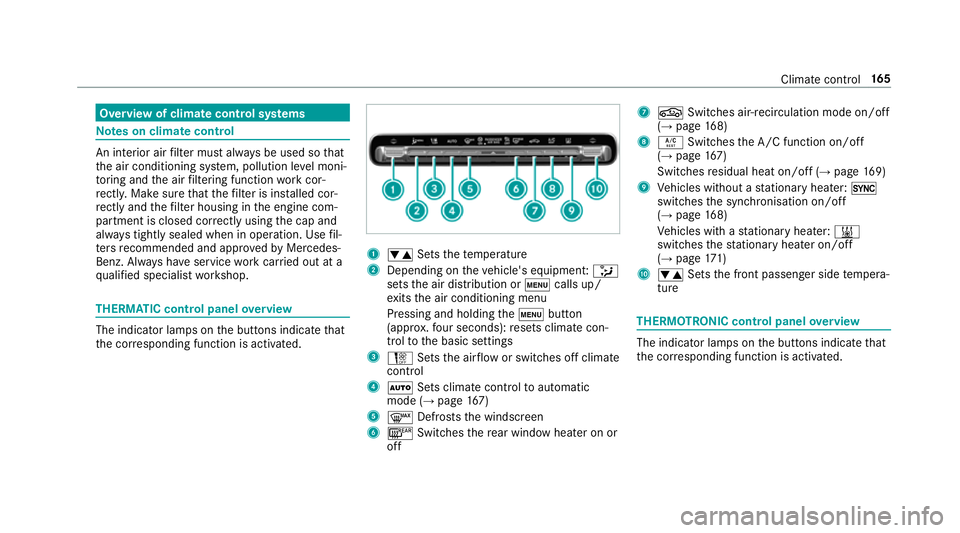
qu alified specialist workshop. THERMATIC control panel
overview The indicator lamps on
the buttons indicate that
th e cor responding function is activated. 1
w Setsthete mp erature
2 Depending on theve hicle's equipment: _
sets the air distribution or tcalls up/
ex its the air conditioning menu
Pressing and holding thet button
(appr ox.fo ur seconds): resets climate con‐
trol tothe basic settings
3 H Setsthe air flow or switches off climate
control
4 Ã Sets climate control toautomatic
mode (→ page167)
5 ¬ Defrosts the windscreen
6 ¤ Switches there ar wind owheater on or
off 7
g Switches air-recirculation mode on/off
(→ page 168)
8 Á Switches the A/C function on/off
(→ page 167)
Switches residual heat on/off (→ page169)
9 Vehicles without a stationary heater: 0
swit ches the synchronisation on/off
(→ page 168)
Ve hicles with a stationary heater: &
swit ches thest ationary heater on/off
(→ page 171)
A w Setsthe front passenger side temp era‐
ture THERMOTRONIC control panel
overview The indicator lamps on
the buttons indicate that
th e cor responding function is activated. Climate
control 16 5
Page 169 of 681
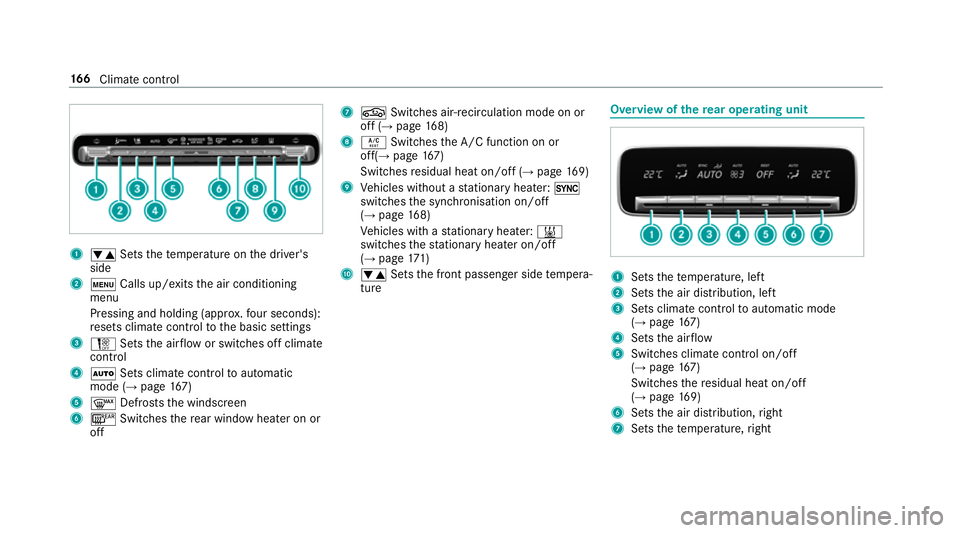
1
w Setsthete mp erature on the driver's
side
2 t Calls up/exits the air conditioning
menu
Pressing and holding (appr ox.fo ur seconds):
re sets climate contro lto the basic settings
3 H Setsthe air flow or switches off climate
control
4 Ã Sets climate control toautomatic
mode (→ page167)
5 ¬ Defrosts the windscreen
6 ¤ Switches there ar wind owheater on or
off 7
g Switches air-recirculation mode on or
off (→ page168)
8 Á Switches the A/C function on or
off(→ page167)
Switches residual heat on/off (→ page169)
9 Vehicles without a stationary heater: 0
swit ches the synchronisation on/off
(→ page 168)
Ve hicles with a stationary heater: &
swit ches thest ationary heater on/off
(→ page 171)
A w Setsthe front passenger side temp era‐
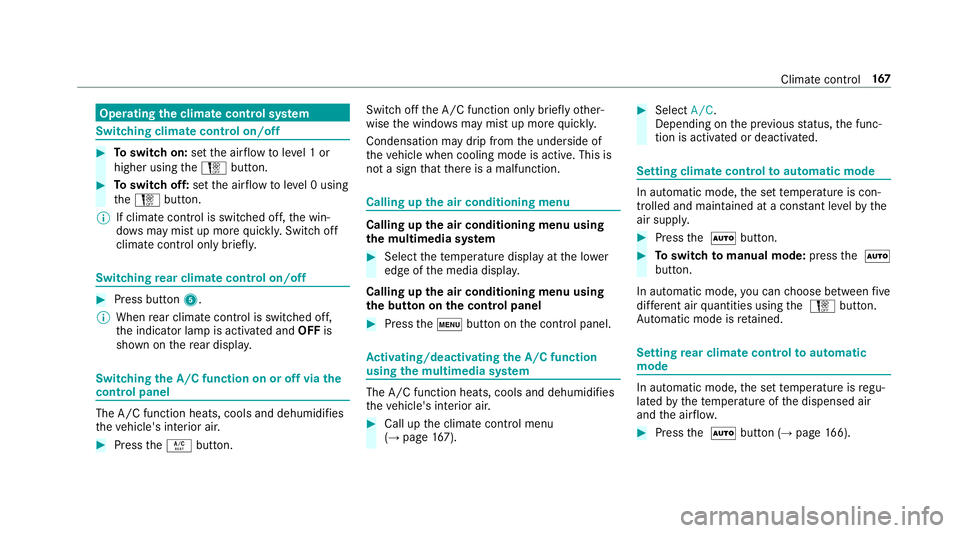
ture Overview of
there ar operating unit 1
Sets thete mp erature, left
2 Sets the air distribution, left
3 Sets climate control toautomatic mode
(→ page 167)
4 Sets the air flow
5 Switches climate control on/off
(→ page 167)
Switches there sidual heat on/off
(→ page 169)
6 Sets the air distribution, right
7 Sets thete mp erature, right 16 6
Climate cont rol
Page 170 of 681
Operating
the clima tecont rol sy stem Switching clima
tecont rol on/off #
Toswitch on: setthe air flow toleve l 1 or
higher using theH button. #
Toswitch off: setthe air flow toleve l 0 using
th eH button.
% If climate control is switched off, the win‐
do ws may mist up more quickl y.Switch off
climate control only brie fly. Switching
rear climate control on/off #
Press button 5.
% When rear climate control is swit ched off,
th e indicator lamp is activated and OFFis
shown on there ar displa y. Switching
the A/C function on or off via the
cont rol panel The A/C function heats, cools and dehumidifies
th
eve hicle's interior air. #
Press theÁ button. Switch off
the A/C function only brief lyother‐
wise the windo wsmay mist up more quickl y.
Condensation may drip from the underside of
th eve hicle when cooling mode is active. This is
not a sign that there is a malfunction. Calling up
the air conditioning menu Calling up
the air conditioning menu using
th e multimedia sy stem #
Select thete mp erature display at the lo wer
edge of the media displa y.
Calling up the air conditioning menu using
th e but ton on the control panel #
Press thet button on the control panel. Ac
tivating/deactivating the A/C function
using the multimedia sy stem The A/C function heats, cools and dehumidifies
th
eve hicle's interior air. #
Call up the climate control menu
(→ page 167). #
Select A/C.
Depending on the pr evious status, the func‐
tion is activated or deactivated. Setting climate control
toautomatic mode In auto
matic mode, the set temp erature is con‐
trolled and maintained at a const ant levelby the
air suppl y. #
Press the à button. #
Toswitch tomanual mode: pressthe Ã
button.
In automatic mode, you can choose between five
dif fere nt air quantities using the H button.
Au tomatic mode is retained. Setting
rear climate control toautomatic
mode In auto
matic mode, the set temp erature is regu‐
lated bythete mp erature of the dispensed air
and the air flow. #
Press the à button (→ page166). Clima
tecontrol 167
Page 171 of 681
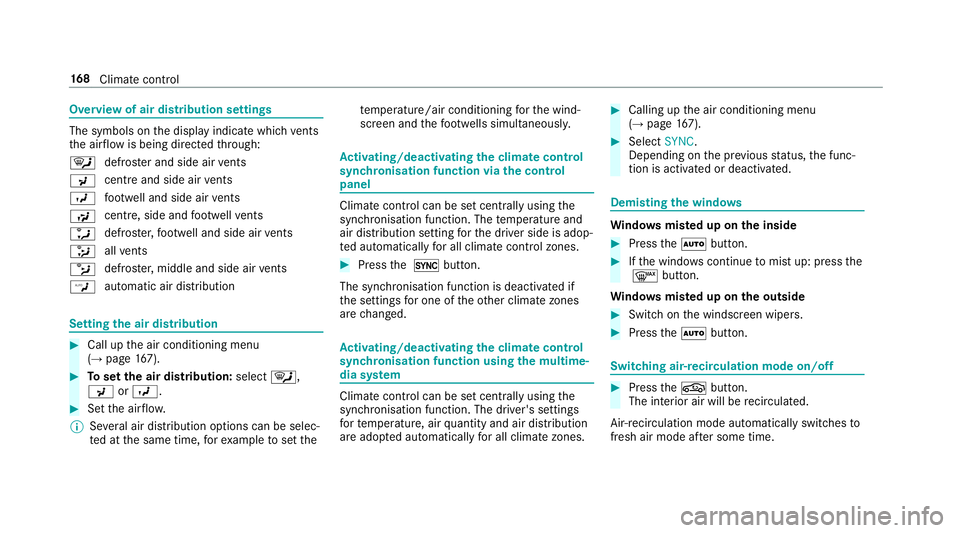
Overview of air distribution settings
The symbols on
the display indicate which vents
th e air flow is being directed thro ugh:
¯ def
rost er and side air vents
P centre and side air
vents
O fo
ot we ll and side air vents
S centre, side and
foot we llve nts
a defros
ter,fo ot we ll and side air vents
_ all
vents
b defros
ter,middle and side air vents
W au
tomatic air distribution Setting
the air distribution #
Call up the air conditioning menu
(→ page 167). #
Toset the air distribution: select¯,
P orO. #
Set the air flow.
% Several air distribution options can be selec‐
te d at the same time, forex ample toset the te
mp erature/air conditioning forth e wind‐
screen and thefo ot we lls simultaneousl y. Ac
tivating/deactivating the climate control
syn chro nisation function via the control
panel Climate control can be set centrally using
the
synchronisation function. The temp erature and
air distribution setting forth e driver side is adop‐
te d automatically for all clima tecontrol zones. #
Press the 0 button.
The synchronisation function is deactivated if
th e settings for one of theot her climate zones
are changed. Ac
tivating/deactivating the climate control
syn chro nisation function using the multime‐
dia sy stem Climate control can be set centrally using
the
synchronisation function. The driver's settings
fo rte mp erature, air quantity and air distribution
are adop ted automatically for all clima tezones. #
Calling up the air conditioning menu
(→ page 167). #
Select SYNC.
Depending on the pr evious status, the func‐
tion is activated or deactivated. Demisting
the windo ws Wi
ndo wsmis ted up on the inside #
Press theà button. #
Ifth e windo wscontinue tomist up: press the
¬ button.
Wi ndo wsmis ted up on the outside #
Switch on the windscreen wipers. #
Press theà button. Switching air-recirculation mode on/off
#
Press theg button.
The interior air will be recirculated.
Air-reci rculation mode automatically swit ches to
fresh air mode af ter some time. 16 8
Climate cont rol
Page 175 of 681
#
After heating or ventilating theve hicle
twice, drive for a longer period of time. Re
quirements:
R The fuel tank is filled toat least reser vefuel
le ve l. #
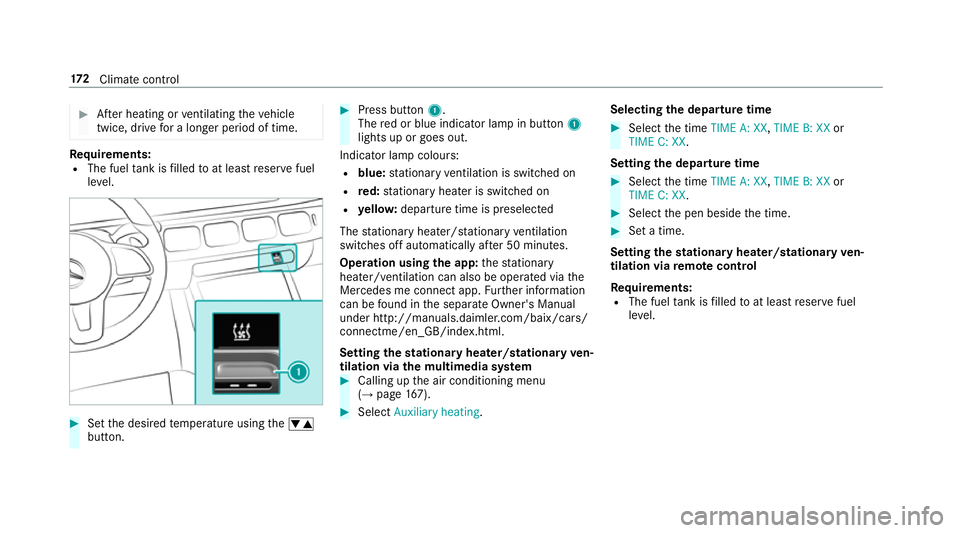
Set the desired temp erature using thew
button. #
Press button 1.
The red or blue indicator lamp in button 1
lights up or goes out.
Indicator lamp colours: R blue: stationary ventilation is switched on
R red: stationary heater is swit ched on
R yello w: departure time is preselected
The stationary heater/ stationary ventilation
switches off au tomatically af ter 50 minutes.
Operation using the app: thest ationary
heater/ ventilation can also be operated via the
Mercedes me connect app. Further information
can be found in the separate Owner's Manual
under http://manuals.daimler.com/baix/cars/
connectme/en_GB/index.html.
Setting thest ationary heater/stationary ven‐
tilation via the multimedia sy stem #
Calling up the air conditioning menu
(→ page 167). #
Select Auxiliary heating. Selecting
the departu retime #
Select the time TIME A: XX, TIME B: XXor
TIME C: XX.
Setting the departu retime #
Select the time TIME A: XX, TIME B: XXor
TIME C: XX. #
Select the pen beside the time. #
Set a time.
Setting thest ationary heater/stationary ven‐
tilation via remo tecont rol
Re quirements:
R The fuel tank is filled toat least reser vefuel
le ve l. 17 2
Climate cont rol
Page 184 of 681
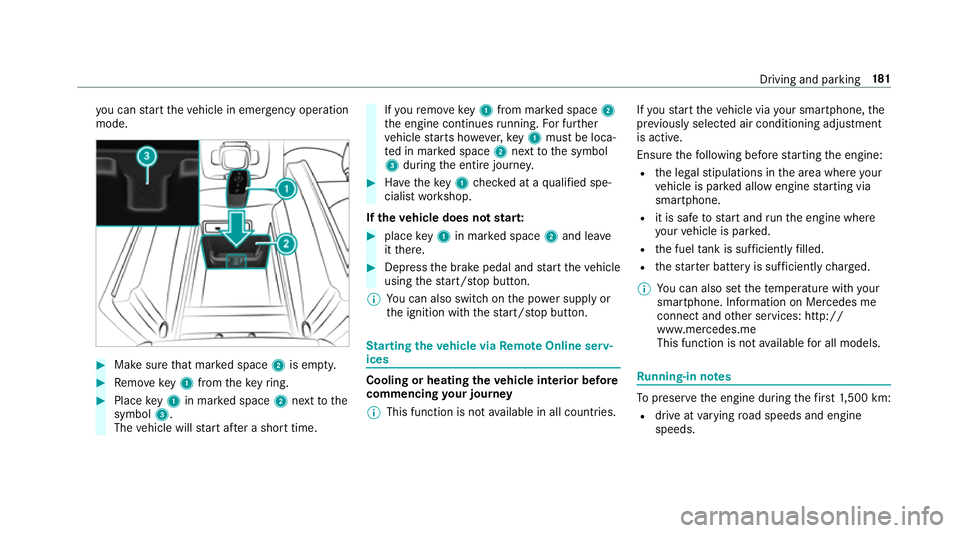
yo
u can start theve hicle in emer gency operation
mode. #
Makesure that mar ked space 2is em pty. #
Remo vekey1 from theke yring. #
Place key1 in mar ked space 2next tothe
symbol 3.
The vehicle will start af ter a short time. If
yo ure mo vekey1 from mar ked space 2
th e engine continues running. For fur ther
ve hicle starts ho wever,ke y1 must be loca‐
te d in mar ked space 2next tothe symbol
3 during the entire journe y. #
Have theke y1 checked at a qualified spe‐
cialist workshop.
If th eve hicle does not star t: #
place key1 in mar ked space 2and lea ve
it th ere. #
Depress the brake pedal and start theve hicle
using thest art/ stop button.
% You can also swit chon the po wer supp lyor
th e ignition with thest art/ stop button. St
arting theve hicle via Remo teOnline serv‐
ices Cooling or heating
theve hicle interior before
commencing your journey
% This function is not available in all countries. If
yo ustart theve hicle via your smartphone, the
pr ev iously selec ted air conditioning adjustment
is active.
Ensure thefo llowing before starting the engine:
R the legal stipulations in the area where your
ve hicle is par ked allow engine starting via
smartphone.
R it is safe tostart and runth e engine where
yo ur vehicle is par ked.
R the fuel tank is su fficiently filled.
R thest ar ter battery is suf ficiently charge d.
% You can also set thete mp erature with your
smartphone. In form ation on Mercedes me
connect and other services: http://
www.mercedes.me
This function is not available for all models. Ru
nning-in no tes To
preser vethe engine during thefirs t1, 500 km:
R drive at varying road speeds and engine
speeds. Driving and parking
181
Page 332 of 681
Vo
ice command Colloquialexample Function
Read out the last e-mail from
Peter ParkerThe last e-mail from
the person mentioned is read out.
E-mail in English to
write an email in En glish tothe person called up Overview of
vehicle voice commands Yo
u can use theve hicle voice commands to
directly call up the cor responding menus forthe
ve hicle settings and operate vehicle functions. The
following list of fers just a small selection of
th e possible vehicle voice commands. You will
re cei veadditional suggestions if you say Help
for vehicle settings orHelp for vehicle functions.
% If no seat or side is mentioned for com‐
mands that relate toa seat or side of vehicle th
en all actions are car ried out automatically
fo rth e driver's seat.
Ve hicle voice commands Vo
ice command Colloquialexample Function
Temperature colder I would like to reduce the tempera-
tureRe
duces thete mp erature of the air conditioning sy stem
Air recirculation on I would like to activate the air circu-
lationSwitches on air
recirculation mode forth e air conditioning sy stem LINGU
ATRO NIC 329
Page 338 of 681
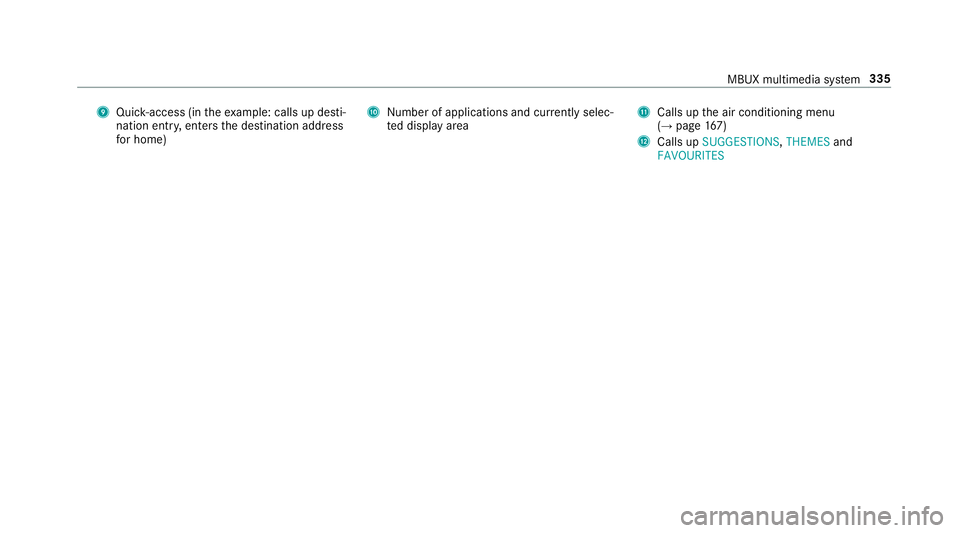
9
Quick-access (in theex ample: calls up desti‐
nation ent ry, enters the destination address
fo r home) A
Number of applications and cur rently selec‐
te d display area B
Calls up the air conditioning menu
(→ page 167)
C Calls up SUGGESTIONS ,THEMES and
FAVOURITES MBUX multimedia sy
stem 335
Page 635 of 681
Ad
justing the mid- range, treble and
bass
Burmes ter®
high-end 3D sur round
sound sy stem ...................................... 485
Ad justing the sound focus
Burmes ter®
sur round sound sy stem ... 485
Ad justing the sound optimisation
Burmes ter®
high-end 3D sur round
sound sy stem ...................................... 486
Ad justing treble, mid- range and bass
settings
Burmes ter®
high-end 3D sur round
sound sy stem ...................................... 485
Burmes ter®
sur round sound sy stem ... 484
ADS PLUS damping sy stem
see AIR BODY CONTROL
Af ter-sales service centre
see ASS YST PLUS
AIR BODY CONT ROL................................ 247
Suspension .......................................... 247
Air conditioning menu Calling up ............................................ .167 Air conditioning sy
stem
see Climate control
Air distribution ........................................ 16 5
Setting (multimedia sy stem) ................1 68
Air freshener sy stem
see Frag rance sy stem
Air inlet see Air-water duct
Air pressure see Tyre pressure
Air suspension see AIR BODY CONTROL
Air vents ................................................... 175
Ad justing (front) ................................... 175
Ad justing (rear) .................................... 176
Glo vebox .............................................1 76
Air vents
see Air vents
Ai r-re circulation mode ............................ 16 8
Air-water duct .......................................... 494
Ke eping free ........................................4 94Airbag
........................................................ .40
Ac tivation .............................................. 34
Fr ont airbag (driver, front passenger) ....40
Ins tallation locations ............................ .40
Knee airbag ........................................... 40
Overview ............................................... 40
PA SSENGER AIR BAG indicator lamp .... .44
Pr otection ..............................................40
Re duced pr otection ...............................42
Side impact airbag ................................ 40
Wi ndow airbag ....................................... 40
Ai rflow ...................................................... 16 5
AIRM ATIC
Setting ................................................ .250
Alarm see Panic alarm
Alarm sy stem
see ATA (anti-theft alarm sy stem)
All-wheel drive see 4MATIC
Alternative route
see Route 632
Index