interior lights MERCEDES-BENZ GLE SUV 2019 Owners Manual
[x] Cancel search | Manufacturer: MERCEDES-BENZ, Model Year: 2019, Model line: GLE SUV, Model: MERCEDES-BENZ GLE SUV 2019Pages: 681, PDF Size: 11.7 MB
Page 47 of 681
A pe
rson in the front passenger seat could
th en, forex ample, come into con tact wi th
th eve hicle interior, especially if the person is
sitting too close tothe cockpit.
If th e front passenger seat is occupied,
alw ays ensure that:
R The classification of the person in the
front passenger seat is cor rect and the
front passenger airbag is enabled or disa‐
bled in accordance with the person in the
front passenger seat.
R The front passenger seat has been mo ved
as far back as possible.
R The person is seated cor rectl y. #
Ensu re, bo thbefore and during the jour‐
ne y,that thest atus of the front
passenger airbag is cor rect. If
th e front passenger seat is occupied, the clas‐
sification of the person or child restra int sy stem
on the front passenger seat take s place af terthe
front passenger front airbag shutoff self-test.
The PASSENGER AIR BAG indicator lamps dis‐ play
thest atus of the front passenger front air‐
bag.
Alw ays obser vethe no tes on the function of the
PA SSENGER AIR BAG indicator lamps
(→ page 44).
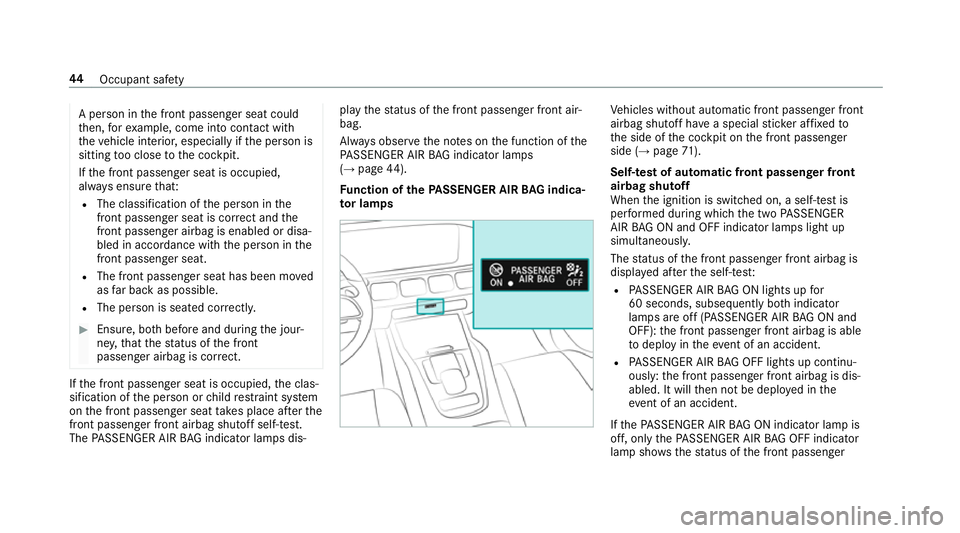
Fu nction of thePA SSENGER AIR BAG indica‐
to r lamps Ve
hicles without automatic front passenger front
airbag shutoff ha vea special sticke r af fixe dto
th e side of the cockpit on the front passenger
side (→ page71).
Self-test of automatic front passenger front
airbag shutoff
When the ignition is switched on, a self-test is
per form ed during which the two PASSENGER
AIR BAG ON and OFF indicator lamps light up
simul taneously.
The status of the front passenger front airbag is
displa yed af terth e self-tes t:
R PASSENGER AIR BAG ON lights up for
60 seconds, subsequently bo thindicator
lamps are off (PASSENGER AIR BAG ON and
OFF): the front passenger front airbag is able
to deploy in theeve nt of an accident.
R PASSENGER AIR BAG OFF lights up continu‐
ously: the front passenger front airbag is dis‐
abled. It will then not be deplo yed in the
eve nt of an accident.
If th ePA SSENGER AIR BAG ON indicator lamp is
off, on lythePA SSENGER AIR BAG OFF indicator
lamp sho ws thest atus of the front passenger 44
Occupant saf ety
Page 49 of 681
#
Alw ays mo vethe front passenger seat
as far back as possible and fully retract
th e seat cushion length adjustment.
Alw ays make sure that the shoulder belt
st ra p is cor rectly routed from the seat
belt outlet on theve hicle tothe shoul‐
der belt guide on thech ild restra int sys‐
te m. The shoulder belt stra p must be
ro uted forw ards and down wards from
th e seat belt outlet. If necessar y,adjust
th e seat belt outlet and the front
passenger seat accordingly. #
Alw ays obser vethech ild restra int sys‐
te m manufacturer's ins tallation instruc‐
tions. When
fitting a child restra int sy stem tothe front
passenger seat, obser vetheve hicle-specific
information (→ page72).
If a person is sitting on the front passenger
seat: PASSENGER AIR BAG OFF may be lit con‐
tinuously or be off, depending on the person's
st ature. A person on
the front passenger seat must
alw ays obser vethefo llowing information:
R Ifth e front passenger seat is occupied byan
adult or a person with a stature cor respond‐
ing tothat of an adult, thePA SSENGER AIR
BA G OFF indicator lamp must be off. This
indicates that the front passenger front air‐
bag is enabled.
If th ePA SSENGER AIR BAG OFF indicator
lamp is lit continuousl y,an adult or person
with a build cor responding tothat of an adult
should not use the front passenger seat.
Ins tead, they should use a rear seat.
R Ifth e front passenger seat is occupied by a
person of smaller stature (e.g. a teenager or
small adult), thePA SSENGER AIR BAG OFF
indicator lamp either lights up continuously
or remains off, depending on there sult of the
classi fication.
- Ifth ePA SSENGER AIR BAG OFF indicator
lamp is off: mo vethe front passenger
seat as far back as possible, or the per‐
son of smaller stature should use a rear
seat. -
Ifth ePA SSENGER AIR BAG OFF indicator
lamp is lit continuously: the person of
smaller stature should not use the front
passenger seat. &
WARNING Risk of inju ryor death when
th ePA SSENGER AIR BAG OFF indicator
lamp is lit
If th ePA SSENGER AIR BAG OFF indicator
lamp remains lit af terth e sy stem self-test,
th e front passenger airbag is disabled. It will
not be deplo yed in theeve nt of an accident.
In this case, the front passenger airbag can‐
not per form its intended pr otective function,
e.g. when a person is seated in the front
passenger seat.
That person could, forex ample, come into
con tact wi th theve hicle interior, especially if
th e person is sitting too close tothe cockpit.
If th e front passenger seat is occupied,
alw ays ensure that:
R The classification of the person in the
front passenger seat is cor rect and the 46
Occupant saf ety
Page 157 of 681
Switching
the sur round lighting on or off Multimedia sy
stem:
, © .
Settings .
Lights .
Sur-
round lighting
The exterior lighting remains lit for 40 seconds
af te rth eve hicle is unloc ked. When youstart the
ve hicle, the sur round lighting is deactivated and
th e automatic driving lights are activated. #
Activate or deacti vate the function. Interior lighting
Ad
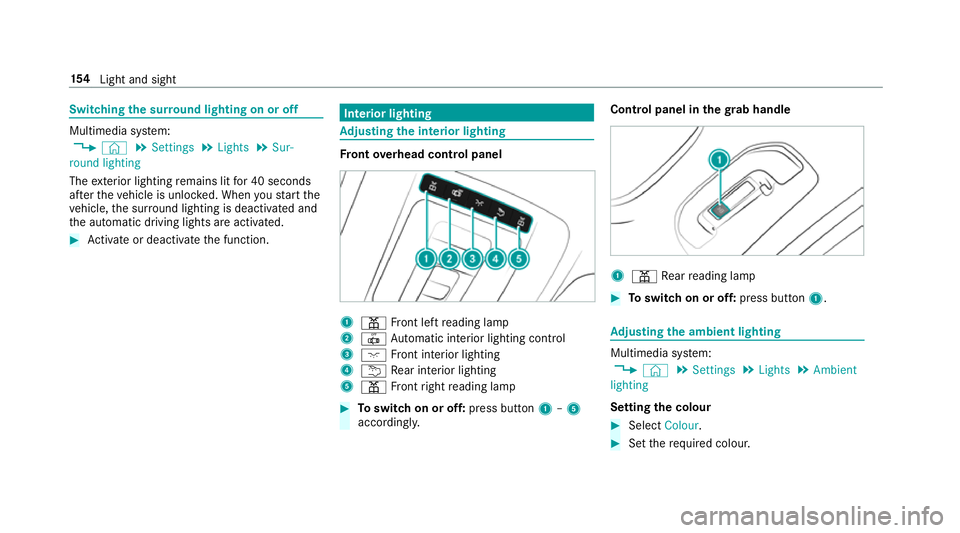
justing the in terior lighting Fr
ont overhead control panel 1
p Front left reading lamp
2 | Automatic interior lighting control
3 c Front interior lighting
4 u Rear interior lighting
5 p Front right reading lamp #
Toswitch on or off: press button1–5
accordingly. Control panel in
thegr ab handle 1
p Rear reading lamp #
Toswitch on or off: press button1. Ad
justing the ambient lighting Multimedia sy
stem:
, © .
Settings .
Lights .
Ambient
lighting
Setting the colour #
Select Colour. #
Set therequ ired colour. 15 4
Light and sight
Page 158 of 681
%
There are 64colours available.
Ad justing the brightness #
Select Brightness .
Ad just the brightness.
Ac tivating the brightness for zones #
Select Brightness . #
Select Brightness zones .
The EMPHASIS , andAMBIENT zones can be
set separately.
Ac tivating multi-coloured lighting #
Select Colour. #
Select Multi-colour.
The reare ten preset colour combinations
av ailable. #
Select a colour combination.
Ac tivating multi-coloured animation #
Select Colour. #
Select Multi-colour animat..
The chosen colour combination changes at
predefined inter vals. Ac
tivating welcome lighting #
Select Colour. #
Select Welcome.
When theve hicle is unloc ked, a special ambi‐
ent lighting sequence runs.
Ac tivating dependency on air conditioning
settings #
Select Colour. #
Select Climate.
If ch anges are made tothete mp erature set‐
ting in theve hicle, the colour of the ambient
lighting changes brief ly. Switching
the interior lighting switch-off
delay time on or off Multimedia sy
stem:
, © .
Settings .
Lights .
Int. light.
del. shut-off #
Switch the lighting switch-off delay time on
or off.
When this function is active, the interior light‐
ing lights up again briefly af terth eve hicle
has been loc ked. Light and sight
15 5
Page 636 of 681
Ambient lighting
Setting (mutlimedia sy stem) ................1 54
Android Auto ............................................ 443
Connecting a mobile phone ................ .443
Ending ................................................. 444
Information ..........................................4 43
Overview ............................................. 443
Sound settings .................................... 444
Tr ans ferred vehicle data ......................4 44
Animals Pets in theve hicle ..................................76
Answering e-mails see In Car Of fice
Anti-lock braking sy stem
see ABS (Anti-lock Braking Sy stem)
Anti-theft alarm sy stem
see ATA (anti-theft alarm sy stem)
Anti-theft pr otection
Ad ditional door lock ...............................81
Immobiliser .........................................1 02
Anti-theft pr otection
see ATA (anti-theft alarm sy stem) Anticipatory occupant pr
otection
see PRE- SAFE®
(anticipatory occu‐
pant pr otection)
see PRE-SAFE ®
PLUS (anticipatory
occupant pr otection plus)
Apple CarPlay™ ....................................... 441
Connecting an iPhone ®
...................... .442
Ending ................................................. 443
No tes .................................................. 442
Overview ..............................................4 41
Sound settings .................................... 443
Tr ans ferred vehicle data ......................4 44
Asht ray
Fr ont centre console ........................... 14 0
Assistance sy stems
see Driving saf ety sy stem
Assistant display Menu (on-board computer) .................. 305
ASS YST PLUS ........................................... 487
Battery disconnection pe riods .............4 88
Displ aying the service due date ........... 487
Fu nction/no tes ................................... 487
Re gular maintenance work .................. 487
Special service requ irements .............. 487 ATA
(anti-theft ala rmsystem) ................ .102
Deactivating the alarm ........................ 103
Fu nction .............................................. 102
Fu nction of interior pr otection .............1 04
Priming/deactivating interior pr otec‐
tion ...................................................... 104
Priming/deactivating tow- aw ay pro‐
te ction ................................................. 104
To w- aw ay protection function .............. 103
AT TENTION ASSI ST.......................... 281, 282
Fu nction .............................................. 281
Setting ................................................. 282
Sy stem limitations ...............................2 81
At tention assistant
see ATTENTION ASSIST
Au thorised workshop
see Qualified specialist workshop
Au tomatic distance control
see Active Dis tance Assi stDISTRONIC
Au tomatic driving lights .........................14 8
Au tomatic engine start (ECO start/
st op function) .......................................... 187 Index
633
Page 674 of 681
Ve
hicle interior
Cooling or heating (Remo teOnline) ..... 181
Ve hicle key
see Key
Ve hicle le vel
Setting individual wheel control .......... 262
Ve hicle maintenance
see ASS YST PLUS
Ve hicle position
Switching transmission on/off ............ 368
Ve hicle tool kit ........................................ .507
TIREFIT kit ...........................................5 07
To wing eye ...........................................5 21
Ve ntilating
Con venience opening ............................ 93
Ve ntilation
see Climate cont rol
Ve nts
see Air vents
VIN ............................................................ 550
Identification plate .............................. 550
Seat ..................................................... 550
Wi ndsc reen ......................................... 550 Vi
sion
Demisting windo ws............................. 16 8
Wi ndsc reen heating ............................. 17 0
Vo ice amplification tothere ar
Switching on/off ................................. 368
Vo ice control sy stem
see LINGU ATRO NIC W
Wa rning lamps
see Warning/indicator lamps
Wa rning sy stem
see ATA (anti-theft alarm sy stem)
Wa rning triangle
Re moving ............................................ 504
Setting up ............................................ 504
Wa rning/indicator lamp
!ABS warning lamp ........................ 61 9
J Brake sy stem warning lamp
(red) .................................................... .618
J Brake sy stem warning lamp
(yellow) ................................................ 620 ?Coolant
warning lamp ................ .627
# Electrical fault warning lamp ...... .626
;Engine diagnosis warning lamp .. .626
åESP ®
OFF warning lamp .............. 622
÷ESP ®
wa rning lamp flashes ........ .621
÷ ESP®
wa rning lamp lights up ...... .621
8 Fuelreser vewarning lamp .......... 626
ÐPo werst eering sy stem warning
lamp .................................................... 624
!Re d indicator lamp, elect ric
parking brake applied .......................... 620
6Re stra int sy stem warning lamp .. .622
7Seat belt warning lamp flashes .. .623
7Seat belt warning lamp lights
up ........................................................ 623
ïTr ailertow hit chwarning lamp .... 625
hTy repressure monitoring sys‐
te m wa rning lamp flashes .................. .629
hTy repressure monitoring sys‐
te m wa rning lamp lights up ................ .628 Index
671