light MERCEDES-BENZ GLK-Class 2011 X204 Comand Manual
[x] Cancel search | Manufacturer: MERCEDES-BENZ, Model Year: 2011, Model line: GLK-Class, Model: MERCEDES-BENZ GLK-Class 2011 X204Pages: 190, PDF Size: 2.21 MB
Page 71 of 190
Disp
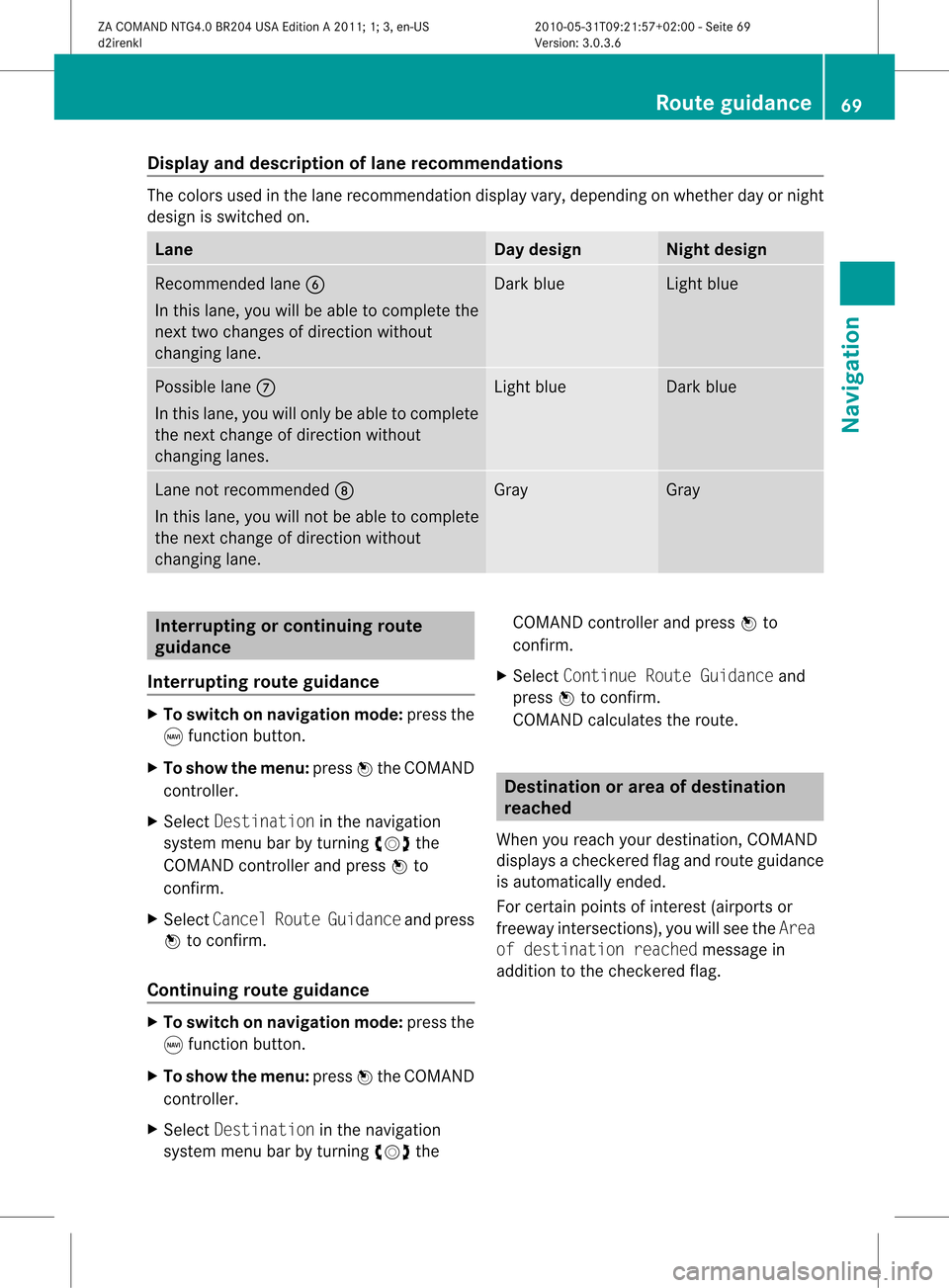
layandd escri ption oflane recom mendation s The
colors used inthelane recomm endatio ndisplay vary,depen dingonwhet herday ornigh t
design isswitc hedon. Lane Day
design Nigh
tdesign Recom
mendedlane B
In this lane, youwillbeable tocom pleteth e
nex ttwo chan gesofdirec tionw itho ut
chan ginglane. Dar
kblue Light
blue Possib
lelane C
In this lane, youwillonly beable tocom plete
the nextchange ofdirection without
changing lanes. Light
blue Dark
blue Lane
notrecommen dedD
In this lane, youwillnotbeable tocomplete
the next change ofdirection without
changing lane. Gray Gray
Interrup
tingorcontinuing route
guidance
Interrup tingroute guidance X
To switch onnavigation mode:pressthe
g funct ionbutton.
X To show themenu: pressWthe COMAND
cont roller.
X Select Destination inthe navigation
system menubarbyturning cVdthe
COMAND controller andpress Wto
confirm .
X Select Cancel RouteGuidance andpress
W toconfirm .
Continuing routeguidance X
To switch onnavigation mode:pressthe
g funct ionbutton.
X To show themenu: pressWthe COMAND
cont roller.
X Select Destination inthe navigation
system menubarbyturning cVdthe COMAND
controller andpress Wto
confirm .
X Select Continue RouteGuidance and
press Wtoconfirm .
COMAND calculates theroute. Destination
orarea ofdestination
reached
When youreach yourdestination, COMAND
displa ysacheck eredflagand route guidance
is automatically ended.
For certain pointsofinterest (airports or
freeway intersections),youwillsee theArea
of destination reachedmessage in
addition tothe check eredflag. Route
guidance
69Navigation
ZACOMAND NTG4.0BR204USAEdition A2011; 1;3,en-US
d2irenkl Version:3.0.3.6
2010-
05-31T09:21 :57+02:00-Seite 69 Z
Page 73 of 190

i
The length ofthe blockable routesection
is predetermin edbythe digital map.The
menu itemsareavailab leaccordin gly.
X To star trout ecalculation: selectStart
and press Wtoconf irm.
X To delete theblocked section: select
Delete whilethemessage isshown and
press Wtoconf irm.
COMAND calculates theroute without the
block. Selecting
analter native route
With the"Altern ativeroute" function,routes
other thantheoriginal onecanbecalculated.
X To switch onnavigation mode:pressthe
g funct ionbutton .
X To show themenu: pressWthe COMAND
cont roller.
X Select Routeinthe navigation system
menu barbyturnin gcVd theCOMAND
cont roller andpress Wtoconf irm.
X Select Alternativ eRoute andpress W
to conf irm.
You seetheselected route.Thedisplay now
shows asplit-sc reenview. Onthe left- hand
side, oneormore alternat iveroutes are
shown fromstarttodestinat ion.The
curren troute ishighlighted darkblue; other
alternative routesappear lightblue.
On the right- hand side,inform ationonthe
current lyselected alternative routeis
shown, e.g.length ofroute, estimated
driving timeandestimated timeofarrival.
X To select thenext orprevious
alterna tiveroute:select Nextor
Previous andpress Wtoconf irm.
The selected routeishighlighted darkblue.
X To select theoriginal route:select Back
a correspon dingnumber oftimes andpress
W toconf irm. X
To star trout eguidance usingthe
selected alternativeroute:select Start
and press Wtoconf irm.
COMAND calculates thealternative route. Displaying
destinationinforma tion
You have enteredadestination (Y page 51)
or apoint ofinteres t(Y page 61)and possibly
an intermediate stop(Ypage 59).
X To switch onnavigat ionmode: pressthe
g func tion button.
X To show themenu: pressWthe COMAND
con troller.
X Select Routeinthe navigat ionsystem
menu barbyturn ingcVd theCOMAND
con troller and press Wtocon firm.
X Select Destin ationInformationand
press Wtocon firm.
Dest ination information isdisplayed. Ex
ample display: destinationinformation
: Dist ance, estimatedtime ofarrival and
estim atedremainin gdrivin gtime to
int ermediate stop
; Intermediate stopP
= State and city
? Dest ination O
A Dist ance, estimatedtime ofarrival and
estim ateddrivin gtime todestin ation
X To close thedestina tioninform ation:
slide XVY theCOMAND controller orpress
the k backbutton. Rout
eguida nce
71Navigat ion
ZACOMAND NTG4.0BR204USAEditionA2011 ;1; 3,en- US
d2iren kl Version:3.0 .3.6
2010
-05-31T09: 21:57+0 2:00-Seite 71 Z
Page 74 of 190
Route
overvi ew
Yo ucan usethe routeove rvie wto move along
the routesecti onbysecti onand view
info rma tion anddeta ils ab ou teach sectiono f
the route.
Yo uha ve ente redade stinati on(Ypage 51)
or apo int ofinte rest(Y page 61)and possibly
an intermediate stop(Ypage 59)).
X To switch onnavigat ionmode: pressthe
g func tion button.
X To show themenu: pressWthe COMAND
con troller.
X Select Routeinthe navigat ionsystem
menu barbyturn ingcVd theCOMAND
con troller and press Wtocon firm.
X Select Route Browse rand press Wto
con firm.
At the top ofthe display, youwillsee
infor mation aboutthehighlighted route
sect ion,forexample thedistan cetobe driven
on the road androad designat ion.The
highlighted routesectionismark edinwhite
with ared border onthe map.
X To view thenext orprevious route
section: selectNextorPrevio usand
press Wtocon firm.
i Ifthe first orlast route sectionis
highlighted, youcann otselect Previo usor
Next.
X To zoom inor out ofthe map:select N
or M and press Wtocon firm.
X To close therout eoverview: select
Back andpress Wtocon firm. Off-
road andoff-m ap
Impor tantsafet yguidelines G
War
ning
The COMAND navigationsystem maydirect
you tooff- road routes thatyour vehicle may not
becapable oftrav ersing through without
damaging yourtires,wheels orvehicle. Itis
the driver’s solerespon sibility todeterm ine
the suitability ofthe route. Off-road routes
may beofvarying condition sand their
appropriaten essforuse may beaffect edby
various factorssuch astime ofday, time of
year andimmediate weathercondition sthat
cann otbe judged ortake ninto consi derati on
by the COMAND system .
Route guidanc eto ades tinatio nthat is
no ton adig itized road CO
MAND canguide yo uto destina tions
wh ich arewi thi nt he area covered bythe
digital map,butwhich arenot themselves
recorded onthe map.
These destinations areknown asoff-r oad
destinations, whichyoucan enter using the
map, forexample. Inthese cases, COMAND
guides youforaslong aspossible with
navigation announcemen tsand displa yson
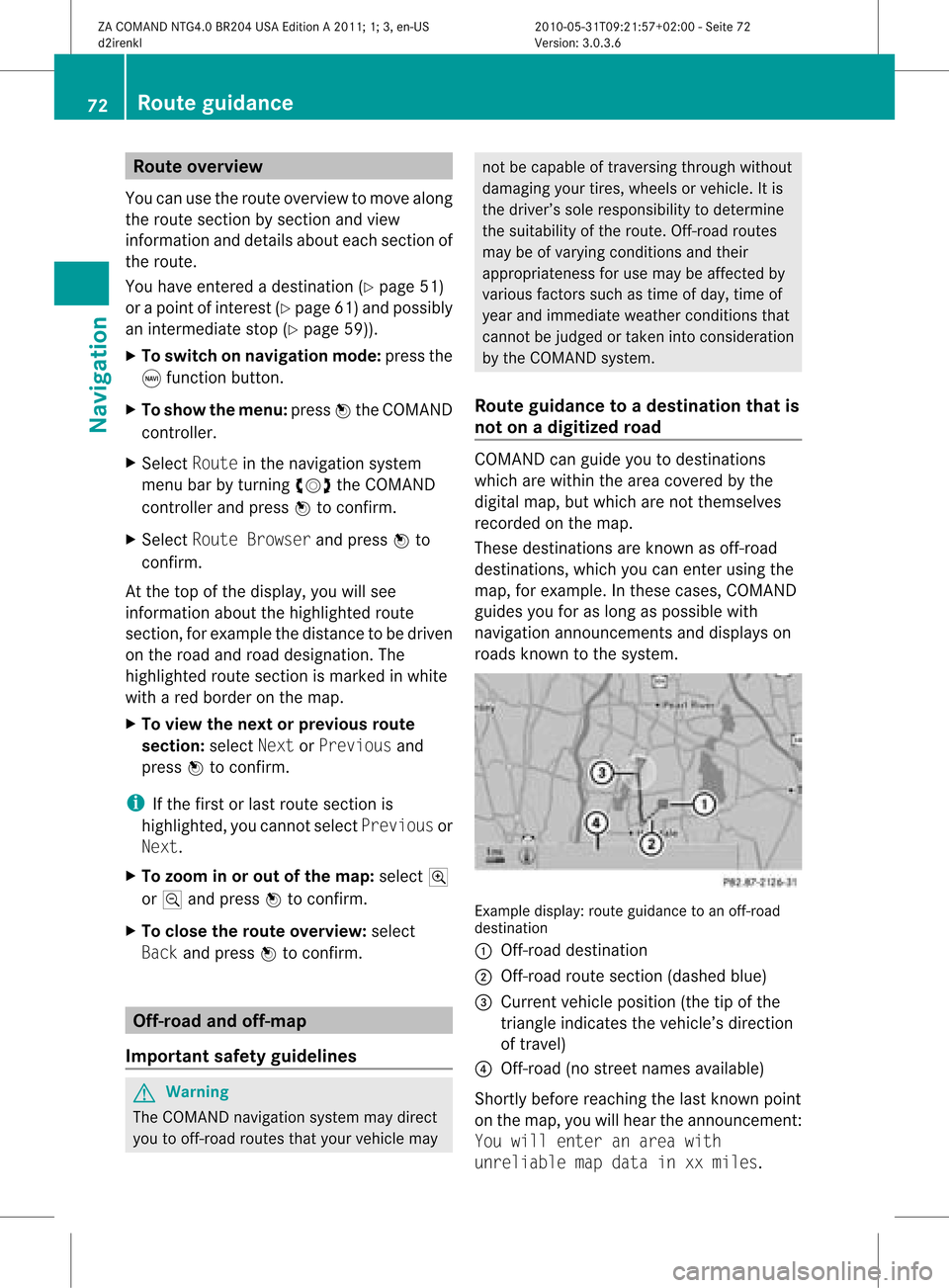
roads known tothe system. Example
display:route guidance toan off-r oad
destination
: Off- road destination
; Off- road route section (dashed blue)
= Current vehicleposition (thetipofthe
triangle indicates thevehicle’s direction
of travel)
? Off- road (nostreet names available)
Short lybefore reaching thelast known point
on the map, youwillhear theannounc ement:
You will enter anarea with
unreliable mapdata inxxmiles. 72
Rout
eguidanceNa vigation
ZACOMAND NTG4.0BR204USAEdition A2011; 1;3,en-US
d2irenkl Version:3.0.3.6
2010-
05-31T09: 21:57+02: 00-Seite 72
Page 75 of 190
If
the vehicle reaches anarea which isnot part
of the digitalmap, thedisp layapp ears asa
spli t-screen view.Onthe right-hand side,an
arrow appears which points tooff-road
destination :.Youwill hear the
announc ement:"Please followthearrow on
the display" .Asthe vehicle approachesthe
destination, theArea ofdestination
reached message appears.
Route guidance fromanoff-road
location toad esti nation If
th eveh icle posit ioniswith inthearea
cov ered bythedigit almap, butthemap does
no tcon tain anyinform ationabout that
locat ion,th eveh icle isin an off-road locat ion.
COMA NDisalso able toguide youtoa
dest inationeven from anoff-road locat ion.
At thest art oftherout eguidan ce,you willsee
th eOff Mapped Roadmes sage, anarro w
and thedist anceto thed estin ation. Thearrow
shows thecompass headingtothe actual
destin ation.
The route ishighlighted blue,startingfrom
the last recogn izedstreet the vehicle wason
before itleft themap.
As soon asthe vehicle isback onaroad
kn own tothe system, routeguidance
con tinues inthe usual way.
Rout eguida ncefrom anoff-m ap
location toad esti nation If
th eveh icle posit ionisouts idethearea
cov ered bythedigit almap, then theveh icle
is in an off-map locat ion.COMAND isalso
able toguide youtoadestination evenfrom
an off-map location.
At the start ofthe route guidance,youwillsee
the Off Mapped Roadmessage, anarrow
and thedistance tothe destination. Thearrow
shows thecompass headingtothe road left
last.
The route ishighlig htedbluefrom thenearest
road known tothe system. As
soon asthe vehicle isback onaroad
known tothe system, routeguidance
cont inues inthe usua lway .
Off-road duringrouteguidance Due
toroad const ruction work,forexample,
there maybedifferences betweenthedata
on the digital mapandtheactual course of
the road.
In such cases, thesystem willtemporarily be
unable tolocate thevehicle position onthe
digital mapandthus considers thevehicle to
be inan off-road position.
In the displa y,you willsee theOff Mapped
Road message, anarrow andthedistance to
the destination. Thearrow shows the
compass headingtothe actual destination.
As soon asthe system canassign thevehicle
position tothe map again,route guidance
cont inues inthe usua lway . Tra
ffic report s Condition
s
To receive real-time trafficreports via
satellite radio,yourequire:
R optionally available satellite radio
equi pment
R asubscription toSIRIUS XMSatellite Radio
Traffic Message Service
Further information onsatellite radiois
avail able inthe "Satellite radio"section
(Y page 123).
COMAND canreceive trafficreports via
satellite radioandtake these intoaccount for
route guidanceinthe navigation system.
Received trafficreports aredispla yedinthe
map either astext oras icons. Real-time
traffic report son the map
COMAND canshow certain trafficincidents
on the map. Traffic reports areshown onthe
map atscales of0.05 mito20 mi. Tr
affic report s
73Navigat ion
ZACOMAND NTG4.0BR204USAEdition A2011; 1;3,en-US
d2irenkl Version:3.0.3.6
2010-0
5-31T09: 21:57+02:00-Seite 73 Z
Page 82 of 190
The
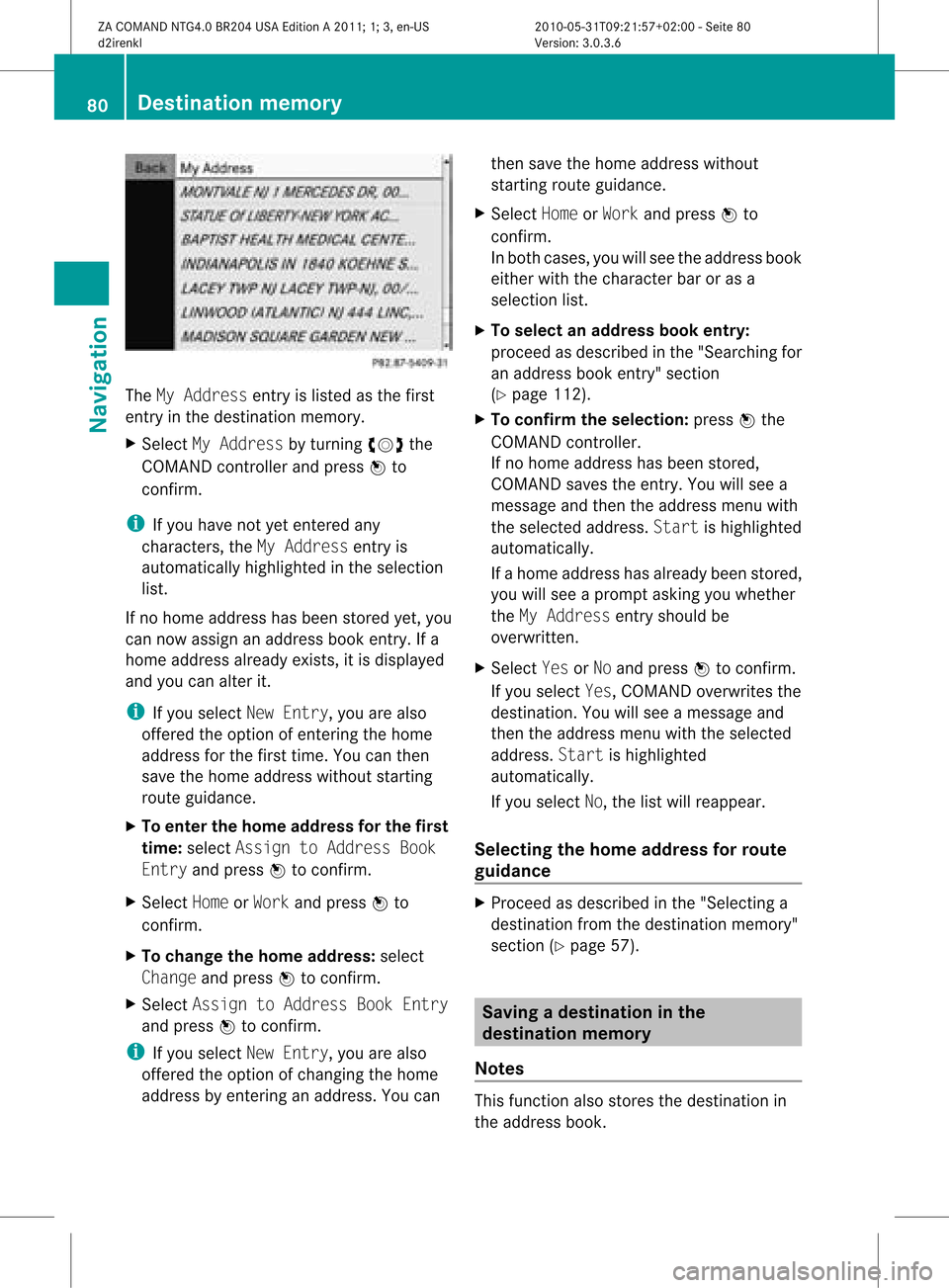
MyAddress entryislisted asthe first
ent ryinthe destinat ionmemory.
X Select MyAddress byturnin gcVd the
COMAND controller andpress Wto
conf irm.
i Ifyou have notyetentered any
charact ers,theMyAddress entryis
automatically highlightedinthe selection
list.
If no home address hasbeen stored yet,you
can now assign anaddress bookentry.Ifa
home address alreadyexists,it is display ed
and youcan alter it.
i Ifyou select NewEntry, youarealso
offered theoption ofent ering thehome
address forthe first time. Youcanthen
save thehome address withoutstarting
route guidance.
X To enter thehome address forthe first
time: select Assign toAddress Book
Entry andpress Wtoconf irm.
X Select HomeorWork andpress Wto
conf irm.
X To change thehome address: select
Change andpress Wtoconf irm.
X Select Assign toAddress BookEntry
and press Wtoconf irm.
i Ifyou select NewEntry, youarealso
offered theoption ofchangin gthe home
address byent ering anaddress. Youcan then
save thehome address without
start ingroute guidance.
X Select HomeorWork andpress Wto
conf irm.
In both cases, youwillsee theaddress book
either withthecharact erbar oras a
selection list.
X To select anadd ress book entry:
proceed asdescribed inthe "Searching for
an address bookentry" sect ion
(Y page 112).
X To confirm theselection: pressWthe
COMAND controller.
If no home address hasbeen stored,
COMAND savestheentry.You willsee a
message andthen theaddress menuwith
the selected address. Startishighlighted
automatically.
If ahome address hasalready beenstored,
you willsee aprompt askingyouwhether
the MyAddress entryshould be
overwritt en.
X Select YesorNo and press Wtoconf irm.
If you select Yes,COMAND overwrites the
destinat ion.You willsee amessage and
then theaddress menuwiththeselected
address. Startishighlighted
automatically.
If you select No,the listwill reappear.
Selecting thehome address forrout e
guidance X
Proceed asdescribed inthe "Selectin ga
destinat ionfrom thedestinat ionmemory"
sect ion(Ypage 57). Saving
adesti nation inthe
dest inationmem ory
Not es This
function also stores thedest inationin
th eaddre ssbook . 80
Destina
tionmem oryNaviga tion
ZACOMA NDNTG4 .0BR2 04USA EditionA 201 1;1;3,en- US
d2ir enklV ersion:3.0.3.6
2010
-05-31T09 :21:57+0 2:00-Seite 80
Page 103 of 190

Aut
horizing (regist ering) amobile
ph one X
In theBluet ooth®
te lepho neslist,selec tthe
not yetauthorized mobilephonebyturning
cVd theCOMAND controller.
X Select Options bysliding VYthe
COMAND controller andpress Wto
confirm .
X Select Authorize andpress Wtoconfirm .
The passcode entrymenu appears. The
passcode isany one tosixteen- digit
number combination whichyoucan
determine yourself.Youmust enter thesame
number combination inCOMAND andinthe
Bluetooth ®
-capable mobilephone(seethe
operating instructionsofthe mobile phone).
i Some mobile phones requiretheinput of
a four-digit passcode orlonger character
strings.
If you want tore-authorize amobile phone
following <0004000500250001001500140008000F00120009001C000100140009000F000E
0032V youcan select a
different passcode.
X To enter apassc odeinCOMA ND:press
the numbe rkeys inturn.
¬ ishig hlighted afterthefirst numbe r
has beenentere d.
or
X Sel ect the digits one byone byturning
cVd theCOMAND controller and press
W toconfi rm.Then,sel ect ¬.
X To confi rm anentry inCO MA ND: press
W the COMAND controller. X
Now enterthe same passcode inthe mobile
phone.
To enter inthe mobile phone:ifthe
Bluetooth ®
conn ection issuccessful, youwill
be prompted bythe mobile phonetoenter the
passcode (seethemobile phoneoperating
instruct ions).
X Ent erthe same passcode inthe mobile
phone asalready entered inCOMAND.
i Afterenterin gthe passcode, youmay also
need toenter aconfirm ationinyour mobile
phone toconn ectcalls. Check thedispla y
of your mobile phone.
If the COMAND displayshows the
Authorization Procedure
Unsuccessful message,youmay have
exceeded theprescribed timeperiod.
Repea tthe procedure.
The mobile phoneisconn ected toCOMAND
(authorized). Youcannow make callsusing
the COMAND hands-free system. External
authorizat ion
If COMAND doesnotdetect yourmobile
phone, thismay bedue toparticular security
settin gson your mobile phone. Inthis case,
check whether yourmobile phonecanfind
COMAND. TheBluetooth ®
device nameof
COMAND isMB Bluetooth.
Observe thefollowing: somemobile phones
require thatyoureconn ecttoCOMAND after
you have entered thepasscode (seethe
mobile phoneoperating instructions).The
mobile phonecannot otherwise be
authorized.
X Press the÷funct ionbutton onCOMAND.
X Select Phoneinthe telephone basicmenu
by sliding VÆandturning cVdthe
COMAND controller andpress Wto
confirm .
X Select Bluetooth Phonesandpress Wto
confirm .
X Select Update. Telephony
viathe Bluetooth ®
interface 101Telephone
ZA
COMAND NTG4.0BR204USAEdition A2011; 1;3,en-US
d2irenkl Version:3.0.3.6
2010-
05-31T09:21 :57+02:00-Seite 101 Z
Page 108 of 190
cha
racte rsinthe characte rba rand press
W toconfi rm.
or
X Pre ssthe corre sponding button on
CO MAND's numberkey pad.
Every characte rselected willbe
tran smitt edimmediately.
X To send aphone bookentry asaDTMF
sequence: selectNamebyturn ingcVd the
COMAND controller andpress Wto
con firm.
X Select thedesired phonebookentryand
press Wtocon firm.
The entryissent asaDTMF charact er
str ing.
X To retu rntothe call displa y:select
Back andpress Wtocon firm. Using
thephone book Introd
uction
The phone bookdisplays thenames and
phone numbers ofall ofthe address book
ent ries saved inthe COMAND addressbook.
If an address bookentryhas nophone
number, theentrydoes notappear inthe
phone book. Calling
upthe phone book
Overview X
Select Nameinthe telephon ebasic menu
by sliding VÆandturningcVd the
COMAND controller andpress Wto
con firm.
If the phone bookcontains entries, these
will bedisplayed alphabetically. Character
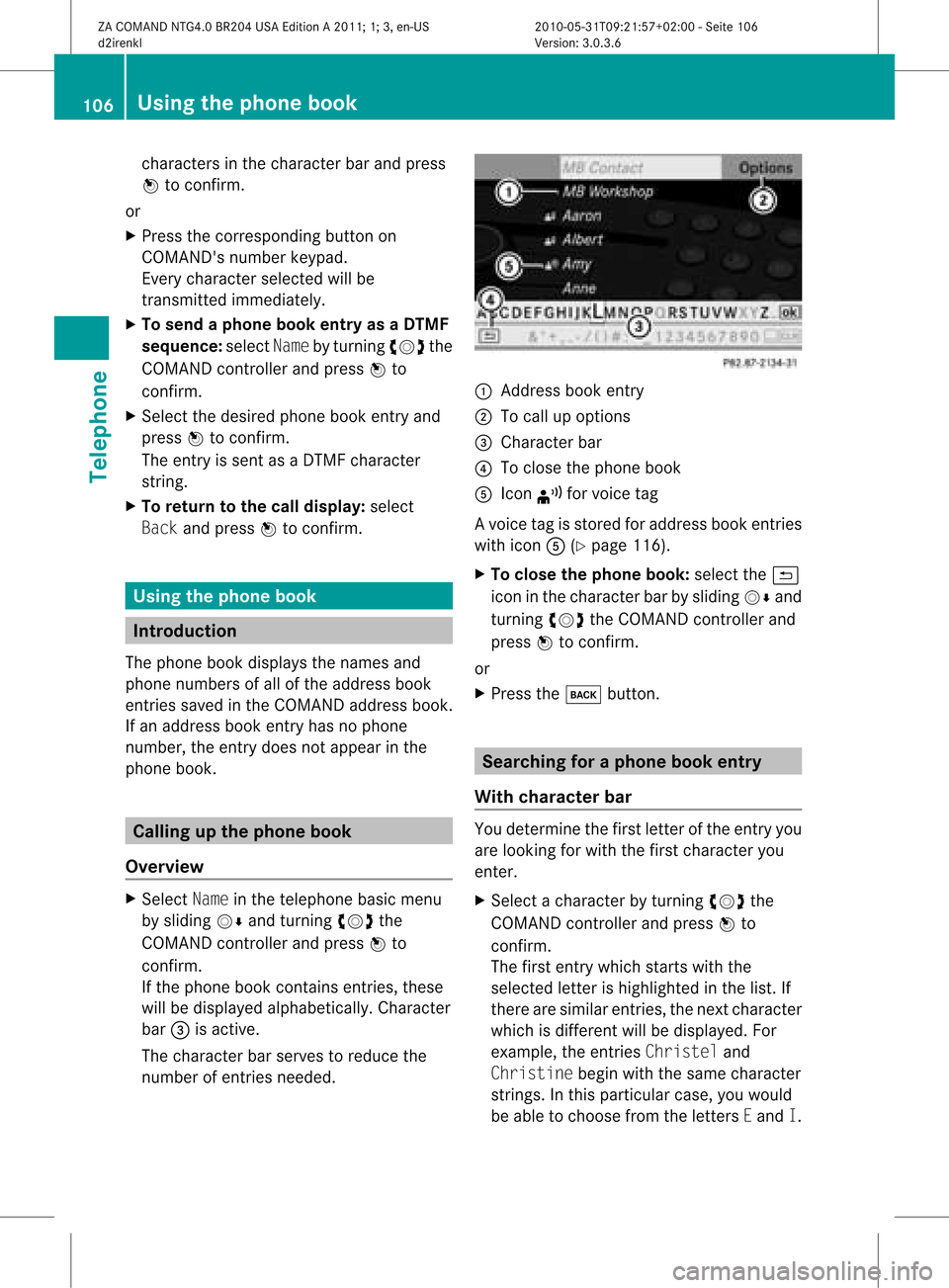
bar =isactive.
The charact erbar serves toreduce the
number ofent ries needed. :
Address bookentry
; Tocall upoption s
= Character bar
? Toclose thephone book
A Icon ¦forvoice tag
Av oice tagisstored foraddress bookentries
with iconA(Ypage 116).
X To close thephone book:select the&
icon inthe charact erbar bysliding VÆand
turnin gcVd theCOMAND controller and
press Wtoconf irm.
or
X Press thek button . Searching
foraphone bookentry
With chara cterbar You
determin ethe first letter ofthe entr yyou
are looking forwith thefirst charact eryou
enter .
X Select acharact erby turnin gcVd the
COMAND controller andpress Wto
conf irm.
The first entrywhich startswith the
selected letterishighlighted inthe list. If
there aresimilar entries,thenext charact er
which isdifferent willbedisplay ed.For
example, theentr iesChristel and
Christine beginwiththesame charact er
strin gs.Inthis particular case,youwould
be able tochoose fromtheletters Eand I. 106
Using
thephone bookTelephone
ZACOMAND NTG4.0BR204USAEdition A2011; 1;3,en-US
d2irenk lV ersion:3.0.3.6
2010
-05-31T09 :21:57+0 2:00-Seite 106
Page 109 of 190
X
Sel ect the characte rsof the entry youare
sea rchi ngfor one byone andpressW to
confi rm.
Whe nthe selection isclear, COMAND
switches automatically tothe selection list.
X To complete thesearch: switchfromthe
phone bookwithcharacter bartothe
selection list(Ypage 107).
The lastlistentr yis automatically
highlighted.
With number pad Altern
atively, youcan also enter digits using
the number keypad(directentry)
(Y page 28).
Dele ting character s X
To delete asingle character :select the
2 iconbyturn ingcVd theCOMAN D
con troller andbriefly pressW.
or
X Brief lypress the2 button.
Eac htim eacharac terisdelete d,the entry
most closelyresem blingtheremain ing
charac tersis shown atthe top ofthe list.
X To delet ean entr y:select the2 icon
by turn ingcVd theCOMAN Dcon troller
and press Wand hold untilthe entryhas
been delete d.
or
X Press andhold the2 buttonunt ilthe
ent ireent ryhas been delete d.
Changing thelangua geofthechar acter
bar X
Selec tB andpress W.
X Selec tthe desired language . Changing
thecharacter setofthe
character bar X
Select pandpress Wtoconfirm .
The character setchanges eachtimeyou
make thisselection.
Selec tinganentry directly fromthelist You
canswitch tothe listatany time during
character entry.
X Slide VZtheCOMAND controller
repeatedly orpress andhold Wuntil the
character bardisappe ars.
or
X Select ¬andpress Wtoconfirm .
X To selec tanentry :turn cVd the
COMAND controller untilthedesired entry
is highlighted andpress Wtocon firm.
To select aphone number: ifan entry
contains morethanonephone numbe r,this
is indi cated bythe Gicon.
X Select aphone bookentry withtheGicon
and press Wtoconfirm.
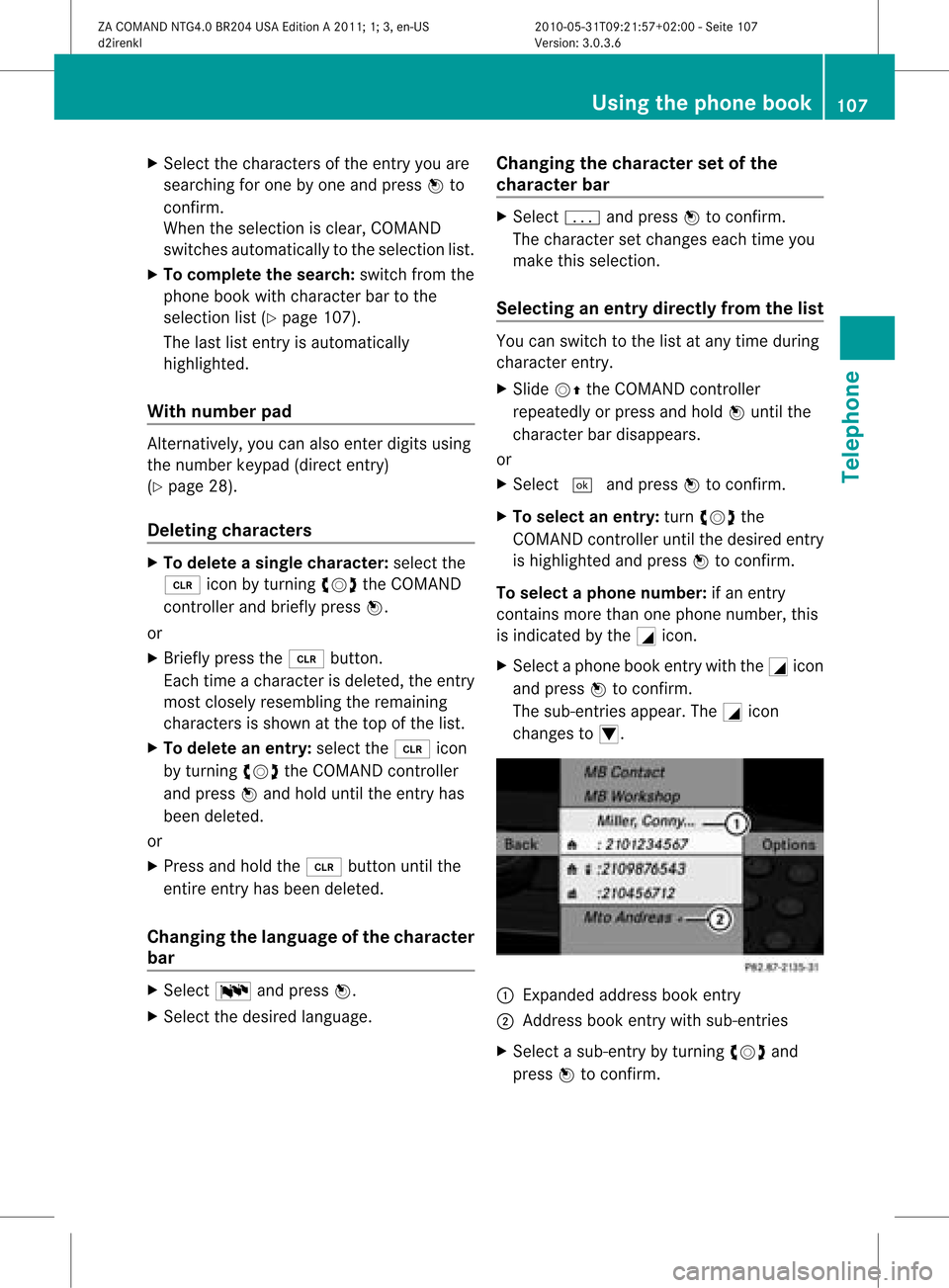
The sub-entries appear. TheGicon
changes toI. :
Expanded address book entry
; Address bookentry withsub-entries
X Select asub -entry byturning cVdand
press Wtoconfirm. Usi
ngthe phone book
107Tele phone
ZACOMAND NTG4.0BR204USAEdition A2011; 1;3,en-US
d2ire nkl Version:3.0.3.6
<003000230024002300250023002000250035002400490023002C002D00300024
002D00200034003300230030002D00230023V
-Seite 107 Z
Page 117 of 190

Cha
nging thecat egor yof atele phone
num berdata field X
Dis play thedet ailed viewforanaddre ss
book entry (Y page 114)and highlight the
te lepho nenum berdatafiel d.
X Sel ect Optionsby slidin gVY the
COMA NDcontroll erand pres sW to
co nfirm .
X Sel ect Change Categoryand pres sW to
co nfirm .
X Sel ect anum bercategor y,e.g .Hom e.
X Sel ect ate lepho necat egor y,e.g .Mob ile
Pho ne.
X Ifdesir ed,selec tPre ferred andpres sW
to confirm .
De pen dingon theprev ious status ,swit ch
th eopt ion onO oroff ª.T hephone
number isdispla yedasthe first number in
the phone bookandcanbediale d
immediately.
X Select Saveandpress Wtoconfirm .
The new category isstored. Calling
anumber storedinan entry
Conditions The
mobile phonemustbeconn ected viathe
Bluetooth ®
interfac e.
Option 1 X
Call upthe detailed viewofan address book
entr y(Y page 114).
X Select thephone number datafieldby
turning cVdtheCOMAND controller and
press Wtoconfirm .
The callismade. Thedispla yswitc hes to
tel ephon emode . Opt
ion 2 X
Dis play thedet ailed viewforanaddres s
book entry.
X Sele ctthephon enum berdata fieldby
tur nin gcVd theCOMA NDcontroller .
X Sele ctOpt ionsby slidin gVY the
COMA NDcontroller andpres sW to
con firm.
X Sele ctCal land pres sW tocon firm.
The callismade. St
artin grou teguid ance toan entr y
Not es This
function isavailable assoon asyou have
st ored adest inationinthed estin ation
memory (Ypage 80).COMAND alsosaves
destin ations inthe address booktogether
with allthe data required forroute guidance.
Opt ion 1 X
Searc hfor anaddress bookentry
(Y page 112)with the ¤icon andselec tit
from thelist.
X Displ aythe detai ledview foranadd ress
book entry (Ypag e114).
X Select theaddress data fieldb ytur ning
cVd theCOMA NDcontro ller and press
W toconfirm .
Op tion 2 X
Se arc hfo ran addr essbooken try
(Y page 112)wit hthe ¤ icon andselect it
from thelist.
X Select Options bysliding VYthe
COMAND controller andpress Wto
confirm .
X Select Navigate andpress Wtoconfirm .
If the address dataiscomplete andit
matches thedigital map,route guidance
starts irrespective ofthe option chosen. Using
theaddress book
115Telephone
ZACOMAND NTG4.0BR204USAEdition A2011; 1;3,en-US
d2irenkl Version:3.0.3.6
2010-
05-31T09:21 :57+02:00-Seite 115 Z
Page 131 of 190

The
DVD changer loadsthedisc intothe
selected magazine tray.Youseethe
Loading Disc
i Itmay take some timeforthe disc tobe
loaded, depending onthe type ofdisc. Ifno
disc isinsert edfor approximately 20
seconds, thedisplay returnstothe
magazine menu.
The DVD changer playsthedisc if:
R ithas been insert edcorrec tly.
R itis apermissible typeofdisc. :
Magazine traycontains adisc (eject
funct ionisavaila ble)
; Empt ymagazine tray(disc canbeloaded)
X To exit themenu: pressthe8 eject/
load button againorpress thek button .
or
X Select Backbysliding VÆandturnin g
cVd theCOMAND controller andpress
W toconf irm.
X To fill empt ymagaz inetrays: press the
8 load/eject button.
The magazine menuappears.
X Select FillEmpty Slots.
You seethePlease Wait... message.
COMAND switchestothe next empty
magazine tray.Youthen seethePlease
Insert Disc
i Never insertadata medium before
COMAND promptsyoutodo so. Never
insert morethanonedisc atatime intoa
magazine tray. X
Insert adisc intothedisc slotwith the
printed sidefacing upwards.
You seethePlease Wait... message.
Once thedisc isloaded, theDVD changer
switches tothe next empty tray.Yousee
the Please InsertDisc
X Repeat thisstep until alltrays areloaded.
The DVD changer willplay thelast disc
loaded ifit has been insert edcorrec tlyand
is of apermissible type.Thisapplies even
if not alltrays havebeen loaded withadisc.
X To complete theinsertion: pressthe
8 eject/load button againorpress the
k button .
Ejecting discsfromtheDVD changer If
you remove onedisc while playinganother
disc, theDVD changer interrupts playback.
Playb ackcont inues oncethedisc hasbeen
eject ed.
X To eject aCD/DVD: pressthe8 load/
ej ec tbut ton.
or
X Se lec tBac kby slid ing VÆ andturning
cVd theCOMA NDcontrol ler and press
W toconfirm .
The mag azine men uappea rs.T he magazine
tray containing thecurrent discis
highlighted. :
Ejec ting ispossible
; Type ofdata medium
= Disc name (onlyifstored onthe disc)
? Current disc Audio
CD/DVD andMP3 mode
129Audio
ZACOMAND NTG4.0BR204USAEdition A2011; 1;3,en-US
d2irenkl Version:3.0.3.6
2010-
05-31T09:21 :57+02:00-Seite 129 Z