light MERCEDES-BENZ GLK-Class 2011 X204 Comand Manual
[x] Cancel search | Manufacturer: MERCEDES-BENZ, Model Year: 2011, Model line: GLK-Class, Model: MERCEDES-BENZ GLK-Class 2011 X204Pages: 190, PDF Size: 2.21 MB
Page 135 of 190
Pause
function
In audio CD/DVD andMP3 mode X
To pause playback: brieflypressB.
The , display isat the top leftofthe
status bar.
X To continue playback: brieflypressthe
B button again.
The , display goesout.
Only inaudio DVDmode X
To pause playback: switchonaudi oDVD
mode (Ypage 131).
X Select «bysliding VÆandturnin gcVd
the COMAND controller andpress Wto
conf irm.
The «display changes toM.
X To continue playback: selectMand press
W toconf irm.
Play back continues fromthepoint where it
was interr upted. TheMdisplay changes to
«. Stop
function
This funct ionisonly availa bleinaudi oDVD
mode.
X Switch onaudi oDVD mode (Ypage 131).
X To interru ptplayback: select±by
sliding VÆandturnin gcVd theCOMAND
cont roller andpress Wtoconf irm.
The «display changes toM.T he± icon
remains highlighted.
X To continue playback: selectMand press
W toconfirm .
Play back continues fromthepoint where it
was interrupted. X
To stop playback: whileplayback is
interrupted, select±again andpress W
to confirm .
or
X Select ±and confirm bypressing Wtwice
in rapid succession.
The selection markerisat M.
X To restar tplayback: selectMand press
W toconfirm .
Play back starts atthe beginning ofthe
DVD . Selec
tingCD/audio DVD/MP3 discs
Selec tingviathe media list X
In CD/ audio DVDandMP3 mode: select
Media bysliding VÆandturning cVdthe
COMAND controller andpress Wto
confirm .
or
X In CD/ audio DVDmode only:press W
the COMAND controller when thedispla y/
selection windowisactive.
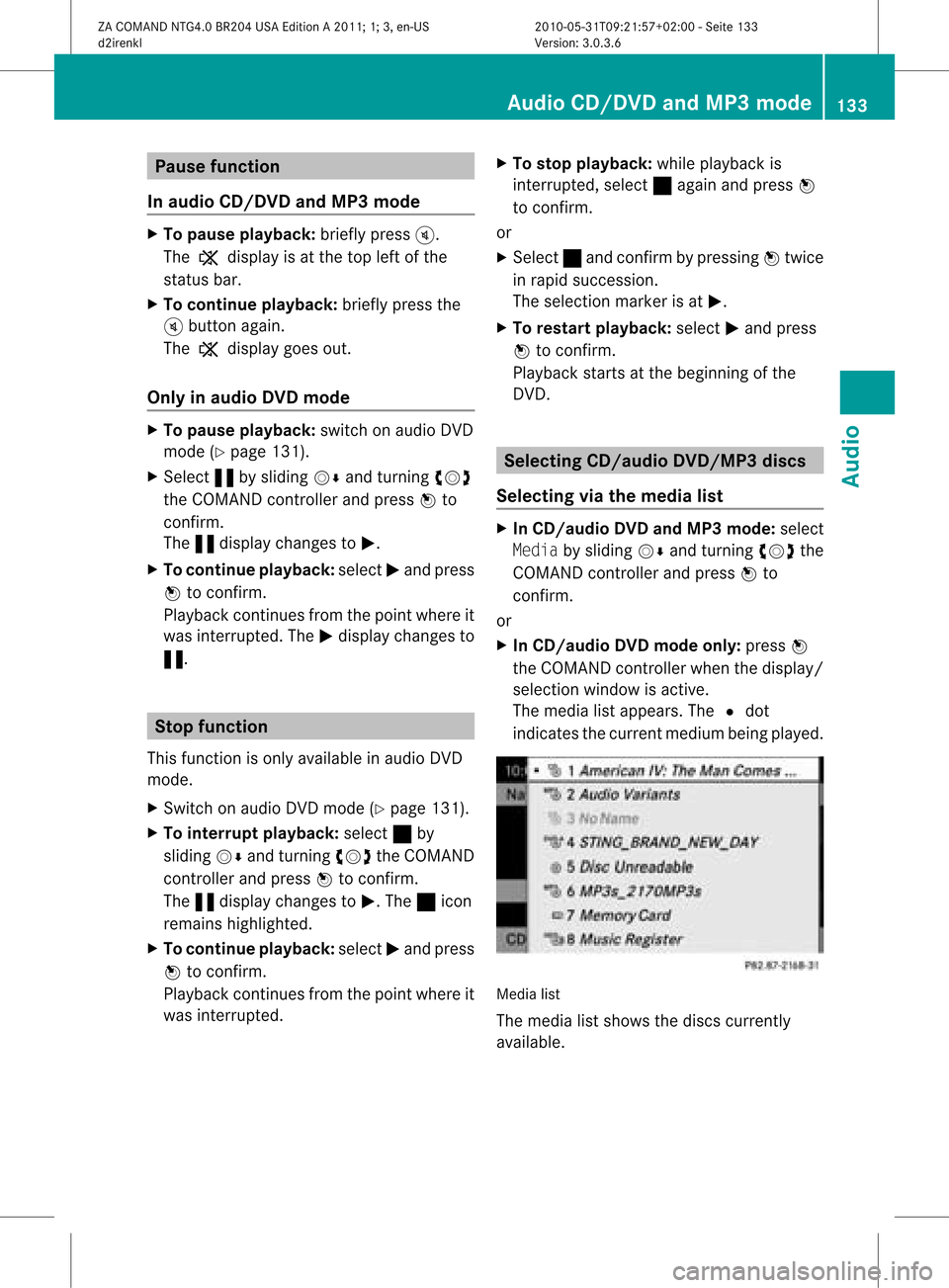
The media listappea rs.The #dot
indicates thecurrent medium beingplayed. Media
list
The media listshows thediscs current ly
availa ble. Audio
CD/DVD andMP3 mode
133Audio
ZACOMAND NTG4.0BR204USAEdition A2011; 1;3,en-US
d2irenkl Version:3.0.3.6
2010-
05-31T09:21 :57+02:00-Seite 133 Z
Page 142 of 190

Fir
ststep: select ingthetrack sfor
reco rding X
Se lec tthe Track byturning cVdthe
COMAND controller andpress Wto
confirm . :
Torecord allmusic files(standard)
; Torecord individua ltrack sO
= Toconfirm yourselection
If you donot select anytrack ,all track sonthe
CD are recorded.
Seco ndstep: selectingatarget folder X
Sele ctthe Folde rby turning cVdthe
COM AND controll erand pres sW to
confirm. :
Tocreate anew folder(sta ndard )
; Existing folders
= Currently selected folder
X Sele ctafold erby turning cVdthe
COM AND controll erand pres sW to
confirm. If
you donot select atarge tfolder, anew
target folderiscreated.
Thir dstep: startrecording X
Select Startbyturnin gcVd theCOMAND
cont roller andpress Wtoconf irm.
Infor mation onthe recordin gsource and
destination aswell asthe recordin g
progress isdisplay ed. The
audio CDbasic display appears
automatically afterasuccessful recording.
X To cancel recording: confirmCancel with
the COMAND controller Wduring
recordin g.
The audio CDbasic display appears. Dele
ting allmusic files
This funct iondeletes allmusic filesfrom the
MUSIC REGISTER.
! The deletion procedure maytake several
minutes. Inorder toprevent malfunct ions,
do not use COMAND duringthisperiod.
X Select Music Register bysliding VÆand
turnin gcVd theCOMAND controller and
press Wtoconf irm.
X Select Delete AllMusic Filesand
press Wtoconf irm.
Aq uery appear s.No ishigh light ed.
If you sele ctYes ,all musi cfiles aredelet ed.
You seethePlea seWait ...mess age.
Then ,you seetheDele tion Procedure
Succ essf ulmess age. 140
MUSIC
REGISTERAudio
ZACOMA NDNTG4. 0BR20 4USA EditionA201 1;1;3,en- US
d2ir enklV ersion:3.0.3.6
2010
-05-31T09 :21:57+0 2:00-Seite 140
Page 143 of 190

If
you select No,the process willbe aborted . Call
ingupmemory spaceinfo
X Select Music Register byslid ing VÆ and
turning cVdtheCOMAND controller and
press Wtoconfirm.
X Select Memory Infoandpress Wto
confirm.
The follo wing isdisp layed:
R storage capacity
R avai lablememory
R occupie dmemory
R content (folders,tracks) Fol
der functio ns
Introductio n You
canview thecontent ofthe MUSIC
REGISTER, changefolderortrack names and
dele teindivi dualfolders ortracks.
Call ingupthe MUSIC REGISTE R X
Select Folder byslid ing VÆ andturning
cVd theCOMAND controller andpress
W toconfirm.
or
X Press Wthe COMAND controller whenthe
disp lay/selection windowisactive.
You seethecontent sof the current folder. :
Folder selection symbol
; Icon formusic file
= Current folder
X To swi tch tothe superordinate folder:
select theU iconandpress Wto
confirm.
The displaychanges tothe next folder up.
Changi ngthe folder/ trackname X
Select Folder byslid ing VÆ andturning
cVd theCOMAND controller andpress
W toconfirm.
X Select afolder/track byturning cVd.
X Select Options byslid ing VY andpress
W toconfirm.
X Select Change andpress Wtoconfirm.
X Ent eraname forthe folder/track.
X To save thechange s:select ¬and
press Wtoconfirm.
De letin gfolders/ tracks X
Select Folder byslid ing VÆ andturning
cVd theCOMAND controller andpress
W toconfirm.
X Select afolder/track byturning cVd.
X Select Options byslid ing VY andpress
W toconfirm.
X Select Delete andpress Wtoconfirm.
Aq uery appear s.No ishigh light ed.
If you selectYes ,th efol der s/track sare
delet ed.You seethePle ase Wait... MUS
ICREG ISTER
141Audio
ZACOMA NDNTG4 .0BR2 04USAEd ition A20 11;1; 3,en-US
d2i ren kl Version :3. 0.3.6
20
10-05-31 T09 :21:57 +02:00 -Sei te14 1 Z
Page 145 of 190
(for
theUSA )or Custom erRelation sat
1- 800 -387- 010 0(for Canada). Connecting
anexter naldevice
i Donot leave extern aldevice sin your
vehic leas ext reme temperatur es(e.g.
caused bydirect sunlight orext remely low
outside temperatur es)can effec t
func tionality (see theoperat ing
inst ruct ions forthe respec tivedevice ).
Merc edes- BenzUSA ,LLC does nottake
respon sibility forany damage toext ern al
device s.
Never connectmore thanonedevice ata
time .You will otherwise notbeable toplay
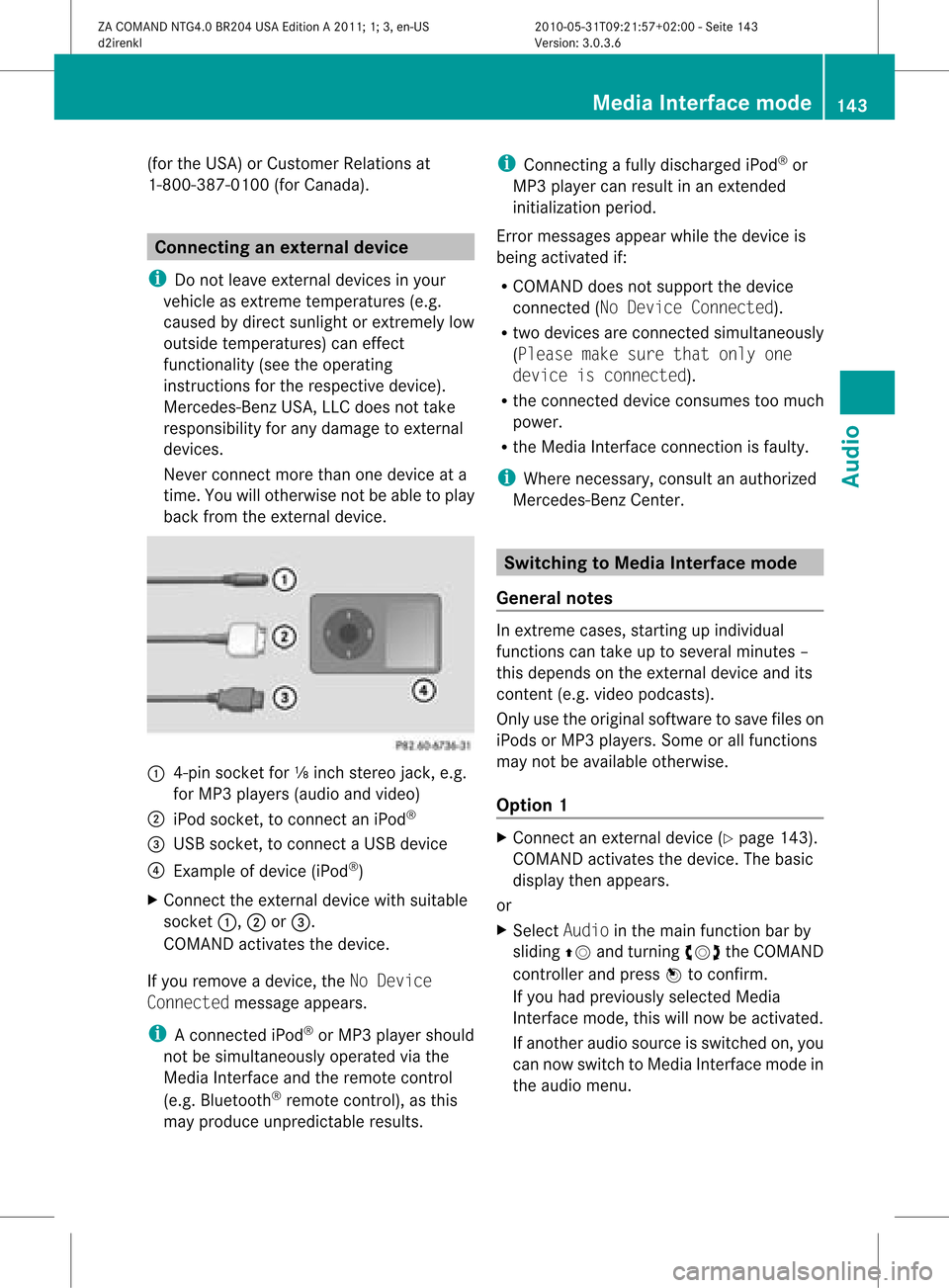
back fromtheexter naldevice. :
4-pin socket for⅛inch stereo jack,e.g.
for MP3 playe rs(audi oand video)
; iPod socket ,to conn ectaniPod ®
= USB socket ,to conn ectaUSBdevice
? Examp leof device (iPod ®
)
X Co nnect theexter naldevice with suita ble
socke t:, ;or=.
CO MAND activate sthe device .
If yo uremo veade vice ,the No Device
Connected messageappears.
i Aconn ected iPod®
or MP3 playershould
not besimultaneously operatedviathe
Media Interface andtheremote control
(e.g. Bluetooth ®
remote control), asthis
may produce unpredictable results. i
Connect ingafully discharged iPod®
or
MP3 playercan result inan exten ded
initialization period.
Error messages appearwhile thedevice is
being activated if:
R COMAND doesnotsupport thedevice
conn ected (No Device Connected).
R two devices areconn ected simultaneously
(Please makesurethatonlyone
device isconnected).
R the conn ected device consumes toomuch
power.
R the Media Interface connection isfaulty.
i Where necessary, consultanauthorized
Mercedes-Ben zCent er. Switching
toMedia Interfacemode
General notes In
ext reme cases, startingupindividual
func tionscan take uptoseveral minutes–
this depends onthe external device andits
con tent(e.g. video podcasts ).
Only usetheoriginal software tosave fileson
iPods orMP3 players. Someorall func tions
may notbeavailable otherwise.
Opt ion 1 X
Connec tan ext ernal device (Ypage 143).
COMAND activates thedevice. Thebasic
display thenappears.
or
X Select Audiointhe main function barby
sliding ZVandturningcVd theCOMAND
con troller andpress Wtocon firm.
If you had previously selectedMedia
Int erface mode,thiswillnow beactiv ated.
If anoth eraudio source isswitch edon, you
can now switch toMedia Interface modein
the audio menu. Media
Interfacemod e
143Audio
ZACOMAND NTG4.0BR204USAEdition A2011 ;1; 3,en-U S
d2irenk lV ersion:3.0.3.6
2010
-05-31T09 :21:57+0 2:00-Seite 143 Z
Page 148 of 190

Exam
ple of displ ay:c ateg orylist
: Dev iceiconand devic enam e
; Sele ctable categor ies
X Sele ctthecat egor y/folder byturnin g
cVd theCOMA NDcontroller andpres s
W tocon firm.
You willsee thecon tent oftheselec ted
cat egor yor selec tedfold er.
i Ifth edata needstobe read from the
con necteddevic e,thePle ase Wait...
mes sage appears .
X Ifnec essar y,repe atthis oper atingst ep
unt ilth etrack sin thes elected folder/
album appear. Ex
ample ofdisplay: currenttrac klist
: Icon fornex tfolder up
; Current category
= Track symbol
? Current track
X Select thetrac kby turn ingcVd the
COMAND controller andpress Wto
con firm.
The trackisplay ed. X
To selec tone folder higher: selectthe
U iconandconfirm with W.
i The U iconisalway sshown rightatthe
top ofthe respect ivefolder. Playing
thecontent ofacategory or
folder
X Select thecategor yor folder byturn ing
cVd theCOMAND controller.
X Press Wthe COMAND controller forlonger
than twosecon ds.
The contentofthe category orfolder
selected isplay edinaccordance withthe
play back option (Ypage 136)selected. Alphabetical
track selec tion
iPod ®
and MP3 player This
funct ionisavaila bleforalpha betically
sorted categories andfolders. Thisfunct ion
is not availa bleforalbu msorplay lists, for
example.
X Select acategory, e.g.Artists, byturning
cVd theCOMAND controller andpress
W toconfirm .
The availa bleartists appear.
X Press thecorresponding numberkeyonce
or several timestoselect thefirst letter of
the artist's name(e.g.foranartist
beginning withtheletter "C",press number
key ;three times).
You seetheavaila bleletters atthe bottom
edge ofthe displa y.
Aft eramessage, thefirst entryin the list
which matches theletter entered is
highlighted.
i Ifthere isno entr ywhich matches the
letter entered, thelast entryin the list
which matches aprevious letteris
highlighted.
i For iPods ®
and MP3 players, thequal ity
of the search results ishighly dependent on146
Media
Interface modeAudio
ZACOMAND NTG4.0BR204USAEdition A2011; 1;3,en-US
d2irenkl Version:3.0.3.6
2010-
05-31T09:21 :57+02:00-Seite 146
Page 160 of 190

X
Sel ect DVD Functi ons andpressW to
confi rm.
X Sel ect Subtitles orCam era Angleand
pre ssW toconfi rm.
In both cases, amenu appe ars .The # dot
in front ofan entr yindicates thecurrent
settin g.
X Select asettin gby turning cVdthe
COMAND controller andpress Wto
confirm .
X To exit themenu: slideXVY theCOMAND
cont roller. Interactive
content
DVD scan cont aininteract ivecont ent(e.g. a
video game). Inavideo game, forexample,
you may beable toinfluence eventsby
selecting andtriggering actions.Thetype and
number ofactions depend onthe DVD .
X Select anaction bysliding ZVÆorXVY the
COMAND controller andpress Wto
execute it.
A menu appearsand thefirst entry,
Select, ishighlighted.
X Press theWCOMAND controller. 158
DVD
video modeVideo
ZACOMAND NTG4.0BR204USAEdition A2011; 1;3,en-US
d2irenkl Version:3.0.3.6
2010-
05-31T09:21 :57+02:00-Seite 158
Page 164 of 190
Remo
tecontrol
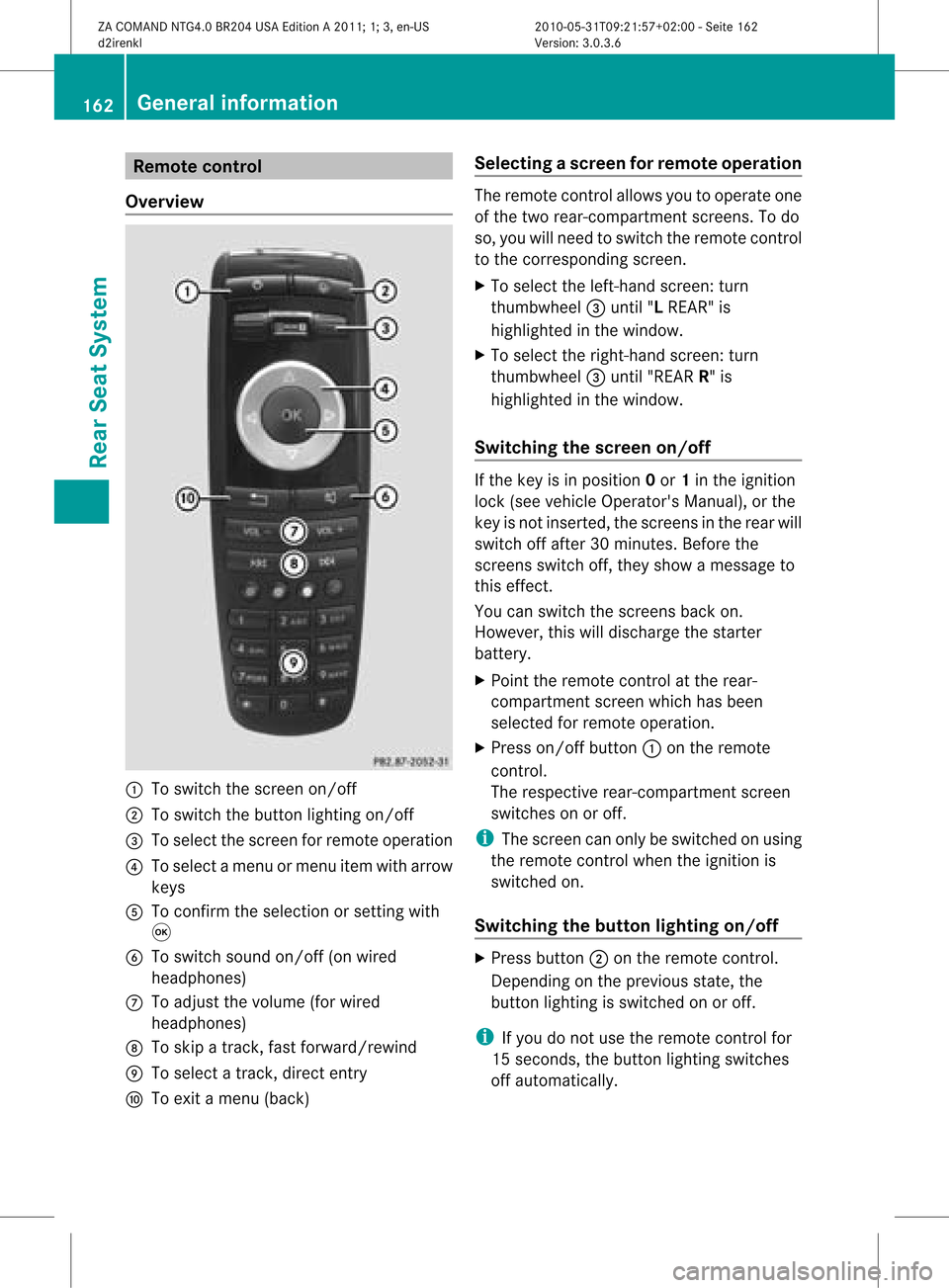
Ove rview :
Toswitch thescre enon/off
; Toswitch thebutton lighti ngon/off
= Toselect the scre enfor remo teope ration
? Toselect amenu ormenu itemwith arr ow
key s
A Toconfi rmthe selectio nor setti ngwith
9
B Toswitch soundon/off (onwired
hea dphone s)
C Toadjust thevolume (forw ired
headphon es)
D Toskip atrack ,fast forward/r ewind
E Toselec ta track ,direc tent ry
F Toexit amen u(back ) Selecting
ascree nfor rem oteoper ation The
remoteco ntrol allows youtooper ateone
of thetwo rear-comp artmen tsc ree ns.To do
so, you willneed toswit chtherem oteco ntrol
to theco rrespo nding scree n.
X To sele cttheleft -hand scree n:tur n
th umbwh eel=until"L REA R"is
high light edinthewin dow.
X To sele cttherig ht-hand scree n:tur n
th umbwh eel=until"REA RR" is
high light edinthewin dow.
Swit chingth escr een on/off If
th eke yis in posi tion 0or 1in theign ition
loc k(see vehicle Operator's Manual),or the
key isnot inserted, thescreens inthe rear will
switch offafter 30minutes. Beforethe
screens switchoff,they show amessage to
this effect.
You canswitch thescreens backon.
However, thiswilldischarge thestarter
battery.
X Point theremote controlatthe rear-
compartment screenwhichhasbeen
selected forremote operation.
X Press on/off button:onthe remote
cont rol.
The respective rear-compartmen tscreen
switches onoroff.
i The screen canonly beswitched onusing
the remote controlwhen theignition is
switched on.
Switching thebutton lighting on/off X
Press button ;onthe remote control.
Depending onthe previous state,the
button lighting isswitched onoroff.
i Ifyou donot use theremote controlfor
15 seconds, thebutton lighting switches
off automaticall y.162
General
informat ionRearSeatSystem
ZACOMAND NTG4.0BR204USAEdition A2011; 1;3,en-US
d2irenkl Version:3.0.3.6
2010-0
5-31T09 :21:57+02:0 0-Seite 162
Page 169 of 190
Right
-hand battery: thepos itive pole (+)
mus tface down wards .
X To close thebat terycomp artm ent :
pres sth ebat tery compar tmentlid
downwar dsunt ilit clips intoplace.
If the batt eries havebeen inserted
cor rectly, the indic atorlamp willlight up
green whentheheadphon esare switc hed
on. Ba
sic functions Using
headphones
You canusethewireless headphon es
supplied and/orup totwo setsof wired
headphon escon nected tothe correspo nding
jac kof the rear- compartmen tscr eens
(Y page 161).
In for mat ionon:
R switc hingthewireless headphon eson/ off
R adjust ingthe volume ofthe headphon es
R selec tingascr een forthe headphon es
can befoun din the Wireles sheadphon es
sect ion(Ypage 164). Using
thema inloud spea kers
This function isavailable incon junction with
COMA ND.
You canusethevehic leloudspeak ersto
list en toadisc inserted inthe rear-
com partmen tdrive. Todo so, atlea stone of
the rear-compa rtmentscreens mustbeset to
disc mode.
X To set using COMA ND:press, for
exampl e,the efunction buttontoswi tch
on anaudio mode.
X Select Audiobyslid ing ZV theCOMAND
controller andpress Wtoconfirm.
The audio menu appears.
X Select Rearbyturning cVdtheCOMAND
controller andpress Wtoconfirm. i
The headpho nes'volumesetting doesnot
affect themain loudspe akers. Adjusting
thesoun dsettings
You canselec tthe sound settingsinthe audi o
CD/DV D/MP3, videoDVDandAUX modes.
X Switch onanoperating mode(e.g.audio
CD mode) (Ypage 170).
X Select Treble orBass using
the :=; buttonsonthe remote
cont roland press the9button toconfirm .
As etting scale appears.
X Select asett ingusing the9:
button sand press the9button tocon firm. Several
users
Simult aneous useofthe rear -
compa rtment drive The
two rear-c ompartm entscreen scan be
operated almostentirely independen tlyfrom
one anoth er.However, therecan beacon flict
in some menus ifthe two screen sare used at
the same time.
If the rear-c ompartm entdrive isbeing used
for both screen ssimultaneously, selecting
cert ainmenus orsett ings onone ofthe
screen salso affect sthe other screen .
The following functionsaffect bothscreen s:
R changin gplayback options
R select ingatrac k(from thetrac klist ora
folder)
R using theplay, pause andstop functions
R fast forwarding /rewindingor scrollin g
R calling upthe DVD menu andnavigatin g
within it
R sett ingthe language, subtitlesandcamera
angle
R calling upinteract iveDVD content Ba
sic functions
167RearSeatSystem
ZACOMAND NTG4.0BR204USAEdition A2011 ;1; 3,en-U S
d2irenk lV ersion:3.0.3.6
2010
-05-31T09 :21:57+0 2:00-Seite 167 Z
Page 180 of 190
X
Opt ion2:select anymenu iteminthe DVD
menu.
X Select theGoUpmenu iteminthe menu
and press the9button tocon firm.
Going backtothe movie X
Opt ion 1:press the% backbutton on
the remot econ trol repeatedly untilyousee
the film orselect thecorr espondin gmenu
item inthe DVD menu.
X Opt ion2:select anymenu iteminthe DVD
menu andpress the9button tocon firm.
X Select theBack (tomovie) menuitemin
the menu andpress the9button to
con firm. Setting
theaudioform at
This function isnot available onallDVD s.Ifit
is available, youcan setthe audio language
or the audio format .The number ofsettin gs
is determined bythe DVD content. Itis
possible thatthesettin gsmay alsobe
accessed inthe DVD menu.
X Press the9button onthe remote control
and show themenu.
X Select DVD-Video andpress the9button
on the remote controltoconfirm .
X Select DVDFunctions andpress the9
button toconfirm .
X Select Audio Language andpress the9
button toconfirm .
Am enu appears afterashort while. The
# dot infron tof an ent ryindicat esthe
curren tlyselect edlanguage.
X Select alanguage usingthe9:
button sand press the9button tocon firm.
X To exit themenu: pressthe=
or ; button . Subtit
lesand camer aangle
These functionsare not available onallDVD s.
The number ofsubtitle languages andcamera
angles available dependsonthe contentof
the DVD. Itis po ssi ble tha tthe settin gsmay
also beaccessed inthe DVD menu.
X Press the9button onthe remote control
and show themenu.
X Select DVD-Video andpress the9button
on the remote controltoconfirm .
X Select DVDFunctions andpress the9
button toconfirm .
X Select Subtitles orCamera Angleand
press the9button toconfirm .
In both cases, amenu appearsafter afew
seconds. The#dot infront ofan entr y
indicates thecurrent setting.
X Select asettin gusing the9:
buttons andpress the9button toconfirm .
X To exit themenu: pressthe=
or ; button. Interactive
content
DVD scan also containinteract ivecont ent
(e.g. avideo game). Inavideo game, youmay
be able toinfluence eventsbyselecting and
triggering actions.Thetype andnumber of
actions depend onthe DVD .
X Select anaction usingthe
9;:= buttonsonthe
remote controland press the9button to
execute it.
A menu appearsand thefirst entry,
Select, ishighlighted.
X Press the9button. AUX
mode Introduction
You canconn ectone extern alvideo source to
each ofthe displa ysofthe Rear Seat 178
AUX
modeRear SeatSystem
ZACOMAND NTG4.0BR204USAEdition A2011; 1;3,en-US
d2irenkl Version:3.0.3.6
2010-
05-31T09:21 :57+02:00-Seite 178