remote control MERCEDES-BENZ GLK-Class 2011 X204 Comand Manual
[x] Cancel search | Manufacturer: MERCEDES-BENZ, Model Year: 2011, Model line: GLK-Class, Model: MERCEDES-BENZ GLK-Class 2011 X204Pages: 190, PDF Size: 2.21 MB
Page 177 of 190
the
DVD menu appe ars, yo uwi llnee dto
sta rtthe film ma nua lly.
X Sel ect the corr espo ndi ngmenu itemi nthe
DVD menu. Showing
/hidingthenavigation menu
X To show: pressthe9 or: button
on the remote control.
X To hide: press the9 or: button.
or
X Wait forapproximately eightseconds. Navigation
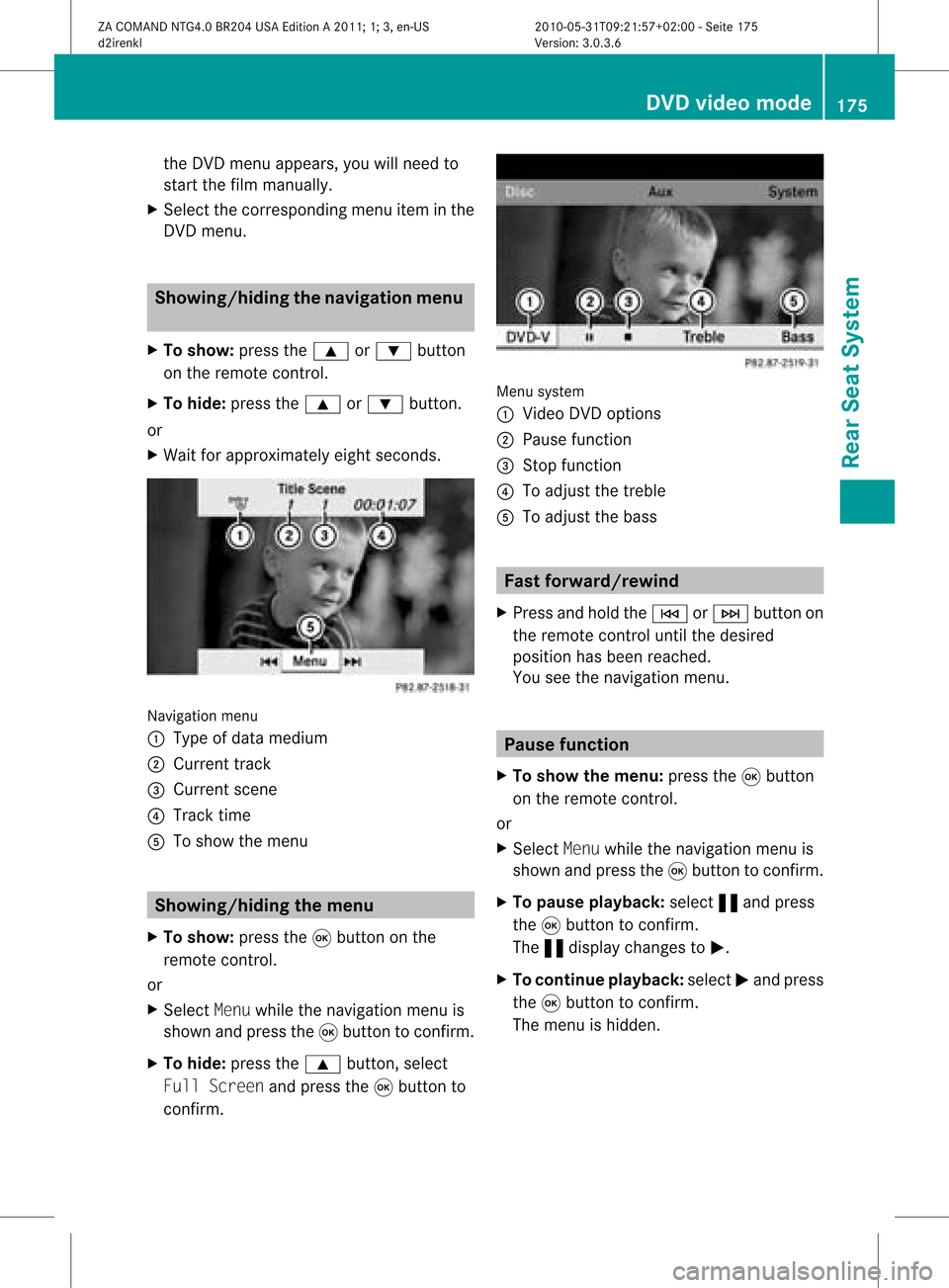
menu
: Type ofdata medium
; Current track
= Current scene
? Track time
A Toshow themenu Showing
/hidingthemenu
X To show: pressthe9button onthe
remote control.
or
X Select Menuwhile thenavigation menuis
shown andpress the9button toconfirm .
X To hide: press the9 button, select
Full Screen andpress the9button to
confirm . Menu
system
: Video DVDoptions
; Pause function
= Stop function
? Toadjust thetreble
A Toadjust thebass Fast
forward /rewind
X Press andhold theE orF button on
the remote controluntil thedesired
position hasbeen reached.
You seethenavigation menu. Pause
function
X To show themenu: pressthe9button
on the remote control.
or
X Select Menuwhile thenavigation menuis
shown andpress the9button toconfirm .
X To pause playback: select«and press
the 9button toconfirm .
The «displa ychanges toM.
X To continue playback: selectMand press
the 9button toconfirm .
The menu ishidden. DVD
video mode
175RearSeatSystem
ZACOMAND NTG4.0BR204USAEdition A2011; 1;3,en-US
d2irenkl Version:3.0.3.6
2010-
05-31T09:21 :57+02:00-Seite 175 Z
Page 178 of 190

Stop
function
X To show themenu: pressthe9button
on the remote control.
or
X Select Menuwhile thenavigation menuis
shown andpress the9button toconf irm.
X To interru ptplayback: select±and
press the9button toconf irm.
The «display changes toM.T hevideo
image ishidden.
X To continue playback: selectMand press
the 9button toconfirm .
Play back continues fromthepoint where it
was interrupted. Themenu ishidden.
X To stop playback: whileplayback is
interrupted, select±again andpress the
9 button toconfirm .
Play back stops andjumps tothe beginning
of the DVD .The selection markerisat M.
X To restar tplayback: selectMand press
the 9button toconfirm .
Play back starts fromthestart ofthe DVD . Selec
tingascene/ch apter
Not es Fur
ther inform ation on this fun ction is
availab lein theVide osec tion (Y page 155).
Ski pping forwar ds/back wards X
Pre ssthe= or; buttonon the
rem oteco ntrol .
or
X Pre sstheE orF button.
The navigat ionmen u(Y page 154)appear s
for appr oximat elyeigh tsecon ds.
Selecting ascene/ch apter directl y The
example sillust ratehow tosele ctscen e/
ch apt er5. X
Op tion1: while thefilm isplayin g,pre ss
th eh buttonon therem oteco ntrol .
X Pre sstheco rrespo nding num berkey,suc h
as ¿.
X Op tion2: while thefilm isplayin g,pre ss
th e9 buttonon therem oteco ntrol and
sho wthemen u.
X Se lec tDVD -Video andpressthe9 but ton
to confirm .
X Se lec tDVD Functions andpressthe9
but tonto confirm .
X Se lec tSce neSelection andpressthe
9 buttonto confirm .
X Se lec t5 usin gth e9 or: buttona nd
pre ssthe 9button toconfi rm.
In bo th cas es, play ba ck willbe gina fter a
short whilewith scene/chap ter5. Sel
ecting afilm/t itle
Not es Furt
herinformat iononthis func tion is
available inthe Video section(Y page 156).
Opt ion 1 X
Press the9butt onon the remo tecon trol
and show themen u.
X Selec tDVD- Videoand press the9butt on
on the remo tecon trol to con firm . 176
DVD
video modeRearSeat System
ZACOMAN DNTG4. 0BR20 4USA EditionA201 1;1;3,en- US
d2ire nklV ersion:3.0.3.6
2010
-05-31T09 :21:57+0 2:00-Seite 176
Page 179 of 190
X
Sel ect DVD Functions andpressthe 9
bu tton toconfi rm.
X Sel ect TitleSelection andpressthe
9 button toconfi rm.
X To callup the selecti on list: pressthe
9 button.
X Sel ect afilm/tra ck.
Opti on2: Examp
le:s electin gfilm 2
X Press the· button .
Aft erashort while, film2begins. DVD
menu
Notes You
willfind furth erinfor mation onthe DVD
menu inthe Video section(Ypage 156).
Calling upthe DVD menu X
Press the9button onthe remot econ trol
and show themenu.
X Select DVD-Vid eoand press the9button
on the remot econ trol tocon firm.
X Select DVDFunctio nsand press the9
button tocon firm.
X Select Menuandpress the9button to
con firm.
The DVD menu appears.
Selecting menuitemsinthe DVD menu X
Select amenu itemusing the
9:=; buttonson the
remot econ trol and press the9button to
con firm.
Am enu appears.
i Menu itemswhich cannotbe select edare
shown ingray. X
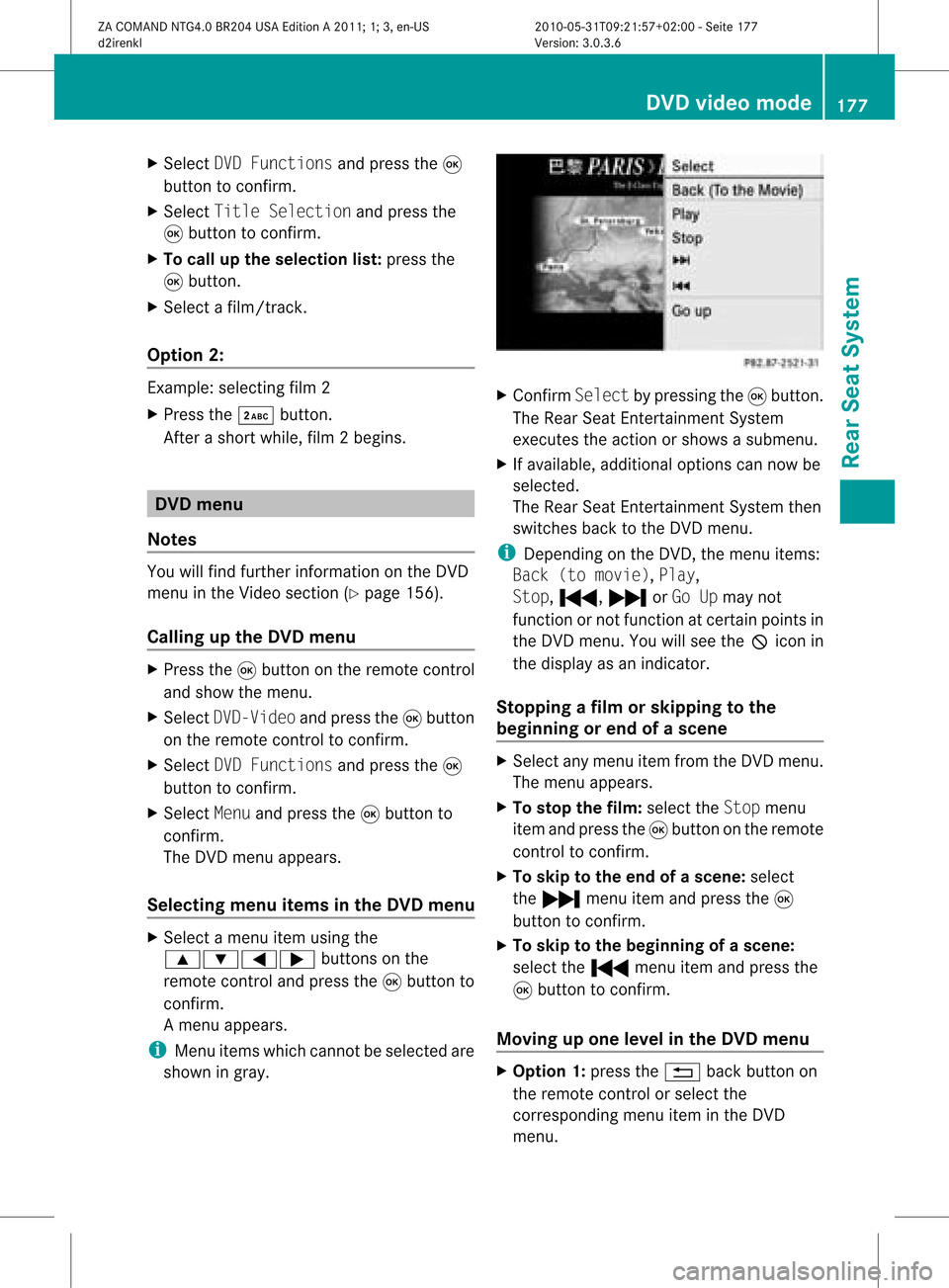
Confirm Selectbypressing the9button .
The Rear SeatEntert ainmen tSystem
exec utes theaction orshows asubmenu.
X Ifavailable, additional optionscan nowbe
selec ted.
The Rear SeatEntertainm entSys tem then
swit ches back totheDV Dmen u.
i Depen dingon theDV D,themen uite ms:
Bac k(to movie),Pla y,
Sto p,., /orGo Upmay not
fun ction ornotfun ction atcer tain poin tsin
th eDV Dm enu. Youwillsee theKicon in
the display asan indicat or.
Stopp ingafilm orskipp ingtothe
beginning orend ofas cene X
Se lec tany men uitem fromthe DVD menu .
Th emenu appe ars.
X To sto pthe film: select the Stopmenu
ite ma ndpre ssthe 9button onthe rem ote
contro lto confi rm.
X To skipto the endof asc en e:sel ect
the / menu itema ndpre ssthe 9
bu tton toconfi rm.
X To skiptoth ebeginnin gof as cene:
selec tthe . menu itemandpress the
9 button toconfirm .
Moving upone level inthe DVD menu X
Option 1:press the% backbutton on
the remote controlorselect the
corresponding menuiteminthe DVD
menu. DVD
video mode
177RearSeatSystem
ZACOMAND NTG4.0BR204USAEdition A2011; 1;3,en-US
d2irenkl Version:3.0.3.6
2010-
05-31T09:21 :57+02:00-Seite 177 Z
Page 180 of 190
X
Opt ion2:select anymenu iteminthe DVD
menu.
X Select theGoUpmenu iteminthe menu
and press the9button tocon firm.
Going backtothe movie X
Opt ion 1:press the% backbutton on
the remot econ trol repeatedly untilyousee
the film orselect thecorr espondin gmenu
item inthe DVD menu.
X Opt ion2:select anymenu iteminthe DVD
menu andpress the9button tocon firm.
X Select theBack (tomovie) menuitemin
the menu andpress the9button to
con firm. Setting
theaudioform at
This function isnot available onallDVD s.Ifit
is available, youcan setthe audio language
or the audio format .The number ofsettin gs
is determined bythe DVD content. Itis
possible thatthesettin gsmay alsobe
accessed inthe DVD menu.
X Press the9button onthe remote control
and show themenu.
X Select DVD-Video andpress the9button
on the remote controltoconfirm .
X Select DVDFunctions andpress the9
button toconfirm .
X Select Audio Language andpress the9
button toconfirm .
Am enu appears afterashort while. The
# dot infron tof an ent ryindicat esthe
curren tlyselect edlanguage.
X Select alanguage usingthe9:
button sand press the9button tocon firm.
X To exit themenu: pressthe=
or ; button . Subtit
lesand camer aangle
These functionsare not available onallDVD s.
The number ofsubtitle languages andcamera
angles available dependsonthe contentof
the DVD. Itis po ssi ble tha tthe settin gsmay
also beaccessed inthe DVD menu.
X Press the9button onthe remote control
and show themenu.
X Select DVD-Video andpress the9button
on the remote controltoconfirm .
X Select DVDFunctions andpress the9
button toconfirm .
X Select Subtitles orCamera Angleand
press the9button toconfirm .
In both cases, amenu appearsafter afew
seconds. The#dot infront ofan entr y
indicates thecurrent setting.
X Select asettin gusing the9:
buttons andpress the9button toconfirm .
X To exit themenu: pressthe=
or ; button. Interactive
content
DVD scan also containinteract ivecont ent
(e.g. avideo game). Inavideo game, youmay
be able toinfluence eventsbyselecting and
triggering actions.Thetype andnumber of
actions depend onthe DVD .
X Select anaction usingthe
9;:= buttonsonthe
remote controland press the9button to
execute it.
A menu appearsand thefirst entry,
Select, ishighlighted.
X Press the9button. AUX
mode Introduction
You canconn ectone extern alvideo source to
each ofthe displa ysofthe Rear Seat 178
AUX
modeRear SeatSystem
ZACOMAND NTG4.0BR204USAEdition A2011; 1;3,en-US
d2irenkl Version:3.0.3.6
2010-
05-31T09:21 :57+02:00-Seite 178
Page 181 of 190

Enterta
inment Syste m( AUX displ ay)and also
one externalvid eo sou rce tothe rear-
comp artment CD/DV Ddri ve (AU Xdrive) with
a sound andvideosigna l.
Plea sesee thecorrespo ndingoperating
instructions forinformati onon how to
opera tethe external videosource .
For further detailsconcerning externalvideo
source s,ple ase consult anauthorized
Mercede s-BenzCenter. Co
nne cting auxiliaryequipment
AUX drive The
AUX drive jacks areloca tedonthe CD/
DVD drive nexttothe CD/DVD ejectbutton
(Y pag e163).
AUX display The
AUX displayjacks areloca tedonthe side
of the screen (Y pag e161).
Audio andvideo conne ctio n X
Insert theaudio plugfor the left and right
signa lsinto thecorrespo ndingLand R
jacks.
X Insert thevide oplu ginto theVsocket. Swi
tching toAUX mode
AUX drive X
Select Auxinthe menu using the
9=; buttonsonthe remote
control andpress the9button toconfirm.
The AUX menu appears. AUX
menu
X Select Source fromtheAUX menu and
press the9button toconfirm.
X Select DiskDrive Auxandpress the9
button toconfirm.
You willhea rand see theconte ntofthe
exte rnalvid eo sou rce ifit is conne ctedto
the CD/DV Ddri ve and switch edto
pl ay ba ck. Ifthe source does not includea
vid eo ima ge,yo uwi llsee anaudio menu .
AU Xdis play X
Sel ect the scre entowh ich anexte rnal
vid eo sou rce isconne ctedandwhich you
wo uld like toopera tewith the rem ote
contro l(Y pa ge 162) .
X Sel ect Aux inthe menu using the
9=; buttons onthe rem ote
contro land pressthe 9button toconfi rm.
X Sel ect Source from theAUX menu and
pre ssthe 9button toconfi rm.
X Sel ect DisplayAux andpressthe 9
bu tton toconfi rm.
Yo uwi llsee and hearthe cont entofthe
extern alvideo source ifit is switched to
play back. Ifthe source doesnotinclude a
video image, youwillsee anaudi omenu. AUX
mode
179RearSeatSystem
ZACOMAND NTG4.0BR204USAEdition A2011; 1;3,en-US
d2irenkl Version:3.0.3.6
2010-
05-31T09:21 :57+02:00-Seite 179 Z
Page 182 of 190

Selec
tingtheactive COMAND source X
Select Auxinthe menu usingthe
9=; buttonsonthe remote
cont roland press the9button toconf irm.
X Select Source fromtheAUX menu and
press the9button toconf irm.
X Select COMAND Audioandpress 9to
conf irm.
The audi oor video mode selected in
COMAND istransm ittedtothe Rear Seat
Ent ertainmen tSystem. Operat
ingwith anactive COMAND
source
You cantransf eran audi oorvideo mode
selec tedinCOMA NDtothe Rear Seat
En ter tain men tSyst em.
i Ifyou subsequen tlyswitc hmodes in
COMA ND,the new sourc ewill notbe
tr ansm itted tothe Rear SeatEnter tain men t
Syst em.
X To switch onthefunct ioninCOMAN D:
switc hon the desire daudio mode in
COMA NDorshow themen uin video DVD
mode.
X Selec tthe men uitem atthe bottom left,
e.g. CDinaudio CDmode, byslidin gVÆ
and turnin gcVd theCOMA NDcontroller
and press Wtocon firm .
X Selec tActi veAud. /Vid.Sour cefor
the Rear andpress Wtocon firm . In
the status baratthe top,you willsee the
headphon esicon andthe_icon forthe
sourc ethat hasbeen switchedon.
X To switch offthefunct ioninCOMAN D:
switc hon the desire daudio mode in
COMA NDorshow themen uin video DVD
mode.
X Selec tthe men uitem atthe bottom left,
e.g. CDinaudio CDmode, byslidin gVÆ
and turnin gcVd theCOMA NDcontroller
and press Wtocon firm . X
Selec t_Rea rAudi o/VideoOffand
press Wthe COMA NDcontroller to
con firm . Sett
ingthebrigh tness /contr ast/
color
X Selec tSour ceinthe rear- compartmen t
scr een and press the9butt onon the
remo tecon trol to con firm .
X Selec tDisp layAuxorDisk DriveAux
and press the9butt ontocon firm .
X Selec tBrig htness,Cont rast orColo r
and press the9butt ontocon firm .
As etting scale appears.
X Select asett ingusing the9 or:
button andpress the9button tocon firm. 180
AUX
modeRear SeatSystem
ZACOMAND NTG4.0BR204USAEdition A2011 ;1; 3,en-U S
d2irenk lV ersion:3.0.3.6
2010
-05-31T09 :21:57+0 2:00-Seite 180