service MERCEDES-BENZ GLK-Class 2012 X204 Comand Manual
[x] Cancel search | Manufacturer: MERCEDES-BENZ, Model Year: 2012, Model line: GLK-Class, Model: MERCEDES-BENZ GLK-Class 2012 X204Pages: 182, PDF Size: 4.89 MB
Page 123 of 182
=
Sou ndsetti ngs
? Wea ther Band switche don
A AM radio
B FM radio
C Channe llist
Se archi ngfor achanne l X
Quic kselect: turncVd orslide XVY the
COMA NDcontroller while thed isplay/
selec tionwindow inthe radio display is
act ive.
or
X Press theE orF button.
Chann elsearc hscan sup ordown and
st ops atthe nextchan nelfoun d.
Selecting achanne lfrom thechann el
lis t X
Select Channe l by
sliding VÆandturning
cVd theCOMAND controllerand press
W toconfirm.
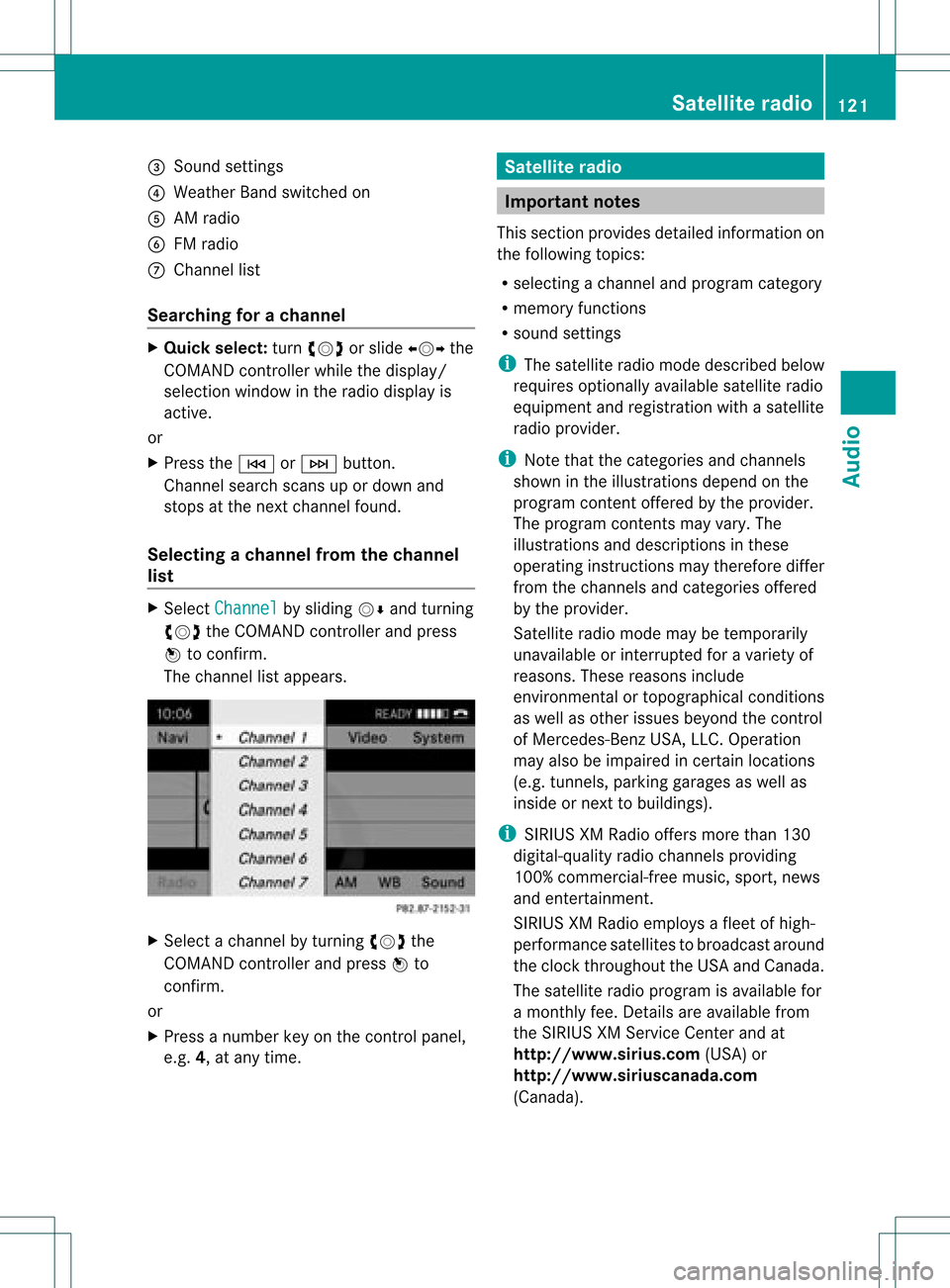
The channel lista ppears. X
Select achann elby turn ingcVd the
COMAND controller and press Wto
con firm.
or
X Press anumber keyonthe controlpanel,
e.g. 4,atany time. Sat
ellite radio Impor
tantnotes
This sectionprovides detailedinformation on
the following topics:
R select ingachann eland program category
R memor yfunc tions
R sound settings
i The satellite radiomode describedbelow
requires optionallyavailable satelliteradio
equipment andregist ration withasatellite
radio provider.
i Note thatthecateg ories andchann els
shown inthe illustration sdepend onthe
program contentoffer edbythe provider.
The program contentsmay vary. The
illustration sand descr iption sin these
operatin ginst ruct ions may therefore differ
from thechann elsand categ ories offered
by the provider.
Satellit eradio mode maybetempo rarily
unavailable orinterrupt edfor avariety of
reasons .These reasons include
environm entalortopographical conditions
as well asother issues beyond thecont rol
of Mercedes-Ben zUSA, LLC.Operation
may alsobeimpaired incertain locations
(e.g. tunnels,parking garages aswell as
inside ornext tobuild ings).
i SIRIUS XMRadi ooffers morethan130
digital-qua lityradio channels providing
100% commerc ial-freemusic,sport,news
and entert ainment.
SIRIUS XMRadi oemploys afleet ofhigh-
performance satellitestobroadcast around
the clock throughout theUSA andCanada .
The satellite radioprogram isavaila blefor
a mont hlyfee. Details areavaila blefrom
the SIRIUS XMService Centerandat
htt <0010002C00210021001700170017002000130009001200090015001300200003
000F000DB (USA)or
htt <0010002C00210021001700170017002000130009001200090015001300030001
000E00010004000100200003000F000DB
(Canada ). Satellite
radio
121Audio
Page 124 of 182
Reg
isteri ngsate llite radio
X Swi tch onsatell ite rad iomod e
(Y page 122).
The satell ite rad iomai nm enu appears
showing theweather channel.You cann ot
select anyother stations.
X Select SatRadio in
the lower menu bar
and press Wtocon firm.
X Select Service and
press Wtocon firm.
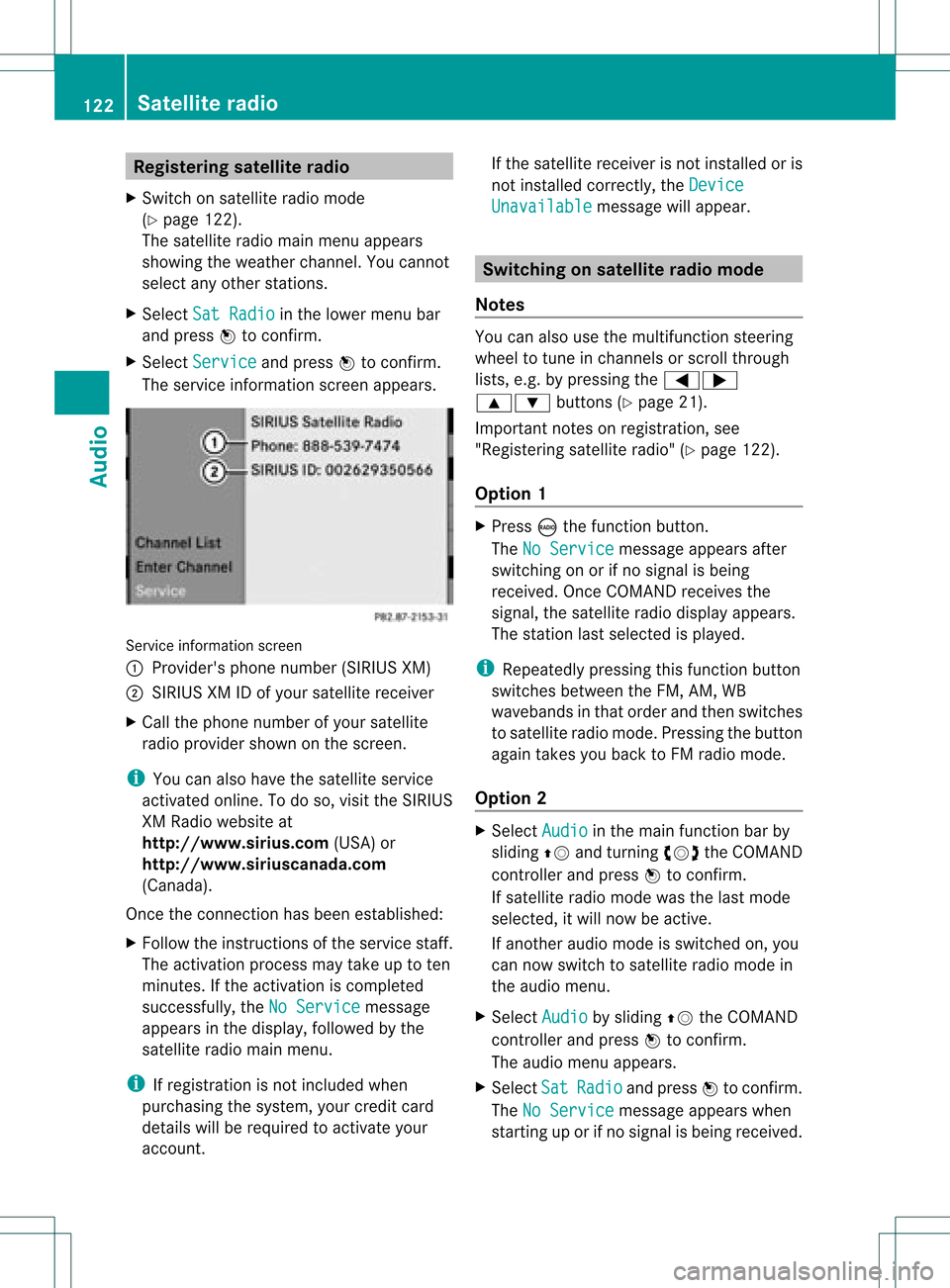
The servic einfor mation screenappears. Serv
iceinfor mation screen
1 Provider's phonenumber (SIRIUSXM)
2 SIRIUS XMIDofyour satellite receiver
X Call thephone number ofyour satellite
radio provider shownonthe screen .
i You canalso have thesatellite service
activat edonline. Todo so, visit theSIRIUS
XM Radio website at
htt p://ww w.siriu s.com(USA)or
htt p://ww w.siriu scanada .com
(Canada).
Onc ethe connection hasbeen established:
X Follow theinstruct ions ofthe servic estaff .
The activat ionprocess maytake uptoten
minut es.Ifthe activat ioniscomplet ed
success fully,theNoService message
appears inthe display, followed bythe
satellite radiomainmenu.
i Ifregistr ationisnot included when
purchasing thesystem, yourcredit card
details willberequired toactivat eyour
accoun t. If
the satellite receiver isnot installed oris
not installed correctly,the Device Unavail
able message
willappear. Switching
onsatellit erad iomode
Notes You
canalso usethemultifunc tionsteer ing
wheel totune inchann elsorscroll through
lists, e.g.bypressing the=;
9: buttons(Y page 21).
Import antnoteson registr ation,see
"Registering satelliteradio"(Y page 122).
Opt ion 1 X
Press óthe func tion button .
The NoService message
appearsafter
switch ingonorifno signal isbeing
received. OnceCOMAND receivesthe
signal, thesatellite radiodisplay appears.
The stationlast select edisplayed.
i Repeatedly pressingthisfunc tion button
switch esbetween theFM, AM, WB
wavebands inthat order andthen switch es
to satellite radiomode. Pressin gthe button
again takes youback toFM radio mode.
Opt ion 2 X
Select Audio in
the main function barby
sliding ZVandturningcVd theCOMAND
con troller andpress Wtocon firm.
If satellite radiomode wasthelast mode
select ed,itwill now beactive .
If anoth eraudio mode isswitch edon, you
can now switch tosatellite radiomode in
the audio menu.
X Select Audio by
sliding ZVtheCOMAND
con troller andpress Wtocon firm.
The audio menu appears.
X Select Sat Radio and
press Wtocon firm.
The NoService message
appearswhen
start inguporifno signal isbeing received. 122
Sat
ellite radioAudio
Page 127 of 182
Disp
laying informa tion X
Se lec tInf o in
thesubm enubar byturn ing
cVd theCOM ANDco ntro ller and press
W toconfirm .
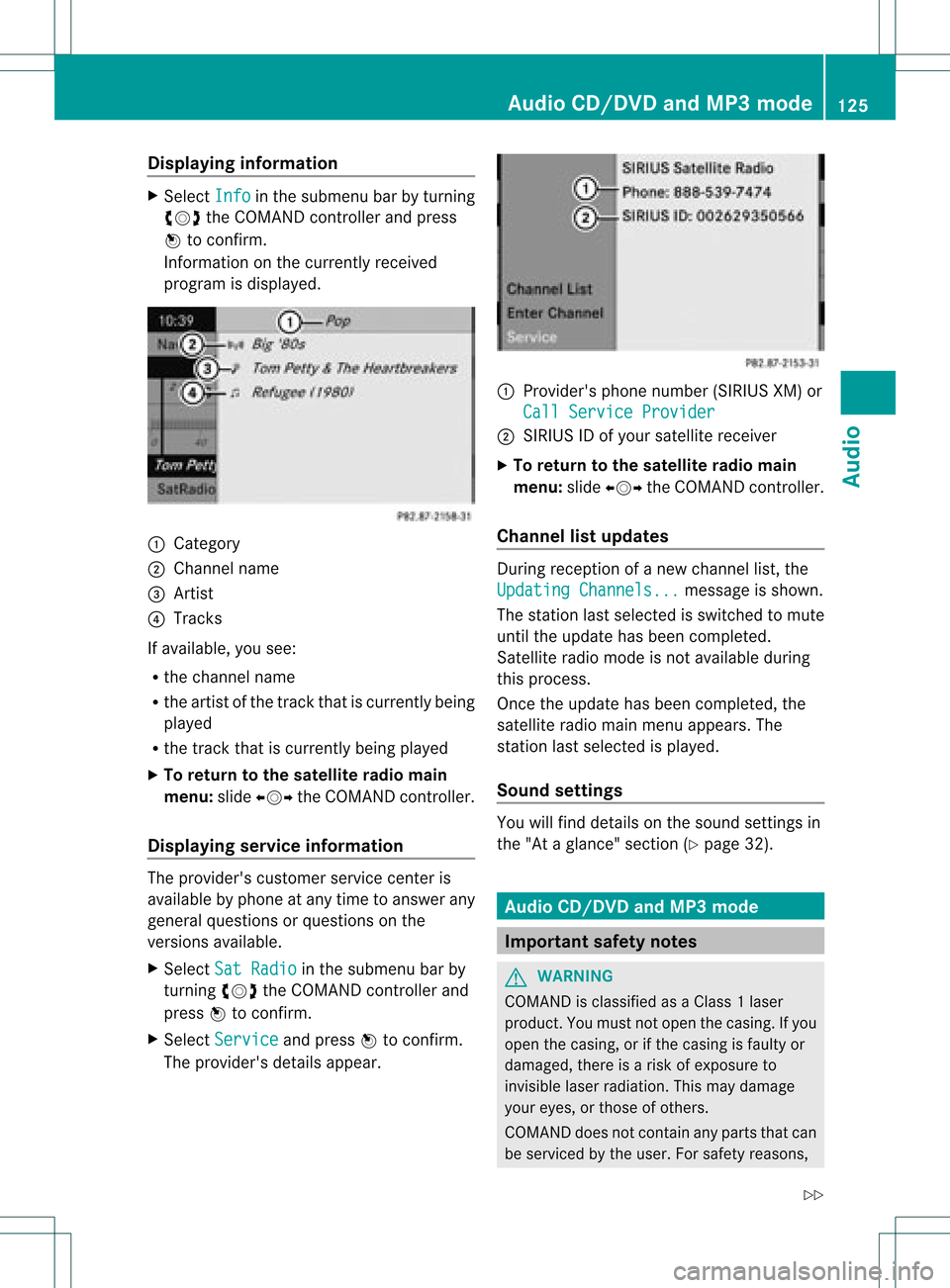
In fo rm ation onthecur ren tly rec eived
pro gram isdis played . 1
Catego ry
2 Chan nelnam e
3 Artist
4 Track s
If avai lable ,you see:
R thech ann elnam e
R theart ist ofthetrack that iscur ren tly bein g
played
R thetrack that iscur ren tly bein gplayed
X To retu rn tothesa tellit era dioma in
me nu:slid eXVY theCOM ANDc ont roller.
Displaying serviceinformation The
provider's customerservicecenteris
availa blebyphone atany time toanswer any
general questions orquestions onthe
versions available.
X Select SatRadio in
the submenu barby
turnin gcVd theCOMAND controller and
press Wtoconf irm.
X Select Service and
press Wtoconf irm.
The provider's detailsappear. 1
Provider's phonenumber (SIRIUSXM)or
Call Service Provider 2
SIRIUS IDofyour satellite receiver
X To retu rntothe satellite radiomain
menu: slideXVY theCOMAND controller.
Channel listupd ates During
reception ofanew chann ellist, the
Updating Channels... message
isshown.
The station lastselected isswitched tomute
until theupdate hasbeen completed.
Satellite radiomode isnot availa bleduring
this process.
Once theupdate hasbeen completed, the
satellite radiomainmenu appears. The
station lastselected isplaye d.
Sound settings You
willfind details onthe sound settings in
the "Ataglance" section(Ypage 32). Audio
CD/DVDand MP3 mode Import
antsafety notes G
WARNIN
G
COMAND isclassified asaClass 1laser
prod uct.You must notopen thecasing. Ifyou
open thecasing, orifthe casing isfaulty or
damaged, thereisarisk ofexposure to
invisible laserradiation. Thismay damage
your eyes, orthose ofothers.
COMAND doesnotcont ainany parts thatcan
be serviced bythe user. Forsafety reasons, Audio
CD/DVD andMP3 mode
125Audio
Z
Page 152 of 182
COMAN
Dfea tures
Thes eOper atingIn st ruc tions desc ribeall
st andar dand optionalequipm enta vail able
for you rCOMAND systematthe time of
purcha se.Cou ntry-specifi cdeviation sare
possible. Pleasenotethat your COMAND
system maynotbeequipped withallthe
features described. General
information Autom
aticpictu reshut off
The video picture isonly shown ifthe select or
lever isin the Pposition .
If the select orlever ofthe tran smission is
changed fromposition P,the In order not
to
distrac tyou from thetraffic situati
on, the picture is faded out
while
thevehicle isinmotion. message
appears
As soon asthe select orlever ofthe
tran smission isreturn edtoposition P,the
video image isshown. Basic
settings Pictur
esettings
Adju sting thebright ness,contra stor
color X
Press Wthe COMAND controller toshow
the menu.
X Select DVD-V by
sliding VÆandturning
cVd theCOMAND controller andpress
W tocon firm.
Am enu appears.
X Select Brightn ess ,
Contras t or
Color by
turn ingcVd theCOMAND controller and
press Wtocon firm. Changing
thepictu reform at X
Press Wthe COMAND controller toshow
the menu.
X Select DVD-V by
sliding VÆandturning
cVd theCOMAND controller andpress
W tocon firm.
Am enu appears.
X Select 16:9Optimiz ed ,
4:3 or
Widescr een and
press Wtocon firm.
The dotinfron tof the entryindicat esthe
curren tlyselect edformat .
X Select asett ingbyturn ingcVd the
COMAND controller andpress Wto
con firm. Video
DVDmode Safet
ynotes G
WARN
ING
COMAND isclassified asaClass 1laser
prod uct.You must notopen thecasing. Ifyou
open thecasing, orifthe casing isfaulty or
damaged, thereisarisk ofexposure to
invisible laserradiation. Thismay damage
your eyes, orthose ofothers.
COMAND doesnotcont ainany parts thatcan
be serviced bythe user. Forsafety reasons,
all mainten ancework must becarried outby
quali fiedaftersales technicians. G
WARNING
Only when thevehicle isstation aryshould
you:
R load adisc
R eject adisc
There isarisk ofbeing distract edfrom the
road andtraffic conditionsifthis isdone while
the vehicle isin motion . 150
Video
DVDmodeVideo
Page 160 of 182
COMAN
Dfea tures
Thes eOper atingIn st ruc tions desc ribeall
st andar dand optionalequipm enta vail able
for you rCOMAND systematthe time of
purcha se.Cou ntry-specifi cdeviation sare
possible. Pleasenotethat your COMAND
system maynotbeequipped withallthe
features described. General
information Impor
tantsafet ynotes G
WARN
ING
The RSE CD/D VDplayer isaClass 1laser
prod uct.There isadanger ofinvisible laser
radiation whenyouopen ordamage thecover.
Do not remove thecover. TheRSE CD/DVD
play erdoes notcont ainany parts which can
be serviced bythe user. Forsafety reasons,
have anynecessary serviceworkperformed
by qual ified personnel. G
WARNING
The driver should notwear aRear Seat
Ent ertainment headsetwhileoperating the
vehicle underanycircumstan ces.Theuseof
a headset whiledriving thevehicle could
drastically impairtheabili tyto react toaudi ble
traffic conditions (e.g.emergency sirensfrom
<0010000F000C0009000300050022000600090012000500220001000D00020015
000C0001000E000300050032V anothercar'shorn,
etc. ). G
WARNING
When notinuse, headsets orextern alvideo
sources shouldbestored inas afe locatio n
(e. g.on eof theveh icle'sstorag e
com partmen ts)so that they are notloose
within thepassenger compartmentduring
braking, vehiclemaneuvers oratraffic
accident .Object smoving withinthe
passenger compartmentcould cause serious
personal injurytovehicle occupant s. G
WARNING
Due toapotent ialchokin ghazar d,wired
heads etusage bychildre nshould onlyoccur
with adultsuper vision . Comp
onents
Over view The
Rear SeatEntertainm entSys tem
co mpr ises:
R two rear-comp artmen tsc ree nsbehin dth e
fr on t-seat head restraint s
R bot hrem oteco ntrols
R aCD/ DVDdriv e
R AU Xjac kson bot hsc ree ns(disp layAUX)
and ontheCD/ DVDdriv e(dri veAU X)
R two setsof cordle ssheadp hones 158
Gener
alinfor mationRea rSe at Ent ertai nme nt
Page 169 of 182
Setting
thebrightness
X Select Settings using
the: button
and press the9button toconf irm.
X Select Brightness using
the9:
buttons andpress the9button toconf irm.
As caleap pea rs.
X Adju stthe brightne ssusing the 9:
bu ttons andpressthe 9button toconfi rm.
The brightne ssbarm oves upordown. The
picture becomes lighterordarker in
accordanc ewith thescale. Showing/hiding
thepictur e
X To hide thepictur e:select Display Off in
the system menuusingthe:;
button son the remote controland press
the 9button toconf irm.
The picture ishidden.
X To display thepictur e:press the9
button . Audio
CD/DVDand MP3 mode Safety
note G
WARNIN
G
The RSE CD/D VDplayer isaClass 1laser
prod uct.There isadanger ofinvisible laser
radiation whenyouopen ordamage thecover.
Do not remove thecover. TheRSE CD/DVD
play erdoes notcont ainany parts which can
be serviced bythe user. Forsafety reasons,
have anynecessary serviceworkperformed
by qual ified personnel. General
informat ion
You willfind information onthe following
topics inthe Audio section:
R notes onCDs/DV Ds(Ypage 136)
R notes onMP3 mode (Ypage 135)
R notes oncopyright (Ypage 136) Inserting
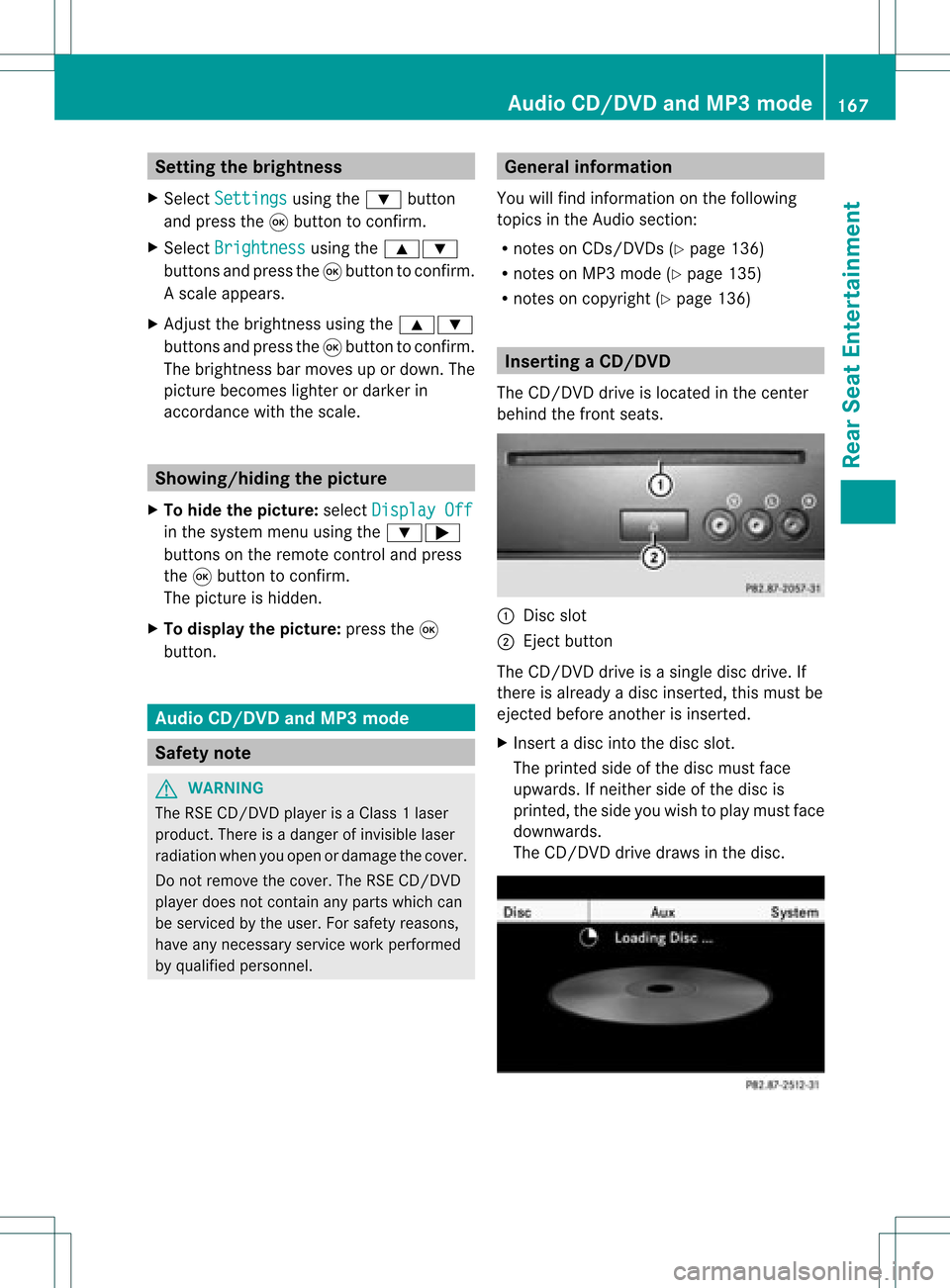
aCD/DVD
The CD/DVD drive isloc ated inthece nter
beh ind th efron tseats. :
Disc slot
; Eject button
The CD/D VDdrive isasingle discdrive. If
ther eis already adisc insert ed,this must be
ejec tedbefore anotherisinsert ed.
X Inser tadisc intothe disc slot.
The print edside ofthe disc must face
upwards. Ifneit her side ofthe disc is
print ed,the side youwish toplay must face
downwards.
The CD/D VDdrive draws inthe disc. Audio
CD/DVDand MP3 mode
167Rear SeatEntert ainment Z