clock MERCEDES-BENZ GLK-Class 2015 X204 Owner's Manual
[x] Cancel search | Manufacturer: MERCEDES-BENZ, Model Year: 2015, Model line: GLK-Class, Model: MERCEDES-BENZ GLK-Class 2015 X204Pages: 386, PDF Size: 7.16 MB
Page 87 of 386
Automatic locking feature
The vehicle is locked automatically when the
ignition is switched on and the vehicle's
wheels are turning at a speed in excess of
9 mph (15 km/h).
You could therefore be locked out if:
R the vehicle is being pushed.
R the vehicle is being towed.
R the vehicle is on a roller dynamometer. X
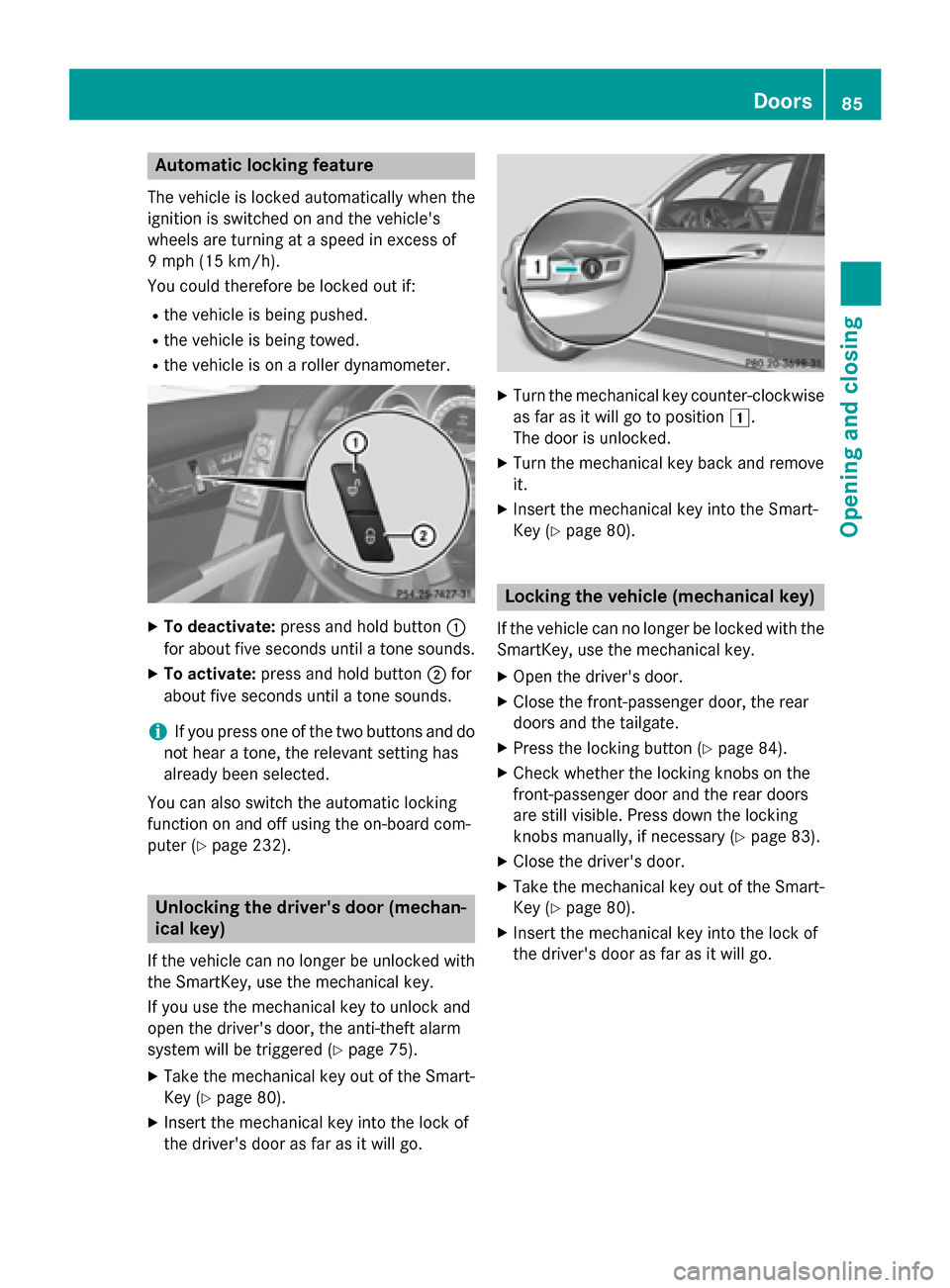
To deactivate: press and hold button 0043
for about five seconds until a tone sounds.
X To activate: press and hold button 0044for
about five seconds until a tone sounds.
i If you press one of the two buttons and do
not hear a tone, the relevant setting has
already been selected.
You can also switch the automatic locking
function on and off using the on-board com-
puter (Y page 232). Unlocking the driver's door (mechan-
ical key)
If the vehicle can no longer be unlocked with
the SmartKey, use the mechanical key.
If you use the mechanical key to unlock and
open the driver's door, the anti-theft alarm
system will be triggered (Y page 75).
X Take the mechanical key out of the Smart-
Key (Y page 80).
X Insert the mechanical key into the lock of
the driver's door as far as it will go. X
Turn the mechanical key counter-clockwise
as far as it will go to position 0047.
The door is unlocked.
X Turn the mechanical key back and remove
it.
X Insert the mechanical key into the Smart-
Key (Y page 80). Locking the vehicle (mechanical key)
If the vehicle can no longer be locked with the
SmartKey, use the mechanical key.
X Open the driver's door.
X Close the front-passenger door, the rear
doors and the tailgate.
X Press the locking button (Y page 84).
X Check whether the locking knobs on the
front-passenger door and the rear doors
are still visible. Press down the locking
knobs manually, if necessary (Y page 83).
X Close the driver's door.
X Take the mechanical key out of the Smart-
Key (Y page 80).
X Insert the mechanical key into the lock of
the driver's door as far as it will go. Doors
85Opening and closing Z
Page 88 of 386
X
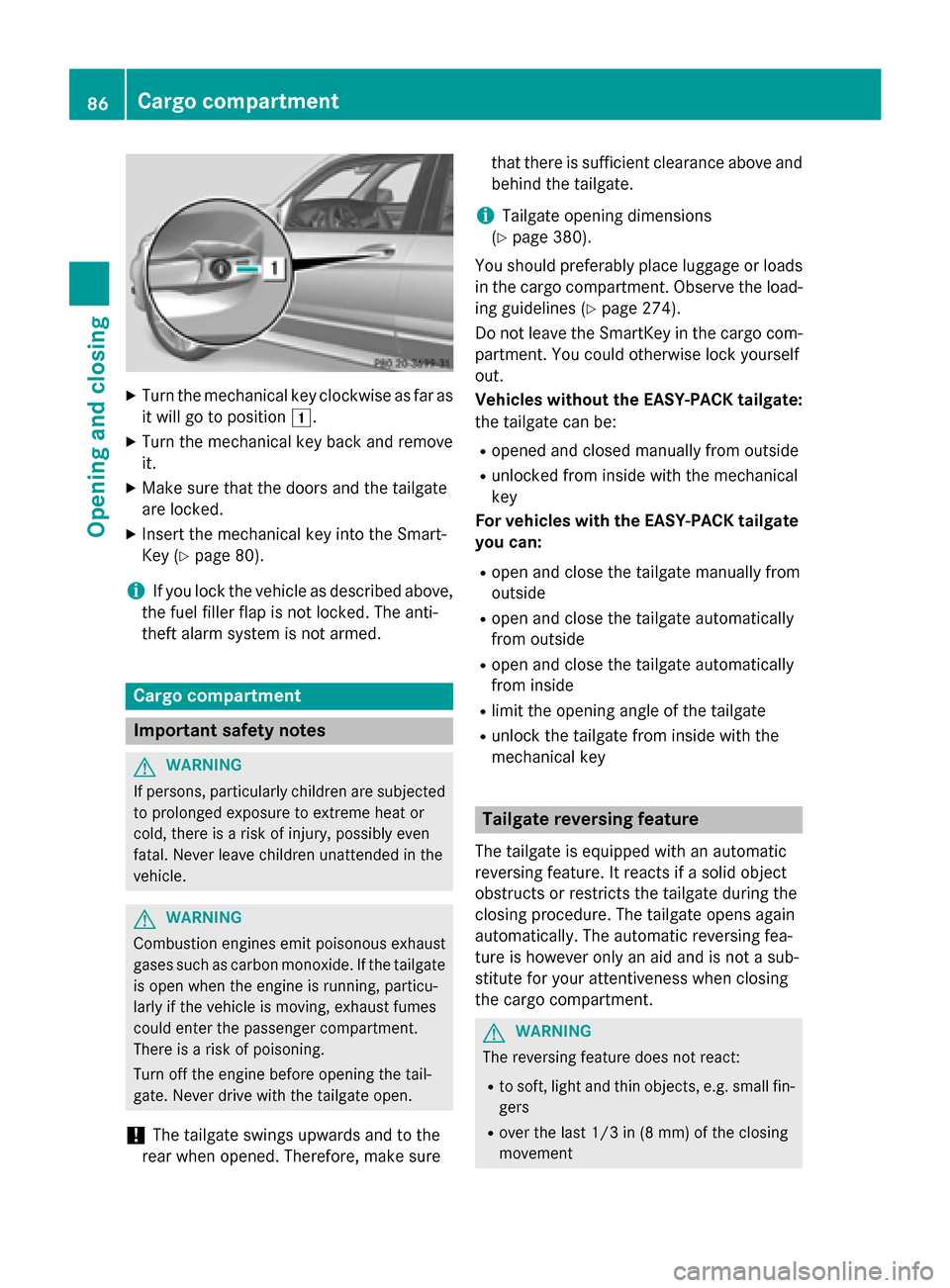
Turn the mechanical key clockwise as far as
it will go to position 0047.
X Turn the mechanical key back and remove
it.
X Make sure that the doors and the tailgate
are locked.
X Insert the mechanical key into the Smart-
Key (Y page 80).
i If you lock the vehicle as described above,
the fuel filler flap is not locked. The anti-
theft alarm system is not armed. Cargo compartment
Important safety notes
G
WARNING
If persons, particularly children are subjected to prolonged exposure to extreme heat or
cold, there is a risk of injury, possibly even
fatal. Never leave children unattended in the
vehicle. G
WARNING
Combustion engines emit poisonous exhaust
gases such as carbon monoxide. If the tailgate is open when the engine is running, particu-
larly if the vehicle is moving, exhaust fumes
could enter the passenger compartment.
There is a risk of poisoning.
Turn off the engine before opening the tail-
gate. Never drive with the tailgate open.
! The tailgate swings upwards and to the
rear when opened. Therefore, make sure that there is sufficient clearance above and
behind the tailgate.
i Tailgate opening dimensions
(Y page 380).
You should preferably place luggage or loads
in the cargo compartment. Observe the load-
ing guidelines (Y page 274).
Do not leave the SmartKey in the cargo com- partment. You could otherwise lock yourself
out.
Vehicles without the EASY-PACK tailgate:
the tailgate can be:
R opened and closed manually from outside
R unlocked from inside with the mechanical
key
For vehicles with the EASY-PACK tailgate you can:
R open and close the tailgate manually from
outside
R open and close the tailgate automatically
from outside
R open and close the tailgate automatically
from inside
R limit the opening angle of the tailgate
R unlock the tailgate from inside with the
mechanical key Tailgate reversing feature
The tailgate is equipped with an automatic
reversing feature. It reacts if a solid object
obstructs or restricts the tailgate during the
closing procedure. The tailgate opens again
automatically. The automatic reversing fea-
ture is however only an aid and is not a sub-
stitute for your attentiveness when closing
the cargo compartment. G
WARNING
The reversing feature does not react:
R to soft, light and thin objects, e.g. small fin-
gers
R over the last 1/3 in (8 mm) of the closing
movement 86
Cargo compartmentOpening and closing
Page 92 of 386
(Y
page 87) in the tailgate or pull the handle
on the outside of the tailgate again.
X To store the position: press and hold the
closing button in the tailgate until you hear a short tone.
The opening angle limiter is activated. The
tailgate will now stop in the stored positionwhen opening.
i To open the tailgate fully, pull the handle
on the outside of the tailgate again after it
has stopped automatically. This does not
delete the stored position.
Deactivating X
Press and hold the closing button
(Y page 87) in the tailgate until you hear
two short tones. Tailgate emergency release
Important safety notes !
The tailgate swings upwards and to the
rear when opened. Therefore, make sure
that there is sufficient clearance above and behind the tailgate.
If the tailgate can no longer be opened from
outside the vehicle, use the emergency
release on the inside of the tailgate.
i Tailgate opening dimensions
(Y page 380).
Opening X
Take the mechanical key out of the Smart-
Key (Y page 80).
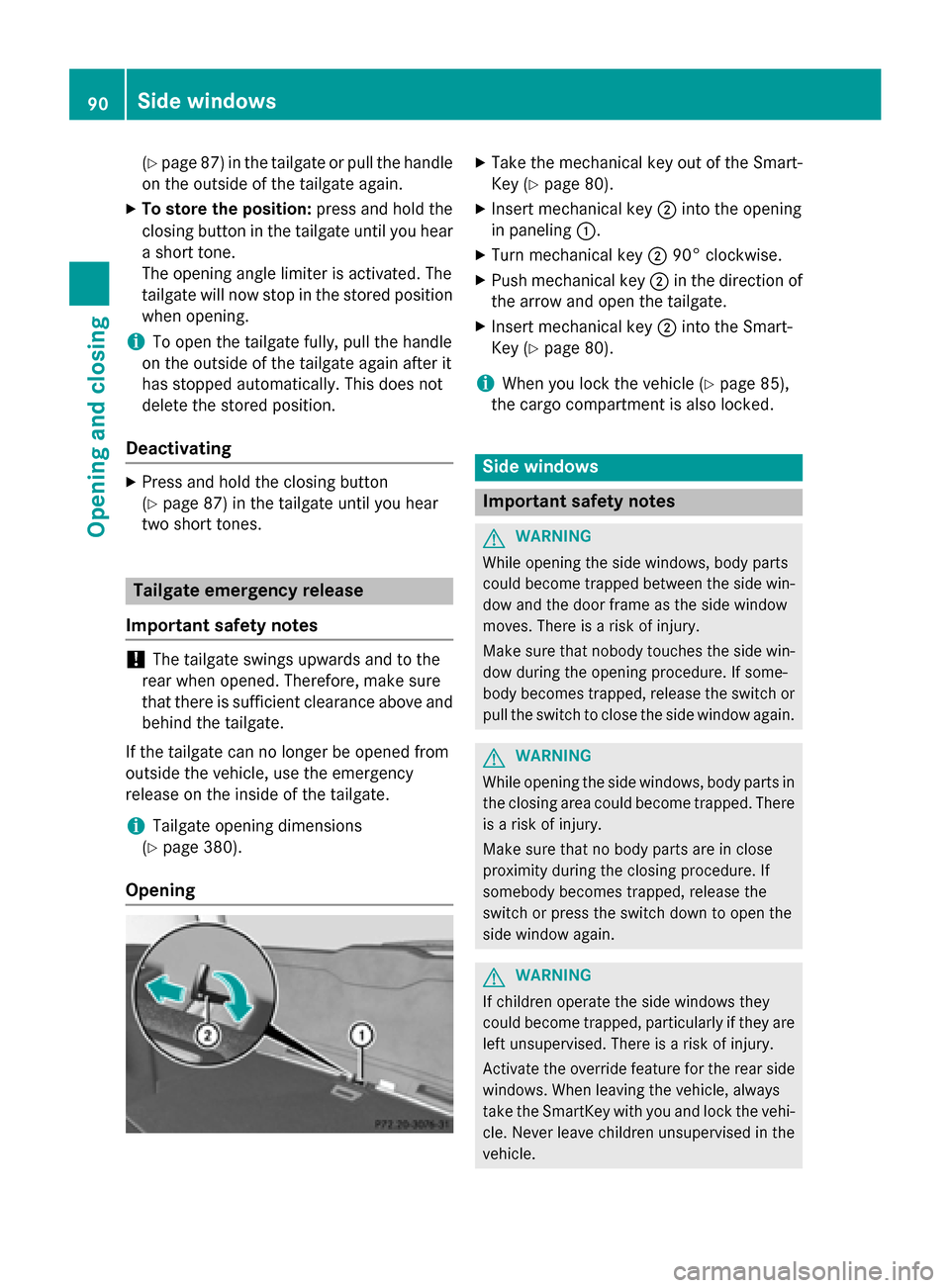
X Insert mechanical key 0044into the opening
in paneling 0043.
X Turn mechanical key 004490° clockwise.
X Push mechanical key 0044in the direction of
the arrow and open the tailgate.
X Insert mechanical key 0044into the Smart-
Key (Y page 80).
i When you lock the vehicle (Y
page 85),
the cargo compartment is also locked. Side windows
Important safety notes
G
WARNING
While opening the side windows, body parts
could become trapped between the side win- dow and the door frame as the side window
moves. There is a risk of injury.
Make sure that nobody touches the side win-
dow during the opening procedure. If some-
body becomes trapped, release the switch or pull the switch to close the side window again. G
WARNING
While opening the side windows, body parts in
the closing area could become trapped. There is a risk of injury.
Make sure that no body parts are in close
proximity during the closing procedure. If
somebody becomes trapped, release the
switch or press the switch down to open the
side window again. G
WARNING
If children operate the side windows they
could become trapped, particularly if they are left unsupervised. There is a risk of injury.
Activate the override feature for the rear side
windows. When leaving the vehicle, always
take the SmartKey with you and lock the vehi-
cle. Never leave children unsupervised in the
vehicle. 90
Side windowsOpening and closing
Page 126 of 386

Changing the front bulbs
Low-beam headlamps (halogen head-
lamps) X
Switch off the lights.
X Open the hood.
X Turn housing cover 0043counter-clockwise
and pull it out.
X At the bulb holder, push the bulb upwards,
disconnect it and pull it out of bulb
holder 0044.
X Insert the new bulb into bulb holder 0044,
push it down and secure it in place.
X Attach housing cover 0043and turn it clock-
wise until it engages.
High-beam headlamps, standing
lamps/parking lamps (halogen head-
lamps) X
Switch off the lights.
X Open the hood.
X Turn housing cover 0043counter-clockwise
and pull it out. X
Turn bulb counter-clockwise and pull it out.
X Insert the new bulb into bulb holder 0044and
turn it clockwise.
X Align housing cover 0043and turn it clock-
wise until it engages.
Cornering light function (Bi-Xenon
headlamps) X
Switch off the lights.
X Open the hood.
X Turn housing cover 0043counter-clockwise
and pull it out.
X Push the lever of holder 0044upwards until
holder 0044is released.
X Pull out bulb holder 0044.
X Take the bulb out of bulb holder 0044.
X Insert the new bulb into bulb holder 0044.
X Insert holder 0044from above and press it
until it engages.
X Align housing cover 0043and turn it clock-
wise until it engages.
Turn signal 124
Replacing bulbsLights and windshield wipers
Page 127 of 386
X
Switch off the lights.
X Open the hood.
X Turn housing cover 0043counter-clockwise
and pull it out.
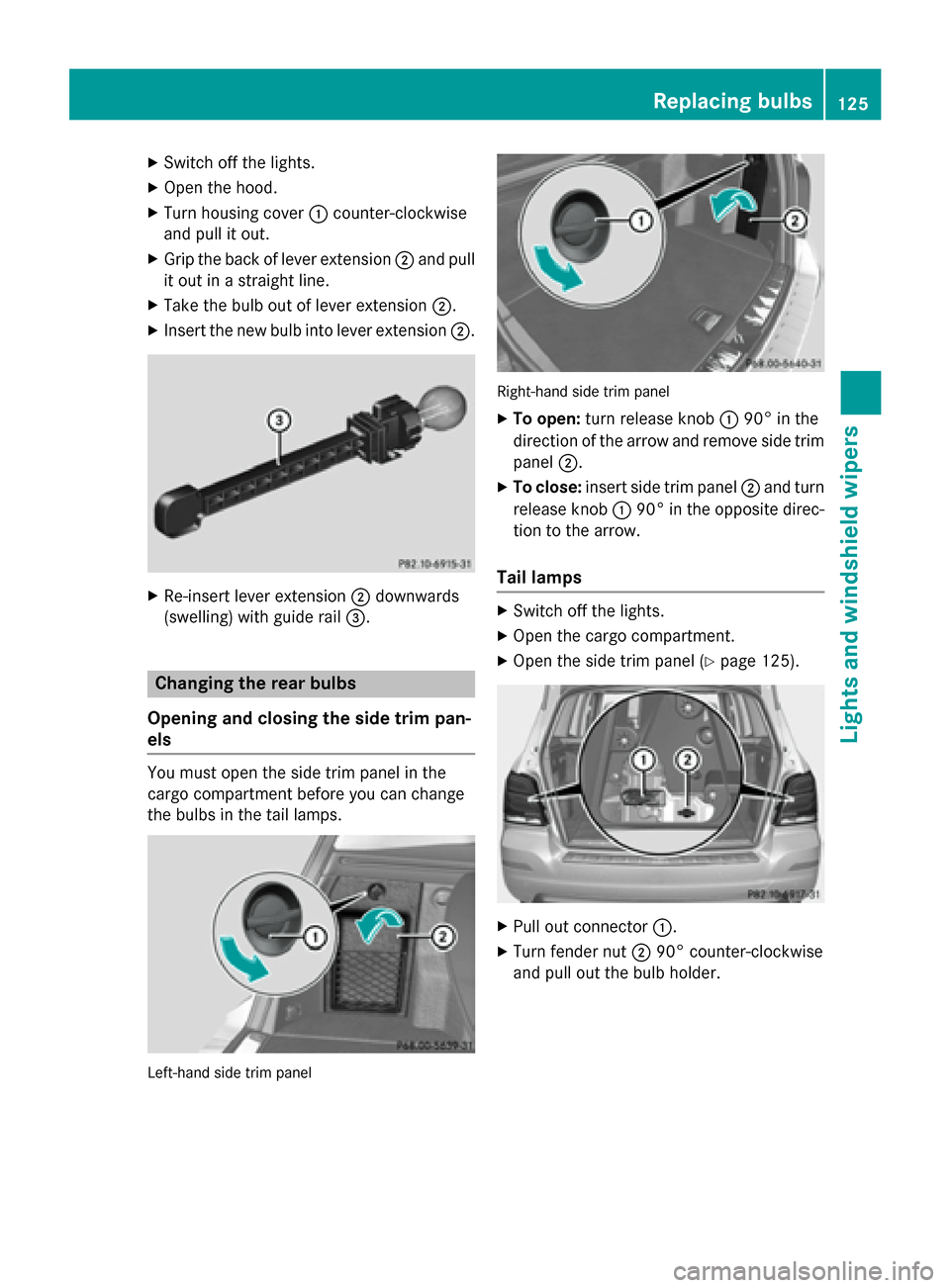
X Grip the back of lever extension 0044and pull
it out in a straight line.
X Take the bulb out of lever extension 0044.
X Insert the new bulb into lever extension 0044.X
Re-insert lever extension 0044downwards
(swelling) with guide rail 0087.Changing the rear bulbs
Opening and closing the side trim pan-
els You must open the side trim panel in the
cargo compartment before you can change
the bulbs in the tail lamps.
Left-hand side trim panel Right-hand side trim panel
X To open: turn release knob 004390° in the
direction of the arrow and remove side trim panel 0044.
X To close: insert side trim panel 0044and turn
release knob 004390° in the opposite direc-
tion to the arrow.
Tail lamps X
Switch off the lights.
X Open the cargo compartment.
X Open the side trim panel (Y page 125). X
Pull out connector 0043.
X Turn fender nut 004490° counter-clockwise
and pull out the bulb holder. Replacing bulbs
125Lights and windshield wipers Z
Page 128 of 386
X
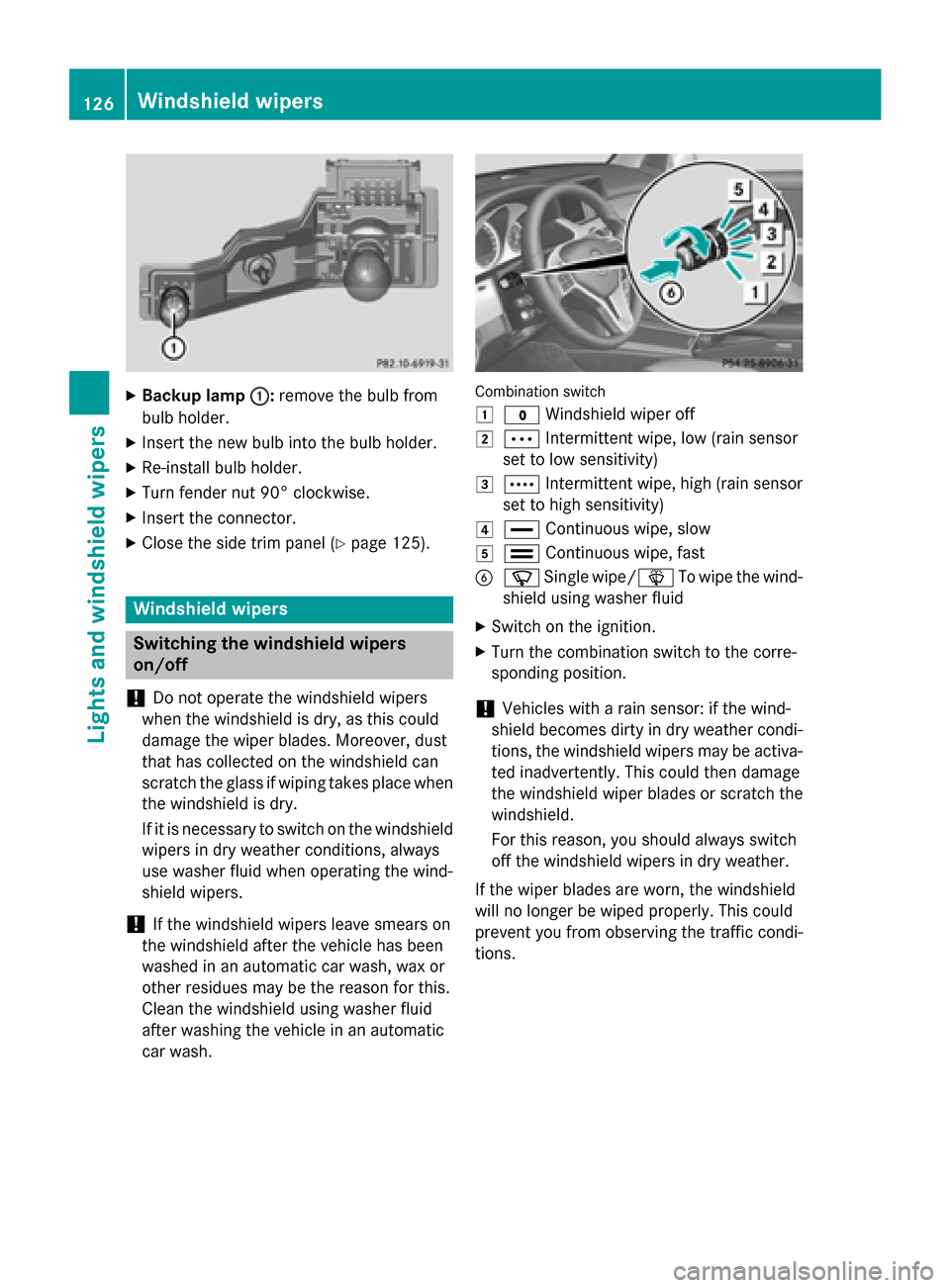
Backup lamp 0043
0043:remove the bulb from
bulb holder.
X Insert the new bulb into the bulb holder.
X Re-install bulb holder.
X Turn fender nut 90° clockwise.
X Insert the connector.
X Close the side trim panel (Y page 125).Windshield wipers
Switching the windshield wipers
on/off
! Do not operate the windshield wipers
when the windshield is dry, as this could
damage the wiper blades. Moreover, dust
that has collected on the windshield can
scratch the glass if wiping takes place when the windshield is dry.
If it is necessary to switch on the windshield wipers in dry weather conditions, always
use washer fluid when operating the wind-
shield wipers.
! If the windshield wipers leave smears on
the windshield after the vehicle has been
washed in an automatic car wash, wax or
other residues may be the reason for this.
Clean the windshield using washer fluid
after washing the vehicle in an automatic
car wash. Combination switch
0047
003F Windshield wiper off
0048 0062 Intermittent wipe, low (rain sensor
set to low sensitivity)
0049 0063 Intermittent wipe, high (rain sensor
set to high sensitivity)
004A 00AA Continuous wipe, slow
004B 00A9 Continuous wipe, fast
0084 00D3 Single wipe/00D4 To wipe the wind-
shield using washer fluid
X Switch on the ignition.
X Turn the combination switch to the corre-
sponding position.
! Vehicles with a rain sensor: if the wind-
shield becomes dirty in dry weather condi-
tions, the windshield wipers may be activa-
ted inadvertently. This could then damage
the windshield wiper blades or scratch the
windshield.
For this reason, you should always switch
off the windshield wipers in dry weather.
If the wiper blades are worn, the windshield
will no longer be wiped properly. This could
prevent you from observing the traffic condi-
tions. 126
Windshield wipersLights and windshield wipers
Page 166 of 386
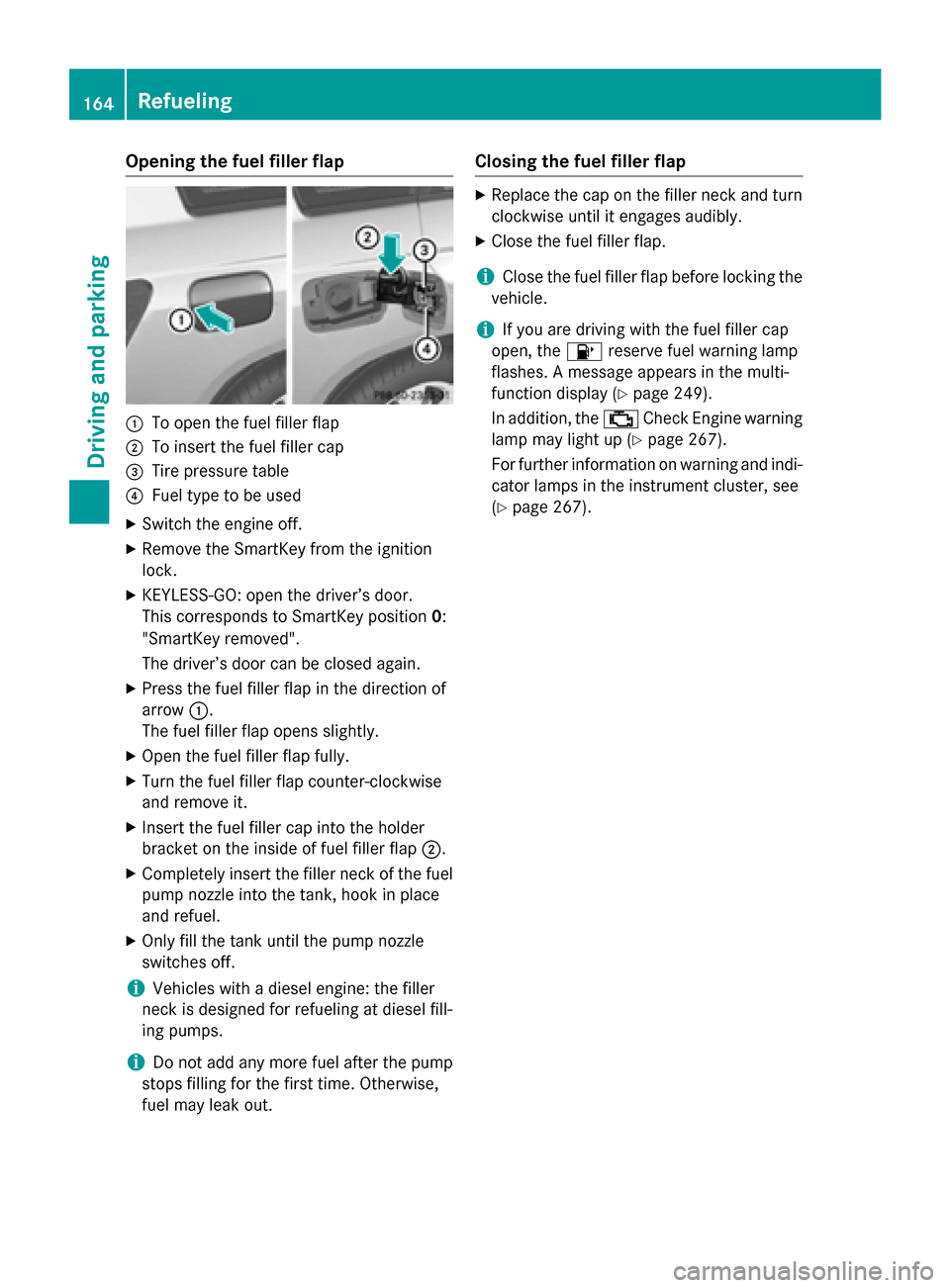
Opening the fuel filler flap
0043
To open the fuel filler flap
0044 To insert the fuel filler cap
0087 Tire pressure table
0085 Fuel type to be used
X Switch the engine off.
X Remove the SmartKey from the ignition
lock.
X KEYLESS-GO: open the driver’s door.
This corresponds to SmartKey position 0:
"SmartKey removed".
The driver’s door can be closed again.
X Press the fuel filler flap in the direction of
arrow 0043.
The fuel filler flap opens slightly.
X Open the fuel filler flap fully.
X Turn the fuel filler flap counter-clockwise
and remove it.
X Insert the fuel filler cap into the holder
bracket on the inside of fuel filler flap 0044.
X Completely insert the filler neck of the fuel
pump nozzle into the tank, hook in place
and refuel.
X Only fill the tank until the pump nozzle
switches off.
i Vehicles with a diesel engine: the filler
neck is designed for refueling at diesel fill-
ing pumps.
i Do not add any more fuel after the pump
stops filling for the first time. Otherwise,
fuel may leak out. Closing the fuel filler flap X
Replace the cap on the filler neck and turn
clockwise until it engages audibly.
X Close the fuel filler flap.
i Close the fuel filler flap before locking the
vehicle.
i If you are driving with the fuel filler cap
open, the 00B6reserve fuel warning lamp
flashes. A message appears in the multi-
function display (Y page 249).
In addition, the 00B9Check Engine warning
lamp may light up (Y page 267).
For further information on warning and indi- cator lamps in the instrument cluster, see
(Y page 267). 164
RefuelingDriving and parking
Page 169 of 386
residues crystallize after time and contam-
inate the affected surfaces.
! DEF is not a fuel additive and must not be
added to the fuel tank. If DEF is added to
the fuel tank, this can lead to engine dam-
age.
! Only screw on the DEF refill bottle hand-
tight. It could otherwise be damaged.
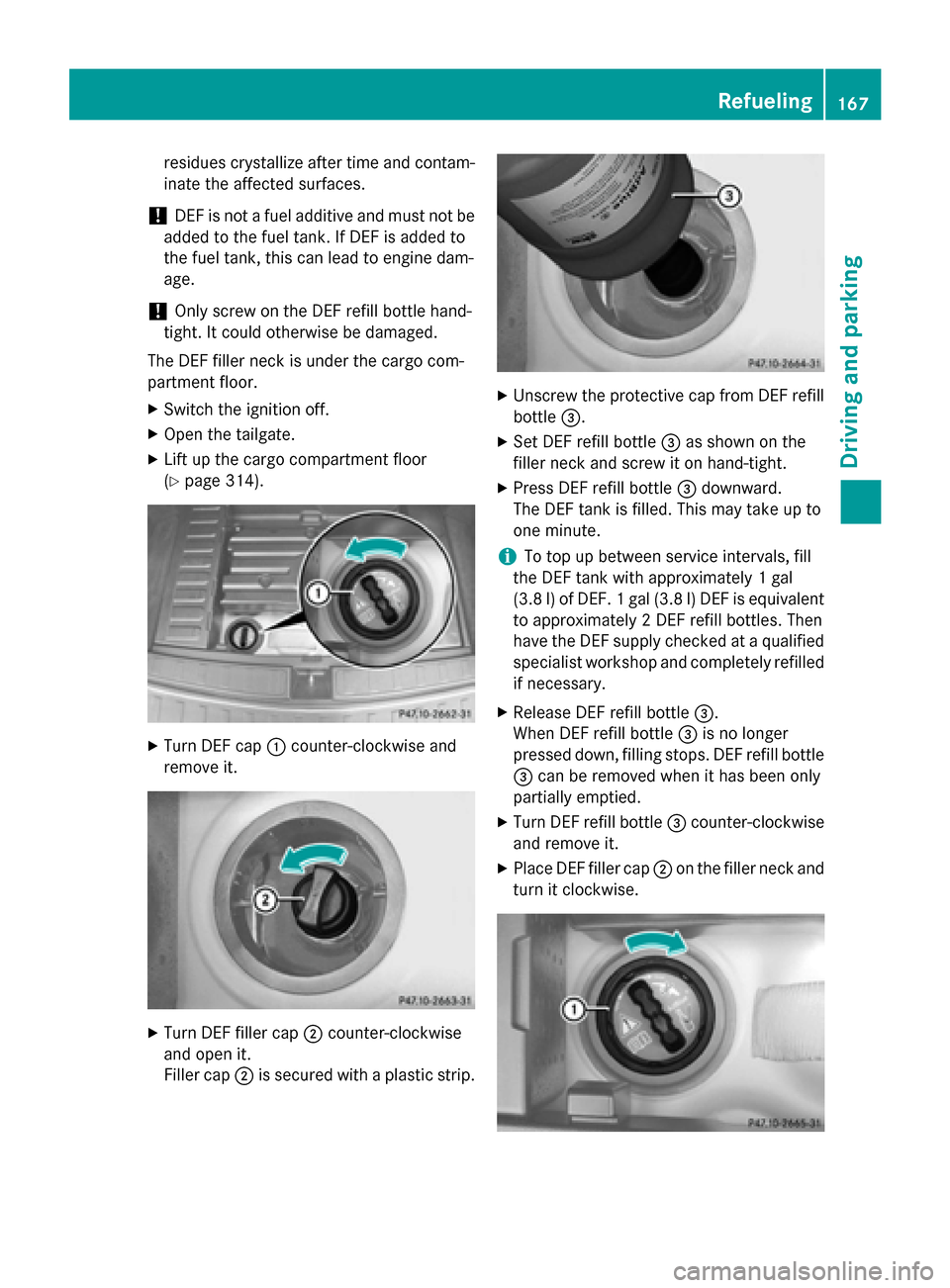
The DEF filler neck is under the cargo com-
partment floor.
X Switch the ignition off.
X Open the tailgate.
X Lift up the cargo compartment floor
(Y page 314). X
Turn DEF cap 0043counter-clockwise and
remove it. X
Turn DEF filler cap 0044counter-clockwise
and open it.
Filler cap 0044is secured with a plastic strip. X
Unscrew the protective cap from DEF refill
bottle 0087.
X Set DEF refill bottle 0087as shown on the
filler neck and screw it on hand-tight.
X Press DEF refill bottle 0087downward.
The DEF tank is filled. This may take up to
one minute.
i To top up between service intervals, fill
the DEF tank with approximately 1 gal
(3.8 l) of DEF. 1 gal (3.8 l)DEF is equivalent
to approximately 2 DEF refill bottles. Then
have the DEF supply checked at a qualified specialist workshop and completely refilled
if necessary.
X Release DEF refill bottle 0087.
When DEF refill bottle 0087is no longer
pressed down, filling stops. DEF refill bottle 0087 can be removed when it has been only
partially emptied.
X Turn DEF refill bottle 0087counter-clockwise
and remove it.
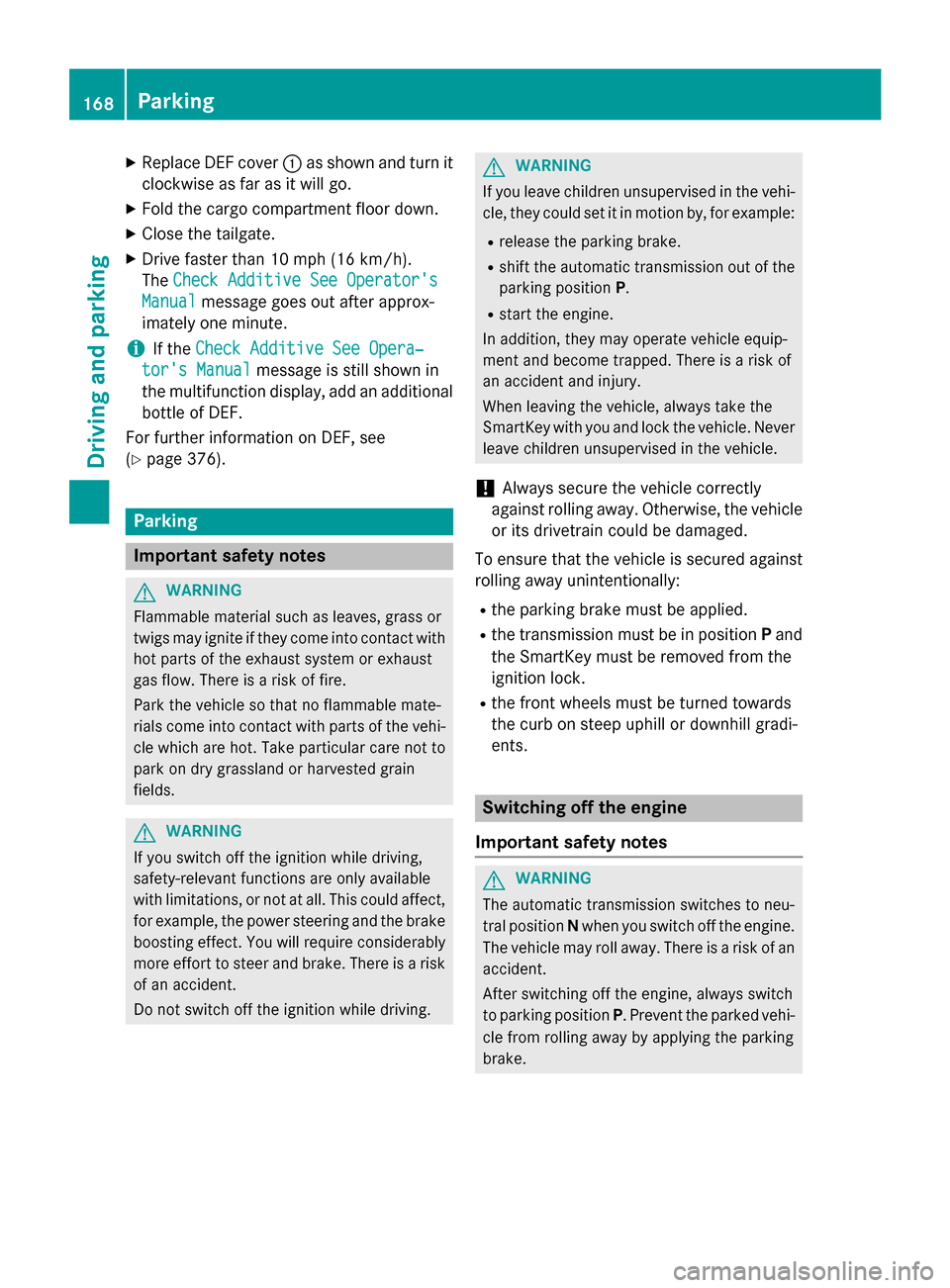
X Place DEF filler cap 0044on the filler neck and
turn it clockwise. Refueling
167Driving and parking Z
Page 170 of 386
X
Replace DEF cover 0043as shown and turn it
clockwise as far as it will go.
X Fold the cargo compartment floor down.
X Close the tailgate.
X Drive faster than 10 mph (16 km/h).
The Check Additive See Operator's Check Additive See Operator's
Manual Manual message goes out after approx-
imately one minute.
i If the
Check Additive See Opera‐
Check Additive See Opera‐
tor's Manual
tor's Manual message is still shown in
the multifunction display, add an additional bottle of DEF.
For further information on DEF, see
(Y page 376). Parking
Important safety notes
G
WARNING
Flammable material such as leaves, grass or
twigs may ignite if they come into contact with hot parts of the exhaust system or exhaust
gas flow. There is a risk of fire.
Park the vehicle so that no flammable mate-
rials come into contact with parts of the vehi- cle which are hot. Take particular care not to
park on dry grassland or harvested grain
fields. G
WARNING
If you switch off the ignition while driving,
safety-relevant functions are only available
with limitations, or not at all. This could affect, for example, the power steering and the brake
boosting effect. You will require considerably
more effort to steer and brake. There is a risk of an accident.
Do not switch off the ignition while driving. G
WARNING
If you leave children unsupervised in the vehi- cle, they could set it in motion by, for example:
R release the parking brake.
R shift the automatic transmission out of the
parking position P.
R start the engine.
In addition, they may operate vehicle equip-
ment and become trapped. There is a risk of
an accident and injury.
When leaving the vehicle, always take the
SmartKey with you and lock the vehicle. Never
leave children unsupervised in the vehicle.
! Always secure the vehicle correctly
against rolling away. Otherwise, the vehicle
or its drivetrain could be damaged.
To ensure that the vehicle is secured against rolling away unintentionally:
R the parking brake must be applied.
R the transmission must be in position Pand
the SmartKey must be removed from the
ignition lock.
R the front wheels must be turned towards
the curb on steep uphill or downhill gradi-
ents. Switching off the engine
Important safety notes G
WARNING
The automatic transmission switches to neu-
tral position Nwhen you switch off the engine.
The vehicle may roll away. There is a risk of an
accident.
After switching off the engine, always switch
to parking position P. Prevent the parked vehi-
cle from rolling away by applying the parking
brake. 168
ParkingDriving and parking
Page 234 of 386
around the vehicle are displayed in orange
in the multifunction display.
X Press the 0076button to save the setting.
Deactivating delayed switch-off of the exte-
rior lighting temporarily:
X Before leaving the vehicle, turn the Smart-
Key to position 0in the ignition lock.
X Turn the SmartKey to position 2in the igni-
tion lock.
The exterior lighting delayed switch-off is
deactivated.
Delayed switch-off of the exterior lighting is
reactivated the next time you start the
engine.
If you have activated the Surround Light‐
Surround Light‐
ing
ing function and the light switch is set to
0058, the following functions are activated
when it is dark:
R surround lighting: the exterior lighting
remains lit for 40 seconds after unlocking
with the SmartKey. If you start the engine,
the surround lighting is switched off and
automatic headlamp mode is activated
(Y page 117).
R exterior lighting delayed switch-off: the
exterior lighting remains lit for 60 seconds
after the engine is switched off. If you close all the doors and the tailgate, the exterior
lighting goes off after 5 seconds.
i Depending on your vehicle's equipment,
when the surround lighting and delayed
switch-off exterior lighting are on, the fol-
lowing light up:
R Parking lamps
R Front fog lamps
R Low-beam headlamps
R Daytime running lamps
R Side marker lamps
R Surround lighting in the exterior mirrors
Activating/deactivating the interior light-
ing delayed switch-off
If you activate the Interior Lighting
Interior Lighting
Delay
Delay function, the interior lighting remains on for 20 seconds after you remove the
SmartKey from the ignition lock.
X Press the 0059or0065 button on the steer-
ing wheel to select the Sett Settmenu.
X Press the 0064or0063 button to select the
Lights
Lights submenu.
X Press 0076to confirm.
X Press the 0064or0063 button to select the
Interior Lighting Delay
Interior Lighting Delay function.
If the Interior
Interior Lighting
Lighting Delay
Delayfunction
has been switched on, the vehicle interior is
displayed in orange in the multifunction
display.
X Press the 0076button to save the setting.
Vehicle Activating/deactivating the automatic
door locking mechanism
X Press the 0059or0065 button on the steer-
ing wheel to select the Sett. Sett.menu.
X Press the 0064or0063 button to select the
Vehicle
Vehicle submenu.
X Press 0076to confirm.
X Press the 0064or0063 button to select the
Auto. Door Locks
Auto. Door Locks function.
When the Auto. Door Locks
Auto. Door Locks function is
activated, the vehicle doors are displayed
in orange in the multifunction display.
X Press the 0076button to save the setting.
If you activate the Auto. Door Locks Auto. Door Locks func-
tion, the vehicle is centrally locked above a
speed of around 9 mph (15 km/h).
For further information on the automatic lock-
ing feature, see (Y page 85).
Activating/deactivating the acoustic
locking verification signal
If you switch on the Acoustic AcousticLock
Lockfunction,
an acoustic signal sounds when you lock the
vehicle.
X Press the 0059or0065 button on the steer-
ing wheel to select the Sett. Sett.menu.
X Press the 0064or0063 button to select the
Vehicle Vehicle submenu. 232
Menus and submenusOn-board computer and displays