stop start MERCEDES-BENZ GLK-CLASS SUV 2013 User Guide
[x] Cancel search | Manufacturer: MERCEDES-BENZ, Model Year: 2013, Model line: GLK-CLASS SUV, Model: MERCEDES-BENZ GLK-CLASS SUV 2013Pages: 380, PDF Size: 19.54 MB
Page 72 of 380
reduce the effects of such a collision. If PRE-
SAFE
®
Brake has detected a
risk of collision,
you will be warned visually and acoustically
as well as by automatic braking. PRE-SAFE ®
Brake cannot prevent a collision without your
intervention.
Starting at a speed of around
4 mph (7 km/h), this function warns you if
you very quickly approach a vehicle in front.
An intermittent warning tone will then sound
and the 00BA distance warning lamp will light
up in the instrument cluster.
X Brake immediately in order to increase the
distance from the vehicle in front.
or
X Take evasive action provided it is safe to do
so.
From a speed of approximately
4 mph (7 km/h), if the driver and front
passenger have fastened their seat belts,
PRE-SAFE ®
Brake can brake the vehicle
automatically at speeds up to approximately
124 mph (200 km/h ).
Due to the nature of the system, particularly
complicated driving conditions may cause
unnecessary warnings or the unnecessary
intervention of PRE-SAFE ®
Brake.
You can prevent the intervention of the PRE-
SAFE ®
Brake at any time by:
R depressing the accelerator pedal further
R activating kickdown
R releasing the brake pedal
The braking action of PRE-SAFE ®
Brake is
ended automatically if:
R you maneuver to avoid the obstacle.
R there is no longer
any danger of a rear-end
collision.
R there is no longer an obstacle detected in
front of your vehicle.
At speeds of up to approximately 40 mph
(70 km/h), PRE-SAFE ®
Brake can also detect
stationary objects. Examples of stationary
objects are stopped or parked vehicles. If you approach an obstacle and PRE-SAFE
®
Brake detects a risk of
a collision, the system
will alert you both visually and acoustically. If
you do not brake or take evasive action, the
system will warn you by automatically braking
the vehicle gently. If there is an increased risk
of collision, preventative passenger
protection measures (PRE-SAFE ®
) are
activated (Y page 52). If the risk of collision
with the vehicle in front remains and you do
not brake, take evasive action or accelerate
significantly, automatic braking may be
performed up to a level of emergency braking.
Automatic emergency braking is not
performed until immediately prior to an
accident that can no longer be avoided. G
WARNING
PRE-SAFE ®
Brake will initially brake your
vehicle by a partial application of the brakes
if a danger of collision
is detected. There may
be a collision unless you also brake.
Automatic emergency braking cannot prevent
a collision. There is a risk of an accident.
Always apply the brakes yourself and try to
take evasive action. G
WARNING
PRE-SAFE ®
Brake cannot always clearly
identify objects and complex traffic
conditions.
In these cases, PRE-SAFE ®
Brake may:
R give an unnecessary warning and then
brake the vehicle
R not give a warning or intervene
There is a risk of an accident.
Always pay particular attention to the traffic
situation and be ready to brake, especially if
PRE-SAFE ®
Brake warns you. Terminate the
intervention in a non-critical driving
situation.
In particular, the detection of obstacles can
be impaired if:
R dirt on the sensors or anything else
covering the sensors
R snow or heavy rain70
Driving safety systems
Safety
Page 74 of 380
i
If the alarm stays on for more than
30 seconds, the mbrace emergency call
system (USA only) or the Tele Aid system
(Canada only) initiates a call to the
Customer Assistance Center
automatically. The Tele Aid system will
initiate the call provided that:
R you have subscribed to the Tele Aid
service.
R the Tele Aid service has been activated
properly.
R the required mobile phone, power
supply
and GPS are available. X
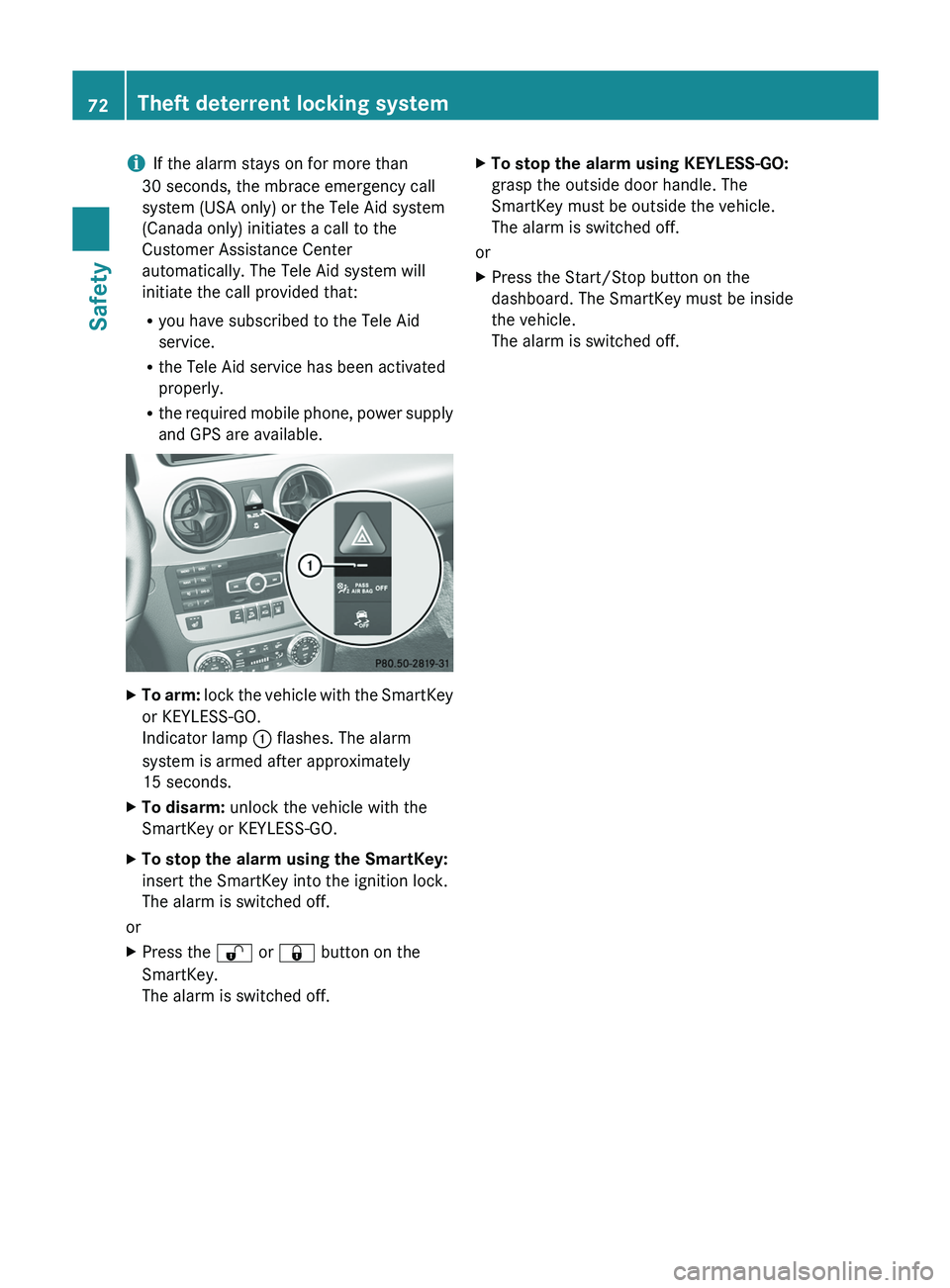
To arm: lock the vehicle with the SmartKey
or KEYLESS-GO.
Indicator lamp 0043 flashes. The alarm
system is armed after approximately
15 seconds.
X To disarm: unlock the vehicle with the
SmartKey or KEYLESS-GO.
X To stop the alarm using the SmartKey:
insert the SmartKey into the ignition lock.
The alarm is switched off.
or
X Press the 0036
or 0037 button on the
SmartKey.
The alarm is switched off. X
To stop the alarm using KEYLESS-GO:
grasp the outside door handle. The
SmartKey must be outside the vehicle.
The alarm is switched off.
or
X Press the Start/Stop button on the
dashboard. The SmartKey must be inside
the vehicle.
The alarm is switched off.72
Theft deterrent locking system
Safety
Page 78 of 380
and the fuel filler flap are unlocked when the
vehicle is unlocked. This is useful if you
frequently travel on your own.
X
To change the setting: press and hold
down the 0036 and 0037 buttons
simultaneously for approximately six
seconds until the battery check lamp
(Y page 77) flashes twice.
i If the setting of the locking system is
changed within the signal range of the
vehicle, pressing the
0037
or
0036
button:
R locks or
R unlocks the vehicle
The SmartKey now functions as follows:
X To unlock the driver's door: press the
0036 button once.
X To unlock centrally: press the 0036
button twice.
X To lock centrally: press the 0037 button.
The KEYLESS-GO function is changed as
follows:
X To unlock the driver's door: touch the
inner surface of the door handle on the
driver's door.
X To unlock centrally: touch the inner
surface of the door handle on the front-
passenger door or the rear door.
X To lock centrally: touch the outer sensor
surface on one of the door handles
(Y page 75).
X To restore the factory settings: press
and hold down the 0036
and 0037 buttons
simultaneously for approximately six
seconds until the battery check lamp
flashes twice. Mechanical key
General notes If the vehicle can no longer be locked or
unlocked with the SmartKey
or
the KEYLESS-
GO key, use the mechanical key. If you use the mechanical key to unlock and
open the driver's door, the anti-theft alarm
system will be triggered (
Y page 71).
X To end the
alarm: insert the SmartKey into
the ignition lock.
i With KEYLESS-GO: remove the Start/
Stop button from the ignition lock
beforehand.
If
you unlock the vehicle
using the mechanical
key, the fuel filler flap will not be unlocked
automatically.
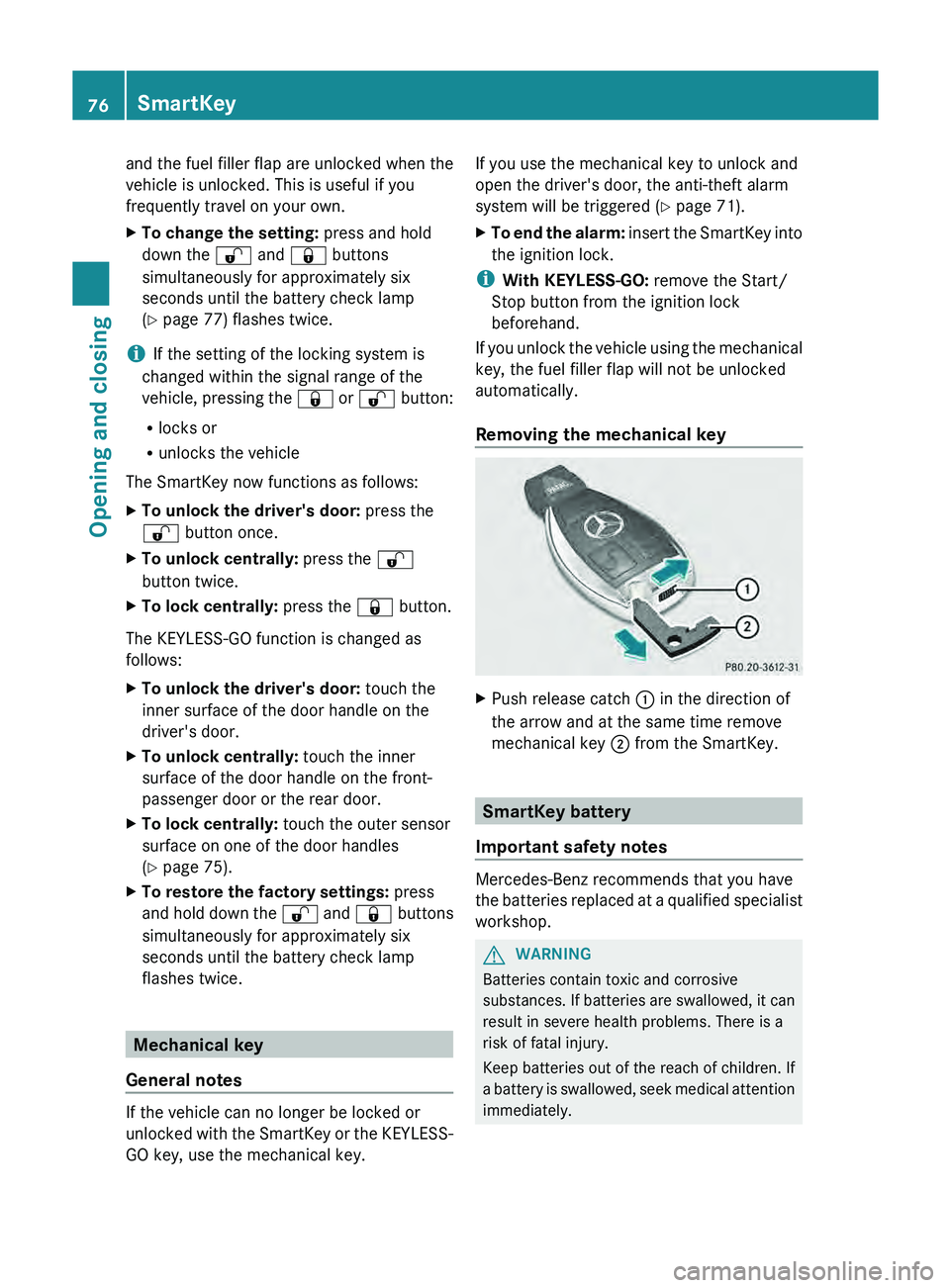
Removing the mechanical key X
Push release catch 0043 in the direction of
the arrow and at the same time remove
mechanical key 0044 from the SmartKey. SmartKey battery
Important safety notes Mercedes-Benz recommends that you have
the batteries replaced at
a
qualified specialist
workshop. G
WARNING
Batteries contain toxic and corrosive
substances. If batteries
are swallowed,
it can
result in severe health problems. There is a
risk of fatal injury.
Keep batteries out of the reach of children. If
a battery is swallowed, seek medical attention
immediately. 76
SmartKey
Opening and closing
Page 89 of 380
G
WARNING
The reversing feature does not react:
R to soft, light and thin objects, e.g. small
fingers
R over the last 4 mm
of the closing movement
R during resetting
R when closing the side window again
manually immediately after automatic
reversing
This means that the reversing feature cannot
prevent someone being trapped in these
situations. There is a risk of injury.
Make sure that no body parts are in close
proximity during the closing procedure. If
someone becomes trapped, press the switch
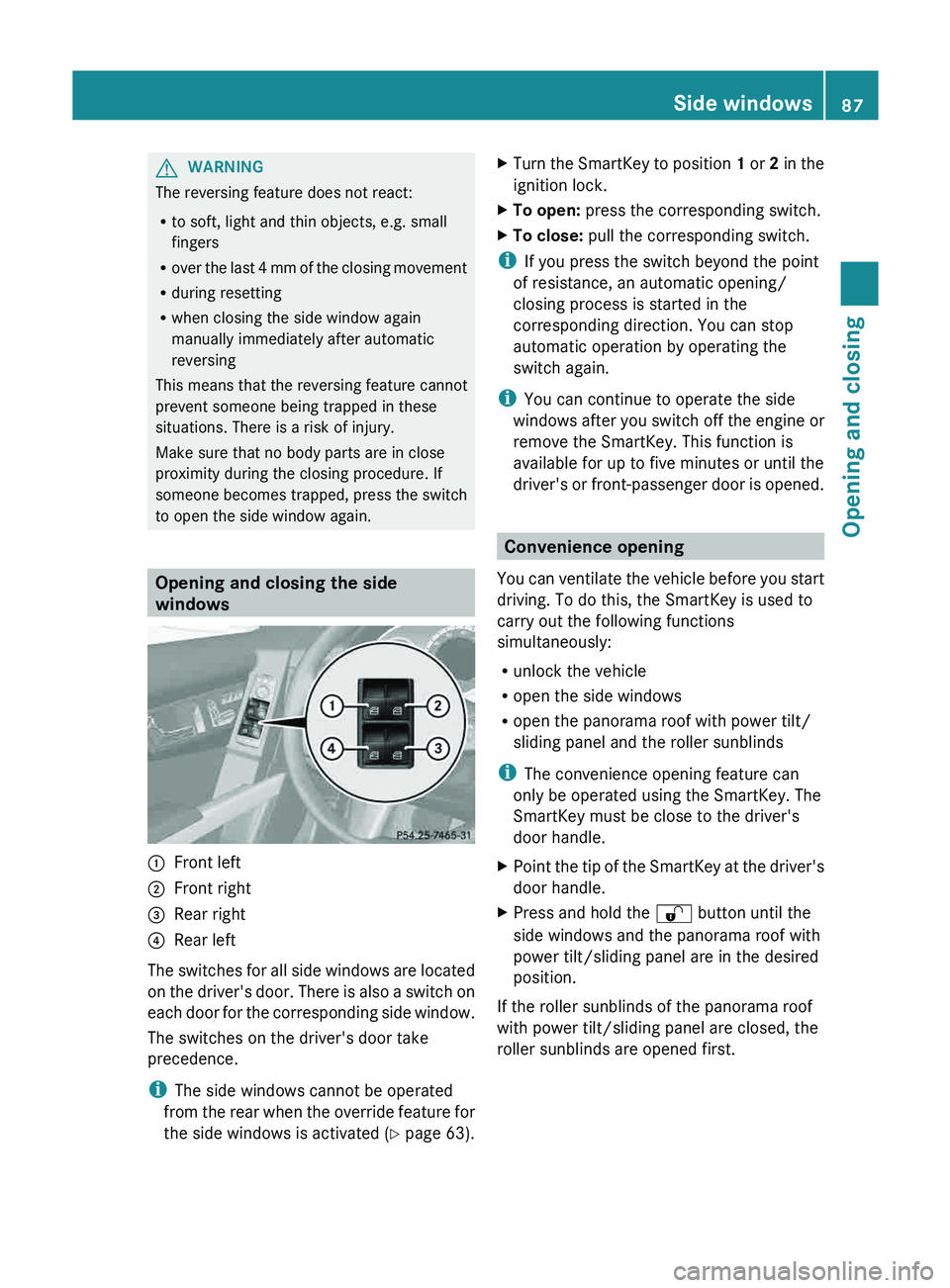
to open the side window again. Opening and closing the side
windows
0043
Front left
0044 Front right
0087 Rear right
0085 Rear left
The switches for all side windows are located
on the driver's door.
There
is also a switch on
each door for the corresponding side window.
The switches on the driver's door take
precedence.
i The side windows cannot be operated
from the rear when the override feature for
the side windows is activated ( Y page 63).X
Turn the SmartKey to position 1 or 2 in the
ignition lock.
X To open:
press the corresponding switch.
X To close: pull the corresponding switch.
i If you press the switch beyond the point
of resistance, an automatic opening/
closing process is started in the
corresponding direction. You can stop
automatic operation by operating the
switch again.
i You can continue to operate the side
windows after you switch off
the engine or
remove the SmartKey. This function is
available for up to five minutes or until the
driver's or front-passenger door is opened. Convenience opening
You can ventilate the vehicle
before you start
driving. To do this, the SmartKey is used to
carry out the following functions
simultaneously:
R unlock the vehicle
R open the side windows
R open the panorama roof with power tilt/
sliding panel and the roller sunblinds
i The convenience opening feature can
only be operated using the SmartKey. The
SmartKey must be close to the driver's
door handle.
X Point the tip of the SmartKey at the driver's
door handle.
X Press and hold the 0036 button until the
side windows and the panorama roof with
power tilt/sliding panel are in the desired
position.
If the roller sunblinds of the panorama roof
with power tilt/sliding panel are closed, the
roller sunblinds are opened first. Side windows
87Opening and closing Z
Page 92 of 380
G
WARNING
While opening and closing the sliding sunroof,
body parts in close proximity could become
trapped. There is a risk of injury.
Make sure that no body parts are in close
proximity during the opening and closing
procedures.
If somebody becomes trapped:
R release the switch immediately, or
R during automatic operation, push the
switch briefly in any direction
The opening or closing procedure will be
stopped. G
WARNING
If children operate the sliding sunroof they
could become trapped, particularly if
they are
left unsupervised. There is a risk of injury.
When leaving the vehicle, always take the
SmartKey with you and lock the vehicle. Never
leave children unsupervised in the vehicle.
! Only open the sliding sunroof if it is free
of snow and ice. Otherwise, malfunctions
may occur.
Do not allow anything to protrude from the
sliding sunroof. Otherwise, the seals could
be damaged.
! The weather can change abruptly. It could
start to rain or snow. Make sure that the
sliding sunroof is closed when you leave the
vehicle. The vehicle electronics can be
damaged if water enters the vehicle
interior.
i Resonance noises can occur in addition
to the usual airflow noises when the sliding
sunroof is open. They are caused by minor
pressure fluctuations in the vehicle interior.
Change the position of the sliding sunroof
or open a side window slightly to reduce or
eliminate these noises. Sliding sunroof reversing feature
The sliding sunroof is equipped with an
automatic reversing feature. If a solid object
blocks or restricts the sliding sunroof during
the closing process, the sliding
sunroof opens
again automatically. However, the automatic
reversing feature is only an aid and does not
relieve you of the responsibility of paying
attention when closing the sliding sunroof. G
WARNING
The reversing feature does not react:
R to soft, light and thin objects, e.g. small
fingers
R over the last 4 mm
of the closing movement
R during resetting
R when closing the sliding sunroof again
manually immediately after automatic
reversing
This means that the reversing feature cannot
prevent someone being trapped in these
situations. There is a risk of injury.
Make sure that no body parts are in close
proximity during the closing procedure.
If somebody becomes trapped:
R release the switch immediately, or
R during automatic operation, push the
switch briefly in any direction
The closing process is stopped. 90
Sliding sunroof
Opening and closing
Page 93 of 380
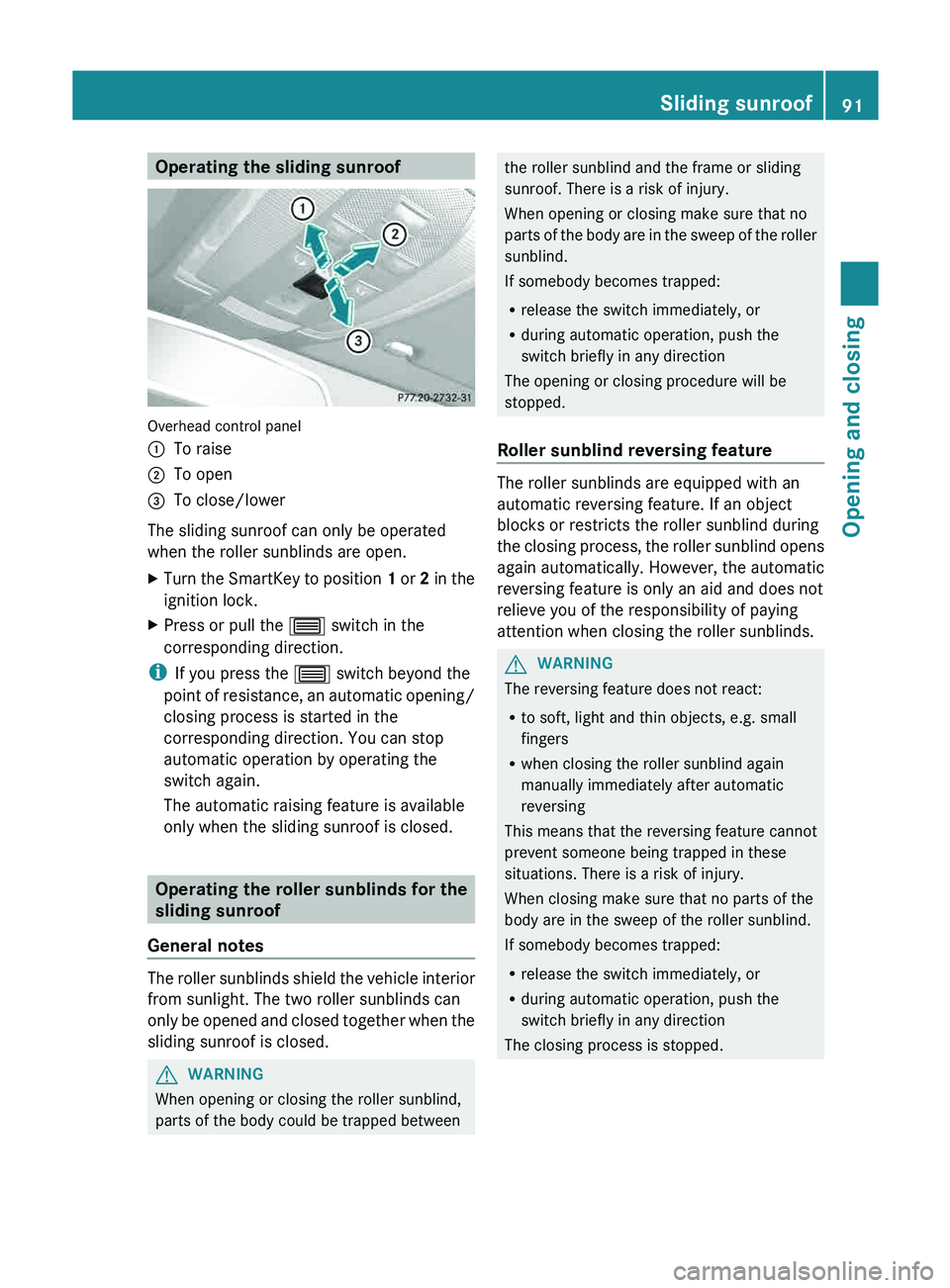
Operating the sliding sunroof
Overhead control panel
0043
To raise
0044 To open
0087 To close/lower
The sliding sunroof can only be operated
when the roller sunblinds are open.
X Turn the SmartKey to position 1 or
2 in the
ignition lock.
X Press or pull the 0057
switch in the
corresponding direction.
i If you press the 0057 switch beyond the
point of resistance, an automatic
opening/
closing process is started in the
corresponding direction. You can stop
automatic operation by operating the
switch again.
The automatic raising feature is available
only when the sliding sunroof is closed. Operating the roller sunblinds for the
sliding sunroof
General notes The roller sunblinds shield the vehicle interior
from sunlight. The two roller sunblinds can
only be opened and closed
together when the
sliding sunroof is closed. G
WARNING
When opening or closing the roller sunblind,
parts of the body could be trapped between the roller sunblind and the frame or sliding
sunroof. There is a risk of injury.
When opening or closing make sure that no
parts of the body
are
in the sweep of the roller
sunblind.
If somebody becomes trapped:
R release the switch immediately, or
R during automatic operation, push the
switch briefly in any direction
The opening or closing procedure will be
stopped.
Roller sunblind reversing feature The roller sunblinds are equipped with an
automatic reversing feature. If an object
blocks or restricts the roller sunblind during
the closing process, the
roller
sunblind opens
again automatically. However, the automatic
reversing feature is only an aid and does not
relieve you of the responsibility of paying
attention when closing the roller sunblinds. G
WARNING
The reversing feature does not react:
R to soft, light and thin objects, e.g. small
fingers
R when closing the roller sunblind again
manually immediately after automatic
reversing
This means that the reversing feature cannot
prevent someone being trapped in these
situations. There is a risk of injury.
When closing make sure that no parts of the
body are in the sweep of the roller sunblind.
If somebody becomes trapped:
R release the switch immediately, or
R during automatic operation, push the
switch briefly in any direction
The closing process is stopped. Sliding sunroof
91
Opening and closing Z
Page 94 of 380
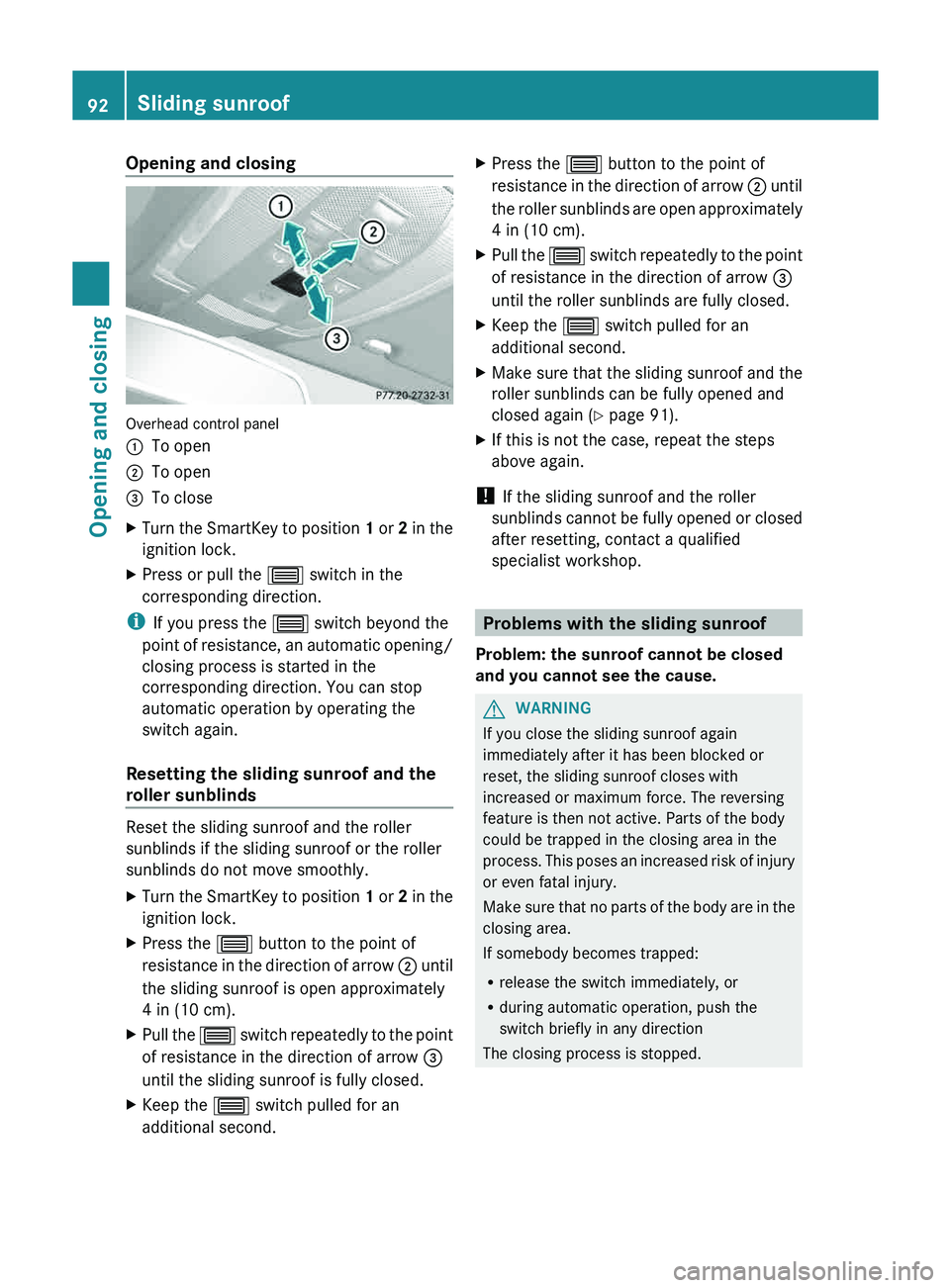
Opening and closing
Overhead control panel
0043
To open
0044 To open
0087 To close
X Turn the SmartKey to position 1 or
2 in the
ignition lock.
X Press or pull the 0057
switch in the
corresponding direction.
i If you press the 0057 switch beyond the
point of resistance, an automatic
opening/
closing process is started in the
corresponding direction. You can stop
automatic operation by operating the
switch again.
Resetting the sliding sunroof and the
roller sunblinds Reset the sliding sunroof and the roller
sunblinds if the sliding sunroof or the roller
sunblinds do not move smoothly.
X
Turn the SmartKey to position 1 or 2 in the
ignition lock.
X Press the
0057 button to the point of
resistance in the direction of
arrow 0044 until
the sliding sunroof is open approximately
4 in (10 cm).
X Pull the 0057 switch repeatedly to the
point
of resistance in the direction of arrow 0087
until the sliding sunroof is fully closed.
X Keep the 0057 switch pulled for an
additional second. X
Press the 0057 button to the point of
resistance in the direction of
arrow 0044 until
the roller sunblinds are open approximately
4 in (10 cm).
X Pull the 0057 switch
repeatedly to
the
point
of resistance in the direction of arrow 0087
until the roller sunblinds are fully closed.
X Keep the 0057 switch pulled for an
additional second.
X Make sure that the sliding sunroof and the
roller sunblinds can be fully opened and
closed again (
Y
page 91).
X If this is not the case, repeat the steps
above again.
! If the sliding sunroof and the roller
sunblinds cannot be fully
opened
or closed
after resetting, contact a qualified
specialist workshop. Problems with the sliding sunroof
Problem: the sunroof cannot be closed
and you cannot see the cause. G
WARNING
If you close the sliding sunroof again
immediately after it has been blocked or
reset, the sliding sunroof closes with
increased or maximum force. The reversing
feature is then not active. Parts of the body
could be trapped in the closing area in the
process. This poses an increased
risk of injury
or even fatal injury.
Make sure that no parts of the body are in the
closing area.
If somebody becomes trapped:
R release the switch immediately, or
R during automatic operation, push the
switch briefly in any direction
The closing process is stopped. 92
Sliding sunroof
Opening and closing
Page 104 of 380
Steering wheel
Important safety notes
G
WARNING
Do not adjust the steering wheel while driving.
Adjusting the steering wheel while
driving, or
driving without the steering wheel adjustment
feature locked could cause the driver to lose
control of the vehicle.
The electrical steering wheel adjustment
feature can be operated at any time.
Therefore, do not leave children unattended
in the vehicle, or with access to an unlocked
vehicle. A child's unsupervised access to a
vehicle could result in an accident and/or
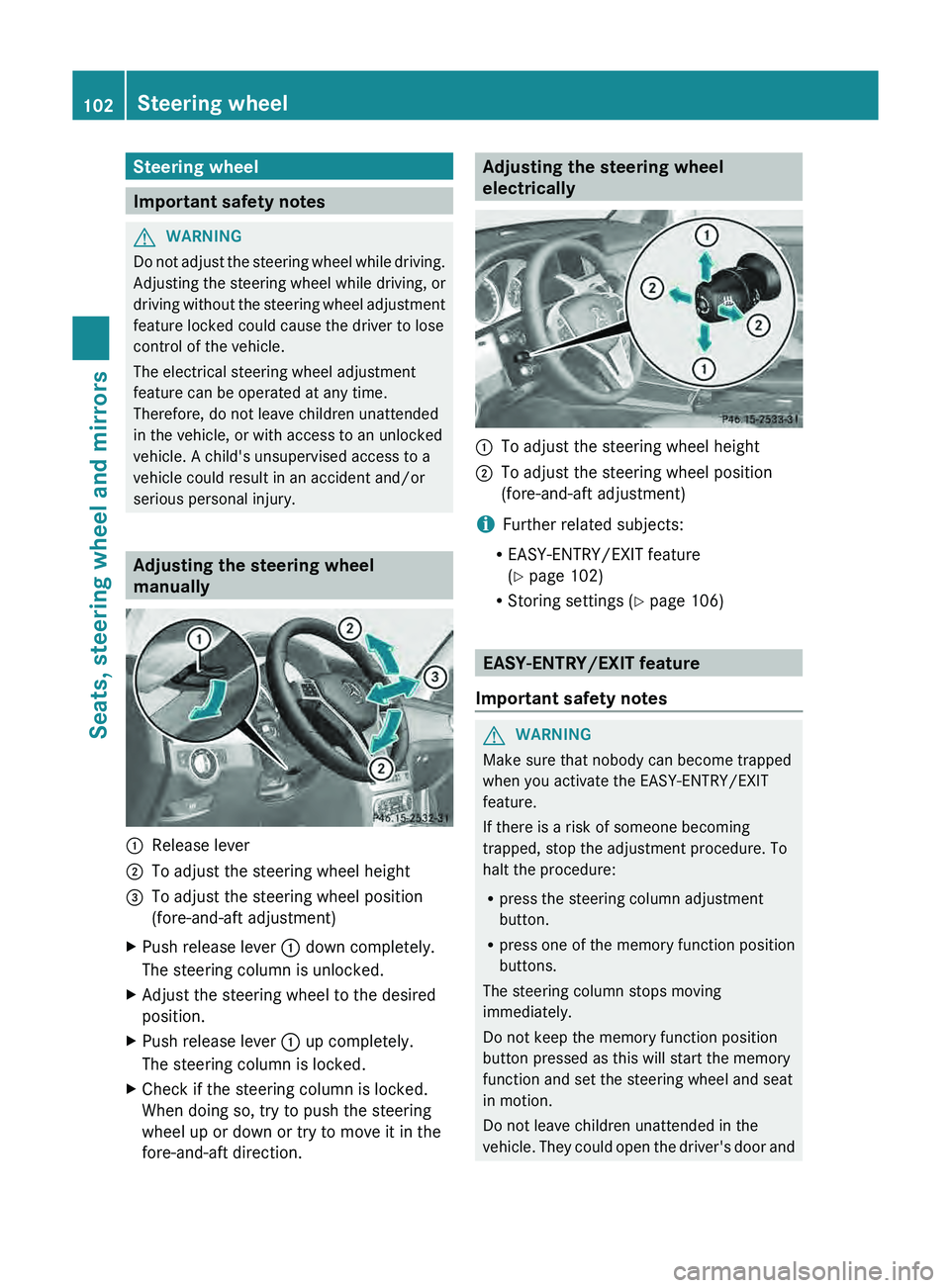
serious personal injury. Adjusting the steering wheel
manually
0043
Release lever
0044 To adjust the steering wheel height
0087 To adjust the steering wheel position
(fore-and-aft adjustment)
X Push release lever 0043 down completely.
The steering column is unlocked.
X Adjust the steering wheel to the desired
position.
X Push release lever 0043 up completely.
The steering column is locked.
X Check if the steering column is locked.
When doing so, try to push the steering
wheel up or down or try to move it in the
fore-and-aft direction. Adjusting the steering wheel
electrically
0043
To adjust the steering wheel height
0044 To adjust the steering wheel position
(fore-and-aft adjustment)
i Further related subjects:
R EASY-ENTRY/EXIT feature
(Y page 102)
R Storing settings ( Y page 106) EASY-ENTRY/EXIT feature
Important safety notes G
WARNING
Make sure that nobody can become trapped
when you activate the EASY-ENTRY/EXIT
feature.
If there is a risk of someone becoming
trapped, stop the adjustment procedure. To
halt the procedure:
R press the steering column adjustment
button.
R press one of the memory function position
buttons.
The steering column stops moving
immediately.
Do not keep the memory function position
button pressed as this will start the memory
function and set the steering wheel and seat
in motion.
Do not leave children unattended in the
vehicle. They could open the
driver's door and102
Steering wheel
Seats, steering wheel and mirrors
Page 105 of 380
thereby unintentionally activate the EASY-
ENTRY/EXIT feature and become trapped.
G
WARNING
Let the system complete the adjustment
procedure before setting the vehicle in
motion. All steering wheel adjustment must
be completed before setting the vehicle in
motion. Driving off with the steering wheel
still adjusting could cause the driver to lose
control of the vehicle.
The EASY-ENTRY/EXIT feature makes getting
in and out of your vehicle easier.
You can activate and deactivate the EASY-
ENTRY/EXIT feature in the on-board
computer (
Y page 229).
Position of the steering wheel when the
EASY-ENTRY/EXIT feature is active The steering wheel swings upwards when
you:
R
remove the SmartKey from the
ignition lock
R open the driver's door and KEYLESS-GO is
in position 1
R open the driver's door and the SmartKey is
in position 0 or 1 in the ignition lock
i The steering wheel only moves upwards if
it has not already reached the upper end
stop.
Position of the steering wheel for
driving The steering wheel is moved to the last
selected position when:
R
the driver's door is closed.
R you insert the SmartKey into the ignition
lock.
or
R you press the Start/Stop button once on
vehicles with KEYLESS-GO.
When you close the driver's door with the
ignition switched on, the steering wheel is also automatically moved to the previously
set position.
The last position of the steering wheel is
stored when you switch off the ignition or
when you store the setting with the memory
function (
Y page 106).
Crash-responsive EASY-EXIT feature If the crash-responsive EASY-EXIT feature is
triggered in an accident,
the
steering column
will move upwards when the driver's door is
opened. This occurs irrespective of the
position of the SmartKey in the ignition lock.
This makes it easier to exit the vehicle and
rescue the occupants.
The crash-responsive EASY-EXIT feature is
only operational if the EASY-EXIT/ENTRY
feature is activated in the on-board computer. Mirrors
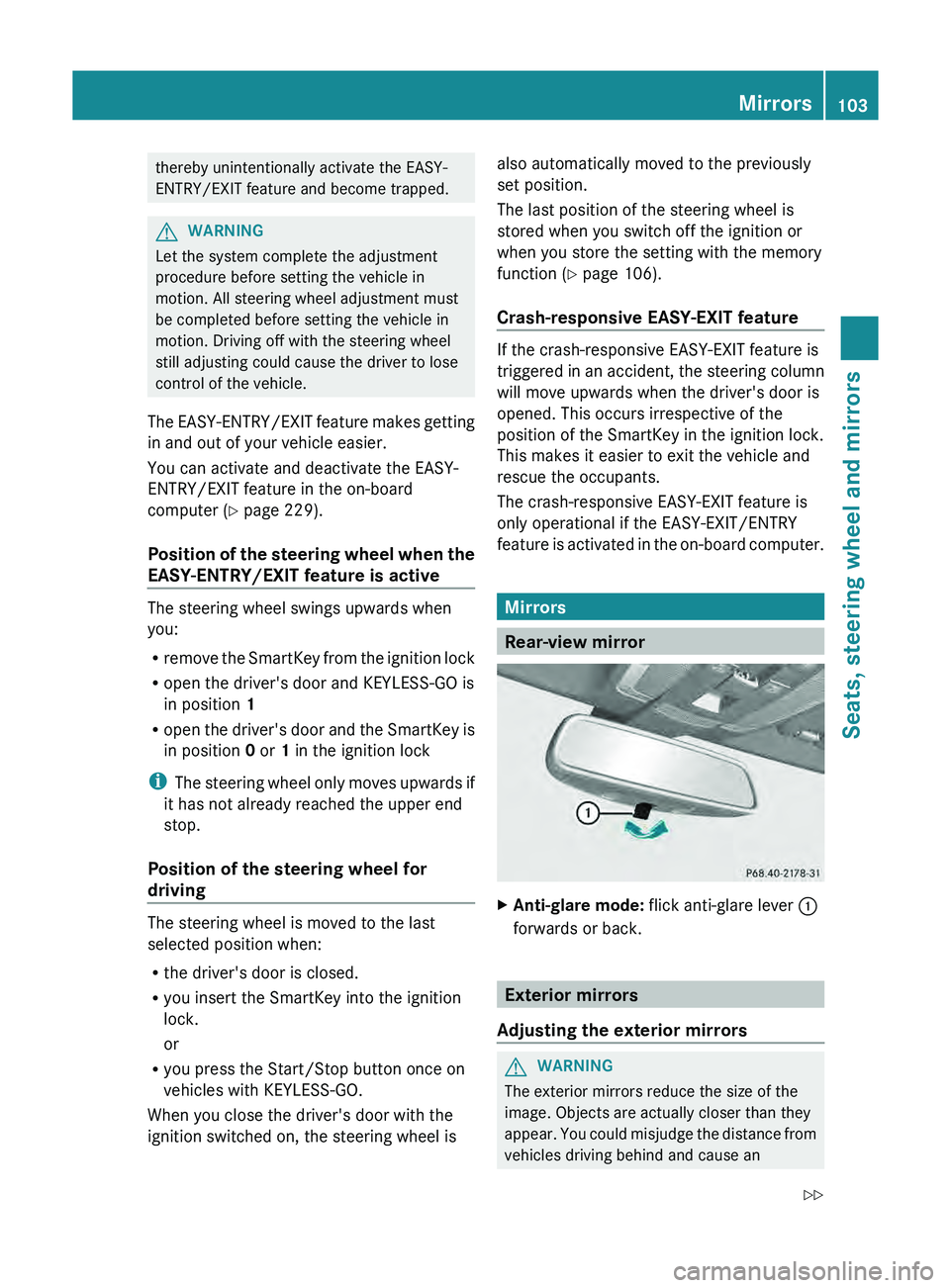
Rear-view mirror
X
Anti-glare mode: flick anti-glare lever 0043
forwards or back. Exterior mirrors
Adjusting the exterior mirrors G
WARNING
The exterior mirrors reduce the size of the
image. Objects are actually closer than they
appear. You could misjudge the
distance from
vehicles driving behind and cause an Mirrors
103
Seats, steering wheel and mirrors
Z
Page 124 of 380
Never fold a windshield wiper arm without
a wiper blade back onto the windshield/
rear window.
Hold the windshield wiper
arm
firmly when
you change the wiper blade. If you release
the wiper arm without a wiper blade and it
falls onto the windshield/rear window, the
windshield/rear window may be damaged
by the force of the impact.
Mercedes-Benz recommends that you have
the wiper blades changed at a qualified
specialist workshop.
! To avoid damaging the wiper blades,
make sure that you touch only the wiper
arm of the wiper.
Changing the windshield wiper blades Moving the wiper blades to a vertical
position
!
Before changing the wiper blades,
always
set the wiper arms to a vertical position
using the combination switch. There is
otherwise a risk of damaging the hood.
Vehicles without KEYLESS-GO
X Turn the SmartKey to position 1 or 2 in the
ignition lock.
X Set the windshield wipers to
position
00AA.
X When the wiper arms have reached a
vertical position, turn the SmartKey to
position 0 and remove it from the ignition
lock.
Vehicles with KEYLESS-GO
X Switch off the engine.
X Remove your foot from the brake pedal.
X Set the windshield wipers to
position 00AA.
X Press the Start/Stop button repeatedly
until the windshield wipers start.
X When the wiper arms have reached a
vertical position, press the Start/Stop
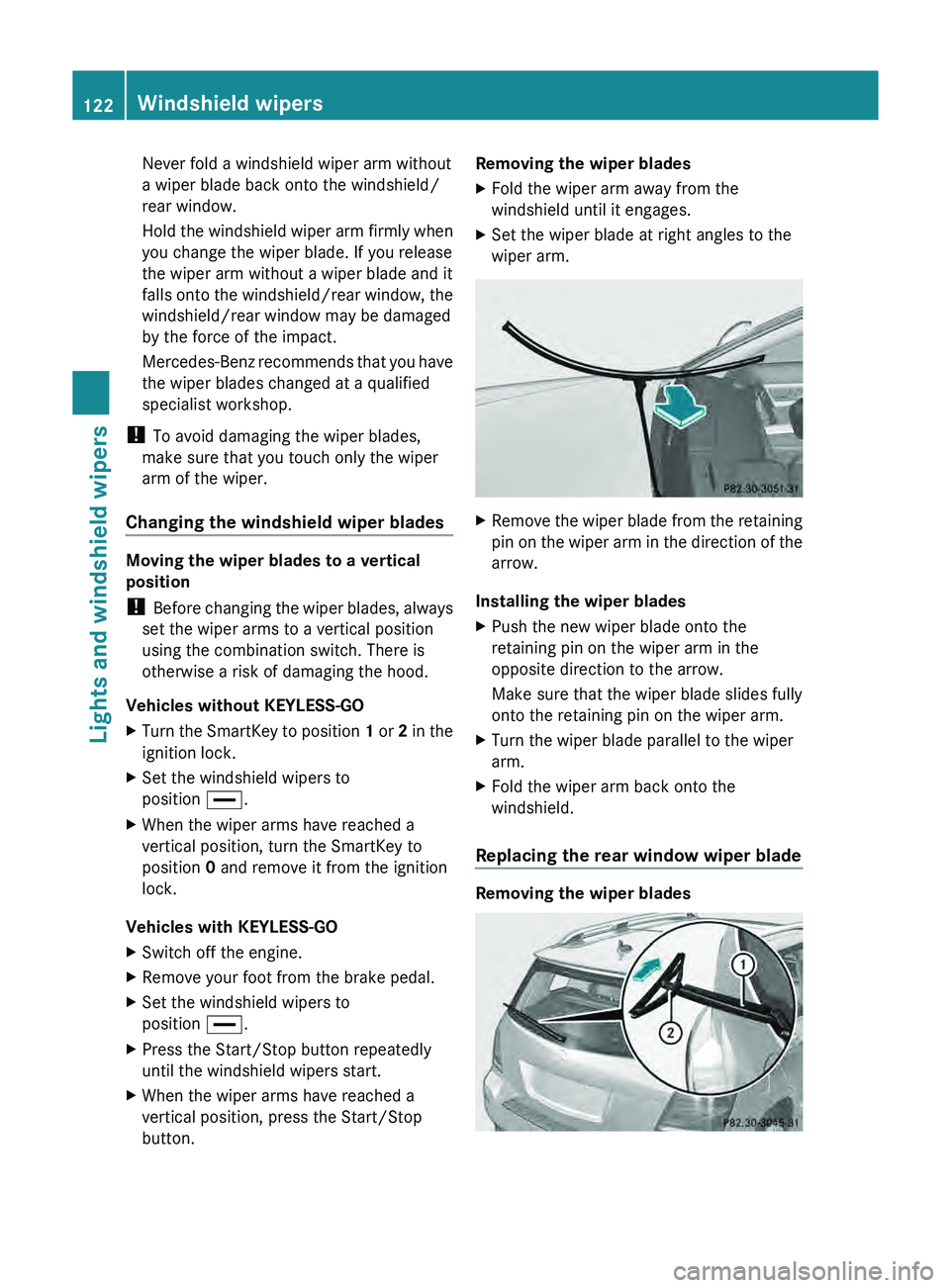
button. Removing the wiper blades
X
Fold the wiper arm away from the
windshield until it engages.
X Set the wiper blade at right angles to the
wiper arm. X
Remove the wiper blade from the retaining
pin on the wiper arm
in the direction of the
arrow.
Installing the wiper blades
X Push the new wiper blade onto the
retaining pin on the wiper arm in the
opposite direction to the arrow.
Make sure that the wiper blade slides fully
onto the retaining pin on the wiper arm.
X Turn the wiper blade parallel to the wiper
arm.
X Fold the wiper arm back onto the
windshield.
Replacing the rear window wiper blade Removing the wiper blades122
Windshield wipers
Lights and windshield wipers