stop start MERCEDES-BENZ GLK-CLASS SUV 2013 Owner's Guide
[x] Cancel search | Manufacturer: MERCEDES-BENZ, Model Year: 2013, Model line: GLK-CLASS SUV, Model: MERCEDES-BENZ GLK-CLASS SUV 2013Pages: 380, PDF Size: 19.54 MB
Page 151 of 380
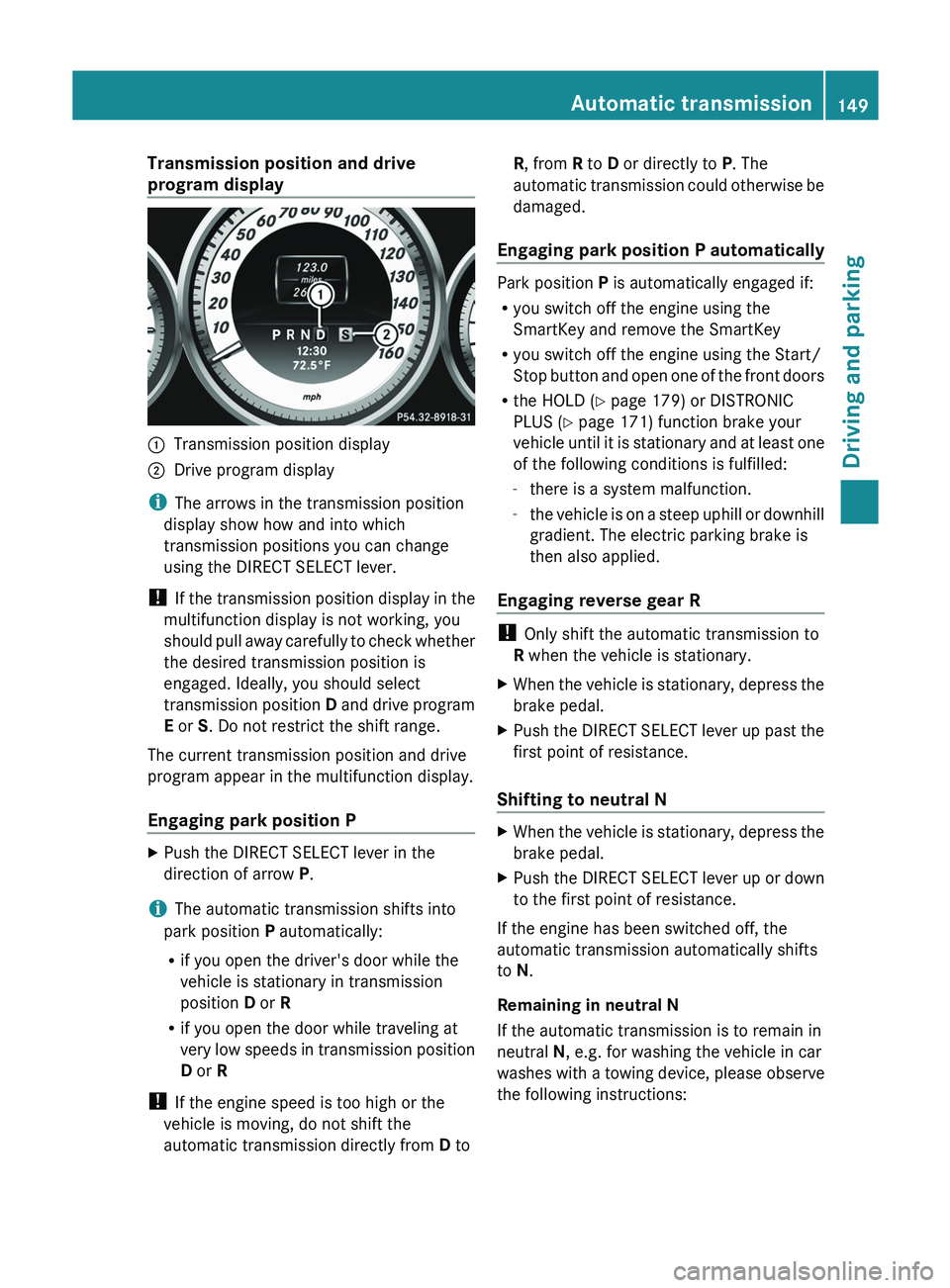
Transmission position and drive
program display
0043
Transmission position display
0044 Drive program display
i The arrows in the transmission position
display show how and into which
transmission positions you can change
using the DIRECT SELECT lever.
! If the transmission position
display
in the
multifunction display is not working, you
should pull away carefully to check whether
the desired transmission position is
engaged. Ideally, you should select
transmission position D and drive program
E or S. Do not restrict the shift range.
The current transmission position and drive
program appear in the multifunction display.
Engaging park position P X
Push the DIRECT SELECT lever in the
direction of arrow P.
i The automatic transmission shifts into
park position P automatically:
R if you open the driver's door while the
vehicle is stationary in transmission
position D or R
R if you open the door while traveling at
very low speeds in transmission
position
D or R
! If the engine speed is too high or the
vehicle is moving, do not shift the
automatic transmission directly from D to R, from R to D or directly to P. The
automatic
transmission could otherwise be
damaged.
Engaging park position P automatically Park position P is automatically engaged if:
R
you switch off the engine using the
SmartKey and remove the SmartKey
R you switch off the engine using the Start/
Stop button and open one
of the front doors
R the HOLD (Y page 179) or DISTRONIC
PLUS (Y page 171) function brake your
vehicle until it is stationary and at least one
of the following conditions is fulfilled:
-there is a system malfunction.
- the vehicle is on a steep uphill or downhill
gradient. The electric parking brake is
then also applied.
Engaging reverse gear R !
Only shift the automatic transmission to
R when the vehicle is stationary.
X When the vehicle is stationary, depress the
brake pedal.
X Push the DIRECT SELECT lever up past the
first point of resistance.
Shifting to neutral N X
When the vehicle is stationary, depress the
brake pedal.
X Push the DIRECT SELECT lever up or down
to the first point of resistance.
If the engine has been switched off, the
automatic transmission automatically shifts
to N.
Remaining in neutral N
If the automatic transmission is to remain in
neutral N, e.g. for washing the vehicle in car
washes with a
towing device,
please observe
the following instructions: Automatic transmission
149
Driving and parking Z
Page 152 of 380
G
WARNING
If children are left unsupervised in the vehicle,
they could:
R open the doors, thus endangering other
people or road users.
R get out and disrupt traffic.
R operate the vehicle's equipment.
Additionally, children could set the vehicle in
motion if, for example, they:
R release the parking brake.
R shift the automatic transmission out of
parking position P.
R starting the engine.
There is a risk of an accident and injury.
When leaving the vehicle, always take the
SmartKey with you and lock
the vehicle. Never
leave children or animals unattended in the
vehicle. Always keep the SmartKey out of
reach of children.
Using the SmartKey:
R Make sure that the ignition is switched on.
R When the vehicle is stationary, depress the
brake pedal and keep it depressed.
R Shift to neutral N.
R Release the brake pedal.
R if the electric parking brake is applied,
release it.
R Switch off the ignition and leave the
SmartKey in the ignition lock.
Using KEYLESS-GO:
R Make sure that the ignition is switched on.
R When the vehicle is stationary, depress the
brake pedal and keep it depressed.
R Engage park position P.
R Release the brake pedal.
R Remove the Start/Stop button from the
ignition lock.
R Insert the SmartKey into the ignition lock.
R Switch on the ignition.
R Depress the brake pedal and keep it
depressed. R
Shift to neutral N.
R Release the brake pedal.
R if the electric parking brake is applied,
release it.
R Switch off the ignition and leave the
SmartKey in the ignition lock.
Engaging drive position D X
When the vehicle is stationary, depress the
brake pedal.
X Push the DIRECT SELECT lever down past
the first point of resistance. Transmission positions
0045
Park position
Do not shift the transmission into
position P(Y page 160) unless the
vehicle is stationary. The parking
lock should not be
used
as a brake
when parking. Always apply the
parking brake in addition to the
parking lock in order to secure the
vehicle.
If the vehicle electronics are
malfunctioning, the transmission
may be locked in position P. Have
the vehicle electronics checked
immediately at a qualified
specialist workshop.
The automatic transmission shifts
to P automatically if you:
R remove the SmartKey
R switch off the engine when in R
or D and open one of the front
doors 0046
Reverse gear
Only shift the transmission to
R
when the vehicle is stationary. 150
Automatic transmission
Driving and parking
Page 156 of 380
Problems with the transmission
Problem Possible causes/consequences and
0050 SolutionsThe transmission has
problems shifting gear. The transmission is losing oil.
X
Have the transmission checked at a qualified specialist
workshop immediately. The acceleration ability
is deteriorating.
The transmission no
longer changes gear. The transmission is in emergency mode.
It is only possible to shift into second
gear and reverse gear.
X Stop the vehicle.
X Shift the transmission to position P.
X Switch off the engine.
X Wait at least ten seconds before restarting the engine.
X Shift the transmission to position D or R.
If D
is selected, the transmission
shifts into second gear; if R is
selected, the transmission shifts into reverse gear.
X Have the transmission checked at a qualified specialist
workshop immediately. Transfer case
This section is only valid for vehicles with 4-
wheel drive (4MATIC). Power is always
transmitted to both axles.
! Performance tests may only be carried
out on a 2-axle dynamometer. The brake
system or transfer case could
otherwise be
damaged. Contact a qualified specialist
workshop for a performance test.
! To prevent ESP ®
from intervening, the
ignition must be switched off (SmartKey in
position 0 or 1) if:
R the parking brake is being tested on a
brake dynamometer.
R the vehicle is being towed with only one
axle raised (not permitted for vehicles
with 4MATIC).
The brake system could otherwise be
damaged.
! Vehicles with 4MATIC must not be towed
with either the front or the rear axle raised,
as doing so will damage the transmission. Refueling
Important safety notes
G
WARNING
Fuel is highly flammable. If you handle fuel
incorrectly, there is a risk of fire and
explosion.
You must avoid fire, open flames, creating
sparks and smoking. Switch off the engine
and, if applicable,
the auxiliary
heating before
refueling. G
WARNING
Fuel is poisonous and hazardous to health.
There is a risk of injury.
You must make
sure that
fuel does not come
into contact with your skin, eyes or clothing
and that it is not swallowed. Do not inhale fuel
vapors. Keep fuel away from children. 154
Refueling
Driving and parking
Page 163 of 380
Vehicles with automatic transmission
X
Apply the parking brake firmly.
X Shift the transmission to position P.
Using the SmartKey
X Turn the SmartKey to position 0 in the
ignition lock and remove it.
The immobilizer is activated.
i The SmartKey can only be removed if the
transmission is in position P.
Using KEYLESS-GO
X Press the Start/Stop button (Y page 141).
The engine stops and all the indicator
lamps in the instrument cluster go out.
i When the driver's door is closed, this
corresponds to key position 1. When the
driver's door is open, this corresponds to
key position 0
: "key removed".
i In the event of an
emergency, the engine
can be turned off while the vehicle is in
motion by pressing and holding the Start/
Stop button for three seconds. Parking brake
G
WARNING
If you must brake the vehicle with the parking
brake, the braking distance is considerably
longer and the wheels could
lock. There is an
increased danger of skidding and accidents.
Only use the parking brake to brake the
vehicle when the service brake is faulty. Do
not apply the parking brake too firmly. If the
wheels lock, release the parking brake until
the wheels begin turning again. G
WARNING
If you leave children unsupervised in the
vehicle, they could set it in motion by, for
example:
R releasing the parking brake
R shifting the automatic transmission out of
the parking position P
R starting the engine.
They could also operate the vehicle's
equipment. There is a risk
of an accident and
injury.
When leaving the vehicle, always take the
SmartKey with you and lock the vehicle. Never
leave children unsupervised in the vehicle.
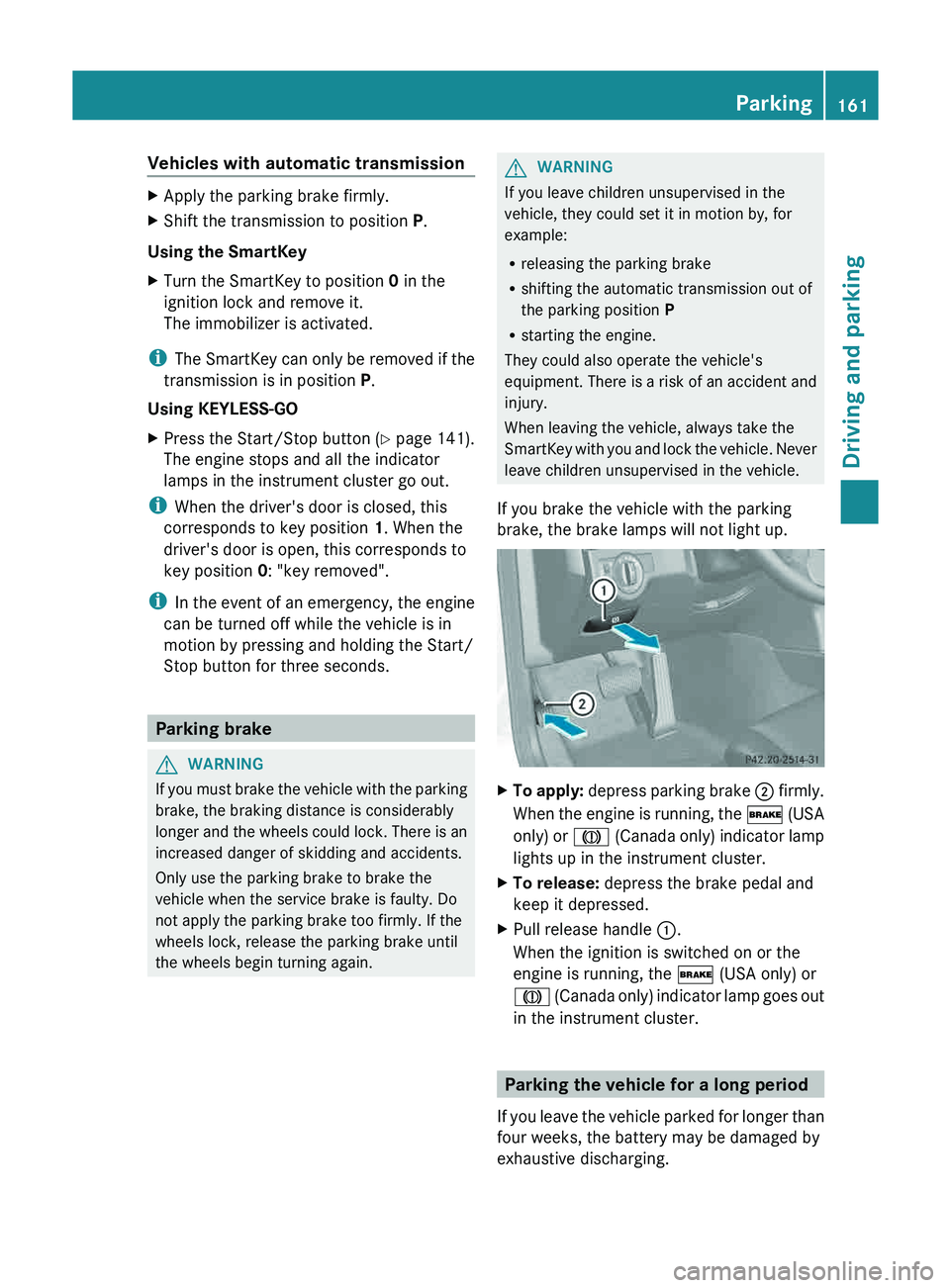
If you brake the vehicle with the parking
brake, the brake lamps will not light up. X
To apply:
depress parking brake 0044
firmly.
When the
engine is running, the 0027 (USA
only) or 004D (Canada only) indicator lamp
lights up in the instrument cluster.
X To release: depress the brake pedal and
keep it depressed.
X Pull release handle 0043.
When the ignition is switched on or the
engine is running, the 0027 (USA only) or
004D (Canada only)
indicator lamp
goes out
in the instrument cluster. Parking the vehicle for a long period
If you leave the vehicle
parked for longer than
four weeks, the battery may be damaged by
exhaustive discharging. Parking
161
Driving and parking Z
Page 164 of 380
X
Connecting a trickle charger.
i You can obtain information about trickle
chargers from a qualified specialist
workshop.
If you leave the vehicle
parked for longer than
six weeks, the vehicle may suffer damage as
a result of lack of use.
X Visit a qualified specialist workshop and
seek advice. Driving tips
General driving tips
Important safety notes G
WARNING
If you switch off the ignition while driving,
safety-relevant functions are only available
with limitations, or not at
all. This could affect,
for example, the power steering and the brake
boosting effect. You will require considerably
more effort to steer and brake. There is a risk
of an accident.
Do not switch off the ignition while driving. G
WARNING
If you operate mobile communication
equipment while driving, you will be
distracted from traffic conditions. You could
also lose control
of the
vehicle. There is a risk
of an accident.
Only operate this equipment when the vehicle
is stationary.
Observe the legal requirements for the
country in which you are driving. Some
jurisdictions prohibit the driver from using a
mobile phone while driving a vehicle.
If you make a call while driving, always use
hands-free mode. Only operate the telephone
when the traffic situation permits. If you are
unsure, pull over to a safe location and stop
before operating the telephone.
Bear in mind that at a speed of only 30 mph
(approximately 50 km/h), the vehicle covers a distance of 44 feet (approximately 14 m)
per second.
Drive sensibly – save fuel
Observe the following tips to save fuel:
X
The tires should always be inflated to the
recommended tire pressure.
X Remove unnecessary loads.
X Remove roof racks when they are not
needed.
X Warm up the engine at low engine speeds.
X Avoid frequent acceleration or braking.
X Have all maintenance work carried out as
indicated by the service intervals in the
Maintenance Booklet or by the service
interval display.
Fuel consumption also increases when
driving in cold weather, in stop-start traffic
and in hilly terrain.
Drinking and driving G
WARNING
Drinking and driving and/or taking drugs and
driving are very dangerous combinations.
Even a small amount of alcohol or drugs can
affect your reflexes, perceptions and
judgment.
The possibility of a serious or even fatal
accident are greatly increased when
you drink
or take drugs and drive.
Do not drink or take drugs and drive or allow
anyone to drive who has been drinking or
taking drugs.
Emission control G
WARNING
Combustion engines emit poisonous exhaust
gases such as carbon monoxide. Inhaling
these exhaust gases leads to
poisoning. There
is a risk of fatal injury. Therefore never leave
the engine running in enclosed spaces
without sufficient ventilation. 162
Driving tips
Driving and parking
Page 166 of 380
i
The ECO display summaries the driving
characteristics from the start of
the journey
to its completion. For this reason, the bars
change dynamically at the beginning of the
journey. On longer journeys, there are
fewer changes. For more dynamic changes,
carry out a manual reset.
Further information on the ECO display
(Y page 220). Brakes
Important safety notes G
WARNING
If you shift down on a slippery road surface in
an attempt to increase the engine's braking
effect, the drive wheels could lose their grip.
There is an increased danger of skidding and
accidents.
Do not shift down for additional engine
braking on a slippery road surface.
Downhill gradients !
On long and steep gradients, you must
reduce the load on the brakes by shifting
early to a lower gear.
This allows you to take
advantage of the engine braking effect and
helps avoid overheating and excessive
wear of the brakes.
When you take advantage of the engine
braking effect, a drive wheel may not turn
for some time, e.g. on a slippery road
surface. This could cause damage to the
drive train. This type of damage is not
covered by the Mercedes-Benz warranty.
Heavy and light loads G
WARNING
If you rest your foot on the brake pedal while
driving, the braking system can
overheat. This
increases the stopping distance and can even
cause the braking system to fail. There is a
risk of an accident. Never use the brake pedal as a footrest. Never
depress the brake pedal and the accelerator
pedal at the same time.
! Depressing the brake pedal constantly
results in excessive and premature
wear to
the brake pads.
If the brakes have been subjected to a heavy
load, do not stop the vehicle immediately.
Drive on for a short while. This allows the
airflow to cool the brakes more quickly.
Wet roads If you have driven for a long time in heavy rain
without braking, there may be a delayed
reaction from the brakes
when
braking for the
first time. This may also occur after the
vehicle has been washed.
You have to depress the brake pedal more
firmly. Maintain a greater distance from the
vehicle in front.
After driving on a wet road or having the
vehicle washed, brake firmly while paying
attention to the traffic conditions. This will
warm up the brake discs, thereby drying them
more quickly and protecting them against
corrosion.
Limited braking performance on salt-
treated roads If you drive on salted roads, a layer of salt
residue may form on the brake discs and
brake pads. This can result in a significantly
longer braking distance.
R
Brake occasionally
to remove
any
possible
salt residue. Make sure that you do not
endanger other road users when doing so.
R Carefully depress the brake pedal and the
beginning and end of a journey.
R Maintain a greater distance to the vehicle
ahead.164
Driving tips
Driving and parking
Page 177 of 380
If you wish to exit the vehicle, always turn off
DISTRONIC PLUS and secure the vehicle
against rolling away.
Deactivating DISTRONIC PLUS
(Y page 177).
If DISTRONIC PLUS detects that the vehicle
in front is stopping, it
brakes your vehicle until
it is stationary.
Once your vehicle is stationary, it remains
stationary and you do not need to depress the
brake.
i Depending on the specified minimum
distance, your vehicle will come to a
standstill at a sufficient distance behind the
vehicle in front. The specified minimum
distance is set using the control on the
cruise control lever.
When DISTRONIC PLUS is activated, the
transmission is shifted automatically to
position P if:
R the driver's door is open and the driver's
seat belt is unfastened.
R the engine is switched off, unless it is
automatically switched off by the ECO
start/stop function.
R the hood is opened.
R a system malfunction occurs.
R the power supply is not sufficient.
Setting a speed X
Press the cruise control lever up 0043 for a
higher speed or down 0044
for a lower speed.
X To adjust the set speed in 1 mph
increments (1 km/h increments):
briefly
press the cruise control lever up 0043
or
down 0044 to the pressure point.
Every time the cruise control lever is
pressed up 0043 or down 0044 the last speed
stored is increased or reduced.
X To adjust the set speed in 5 mph
increments (10 km/h increments):
briefly press the cruise control lever up
0043 or down 0044 beyond the pressure
point.
Every time the cruise control lever is
pressed up 0043 or down 0044, the last speed
stored is increased or reduced.
i DISTRONIC PLUS is not
deactivated
if you
depress the accelerator pedal. If you
accelerate to overtake, DISTRONIC PLUS
adjusts the vehicle's speed to the last
speed stored after you have finished
overtaking.
Storing the current speed or calling up
a stored speed X
Briefly pull the cruise control lever towards
you 0085.
X Remove your foot from the accelerator
pedal.
DISTRONIC PLUS is activated. The first
time it is activated, the current speed is
stored. Otherwise, it sets the
vehicle cruise
speed to the previously stored value.
Setting the specified minimum distance You can set the specified minimum distance
for
DISTRONIC PLUS
by varying
the time span
between one and two seconds. With this
function, you can set the minimum distance
that DISTRONIC PLUS keeps to the vehicle in
front, dependent on vehicle speed. You can
see this distance in the multifunction display
(Y page 176).
i Make sure that you maintain a sufficient
distance to the vehicle in front and comply
with the minimum distance as required by
law. Adjust the distance to the vehicle in
front if necessary. Driving systems
175
Driving and parking Z
Page 181 of 380
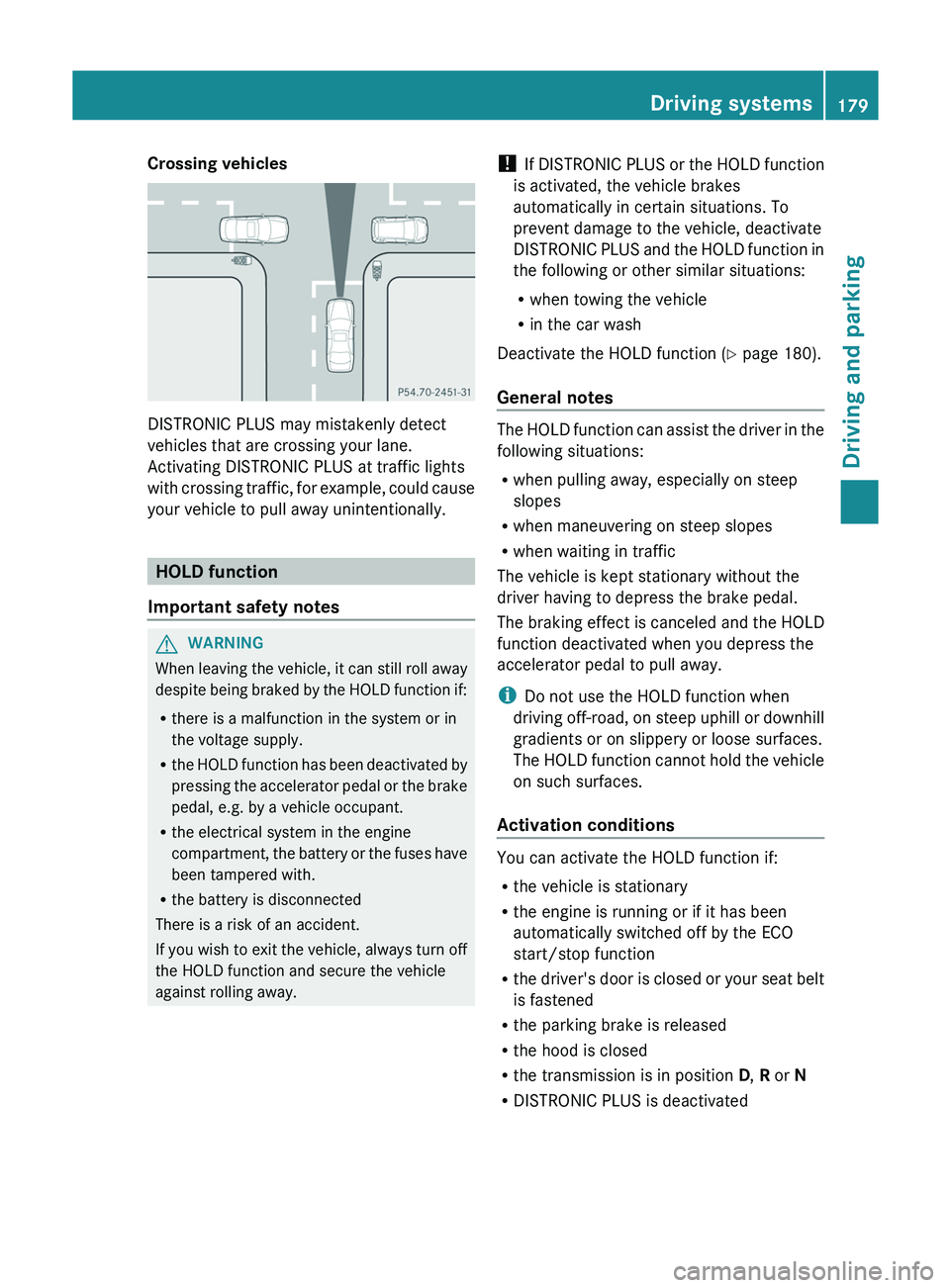
Crossing vehicles
DISTRONIC PLUS may mistakenly detect
vehicles that are crossing your lane.
Activating DISTRONIC PLUS at traffic lights
with crossing traffic, for
example,
could cause
your vehicle to pull away unintentionally. HOLD function
Important safety notes G
WARNING
When leaving the vehicle, it can still roll away
despite being braked by the
HOLD function if:
R there is a malfunction in the system or in
the voltage supply.
R the HOLD function has been deactivated by
pressing the accelerator pedal or the brake
pedal, e.g. by a vehicle occupant.
R the electrical system in the engine
compartment, the battery or the fuses have
been tampered with.
R the battery is disconnected
There is a risk of an accident.
If you wish to exit the vehicle, always turn off
the HOLD function and secure the vehicle
against rolling away. !
If DISTRONIC PLUS or the
HOLD function
is activated, the vehicle brakes
automatically in certain situations. To
prevent damage to the vehicle, deactivate
DISTRONIC PLUS and the HOLD function in
the following or other similar situations:
R when towing the vehicle
R in the car wash
Deactivate the HOLD function (Y page 180).
General notes The HOLD function can assist the driver in the
following situations:
R
when pulling away, especially on steep
slopes
R when maneuvering on steep slopes
R when waiting in traffic
The vehicle is kept stationary without the
driver having to depress the brake pedal.
The braking effect is canceled
and the HOLD
function deactivated when you depress the
accelerator pedal to pull away.
i Do not use the HOLD function when
driving off-road, on steep uphill or downhill
gradients or on slippery or loose surfaces.
The HOLD function cannot hold the vehicle
on such surfaces.
Activation conditions You can activate the HOLD function if:
R
the vehicle is stationary
R the engine is running or if it has been
automatically switched off by the ECO
start/stop function
R the driver's
door is
closed
or your seat belt
is fastened
R the parking brake is released
R the hood is closed
R the transmission is in position D, R or N
R DISTRONIC PLUS is deactivated Driving systems
179
Driving and parking Z
Page 182 of 380
Activating the HOLD function
X
Make sure that the activation conditions
are met.
X Depress the brake pedal.
X Quickly depress the brake pedal further
until 00D9 appears in the multifunction
display.
The HOLD function is activated. You can
release the brake pedal.
i If depressing the brake pedal the first
time does not activate the HOLD function,
wait briefly and then try again.
Deactivating the HOLD function The HOLD function is deactivated
automatically if:
R
you accelerate and the transmission is in
position D or R
R the transmission is in position P.
R you depress the brake pedal again with a
certain amount of pressure until 00D9
disappears from the multifunction display
R you activate DISTRONIC PLUS
When the HOLD function is activated, the
automatic transmission is shifted
automatically to position P if:
R the driver's door is open and the driver's
seat belt is unfastened.
R the engine is switched off, unless it is
automatically switched off by the ECO
start/stop function.
R the hood is opened.
R a system malfunction occurs.
R the power supply is not sufficient.
The horn will also sound
at regular intervals if
the HOLD function is activated and you:
R switch the engine off, open the driver's
door and remove your seat belt
R open the hood
The sounding of the horn alerts you to the fact
that the vehicle has been parked while the
HOLD function is still activated. If you attempt to lock the vehicle, the tone becomes louder.
The vehicle is not locked until the HOLD
function is deactivated.
i
If the engine has been switched off, it
cannot be started again until the HOLD
function has been deactivated.
If there is a malfunction in the system or
power supply while the HOLD function is
activated, the Brake Immediately message
is shown in the multifunction display.
Immediately depress the brake firmly until
the warning message in the multifunction
display goes out.
You can
also shift the transmission to position
P. This deactivates the HOLD function. PARKTRONIC
Important safety notes PARKTRONIC is an electronic parking aid with
ultrasonic sensors. It indicates visually and
audibly the distance between your vehicle
and an object.
PARKTRONIC is only an aid. It is not a
replacement for your attention to your
immediate surroundings. You are always
responsible for safe maneuvering, parking
and exiting a parking space. When
maneuvering, parking or pulling out of a
parking space, make sure that there are no
persons, animals or objects in the area in
which you are maneuvering.
!
When parking, pay particular attention
to
objects above or below the sensors, such
as flower pots or trailer drawbars.
PARKTRONIC does not detect such objects
when they are in the immediate vicinity of
the vehicle. You could damage the vehicle
or the objects.
The sensors may not detect snow and other
objects that absorb ultrasonic waves.
Ultrasonic sources such as an automatic
car wash, the compressed-air brakes on a 180
Driving systems
Driving and parking
Page 188 of 380
A parking space is displayed while you are
driving past it, and until you are
approximately 50 ft (15 m) away from it.
Parking G
WARNING
Active Parking Assist merely aids you by
intervening actively in the steering. If you do
not brake there is a risk of an accident.
Always apply the brakes yourself when
maneuvering and parking.
i When PARKTRONIC detects obstacles,
Active Parking Assist brakes automatically
during the parking process. You are
responsible for braking in good time.
Active Parking Assist does not support you
with parking spaces parallel to the direction
of travel if:
R the parking space is on a curb
R the parking space is apparently blocked,
for example by foliage or grass paving
blocks
R the range of movement is too small
R the parking space is bordered by an
obstacle which is not clearly defined such
as a tree or a trailer
X Stop the vehicle when the parking space
symbol shows the desired parking
space in
the instrument cluster.
X Shift the transmission to position R.
The Start Park Assist? Yes: OK No:
0038 message appears in the
multifunction
display.
X To cancel the procedure: press the
0038 button on the multifunction steering
wheel or pull away.
or
X To park using Active Parking Assist:
press the 0076 button on
the multifunction
steering wheel.
The Park Assist Active Accelerate
and Brake Observe Surroundings message appears in the multifunction
display.
X Let go of the multifunction steering wheel.
X Back up the vehicle, being ready to brake
at all times. When backing up, drive at a
speed below approximately 6 mph
(10 km/h). Otherwise
Active Parking Assist
will be canceled.
i In tight parking spaces, you will achieve
the best parking results by backing up as
far as possible. When doing so, also
observe the PARKTRONIC messages.
X Stop as soon as PARKTRONIC sounds the
continuous warning tone, if not before.
Maneuvering may be required in tight
parking spaces.
The Park Assist Active Select D
Observe Surroundings message appears
in
the multifunction display.
X Shift the transmission to position D while
the vehicle is stationary.
Active Parking Assist immediately steers
in
the other direction.
The Park Assist Active Accelerate
and Brake Observe Surroundings
message appears in the multifunction
display.
i You will achieve the best results by
waiting for the steering procedure to
complete before pulling away.
X Drive forwards and be ready to brake at all
times.
X Stop as soon as PARKTRONIC sounds the
continuous warning tone, if not before.
The Park Assist Active Select R
Observe Surroundings
message
appears
in
the multifunction display.
X Further transmission shifts may be
necessary.
As soon as the parking procedure is
complete, the Park Assist Finished
message appears in the multifunction
display. PARKTRONIC continues to be
available. 186
Driving systems
Driving and parking