stop start MERCEDES-BENZ GLK-CLASS SUV 2013 Service Manual
[x] Cancel search | Manufacturer: MERCEDES-BENZ, Model Year: 2013, Model line: GLK-CLASS SUV, Model: MERCEDES-BENZ GLK-CLASS SUV 2013Pages: 380, PDF Size: 19.54 MB
Page 189 of 380
X
Maneuver if necessary.
X Always observe the warning messages
displayed by PARKTRONIC ( Y page 182).
Parking tips:
R The way your vehicle is positioned in the
parking space after parking is dependent
on various factors. These include the
position and shape of the vehicles parked
in front and
behind it
and the conditions of
the location. It may be the case that Active
Parking Assist guides you too far into a
parking space, or not far enough into it. In
some cases, it may also lead you across or
onto the curb. If necessary, you should
cancel the parking procedure with Active
Parking Assist.
R You can also engage forward gear
prematurely. The vehicle redirects and
does not drive as far into the parking space.
Should a gear be changed too early, the
parking procedure will be canceled. A
sensible parking position can no longer be
achieved from this position.
Exiting a parking space In order that Active Parking Assist can
support you when you
exit
the parking space:
R the border of the parking space must not
be too low.
R the border of the parking space must not
be too wide. The system maneuvers the
vehicle into a position at a maximum of 45°
to the starting position in the parking
space.
R a maneuvering distance of at least 24 in
(0.60 m) must be available.
Active Parking Assist can only assist you with
exiting a parking space if you have parked the
vehicle using Active Parking Assist.
X Start the engine.
X Switch on the turn signal on the side facing
the street. X
Shift the transmission to position D or R.
The Start Park Assist? Yes: OK No:
0038 message appears in the
multifunction
display.
X To cancel the procedure: press the
0038 button on the multifunction steering
wheel or pull away.
or
X To exit a parking space using Active
Parking Assist: press the 0076 button on
the multifunction steering wheel.
The Park Assist Active Accelerate
and Brake Observe Surroundings
message appears in the multifunction
display.
X Let go of the multifunction steering wheel.
X Reverse the vehicle or drive forwards, being
ready to brake at all times. Do not exceed
a maximum speed of approximately
6 mph (10 km/h) when exiting a parking
space. Otherwise Active Parking
Assist will
be canceled.
X Stop when PARKTRONIC sounds the
continuous warning tone, if not before.
X Shift the transmission to position D or R as
required while the vehicle is stationary.
Active Parking
Assist immediately steers in
the other direction. The Park Assist
Active Accelerate and Brake
Observe Surroundings message appears
in the multifunction display.
i You will achieve the best results by
waiting for the steering procedure to
complete before pulling away.
If you back up
after
activation, the steering
wheel is moved to the straight-ahead
position.
X Drive forwards or back up the vehicle, being
ready to brake at all times.
X Stop as soon as PARKTRONIC sounds the
continuous warning tone, if not before.
X Drive forwards and reverse as prompted by
the PARKTRONIC warning displays, several
times if necessary. Driving systems
187
Driving and parking Z
Page 220 of 380
0063
0064
Press and hold:
R
In the Audio menu: selects the
previous/next station or selects
an audio track or a video scene
using rapid scrolling
R In the Tel (Telephone) menu:
starts rapid scrolling of the
phone book if it is open 0076 R
Confirms a selection/display
message
R In the Tel (Telephone) menu:
switches to the telephone book
and starts dialing the selected
number
R In the Audio menu: stops the
station search function at the
desired station Right control panel
0076 R
Rejects or ends a call
R Exits phone book/redial
memory 0061 R
Makes or accepts a call
R Switches to the redial memory 0081
0082 R
Adjusts the volume 0063 R
Mute Back button
0038
Press briefly:
R
Back
R Switches off the Voice Control
System; see the separate
operating instructions
R Hides display messages/calls
up the last Trip menu function
used
R Exits the telephone book/redial
memory 0038
Press and hold:
R
Calls up the standard display in
the Trip menu Multifunction display
Values and settings as well as display
messages are shown in the multifunction
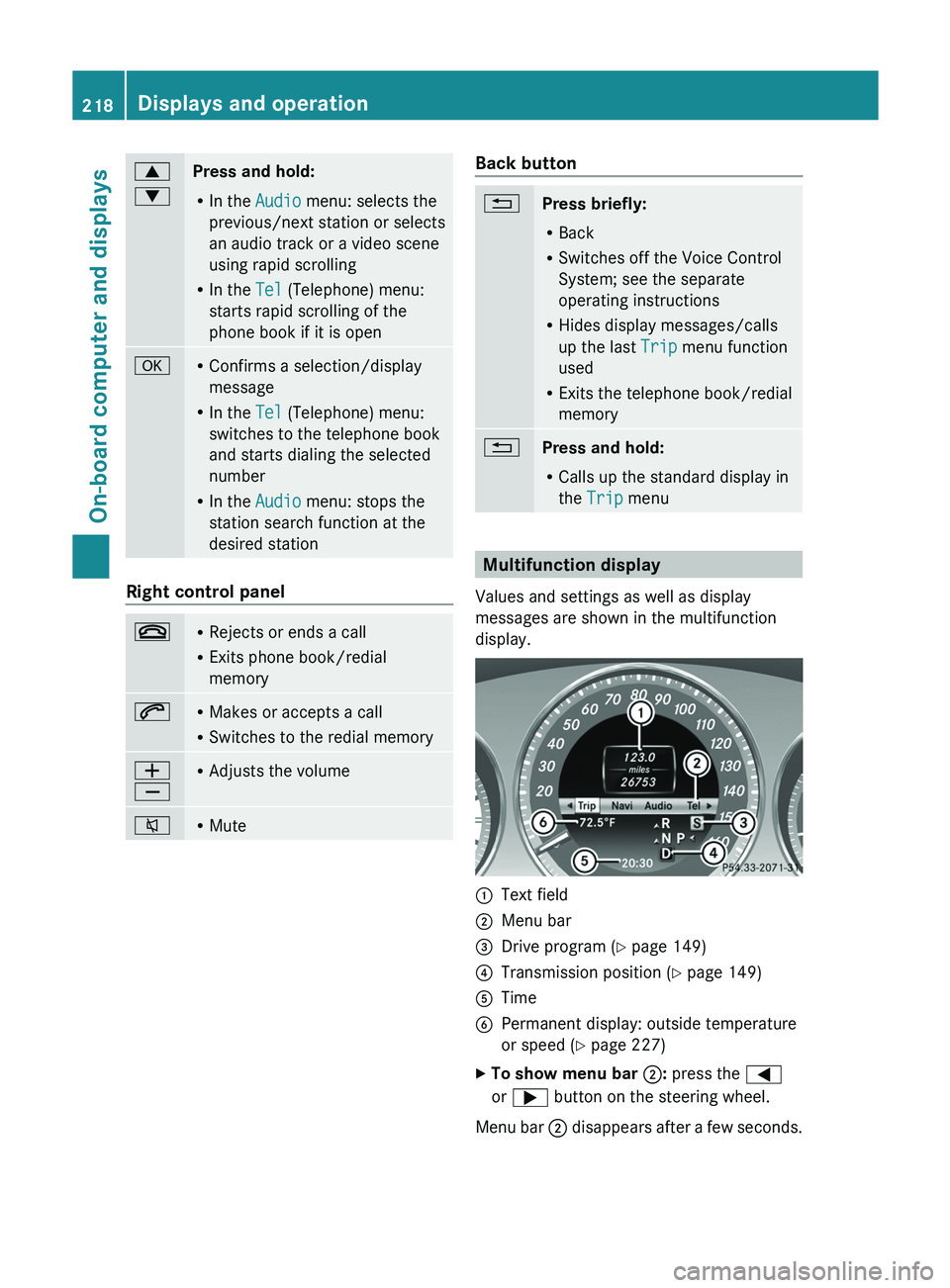
display. 0043
Text field
0044 Menu bar
0087 Drive program (Y page 149)
0085 Transmission position ( Y page 149)
0083 Time
0084 Permanent display: outside temperature
or speed ( Y page 227)
X To show menu bar 0044: press the 0059
or 0065 button on the steering wheel.
Menu bar 0044 disappears after a few
seconds.218
Displays and operation
On-board computer and displays
Page 221 of 380
Text field 0043 shows the selected menu or
submenu as well as display messages.
i
You can set the time using the audio
system or COMAND, see the separate
operating instructions.
The following messages may appear in the
multifunction display:
CRUISE Cruise control (
Y page 169)
00C5 Rear window wiper ( Y page 121)
00CE Adaptive Highbeam Assist
(Y page 114)
00AD ATTENTION ASSIST (Y page 197)
00A7 ECO start/stop function
(Y page 144)
00B0 Lane Keeping Assist (Y page 200) or
Active Lane Keeping Assist
( Y
page 205)
00D9 HOLD function ( Y page 179)
00C7 PRE-SAFE ®
Brake (Y page 69) Menus and submenus
Menu overview
Operating the on-board computer
(Y page 217).
Depending on the equipment installed in the
vehicle, you can call up the following menus:
R Trip menu (Y page 219)
R Navi menu (navigation instructions)
(Y page 221)
R Audio menu (Y page 222)
R Tel menu (telephone) ( Y page 223)
R DriveAssist menu (assistance)
(Y page 224)
R Serv menu (Y page 226)
R Sett. menu (settings) (Y page 226)
The Audio, Navi and
Tel menus differ
slightly
in vehicles with an audio system and in
vehicles with COMAND. The examples given
in this Operator's Manual apply to vehicles
equipped with COMAND. Trip menu
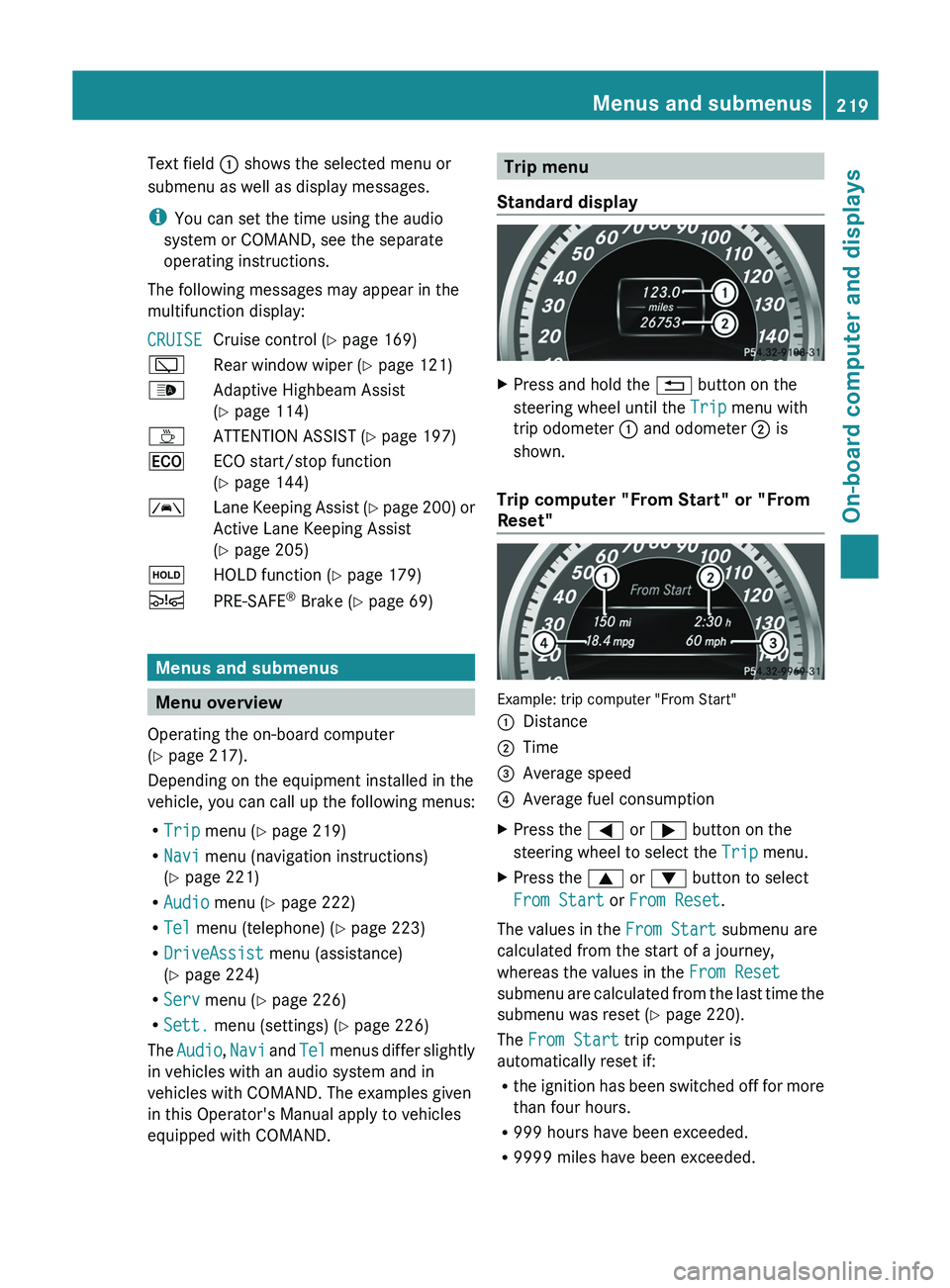
Standard display X
Press and hold the 0038 button on the
steering wheel until the Trip menu with
trip odometer 0043 and odometer 0044 is
shown.
Trip computer "From Start" or "From
Reset" Example: trip computer "From Start"
0043
Distance
0044 Time
0087 Average speed
0085 Average fuel consumption
X Press the 0059 or 0065 button on the
steering wheel to select the Trip menu.
X Press the 0063 or 0064 button to select
From Start or From Reset.
The values in the From Start submenu are
calculated from the start of a journey,
whereas the values in the From Reset
submenu are calculated from
the
last time the
submenu was reset ( Y page 220).
The From Start trip computer is
automatically reset if:
R the ignition has been switched off for more
than four hours.
R 999 hours have been exceeded.
R 9999 miles have been exceeded. Menus and submenus
219
On-board computer and displays Z
Page 226 of 380
Dialing a number from the phone book
X
Press the 0059 or 0065 button on the
steering wheel to select the Tel menu.
X Press the 0063, 0064 or 0076 button to
switch to the phone book.
X Press the 0063 or 0064 button to select the
desired name.
or
X To begin rapid scrolling: press and hold
the 0063 or 0064 button for longer than
one second.
Rapid scrolling stops when you
release the
button or reach the end of the list.
X If only one telephone number is stored
for a name: press
the 0061
or 0076 button
to start dialing.
or
X If there is more than one number for a
particular name: press the 0061 or 0076
button to display the numbers.
X Press the 0063
or 0064 button to
select the
number you want to dial.
X Press the 0061 or 0076 button to start
dialing.
or
X To exit the telephone book: press the
0076 or 0038 button.
Redialing The on-board computer saves the last names
or numbers dialed in the redial memory.
X
Press the 0059 or 0065 button on the
steering wheel to select the Tel menu.
X Press the 0061 button to switch to the
redial memory.
X Press the 0063
or 0064
button to
select the
desired name or number.
X Press the 0061 or 0076 button to start
dialing.
or
X If you do not want to make a call: press
the 0076 or 0038 button. Assistance menu
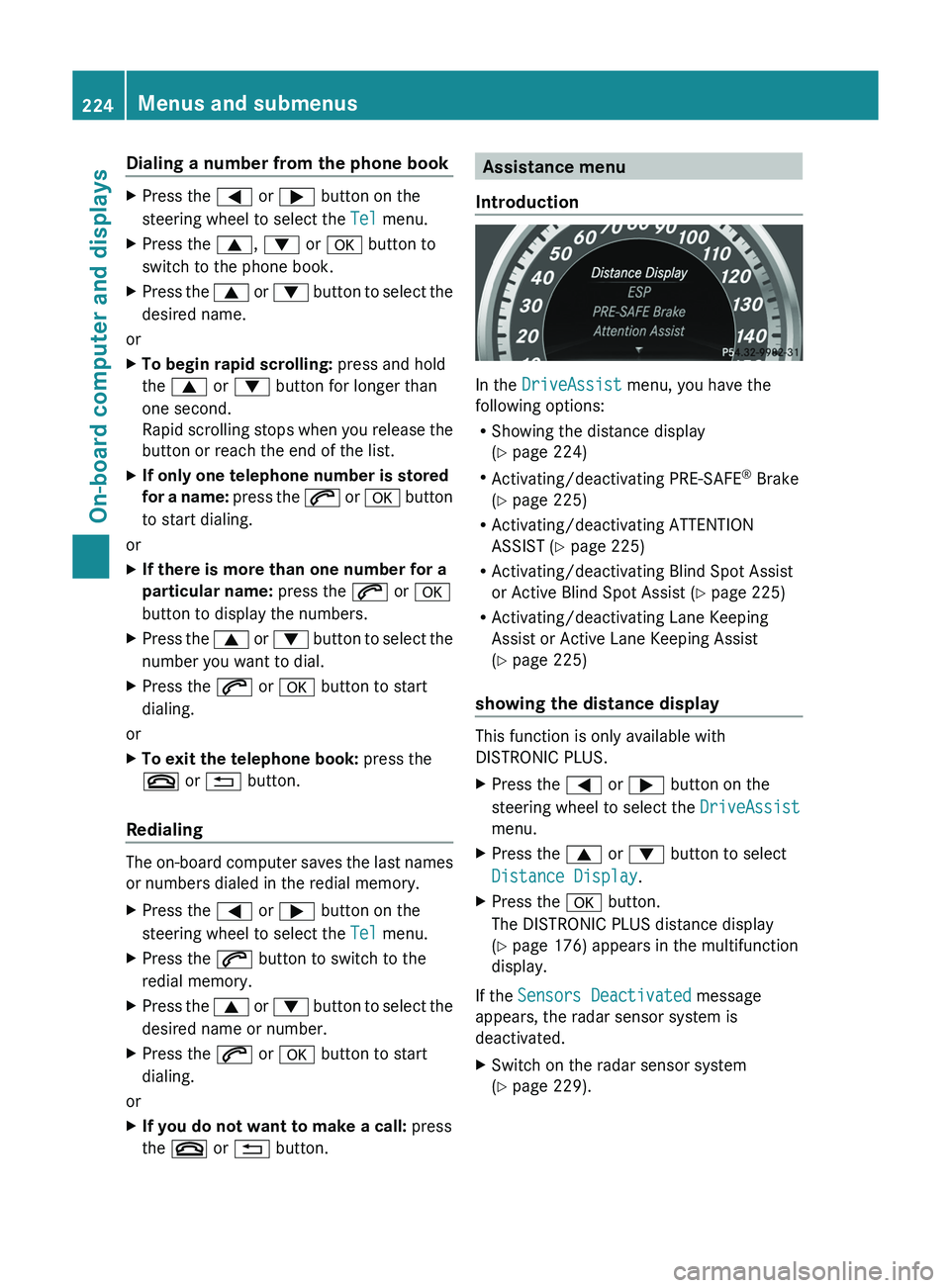
Introduction In the
DriveAssist menu, you have the
following options:
R Showing the distance display
(Y page 224)
R Activating/deactivating PRE-SAFE ®
Brake
(Y page 225)
R Activating/deactivating ATTENTION
ASSIST (Y page 225)
R Activating/deactivating Blind Spot Assist
or Active Blind Spot Assist (
Y page 225)
R Activating/deactivating Lane Keeping
Assist or Active Lane Keeping Assist
(Y page 225)
showing the distance display This function is only available with
DISTRONIC PLUS.
X
Press the 0059 or 0065 button on the
steering wheel to select the DriveAssist
menu.
X Press the 0063 or 0064 button to select
Distance Display.
X Press the 0076 button.
The DISTRONIC PLUS distance display
(Y page 176) appears in the multifunction
display.
If the Sensors Deactivated message
appears, the radar sensor system is
deactivated.
X Switch on the radar sensor system
(Y page 229).224
Menus and submenus
On-board computer and displays
Page 237 of 380
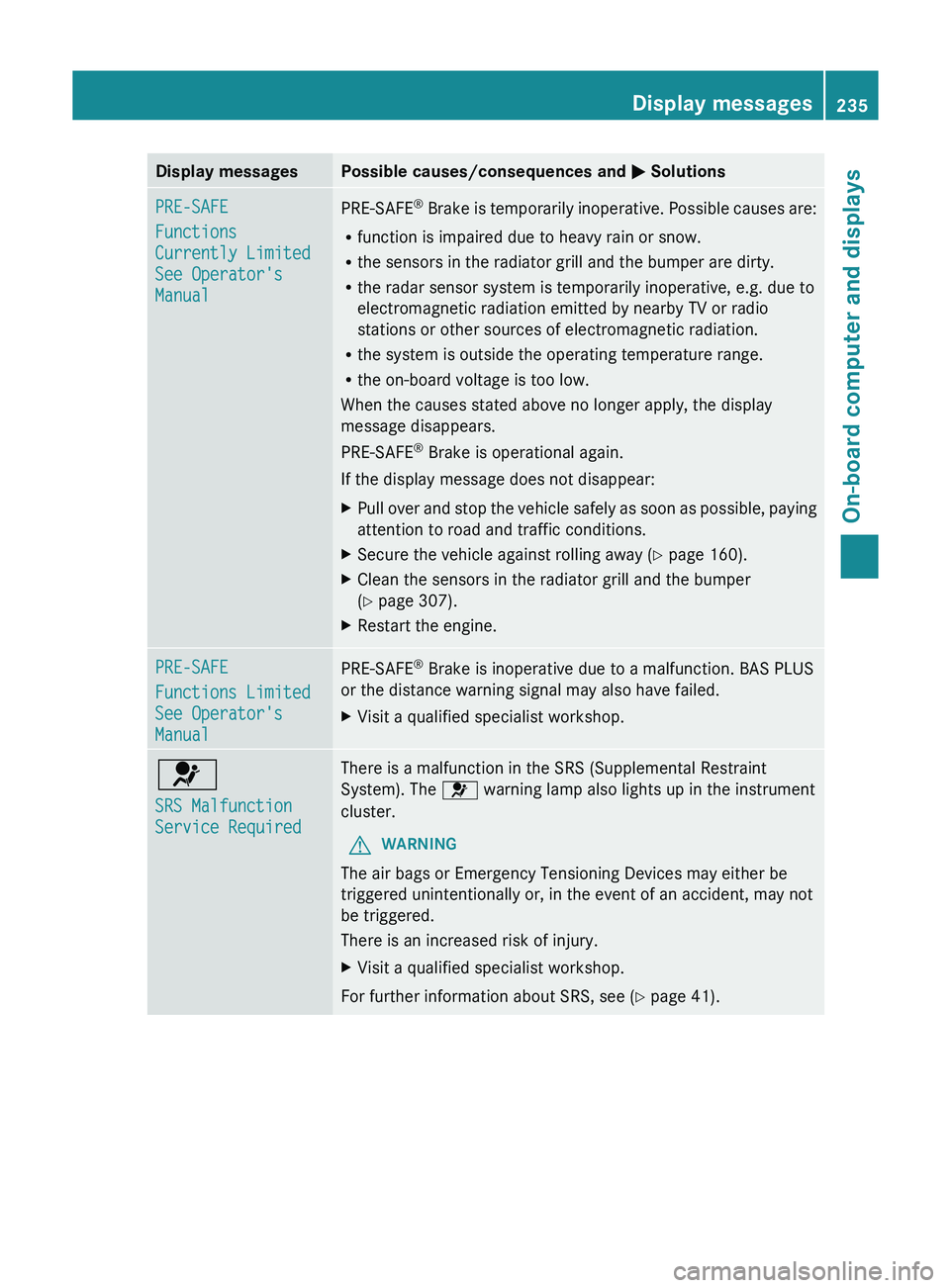
Display messages Possible causes/consequences and
0050 SolutionsPRE-SAFE
Functions
Currently Limited
See Operator's
Manual
PRE-SAFE
®
Brake is temporarily inoperative. Possible causes are:
R function is impaired due to heavy rain or snow.
R the sensors in the radiator grill and the bumper are dirty.
R the radar sensor system is temporarily inoperative, e.g. due to
electromagnetic radiation emitted by nearby TV or radio
stations or other sources of electromagnetic radiation.
R the system is outside the operating temperature range.
R the on-board voltage is too low.
When the causes stated above no longer apply, the display
message disappears.
PRE-SAFE ®
Brake is operational again.
If the display message does not disappear:
X Pull over and stop
the vehicle safely as soon as possible, paying
attention to road and traffic conditions.
X Secure the vehicle against rolling away ( Y page 160).
X Clean the sensors in the radiator grill and the bumper
(Y page 307).
X Restart the engine. PRE-SAFE
Functions Limited
See Operator's
Manual
PRE-SAFE
®
Brake is inoperative due to a malfunction. BAS PLUS
or the distance warning signal may also have failed.
X Visit a qualified specialist workshop. 0075
SRS Malfunction
Service Required There is a malfunction in the SRS (Supplemental Restraint
System). The 0075 warning lamp also lights up in the instrument
cluster.
G WARNING
The air bags or Emergency Tensioning Devices may either be
triggered unintentionally or, in the event of an accident, may not
be triggered.
There is an increased risk of injury.
X Visit a qualified specialist workshop.
For further information about SRS, see (Y page 41). Display messages
235
On-board computer and displays Z
Page 246 of 380
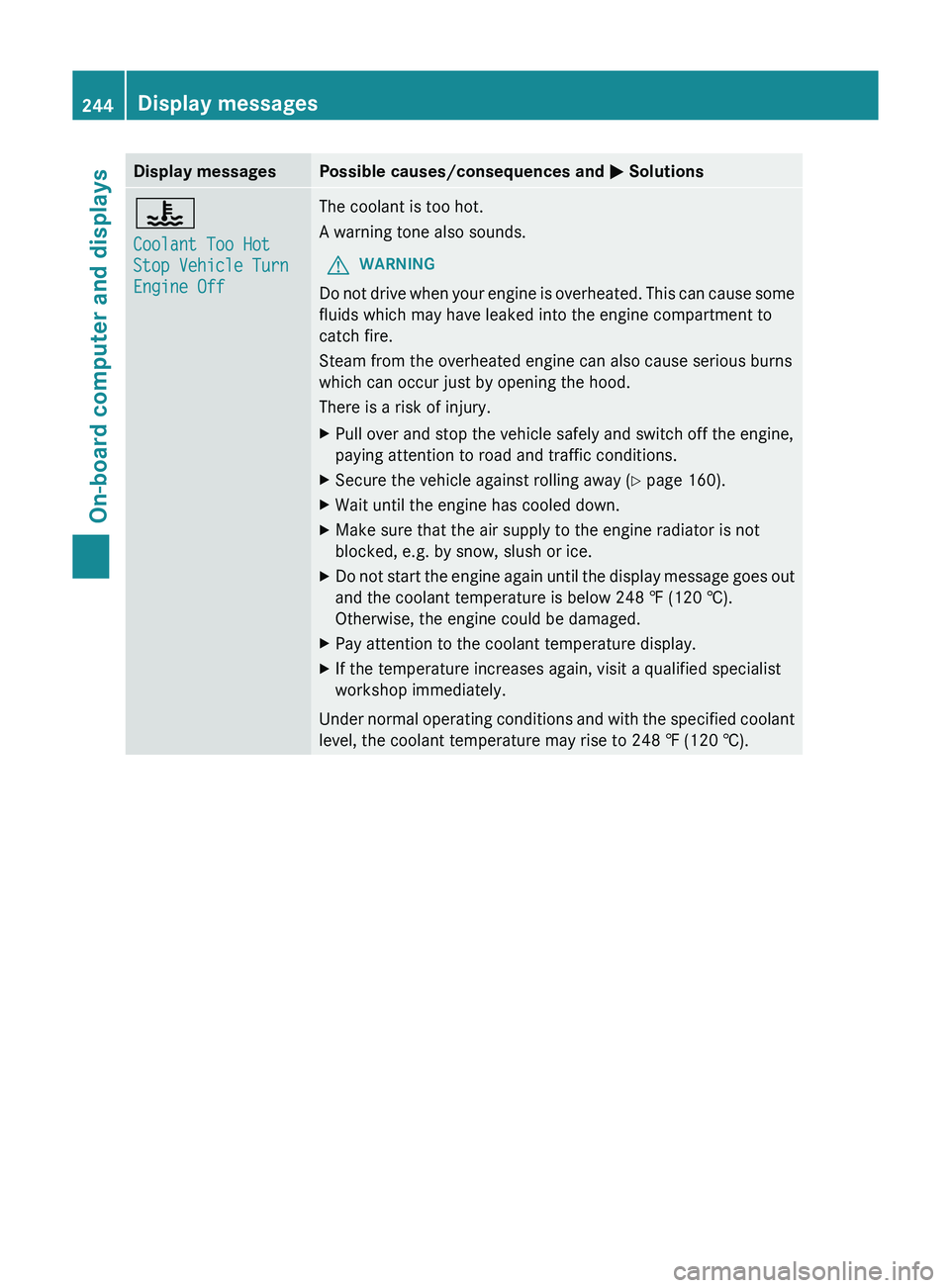
Display messages Possible causes/consequences and
0050 Solutions00AC
Coolant Too Hot
Stop Vehicle Turn
Engine Off The coolant is too hot.
A warning tone also sounds.
G WARNING
Do not drive when your engine is overheated. This can cause some
fluids which may have leaked into the engine compartment to
catch fire.
Steam from the overheated engine can also cause serious burns
which can occur just by opening the hood.
There is a risk of injury.
X Pull over and stop the vehicle safely and switch off the engine,
paying attention to road and traffic conditions.
X Secure the vehicle against rolling away ( Y page 160).
X Wait until the engine has cooled down.
X Make sure that the air supply to the engine radiator is not
blocked, e.g. by snow, slush or ice.
X Do not start the engine again until the display message goes out
and the coolant temperature is below 248 ‡ (120 †).
Otherwise, the engine could be damaged.
X Pay attention to the coolant temperature display.
X If the temperature increases again, visit a qualified specialist
workshop immediately.
Under normal operating
conditions and with the specified coolant
level, the coolant temperature may rise to 248 ‡ (120 †). 244
Display messages
On-board computer and displays
Page 251 of 380
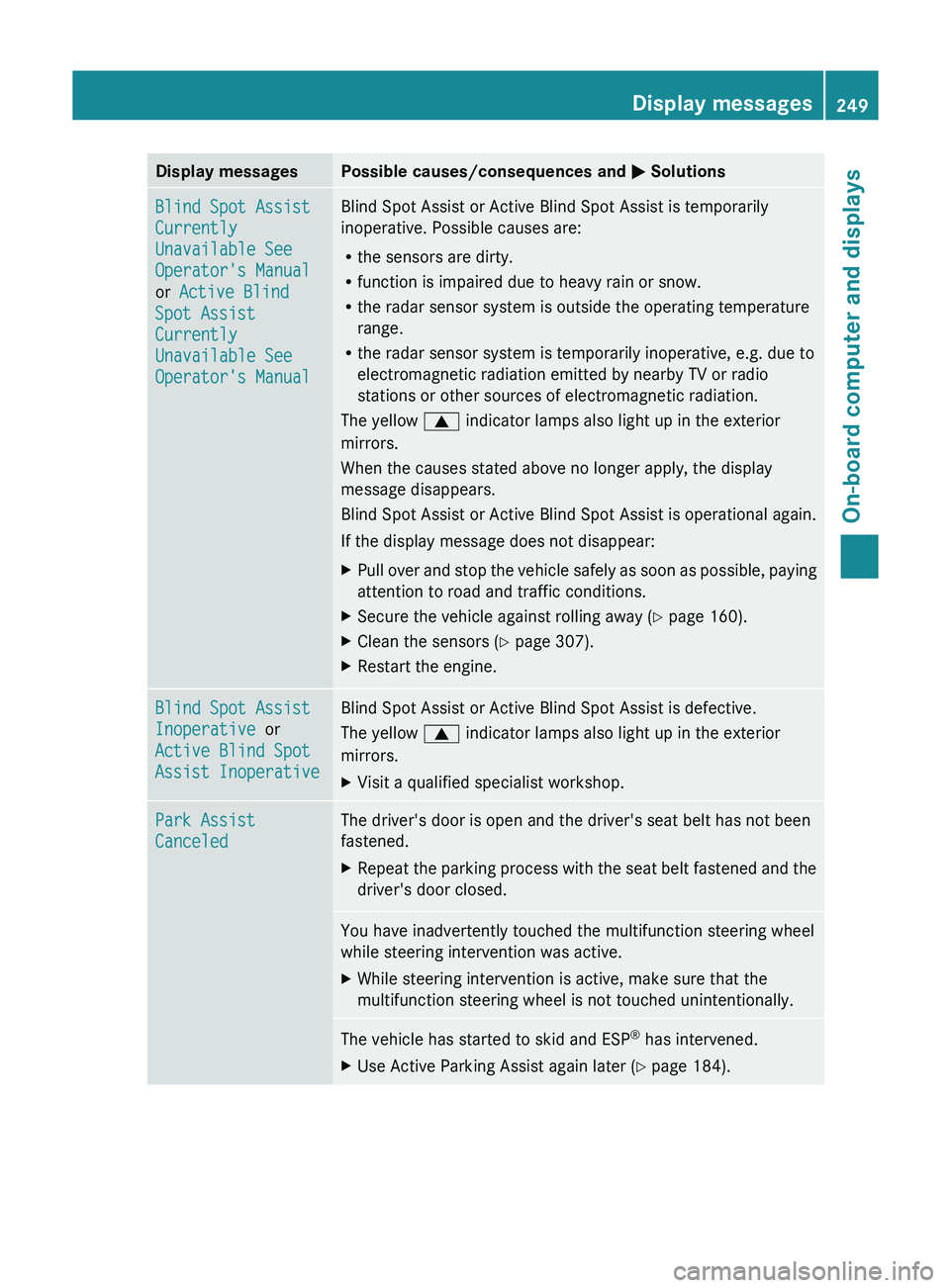
Display messages Possible causes/consequences and
0050 SolutionsBlind Spot Assist
Currently
Unavailable See
Operator's Manual
or Active Blind
Spot Assist
Currently
Unavailable See
Operator's Manual Blind Spot Assist or Active Blind Spot Assist is temporarily
inoperative. Possible causes are:
R
the sensors are dirty.
R function is impaired due to heavy rain or snow.
R the radar sensor system is outside the operating temperature
range.
R the radar sensor system is temporarily inoperative, e.g. due to
electromagnetic radiation emitted by nearby TV or radio
stations or other sources of electromagnetic radiation.
The yellow 0063 indicator lamps also light up in the exterior
mirrors.
When the causes stated above no longer apply, the display
message disappears.
Blind Spot Assist or Active Blind Spot Assist is operational again.
If the display message does not disappear:
X Pull over and stop the vehicle safely as soon as possible, paying
attention to road and traffic conditions.
X Secure the vehicle against rolling away ( Y page 160).
X Clean the sensors ( Y page 307).
X Restart the engine. Blind Spot Assist
Inoperative or
Active Blind Spot
Assist Inoperative Blind Spot Assist or Active Blind Spot Assist is defective.
The yellow
0063 indicator lamps also light up in the exterior
mirrors.
X Visit a qualified specialist workshop. Park Assist
Canceled The driver's door is open and the driver's seat belt has not been
fastened.
X
Repeat the parking process with the seat belt fastened and the
driver's door closed. You have inadvertently touched the multifunction steering wheel
while steering intervention was active.
X
While steering intervention is active, make sure that the
multifunction steering wheel is not touched unintentionally. The vehicle has started to skid and ESP
®
has intervened.
X Use Active Parking Assist again later (Y page 184). Display messages
249On-board computer and displays Z
Page 252 of 380
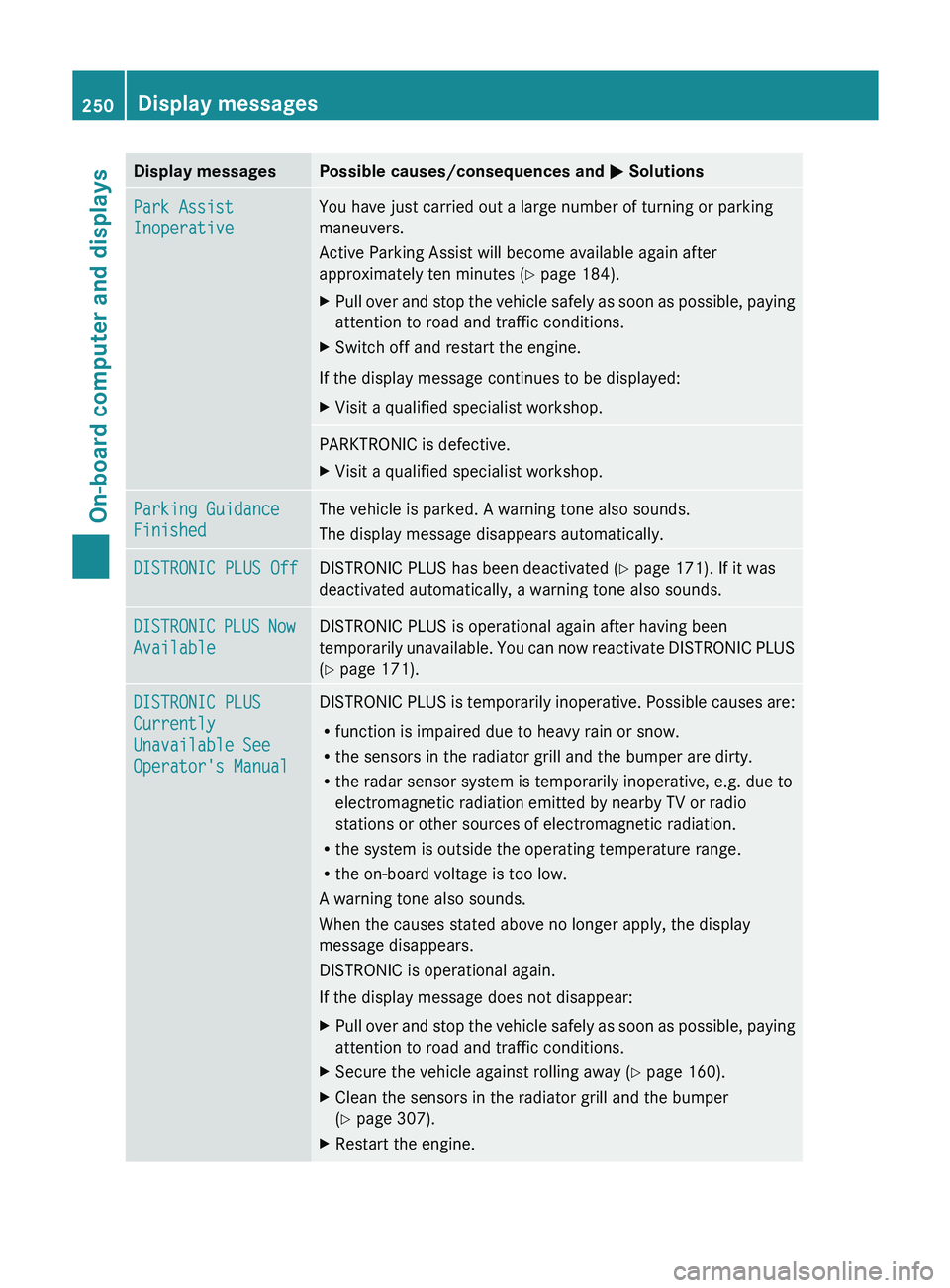
Display messages Possible causes/consequences and
0050 SolutionsPark Assist
Inoperative You have just carried out a large number of turning or parking
maneuvers.
Active Parking Assist will become available again after
approximately ten minutes (
Y page 184).
X Pull over and stop the vehicle safely as soon as possible, paying
attention to road and traffic conditions.
X Switch off and restart the engine.
If the display message continues to be displayed:
X Visit a qualified specialist workshop. PARKTRONIC is defective.
X
Visit a qualified specialist workshop. Parking Guidance
Finished The vehicle is parked. A warning tone also sounds.
The display message disappears automatically.
DISTRONIC PLUS Off DISTRONIC PLUS has been deactivated (
Y page 171). If it was
deactivated automatically, a warning tone also sounds. DISTRONIC PLUS Now
Available DISTRONIC PLUS is operational again after having been
temporarily
unavailable. You
can now
reactivate DISTRONIC PLUS
(Y page 171). DISTRONIC PLUS
Currently
Unavailable See
Operator's Manual DISTRONIC PLUS is temporarily inoperative. Possible causes are:
R
function is impaired due to heavy rain or snow.
R the sensors in the radiator grill and the bumper are dirty.
R the radar sensor system is temporarily inoperative, e.g. due to
electromagnetic radiation emitted by nearby TV or radio
stations or other sources of electromagnetic radiation.
R the system is outside the operating temperature range.
R the on-board voltage is too low.
A warning tone also sounds.
When the causes stated above no longer apply, the display
message disappears.
DISTRONIC is operational again.
If the display message does not disappear:
X Pull over and stop the vehicle safely as soon as possible, paying
attention to road and traffic conditions.
X Secure the vehicle against rolling away ( Y page 160).
X Clean the sensors in the radiator grill and the bumper
(Y page 307).
X Restart the engine.250
Display messages
On-board computer and displays
Page 254 of 380
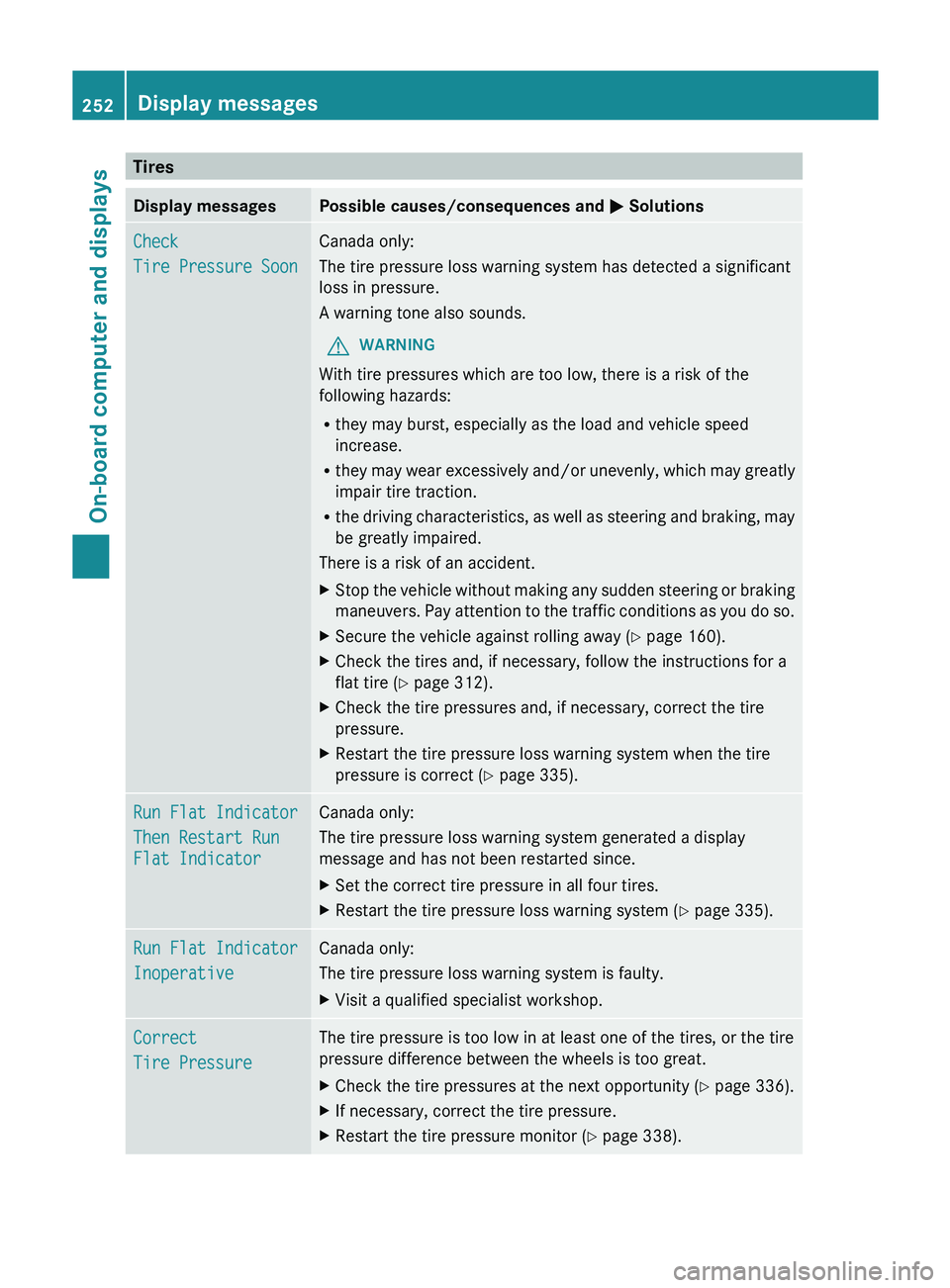
Tires
Display messages Possible causes/consequences and
0050 SolutionsCheck
Tire Pressure Soon Canada only:
The tire pressure loss warning system has detected a significant
loss in pressure.
A warning tone also sounds.
G WARNING
With tire pressures which are too low, there is a risk of the
following hazards:
R they may burst, especially as the load and vehicle speed
increase.
R they may wear
excessively and/or
unevenly, which may greatly
impair tire traction.
R the driving characteristics, as well as steering and braking, may
be greatly impaired.
There is a risk of an accident.
X Stop the vehicle without making any sudden steering or braking
maneuvers. Pay attention to the
traffic conditions as you do so.
X Secure the vehicle against rolling away ( Y page 160).
X Check the tires and, if necessary, follow the instructions for a
flat tire (Y page 312).
X Check the tire pressures and, if necessary, correct the tire
pressure.
X Restart the tire pressure loss warning system when the tire
pressure is correct (Y page 335). Run Flat Indicator
Then Restart Run
Flat Indicator Canada only:
The tire pressure loss warning system generated a display
message and has not been restarted since.
X
Set the correct tire pressure in all four tires.
X Restart the tire pressure loss warning system ( Y page 335).Run Flat Indicator
Inoperative Canada only:
The tire pressure loss warning system is faulty.
X
Visit a qualified specialist workshop. Correct
Tire Pressure The tire pressure is too low in at least one of the tires, or the tire
pressure difference between the wheels is too great.
X
Check the tire pressures at the next opportunity (Y page 336).
X If necessary, correct the tire pressure.
X Restart the tire pressure monitor (Y page 338).252
Display messages
On-board computer and displays
Page 256 of 380
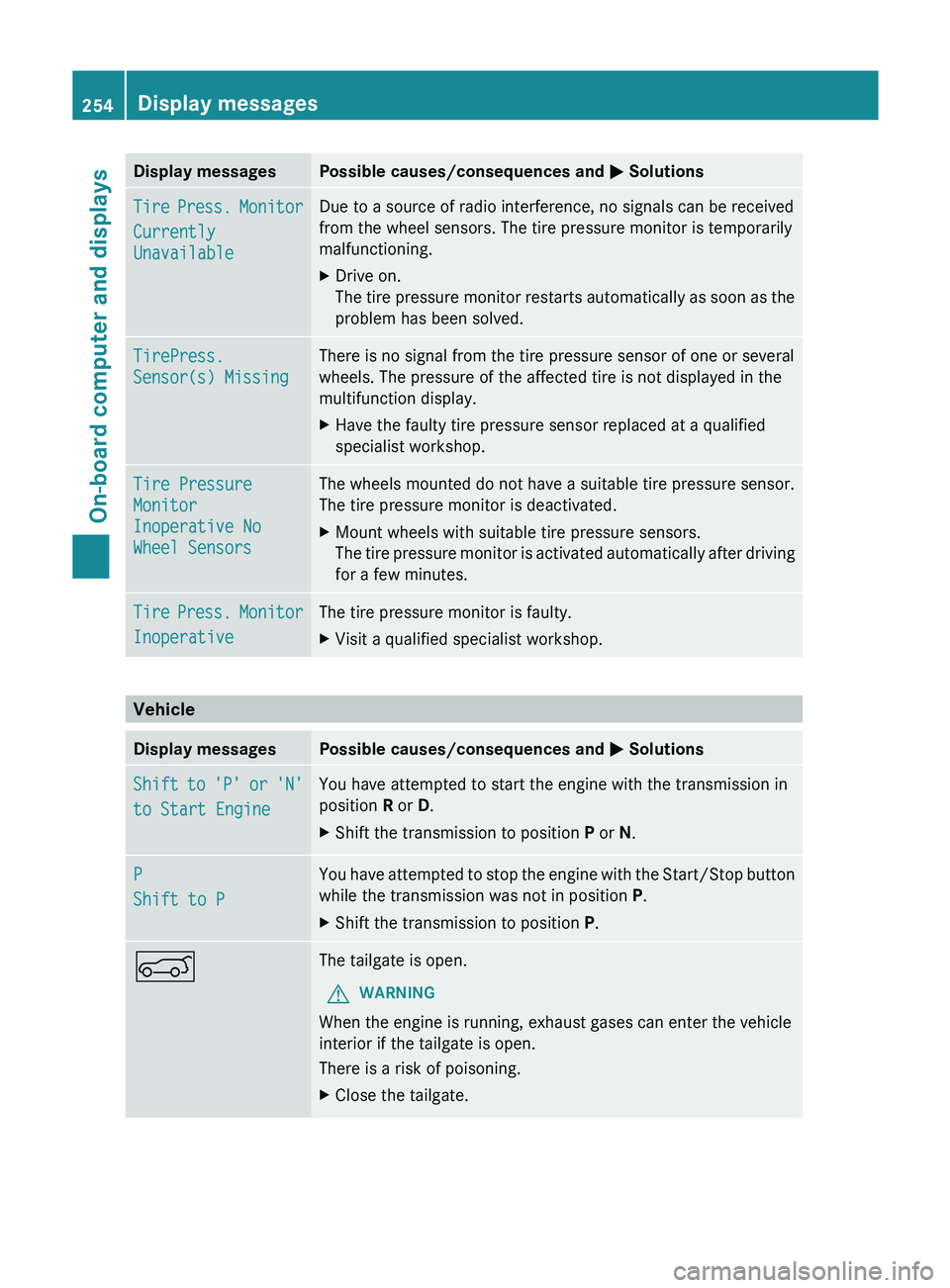
Display messages Possible causes/consequences and
0050 SolutionsTire Press. Monitor
Currently
Unavailable Due to a source of radio interference, no signals can be received
from the wheel sensors. The tire pressure monitor is temporarily
malfunctioning.
X
Drive on.
The tire pressure
monitor restarts
automatically as soon as the
problem has been solved. TirePress.
Sensor(s) Missing There is no signal from the tire pressure sensor of one or several
wheels. The pressure of the affected tire is not displayed in the
multifunction display.
X
Have the faulty tire pressure sensor replaced at a qualified
specialist workshop. Tire Pressure
Monitor
Inoperative No
Wheel Sensors The wheels mounted do not have a suitable tire pressure sensor.
The tire pressure monitor is deactivated.
X
Mount wheels with suitable tire pressure sensors.
The tire pressure
monitor is
activated automatically after driving
for a few minutes. Tire Press. Monitor
Inoperative The tire pressure monitor is faulty.
X
Visit a qualified specialist workshop. Vehicle
Display messages Possible causes/consequences and
0050 SolutionsShift to 'P' or 'N'
to Start Engine You have attempted to start the engine with the transmission in
position R or D.
X
Shift the transmission to position P or N.P
Shift to P You have attempted to stop the engine with the Start/Stop button
while the transmission was not in position P.
X
Shift the transmission to position P.0065 The tailgate is open.
G WARNING
When the engine is running, exhaust gases can enter the vehicle
interior if the tailgate is open.
There is a risk of poisoning.
X Close the tailgate.254
Display messagesOn-board computer and displays