ESP MERCEDES-BENZ GLK-CLASS SUV 2013 Manual Online
[x] Cancel search | Manufacturer: MERCEDES-BENZ, Model Year: 2013, Model line: GLK-CLASS SUV, Model: MERCEDES-BENZ GLK-CLASS SUV 2013Pages: 380, PDF Size: 19.54 MB
Page 263 of 380
Problem Possible causes/consequences and
0050 Solutions0025
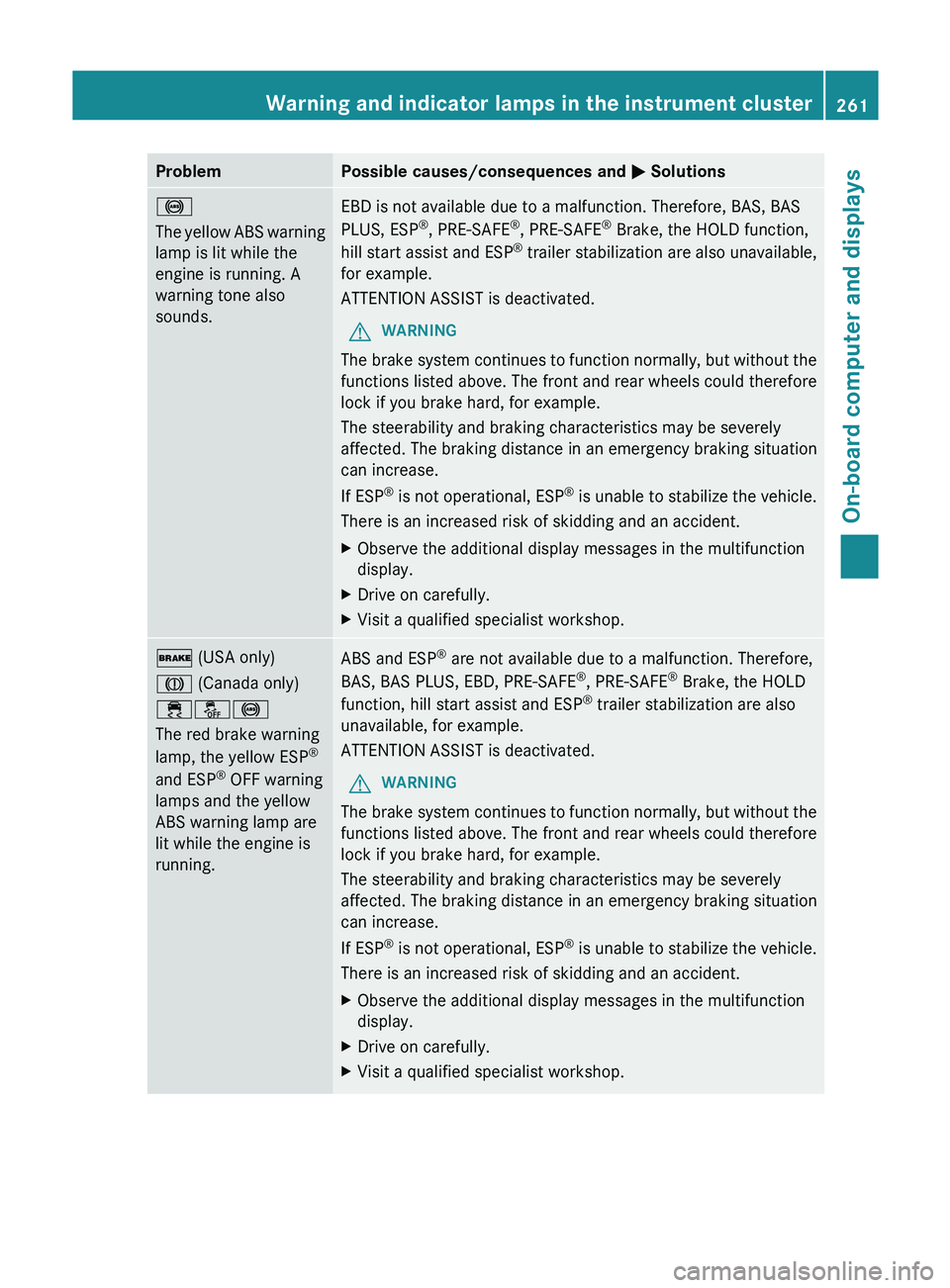
The yellow ABS warning
lamp is lit while the
engine is running. A
warning tone also
sounds.
EBD is not available due to a malfunction. Therefore, BAS, BAS
PLUS, ESP
®
, PRE-SAFE ®
, PRE-SAFE ®
Brake, the HOLD function,
hill start assist and ESP ®
trailer stabilization
are also
unavailable,
for example.
ATTENTION ASSIST is deactivated.
G WARNING
The brake system continues to function normally, but without the
functions listed above. The front and rear wheels could therefore
lock if you brake hard, for example.
The steerability and braking characteristics may be severely
affected. The braking distance in an emergency braking situation
can increase.
If ESP ®
is not operational, ESP®
is unable to stabilize the vehicle.
There is an increased risk of skidding and an accident.
X Observe the additional display messages in the multifunction
display.
X Drive on carefully.
X Visit a qualified specialist workshop. 0027 (USA only)
004D (Canada only)
00E500BB0025
The red brake warning
lamp, the yellow ESP
®
and ESP ®
OFF warning
lamps and the yellow
ABS warning lamp are
lit while the engine is
running. ABS and ESP
®
are not available due to a malfunction. Therefore,
BAS, BAS PLUS, EBD, PRE-SAFE ®
, PRE-SAFE ®
Brake, the HOLD
function, hill start assist and ESP ®
trailer stabilization are also
unavailable, for example.
ATTENTION ASSIST is deactivated.
G WARNING
The brake system continues to function normally, but without the
functions listed above. The front and rear wheels could therefore
lock if you brake hard, for example.
The steerability and braking characteristics may be severely
affected. The braking distance in an emergency braking situation
can increase.
If ESP ®
is not operational, ESP ®
is unable to stabilize the vehicle.
There is an increased risk of skidding and an accident.
X Observe the additional display messages in the multifunction
display.
X Drive on carefully.
X Visit a qualified specialist workshop. Warning and indicator lamps in the instrument cluster
261
On-board computer and displays Z
Page 264 of 380
Problem Possible causes/consequences and
0050 Solutions00E500BA
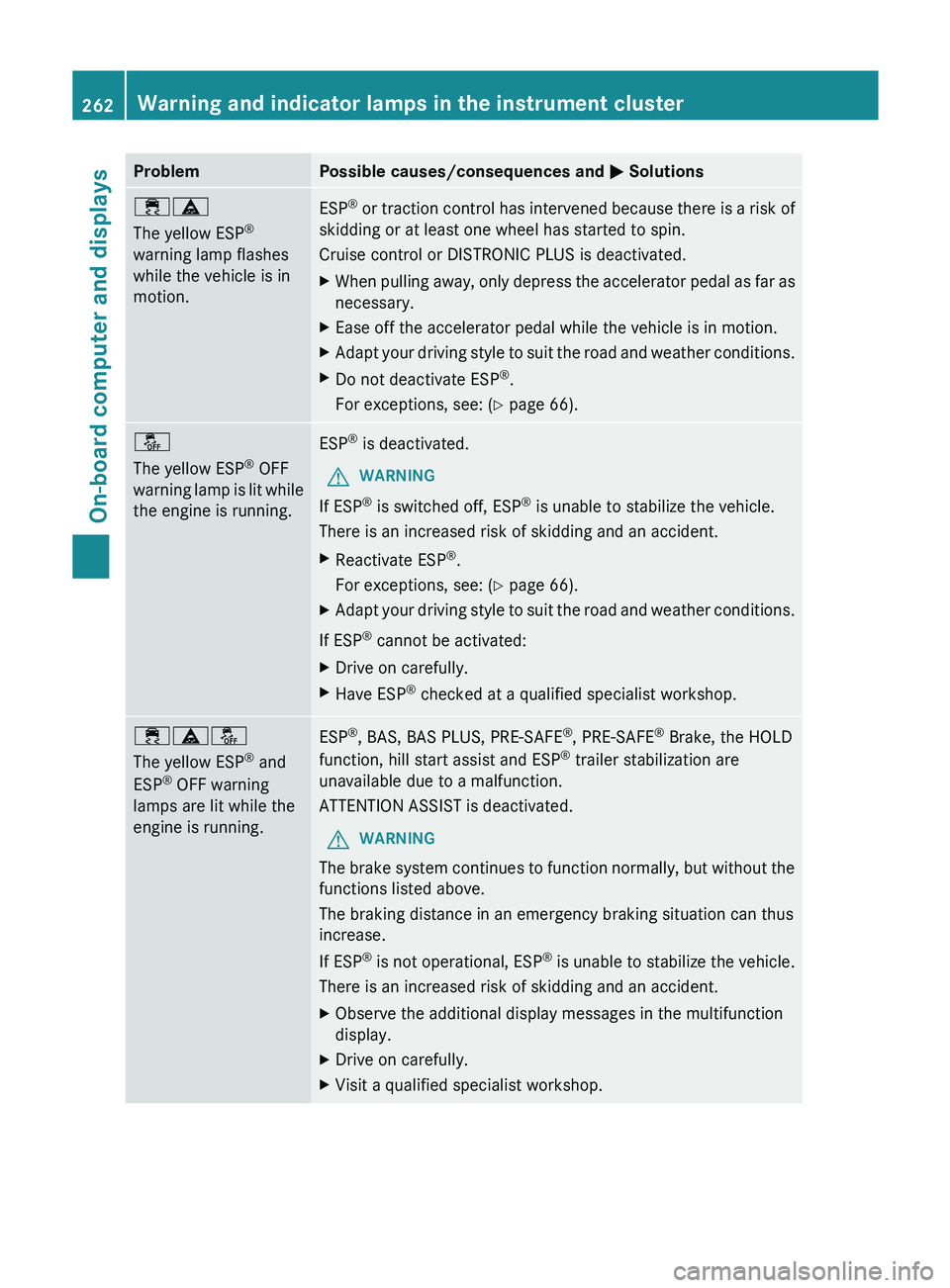
The yellow ESP
®
warning lamp flashes
while the vehicle is in
motion. ESP
®
or traction control has intervened because there is a risk of
skidding or at least one wheel has started to spin.
Cruise control or DISTRONIC PLUS is deactivated.
X When pulling away, only
depress the accelerator pedal as far as
necessary.
X Ease off the accelerator pedal while the vehicle is in motion.
X Adapt your driving style to suit the road and weather conditions.
X Do not deactivate ESP ®
.
For exceptions, see: ( Y page 66).00BB
The yellow ESP
®
OFF
warning lamp is lit while
the engine is running. ESP
®
is deactivated.
G WARNING
If ESP ®
is switched off, ESP ®
is unable to stabilize the vehicle.
There is an increased risk of skidding and an accident.
X Reactivate ESP ®
.
For exceptions, see: ( Y page 66).
X Adapt your driving style to suit the road and weather conditions.
If ESP ®
cannot be activated:
X Drive on carefully.
X Have ESP ®
checked at a qualified specialist workshop. 00E500BA00BB
The yellow ESP
®
and
ESP ®
OFF warning
lamps are lit while the
engine is running. ESP
®
, BAS, BAS PLUS, PRE-SAFE ®
, PRE-SAFE ®
Brake, the HOLD
function, hill start assist and ESP ®
trailer stabilization are
unavailable due to a malfunction.
ATTENTION ASSIST is deactivated.
G WARNING
The brake system continues to function normally, but without the
functions listed above.
The braking distance in an emergency braking situation can thus
increase.
If ESP ®
is not operational, ESP®
is unable to stabilize the vehicle.
There is an increased risk of skidding and an accident.
X Observe the additional display messages in the multifunction
display.
X Drive on carefully.
X Visit a qualified specialist workshop.262
Warning and indicator lamps in the instrument cluster
On-board computer and displays
Page 265 of 380
Problem Possible causes/consequences and
0050 Solutions00E500BB
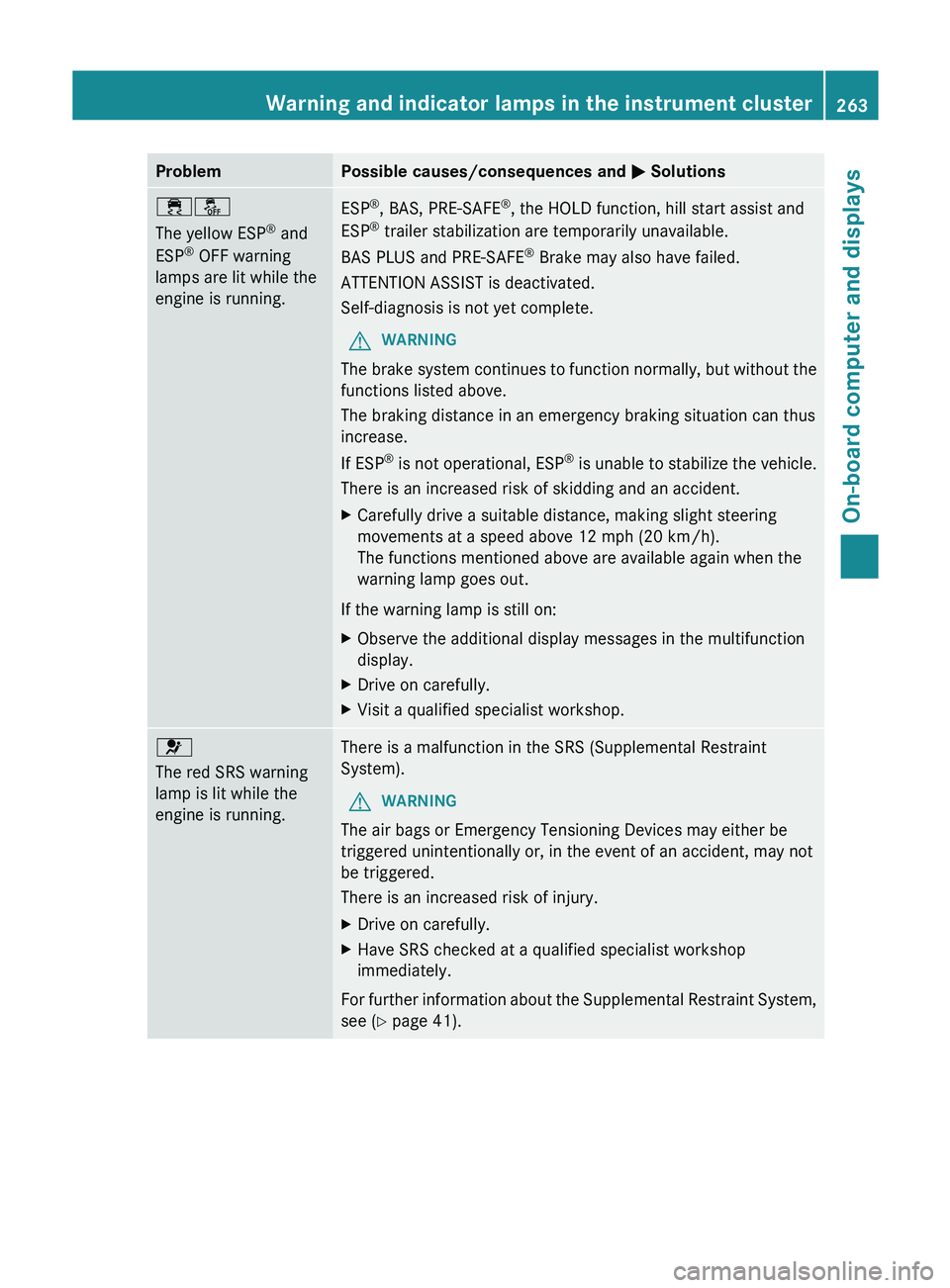
The yellow ESP
®
and
ESP ®
OFF warning
lamps are lit while the
engine is running. ESP
®
, BAS, PRE-SAFE ®
, the HOLD function, hill start assist and
ESP ®
trailer stabilization are temporarily unavailable.
BAS PLUS and PRE-SAFE ®
Brake may also have failed.
ATTENTION ASSIST is deactivated.
Self-diagnosis is not yet complete.
G WARNING
The brake system continues to function normally, but without the
functions listed above.
The braking distance in an emergency braking situation can thus
increase.
If ESP ®
is not operational, ESP®
is unable to stabilize the vehicle.
There is an increased risk of skidding and an accident.
X Carefully drive a suitable distance, making slight steering
movements at a speed above 12 mph (20 km/h).
The functions mentioned above are available again when the
warning lamp goes out.
If the warning lamp is still on:
X Observe the additional display messages in the multifunction
display.
X Drive on carefully.
X Visit a qualified specialist workshop. 0075
The red SRS warning
lamp is lit while the
engine is running.
There is a malfunction in the SRS (Supplemental Restraint
System).
G WARNING
The air bags or Emergency Tensioning Devices may either be
triggered unintentionally or, in the event of an accident, may not
be triggered.
There is an increased risk of injury.
X Drive on carefully.
X Have SRS checked at a qualified specialist workshop
immediately.
For further information about the Supplemental Restraint System,
see ( Y page 41). Warning and indicator lamps in the instrument cluster
263
On-board computer and displays Z
Page 270 of 380
Tires
Problem Possible causes/consequences and
0050 Solutions0077
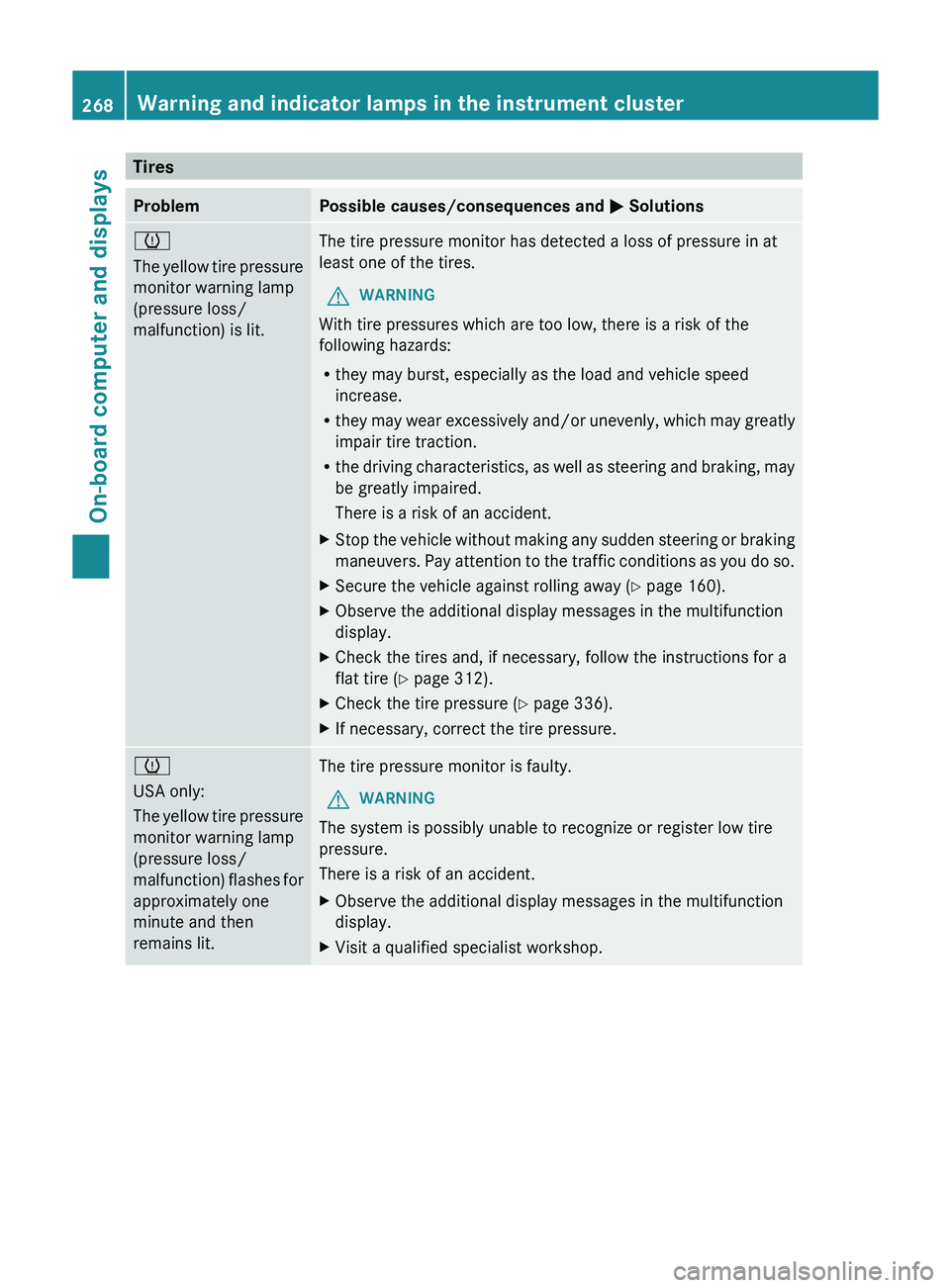
The yellow tire pressure
monitor warning lamp
(pressure loss/
malfunction) is lit.
The tire pressure monitor has detected a loss of pressure in at
least one of the tires.
G WARNING
With tire pressures which are too low, there is a risk of the
following hazards:
R they may burst, especially as the load and vehicle speed
increase.
R they may wear
excessively and/or
unevenly, which may greatly
impair tire traction.
R the driving characteristics, as well as steering and braking, may
be greatly impaired.
There is a risk of an accident.
X Stop the vehicle without making any sudden steering or braking
maneuvers. Pay attention to the
traffic conditions as you do so.
X Secure the vehicle against rolling away ( Y page 160).
X Observe the additional display messages in the multifunction
display.
X Check the tires and, if necessary, follow the instructions for a
flat tire (Y page 312).
X Check the tire pressure (Y page 336).
X If necessary, correct the tire pressure. 0077
USA only:
The yellow tire pressure
monitor warning lamp
(pressure loss/
malfunction)
flashes
for
approximately one
minute and then
remains lit. The tire pressure monitor is faulty.
G WARNING
The system is possibly unable to recognize or register low tire
pressure.
There is a risk of an accident.
X Observe the additional display messages in the multifunction
display.
X Visit a qualified specialist workshop.268
Warning and indicator lamps in the instrument cluster
On-board computer and displays
Page 274 of 380
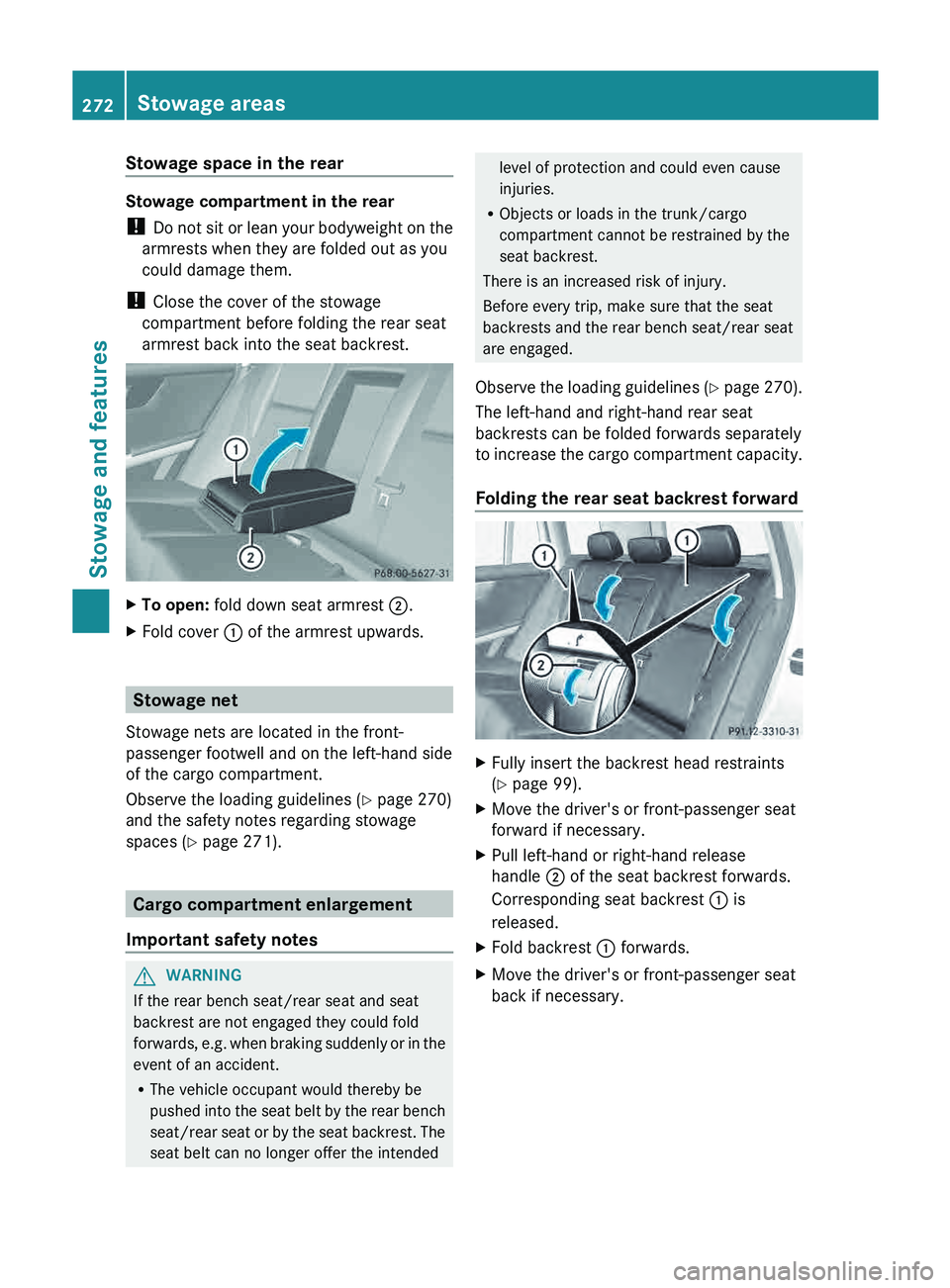
Stowage space in the rear
Stowage compartment in the rear
!
Do not sit or lean
your bodyweight on the
armrests when they are folded out as you
could damage them.
! Close the cover of the stowage
compartment before folding the rear seat
armrest back into the seat backrest. X
To open: fold down seat armrest 0044.
X Fold cover 0043 of the armrest upwards. Stowage net
Stowage nets are located in the front-
passenger footwell and on the left-hand side
of the cargo compartment.
Observe the loading guidelines ( Y page 270)
and the safety notes regarding stowage
spaces ( Y page 271). Cargo compartment enlargement
Important safety notes G
WARNING
If the rear bench seat/rear seat and seat
backrest are not engaged they could fold
forwards, e.g. when braking suddenly
or in the
event of an accident.
R The vehicle occupant would thereby be
pushed into the seat belt by the rear bench
seat/rear seat or by the seat backrest. The
seat belt can no longer offer the intended level of protection and could even cause
injuries.
R Objects or loads in the trunk/cargo
compartment cannot be restrained by the
seat backrest.
There is an increased risk of injury.
Before every trip, make sure that the seat
backrests and the rear bench seat/rear seat
are engaged.
Observe the loading guidelines (
Y page 270).
The left-hand and right-hand rear seat
backrests can be folded forwards separately
to increase the cargo compartment capacity.
Folding the rear seat backrest forward X
Fully insert the backrest head restraints
(Y page 99).
X Move the driver's or front-passenger seat
forward if necessary.
X Pull left-hand or right-hand release
handle 0044 of the seat backrest forwards.
Corresponding seat backrest 0043 is
released.
X Fold backrest 0043 forwards.
X Move the driver's or front-passenger seat
back if necessary.272
Stowage areas
Stowage and features
Page 277 of 380
X
To extend: pull cargo compartment
cover 0043 back and clip it
into the retainers
on the left and right.
X To retract: unhook cargo compartment
cover 0043 from the retainers on
the left and
right and guide it forwards by the grab
handle until it is fully retracted.
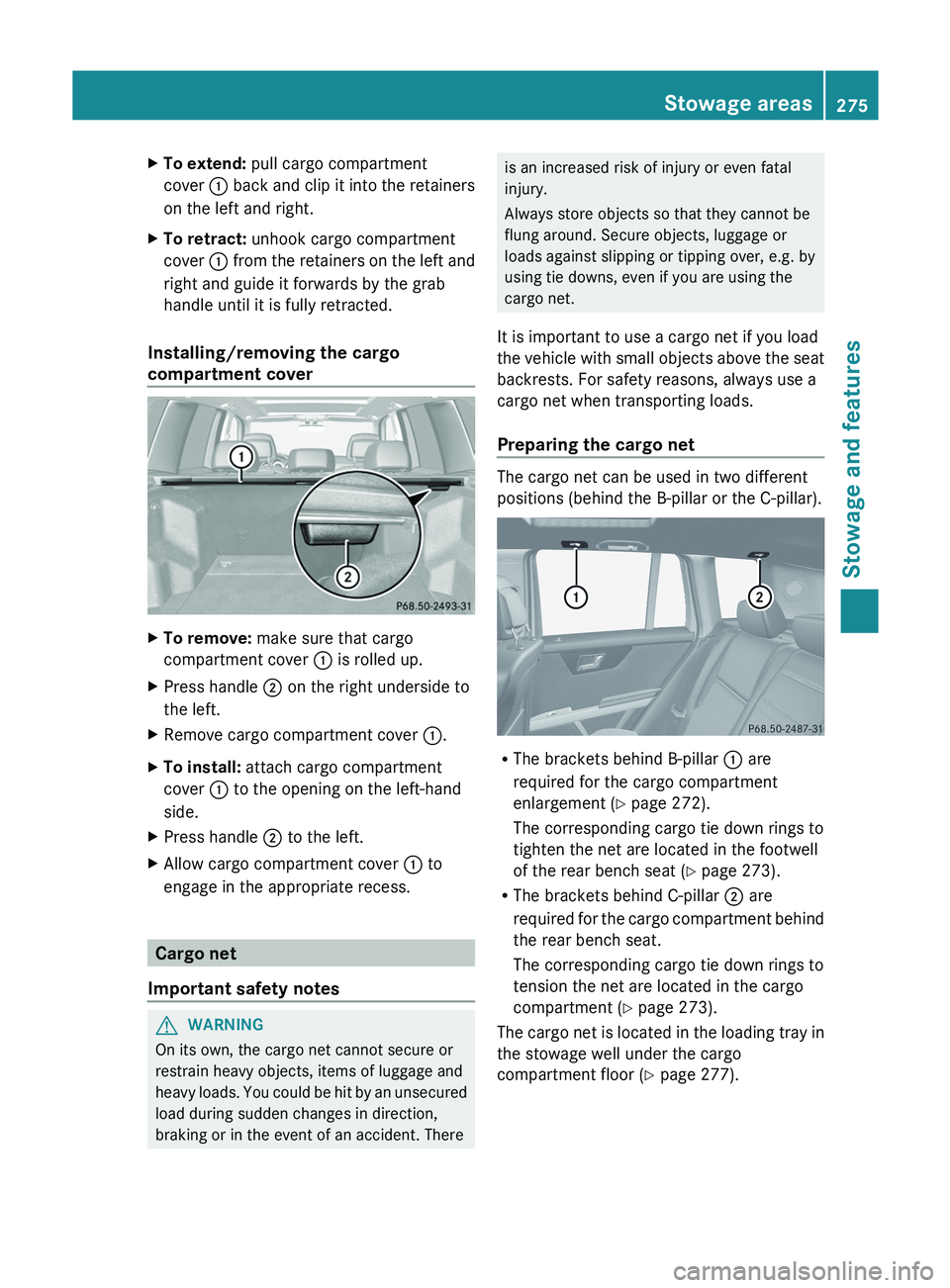
Installing/removing the cargo
compartment cover X
To remove: make sure that cargo
compartment cover 0043 is rolled up.
X Press handle 0044 on the right underside to
the left.
X Remove cargo compartment cover 0043.
X To install: attach cargo compartment
cover 0043 to the opening on the left-hand
side.
X Press handle 0044 to the left.
X Allow cargo compartment cover 0043 to
engage in the appropriate recess. Cargo net
Important safety notes G
WARNING
On its own, the cargo net cannot secure or
restrain heavy objects, items of luggage and
heavy loads. You
could be
hit by an unsecured
load during sudden changes in direction,
braking or in the event of an accident. There is an increased risk of injury or even fatal
injury.
Always store objects so that they cannot be
flung around. Secure objects, luggage or
loads against slipping or tipping over, e.g. by
using tie downs, even if you are using the
cargo net.
It is important to use a cargo net if you load
the vehicle with small objects
above the seat
backrests. For safety reasons, always use a
cargo net when transporting loads.
Preparing the cargo net The cargo net can be used in two different
positions (behind the B-pillar or the C-pillar).
R
The brackets behind B-pillar 0043 are
required for the cargo compartment
enlargement (Y page 272).
The corresponding cargo tie down rings to
tighten the net are located in the footwell
of the rear bench seat (Y page 273).
R The brackets behind C-pillar 0044 are
required for
the cargo
compartment
behind
the rear bench seat.
The corresponding cargo tie down rings to
tension the net are located in the cargo
compartment (Y page 273).
The cargo net is located in the loading tray in
the stowage well under the cargo
compartment floor (Y page 277). Stowage areas
275
Stowage and features Z
Page 285 of 380
Problems with the 115 V power socket
Problem Possible causes/consequences and
0050 SolutionsThe warning lamp on
the 115 V power
socket
is not lit. The on-board voltage is too low because the battery is too weak.
X
Start the engine.
or
X Charge the battery ( Y page 316).
If the indicator lamp still does not light up:
X Visit a qualified specialist workshop. The temperature of the DC/AC converter is temporarily too high.
X
Remove the electronic device connector from the 115 V socket.
X Let the DC/AC converter cool down.
If the indicator lamp still does not light up after cooling down the
converter:
X Visit a qualified specialist workshop. You have connected a small electronic device that has a constant
nominal power of less than 150 W, but a very high switch-on
current. This device will not work. If you connect such a device,
the 115 V power socket will not supply it with power.
X
Connect a suitable device. mbrace
Important safety notes !
You must have a license agreement to
activate the mbrace service. Make sure
that your system is activated
and ready for
use. To register, press the 00D9 MB Info call
button. If any of the steps mentioned are
not carried out, the system may not be
activated.
If you have questions about the activation,
contact one of the following telephone
hotlines:
R USA: Mercedes-Benz Customer
Assistance Center at
1-800-FOR-MERCedes
(1-800-367-6372) or 1-866-990-9007
R Canada: Customer Service at
1-888-923-8367 Shortly after successfully registering with the
mbrace
service (Canada:
TELEAID), a
user ID
and password will be sent to you by post. USA
only: you can use this password to log onto
the mbrace area under "Owners Online" at
http://www.mbusa.com .
The mbrace system is available if:
R it has been activated and is operational
R the corresponding mobile phone network
is available for transmitting data to the
Customer Center
R a service subscription is available
R the starter battery is sufficiently charged
i Determining the location of the vehicle on
a map is only possible if:
R GPS reception is available.
R the vehicle position can be forwarded to
the Customer Assistance Center. Features
283
Stowage and features Z
Page 287 of 380
flashes. The
Connecting Call message
appears in the multifunction display.
The audio output is muted.
Once the connection has been made, the
Call Connected message appears in the
multifunction display.
All important information on the emergency
is transmitted, for example:
R Current location of the vehicle (as
determined by the GPS system)
R Vehicle identification number
R Information on the severity of
the accident
Shortly after the emergency call has been
initiated, a voice connection is automatically
established between the Mercedes-Benz
Customer Assistance Center and the vehicle
occupants.
R If the vehicle occupants respond, the
Mercedes-Benz Customer Assistance
Center attempts to get more information
on the emergency.
R If there is no response from the vehicle
occupants, an ambulance is immediately
sent to the vehicle.
The mbrace system has not been able to
initiate an emergency call if no voice
connection to the Response Center has been
established. This can occur, for example, if
the relevant mobile phone network is not
available. The indicator lamp in the SOS
button flashes continuously.
The Call Failed message appears in the
multifunction display and must be confirmed.
In this case, seek assistance by other means. Making an emergency call G
WARNING
It can be dangerous to remain in the vehicle,
even if you have pressed
the SOS button in an
emergency if:
R you see smoke inside or outside of the
vehicle, e.g. if there is a fire after an
accident
R the vehicle is on a dangerous section of
road
R the vehicle is not visible or cannot easily be
seen by other road users, particularly when
dark or in poor visibility conditions
There is a risk of an accident and injury.
Leave the vehicle immediately in this or
similar situations as soon as it is safe to do
so. Move to a safe location along with other
vehicle occupants. In such situations, secure
the vehicle in accordance with national
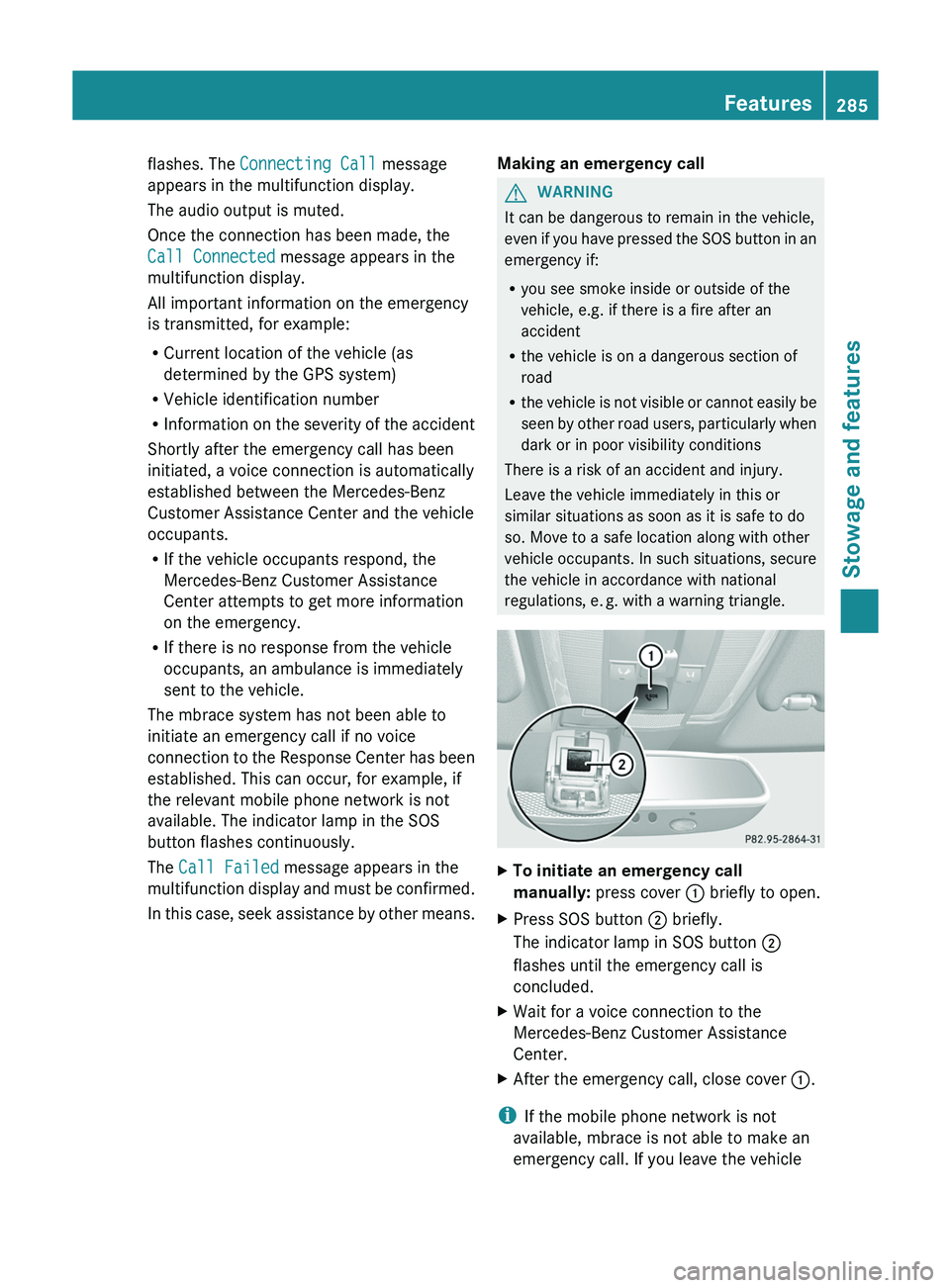
regulations, e. g. with a warning triangle. X
To initiate an emergency call
manually: press cover 0043 briefly to open.
X Press SOS button 0044 briefly.
The indicator lamp in SOS button 0044
flashes until the emergency call is
concluded.
X Wait for a voice connection to the
Mercedes-Benz Customer Assistance
Center.
X After the emergency call, close cover 0043.
i If the mobile phone network is not
available, mbrace is not able to make an
emergency call. If you leave the vehicle Features
285
Stowage and features Z
Page 288 of 380
immediately after pressing the SOS button,
you do not know
if
mbrace has successfully
made the emergency call. In this situation,
seek additional assistance by other means.
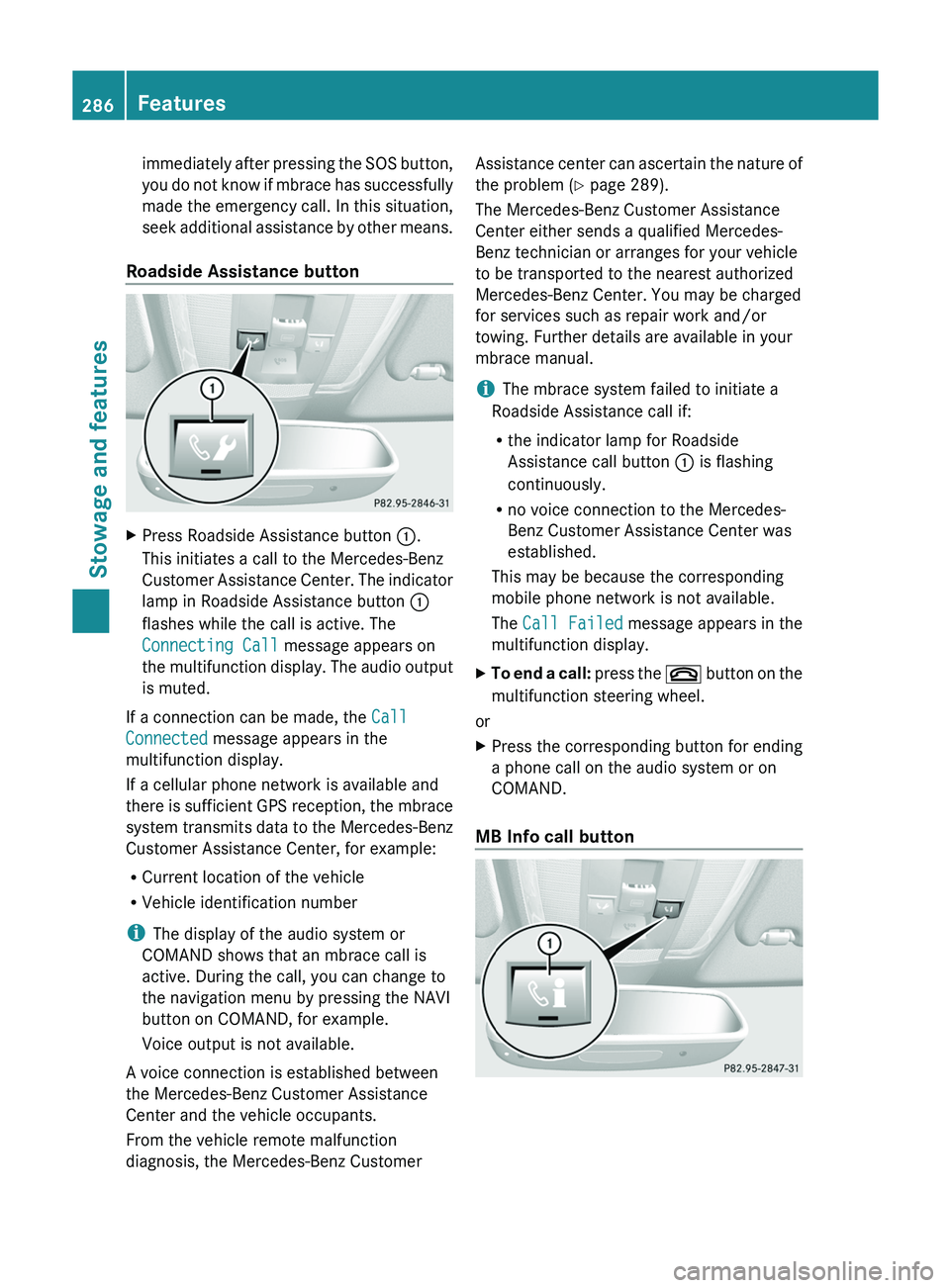
Roadside Assistance button X
Press Roadside Assistance button 0043.
This initiates a call to the Mercedes-Benz
Customer Assistance Center. The indicator
lamp in Roadside Assistance button 0043
flashes while the call is active. The
Connecting Call
message appears on
the multifunction display. The audio output
is muted.
If a connection can be made, the Call
Connected message appears in the
multifunction display.
If a cellular phone network is available and
there is sufficient GPS
reception,
the mbrace
system transmits data to the Mercedes-Benz
Customer Assistance Center, for example:
R Current location of the vehicle
R Vehicle identification number
i The display of the audio system or
COMAND shows that an mbrace call is
active. During the call, you can change to
the navigation menu by pressing the NAVI
button on COMAND, for example.
Voice output is not available.
A voice connection is established between
the Mercedes-Benz Customer Assistance
Center and the vehicle occupants.
From the vehicle remote malfunction
diagnosis, the Mercedes-Benz Customer Assistance center can ascertain the nature of
the problem (
Y page 289).
The Mercedes-Benz Customer Assistance
Center either sends a qualified Mercedes-
Benz technician or arranges for your vehicle
to be transported to the nearest authorized
Mercedes-Benz Center. You may be charged
for services such as repair work and/or
towing. Further details are available in your
mbrace manual.
i The mbrace system failed to initiate a
Roadside Assistance call if:
R the indicator lamp for Roadside
Assistance call button 0043 is flashing
continuously.
R no voice connection to the Mercedes-
Benz Customer Assistance Center was
established.
This may be because the corresponding
mobile phone network is not available.
The Call Failed message appears in the
multifunction display.
X To end a call: press the
0076 button
on the
multifunction steering wheel.
or
X Press the corresponding button for ending
a phone call on the audio system or on
COMAND.
MB Info call button 286
Features
Stowage and features
Page 289 of 380
X
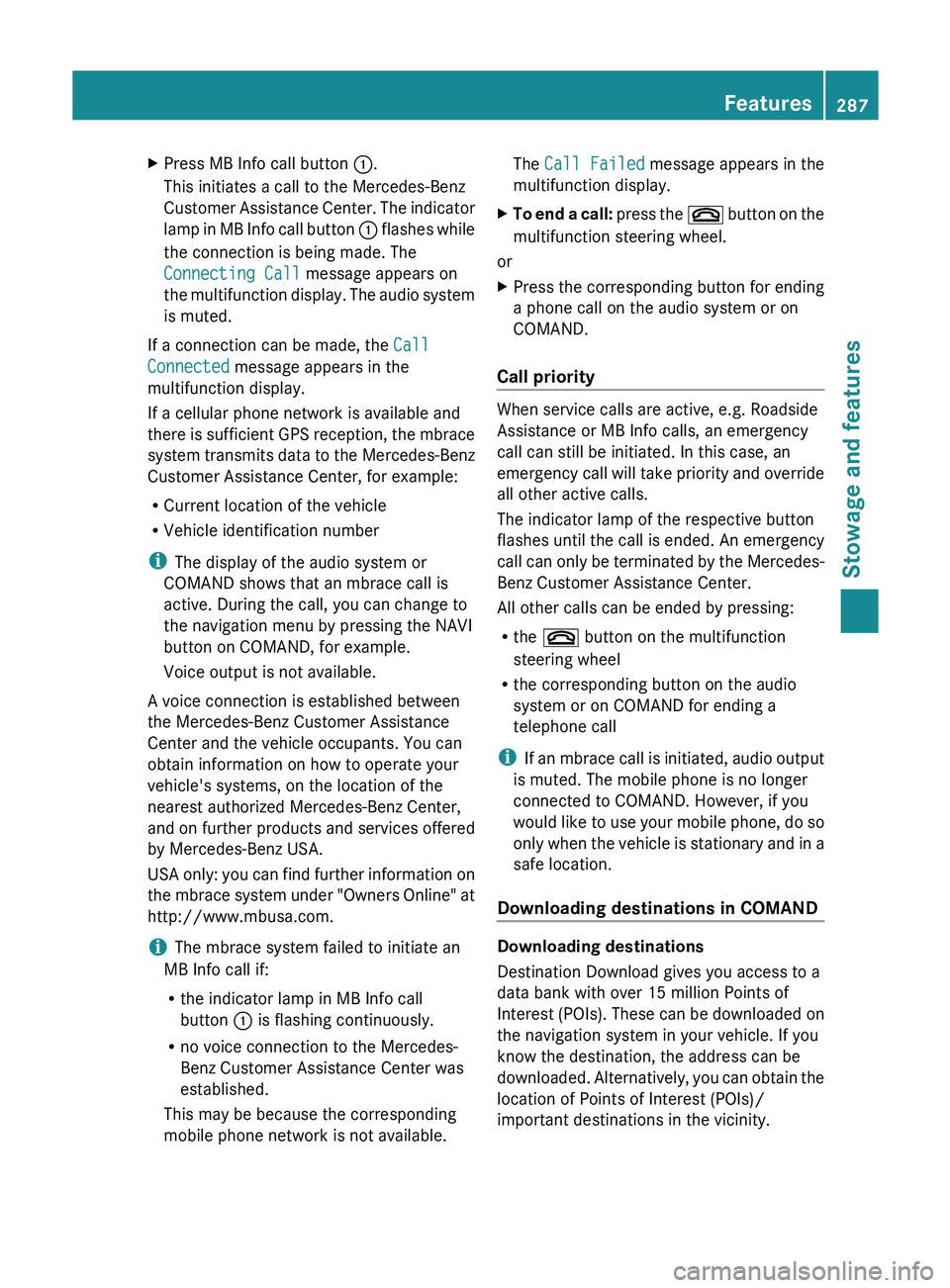
Press MB Info call button 0043.
This initiates a call to the Mercedes-Benz
Customer Assistance Center. The indicator
lamp
in MB Info call button 0043 flashes while
the connection is being made. The
Connecting Call message appears on
the multifunction display. The audio system
is muted.
If a connection can be made, the Call
Connected message appears in the
multifunction display.
If a cellular phone network is available and
there is sufficient GPS
reception,
the mbrace
system transmits data to the Mercedes-Benz
Customer Assistance Center, for example:
R Current location of the vehicle
R Vehicle identification number
i The display of the audio system or
COMAND shows that an mbrace call is
active. During the call, you can change to
the navigation menu by pressing the NAVI
button on COMAND, for example.
Voice output is not available.
A voice connection is established between
the Mercedes-Benz Customer Assistance
Center and the vehicle occupants. You can
obtain information on how to operate your
vehicle's systems, on the location of the
nearest authorized Mercedes-Benz Center,
and on further products and services offered
by Mercedes-Benz USA.
USA only: you can find further information on
the mbrace system under "Owners Online" at
http://www.mbusa.com.
i The mbrace system failed to initiate an
MB Info call if:
R the indicator lamp in MB Info call
button 0043 is flashing continuously.
R no voice connection to the Mercedes-
Benz Customer Assistance Center was
established.
This may be because the corresponding
mobile phone network is not available. The
Call Failed message appears in the
multifunction display.
X To end a call: press the 0076 button
on the
multifunction steering wheel.
or
X Press the corresponding button for ending
a phone call on the audio system or on
COMAND.
Call priority When service calls are active, e.g. Roadside
Assistance or MB Info calls, an emergency
call can still be initiated. In this case, an
emergency call will take
priority
and override
all other active calls.
The indicator lamp of the respective button
flashes until the call is ended. An emergency
call can only be terminated by the Mercedes-
Benz Customer Assistance Center.
All other calls can be ended by pressing:
R the 0076 button on the multifunction
steering wheel
R the corresponding button on the audio
system or on COMAND for ending a
telephone call
i If an mbrace call is initiated, audio output
is muted. The mobile phone is no longer
connected to COMAND. However, if you
would like to use your mobile phone, do so
only when the vehicle is stationary and in a
safe location.
Downloading destinations in COMAND Downloading destinations
Destination Download gives you access to a
data bank with over 15 million Points of
Interest (POIs). These can
be
downloaded on
the navigation system in your vehicle. If you
know the destination, the address can be
downloaded. Alternatively, you can obtain the
location of Points of Interest (POIs)/
important destinations in the vicinity. Features
287
Stowage and features Z