lane assist MERCEDES-BENZ GLK-CLASS SUV 2015 Owners Manual
[x] Cancel search | Manufacturer: MERCEDES-BENZ, Model Year: 2015, Model line: GLK-CLASS SUV, Model: MERCEDES-BENZ GLK-CLASS SUV 2015Pages: 386, PDF Size: 26 MB
Page 6 of 386
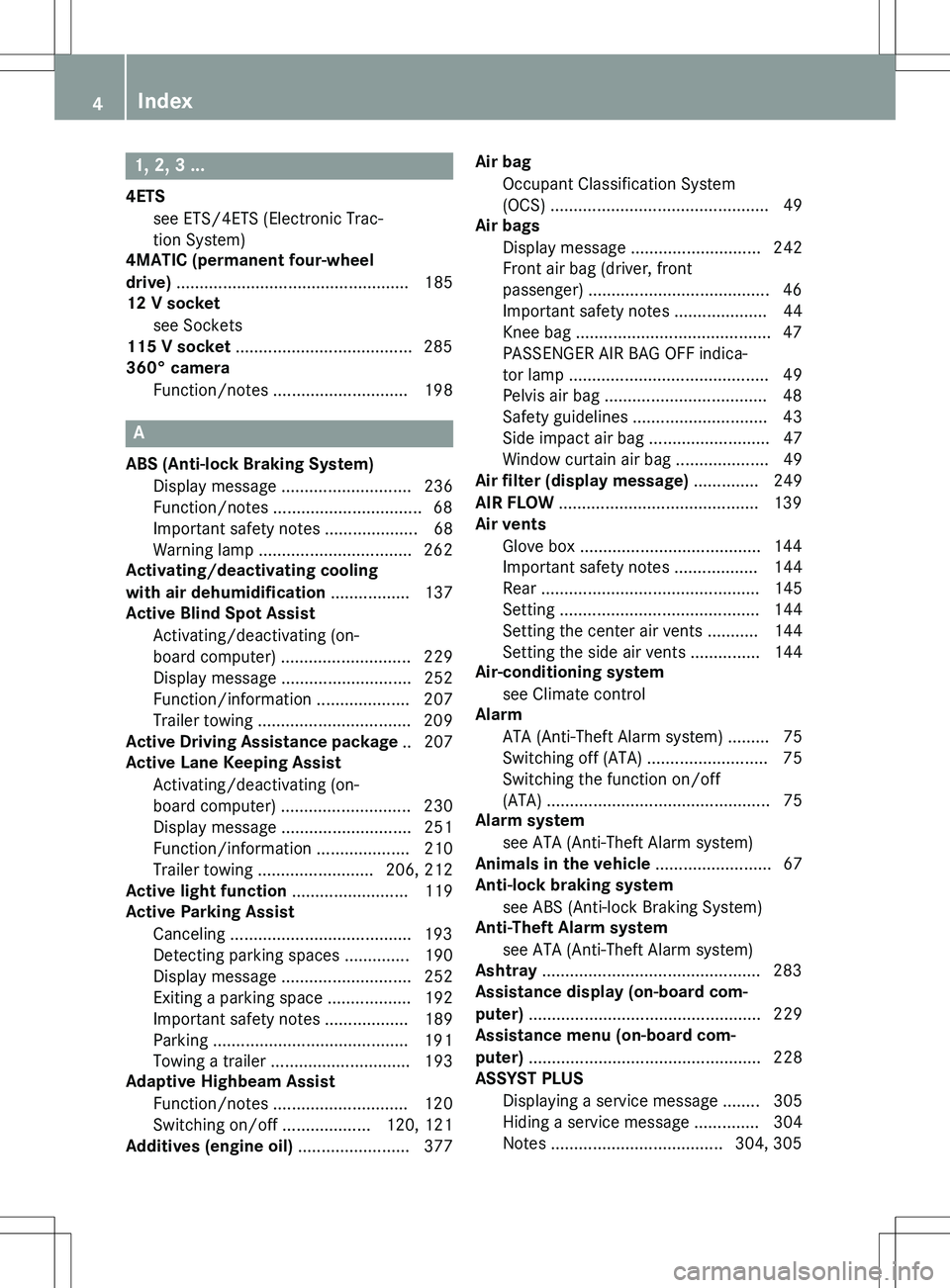
1, 2, 3 ...
4ETSsee ETS/4ETS (Electronic Trac-
tion System)
4MATIC (permanent four-wheel
drive) .................................................. 1 85
12 V socket
see Sockets
115 V socket ...................................... 285
360° camera
Function/notes ............................. 198
A
ABS (Anti-lock Braking System)Display message ............................ 236
Function/notes ................................ 68
Important safety notes .................... 68
Warning lamp ................................. 262
Activating/deactivating cooling
with air dehumidification ................. 137
Active Blind Spot Assist
Activating/deactivating (on-
board computer) ............................ 229
Display message ............................ 252
Function/information .................... 207
Trailer towing ................................. 209
Active Driving Assistance package .. 207
Active Lane Keeping Assist
Activating/deactivating (on-
board computer) ............................ 230
Display message ............................ 251
Function/information .................... 210
Trailer towing ......................... 206, 212
Active light function ......................... 119
Active Parking Assist
Canceling ....................................... 193
Detecting parking spaces .............. 190
Display message ............................ 252
Exiting a parking space .................. 192
Important safety notes .................. 189
Parking .......................................... 19 1
Towing a trailer .............................. 193
Adaptive Highbeam Assist
Function/notes ............................. 120
Switching on/off ................... 120, 121
Additives (engine oil) ........................ 377 Air bag
Occupant Classification System
(OCS) ............................................... 49
Air bags
Display message ............................ 242
Front air bag (driver, front
passenger) ....................................... 46
Important safety notes .................... 44
Knee bag .......................................... 47
PASSENGER AIR BAG OFF indica-
tor lamp ........................................... 4 9
Pelvis air bag ................................... 48
Safety guidelines ............................. 43
Side impact air bag .......................... 47
Window curtain air bag .................... 49
Air filter (display message) .............. 249
AIR FLOW ........................................... 139
Air vents
Glove box ....................................... 144
Important safety notes .................. 144
Rear ............................................... 145
Setting ........................................... 1 44
Setting the center air vents ........... 144
Setting the side air vents ............... 144
Air-conditioning system
see Climate control
Alarm
ATA (Anti-Theft Alarm system) ......... 75
Switching off (ATA) .......................... 75
Switching the function on/off
(ATA) .............................................. .. 75
Alarm system
see ATA (Anti-Theft Alarm system)
Animals in the vehicle ......................... 67
Anti-lock braking system
see ABS (Anti-lock Braking System)
Anti-Theft Alarm system
see ATA (Anti-Theft Alarm system)
Ashtray ............................................... 283
Assistance display (on-board com-
puter) .................................................. 2 29
Assistance menu (on-board com-
puter) .................................................. 2 28
ASSYST PLUS
Displaying a service message ........ 305
Hiding a service message .............. 304
Notes ..................................... 304, 305
4Index
Page 11 of 386
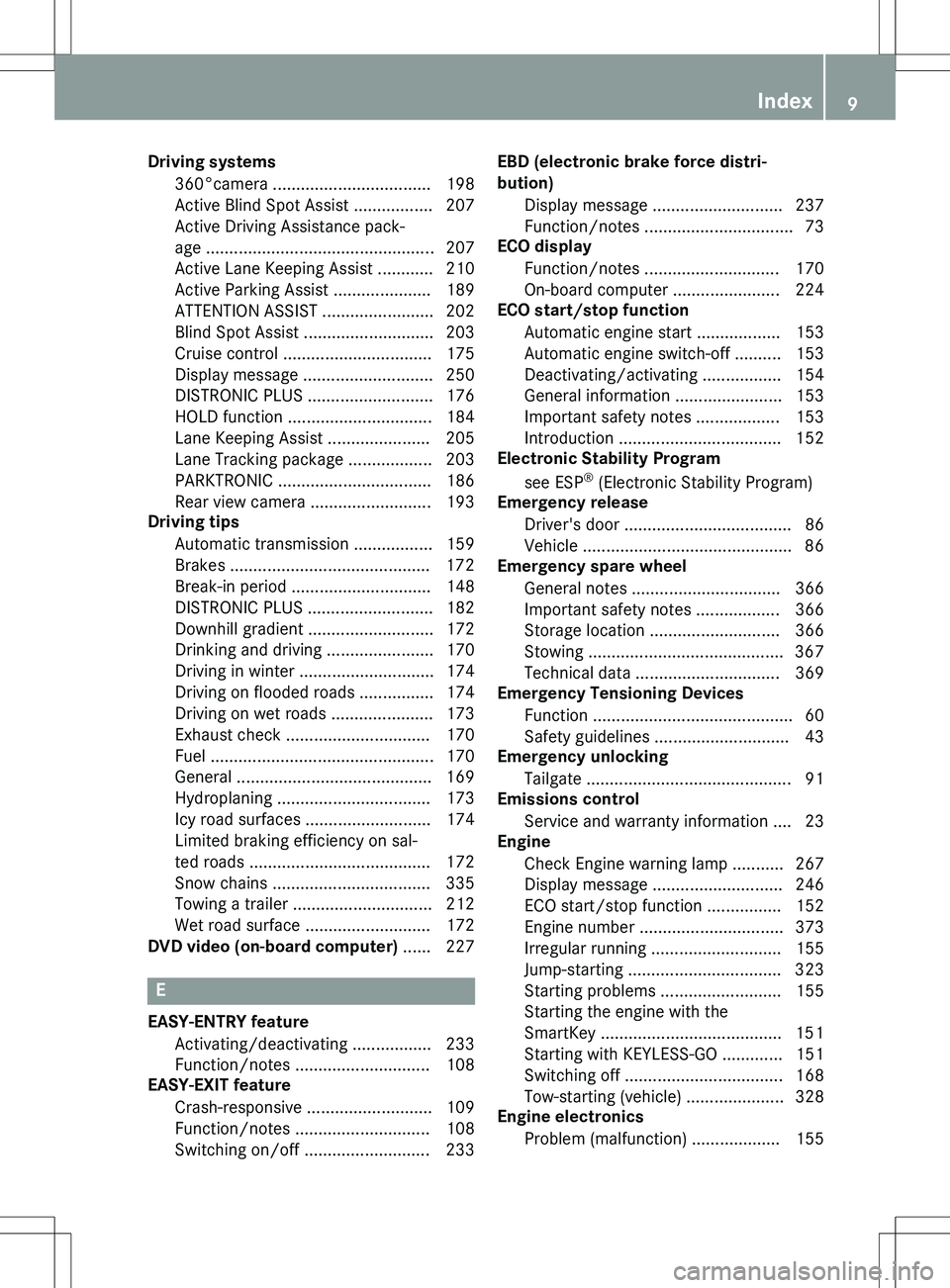
Driving systems360°camera .................................. 198
Active Blind Spot Assist ................. 207
Active Driving Assistance pack-
age ................................................ . 207
Active Lane Keeping Assist ............ 210
Active Parking Assist ..................... 189
ATTENTION ASSIST ........................ 202
Blind Spot Assist ............................ 203
Cruise control ................................ 175
Display message ............................ 250
DISTRONIC PLUS ........................... 176
HOLD function ............................... 184
Lane Keeping Assist ...................... 205
Lane Tracking package .................. 203
PARKTRONIC ................................. 186
Rear view camera .......................... 193
Driving tips
Automatic transmission ................. 159
Brakes ........................................... 172
Break-in period .............................. 148
DISTRONIC PLUS ........................... 182
Downhill gradient ........................... 172
Drinking and driving ....................... 170
Driving in winter ............................. 174
Driving on flooded roads ................ 174
Driving on wet roads ...................... 173
Exhaust check ............................... 170
Fuel ............................................... . 170
General .......................................... 16 9
Hydroplaning ................................. 173
Icy road surfaces ........................... 174
Limited braking efficiency on sal-
ted roads ....................................... 172
Snow chains .................................. 335
Towing a trailer .............................. 212
Wet road surface ........................... 172
DVD video (on-board computer) ...... 227
E
EASY-ENTRY feature
Activating/deactivating ................. 233
Function/notes ............................. 108
EASY-EXIT feature
Crash-responsive ........................... 109
Function/notes ............................. 108
Switching on/off ........................... 233 EBD (electronic brake force distri-
bution)
Display message ............................ 237
Function/notes ................................ 73
ECO display
Function/notes ............................. 170
On-board computer ....................... 224
ECO start/stop function
Automatic engine start .................. 153
Automatic engine switch-off .......... 153
Deactivating/activating ................. 154
General information ....................... 153
Important safety notes .................. 153
Introduction ................................... 152
Electronic Stability Program
see ESP ®
(Electronic Stability Program)
Emergency release
Driver's door .................................... 86
Vehicle ............................................. 8 6
Emergency spare wheel
General notes ................................ 366
Important safety notes .................. 366
Storage location ............................ 366
Stowing .......................................... 36 7
Technical data ............................... 369
Emergency Tensioning Devices
Function ........................................... 60
Safety guidelines ............................. 43
Emergency unlocking
Tailgate ........................................... . 91
Emissions control
Service and warranty information .... 23
Engine
Check Engine warning lamp ........... 267
Display message ............................ 246
ECO start/stop function ................ 152
Engine number ............................... 373
Irregular running ............................ 155
Jump-starting ................................. 323
Starting problems .......................... 155
Starting the engine with the
SmartKey ....................................... 151
Starting with KEYLESS-GO ............. 151
Switching off .................................. 168
Tow-starting (vehicle) ..................... 328
Engine electronics
Problem (malfunction) ................... 155
Index9
Page 14 of 386
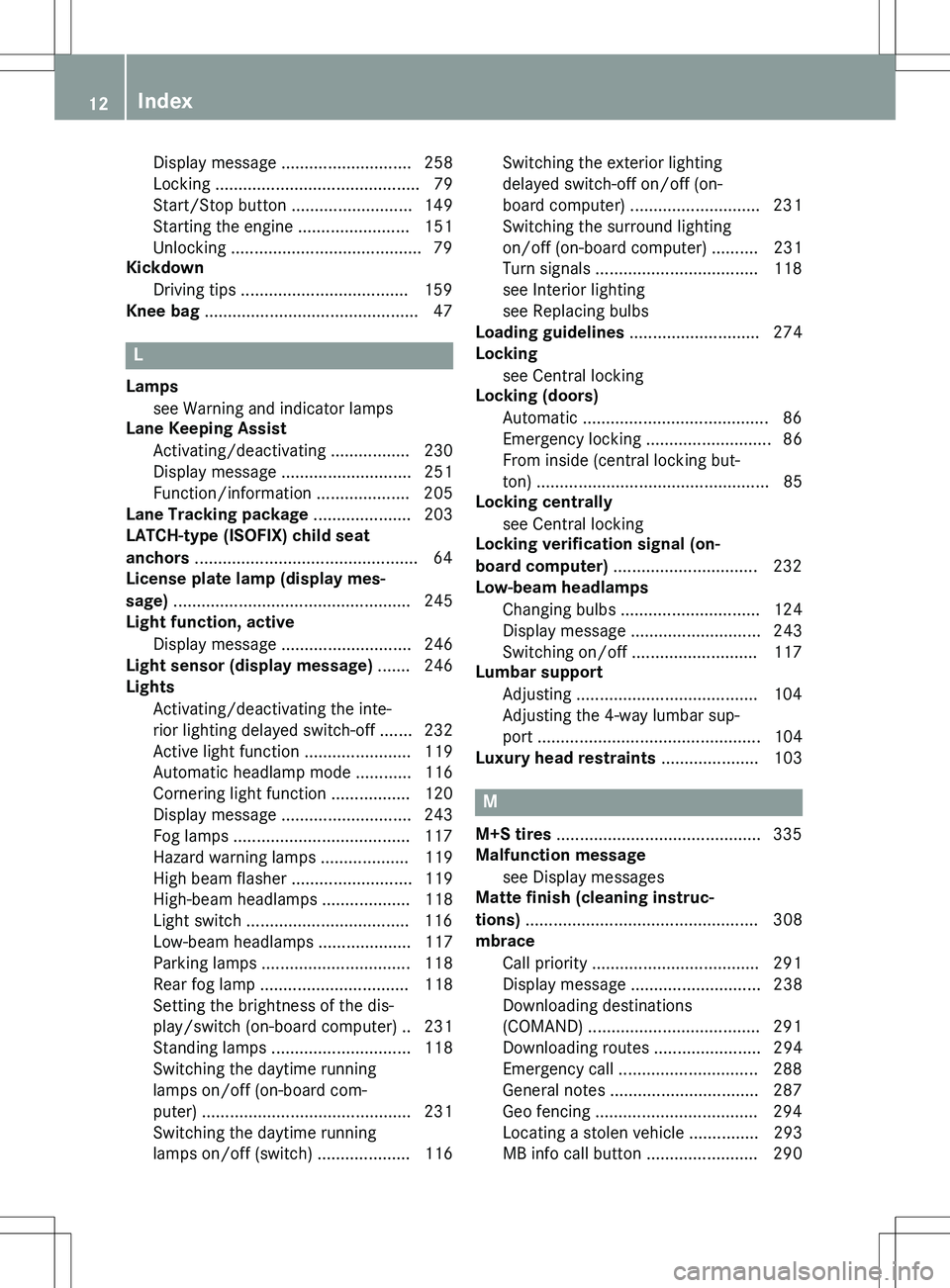
Display message ............................ 258
Locking ............................................79
Start/Stop button .......................... 149
Starting the engine ........................ 151
Unlocking ......................................... 79
Kickdown
Driving tips .................................... 159
Knee bag .............................................. 47
L
Lamps
see Warning and indicator lamps
Lane Keeping Assist
Activating/deactivating ................. 230
Display message ............................ 251
Function/information .................... 205
Lane Tracking package ..................... 203
LATCH-type (ISOFIX) child seat
anchors ................................................ 64
License plate lamp (display mes-
sage) ................................................... 245
Light function, active
Display message ............................ 246
Light sensor (display message) ....... 246
Lights
Activating/deactivating the inte-
rior lighting delayed switch-off ....... 232
Active light function ....................... 119
Automatic headlamp mode ............ 116
Cornering light function ................. 120
Display message ............................ 243
Fog lamps ...................................... 117
Hazard warning lamps ................... 119
High beam flasher .......................... 119
High-beam headlamps ................... 118
Light switch ................................... 116
Low-beam headlamps .................... 117
Parking lamps ................................ 118
Rear fog lamp ................................ 118
Setting the brightness of the dis-
play/switch (on-board computer) .. 231
Standing lamps .............................. 118
Switching the daytime running
lamps on/off (on-board com-
puter) ............................................. 231
Switching the daytime running
lamps on/off (switch) .................... 116 Switching the exterior lighting
delayed switch-off on/off (on-
board computer) ............................ 231
Switching the surround lighting
on/off (on-board computer) .......... 231
Turn signals ................................... 118
see Interior lighting
see Replacing bulbs
Loading guidelines ............................ 274
Locking
see Central locking
Locking (doors)
Automatic ........................................ 86
Emergency locking ........................... 86
From inside (central locking but-
ton) ............................................... ... 85
Locking centrally
see Central locking
Locking verification signal (on-
board computer) ............................... 232
Low-beam headlamps
Changing bulbs .............................. 124
Display message ............................ 243
Switching on/off ........................... 117
Lumbar support
Adjusting ....................................... 104
Adjusting the 4-way lumbar sup-
port ............................................... . 104
Luxury head restraints ..................... 103
M
M+S tires ............................................ 335
Malfunction message
see Display messages
Matte finish (cleaning instruc-
tions) .................................................. 3 08
mbrace
Call priority .................................... 291
Display message ............................ 238
Downloading destinations
(COMAND) ..................................... 291
Downloading routes ....................... 294
Emergency call .............................. 288
General notes ................................ 287
Geo fencing ................................... 294
Locating a stolen vehicle ............... 293
MB info call button ........................ 290
12Index
Page 21 of 386
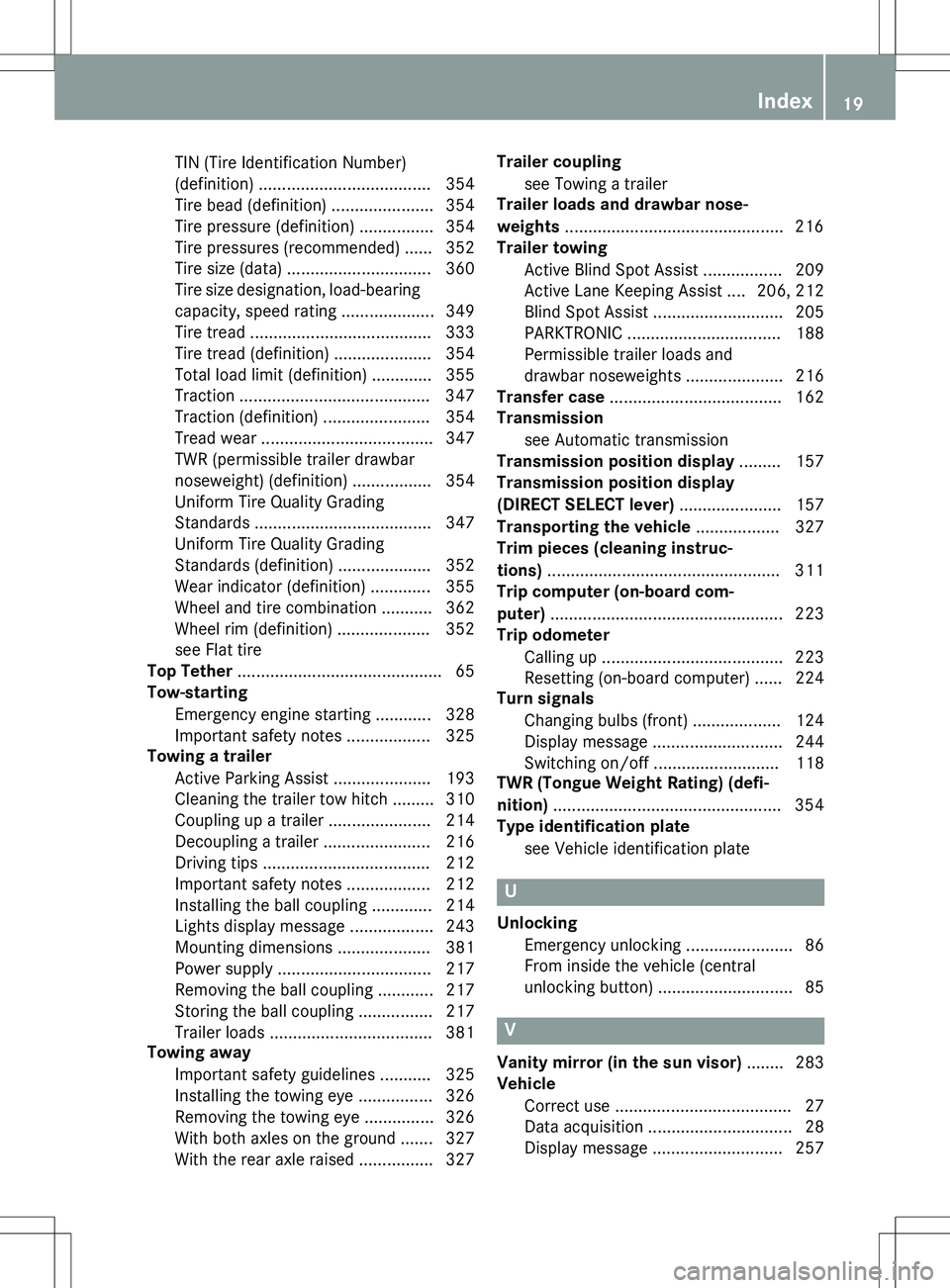
TIN (Tire Identification Number)
(definition) ..................................... 354
Tire bead (definition) ...................... 354
Tire pressure (definition) ................ 354
Tire pressures (recommended) ...... 352
Tire size (data) ............................... 360
Tire size designation, load-bearing capacity, speed rating .................... 349
Tire tread ....................................... 333
Tire tread (definition) ..................... 354
Total load limit (definition) ............. 355
Traction ......................................... 34 7
Traction (definition) ....................... 354
Tread wear ..................................... 347
TWR (permissible trailer drawbar
noseweight) (definition) ................. 354
Uniform Tire Quality Grading
Standards ...................................... 347
Uniform Tire Quality Grading
Standards (definition) .................... 352
Wear indicator (definition) ............. 355
Wheel and tire combination ........... 362
Wheel rim (definition) .................... 352
see Flat tire
Top Tether ............................................ 65
Tow-starting
Emergency engine starting ............ 328
Important safety notes .................. 325
Towing a trailer
Active Parking Assist ..................... 193
Cleaning the trailer tow hitch ......... 310
Coupling up a trailer ...................... 214
Decoupling a trailer ....................... 216
Driving tips .................................... 212
Important safety notes .................. 212
Installing the ball coupling ............. 214
Lights display message .................. 243
Mounting dimensions .................... 381
Power supply ................................. 217
Removing the ball coupling ............ 217
Storing the ball coupling ................ 217
Trailer loads ................................... 381
Towing away
Important safety guidelines ........... 325
Installing the towing eye ................ 326
Removing the towing eye ............... 326
With both axles on the ground ....... 327
With the rear axle raised ................ 327 Trailer coupling
see Towing a trailer
Trailer loads and drawbar nose-
weights ............................................... 216
Trailer towing
Active Blind Spot Assist ................. 209
Active Lane Keeping Assist .... 206, 212
Blind Spot Assist ............................ 205
PARKTRONIC ................................. 188
Permissible trailer loads and
drawbar noseweights ..................... 216
Transfer case ..................................... 162
Transmission
see Automatic transmission
Transmission position display ......... 157
Transmission position display
(DIRECT SELECT lever) ...................... 157
Transporting the vehicle .................. 327
Trim pieces (cleaning instruc-
tions) .................................................. 3 11
Trip computer (on-board com-
puter) .................................................. 2 23
Trip odometer
Calling up ....................................... 223
Resetting (on-board computer) ...... 224
Turn signals
Changing bulbs (front) ................... 124
Display message ............................ 244
Switching on/off ........................... 118
TWR (Tongue Weight Rating) (defi-
nition) ................................................. 35 4
Type identification plate
see Vehicle identification plate
U
UnlockingEmergency unlocking ....................... 86
From inside the vehicle (central
unlocking button) ............................. 85
V
Vanity mirror (in the sun visor) ........ 283
Vehicle
Correct use ...................................... 27
Data acquisition ............................... 28
Display message ............................ 257
Index19
Page 180 of 386
This speed may:
R be too high if you are driving in a filter lane
or an exit lane
R be so high when driving in the right-hand
lane that you overtake vehicles in the left-
hand lane
R be so high when driving in the left-hand lane
that you overtake vehicles in the right-hand
lane
If there is a change of drivers, advise the new driver of the speed stored.
If there is no vehicle in front, DISTRONIC
PLUS operates in the same way as cruise
control in the speed range between 20 mph
(Canada: 30 km/h) and 120 mph (Canada:
200 km/h). If a vehicle is driving in front of
you, it operates in the speed range between
0 mph (0 km/h) and 120 mph (Canada:
200 km/h).
Do not use DISTRONIC PLUS while driving onroads with steep gradients.
As DISTRONIC PLUS transmits radar waves, it
can resemble the radar detectors of the
responsible authorities. You can refer to the
relevant chapter in the Operator's Manual if
questions are asked about this.
iUSA only:
This device has been approved by the FCC as a "Vehicular Radar System". The radar
sensor is intended for use in an automotive
radar system only. Removing, tampering
with, or altering the device will void any
warranties, and is not permitted by the
FCC. Do not tamper with, alter, or use in
any non-approved way.
Any unauthorized modification to this
device could void the user’s authority to
operate the equipment.
iCanada only: This device complies with
RSS-210 of Industry Canada. Operation is
subject to the following two conditions:
1. This device may not cause harmful inter-
ference, and 2. This device must accept any interference
received, including interference that may
cause undesired operation of the device.
Removal, tampering, or altering of the
device will void any warranties, and is not
permitted. Do not tamper with, alter, or use in any non-approved way.
Any unauthorized modification to this
device could void the user's authority to
operate the equipment.
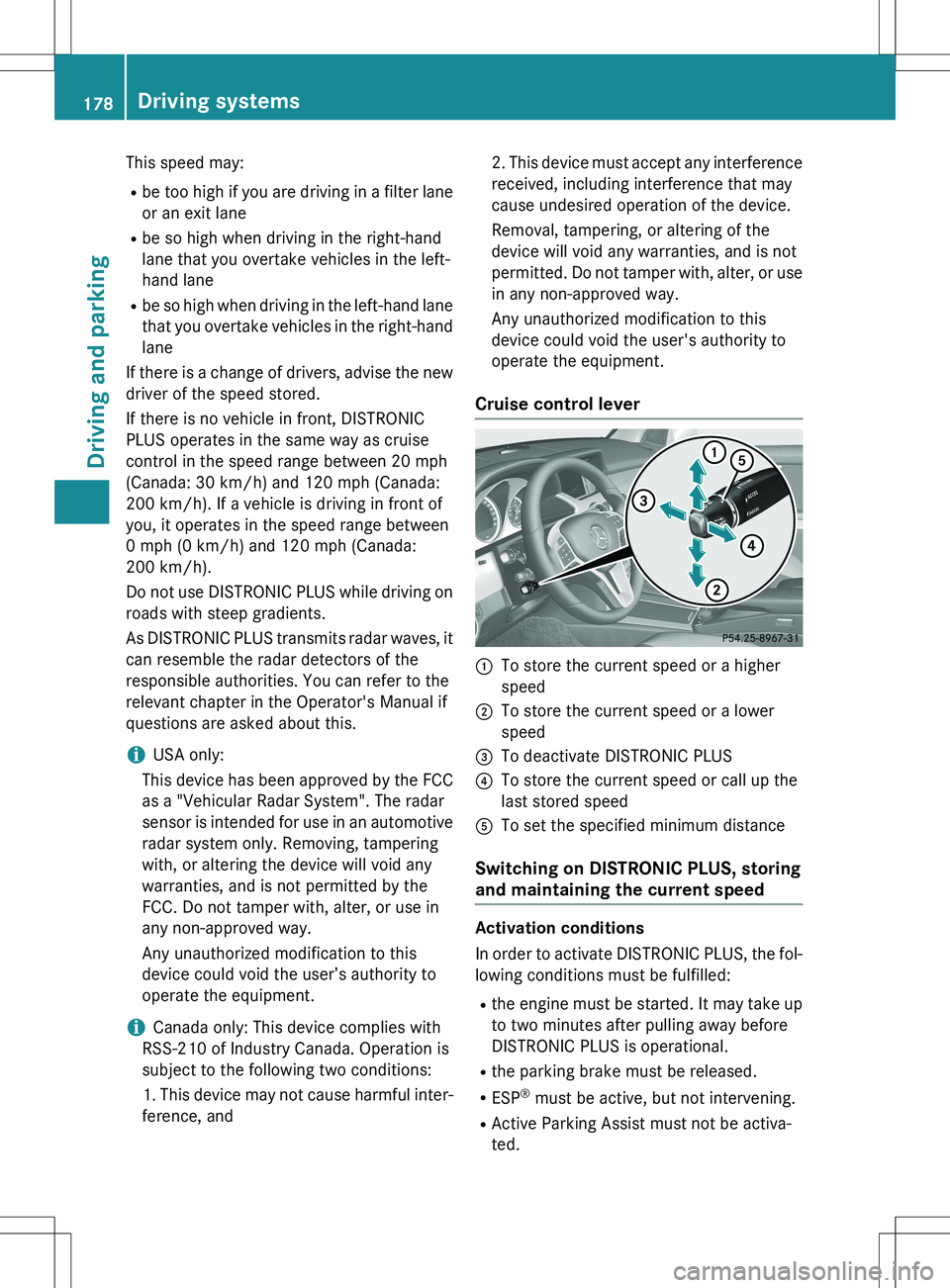
Cruise control lever
:To store the current speed or a higher
speed
;To store the current speed or a lower
speed
=To deactivate DISTRONIC PLUS
?To store the current speed or call up the
last stored speed
ATo set the specified minimum distance
Switching on DISTRONIC PLUS, storing
and maintaining the current speed
Activation conditions
In order to activate DISTRONIC PLUS, the fol-
lowing conditions must be fulfilled:
R the engine must be started. It may take up
to two minutes after pulling away before
DISTRONIC PLUS is operational.
R the parking brake must be released.
R ESP ®
must be active, but not intervening.
R Active Parking Assist must not be activa-
ted.
178Driving systems
Driving and parking
Page 186 of 386
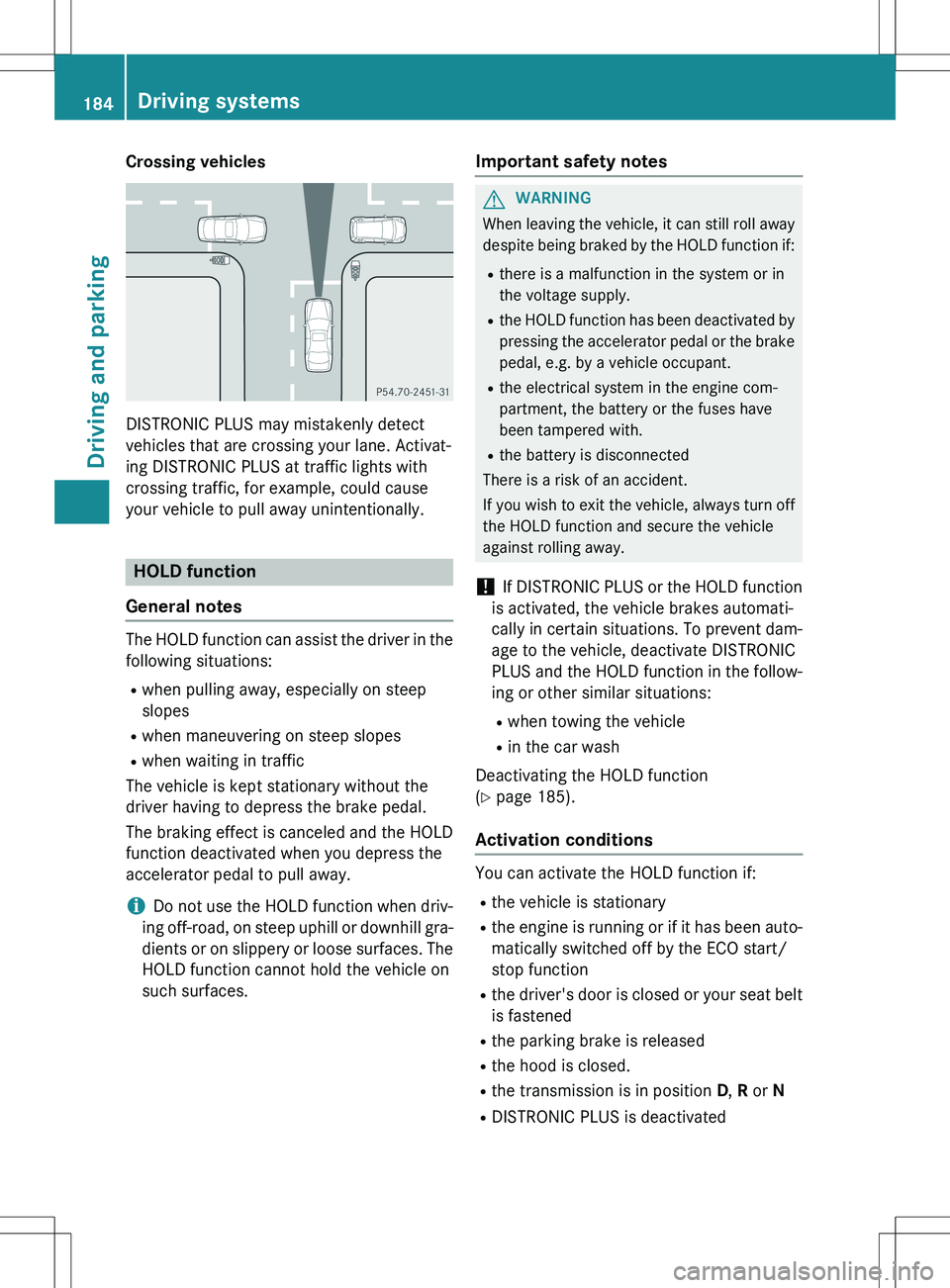
Crossing vehicles
DISTRONIC PLUS may mistakenly detect
vehicles that are crossing your lane. Activat-
ing DISTRONIC PLUS at traffic lights with
crossing traffic, for example, could cause
your vehicle to pull away unintentionally.
HOLD function
General notes
The HOLD function can assist the driver in the
following situations: R when pulling away, especially on steep
slopes
R when maneuvering on steep slopes
R when waiting in traffic
The vehicle is kept stationary without the
driver having to depress the brake pedal.
The braking effect is canceled and the HOLD
function deactivated when you depress the
accelerator pedal to pull away.
iDo not use the HOLD function when driv-
ing off-road, on steep uphill or downhill gra-
dients or on slippery or loose surfaces. The HOLD function cannot hold the vehicle on
such surfaces.
Important safety notes
GWARNING
When leaving the vehicle, it can still roll away despite being braked by the HOLD function if:
R there is a malfunction in the system or in
the voltage supply.
R the HOLD function has been deactivated by
pressing the accelerator pedal or the brake
pedal, e.g. by a vehicle occupant.
R the electrical system in the engine com-
partment, the battery or the fuses have
been tampered with.
R the battery is disconnected
There is a risk of an accident.
If you wish to exit the vehicle, always turn off the HOLD function and secure the vehicle
against rolling away.
! If DISTRONIC PLUS or the HOLD function
is activated, the vehicle brakes automati-
cally in certain situations. To prevent dam-
age to the vehicle, deactivate DISTRONIC
PLUS and the HOLD function in the follow-
ing or other similar situations:
R when towing the vehicle
R in the car wash
Deactivating the HOLD function
( Y page 185).
Activation conditions
You can activate the HOLD function if:
R the vehicle is stationary
R the engine is running or if it has been auto-
matically switched off by the ECO start/
stop function
R the driver's door is closed or your seat belt
is fastened
R the parking brake is released
R the hood is closed.
R the transmission is in position D, R or N
R DISTRONIC PLUS is deactivated
184Driving systems
Driving and parking
Page 191 of 386
Problems with PARKTRONIC
ProblemPossible causes/consequences and M Solutions
Only the red segments
in the PARKTRONIC
warning displays are lit.
You also hear a warning
tone for approximately
two seconds.
PARKTRONIC is deacti-
vated after approx-
imately five seconds,
and the indicator lamp
in the PARKTRONIC
button lights up.PARKTRONIC has malfunctioned and has switched off.
X If problems persist, have PARKTRONIC checked at a qualified
specialist workshop.
Only the red segments
in the PARKTRONIC
warning displays are lit.
PARKTRONIC is deacti-
vated after approx-
imately five seconds.The PARKTRONIC sensors are dirty or there is interference. X Clean the PARKTRONIC sensors ( Y page 309).
X Switch the ignition back on.
The problem may be caused by an external source of radio or
ultrasound waves. XSee if PARKTRONIC functions in a different location.
Active Parking Assist
Important safety notes
Active Parking Assist is an electronic parking
aid with ultrasound. Ultrasound is used to
measure the road on both sides of the vehicle. A parking symbol indicates a suitable parking
space. Active steering intervention can assist you during parking. You may also use
PARKTRONIC ( Y page 186).
GWARNING
While parking or pulling out of a parking
space, the vehicle swings out and can drive
onto areas of the oncoming lane. This could
result in a collision with another road user.
There is a risk of an accident.
Pay attention to other road users. Stop the
vehicle if necessary or cancel the Active Park-
ing Assist parking procedure.
! If unavoidable, you should drive over
obstacles such as curbs slowly and not at a sharp angle. Otherwise, you may damage
the wheels or tires.
Active Parking Assist is merely an aid. It is not
a replacement for your attention to your
immediate surroundings. You are always
responsible for safe maneuvering, parking
and exiting a parking space. Make sure that
no persons, animals or objects are in the
maneuvering range.
When PARKTRONIC is switched off, Active
Parking Assist is also unavailable.
Active Parking Assist may possibly indicate
parking spaces which are not suitable for
parking, for example:
R where parking or stopping is prohibited
R in front of driveways or entrances and exits
R on unsuitable surfaces
Driving systems189
Driving and parking
Z
Page 197 of 386
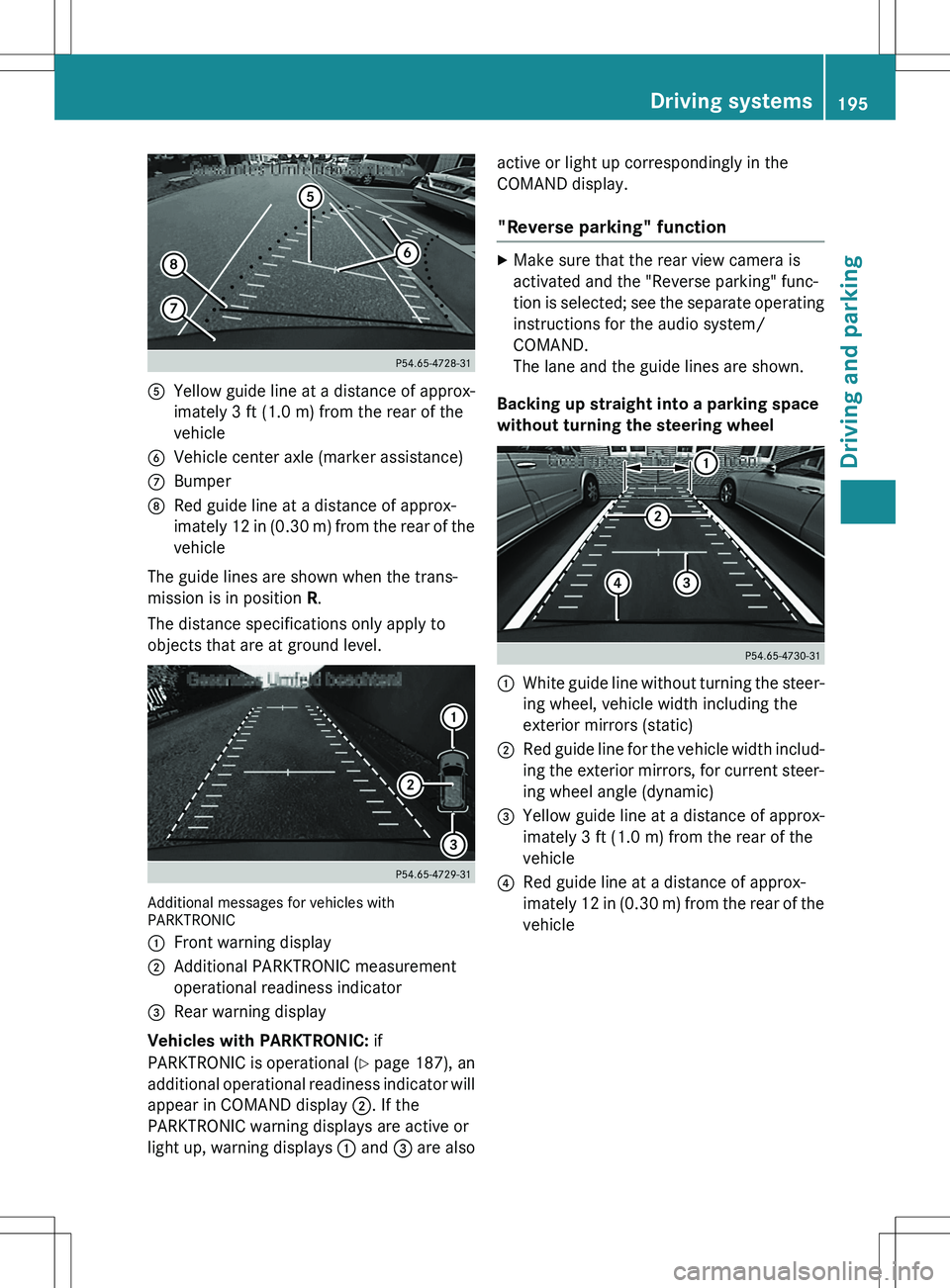
AYellow guide line at a distance of approx-
imately 3 ft (1.0 m) from the rear of the
vehicle
BVehicle center axle (marker assistance)
CBumper
DRed guide line at a distance of approx-
imately 12 in (0.30 m) from the rear of thevehicle
The guide lines are shown when the trans-
mission is in position R.
The distance specifications only apply to
objects that are at ground level.
Additional messages for vehicles with
PARKTRONIC :
Front warning display
;Additional PARKTRONIC measurement
operational readiness indicator
=Rear warning display
Vehicles with PARKTRONIC: if
PARKTRONIC is operational ( Y page 187), an
additional operational readiness indicator will
appear in COMAND display ;. If the
PARKTRONIC warning displays are active or
light up, warning displays : and = are also active or light up correspondingly in the
COMAND display.
"Reverse parking" function
X
Make sure that the rear view camera is
activated and the "Reverse parking" func-
tion is selected; see the separate operating
instructions for the audio system/
COMAND.
The lane and the guide lines are shown.
Backing up straight into a parking space
without turning the steering wheel
:White guide line without turning the steer-
ing wheel, vehicle width including the
exterior mirrors (static)
;Red guide line for the vehicle width includ-
ing the exterior mirrors, for current steer-
ing wheel angle (dynamic)
=Yellow guide line at a distance of approx-
imately 3 ft (1.0 m) from the rear of the
vehicle
?Red guide line at a distance of approx-
imately 12 in (0.30 m) from the rear of the
vehicle
Driving systems195
Driving and parking
Z
Page 202 of 386
XTo switch to full screen mode: select
Full Screen by turning cVd the
COMAND controller and press W to con-
firm.
Displays in the COMAND display
Important safety notes
! Objects not at ground level may appear to
be further away than they actually are, e.g.: R the bumper of a parked vehicle
R the drawbar of a trailer
R the ball coupling of a trailer tow hitch
R the rear section of an HGV
R a slanted post
Use the guidelines only for orientation.
Approach objects no further than the bot-
tom-most guideline.
Top view with picture from the rear view
camera
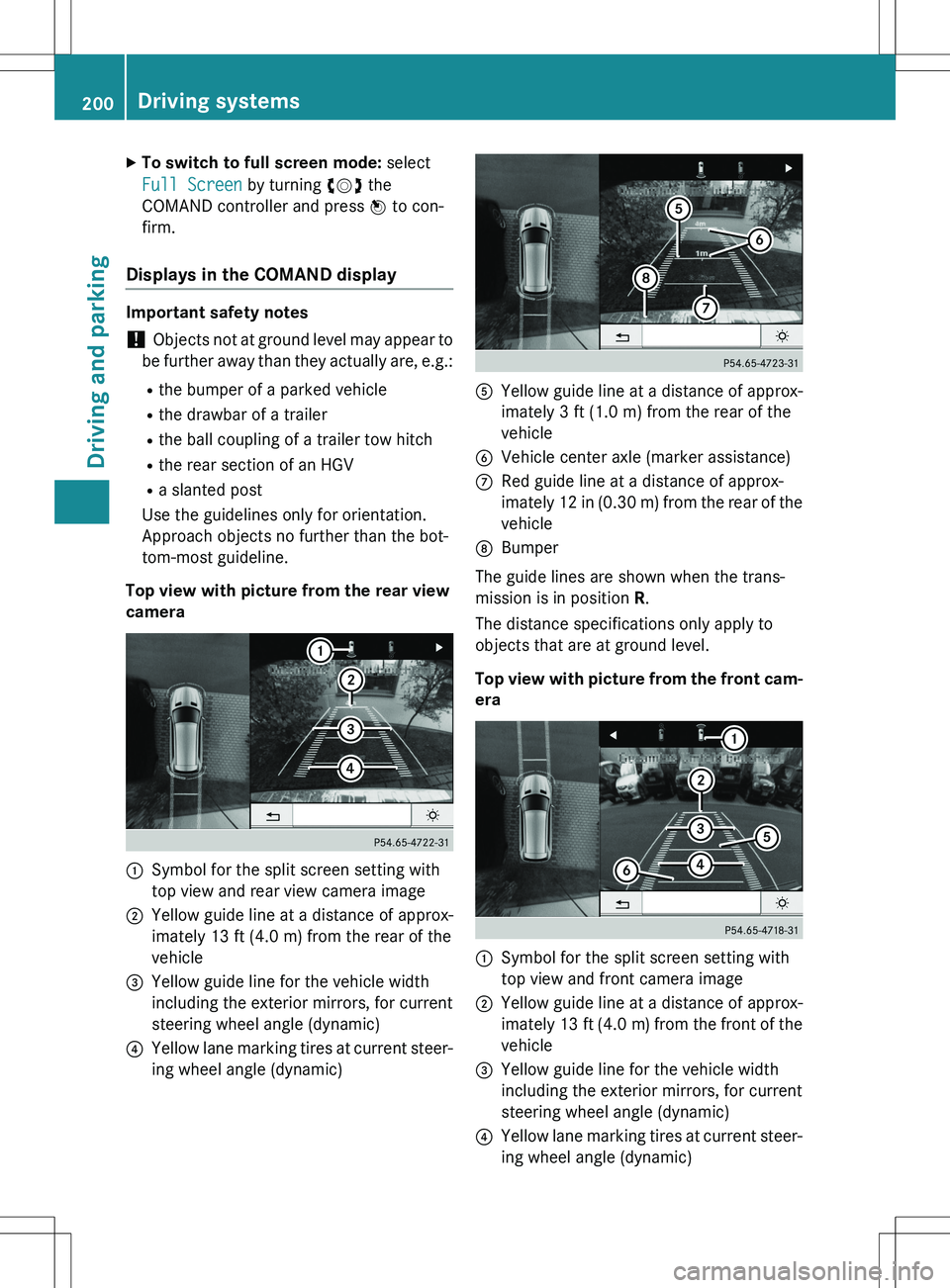
:Symbol for the split screen setting with
top view and rear view camera image
;Yellow guide line at a distance of approx-
imately 13 ft (4.0 m) from the rear of the
vehicle
=Yellow guide line for the vehicle width
including the exterior mirrors, for current
steering wheel angle (dynamic)
?Yellow lane marking tires at current steer-
ing wheel angle (dynamic)
AYellow guide line at a distance of approx-
imately 3 ft (1.0 m) from the rear of the
vehicle
BVehicle center axle (marker assistance)
CRed guide line at a distance of approx-
imately 12 in (0.30 m) from the rear of the
vehicle
DBumper
The guide lines are shown when the trans-
mission is in position R.
The distance specifications only apply to
objects that are at ground level.
Top view with picture from the front cam- era
:Symbol for the split screen setting with
top view and front camera image
;Yellow guide line at a distance of approx-
imately 13 ft (4.0 m) from the front of the
vehicle
=Yellow guide line for the vehicle width
including the exterior mirrors, for current
steering wheel angle (dynamic)
?Yellow lane marking tires at current steer-
ing wheel angle (dynamic)
200Driving systems
Driving and parking
Page 204 of 386
Display with the PARKTRONIC display
Example: full screen mode with PARKTRONIC dis-
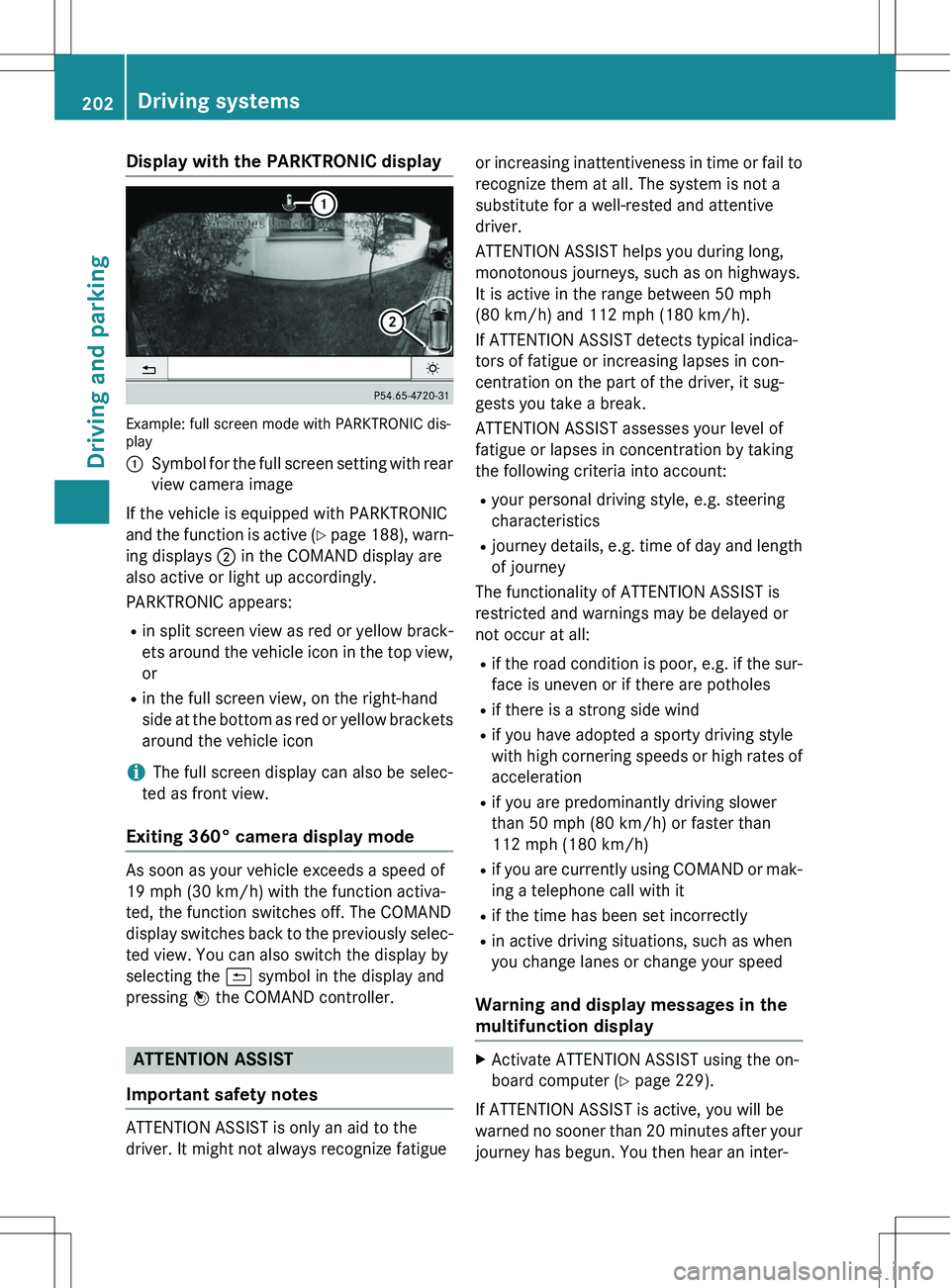
play :
Symbol for the full screen setting with rear
view camera image
If the vehicle is equipped with PARKTRONIC
and the function is active ( Y page 188), warn-
ing displays ; in the COMAND display are
also active or light up accordingly.
PARKTRONIC appears:
R in split screen view as red or yellow brack-
ets around the vehicle icon in the top view, or
R in the full screen view, on the right-hand
side at the bottom as red or yellow brackets
around the vehicle icon
iThe full screen display can also be selec-
ted as front view.
Exiting 360° camera display mode
As soon as your vehicle exceeds a speed of
19 mph (30 km/h) with the function activa-
ted, the function switches off. The COMAND
display switches back to the previously selec- ted view. You can also switch the display by
selecting the & symbol in the display and
pressing W the COMAND controller.
ATTENTION ASSIST
Important safety notes
ATTENTION ASSIST is only an aid to the
driver. It might not always recognize fatigue or increasing inattentiveness in time or fail to
recognize them at all. The system is not a
substitute for a well-rested and attentive
driver.
ATTENTION ASSIST helps you during long,
monotonous journeys, such as on highways.
It is active in the range between 50 mph
(80 km/h) and 112 mph (180 km/h).
If ATTENTION ASSIST detects typical indica-
tors of fatigue or increasing lapses in con-
centration on the part of the driver, it sug-
gests you take a break.
ATTENTION ASSIST assesses your level of
fatigue or lapses in concentration by taking
the following criteria into account: R your personal driving style, e.g. steering
characteristics
R journey details, e.g. time of day and length
of journey
The functionality of ATTENTION ASSIST is
restricted and warnings may be delayed or
not occur at all:
R if the road condition is poor, e.g. if the sur-
face is uneven or if there are potholes
R if there is a strong side wind
R if you have adopted a sporty driving style
with high cornering speeds or high rates of
acceleration
R if you are predominantly driving slower
than 50 mph (80 km/h) or faster than
112 mph (180 km/h)
R if you are currently using COMAND or mak-
ing a telephone call with it
R if the time has been set incorrectly
R in active driving situations, such as when
you change lanes or change your speed
Warning and display messages in the
multifunction display
XActivate ATTENTION ASSIST using the on-
board computer ( Y page 229).
If ATTENTION ASSIST is active, you will be
warned no sooner than 20 minutes after your journey has begun. You then hear an inter-
202Driving systems
Driving and parking