display MERCEDES-BENZ GLS 2019 Owner's Manual
[x] Cancel search | Manufacturer: MERCEDES-BENZ, Model Year: 2019, Model line: GLS, Model: MERCEDES-BENZ GLS 2019Pages: 398, PDF Size: 7.3 MB
Page 24 of 398
Display message ............................ 268
Distribution of the vehicle occu-
pants (definition) ............................ 372
DOT (Department of Transporta-
tion) (definition) ............................. 370
DOT, Tire Identification Number
(TIN) ............................................... 370
GAWR (Gross Axle Weight Rating)
(definition) .................................... .371
GTW (Gross Trailer Weight) (defi-
nition) ............................................ 371
GVW (Gross Vehicle Weight) (def-
inition) .......................................... .371
GVWR (Gross Vehicle Weight Rat-
ing) (definition) .............................. 371
Important safety notes .................. 352
Increased vehicle weight due to
optional equipment (definition) ...... 371
Information on driving .................... 352
Kilopascal (kPa) (definition) ........... 371
Labeling (overview )........................ 367
Load bearing index (definition) ...... 372
Load index ..................................... 369
Load index (definition) ................... 371
M+S tire s....................................... 354
Maximum load on a tire (defini-
tion) ............................................... 371
Maximum loaded vehicle weight
(definition) ..................................... 371
Maximum permissible tire pres-
sure (definition) ............................. 371
Maximum tire load ......................... 369
Maximum tire load (definition) ....... 371
MOExtended tire s.......................... 353
Optional equipment weight (defi-
nition) ............................................ 372
PSI (pounds per square inch) (def-
inition) ........................................... 372
Replacing ....................................... 372
Service life ..................................... 353
Sidewall (definition) ....................... 372
Snow chains .................................. 354
Speed rating (definition) ................ 371
Storing ........................................... 373
Structure and characteristics
(definition) ..................................... 370
Summer tires in winter .................. 354
Temperature .................................. 366 TIN (Tire Identification Number)
(definition) ..................................... 372
Tire bead (definition) ...................... 372
Tire pressure (definition) ................ 372
Tire pressures (recommended) ...... 371
Tire size (data) ............................... 377
Tire size designation, load-bearing
capacity, speed rating .................... 367
Tire tread ....................................... 353
Tire tread (definition) ..................... 372
Total load limit (definition) ............. 372
Traction ......................................... 366
Traction (definition) ....................... 372
Tread wear ..................................... 366
TWR (permissible trailer drawbar
noseweight) (definition) ................. 372
Uniform Tire Quality Grading
Standards ...................................... 366
Uniform Tire Quality Grading
Standards (definition) .................... 370
Wear indicator (definition) ............. 372
Wheel and tire combination ........... 377
Wheel rim (definition) .................... 371
see Flat tire
Tool
see Vehicle tool kit
Top Tether ............................................ 63
Tow-starting
Emergency engine starting ............ 349
Important safety notes .................. 346
Towing
Permitted towing methods ............ 347
Towing a trailer
Axle load, permissibl e.................... 392
Cleaning the trailer tow hitch ......... 331
Coupling up a traile r...................... 224
Decoupling a trailer ....................... 226
Driving tip s.................................... 222
Important safety notes .................. 221
Installing the ball coupling ............. 223
Lights display message .................. 257
Mounting dimensions .................... 392
Parking Assist PARKTRONIC .......... 189
Power supply ................................. 227
Pulling away with a traile r.............. 143
Removing the ball coupling ............ 226
Trailer load s................................... 392 22
Index
Page 25 of 398
Towing away
Important safety guidelines ........... 346
Installing the towing eye ................ 347
Notes for 4MATIC vehicles ............ 349
Removing the towing eye ............... 347
Transporting the vehicle ................ 348
With both axles on the ground ....... 347
Towing eye ......................................... 335
Traffic reports
see also Digital Operator's Man-
ual .................................................. 287
Traffic Sign Assist
Activating/deactivating the warn-ing function .................................... 238
Display message ............................ 264
Function/note s............................. 206
Important safety notes .................. 206
Instrument cluster display ............. 206
Trailer coupling
see Towing a trailer
Trailer loads and drawbar nose-
weights ............................................... 226
Trailer towing
Active Blind Spot Assist ................. 212
Active Lane Keeping Assist ............ 215
Blind Spot Assist ............................ 208
Permissible trailer loads and
drawbar noseweights ..................... 226
Transfer case ..................................... 155
Transmission
see Automatic transmission
Transmission position display ......... 149
Transporting the vehicle .................. 348
Traveling uphill
Brow of hill ..................................... 170
Driving downhill ............................. 170
Maximum gradient-climbing capa-
bility ............................................... 170
Trim pieces (cleaning instruc-
tions) .................................................. 332
Trip computer (on-board com-
puter) .................................................. 233
Trip odometer
Calling up ....................................... 233
Resetting (on-board computer) ...... 234
Trunk
see Tailgate Turn signals
Display message ............................ 257
Replacing bulbs (front) ................... 122
Switching on/of f........................... 116
Two-way radio
Frequencies ................................... 382
Installation ..................................... 382
Transmission output (maximum) .... 382
TWR (Tongue Weight Rating) (defi-
nition) ................................................. 372
Type identification plate
see Vehicle identification plate U
Unlocking Emergency unlocking ....................... 84
From inside the vehicle (central
unlocking button) ............................. 83
Upshift indicator (on-board com-
puter, Mercedes-AMG vehicles) ....... 242
USB devices
Connecting to the Media Inter-
face ............................................... 294 V
Vanity mirror (in the sun visor) ........ 305
Vehicle
Correct use ...................................... 31
Data acquisition ............................... 32
Display message ............................ 270
Equipment ....................................... 28
Individual settings .......................... 240
Limited Warranty ............................. 32
Loading .......................................... 362
Locking (in an emergency) ............... 84
Locking (SmartKey) .......................... 77
Lowering ........................................ 377
Maintenance .................................... 29
Operating safety .............................. 30
Parking .......................................... 158
Parking for a long period ................ 160
Pulling away ................................... 143
Raising ........................................... 374
REACH Regulation ........................... 31
Reporting problems ......................... 32
Securing from rolling away ............ 374 Index
23
Page 26 of 398
Towing away ..................................3
46
Transporting .................................. 348
Unlocking (in an emergency) ........... 84
Unlocking (SmartKey) ..................... .77
Vehicle data ................................... 389
Vehicle battery
see Battery (vehicle)
Vehicle data ....................................... 389
Vehicle data (off-road driving)
Approach/departure angle ............ 391
Maximum gradient climbing abil-
ity .................................................. 392
Maximum water depth ................... 390
Vehicle dimensions ........................... 389
Vehicle emergency locking ................ 84
Vehicle identification number
see VIN
Vehicle identification plate .............. 383
Vehicle level
AIRMATIC ...................................... 187
Vehicle level (display message) ....... 261
Vehicle tool kit .................................. 335
Video
Operating the DVD .........................2 36
see also Digital Operator's Man-
ual ................................................. .287
VIN ...................................................... 383
Seat ............................................... 384
Type plate ...................................... 383 W
Warning and indicator lamps ABS ................................................ 277
Brakes .......................................... .276
Coolant .......................................... 283
Distance warning ........................... 285
Engine diagnostics ......................... 282
ESP ®
.............................................. 279
ESP ®
OFF ....................................... 280
Fuel tank ........................................ 282
Overview .......................................... 37
Parking brake ................................ 282
PASSENGER AIR BAG ..................... .45
Reserve fuel .................................. .282
Restraint system ............................ 282
Seat belt ........................................ 275
Tire pressure monitor .................... 286 Warranty
.............................................. 28
Washer fluid
Display message ............................ 273
Weather display (COMAND)
see also Digital Operator's Man-
ual.................................................. 287
Wheel and tire combinations
Tires ............................................... 377
Wheel bolt tightening torque ........... 377
Wheel chock ...................................... 374
Wheels
Changing a whee l.......................... 372
Checking ........................................ 352
Cleaning ......................................... 329
Emergency spare wheel ................. 378
Important safety notes .................. 352
Information on driving .................... 352
Interchanging/changing ................ 372
Mounting a new whee l................... 376
Mounting a whee l.......................... 373
Overview ........................................ 352
Removing a whee l.......................... 375
Snow chains .................................. 354
Storing ........................................... 373
Tightening torque ........................... 377
Wheel size/tire size ....................... 377
Window curtain air bag
Display message ............................ 254
Operation ......................................... 51
Windows
see Side windows
Windshield
Defrosting ...................................... 133
Infrared reflective .......................... 320
Windshield washer fluid
see Windshield washer system
Windshield washer system
Adding washer fluid ....................... 324
Important safety notes .................. 388
Windshield wipers
Problem (malfunction) ................... 124
Rear window wipe r........................ 123
Replacing the wiper blades ............ 123
Switching on/of f........................... 122
Winter driving
Slippery road surfaces ................... 165
Winter operation
Overview ........................................ 354 24
Index
Page 28 of 398
Introduction
The printed Operator's Manual provides infor-
mation about the safe operation of your vehicle.
The Digital Operator's Manual provides compre- hensive and specifically adapted information on
your vehicle's equipment and multimedia sys-
tem. You can call up the Digital Operator's Man-
ual via the multimedia system.
i You will not incur any costs when calling up
the Digital Operator's Manual. The Digital
Operator's Manual works without connecting to the Internet.
There are three ways to access the topics of the Digital Operator's Manual:
R Visual search
The visual search allows you to explore your
vehicle "virtually". Starting from either the
vehicle exterior view or interior view, you can
access many of the different topics covered
by the Digital Operator's Manual. To access
the vehicle interior section, select the "Vehi-
cle interior" view.
R Keyword search
The keyword search allows you to search for a
keyword by entering characters. Further
information can be found in the Digital Oper-
ator's Manual in the "Audio 20" or "COMAND"
section under the "Character entry (teleph-
ony)" keyword.
R Contents
You can select individual sections in the con-
tents.
i The Digital Operator's Manual is deactiva-
ted for safety reasons while driving. Operation
Calling up the Digital Operator's Man-
ual
X Press the 00D4button on the center console.
The overview relating to the vehicle appears.
X Select the "Operator's Manual" menu item by
turning 3or pressing 7the controller.
X Confirm 7the message about the warning
and safety notes.
The menu for the Digital Operator's Manual
appears. Operating the Digital Operator's Man-
ual
General notes Please observe the information about the oper-
ation of the controller (Y page 288).
Content pages The content pages can be accessed by means of
a visual search, a keyword search or using the
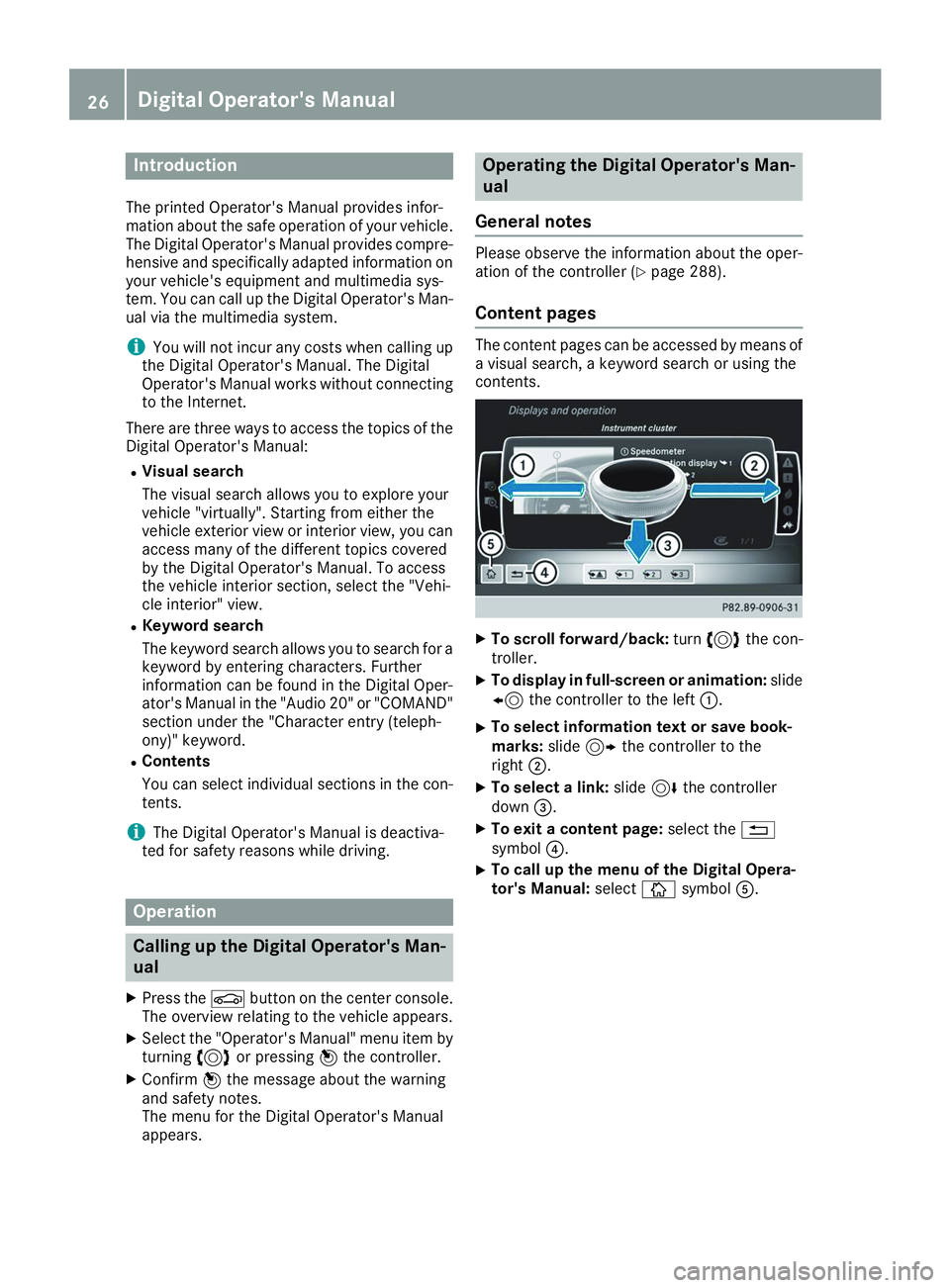
contents. X
To scroll forward/back: turn3 the con-
troller.
X To display in full-screen or animation: slide
8 the controller to the left 0043.
X To select information text or save book-
marks: slide9 the controller to the
right 0044.
X To select a link: slide6the controller
down 0087.
X To exit a content page: select the0038
symbol 0085.
X To call up the menu of the Digital Opera-
tor's Manual:
select00DAsymbol 0083. 26
Digital Operator's Manual
Page 38 of 398
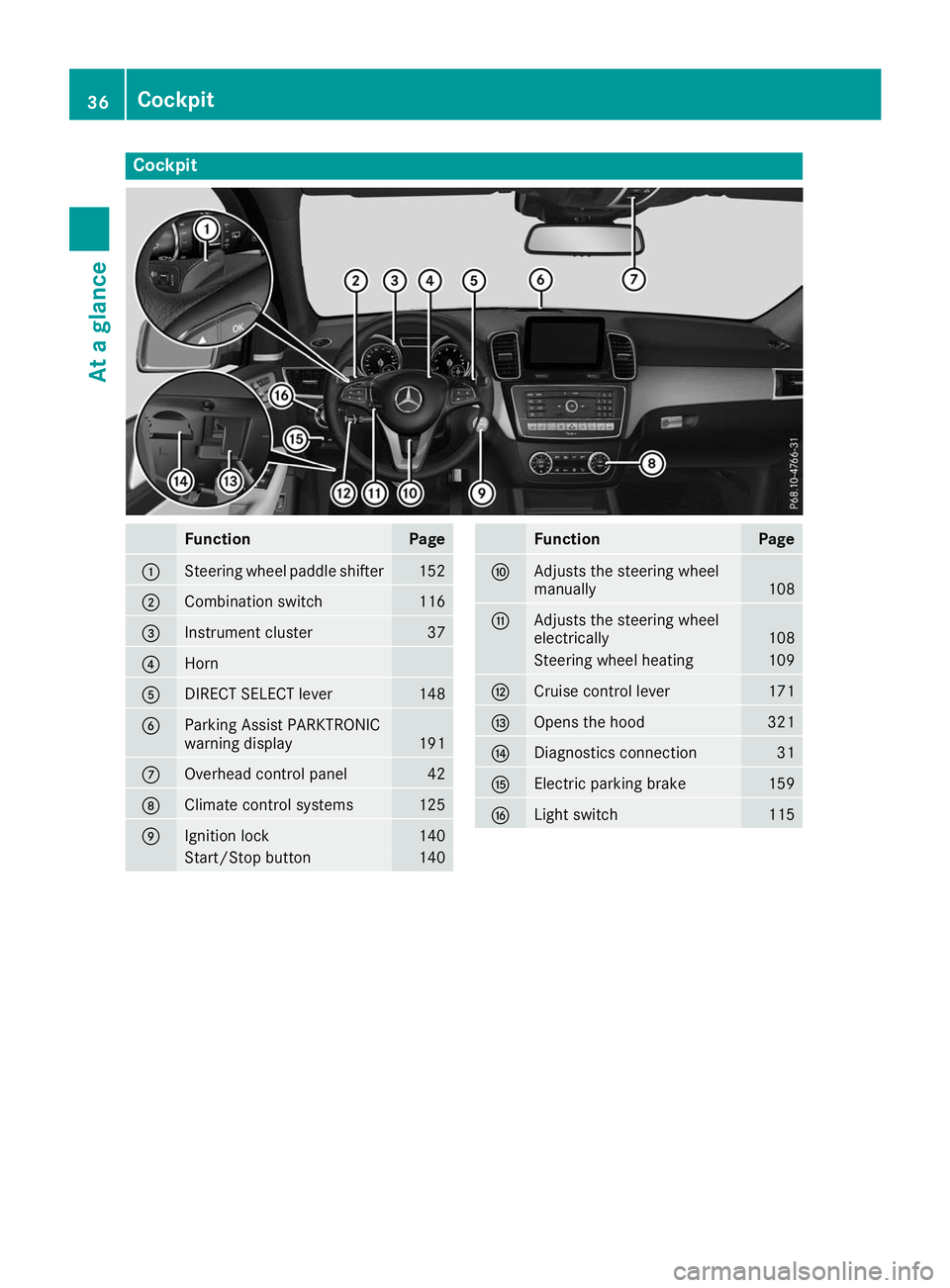
Cockpit
Function Page
0043
Steering wheel paddle shifter 152
0044
Combination switch 116
0087
Instrument cluster 37
0085
Horn
0083
DIRECT SELECT lever 148
0084
Parking Assist PARKTRONIC
warning display
191
006B
Overhead control panel 42
006C
Climate control systems 125
006D
Ignition lock 140
Start/Stop button 140 Function Page
006E
Adjusts the steering wheel
manually
108
006F
Adjusts the steering wheel
electrically
108
Steering wheel heating 109
0070
Cruise control lever 171
0071
Opens the hood 321
0072
Diagnostics connection 31
0073
Electric parking brake 159
0074
Light switch 11536
CockpitAt a glance
Page 39 of 398
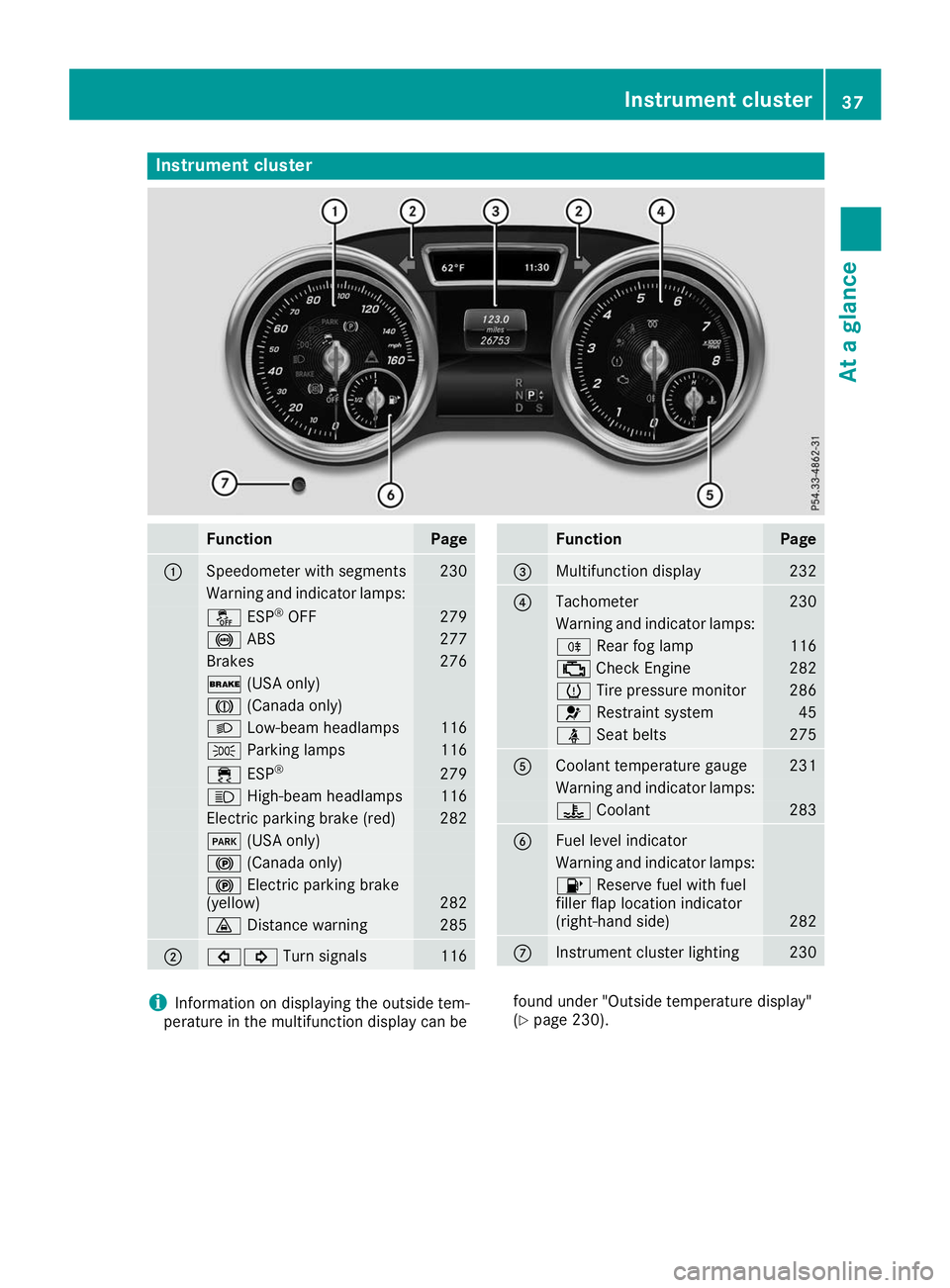
Instrument cluster
Function Page
0043
Speedometer with segments 230
Warning and indicator lamps:
00BB
ESP®
OFF 279
0025
ABS 277
Brakes 276
0027
(USA only) 004D
(Canada only) 0058
Low-beam headlamps 116
0060
Parking lamps 116
00E5
ESP® 279
0057
High-beam headlamps 116
Electric parking brake (red) 282
0049
(USA only) 0024
(Canada only) 0024
Electric parking brake
(yellow) 282
00BA
Distance warning 285
0044
003E003D
Turn signals 116 Function Page
0087
Multifunction display 232
0085
Tachometer 230
Warning and indicator lamps:
005E
Rear fog lamp 116
00B9
Check Engine 282
0077
Tire pressure monitor 286
0075
Restraint system 45
00E9
Seat belts 275
0083
Coolant temperature gauge 231
Warning and indicator lamps:
00AC
Coolant 283
0084
Fuel level indicator
Warning and indicator lamps:
00B6
Reserve fuel with fuel
filler flap location indicator
(right-hand side) 282
006B
Instrument cluster lighting 230
i
Information on displaying the outside tem-
perature in the multifunction display can be found under "Outside temperature display"
(Y
page 230). Instrument cluster
37At a glance
Page 40 of 398
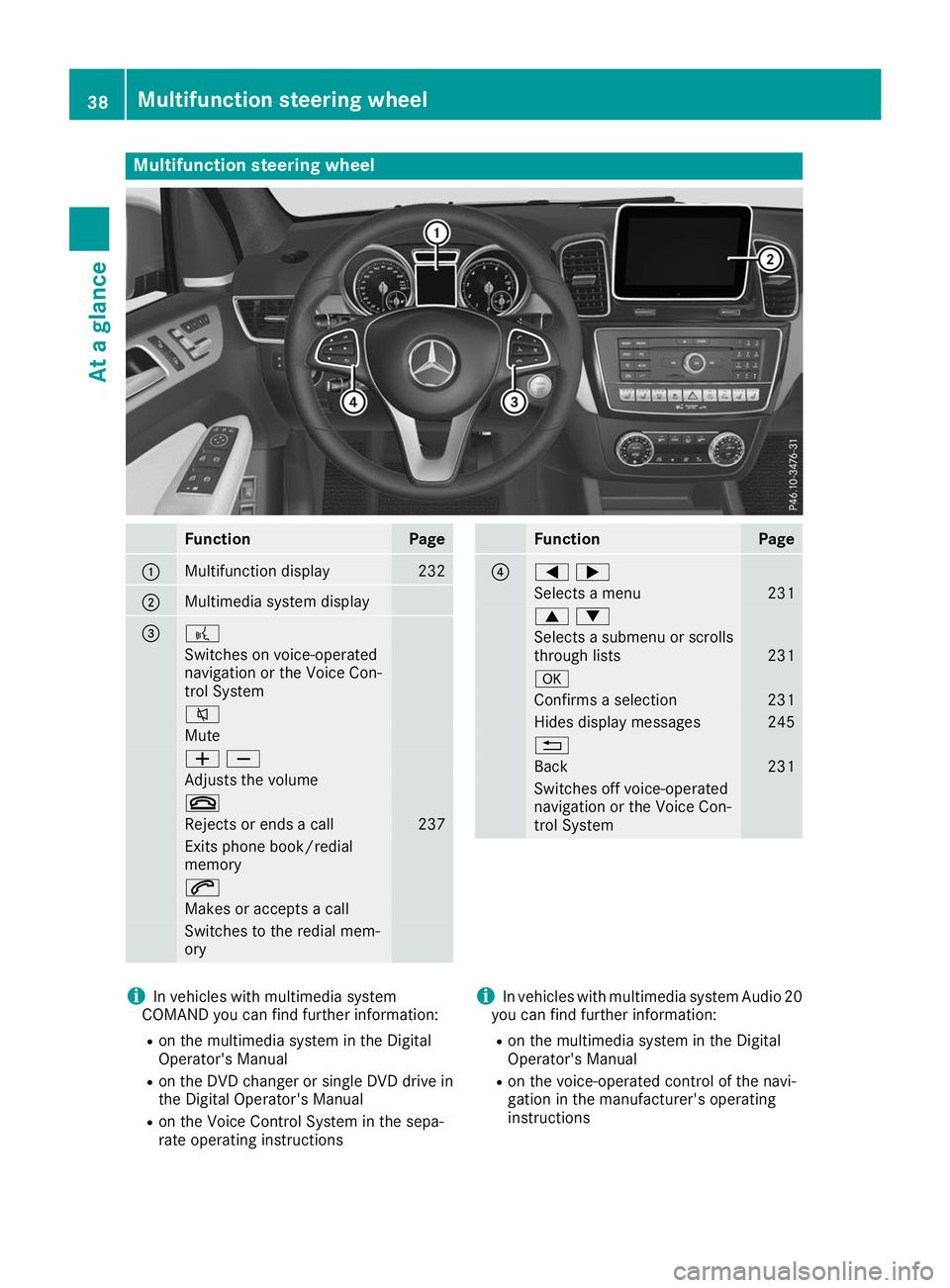
Multifunction steering wheel
Function Page
0043
Multifunction display 232
0044
Multimedia system display
0087 0059
Switches on voice-operated
navigation or the Voice Con-
trol System
0063
Mute
00810082
Adjusts the volume
0076
Rejects or ends a call 237
Exits phone book/redial
memory
0061
Makes or accepts a call
Switches to the redial mem-
ory Function Page
0085
00590065
Selects a menu 231
00630064
Selects a submenu or scrolls
through lists 231
0076
Confirms a selection 231
Hides display messages 245
0038
Back 231
Switches off voice-operated
navigation or the Voice Con-
trol System i
In vehicles with multimedia system
COMAND you can find further information:
R on the multimedia system in the Digital
Operator's Manual
R on the DVD changer or single DVD drive in
the Digital Operator's Manual
R on the Voice Control System in the sepa-
rate operating instructions i
In vehicles with multimedia system Audio 20
you can find further information:
R on the multimedia system in the Digital
Operator's Manual
R on the voice-operated control of the navi-
gation in the manufacturer's operating
instructions 38
Multifunction steering wheelAt a glance
Page 42 of 398
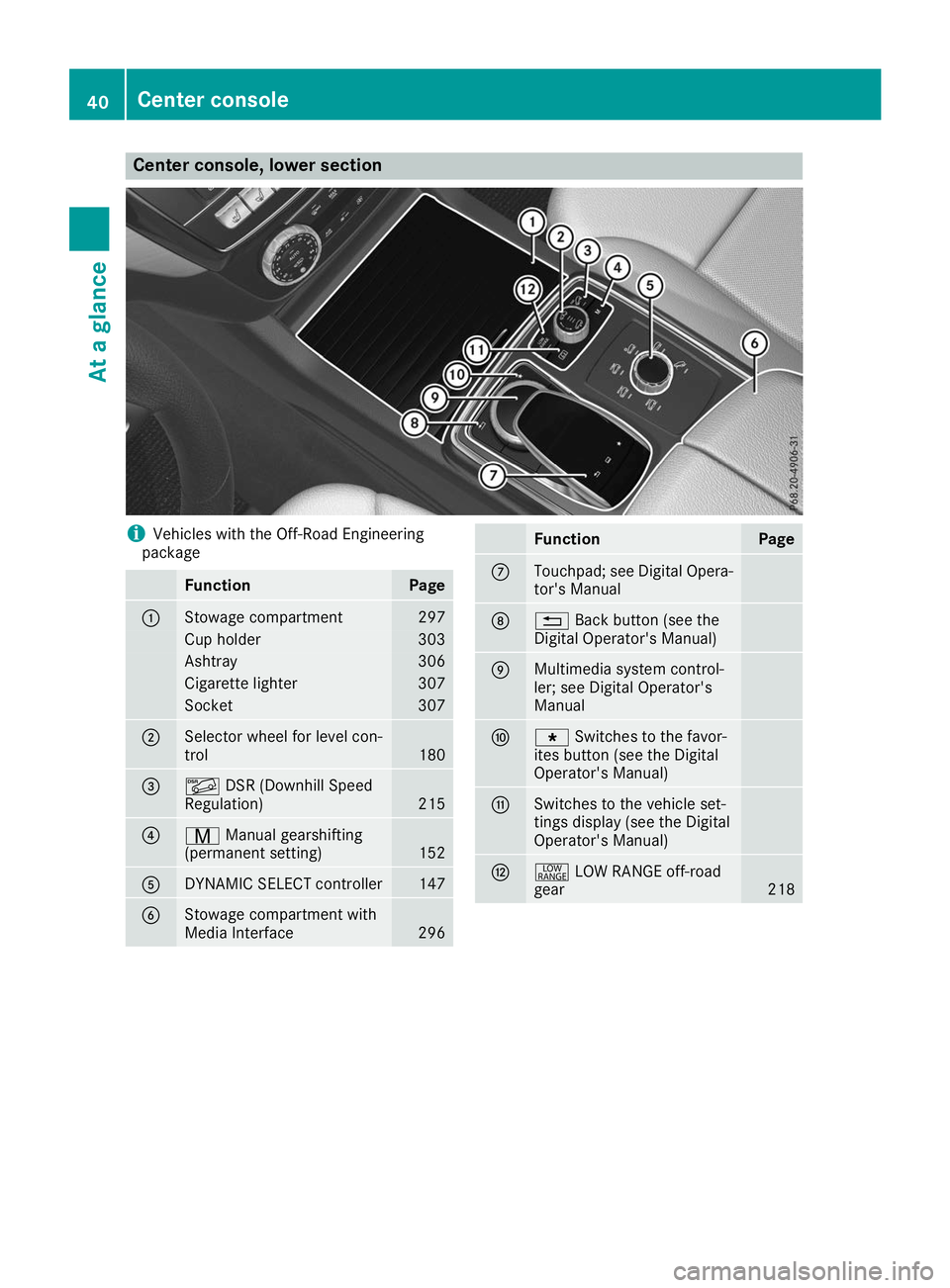
Center console, lower section
i
Vehicles with the Off-Road Engineering
package Function Page
0043
Stowage compartment 297
Cup holder 303
Ashtray 306
Cigarette lighter 307
Socket 307
0044
Selector wheel for level con-
trol
180
0087
00C6
DSR (Downhill Speed
Regulation) 215
0085
008D
Manual gearshifting
(permanent setting) 152
0083
DYNAMIC SELECT controller 147
0084
Stowage compartment with
Media Interface
296 Function Page
006B
Touchpad; see Digital Opera-
tor's Manual 006C
0038
Back button (see the
Digital Operator's Manual) 006D
Multimedia system control-
ler; see Digital Operator's
Manual 006E
007D
Switches to the favor-
ites button (see the Digital
Operator's Manual) 006F
Switches to the vehicle set-
tings display (see the Digital
Operator's Manual)
0070
002E
LOW RANGE off-road
gear 21840
Center consoleAt a glance
Page 43 of 398
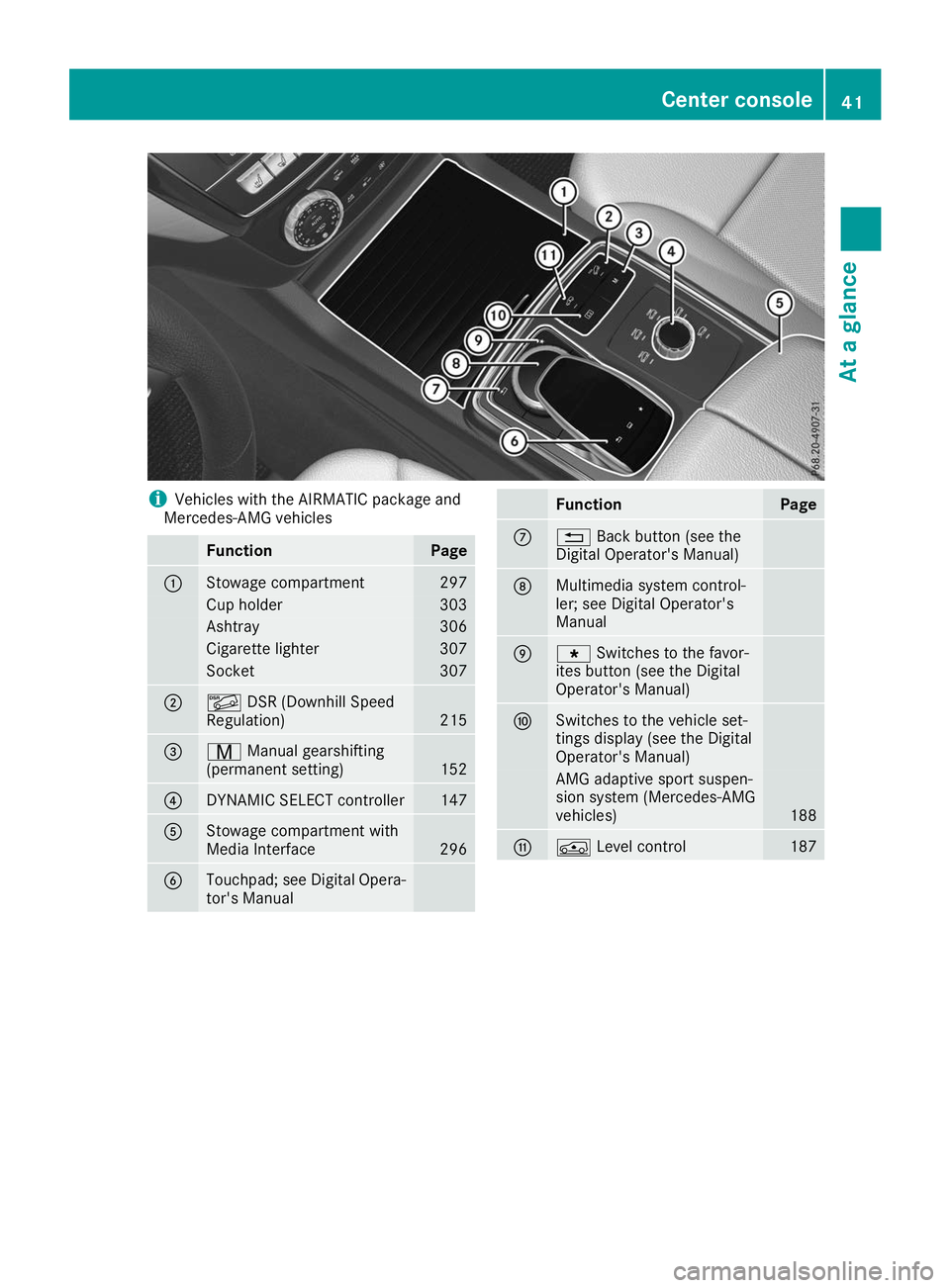
i
Vehicles with the AIRMATIC package and
Mercedes-AMG vehicles Function Page
0043
Stowage compartment 297
Cup holder 303
Ashtray 306
Cigarette lighter 307
Socket 307
0044
00C6
DSR (Downhill Speed
Regulation) 215
0087
008D
Manual gearshifting
(permanent setting) 152
0085
DYNAMIC SELECT controller 147
0083
Stowage compartment with
Media Interface
296
0084
Touchpad; see Digital Opera-
tor's Manual Function Page
006B
0038
Back button (see the
Digital Operator's Manual) 006C
Multimedia system control-
ler; see Digital Operator's
Manual
006D
007D
Switches to the favor-
ites button (see the Digital
Operator's Manual) 006E
Switches to the vehicle set-
tings display (see the Digital
Operator's Manual)
AMG adaptive sport suspen-
sion system (Mercedes-AMG
vehicles)
188
006F
00C4
Level control 187Center console
41At a glance
Page 47 of 398
Restraint system warning lamp
The functions of the restraint system are
checked after the ignition is switched on and at
regular intervals while the engine is running.
Therefore, malfunctions can be detected in
good time.
The 0075 restraint system warning lamp on the
instrument cluster lights up when the ignition is switched on. It goes out no later than a few sec-
onds after the vehicle is started. The compo-
nents of the restraint system are in operational
readiness.
A malfunction has occurred if the 0075restraint
system warning lamp:
R does not light up after the ignition is switched
on
R does not go out after a few seconds with the
engine running
R lights up again while the engine is running G
WARNING
If the restraint system is malfunctioning,
restraint system components may be trig-
gered unintentionally or may not deploy as
intended during an accident. This can affect
for example the Emergency Tensioning
Device or the air bag. This poses an increased risk of injury or even fatal injury.
Have the restraint system checked and
repaired in a qualified specialist workshop as
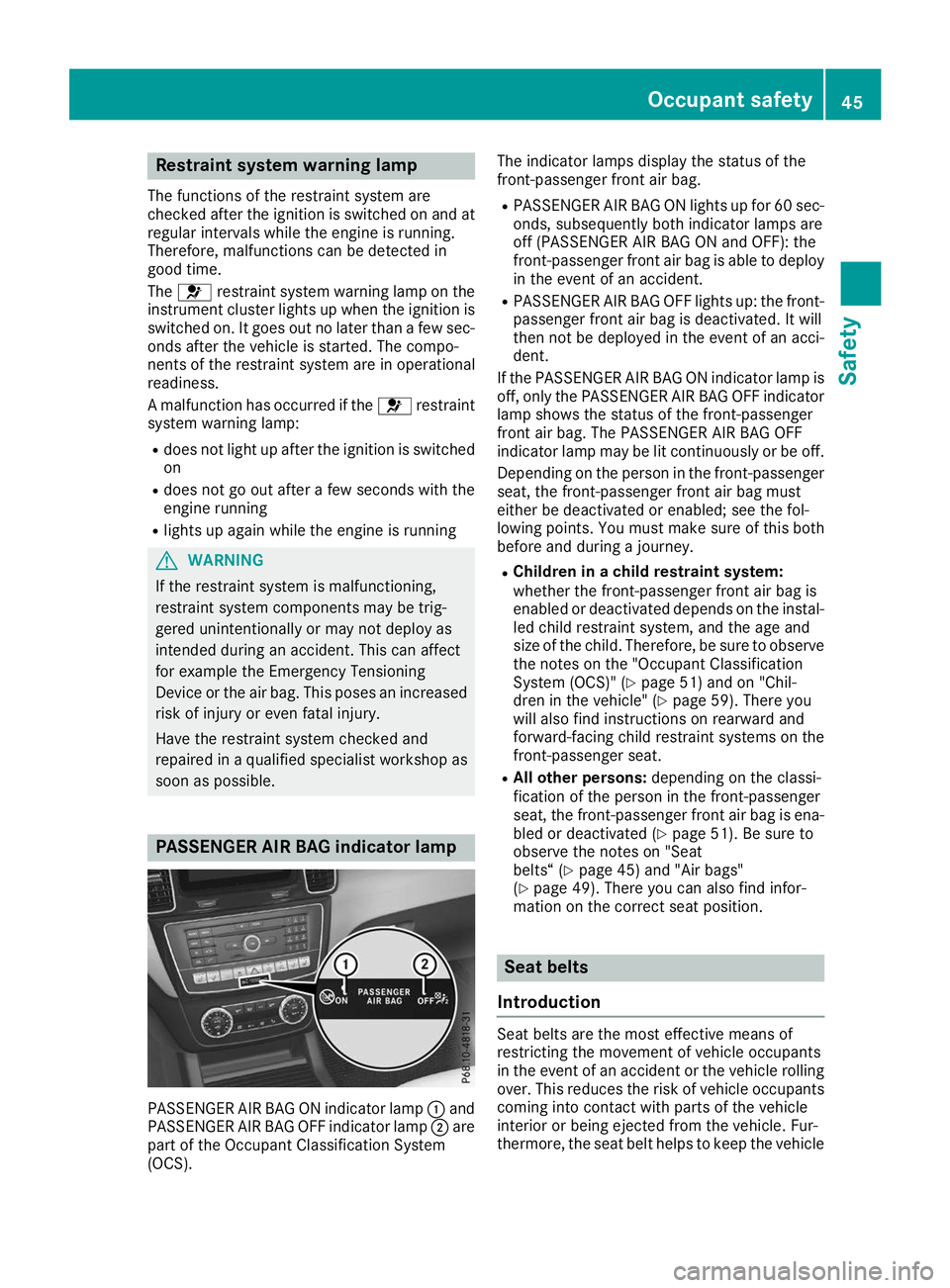
soon as possible. PASSENGER AIR BAG indicator lamp
PASSENGER AIR BAG ON indicator lamp
0043and
PASSENGER AIR BAG OFF indicator lamp 0044are
part of the Occupant Classification System
(OCS). The indicator lamps display the status of the
front-passenger front air bag.
R PASSENGER AIR BAG ON lights up for 60 sec-
onds, subsequently both indicator lamps are
off (PASSENGER AIR BAG ON and OFF): the
front-passenger front air bag is able to deploy in the event of an accident.
R PASSENGER AIR BAG OFF lights up: the front-
passenger front air bag is deactivated. It will
then not be deployed in the event of an acci-
dent.
If the PASSENGER AIR BAG ON indicator lamp is
off, only the PASSENGER AIR BAG OFF indicator lamp shows the status of the front-passenger
front air bag. The PASSENGER AIR BAG OFF
indicator lamp may be lit continuously or be off.
Depending on the person in the front-passenger seat, the front-passenger front air bag must
either be deactivated or enabled; see the fol-
lowing points. You must make sure of this both
before and during a journey.
R Children in a child restraint system:
whether the front-passenger front air bag is
enabled or deactivated depends on the instal-
led child restraint system, and the age and
size of the child. Therefore, be sure to observe
the notes on the "Occupant Classification
System (OCS)" (Y page 51) and on "Chil-
dren in the vehicle" (Y page 59). There you
will also find instructions on rearward and
forward-facing child restraint systems on the
front-passenger seat.
R All other persons: depending on the classi-
fication of the person in the front-passenger
seat, the front-passenger front air bag is ena-
bled or deactivated (Y page 51). Be sure to
observe the notes on "Seat
belts“ (Y page 45) and "Air bags"
(Y page 49). There you can also find infor-
mation on the correct seat position. Seat belts
Introduction Seat belts are the most effective means of
restricting the movement of vehicle occupants
in the event of an accident or the vehicle rolling
over. This reduces the risk of vehicle occupants
coming into contact with parts of the vehicle
interior or being ejected from the vehicle. Fur-
thermore, the seat belt helps to keep the vehicle Occupant safety
45Safety Z