ECU MERCEDES-BENZ GLS 2020 Owners Manual
[x] Cancel search | Manufacturer: MERCEDES-BENZ, Model Year: 2020, Model line: GLS, Model: MERCEDES-BENZ GLS 2020Pages: 682, PDF Size: 23.3 MB
Page 451 of 682
R
Avo ice con nection totheve hicle occupants
can beestablished Online
andInterne tfunctions Int
erne tconnection Inf
ormat iononconnecting totheInt erne t &
WARNIN GRisk ofdist ra ction from infor‐
mati onsystems andcomm unication s
eq uipment
If yo uoperat einf ormat ionand comm unic a‐
tio neq uipme ntintegrat edintheve hicle
when driving, youwill bedistract edfrom the
tr af fic situ ation. Thiscou ldalso cau seyouto
lose control of theve hicle. #
Onlyoper ateth is eq uipmen twhen the
tr af fic situ ation per mits. #
Ifyo ucan notbe sur eof this, stop the
ve hicle whilstpa ying attention toroad
and traffic condi tions andoperate the
eq uipment withth eve hicle statio nary. Yo
umus tobse rveth eleg alrequ iremen tsforth e
cou ntryin whi chyouar ecur rentl ydr ivi ng when
op erati ng themultimedia system. &
WARNIN GRisk ofan acci dent from
ope rating mob ile comm unicati onequip ‐
ment while th eve hicle isin mo tion
Mobile communication sde vices distract the
dr iver from thetraf fic situ ation. Thiscou ld
al so cau sethedr iver tolose control of the
ve hicle. #
Asthedr iver ,onl yoper atemobile com‐
municat ionsdevices when theve hicle is
st atio nary. #
Asave hicle occupant, onlyuse mobile
communication sde vices inthear eas
int ended forth is pur pose, e.g.inthe
re ar passe nger com partment . Yo
umus tobse rveth eleg alrequ iremen tsforth e
cou ntryin whi chyouar ecur rentl ydr ivi ng when
op erati ng mob ile comm unicati onequip ment in
th eve hicle.
The Interne tfunct ionscanonlybe used toalimi‐
te ddeg reewhils tdr iving. Fu
nction ofthecomm unicationmodule
On vehicles withabuilt-in communication mod‐
ule, theInt erne tcon nect ionises tablished viaan
int egratedSIM card.
To use Inte rn et acc ess viathecomm unication
module thefo llo wing condition smus tbe met:
R Mer cedes meconn ectisactiv eand ready for
oper ation.
R Mer cedes meconn ectisactiv ated forInt er‐
ne taccess.
R Insome countr ies:datavo lume viaMer cedes
me connectis available.
In som ecoun tries: ifth edat avo lume limitis
re ac hed, theav ailabilit yof Mer cedesme con‐
nec tser vices islimit ed.The datavo lume must
be pur chased viaMer cedesme connect.
% Con tact an author ized Mercedes-B enzCen‐
te rto find outwh ether itis possible topur‐
ch ase datavo lume inyour count ry. MBUX
multimedia system 44
9
Page 453 of 682
#
Onlyoper ateth is eq uipmen twhen the
tr af fic situ ation per mits. #
Ifyo ucan notbe sur eof this, stop the
ve hicle whilstpa ying attention toroad
and traffic condi tions andoperate the
eq uipment withth eve hicle statio nary. Yo
umus tobse rveth eleg alrequ iremen tsforth e
cou ntryin whi chyouar ecur rentl ydr ivi ng when
op erati ng themultimedia system.
Multimedia system:
4 © 5
Mercedes me&Apps
5 z Browser
Calling upane wwe bpag e #
Select ä. #
Entering awe baddr ess #
Select 0054.
% The func tion iscount ry-de pende nt.
% Websit escann otbe sho wnwhile theve hicle
is in mo tion. Calling
upawe bsit efrom thebr ows erhis‐
to ry #
Tocal lup thepr ev ious ornext pag efrom the
his tory:sel ect 0095or 0096. MBUX
multime diasy stem 45
1
Page 457 of 682
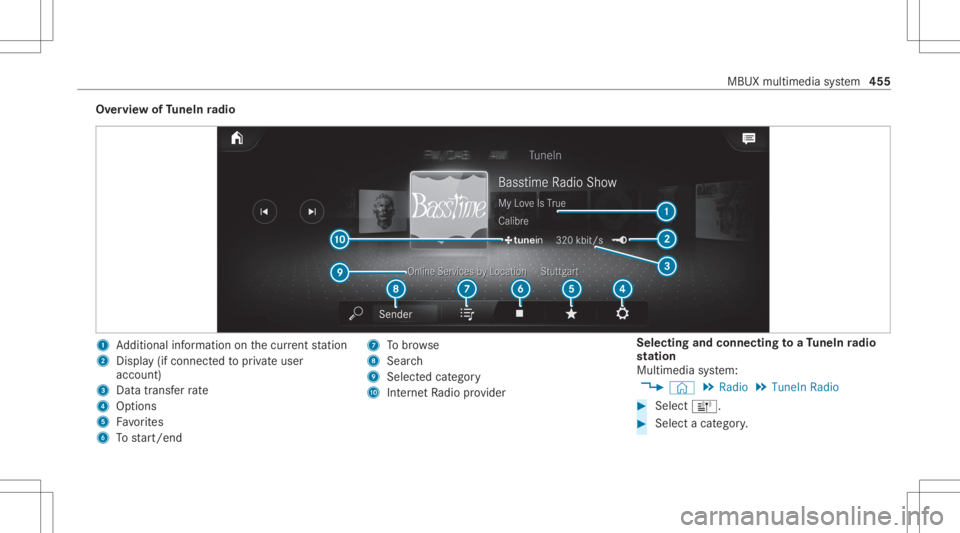
Ov
ervie wof TuneIn radio 1
Addition alinf ormation onthecur rent statio n
2 Display(if con nectedto privat euser
accoun t)
3 Datatra nsf errate
4 Options
5 Favorite s
6 Tostar t/ end 7
Tobrow se
8 Sear ch
9 Selectedcatego ry
A Interne tRa dio prov ider Selecting
andconnecting toaTu neIn radio
st ation
Mul timedi asy stem:
4 © 5
Radio 5
TuneIn Radio #
Select =. #
Select acat egor y. MBUX
multimedia system 455
Page 458 of 682
#
Select ast atio n.
The connectionis es tablished automatic ally.
or #
Select thesear chfield. #
Entera st atio nnam e.
% Arelativ elylar ge volume ofdat acan be
transmit tedwhen usingTuneIn radio.
Sa ving/dele tingaTu neIn radio station asa
fa vo rite
Multimedia system:
4 © 5
Radio 5
TuneIn Radio #
Select ast atio n. #
Select ß.
The listof save dfavo rite statio nsappear s. #
Select Add toFav orites.
or #
Creat ean acc oun tfo rth eonline prov ider
(T uneIn radio) andthen log inon themulti‐
media system.
Yo ur favo rite sar eim por tedto themultimedia
sy stem. Dele
ting favo rite s #
Select ast atio n. #
Select ß. #
Select DeleteFav orite.
Se tting theTu neIn radio optio ns
Mu ltimed iasystem:
4 © 5
Radio 5
TuneIn Radio5
Z
5 TuneIn Radio
The follo wing option sar eav ailable:
R Select Stream: selectth est re am qualit y.
R Login toTuneIn Account :log into your
Tu neIn user acco unt.
R Log Outof Accou nt:lo g ou tof your TuneIn
us er acco unt. #
Select anoptio n. Sho
wing the station listfo rthe lastca tegor y
select ed
Multimedia system:
4 © 5
Radio 5
TuneIn Radio #
Press theco verof thecur rent statio n.
De pen dingon howthest atio nwa sselect ed,
a st atio nlis tis sho wn. Med
ia Inf
orma tion abou tmed iamod e Inf
orma tion abou tsup portedfo rm ats and
data storage medi a &
WARNIN GRisk ofdist ra ction whenha n‐
dl ing data stor ag emedia
If yo uhan dleadat ast or ag emedium while
dr iving, your att entio nis div ertedfrom the
tr af fic condi tions.Thi scou ldalso cau seyou
to lose control of theve hicle. #
Onlyhandle adat ast or ag emedium
when theve hicle isstatio nary. 456
MBUX multimedia system
Page 463 of 682
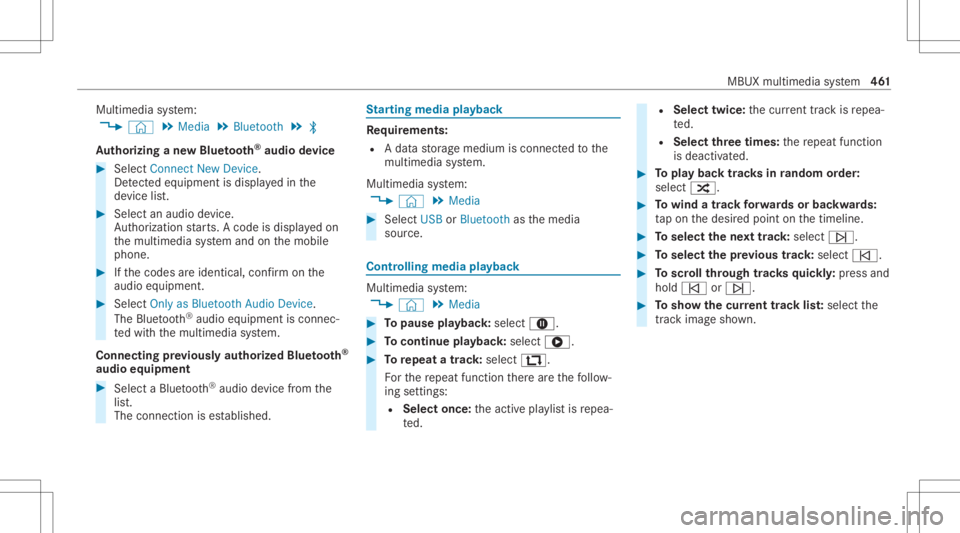
Multimedia
system:
4 © 5
Media 5
Bluetoot h5
00A5
Au thor izing ane wBlue tooth®
audio devic e #
Select Connect NewDevice .
De tected equipme ntisdispl ayed inthe
de vice list. #
Select anaudio device.
Au thor ization star ts.A cod eis displa yedon
th emultimedia system and onthemobile
phone. #
Ifth ecodes areidentic al,con firm onthe
audio equipme nt. #
Select Onlyas Bluet oothAudi oDe vic e.
The Blue tooth®
audio equipme ntiscon nec‐
te dwit hth emultimedia system.
Connecting prev iousl yaut hor ized Bluetooth®
audio equipment #
Select aBlue tooth®
audio devic efrom the
lis t.
The connection ises tablished. St
arting media playbac k Re
quirement s:
R Adat ast or ag emedium isconn ectedtothe
multime diasystem.
Multimedia system:
4 © 5
Media #
Select USBorBluetoot has themedia
sour ce. Contr
olling media playbac k Multimedia
system:
4 © 5
Media #
Topause playbac k:sel ect 8. #
Tocont inue playba ck:sel ect 6. #
Torepeat atrac k: sel ect :.
Fo rth ere peat function ther ear eth efo llo w‐
ing settings :
R Select once:theactiv epla ylistis repea‐
te d. R
Select twice:thecur rent trac kis repea‐
te d.
R Select threetim es: there peat function
is deactiv ated. #
Topla ybac ktrac ks inrandom order:
select 9. #
Towind atrac kfo rw ards orbac kwards:
ta pon thedesir edpoint onthetimelin e. #
Toselect thene xt trac k: selec t00F6. #
Toselect thepr ev ious trac k: select 00F5. #
Toscr ollthrough trac ks quickl y: press and
hold 00F5 or00F6. #
Tosho wthecur rent trac klis t:select the
tr ac kim agesho wn. MBU
Xmu ltimed iasystem 46
1
Page 469 of 682
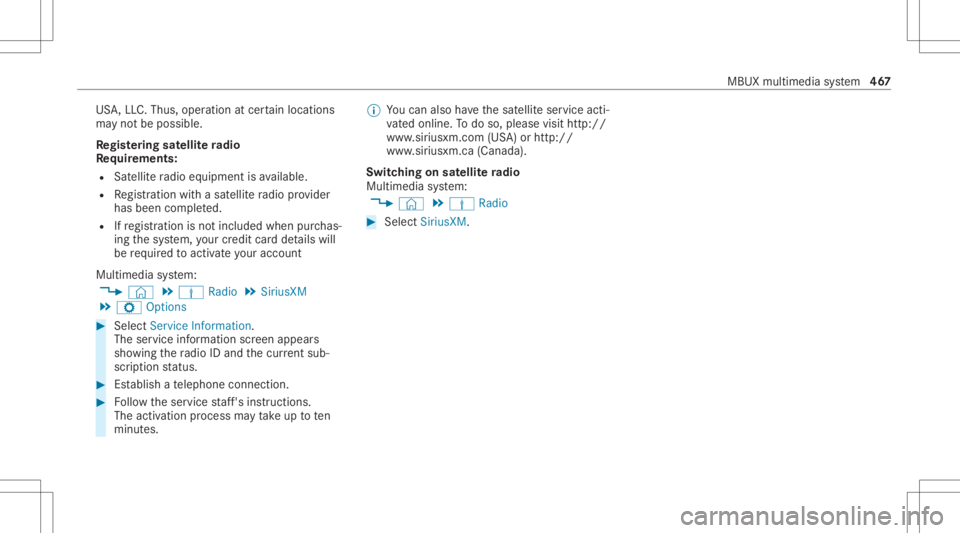
US
A,LLC. Thus, operation atcer tain locat ions
ma yno tbe possible .
Re gis tering sat ellit era dio
Re quirement s:
R Satellit era dio equipment isavailable.
R Regis tration withasat ellit era dio prov ider
has been completed.
R Ifre gis tration isno tincluded whenpurchas‐
ing thesy stem, your credit cardde tails will
be requ ired toact ivat eyo ur acc oun t
Mult imed iasystem:
4 © 5
Þ Radio 5
SiriusXM
5 Z Option s #
Select ServiceInformation.
The service information screen appear s
sho wing thera dio IDand thecur rent sub‐
scr iptio nstatus . #
Establish ate lephon econ nection . #
Followtheser vice staf f's instruct ions.
The activatio npr oce ssma yta ke up toten
minut es. %
Youcan also have thesat ellit eser vice acti‐
va tedonline. Todo so, please visithttp://
www .siriusxm. com(USA)orhtt p://
www .siriusxm. ca(Canada).
Switc hingonsat ellit era dio
Mu ltimed iasystem:
4 © 5
Þ Radio #
Select SiriusXM. MBUX
multimedia system 46
7
Page 471 of 682
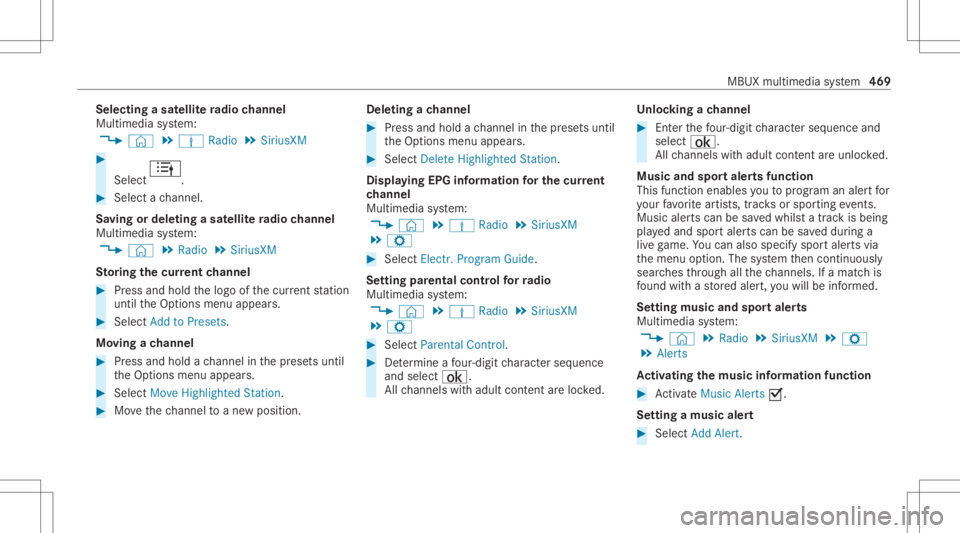
Selec
tingasat ellit era dio channe l
Mul timedi asy stem:
4 © 5
Þ Radio 5
SiriusXM #
Select .
#
Select ach ann el.
Sa ving ordele tingasat ellit era dio channe l
Mul timedi asy stem:
4 © 5
Radio 5
SiriusXM
St oring thecur rent channe l #
Press and hold thelogo ofthecur rent statio n
unt ilth eOp tion smenu appear s. #
Select AddtoPreset s.
Mo ving ach anne l #
Press and hold ach ann elin thepr ese tsuntil
th eOp tion smenu appear s. #
Select MoveHighlighted Station. #
Movethech ann elto ane wposit ion. Dele
tingach anne l #
Press and hold ach ann elin thepr ese tsuntil
th eOp tion smenu appear s. #
Select DeleteHighlighted Station.
Displa yingEPGinformat ionforthe current
ch anne l
Mul timedi asy stem:
4 © 5
Þ Radio 5
SiriusXM
5 Z #
Select Electr.Program Guide.
Se tting parental controlforra dio
Mu ltimed iasystem:
4 © 5
Þ Radio 5
SiriusXM
5 Z #
Select ParentalContr ol. #
Determ ine afo ur -di git charact erseq uenc e
and selec t¡.
All chann elswithadult content are lock ed. Un
loc king ach anne l #
Enterthefo ur -di git charact erseq uenc eand
selec t¡.
All chann elswithadult content are unlocked.
Music andspor taler tsfunction
This function enables youto prog ram an alertfor
yo ur favo rite artis ts,tr ac ks orspor tingevents.
Mu sic aler ts can besave dwhils ta tra ck isbeing
pla yedand spor taler tscan besave ddur ing a
liv ega me. Youcan also spec ifyspor taler tsvia
th emenu option .The system then con tinuousl y
sear ches thro ugh allthech ann els. Ifamat chis
fo und withast or ed aler t,yo uwill beinformed .
Se tting music and sportaler ts
Mul timedi asy stem:
4 © 5
Radio 5
SiriusXM 5
Z
5 Alert s
Ac tiv atin gthe musi cin fo rm ation functi on #
ActivateMu sic Ale rts 0073.
Se ttin gamusi cale rt #
Select Add Alert. MBUX
multime diasy stem 469
Page 472 of 682
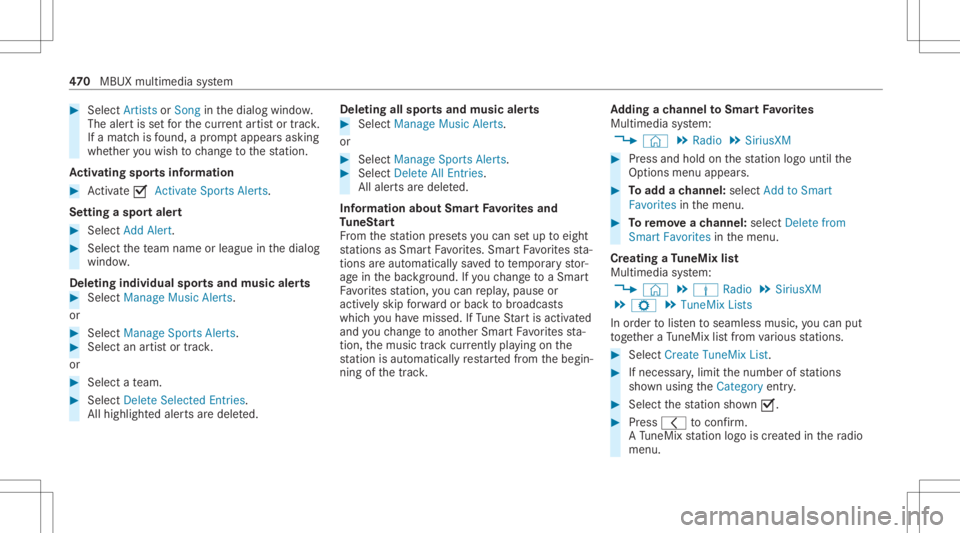
#
Select Artists orSong inthedialog window.
The alertis setfo rth ecur rent artis tor trac k.
If amatc his found ,a pr om ptappear sask ing
whe ther youwish tochang eto thest atio n.
Ac tiv atin gspo rtsinf ormat ion #
Activate0073 Activ ateSpo rtsAlerts.
Se ttin gaspo rtaler t #
Select AddAlert . #
Select thete am nam eor league inthedialog
windo w.
Dele ting ind ivid ualsp orts and music aler ts #
Selec tMan ageMusi cAl ert s.
or #
Selec tMan ageSport sAl ert s. #
Selec tan artist or trac k.
or #
Select ate am. #
Select DeleteSel ect edEntries .
All high light edaler tsaredele ted. Dele
ting allspor tsand music alerts #
Select Manage MusicAlerts.
or #
Select Manage SportsAlert s. #
Select DeleteAll Entries.
All aler tsaredele ted.
Inf ormat ionabout SmartFa vo rite sand
Tu neS tart
Fr om thest atio npr ese tsyoucan setup toeight
st atio nsasSm artFavo rite s. Smar tFavo rite sst a‐
tio ns areaut omat icallysa ve dto temp orar yst or‐
ag ein thebac kground .If yo uch ang eto aSm art
Fa vorite sst atio n,youcan repla y,pause or
activ elyskip forw ardor bac kto broadcas ts
whic hyo uha ve missed .If Tu ne Startis act ivat ed
and youch ang eto ano ther Smar tFa vorite sst a‐
tio n,themusic trac kcur rently play ing onthe
st atio nis aut omat icallyre star tedfrom thebegin‐
ning ofthetrac k. Ad
ding ach anne lto Smar tFavo rite s
Multimedia system:
4 © 5
Radio 5
SiriusXM #
Press and hold onthest atio nlogo untilth e
Op tions menu appears. #
Toadd ach anne l:sele ctAdd toSmart
Favori tesinthemenu. #
Toremo veach anne l:sele ctDelete from
Smart Favoritesinthemenu.
Cr eating aTu neMix list
Multimedia system:
4 © 5
Þ Radio 5
SiriusXM
5 Z 5
TuneMix Lists
In order tolistento seamless music,youcan put
to ge ther aTu neMi xlist from various statio ns. #
Select Creat eTune MixList. #
Ifnec essar y,limit thenumber ofstatio ns
sho wnusin gth eCategory entry. #
Select thest atio nsho wn0073. #
Press 0047 toconf irm.
A Tu neMi xst atio nlogo iscreat edinthera dio
menu. 47
0
MBUX multimedia system
Page 473 of 682
Ac
tiv atin g/deac tivatin gTu neS tart
Multimedia system:
4 © 5
Þ Radio 5
SiriusXM
5 Z #
Switc hTuneSt artonoroff.
Switc hingonsat ellit era dio playbac kco ntr ol
Mu ltimed iasystem:
4 © 5
Radio 5
SiriusXM
Yo ucan pause thepla ybac kof thecur rent sta‐
tio nor skip forw ardor bac kwardin thetimeline.
This leavesliv emode toacc ess theint ernal tem‐
por aryst or ag e. #
Tosho wthetim eline: press 5. #
Tofast forw ard/r ewind: tapan ywher eon
th etimeline. #
Topause playbac k:sel ect 00CF. #
Toretur nto livemod e:navig ateto theend
of thetimeline. Displa
yingsatellit era dio service informa tion
Multime diasystem:
4 © 5
Þ Radio 5
SiriusXM
5 Z #
Select ServiceInformation. Sound
To
ne settings Inf
ormat ionabout thesound system
The soun dsy stem has atot alout put of125W
and iseq uippe dwit hse venspe akers. Itis availa‐
ble forall functions inthera dio and media
modes.
Calling upthesound menu
Multi media system:
4 © 5
Media 5
Z 5
Sound
The follo wing functionsar eav ailable:
R Equal izer
R Balan ceand Fade r
R Volum e #
Select afun ction . Ad
jus tingtreb le,mid- rang eand bass set‐
tings
Multimedia system:
4 © 5
Media 5
Z 5
Sound
5 Equalizer #
SetTREBLE, MIDorBAS S.
Ac tiv atin g/deac tivatin gaut omati cvo lum e
adj ustm ent
Multime diasystem:
4 © 5
Media 5
Z 5
Sound
5 Volume
Au tomatic volume adjustment com pens ates for
dif fering volumes whenchang ingbetween audio
sour cesand within anaudio source. #
Swit chAuto matic Adju stme nton oroff. MBUX
multimed iasystem 47
1
Page 476 of 682
&
WARNIN GRisk ofbeco ming trap ped
th ro ugh oper ationof theMBUX rear tab‐
le toutside theve hicle
If th eMBUX rear table tis oper ated outside
th eve hicle, seats canbemo vedusing the
seat control.Ve hicle occupants andanimals
could become trapped bytheseat adjus t‐
ment . #
Onlyoper ateth eseat control when
inside theve hicle. &
WARNIN GRisk ofinju ryas are sult of
th eMBUX rear table tno tbeing secured
in theve hicle
If th eMBUX rear table tis loose intheve hicle
int erior ,it could bethrow nar ou nd and
th er eb yhit vehicle occupants. #
Alw ayssecur elylockth eMBUX rear
ta ble tin thebr ac ketint end edforth at
pur pose . The
MBU Xre ar table tcon sistsof atab let
(/ page47 4) andabrac ketint egr ated inthe
bac kres t(/ page47 5).
If th eta ble thas been pairedwithth emultimedia
sy stem, theMBUX rear table tcan makese ttings
on themultimedia system from there ar
passe nger com partment .
% The function ofoperatin gth emultimedia
sy stem withth epair edtable t,can be
bloc kedin themultimedia system.
The MBUX rear table tcan also beused outside
th eve hicle. Ov
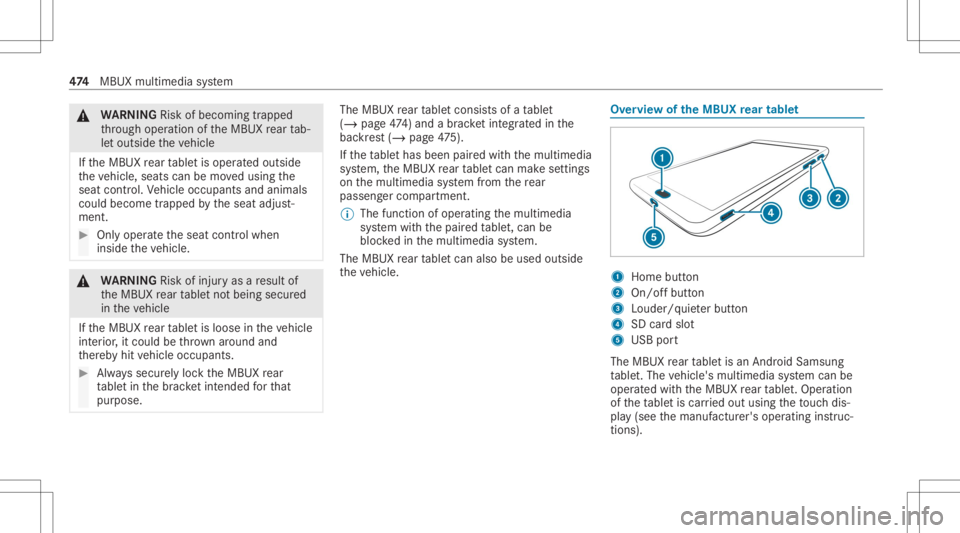
ervie wof theMB UX rear tab let 1
Home button
2 On/of fbutt on
3 Loud er/quiet er butt on
4 SDcardslo t
5 USB port
The MBUX rear table tis an Android Samsun g
ta ble t.The vehicle's multimedia system can be
oper ated withth eMBUX rear table t.Oper ation
of theta ble tis car ried out using theto uc hdis‐
pla y(see themanuf acturer'soper ating instruc‐
tion s). 47
4
MBUX multimedia system