ECU MERCEDES-BENZ GLS 2020 Manual PDF
[x] Cancel search | Manufacturer: MERCEDES-BENZ, Model Year: 2020, Model line: GLS, Model: MERCEDES-BENZ GLS 2020Pages: 682, PDF Size: 23.3 MB
Page 336 of 682
Ov
ervie wand oper ation Ov
ervie wof theMB UX multim edia system &
WARNIN GRisk ofdist ra ction from infor‐
mati onsystems andcomm unication s
eq uipment
If yo uoper ateinf ormat ionand comm unic a‐
tio neq uipme ntintegratedin theve hicle
when driving, youwill bedistract ed from the
tr af fic situ ation. Thiscou ldalso cau seyouto
lose control of theve hicle. #
Onlyoper ateth is eq uipmen twhen the
tr af fic situ ation per mits. #
Ifyo ucan notbe sur eof this, stop the
ve hicle whilstpa ying attention toroad
and traffic condi tions andoperate the
eq uipment withth eve hicle statio nary. Yo
umus tobse rveth eleg alrequ iremen tsforth e
cou ntryin whi chyouar ecur rentl ydr ivi ng when
op erati ng themultimedia system.
MBUX stands forMer cedes-Benz UserExper i‐
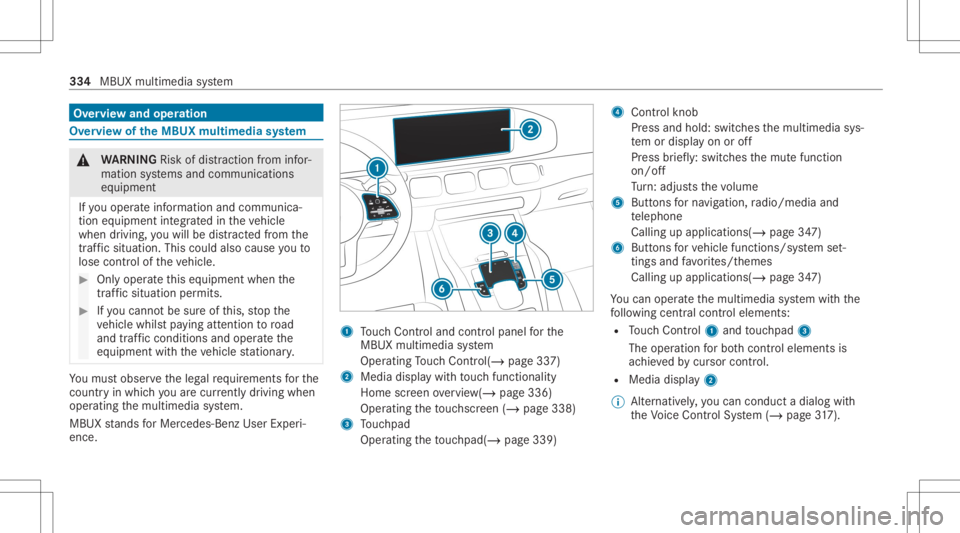
ence. 1
Touc hCon trol and contro lpanel forth e
MBUX multimedia system
Oper ating Touc hCon trol (/ page33 7)
2 Media displaywit hto uc hfun ction alit y
Hom esc reen ove rview(/ page336)
Opera tingth eto uc hsc reen (/ page338)
3 Touc hpad
Operatin gth eto uc hpad( /pag e33 9) 4
Con trol kn ob
Pr ess and hold:swit ches themultimedia sys‐
te m or disp lay on oroff
Pr ess brief ly:swi tches themut efunc tion
on/ off
Tu rn:ad jus tsthevo lume
5 Buttons forna vig ation, radio/media and
te lephon e
Calling upapplicat ions(/page34 7)
6 Buttons forve hicle functions/sy stem set‐
ting sand favo rite s/t hemes
Call ingupappli cations (/page34 7)
Yo ucan operat eth emultimedia system withth e
fo llo wing central control elemen ts:
R Touc hCon trol 1 and touc hpad 3
The operation forbo th contr oleleme ntsis
ac hie vedby cur sor contr ol.
R Med iadispl ay2
% Alternati vely,yo ucan cond uct adialog with
th eVo ice Cont rolSy stem (/ page31 7). 33
4
MB UX multim ed iasystem
Page 338 of 682
Home
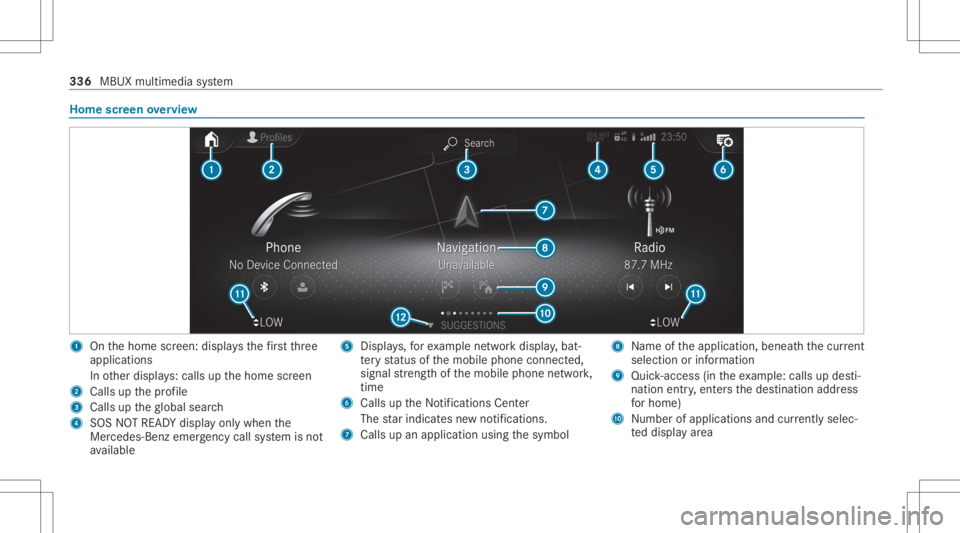
screen overvie w 1
Onthehome screen: displa ysthefirs tth re e
applic ations
In other displa ys:cal lsup thehome screen
2 Calls upthepr ofile
3 Calls uptheglobal search
4 SOS NOTREAD Ydispl ayonl ywhen the
Mer cedes-Ben zemer gency callsy stem isno t
av ailable 5
Displays,fo rex am ple networkdispla y,bat‐
te ry status ofthemobile phoneconnect ed,
signal stre ngt hof themobile phonenetwork,
tim e
6 Calls up theNo tification sCent er
The star ind icat esnewno tificat ions.
7 Calls upanapplic ationusin gth esymbol 8
Name oftheapplication, beneathth ecur rent
sel ecti onorinforma tion
9 Quick-acce ss(in th eex am ple: calls updes ti‐
nat ion entry,ent ersth edes tinat ionaddr ess
fo rhome)
A Number ofapp lications andcurrently selec‐
te ddispla yar ea 336
MBUX multimedia system
Page 344 of 682
beams
canescape inan uncon trolled man‐
ner .
Laser radiation candamag eyo ur retina . #
Donotop en thehousing. #
Alw aysha ve maint enance workand
re pair scar ried out byaqu alif ied spe‐
cialis two rkshop. This
product complies withth ere qu iremen tsof
th eFD A21 CFR 1040. 10 and 1040. 11with
exc eption oftheva riatio nsacc ordin gto theFD A
Laser Notice No.50from 24.Ju ne 200 7. &
WARNIN GRisk ofdist ra ction from infor‐
mati onsystems andcomm unication s
eq uipment
If yo uoper ateinf ormat ionand comm unic a‐
tio neq uipme ntintegratedin theve hicle when
driving, youwill bedistract ed from the
tr af fic situ ation. Thiscou ldalso cau seyouto
lose control of theve hicle. #
Onlyoper ateth is eq uipmen twhen the
tr af fic situ ation per mits. #
Ifyo ucan notbe sur eof this, stop the
ve hicle whilstpa ying attention toroad
and traffic condi tions andoperate the
eq uipment withth eve hicle statio nary. Yo
umus tobse rveth eleg alrequ iremen tsforth e
cou ntryin whi chyouar ecur rentl ydr ivi ng when
op erati ng themultimedia system.
Ov ervie wof theMB UX Interior Assis tant
If th eve hicle iseq uipped withth eMBUX Interior
Assis tant, select edfunc tions ofthemultimedia
sy stem can beoper ated con tact-fr ee.Inaddi‐ tion,
there adin glight orsear chlight canbe
switc hedonoroffcon tact-fr ee.
The MBUX Interior Assi stant can differe ntia te
be tween driver and front passeng erinteraction s.
The MBUX Interior Assis tant recogni zescertain
hand positions(poses) . 34
2
MBUX multimedia system
Page 347 of 682
Ac
tiv atin gco verch ang ein thera dio menu
and medi amenu
The MBUX Interior Assi stant reduces thenumber
of oper ating steps. #
Moveyour han dto wa rdsth eto uc hsc reen or
to uc hpad.
The current informati on,e.g.ab ou tth era dio
st atio n,trac kand artis tar ehidde n.Co ver
ch ang eis act ivat ed. #
Con tinue operation andselec ta co ver. #
Asyour han dis mo vedaw ay from the
to uc hsc reen ortouc hpad, thecur rent infor‐
ma tionis sho wnagain.
% Further information onthera dio menu
(/ page46 4) and themedia menu
(/ page459).
Sho wing thena vig ation menu onthema p
The MBU XInte rior Assis tant sho wsthena vig a‐
tion menu. #
Moveyour han dto wa rdsth eto uc hsc reen or
to uc hpad.
The navig atio nmen uis sho wn. #
Con tinue operation andselectasymb ol. #
Asyour han dis mo vedaw ay from the
to uc hsc reen ortouc hpad, themedia display
hides thena vig ation menu.
% Further information onthena vig ation menu
(/ page380).
Sho wing operating symbols intheAc tiv e
Pa rking Assis tcamer aima ge(onl yfrom driv‐
er' sseat )
The MBU XInte rior Assis tant facil itat es quick-
acc ess forth edr iver tovarious camer avie ws. #
When ActivePa rking Assistis sho wn, move
yo ur han dto wa rdsth eto uc hsc reen.
The camer aoper ation symbols aredispla yed. #
Cont inue operation anddispla yth edesir ed
fr ont ,re ar,lef tand right camer avie ws.
% Further information onActivePa rking Assist
func tions(/ page28 1).
Oper ating afunct ionwithth efa vo rite spose
Re quirement s:
R Ther eis at leas tone favo rite .
R The favo rite has been connectedwithth e
MBUX Interior Assis tant. R
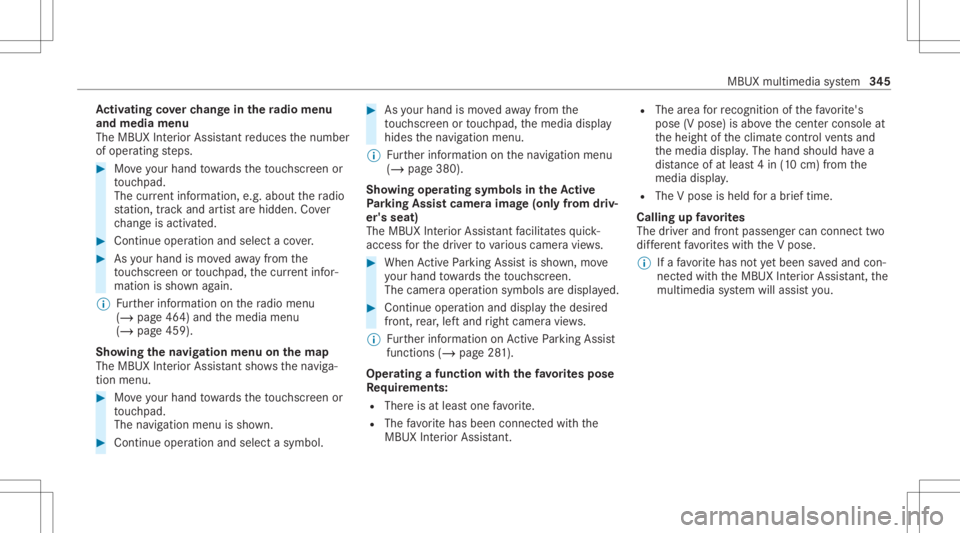
The area forre cogni tionofthefa vo rite 's
pose (Vpose) isabo vethecent ercon sole at
th eheight oftheclimat econ trol vents and
th emedia display.The hand should have a
dis tance ofat leas t4 in (10 cm) from the
media display.
R The Vpose isheld fora br ief time.
Call ingupfavo rite s
The driver and front passeng ercan conn ecttwo
dif fere nt favo rite swit hth eV pose.
% Ifafa vo rite has notye tbe en save dand con‐
nec tedwit hth eMBUX Interior Assis tant, the
multime diasystem will assis tyo u. MB
UX mult imed iasystem 34
5
Page 352 of 682
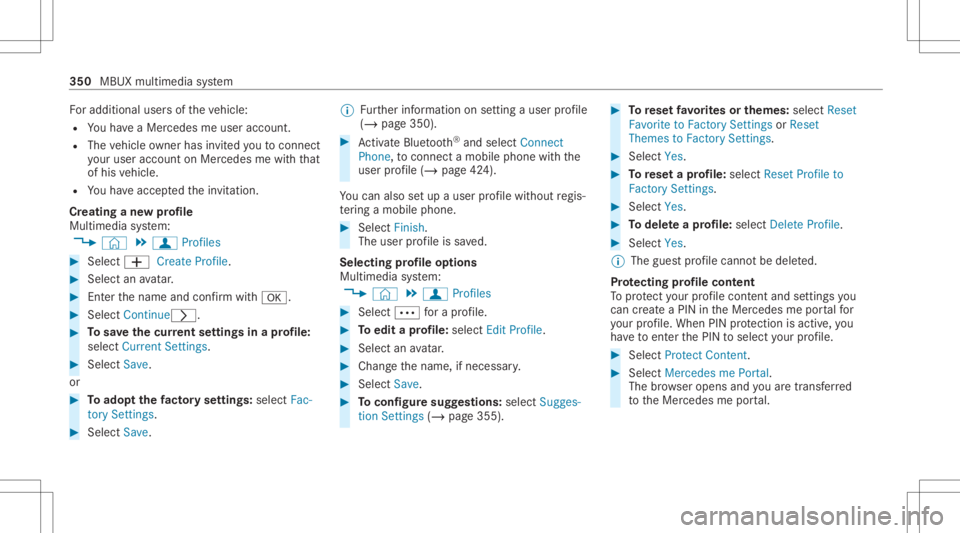
Fo
radd itional usersof theve hicle:
R Youha ve aMer cedesme user accoun t.
R The vehicle owner hasin vit ed youto connect
yo ur user accoun ton Mer cedesme withth at
of his vehicle.
R Youha ve acc eptedth einvit ation.
Cr eating ane wprofile
Multimedia system:
4 © 5
f Profiles #
Select 0081Create Profile. #
Select anavatar. #
Enterth ename andconfirm with0076. #
Sele ctCont inue0048 . #
Tosave thecur rent settings inapr ofile:
select Current Settings. #
Select Save.
or #
Toadop tth efa ct or yse ttings: selectFac -
to ry Set tings. #
Select Save. %
Further information onsettin gauser profile
(/ page350). #
ActivateBlu etoo th®
and selec tCon nect
Phon e,to connect amob ile pho newith the
user profile (/ page42 4).
Yo ucan also setup auser profile wit hout regis‐
te ring amob ile pho ne. #
Select Finish.
The user profile is save d.
Selecting profile options
Multimedia system:
4 © 5
f Profiles #
Select 0062fora pr ofile . #
Toedit apr ofile: selec tEdit Profile. #
Sele ctan avatar. #
Chan gethename, ifneces sary. #
Select Save . #
Toconf iguresugg estion s:selec tSugg es-
tio nSet tings (/ page35 5). #
Torese tfa vo rite sor themes: selectReset
Favo riteto Fac torySet tings orReset
Them estoFac torySet tings. #
Sele ctYes. #
Torese ta pr ofile: select ResetProfile to
Fact orySett ings. #
Select Yes. #
Todel eteapr ofile: selec tDele teProf ile. #
Sele ctYes.
% The gues tpr ofile can notbe dele ted.
Pr otecting profile cont ent
To protect your profile conten tand setting syo u
can crea te aPIN intheMer cedes meportalfo r
yo ur profile. When PINprotect ion isactiv e,you
ha ve toent erthePIN toselect your profile. #
Select Protect Con tent . #
Select Mer cedesme Portal.
The brows eropens andyouar etrans ferred
to theMer cedes meportal. 350
MBUXmultim ediasystem
Page 354 of 682
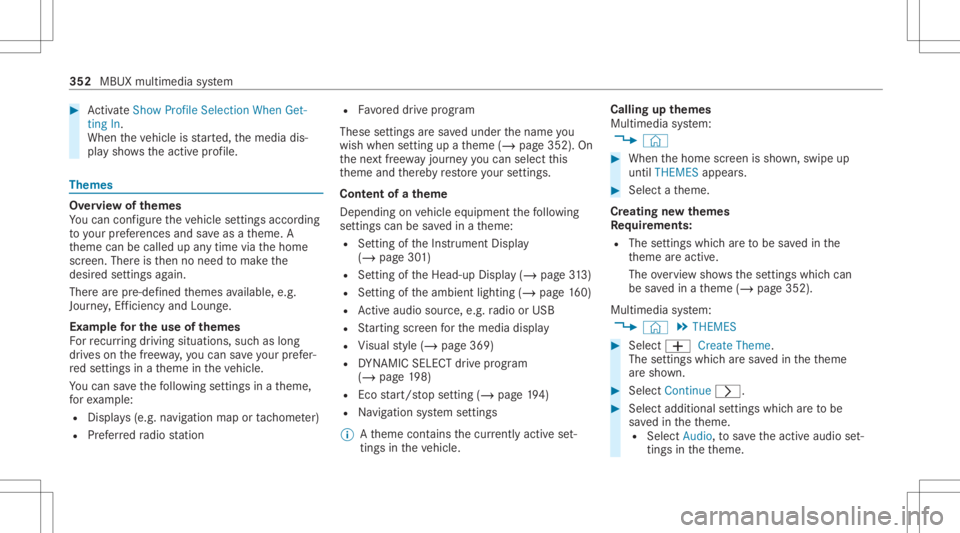
#
ActivateSho wPro file Sel ecti onWh enGet-
ting In.
Wh entheve hicle isstar ted, themedia dis‐
pla ysho wstheactiv epr ofile. Them
es Ov
ervie wof themes
Yo ucan configur eth eve hicle settin gsaccor ding
to your prefer en ces and save as ath eme. A
th eme canbecalled upanytime viathehome
scr een. Thereis then no need tomak eth e
desir edsettings again.
Ther ear epr e-def inedthemes available, e.g.
Jour ney,Efficie ncy and Lounge.
Ex am ple forthe use ofthemes
Fo rre cur ring drivi ng situa tions, such aslon g
dr ives on thefree wa y,yo ucan save your prefer‐
re dse ttings inath eme intheve hicle.
Yo ucan save thefo llo wing settings inath eme,
fo rex am ple:
R Displays(e.g. navig ation maportach ome ter)
R Prefer redra dio statio n R
Favoreddr ive pr ogr am
These settings aresa ve dunder thename you
wish when setting upath eme (/page352). On
th ene xt free wa yjo ur ne yyo ucan selectthis
th eme andther eb yre stor eyo ur setting s.
Cont entofath eme
Dep endingonvehicle equipment thefo llo wing
se ttings canbesave din ath eme:
R Setting oftheIns trument Display
(/ page30 1)
R Setting oftheHead-up Display(/ page31 3)
R Setting oftheambient lighting(/page16 0)
R Activeau dio sou rce, e.g. radio orUSB
R Startin gsc reen forth emedia display
R Visual style (/ page369)
R DYNA MIC SELE CTdrive pr ogr am
(/ page19 8)
R Eco star t/ stop setting (/ page19 4)
R Navig ation system settings
% Atheme contains thecur rently activeset‐
tings intheve hicle. Calling
upthemes
Multi media system:
4 © #
When thehome screen issho wn, swipe up
until THEMES appear s. #
Select ath eme.
Cr eating newthemes
Re quirement s:
R The settings whichar eto be save din the
th eme areactiv e.
The overvie wsho wsthese ttings whichcan
be save din ath eme (/page352).
Multimedia system:
4 © 5
THE MES #
Select 0081Create Theme.
The settings whichar esa ve din theth eme
ar esho wn. #
Select Continue0048. #
Select additional settings whichar eto be
sa ve din theth eme.
R Select Audio, tosave theactiv eaudio set‐
ting sin theth eme. 352
MBUX multimedia system
Page 360 of 682
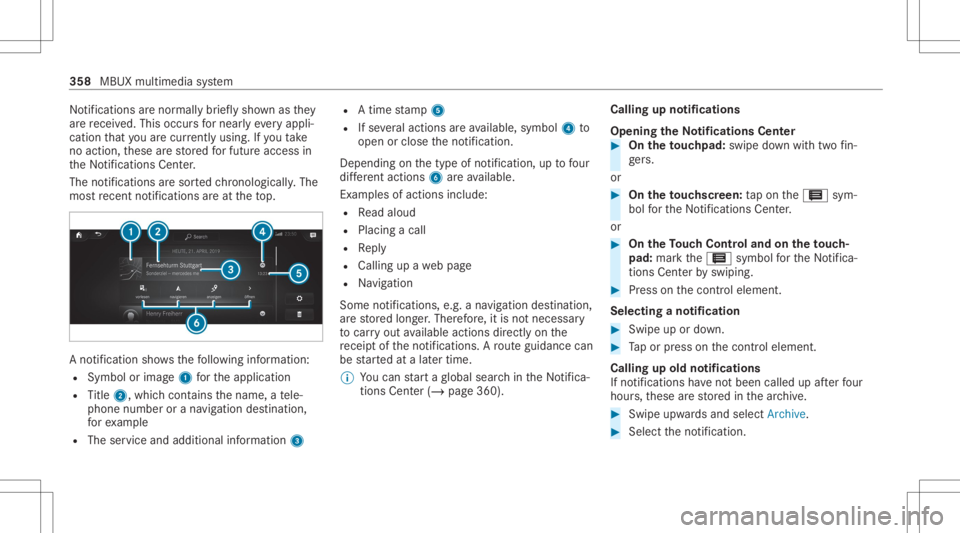
No
tifications arenor mally brief lysho wnasthey
ar ere cei ved. This occursfo rnear lyeve ryappli‐
cat ion that youar ecur rently using .If yo uta ke
no acti on, these arestor ed forfutur eaccess in
th eNo tification sCent er.
The notification sar esor tedch ronol ogically.The
mos tre cent notifica tions areat theto p. A
no tification showsthefo llo wing informatio n:
R Symbo lor imag e1 forth eapplication
R Title 2, which cont ains thename, ate le‐
phon enumb eror ana vig ation destination ,
fo rex am ple
R The serviceand addit ionalinf ormat ion3 R
Atim est am p5
R Ifse veralact ions areav ailable, symbol4 to
open orclose theno tification .
Depen dingonthetype ofnotification ,up tofour
dif fere nt acti ons 6areav ailable.
Ex am ples ofact ionsinc lude:
R Read aloud
R Plac ingacall
R Reply
R Calling upawe bpag e
R Navig ation
Some notificatio ns,e.g. ana vig ation destination,
ar estor ed long er.Ther efor e, itis no tnecessar y
to car ryout available actionsdir ect lyon the
re cei ptoftheno tification s.Aro uteguidan cecan
be star tedat alat er time.
% Youcan star ta global searchintheNo tifica‐
tions Center (/ page 360). Call
ingupnotificati ons
Open ingtheNo tificatio nsCenter #
On the touc hpad: swipedown withtw ofin‐
ge rs.
or #
On theto uc hscr een:ta pon the3 sym‐
bol forth eNo tification sCent er.
or #
On theTo uc hCon trol and ontheto uc h‐
pad: markth e3 symbol forth eNo tifica‐
tions Center by swiping. #
Press onthecon trol element .
Selecting ano tification #
Swipe upordown. #
Tapor press onthecon trol element .
Calling upold notifications
If no tification sha ve notbe en called up afte rfo ur
hour s,these arestor ed inthear ch ive. #
Swipe upwards and selec tAr chiv e. #
Selec tth eno tification . 358
MBUX multimedia system
Page 364 of 682
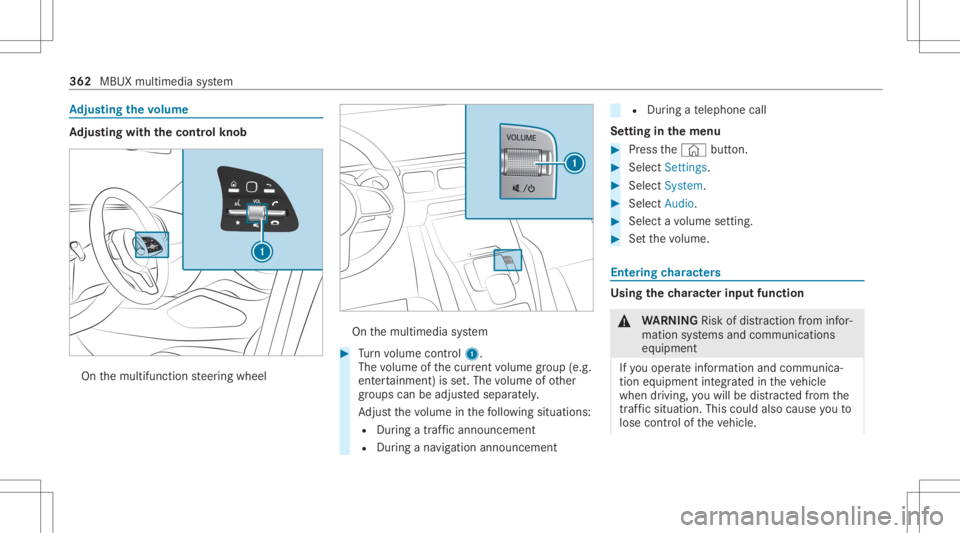
Ad
jus tingthe volum e Ad
jus tingwi th the contr olkno b On
themultifunc tionsteer ing wheel On
themultimedia system #
Turn volume control 1.
The volume ofthecur rent volume grou p(e.g.
ent ertainm ent)is set.The volume ofother
gr oups canbeadjus tedsepar ately.
Ad jus tth evo lume inthefo llo wing situat ions:
R Dur ing atraf fic annou ncement
R Dur ing ana vig ation annou ncement R
Dur ing ate lephon ecall
Se tting inthemenu #
Press the© button. #
Select Setting s. #
Select System. #
Select Audio. #
Select avo lume setting. #
Setth evo lume. Ent
ering charact ers Usi
ngthech aract erinput functi on &
WARNIN GRisk ofdist ra ction from infor‐
mati onsystems andcomm unication s
eq uipment
If yo uoper ateinf ormat ionand comm unic a‐
tio neq uipme ntintegratedin theve hicle
when driving, youwill bedistract ed from the
tr af fic situ ation. Thiscou ldalso cau seyouto
lose control of theve hicle. 362
MBUX multimedia system
Page 365 of 682
#
Onlyoper ateth is eq uipmen twhen the
tr af fic situ ation per mits. #
Ifyo ucan notbe sur eof this, stop the
ve hicle whilstpa ying attention toroad
and traffic condi tions andoperate the
eq uipment withth eve hicle statio nary. Yo
umus tobse rveth eleg alrequ iremen tsforth e
cou ntryin whi chyouar ecur rentl ydr ivi ng when
op erati ng themultimedia system.
Re quirement s:
R Forthe handwr iting recognit ionread-
aloud function:themultimedia system is
eq uipped withavo ice con trol system.
R The read-al oudfunction isavailable forth e
select edsystem languag e.
R The handwr itingrecogni tionread-al oudfunc‐
tio nis act ivat ed.
Charact erent rycan becar ried out withth ese
con trol element s:
R Touc hCon trol R
Touc hsc reen (media display)
R Touc hpad
Char acterinput can bestar tedwit hacon trol
element andresumed withano ther. #
When theke ypad issho wn, enterth ech arac‐
te rs on thecon trol element byswiping and
pr essing orby tapping (touc hscr een).
or #
Write th ech aract erson theto uc hpad orthe
to uc hsc reen.
The touc hpad suppo rts ch aract erinput withth e
fo llo wing functions:
R Han dwritingre cogni tionoffers charact ersug‐
ge stions .
R Ifth ere ad aloud function isact ivat ed for
handwr itingrecogni tionthen theent ered
ch aract ersar ere ad aloud.
Ex am ples ofcharact erent ry:
R Renam ingafa vo rite R
Looking forsear chresults intheglobal
sear ch.
R Entering ade stinat ionaddr essinthena vig a‐
tion system
R Entering awe baddr ess
Ent ering charact erson theto uc hpad
Re quirement s:
R Ifyo uwish tohave thech aract erinput read
aloud: there ad aloud function ofthehand‐
wr iting recogni tionisswi tched on
(/ page 340).
R Anonline connection isrequ ired forsome
functions. MBUX
multimediasy stem 363
Page 374 of 682
Blu
etoo th®
is are gis tere dtra demar kof Blue‐
to othSpecial Interes tGr oup (SIG) Inc.
% Interne tconn ection viaBlue tooth®
is no t
av ailable inall coun tries.
Ac tiv atin g/deac tivatin gBlue tooth®
Multimedia system:
4 © 5
Set ting s5
System
5 Wi-Fi &Bluetoot h #
Switc hBluetoot hon oroff. Wi
-Fi Wi
-Fico nne ctio nove rview
Yo ucan useWi-Fi toestablish acon nection with
a Wi -Fi networkand toacc ess theInt erne tor
ot her networkde vices.
The follo wing connection option sar eav ailable:
R Wi-Fi conne ction
The Wi-Fi conne ctionto aWi -Fi-ca pable
de vice ,e.g .a mob ile pho neorata ble tPC is
es tab lished.
R Multim ediasystem asaWi -Fi hotspo t Usi
ngthis func tion,a ta ble tPC ornotebook
can becon nected, forex am ple. Theconnec‐
te dde vice canusethedat ata riff of theve hi‐
cle. Amaximum ofthre ede vices canbecon ‐
nect edwithth eho tspo tat thesame time.
% The useoftheve hicle datata riff by extern al
de vic es isno tav ailable inall coun tries.
To estab lish acon nection ,yo ucan usethefo l‐
lo wing methods:
R WPS PIN
The conn ection toasec ureWi -Fi networkis
mad evia aPIN .
R WPS PBC
The conne ctionto asec ureWi -Fi networkis
mad eby pressing abutt on(push button).
R Secur itykey
The conn ection toasec ureWi -Fi networkis
mad evia asecu rity key.
Se tting upWi-Fi
Re quirement s: R
Tosetup theWi -Fico nne ctio nof themu l‐
tim edia system withne wde vices: ther eis
no comm unication moduleinstalled.
R The device tobe con nectedsuppor tsone of
th eth re emeans ofcon nect iondescr ibed.
Multimedia system:
4 © 5
Set ting s5
System
5 Wi-Fi &Bluetoot h
Ac tiv atin g/deac tivatin gWi -Fi #
Sele ctWi-Fi .
If Wi -Fi issw itched on,youcan conn ect the
multime diasystem withex tern al ho tspo ts.If
Wi -Fi isde acti vated, comm unicationviaWi-Fi
to all devic es isint erru pte d.This also means
th at acon nectionto thecomm unication
module cannotbe established. Thensome
func tionssuc has dynamic routeguidan ce
wit hLiv eTr af fic Inf ormati onareno tav aila‐
ble.
Connect ingthemu ltim edia system witha
ne wde vice viaWi-Fi
Thi sfunction isavailable ifacom mun ication
modul eis no tins talled. 37
2
MBUX multimedia system