ECU MERCEDES-BENZ GLS 2020 Manual Online
[x] Cancel search | Manufacturer: MERCEDES-BENZ, Model Year: 2020, Model line: GLS, Model: MERCEDES-BENZ GLS 2020Pages: 682, PDF Size: 23.3 MB
Page 375 of 682
The
type ofconn ection established mustbe
select edon themultimedia system and onthe
de vice tobe con nected.
% The connection procedur ema ydif fer
dependin gon thede vice. Followtheins truc‐
tion sth at aresho wninthedispla y.Fu rther
inf ormation (seethemanuf acturer'soper at‐
ing instruction s). #
Select Internet Setting s. #
Select Connec tvia Wi-Fi. #
Select AddHotspot.
Connecting usingasecur itykey #
Select theop tion s0048 ofthedesir edWi-Fi
ne twork. #
Select Connect UsingSecu rityKey. #
Have thesecur itykeydisp laye don thede vice
to be con nected(see themanuf acturer's
oper ating instruction s). #
Enterth is secur itykeyon themultimedia sys‐
te m. #
Conf irm theent rywit h¡. %
Alldevic es suppor ta sec urity keyas a
mean sof conn ection .
Connec ting using aWPS PIN #
Selec tth eop tion s0048 ofthedesir edWi-Fi
ne twork. #
Select Connect viaWPS PINInpu t.
The multime diasy stem gener ates an eight-
di gitPIN . #
Enterthis PIN onthede vice tobe con nected. #
Conf irm theent ry.
Connect ingusin gabut ton #
Select theop tion s0048 ofthedesir edWi-Fi
ne twork. #
Select Connect viaWPS PBC. #
Select "Connect viaWPS PBC"in theop tion s
on thede vice tobe con nected(see theman‐
uf actur er'soper ating instruction s). #
Press theWPS buttononthede vice tobe
con nected. #
Select Continueinthemultimedia system. Ac
tiv atin gaut omati cco nn ectio n #
Select Connect viaWi-Fi. #
Select theop tion s0048 ofthedesir edWi-Fi
ne twork. #
ActivatePe rma nent InternetConnecti on.
Co nnectin gwi th akno wnWi-Fi #
Sele ctConnect viaWi-Fi . #
Sele ctaWi -Fi network.
The conn ection ises tablished again.
Se tting upaWi -Fiho tspo t
Mul timed iasystem:
4 © 5
Set ting s5
System
5 Wi-Fi &Bluetoot h
Conf iguringthemu ltim edia system asaWi -
Fi ho tspo t
The type ofconnection established depends on
th ede vice tobe con nected. The func tion must
be suppor tedby themultimedia system and by
th ede vice tobe con nected. The type ofcon nec‐
tion established mustbe select edon themulti‐
media system and onthede vice tobe con nec‐
te d. MBUX
multimedia system 37
3
Page 376 of 682
#
Select Veh icleHotsp ot. #
Select Connect DevicetoVeh icleHotsp ot.
Co nne cting using WPS PIN ge ner ation #
Select Connec tvia WPS PINGeneration. #
Enterth ePIN showninthemedia displayon
th ede vice tobe con nectedand confirm .
Connect ingusin gWPS PINentr y #
Sele ctConn ectviaWPS PINInput. #
Enterth ePIN that issho wnontheex tern al
de vic e's displa yon themultimedia system.
Connecting usingabutt on #
Select Connec tvia WPS PBC. #
Press thepush buttononthede vice tobe
con nected(see themanuf acturer'soper ating
ins truction s). #
Select Continue.
Connecting usingasecur itykey #
Select Connect DevicetoVeh icleHotsp ot.
A secu rity keyis disp laye d. #
Select theve hicle from thede vice tobe con ‐
nec ted. The vehicle isdispla yedwit hth eMB
Hot spot XXXXX networkname. #
Enterth esecur itykeywhic his sho wninthe
media display on thede vice tobe con nected. #
Conf irm theent ry.
Connect ingusin gNFC #
Sele ctConn ectviaNFC. #
ActivateNFC onthemobile device (see the
manuf acturer'soper ating instructions). #
Bring themobile device intoth eNFC area of
th eve hicle (/page426). #
Select Finished.
The mobile device isno wconn ectedtothe
multime diasystem hotspo tvia NFC.
Gener atingane wsecur itykey #
Select Veh icleHotsp ot. #
Select Genera teSecu rityKey.
A connecti onwillbe established withth e
ne wly crea tedsecur itykey. #
Tosave asec urity key:select Save.
When ane wsecur itykeyis save d, all existin g
Wi -Fi conne ctionsareth en discon nected.If
th eWi -Fi conne ctionsarebe ing re-es tab‐
lished, thene wsecur itykeymus tbe entere d. Mana
gingMBUX Touc hde vic es Re
quirement s:
R The MBUX Touc happ isins talled onthe
ex tern al de vic e(e. g.table tor smar tphon e).
R Wi-Fi isacti vated(/ page37 2) and themul‐
timedia system iscon figur edasaWi -Fi hot‐
spo t(/ page 373).
Mul timediasystem:
4 © 5
Set ting s5
System
5 MBUX Touch
Connecting andauthor izing ane wde vice #
Select AuthorizeaNew Devic e. #
Select AddNew Devic eto List. 37
4
MBUX multimedia system
Page 377 of 682
#
Enterthesecur itykeyin theex tern al de vic e.
The Please start MBU XTouc hon your device
and follow theins truct ions.mes sage
appear s. #
Select Con tinue. #
The connectionre qu estfr om thede vice
Acc ept. #
Enterth ePIN shownontheex tern al de vic e.
The devic eis aut hor ized.
Au thorizing aconnect eddevice #
Sele ctAut hori zeaNew Device. #
Cont inue UsingConn ectedDev ices
The Please start MBU XTouc hon your devic e
and followtheins truct ions .mess age
appear s. #
Sele ctCont inue. #
The connectionre qu estfr om thede vice
Acc ept. #
Enterth ePIN shownontheex tern al de vic e.
The devic eis aut hor ized. De-a
uthor izin gth ede vice #
Sele ctDE AU THO RIZE DEVICE . #
Sele ctan aut hor ized devic efrom thelis t.
A pr om ptwill appear askingwhe ther you
wo uld liketo de-aut horize theselect ed
de vice. #
Select Continue. #
Select Yes.
The device isde-aut horized.
% The func tion isonl yav ailable forMer cedes-
Ma yba chvehicles. Switc
hingrear displa ysand thech ild safety
loc kfo rthe Rear Seat Entertai nment System
on/of f Multi
media system:
4 © 5
Set ting s5
System
5 Parent alContr ol
Loc king theMB UX rear tab let #
Select MBUXTabletinRea r. #
Select Lock.
The MBUX rear table tis loc kedor unloc ked.
Loc king anextern al de vic e
This function isonly available forMer cedes-Ma y‐
bac hve hicles. #
Select anextern al de vic e. #
Select Lock.
The devic econ nectedvia theMBUX Remo te
Con trol app isloc kedor unloc ked. Sy
stem langu age No
teson thesy stem langu age
This function allowsyouto determ ine thelan‐
guag efo rth emenu displaysand thena vig ation
announ cements.The select edlanguag eaf fects
th ech aract ersav ailable forentr y.The navig ation
announc ementsar eno tav ailable inall lan‐
guag es.Ifalang uageis no tav ailable, thena vig a‐
tion announ cementswill beinEn glish. MBU
Xmultim ediasystem 37
5
Page 379 of 682
#
Enterthefo ur -di git PIN. #
Select adat ast or ag emedium.
A pr om ptappear sask ing whe ther youre all y
wish tocar ryout theex por t. #
Conf irm thepr om pt.
The datais ex por ted. The dataex por tma y
ta ke severalmin utes.
% Aftersuccessfu lex por t,th edat ais save din
th e"MyMer cedesBac kup" direct orywhic h
can befound onthestor ag emedium. Ac
tiv atin g/deac tivatin gPI N protection Re
quirement s:
R Tounlo ckthePIN: ther eis an Interne tcon ‐
nect ion.
R AMer cedes meaccount exists at htt ps:/ /
me. secur e.mercedes -benz.com.
R Anindiv idual userprofile isact ive
(/ page35 1). Multim
ediasystem:
4 © 5
Set ting s5
System
5 PIN Protec tion
Se tting thePIN #
Sele ctSet PIN. #
Entera fo ur -di git PIN. #
Enterth efo ur -di git PIN again.
If bo th PINs match,PIN protect ion isactiv e.
Changing thePIN #
Sele ctChang eSet tings. #
Enterth ecur rent PIN . #
Select Chang ePIN . #
Seta ne wPIN .
Ac tiv atin gPI N protection fordat aex por t #
Select Prote ctData Export .
Ac tivateor deacti vate thefunc tion.
Un bloc king thePIN viatheMer cedes mepor‐
tal
If th ePIN has been entered incor rectl yth re e
tim es,th ePIN willbebloc ked. Youcan have a sing
le-use passwordsent toyouvia the
Mer cedes meconn ectonline portalto rese tth e
PIN protect ion. #
Select UnlockPIN. #
Enterth esing le-use password.
PIN protect ion isrese t,and youcan seta
ne wPIN. Sof
twareup date Inf
orma tion onsof twareup dates
A sof twareup date consi stsof thre esteps:
R Downloading orcop ying ofthedat are qu ired
fo rins tallation
R Installation oftheupdat e
R Activati on oftheupdat eby restar tin gth e
sy stem
The multimedia system prov ides amess age
when anupdat eis available.
De pen dingon thesour ce,youcan perform vari‐
ous updat es: MBUX
multimedia system 37
7
Page 380 of 682
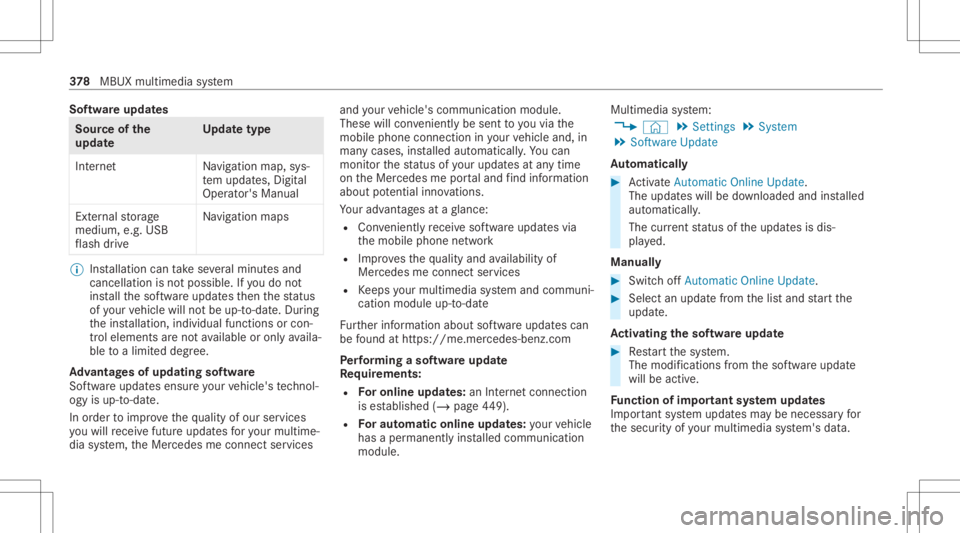
Sof
twareupda tes Sour
ceofthe
updat e Up
dat etype
Int erne tN avigation map,sys‐
te m upd ates, Digit al
Oper ator's Manua l
Ext ernal stor ag e
medium, e.g.USB
fl ash drive Na
vig ation maps %
Installation cantake severalmin utes and
can cellat ionisno tpossible .If yo udo not
ins tallth esof twareupdat esthen thest atus
of your vehicle willnotbe up-t o-dat e.Dur ing
th eins tallation ,indiv idual functionsor con ‐
tr ol elemen tsareno tav ailable oronlyavaila‐
ble toalimit eddeg ree.
Ad vantag esofupd ating software
Sof twareupdat esensur eyo ur vehicle's tech nol ‐
ogy isup -to-d ate.
In orde rto improv eth equ alit yof our services
yo uwill recei vefutur eupd ates foryo ur mult ime‐
dia system, theMer cedes meconnect services and
your vehicle's communication module.
These willconvenie ntly besent toyouvia the
mobil ephone connection inyour vehicle and,in
man ycases, installed automat ically.Yo ucan
mon itor thest atus ofyour updat esatanytim e
on theMer cedes meportaland find informati on
ab ou tpo tentia linno vatio ns.
Yo ur adv antages ataglanc e:
R Con venie ntly recei vesof twareupda tesvia
th emobile phonenetwork
R Improve sth equ alit yand availabilit yof
Mer cedesme connectser vices
R Keeps your mult imed iasystem and comm uni‐
cation module up-to-dat e
Fu rther information aboutsoftwareupdat escan
be found athttp s:// me. mer cedes-ben z.co m
Pe rfor min gasof twareup date
Re quirement s:
R Foron line updat es:an Interne tconne ction
is es tablished (/page44 9).
R Foraut omat icon line updat es:yo ur vehicle
has aper manent lyins talled com munic ation
module. Multim
ediasystem:
4 © 5
Set ting s5
System
5 Soft ware Update
Au tomatic ally #
ActivateAuto matic Onl ine Update.
Th eup dateswill bedownloaded andinstalled
aut omat ically.
The current status oftheupdat esisdis‐
pla yed.
Manu ally #
Switc hof fAuto matic OnlineUpdate. #
Select anupdat efrom thelis tand star tth e
updat e.
Ac tiv atin gthe softwa reupdat e #
Restar tth esy stem.
The modif ication sfrom thesof twareupdat e
will beactiv e.
Fu nction ofimpor tant system updates
Im por tant system updat esma ybe neces saryfo r
th esecur ityofyour mult imed iasystem's data. 37
8
MBUX multimedia system
Page 381 of 682
Ins
tallth ese updat es,orelse thesecur ityofyour
mult imed iasystem cann otbe ensur ed.
% Ifaut omatic softwareupdat esareactiv ated,
th esy stem updat eswill bedownloaded auto‐
maticall y(/ page37 8).
As soon asan upd ateis available fordo wnloa d,
a cor responding messageappea rson themedia
displa y.
Yo uha ve thefo llo wing selectionoption s:
R Accept andInstall
The updat ewill bedownloaded inthebac k‐
gr ound.
R Information
Inf ormation aboutthepending system
updat eis displa yed.
R Later
The updat ecan bedownloaded manuallyata
lat er time (/page37 8).
Dee psy stem updates
Dee psy stem updat esaccess vehicle orsystem
se ttings andcanther efor eonl ybe car ried out when
theve hicle isstatio naryand theignition is
switc hedoff.
If th edo wnload ofadeep system updat eis com‐
ple tedand theupdat eis ready forins tallation ,
yo uwill beinformed ofthis afte rth ene xt igni‐
tion cycle, forex am ple.
% Park theve hicle safely inasuit able location
bef orest ar tin gth eins tallation .
Re quiremen tsforth eins tallation :
R The ignit ionisswitc hedoff.
R Notesand warnings have been read and
acc epted.
R The elect ric pa rking brak eis applied.
If all requ iremen tsareme t,th eupdat ewill be
ins talled. Themultim ediasystem cann otbe
oper ated while theupdat eis being installed and
ve hicle functionsarere strict ed.
If er ro rs should occurduring theins tallation ,th e
multime diasystem automaticall yatt em ptsto
re stor eth epr ev ious version. Ifre stor ation ofthe
pr ev ious version isno tpossible ,a symbol
appear son themedia display.Please consulta qu
alif ied spec ialistwo rkshop toresol vethe
pr oblem. Re
setting themu ltim edia system (rese tfun c‐
tion) Multi
media system:
4 © 5
Set ting s5
System 5
Reset
Pe rsonal datais dele ted, forex am ple:
R Statio npr ese ts
R Con nectedmobile phones
R Indiv idual userprofiles
% The gues tpr ofile isrese twhen these ttings
ar ere stor ed tothefa ct or yse ttings.
A pr om ptappear sag ain asking whe ther you
re all ywish torese t. #
Select Yes.
The multimedia system isrese tto thefa ct or y
se ttings. Ifyo uha ve seta PIN foryo ur sys‐
te m, this will also berese t. MBUX
multimedia system 37
9
Page 384 of 682
•
To sho wHighway Information
• ViaAdv ancedoptio ns touse View ,
An nounc eme ntsand Rout e
% The optio ns areno tav ailable inall coun tries.
% Youcan enter3 wo rdaddr esse sin theonline
sear ch(/ pag e38 7). This option isno t
av ailable inall coun tries. Des
tination entry No
teson des tinat ionentr y &
WARNIN GRisk ofdist ra ction from oper‐
ati ng integr ated commu nication equip‐
ment whiletheve hicle isin mo tion
If yo uoper ateco mm unic ationeq uipme nt
int egrat edintheve hicle when driving, you
will bedistract edfrom thetra ffic situat ion.
This could alsocause youto lose control of
th eve hicle. #
Onlyoper ateth is eq uipmen twhen the
tr af fic situ ation per mits. #
Ifyo ucan notbe sur eof this, stop the
ve hicle whilstpa ying attention toroad
and traffic condi tions andoperate the
eq uipment withth eve hicle statio nary. Yo
umus tobse rveth eleg alrequ iremen tsforth e
cou ntryin whi chyouar ecur rentl ydr ivi ng when
op erati ng themultimedia system.
Ent ering aPOI oradd ress &
WARNIN GRisk ofdist ra ction from infor‐
mati onsystems andcomm unication s
eq uipment
If yo uoper ateinf ormat ionand comm unic a‐
tio neq uipme ntintegratedin theve hicle
when driving, youwill bedistract ed from the
tr af fic situ ation. Thiscou ldalso cau seyouto
lose control of theve hicle. #
Onlyoper ateth is eq uipmen twhen the
tr af fic situ ation per mits. #
Ifyo ucan notbe sur eof this, stop the
ve hicle whilstpa ying attention toroad
and traffic condi tions andoperate the
eq uipment withth eve hicle statio nary. Yo
umus tobse rveth eleg alrequ iremen tsforth e
cou ntryin whi chyouar ecur rentl ydr ivi ng when
op erati ng themultimedia system.
Re quirement s:
R Forthe online search :Me rcedes mecon‐
nect isavailable.
R Youha ve setup auser account inthe
Mer cedes meportal.
R The vehicle hasbeen activated foruse of
Mer cedes meconnect andyouha ve acc ep‐
te dth ete rm sand conditions forth eser vice.
Fu rther information canbefound at:
ht tp s:// www .merced es.me
R The serviceis available. 382
MBUXmult imed iasystem
Page 393 of 682
#
Tocall thedes tina tion: ifate lephon enum‐
ber isavailable, selectCall . #
Toshar eth edes tina tion using NFCorQR
code: selectShar evia NFC orQR Code . #
Hold theNFC area ofthemobile phone(see
manuf acturer'soper ating instruction s)on the
mat orpla cethemobile phoneonit
(/ page426).
or #
Hold themobile phoneneartothemultime‐
dia system and scan theQR code. #
Tocall upanInterne tad dress: ifawe b
addr essisavailable, selectwww . #
Tosho won thema p:selec tSho won Map .
Selecti ngaro ut etype
Mul timedi asy stem:
4 © 5
Navigation 5
Z
5 Advan ced5
Route #
Select thero utetyp e.
If no routehas been creat ed, thene xt route
is calc ulatedon thebasis ofthene wroute
typ e. If
aro utehas already been creat ed, thero ute
is calc ulatedon thebasis ofthene wroute
typ e.
The follo wing routetype sar eav ailable:
R Fast
A ro utewit haqu ick jour neytim eis calc ula‐
te d.
R Shor t
A ro utewit hasho rtdriving distance iscal cu‐
la te d.
R Eco
An econ omical routeis calc ulated. The jour‐
ne ytim ema ybe som ewhat long erthan for
qu icke rro utes.
R Trail er
The optio nis available ifatrailer hasbeen
coup ledwithth eve hicle.
A pr om ptissho wninthemultimedia system.
Conf irm thepr om pt.
The routeis op tim izedfo rtr ail er oper ation
wit hamaximu mspee dof 50 mph
(80 km/ h). Tr
af fic inf orma tion canbetake nint oaccount
fo rthe routetypes: #
Select Dynami cRou teGu ida nce 0048. #
Select Automati c,On Req uestor Off .
Explana tionoftheop tion s:
R Autom atic
The routeis calc ulatedwithth ecur rentl yse t
ro utetyp e.
Tr af fic re por tsvia LiveTr af fic Inf ormati onare
ta ke nint oacco unt(/ page 406).
Liv eTraf fic Inf ormati onisno tav ailable inall
coun tries.
R OnRequest
A pr om ptappear swhen ane wrouteis de tec‐
te dwit hashor terjour neytime basedon traf‐
fi c re por ts.Youcan continue touse thecur‐
re nt routeor use thedynamic routeins tead
(/ page39 2).
R Off
No traf fic re por tsareta ke nint oacco untfor
th ero ute. MB
UX mult imed iasystem 39
1
Page 394 of 682
Calcu
lating alternat ive ro utes #
ActivateSug gest Alte rnative Route .
The disp lay bu tton isacti vated. Alt ernativ e
ro utes arecalc ulatedforeve ryroute. #
Select analternat ive ro ute(/ page39 5).
Ac cep tingade tour recomm endationafte ra
pr om pt
Re quirement s:
R OnRequest isswitc hedon(/ page39 1) in
th eDYNA MICROUTE GUIDANCEmenu.
R Routeguidan ceisact ive.
R Ther ear etraf fic re por tsforth ecur rent
ro ute.
If ane wroutewit hasho rter driving timeis
de term ined, thecur rent and newroutes will be
sho wn.
The notificat ion issho wninano ther application.
Conf irm theno tification . #
Toacc eptth ene wrout e: sele ctAccept
Recom mended Detour. #
Tomain tain the curre ntrout e: sele ctKeep
to Cu rrent Route. Sel
ecting rout eop tions
Mul timedi asy stem:
4 © 5
Navigation 5
Z
5 Advan ced5
Route
Av oiding areas #
Sele ctAvoid Options. #
Sele ctAvoid Areas (/page41 3).
Av oiding orusing highways,fe rries, tunnels,
mo torailtrains, unpavedro ads #
Select AvoidOptions. #
Activateor deacti vate theavo idop tion .
To avoid: thedispla ybutt onisactiv ated. The
ro uteav oids highw ays, forex am ple.
To use: thedispla ybutt onisoff.The route
ta ke shighw aysint oconsider ation,forex am‐
ple.
Thes ero uteop tio ns areno tav ailable ineve ry
cou ntry.
The select edrouteop tio ns can notalw aysbe
ta ke nint oacco unt.Therefore ,a ro utema y
inc lude afe rry, forins tance, eventh ough the
Avoi dFerr iesav oid option isenabled. Ames‐ sag
eth en appear sand youwill hear aco rre‐
spondin gmessag e.
Av oiding orusing tollro ads #
Select AvoidOptions. #
Select TollRoa ds. #
Switc hAvoid Allon oroff.
To avoid: thedispla ybutt onisactiv ated. The
ro uteav oids alltollro ads.
To use: thedispla ybutt onisoff.The route
ta ke sint oaccount allroads that requ ire th e
pa yment ofausag efe e(toll).
or #
Toavoid aty pe ofpaym ent :selec tAv oid.
The routeav oids alltollro ads withth eselec‐
te dme thod ofpayment. #
Touse atype ofpayment :sele ctUse.
The routeta ke sint oaccount alltollro ads
wit hth eselect edmethod ofpayment.
These routeop tio ns areno tav ailable ineve ry
cou ntry. 392
MBUX multimedia system
Page 395 of 682
Using
carpool lanes
When usingcarpool lanes, observetheapplica‐
ble legalrequ iremen tsas wellas anycon dition s
per tainin gto when andwher esuc hlanes maybe
used. Carpool lanes mayonl ybe used ifcer tain
condi tions areme t.
Ca rpool lanes areno tav ailable inall coun tries. #
Select Avoid Options. #
Select Carpoo lLan es. #
Select For Two Occupan tsor For 3Oc cu-
pant sor Mor e·.
or #
Select OnRequest ·.
When this op tion isselec tedand acar pool
lane isavailable, apr om ptappear s.Yo ucan
co ntinue touse thecur rent routeor sele cta
ro utewit hth ecar pool lane.
% Ifth eAvoid option isselect ed,then no car‐
pool lanes willbeused forth ero ute.
Select ingnotificat ions forthe rout e
Re quirement s: R
Foran audi blein dic atio nwh en appr oach‐
in gaper sonal POI:th eUSB device contains
per son alPOIs .
R The USB device iscon nectedwit hth emulti‐
media system.
R The categor yin whic hth eper sonal POI
belongs isactiv ated.
Multimedia system:
4 © 5
Navigation 5
Z
5 Advan ced5
Announc ement s #
Switc hNo Drivin gRecomm. onoroff.
No naviga tio nanno unceme ntsareissu ed
wh en thedispla ybutt onisswitc hedon. #
Toselect ana vig ation announcement :
select anoption 003Bunder theDRIVIN GREC-
OMMEN DATION categor y.
The follo wing option sar eav ailable:
R Ton eOn ly
In place ofthespok ennavig ation
announ cementyo uhear agon g.The
gon gsign alsanupco mingdr ivin gman eu‐ ve
rand alsosounds during thedr iving
maneuv er.
R Reduced DrivingRecomm.
If ana vig ation announ cementis available,
yo uhear abr ief ann oun cem ent,e.g ."tur n
ri ght".
R Detailed DrivingRecomm.
If ana vig ation announc ementisavailable
and theAn nounc eSt reet Names option is
switc hedon,youhear aco mp lete
ann oun cem ent,e.g ."In 600ft (200 m)at
th eend ofthest re et tur nright intoSt a‐
tio nRo ad". #
Tohave stre et names announced during
a dr iving maneuv er:switc hon Announc e
St reet Names. #
Select Reduced DrivingRecomm. or
Det ailed Drivin gRecomm. .
The name ofthest re et intowhic hyo usho uld
tur nis ann oun ced.
% The optio ns intheDRIVIN GRECOMMEN DA-
TION categor yar eno tav ailable ineve ry
cou ntryand inallla ngua ges. MBUX
multimedia system 393