display MERCEDES-BENZ GLS 2020 Workshop Manual
[x] Cancel search | Manufacturer: MERCEDES-BENZ, Model Year: 2020, Model line: GLS, Model: MERCEDES-BENZ GLS 2020Pages: 682, PDF Size: 23.3 MB
Page 317 of 682
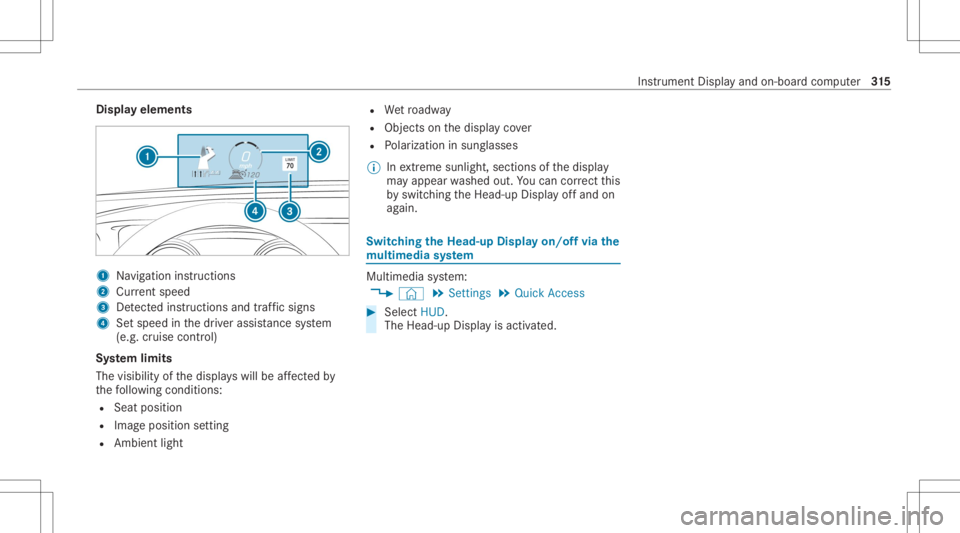
Disp
layelem ents 1
Navig ation instructions
2 Current speed
3 Detected instructi ons and traf fic sig ns
4 Setspe edinthedr iver assis tance system
(e.g. cruise control)
Sy stem limit s
The visib ilityofthedispla yswill beaffect ed by
th efo llo wing condition s:
R Seat position
R Imag eposit ionsetting
R Ambient light R
Wetro adw ay
R Objects onthedispla yco ver
R Polar izat ion insung lasses
% Inextreme sunli ght, sectio nsofthedispla y
ma yappear washed out.Youcan correct this
by switc hingtheHead-up Displayof fand on
ag ain. Switc
hingtheHead -upDispla yon/of fvia the
mu ltim edia system Multi
media system:
4 © 5
Set ting s5
Quick Access #
Select HUD.
The Head-up Displayis activ ated. Ins
trument Displayand on-boar dcom puter 31
5
Page 336 of 682
Ov
ervie wand oper ation Ov
ervie wof theMB UX multim edia system &
WARNIN GRisk ofdist ra ction from infor‐
mati onsystems andcomm unication s
eq uipment
If yo uoper ateinf ormat ionand comm unic a‐
tio neq uipme ntintegratedin theve hicle
when driving, youwill bedistract ed from the
tr af fic situ ation. Thiscou ldalso cau seyouto
lose control of theve hicle. #
Onlyoper ateth is eq uipmen twhen the
tr af fic situ ation per mits. #
Ifyo ucan notbe sur eof this, stop the
ve hicle whilstpa ying attention toroad
and traffic condi tions andoperate the
eq uipment withth eve hicle statio nary. Yo
umus tobse rveth eleg alrequ iremen tsforth e
cou ntryin whi chyouar ecur rentl ydr ivi ng when
op erati ng themultimedia system.
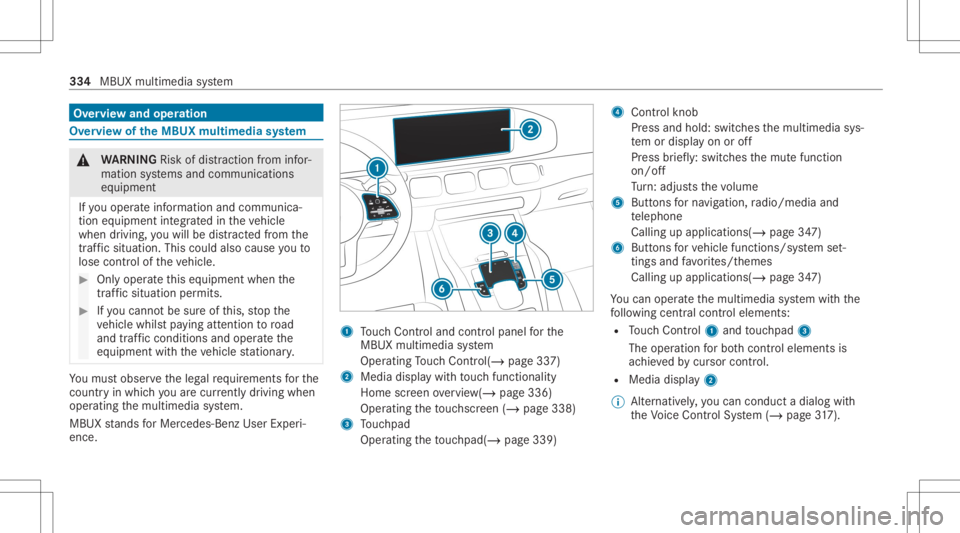
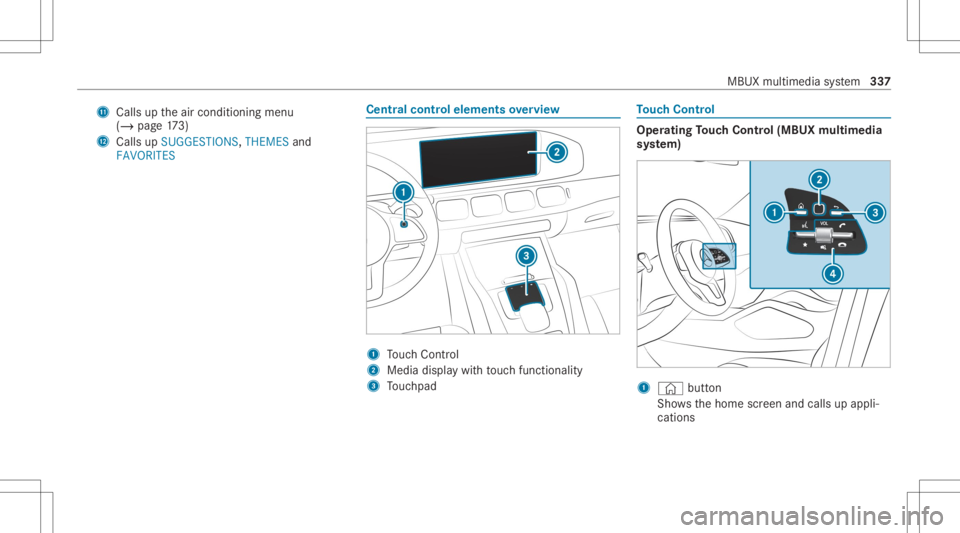
MBUX stands forMer cedes-Benz UserExper i‐
ence. 1
Touc hCon trol and contro lpanel forth e
MBUX multimedia system
Oper ating Touc hCon trol (/ page33 7)
2 Media displaywit hto uc hfun ction alit y
Hom esc reen ove rview(/ page336)
Opera tingth eto uc hsc reen (/ page338)
3 Touc hpad
Operatin gth eto uc hpad( /pag e33 9) 4
Con trol kn ob
Pr ess and hold:swit ches themultimedia sys‐
te m or disp lay on oroff
Pr ess brief ly:swi tches themut efunc tion
on/ off
Tu rn:ad jus tsthevo lume
5 Buttons forna vig ation, radio/media and
te lephon e
Calling upapplicat ions(/page34 7)
6 Buttons forve hicle functions/sy stem set‐
ting sand favo rite s/t hemes
Call ingupappli cations (/page34 7)
Yo ucan operat eth emultimedia system withth e
fo llo wing central control elemen ts:
R Touc hCon trol 1 and touc hpad 3
The operation forbo th contr oleleme ntsis
ac hie vedby cur sor contr ol.
R Med iadispl ay2
% Alternati vely,yo ucan cond uct adialog with
th eVo ice Cont rolSy stem (/ page31 7). 33
4
MB UX multim ed iasystem
Page 337 of 682
%
Ifth eve hicle iseq uipped withth eMBUX in-
car assis tant, select edfunc tions ofthemul‐
timedia system can beoper ated con tact-fr ee
as wellas turnin gth ere adin glight onoroff
(/ page34 2).
Nu mer ous application, online services, services
and appsar eav ailable foryo u. Youcan call
th ese upusing thehome screen orusing buttons
5 and 6next to theto uc hpad.
Yo ucan convenient lycall upand add favo rite s
usin gth eß rock er switc hon thesteer ing
wheel orusing theß buttonnext to the
to uc hpad. Quick-acc ess inthehome screen and
in theapplications servetoselect functions
mor equ ickl y.
If yo uuse thelear nfunc tion ofthemultimedia
sy stem, youwill recei vesugg estions during oper‐
ation ofthemos tpr obable navig ation destina‐
tion s,media sources, radio statio nsand con‐
ta cts. Theconf iguratio nof thesugg estion sta ke s
place inyour profile. Youcan comp ileyour pro‐
fi le from various vehicle settin gsand settin gsof
th emultimedia system. Youcan creat eth emes
fo rva rious driving situations inthehome screen as
wellas using theß rock er switc hor the
ß button.
The Notificati ons Center coll ects incom ingnotifi‐
cati ons, e.g.abou tan available softwareupdat e.
De pen dingon thetype ofnotification itof fers
va rious actions. Youcan calluptheNo tification s
Cent eron thehome screen and intheapplica‐
tion menus.
Wi th theglobal searchintheve hicle youcan
sear chon-boar dacr oss man ycat egor iesaswell
as onlin ein theInt erne t.Yo ucan usetheglobal
sear chinthehome screen and intheno tifica‐
tion s.
Pr otection agains tth eft
This devic eis eq uipped withte ch nica lpr ov ision s
to protect itag ains tth eft. Fu rther information on
pr otect ion agains tth eftcan beobt ained from an
aut hor ized Mercedes- BenzCenter. No
teson themed iadisp lay Obser
vetheno teson car ing forth eint erior
(/ page492). Au
tomatic temp eratur e-cont rolled switc h-
of ffe atur e:ifth ete mp eratur eis toohigh, the
br ightn essisinitiall yre duced automatic ally.The
media displayma yth en switc hof fcom pletely for
a while.
% Ifyo uar ewe aring polar izedsun glasses ,it
ma ybe difficul tto read themultimedia sys‐
te m disp lay. MBUX
multimedia system 335
Page 338 of 682
Home
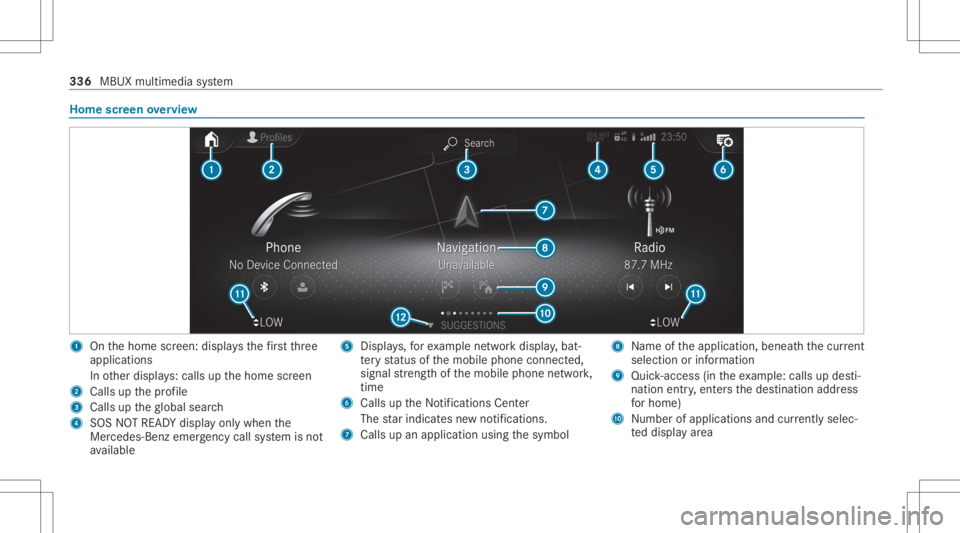
screen overvie w 1
Onthehome screen: displa ysthefirs tth re e
applic ations
In other displa ys:cal lsup thehome screen
2 Calls upthepr ofile
3 Calls uptheglobal search
4 SOS NOTREAD Ydispl ayonl ywhen the
Mer cedes-Ben zemer gency callsy stem isno t
av ailable 5
Displays,fo rex am ple networkdispla y,bat‐
te ry status ofthemobile phoneconnect ed,
signal stre ngt hof themobile phonenetwork,
tim e
6 Calls up theNo tification sCent er
The star ind icat esnewno tificat ions.
7 Calls upanapplic ationusin gth esymbol 8
Name oftheapplication, beneathth ecur rent
sel ecti onorinforma tion
9 Quick-acce ss(in th eex am ple: calls updes ti‐
nat ion entry,ent ersth edes tinat ionaddr ess
fo rhome)
A Number ofapp lications andcurrently selec‐
te ddispla yar ea 336
MBUX multimedia system
Page 339 of 682
B
Calls uptheair con ditionin gmenu
(/ page17 3)
C Callsup SUG GEST IONS,THEMES and
FAVOR ITES Ce
ntr alco ntr oleleme ntsoverview 1
Touc hCon trol
2 Media displaywit hto uc hfun ction alit y
3 Touc hpad To
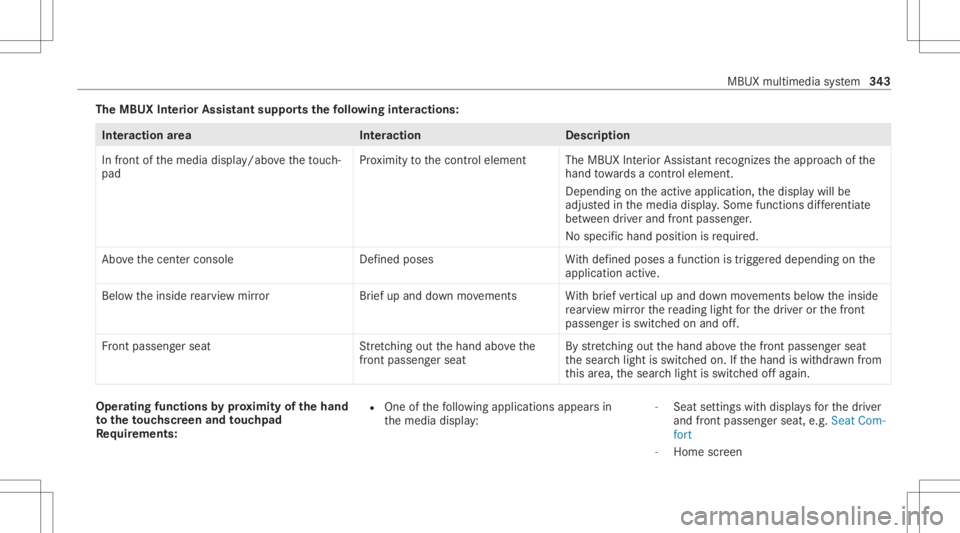
uc hCon trol Oper
ating Touc hCon trol (MBUX multimedia
sy stem) 1
© button
Sho wsthehome screen and calls upappli‐
cation s MBUX
multimedia system 33
7
Page 345 of 682
The
MBUX Inte rior Assis tantsupportsthefo llo wing interactions : Int
eraction area Interaction Description
In front ofthemedia display/abo vetheto uc h‐
pad Pr
ox imit yto thecon trol element TheMBUX Interior Assis tant recogni zestheappr oachof the
hand towa rdsa cont rolelemen t.
Depe ndingon theactiv eapplication, thedispla ywill be
adjus tedin themedia display.Some functionsdiffer ent iate
be tween driver and front passeng er.
No specif ichand position isrequ ired.
Abo vethecent ercon sole Defined poses With def ined poses afunc tion istrigg ered dependin gon the
applic ationact ive.
Belo wtheinside rear vie wmir rorB rief up and down movements With brief vertical upand down movements belowtheinside
re ar vie wmir rorth ere adin glight forth edr iver or thefront
passeng erisswitc hedonand off.
Fr ont passeng erseat Stretching outth ehand abovethe
fr ont passeng ersea t By
stre tching outth ehand abovethefront passeng erseat
th esear chlight isswitc hedon.Ifth ehand iswit hdr awnfrom
th is area, thesear chlight isswitc hedoffag ain. Oper
ating funct ionsbyprox imit yof thehan d
to theto uc hscr eenand touc hpad
Re quirement s: R
One ofthefo llo wing applicat ionsappear sin
th emedia display: -
Seat settings withdispla ysforth edr iver
and front passeng erseat, e.g.Seat Com-
fort
- Home screen MBUX
multimedia system 34
3
Page 346 of 682
-
Radio menu ormedia menu
- Map inthena vig ation
- ActivePa rking Assist
R Recogni tionoccu rsas thehand approaches
to appr oximat ely4 in (10 cm) from theto uc h‐
pad ortheto uc hsc reen.
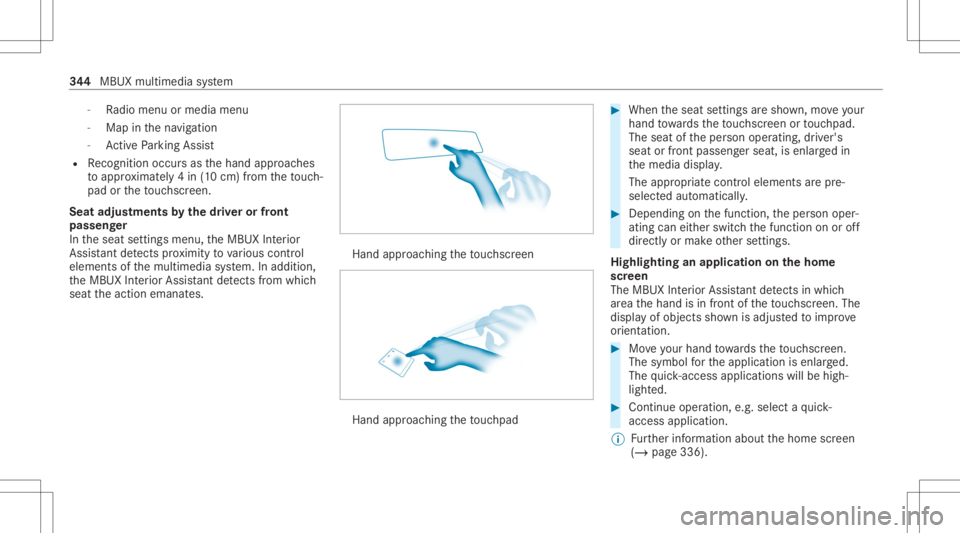
Seat adjustm ents bythedr iver or front
pa sseng er
In theseat settings menu, theMBUX Interior
Assis tant detects prox imit yto various cont rol
element sof themultimedia system. Inaddition,
th eMBUX Interior Assis tant detects from which
seat theaction emanat es. Hand
approaching theto uc hsc reen Hand
approaching theto uc hpad #
When theseat settings aresho wn, moveyour
han dto wa rdsth eto uc hsc reen ortouc hpad.
The seat oftheper son oper ating, driver's
seat orfront passeng erseat, isenlar gedin
th emedia display.
The appr opriatecont rolelemen tsarepr e-
selec tedaut omatic ally. #
Depen dingonthefunc tion,th eper son oper‐
ating caneither switc hth efunc tion onoroff
dir ect lyor mak eot her settin gs.
Highlighting anapplication onthehom e
scr een
The MBU XInte rior Assis tant detects inwhi ch
ar ea thehand isin front oftheto uc hsc reen. The
displa yof objec tssho wnisadjus tedto improve
or ient ation. #
Moveyour han dto wa rdsth eto uc hsc reen.
The symbol forth eapplication isenlar ged.
The quick- acc ess applic ationswill behigh ‐
light ed. #
Con tinue operation ,e.g .selec ta qu ick-
acc ess applic ation.
% Further information aboutthehome screen
(/ page336). 34
4
MBUX multimedia system
Page 347 of 682
Ac
tiv atin gco verch ang ein thera dio menu
and medi amenu
The MBUX Interior Assi stant reduces thenumber
of oper ating steps. #
Moveyour han dto wa rdsth eto uc hsc reen or
to uc hpad.
The current informati on,e.g.ab ou tth era dio
st atio n,trac kand artis tar ehidde n.Co ver
ch ang eis act ivat ed. #
Con tinue operation andselec ta co ver. #
Asyour han dis mo vedaw ay from the
to uc hsc reen ortouc hpad, thecur rent infor‐
ma tionis sho wnagain.
% Further information onthera dio menu
(/ page46 4) and themedia menu
(/ page459).
Sho wing thena vig ation menu onthema p
The MBU XInte rior Assis tant sho wsthena vig a‐
tion menu. #
Moveyour han dto wa rdsth eto uc hsc reen or
to uc hpad.
The navig atio nmen uis sho wn. #
Con tinue operation andselectasymb ol. #
Asyour han dis mo vedaw ay from the
to uc hsc reen ortouc hpad, themedia display
hides thena vig ation menu.
% Further information onthena vig ation menu
(/ page380).
Sho wing operating symbols intheAc tiv e
Pa rking Assis tcamer aima ge(onl yfrom driv‐
er' sseat )
The MBU XInte rior Assis tant facil itat es quick-
acc ess forth edr iver tovarious camer avie ws. #
When ActivePa rking Assistis sho wn, move
yo ur han dto wa rdsth eto uc hsc reen.
The camer aoper ation symbols aredispla yed. #
Cont inue operation anddispla yth edesir ed
fr ont ,re ar,lef tand right camer avie ws.
% Further information onActivePa rking Assist
func tions(/ page28 1).
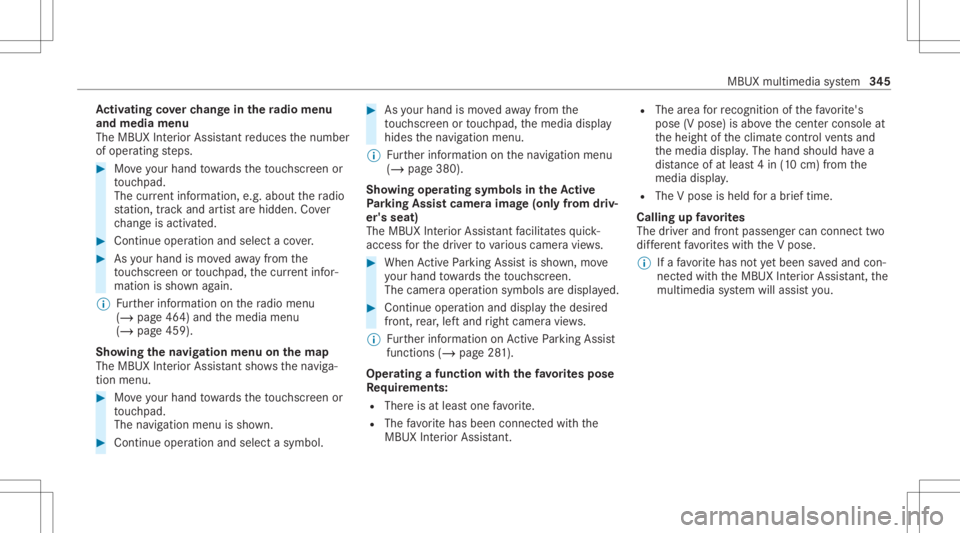
Oper ating afunct ionwithth efa vo rite spose
Re quirement s:
R Ther eis at leas tone favo rite .
R The favo rite has been connectedwithth e
MBUX Interior Assis tant. R
The area forre cogni tionofthefa vo rite 's
pose (Vpose) isabo vethecent ercon sole at
th eheight oftheclimat econ trol vents and
th emedia display.The hand should have a
dis tance ofat leas t4 in (10 cm) from the
media display.
R The Vpose isheld fora br ief time.
Call ingupfavo rite s
The driver and front passeng ercan conn ecttwo
dif fere nt favo rite swit hth eV pose.
% Ifafa vo rite has notye tbe en save dand con‐
nec tedwit hth eMBUX Interior Assis tant, the
multime diasystem will assis tyo u. MB
UX mult imed iasystem 34
5
Page 348 of 682
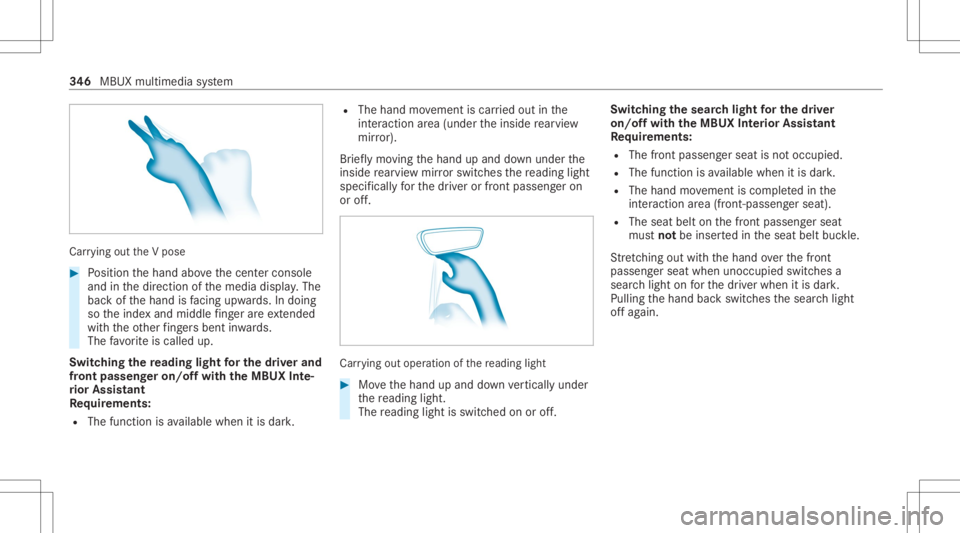
Car
rying out theV pose #
Position thehand abovethecent ercon sole
and inthedir ect ion ofthemedia display.The
bac kof thehand isfacing upwa rds. In doing
so theinde xand middle fing er areex tende d
wi th theot her fing ersbe nt inwa rds.
The favo rite iscalled up.
Switc hingthere ading light forthe driver and
fr on tpass engeron /o ffwit hth eMB UX Inte‐
ri or Assis tant
Re quirement s:
R The func tion isavailable whenitis dar k. R
The hand movement iscar ried out inthe
int eract ion area (under theinside rear vie w
mir ror).
Br ief lymo ving thehand upand down under the
inside rear vie wmir rorswi tches there adin glight
spec ificall yfo rth edr iver or front passeng eron
or off. Car
rying out oper ation ofthere ading light #
Movethehand upand down verticall yunder
th ere adin glight .
The readin glight isswit ched on oroff. Switc
hingthesear chlight forthe driver
on /o ffwit hth eMB UX Interior Assis tant
Re quirement s:
R The front passen gerseat isno toccupi ed.
R The function isavailable whenitis dar k.
R The hand movement iscom pletedin the
int eract ion area (front -pass engerseat) .
R The seat beltonthefront passeng erseat
mus tno tbe inser tedin theseat beltbuckle.
St retching outwi th thehand overth efront
passeng erseat when unocc upied switchesa
sear chlight onforth edr iver when itis dar k.
Pulling thehand backswitc hesthesear chlight
of fag ain. 34
6
MBUX multimedia system
Page 350 of 682
Pr
ess brief ly:cal lsup favo rite s
( / pag e356)
Pr ess and hold: addsafa vo rite
( / pag e356) orcreat esane wtheme
(/ page352)
Alt ernativ elyin thehom escr een: when you
st ar tth eve hicle thehome screen issho wnin
th emedia display. #
Select theapplication byswiping andtap‐
ping.
or #
Inanydispla y:press the© buttononthe
To uc hCon trol or on theto uc hpad.
or #
Tapon the© symbol ontheto uc hsc reen.
The applications aredispla yed. #
Select theapplication byswiping andtap‐
ping.
Changing thear ra ng ement ofapp lications on
th ehom escr een #
Call upthehome screen. #
Touc hand hold anapplic ationon the
to uc hsc reen until symbols appear. #
Tapon 0059 or0065 andmovetheapplica‐
tion inthemenu. #
Tapon 00FB. Pr
ofile No
teson profiles &
WARNIN GRisk ofbeco ming trap ped
du ring adjus tment ofthedr iver's seat
af te rcall ing upadr iver profile
Selecting apr ofile ma ytrigg eran adju stment
of thedr iver's seat totheposition save d
und erthepr ofile. Youor other vehicle occu‐
pants couldbeinjur edinthepr ocess. #
Mak esur eth at when theposition of
dr iver's seat isbeing adjustedusing the
multime diasystem, nopeople orbody
par tsarein theseat's rang eof mo ve‐
ment. If
th er eis arisk ofsomeone becoming trap‐
ped, stop theadjus tmentpr ocess immedi‐
at ely: #
a)Tapth ewa rning mess ageon the
media display.
or #
b)Press amemor yposition buttonora
seat adjus tmentswitc hon thedr iver's
door .
The adjus tmentpr ocess isstopped. The
driver's seat iseq uipped withan anti-en trap‐
ment featur e.
If th edr iver's door isopen, thedr iver's seat will
no tbe setaf te rcall ing upthedr iver's profile.
Ov ervie wof profiles
Using themultimedia system uptosevenpr o‐
fi les can becreat edintheve hicle.
Pr ofiles stor eyo ur per son alvehicle settin gsand
se ttin gsforth emultimedia system.
If th eve hicle isused byseveraldr iver s, the
dr iver can select their profile bef oreth ejour ney,
wit hout chang ingthese ttings ofother driver s. 34
8
MBUX multimedia system