ECU MERCEDES-BENZ GLS 2020 Repair Manual
[x] Cancel search | Manufacturer: MERCEDES-BENZ, Model Year: 2020, Model line: GLS, Model: MERCEDES-BENZ GLS 2020Pages: 682, PDF Size: 23.3 MB
Page 281 of 682
R
Orang esegments: obstacle sat adi st anc e
be tween appr ox.1. 0 ft (0.3 m)and 2.0ft
(0.6 m)
R Redse gme nts: obstacle sat ave ry shor t
dis tance ofapprox .1. 0 ft (0.3 m)orless
When Parking AssistPA RK TRONI Cis operatio nal
and noobj ectis de tected, thesegment sof the
wa rning displa yar esho wningray .
% Ifth eent ire sy stem fails, thesegment sof
th ewa rning displa yar esho wninred. The
indicat orlam pon thePA RK TRONI Cbut ton
light sup and theé symbol appearsin
th emultifunc tiondispla y.
If th esy stem fails atthere ar,th edispla yof
th esegment sch ang esasfollo ws :
R The rear segm entsar esho wninred
when backingup.
R The rear segm entsar ehidde nwhen driv‐
ing forw ards.
If Pa rking AssistPA RK TRONI Cis deac tiva ted,
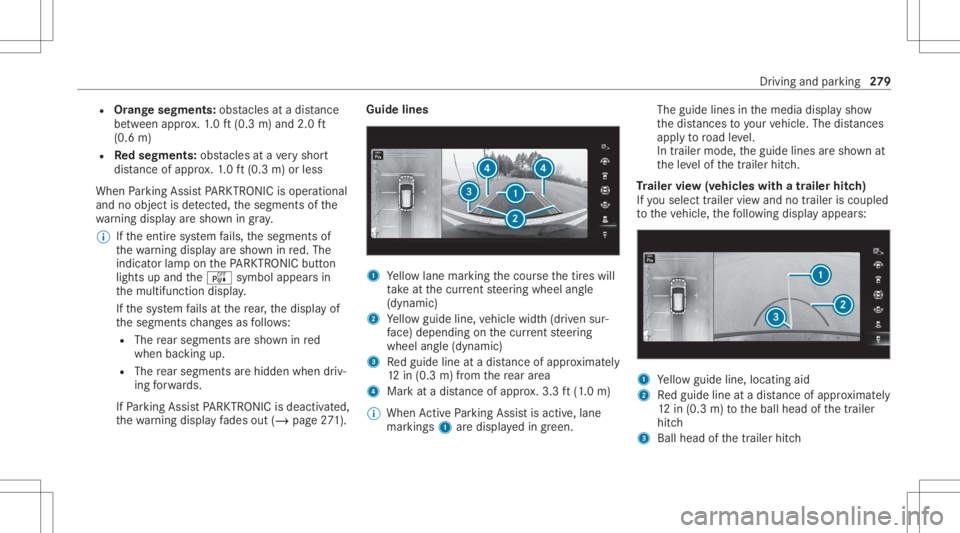
th ewa rning displa yfa des out(/ page27 1). Guide
lines 1
Yello wlane markingth ecour sethetir es will
ta ke atthecur rent steer ing wheel angle
(dynamic)
2 Yello wguide line,vehicle width(dr iven sur‐
fa ce) dep endi ngon thecur rent steer ing
wheel angle(dynamic)
3 Redguide lineatadis tance ofapprox imat ely
12 in(0. 3m) from there ar area
4 Markat adis tance ofappr ox.3.3 ft(1.0 m)
% When ActivePa rking Assistis act ive, lane
mar kings1 aredispla yedin green. The
guide linesinthemedia displaysho w
th edis tances toyour vehicle. Thedistances
ap ply toroad leve l.
In trailer mode, theguide linesaresho wnat
th eleve lof thetrailer hitch.
Tr aile rvie w(vehic leswith atraile rhitc h)
If yo usele cttrailer viewand notrailer isco upled
to theve hicle, thefo llo wing displa yappear s: 1
Yello wguide line,locat ingaid
2 Redguide lineatadis tance ofapprox imat ely
12 in(0. 3m) totheball head ofthetra iler
hitc h
3 Ball head ofthetrailer hitch Dr
iving andparking 27
9
Page 286 of 682
#
Payatt ention toobject sand other road
user s. #
Wher enec essar y,stop theve hicle or
cancel thepar king procedur ewit h
Ac tivePa rking Assist. #
If,forex am ple, thePlease Engage Reverse
Gear messag eappear sin themedia display:
select thecor responding transmission posi‐
tion.
The vehicle drives intoth eselect edpar king
space.
On com pletion ofthepar king procedur e,the
Parking AssistFinished, TakeContro lof Vehicle
displa ymessag eappear s.Fu rther maneuv ering
ma yst ill be nec essar y. #
Aftercom pletion ofthepar king procedur e,
saf eguar dth eve hicle agains tro lling away.
When requ ired bylegalrequ iremen tsor local
con dition s:tur nth ewheels towa rdsth ecurb.
% Youcan stop theve hicle andchang eth e
tr ans missi on positio ndu ring thepar king pro‐
cedur e.The system then calculat esane w
ve hicle path.The parking procedur ecan th
en be con tinued. Ifno newvehicle pathis
av ailable, thetransmission positionwillbe
ch ang edagain. Ifth eve hicle hasnotye t
re ac hed thepar king space, thepar king pro‐
cedur ewill becanc eled, should age ar be
ch ang ed.
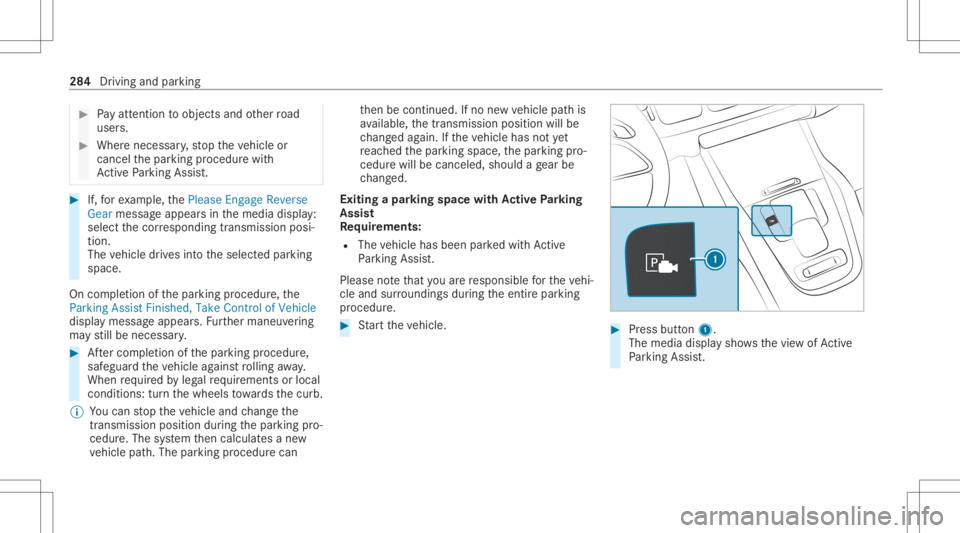
Exit ingapa rking spacewit hAc tiv ePa rking
Assis t
Re quirement s:
R The vehicle hasbeen parkedwit hAc tive
Pa rking Assist.
Please note that youar ere sponsible forth eve hi‐
cle and surround ingsdur ing theent ire par king
pr ocedur e. #
Startth eve hicle. #
Press butt on1.
The media displaysho wsthevie wof Active
Pa rking Assist. 28
4
Drivin gand parking
Page 291 of 682
Tr
af fic Sign Assis t Fu
nction ofTraf fic Sign Assis t Tr
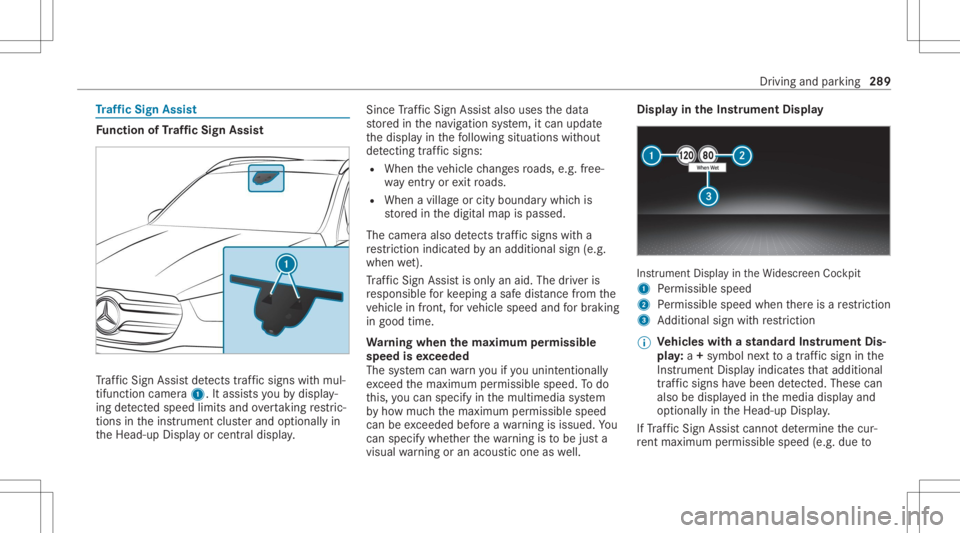
af fic Sign Assistdetects traf fic sig ns with mul‐
tifunction camera1. Itassi stsyo uby displa y‐
ing detected spe edlimits andovertakin gre stric‐
tions intheins trument clusterand optionally in
th eHead-up Displayor cent raldispla y. Since
Traf fic Sign Assistalso uses thedat a
st or ed inthena vig ation system, itcan updat e
th edispla yin thefo llo wing situat ionswithout
de tecting traf fic sig ns:
R Whe nth eve hicle chang esroads, e.g.fr ee‐
wa yen try or exitro ads.
R When avillag eor cityboun darywhic his
st or ed inthedigit almap ispassed.
The camer aalso detects traf fic sig ns with a
re striction indicated byan addit ionalsign (e.g.
when wet).
Tr af fic Sign Assistisonl yan aid. Thedriver is
re sponsible forke eping asaf edis tance from the
ve hicle infront, forve hicle speed andforbr aking
in good time.
Wa rning when thema xim um permis sible
speed isexc eeded
The system can warnyouif yo uunin tentio nally
exc eed themaximum permissible speed.Todo
th is, youcan spec ifyinthemultimedia system
by howmuc hth emaximum permissible speed
can beexc eeded beforeawa rning isissued. You
can specify whether thewa rning isto be justa
visual warning oran acous ticone aswell. Displa
yin theIns trum ent Displa y In
stru ment Displa yin theWi descr eenCockpit
1 Perm issible speed
2 Perm issible speedwhenther eis are striction
3 Addition alsign withre striction
% Ve
hicl eswith ast andar dIns trument Dis‐
pla y:a+ symbo lne xt to atraf fic sig nin the
Ins trument Displayindicat esthat addit ional
traf fic sig ns have been detected. Thesecan
al so be displ ayed inthemedia displayand
op tion ally intheHead-up Display.
If Traf fic Sign Assistcanno tde term ine thecur‐
re nt ma ximu mperm issible speed(e.g.dueto Dr
iving and parking 289
Page 300 of 682
mum
speed of62 mph(1 00 km/h) forre ason s
con cerningth eoper ating permit. This also
applies incount ries inwhic hth eper missible
maximum speedforve hicle/tr ailercombinations
is abo ve62 mph(1 00 km/h).
Ve hicl eswith AIRMA TICorE-AC TIVE BODY
CONT ROL:ifth esoc ketof thetra iler hitchis
occupied, e.g.byatrailer orrear bicy clerack ,
th eve hicle issetto thenor mal leve lre ga rdless
of thedr ive pr og ram at speed sgr eat erthan
19 mp h(30 km/h). At
tac hin gth eball neck &
WARNIN GRisk ofacci dent andinjury
due toan incorrectl yins talled ballcou‐
pling
If th eball coupling isno tins talled and
eng aged cor rectly ,it ma ybeco medetach ed
dur ing trav el and endang erother road user s.
Ther eis arisk offata linj ury. #
Installand secur eth eball coupling as
descr ibedintheball coupling manufac‐
tur er's installation instruct ions . #
When theball coupling hasbeen instal‐
led, ensureth at itis cor rectly secu red
bef oreev erytrip. &
WARNIN GRisk ofacci dent dueto an
inc orrectl yins talled and secur edball
couplin g
If th eball coupling hasnotbeen correctly
ins talled and secur ed,thetra iler can become
de tach ed. #
Installand secur eth eball coupling as
descr ibedintheball coupling manufac‐
tur er's installation instruct ions . #
When theball coupling hasbeen instal‐
led, ensureth at itis cor rectly secu red
bef oreev erytrip. Re
quirement s:
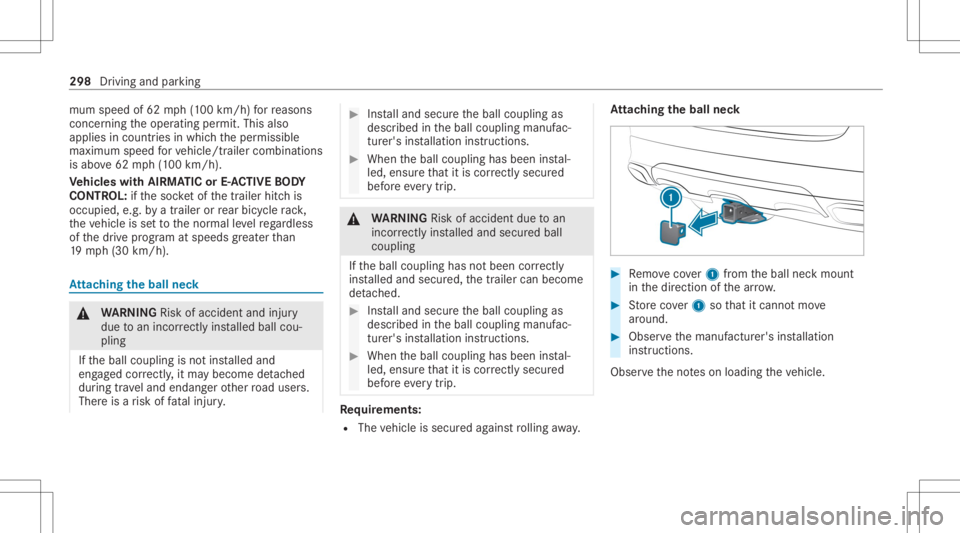
R The vehicle issecur edagains tro lling away. At
tac hin gth eball neck #
Remo vecover1 from theball neckmount
in thedir ect ion ofthear row . #
Storeco ver1 sothat itcan notmo ve
ar oun d. #
Obse rveth emanuf acturer'sinstallation
ins truct ions .
Obser vetheno teson loadi ngtheve hicle. 298
Driving andparking
Page 301 of 682
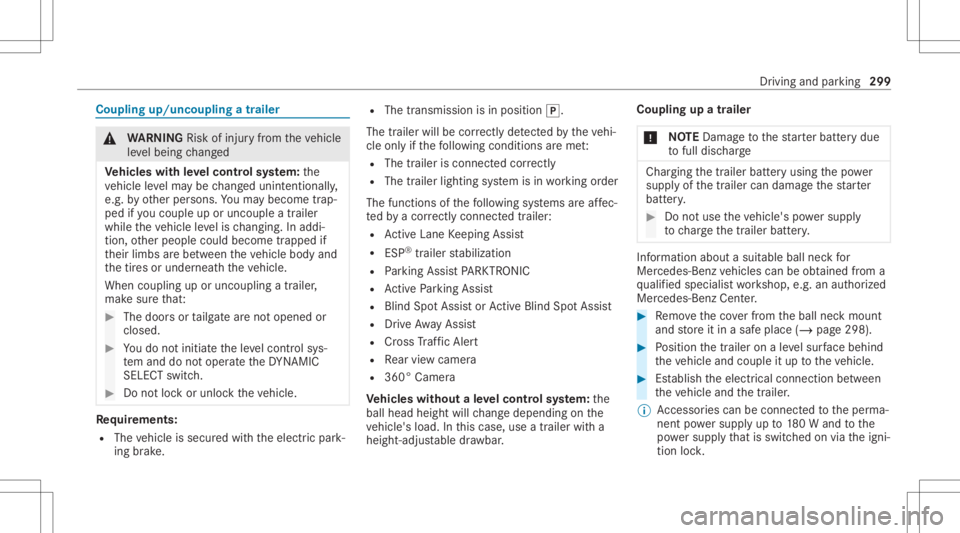
Coup
lingup/uncou plingatrailer &
WARNIN GRisk ofinju ryfrom theve hicle
le ve lbeing chang ed
Ve hicl eswith leve lcontr olsystem: the
ve hicle leve lma ybe chang edunin tentio nally,
e.g. byother persons. Youma ybec ome trap‐
ped ifyo uco uple uporunc ouple atrailer
while theve hicle leve lis ch ang ing.In addi‐
tio n,other people couldbecome trapped if
th eir limbs arebe tween theve hicle body and
th etir es orunder neathth eve hicle.
When coupling uporuncoupling atrailer ,
mak esur eth at: #
The door sor tailg atear eno topen edor
clos ed. #
Youdo notini tiat eth eleve lcon trol sys‐
te m and donotoper ateth eDY NA MIC
SELE CTswitc h. #
Donotloc kor unloc kth eve hicle. Re
quirement s:
R The vehicle issecur edwithth eelectr icpar k‐
ing brak e. R
The transmission isin position 005D.
The trailer willbecor rectly detected bytheve hi‐
cle onlyif th efo llo wing condition sar eme t:
R The trailer isconn ectedcor rectl y
R The trai le rlighti ngsystem isin wo rking order
The func tionsof thefo llo wing systems areaf fec‐
te dby acor rectl yconnect edtrai le r:
R ActiveLa ne Keeping Assist
R ESP®
tra iler stabiliz ation
R Parking AssistPA RK TRONI C
R ActivePa rking Assist
R Blin dSpo tAss istor ActiveBli nd Spo tAssi st
R Drive Aw ayAssi st
R Cross Traf fic Aler t
R Rear vie wcam era
R 360° Camer a
Ve hicl eswithout aleve lcontr olsystem: the
ball head height willchang edepen dingon the
ve hicle's load.Inthis case, useatrailer witha
height -adjustable draw bar . Coupling
upatrailer
* NO
TEDama getothest ar terbatt erydue
to full disc harg e Cha
rging thetra iler batt eryusing thepo we r
supply ofthetra iler can damag eth est ar ter
batt ery. #
Donotus eth eve hicle's powe rsupp ly
to charge thetrailer battery. Inf
ormation abouta suit ablebal lnec kfo r
Mer cedes-Ben zve hicles canbeobt ained from a
qu alif ied spec ialistwo rkshop, e.g.anaut hor ized
Mer cedes-Benz Center. #
Remo vetheco verfr om theball neckmount
and stor eit in asaf eplace (/page298). #
Position thetra iler onaleve lsur face beh ind
th eve hicle andcouple itup totheve hicle. #
Establish theelectr icalconnect ionbetween
th eve hicle andthetra iler .
% Access oriescan beconnect edtotheper ma‐
nen tpo we rsupp lyup to180W and tothe
po we rsupp lythat isswit ched on via theigni‐
tion lock. Dr
iving and parking 299
Page 305 of 682
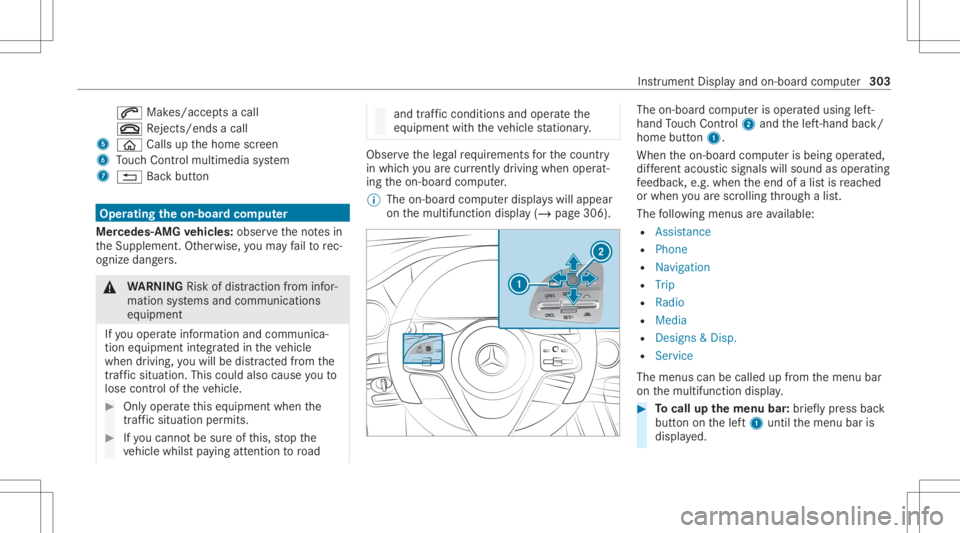
0061
Makes/accep tsacall
0076 Rejects /end sa cal l
5 00E2 Calls up thehome screen
6 Touc hCon trol mult imed iasystem
7 0038 Backbutt on Oper
ating theon-boa rdcom puter
Mer cede s-AMG vehicl es:obse rveth eno tesin
th eSupplement .Ot her wise, youma yfa ilto rec‐
ogni zedangers. &
WARNIN GRisk ofdist ra ction from infor‐
mati onsystems andcomm unication s
eq uipment
If yo uoper ateinf ormat ionand comm unic a‐
tio neq uipme ntintegratedin theve hicle
when driving, youwill bedistract ed from the
tr af fic situ ation. Thiscou ldalso cau seyouto
lose control of theve hicle. #
Onlyoper ateth is eq uipmen twhen the
tr af fic situ ation per mits. #
Ifyo ucan notbe sur eof this, stop the
ve hicle whilstpa ying attention toroad and
traffic condi tions andoperate the
eq uipment withth eve hicle statio nary. Obser
vetheleg alrequ iremen tsforth ecount ry
in whic hyo uar ecur rently drivi ng when operat‐
ing theon- boar dcom puter.
% The on-boar dcom puterdispla yswill appear
on themultifunc tiondispla y(/ page306). The
on-boar dcom puterisoper ated using left-
hand Touc hCon trol 2 and thelef t-hand back/
home button1.
When theon- boar dcom puterisbeing operated,
dif fere nt aco ustic signa lswillsou ndasoperati ng
fe edbac k,e.g. when theend ofalis tis reac hed
or when youar esc rolling thro ugh alis t.
The follo wing menusareav ailable:
R Assist anc e
R Phon e
R Navi gation
R Trip
R Radio
R Media
R Design s& Dis p.
R Service
The men uscan becalle dup from themenu bar
on themultifunc tiondispla y. #
Tocall upthemenu bar:brief lypress back
butt ononthelef t1 until themenu baris
displa yed. Ins
trument Displayand on-boar dcom puter 303
Page 312 of 682
Callin
gup navig ation instruct ions ontheon-
boar dcom puter On-boar
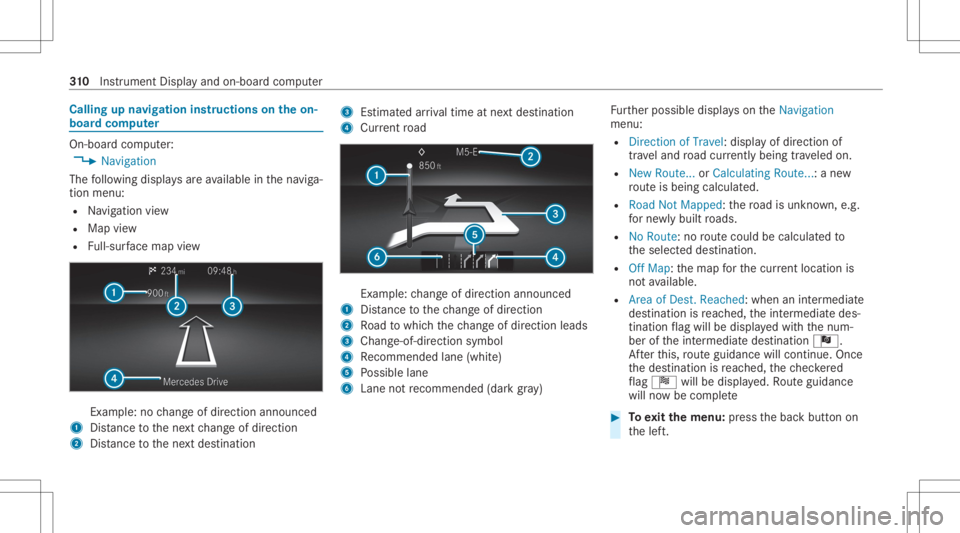
dcom puter:
4 Navigation
The follo wing displa ysareav ailable inthena vig a‐
tion menu:
R Navig ation view
R Map view
R Full-sur face map view Ex
am ple: no chang eof dir ect ion ann oun ced
1 Distance tothene xt chang eof dir ect ion
2 Distance tothene xt des tinat ion 3
Estimat edarriva ltim eat next des tination
4 Current road Ex
am ple: chang eof dir ect ion ann oun ced
1 Distance tothech ang eof dir ect ion
2 Road towhic hth ech ang eof dir ect ion leads
3 Chan ge-of-d irection symbo l
4 Recomme ndedlane (whit e)
5 Possible lane
6 Lane notre comme nded(darkgray ) Fu
rther possible displayson theNavigation
menu:
R Direc tionofTravel: displayof dir ect ion of
tra veland road cur rentl ybe ing trave led on.
R New Route. ..or Calculatin gRoute. ..:a ne w
ro uteis bein gcalc ulated.
R Road NotMappe d:th ero ad isunk nown, e.g.
fo rne wly builtro ads.
R NoRout e: no routeco uld becalc ulatedto
th eselect eddes tinat ion.
R Off Map: themap forth ecur rent locati onis
no tav ailable.
R Area ofDe st.Reach ed:when anintermedi ate
des tinatio nis reac hed, theint ermediat edes‐
tinat ionflag will bedispla yedwit hth enum‐
ber oftheint ermediat edes tinat ionÎ.
Af terth is, routeguidan cewill continue .On ce
th edes tinat ionisreac hed, thech eckered
fl ag Í willbedispla yed. Ro uteguidan ce
will nowbe comp lete #
Toexitth emenu :pr ess thebac kbutt onon
th elef t. 31
0
Instrument Displayand on-boar dcom puter
Page 313 of 682
Ve
hicl eswith theMB UX multim edia system:
Yo ucan also star tna vig atio nto one ofthe
re cent destina tions ontheNavigation menu: #
Press thelef t-hand Touc hCon trol. #
Toselect ades tinat ion:swipe upwards or
do wn wardson thelef t-hand Touc hCon trol. #
Press thelef t-hand Touc hCon trol.
Ro uteguidan cewill star t.
If ro uteguidan cehas already been activat ed,
a qu erywill appear askingwhether youwish
to end thecur rent routeguidan ce. #
Select Yes. #
Press thelef t-hand Touc hCon trol.
Ro uteguidan cewill star t. Select
ingradio station susin gth eon-boa rd
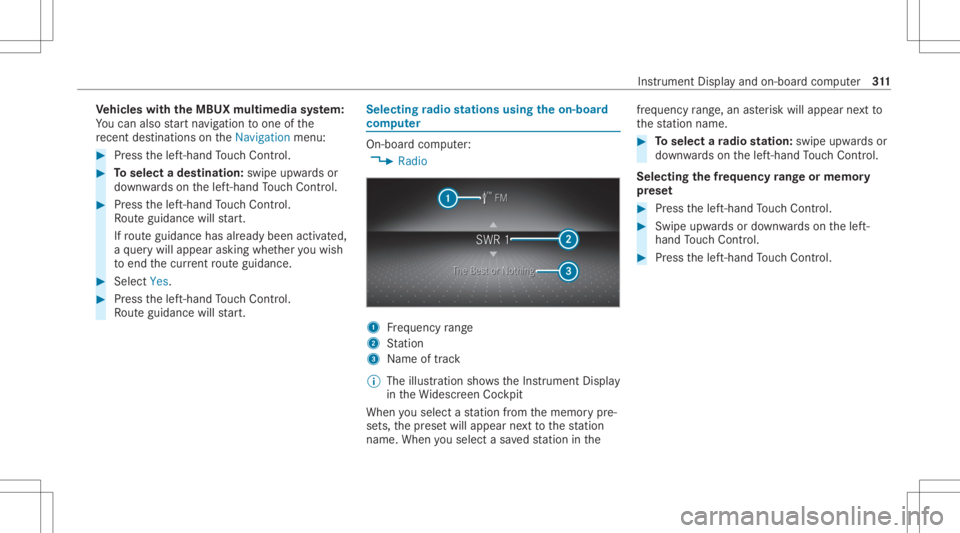
com puter On-boar
dcom puter:
4 Radio 1
Freq uency rang e
2 Statio n
3 Name oftrac k
% The illus tration showstheIns trument Display
in theWi descr eenCockpit
When yousele ctast atio nfrom thememor ypr e‐
se ts, thepr ese twill appear next to thest atio n
nam e.When yousele ctasa ve dstatio nin the fr
eq uency rang e, an asterisk will appea rne xt to
th est atio nnam e. #
Toselect ara dio station :swi peupw ards or
do wn wardson thelef t-hand Touc hCon trol.
Select ingthefreq uency rang eor memor y
pr ese t #
Press thelef t-hand Touc hCon trol. #
Swip eupw ards ordown wardson thelef t-
hand Touc hCon trol. #
Press thelef t-hand Touc hCon trol. In
stru ment Displa yand on-boar dcom puter 31
1
Page 318 of 682
No
teson oper ating safety &
WARNIN GRisk ofdist ra ction from infor‐
mati onsystems andcomm unication s
eq uipment
If yo uoper ateinf ormat ionand comm unic a‐
tio neq uipme ntintegratedin theve hicle
when driving, youwill bedistract ed from the
tr af fic situ ation. Thiscou ldalso cau seyouto
lose control of theve hicle. #
Onlyoper ateth is eq uipmen twhen the
tr af fic situ ation per mits. #
Ifyo ucan notbe sur eof this, stop the
ve hicle whilstpa ying attention toroad
and traffic condi tions andoperate the
eq uipment withth eve hicle statio nary. &
WARNIN GRisk ofan acci dent from
ope rating mob ile comm unicati onequip ‐
ment while th eve hicle isin mo tion
Mobile communication sde vices distract the
dr iver from thetraf fic situ ation. Thiscou ld al
so cau sethedr iver tolose control of the
ve hicle. #
Asthedr iver ,onl yoper atemobile com‐
municat ionsdevices when theve hicle is
st atio nary. #
Asave hicle occupant, onlyuse mobile
communication sde vices inthear eas
int ended forth is pur pose, e.g.inthe
re ar passe nger com partment . &
WARNIN GRisk ofinju rydue toobject s
being stowe dincor rectl y
If obje ctsintheve hicle interior arestowe d
inc orrectly ,th ey can slide orbe throw n
ar oun dand hitvehicle occupants. Inaddi‐
tion, cupholder s,open stow agespac esand
mobi lephon ere cep tacle scanno tal wa ys
re tain all obje ctsth ey cont ain.
The reisarisk ofinjur y,par ticular lyin the
ev ent ofsudden braking orasudden chang e
in dir ect ion. #
Alw aysst ow object sso that they can‐
no tbe throw nar ou nd insuch situa‐
tions. #
Alw aysmak esur eth at obj ect sdo not
pr otru de from stow agespac es,lugg age
ne ts or stow agene ts. #
Close theloc kable stow agespac es
bef orest ar tin gajo ur ne y. #
Alw aysst ow and securehea vy,har d,
poin ted, shar p-edg ed,fragile orbulky
objec tsinthetrunk/ loadcompartmen t. Fo
ryo ur ow nsa fety,al wa ys obser vethefo llo w‐
ing point swhen operatingmobile communic a‐
tion seq uipmen tand espec iallyyo ur voice con ‐
tr ol system:
R Obser vetheleg alrequ iremen tsforth ecoun‐
tr y in whic hyo uar edr ivin g.
R While drivin g,on lyop eratemobi lecom mun i‐
cat ionseq uipme ntand your voice con trol
sy stem when thetra ffic con dition sper mit it.
Yo uma yot her wise bedistract ed from the
tr af fic condi tions andcausean acci dent,
inju ring yourself and other s. 31
6
Voice Cont rolSy stem
Page 334 of 682
Vo
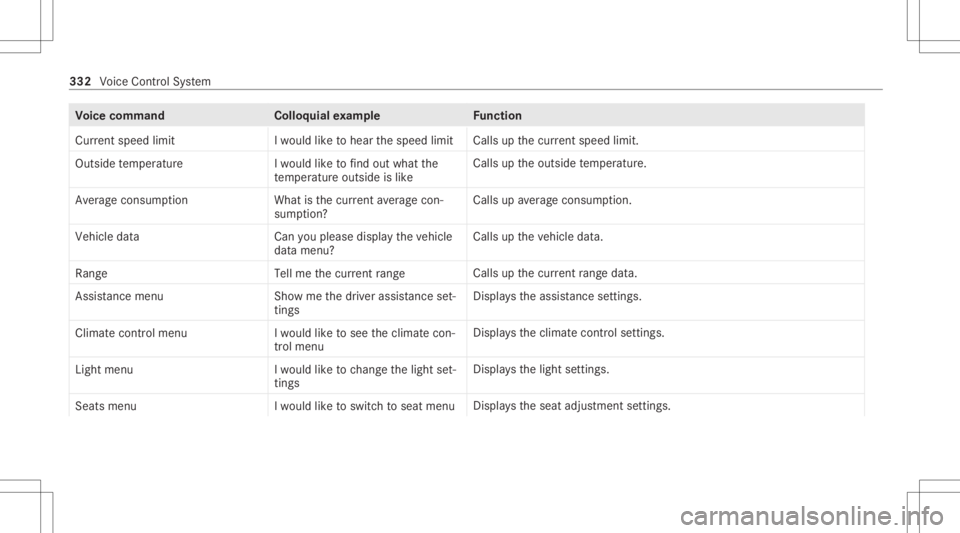
ice comm and Colloquialexam ple Function
Current speedlimit Iwould liketohear thespeed limit Calls
upthecur rent spe edlimit.
Ou tsid etemp erature Iwo uld like tofind outwh atthe
temp erature outsid eis like Ca
lls up theoutside temp eratur e.
Aver ageconsumption Whatisthe curren taverage con-
sumption ? Calls
upave rage consu mption.
Veh icleda ta Canyo uplea se disp laythe vehicle
da ta menu ? Ca
lls up theve hicle data.
Range Tellmethe current range Call
sup thecur rent rang eda ta.
Assi stance menu Showmethe driver assista nce set-
ting s Dis
play sth eassis tance settings .
Cl ima tecontro lmenu Iwo uld like tosee theclima tecon-
trol menu Disp
lays theclimat econ trol settings.
Light menu Iwould liketochange thelight set-
ting s Displa
ysthelight settings.
Seats menu Iwould liketoswitch toseat menu Displa
ystheseat adjus tmentse ttings. 332
Voice Cont rolSy stem