wheel MERCEDES-BENZ GLS 2020 Manual PDF
[x] Cancel search | Manufacturer: MERCEDES-BENZ, Model Year: 2020, Model line: GLS, Model: MERCEDES-BENZ GLS 2020Pages: 682, PDF Size: 23.3 MB
Page 315 of 682
wa
rdson thelef t-hand Touc hCon trol to
select thedesir edtelephon enumb er. #
Press thelef t-hand Touc hCon trol.
The telephon enumb erwill bedialed.
The follo wing displa ysma yapp ear instead ofthe
te lephon enumb ersdialed:
R Please Wait:th eapplication isstar tin g.Ifa
Blue tooth®
connecti ontothemobile phone
is no tes tablished, themenu forau thor izing
and conn ectin gamobile phonewillbedis‐
pla yedon themultimedia system
(/ page42 4).
R Updating Data…:th ecall listis being upda‐
te d.
R Import ingCont acts: contacts arebei ng
im por tedfrom themobile phoneorast or ag e
medium.
Ac cep tingor rejec tingan inco min gca ll
Ve hicl eswith Head-up Display:when you
re cei veacall, theInc oming Callmessag ewill
appear ontheHead-up Display. #
Swi peupwa rdsor down wardson thelef t-
hand Touc hCon trol and select0061 (Acc ep t)
or 0076 (Reject ). #
Press thelef t-hand Touc hCon trol.
Yo uma yacc eptor reject thecall using the0061
or 0076 buttononthesteer ing wheel. Se
tting theHead -upDispla yusing theon-
boar dcom puter On-boar
dcom puter:
4 HEAD-UP DISPLA Y
The follo wing Head- upDisp lay se ttings canbe
selec ted:
R Position
R Brightness
R Displa ys
R Messag es
R Assis tance status
R Telephon e
R Audio
R Voice Cont rolSy stem #
Tochoose ase tting: swipe totheright on
th elef t-hand Touc hCon trol.
Se tting smen u5 will besele cted. #
Tocall uptheSe ttings menu :pr ess the
lef t-hand Touc hCon trol. #
Toadjus tth eposit ion:swipe upwards or
do wn wardson thelef t-hand Touc hCon trol. #
Toadjus tth ebr ight ness: swipe tothelef t
or right onthelef t-hand Touc hCon trol. #
Tosetmessag es,assis tance status, tele‐
phone, audioand theVo ice Contr olSy s‐
te m: pres sth elef t-hand Touc hCon trol.
The listof setting optio ns will bedispl ayed. #
Swipe upwards ordown wardson thelef t-
hand Touc hCon trol and selectase tting by
pr essing thelef t-hand Touc hCon trol. In
stru ment Displa yand on-boar dcom puter 31
3
Page 319 of 682
R
Ifyo uuse thevo ice con trol system inan
emer gency your voice can chang eand your
te lephon ecall, e.g.anemer gency call,can
th er eb ybe unnec essarilydela yed.
R Famili arize yourself withth evo ice con trol
sy stem func tionsbef orest ar tin gth ejour ney.
R Com plywit hth eloading guidelines
(/ page12 7). Oper
ation Ov
ervie wof oper ating themu ltifunct ion
st eer ing wheel The
Voice Cont rolSy stem isoper ational approx‐
imat elyth irty seco ndsafte rth eignition is
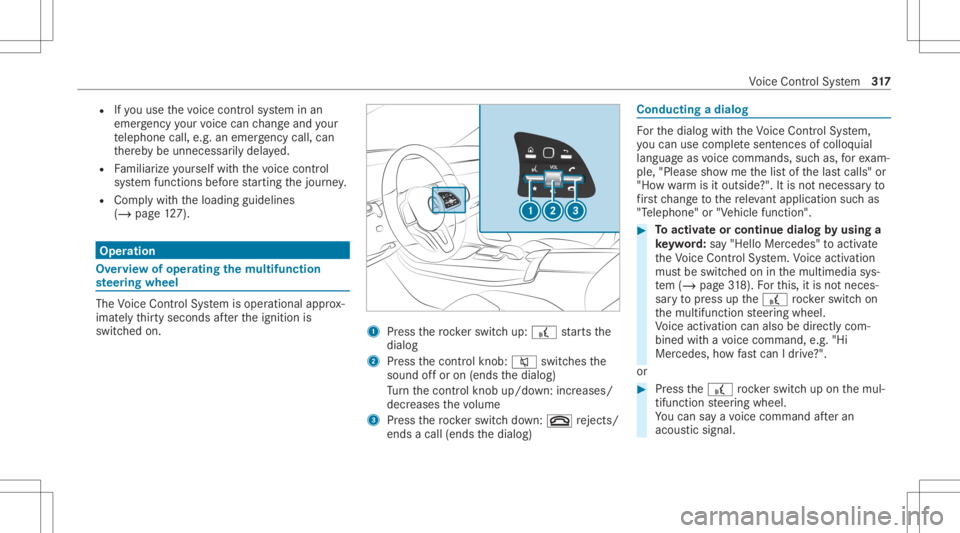
switc hedon. 1
Press thero ck er switc hup: £ star ts the
dialog
2 Press thecon trol kn ob: 0063 switchesthe
sound offor on (ends thedialog)
Tu rn thecon trol kn ob up/do wn:increases/
decr eases thevo lume
3 Press thero ck er switc hdo wn: 0076 rejects /
end sa cal l(e nds thedialog) Conducting
adialog Fo
rth edialog withth eVo ice Cont rolSy stem,
yo ucan usecomp lete sent ences ofcolloq uial
langua geasvoice com mand s,suc has, forex am‐
ple, "Please showme thelis tof thelas tcalls" or
"Ho wwa rm isitouts ide?". Itis no tnec essar yto
fi rs tch ang eto there leva nt applica tionsu ch as
"T eleph one" or"Vehic lefun ction ". #
Toactiv ateor continue dialogby using a
ke yw ord: say"Hello Mercedes" toact ivat e
th eVo ice Cont rolSy stem. Voice activation
mus tbe switc hedoninthemultimedia sys‐
te m (/ page31 8).Fo rth is, itis no tnec es‐
sar yto press upthe£ rock er switc hon
th emultifunc tionsteer ing wheel.
Vo ice activation canalso bedirect lycom ‐
bined withavo ice com mand ,e.g. "Hi
Mer cedes ,ho wfast can Idr ive?" .
or #
Press the£ rock er switc hup on themul‐
tifun ction steer ing wheel.
Yo ucan saya vo ice com mand afte ran
acou stic sign al. Vo
ice Cont rolSy stem 317
Page 320 of 682
#
Tocor rect an ent ry:sa yth eCorrect ion
vo ice com mand . #
Toselect anentr yfrom theselecti onlist:
sa yth eline number orthecon tents. #
Tobrows eth eselection list:sa yth eNext
or Back voice com mand . #
Tointerru pt thedia log: sayth ePause voice
com mand .
The dialog canbecon tinued withth e"Hello
Mer cedes" voice com mand orby pressing up
th e£ rock er switc hon themultifunc tion
st eer ing wheel. #
Tojum pto thepr eceding dialog: sayth e
Back voice com mand . #
Tojum pbac kto theto pdial ogleve l:sa y
th eHome voice com mand . #
Tocancel thedia log: sayth eClose voice
com mand orpress the0063 or0076 button
on themultifunc tionsteer ing wheel. #
Tointerru pt avo ice outp ut:speak inthe
middl eof avo ice dialog whenthesy stem is
st ill answ ering.
The voice output isshor tened andthecon ‐
clusion isreac hed morequ ickl y.
% The Speak During VoiceOutput option must
be switc hedoninthemultimedia system for
th is (/ page31 8). Ov
erview ofoper able functions intheVo ice
Contr olSy stem Yo
ucan usetheVo ice Cont rolSy stem tooper ate
th efo llo wing functionsdepen dingontheve hicle
eq uipment :
R Telephon e
R Text mes sage s
R Navig ation
R Address book
R Radio
R Media
R Vehicle functions
R Weather Fu
llfunc tionality isonl yav ailable foryo uwit h
act ivatio nof onlinevo ice con trol (/ page31 8). No
teson thelangu agese tting Yo
ucan chang eth elanguag eof theVo ice Con‐
tr ol Sy stem viathesy stem languag ese ttings. If
th ese tsy stem languag eis no tsuppor tedby the
Vo ice Cont rolSy stem, English will beselec ted.
The Voice Cont rolSy stem isavailable inEn glish,
Fr enc h,Po rtuguese andSpan ish. Se
tting theVo ice Contr olSy stem (mu ltim e‐
dia system) Re
quirement s:
R Foron line voice contr ol:your vehicle is
conn ectedwithyo ur Mer cedesme user
acc oun t(/ page44 5).
R Thereis an Inte rn et connecti on
(/ page 449).
R Foron line use ofcontac ts: online voice
con trol isact ivat ed. 31
8
Voice Cont rolSy stem
Page 321 of 682
Multimedia
system:
4 © 5
Set ting s5
System
5 LINGUA TRONIC
Switc hingvoice activ ation oftheVo ice Con‐
tr ol Sy stem on/of f #
Sele ctVoic eAc tivation "HeyMercedes".
Dep endingonthepr ev ious status ,th efunc ‐
tion isactiv ated ordeactiv ated.
When thefunc tion isactiv e,the"Hi
Mer cedes" voice com mand canactivat eth e
dialog.
Ac tiv atin g/deac tivatin gon line voice contr ol #
ActivateOnl ine VoiceControl .
% Online voice con trol isact ivat ed atthefa c‐
to ry. #
Select Onli neVoi ceControl Subscr..
Yo uwill beconn ect edwithth eMer cedes me
por tal. #
Activateonl ine voice con trol intheMer cedes
me portal. Ac
tiv atin gco ntacts foron line use #
Select Contacts forOnl ine Use .
Wh enthefunc tion isactiv e,con tacts willbe
fo und moreeasil yand accuratelyusin gvo ice
in put. Thequalit yof theenunc iation ofcon ‐
ta ct name sby thesy stem will also be
im prov ed.
Switc hingonvoice interru ption #
Selec tSpeak DuringVoice Output .
If th efunc tion isactiv e,acomm andcanbe
int erjec teddur ing voice output ofthesy s‐
te m. Usin
gth eVo ice Contr olSy stem effectiv ely Vo
ice Contr olSy stem aud ible help functions Usin
gth ecor responding voice com mand syo u
re cei vethefo llo wing informatio nand assis tance
in thefo llo wing cases :
R Forop timal operatio n:sayth eVoice con-
trol tutor ialvoice com mand orcall upthe
Dig ital Op erator' sMa nua lwi th Could yougo
to theVoic eCon trol Sys tem tut orial pleas e?, fo
rex am ple. Thefullextent oftheDigit al
Oper ator's Manual isavailable whentheve hi‐
cle isstatio nary.Her eyo ucan also find
ex planat oryvideos whichint roduce youto
th efunc tionsof theVo ice Cont rolSy stem.
R Cur rent app lication: onthemultifunc tion
st eer ing wheel, press the£ rock er switc h
up and sayth eHelp voice com mand .Yo uwill
re cei vesugg estions andinformation about
oper ation oftheVo ice Cont rolSy stem forth e
cur rent applica tion.
R Conti nue ddial og:sa yth eHelp voice com ‐
mand during avo ice dialog. Foreve rystep of
th edialog youre cei vematc hinginformation.
R Speci fic fu ncti on:sayth evo ice com mand
fo rth edesir edfunc tion,e.g. with"Hello
Mer cedes, Ineed helpwithth era dio" orafte r
pr essing the£ rock er switc hon themulti‐
func tion steer ing wheel up,sayth eHelp for
the telephon evo ice com mand ,fo rex am ple. Vo
ice Cont rolSy stem 31
9
Page 337 of 682
%
Ifth eve hicle iseq uipped withth eMBUX in-
car assis tant, select edfunc tions ofthemul‐
timedia system can beoper ated con tact-fr ee
as wellas turnin gth ere adin glight onoroff
(/ page34 2).
Nu mer ous application, online services, services
and appsar eav ailable foryo u. Youcan call
th ese upusing thehome screen orusing buttons
5 and 6next to theto uc hpad.
Yo ucan convenient lycall upand add favo rite s
usin gth eß rock er switc hon thesteer ing
wheel orusing theß buttonnext to the
to uc hpad. Quick-acc ess inthehome screen and
in theapplications servetoselect functions
mor equ ickl y.
If yo uuse thelear nfunc tion ofthemultimedia
sy stem, youwill recei vesugg estions during oper‐
ation ofthemos tpr obable navig ation destina‐
tion s,media sources, radio statio nsand con‐
ta cts. Theconf iguratio nof thesugg estion sta ke s
place inyour profile. Youcan comp ileyour pro‐
fi le from various vehicle settin gsand settin gsof
th emultimedia system. Youcan creat eth emes
fo rva rious driving situations inthehome screen as
wellas using theß rock er switc hor the
ß button.
The Notificati ons Center coll ects incom ingnotifi‐
cati ons, e.g.abou tan available softwareupdat e.
De pen dingon thetype ofnotification itof fers
va rious actions. Youcan calluptheNo tification s
Cent eron thehome screen and intheapplica‐
tion menus.
Wi th theglobal searchintheve hicle youcan
sear chon-boar dacr oss man ycat egor iesaswell
as onlin ein theInt erne t.Yo ucan usetheglobal
sear chinthehome screen and intheno tifica‐
tion s.
Pr otection agains tth eft
This devic eis eq uipped withte ch nica lpr ov ision s
to protect itag ains tth eft. Fu rther information on
pr otect ion agains tth eftcan beobt ained from an
aut hor ized Mercedes- BenzCenter. No
teson themed iadisp lay Obser
vetheno teson car ing forth eint erior
(/ page492). Au
tomatic temp eratur e-cont rolled switc h-
of ffe atur e:ifth ete mp eratur eis toohigh, the
br ightn essisinitiall yre duced automatic ally.The
media displayma yth en switc hof fcom pletely for
a while.
% Ifyo uar ewe aring polar izedsun glasses ,it
ma ybe difficul tto read themultimedia sys‐
te m disp lay. MBUX
multimedia system 335
Page 351 of 682
Yo
ucan selectthepr ofile:
R When entering (/ page35 1)
R Using thehome screen (/page336)
The profile settings areactiv ated assoon asa
pr ofile isselect ed.
% When youcall upyour profile, thedr iver's
seat, steer ing wheel andoutside mirrors can
be set.
If yo ucall upyour profile when drivin gth en
th edr iver's seat position willnotbe adjus‐
te d.
Yo ucan cancelthese tting process withth e
fo llo wing actions :
R Tapon thePosition ingSeat andSteering
Wheel… Pleasetaptocanc el.warning on
th emedia display.
R Press one oftheseat operating buttons
in thedr iver's door . Pr
ofile cont ent
Depen dingontheve hicle equipment, thefo llo w‐
ing settings canbestor ed inyour profile, for
ex am ple:
R Driver' sseat ,st eer ing wheel andmirrorse t‐
tings
R Driver's seat memor y
R Radio (including statio nlis t)
R Lastdes tinatio ns
R Climat econ trol
R Ambien tlight ing
R DYNA MIC SELE CTI(individua l)
R Instrument Display,Hea d-up Display and
st yle (displa yst yle of themultimedia system)
R Themes, suggestion sand favo rite s
% Settings fordr iver assi stanc esy stems can‐
no tbe save din thepr ofile. Mer
cedes meconnect profile
If yo uuse apr ofile from Mer cedesme conn ect ,
th efo llo wing onlinefunc tionsar eav ailable, for
ex am ple:
R Youcan configur eth ese ttings intheve hicle
using theMer cedes meapp andthe
Mer cedes meportal.
R Youcan synchronize your profile on
Mer cedesme conn ect withth epr ofile inthe
ve hicle (/page35 1).
R Youcan add aper son alprofile pho tothat is
sho wnintheve hicle.
R Youcan take your profile and someof your
se tting swit hyo uin ne wvehicles.
Re quirement sfo rusi ng Mercedes mecon‐
nect profiles:
Fo rth eve hicle owner :
R Youha ve aMer cedesme user accoun t.
R The vehicle hasbeen connectedwithth e
user accoun t.
R The person alizatio nser viceis act ivat ed. MB
UX mult imed iasystem 34
9
Page 353 of 682
Selec
tingapr ofile
Multimedia system:
4 © 5
f Profiles
% When youcall upyour profile, thedr iver's
seat, steer ing wheel andoutside mirrors can
be set.
Yo ucan cancelthese tting process withth e
fo llo wing actions :
R Tapon thePosition ingSeat andSteering
Wheel… Pleasetaptocanc el.warning on
th emedia display.
R Press one oftheseat operating buttons
in thedr iver's door . #
Select apr ofile. #
Press the0076 buttontoconf irm themes‐
sag e.
The profile isloaded andactiv ated.
% Alternativ ely,th epr ofile can already be
select edwhen theve hicle isent ered
(/ page35 1).
Sync hronizing apr ofile
Re quirement s: R
Youha ve aMer cedesme user accoun t.
R The vehicle isconn ectedwithyo ur Mer cedes
me user accoun t.
R The person alizatio nser viceis act ivat ed on
Mer cedesme conn ect .
Mult imed iasystem:
4 © 5
f Profiles
5 General Setting s
Sync hroniz ation enables thefo llo wing:
R Youcan configur eth eve hicle settin gsusing
th eMer cedes meapp.
R The profile on Mer cedes meconnect andthe
pr ofile intheve hicle arealigned (profile man‐
ag ement). #
ActivateSyn chro nize Profiles Auto matica lly.
Th epr ofiles intheve hicle areaut omatically
sync hronized withth epr ofiles onMer cedes
me connect when theignition isswitc hedon
and off.
or #
Select Synchroniz eProfiles Now.
Af tersele cting this op tion ,th epr ofiles inthe
ve hicle aresync hronized withth epr ofiles on
Mer cedes meconnect .
% During sync hroniz ation thepr ofile listand
th epr ofile func tionsar ebloc ked.
% Noteon data protection: ifyo udo notwish
to shar eyo ur dat awit hMer cedesme, make
sur eth at theaut omatic synchroniz ation is
switc hedoffand donotselect Synchroniz e
Profiles Now.
Sho wing thepr ofile selecti onwhen entering
Re quirement s:
R Atleas tone profile has been creat ed.
Multim ediasystem:
4 © 5
f Profiles
If th eop tion isactiv ated, youcan seeapr ofile as
soo nas youget in. #
Selec tGener alSet tings. MBU
Xmultim ediasystem 35
1
Page 355 of 682
R
Select Nav igati on (Navigation ),to save
th eactiv ena vig ation settings inthe
th eme. #
Select Continue0048. #
Select anent ryscr een. #
Select Continue 0048. #
Select animag e. #
Enterthenames intoth eent ryfield and con‐
fi rm with0076. #
Tosave ath eme: selectSav e.
When thema xim um num berthat can be
sa ve dis reac hed: #
Select 0076from thepr om pt. #
Select ath eme that shoul dbe ove rwritt en.
The setting swh ich ar esa ve din theth eme
ar esho wn. #
Select Continue0048. #
Select additional settings whichar eto be
sa ve din theth eme.
R Select Audio, tosave theactiv eaudio set‐
ting sin theth eme. R
Select Navigation (Navigation ),to save
th eactiv ena vig ation settings inthe
th eme. #
Select Continue0048. #
Select anent ryscr een. #
Select Continue 0048. #
Select animag e. #
Enterthenames intoth eent ryfield and con‐
fi rm with0076. #
Tosave ath eme: selectSav e.
Cr eat ing using theß ß
rock er switc hor but ‐
to n #
Press and hold thebo ttom sect ionofthe
ß rock er switc hon thesteer ing wheel.
or #
Press and hold theß buttonnext to the
to uc hpad. #
Select 0081 CreateThem e.
The setting swhic har esa ve din theth eme
ar esho wn. #
Select Continue0048. #
Select additional settings whichar eto be
sa ve din theth eme.
R Select Audio, tosave theactiv eaudio set‐
ting sin theth eme.
R Select Navigation (Navigation ),to save
th eactiv ena vig ation settings inthe
th eme. #
Select Continue0048. #
Select animag e. #
Enterth enames intoth eent ryfield and con‐
fi rm with0076. #
Tosave ath eme: selectSav e.
Mod ifyin gth emes
Multi media system:
4 © #
When thehome screen issho wn, swipe up
until THEMES appear s. #
Press onath eme until theOPTIONS menuis
sho wn. #
Select Rename. #
Enterth ename. #
Select Save✓. MBUX
multimedia system 353
Page 358 of 682
#
Select Dele te.
The queryas towhe ther thesugg estion is
dele tedte mp orarily or per manent lyappear s. #
Ifth esugg estion shou ldbe sho wnagain
at alat er tim e:selec tNot Now. #
Ifth esugg estion shou ldno tbe sho wn
ag ain: selec tNev er. Fa
vo rite s Ov
ervie wof favo rite s
Fa vorite sof feryo uqu ick acc ess tofreq uently
use dapp lications. Itis possi bletocrea te 20
fa vo rite sin tota l.
Yo ucan selectfavo rite sfrom categor iesoryou
add favo rite sdir ectl yfrom anappli cation.
Calling upfavo rite s
In themed iadisp lay #
Tapon ©.
The home screen issho wn. #
Swipe upuntil FAVORITES issho wn. On
thest eer ing wheel ortheto uc hpad #
Press theß rock er switc hon thesteer ing
wheel down.
or #
Press theß buttonnext to theto uc hpad.
Ad ding favo rite s
Selec tingfavo rite sfrom categor ies #
Tapon © inthemedia display.
The home screen issho wn. #
Swipe upuntil FAVO RITES issho wn. #
Select 0081Create Favorite.
The categor iesaredispla yed. #
Select thecat egor y.
The favo rite sar edispla yed. #
Select afa vo rite .
The favo rite isstor ed atthene xt available
posit ion. #
Allposi tionsin thefa vo rite sar etak en:
conf irm themessag esho wnwithOK.
A lis tsho wsallthefa vo rite s. #
Select afa vo rite whic hshould beove rwrit‐
te n. Ad
ding afa vo rite from anapplicatio n
Ex am ples ofadd ingfrom anapp lication are:
R Saving acont act.
R Stor ing ara dio statio n.
R Adding amedia source.
R Saving ana vig ation destination.
R Adding anENE RGIZING comfortpr ogr am (if
av ailable). #
Tosave aco ntact asagl obal favo rite :
sel ect acont act(/ page 429) .
The details aredispla yed. #
Press onate lephon enumb erunt ilth e
OPTIONS menuissho wn. #
Select SaveasFavorite.
The cont actisadded asafa vo rite . #
Tosto reara dio station asagl obal favo r‐
it e: seta ra dio statio n(/ page46 5). #
Press onthera dio statio nunt ilth eOPTIONS
menu issho wn. #
Select SaveasFavorit e.
The radio statio nis added asafa vo rite . 356
MBUX multimedia system
Page 363 of 682
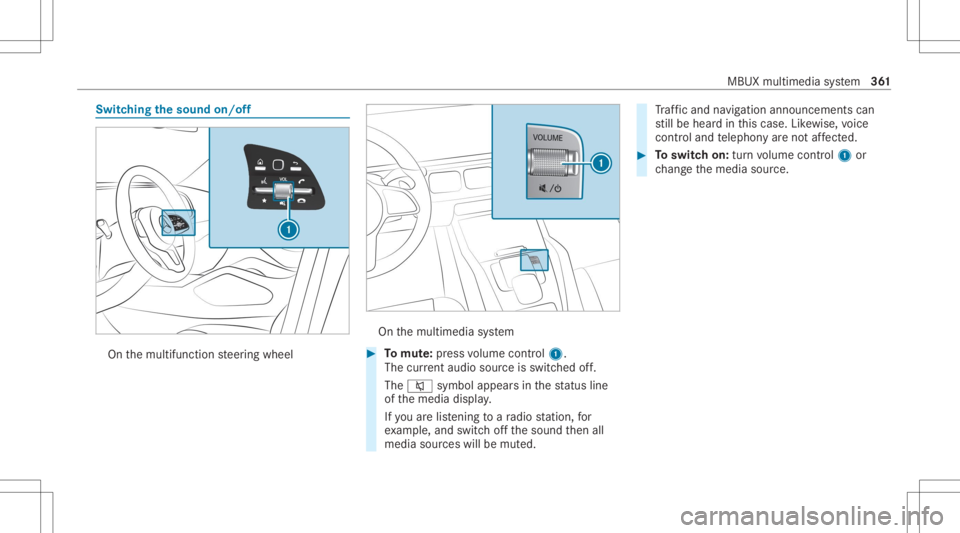
Switc
hingthesound on/off On
themultifunc tionsteer ing wheel On
themultimedia system #
Tomut e:pres svo lume control 1.
The current audio sou rceis switc hedoff.
The 0063 symbol appearsin thest atus line
of themedia display.
If yo uar elis tening toara dio statio n,for
ex am ple, and switchoffth esound then all
media sourceswillbemut ed. Tr
af fic and navig ation annou ncements can
st ill be hear din this case. Likewise, voice
con trol and telephon yar eno taf fect ed. #
Toswitc hon: turnvo lume control 1 or
ch ang eth emedia source. MBUX
multimedia system 36
1