reset MERCEDES-BENZ GLS 2020 Owners Manual
[x] Cancel search | Manufacturer: MERCEDES-BENZ, Model Year: 2020, Model line: GLS, Model: MERCEDES-BENZ GLS 2020Pages: 682, PDF Size: 23.3 MB
Page 118 of 682
%
This setting isavailable onlyforindivi dual
user profile s. Fo rth egues tpr ofile, auto‐
matic seatadjus tmentcann otbe switc hed
on oroff.Fu rther information aboutuser
pr ofiles (/ page348).
Ad jus tingdr iver' sse at and steer ing wheel
posit iontobody size
The vehicle calculat esasuit able driver's seat
and steer ing wheel position onthebasis ofthe
dr iver's body sizeandsets this dir ect ly. #
Tosetth eunit ofmea surement :selec tcm
or ft/in. #
Setth esize using thescale. #
Select Start Position ing.
The driver's seat andsteer ing wheel position
is adjus tedto thebody sizethat has been
se t.
% Ifth edr iver's seat andsteer ing wheel posi‐
tion calculat edbytheve hicle isno tpr actical
or comf ortable, itcan bemanuall ych ang ed
at anytim evia thecon trol butt ons.
The outside mirrors areno tse tvia this func ‐
tion .Ins tead, they have tobe setmanually
via theswitc hes. %
Youcan also maketh ese settings viathe
Mer cedes meportalfo ryo ur user profile. By
syn chronizi ngthepr ofiles intheve hicle and
th eMer cedes meconnect profiles, youcan
car ryove rth ese settings foryo ur vehicle.
Fu rther information aboutsynchronizing user
pr ofiles (/ page35 1).
Se tting theeasy entryand exitfeatur e #
Select Steering Wheel& Seat ,Steering
Whee lOnly orOff.
% Ifyo uuse anind ivid ual user profile and have
se tyo ur body size,this inf ormatio nis car ried
ove rfo rth eeasy entryand exitfeatur e.This
caus esthedr iver's seat andsteer ing wheel
to aut omat icallymo veintoth ecor rect pos i‐
tion (/page 350). Sel
ecting thema ssag epr og ram forthe fron t
se ats Mu
ltimed iasystem:
4 © 5
Comfort 5
Massage #
Select amassag epr ogr am . #
Startth epr ogr am forth edesir edseat 0065. #
Tosetth ema ssag eint ensit y:switc hHigh
Inten sityonoroff.
% Forth ere ar seat s,themassag epr og ram can
be sele cted on thefo llo wing device s(if avail‐
able):
R Onthere ar displa ys
The selection canbemade forth ere ar
seat son thesecon dand third row sof
seats.
R OntheMBUX rear table t
The select ionismade inthesame wayas
on there ar displa ysforth ere ar seat son
th esecon dro w of seat s. Re
setting seat settings Multimedia
system:
4 © 5
Comfort 5
Seat Comfort #
Select Reset. #
Select 00D1forth edesir edseat.
The settings forth eselect edseat arere se t. 11
6
Sea tsand stow ing
Page 270 of 682
2
light upcon tinuousl ywhen theve hicle
has finis hed lowe ring.
R Off-roa dleve l+2: theve hicle islowe red
to off-r oad leve l+1 .One indic ator lam p
2 light sup con tinuousl ywhen theve hi‐
cle has finis hed lowe ring.
R Off-roa dleve l+1: theve hicle islowe red
to thenor mal leve l.No indic ator lam p2
light sup when theve hicle hasfinis hed
lo we ring.
Yo ur sele ction issave d. The off-r oad leve lse t
re mains stor ed eve naf te rth eignition hasbeen
switc hedoff.
Se tting Off-road Assis t
Re quirement s:
R The vehicle isstatio nary
R The vehicle issetto off-r oad leve l1 or 2
R The Off-ro ad orOff-ro ad Plus (onlyve hicles
wit hOf f-road package )dr ive pr ogr am has
been select ed
R The ignit ionisswitc hedon
R Alldoor sand thehood areclosed R
The transmission isno teng aged inposition
005D
R Ther eis no trailer coupled
R The vehicle isoutdoor s
R The detected late ra linc linat ionoftheve hicle
mus tno texc eed appr ox.15 °
R The system iswit hin itsoper ating temp era‐
tur e
R The on-boar dvo ltag eis suf ficie ntly high
Mu ltimed iasystem:
4 © 5
Set ting s5
Assist ance
5 Offr oad Assist ant
Re covery mode
Re covery mode assiststh edr iver when pulling
aw ay on rough terrain, suchas san dor snow . #
Select Free DrivingAssi st. #
Select Start .
Re covery mode isactiv ated. #
Select Stoptostop reco very mode. Re
covery mode isau tomatical lydeactiv ated in
th efo llo wing situat ions:
R Youar eact uall ytra veling faster than 9mp h
(1 5 km/ h)
R Aftera ru nning timeof30 seco nds
R Itis de tected that an obj ect has hitthe
und erbody oftheve hicle hard
R Notall con dition sar eme t
% Further information onreco very mode
(/ page26 4).
Indiv idual wheelcon trol
Individ ualwhee lcontr olenabl estheve hicle leve l
to be setsepar ately foreac hwhee l. #
Select IndividualWhee lCtrl. . #
Setth eve hicle leve lfo rth edesir edwheel.
% Youcan also usetheto uc hdispl aytosetth e
le ve lfo rtw oor mor ewhee lsat thesame
time. #
Select Resettosetall wheels tothedef ault
se tting. 268
Driving andparking
Page 307 of 682
R
Spor t
R Progressive
R Unde rstated
R Stand ardDisp lays Sho
wing displa yco nten ton the inst ru men t
cl us ter
Ad dition aldispla ycon tent can also be sho wnon
th eins trument cluster.
% The displa ycont entontheins trument clus‐
te rada ptsto theto pic select edon themulti‐
media system. #
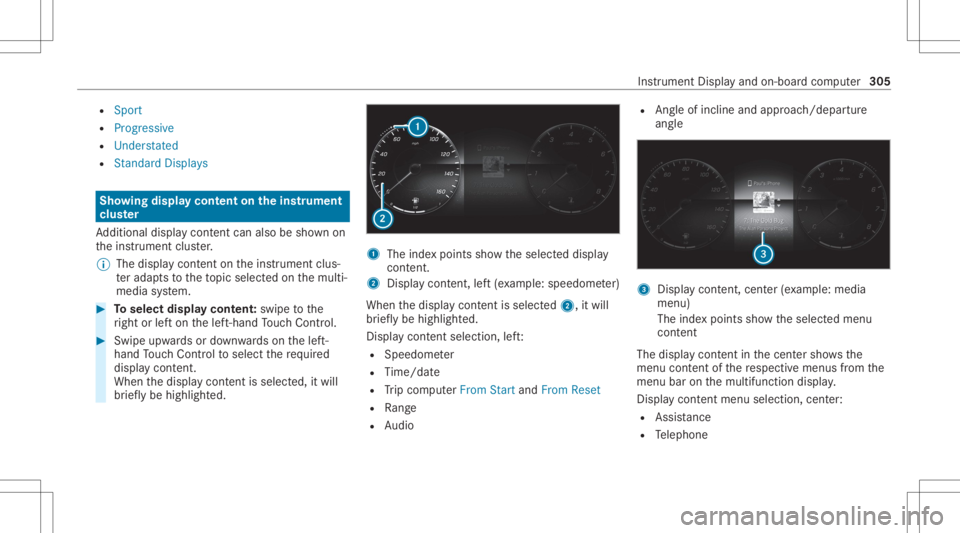
Toselect displaycont ent:swipe tothe
ri ght orlefton thelef t-hand Touc hCon trol. #
Swip eupw ards ordown wardson thelef t-
hand Touc hCon trol to select there qu ired
displa ycon tent.
Whe nth edispla ycon tent issel ect ed,it wi ll
br iefly be high lighted. 1
The inde xpoint ssho wtheselect eddispla y
con tent.
2 Disp lay cont ent, left (exa mp le:speedom eter)
When thedispla ycon tent issel ect ed2, itwi ll
br iefly be high lighted.
Displa ycon tent sel ecti on, left:
R Spee dometer
R Time/dat e
R Trip com puterFro mStart and FromReset
R Range
R Audio R
Angle of inclin eand appr oach/depar ture
ang le 3
Displa ycon tent, cent er(exa mp le:media
men u)
The inde xpoint ssho wtheselect edmenu
con tent
The displ aycont entinthecent ersho wsthe
menu contentofthere spectiv emenus from the
menu baronthemultifunc tiondispla y.
Dis play cont entmenu selectio n,cent er:
R Assi stanc e
R Telephon e Ins
trumen tDisp lay and on-boar dcom puter 305
Page 310 of 682
R
Con sump tionInfo: fuel life cy cle consum p‐
tio n Calli
ngup displa yson theAssis tance menu On
-bo ardcom puter:
4 Assist anc e
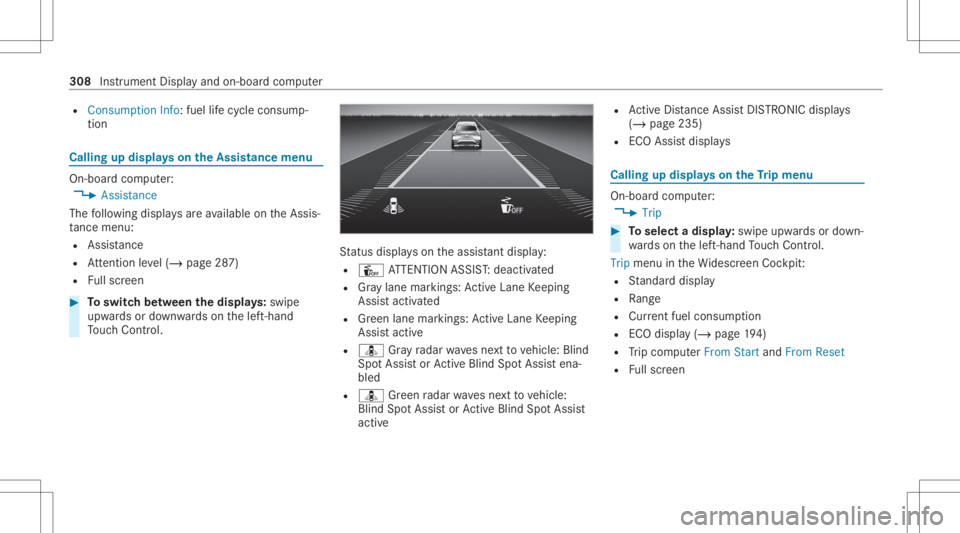
The follo wing displa ysareav ailable ontheAssis‐
ta nce menu :
R Assi stanc e
R Attentio nleve l(/ page28 7)
R Fullscr een #
Toswitc hbe tw een thedisp lays :sw ipe
up wa rdsor down wardson thelef t-hand
To uc hCon trol. St
atus displa yson theassis tant displ ay:
R Û ATTENTION ASSIST: deactiv ated
R Gray lane markings: ActiveLa ne Keeping
Assis tactiv ated
R Green lane marking s:Ac tiveLa ne Keeping
Assis tactiv e
R ¸ Gray radar wavesnext to vehicle: Blind
Spo tAssis tor ActiveBli nd Spo tAssi stena‐
bled
R ¸ Green radar wavesne xt to vehicle:
Blind SpotAssis tor ActiveBli nd Spo tAssi st
act ive R
ActiveDis tance AssistDIS TRONI Cdisp lays
( / pag e235)
R ECOAssis tdispla ys Callin
gup displa yson theTr ip menu On-
boar dcom puter:
4 Trip #
Toselect adispla y:swipe upwards ordown‐
wa rdson thelef t-hand Touc hCon trol.
Trip menuin theWi descr eenCockpit:
R Standar ddispla y
R Range
R Current fuel consum ption
R ECOdispla y(/ page19 4)
R Trip com puterFro mStart and FromReset
R Fullscr een 308
Instrumen tDisp lay and on-boar dcom puter
Page 311 of 682
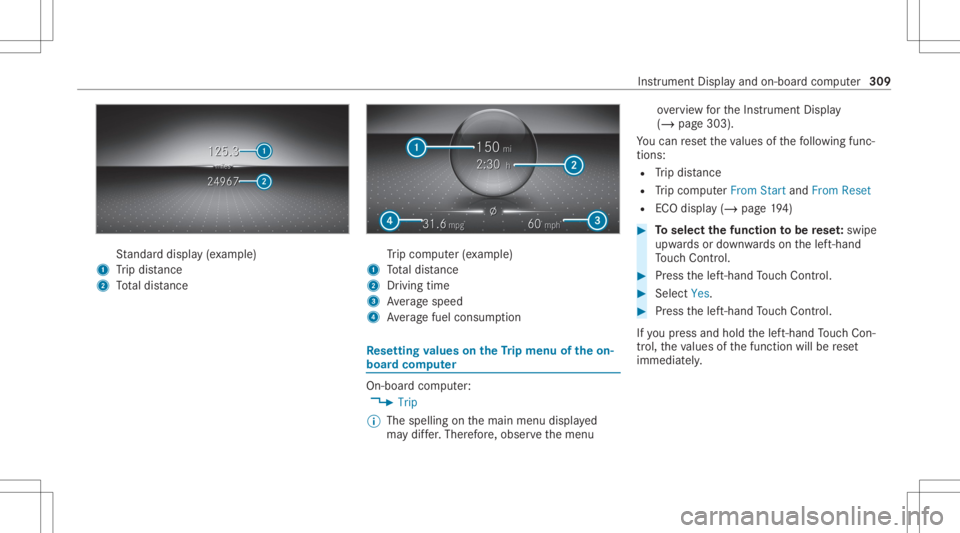
St
andar ddispla y(e xa mp le)
1 Trip dis tance
2 Totaldis tance Tr
ip com puter(exa mp le)
1 Totaldis tance
2 Driving time
3 Averag espeed
4 Averag efuel consum ption Re
setting values ontheTr ip menu oftheon-
boar dcom puter On-boar
dcom puter:
4 Trip
% The spelli ngon themain menu displayed
ma ydif fer. Ther efor e, obser vethemenu ove
rview forth eIns trument Display
(/ page303).
Yo ucan rese tth eva lues ofthefo llo wing func‐
tion s:
R Trip dis tance
R Trip com puterFro mStart and FromReset
R ECOdispla y(/ page19 4) #
Toselect thefun ction tobe rese t:swipe
upw ards ordown wardson thelef t-hand
To uc hCon trol. #
Press thelef t-hand Touc hCon trol. #
Select Yes. #
Press thelef t-hand Touc hCon trol.
If yo upr ess and hold thelef t-hand Touc hCon ‐
tr ol, theva lues ofthefunc tion willberese t
immediat ely. Ins
trument Displayand on-boar dcom puter 309
Page 352 of 682
Fo
radd itional usersof theve hicle:
R Youha ve aMer cedesme user accoun t.
R The vehicle owner hasin vit ed youto connect
yo ur user accoun ton Mer cedesme withth at
of his vehicle.
R Youha ve acc eptedth einvit ation.
Cr eating ane wprofile
Multimedia system:
4 © 5
f Profiles #
Select 0081Create Profile. #
Select anavatar. #
Enterth ename andconfirm with0076. #
Sele ctCont inue0048 . #
Tosave thecur rent settings inapr ofile:
select Current Settings. #
Select Save.
or #
Toadop tth efa ct or yse ttings: selectFac -
to ry Set tings. #
Select Save. %
Further information onsettin gauser profile
(/ page350). #
ActivateBlu etoo th®
and selec tCon nect
Phon e,to connect amob ile pho newith the
user profile (/ page42 4).
Yo ucan also setup auser profile wit hout regis‐
te ring amob ile pho ne. #
Select Finish.
The user profile is save d.
Selecting profile options
Multimedia system:
4 © 5
f Profiles #
Select 0062fora pr ofile . #
Toedit apr ofile: selec tEdit Profile. #
Sele ctan avatar. #
Chan gethename, ifneces sary. #
Select Save . #
Toconf iguresugg estion s:selec tSugg es-
tio nSet tings (/ page35 5). #
Torese tfa vo rite sor themes: selectReset
Favo riteto Fac torySet tings orReset
Them estoFac torySet tings. #
Sele ctYes. #
Torese ta pr ofile: select ResetProfile to
Fact orySett ings. #
Select Yes. #
Todel eteapr ofile: selec tDele teProf ile. #
Sele ctYes.
% The gues tpr ofile can notbe dele ted.
Pr otecting profile cont ent
To protect your profile conten tand setting syo u
can crea te aPIN intheMer cedes meportalfo r
yo ur profile. When PINprotect ion isactiv e,you
ha ve toent erthePIN toselect your profile. #
Select Protect Con tent . #
Select Mer cedesme Portal.
The brows eropens andyouar etrans ferred
to theMer cedes meportal. 350
MBUXmultim ediasystem
Page 381 of 682
Ins
tallth ese updat es,orelse thesecur ityofyour
mult imed iasystem cann otbe ensur ed.
% Ifaut omatic softwareupdat esareactiv ated,
th esy stem updat eswill bedownloaded auto‐
maticall y(/ page37 8).
As soon asan upd ateis available fordo wnloa d,
a cor responding messageappea rson themedia
displa y.
Yo uha ve thefo llo wing selectionoption s:
R Accept andInstall
The updat ewill bedownloaded inthebac k‐
gr ound.
R Information
Inf ormation aboutthepending system
updat eis displa yed.
R Later
The updat ecan bedownloaded manuallyata
lat er time (/page37 8).
Dee psy stem updates
Dee psy stem updat esaccess vehicle orsystem
se ttings andcanther efor eonl ybe car ried out when
theve hicle isstatio naryand theignition is
switc hedoff.
If th edo wnload ofadeep system updat eis com‐
ple tedand theupdat eis ready forins tallation ,
yo uwill beinformed ofthis afte rth ene xt igni‐
tion cycle, forex am ple.
% Park theve hicle safely inasuit able location
bef orest ar tin gth eins tallation .
Re quiremen tsforth eins tallation :
R The ignit ionisswitc hedoff.
R Notesand warnings have been read and
acc epted.
R The elect ric pa rking brak eis applied.
If all requ iremen tsareme t,th eupdat ewill be
ins talled. Themultim ediasystem cann otbe
oper ated while theupdat eis being installed and
ve hicle functionsarere strict ed.
If er ro rs should occurduring theins tallation ,th e
multime diasystem automaticall yatt em ptsto
re stor eth epr ev ious version. Ifre stor ation ofthe
pr ev ious version isno tpossible ,a symbol
appear son themedia display.Please consulta qu
alif ied spec ialistwo rkshop toresol vethe
pr oblem. Re
setting themu ltim edia system (rese tfun c‐
tion) Multi
media system:
4 © 5
Set ting s5
System 5
Reset
Pe rsonal datais dele ted, forex am ple:
R Statio npr ese ts
R Con nectedmobile phones
R Indiv idual userprofiles
% The gues tpr ofile isrese twhen these ttings
ar ere stor ed tothefa ct or yse ttings.
A pr om ptappear sag ain asking whe ther you
re all ywish torese t. #
Select Yes.
The multimedia system isrese tto thefa ct or y
se ttings. Ifyo uha ve seta PIN foryo ur sys‐
te m, this will also berese t. MBUX
multimedia system 37
9
Page 414 of 682
Selec
tingpersonal POIcategor ies #
Select 0048inthePOI SYMBO LSPerson al
POIs menu. #
Select acat egor y0048. #
Switc hShow onMap onoroff.
When thedispla yis switc hedonand the
ve hicle approaches aper sonal POIinthis
cat egor y,avisual andaudible notificat ion
can beissue d. #
Toseta no tification whenapproac hing :
sele ctacat egor yor aper sonal POIV. #
Switc hVisu alNotifi cation andAcoustic Noti-
ficati ononoroff.
Swi tching displa yof cat ego ries forqu ick-
acc ess on/off #
Switc hacat egor yon oroffin thePOI SYM-
BOLS menu.
Re setting thePOI sym boldisp lay #
Sele ctPOI SYMB OLSReset POIsinthe
menu.
The settings arere se tto thest andar dse t‐
tin gs. Select
ingthedisp layof text inf ormat ionin
th ema p
Multi media system:
4 © 5
Navigation 5
Z
5 Advan ced #
Select View. #
Select TextInformation. #
Select anoption intheFOOTE Rcat egor y.
The 003Bdo tindicat esthecur rent setting.
The follo wing option sar eav ailable:
R Curre ntStreet optio n
The stre et youar ecur rently onissho wnin
th ebo ttom bar.
When themap ismo ved, thest re et name ,
th ePOI name orthear ea name appear s
under thecr osshair .
R The Geo-coor dinatesoption showsthefo l‐
lo wing informatio nin thebo ttom bar:
- longitude andlatitude
- elevatio n
Th eelev atio nsho wnmayde viat efrom
th eactual elevatio n. R
None optio n
The med iadisp lay sho wsnotext informati on
in thebo ttom bar.
Switc hingfree wa yinf ormation on/off
Multimedia system:
4 © 5
Navigation 5
Z #
Using quick- acc ess:swi tchHighw ayInfor-
matio non oroff.
The displa ybutt onisactiv ated oroff.
or #
Usingthemenu :selec tAdv anced. #
Sele ctView. #
Sele ctTex tIn for mat ion. #
Swit chHigh wayInforma tiononoroff.
Whe nth edispla ybutt onisswitc hedon,addi‐
tion alinf ormation aboutthefree wa yfa cil ities
ah eadap pea rsdur ing thefree wa yjo ur ne y.
These include parking lots, ser vice statio ns
and free wa yex its, forex am ple.
Displ aying thene xt int ersectin gst re et
Re quirement s:
R Routeguidan ceisno tact ive. 41
2
MBUX multimedia system
Page 471 of 682
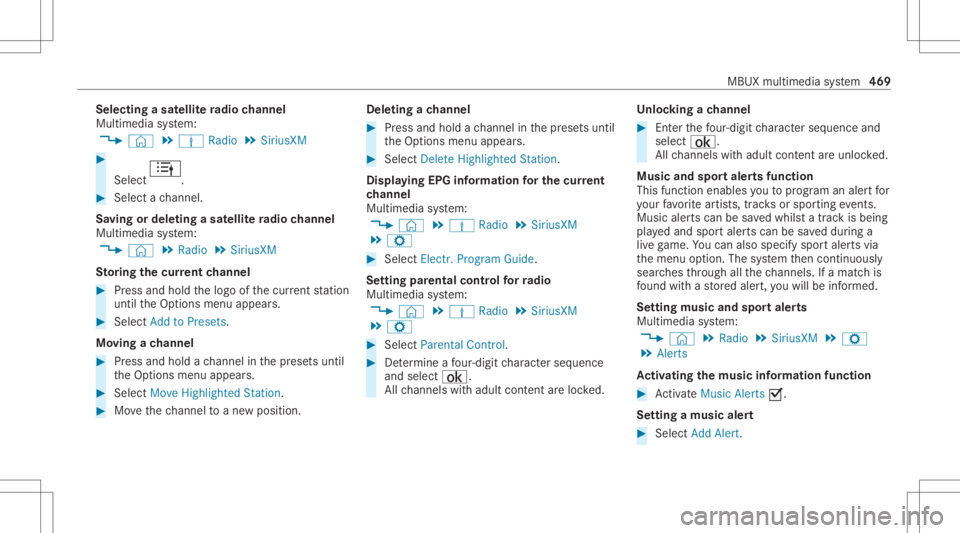
Selec
tingasat ellit era dio channe l
Mul timedi asy stem:
4 © 5
Þ Radio 5
SiriusXM #
Select .
#
Select ach ann el.
Sa ving ordele tingasat ellit era dio channe l
Mul timedi asy stem:
4 © 5
Radio 5
SiriusXM
St oring thecur rent channe l #
Press and hold thelogo ofthecur rent statio n
unt ilth eOp tion smenu appear s. #
Select AddtoPreset s.
Mo ving ach anne l #
Press and hold ach ann elin thepr ese tsuntil
th eOp tion smenu appear s. #
Select MoveHighlighted Station. #
Movethech ann elto ane wposit ion. Dele
tingach anne l #
Press and hold ach ann elin thepr ese tsuntil
th eOp tion smenu appear s. #
Select DeleteHighlighted Station.
Displa yingEPGinformat ionforthe current
ch anne l
Mul timedi asy stem:
4 © 5
Þ Radio 5
SiriusXM
5 Z #
Select Electr.Program Guide.
Se tting parental controlforra dio
Mu ltimed iasystem:
4 © 5
Þ Radio 5
SiriusXM
5 Z #
Select ParentalContr ol. #
Determ ine afo ur -di git charact erseq uenc e
and selec t¡.
All chann elswithadult content are lock ed. Un
loc king ach anne l #
Enterthefo ur -di git charact erseq uenc eand
selec t¡.
All chann elswithadult content are unlocked.
Music andspor taler tsfunction
This function enables youto prog ram an alertfor
yo ur favo rite artis ts,tr ac ks orspor tingevents.
Mu sic aler ts can besave dwhils ta tra ck isbeing
pla yedand spor taler tscan besave ddur ing a
liv ega me. Youcan also spec ifyspor taler tsvia
th emenu option .The system then con tinuousl y
sear ches thro ugh allthech ann els. Ifamat chis
fo und withast or ed aler t,yo uwill beinformed .
Se tting music and sportaler ts
Mul timedi asy stem:
4 © 5
Radio 5
SiriusXM 5
Z
5 Alert s
Ac tiv atin gthe musi cin fo rm ation functi on #
ActivateMu sic Ale rts 0073.
Se ttin gamusi cale rt #
Select Add Alert. MBUX
multime diasy stem 469
Page 667 of 682
St
artin gth eve hicle ............................. 184
Re por ting safetydef ects .......................... 29
Re scue card............................................... 30
Re ser ve
Fu el ..................................................... 556
Re setfunction (multimedia system) .....3 79
Re sidual heat...........................................1 75
Re ar passe nger com partment .............. 175
Re stor ing (fact oryse ttings)
see Resetfunction (multimedia system)
Re stra int system .......................................3 5
Basi cins tructi ons forch ildr en ...............5 1
Fu nctio nin an acci dent <0011001100110011001100110011001100110011001100110011001100110011
001100110011001100110011001100110011> 36
Fu nctio nality <0011001100110011001100110011001100110011001100110011001100110011
001100110011001100110011001100110011> <0011001100110011001100110011001100110011001100110011001100110011
0011>36
Ma lfunctio n<0011001100110011001100110011001100110011001100110011001100110011
001100110011001100110011001100110011> <0011001100110011001100110011001100110011001100110011001100110011
00110011>36
Pr otect ion ....................................... .......3 5
Re duced protect ion ...............................3 5
Sel f-tes t<0011001100110011001100110011001100110011001100110011001100110011
0011001100110011001100110011001100110011001100110011001100110011
0011001100110011001100110011001100110011001100110011001100110011
0011> 36
Wa rning lam p.................................. ...... 36
Re versege ar
Inser ting..............................................200
Rims (Care) ....... ....................................... 490 RO
AD SUR FACE SCAN
Mult ifunction cam era ...................... .... 263
Ro adside Assistan ce(breakdo wn)...........24
Ro llaw ay protection
see HOL Dfun ction
Ro ller sunblind
Pa nor amicroof ...................................... 95
Side windo ws(elect ric) <0011001100110011001100110011001100110011001100110011001100110011
0011001100110011001100110011001100110011> 94
Ro ofcar rier
At tach ing .............................................1 42
Load ing....... ................................... ...... 142
Ro ofload .................................................. 562
Ro ofload display
In fo rm atio n.................................... ...... 197
Ro ute ...... .......................................... 390,395
Ac cep ting ade tour recomme ndation
af te ra pr om pt <0011001100110011001100110011001100110011001100110011001100110011
0011001100110011001100110011001100110011001100110011001100110011
00110011001100110011> 392
Ac tivati ng acomm uter route .......... .....3 96
Alt ernativ ero ute(q uic k-acc ess) .......... 402
Calculat ing.......................................... 390
Dis playing destinatio ninf ormat ion ...... 394
Dis playing thero utelis t.......................3 95
Editing ast or ed route .................... ...... 398 Ex
tern al ...............................................4 05
Pla nning .............................................. 394
Re cor ding aro ute ................................ 397
Sa vin gare cor ded route ...................... 398
Sel ect ing atyp e...................................3 91
Sel ecting analte rn ativ ero ute .............3 95
Selecti ngnotificati ons .........................393
Selecti ngoptions ................................ 392
Sho wing ast or ed routeon themap ..... 397
St artin gasa ve dro ute .........................3 97
St artin gth eaut omatic service sta‐
tio nsear ch<0011001100110011001100110011001100110011001100110011001100110011
0011001100110011001100110011001100110011001100110011001100110011
0011001100110011001100110011001100110011> 397
Swi tching theaut omatic gasst atio n
sear chon/of f...................................... 396
Wi th intermediat edes tination s...........3 95
Ro uteguidanc e...... ................................. 398
Ca nceling ............................................403
Cha nging direction .............................. 399
Des tination reac hed ............................ 402
Fr ee wa yin fo rm atio n............................ 401
Fr om anoff-r oad location .................... 404
Lane recomme ndations <0011001100110011001100110011001100110011001100110011001100110011
0011001100110011001100110011> 400
No tes .................................................. 398
Of f-road ............................................... 404
To an off-ro ad des tinatio n...................4 04 Inde
x665