ESP MERCEDES-BENZ GLS SUV 2020 Manual PDF
[x] Cancel search | Manufacturer: MERCEDES-BENZ, Model Year: 2020, Model line: GLS SUV, Model: MERCEDES-BENZ GLS SUV 2020Pages: 549, PDF Size: 9.9 MB
Page 293 of 549
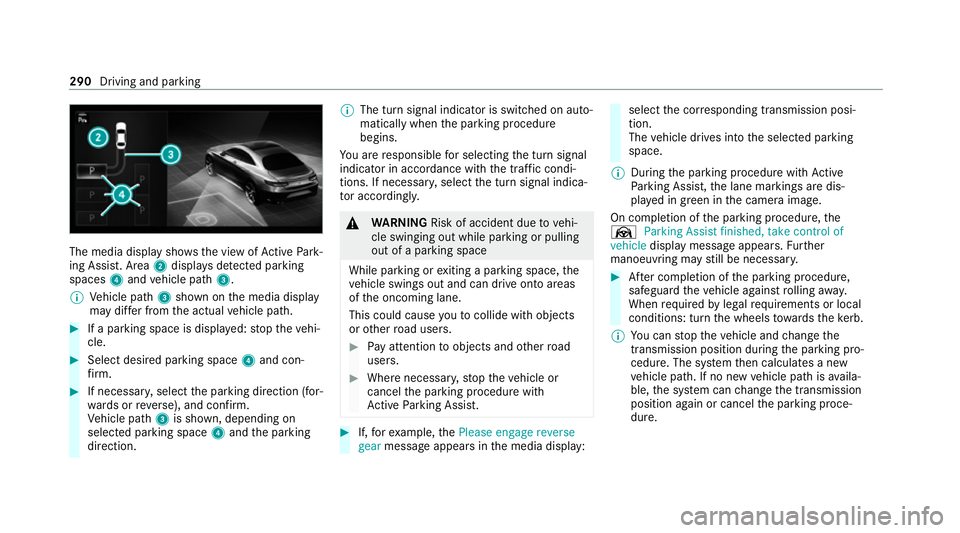
The media display sho
ws the view of Active Park‐
ing Assist. Area 2displa ysdetected pa rking
spaces 4and vehicle path 3.
% Vehicle path 3shown on the media display
may dif fer from the actual vehicle path. #
If a parking space is displa yed: stop theve hi‐
cle. #
Select desired parking space 4and con‐
fi rm. #
If necessar y,select the parking direction (for‐
wa rds or reve rse), and confi rm.
Ve hicle path 3is shown, depending on
selected parking space 4and the parking
direction. %
The turn signal indicator is switched on auto‐
matically when the parking procedure
begins.
Yo u are responsible for selecting the turn signal
indicator in accordance with the traf fic condi‐
tions. If necessar y,select the turn signal indica‐
to r according ly. &
WARNING Risk of accident due tovehi‐
cle swinging out while parking or pulling
out of a parking space
While parking or exiting a parking space, the
ve hicle swings out and can drive onto areas
of the oncoming lane.
This could cause youto collide wi thobjects
or other road users. #
Pay attention toobjects and other road
users. #
Where necessar y,stop theve hicle or
cancel the parking procedure with
Ac tive Parking Assist. #
If,forex ample, thePlease engage reverse
gear message appears in the media display: select
the cor responding transmission posi‐
tion.
The vehicle drives into the selected parking
space.
% During the parking procedure with Active
Pa rking Assist, the lane markings are dis‐
pla yed in green in the camera image.
On completion of the parking procedure, the
Ø Parking Assist finished, take control of
vehicle display message appears. Further
manoeuvring may still be necessar y. #
After completion of the parking procedure,
safeguard theve hicle against rolling away.
When requ ired bylegal requirements or local
conditions: turn the wheels towa rdsth eke rb.
% You can stop theve hicle and change the
transmission position du ring the parking pro‐
cedure. The sy stem then calculates a new
ve hicle path. If no new vehicle path is availa‐
ble, the sy stem can change the transmission
position again or cancel the parking proce‐
dure. 290
Driving and parking
Page 294 of 549
Exiting a pa
rking space with Active Parking
Assist
Re quirements:
R The vehicle has been par ked with Active
Pa rking Assist.
Please no tethat you are responsible forth eve hi‐
cle and sur roundings during the entire parking
procedure. #
Start theve hicle. #
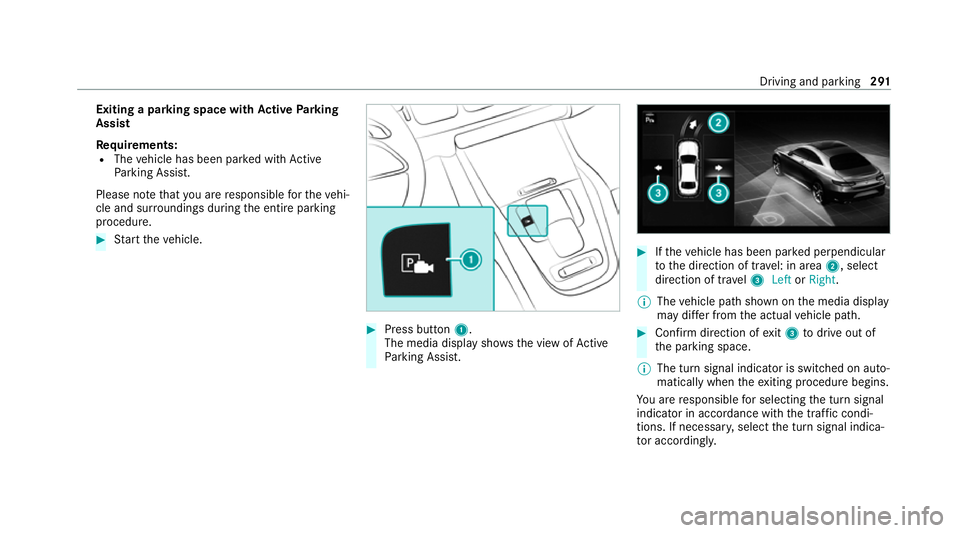
Press button 1.
The media display sho wsthe view of Active
Pa rking Assist. #
Ifth eve hicle has been par ked perpendicular
to the direction of tra vel: in area 2, select
direction of tra vel3 Left orRight .
% The vehicle path shown on the media display
may dif fer from the actual vehicle path. #
Confirm direction of exit3 todrive out of
th e parking space.
% The turn signal indicator is switched on auto‐
matically when theex iting procedure begins.
Yo u are responsible for selecting the turn signal
indicator in accordance with the traf fic condi‐
tions. If necessar y,select the turn signal indica‐
to r according ly. Driving and pa
rking 291
Page 295 of 549
&
WARNING Risk of accident due tovehi‐
cle swinging out while parking or pulling
out of a parking space
While parking or exiting a parking space, the
ve hicle swings out and can drive onto areas
of the oncoming lane.
This could cause youto collide wi thobjects
or other road users. #
Pay attention toobjects and other road
users. #
Where necessar y,stop theve hicle or
cancel the parking procedure with
Ac tive Parking Assist. #
If,forex ample, thePlease engage forward
gear message appears in the media display:
select the cor responding transmission posi‐
tion.
The vehicle mo ves out of the parking space.
The turn signal indicator is switched off auto‐
maticall y.
Af terth e parking space has been exited, a warn‐
ing tone and theØ Parking Assist finished, take control of vehicle
message promptyouto
ta ke control of theve hicle.
The vehicle is not automatically braked and can
ro llaw ay.Yo u ha vetoaccelerate, brake, steer
and change gear yourself again. Manoeuv
ring assistant Fu
nction of Drive Away Assist
Drive AwayAssi stcan reduce the se verity of an
impact when pulling away. If an obs tacle is
de tected in the direction of tr avel, theve hicle's
speed is brief lyreduced toappr ox. 2 km/h. If a
critical situation is de tected, theÉ symbol
appears in the media displa y.
% You can cancel an inter vention byDrive
Aw ayAssi stat any time bydeactivating
Pa rking Assist PARKTRONIC (/ page 287). &
WARNING Risk of accident caused by
limited de tection per form ance of Drive
Aw ayAssi st
Drive AwayAssi stcannot al ways clearly iden‐
tify objects and traf fic situations. #
Alw ays pay careful attention tothe traf‐
fi c situation; do not rely on Drive Away
Assi stalone. #
Be prepared tobrake or swer veas nec‐
essar y,prov ided the tra ffic situation
permits and that it is safe totake eva‐
sive action. Drive
AwayAssi stis only an aid. It is not a sub‐
st itute foryo ur attention tothe sur roundings.
The responsibility for safe manoeuvring and
parking remains with you. Make sure that no
persons, animals or objects etc. are in the
manoeuvring range.
A risk of a collision may arise in thefo llowing sit‐
uations, forex ample:
R Ifth e accelera tor and brake pedals are inter‐
ch anged.
R If an incor rect transmission position is
engaged.
Drive AwayAssi stis active under thefo llowing
conditions:
R IfPa rking Assist PARKTRONIC is activated. 292
Driving and parking
Page 297 of 549
*
NO
TEDama getotraile rswith a stabilisa‐
tion device against swerving In
the case of trailers with a stabilisation
device against swerving, the trailer or trailer
to w hit chcould be damaged. #
If a trailer coupling wi thTrailer Manoeu‐
vring Assist is used, on lyuse trailers
without a stabilisation device against
swerving. *
NO
TEDama gedue to ov erhanging loads
in front or dr awbar ins tallations The
vehicle and the trailer may be damaged
during manoeuvring due toove rhanging
loads at the front of the trailer or dr awbar
ins tallations. #
Pay attention to overhanging loads or
dr aw bar ins tallations while manoeu‐
vring. Tr
ailer Manoeuv ring Assi stassists you when
re ve rsing with a trailer. By means of a turning
angle sensor in the trailer coupling, Trailer Manoeuv
ring Assi stmonitors the articulation
angle between theve hicle and trailer and
adjusts it toa specified value.
Tr ailer Manoeuv ring Assi stis only an aid. It is not
a substitute foryo ur attention tothe sur round‐
ings. The responsibility for safe manoeuvring and
parking remains with you. Make sure that there
are no persons, animals or objects in the
manoeuvring area while manoeuvring and park‐
ing in/exiting parking spaces.
Yo u can either en terth e articulation angle value
directly via the multimedia sy stem or use a
st ra ightening manoeuvre. When car rying out a
st ra ightening manoeuvre, the sy stem calculates
th e articulation angle automatically and stra ight‐
ens theve hicle/trailer combination tothe trail‐
er's cur rent di rection.
Tr ailer Manoeuv ring Assi stmust be taught-in
before it can adjust the articulation angle
(/ page 294).
Obser vethe no tes on towing a trailer
(/ page 295). Sy
stem limits
The sy stem may be impaired or may not function
in thefo llowing situations:
R The gradient is more than appr oximately
15 %.
Using Trailer Manoeuvring Assist
Re quirements:
R The vehicle has been star ted and is station‐
ar y.
R A trailer has been de tected.
R The gradient is less than appr oximately 15%.
R The elect ric pa rking brake is not applied.
Te aching in Trailer Manoeuvring Assist #
Drive forw ards a short dis tance wi th the car/
trailer combination.
The comple tedte ach-in process is shown in
th e media displa y.294
Driving and parking
Page 301 of 549
R
The trailer cables or adap ter plugs ha vebeen
re mo ved.
Multimedia sy stem:
4 © 5
Settings 5
Quick access
Extending the ball neck fully electrically #
Select Ü.
The Trailer coupling extending… display mes‐
sage will appear on the multifunction displa y.
The ball neck will extend fully electrically. #
Wait until the ball neck has loc ked in place.
If th e ball neck is not securely loc ked in place,
th eCheck trailer hitch lock message will appear
on the multifunction displa y.
Re tracting the ball ne ckfully electrical ly#
Select Ü.
The Trailer coupling extending… displaymes‐
sage will appear on the multifunction displa y.
The ball neck will retract fully electrically. #
Wait until the ball neck has loc ked in place. If
th e ball neck is not securely loc ked in place,
th eCheck trailer hitch lock message will appear
on the multifunction displa y. Coupling/uncoupling a trailer
&
WARNING Risk of inju ryfrom theve hicle
le ve l being changed
Ve hicles with le vel control sy stem: the
ve hicle le vel may be changed unin tentional ly,
e.g. by ot her persons. You may become trap‐
ped if you couple up or uncouple a trailer
while theve hicle le vel is changing. In addi‐
tion, other people could become trapped if
th eir limbs are between theve hicle body and
th e tyres or underneath theve hicle.
When coupling up or uncoupling a trailer,
make sure that: #
The doors or tailgate are not opened or
closed. #
You do not initiate the le vel control sys‐
te m and do not operate theDY NA MIC
SELECT switch. #
Do not lock or unlock theve hicle. Re
quirements:
R The ball neck is extended and engaged in a
secu rely loc ked position.
Tr ailers with a 7-pin plug can be connec tedto
th eve hicle with thefo llowing adap ters:
R Adapter plug
R Adapter cable
The trailer will be cor rectly de tected bytheve hi‐
cle only if thefo llowing conditions are me t:
R The trailer is connected cor rectl y.
R The trailer lighting sy stem is in working
order.
The functions of thefo llowing sy stems will be
af fected bya cor rectly connected traile r:
R ESP ®
trailer stabilisation
R Trailer Manoeuvering Assist
R Active Lane Keeping Assist
R Parking Assist PARKTRONIC
R Active Parking Assist 298
Driving and parking
Page 311 of 549
R
Navigation #
Onthe cor responding menu, use the left-
hand Touch Control toscroll tothe end of the
list. #
Press the left-hand Touch Control.
The selected menu will be displ ayed full-
screen. Overview of what is shown on
the multi‐
function display
Displa yson the multifunction display
u Active Parking Assist (/ page 289)
é Parking Assist PARKTRONIC deacti vated
( / page 287)
î DSR (/ page244)
h Cruise control (/ page 233)
È Limi
ter (/ page 234)
ç Active Dis tance Assi stDISTRONIC
(/ page 236)
ê Active Brake Assi st (/ page 248)
à Active Steering Assist (/ page246) ¬
Active Stop-and-Go Assist (/ page243)
à Ac
tive Lane Keeping Assist (/ page 260)
è ECO
start/ stop function (/ page197)
ë HOLD fu
nction (/ page 230)
_ Ad
aptive Highbeam Assist Plus
(/ page 161)
ð Maximum permissible speed exceeded
(for cer tain countries only)
Ve hicles with Speed Limit Assis t:de tected
instructions and traf fic signs (/ page 253).
Ve hicles with Traf fic Sign Assis t:de tected
instructions and traf fic signs (/ page 255).
Fo r an overview of the indicator and warning
lamps, see (/ page 490). Head-up display
Fu
nction of the head-up display *
NO
TEMercedes-AMG vehicles #
Obser vethe no tes in the Supplement.
Yo u could otherwise failto recognise
dangers. The head-up displ
ayprojects thefo llowing infor‐
mation into the driver's field of vision abo vethe
cockpit, forex ample:
R The vehicle speed
R Information from the navigation sy stem
R Information from the driving sy stems and
driving saf ety sy stems
R Some warning messages
Depending on theve hicle's equipment, dif fere nt
content can be shown in theth re e areas of the
head-up display (/ page 309).308
Instrument display and on-board computer
Page 341 of 549
#
Select Yes.
Re leva nt identi fication da tais transmitted
automaticall y.
More information on Mercedes me: https://
www.mercedes.me
Tr ansfer red data during a Mercedes me call
When you make a service call via Mercedes me,
data is transmitted. This enables targeted advice
and a smoo thservice.
The following requ irements must be fulfilled for
th e transfer of the data:
R The ignition is switched on.
R The requ ired data transfer tech nology is sup‐
po rted bythe mobile phone network pro‐
vider.
R The quality of the mobile connection is suf fi‐
cient.
Multi-s tage trans fer depends on thefo llowing
fa ctors:
R Reason forth e initiation of the call
R The available mobile phone transmission
te ch nology. R
The acti vated Mercedes me connect serv‐
ices.
R The service selected in thevo ice control sys‐
te m.
% A prom ptfor consent tothe data transmis‐
sion only occurs if the cor responding
Mercedes me connect service is not activa‐
te d.
Data transfer if Mercedes me connect serv‐
ices are not activated
If no Mercedes me connect services are activa‐
te d and the data pr otection prom pthas been
confirmed thefo llowing data is transmitted:
R Vehicle identification number
R Time of the call
R Reason forth e initiation of the call
R Confirmation of the data pr otection prom pt
R Country indicator of theve hicle
R Set language forth e multimedia sy stem
R Telephone number of the communication
platform ins talled in theve hicle If a call is made
for a service appointment via
th e service reminder, thefo llowing data is also
transmitte d:
R Cur rent milea geand main tenance da ta
If a call is made af ter auto matic accident or
breakdown de tection using the multimedia sys‐
te m, thefo llowing data is also transmitted:
R Cur rent milea geand main tenance da ta
R Cur rent vehicle location
If Ac cident and Breakdown Management is
called via thevo ice control sy stem and no
service has been activated, but the data pr otec‐
tion query has been confi rmed, thefo llowing
data can also be called up from theve hicle by
th e Mercedes-Benz Cus tomer Centre:
R Curr entvehicle location
If th e data pr otection prom pthas been rejected,
th efo llowing data is transmitte dto enable targe‐
te d advice and an ef ficient service:
R Reason forth e initiation of the call
R Rejection of the data pr otection prom pt
R Country indicator of theve hicle 338
MBUX multimedia sy stem
Page 345 of 549
Apps
for Smartphone Integration
R Mercedes-Benz Link (implementation of the
function using the Mercedes-Benz Link con‐
trol box)
R Apple CarPlay ®
R Android Auto
Yo u can start Smartphone In tegr ation using the
Mercedes me & Apps menu.
Yo u can end Smartphone In tegration bydiscon‐
necting the connecting cable between the
mobile phone and multimedia sy stem.
% Mercedes-Benz recommends disconnecting
th e connecting cable only when theve hicle
is stationar y.
Overview of transfer redve hicle data
When using Smartphone Integration, cer tain
ve hicle data is transfer redto the mobile phone.
This enables youto getth e best out of selected
mobile phone services. Vehicle data is not
directly accessible.
The following sy stem information is transmit ted:
R Software release of the multimedia sy stem R
System ID (anonymised)
The transfer of this data is used toalter how
con tent is displ ayed tocor respond tothe driving
situation.
The following position data is transmitte d:
R Coordinates
R Speed
R Compass direction
R Acceleration di rection
This da tais used bythe mobile phone to
impr ovethe accuracy of the navigation (e.g. for
continuation in a tunnel). Mercedes-Benz eme
rgency call sy stem Information on
available emer gency call sys‐
te ms Tw
o types of emer gency call sy stem are availa‐
ble to yo u intheve hicle:
R Mercedes-Benz emer gency call sy stem
R 112 emergency call sy stem (EU eCall) The Mercedes-Benz emer
gency call sy stem is
not available in all countries. You can find more
information on there gional availability of eCall
at: https://www.mercedes-benz-mobile.com/
ex tra/ecall/
The following applies for bo themer gency call
sy stems:
R The transfer of specific data is requ ired for
th e intended function of bo themer gency call
sy stems. This will be explained in the "Data
transfer" section (/ page 345).
R Both emer gency call sy stems are included as
st andard equipment in your vehicle and are
activated at thefa ctor y.
R The use of bo themer gency call sy stems is
exe mpt from charge s.
R Both emer gency call sy stems only function in
areas in which the mobile phone network
pr ov iders of fer mobile phone co verage.
Fo r bo thsystems, insuf ficient network co ver‐
age from the mobile phone network pr ovid‐
ers can result in an emer gency call not being
transmitted. 342
MBUX multimedia sy stem
Page 348 of 549
Bo
th th e Mercedes-Benz emer gency call sy stem
as well as the11 2 emergency call sy stem (EU
eCall) automatically initiate an emer gency call
af te r:
R Activation of there stra int sy stems such as
airbags or seat belt tensioners af ter an acci‐
dent
The emer gency call has been made:
R Avo ice connection is es tablished with the
emer gency call centre.
R A messa gewith accident data is transmit ted
to the emer gency call centre.
The SOS button in theov erhead control panel
fl ashes until the emer gency call is finished.
If no connection can be made tothe public
emer gency services, a cor responding message
appears inthe displa y. #
Dial the emer gency number 112 or an app ro‐
priate local emer gency call number on your
mobile phone. If an eme
rgency call has been initiated:
R Remain in theve hicle if thero ad and traf fic
conditions permit youto do so until a voice
connection is es tablished with the emer‐
ge ncy call centre.
R Onthe basis of the call, the emer gency call
centre decides wh ether it is necessary tocall
re scue teams and/or the police tothe acci‐
dent site.
R If no vehicle occupant answers, an ambu‐
lance is sent totheve hicle immediatel y. Tr
iggering a manual emer gency call #
Touse the SOS but ton in theov erhead
control panel: pressthe SOS button at least
one second long (/ page 335). #
Touse voice control: usethe LINGUA‐
TRONIC voice commands .
The emer gency call has been made:
R Avo ice connection is es tablished with an
emer gency call centre. R
Remain in theve hicle if thero ad and traf fic
conditions permit youto do so until a voice
connection is es tablished with the emer‐
ge ncy call centre.
R Onthe basis of the call, the emer gency call
centre decides wh ether it is necessary tocall
re scue teams and the police tothe accident
site.
R A message with accident data is transmit ted
to the emer gency call centre.
If no connection can be made tothe public
emer gency services, a cor responding message
appears inthe media displa y. #
Dial the emer gency number1 12or an appro‐
priate local emer gency call number on your
mobile phone. Emer
gency call sy stem data transmission Fo
r bo th th e Mercedes-Benz emer gency call sys‐
te m as well as the11 2 emergency call sy stem
(EU eCall) data is transfer redto the Mercedes-
Benz emer gency call centre or the public emer‐
ge ncy services call centre. MBUX multimedia sy
stem 345
Page 351 of 549
The
owner of a vehicle, that is equipped with a
Mercedes-Benz emer gency call sy stem in addi‐
tion tothe11 2 emer gency call sy stem (EU eCall),
has theright touse the11 2 emer gency call sys‐
te m ins tead of the Mercedes-Benz emer gency
call sy stem.
Contact address for car rying out deactivation of
th e Mercedes-Benz emer gency call sy stem are
th e local dealers.
Processing of personal data via the11 2
emer gency call sy stem (EU eCall)
All processing of personal data via the11 2 emer‐
ge ncy call sy stem (EU eCall) cor responds with
th e specifications in the EU Regulation
20 16 /679 "on the pr otection of individuals with
re ga rd tothe processing of personal data
(GDPR)" and is based particular lyon the neces‐
sity of upholding the vital interests of the af fec‐
te d person in accordance with Article 6, Clause
1, Letter d of the GDPR.
The processing of this type of data is strictly
limited tothe purpose of operating the emer‐
ge ncy calls tothest andard European emer gency
call number 112. Data
recipient
The recipients of da tathat is processed using
th e11 2 emergency call sy stem (EU eCall) are the
re leva nt eme rgency call inquiry term inals that
are specified tofirs tre cei veand handle emer‐
ge ncy calls tothest andard European emer gency
call number 112by there spective country
authorities in whose territory you are located.
Ar rangements for data processing
Bo th emer gency call sy stems are designed so
th at thefo llowing requ irements are fulfilled:
R The data con tained in the sy stem memory is
not accessible outside the sy stem prior to
th e initiation of an emer gency call.
R Both emer gency call sy stems cann otbe
traced and there is no continuous tracking in
normal operation.
R The data in the sy stem's internal memory is
automatically and continuously dele ted.
R The location data of theve hicle is continu‐
ously overwritten in the sy stem's internal
memor y,so that no more than the last three
cur rent locations requ ired forth e normal
function of the sy stem are available. R
The record of the activity data of bo themer‐
ge ncy call sy stems is only kept for as long as
is requ ired tofulfil the purpose of handling
th e emer gency call, ho weverfo r no longer
th an 13 hours af terth e time that an emer‐
ge ncy call is initia ted.
Rights of persons af fected bythe data pro‐
cessing
The person af fected bythe data processing (the
ve hicle owner) has theright toaccess the data
and if applicable can demand the cor rection,
del etion or bar ring of da tathat af fects him or
her and that the processing of which does not
cor respond with the GDPR regulations. Each cor‐
re ction, del etion or bar ring car ried out according
to this regulation must be shared with theth ird
party towhich the data has been transmit ted,
pr ov ided this does not pr oveto be infeasible and
does not incur disproportionate expenditure.
The person af fected bythe data processing has
th eright tocomplain tothe appropriate data
pr otection authority should they be of the opin‐
ion that their rights ha vebeen infringed bythe
processing of their personal data. 348
MBUX multimedia sy stem