ESP MERCEDES-BENZ GLS SUV 2020 Owner's Guide
[x] Cancel search | Manufacturer: MERCEDES-BENZ, Model Year: 2020, Model line: GLS SUV, Model: MERCEDES-BENZ GLS SUV 2020Pages: 549, PDF Size: 9.9 MB
Page 160 of 549
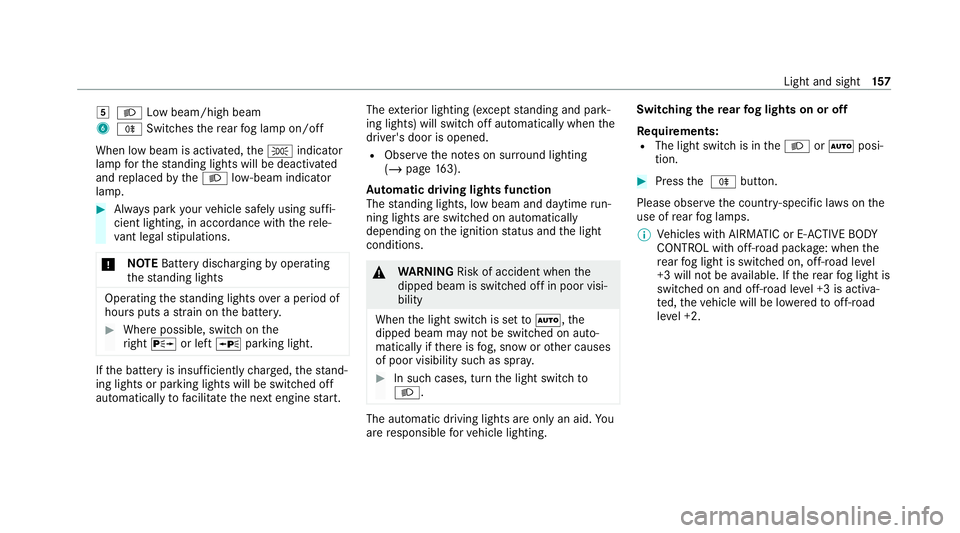
5
L Low beam/high beam
6 R Switches there ar fog lamp on/off
When low beam is activated, theT indicator
lamp forth est anding lights will be deactivated
and replaced bytheL low- beam indicator
lamp. #
Alw ays park your vehicle safely using suf fi‐
cient lighting, in acco rdance with there le‐
va nt le galst ipulations.
* NO
TEBattery discharging byoperating
th est anding lights Operating
thest anding lights over a period of
hours puts a stra in on the batter y. #
Where possible, switch on the
ri ght X or left Wparking light. If
th e battery is insuf ficiently charge d, thest and‐
ing lights or parking lights will be swit ched off
automatically tofacilitate the next engine start. The
exterior lighting (e xcept standing and park‐
ing lights) will swit choff automatically when the
driver's door is opened.
R Obser vethe no tes on sur round lighting
(/ page 163).
Au tomatic driving lights function
The standing lights, low beam and daytime run‐
ning lights are switched on au tomatically
depending on the ignition status and the light
conditions. &
WARNING Risk of accident when the
dipped beam is switched off in poor visi‐
bility
When the light switch is set toà ,the
dipped beam may not be switched on auto‐
matically if there is fog, snow or other causes
of poor visibility such as spr ay. #
In such cases, turn the light switch to
L . The automatic driving lights are only an aid.
Yo u
are responsible forve hicle lighting. Switching
there ar fog lights on or off
Re quirements:
R The light switch is in theL orà posi‐
tion. #
Press the R button.
Please obser vethe count ry-specific la wsonthe
use of rear fog lamps.
% Vehicles with AIRMATIC or E- ACTIVE BODY
CO NTROL with off-road pac kage : when the
re ar fog light is switched on, off-road le vel
+3 will not be available. If there ar fog light is
switched on and off-road le vel +3 is activa‐
te d, theve hicle will be lo weredto off-road
le ve l +2. Light and sight
157
Page 161 of 549
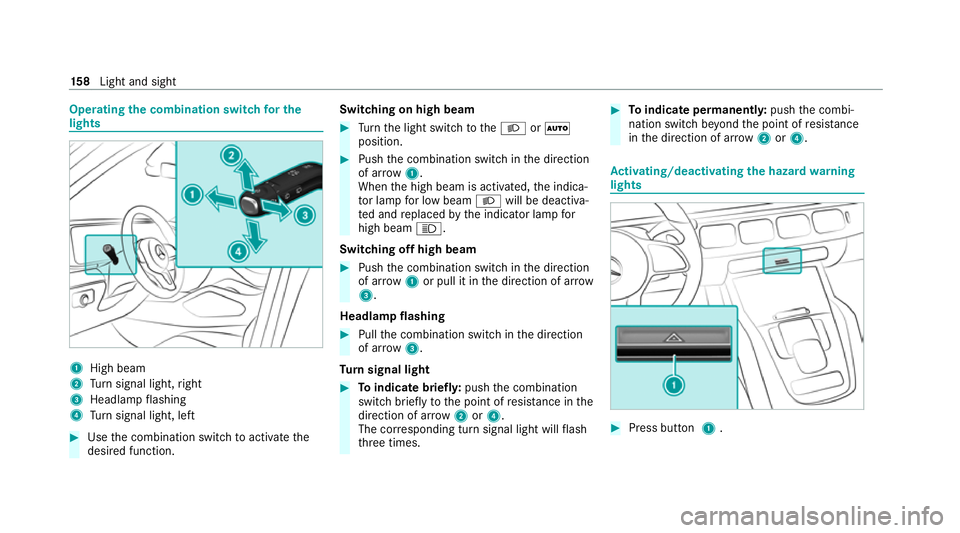
Operating
the combination switch for the
lights 1
High beam
2 Turn signal light, right
3 Headlamp flashing
4 Turn signal light, left #
Use the combination switch toactivate the
desired function. Switching on high beam #
Turn the light switch totheL orÃ
position. #
Push the combination switch in the direction
of ar row1.
When the high beam is activated, the indica‐
to r lamp for low beam Lwill be deactiva‐
te d and replaced bythe indicator lamp for
high beam K.
Switching off high beam #
Push the combination switch in the direction
of ar row1or pull it in the direction of ar row
3 .
Headlamp flashing #
Pull the combination switch in the direction
of ar row3.
Tu rn signal light #
Toindicate briefl y:push the combination
switch briefly tothe point of resis tance in the
direction of ar row2or4.
The cor responding turn signal light will flash
th re e times. #
Toindicate permanentl y:push the combi‐
nation switch be yond the point of resis tance
in the direction of ar row2or4. Ac
tivating/deactivating the hazard warning
lights #
Press button 1. 15 8
Light and sight
Page 164 of 549
Fu
nction of the off-road light
The off- road light impr oves illumination during
off-road driving. The low beam is distributed
symmetrically and across a wide angle, and
brightness is increased slightl y.This makes it
easier tofind your wa y when driving off- road and
to detect obs tacles at an ea rly st age. The active
headlamps are deactivated during this time so
th at steering mo vements do not change the illu‐
mination.
The function is active when the low beam is
switched on if you are not driving at a speed
greater than 50 km/h and theF (Offroad) or
G (Offroad Plus) drive program has been
selected.
Switching the Intelligent Light Sy stem
on/off
Re quirements:
R the ignition is switched on.
Multimedia sy stem:
4 © 5
Settings 5
Lights
5 Intelligent Light System #
Activate or deacti vate the function. Ad
aptive Highbeam Assist Plus Ad
aptive Highbeam Assist Plus function &
WARNING Risk of accident despi te
Ad aptive Highbeam Assist Plus
Ad aptive Highbeam Assist Plus does not
re act to:
R road users without lights, e.g. pedes‐
trians
R road users with poor lighting, e.g. cyclists
R road users whose lighting is obstructed,
e.g. bya bar rier
On very rare occasions, Adaptive Highbeam
Assist Plus may failto recognise other road
users with their own lighting, or may recog‐
nise them too late.
In these, or in similar situations, the auto‐
matic high beam will not be deactivated or
will be activated despite the presence of
ot her road users. #
Alw ays obser vethero ad and traf fic
conditions carefully and switch off the
high beam in good time. Ad
aptive Highbeam Assist Plus cannot take into
account road, weather or traf fic conditions.
De tection may be restricted in thefo llowing
cases:
R In poor visibilit y,e.g. fog, heavy rain or snow
R ifth ere is dirt on the sensors or the sensors
are obscured
Ad aptive Highbeam Assist Plus is on lyan aid.
Yo u are responsible for adju sting theve hicle's
lighting tothe pr evailing light, visibility and traf‐
fi c conditions. Light and sight
161
Page 174 of 549
%
Mercedes-Maybach vehicles: when the out‐
side mir rors fold in, theex tendable running
boards will retract if they wereprev iously
ex tended.
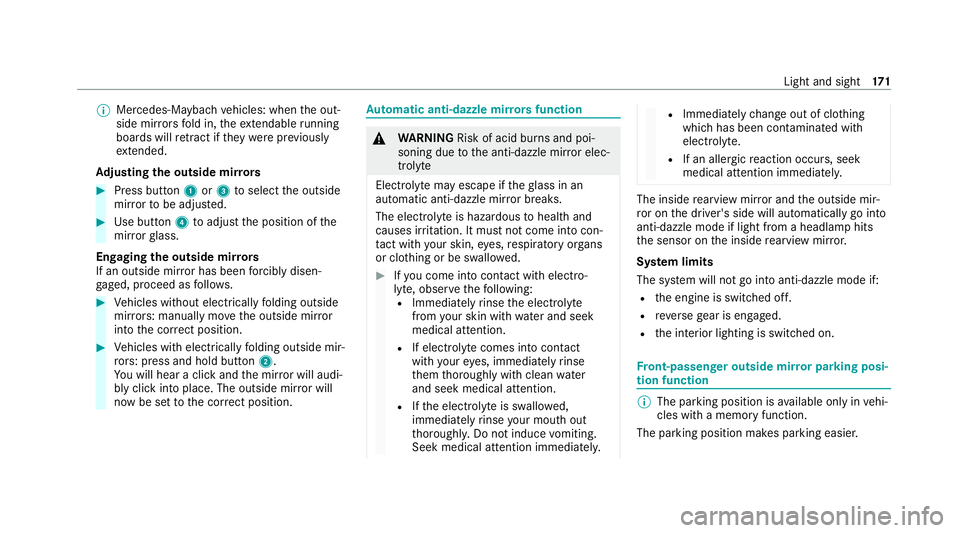
Ad justing the outside mir rors #
Press button 1or3 toselect the outside
mir rorto be adjus ted. #
Use button 4toadjust the position of the
mir rorgl ass.
Engaging the outside mir rors
If an outside mir ror has been forc ibly disen‐
ga ge d, proceed as follo ws. #
Vehicles without electrically folding outside
mir rors: manually mo vethe outside mir ror
into the cor rect position. #
Vehicles with electrically folding outside mir‐
ro rs: press and hold button 2.
Yo u will hear a click and the mir ror will audi‐
bly click into place. The outside mir ror will
now be set tothe cor rect position. Au
tomatic anti-dazzle mir rors function &
WARNING Risk of acid bu rns and poi‐
soning due tothe anti-dazzle mir ror elec‐
trolyte
Electrolyte may escape if theglass in an
automatic anti-dazzle mir ror breaks.
The electrolyte is hazardous tohealth and
causes ir rita tion. It mu stnot come into con‐
ta ct wi thyour skin, eyes,respiratory or gans
or clo thing or be swallo wed. #
Ifyo u come into contact with electro‐
ly te , obser vethefo llowing:
R Immediately rinse the electrolyte
from your skin with water and seek
medical attention.
R If electrolyte comes into contact
with your eyes, immediately rinse
th em thoroughly with clean water
and seek medical attention.
R Ifth e electrolyte is swallo wed,
immediately rinse your mouth out
th oroughl y.Do not induce vomiting.
Seek medical attention immediately. R
Immedia tely ch ange out of clo thing
which has been con taminated with
electrolyte.
R If an allergic reaction occurs, seek
medical attention immediatel y. The inside
rearview mir ror and the outside mir‐
ro r on the driver's side will automatically go into
anti-dazzle mode if light from a headlamp hits
th e sensor on the inside rearview mir ror.
Sy stem limits
The sy stem will not go into anti-dazzle mode if:
R the engine is switched off.
R reve rsege ar is engaged.
R the interior lighting is switched on. Fr
ont-passenger outside mir ror parking posi‐
tion function %
The pa rking position is available on ly invehi‐
cles with a memory function.
The parking position makes parking easier. Light and sight
171
Page 177 of 549
Overview of climate control sy
stems Note
s on climate control An interior air
filter in combination with the pre‐
fi lter in the engine compartment must alw ays be
used so that the air conditioning sy stem, pollu‐
tion le vel monitoring and the air filtration work
cor rectl y.Make sure that thefilter is ins talled
cor rectly and thefilter housing in the engine
compartment is closed cor rectly using the cap
and alw ays tightly sealed when in operation. Use
fi lters recommended and appr ovedby
Mercedes-Benz. Alw ays ha veservice workcar‐
ri ed out at a qualified specialist workshop. Overview of
the air conditioning control
panel The indicator lamps on
the buttons indicate that
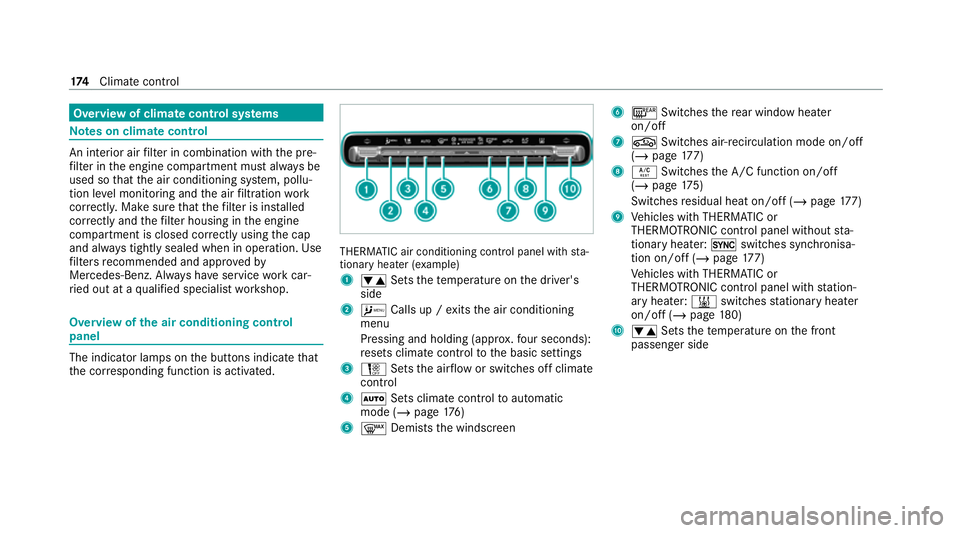
th e cor responding function is activated. THERMATIC air conditioning contro
l panel withsta‐
tionary heater (e xamp le)
1 w Setsthete mp erature on the driver's
side
2 A Calls up / exits the air conditioning
menu
Pressing and holding (appr ox.fo ur seconds):
re sets climate contro lto the basic settings
3 H Setsthe air flow or switches off climate
control
4 Ã Sets climate control toautomatic
mode (/ page176)
5 ¬ Demists the windscreen 6
¤ Switches there ar wind owheater
on/off
7 g Switches air-recirculation mode on/off
(/ page 177)
8 Á Switches the A/C function on/off
(/ page 175)
Switches residual heat on/off (/ page177)
9 Vehicles with THERMATIC or
THERMOTRONIC contro l panel withoutsta‐
tionary heater: 0switches synchronisa‐
tion on/off (/ page177)
Ve hicles with THERMATIC or
THERMOTRONIC contro l panel withstation‐
ary heater: &switches stationary heater
on/off (/ page180)
A w Setsthete mp erature on the front
passenger side 174
Climate cont rol
Page 194 of 549
This also applies when
the engine or parts of the
driv etra in ha vebeen replaced.
Please also obser vethefo llowing running-in
no tes:
R in cer tain driving and driving saf ety sy stems,
th e sensors adjust automatically while a cer‐
ta in dis tance is being driven af terth eve hicle
has been delivered or af terre pairs. Full sys‐
te m ef fectiveness is not reached until the
end of this teach-in process.
R brakepads, brake discs and tyres that are
either new or ha vebeen replaced only ach‐
ie ve optimum braking ef fect and grip af ter
se veral hundred kilom etre s of driving. Com‐
pensate forth ere duced braking ef fect by
applying greater forc eto the brake pedal. Note
s on optimised acceleration If all necessary
requirements and activation con‐
ditions are fulfilled, the best possible accelera‐
tion can be achie ved from a standstill.
Do not use the optimised acceleration on public
ro ads. Individual wheels could spin and youcould lose control of
theve hicle. There is an
increased risk of skidding and/or accident.
Be sure toobser vethe saf ety no tes and informa‐
tion on ESP ®
(/ page 227). Moving
away with optimised acceleration &
WARNING Risk of skidding and having
an accident from wheels spinning
When you use optimised acceleration, indi‐
vidual wheels could spin and you could lose
cont rol of theve hicle.
If ESP ®
is deactivated, there is a risk of skid‐
ding and accident! #
Make sure that no persons or obstacles
are in the close vicinity of your vehicle. Re
quirements:
R theve hicle is run in (/ page 190).
R theve hicle and tyres are in good condition.
R you are on a high-g rip ro adw ay.
R the engine and transmission are at normal
operating temp erature. *
NO
TEIncreased wear due tooptimised
acceleration When pulling
away with optimised accelera‐
tion, all components of the driv etra in are
subjected toave ry high load.
This can lead toinc reased component wear. #
Do not alw ays pull away with optimised
acceleration. #
Engage theh drive position (/ page 206). #
Movethesteering wheel tothest ra ight-
ahead position. #
Select the sportiest available drive program
B orC(/ page 203). #
Deactivating ESP ®
(/ page 229). #
Depress and hold the brake pedal firm ly wi th
yo ur left foot. #
With your right foot , fully depress the accel‐
erator pedal. Driving and parking
191
Page 195 of 549
#
After no more than five seconds, take your
left foot quickly off the brake, but keep the
accelerator pedal depressed.
The vehicle pulls away at maximum accelera‐
tion. #
Swit chon ESP ®
once the acceleration proce‐
dure is comple te.
Ending optimised acceleration #
Remo veyour foot from the accelerator pedal. #
Reactivate the ESP ®
.
% Afteryo u pull away with optimised accelera‐
tion, components of the driv etra in can
become very hot, which means that opti‐
mised acceleration values may be reached
again on lyafte r a few minutes. Note
s on driving &
WARNING Risk of accident due to
objects in the driver's foot we ll
Objects in the driver's foot we ll may impede
pedal tr avel or block a depressed pedal. This jeopardises
the operating and road
saf ety of theve hicle. #
Stow all objects in theve hicle securely
so that they cannot getinto the driver's
fo ot we ll. #
Alw aysfit th efloor mats securely and
as prescribed in order toensure that
th ere is alw ays suf ficient room forthe
pedals. #
Do not use loose floor mats and do not
place floor mats on top of one ano ther. &
WARNING Risk of accident due toincor‐
re ct foot we ar
Incor rect foot we ar includes, forex ample:
R shoes with plat form soles
R shoes with high heels
R slippers #
Alw ayswe ar suitable foot we ar so that
yo u can operate the pedals safel y. &
WARNING Risk of accident if the ignition
is switched off while driving
If yo u swit choff the ignition while driving,
saf ety functions are restricted or no longer
av ailable.
Yo u will then need, forex ample, touse con‐
siderably more forc eto steer and brake. #
Do not switch off the ignition while driv‐
ing. &
DANG ER Risk of death caused by
ex haust gases
Combustion engines emit poisonous exhaust
ga ses such as carbon monoxide. Inhaling
th ese exhaust gases is hazardous tohealth
and leads topoisoning. #
Never lea vethe engine or, if present,
th e auxiliary heating running in an
enclosed space wi thout suf ficient venti‐
lation. 19 2
Driving and pa rking
Page 198 of 549
#
Alw ays drive on inclines in the line of
fa ll (straight up or down) and do not
turn. &
WARNING Risk offire due toflammable
materials on hot parts of theex haust
sy stem
Flammable material such as lea ves, grass or
twigs may ignite if they come into contact
wi th hot parts of theex haust sy stem. #
When driving on unpa vedro ads or off-
ro ad, regular lych eck theve hicle under‐
side. #
Remo vetrapped plants or other flam‐
mable material, in particular. #
Ifth ere is damage, consult a qualified
specialist workshop immediately. When driving off-road, sand, mud and
water or
wate r mixed with oil may getinto the brakes.
This may lead toare duction in braking ef fect or
tot al brake failure as a result of increased wear.
The braking characteristics will vary depending
on the material that has entered the sy stem. Clean
the brakes af ter driving off-road. If you
th en notice reduced braking ef fect or hear
scraping noises, ha vethe brake sy stem checked
at a qualified specialist workshop. Adapt your
driving style to thech anged braking characteris‐
tics.
* NO
TEDama gecaused bydriving over
obs tacles The
vehicle can be damaged by:
R driving up onto high kerbs or unpa ved
ro ads.
R quickly driving over obs tacles su chas
ke rbs, speed bumps or po tholes.
R heavy objects hitting the underbody or
ch assis components. #
Do not drive over obs tacles that could
damage theve hicle. #
Check theve hicle regular lyfor dama ge
during off-road driving. #
Adjust theve hicle speed tosuit the
ro ad sur face conditions. #
Ifth ere is damage, consult a qualified
specialist workshop immediately. +
ENVIRONMENTAL
NOTEEnvironmental
dama gedue tonon-obser vance of pro‐
hibition signs Environmental pr
otection has priority. Treat
nature with respect. #
Be sure toobser veprohibition signs. Checklist before driving off-road
Check
thefo llowing points before driving off-
ro ad:
R Fuel le vel
R Vehicles with a diesel engine: AdBlue ®
le vel
R Engine oil le vel:fill engine oil tothe maxi‐
mum le velto ensure full gradeability
(/ page 360).
R Tyre-change tool kit and spare wheel
R Tyres and wheels Driving and parking
19 5
Page 203 of 549
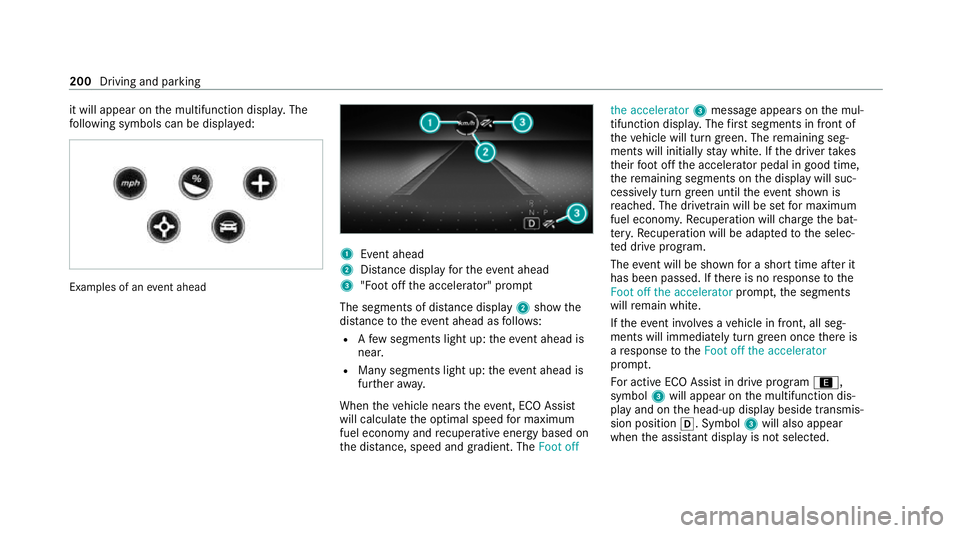
it will appear on
the multifunction displa y.The
fo llowing symbols can be displa yed: Examples of an
event ahead 1
Event ahead
2 Distance displ ayforth eev ent ahead
3 "Foot off the accelerator" prom pt
The segments of dis tance displ ay2 show the
dis tance totheeve nt ahead as follo ws:
R Afew segments light up: theeve nt ahead is
nea r.
R Many segments light up: theeve nt ahead is
fur ther aw ay.
When theve hicle nears theeve nt, ECO Assi st
will calculate the optimal speed for maximum
fuel economy and recuperati veenergy based on
th e dis tance, speed and gradient. The Foot offthe accelerator
3message appea rson the mul‐
tifunction displa y.The firs t segments in front of
th eve hicle will turn green. The remaining seg‐
ments will initially stay white. If the driver takes
th eir foot off the accelera tor pedal in good time,
th ere maining segments on the display will suc‐
cessively turn green until theeve nt shown is
re ached. The driv etra in will be set for maximum
fuel econom y.Re cuperation will charge the bat‐
te ry.Re cuperation will be adap tedto the selec‐
te d drive prog ram.
The event will be shown for a short time af ter it
has been passed. If there is no response tothe
Foot off the accelerator prompt,th e segments
will remain white.
If th eev ent in volves a vehicle in front, all seg‐
ments will immediately turn green once there is
a re sponse totheFoot off the accelerator
prom pt.
Fo r active ECO Assist in drive program ;,
symbol 3will appear on the multifunction dis‐
play and on the head-up display beside transmis‐
sion position h. Symbol3will also appear
when the assis tant displ ayis not selec ted. 200
Driving and parking
Page 204 of 549
If
th e sy stem does not inter vene du ring the
eve nt ahead, no thing will be displa yed. The sys‐
te m will be passive.
ECO Assist is active only in drive programs ;
and A.
Sy stem limits
ECO Assist can function even more precisely if
th ero ute is adhered towhen route guidance is
active. The basic function is also available with‐
out active route guidance. Notall information
and traf fic situations can be fore seen. The qual‐
ity depends on the map data.
ECO Assist is only an aid. The driver is responsi‐
ble forke eping a safe dis tance from theve hicle
in front, forve hicle speed and for braking in
good time. The driver must be ready tobrake at
all times ir respective of whe ther the sy stem
inter venes.
The sy stem may be impaired or may not function
in thefo llowing situations:
R If visibility is poor, e.g. due toinsuf ficient illu‐
mination of thero ad, high lyvariable shade
conditions, rain, sno w,fog or heavy spr ay.R
Ifth ere is glare, e.g. from oncoming traf fic,
di re ct sunlight or reflections.
R Ifth ere is dirt on the windscreen in the area
of the multifunction camera or the camera is
mis ted up, damaged or obscured.
R If traf fic signs are ha rdtodiscern, e.g. due to
dirt, snow or insuf ficient lighting, or because
th ey are obscured.
R Ifth e information on the navigation sy stem's
digital map is incor rect or out of da te.
R If signs are ambiguous, e.g. traf fic signs in
ro adwor ksor in adjacent lanes. DY
NA MIC SELECT switch Fu
nction of theDY NA MIC SELECT switch *
NO
TEMercedes-AMG vehicles #
Obser vethe no tes in the Supplement.
Yo u could otherwise failto recognise
dangers. %
Depending on the engine and equipment,
th eve hicle has dif fere nt drive programs. Use
theDY NA MIC SELECT switch tochange
between thefo llowing drive programs.
The drive prog ram selected appears in the multi‐
function display of the on-board computer.
= Individual
R individual settings
B Sport+
R particularly sporty driving
R emphasises theve hicle's ownove rste ering
and under steering characteristics for a more
active driving style
R only suitable for good road conditions, a dry
ro ad sur face and a clear stre tch of road
C Sport
R continues toofferst ability but with a sporty
setup
R allows th e sporty driver a more active driving
st yle
R only suitable for good road conditions, a dry
ro ad sur face and a clear stre tch of road Driving and parking
201