phone MERCEDES-BENZ M-Class 2011 W164 Comand Manual
[x] Cancel search | Manufacturer: MERCEDES-BENZ, Model Year: 2011, Model line: M-Class, Model: MERCEDES-BENZ M-Class 2011 W164Pages: 214, PDF Size: 4.69 MB
Page 164 of 214
Vehi
cle equi pmen t
i TheseOpe rating Instru ctionsdescri beall
sta nda rdand optio nal equipme ntava ilab le
for your veh icleat the time ofpurcha se.
Pl ea se note thatyour vehicle maynotbe
equipped withallfeatures described. General
information Changing
thebatt eries
Notes Both
theremote controland thetwo sets of
wireless headphones requirebatteries. G
War
ning!
Keep thebatteries outofthe reach of
children. Consultadoctor immediately ifa
child should swallow abattery.
Do not dismantle, short-circuit orburn a
battery. H
Environmental
note
Dispose ofdischarged batteriesinan
environ mentallyresponsible manner. In
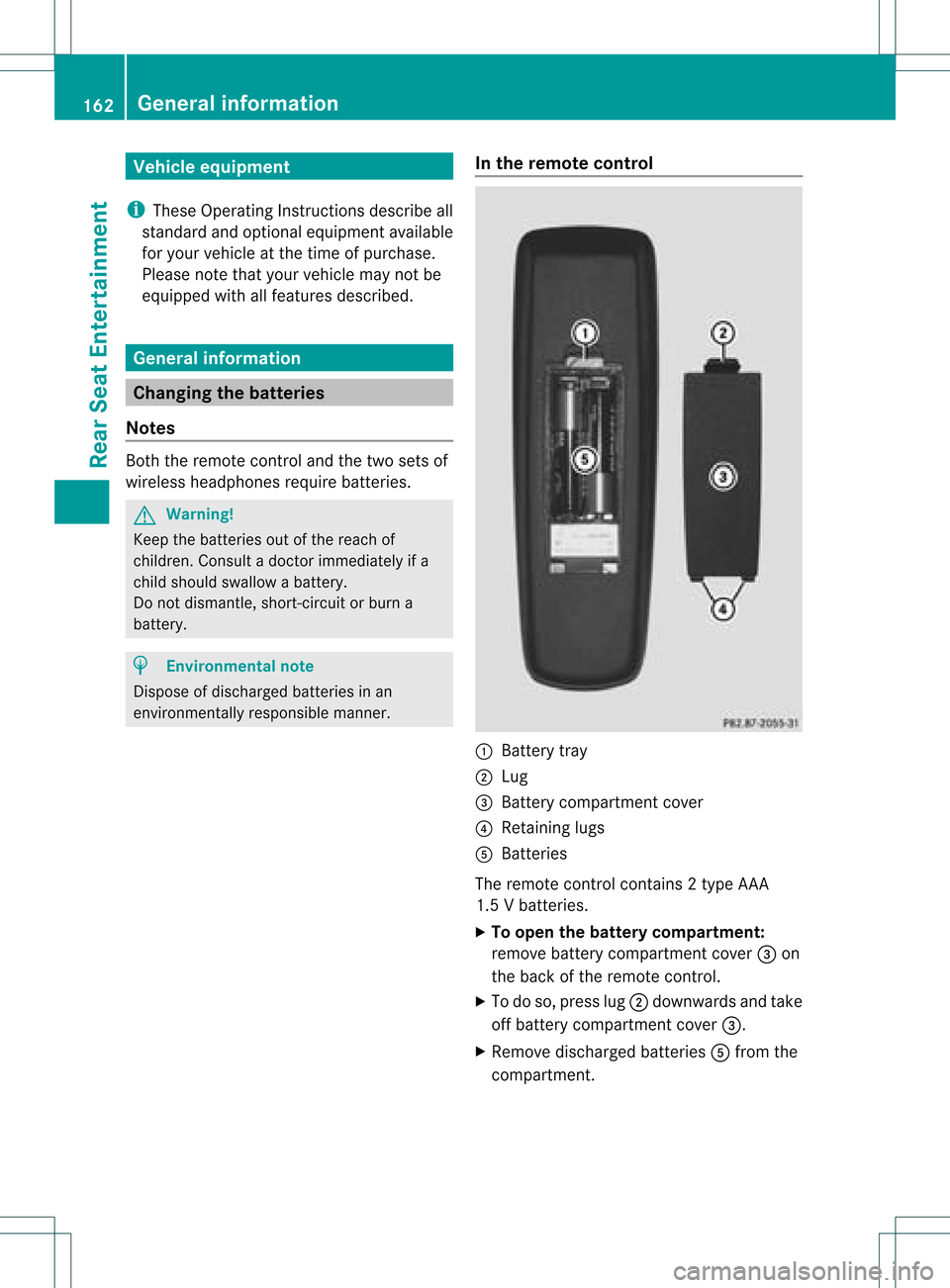
the remot econtrol :
Batt erytray
; Lug
= Batt erycompartm entcover
? Retaining lugs
A Batt eries
The remote controlcont ains 2type AAA
1.5 Vbatteries.
X To open thebatt erycompar tment:
remove batterycompartm entcover =on
the back ofthe remote control.
X To do so, press lug;downwards andtake
off battery compartm entcover =.
X Remove discharged batteriesAfrom the
compartm ent. 162
General
informationRearSeatEntert ainment
Page 165 of 214

X
Insert newbatteries. Observethepola rity
marking onthe batteries andinthe battery
compartment whendoing so.
Left-hand battery:thepositive pole(+)
must faceupwards.
Rig ht-hand battery: thepositive pole(+)
must facedownwa rds.
X To clo sethe battery compartment: first
pla cebattery compartment cover=into
the battery compartment withretaining
lug s? and allow lug ;toclip into place.
In the wirel essheadphones The
battery compartment coverislocated on
the left head phone. :
Battery compartment cover
The wirel esshead phones contain 2type AAA
1. 5V bat terie s.
X To ope nth ebat tery com partme nt:fo ld
th ebat tery compar tmentco ver :
upwar ds.Whe ndoing so,hold theleft
headphone asshown toprevent the
insert edbatteries fromfalling out.
X Remove thedischarged batteriesfromthe
compart ment.
X Insert newbatteries. Observethepolarity
marking onthe batteries andinthe battery
compart mentwhen doing so.
Left- hand battery: thepositive pole(+)
must faceupwards. Right-hand
battery:thepositive pole(+)
must facedownwards.
X To close thebatt erycompar tment:
press thebattery compartm entlid
downwards untilitclips intoplace.
If the batteries havebeen insert ed
correc tly,the indicator lampwilllight up
green whentheheadphones areswitched
on. Basic
functions Using
headphones
You canusethewireless headphones
supplied and/oruptotwo sets ofwired
headphones connected tothe correspon ding
jack ofthe rear-com partmentscreen s
(Y page 30).
Infor mation on:
R switching thewireless headphones on/off
R adjusting thevolume ofthe headphones
R selecting ascreen forthe headphones
can befound inthe "Wireless headphones"
section (Ypage 33). Using
themain loudspeaker s
You canusethevehicle loudspeakers to
listen toadisc insert edinthe rear-
compart mentdrive. Todo so, atleast oneof
the rear-com partmentscree nsmus tbeset to
disc mode.
X Sett ingusing COMAND: press,for
example, the$ function button to
switch onanaudio mode.
X Select Audio using
the9 button and
press the9button tocon firm.
The audio menu (Ypage 21)appears.
X Select Rear using
the9: buttons
and press the9button tocon firm.
i The headphones' volumesettingdoes not
affect themain loudspeakers. Ba
sic functions
163RearSeatEntert ainment Z
Page 179 of 214

X
To switcho nthe function inCOMAND:
switch tothe desired audiomode in
COMAND orshow themenu invideo mode.
X Select themenu itematthe bott omleft,
e.g. CD ,
using the:=; buttons
on the remot econ trol while CDmode is
switched on.
X Select Active Aud./Vid .Source for the
Rear .
In
the statusbar atthe top, youwillsee the
headphones iconandthe_icon forthe
source thathasbeen switched on.
X To switch offthe function inCOMAND:
switch tothe desired audiomode in
COMAND oractivat ethe menu system in
video mode.
X Select themenu itematthe bott omleft,
e.g. CD ,
using the:=; buttons
and press the9button tocon firm. X
Select _Rear Audio/Vi deoOff and
press the9button tocon firm. Setting
thebright ness/contrast /
color
X Select Source in
the AUX menu andpress
the 9button onthe remot econ trol to
con firm.
X Select Display Aux or
Disk Drive Aux and
press the9button tocon firm.
X Select Brightne ss ,
Contrast or
Color and
press the9button tocon firm.
As etting scale appears.
X Select asett ingusing the9 or:
button andpress the9button tocon firm. Changing
thepictu reform at
X Select Source in
the AUX menu andpress
the 9button onthe remot econ trol to
con firm.
X Select Display Aux or
Disk Drive Aux and
press the9button tocon firm.
X Select 16:9Optimiz ed ,
4:3 or
Widescr een using
the9: buttons
and press the9button tocon firm.
The äicon infron tof amenu item
indicat esthe curren tsett ing. AUX
mode
177Rear SeatEntert ainment Z
Page 181 of 214

Vehi
cle equi pmen t<0023002300230023002300230023002300230023002300230023002300230023
002300230023002300230023002300230023002300230023> 180
Overview ........ .......... .................. ........ 180
Phone <0023002300230023002300230023002300230023002300230023002300230023
0023002300230023002300230023002300230023002300230023002300230023
0023002300230023002300230023002300230023002300230023002300230023
0023> 183
Nav igation <0023002300230023002300230023002300230023002300230023002300230023
0023002300230023002300230023002300230023002300230023002300230023
002300230023002300230023002300230023> 185
Addr essBook <0023002300230023002300230023002300230023002300230023002300230023
0023002300230023002300230023002300230023002300230023002300230023
0023002300230023> 193
Rad ioand Satellite Radio<0023002300230023002300230023002300230023002300230023002300230023
0023> 196
DVD Changer <0023002300230023002300230023002300230023002300230023002300230023
0023002300230023002300230023002300230023002300230023002300230023
00230023002300230023> 200
Externa lEquip ment (Aux) ................ 201
Comma ndList <0023002300230023002300230023002300230023002300230023002300230023
0023002300230023002300230023002300230023002300230023002300230023
002300230023> 201
Tr oubleshooting <0023002300230023002300230023002300230023002300230023002300230023
0023002300230023002300230023002300230023002300230023002300230023> 208 179Voice
Control
Page 182 of 214

Vehi
cle equi pmen t
i Thisma nua lde scri besal lthe standa rd
and optio nal equipme ntofyour veh icle
wh ich wasava ilab leat the time of
pu rcha se.Country -specificd iffe ren ces are
possible .Bear inmind thatyour vehicle
may notfeature allfunc tionsdescribed
here. Thisalso refers tosafety- related
systems andfunc tions. Overview
Opera
tingSafet y G
War
ning!
Please devote youratten tionfirst and
foremo stto the traff icsituation youarein.
While thesystem permitshands- freephone
operation ,atten tiontotraff icmay bedivert ed
not only byphysical operation ofaphone, but
also bythe distrac tionofaphone
con versat ionwhile driving. Assuch, forsafety
reasons, weenco urage thedriver tostop the
vehicle inasafe place before answering or
placing aphone call.
For safety reasons, youshould onlyselect a
destin ationwhen thevehicle isstat ionary.
While thenavigation systemprovides
direct ionalassistanc e,the driver mustremain
focused onsafe driving behavior, especially
pay atten tiontotraff icand street signs, and
should utilizethesystem' saudio cueswhile
driving.
The navigation systemdoesnotsupply any
infor mation onstop signs, yieldsigns, traffic
regulations ortraff icsafety rules.Their
observan cealway sremains inthe driver's
person alrespon sibility. DVDmaps donot
cover allareas norallroutes withinanarea.
Traffic regulations alwayshave priority over
any route recom mendat ionsgiven.
Bear inmind thatataspeed ofjust 30mph
(approximat ely50km/ h),your vehicle is
cover ingadistanc eof 44 feet (approximat ely
14 m)every second. G
War
ning
Navigation announcementsare intended to
direct youwhile driving without divertingyour
atten tionfrom theroad anddriving.
Please alwaysuse this feature instead of
con sulting themap display fordirect ions.
Consultin gthe symbols ormap display for
direct ionsmay cause youtodivert your
atten tionfrom driving andincrease yourrisk
of an acciden t. G
War
ning!
Please donot use theVoice ControlSystem
in an emergen cy,asthe toneof your voice
may change inastr essful situation .This could
cause adelay incompleting yourphone call
in atimely manner. Thiscould distract youin
an emergency situationandcause youtobe
involved inan accident. Symbols
OnlyUsed inthis Chapter
The following symbolsindicate:
s thatyouhave tosay something
t thatthere isavoice output fromthe
voice control
u thatthesystem showsinformation on
the displa y. Usage
You canusethevoice controlsystem to
operate thefollowing systemsdepending on
the equipment inyour vehicle:
R Phone
R Navigation
R Address book
R Audio (radio, satellite radio,DVDchanger,
memory card,music register)
Say thecommands withoutpausingbetween
individua lwords. Ifyou enter acommand that
does notexist orisincorrec t,the voice
cont rolsystem asksyouforanew command
with “Please repeat”or“Please repeatyour 180
OverviewVoice
Control
Page 183 of 214

ent
ry!”. Thevoice control confirms import ant
comm andstoyou and gives youinstruct ions
in the event ofincor rectentries.
Comma ndTyp es Voice
control distin guishes between the
following typesofcomm and:
R Global commands:
These arecomm andswhich canbecalled
up atany time (e.g.helporphone
comm ands).
R Local comm ands:
These arecomm andswhich areonly
available forthe active application (e.g.
“En terStreet” during navigation ).
Active Applicat ion The
local comm andsrefertothe application
curren tlyshown onthe display andtothe
audio source youarecurren tlylisten ingto.
For example, ifyou arelisten ingtothe radio
while thenavigation application isactive on
the display, youcan operate both
applications usingvoicecontrol.
To operate adifferen tfunc tion usin gvoi ce
co ntrol ,you must first swit chtothat
applic ation usin gth eco rrespo nding
co mm and. Op
era ting Voi ceCont rol Veh
icles withVoiceCont rolButtons on
th eMu lti-Fu nct ion Steer ing Wheel Ex
ampl edisp lay:M-Class
1 A Cancelsvoice control
2 ? Activat esvoice control
3 X Decreases thevol ume
W Incr eases thevol ume
x Mute
i You cancancelthedialog withvoi ce
co ntrol atany time.
Voic eco ntrol isoper ationalaroun dhalf a
min ute afterCOMA NDisswit ched on.
Veh icles withLever forVoiceCont rol Ex
ampl edisp lay:SL-Cla ss
1 Canc elsvoice control
2 Activat esvoice control
3 X Decreases thevol ume
W Incr eases thevol ume Over
view
181VoiceControl Z
Page 184 of 214
Star
ting theDialog X
Switch onthe ignition (seethevehicle
Owner's Manual).
X Vehicles withVoice Control buttonson
the Multi-fu nctionSteering Wheel:Press
the ? button.
or
X Vehicles withLever forVoice Control:
Pull thelever toward you
An acoustic signalconfirms thatthedialog
has been started.
X Give acommand.
Interru ptingtheDialog If
alist appears onthe display ,you can use
the “Pause” command tointerr uptthedialog.
You canthen select anentr yusing the
COMAND controlpanel.
To resume thedialog withvoice control,press
the ? button onthe multifunct ionsteering
wheel.
Cancel ingthe Dialog X
Vehicles withVoice Control buttonson
the Multi-fu nctionSteering Wheel:Press
the A button.
or
X Vehicles withLever forVoice Control:
Push thelever away fromyou.
An acoustic signalconfirms thatthedialog
has been canceled.
or
X Say thecommand “Cancel”(exceptwhen
creating andstoring voicetags,navigation
entr iesorduring individual ization).
or
X Press anybutton onCOMAND.
Adjust ingthe Volume X
Start thedialog.
X Give acommand, e.g.“Help”. X
Press theW orX button.
The volume increases ordecreases during
voice output.
or
X Set thevolume forthe voice output onthe
volume controlfor COMAND.
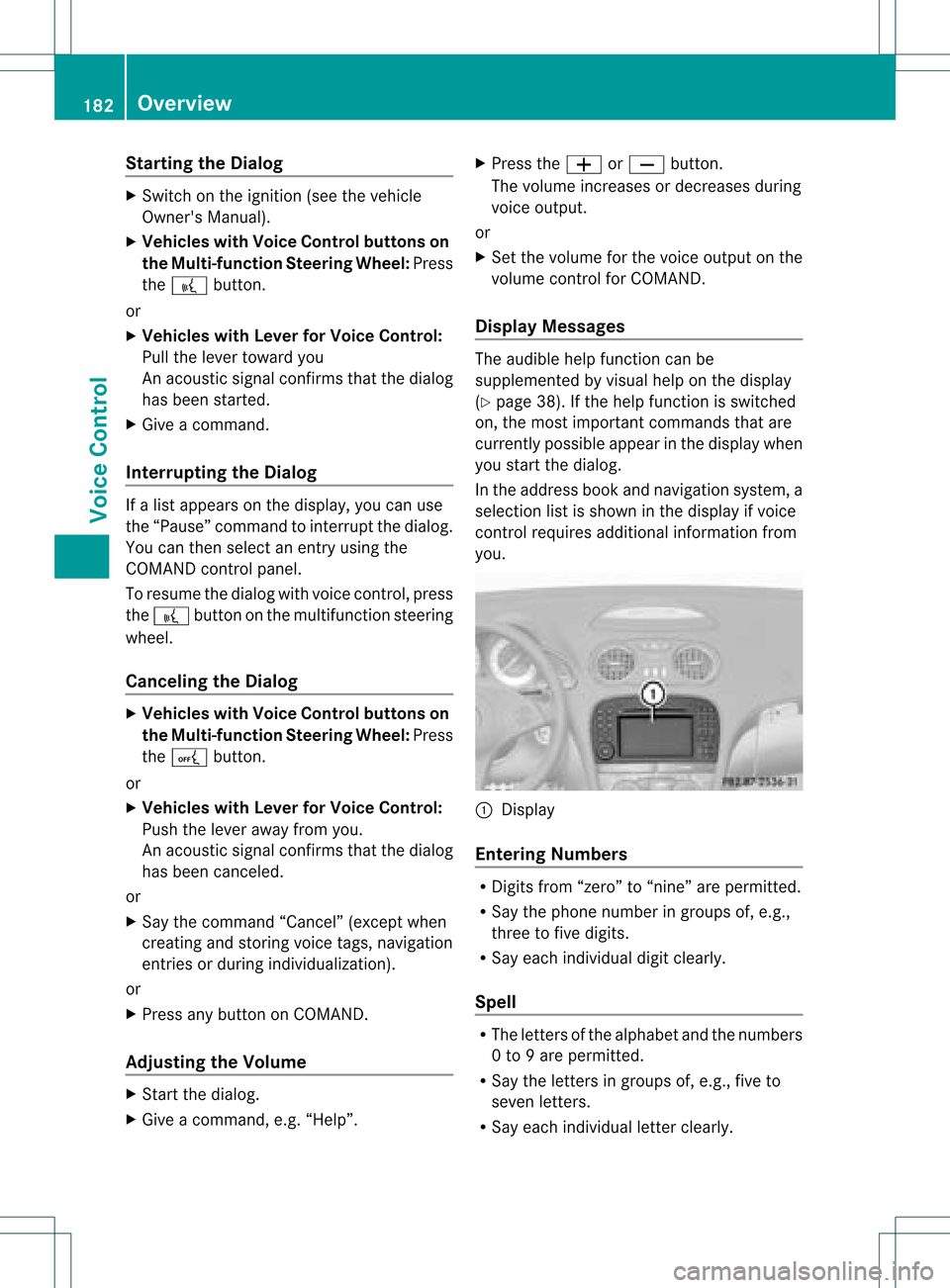
Display Messages The
audi blehelp funct ioncan be
supplemented byvisual helponthe display
(Y page 38).Ifthe help funct ionisswitched
on, the most important commands thatare
current lypossible appearint he displa ywhen
you start thedialog .
In the address bookandnavigation system,a
selection listisshown inthe displa yif voice
cont rolrequires additional information from
you. 1
Display
Entering Numbers R
Digits from“zero” to“nine” arepermitted.
R Say thephone number ingroups of,e.g.,
three tofive digits.
R Say each individua ldigit clearly.
Spell R
The letters ofthe alpha betand thenumbers
0 to 9are permitted.
R Say theletters ingroups of,e.g., fiveto
seven letters.
R Say each individua lletter clearly. 182
OverviewVoice
Control
Page 185 of 214
i
Using individu alization, youcan fine-tune
voice controltoyour ownvoice andthus
improve voicerecognition. Theprocess of
individu alization isdescribed inchapter
“System Settings” (Ypage 38).
i Ifyou useindividu alization, itmay impai r
recognition ofother users. Switch off
individu alization ifit makes recognition of
other users worse. Phone
G
Warning
Some jurisdictions prohibitthedriver from
using acellul artelephone whiledriving.
Whether ornot prohibited bylaw, forsafety
reasons, thedriver should notuse thecellul ar
telephone whilethevehicle isin motion. Stop
the vehicle inasafe location beforeplacing or
answering acall.
If you nonetheless choosetouse themobile
phone whiledriving, pleaseusethehandsfree
feature andbesure topay attent iontothe
traffic situation atall times. Usethemobile
phone onlywhen road,weather andtraffic
conditions permit.Otherwise, youmay notbe
able toobserve trafficconditions andcould
endanger yourselfand othe rs.
Bea rin mind thatat aspe edofjus t30 mph
(a pp roxi mately50 km/h) ,yo ur veh icleis
cove ringadi sta nce of44 feet(appro ximately
14 m)ever ysec ond. Oper
ation
You canusevoicecon trol to:
R place acall byusin gyour voiceto inp uta
phon enum ber
R store nam esand num bers intheaddre ss
book
R dial anum berfrom theaddre ssbook
R dial anum berfrom thecall list“Lat est
calls ”
R list en tothephon ebook R
ret riev eand man ageyour voicemail and
rec orde dann oun cem entservices
R redi al
Voic econ trol rec ogn izeswhet her:
R your phoneis swit ched on
R your phoneis con nectedvia Bluet ooth®
R thecar phon eis reg istered withthe
rele vantmobile phone network
R itis possible todial
If it is not possible todial, voice controlissues
a message tothis effect .
i You canstilloperate yourphone usingthe
keypad. Command
s
“Phone” Use
the“Phone” commandto select the
phone application. Usethiscomman difyou
wish thedigits enteredtobe shown onthe
display .
“Help Phone” Voice
controlhas anexten sivehelp funct ion.
Using the“Help Phone” comman d,you can
have allthe essent ialcomman dsfor the
phone readout.
“Dial number” You
canusethe“Dial number” commandto
dial aphone number.
The digits 0to9a nd the word“Pl us”ar e
pe rmi tted .
“Pl us”rep laces theinte rnational dialing cod e,
e.g .“00” .
Say thephone num berin the form ofa
conti nuousstri ngofind ividu aldigits or as
bl ocks ofdigits, e.g.three tofive digits.
Voice controlrepeats thedigits itrecogniz es
after each block ofdigits (withapause of
about halfasecond between eachblock of
digits) andwaits foryou tocont inue speaking. Phone
183VoiceControl Z
Page 186 of 214
Exam
ple of dialog :
s Dialnum ber
t Plea se saythe num ber
s Zero one threezero
t Zero one threezero
s Fivezero zero five
t Fivezero zero five
s Okay
t Dialing
i Youcan also dial the speci fiednum berif
you pressthe6 buttonon themult i-
fun ction steer ing whee lin st ead ofthe
co ncludin gco mm and “Okay”.
“Conf irm” Whil
eyou areenterin ganum ber,you can use
th e“Con firm” comm and tohav eall the
spo kend igits repeat edbyvoic econ trol.
Voic econ trol will thenprompt youto
continue withtheentry.
Example ofdia log:
s Dialnumber
t Pleasesay thenumber
s Zeroonethree zero
t Zeroonethree zero
s Confirm
t Zeroonethree zero.Pleasecontinue.
s Fivezero zero five
t Fivezero zero five
s Okay
t Dialing
i You canalsodia lthe speci fiednumber if
you press the6 button onthe multi -
function steeringwheelinstead ofthe
concludi ngcommand “Okay”.
“Co rrectio n” Whil
eyou areentering anumber, youcan use
the “Correction” command tocorrect the
block ofdigi tslas tspoken .When youinput
this command, voicecontroldeletes thelast block
ofdigits andrepeats thedigits inputup
to this point. Voicecontrolwill then prompt
you tocont inue withtheentr y.
Example ofdialog :
s Dialnumber
t Please saythenumber
s Zeroonethree zero
t Zeroonethree zero
s Fivezero zero five
t Fivezero zero five
s Correction
t Zeroonethree zero.Please continue
s Fivezero zero five
t Fivezero zero five
s Okay
t Dialing
“Del ete” While
youareenterin ganumber, youcan use
the “Delete” command todelete allthe digits
which havebeen entered. Afteryou have
input thiscommand, voicecontrolprompts
you toenter additional digitsorcommands.
Example ofdialog :
s Dialnumber
t Please saythenumber
s Zeroonethree zero
t Zeroonethree zero
s Fivezero zero five
t Fivezero zero five
s Delete
t Number deleted, pleasesaythe
number again:
s Zerothree seven three
t Zerothree seven three
s Threenineone
t Threenineone
s Okay
t Dialing 184
PhoneVoice
Control
Page 187 of 214

“Save
Name”(Address Book) "Save
Name" (Address Book)functional
description (Ypage 194)
“Dial Name”(Address Book) “Dial
Name” (Address Book)functional
description (Ypage 195)
“Dele teNam e”(Address Book) “Delete
Name”(Address Book)functional
description (Ypage 195)
“Find Name”(Address Book) “Find
Name” (Address Book)functional
description (Ypage 195)
“List Phone Book”andDialing aPhone
Number You
canusethe“List phone book”command
to listen toallentries inthe phone bookin
whi chaphone numbe risalso stored and,if
required, selectanentry. Ifthe listcont ains
more than30entries, thesystem asksyouto
say thename fromwhich thereading shallbe
started.
Example ofdial og:
s Listphone book
The system readsoutallthe address
book entries withphone numbers. If
there ismore thanonephone number
for anentry, voicecontrolqueries this.
t Doyou want tomake awork callora
home call?
s Homecall To
cance lthe dialog:
X Vehicles withVoice Control buttons on
the Multi-function SteeringWheel:Press
the A button.
X Vehicles withLever forVoice Control:
Push theVoice Control leverawayfrom
you.
You have canceled thedialog. The system
confirms byresponding “Cancel”.
“Redial” You
canusethe“Redi al”command toredial
the number mostrecent lycalled.
Managing Announcement Servicesor
Voice Mail You
canalso usevoice controltomanage
your voice mailorrecorded announcement
services.
While aphone callisin progress:
X Vehicles withVoice Control buttons on
the Multi-function SteeringWheel:Press
the ? button whileaphone callisin
progress.
or
X Vehicles withLever forVoice Control:
Pull theVoice Control levertoward you.
An acoustic signalconfirms thatthesystem
is activated.
X Say therequired digits(“zero” to“nine”).
or
X Say therequired words“Star”or“Hash”.
X Say theconcluding command“Okay”.
The system dialsthe number entered. Navigation
G
Warning!
For safety reasons, youshould onlyselect a
destination whenthevehicle isstationary.
While thenavigation systemprovides
directional assistance, thedriver mustremain Navigat
ion
185Voice Control
Z