Display MERCEDES-BENZ M-Class 2012 W166 Service Manual
[x] Cancel search | Manufacturer: MERCEDES-BENZ, Model Year: 2012, Model line: M-Class, Model: MERCEDES-BENZ M-Class 2012 W166Pages: 396, PDF Size: 14.48 MB
Page 186 of 396
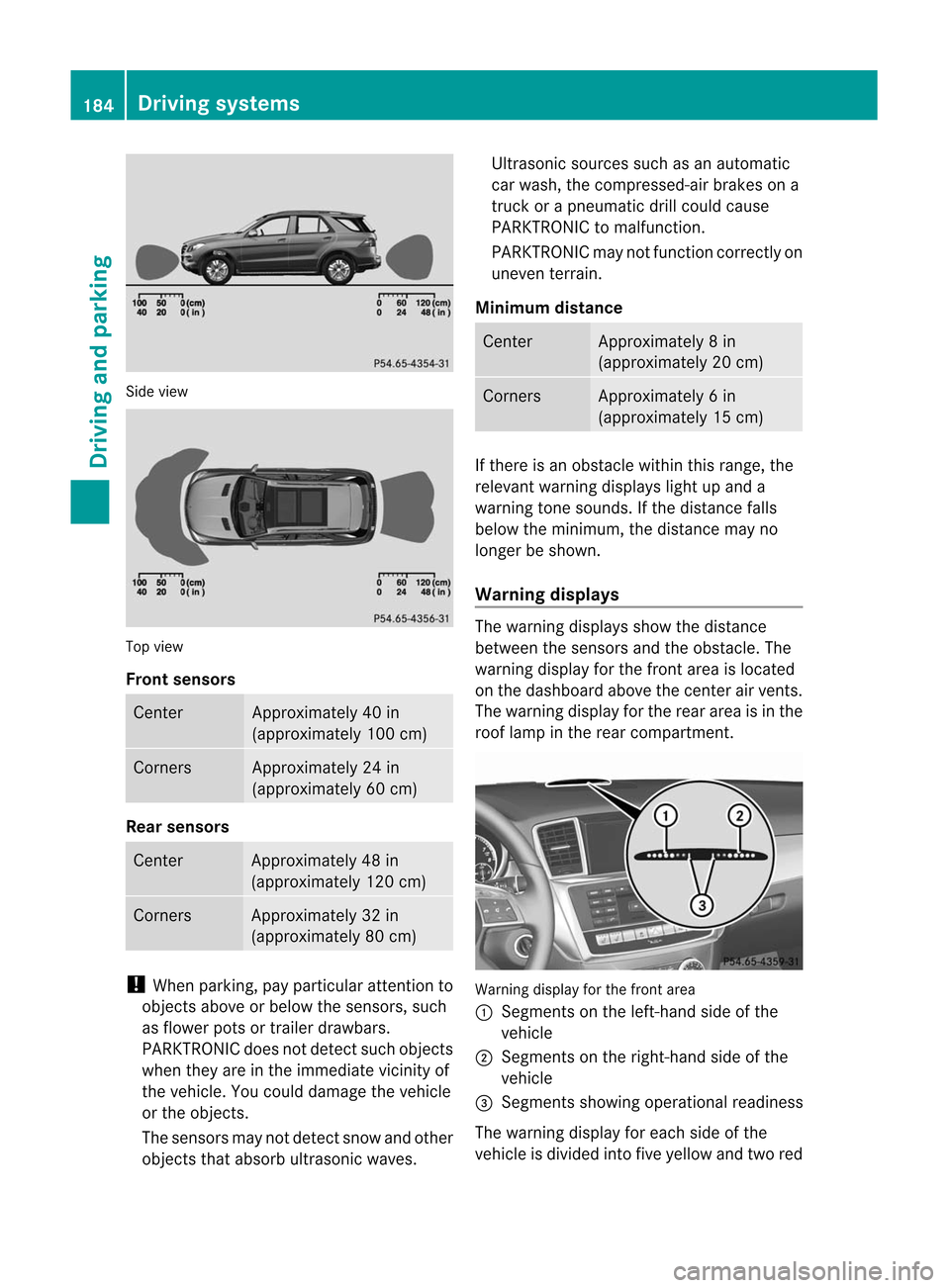
Sid
evie w Top
view
Fro ntsenso rs Ce
nter Appr
oxim ately40 in
(a ppr oxim ately100 cm) Co
rners Appr
oxim ately24 in
(a ppr oxim ately60 cm) Rear
senso rs Ce
nter Appr
oxim ately48 in
(a ppr oxim ately120 cm) Co
rners Appr
oxim ately32 in
(a ppr oxim ately80 cm) !
Whe npark ing,pay particular attentio nt o
object sabove orbelow thesensors, such
as flower potsortrailer drawbars.
PARKTRONIC doesnotdetect suchobject s
when theyareinthe immediate vicinityof
the vehicle. Youcould damage thevehicle
or the object s.
The sensors maynotdetect snowandother
object sthat absorb ultrasonic waves. Ultrasonic
sourcessuchasan automatic
car wash, thecompressed- airbrakes ona
truck orapneumatic drillcould cause
PARKTRONIC tomalfunct ion.
PARKTRONIC maynotfunct ioncorrec tlyon
uneven terrain.
Minimum distance Center Approx
imately 8in
(approx imately 20cm) Corne
rs Appr
oxim ately 6in
(approx imately 15cm) If
ther eis an obst acle within thisrange ,the
relevan twarn ing displ ayslight upand a
warn ingtone soun ds.Ifth edist ancefalls
below themin imum ,th edist ancemay no
lon ger besho wn.
Wa rning displa ys The
warn ingdispl aysshowthedist ance
bet ween thesen sorsand theo bstac le.The
warning displayforthe fron tarea isloca ted
on the dashboa rdabo vethe center airvents.
The warning displayforthe rear area isin the
roof lamp inthe rear compartment. Warning
displayforthe front area
: Segments onthe left-hand sideofthe
vehicl e
; Segments onthe right-hand sideofthe
vehicl e
= Segments showingopera tional readiness
The warning displayforeach sideofthe
vehicl eis divi ded into fiveyellow and twored 184
Drivi
ngsystemsDriving and parking
Page 187 of 396
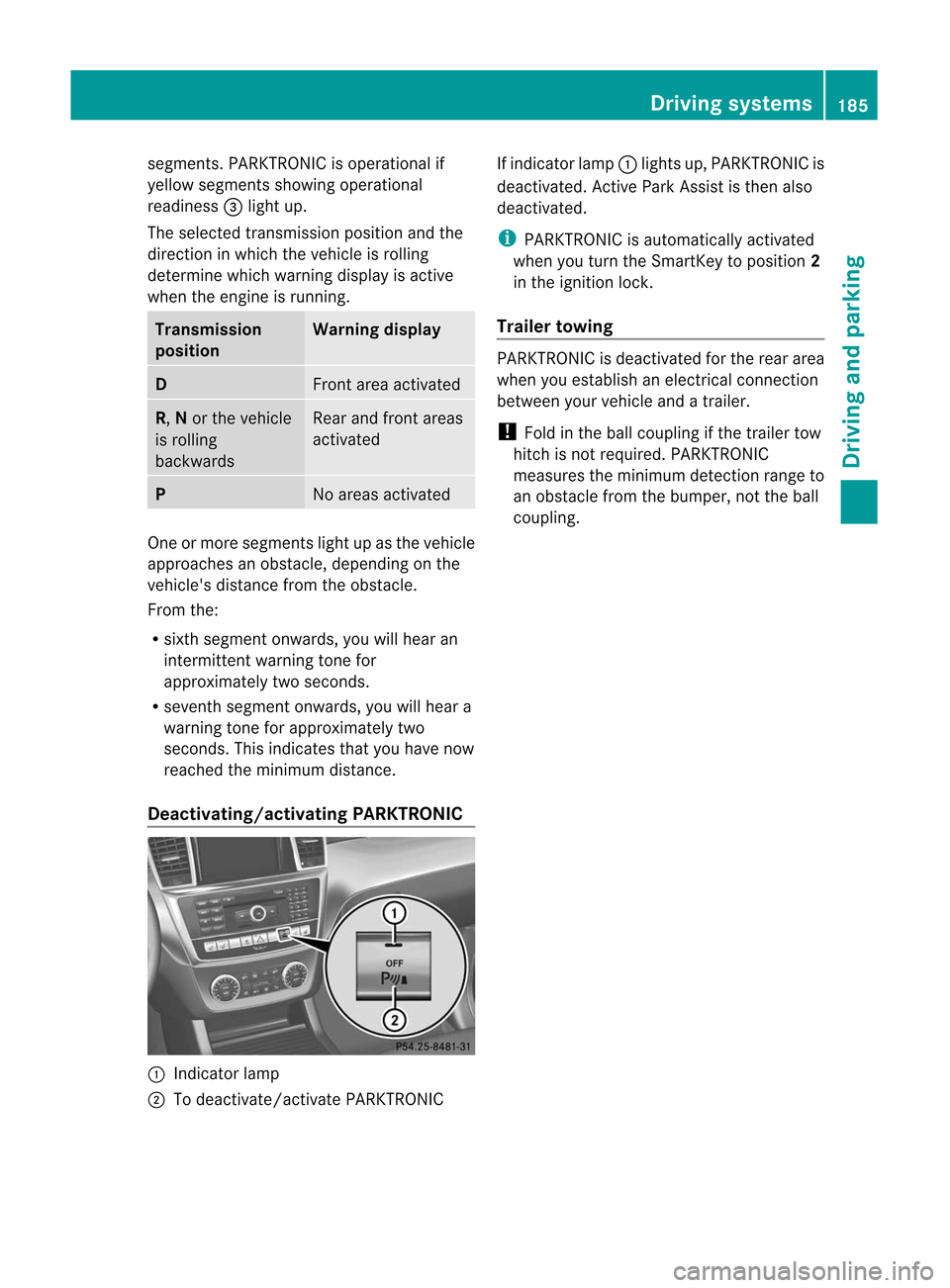
segments.
PARKTRONIC isoperational if
yell ow segments showingoperational
readiness =light up.
The selected transmission positionandthe
direction inwhich thevehicle isrolling
determine whichwarning displayis active
when theengine isrunning. Tra
nsmission
position Warning
display D
Front
areaactivated R,
Nor the vehicle
is rolling
backwards Rear
andfront areas
activated P
No
areas activated One
ormore segments lightupasthe vehicle
approa chesanobstacle, depending onthe
vehicle's distancefromtheobstacle.
From the:
R sixth segment onwards, youwillhear an
intermitt entwarning tonefor
approximately twoseconds.
R seventh segment onwards, youwillhear a
warning toneforapproximately two
seconds. Thisindicates thatyouhave now
reached theminimum distance.
Deac tivating/activating PARKTRONIC:
Indicator lamp
; Todeactivate/activate PARKTRONIC If
indicator lamp:lights up,PARKTRONIC is
deactivated. Active Park Assist isthen also
deactivated. i
PARKTRONIC
isautomaticall yactivated
when youturn theSmartKey toposition 2
in the ignition lock.
Tra iler towing PARKTRONIC
isdeactivated forthe rear area
when youestablish anelectrical connection
between yourvehicle andatrailer.
! Fold inthe ball coupling ifthe trailer tow
hitch isnot required. PARKTRONIC
measures theminimum detection rangeto
an obstacle fromthebumper, nottheball
coupling. Driving
systems
185Driving and parking Z
Page 188 of 396
Problems
withPARKTRONIC Problem Possible
causes/co nsequences andM Solutions
Only
thered segments
in the PARKTRONIC
warning displaysare lit.
You also hear awarning
tone forapproximately
two seconds.
PARKTRONIC is
deactivated after
approximately
20 seconds, andthe
indicator lampinthe
PARKTRONIC button
lights up. PARKTRONIC
hasmalfunction edand hasswitched off.
X Ifproblems persist,havePARKTRONIC checkedataqual ified
specialist workshop. Only
thered segments
in the PARKTRONIC
warning displaysare lit.
PARKTRONIC is
deactivated after
approximately 20
seconds. The
PARKTRONIC sensorsaredirty orthere isinterf erence.
X Clea nthe PARKTRONIC sensors(Ypage 322).
X Switch theignition backon. The
problem maybecaused byan extern alsource ofradio or
ultrasound waves.
X See ifPARKTRONIC functionsinadifferent location. Active
Parking Assist
Import antsafety notes Act
ive Parking Assistisan electronic parking
aid with ultrasound. Ultrasoundisused to
measure theroad onboth sides ofthe vehicle.
As uitable parkingspac eis ind icat edbythe
park ingsymb ol.Active steer ing interv ention
can assis tyou during parking. Youmay also
use PARKTRONIC (Ypage 183). When
PARKTRONIC isswitched off,Active Parking
Assist isalso unavailab le. G
WARNIN
G Act
iveParking Assistismerely anaid and may
sometimes recommendparking spacesthat
are not suitable forparking. Forexample,
these might bespaces whereparking is
prohibited, driveways,unsuitablesurfaces,
etc. Act
ive Parking Assistmeasures theparking
space asyou drive pastit.Any later changes
to the parking spacearenot taken into
account .For instan ce,this may bethe case
when thevehicle parkedinfront ofor behind
the space changes itsposition orwhen an
obstacle ismoved intotheparking space.
Act ive Parking Assistdoesnotrelieve youof
the responsibility ofpaying attention.Ifyou
rely solely onAct ive Parking Assist,you could
cause anaccident andinjure yourself and
others.
You arealway sresponsible forsafety and
must continue topay atten tiontoyour
immediate surroundings whenparking and
maneuvering. 186
Driving
systemsDriving and parking
Page 190 of 396
and
meas uresparkingspac eson bot hsides
of theveh icle.When driving atspeeds below
19 mph (30km/h), youwillsee theparking
symbol asastatus indicator inthe instrumen t
cluster. Bydefault, Active Parking Assistonly
displa ysparking spacesonthe front -
passenger side.Parking spacesonthe
driver's sidearedispla yedassoon asthe turn
signal onthe driver's sideisactivated. Ifyou
wish topark inaspace onthe driver's side,
the indicator onthe driver's sidemust remain
on. This must remain switched onuntil you
acknowledge theuse ofAct iveParking Assist
by pressing thea button onthe
multifunction steeringwheel.
When aparking spacehasbeen detect ed,an
arrow towards theright orthe left also
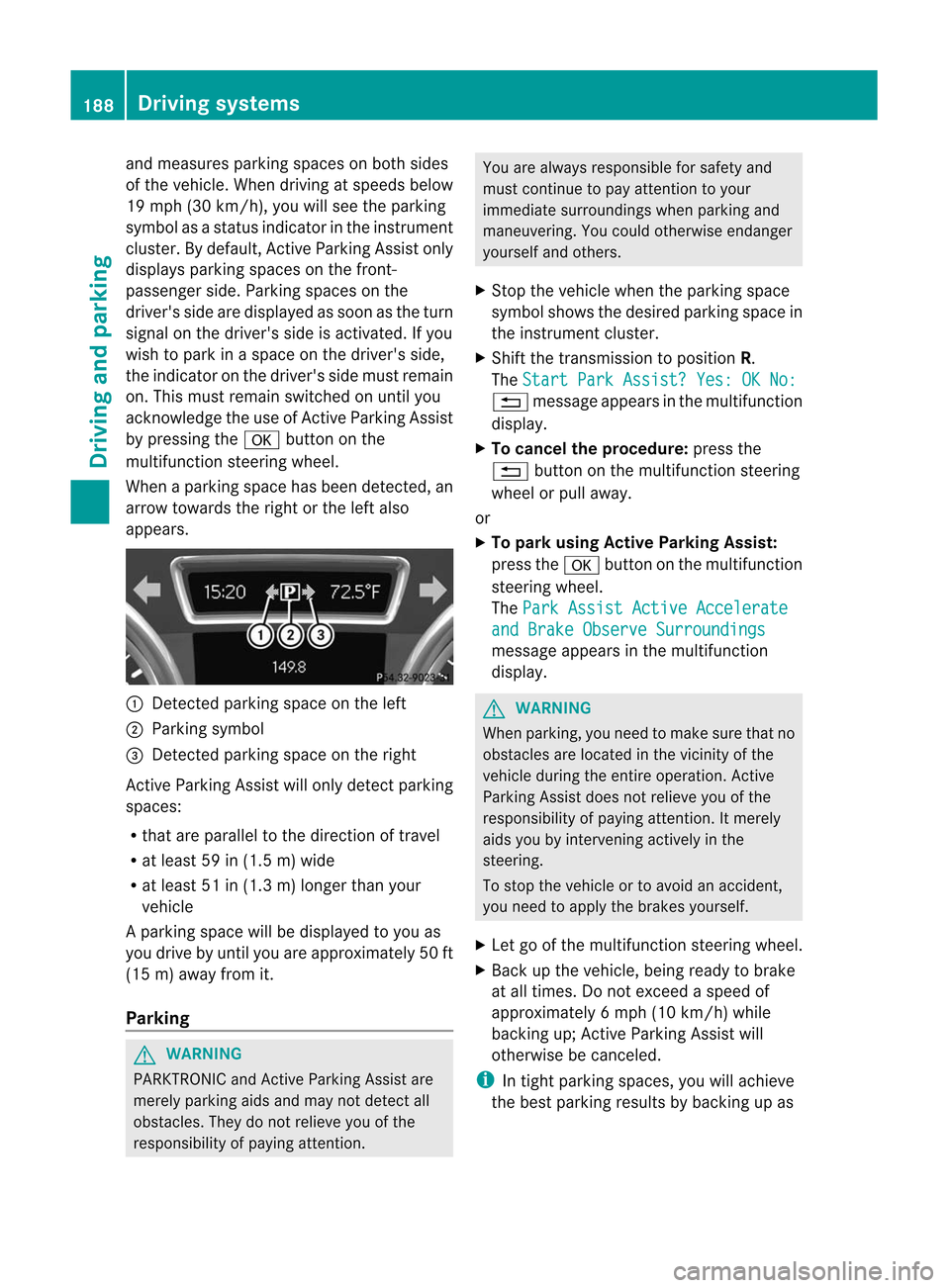
appea rs. :
Detec tedparking spaceonthe left
; Parking symbol
= Detec tedparking spaceonthe right
Act ive Parking Assistwillonly detect parking
spaces:
R that areparall elto the direction oftravel
R at least 59in(1.5 m)wide
R at least 51in(1.3 m)longer thanyour
vehicle
Ap arking spac ewill bedispl ayed toyou as
you driveby unt ilyou areappro ximately50 ft
(15 m)away from it.
Par king G
WAR
NING PA
RKTRO NICandActivePark ingAssist are
mer elypark ingaids andmay notd etec tall
obst acles. Theydonot reliev eyou ofthe
respo nsibilit yof paying attent ion. You
arealways responsible forsafet yand
must continue topay attent ion toyour
immed iatesurro undin gswhen parkingand
mane uverin g.You could otherwise endanger
yourself andothers.
X Stop the vehic lewhen thepark ingspace
symbol showsthedesired parkingspace in
the instrumen tclust er.
X Shif tthe transmission toposition R.
The Start
ParkAssist? Yes:OKNo: %
message appearsinthe multifunction
displa y.
X To cancel theprocedur e:press the
% button onthe multifunction steering
wheel orpull away .
or
X To par kusing Active ParkingAssist:
press thea button onthe multifunc tion
steerin gwheel.
The Park
Assist ActiveAccelera te and
Brake Observe Surroundings message
appearsinthe multifunc tion
display. G
WARNIN
G When
parking, youneed tomake surethatno
obstacles arelocated inthe vicinit yof the
vehicle duringtheentireoperation. Active
Parking Assistdoesnotrelieve youofthe
respons ibilityofpaying attention.Itmerely
aids youbyinter venin gactively inthe
steerin g.
To stop thevehicle ortoavoid anaccident ,
you need toapply thebrakes yourself.
X Let goofthe multifunc tionsteerin gwheel.
X Back upthe vehicle, beingready tobrake
at all times. Donot exceed aspeed of
approximately 6mph(10 km/ h)while
backin gup; Active Parkin gAssist will
other wisebecanc eled. i
In
tight parkin gspaces, youwillachieve
the best parkin gresults bybackin gup as 188
Driving
systemsDriving and parking
Page 191 of 396
far
aspossi ble.W hen doing so,also
observe thePARKTRONIC messages.
X Stop assoon asPARKTRONIC soundsthe
cont inuous warning tone,ifnot before.
Maneuvering mayberequired intight
parking spaces.
The Park
Assist ActiveSelectD Observe Surroundings message
appearsin
the multifunction display.
X Shift thetransmission toposition Dwhile
the vehicle isstationary.
Act iveParking Assistimmediately steersin
the other direction.
The Park
Assist ActiveAccelerate and
Brake Observe Surroundings message
appearsinthe multifunction
displa y. i
You
willachieve thebest parking results
by waiting forthe steering procedure to
complete beforemoving forwards.
X Drive forwards andbeready tobrake atall
times.
X Stop assoon asPARKTRONIC soundsthe
cont inuous warning tone,ifnot before.
The Park
Assist ActiveSelectR Observe Surroundings message
appearsin
the multifunction display.
X Further transmission shiftsmaybe
necessary.
As soon asthe parking procedure is
complete, the Park
Assist Finished message
appearsinthe multifunction
displa y.PARKTRONIC continues tobe
availa ble.
X Maneuver ifnecessary.
X Always observe thewarning messages
displa yedbyPARKTRONIC (Ypage 184).
Cancel ingActive Parking Assist You
cancancel Active Parking Assistatany
time. X
Stop themovement ofthe multifunction
steering wheelorsteer yourself.
Act ive Parking Assistwillbecanceled at
once. The Park
Assist Canceled message
appearsinthe multifunction
displa y.
or
X Press thePARKTRONIC buttononthe
cent erconsole (Ypage 185).
PARKTRONIC isswitched offand Active
Parking Assistisimmediately canceled.
The Park
Assist Canceled message
appea rsinthe multifunction display.
Act ive Parking Assistiscanceled
automatically if:
R parking usingActive Parking Assistisno
longer possible.
R you aredriving fasterthan6mph
(10 km/h).
R awheel spins,ESP®
interven esorfails. The
ä warning lamplights upinthe
instrumen tcluster.
Aw arning tone soun ds.The park ingspac e
symb oldisapp earsandthe Par
kAss ist Can
celed mes
sage appear sin the
mult ifunction displ ay.
When ActivePark ingAssist iscan celed, you
must steer again yourself.
Tr ailer towin g For
vehicleswit hatrailer tow hit ch,th e
min imum lengthfor park ingspac esissligh tly
inc reas ed.
If you have attach edatrailer toyour vehicle,
you should notu se Act ive Parking Assist.
Once theelectrical connection isestablished
between yourvehicle andthetrailer, Active
Parking Assistisno longer available.
PARKTRONIC isdeactivated forthe rear area. Driving
systems
189Driving and parking Z
Page 192 of 396
Rear
viewcame ra
Impo rtant safetynotes The
rearview came raisan opt ical park ingand
mane uverin gaid. Itshows thearea behin d
your vehic lewith guide linesinthe COMA ND
display. G
WARN
ING Make
surethatnoperso nsoranimals arein
the mane uverin grang e.Oth erwise, they
could beinjured.
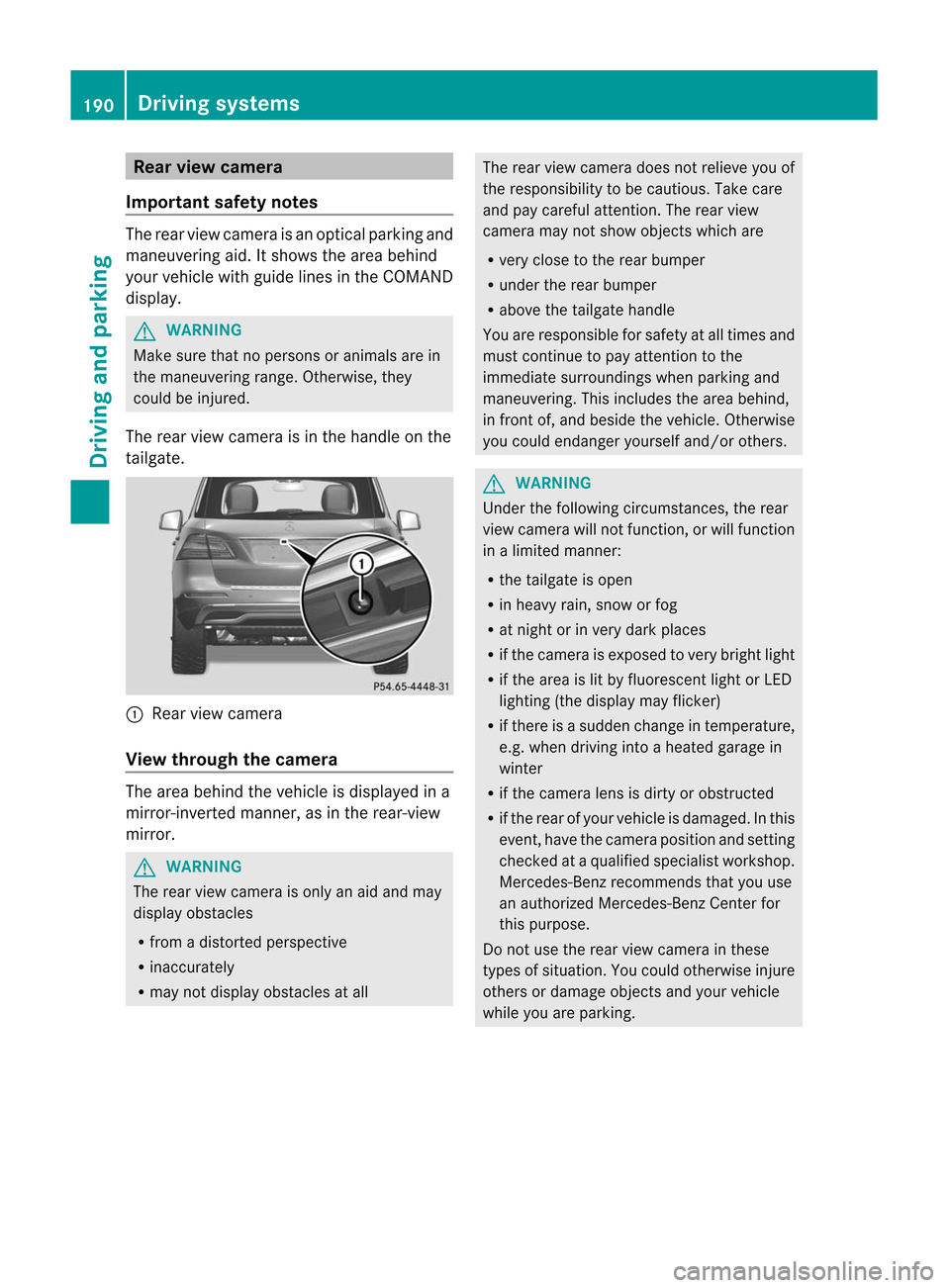
The rear view came raisin the handle onthe
tailgat e. :
Rear viewcame ra
View throu ghthecam era The
area behin dthe vehic leisdisplayed ina
mirr or-inv erted mann er,asinthe rear- view
mirr or. G
WARN
ING The
rear view came raisonly anaid and may
display obstacles
R fro madistort edperspect ive
R inacc urately
R may notdisplay obstaclesatall The
rear view camera doesnotrelieve youof
the respon sibility tobe cautious. Takecare
and paycareful attention. Therear view
camera maynotshow objectswhich are
R very close tothe rear bumper
R under therear bumper
R above thetailgate handle
You arerespon sibleforsafety atall times and
must continue topay attention tothe
immediate surroundingswhen parkin gand
maneuver ing.This includes thearea behind,
in fron tof,and besidethe vehicl e.Otherwi se
you couldendange ryourself and/or others. G
WARNING Under
thefollowing circumstances,therear
view camera willnotfunct ion,orwill funct ion
in alimited manner :
R the tailgate isopen
R in heavy rain,snow orfog
R at night orinvery dark places
R ifthe camera isexposed tovery bright light
R ifthe area islit by fluorescent lightorLED
lighting (thedisplay mayflicker)
R ifthere isasudden changeintemperature,
e.g. when driving intoaheated garagein
winter
R ifthe camera lensisdirty orobstruct ed
R ifthe rear ofyour vehicle isdamaged. Inthis
event ,have thecamera position andsetting
check edataquali fiedspecialist workshop.
Mercedes-B enzrecommen dsthat youuse
an authorized Mercedes-B enzCenter for
this purpose.
Do not use therear view camera inthese
types ofsituation. Youcould otherwise injure
others ordamage objectsand your vehicle
while youareparking. 190
Driving
systemsDriving and parking
Page 193 of 396
Acti
vating/d eactivating therea rview
cam era X
To activ ate: make surethattheSmar tKey
is in posit ion2in the ignit ionlock .
X Make surethatthe"rear viewcamer a"
func tion isselec tedinCOMAN D(see the
separate operating instructionsfor
COMAND).
X Engage reverse gear.
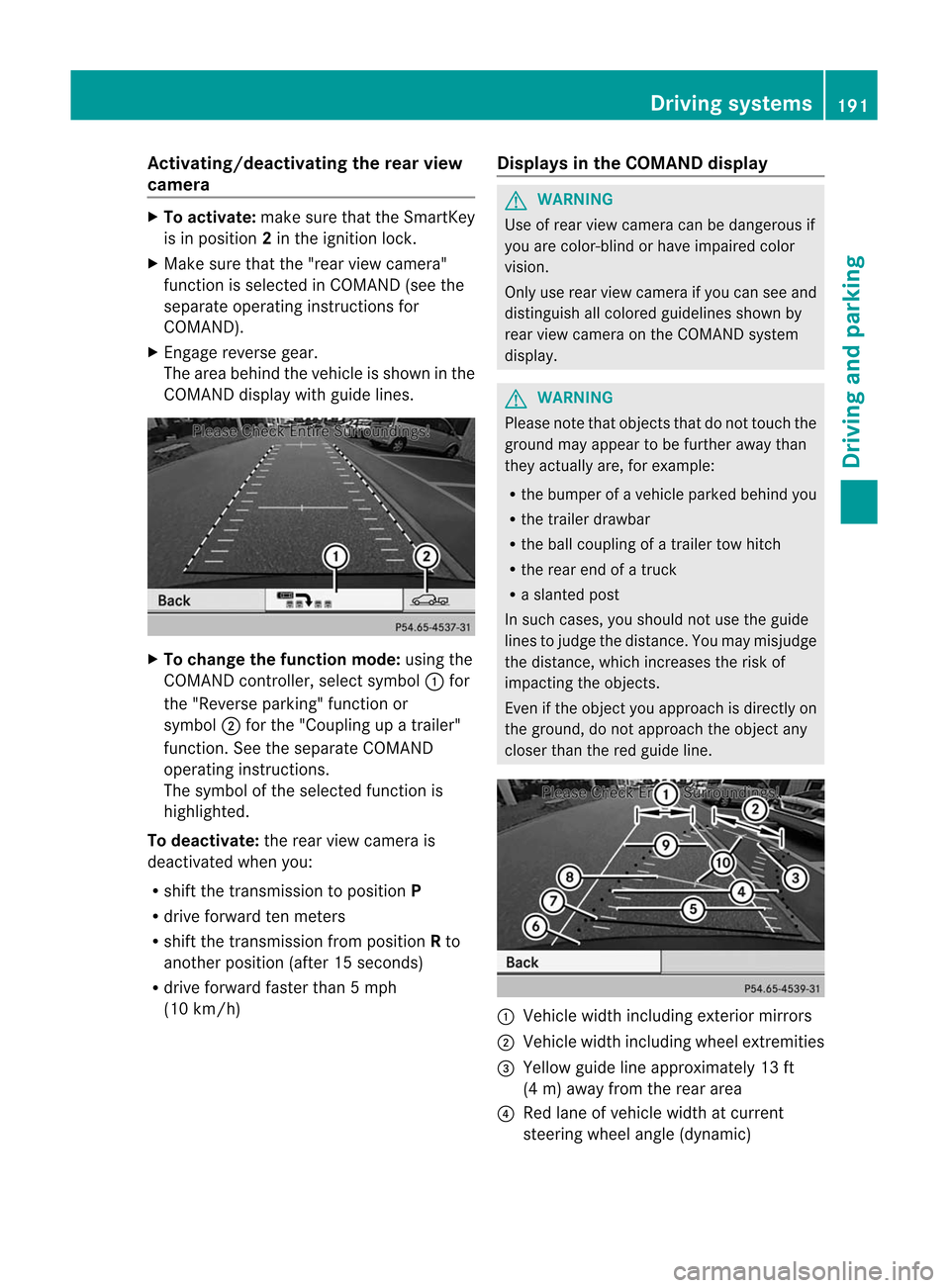
The area behind thevehicle isshown inthe
COMAND displaywith guide lines. X
To change thefunction mode:usingthe
COMAND controller, select symbol :for
the "Reverse parking"functionor
symbol ;for the "Cou pling upatrailer"
function .See the separate COMAND
operatin ginst ruct ions.
The symbol ofthe select edfunc tion is
highlighted.
To deactiva te:the rear view camera is
deactivat edwhen you:
R shift thetran smission toposition P
R drive forward tenmeter s
R shift thetran smission fromposition Rto
anoth erposition (after15secon ds)
R drive forward fasterthan5mph
(10 km/ h) Displays
inthe COMAND display G
WARN
ING Use
ofrear view camera canbedangerous if
you arecolor- blindorhave impaired color
vision.
Only userear view camera ifyou can seeand
distin guish allcolored guidelines shownby
rear view camera onthe COMAND system
display. G
WARN
ING Please
notethat objec tsthat donot touch the
ground mayappear tobe furth eraway than
they actually are,forexample:
R the bumper ofavehicle parkedbehindyou
R the trailer drawbar
R the ball coupling ofatrailer towhitch
R the rear endofatruc k
R aslanted post
In such cases, youshould notuse theguide
lines tojudge thedistanc e.You may misjudge
the distanc e,which increases therisk of
impactin gthe objec ts.
Even ifthe objec tyou approach isdirectly on
the ground, donot approach theobject any
closer thanthered guide line. :
Vehicle widthincluding exteriormirrors
; Vehicle widthincluding wheelextremities
= Yellow guidelineapproximately 13ft
(4 m) away fromtherear area
? Red lane ofvehicle widthatcurrent
steering wheelangle(dynamic) Driving
systems
191Driving and parking Z
Page 194 of 396
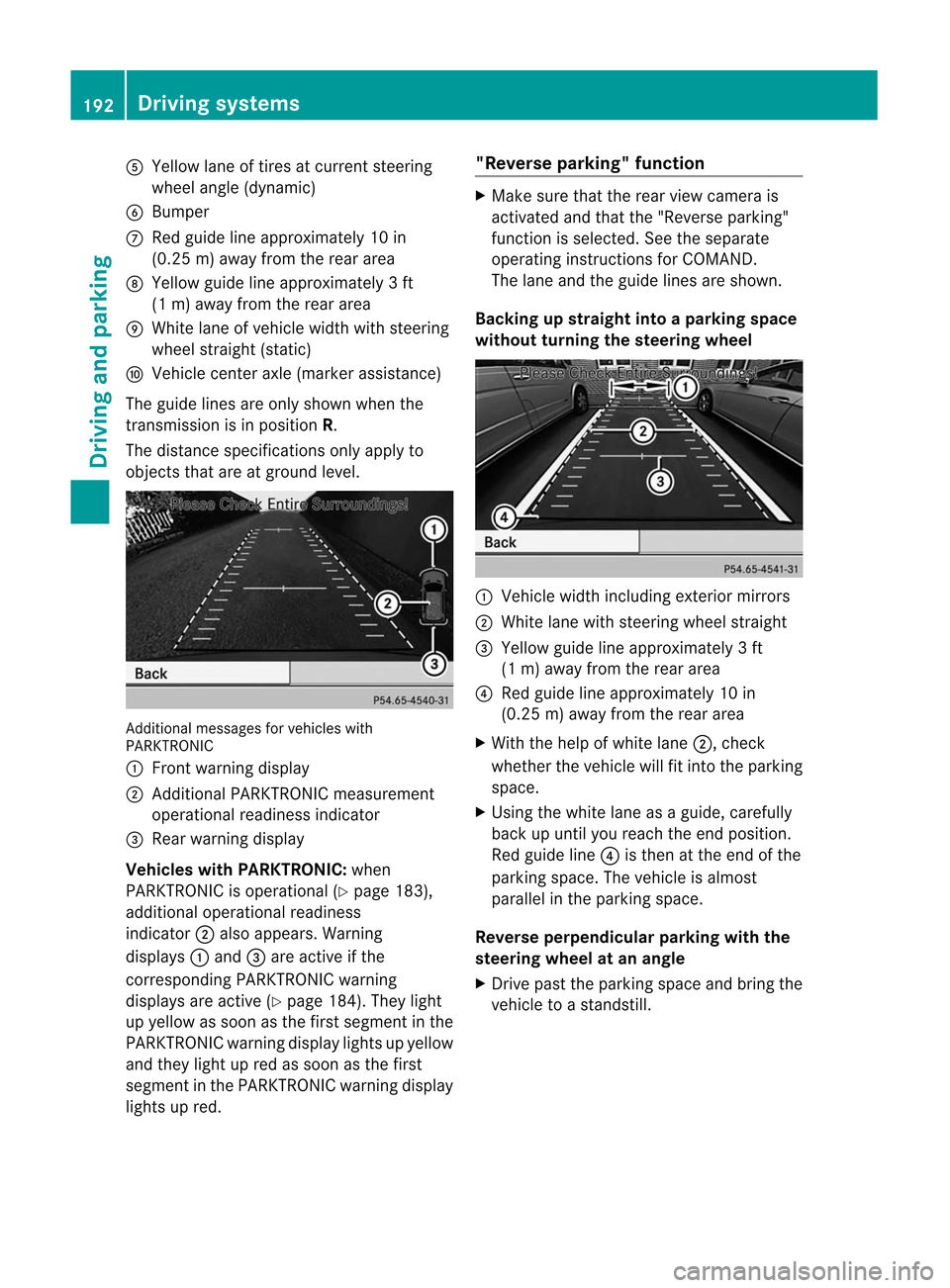
A
Yellow laneoftires atcurr entsteerin g
wheel angle(dynamic )
B Bumpe r
C Red guide lineapprox imately10 in
(0. 25 m)away fromthe rear area
D Yellow guidelineapprox imately3f t
(1 m) away fromtherear area
E White laneofvehic lewidth withsteering
wheel straight (static)
F Vehic lecen teraxle (mark erassist ance)
The guide linesareonly shown whenthe
tr ansm ission isin posit ionR.
The distan cespecif icationsonly apply to
objec tsthat areatgroun dlevel. Addit
ional messages forvehic leswith
PARKTRO NIC
: Frontwarnin gdisplay
; Addit ional PARKTRON ICmeasurem ent
operat ionalreadines sindic ator
= Rear warnin gdisplay
Vehicles withPARKTR ONIC:when
PARKTRON ICisoperat ional(Ypage 183),
addition aloperat ionalreadines s
indic ator;also appears. Warning
displays :and =are active ifthe
cor respon dingPARKTRON ICwarnin g
displays areactive (Ypage 184).They light
up yellow assoon asthe first segmen tint he
PARKTRONIC warningdisplaylights upyell ow
and they light upred assoon asthe first
segment inthe PARKTRONIC warningdisplay
lights upred. "Reverse
parking" function X
Make surethattherear view camera is
activated andthat the"Reverse parking"
funct ionisselected. Seetheseparate
operating instructionsforCOMAND.
The lane andtheguide linesareshown.
Backing upstra ight intoapar king space
without turning thesteering wheel :
Vehicle widthincluding exteriormirrors
; White lanewith steering wheelstraight
= Yellow guidelineapproximately 3ft
(1 m) away fromtherear area
? Red guide lineapprox imately 10in
(0.2 5m) away fromtherear area
X With thehelp ofwhite lane;,chec k
whethe rthe vehicle willfitinto theparking
space.
X Using thewhite laneasaguide, carefully
back upuntil youreach theend position.
Red guide line?isthen atthe end ofthe
parking space.Thevehicle isalmost
parall elin the parking space.
Reverse perpendicular parking with the
steering wheelatan angle
X Drive pasttheparking spaceandbring the
vehicle toastandst ill. 192
Driving
systemsDriving and parking
Page 197 of 396
ATT
ENTI ONASSIST asses ses your level of
fa tig ue orlaps es inconce ntrationb yta king
th efo llowi ngcriteri ainto acc oun t:
R your person aldri vin gst yle, e.g. steer ing
ch arac teris tics
R dri vin gco nd ition s,e.g. time, drivin gtime
The function alit yof ATTENTI ON ASSIST is
res trict ed and warn ings may bedelaye dor
no toc cur atall:
R ifth ero ad cond ition ispoo r,e.g. ifth e
sur faceis une ven orifth ere arepotholes
R ifth ere isast ro ng side wind
R ifyou haveadop tedaspo rty dri vin gst yle
wit hhig hco rneri ng spe eds orhig hrat es of
acc eler ation
R ifyou predom inant lydri ve atspe eds under
50 mph (80km/h)or over 11 2mph
(18 0km /h)
R ifyou arecurren tly usin gCOMA NDor
mak ing ate leph onecal lwit hit
R ifthe timehas been setincorrect ly
R in act ive drivin gsit uation s,such aswhen
you chan gelanes orchan geyour speed
War ning anddisplaymessa gesinthe
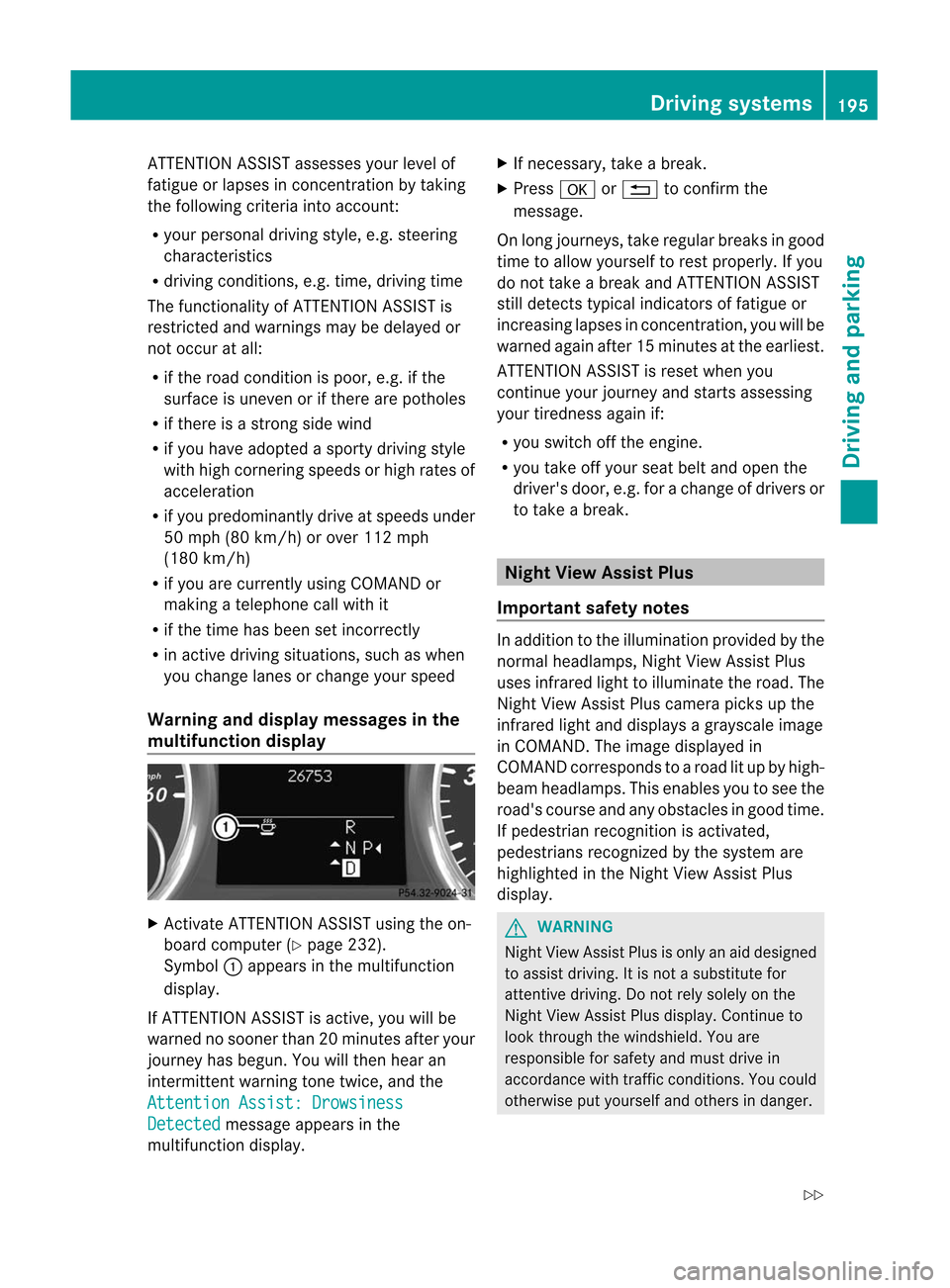
mu ltifunct iondisp lay X
Ac tivate ATTENTION ASSIS Tusing theon-
board computer (Ypage 232).
Symbo l: appears inthe mult ifunc tion
display.
If ATT ENTION ASSIS Tis act ive, you willbe
warne dno soon erthan 20min utes afteryour
jour ney hasbegun. Youwillthenhear an
int ermit tentwarning tonetwice, andthe Att
ention Assist:Dro wsiness Det
ected mess
ageappears inthe
mult ifunction display. X
Ifnec essar y,tak eabreak .
X Pres sa or% tocon firm the
mess age.
On longjo urn eys, takeregular breaksin good
tim eto allow yourse lfto rest prop erly. Ifyou
do not takeabreak andATTENTION ASSIST
st ill det ectstypic alindi cators offat igue or
inc reasin glapses incon centratio n,you willbe
warn edagain after15 min utes attheearlies t.
ATT ENTION ASSIST isrese twhen you
con tinue your journ eyand start sasses sing
your tiredn ess again if:
R you switchoff theeng ine.
R you takeoff your seatbeltandopen the
driv er's door ,e.g .for achange ofdrivers or
to take abreak. Night
ViewAssist Plus
Import antsafety notes In
addition tothe illumination providedbythe
normal headlamps, NightViewAssist Plus
uses infrared lighttoilluminate theroad. The
Night ViewAssist Pluscamera picksupthe
infrared lightanddisplay sag ray scale image
in COMAND. Theimag edisp layed in
COMAND correspondstoaroad litup byhigh -
bea mheadlamps. Thisenables youtosee the
road's course andanyobstac lesingood time.
If pedestrian recognitionisactiv ated,
pedestrian srecogn izedbythe system are
highlighted inthe Night ViewAssist Plus
display. G
WARN
ING Night
ViewAssist Plusisonly anaid designed
to assist driving. Itis not asubstit utefor
atten tivedriving. Donot rely solely onthe
Night ViewAssist Plusdisplay. Continueto
look through thewindshield. Youare
respon sibleforsafety andmust drivein
accor dance withtrafficcon ditions .You could
otherwise putyourself andothers indanger. Driving
systems
195Driving and parking
Z
Page 198 of 396
The
system maybeimpaired orunavailable if:
R there ispoor visibility, e.g.due tosnow,
rain, fogorheavy spray.
R the windshield isdirty, fogged upor
covered, forinstan cebyastick er,inthe
vicinit yof the camera.
R you aredriving onbends, uphillgradients
or downhill gradients.
Light fromtheheadlamps ofoncom ing
vehicles doesnotaffect theNight ViewAssist
Plus display inthe multifunct iondisplay .This
is also thecase ifyou cannot switchonthe
high-beam headlampsduetooncomin g
traffic. G
WARNING The
Night ViewAssist Pluscannot record
object simmediately infront ofor next tothe
vehicle. Whenmaneuvering, continue tolook
through thewindshield. Makesureno
persons oranimals areinthe area inwhich
you aremaneuvering. Youcould otherwise
injure them. i
Infrared
lightisnot visible tothe human
eye and therefore doesnotglare. Night
View Assist Pluscantherefore remain
switched oneven ifthere isoncomin g
traffic. :
Night ViewAssist Pluscamera
Switching onNight ViewAssist Plus Depending
onyour vehicle's dateof
manufacture, thec orà symbol for
the "Automatic drivinglights/daytime running
lamps"position islocated onthe light
switch. You
canonly activate NightViewAssist Plus
if:
R the SmartK eyisin position 2in the ignition
lock.
R itis dark.
R the light switch isset toeither c,
à orL.
R reverse gearhasnotbeen engaged.
X Make surethatCOMAND isswitched on.
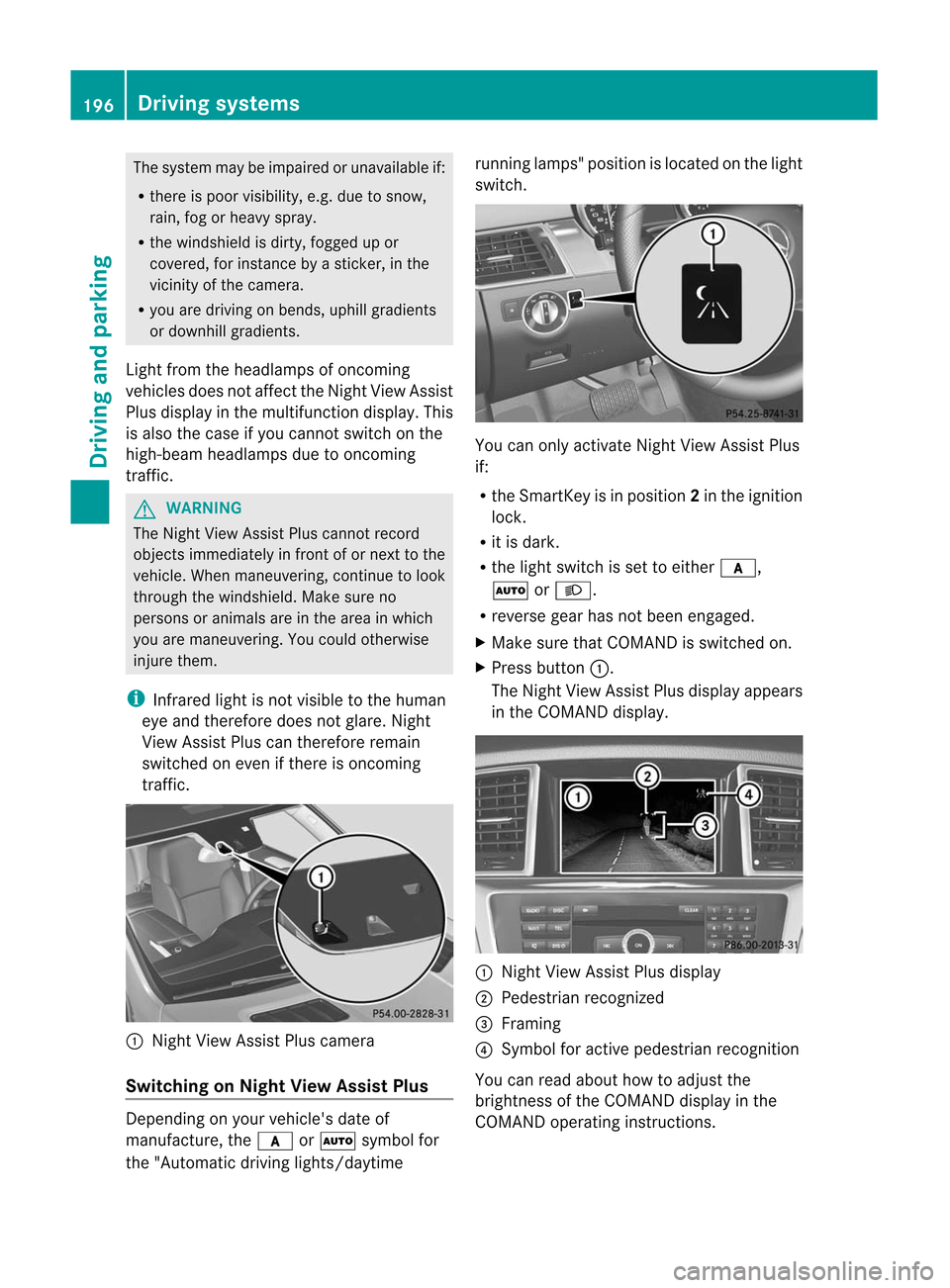
X Press button :.
The Night ViewAssist Plusdispla yappea rs
in the COMAND display. :
Night ViewAssist Plusdispla y
; Pedestrian recognized
= Framing
? Symbol foractive pedestrian recognition
You canread about howtoadjust the
brightness ofthe COMAND displayin the
COMAND operatinginstructions. 196
Driving
systemsDriving and parking