camera MERCEDES-BENZ M-Class 2014 W166 Owner's Manual
[x] Cancel search | Manufacturer: MERCEDES-BENZ, Model Year: 2014, Model line: M-Class, Model: MERCEDES-BENZ M-Class 2014 W166Pages: 462, PDF Size: 6.23 MB
Page 6 of 462
1, 2, 3 ...
115 Vsocket ...................................... 348
12 Vsocket
see Sockets
360° camera
Function/notes ............................. 225
4ETS
see ETS/4ETS (Electronic
Traction System)
4MATIC (permanent four-wheel
drive) .................................................. 246A
ABS (Anti-lock Braking System) Display message ............................ 283
Function/notes ................................ 67
Important safety notes ....................67
Warning lamp ................................. 319
Activating/deactivating cooling
with air dehumidification .................145
Active Blin dSpot Assist
Activating/deactivating (on-
board computer) ............................ 273
Display message ............................ 306
Function/informatio n.................... 237
Trailer towing ................................. 240
Active Curve System
Display message ............................ 303
Function/notes ............................. 208
Active Driving Assistance package .237
Active Lane Keeping Assist Activating/deactivating (on-
board computer) ............................ 273
Display message ............................ 305
Function/informatio n.................... 241
Trailer towing ................................. 243
Active light function .........................125
Active Parking Assist Display message ............................ 306
Exiting aparking spac e.................. 219
Function/notes ............................. 216
Important safety notes ..................216
Parking .......................................... 218
Towing atrailer .............................. 220
ADAPTIVE BRAKE ................................. 74 Adaptive Brake Assist
Display message ............................ 290
Function/notes ................................ 70
Adaptive Damping System
see ADS (Adaptive Damping System)
Adaptive Highbeam Assist
Display message ............................ 298
Function/notes ............................. 125
Switching on/off ........................... 126
Switching on/off (on-board
computer) ...................................... 275
Additives (engine oil) ........................449
ADS (Adaptive Damping System) Function/notes ............................. 207
Airb ags
Display message ............................ 293
Front air bag (driver, front
passenger )....................................... 46
Important safety notes ....................44
Knee bag .......................................... 47
PASSENGER AIR BAG OFF
indicator lamp .................................. 49
Safety guidelines ............................. 43
Side impact airb ag.......................... 47
Windo wcurtain air bag .................... 48
Air-conditioning system
see Climate control
Airf ilter (display message) ..............301
AIRF LOW ........................................... 147
AIRMATIC package ADS (Adaptive Damping System) ...207
Function/notes ............................. 207
Level control .................................. 209
Airv ents
Glove box ....................................... 153
Important safet ynotes .................. 152
Rea r............................................... 153
Setting ........................................... 152
Setting the center air vents ...........152
Setting the side air vents ...............153
Alarm system
see ATA (Anti-Theft Alarm system)
Ambient lighting
Setting the brightness (on-board
computer) ...................................... 275
Setting the color (on-board
computer) ...................................... 2754
Index
Page 8 of 462
Battery (vehicle)
Charging ........................................ 388
Display message ............................ 299
Important safety notes ..................385
Jump starting ................................. 389
Overview ........................................ 385
Belt force limiter
Activation ......................................... 59
Function .......................................... .59
Blind Spo tAssist
Activating/deactivating .................273
Display message ............................ 306
Notes/function .............................. 233
Trailer towing ................................. 235
see Active Blind Spot Assist
BlueTEC
Adding DEF .................................... 177
BlueTEC (DEF) .................................... 447
Brake Assist see BAS (Brake Assist System)
Brake fluid
Display message ............................ 289
Notes ............................................. 449
Brake lamps
Changing bulbs .............................. 132
Display message ............................ 296
Brakes
ABS .................................................. 67
Adaptive Brake Assist ......................70
BAS .................................................. 67
BAS PLUS ........................................ 68
Brake fluid (notes) .........................449
Display message ............................ 283
Driving tips .................................... 184
High-performance brake system ....185
Important safety notes ..................184
Maintenance .................................. 185
Parking brake ................................ 180
Warning lamp ................................. 318
Breakdown
see Flat tire
see Towing away
Bulbs
see Changing bulbs C
California Important notice for retail
customers and lessees ....................25
Calling up a malfunction
see Display messages
Car
see Vehicle
Care
Carpets .......................................... 377
Car wash ........................................ 370
Display ........................................... 375
Exhaus tpipe .................................. 374
Exterior lights ................................ 373
Gea rors electo rlever .................... 376
Interior ........................................... 375
Matte finish ................................... 372
Nigh tView Assist Plus ...................375
Notes ............................................. 370
Paint .............................................. 372
Plastic trim .................................... 376
Power washer ................................ 371
Rea rview camera .......................... 374
Roof lining ...................................... 377
Seat bel t........................................ 377
Seat cover ..................................... 376
Sensors ......................................... 374
Steering wheel ............................... 376
Trim pieces .................................... 376
Washing by hand ........................... 371
Wheels ........................................... 373
Windows ........................................ 373
Wiper blades .................................. 373
Wooden trim .................................. 376
Cargo compartment cover
Notes/ho wtouse......................... 338
Cargo compartment enlargement
Important safety notes ..................335
Cargo compartment floor
Opening/closing ............................ 342
Stowag ewell (under) ..................... 342
Cargo net
Attaching ....................................... 340
Important safety information .........340
Cargo tie down rings .........................337
Car keys see SmartKey 6
Index
Page 11 of 462
Doors
Automati clocking (on-board
computer) ...................................... 276
Automatic locking (switch) .............. .88
Central locking/unlocking
(SmartKey) ...................................... .80
Control panel ................................... 40
Display message ............................ 313
Emergency locking ........................... 88
Emergency unlocking .......................88
Important safety notes ....................86
Opening (from inside) ......................87
Overview .......................................... 86
Power closing feature ......................88
Downhill Spee dRegulation
see DSR (Downhill Speed Regulation)
Drinking and driving .........................182
Drinks holder see Cuph older
Drive program
Automatic ...................................... 170
Display (DIRECT SELECT lever) ......165
Manual .......................................... .170
Manual (AMG vehicles) ..................171
Manual (vehicles with the
ON&OFFROAD package) ................171
Off-road program (vehicles with
the ON&OFFROAD package) ..........248
SETUP (on-board computer) ..........279
see On-road programs
Driver's door
see Doors
Driving abroad
Mercedes-Benz Service .................370
Symmetrical low bea m.................. 120
Driving in mountainous terrain
Approach/departure angl e............ 190
Driving lamps
see Daytime running lamps
Driving off-road
see Off-road driving
Driving safety systems
ABS (Anti-lock Braking System) .......67
ADAPTIVE BRAKE ............................. 74
Adaptive Brake Assist ......................70
BAS (Brake Assist System) ..............67
BAS PLUS (Brake Assist System
PLUS) .............................................. .68COLLISION PREVENTION ASSIST
....69
Distance warning function ...............69
Electronic brake force distribution ...74
ESP ®
(Electronic Stability Program) .71
ETS/4ETS (Electronic Traction
System) ........................................... 71
Important safety information ...........66
Overview .......................................... 66
PRE-SAFE ®
Brake ............................ .74
STEER CONTROL ............................. 76
Driving systems
360°camera .................................. 225
Active Blind Spot Assist .................237
Active Curve System ......................208
Active Driving Assistance package 237
Active Lane Keeping Assist ............241
Active Parking Assist .....................216
ADS ............................................... 207
AIRMATIC package ........................207
AMG adaptive sport suspension
system ........................................... 211
ATTENTION ASSIST ........................229
Blind Spot Assist ............................ 233
Cruise control ................................ 191
Display message ............................ 301
DISTRONI CPLUS ........................... 194
HOLD function ............................... 206
Lane Keeping Assist ......................235
Level control (vehicles with
AIRMATIC package) .......................209
Level control (vehicles with the
ON&OFFROAD package) ................202
On-road programs .......................... 243
PARKTRONI C................................. 213
Rea rview camera .......................... 220
Driving tips
Automatic transmission .................168
Brakes ........................................... 184
Break-in period .............................. 156
DISTRONI CPLUS ........................... 201
Downhill gradient ........................... 184
Drinking and driving .......................182
Driving abroad ............................... 120
Driving in winter ............................ .187
Driving on flooded road s................ 186
Driving on sand .............................. 190
Driving on wet road s...................... 186
Driving over obstacles ...................190 Index
9
Page 17 of 462
Off-road ABS
.................................... 67
Off-road ESP ®
.................................. 73
Off-road programs (vehicle swith
the ON&OFFROAD package) ..........248
Oil
see Engine oil
On and Offroad menu (on-board
computer) .......................................... 278
On-board computer AMG menu ..................................... 278
Assistance menu ........................... 272
Audi omenu ................................... 269
Convenience submenu ..................277
Displaying a service message ........369
Display messages ..........................282
DISTRONI CPLUS ........................... 201
Factory settings submenu .............278
Important safety notes ..................262
Instrument cluster submenu ..........274
Lighting submenu .......................... 274
Menu overview .............................. 266
Message memory .......................... 282
Navigation menu ............................ 268
On and Offroa dmenu .................... 278
Operation ....................................... 264
RACETIMER ................................... 279
Service menu ................................. 273
Settings menu ............................... 274
Standard displa y............................ 266
Telephone menu ............................ 270
Trip menu ...................................... 266
Vehicle submenu ........................... 276
Video DVD operatio n..................... 270
On-road programs
AUTO program ............................... 244
Function/notes ............................. 243
Snow program ............................... 245
SPORT program ............................. 244
Trailer program .............................. 245
Opening and closing the side trim
panels ................................................. 132
Operating safety Declaratio nofconformity ................ 27
Important safety notes ....................26
Operating system
see On-board computer
Operator's Manual
Vehicle equipment ...........................24Outside temperature display
...........264
Overhead control panel ......................39
Override feature Rea rside windows ........................... 66 P
Pain tcode number ............................ 442
Paintwork (cleaning instructions) ...372
Panic alarm .......................................... 42
Panorama roof with power tilt/
sliding panel
Opening/closing .............................. 99
Opening/closing the roller
sunblind ......................................... 100
Problem (malfunction) ...................102
Resetting ....................................... 100
Panorama sliding sunroof
Important safety notes ....................97
Parking ............................................... 179
Important safety notes ..................179
Parking brake ................................ 180
Position of exterior mirror, front-
passenger side ............................... 116
Rea rview camera .......................... 220
see PARKTRONIC
Parking aid
Active Parking Assist .....................216
see Exterior mirrors
see PARKTRONIC
Parking brake
Display message ............................ 286
Electric parking brake ....................180
Warning lamp ................................. 324
Parking lamps
Switching on/off ........................... 122
Parking lamps (changing bulbs) ......131
PARKTRONIC Deactivating/activating .................215
Driving system ............................... 213
Function/notes ............................. 213
Important safety notes ..................213
Problem (malfunction) ...................216
Range of the sensors .....................214
Trailer towing ................................. 215
Warning displa y............................. 214 Index
15
Page 18 of 462
PASSENGER AIR BAG OFF
Problem (malfunction) .....................53
Problems (malfunction) .................. 293
PASSENGE RAIR BAG OFF indicator
lamp ...................................................... 49
Plastic trim (cleaning instructions) .376
Power closing feature .........................88
Power washers .................................. 371
Power windows see Side windows
PRE-SAFE ®
(anticipatory occupant
protection) Display message ............................ 289
Operation ........................................ .54
PRE-SAFE ®
Brake
Activating/deactivating .................272
Display message ............................ 291
Function/notes ................................ 74
Warning lamp ................................. 328
Program selector button ..................169
Protection of the environment General notes .................................. 23
Pulling away
Trailer ............................................ 160
Pulling away (automatic
transmission) ..................................... 160 Q
Qualifie dspecialis tworkshop ...........28 R
RACETIMER (on-board computer) ....279
Radar sensor system Activating/deactivating .................276
Display message ............................ 304
Radiator cover ................................... 365
Radio Selecting astation ......................... 269
see separate operating instructions
Radio-controlled devices (installing) 362
Radio-wave reception/
transmission in the vehicle
Declaratio nofconformity ................ 27
Reading lamp ..................................... 127
Rear compartment Setting the airv ents...................... 153Rear fog lamp
Switching on/off ........................... 122
Rear seats
Adjusting ....................................... 108
Rear view camera
Cleaning instructions .....................374
Function/notes ............................. 220
Switching on/off ........................... 221
Rear-view mirror
Anti-glare (manual )........................ 114
Dipping (automatic) .......................115
Rear window defroster
Problem (malfunction) ...................151
Switching on/off ........................... 150
Rear window wiper
Replacing the wiper blade .............. 134
Switching on/off ........................... 133
Refrigerant (air-conditioning
system)
Important safety notes ..................451
Refueling
Fuel gauge ............................... 33, 263
Important safety notes ..................173
Refueling proces s.......................... 174
see Fuel
Remote control
Programming (garage door opener) 359
Reporting safety defects ....................28
Reserve (fuel tank) see Fuel
Reserve fuel
Display message ............................ 300
Warning lamp ................................. 325
see Fuel
Residual heat (climate control) ........151
Restraint system see SRS (Supplemental Restraint
System)
Reversing feature
Panorama sliding sunroo f................ 98
Roller sunblinds ............................... 99
Side windows ................................... 94
Sliding sunroo f................................. 98
Tailgate ............................................ 90
Reversing lamps (display message) 297
Roadside Assistance (breakdown) ....25 16
Index
Page 222 of 462
Once you have exited the parking space
completely, the steering wheel is moved to
the straight-ahead position. You hear a tone
and the
Park Assist Switched Off message appears in the multifunction
display. You will then have to steer and merge
into traffic on your own. PARKTRONIC is still
available. You can take over the steering,
before the vehicle has exited the parking
space completely. This is useful, for example
when you recognize that it is already possible
to pull out of the parking space.
Canceling Active Parking Assist
X
Stop the movement of the multifunction
steering wheel or steer yourself.
Active Parking Assist will be canceled at
once. The Park Assist Canceled message appears in the multifunction
display.
or
X Press the PARKTRONIC button on the
center console (Y page 215).
PARKTRONIC is switched off and Active
Parking Assist is immediately canceled.
The Park Assist Canceled message
appears in the multifunction display.
Active Parking Assist is canceled
automatically if:
R the electric parking brake is engaged
R transmission position Pis selected
R parking using Active Parking Assist is no
longer possible
R you are driving faster than 6 mph
(10 km/h)
R a wheel spins, ESP ®
intervenes or fails. The
000F warning lamp lights up in the
instrument cluster.
Aw arning tone sounds. The parking symbol
disappears and the multifunction display
shows the Park Assist Canceled message.
If Active Parking Assist is canceled, you must
steer again yourself. Towing
atrailer For vehicles with a trailer tow hitch, the
minimum length for parking spaces is slightly
increased.
If you have attached a trailer to your vehicle,
you should not use Active Parking Assist.
Once the electrical connectio
nis established
between your vehicle and the trailer, Active
Parking Assist is no longer available.
PARKTRONIC is deactivated for the rear area. Rear view camera
General notes Rear view camera
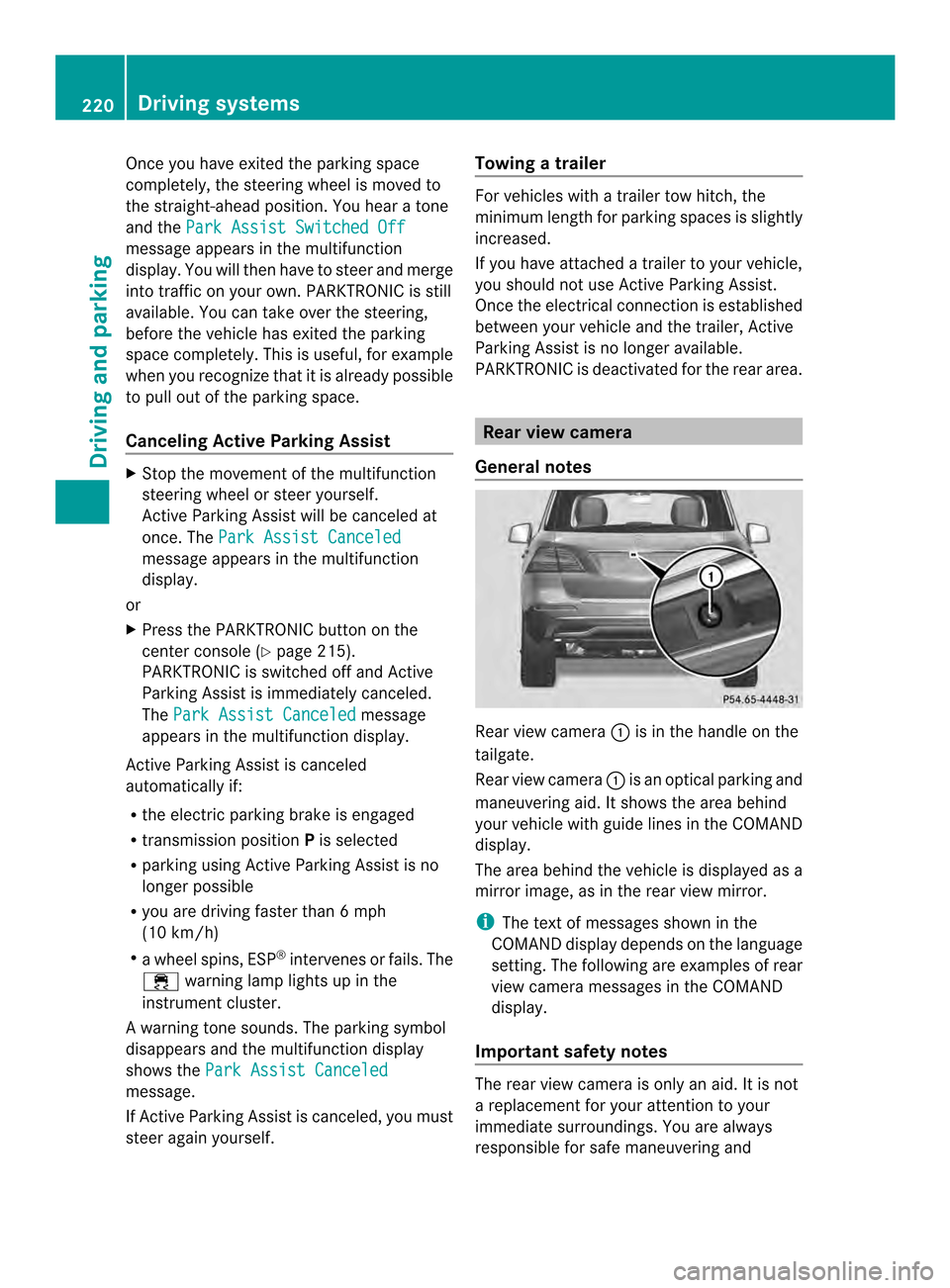
0002is in the handle on the
tailgate.
Rear view camera 0002is an optical parking and
maneuvering aid. It shows the area behind
your vehicle with guide lines in the COMAND
display.
The area behind the vehicle is displayed as a
mirror image, as in the rear view mirror.
i The text of messages shown in the
COMAND display depends on the language
setting. The following are examples of rear
view camera messages in the COMAND
display.
Important safety notes The rear view camera is only an aid. It is not
a replacement for your attention to your
immediate surroundings. You are always
responsible for safe maneuvering and220
Driving systemsDriving and parking
Page 223 of 462
parking. When maneuvering or parking, make
sure that there are no persons, animals or
objects in the area in which you are
maneuvering.
Under the following circumstances, the rear
view camera will not function, or will function
in a limited manner:
R the tailgate is open
R in heavy rain, snow or fog
R at night or in very dark places
R if the camera is exposed to very bright light
R if the area is lit by fluorescent light or LED
lighting (the display may flicker)
R if there is a sudden change in temperature,
e.g. when driving into a heated garage in
winter
R if the camera lens is dirty or obstructed
R if the rear of your vehicle is damaged. In
this event, have the camera position and
setting checked at a qualified specialist
workshop
Activating/deactivating the rear view
camera X
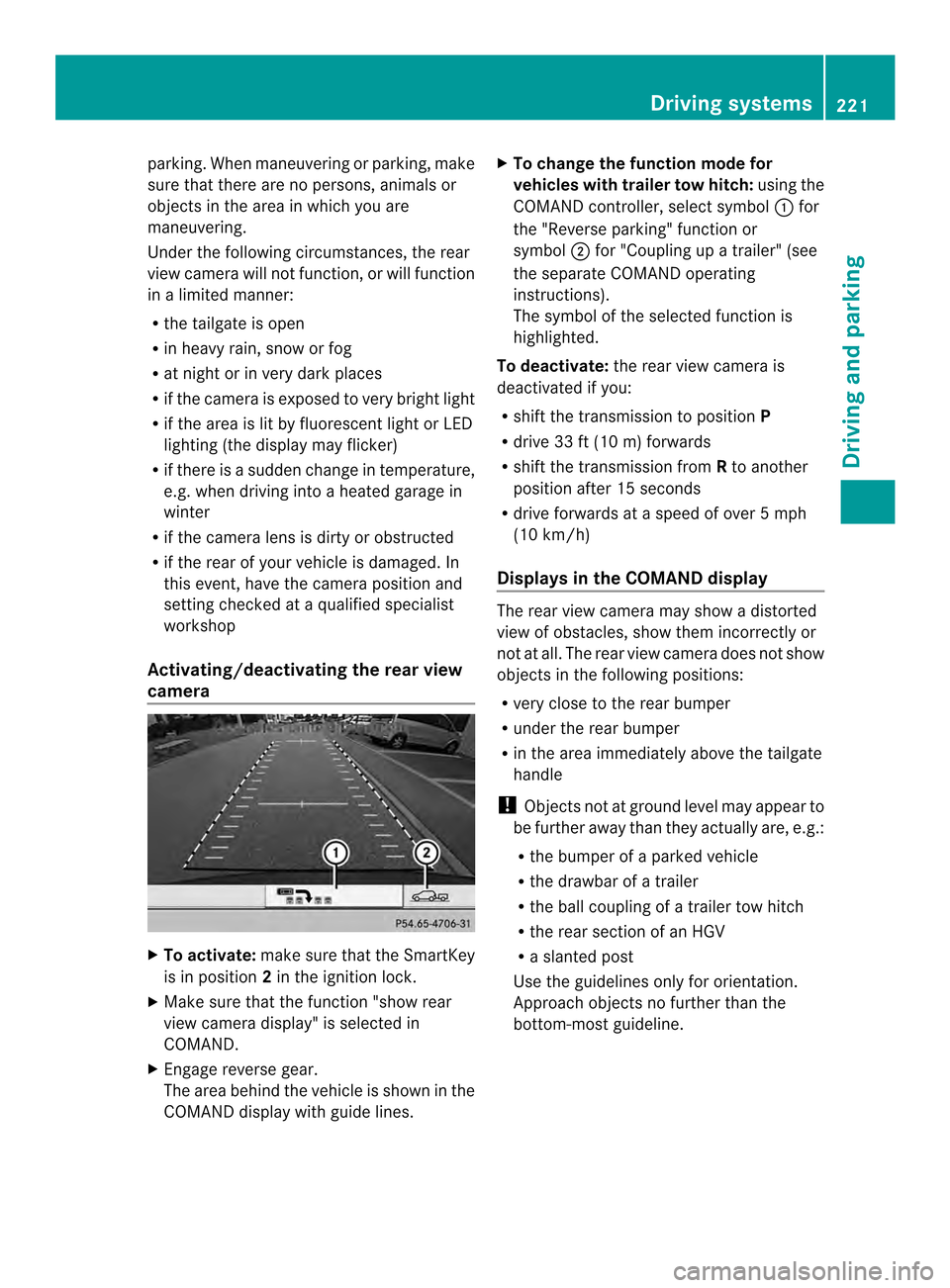
To activate: make sure that the SmartKey
is in position 2in the ignition lock.
X Make sure that the function "show rear
view camera display" is selected in
COMAND.
X Engage reverse gear.
The area behind the vehicle is shown in the
COMAND display with guide lines. X
To change the function mode for
vehicles with trailer tow hitch: using the
COMAND controller, select symbol 0002for
the "Reverse parking" function or
symbol 0003for "Coupling up a trailer" (see
the separate COMAND operating
instructions).
The symbol of the selected function is
highlighted.
To deactivate: the rear view camera is
deactivated if you:
R shift the transmission to position P
R drive 33 ft (10 m) forwards
R shift the transmission from Rto another
position after 15 seconds
R drive forwards at a speed of over 5mph
(10 km/h)
Displays in the COMAND display The rear view camera may show a distorted
view of obstacles, show them incorrectly or
not at all. The rear view camera does not show
objects in the following positions:
R
very close to the rear bumper
R under the rear bumper
R in the area immediately above the tailgate
handle
! Objects not at ground level may appear to
be further away than they actually are, e.g.:
R the bumper of a parked vehicle
R the drawbar of a trailer
R the ball coupling of a trailer tow hitch
R the rear section of an HGV
R a slanted post
Use the guidelines only for orientation.
Approach objects no further than the
bottom-most guideline. Driving systems
221Driving and parking Z
Page 225 of 462
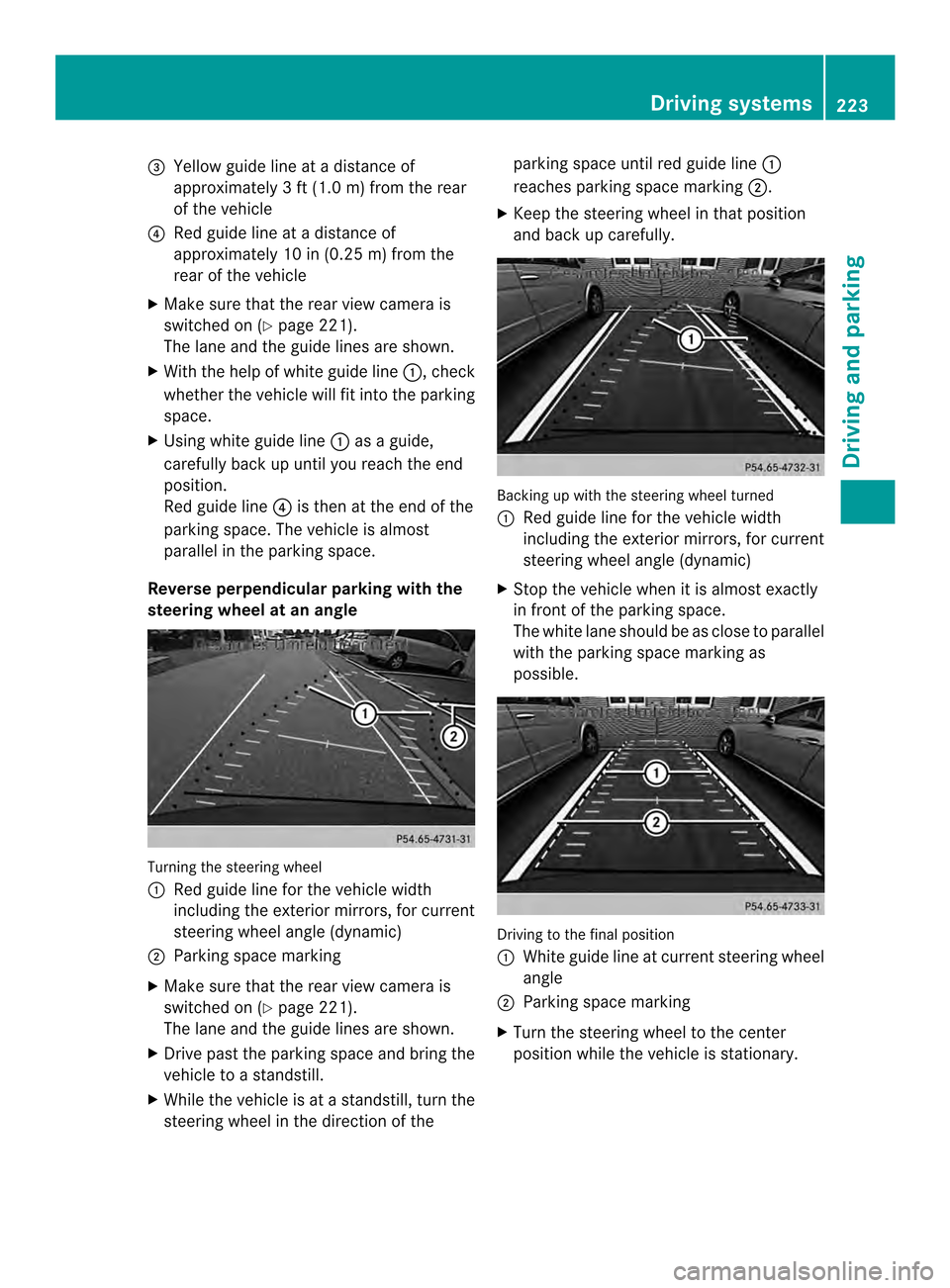
0023
Yellow guide line at a distance of
approximately 3 ft (1.0 m) from the rear
of the vehicle
0022 Red guide line at a distanc eof
approximately 10 in (0.25 m) from the
rear of the vehicle
X Make sure that the rear view camera is
switched on (Y page 221).
The lane and the guide lines are shown.
X With the help of white guide line 0002, check
whether the vehicle will fit into the parking
space.
X Using white guide line 0002as a guide,
carefully back up until you reach the end
position.
Red guide line 0022is then at the end of the
parking space. The vehicle is almost
parallel in the parking space.
Reverse perpendicular parking with the
steering wheel at an angle Turning the steering wheel
0002
Red guide line for the vehicle width
including the exterior mirrors, for current
steering wheel angle (dynamic)
0003 Parking space marking
X Make sure that the rear view camera is
switched on (Y page 221).
The lane and the guide lines are shown.
X Drive past the parking space and bring the
vehicle to a standstill.
X While the vehicle is at a standstill, tur nthe
steering wheel in the direction of the parking space until red guide line
0002
reaches parking space marking 0003.
X Keep the steering wheel in that position
and back up carefully. Backing up with the steering wheel turned
0002
Red guide line for the vehicle width
including the exterior mirrors, for current
steering wheel angle (dynamic)
X Stop the vehicle when it is almost exactly
in front of the parking space.
The white lane should be as close to parallel
with the parking space marking as
possible. Driving to the final position
0002
White guide line at current steering wheel
angle
0003 Parking space marking
X Turn the steering wheel to the center
position while the vehicle is stationary. Driving systems
223Driving and parking Z
Page 227 of 462
X
Use the COMAND controller to select
symbol 0020, see the separate operating
instructions for COMAND.
The "Coupling up a trailer" function is
selected. The distance specifications now
only apply to objects that are at the same
level as the ball coupling.
X Back up carefully, making sure that trailer
drawbarm arker assistant 0023points
approximately in the direction of trailer
drawbar 0022.
X Reverse carefully until trailer drawbar 0022
reaches red guide line 0003.
X Couple up the trailer (Y page 253).360° camera (surround view)
General notes The 360° camera is a system consisting of
four cameras.
The system analyzes images from the
following cameras:
R Rear view camera
R Front camera
R Two cameras in the exterior rear view
mirrors
The cameras capture the immediate
surroundings of the vehicle .The system
supports you, e.g. when parking or if vision is
restricted at an exit.
The 360° camera images can be shown in full
screen mode or in seven different split-screen
views on the COMAND display. Asplit-screen
view also includes a top view of the vehicle.
This view is calculated from the data supplied
by the installed cameras (virtual camera).
The seven split-screen views are:
R top view and picture from the rear view
camera (130 °viewing angle)
R top view and picture fro mthe front camera
(without displaying the maximum steering
wheel angle)
R top view and enlarged rear view R
top view and enlarged front view
R top view and trailer view (vehicles with
trailer tow hitch)
R top view and pictures from the rearward
facing mirror cameras (rear wheel view)
R top view and pictures from the forward
facing mirror cameras (front wheel view)
i The top view and trailer view are available
for vehicles equipped with a trailer tow
hitch.
When the function is active and you shift the
transmission from position Dor Rto N, you
see the previous view in the COMAND
display. The dynamic guidelines are hidden.
When you change between transmission
positions Dand R, you see the previously
selected front or rear view.
Important safety notes The 360° camera is only an aid. It is not a
replacement for your attention to your
immediate surroundings. You are always
responsible for safe maneuvering and
parking. When maneuvering or parking, make
sure that there are no persons, animals or
objects in the area in which you are
maneuvering.
The 360° camera may show a distorted view
of obstacles, show them incorrectly or not at
all. It cannot show objects in the following
areas:
R
under the front bumper
R very close to the front bumper
R very close to the rear bumper
R under the rear bumper
R in close range above the handle on the
trunk lid
R very close to the exterior mirrors
You are always responsible for safety, and
must always pay attention to your
surroundings when parking and
maneuvering. This applies to the areas
behind, in front of and beside the vehicle. You Driving systems
225Driving and parking Z
Page 228 of 462
could otherwise endanger yoursel
fand
others.
The 360° camera will not function or will
function in a limited manner:
R if the doors are open
R if the exterio rmirrors are folded in
R if the trunk lid is open
R in heavy rain, snow or fog
R at night or in very dark places
R if the cameras are exposed to very bright
light
R if the area is lit by fluorescen tlight or LED
lighting (the display may flicker)
R if you exit a heated garage in winter,
resulting in a rapid change in temperature
R if the camera lenses are dirty or covered
R if the vehicle components in which the
cameras are installed are damaged. In this
event, have the camera position and setting
checked at a qualified specialist workshop.
Do not use the 360 °camera in this case. You
can otherwise injure other sorcause damage
to objects or the vehicle.
Activation conditions The 360° camera image can be displayed if:
R
your vehicle is equipped with a 360°
camera
R COMAND is switched on, see the separate
COMAND operating instructions
R the 360° Camera function is activated
Activating the 360° camera using the
SYS button X
Press and hold the 0003button for longer
than 2seconds, see the separate COMAND
operating instructions.
Depending on whether position Dor Ris
engaged, the following is shown:
R full screen display with the image from
the front camera
R full screen display with the image from
the rear camera Activating the 360° camer
awith
COMAND X
Press the 0003button, see the separate
COMAN Doperating instructions.
X Select System by turning
000E0002000Fthe
COMAND controller and press 000Cto
confirm.
X Select 360° Camera and press
000Cto
confirm.
Depending on whether position Dor Ris
engaged, the following is shown:
R a split scree nwith top view and the
image from the front camera or
R a split screen with top view and the
image from the rear view camera
For further information about the COMAND
controller, see the separat eCOMAND
operating instructions.
Activating the 360° camera using
reverse gear The 360° camera images can be
automatically displayed by engaging reverse
gear.
X
Make sure that the SmartKey is in position
2in the ignition lock.
X Make sure that the Activation by R gear setting is active in COMAND, see the
separate COMAND operating instructions.
X To show the 360° camera image: engage
reverse gear.
The COMAND display shows the area
behind the vehicle in split screen:
R vehicle with guide lines
R top view of the vehicle
Selecting the split-screen and full
screen displays X
To switch between split screen views:
switch to the line with the vehicle icons by
sliding 000B0002the COMAND controller.
X Turn 000E0002000F the COMAND controller and
select one of the vehicle symbols. 226
Driving systemsDriving and parking