lock MERCEDES-BENZ M-CLASS SUV 2011 Owners Manual
[x] Cancel search | Manufacturer: MERCEDES-BENZ, Model Year: 2011, Model line: M-CLASS SUV, Model: MERCEDES-BENZ M-CLASS SUV 2011Pages: 389, PDF Size: 9.22 MB
Page 233 of 389
Vehicles with the AIRMATIC package
X
Make sure tha tthe transmission is in posi-
tion P.
X Engage the electric parkin gbrake.
X Start th eengine.
X Clos ethe doors and tailgate.
X Secur ethe trailer against rolling away.
X Remove the trailer cable and decouple the
trailer.
X Switc hoff th eengine. Folding in the ball coupling
i Fold the ball coupling back in if you are
not using the trailer tow hitch.
X Make sure that the vehicl eisstationary and
the trailer cables are disconnected.
X Place the protective cap on the ball cou-
pling.
X Ope nthe tailgate. X
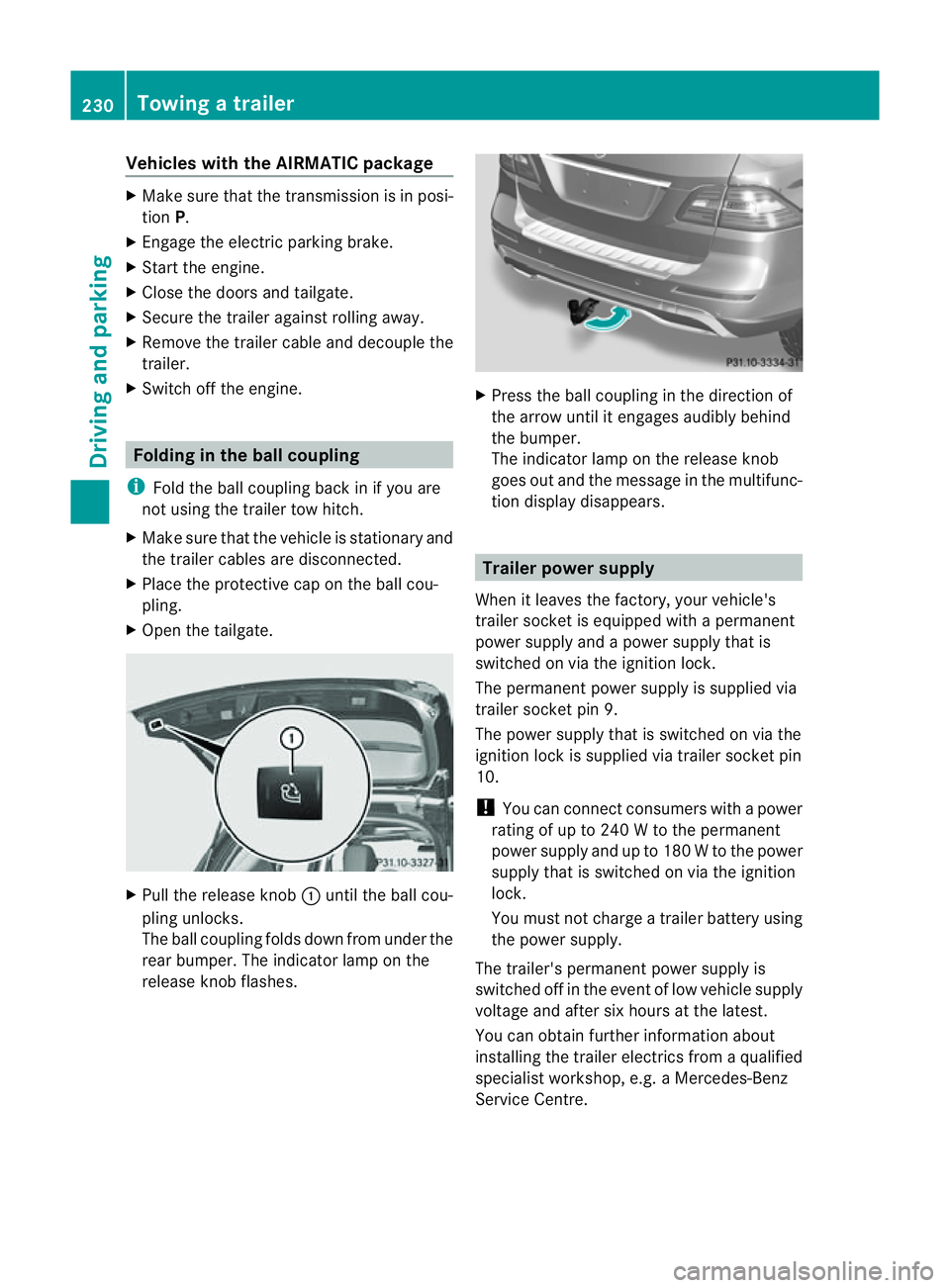
Pull the release knob :until the ball cou-
plin gunlocks.
The ball coupling folds dow nfrom under the
rea rbumper. The indicator lamp on the
release knob flashes. X
Press the ball coupling in the direction of
the arrow until it engage saudibly behind
the bumper.
The indicator lamp on the release knob
goes out and the messag einthe multifunc-
tion display disappears. Trailer power supply
When it leaves the factory ,your vehicle's
trailer socket is equipped with apermanent
power supply and apower supply that is
switched on via the ignition lock.
The permanen tpower supply is supplied via
trailer socket pin 9.
The power supply that is switched on via the
ignition lock is supplied via trailer socket pin
10.
! You can con nect consumers with apower
ratin gofupto2 40Wtot he permanent
power supply and up to 18 0Wto the power
supply that is switched on via the ignition
lock.
You must not charge atrailer battery using
th ep ower supply.
The trailer's permanen tpower supply is
switched off in the even toflow vehicle supply
voltage and after six hour satthe latest.
You can obtai nfurther information about
installing the trailer electrics from aqualified
specialist workshop, e.g. aMercedes-Benz
Ser vice Centre. 230
Towing
atrailerDriving and parking
Page 234 of 389
X
To switc hthe conn ected powe rsupply
on or off: turn thekey in the ignition lock
to position 2or 0respectivel y. Bulb failure indi
cator for LE Dlamps
i If LED lamps are fitte dinthe trailer, an
error message ma yappear in the multi-
function display even if there is no fault. The
reason for the error message may be that
the current has fallen below the minimum
of 50 milliamper es(mA).
To ensure reliabl eoperation of the bul bfailure
indicator, each LED chai ninthe trailer lighting
must be guaranteed aminimum current of
50 mA. Trailer with 7-pin connector
Genera linforma tion If your trailer has
a7-pin connector, you can
connect it to the 13-pin socket on the ball
coupling using an adapter or, if necessary, an
adapter cable .Both of these can be obtained
at aq ualified specialist workshop, e.g. at a
Mercedes-Ben zService Centre.
Fitting the adapter X
Open the socket cover.
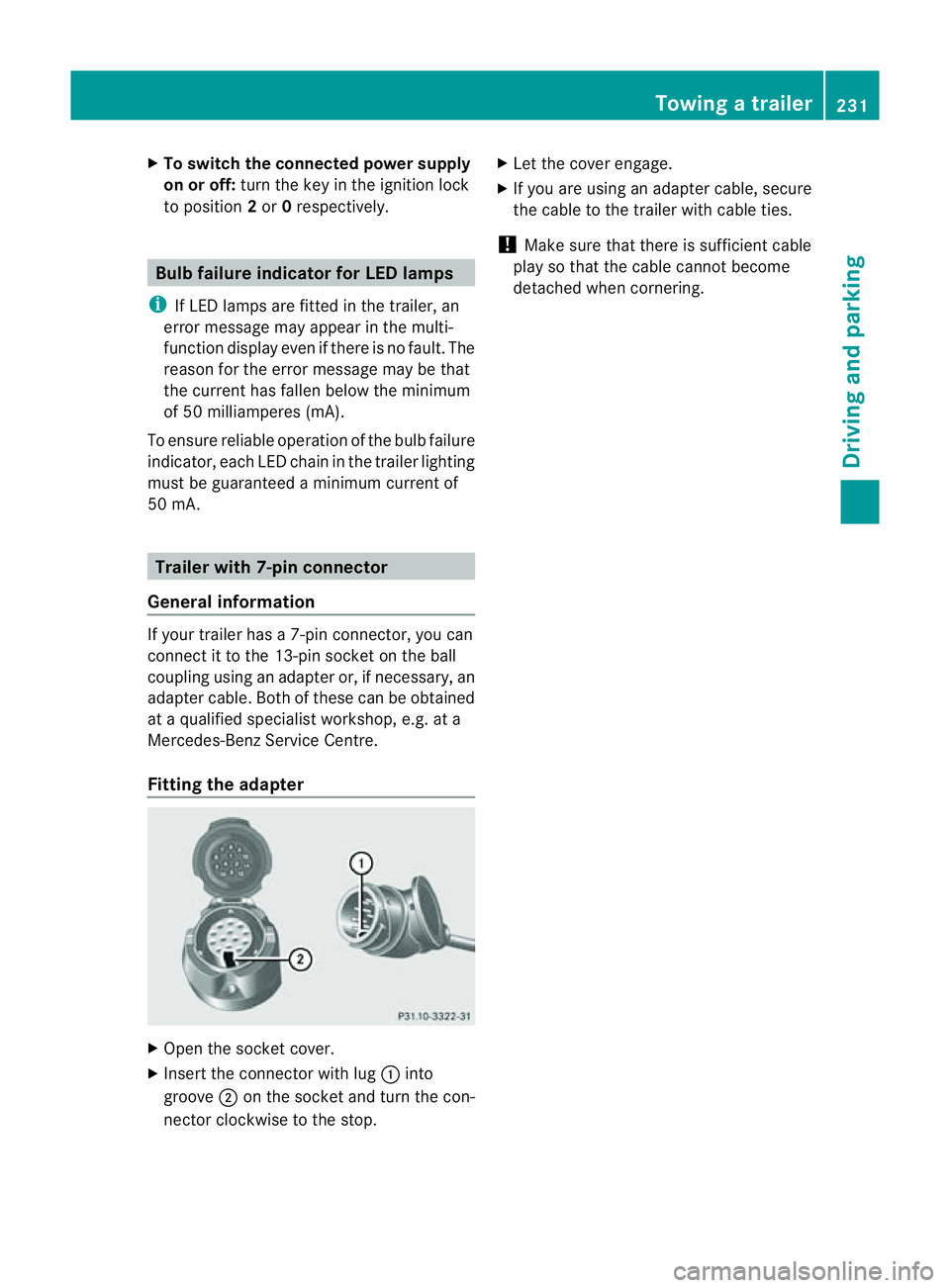
X Insert the connector with lug :into
groove ;on the socket and tur nthe con-
nec torc lockwise to the stop. X
Let the cover engage.
X If you are using an adapter cable, secure
the cable to the trailer with cable ties.
! Make sure that there is sufficient cable
play so that the cable cannot become
detached when cornering. Towing
atrailer
231Driving andparki ng Z
Page 235 of 389
Problems wit
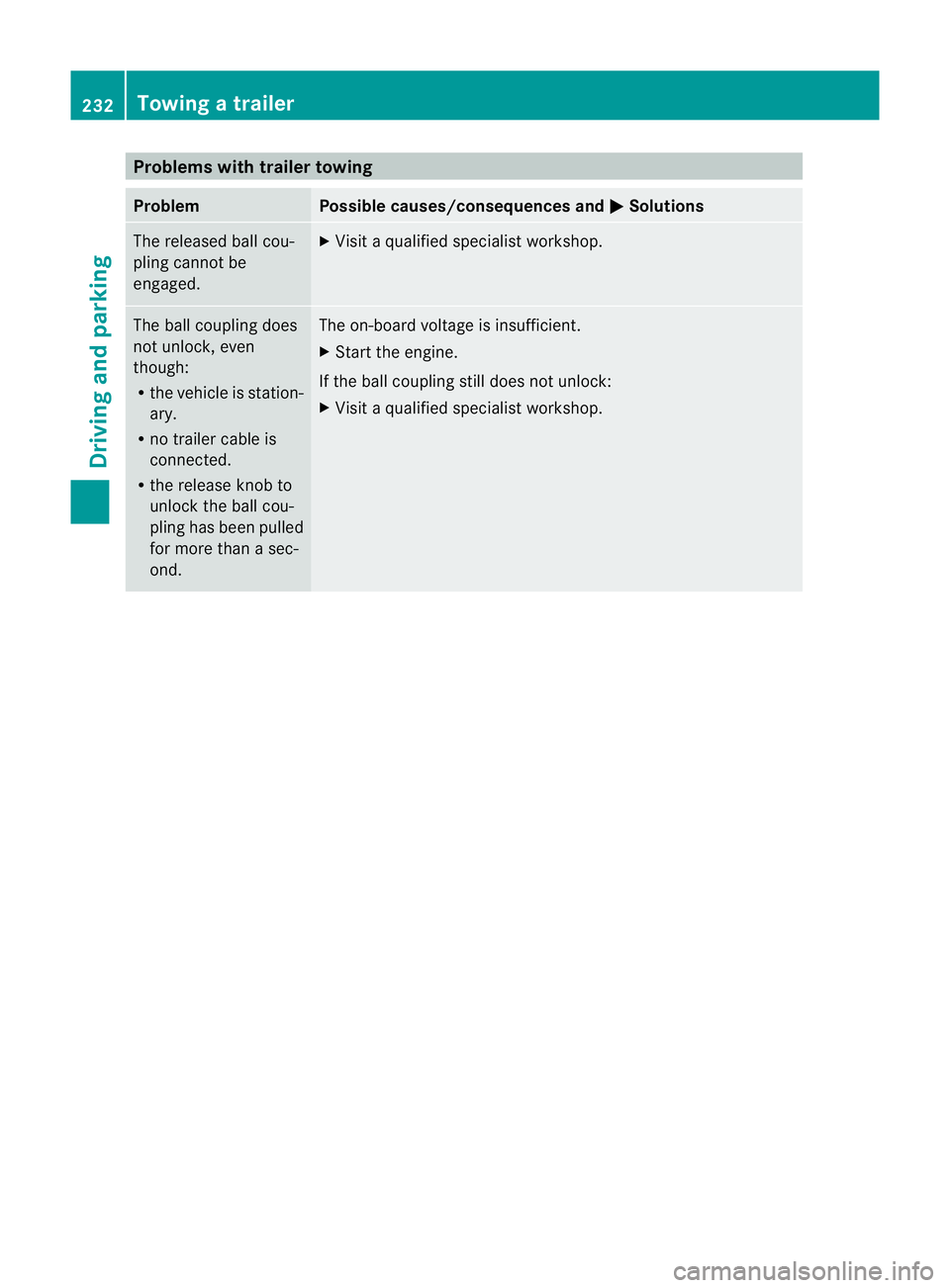
htrailer towing Problem Possible causes/consequences and
M Solutions
The released ball cou-
pling cannot be
engaged. X
Visit aqualified specialist workshop. The ball coupling does
not unlock, even
though:
R the vehicle is station-
ary.
R no trailer cable is
connected.
R the release knob to
unlock the ball cou-
pling has been pulled
for more than asec-
ond. The on-boar
dvoltage is insufficient.
X Start the engine.
If the ball coupling still does not unlock:
X Visit aqualified specialist workshop. 232
Towin
gatrailerDriving and parking
Page 238 of 389
or on bridges. If you do not adapt your driving
style to the conditions, the vehicle coul dskid.
For this reason, adapt your driving style and
speed to the weather conditions.
Changes in the outside temperature are dis-
playe dafter ashort delay. Speedometer wit
hsegments
The segment sinthe speedometer indicate
whic hspeed range is available.
Cruise control (Y page 170) activated:
The segment slight up from the stored speed
to the maximum speed.
Variable SPEEDTRONI C(Ypage 172) activa-
ted:
The segment slight up from the start of the
scale to the selected limit speed.
DISTRONIC PLU S(Ypage 174) activated:
One or two segment sinthe set speed range
light up.
DI ST RONIC PLUS detects avehicle in front:
The segment sbetween the speed of the vehi-
cle in front and the stored speed light up. Opera
ting th eon-board computer
Overview The on-board computer is activated as soon
as you tur nthe key to position 1in the ignition
lock.
You can con trol the multifunc tion display and
the settings in the on-boar dcomputer using
the button sonthe multifunc tion steering
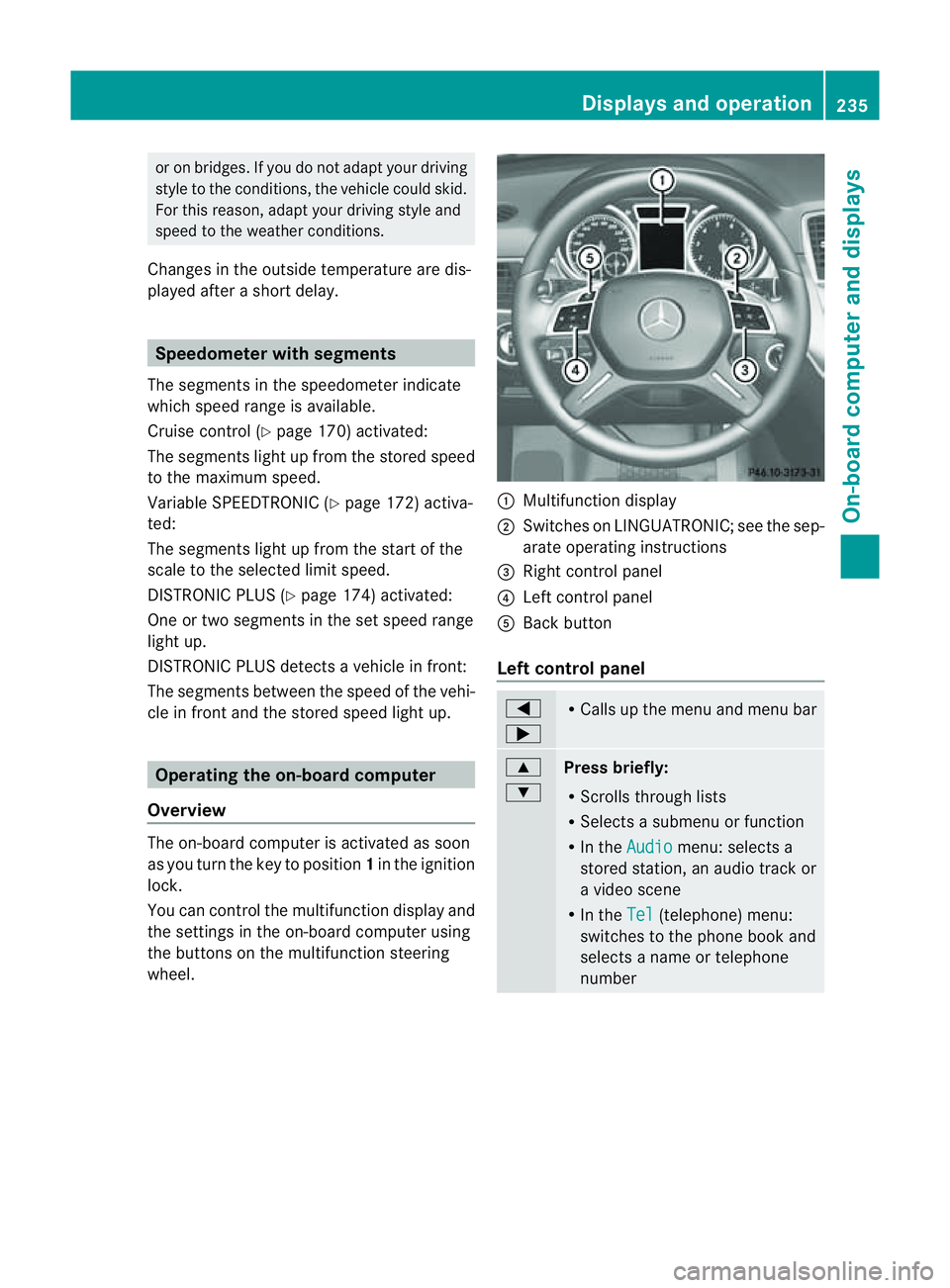
wheel. :
Multifunc tion display
; Switches on LINGUATRONIC ;see the sep-
arate operating instructions
= Right control panel
? Leftcontrol panel
A Bac kbutton
Left control panel =
; R
Call supt he men uand menu bar 9
:
Pres
sbriefly:
R Scrolls throug hlists
R Select sasubmenu or function
R In the Audio menu: selects a
stored station, an audio track or
av ideo scene
R In the Tel (telephone) menu:
switches to the phone book and
selects aname or telephone
number Displays and operation
235On-boardcomputer and displays Z
Page 251 of 389
Switching Adaptive Highbeam Assist on/
off
X Press the =or; button on the steer-
ing wheel to select the Settings menu.
X Press the :or9 button to select the
Light submenu.
X Press the abutton to con firm.
X Press the :or9 button to select the
Adaptive Main-bea mAssist: function.
Yo uw ill see the selected setting: Activa‐ted or
Deactivated .
X Press the abutton to save the setting.
Setting the brightness of the ambient
lighting
X Press the =or; button on the steer-
ing wheel to select the Settings menu.
X Press the :or9 button to select the
Light submenu.
X Press the :or9 button to select
Ambien tlight .
Yo uw ill see the selected setting.
X Press the abutton to confirm.
X Press the :or9 button to adjust the
brightness to any level from Off to
Level 5 (bright).
X Press the aor% button to save the
setting.
Setting the ambient lighting colour
X Press the =or; button on the steer-
ing wheel to select the Settings menu.
X Press the :or9 button to select the
Light submenu.
X Press the abutton to confirm.
X Press the :or9 button to select the
Ambien tlight colour function.
X Press the abuttontoc onfirm.
X Press the :or9 button to set the
colou rtoSOLAR ,
NEUTRAL or
POLAR .
X Press the aor% buttontos ave the
setting. Activating/deactivating the surround
lighting and exterior lighting delayed
switch-off
If you have activated the
Surround light‐ ing function and the light switch is set to
Ã,t he followin gfunctions are activated
when it is dark:
R Surround lighting: the exterior lighting
remains lit for 40 seconds after unlocking
with the key. If you start the engine, the
surround lighting is switched off and the
automatic headl ampm ode is activated
(Y page 107).
R Exterior lighting delaye dswitch-off: the
exterior lighting remains lit for 60 seconds
after the engine has been switche doff. If
you close all th edoors, the exterior lighting
goes off after 15 seconds.
If you activate the Surround lighting func-
tion ,the followin glight up depending on the
vehicle' sequipment:
R the side lamps
R the daytim edriving lights
R thes urround lighting in the exterior mirrors
X Press the =or; button on the steer-
ing wheel to select the Settings menu.
X Press the :or9 button to select the
Light submenu.
X Press the abutton to confirm.
X Press the :or9 button to select the
Surround lighting function.
You will see the selected setting: on or
off .
X Press the abutton to save the setting.
Deactivating delayed switch-off of the exte-
rior lighting temporarily:
X Before leaving the vehicle, turn the key to
position 0in the ignition lock.
X Turn the key to position 2in the ignition
lock and back to position 0.
The exterior lighting delayed switch-off is
deactivated. 248
Menus and submenusOn-board computer and displays
Page 252 of 389
Delayed switch-off of the exterio
rlight ing is
reactivate dthe nex ttime yo ustart the
engine.
Activating/deactivating the interior light-
in gd elay ed switch -off
If yo uactivat ethe Interior lighting delay sw. off function, the
interiorlighting
remain sonfor 20 seconds after you rem ove
th ek ey fr om th eignition lock.
X Press the =or; button on the steer-
ing wheel to selec tthe Settings menu.
X Press the :or9 button to selec tthe
Light submenu.
X Press the abutton to confir m.
X Press the :or9 button to select the
Interior lighting dela ysw. off: function.
Yo
uw ill see the selected setting: on or
off .
X Press the abutton to save the setting.
Vehicle Setting permanent SPEEDTRONIC
You can set permanent SPEEDTRONIC
(Y page 174 )using the Limitspeed (win‐ ter tyres) function.
X Press the =or; buttononthe steer-
ing wheel to selec tthe Settings menu.
X Press the :or9 button to selec tthe
Vehicle submenu.
X Press the abutton to confir m.
X Press :or9 to select the Limit spee
d(winter tyres): function.
Yo uw ill see the current setting.
X Press the abutton to confir m.
X Press :or9 to adjust permanent
SPEEDTRONIC in increments of 10
(24 0k m/h to
160 km/h ). The
Off setting
switches permanen tSPEEDTRONIC off.
X Press the abutton to store the entry. Switching th
eautomatic lockin gfeatu re
on/off
If you select the Automatic door lock func-
tion, the vehicle is centrally locked above a
speed of around 15 km/h.
i For further information on the automatic
locking feature, see (Y page 78).
X Press the =or; button on the steer-
ing wheel to select the Settings menu.
X Press the :or9 button to select the
Vehicle submenu.
X Press the abutton to confir m.
X Press the :or9 button to select the
Automati cdoor lock function.
Yo uw ill see the selected setting: on or
off .
X Press the abutton to save the setting.
Activating/deactivating the acoustic
locking confirmation
If you switch on the Acoustic Lock feed‐ back func
tion, an acoustic signal sounds
when you lock the vehicle.
X Press the =or; button on the steer-
ing wheel to select the Settings menu.
X Press the :or9 button to select the
Vehicle submenu.
X Press the abutton to confir m.
X Press the :or9 button to select the
Acoustic Lock feedback: function.
You will see the selected setting: Activa‐ ted or
Deactivated .
X Press the abutton to save the setting.
Activating/deactivating th eradar sensor
system
i Youm ust deactivate the radar senso rsys-
tem in certain countries and near radio
telescope facilities .For further informa-
tion ,see (Y page 380).
When you are close to radi otelescope facili-
ties, the rada rsensor system will be deacti-
vated automatically. Menu
sand submenus
249On-boardcomput er anddisplay s Z
Page 254 of 389
Changing th
edeparture time
X Pres sthe = or; button on th esteer-
ing wheel to selec tthe Settings menu.
X Press the :or9 button to selec tthe
Heating submenu.
X Press the abutton to confir m.
You will see the selected setting.
X Press the abutton to confirm.
X Press the :or9 button to select
Change A ,
B or
C .
X Press the abutton to confirm.
You can now change the departur etime.
X Press the =or; button to select the
displa ytobec hanged: hours, minutes.
X Press the :or9 button to set the
selected display.
X Press the abutton to stor ethe ent ry.
The yellow indicator lam ponthe auxiliary
heating button lights up.
Convenience Activating/deactivating th
eEASY-
ENTRY/EXIT featu re
You can use the Easy Entry/Exit: func
tion
to activate or deactivate the EAS YENTRY/
EXIT feature (Y page 99). G
WARNING
Th es teering whee lmoves when the EASY-
ENTRY/EXI Tfeatur eisa ctive. There is arisk
of occupant sbecoming trapped. Before acti-
vating the EASY-ENTRY/EXI Tfeature, make
sure that nobody can becom etrapped.
Do not leave children unsupervised in the
vehicle, eve nifthey ar esecured in achild
restraint system .The children coul dopen the
driver' sdoor and thereby unintentionally acti-
vat ethe EASY-ENTRY/EXI Tfeatur eand
become trapped.
X Pres sthe = or; button on the steer-
ing wheel to selec tthe Settings menu.
X Press the :or9 button to selec tthe
Convenience submenu.X
Press the abutton to confir m.
X Press the :or9 button to select the
Easy Entry/Exit: function.
You will see the selected setting: on or
off .
X Press the abutton to save the setting.
Switching th ebelt adjustment on/off
For further information on belt adjustment,
see (Y page 48).
X Press the =or; button on the steer-
ing wheel to select the Settings menu.
X Press the :or9 button to select the
Convenience submenu.
X Press the abutton to confir m.
X Press the :or9 button to select the
Belt adjustment function.
You will see the selected setting: on or
off .
X Press the abutton to save the setting.
Switching th efold in mirrors when lock-
ing function on/off
If you switch on the Fold mirrors in when
locking func
tion, the exterior mirror sfold in
when you lock the vehicle. When you unlock
the vehicle and then open the driver's or
front-passenger door, the exterior mirrors
fold out again.
If you have switched the func tion on and you
fold the exterior mirror sinusing the button
on the door (Y page 101), they will not fold
out automatically. The exterior mirrors can
then only be folded out usin gthe button on
the door.
X Press the =or; button on the steer-
ing wheel to selec tthe Settings menu.
X Press the :or9 button to selec tthe
Convenience submenu.
X Press the abutton to confir m. Menus and submenus
251On-boardcomputer and display s Z
Page 255 of 389
X
Press the :or9 to select the Fold mirror
sinwhen locking: function.
Yo uw ill see the selected setting: on or
off .
X Press the abutton to save the setting.
Resetting to factor ysettings For safety reasons
,not al lfunction sare reset:
the Limit speed (winter tyres) function
in permane ntSPEEDTRONI Ccan only be set
in the Vehicle submenu. If you want to reset
the Daytim edriving lights: fun
ction in
the Light submenu, you must tur
nthe key in
the ignition lock to position 1.
X Press the =or; button on the steer-
ing wheel to selec tthe Settings menu.
X Press the :or9 button to selec tthe
Factor ysetting submenu.
X Press the abuttontoc onfirm.
The Rese tall settings? message
appe ars.
X Pres sthe : or9 button to select
No or
Yes .
X Press the abutton to confir mthe selec-
tion.
If you select Yes ,t
he multifunction display
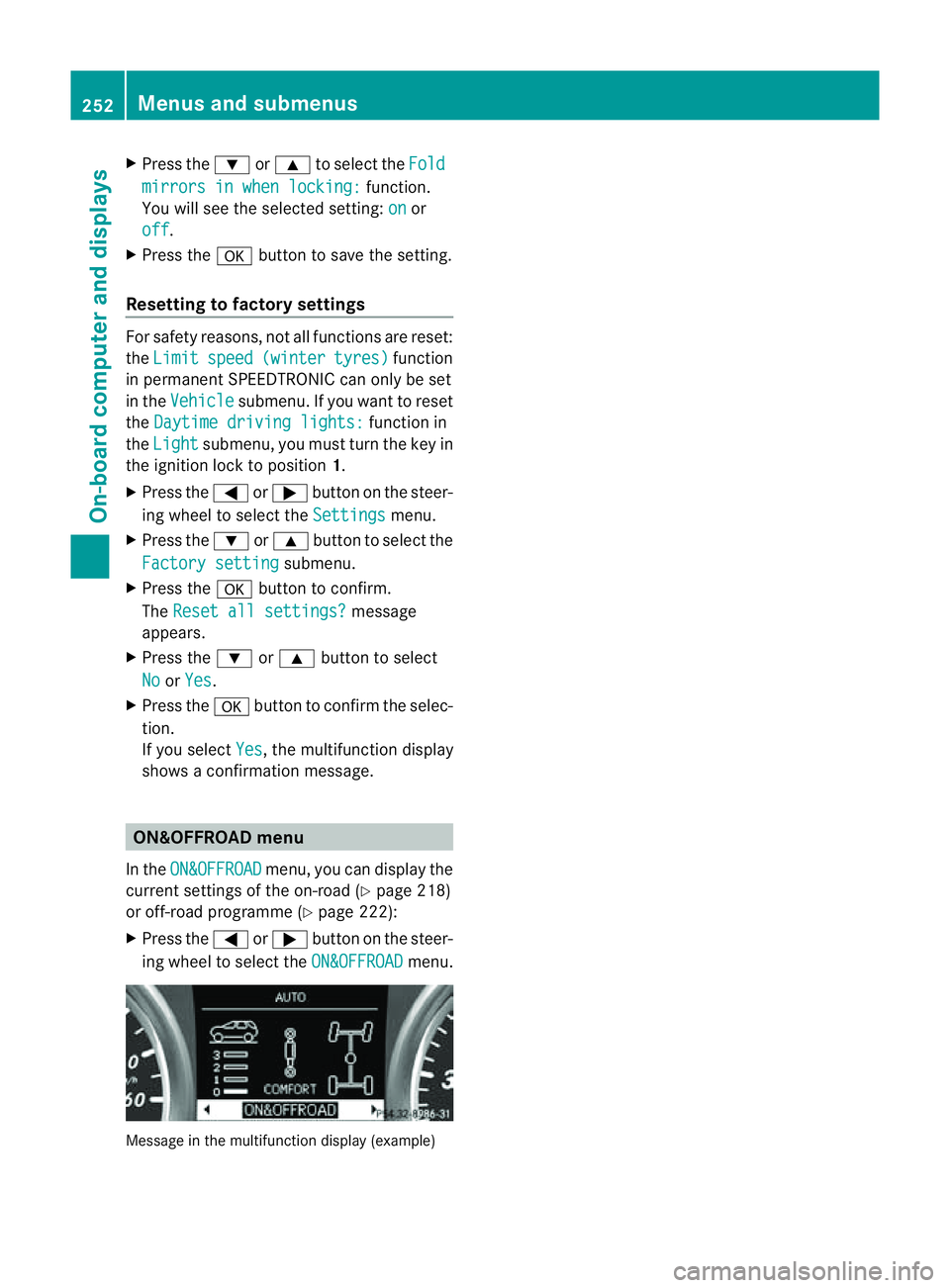
shows aconfirmation message. ON&OFFROAD menu
In the ON&OFFROAD menu, you can display the
curren tsettings of the on-road (Y page 218)
or off-road programm e(Ypage 222):
X Press the =or; button on the steer-
ing wheel to select the ON&OFFROAD menu.
Message in the multifunction display (example)252
Menus and submenusOn-board computer and displays
Page 257 of 389
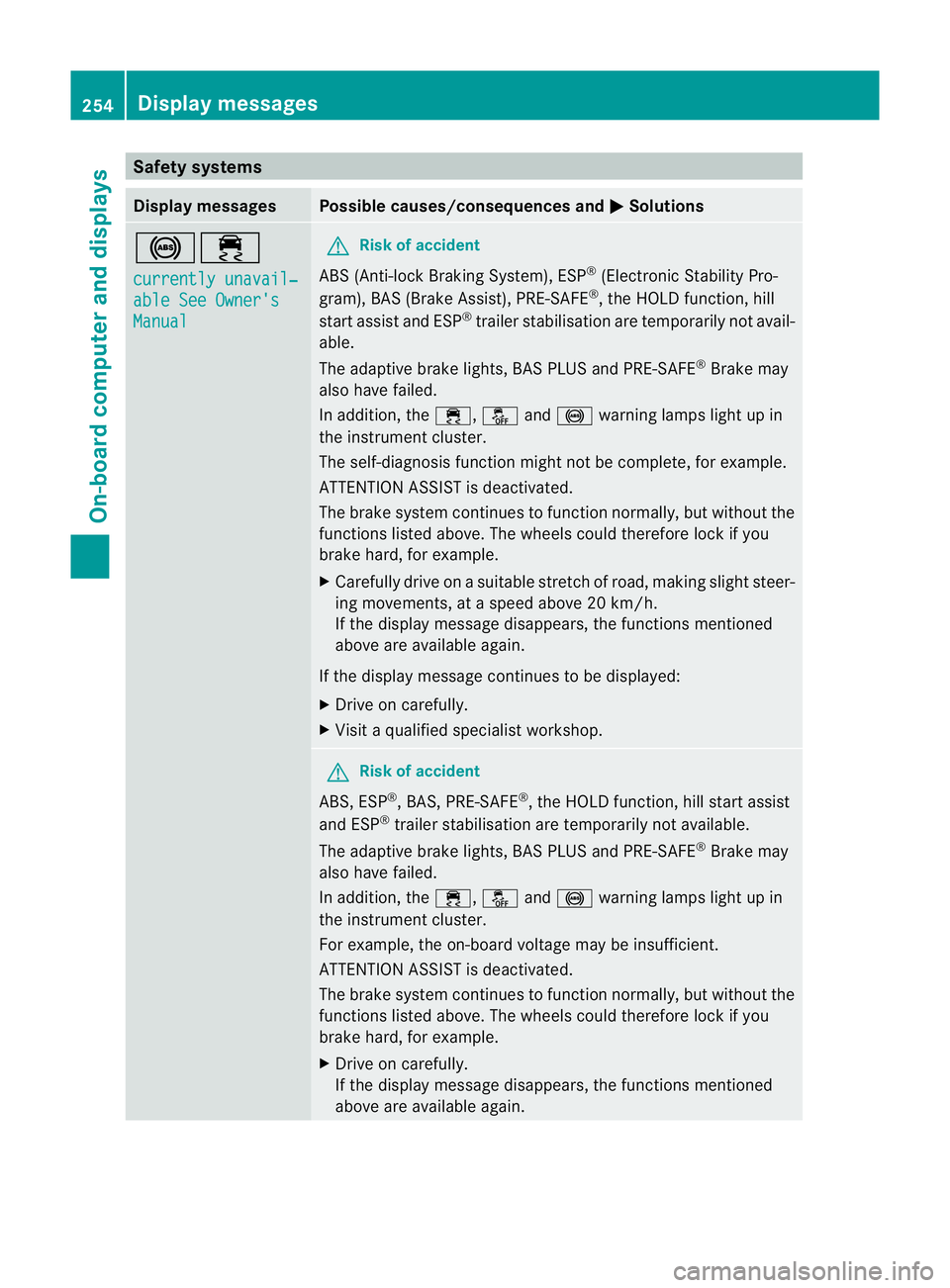
Safety systems
Display messages Possible causes/consequences and
M Solutions
!÷
currentl
yunavail‐ able See Owner's
Manual G
Ris
kofa ccident
ABS (Anti-lock Braking System), ESP ®
(Electronic Stability Pro-
gram), BAS (Brake Assist), PRE-SAFE ®
,t he HOL Dfunction, hill
start assis tand ESP ®
trailer stabilisation are temporarily not avail-
able.
The adaptive brake lights ,BAS PLUS and PRE-SAFE ®
Brake may
also have failed.
In addition, the ÷,åand! warning lamps ligh tupin
the instrument cluster.
The self-diagnosis function might not be complete ,for example.
ATTENTION ASSIS Tisdeactivated.
The brak esystem continues to function normally, but without the
functions liste dabove. The wheels could therefore lock if you
brak ehard, for example.
X Carefully drive on asuitable stretch of road, making slight steer-
ing movements, at aspeed above 20 km/h.
If the display message disappears, the functions mentioned
above are available again.
If the display message continues to be displayed:
X Drive on carefully.
X Visit aqualified specialist workshop. G
Risk of accident
ABS ,ESP ®
,B AS ,PRE-SAFE ®
,t he HOL Dfunction, hill start assist
and ESP ®
trailer stabilisation are temporarily not available.
The adaptive brake lights ,BAS PLUS and PRE-SAFE ®
Brake may
also have failed.
In addition, the ÷,åand! warning lamps ligh tupin
the instrument cluster.
For example, the on-board voltage may be insufficient.
ATTENTION ASSIST is deactivated.
The brake system continues to function normally, but without the
functions liste dabove. The wheels could therefore lock if you
brak ehard, for example.
X Drive on carefully.
If the display message disappears, the functions mentioned
above are available again. 254
Display messagesOn-board computer and displays
Page 258 of 389
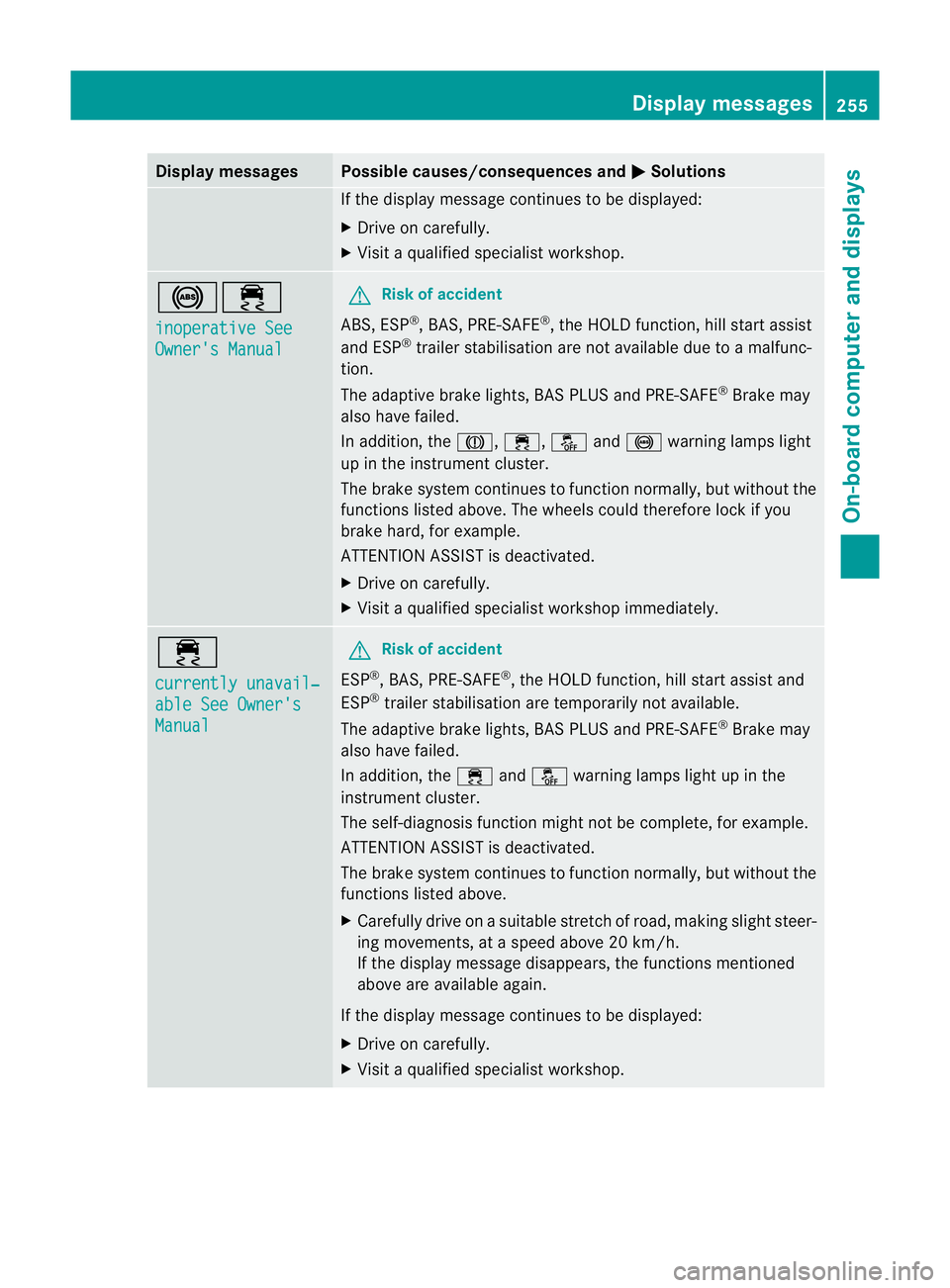
Displa
ymessages Possible causes/consequences and
M Solutions
If th
edisplay message continues to be displayed:
X Drive on carefully.
X Visit aqualified specialist workshop. !÷
in
operative See Owner'
sManual G
Risk of accident
ABS, ESP ®
,B AS ,PRE-SAFE ®
,t he HOL Dfunction ,hill start assist
and ESP ®
trailer stabilisation are no tavailab ledue to amalfunc-
tion.
The adaptive brake lights, BAS PLUS and PRE-SAFE ®
Brake may
als oh ave failed.
In addition, the J,÷,åand! warning lamp slight
up in the instrument cluster.
The brake system continues to function normally, but without the
functions listed above. The wheels could therefor elock if you
brake hard, for example.
ATTENTION ASSIS Tisd eactivated.
X Drive on carefully.
X Visit aquali fieds pecialist workshop immediately. ÷
currentl
yunavail‐ able See Owner's
Manual G
Ris
kofa ccident
ESP ®
,B AS, PRE- SAFE ®
,t he HOL Dfunction, hill start assis tand
ESP ®
trailer stabilisation are temporarily not available.
The adaptive brake lights ,BAS PLU Sand PRE-SAFE ®
Brak emay
also have failed.
In addition, the ÷andå warning lamps light up in the
instrument cluster.
The self-diagnosis function might not be complete, for example.
ATTENTION ASSIS Tisdeactivated.
The brak esystem continues to function normally, but without the
functions liste dabove.
X Carefull ydrive on asuitable stretc hofroad, makin gslight steer-
ing movements, at aspeed above 20 km/h.
If the display message disappears, the fun ction sm entioned
above are available again.
If the display message continues to be displayed:
X Driv eonc arefully.
X Visit aqualified specialist workshop. Display messages
255On-boardcomputer and displays Z