lock MERCEDES-BENZ M-CLASS SUV 2011 Owners Manual
[x] Cancel search | Manufacturer: MERCEDES-BENZ, Model Year: 2011, Model line: M-CLASS SUV, Model: MERCEDES-BENZ M-CLASS SUV 2011Pages: 389, PDF Size: 9.22 MB
Page 209 of 389
position "Automatic drivin
glights/daytime
drivin glights" is located on the light switch. You can only activat
eNight View Assist Plus
if:
R the key is in position 2in the ignition lock.
R it is dark.
R the light switc hisset to either c,
à orL.
R rev ers egear has not been engaged.
X Make sure COMAND Onlin eisswitched on.
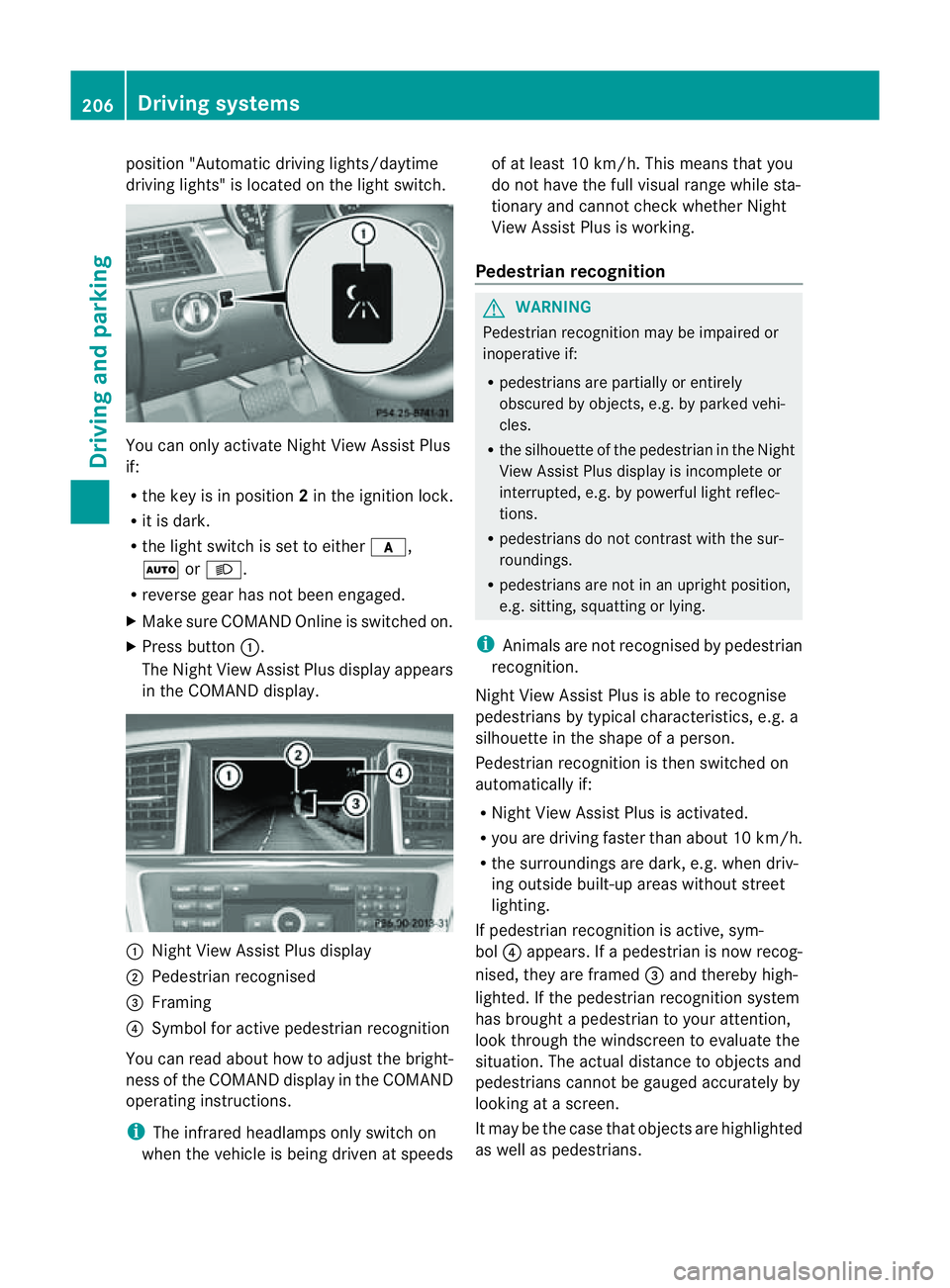
X Press button :.
The Night View Assist Plus display appears
in the COMAN Ddisplay. :
Night View Assist Plus display
; Pedestrian recognised
= Framing
? Symbol for active pedestrian recognition
You can read abou thow to adjust the bright-
nes soft he COMAND displa yinthe COMAND
operating instructions.
i The infrared headlamps only switc hon
when the vehicle is being drive natspeeds of at least 10 km/h. This mean
sthat you
do not hav ethe full visual range while sta-
tionar yand cannot check whether Night
View Assist Plus is working.
Pedestrian recognition G
WARNING
Pedestrian recognition may be impaired or
inoperative if:
R pedestrians are partiall yorentirely
obscured by obje cts, e.g. by parked vehi-
cles.
R the silhouett eofthe pedestrian in the Night
View Assist Plus displa yisincomplete or
interrupted, e.g. by powerful ligh treflec-
tions.
R pedestrians do not contrast with the sur-
roundings.
R pedestrians are not in an upright position,
e.g. sitting, squattin gorlying.
i Animals are not recognised by pedestrian
recognition.
Night View Assist Plus is able to recognise
pedestrians by typical characteristics, e.g. a
silhouette in the shape of aperson.
Pedestrian recognition is then switched on
automatically if:
R Night View Assist Plus is activa ted.
R you are driving faster than about 10 km/ h.
R the surrounding sare dark ,e.g.w hen driv-
ing outside built-up areas without street
lighting.
If pedestrian recognition is active ,sym-
bol ?appears. If apedestrian is now recog-
nised, they are framed =and thereby high-
lighted. If the pedestrian recognition system
has brought apedestrian to your atten tion,
look through the windscreen to evaluate the
situation .The actual distanc etoobjectsand
pedestrians cannot be gauged accurately by
looking at ascreen.
It may be the case that objects are highlighted
as wel laspedestrians. 206
Driving systemsDriving and parking
Page 213 of 389
the warning onl
yoccurs if the differenc ein
spee dislesst han 12 km/h.
The yellow indicator lamp goes out if reverse
gea rise ngaged. Blind Spot Assist is then
deactivated.
The brightness of the indicator/warning
lamps is adjusted automaticall yaccording to
the ambient light. G
WARNING
Blind Spot Assist is not active at speeds below
30 km/h, and the indicator lamps in the exte-
rior mirrors are yellow. Vehicles in the moni-
toring range are the nnot indicated.
Always pay attention to traffic condition sand
your surroundings .Otherwise, you may fail to
recognis edangers in time, cause an accident
and injure yoursel fand others.
Collisio nwarning
If av ehicle is detected in the mon itoring range
of Blind Spot Assis tand you switch on the turn
signal, adouble warnin gtone sounds. Red
warnin glamp :flashes .Ifthe tur nsignal
remains on, detected vehicles are indicated
by the flashing of red warnin glamp :.T here
ar enof urther warning tones.
Switching on Blind Spot Assist
X On vehicles without anavigation system,
make sure that the Becker ®
MAP PILOT is
connected; see the separate operating
instructions for Audio 20.
X Make sure that the radar senso rsystem
(Y page 249) and Blind Spot Assist
(Y page 245) are activated in the on-board
computer.
X Turn the key to position 2in the ignition
lock.
Warning lamps :ligh tupr ed in the exte-
rior mirror sfor approximately 1. 5seconds
and then tur nyellow.
Trailer towing
If you attach atrailer, make sure that yo uhave
correctly established the electrical connec-
tion. This can be accomplished by checking the trailer lighting
.Blind Spot Assist is then
deactivated. The indicator lamp in the exte-
rior mirrors lights up yellow, and the Blind Spot Assist currentl
yunavailable See Owner's Manual message appe
arsin
the multifunction display.
i You can deactivate the indicato rlamps in
the exterior mirrors.
To do so, switch off Blind Spot Assis tif:
R thek ey is in position 2in the ignition
lock.
R the engine is not running.
R the electrical connection to the trailer
has been established.
Lane Keeping Assist Important safety notes
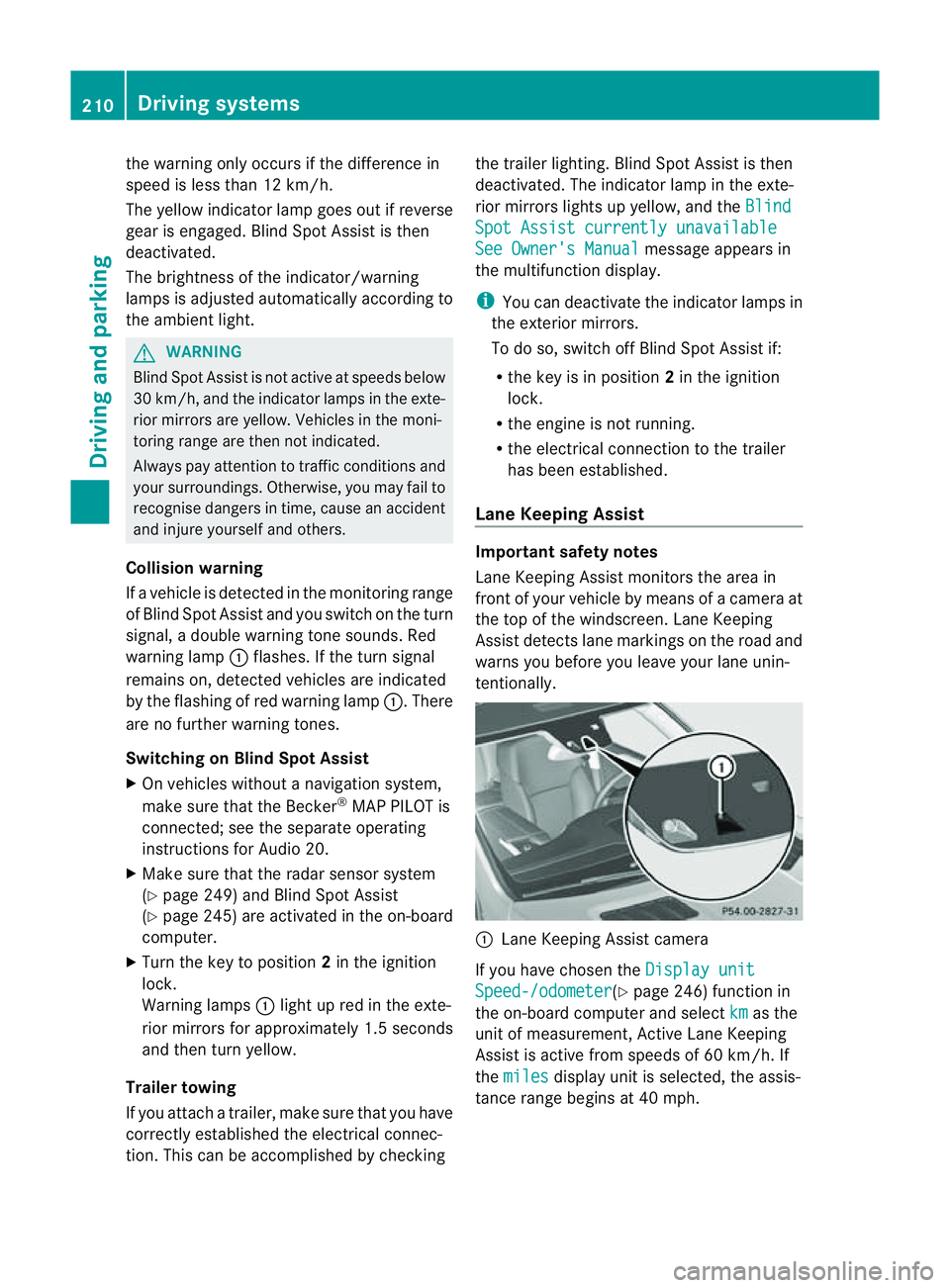
Lan
eKeeping Assist monitor sthe area in
front of your vehicle by means of acamera at
the top of the windscreen. Lane Keeping
Assis tdetect slane markings on the road and
warns you before you leave your lane unin-
tentionally. :
Lane Keeping Assis tcamera
If you have chose nthe Displa yunit Speed-/odometer (Y
page 246) functio nin
the on-board computer and select km as the
unit of measurement, Active Lane Keeping
Assist is active from speeds of 60 km/h. If
the miles displa
yunit is selected ,the assis-
tance range begin sat40mph. 210
Driving systemsDriving and parking
Page 218 of 389
R
the Off-roa dprogra misa ctivate d(vehicles
without th eON&OFFROAD package).
R Off-road progra m1or2isactivated(vehi-
cle sw ith the ON&OFFROAD package).
R the LOW RANGE off-road gear is activated
(vehicles with the ON&OFFROAD package).
R al oss of tyr epressure or adefectiv etyre is
detected.
Activating Active Blind Spot Assist
X On vehicles without anavigation system,
make sure that the Becker ®
MAP PILOT is
connected; see the separate operating
instructions for Audio 20.
X Make sure that the radar senso rsystem
(Y page 249) and Active Blind Spot Assist
(Y page 245) are activated in the on-board
computer.
X Turn the key to position 2in the ignition
lock.
Warning lamps :ligh tupr ed in the exte-
rior mirror sfor approximately 1. 5seconds
and then tur nyellow.
Trailer towing
If you attach atrailer, make sure that yo uhave
correctly established the electrical connec-
tion. This can be accomplished by checking
the trailer lighting .Active Blind Spo tAssist is
then deactivated. The indicator lam plights up
yellow in the exterior mirrors and the ActiveBlind Spot Assist currently unavail‐
able Se
eOwner's Manual message
appe arsint he multifunction display.
Active Lan eKeeping Assist Import
ants afety notes
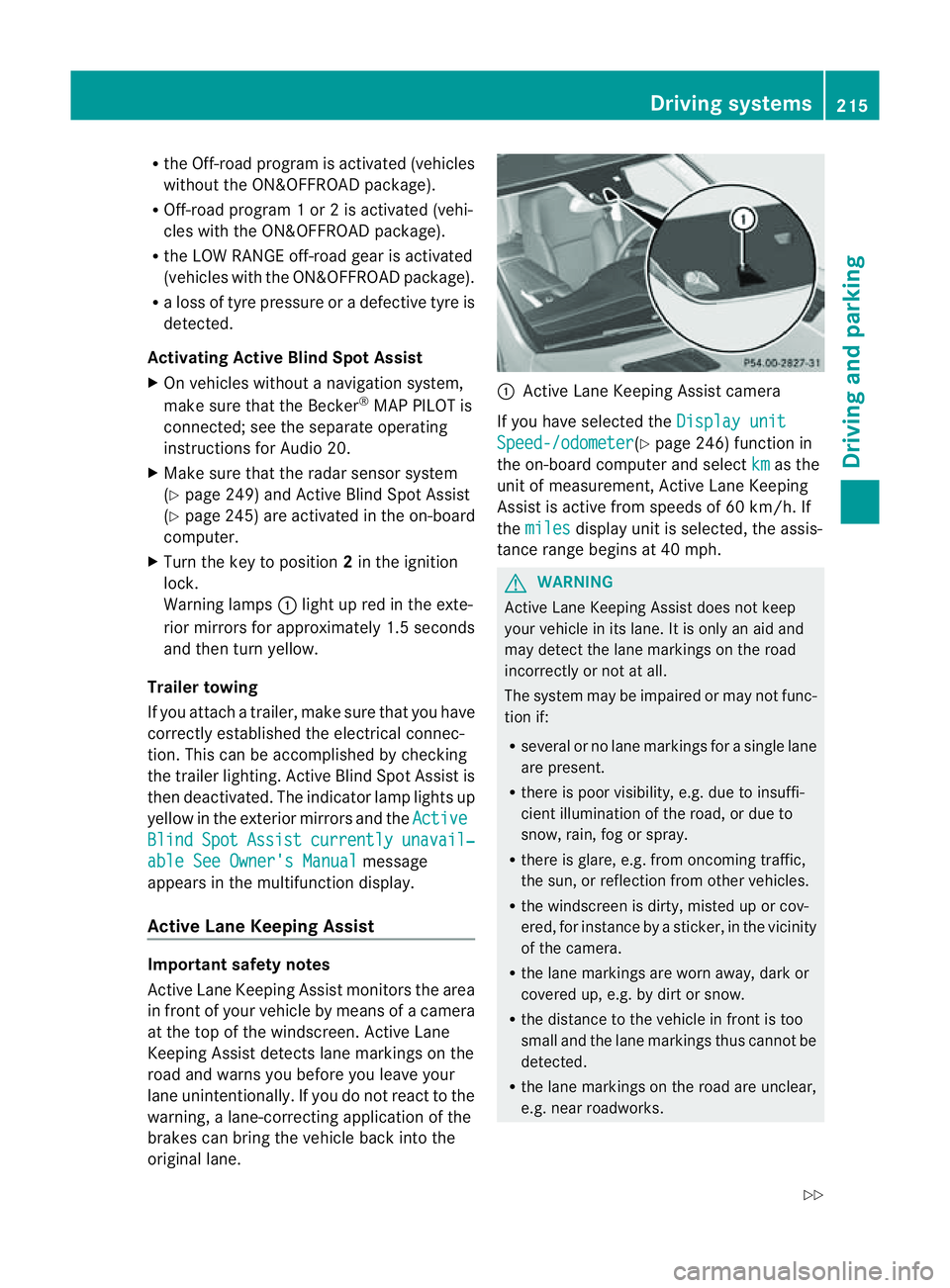
Active Lane Keeping Assis tmonitors the area
in front of your vehicle by means of acamera
at the top of the windscreen. Active Lane
Keeping Assis tdetect slane markings on the
road and warns you before you leave your
lane unintentionally .Ifyou do not react to the
warning, alane-correcting application of the
brakes can bring the vehicle back into the
original lane. :
Active Lane Keeping Assis tcamera
If you have selected the Displayunit Speed-/odometer (Y
page 246) function in
th eo n-board compute rand select km as the
unit of measurement, Active Lane Keeping
Assist is active from speeds of 60 km/h. If
the miles display unit is selected
,the assis-
tan ce ra nge begins at 40 mph. G
WARNING
Active Lane Keeping Assist doe snot keep
your vehicle in its lane. It is only an aid and
may detec tthe lan emarkings on the road
incorrectly or not at all.
The system may be impaired or may not func-
tion if:
R several or no lane markings for asingle lane
are present.
R there is poor visibility, e.g. due to insuffi-
cient illumination of the road, or due to
snow, rain, fog or spray.
R there is glare, e.g. from oncoming traffic,
the sun, or reflec tion from other vehicles.
R the windscreen is dirty, misted up or cov-
ered, for insta ncebyasticker, in the vicinity
of the camera.
R the lane markings are worn away ,dark or
covered up, e.g. by dirt or snow.
R the distance to the vehicle in front is too
small and the lane markings thus cannot be
detected.
R the lane markings on the road are unclear,
e.g. near roadworks. Driving systems
215Drivingand park ing
Z
Page 221 of 389
On-roa
dprogram (vehicle swith the
ON&OFFROAD package)
Genera lnotes The on-road program
ssupport you when driv-
ing on roads and the off-road programs sup-
port you when driving off-road (Y page 222).
The following program messages remain in
the multifunction display until the corre-
spondin gvehicle level has been set. Up to off-
road level 2, you can hide the program mes-
sages using the %ora button on the
multifunction steering wheel.
AUTO program Selec
tthe AUTO program for amore com-
for table ride under all normal driving condi-
tions.
Your selection remains stored even if you
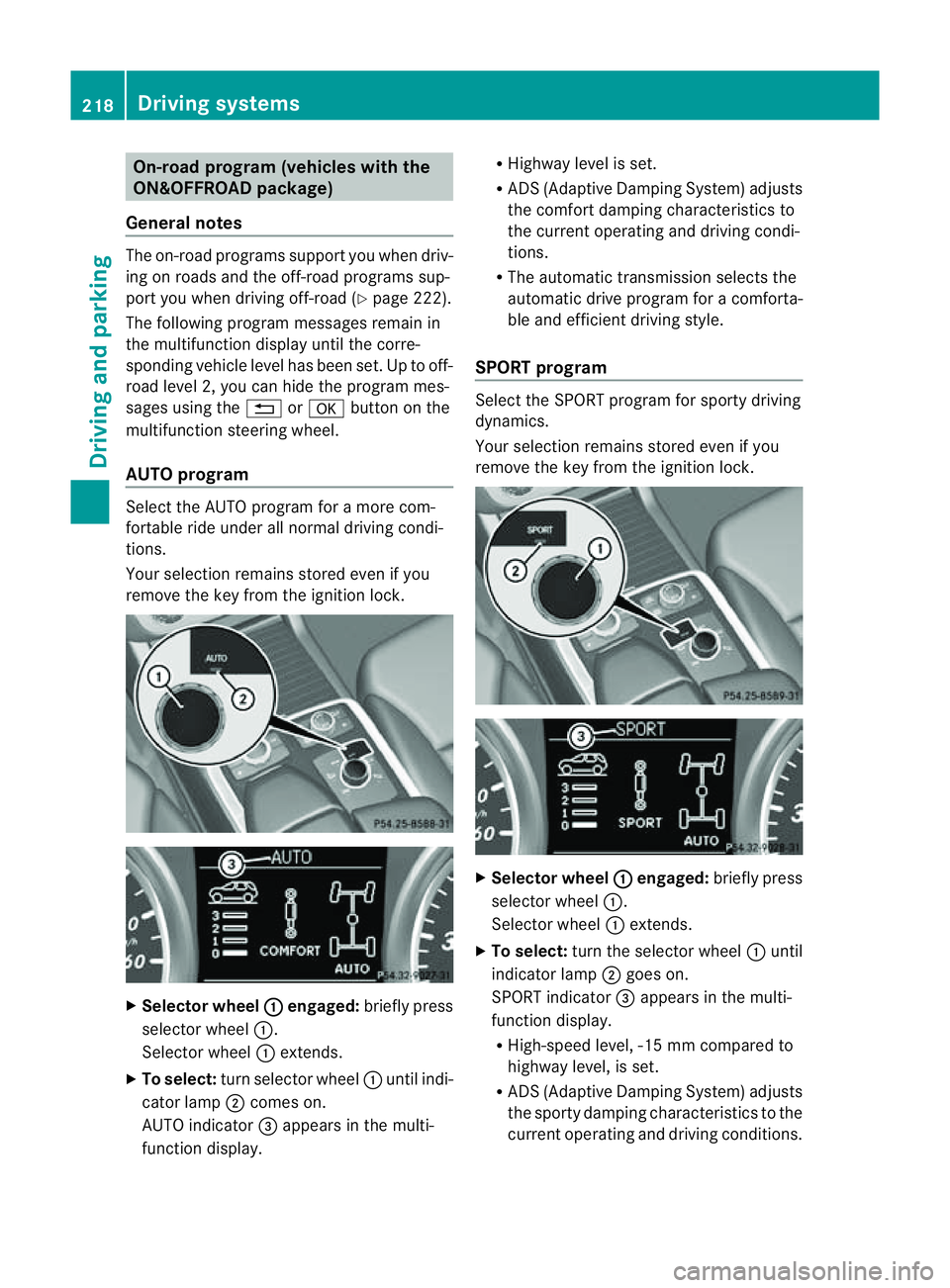
remove the key from the ignition lock. X
Selecto rwheel : engaged:
brieflypress
selector wheel :.
Selector wheel :extends.
X To select: turn selector wheel :unti lindi-
cator lamp ;comes on.
AUTO indicator =appears in the multi-
function display. R
Highway level is set.
R AD S(Adaptive Damp ingS ystem) adjusts
the comfort damping characteristics to
the current operating and driving condi-
tions.
R The automatic transmission selects the
automatic drive progra mforac omforta-
ble and efficien tdriving style.
SPORT program Select th
eSPORT program for sport ydriving
dynamics.
Your selection remains store deven if you
remove th ekey from the ignition lock. X
Selector wheel : engaged:
briefly press
selector wheel :.
Selec torw heel :extends.
X To select: turnthe selector wheel :until
indicator lamp ;goes on.
SPOR Tindicator =appears in the multi-
function display.
R High-speed level ,-15 mm compared to
highway level ,isset.
R AD S(Adaptive Damp ingS ystem) adjusts
the sporty damping characteristics to the
current operating and driving conditions. 218
Driving systemsDriving and
parking
Page 222 of 389
R
The automatic transmission select sthe
automatic drive program for asporty
driving style.
R The sporty accelerator pedal curve is
selected. This mean sthat the accelera-
tor pedal does not need to be depressed
as fa rwhen accelerati ng.
R The sport ysteering curve is selected.
Thi sm eans that mor eeffort is required
when steering.
i Youc annot select the SPORT program if
LOW RANGE has been selected .The
Driv eprogram SPORT Not in LOW RANGE message appears in th
emultifunc-
tion display.
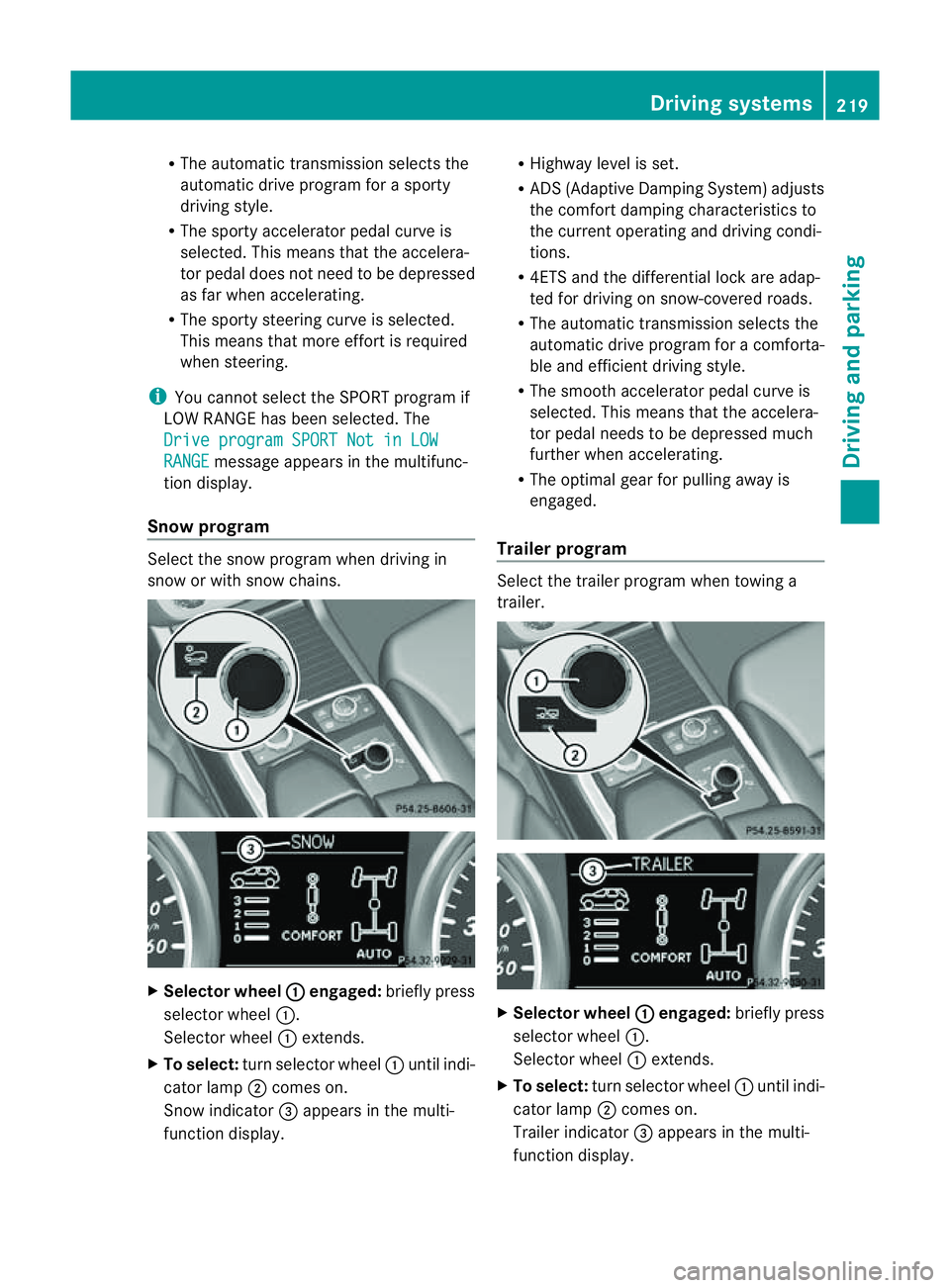
Snow program Select the snow program when driving in
snow or with snow chains. X
Selector wheel : engaged:
briefly press
selector wheel :.
Selector wheel :extends.
X To select: turn selector wheel :until indi-
cator lamp ;comes on.
Snow indicator =appears in the multi-
function display. R
Highway level is set.
R AD S(Adaptive Damp ingS ystem) adjusts
the comfort damping characteristics to
the current operating and driving condi-
tions.
R 4ETS and the differential lock are adap-
ted for driving on snow-covered roads.
R The automatic transmission selects the
automatic drive progra mforac omforta-
ble and efficien tdriving style.
R Th es mooth accelerato rpedal curve is
selected. This mean sthat the accelera-
tor pedal needs to be depressed much
further when accelerating.
R The optimal gear for pulling away is
engaged.
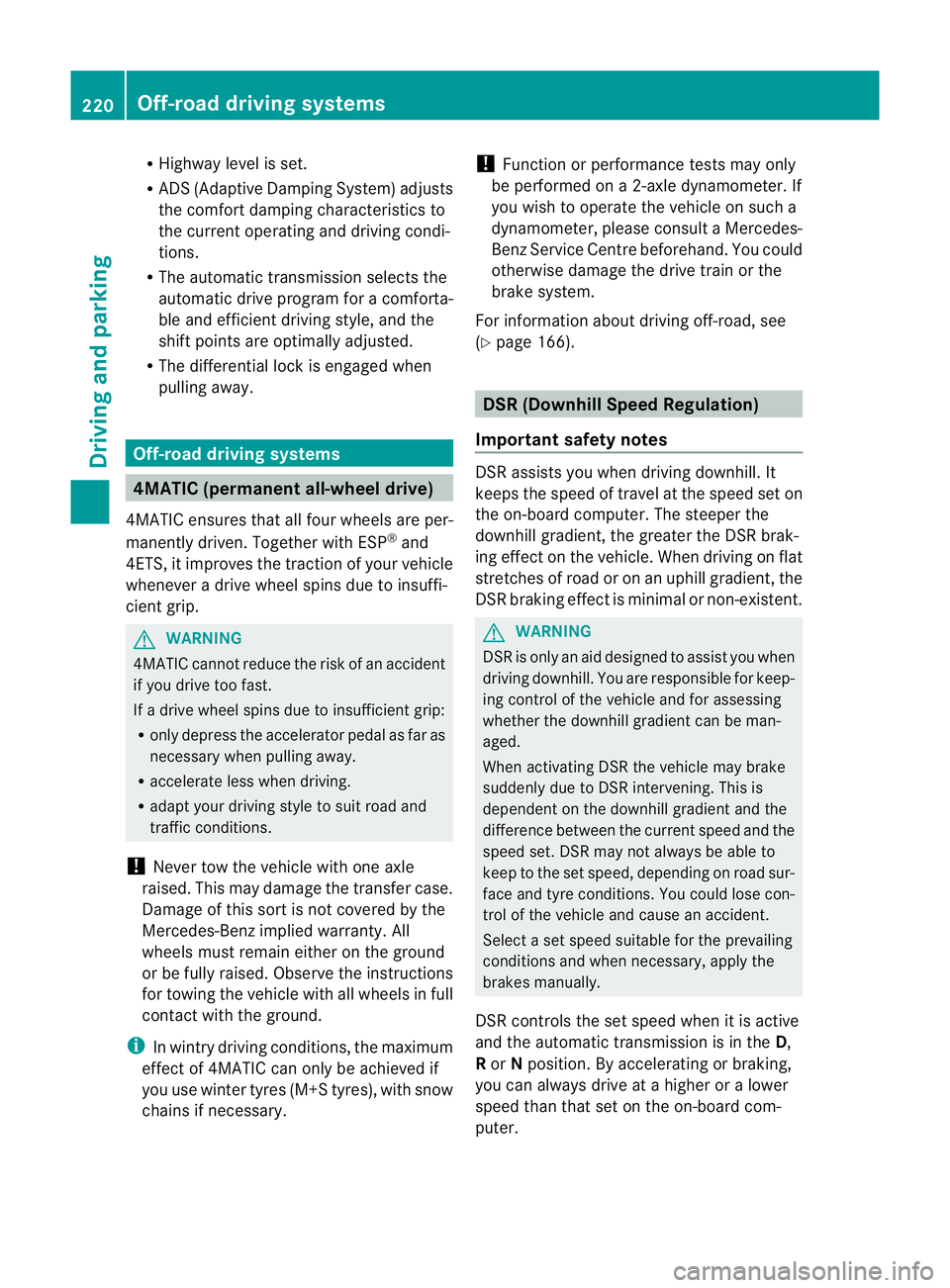
Trailer program Select the trailer program when towing a
trailer. X
Selector wheel : engaged:
brieflypress
selecto rwheel :.
Selector wheel :extends.
X To select: turnselector wheel :until indi-
cator lamp ;comes on.
Trailer indicator =appear sint he multi-
func tion display. Driving systems
219Drivingand parking Z
Page 223 of 389
R
Hig hway level is set.
R ADS (Adaptive Damping System) adjusts
the comfort damping characteristics to
the current operating and driving condi-
tions.
R The automatic transmission selects the
automatic drive progra mforac omforta-
ble and efficien tdriving style ,and the
shift points are optimally adjusted.
R The differential lock is engaged when
pulling away. Off-road driving systems
4MATIC (permanent all-wheel drive)
4MATIC ensures that all four wheels are per-
manently driven. Togethe rwith ESP ®
and
4ETS, it improves the trac tion of your vehicle
whenever adrive whee lspins due to insuffi-
cient grip. G
WARNING
4MATI Ccannot reduce the risk of an accident
if you drive too fast.
If ad rive whee lspins due to insufficien tgrip:
R onl ydepress the accelerator peda lasfar as
necessary when pulling away.
R accelerate less when driving.
R adapt you rdriving style to su itroa dand
traffic conditions.
! Never tow the vehicle with one axle
raised. Thi smay damage the transfer case.
Damage of this sort is not covered by the
Mercedes-Benz implied warranty. All
wheels must remain either on the ground
or be fully raised. Observe the instructions
for towing the vehicle with all wheels in full
contact with the ground.
i In wintry driving conditions, the maximum
effect of 4MATIC can only be achieved if
you use winter tyres (M+S tyres), with snow
chains if necessary. !
Functio norperformanc etests ma yonly
be performed on a2-axle dynamometer. If
you wis htooperatethe vehicle on such a
dynamometer, pleas econsult aMercedes-
Benz Service Centr ebeforehand. You could
otherwise damage th edrive train or the
bra kesystem.
Fo rinformation abou tdriving off-roa d, see
( Y page 166). DSR (Downhill Speed Regulation)
Important safety notes DSR assists you when driv
ingd ownhill .It
keeps the spee doftravel at th espeed set on
the on-board comp uter. Th esteeper the
downhil lgradient ,the greate rthe DS Rbrak-
ing effect on th evehicle. When driving on flat
stretches of road or on an uphill gradient, the
DSR braking effect is minima lornon-existent. G
WARNING
DSR is only an aid designe dtoassist you when
driving downhill. You ar eresponsible for keep-
ing control of the vehicle and for assessing
whether the downhill gradien tcan be man-
aged.
When activating DSR the vehicle may brake
suddenly due to DSR intervening. This is
dependent on the downhill gradient and the
difference between the current spee dand the
speed set. DSR may not always be able to
keep to the set speed, depending on road sur-
face and tyre conditions .You coul dlose con-
trol of the vehicle and cause an accident.
Selec taset speed suitable for the prevailing
conditions and when necessary, apply the
brakes manually.
DSR con trols the set speed when it is active
and the automatic transmission is in the D,
R or Nposition. By accelerating or braking,
you can always drive at ahigher or alower
speed than that set on the on-boar dcom-
puter. 220
Off-road driving systemsDriving and parking
Page 226 of 389
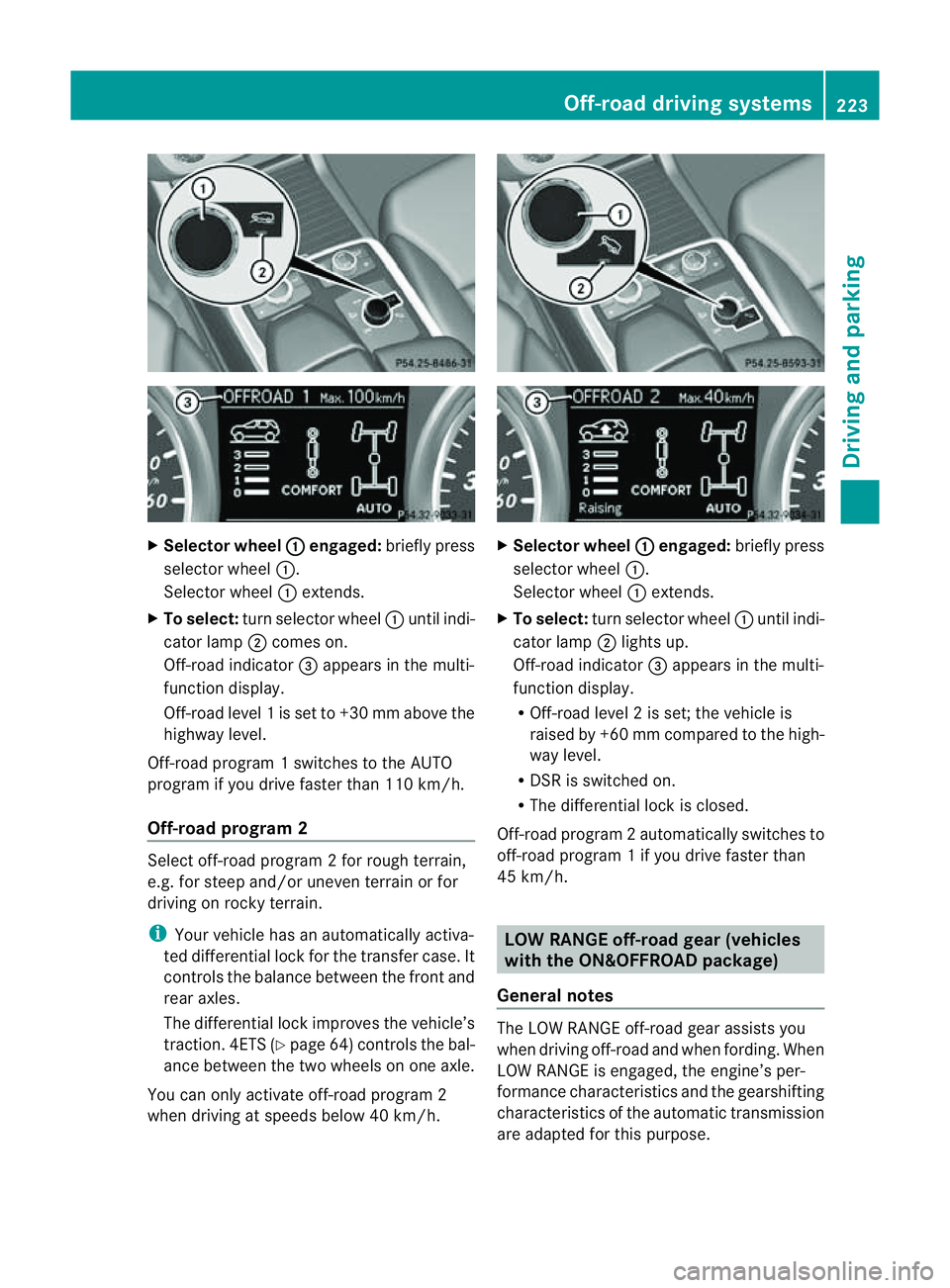
X
Selector wheel : engaged:
brieflypress
selecto rwheel :.
Selector wheel :extends.
X To select: turnselector wheel :until indi-
cator lamp ;comes on.
Off-road indicator =appears in the multi-
function display.
Off-road level 1isset to +3 0mmabove the
highwa ylevel.
Off-road program 1switches to the AUTO
program if you drive faster than 110 km/h.
Off-road program 2 Select off-road program
2for rough terrain,
e.g. for steep and/or uneven terrain or for
drivin gonr ocky terrain.
i Your vehicle has an automatically activa-
ted differential lock for the transfer case. It
con trols the balance between the front and
rear axles.
The differential lock improves the vehicle’s
trac tion. 4ETS (Y page 64)controls the bal-
anc ebetween the two wheels on one axle.
You can only activate off-road program 2
when driving at speeds below 40 km/h. X
Selector wheel : engaged:
briefly press
selector wheel :.
Selector wheel :extends.
X To select: turnselector wheel :until indi-
cator lamp ;lights up.
Off-road indicator =appears in the multi-
function display.
R Off-road level 2isset; the vehicle is
raised by +6 0mmcompared to the high-
way level.
R DSR is switched on.
R The differential lock is closed.
Off-road program 2automatically switches to
off-road program 1ifyou dri vefaster than
45 km/h. LO
WR ANGE off-road gear (vehicles
with th eON&O FFROAD package)
General notes The LOW RANGE off-road gear assists you
when driving off-road and when fording. When
LOW RANGE is engaged, th
eengin e’sp er-
formance characterist icsa nd the gearshifting
characteristics of the automatic transmiss ion
are adapted for thi spurpose. Off-roa
ddriving systems
223Drivingandparki ng Z
Page 228 of 389
From LOW RANGE to HIG
HRANGE
! Only carry out the gear change process if:
R the engin eisrunning
R the transmission is in position N
R you are not driving above 70 km/h
X Press LOW RANG Ebutton :.
Indicato rlamp ;flashes.
When the gear change is complete, indica-
tor lamp ;goes out. In th emultifunction
display, the LOWR ANGE Off message
appears and status indica tor=goes out.
While indica torlamp ;is flashing, you can
cancel the gear change by pressin gLOW
RANGE button :agai n.
Me ssages in th emultif un ction display
If ag ear chang eprocess ha snot been suc-
cessful, th efollowin gmessages may be dis-
played in the multifunction display:
LOW RANGE Max. speed 40 km/h :Y
ou have
been drivin gabove 40 km/h. Indicator
lamp ;also flashes.
X Drive mor eslowly to carr yout the gear
change process.
LO WR ANGE Shift to position N briefly :T
he transmission is in position D
and you ar enow drivin gatbelow 40 km/h.
X Shif tthe transmission to Nto complete the
gear change process.
LOW RANGE Shifting cancelled Please
reactivate :T
he shifting process has not
been completed.
X Maintai nall gear change condition sand
carry out the gea rchange process again.
LO WR ANGE Stop Apply parking brake :
Aw arning ton eisalso heard. The gear change
proces shas not been completed. LOW
RANGE is in the neut ralp osition .There is no
con nectio nbetween the engine and the drive
wheels.
! Do not driv eany further, otherwis eyou
coul ddamage the vehicle's drive train. X
Stop the vehicle. Take into account the
road and traffic conditions when doing this.
X Apply the electric parking brake
(Y page 161).
X Carry out the gear change process again.
If the gear change process has been carried
out, the LOWR ANGE Stop Apply park‐ ing brake message disapp
ears. ON&OFFROAD men
uint he COMAND
display (vehicles wit hthe ON&OFF-
ROA Dpackage)
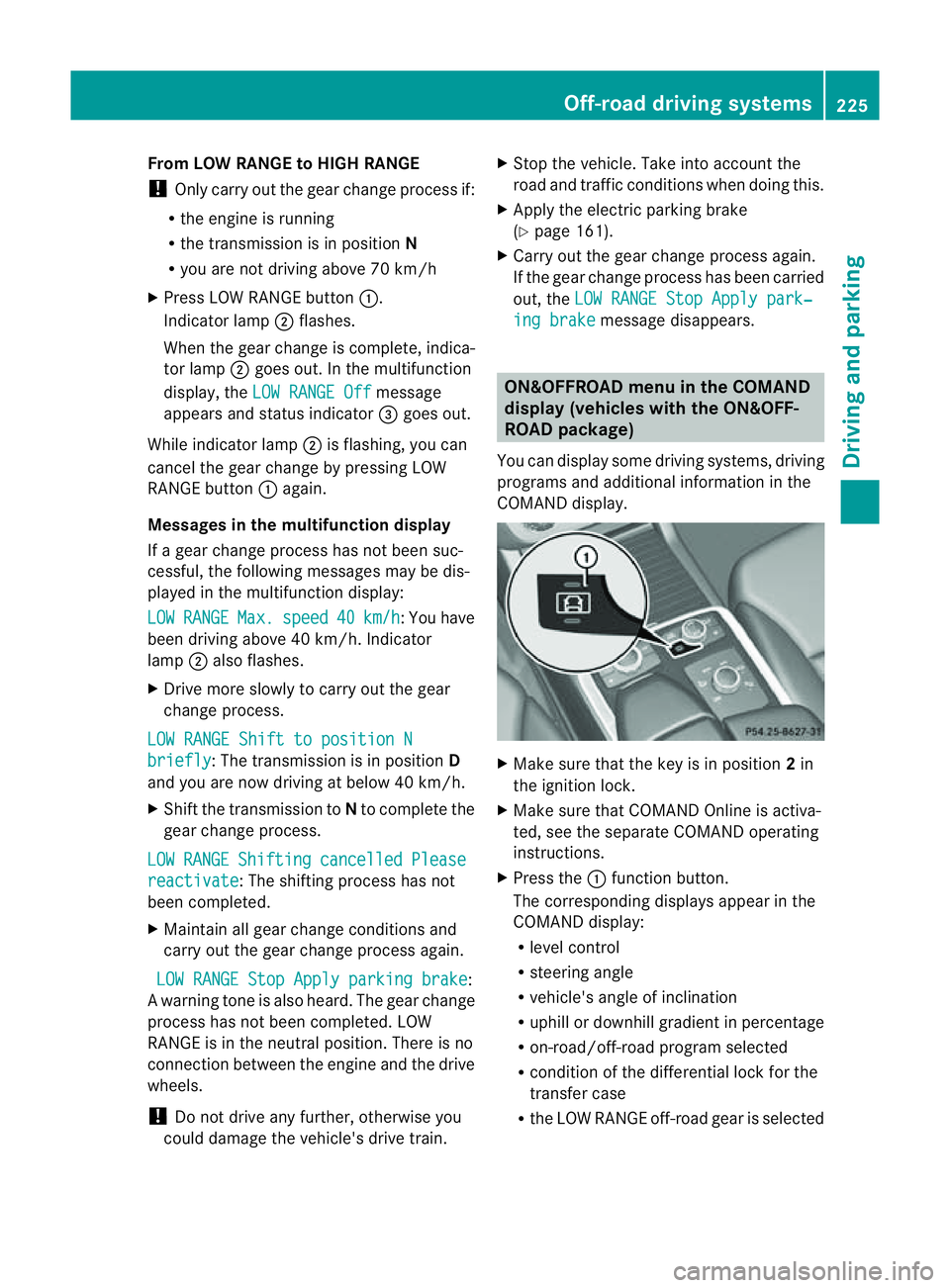
Yo uc an displ ay some driving systems ,driving
programs and additional information in the
COMAND display. X
Make sure that th ekey is in position 2in
the ignition lock.
X Make sure that COMAN DOnline is activa-
ted, see the separate COMAND operating
instructions.
X Pres sthe : func tion button.
The corresponding displays appear in the
CO MAN Ddisplay:
R level control
R steering angle
R vehicle' sangle of inclination
R uphill or downhil lgradient in percentage
R on- road/off-road program selected
R condition of the differential lock for the
transfer case
R the LOW RANGE off-road gear is selected Off-road driving systems
225Drivingand parking Z
Page 229 of 389
R
cond ition of the LOW RAN GEoff-r oad
gear
R the on-roa dtraile rprogram is selected Tow
inga trailer Note
sont owingatrailer
Important safety notes G
WARNING
When reversing the vehicl etowards the
trailer, make sure there is nobod ybetween
the trailer and the vehicle.
Couple and uncoupl ethe trailer carefully .If
you do not couple the trailer to the towing
vehicle correctly, the trailer coul dbecome
detached.
Make sure that the following values are not
exceeded:
R the permissible trailer drawbar noseweight
R the permissible trailer load
R the permissible rear axle load of the towing
vehicle
R the maximu mpermissible gross vehicle
weight of both the towing vehicle and the
trailer
You will fin dthe applicable permissible val-
ues, whic hmust not be exceeded ,inthe vehi-
cle documen ts.
You will find the values approved by the man-
ufacturer on the vehicle identification plates
and those for the towing vehicle in the "Tech-
nical data" section. G
WARNING
If the Checktrailer hitch locking mechanism message appears in th
emulti-
function display while the vehicle is in motion,
pull over immediately and check whethe rthe
ball coupling is correctly engaged. G
WARNING
When towin gatrailer, you rvehicle' shandling
characteristics will be different in comparison
to when driving without atrailer.
Th ev ehicle/ trailer combination:
R is heavier
R is restricted in its acceleration and gradi-
ent-climbin gcapability
R has an increased braking distance
R is affected more by stron gcrosswinds
R demand smore sensitive steering
R has alarger turnin gcircle
As aresult, the handlin gcharacteristic smay
be impaired and you may lose control of the
vehicle. This could lead to an accident with
serious or even fatal injuries.
When towing atrailer, alway sadjust your
speed to the current road and weather con-
ditions. Do not exceed the maximum permis-
sible speed for your vehicle/trailer combina-
tion. G
WARNING
Never depress the brak epedal continuously
while the vehicle is in motion ,e.g. never cause
the brakes to rub by applying cons tant slight
pedal pressure. Thi scauses the brake system
to overheat, increases the braking distance
and can lead to the brakes failing completely. G
WARNING
On no account shoul dyou attempt to dra wthe
vehicle/ trailer combination out by increasing
speed. G
WARNING
If you exceed the maximum noseweight when
using acarrier system on the ball coupling:
R the carrier system may be thrown around.
R the ball coupling and the carrier system
may become detached from the vehicle.
As aresult, you may injure others or cause an
accident. 226
Towing
atrailerDriving and parking
Page 231 of 389
Driving tips
R
Maintain agreater distanc efrom th evehi-
cle in front than when driv ingw ithou ta
trailer.
R Avoid braking abruptly .Ifpossible, brake
gentl yatfirst to allow the trailer to run on.
Then, increase the brakin gforc erapidly.
R The values given for gradient-climbing
capabilities from astandstill refer to sea
level. Whe ndriving in mountainou sareas,
note that th epower outpu tofthe engine,
and consequen tlyt he vehicle' sgradient-
climbing capability ,decrease with increas-
ing altitude.
If the trailer swings from side to side:
X Do not accelerate.
X Do not coun ter-steer.
X Brake if necessary. Folding ou
tthe bal lcoupling G
WARNING
Make sure that no persons or animals are in
the pivoting range of the ball coupling. Other-
wise, they could be injured.
Before you can tow atrailer wit hyour vehicle,
you must fold out the ball coupling.
X Make sure that the vehicle is stationary.
X Open the tailgate. G
WARNING
Make sur ethat the ball coupling is engaged,
either in its folded-ou torfolded-i nposition.
The indicator lam ponthe release knob is off.
Do not pull the ball coupling release switch
when atrailer is coupled or abicycle rack is
fitted.
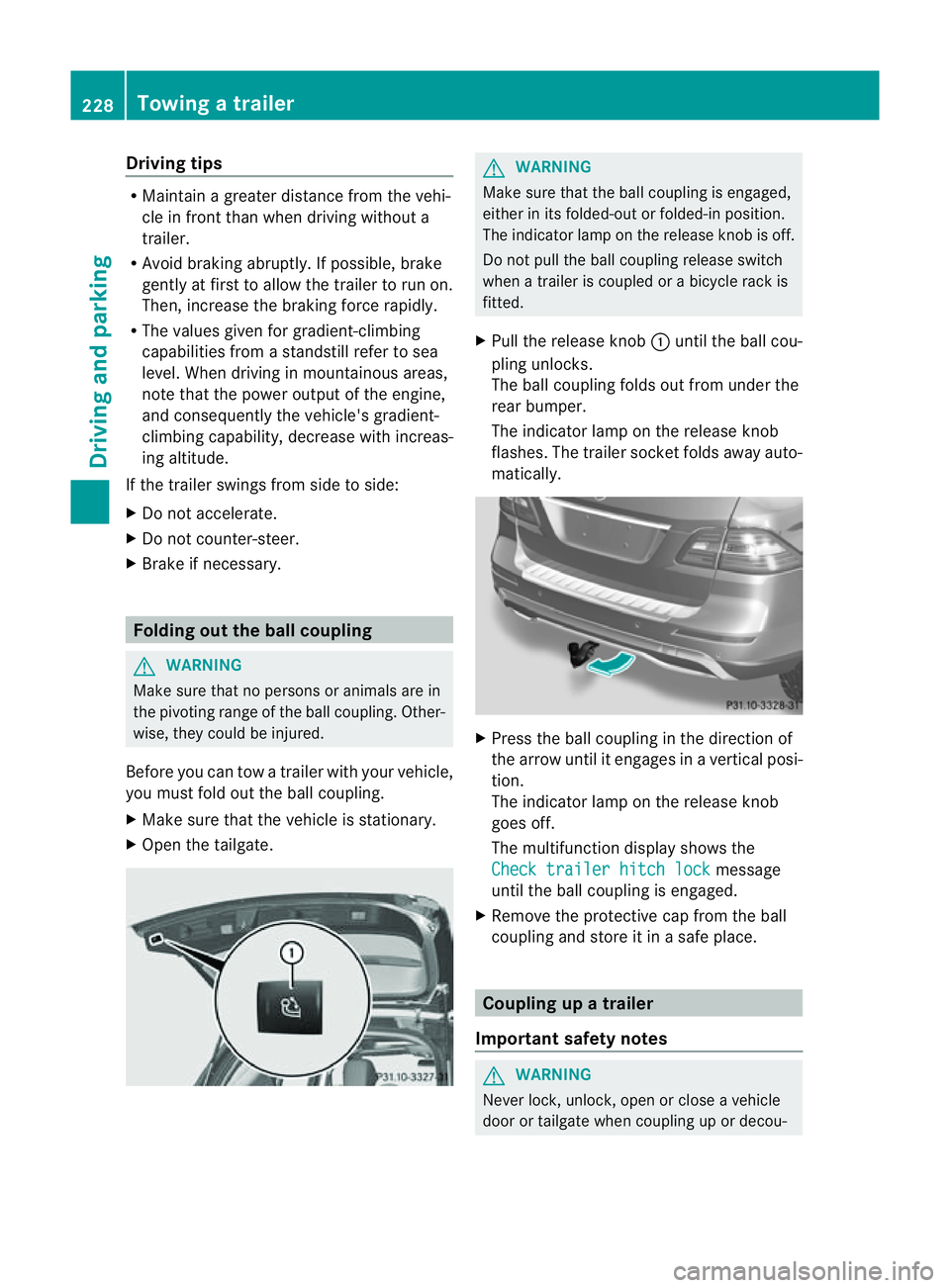
X Pull the release knob :until the ball cou-
pling unlocks.
The ball coupling folds out from under the
rear bumper.
The indicator lamp on the release knob
flashes. The trailer socket folds away auto-
matically. X
Press the ball coupling in the direction of
the arrow until it engages in avertical posi-
tion.
The indicator lam ponthe release knob
goes off.
The multifunc tion display shows the
Chec ktrailer hitch lock message
until th eball coupling is engaged.
X Remove the protective cap from the ball
coupling and store it in asafe place. Coupling up
atrai ler
Impor tant safety notes G
WARNI
NG
Neve rlock, unlock, open or close avehicle
door or tailgat ewhen coupling up or decou- 228
Towing
atrailerDriving and parking