ECO mode MERCEDES-BENZ M-CLASS SUV 2011 Owner's Manual
[x] Cancel search | Manufacturer: MERCEDES-BENZ, Model Year: 2011, Model line: M-CLASS SUV, Model: MERCEDES-BENZ M-CLASS SUV 2011Pages: 389, PDF Size: 9.22 MB
Page 189 of 389
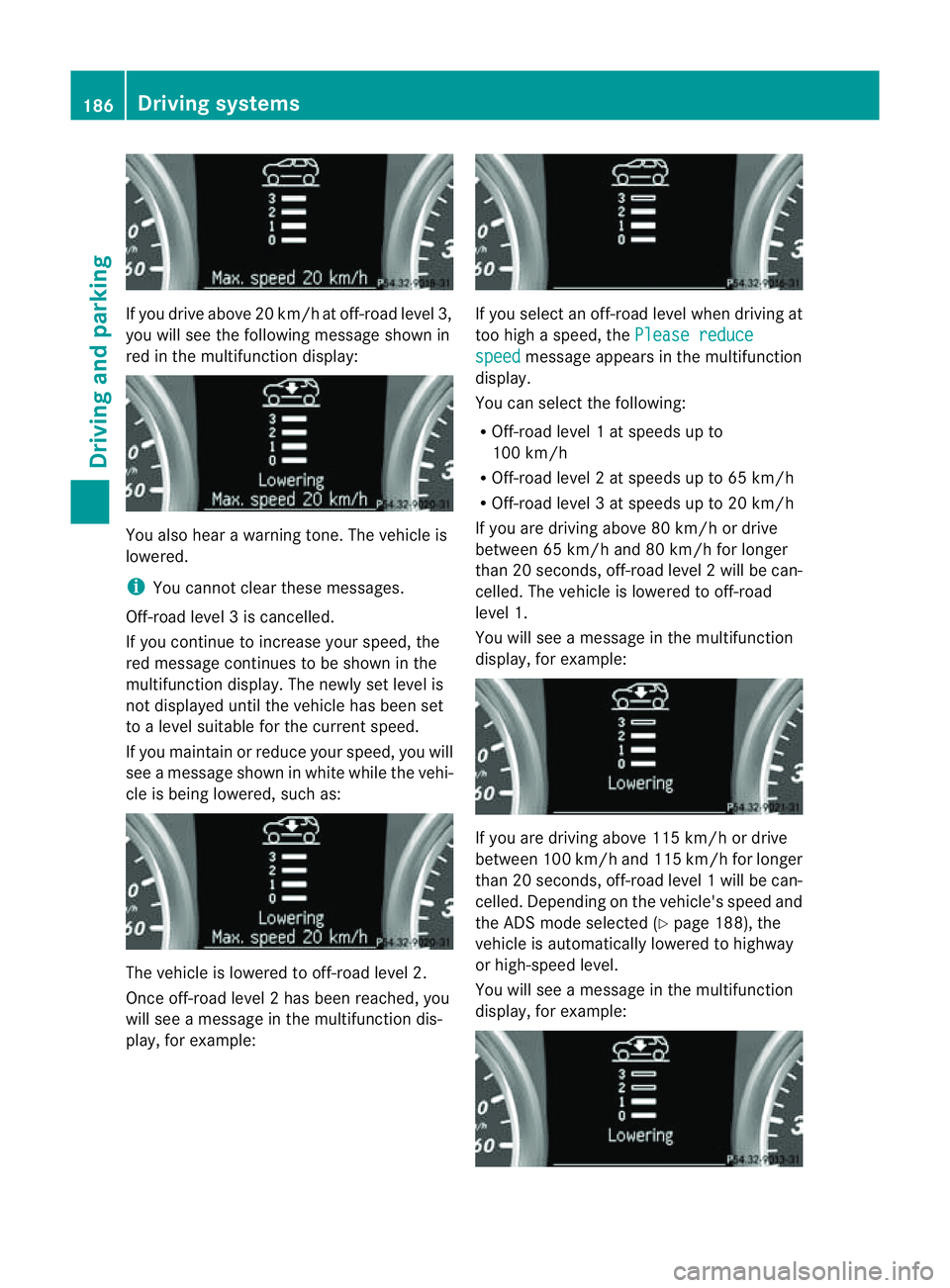
If yo
udrive above 20 km/h at off-roa dlevel 3,
you will see the following message shown in
red in the multif unctio ndisplay: You also hear
awarning tone. The vehicle is
lowered.
i You cannot clear these messages.
Off-road level 3iscancelled.
If you continue to increase your speed, the
red message continues to be shown in the
multifunction displ ay.T he newl yset level is
not displayed until the vehicle has been set
to alevel suitable for the curren tspeed.
If you maintain or reduc eyour speed, you will
see amessage shown in white while the vehi-
cle is being lowered, such as: The vehicle is lowered to off-road level 2.
Once off-road level 2has been reached, you
will see amessage in th emultifunction dis-
play, for example: If you sele
ctan off-road level when driving at
too high aspeed, the Please reduce speed message appears in the mult
ifunction
display.
You can select the following:
R Off-road leve l1atspeeds up to
10 0k m/h
R Off-road level 2atspeeds up to 65 km/h
R Off -road leve l3atspeeds up to 20 km/h
If you are drivin gabove 80 km/ hordrive
between 65 km/h and 80 km/h for longer
than 20 seconds ,off-roa dlevel 2will be can-
celled. The vehicle is lowered to off-road
level 1.
You will see amessage in the mul tifunction
display, for example: If you are drivin
gabove 11 5km/ hordrive
betwee n100 km/h and 115 km/h for longer
tha n20s econds ,off-road level 1will be can-
celled. Dependin gonthe vehi cle's speed and
the AD Smode selected (Y page 188), the
vehicle is automatically lowered to highway
or high-speed level.
You will see amessage in the multifunc tion
display, for example: 186
Driving systemsDriving and parking
Page 191 of 389
R
the electrica lsystem in thee ngine com-
partment, the battery or the fuses are tam-
pered with.
R the battery is disconnected.
If you leave the vehicl eorpark it, deactivate
the HOLD function and secure the vehicle
against rolling away.
The electric parking brake secures the vehicle
automatically if the HOLD function is activa-
ted and:
R the driver' sdoor is open and the driver's
seat belt is unfastened.
R the engin eisswitched off, unless it is auto-
matically switched off by the ECO start/
stop func tion.
R as ystem fault occurs.
R the powe rsupply is not sufficient.
On steep uphill or downhill inclines or if there
is am alfunction, the transmission may also
automatically be shifted into position P.AIRMATIC package
General notes AIRMATIC enables
asuspension tuning set-
ting to be selected and regulates the damping
behaviou rand level of your vehicle. The sys-
tem comprises aminimum of two compo-
nents. These are ADS (Adaptive Damping Sys-
tem) (Y page 188 )and level control
(Y page 189) .Your vehicle ma yalso be equip-
ped with the Active Curv eSystem
(Y page 188).
Observe the notes on driving with atrailer
(Y page 226).
ADS (Adaptive Damping System) General notes
ADS adapts th
edamping characteristic sto
the curren toperatin gand driving situation. Thi
sd epends on:
R your drivin gstyle
R the road surface conditions
R the AD Ssetting
R the vehicle level setting
Your selection remains stored even if you
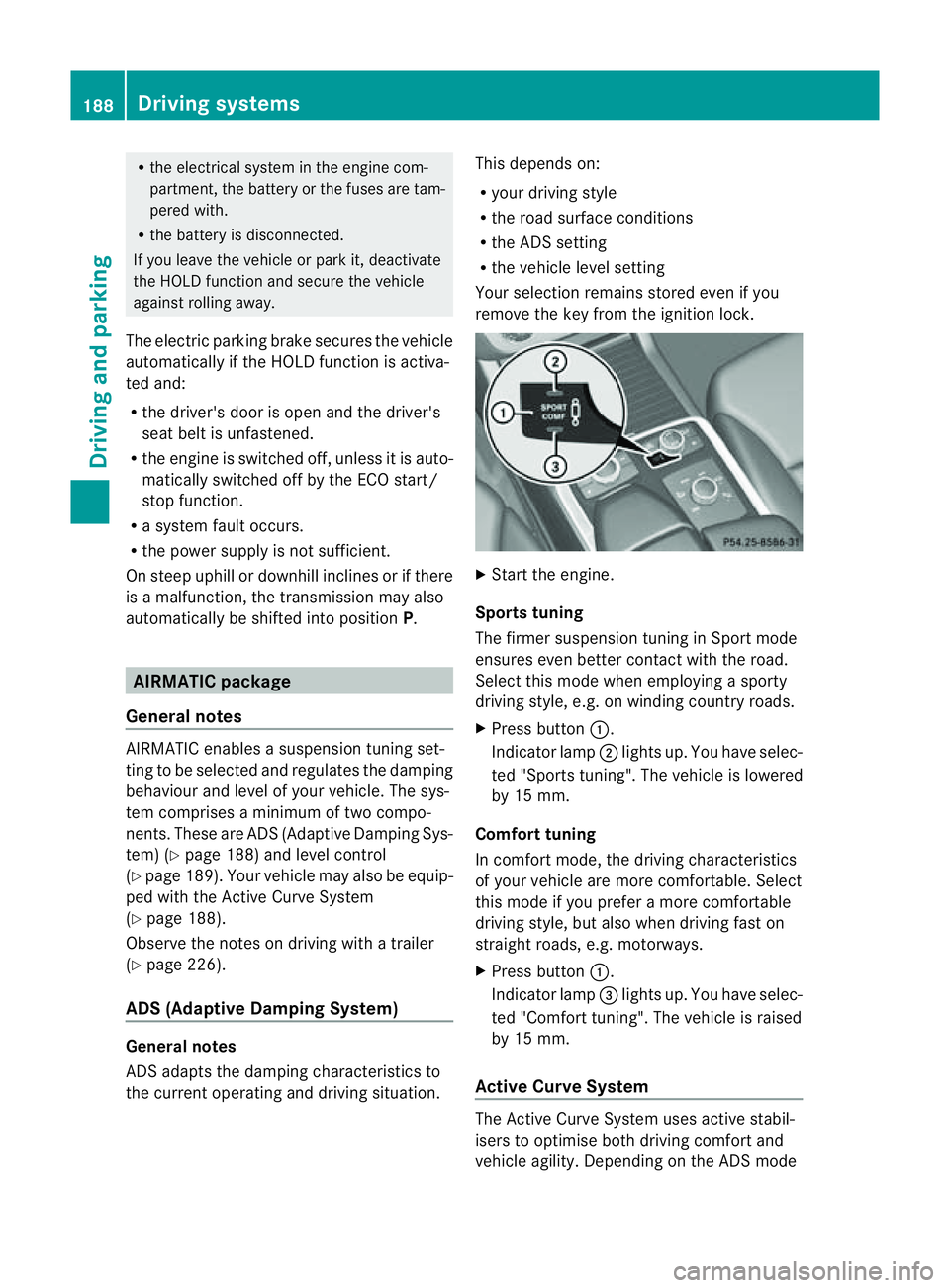
remov ethe key from the igni tion lock. X
Star tthe engine.
Sports tuning
The firmer suspension tunin ginSport mode
ensures even better contact with the road.
Select this mode when employing asporty
drivin gstyle, e.g. on winding country roads.
X Press button :.
Indicator lamp ;lights up. You have selec-
ted "Sports tuning". The vehicle is lowered
by 15 mm.
Comfort tuning
In comfort mode, the driving characteristics
of your vehicle are more comfortable. Select
this mode if you prefer amore com fortable
driving style ,but also when drivin gfast on
straight roads, e.g. motorways.
X Press button :.
Indicator lamp =lights up. You have selec-
ted "Comfort tuning". The vehicle is raised
by 15 mm.
Active Curve System The Active Curve System uses activ
estabil-
isers to optimis eboth drivin gcomfort and
vehicle agility. Depending on the AD Smode 188
Driving systemsDriving and parking
Page 201 of 389
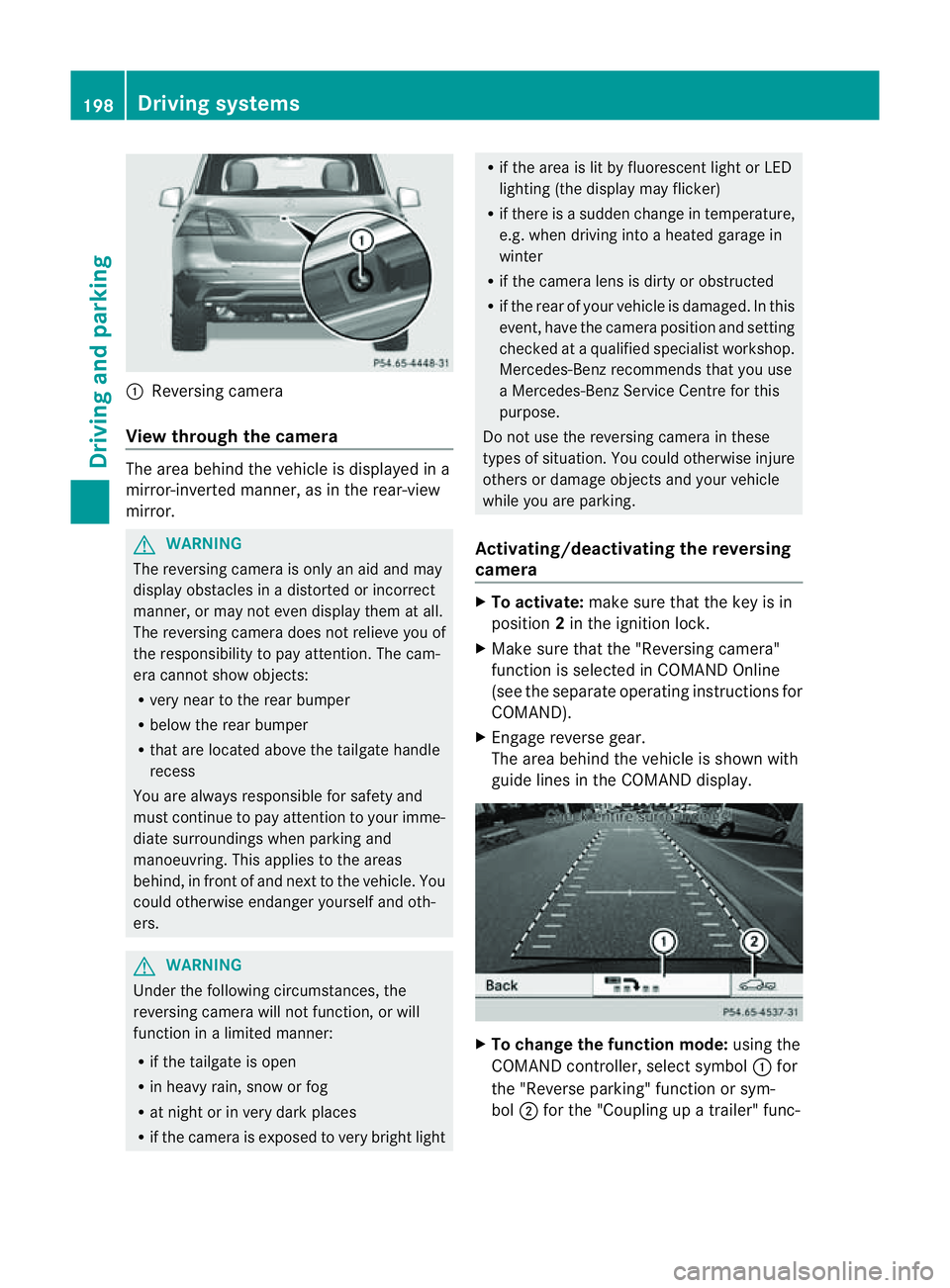
:
Reversin gcamera
View through th ecamera Th
ea rea behind the vehicle is displaye dina
mirror-inverted manner, as in the rea r-view
mirror. G
WARNING
The reversin gcamera is only an aid and may
display obstacles in adistorted or incorrect
manner, or may no teven display them at all.
Th er eversing camera does not relieve you of
the responsibility to pay attention. The cam-
era cannot show objects:
R ver ynear to the rear bumper
R belo wthe rea rbumper
R that are located above the tailgate handle
recess
You are alway sresponsible for safet yand
must continue to pay attentio ntoyourimme-
di at es urroundings when parking and
manoeuvring. This applie stothe areas
behind, in front of and nex ttothe vehicle. You
coul dotherwise endang er yourself and oth-
ers. G
WARNING
Under the following circumstances, the
reversing camera will not function, or will
function in alimited manner:
R if the tailgate is open
R in heavy rain, snow or fog
R at night or in very dark places
R if the camer aisexposed to very brigh tlight R
if the area is lit by fluorescen tlight or LED
lighting (the display may flicker)
R if there is asudden change in temperature,
e.g. when driving into aheated garage in
winter
R if the camera lens is dirt yorobstruc ted
R if the rear of your vehicle is damaged. In this
event ,have the camera positio nand setting
checked at aqualified specialist workshop.
Mercedes-Benz recommends that you use
aM ercedes-Benz Servic eCentr efor this
purpose.
Do not use the reversin gcamera in these
types of situation. You could otherwise injure
others or damage objects and your vehicle
while you are parking.
Activating/deactivating the reversing
camera X
To activate: make sure that the key is in
position 2in the ignition lock.
X Make sure that the "Reversing camera"
function is selected in COMAND Online
(see the separate operating instructions for
COMAND).
X Engage reverse gear.
The area behind the vehicle is shown with
guide lines in the COMAND display. X
To change the function mode: using the
COMAND controller, select symbol :for
the "Reverse parking" function or sym-
bol ;for the "Coupling up atrailer" func- 198
Dri
ving systemsDriving and parking
Page 237 of 389
Usefu
linfor mati on
i This Owner's Manual describes all models
and all standard and optional equipment
available to your vehicle at the time of pub-
lication of the Owner's Manual. Country-
specific deviation sare possible .Please
not ethat your vehicle ma ynot be equipped
with all featur es described. This also
applies to safety-releva ntsystems and
functions.
i Please read the information on qualified
specialist workshops (Y page 24).Important safet
ynotes
You will fin danillustration of th einstrument
cluste rinthe "A taglance "section
(Y page 30). G
WARNING
Only use th eon-bo ardc omputer wh en road
and traffic condition spermit .You would oth-
erwise be distracted and unable to concen-
trate properly on driving, and coul dcause an
accident. G
WARNING
No message swill be displayed if either the
instrument cluster or the multifunction dis-
play is inoperative.
As aresult, you will not be able to see infor-
mation about your driving conditions, such as
speed, outside temperature, warning and indi-
cator lamps, display messages or system fail-
ures. Drivin gcharacteristic smay be impaired.
Adjust your driving style and vehicle speed
accordingly.
Contact aqualified specialist workshop
immediately. G
WARNING
The on-board computer only records and dis-
plays malfunctions and warnings from certain
systems. For this reason, you should always make sure that your vehicle is safe to use. You
could otherwis
ecause an accident by driving
an unsafe vehicle. G
WARNING
The operating safety of your vehicle could be
impaired if maintenance work is carried out
incorrectly. This could cause you to lose con-
trol of your vehicle and cause an accident.
Moreover, the safety systems may no longer
be able to protect you or others as they are
designed to do.
Always have service work carried out at a
qualified specialis tworkshop. Displays and operation
Coolant tempera
tureg auge
Th ec oolant temperatur egauge is in the
instrument cluster on the right-hand side.
Under normal operating conditions and with
the specified coolant level, the coolant tem-
perature may rise to 120 †.
At high outside temperatures and when driv-
ing uphill, the coolant temperature may rise
to the end of the scale. Rev counter
The red band in the rev counter indicates the
engine's overrevvin grange.
! Do not drive in the overrevving range.
Doing so will damage the engine.
The fuel supply is interrupted to protect the
engine when the red band is reached. Outside temperature display
The outside temperature display is in the mul-
tifunction display (Y page 236). G
WARNING
At temperatures just above freezing point, the
street may be icy, especially in wooded areas 234
Displays and operationOn-board computer and displays
Page 244 of 389
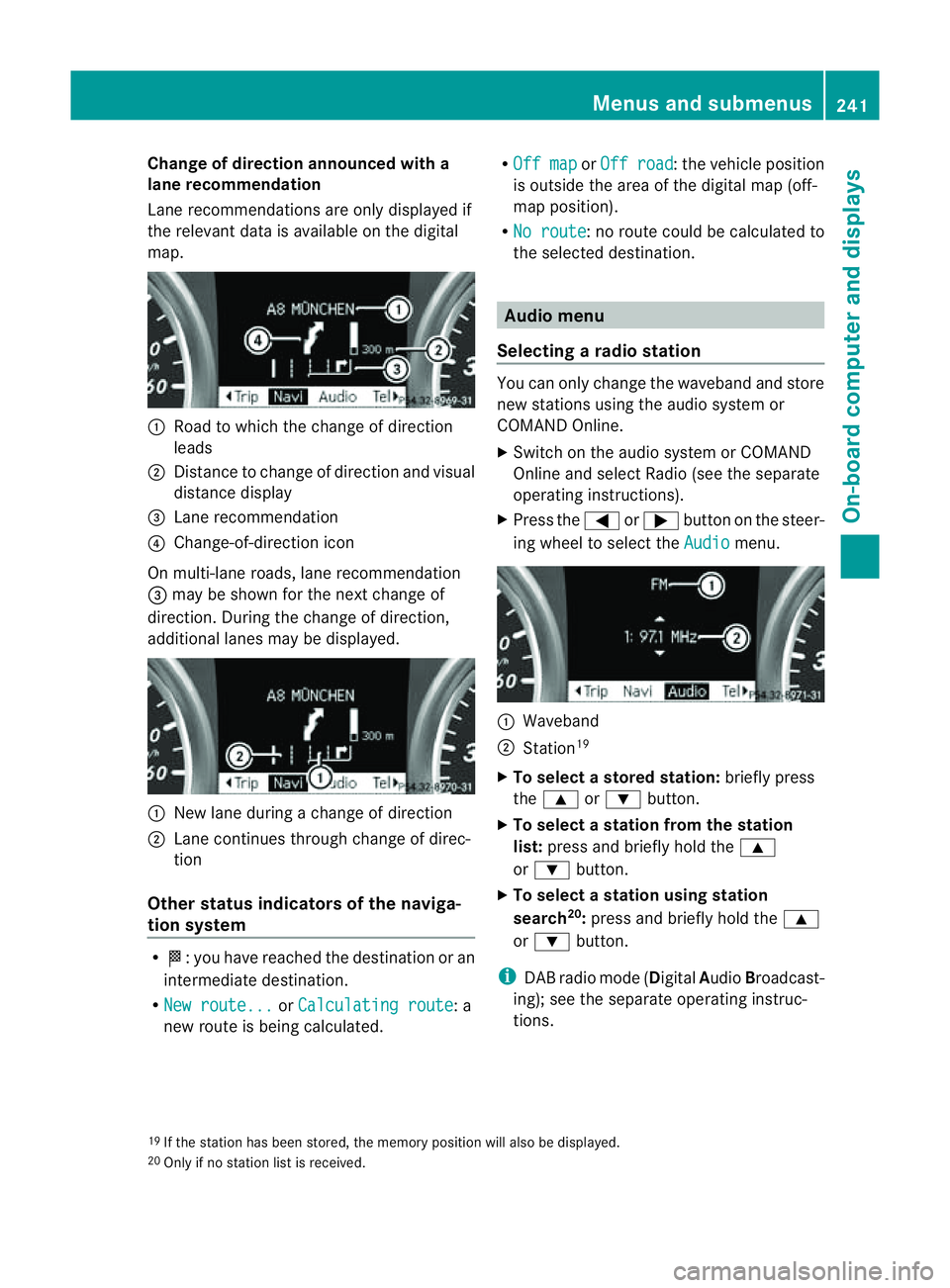
Change of direction announced with a
lane recommend
ation
Lan erecommendations are only displaye dif
the relevan tdata is available on thed igital
map. :
Road to which the change of direction
leads
; Distanc etochange of direction and visual
distanc edisplay
= Lane recommendation
? Change-of-direction icon
On multi-lane roads, lane recommendation
= may be shown for the next change of
direction. Durin gthe change of direction,
additiona llanes may be displ ayed. :
New lane durin gachange of direction
; Lane con tinues throug hchange of direc-
tion
Other sta tusindicators of the naviga-
tion system R
O:y ou have reached the destination or an
intermediate destination.
R Ne wr oute... or
Calculating route :a
new route is being calculated. R
Off map or
Off road :t
he vehicle position
is outside the area of the digital ma p(off-
ma pp osition).
R No route :nor
oute coul dbecalculated to
the selected destination. Audio menu
Selectin garadio station Yo
uc an only change the waveband and store
new stations using the audio system or
COMAND Online.
X Switch on the audio system or COMAND
Online and select Radio (se ethe separate
operating instructions).
X Press the =or; button on the steer-
ing wheel to select the Audio menu.
:
Wav eband
; Station 19
X To selec tastoredstation: brieflypress
the 9 or: button.
X To select astation from the station
list: press and briefl yholdt he 9
or : button.
X To select astatio nusing station
search 20
:press and briefl yholdt he 9
or : button.
i DAB radio mode ( DigitalAudioBroadc ast-
ing); see the separate operating instruc-
tions.
19 If the statio nhas been stored ,the memory po sition will also be displayed.
20 Onl yifnos tation list is received. Menus and submenus
241On-boardcomputer and displays Z
Page 314 of 389
healt
hofothers. Using an exterior aerial takes
into account current scientific discussions
relating to the possibl ehealth risk posed by
electromagnetic fields.
Mercedes-Ben zrecom mends the use of an
approved exterior aerial .This ensures:
R optimal mobile phone reception quality in
the vehicle
R mutua linfluences between the vehicle
electronics and mobil ephones ar emini-
mised
An exterior aerial has the following advan-
tages:
R it conducts the electromagnetic fields gen-
erated by awireless device to the exterior.
R the field strengt hinthe vehicle interior is
lower than in avehicle that does not have
an exterior aerial.
i There are various mobile phone brac kets
that may be fitted to your vehicle ;insome
cases, these ar ecountry-specific.
i Even if your vehicle is equipped with con-
venience telephony, you can connec ta
Blueto oth®
capable mobil ephone to Audio
20 or COMAND Online via the Bluetooth ®
interfac e.
More information on suitabl emobilephones,
mobile phone brackets and on connecting
Bluetooth ®
capable mobile phones to Audio
20 or COMAND Online can be obtained:
R at your Merc edes-Ben zServ iceC entre
R on the Internet at http://www.mercedes-
benz.com/connect
i The functions and service savailab lewhen
you use the phone depend on you rmobile
phone model and service provider. Inserting th
emobile phone X
Open the telephone compartment
(Y page 298).
X If required by the design of the mobile
phone bracket ,instal lthe slidin gadapter
(Y page 312).
X Insert the mobile phone into the mobile
phone bracket (see the separat emobile
phone bracke tinstallatio ninstructions).
If the mobil ephone is inser tedint he mobile
phone bracket ,you can speak to the person
you ar ecalling using the hands-free system.
i On some mobile phone brackets, you first
have to connect the mobile phone via Blue-
tooth ®
to am obile phone bracke t(see the
separate operating inst ructions for the
mobile phone bracke t).
On these mobile phone brackets, the
mobile phone does not hav etobeinserted
into the bracket for you to be able to use
the telephone functions .Inthis case ,the
charging func tion and aerial func tion are
not available.
Operating th emobile phone You can operate the telephone using the
6 and~ button sonthe multifunc tion
steering wheel. You can operate other mobile
phone func tions via the on-boar dcomputer
(Y page 242).
If you tak ethe key out of the ignition lock ,the
mobile phone stay sonb ut you can no longer
use the hands-free system.
If you are making acall and you would like to
take the key out of the ignition lock, first
remove the mobile phone from the bracket.
Otherwise, the call will be ended.
i When amobile phone bracke tisu sed that
is con nected to the mobile phone via Blue-
tooth ®
:ify ou wan ttocontinue acall in
"Private mode", you have to perform the
necessary steps on the mobile phone (see Features
311Stowingandfeatures Z
Page 321 of 389
Usefu
linfor mati on
i This Owner's Manual describes all models
and all standard and optional equipment
available to your vehicle at the time of pub-
lication of the Owner's Manual. Country-
specific deviation sare possible .Please
not ethat your vehicle ma ynot be equipped
with all featur es described. This also
applies to safety-releva ntsystems and
functions.
i Please read the information on qualified
specialist workshops (Y page 24).Engine compartment
Bonnet
Active bonnet (pedestrian protection) Operating principle
i The active bonnet is only available in cer-
tai nc ountries.
The active bonnet can reduce the risk of injury
to pedestrians in certain accident situations.
Raising the active bonnet increases the clear-
anc etoh ard components, such as the engine.
If the active bonnet has been triggered, it is
raised in the area of the bonnet hinges by
abou t100 mm. Th eactive bonnet is trigg ered
by pyrotechnics.
! Once triggered, an active bonnet must be
reset at aqualified specialist workshop,
e.g. aMercedes-Ben zService Centre. The
active bonnet function will then be availa-
ble again. The additional pedestrian pro-
tection provided by the active bonnet will
then be restored.
For the driv etot he workshop, reset the trig-
gere dactive bonnet yourself. After being
reset, the active bonnet rest sinthe area of
the bonnet hinges on the seals, and the bon-
net hinges do not engage. For this reason, we
recommend that you do not exceed amaxi-
mum top spee dof130 km/h on the wa ytothe workshop
.Ifthe active bonnet has been
triggered, pedestrian protection ma ybelimi-
ted.
Resetting G
WARNING
There is arisk of injur yifthe bonnet is open,
even if the engin eisnot running.
Som eengine compone ntsc an become very
hot.
To avoid the risk of burns, only touch those
component sdescribed in the Owner's Manual
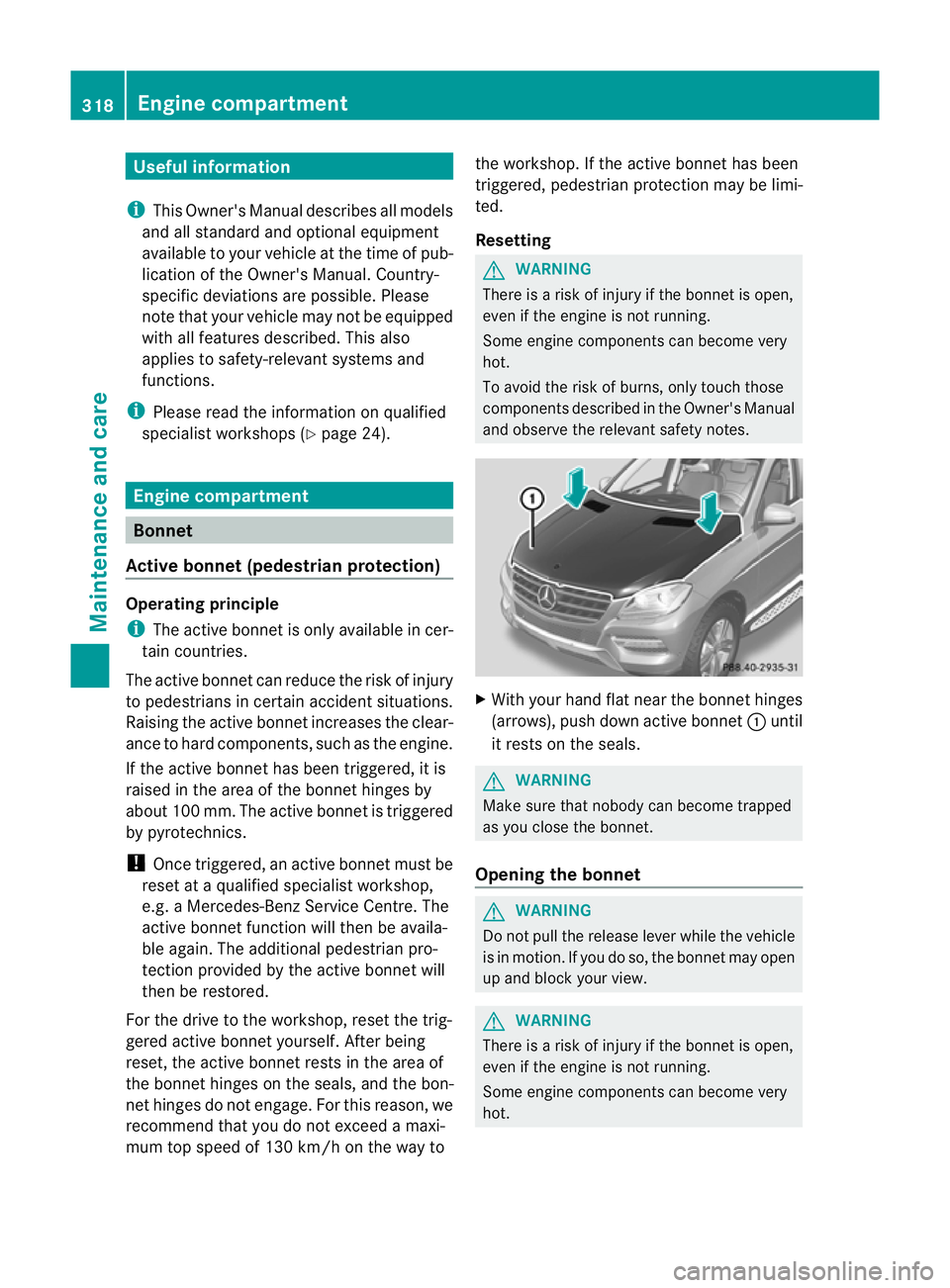
and observ ethe relevant safety notes. X
With your hand fla tnear the bonnet hinges
(arrows), push down active bonnet :until
it rests on the seals. G
WARNING
Make sure that nobody can becom etrapped
as you close th ebonnet.
Opening th ebonnet G
WARNING
Do not pull the release lever while the vehicle
is in motion. If you do so, the bonnet may open
up and block your view. G
WARNING
There is arisk of injur yifthe bonnet is open,
even if the engin eisnot running.
Som eengine compone ntsc an become very
hot. 318
Eng
inecompartmentMaintenance and care
Page 335 of 389
Usefu
linfor mati on
i This Owner's Manual describes all models
and all standard and optional equipment
available to your vehicle at the time of pub-
lication of the Owner's Manual. Country-
specific deviation sare possible .Please
not ethat your vehicle ma ynot be equipped
with all featur es described. This also
applies to safety-releva ntsystems and
functions.
i Please read the information on qualified
specialist workshops (Y page 24).Where will
Ifind...? Warning triangle
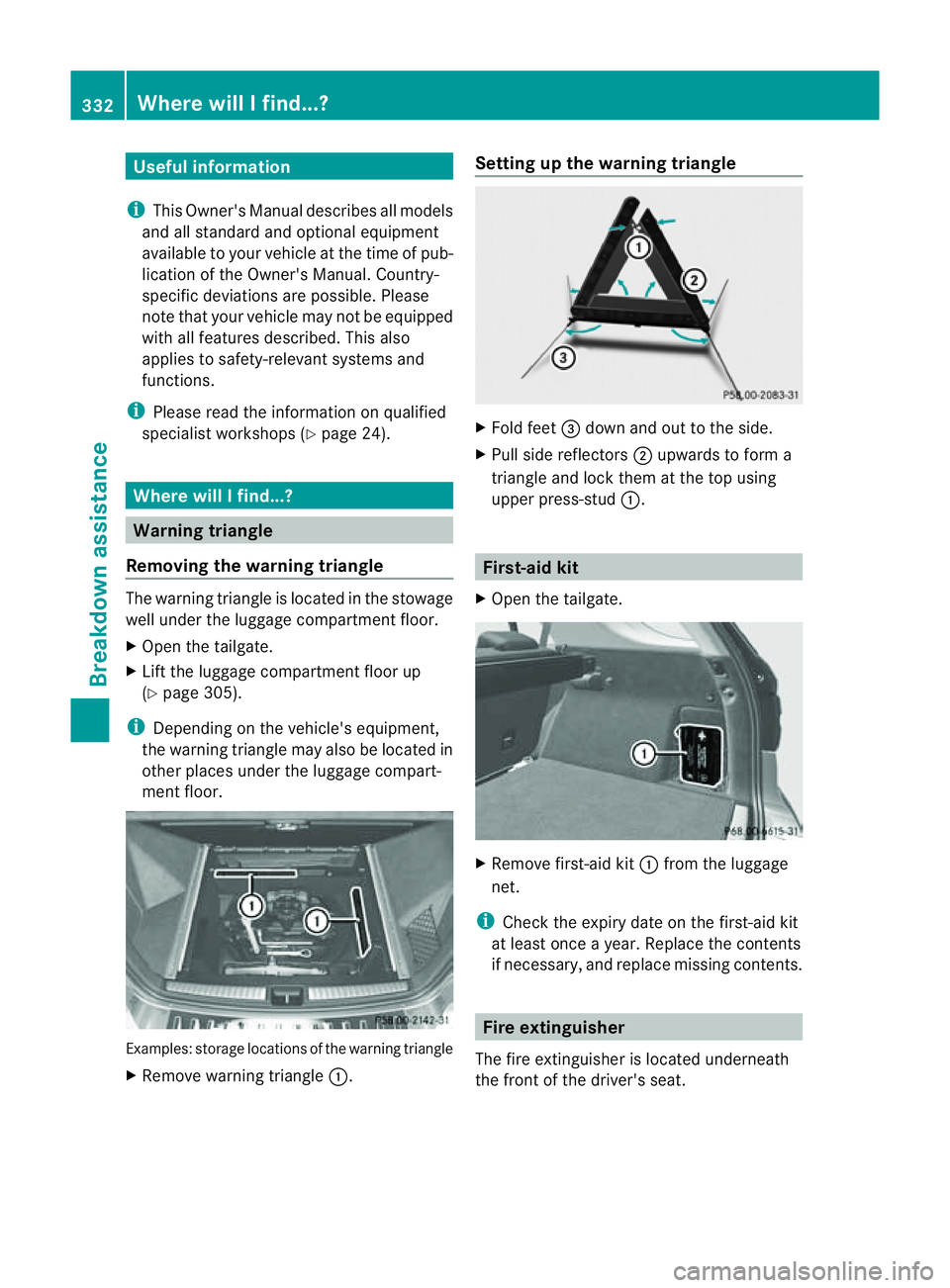
Removing th ewarning triangle Th
ew arnin gtriangle is located in th estowage
well under th eluggage compartmen tfloor.
X Open the tailgate.
X Lif tthe luggage compar tment floor up
(Y page 30 5).
i Dependin gonthe vehi cle's equipment,
the warnin gtriangle may also be located in
other places under the luggag ecompar t-
ment fl oor. Examples: storage loca
tions of the warnin gtriangle
X Remove warnin gtriangle :. Setting up th
ewarnin gtriangle X
Fol dfeet =down and out to the side.
X Pull side reflectors ;upwards to for ma
triangle and lock them at thet op using
upper press-stud :. First-aid kit
X Open the tailgate. X
Remove first-aid kit :from the luggage
net.
i Check the expir ydate on the first-aid kit
at least once ayear. Replace the contents
if necessary, and replace missin gcontents. Fire extinguisher
The fir eextinguisher is locate dunderneath
the front of the driver's seat. 332
Where wil
lIfind...?Breakdown assistance
Page 345 of 389
and transpor
tthe wheel in the luggage
compartment.
or
X Depending on the size of the wheel, you
ma yalso be able to secure the faulty wheel
in the emergenc yspare wheel well. In this
case, you must remove the stowage tray
from the emergency spare wheel well and
store it securely in the luggage compart-
ment.
i When you are driving with the collapsible
emergency spare wheel fitted, the tyre
pressur eloss warnin gsystem or the tyre
pressure monitor cannot function reliably.
Only restart the tyre pressure los swarning
system/tyre pressure monitor when the
defective wheel has been replaced with a
new wheel.
Vehicles with tyre pressure monitor: all fit-
ted wheels must be equipped with func-
tioning sensors. The defective wheel
should no longer be in the vehicle. MOExtended tyres (tyres with run-flat
characteristics)
MOExtended tyres (tyres with run-flat char-
acteristics) allow you to continue driving the
vehicle even when one or more tyres lose all
air pressure.
MOExtended tyres may only be used in con-
junction with the activated tyre pressure loss
warning system or with the tyre pressure
monitor.
The maximum permissible distance which
can be driven in run-flat mode depends on the
load in the vehicle. It is 80 km if the vehicle
is partially laden and 30 km if fully laden.
The maximum permissible distance which
can be driven in run-flat mode is counted from
the moment the tyre pressure loss warning
appears in the multifunction displ ay.
Yo um ust not exceed amaximum spee dof
80 km/h. G
WARNING
Th eh andling characteristics of your vehicle
deteriorate in run-flat mode, for example:
R when cornering
R when braking
R when accelerating rapidly
Adapt your driving style accordingly and avoid
sudden changes in direction and sudden
acceleration, as well as driving over obstacles
(i.e. kerbs, potholes), and driving off-road.
This is particularly the case when the vehicle
is heavily laden.
The maximum permissible distance that can
be driven in run-flat mode depends to alarge
exten tonthe loads placed on the vehicle. It
can be shorter due to high speeds, aheavy
load, sudden changes in direction, the road
surface condition, outside temperature, etc.,
or further if you driv ecarefully and conserva-
tively.
Do not continue to drive in run-flat mode if:
R you hear banging noises.
R the vehicle starts to shake.
R you see smoke and smell rubber.
R ESP ®
is intervening constantly.
R there are tears in the sidewalls of the tyre.
After driving in run-flat mode, you must have
the wheel(s) checked for damage at aquali-
fied specialist workshop which has the nec-
essary specialist knowledg eand tool stocarry
out the work required. The faulty tyre must be
replaced in every case.
Mercedes-Benz recommends that you use a
Mercedes-Benz Service Centr efor this pur-
pose. In particular ,work relevant to safet yor
on safety-related system smust be carried out
at aq ualified specialist workshop.
i Whe nreplacing one or all tyres, make
sure that you only use tyres marked
MOExtended and of the specified size for
the vehicle.
i Vehicles with MOExtended tyres are not
equipped with aTIREFIT kit at th efactory. 342
Flat tyreBreakdown assistance
Page 353 of 389
R
the engine is not running.
R there is abrake syst emmalfunction.
R there isam alfunction in the power supply
or the vehicle' selectrical system.
The power assistance for the steering and the
brake forc ebooster do not work when the
engin eisnot running. You will need more
force to steer and brake, you may have to
depress the brake pedal with maximu mforce.
Before towin gaway ,make sure that the steer-
ing can be moved and is not locked.
If you tow or tow-star tanothe rvehicle, its
weight must not exceed the maximu mper-
missible gross vehicle weight of your vehicle. G
WARNING
The vehicle is braked when the HOL Dfunction
or DISTRONIC PLUS is activated. Therefore,
deactivate HOLD and DISTRONIC PLUS if the
vehicle is to be towed.
It is better to have the vehicle transported
than to have it towed.
! You may tow the vehicle for amaximum
of 50 km. Atowing speed of 50 km/h must
not be exceeded.
For towin gdistances over 50 km, the entire
vehicle must be lifted up and transported.
! Make sure that the electric parkin gbrake
is released. If th eelectric parkin gbrake is
faulty, visit aqualified specialist workshop.
! Only secure the tow rope or towing bar to
the towing eyes. The vehicle may otherwise
be damaged.
! Do not use the towing eye for recovery,
as this could damage the vehicle. If in
doubt, recover the vehicle with acrane.
! When towing, pull awa yslowly and
smoothly. If the trac tivepower is too high,
the vehicles could be damaged.
! To tow vehicles with KEYLESS-GO, use
the key instead of the Star t/Stop button.
Th ea utomatic transmission may otherwise switch to position
Pwhen you open the
driver' sorfront-passenger door which
could damag ethe transmission.
! Vehicles with differential locks: make
sur ethe differential lock sare in automatic
mode. Th edifferential locks must not be
switched on by hand when towing the vehi-
cle. The transmission may otherwise be
damaged.
If the vehicle has suffered transmission dam-
age, have it transported on atransporter or
trailer.
Th ea utomatic transmission must be in posi-
tion Nwhen the vehicle is being towed.
The battery must be connected and charged.
Otherwise, you:
R cannot turn the key in the ignition lock to
position 2
R cannot shift the automatic transmission to
position N
i Before the vehicle is towed, switch off the
automatic locking feature (Y page 249).
You could otherwis ebelockedout when
pushing or towing the vehicle.
Deactivate tow-away protection
(Y page 69) before the vehicle is towed. Fitting/removing the towing eye
Fitting the towing eye Vehicles with
atrailer to whitch: if you intend
to use the vehicle for towing, fold out the ball
coupling and connect the towbar to it
(Y page 228).
X Remove the towing eye from the vehicle
tool kit (Y page 333).
The mountings for the removable towing eyes
are located in the bumpers. They are at the
front and at the rear ,under the covers. 350
Towing and tow-startingBreakdow
nassistance