lock MERCEDES-BENZ M-CLASS SUV 2011 Owner's Manual
[x] Cancel search | Manufacturer: MERCEDES-BENZ, Model Year: 2011, Model line: M-CLASS SUV, Model: MERCEDES-BENZ M-CLASS SUV 2011Pages: 389, PDF Size: 9.22 MB
Page 64 of 389
R
ABS ( Anti-lock BrakingSystem)
R BAS ( Brake Assist System)
R BAS PLU S(Brake Assist Sys tem Plus*)
R Adaptive brake lamps
R ESP ®
(Elec tronic Stability Program)
R EBD ( electronic brake force distribution)
R ADAP TIVE BRA KE
R PRE- SAFE ®
Brake
R STEER CONTROL Important safety notes
If yo ufail to adap tyou rd riving style, the driv-
ing safety systems ca nneither reduc ethe risk
of accident nor override the laws of physics.
Drivi ngsafety systems ar emerely aids
designed to assist driving. You are responsi-
ble for the distance to the vehicle in front ,for
vehicle speed and for brakin gingood time.
Always adapt your drivin gstyle to suit the
prevailing road and weather conditions, as
well as the traffic conditions and maintain a
safe distance from the vehicle in front .Drive
carefully.
i Please note that th edriving safetys ys-
tems described only work as effectively as
possibl ewhen ther eisadequate contact
between the tyres and the road surface.
Pay particula rattention to the information
regarding tyres, recommended minimum
tyre tread depth setc. in the "Wheels and
tyres" sectio n(Ypage 356).
In wintr ydriving conditions ,always use
winter tyres (M+S tyres) and if necessary,
snow chains. Only in this way will the driv-
ing safety systems described in this section
work as effec tivel yasp ossible. ABS (Anti-loc
kBrak ing System)
Impor tant safety notes i
Observ ethe "Importan tsafety notes" sec-
tion (Y page 61). ABS regulates brake pressure in such
away
that the wheels do not lock when you brake.
This allows you to continue steering the vehi-
cle when braking.
ABS works from aspeed of about 8km/h
upwards, regardless of road-surfac econdi-
tions. AB Sworksons lippery surfaces, even
when you only brake gently. G
WARNING
If ABS is faulty, the wheels could lock when
braking. This limits the steerability of the vehi-
cle when brakin gand the braking distance
may increase.
If ABS is deactivated due to amalfunction,
then BAS and ESP are also deactivated. There
is an increased risk of your vehicle skidding in
certain situations.
You shoul dalways adapt your drivin gstyle to
suit the prevailing road and weather condi-
tions.
Braking If ABS intervenes whe
nbraking, yo uwill feel
ap ulsing in the brake pedal.
X If ABS intervenes: continue to depressthe
brake pedal with force until the brakin gsit-
uation is over.
X To mak eafull brake application:
depress th ebrake peda lwith full force.
The pulsating brake pedal can be an indica-
tion of hazardous road conditions and func-
tions as areminder to take extr acare while
driving. G
WARNING
Do not depress the brake pedal several times
in quick succession (pumping). Pumping the
brake pedal reduces the braking effect .You
might otherwise not be able to stop the vehi-
cle in tim eand could cause an accident.
Depres sthe brake pedal firmly and smoothly. Driving safety systems
61Safety Z
Page 65 of 389
Off-road ABS
An AB
Ssystem specifically suited to off -road
ter rain is activated automatically once th eoff-
road program (Y page 222) is activated.
At speeds below 30 km/h, the front wheels
loc kc yclically durin gbraking .The digging-in
eff ect ac hieved in the process red ucesthe
stopping distanc eonoff-road terrain. This
limits steering capability. BAS (Brak
eAssist)
i Observ ethe "Importan tsafety notes" sec-
tion (Y page 61).
BAS operates in emergency braking situa-
tions. If you depress the brake pedal quickly,
BAS automatically boosts the braking force,
thus shortening the stopping distance.
X Keep the brake pedal firmly depressed until
the emergency braking situation is over.
ABS prevents the wheels from locking.
The brakes will function as usua lonce you
releas ethe brake pedal. BA Sisd eactivated. G
WARNING
If BAS has malfunctioned, the braking system
remains available with ful lbrake boosting
effect. However, braking force is not auto-
matically increased in emergency braking sit-
uations and th estopping distance may
increase. BAS PLU
S(Brak eAssist System Plus)
BA SP LUS is only availabl eonvehicles with
DI ST RONIC PLUS.
i Observe the "Important safety notes" sec-
tion (Y page 61).
BAS PLUS assists you in braking during haz-
ardous situations at speeds above 30 km/h
and uses the radar sensor syste mtoevaluate
the traffic situation.
With the hel pofthe radar sensor system ,BAS
PLUS can detect obstacles that are in the path of your vehicl
efor an exte nded period of
time.
At speeds up to approximately 70 km/h ,BAS
PLUS may also detect stationary obstacles,
for example ,stopped or parked vehicles.
Shoul dyou approach an obstacle and BAS
PLU Shas detected arisk of collision, BAS
PLU Scalculates the braking force necessary
to avoid arear-end collision .Should you apply
the brakes forcefully ,BAS PLUS can auto-
matically increase the braking force to alevel
suitabl efor the traffic conditions.
If BA SPLUS demand sparticularly high brak-
ing force, preventative passenger protection
measures (PRE-SAFE ®
)a re activate dsimul-
taneously.
X Keep the brake pedal depressed until the
emergenc ybraking situatio nisover.
ABS prevent sthe wheels from locking.
The brakes will wor knormally again if:
R you release the brake pedal.
R ther eisnol onger any danger of arear-end
collision.
R no obstacl eisdetected in front of your
vehicle.
BAS PLU Sisthen deactivated .Ifyou have
activated DSR (Y page 220), BASPLUS is
likewise deactivated.
Th er adar senso rsystem is switched off auto-
matically in the vicinity of radio telescope
facilities in the following vehicles:
R vehicles with COMAND Online and naviga-
tion
R vehicles with Audio 20 and Becker ®
MAP
PILOT
Becker ®
MAP PILOT must be connected;
see the separate Audio 20 operating
instructions. 62
Driving safety systemsSafety
Page 69 of 389
G
WARNING
If EBD ha smalfunctioned, the braking system
remains available with full brake boosting
effect. However, the rear wheels can still lock,
e.g. under full braking. This coul dcaus eyou
to lose control of your vehicle and cause an
accident. You shoul dtherefore adapt your
drivin gstyle to the different handling charac-
teristics.
X Observe the notes on warning and indica tor
lamps (Y page 286) as well as display mes-
sages (Y page 256). ADAPTIV
EBRAKE
ADAPTI VEBRAKE enhances braking safety
and offers increased braking comfort. In addi-
tion to the braking function, ADAPTIV EBRAKE
als oh as the HOLD function (Y page187) and
hi ll st art assist (Y page141). For further
information, se eDriving tip s(Ypage 162). PRE-SAFE
®
Brake
PRE-SAFE ®
Brake is only available in vehic les
with DISTRONIC PLUS.
i Observe the "Important safety notes" sec-
tion (Y page61).
PRE-SAFE ®
Brake can help you to minimise
the ris kofaf rontal collision wit havehicle
ahead or reduce the effects of such acolli-
sion. If PRE-SAFE ®
Brake has detected arisk
of collision, you wil lbewarned visuall yand
acoustically as wel lasbyautomatic braking.
PRE-SAFE ®
Brake cannot prevent acollision
withou tyou rintervention.
Thi sfun ctio nwill issue awarnin gats peeds of
arou nd 30 km/h or moreif:
R for aperiod of several seconds ,the dis-
tance to the vehi cleinf ront is to oshor tfor
the speed at which you ar etravelling .The ·
distanc ewarning lamp then lights up
in the instrument cluster.
R you are rapidly approaching the vehicle in
front .Ani ntermittent warning tone will
then sound and the ·distance warning
lamp will light up in the instrument cluster.
X Brake immediately in order to increas ethe
distanc efrom th evehicle in front.
or
X Take evasiv eactio nprovide ditiss afe to do
so.
If the driver and passengers have fastened
their seat belts, PRE-SAFE ®
Brake can also
can also perform the following at speeds of
above approximately 30 km/h:
R brake the vehicle automatically from a
spee dofuptoa pproximately 20 0km/h
R trigge rpreventative passenger protection
measures (PRE-S AFE®
)( Ypage 45)
Due to the nature of the system, particularly
complicated driving conditions may cause
unnecessar ywarnings or the unnecessary
intervention of PRE-SAFE ®
Brake. To end this,
you can either depress the accelerator pedal
further, activate kickdown or release the
brake pedal.
The braking action of PRE-SAFE ®
Brake is
ended automatically if:
R you drive slowe rthan approximately
15 km /h.
R you manoeuvre to avoid the obstacle.
R there is no longe rany danger of arear-end
collision.
R there is no longer an obstacl edetected in
front of your vehicle.
If you have activated DSR (Y page 220), PRE-
SAFE ®
brak eisd eactivated.
With the help of the rada rsensor system,
PRE- SAFE ®
Brake can detect obstacles that
are in front of your vehicle for an exte nded
period of time.
At speeds up to approximately 70 km /h,
PRE- SAFE ®
Brake may als odetect stationary 66
Driving safet
ysystemsSafety
Page 71 of 389
The radar sensor system must be switched off
using the on-boar dcomputer in the vicinit yof
radio telescop efacilities in the following vehi-
cles:
R vehicles without COMAND Online and nav-
igation
R vehicles without Audio 20 and Becker ®
MAP PILOT
R vehicles for Australia
Information about switching off the rad ar sen-
so rs ystem using the on-board computer can
be found in the "On-board computer and dis-
plays “section (Y page 249).
For PRE- SAFE®
Brake to assist you whe ndriv-
ing ,the radar sensor system must be
switc hed on (Y page 249) an dbeopera-
tional.
Followin gdamage to the fron tend of the vehi-
cle ,havet he configuration and operation of
the radar sensors checked at aqualified spe-
cialist workshop. This also applie stoc olli-
sions at slow speeds where ther eisnovisible
damage to the fron tofthe vehicle. STEE
RCONTROL
The steering assistan tSTEE RCONTROL helps
you by transmittin ganoticeable steering
force to the steering wheel in the direction
required for vehicle stabilisation.
This steering assistance is provided in partic-
ular if:
R both right wheels or both left wheels ar eon
aw et or slippery road surface when you
brake
R the vehicle starts to skid
You have control over the steerin gatall
times. G
WARNING
If there is an ESP ®
malfunction, you will not
receiv eany steering assistance from the
STEER CONTROL. The steering continues to
function with steering assistance. Anti-theft systems
Immobiliser
The immobilise rprevents your vehicl efrom
being starte dwithout the correct key.
X To activate with the key: removethe key
from the ignition lock.
X To activate wit hKEYLESS-GO: switch the
ignition off and open the driver' sdoor.
X To deactivate: switchont he ignition.
i The immobiliser is always deactivated
when you star tthe engine. ATA (Anti-Thef
tAlarm system)
Av isual and audible alarm is triggered if the
alarm system is prime dand you ope n:
R ad oor
R the vehicle with the emergency key ele-
ment
R the tailgate
R the bonnet
The alar misnot switched off ,even if you
close th eopen door that has triggere dit, for
example. X
To prime: lock the vehicle with the key or
KEYLESS-GO.
Indicator lamp :flashes. The alarm sys-
tem is primed after approximately 15 sec-
onds.
X To deactivate: unlock the vehicle with the
key or KEYL ESS-GO.68
Anti-thef
tsystemsSafety
Page 72 of 389
X
To sto pthe alarm using the key: insert
th ek ey into the ignition lock.
The alarm is switched off.
or
X Pres sthe % or& button on the key.
The alarm is switched off.
X To stop th ealarm using KEYLESS-GO:
grasp the outside door handle. The key
must be outside the vehicle.
The alarm is switched off.
or
X Press the Star t/Stopbutton on the dash-
board. The key must be inside the vehicle.
The alarm is switched off. Tow-away protection
An audible and visual alarm is triggered if your
vehicle's angle of inclination is altered while
tow-away protection is primed. This occurs if
the vehicle is jacked up on one side ,for exam-
ple.
X To pri me:lock the vehicle with the key or
KEYLESS-GO.
Tow-away protection is primed after
approximately 30 seconds.
X To deactivate: unlock the vehicle with the
key or KEYLESS-GO.
Tow-away protection is deactivated auto-
matically.
To prevent afalse alarm, deactivate tow-away
protection manually if your vehicle:
R is being transported
R is being loade donto aferr yorc ar trans-
porter, for example
R is parked on amovable surface, e.g. in a
split-leve lgarage
Deactivating:
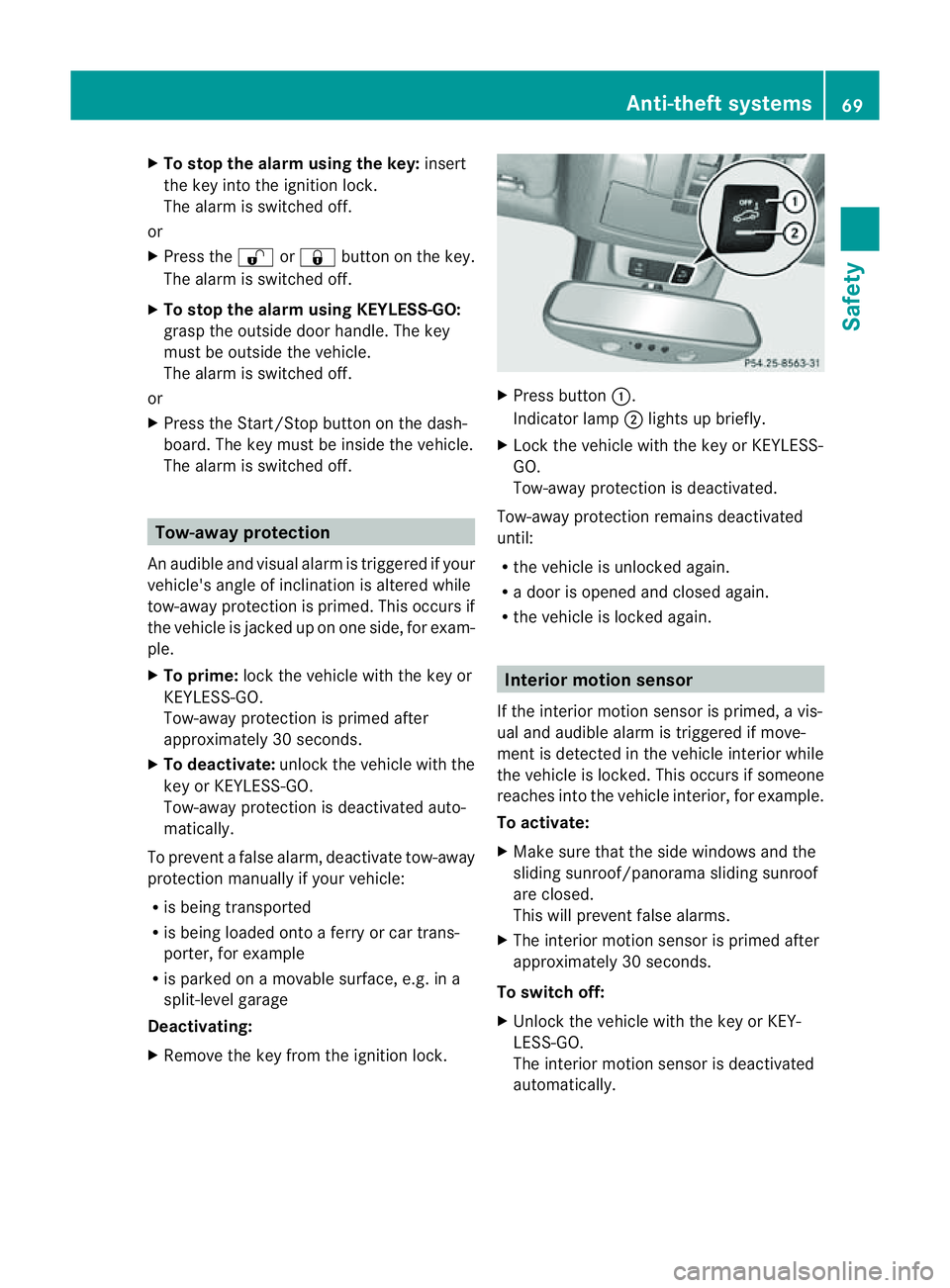
X Remove the key from the ignition lock. X
Press button :.
Indicator lamp ;lights up briefly.
X Lock the vehicle with the key or KEYLE SS-
GO.
Tow-awa yprotectio nisdeactivated.
Tow-away protection remains deactivated
until:
R the vehicle is unlocked again.
R ad oor is opened and closed again.
R the vehicle is locked again. Interior motion sensor
If the interior motion sensor is primed, avis-
ual and audible alarm is triggered if move-
ment is detected in the vehicle interior while
the vehicle is locked. This occur sifsomeone
reaches int othe vehicle interior, for example.
To activate:
X Make sur ethat the side windows and the
slidin gsunroof/panorama sliding sunroof
are closed.
This will prevent false alarms.
X The interior motion senso risp rime dafter
approximately 30 seconds.
To switch off:
X Unlock th evehicle with the key or KEY-
LESS-GO.
The interior motion sensor is deactivated
automatically. Anti-theft systems
69Safety Z
Page 73 of 389
To prevent
afalse alarm, deactivate the inte-
rior motion senso rifyou lock your vehicle
and:
R people or animals remain in the vehicle.
R the side window sremai nopen.
R the sliding sunroof/panorama sliding sun-
roof remains open.
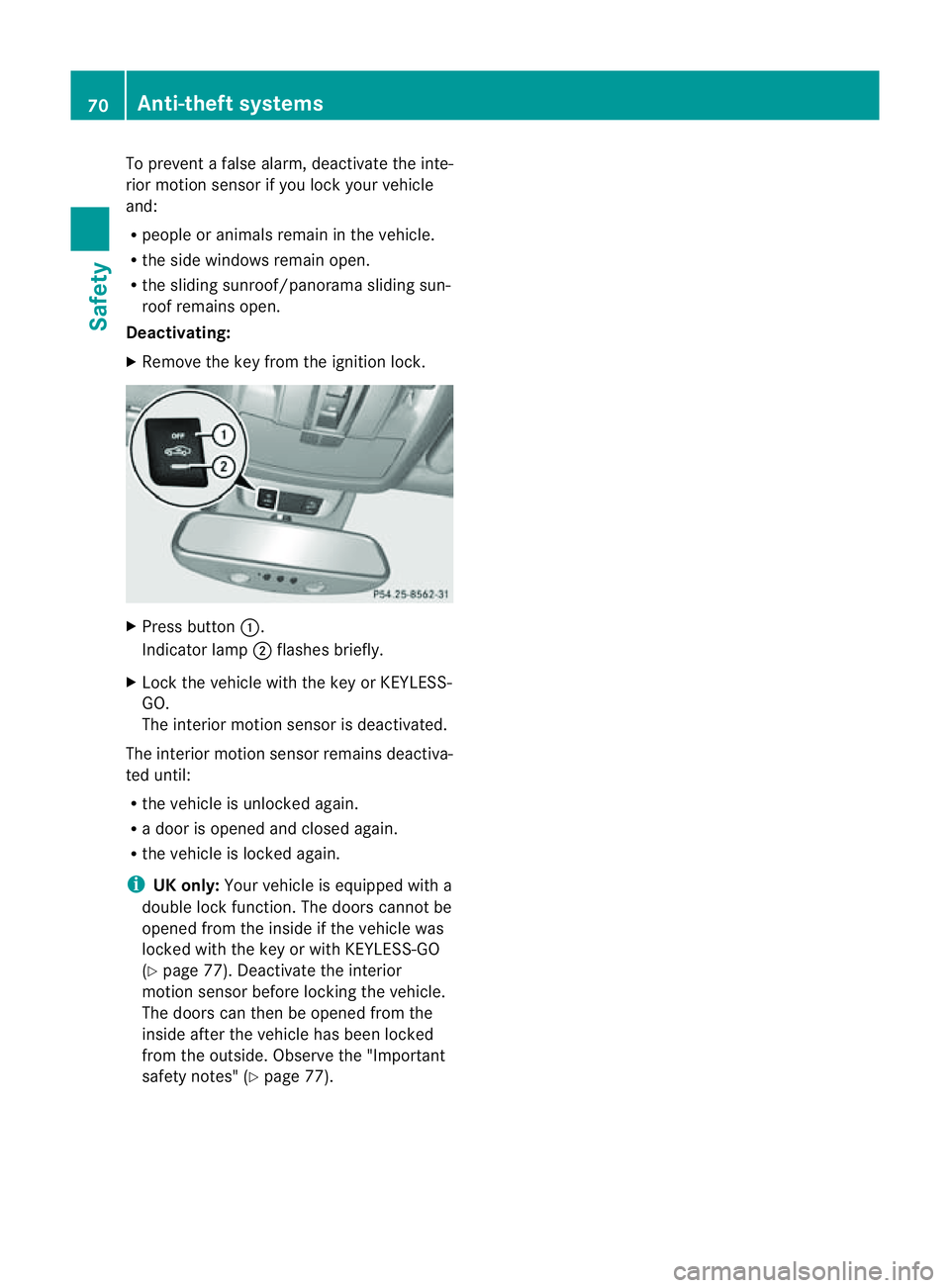
Deactivating:
X Remov ethe key from the ignition lock. X
Press button :.
Indica torlamp ;flashes briefly.
X Lock the vehicle with the key or KEYLESS-
GO.
The interior motion senso risd eactivated.
The interior motion sensor remains deactiva-
ted until:
R the vehicle is unlocked again.
R ad oor is opened and closed again.
R the vehicle is locked again.
i UK only: Your vehicle is equipped with a
double lock func tion. The doors can notbe
opened from the inside if the vehicle was
locked with the key or with KEYLESS -GO
( Y page 77). Deactivat ethe interior
motion sensor before lockin gthe vehicle.
The doors can then be opened from the
insid eafter th evehicle has been locked
from the outside. Observ ethe "Important
safety notes" (Y page 77).70
Anti-theft systemsSafety
Page 75 of 389
Usefu
linfor mati on
i This Owner's Manual describes all models
and all standard and optional equipment
available to your vehicle at the time of pub-
lication of the Owner's Manual. Country-
specific deviation sare possible .Please
not ethat your vehicle ma ynot be equipped
with all featur es described. This also
applies to safety-releva ntsystems and
functions.
i Please read the information on qualified
specialist workshops (Y page 24).Key
Key functions
Locking and unlocking centr ally The key centrally locks/unlocks:
R the doors
R the tailgate
R the fuel filler flap G
WAR
NING
Only for the Unite dKingdom: if the vehicle
has been locked with the key or with KEY-
LESS-GO, the double lock function is activa-
ted as standard. It is then not possible to open
the doors from inside the vehicle.
Therefore, do not leave any people behind in
the vehicle, particularly children ,elderly peo-
ple or people requirin gspecial assistance. As
ar esult, they may not be able to free them-
selves in the event of an emergency. They
could be seriously or even fatally inju redby
prolonged exposure to extremely high or low
temperatures, for example. In this case, res-
cuin gpeople from outside the vehicle is diffi-
cult.
Deac tivate th einterior motion sensor before
you lock the vehicle. The doors can then be
opened from the inside after the vehicl ehas
been locked from the outside. G
WARNING
If children are left unsupervised in the vehicle,
they could:
R open adoor from inside the vehicle at any
time, even if it has been locked
R star tthe vehicle usin gakey which has been
left in the vehicle
R release the electric parking brake
They could thereby endanger themselves and
others. Never leave children unsupervised in
the vehicle. Alway stake the key with you
when leaving the vehicle, even if you are only
leaving it for ashort time. G
WARNING
If ak ey rin gistoo heavy or too large, the
weight actin gonthe key coul dcause it to turn
in the ignition lock or catc honthe steering
wheel. This coul dcause the engine to be
switched off suddenly. You may lose control
of the vehicle and cause an accident. Do not
attac hany heavy or large key rings to the key
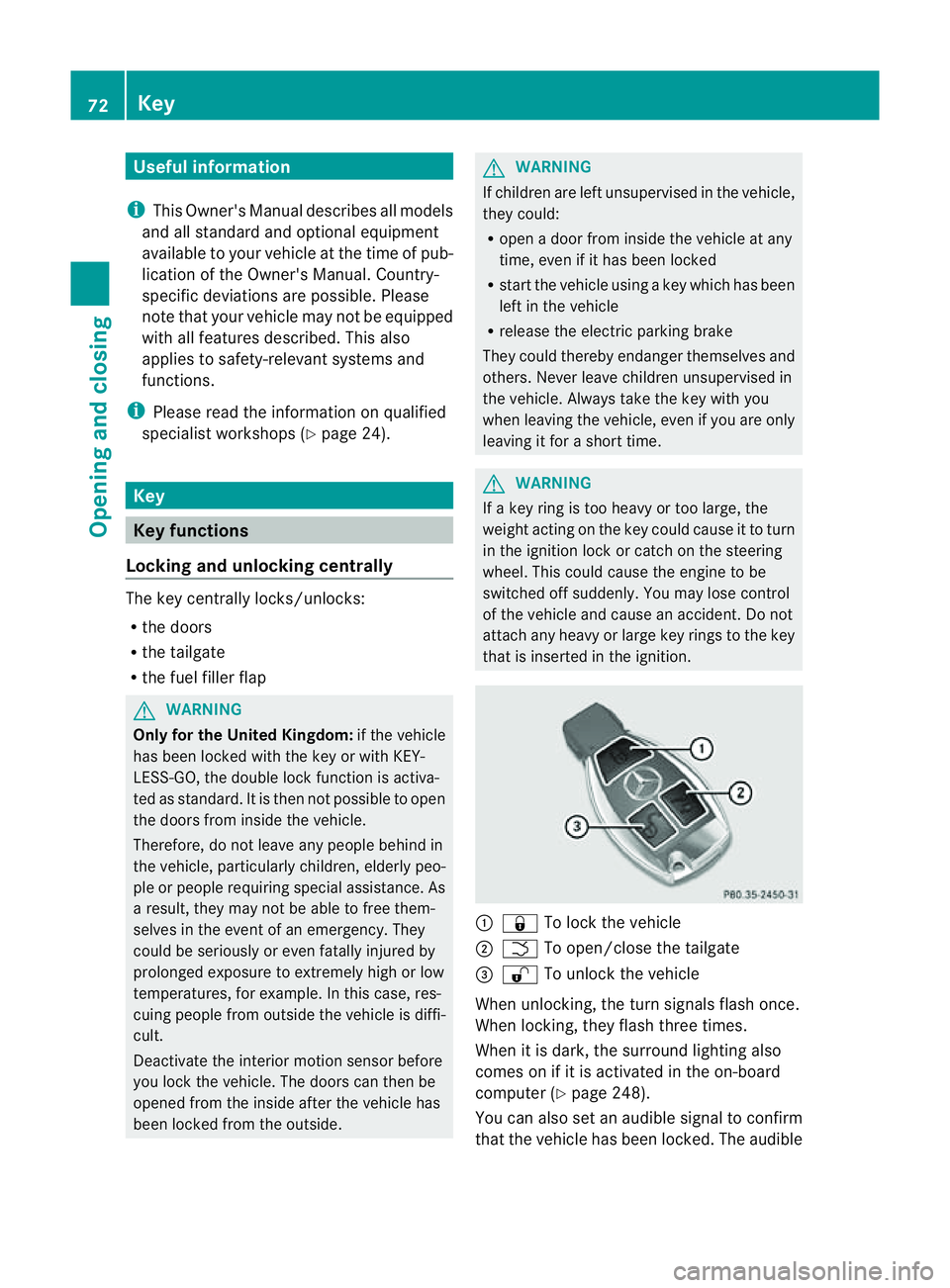
that is inserted in the ignition. :
& To lock the vehicle
; F To open/clos ethe tailgate
= % To unlock the vehicle
When unlocking, the tur nsignals flash once.
When locking, they flash three times.
When it is dark, the surroun dlighting also
comes on if it is activated in the on-board
computer (Y page 248).
You can also set an audible signal to confirm
that the vehicle has been locked. The audible 72
KeyOpening and clos
ing
Page 76 of 389
signa
lcan be activated and deactivated using
the on-board computer (Y page 249).
X To unlock centrally: press the%but-
ton.
If you do not open the vehicle within approx-
imately 40 seconds of unlocking:
R the vehicle is locked again.
R the anti-theft system is primed again.
X To lock centrally: press the&button. KEYLESS-GO
You can start, lock or unlock the vehicle using
KEYLE SS-GO. To do this ,you only need carry
the key with you. When you touc hthe surface
of the sensor sonthe vehicle' soutside door
handles ,KEYLESS-GO establishes aradio
connection between the vehicle and the key.
When the engine is started and whils tyou are
driving, KEYLE SS-GO also checks whether a
valid key is in the vehicl ebyperiodically
establishing radi ocontact.
When locking or unlockin gwith KEYLESS-GO,
the distance between the key and the door
handle you wish to lock or unlock must not
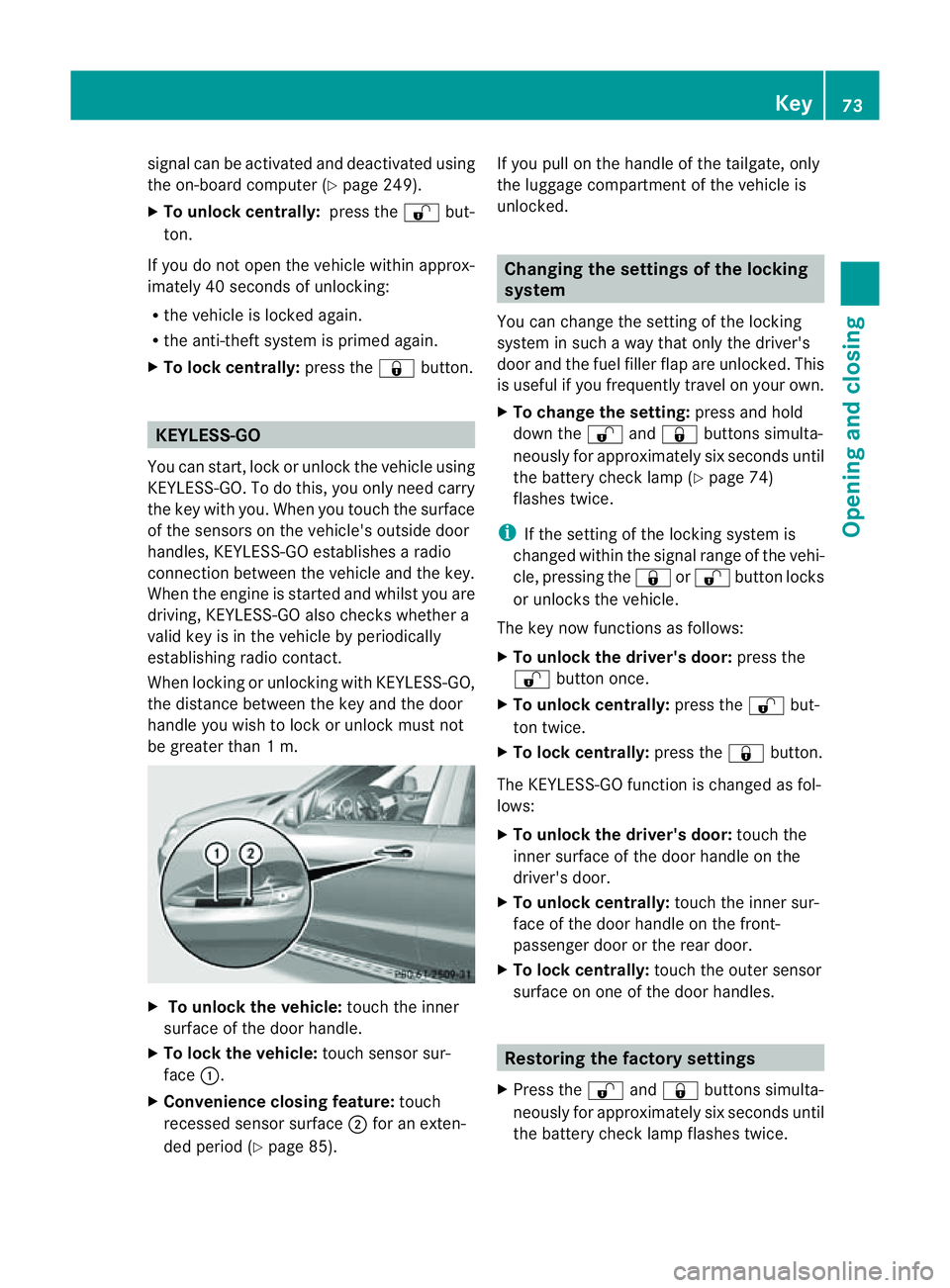
be greater than 1m. X
To unlock the vehicle: touch the inner
surface of the doo rhandle.
X To lock the vehicle: touch sensorsur-
face :.
X Convenienc eclosing feature: touch
recessed sensor surface ;for an exten-
ded period (Y page 85). If you pull on the handle of the tailgate, only
the luggage compartmen
tofthe vehicle is
unlocked. Changing th
esettings of the locking
system
You can change the setting of the locking
system in such away that only the driver's
door and the fuel filler flap are unlocked. This
is useful if you frequently travel on your own.
X To change the setting: press and hold
down the %and& buttons simulta-
neously for approximately six seconds until
the battery check lamp (Y page 74)
flashes twice.
i If the setting of the locking system is
changed within the signal range of the vehi-
cle, pressing the &or% button locks
or unlocks the vehicle.
The key now function sasfollows:
X To unlock th edriver's door: press the
% button once.
X To unlock centrally: press the%but-
ton twice.
X To lock centrally: press the&button.
The KEYLESS-GO function is change dasfol-
lows:
X To unlock th edriver's door: touch the
inner surface of the doo rhandle on the
driver' sdoor.
X To unlock centrally: touchthe inner sur-
face of the door handl eonthe front-
passenger door or the rea rdoor.
X To lock centrally: touchthe outer sensor
surface on one of the door handles. Restoring th
efactory settings
X Press the %and& button ssimulta-
neously for approximately six seconds until
the battery check lamp flashes twice. Key
73Opening and closing Z
Page 77 of 389
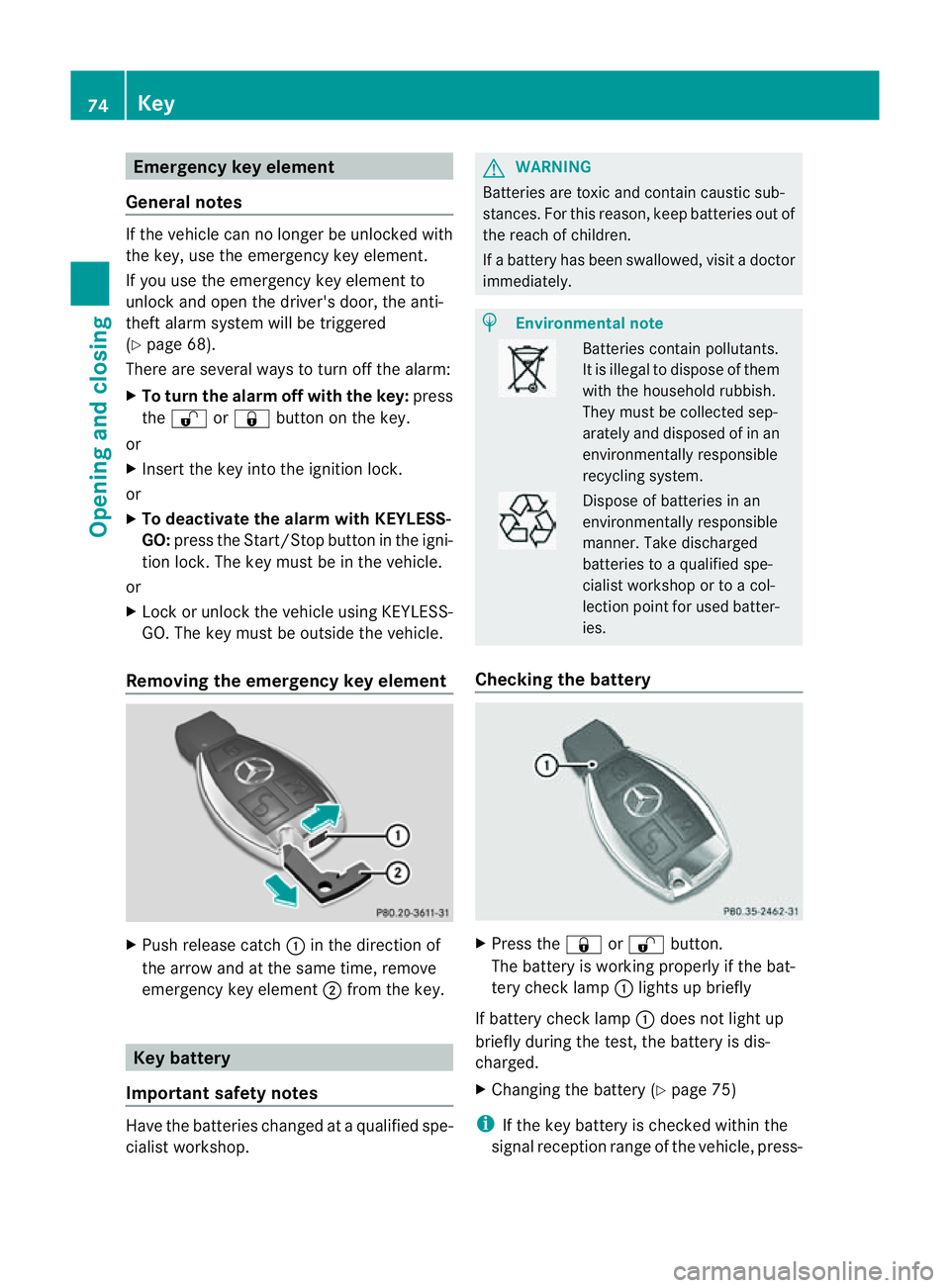
Emergency key element
General notes If th
evehicle can no longer be unlocked with
th ek ey, us ethe emergency ke yelement.
If you use th eemergency key element to
unlock and open the dri ver'sd oor ,the anti-
theft alar msystem will be triggered
(Y page 68).
The reare several ways to tur noff th ealarm:
X To turn the alarm off with the key: press
the % or& buttonont he key.
or
X Insert the key int othe ignition lock.
or
X To deactivat ethe alarm with KEYLESS-
GO: press th eStart/Stop button in the igni-
tion lock. The key must be in the vehicle.
or
X Lock or unlock the vehicle using KEYLESS-
GO. The key must be outside the vehicle.
Removing the emergency key element X
Pus hrelease catch :in the direction of
the arrow and at the same time, remove
emergency key element ;from the key. Key battery
Important safety notes Hav
ethe batteries changed at aqualified spe-
cialist workshop. G
WARNING
Batteries are toxic and contain caustic sub-
stances. For this reason, keep batteries out of
the reach of children.
If ab attery has been swallowed ,visi tad octor
immediately. H
Environmental note Bat
terie sc ontain pollutants.
It is illegal to dispose of them
with the household rubbish.
They must be collec teds ep-
arately and disposed of in an
environmentally responsible
recycli ngsystem. Dispose of batt
eries in an
envi ronmentally responsible
manner. Take discharged
batteries to aqualified spe-
cialist workshop or to acol-
lection point for used batt er-
ie s.
Checking th ebattery X
Press the &or% button.
Th eb attery is workin gproperl yifthe bat-
ter yc hec klamp :lights up briefly
If battery chec klamp :does not light up
briefly during the test, the batter yisdis-
charged.
X Changing the battery (Y page 75)
i If the key battery is checked within the
signal reception range of the vehicle, press- 74
KeyOpening and closing
Page 78 of 389
ing the
&or% button lock sor
unlocks the vehicle.
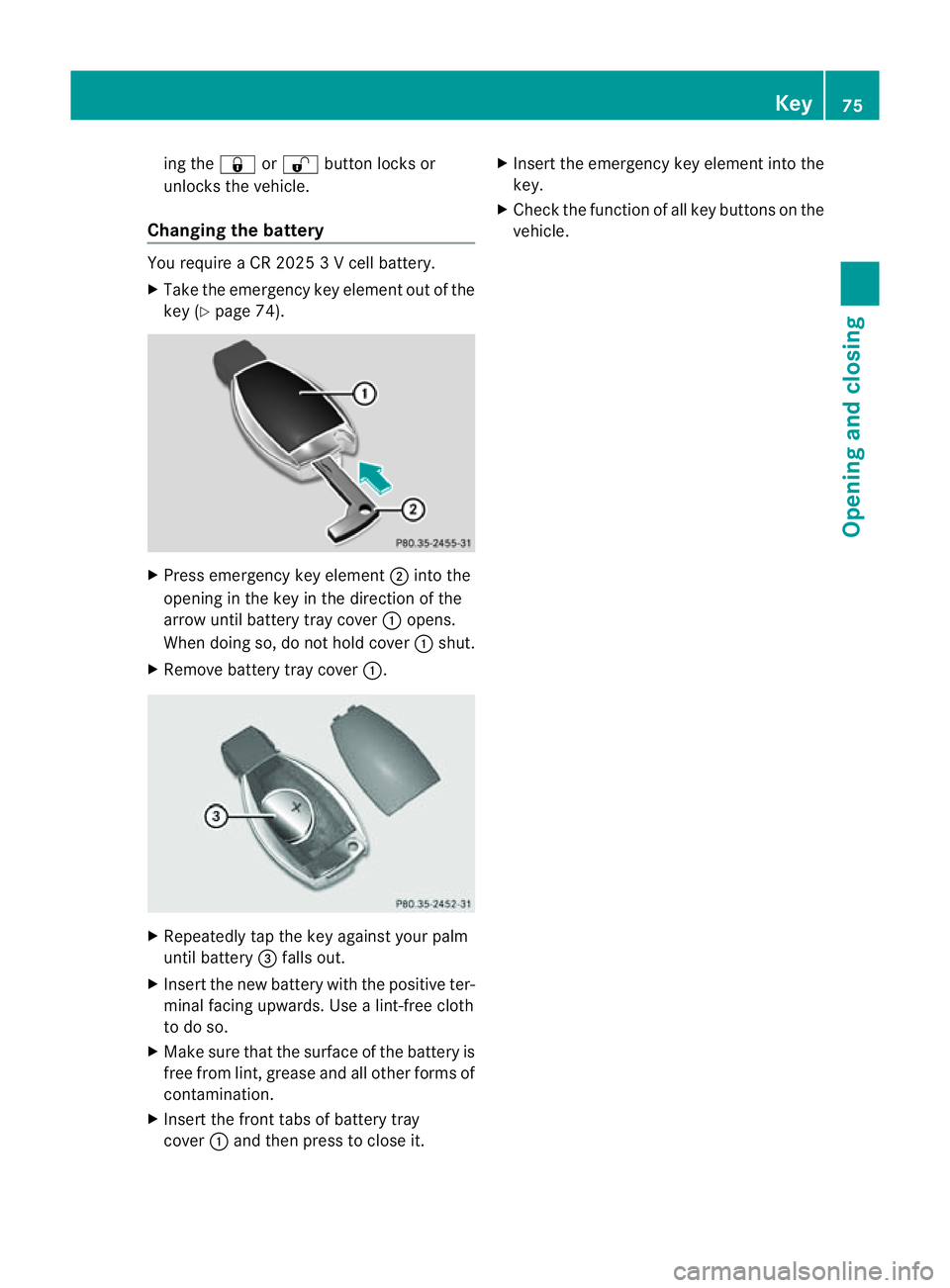
Changing th ebattery Yo
ur equir eaCR2 0253Vc ell battery.
X Take the emergency key elemen tout of the
key (Y page 74). X
Press emergenc ykey element ;intot he
opening in th ekey in the direction of the
arrow until battery tray cover :opens.
When doin gso, do no thold cover :shut.
X Remove battery tray cover :.X
Repeatedly tap the key against your palm
until battery =falls out.
X Insert the new battery with the positiv eter-
minal facing upwards. Use alint-free cloth
to do so.
X Make sure that the surface of the battery is
free from lint, grease and all other form sof
contamination.
X Insert the front tabs of battery tray
cover :and the npresstoc lose it. X
Insert the emergenc ykey elemen tinto the
key.
X Check the function of all key butto nson the
vehicle. Key
75Opening and closing Z