radio MERCEDES-BENZ M-CLASS SUV 2011 Owner's Manual
[x] Cancel search | Manufacturer: MERCEDES-BENZ, Model Year: 2011, Model line: M-CLASS SUV, Model: MERCEDES-BENZ M-CLASS SUV 2011Pages: 389, PDF Size: 9.22 MB
Page 275 of 389
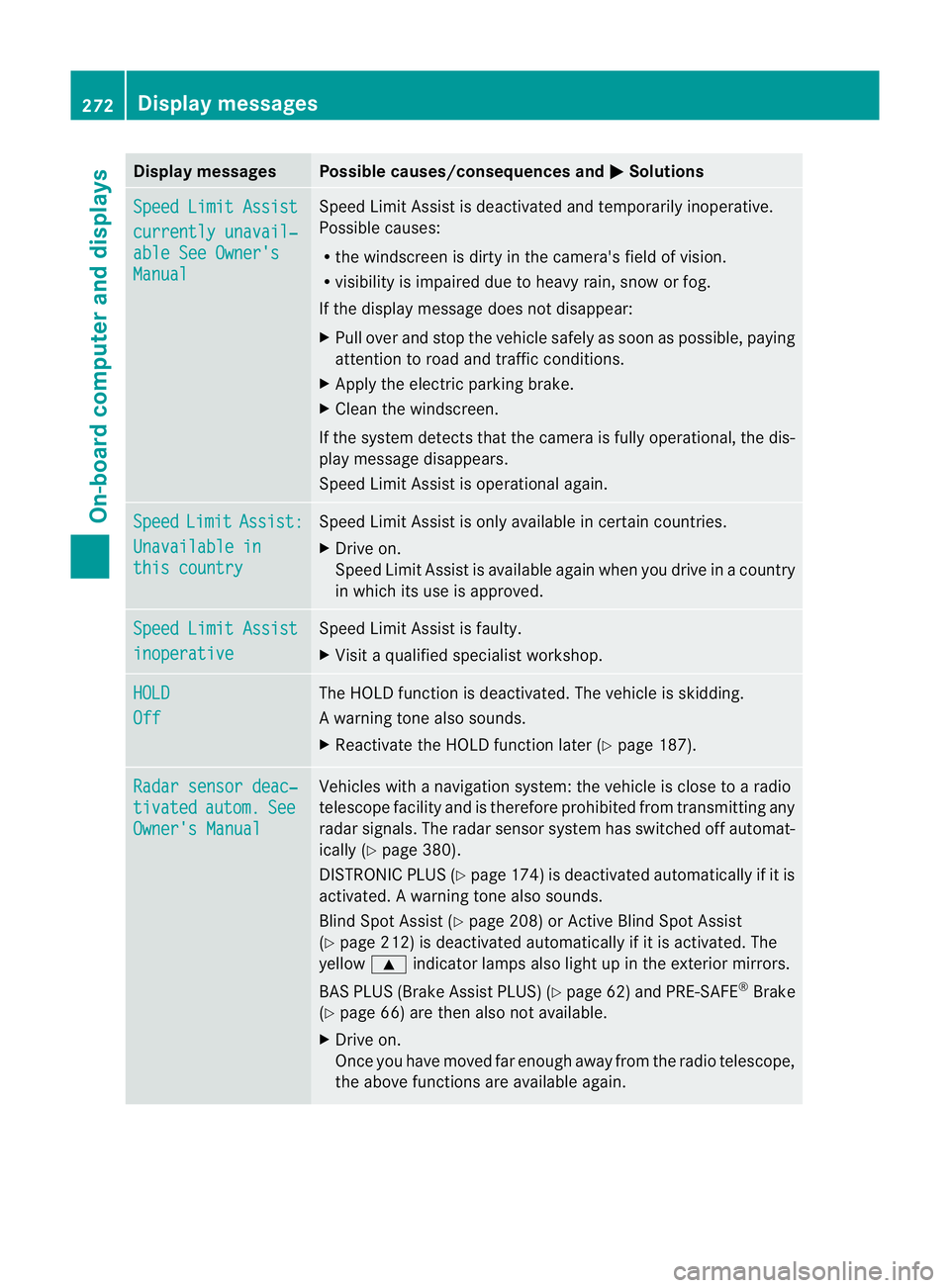
Displa
ymessages Possible causes/consequences and
M Solutions
Sp
eedL imit Assist currently unavail‐
abl
eS ee Owner's Manual Spee
dLimit Assist is deactivated an dtemporarily inoperative.
Possible causes:
R the windscreen is dirt yinthe camera's field of vision.
R visibility is impaired due to heav yrain, snow or fog.
If the displ aymessage does not disappear:
X Pull ove rand sto pthe vehicle safely as soon as possible, paying
attention to roa dand traffic conditions.
X Appl ythe electric parkin gbrake.
X Cle anthe windscreen.
If th esystem detects that the camera is fully operational, the dis-
play messag edisappears.
Speed Limit Assist is operational again. Speed Limit Assist:
Unavailabl
ein this country Spee
dLimit Assist is only available in certain countries.
X Driv eon.
Spee dLimit Assist is available again when you drive in acount ry
in which its use is approved. Spee
dLimit Assist inoperative Spee
dLimit Assist is faulty.
X Visit aqualified specialist workshop. HOLD
Off The HOLD function is deactivated. The vehicle is skidding.
Aw arning ton ealso sounds.
X Reactivat ethe HOL Dfunction later (Y page 187). Ra
dars ensor deac‐ tivated autom. See
Owner'
sManual Vehicles with
anavigation system :the vehicl eisclose to aradio
telescope facility and is therefor eprohibited from transmittin gany
radar sig nals. The radar sensor system has switched off automat-
icall y(Ypage 380).
DISTRONI CPLUS (Y page 174) is deactivate dautomaticall yifitis
activated. Awarning ton ealso sounds.
Blin dSpotA ssist (Y page 208) or Ac tiveBlind Spo tAssist
(Y page 212) is deactivate dautomaticall yifitisactivated. The
yellow 9indicator lamps als olight up in the exterior mirrors.
BAS PLU S(Brake Assis tPLUS) (Y page 62) and PRE-SAFE ®
Brake
(Y page 66) are then also no tavailable.
X Drive on.
Once yo uhave moved far enough awa yfrom th eradio telescope,
the above function sare avai lable again. 272
Display messagesOn-board computer and displays
Page 277 of 389
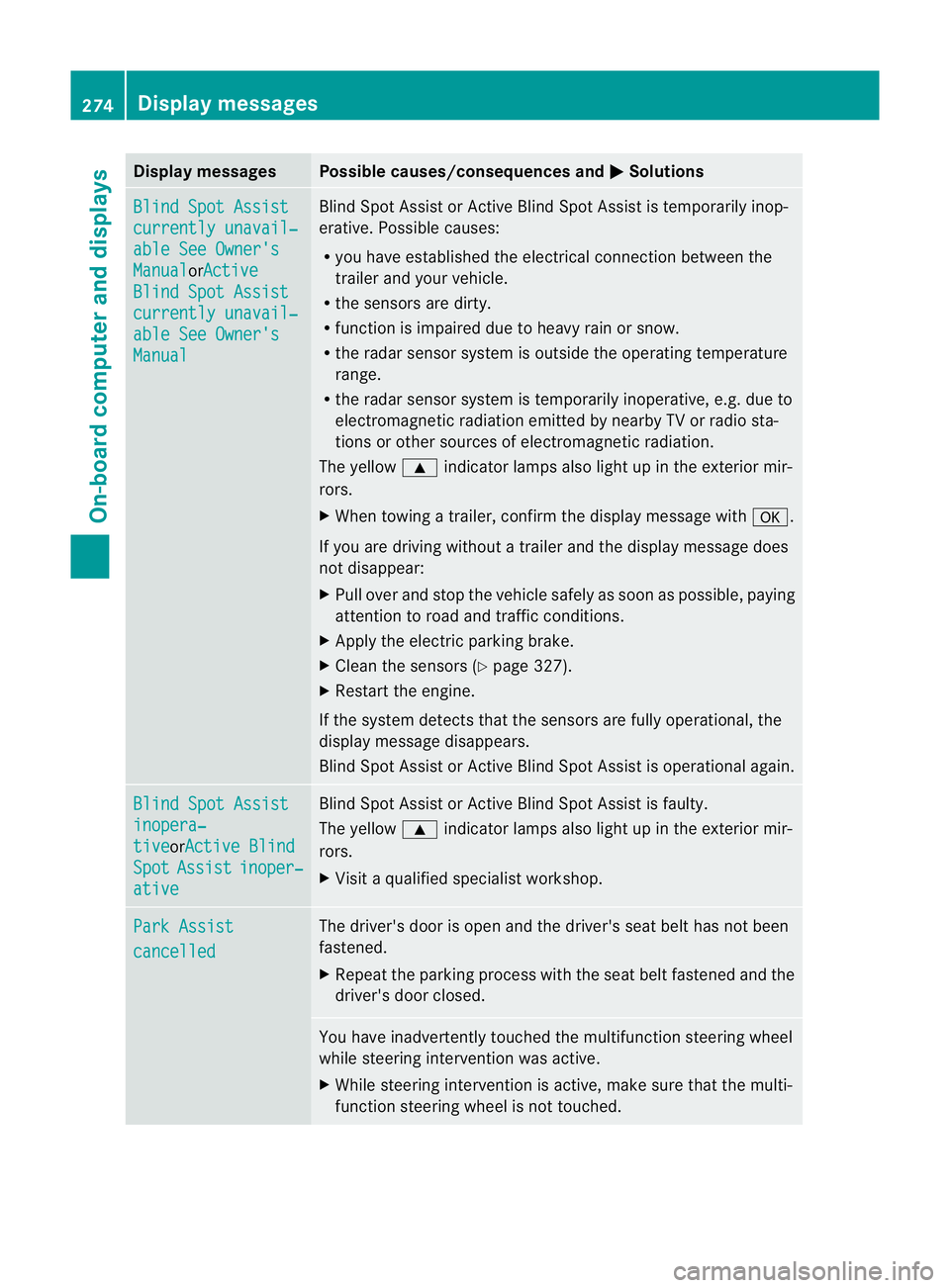
Displa
ymessages Possible causes/consequences and
M Solutions
Bl
indS potA ssist currently unavail‐
abl
eS ee Owner's Manual or
Ac tive Blind Spo
tAssist currently unavail‐
abl
eS ee Owner's Manual Blind Spot Assist or Active Blind Spot Assis
tist emporaril yinop-
erative .Possible causes:
R you have established the electrical con nectio nbetween the
trailer and your vehicle.
R the sensors are dirty.
R function is impaired due to heavy rai norsnow.
R the radar sensor system is outside the operating temperature
range.
R the radar sensor system is temporarily inoperative, e.g. due to
electromagnetic radiation emitted by nearby TV or radio sta-
tions or other sources of electromagnetic radiation.
The yellow 9indicator lamps also light up in the exterior mir-
rors.
X Whe ntowing atrailer, con firm th edisplay message with a.
If you are drivin gwithout atrailer and th edisplay message does
not disappear:
X Pull over and stop the vehicle safely as soon as possible ,paying
attention to road and traffic conditions.
X Apply the electric parking brake.
X Clean the sensors (Y page 327).
X Restart the engine.
If the system detect sthat the sensor sare full yoperational, the
display message disappears.
Blin dSpot Assist or Active Blin dSpot Assist is operational again. Blin
dSpot Assist inopera‐
tive or
Active Blind Spot Assist inoper‐
ative Blind Spot Assist or Active Blind Spot Assist is faulty.
Th ey ellow 9indicator lamps also light up in the exterior mir-
rors.
X Visit aqualified specialist workshop. Park Assist
cancelled The driver'
sdoor is open and the driver' sseat belt has not been
fastened.
X Repeat the parking process with the seat belt fastened and the
driver' sdoor closed. You have inadvertently touched the multifunc
tion steerin gwheel
while steerin gintervention was active.
X While steerin gintervention is active, make sure that the multi-
function steerin gwheel is not touched. 274
Displa
ymessagesOn-board compu tera nd displays
Page 279 of 389
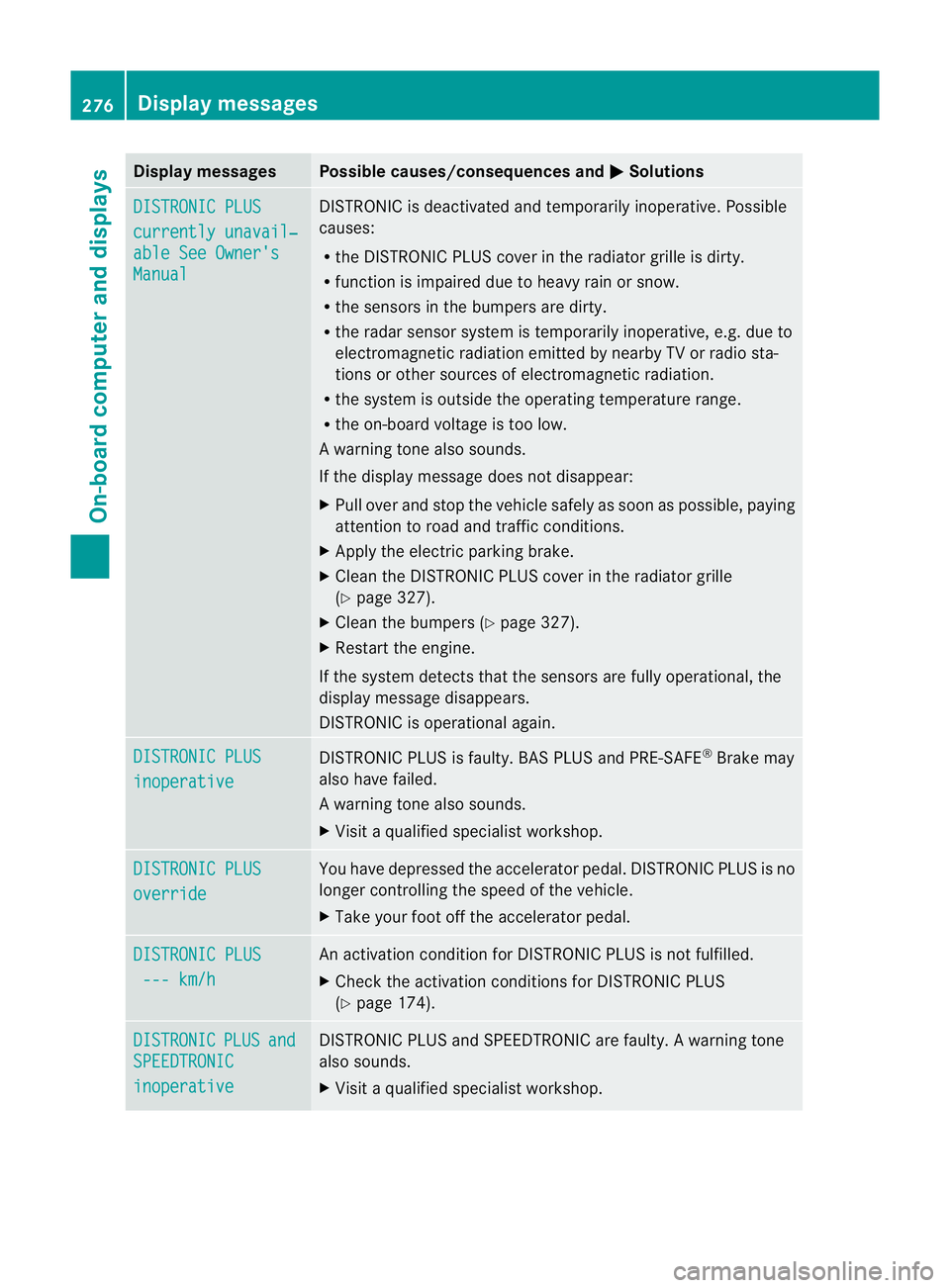
Displa
ymessages Possible causes/consequences and
M Solutions
DI
STRONIC PLUS currently unavail‐
abl
eS ee Owner's Manual DISTRONIC is deactivated and tempora
rily inoperative. Possible
causes:
R theD ISTR ONIC PLU Scove rint he ra diatorgrille is di rty.
R function is impaire ddue to heav yrain or snow.
R thes ensor sinthebumpers are dirty.
R ther adar sensor system is temporarily inoperative, e.g. due to
elect romagnetic radiatio nemitted by nearby TV or radio sta-
tions or other source sofelectromagnetic radiation.
R the system is outside the operatin gtemperatur erange.
R the on-board voltage is too low.
Aw arning ton ealso sounds.
If th edisplay message does no tdisappear:
X Pull over and stop the vehicle safely as soon as possible, paying
attention to road and traffic conditions.
X Apply the electric parking brake.
X Clean the DISTRONIC PLU Scover in the radiator grille
(Y page 32 7).
X Clean the bumper s(Ypage 32 7).
X Restart the engine.
If the system detects that the sensors are fully operational, the
displa ymessage disappears.
DI ST RONIC is operational again. DISTRONIC PLUS
inoperative DISTRONIC PLUS is faulty. BAS PLUS and PRE-SAFE
®
Brake may
also have failed.
Aw arning ton ealso sounds.
X Visi taq ualifieds pecialist workshop. DISTRONI
CPLUS override Yo
uh ave depressed the accelerator pedal. DISTRONIC PLUS is no
longer controlling the spee dofthe vehicle.
X Take your foot off the accelerator pedal. DISTRONI
CPLUS --- km/h An activation conditio
nfor DI STRONIC PLUS is not fulfilled.
X Check the activation conditions for DISTRONIC PLUS
(Y page 174). DISTRONIC PLUS and
SPEEDTRONIC
inoperative DISTRONIC PLUS and SPEEDTRONIC are faulty.
Awarning tone
also sounds.
X Visit aqualified specialist workshop. 276
Display messagesOn-board computer and displays
Page 286 of 389
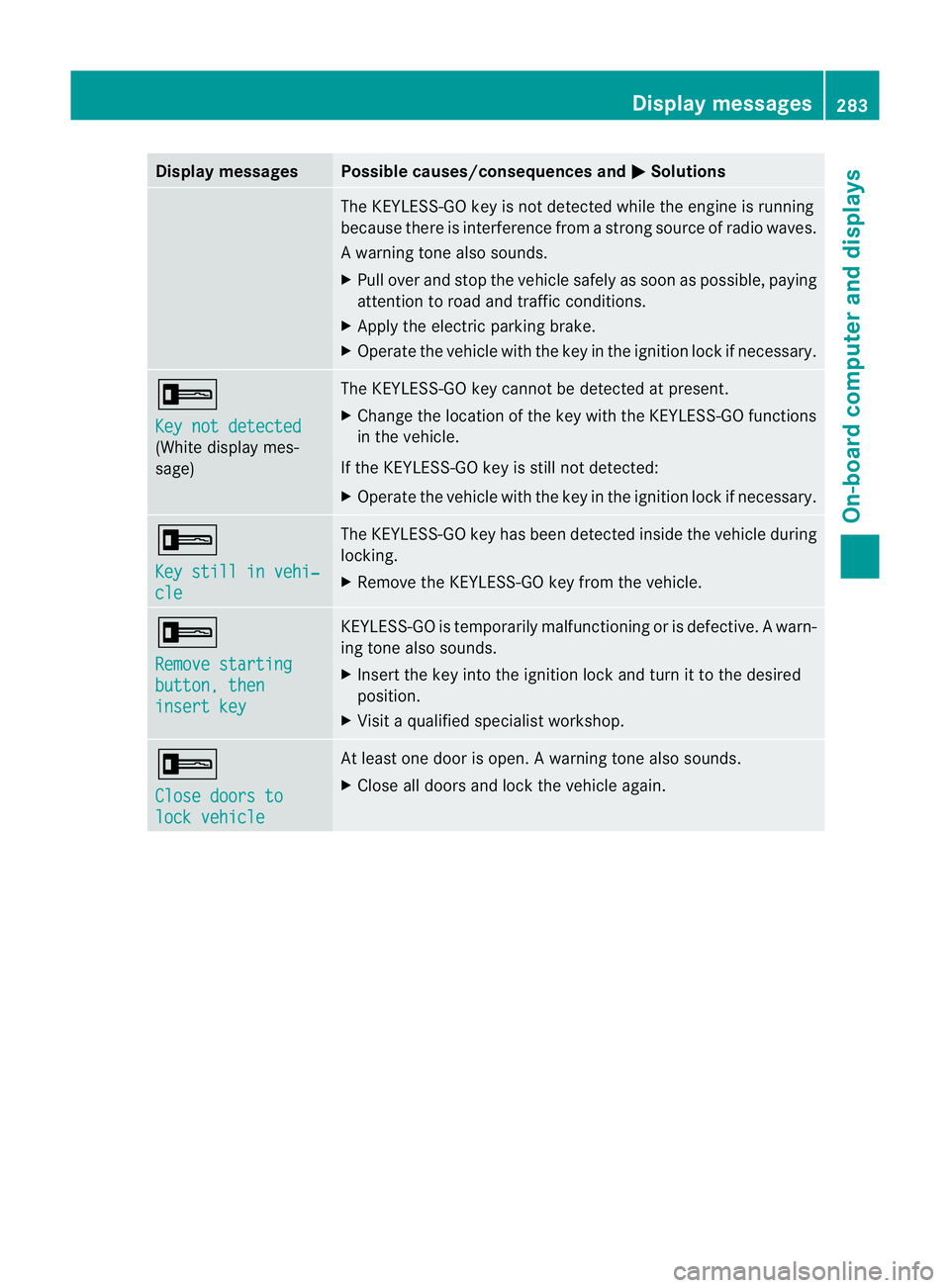
Displa
ymessages Possible causes/consequences and
M Solutions
The KEYLESS-GO ke
yisnot detected whil ethe engin eisrunning
because there is interference from astrong source of radio waves.
Aw arning ton ealso sounds.
X Pull ove rand sto pthe vehicle safel yassoonasp ossible, paying
attention to roa dand traffic conditions.
X Appl ythe electric parkin gbrake.
X Operate th evehicle with the key in the ignition lock if necessary. +
Ke
yn ot detected (White displa
ymes-
sage) The KEYLE
SS-GO key cannot be detected at present.
X Chang ethe location of the key with the KEYLESS-GO functions
in the vehicle.
If the KEYLESS-GO key is still not detected:
X Operate the vehicle with the key in the ignition lock if necessary. +
Ke
ys till in vehi‐ cle Th
eK EYLESS-GO key has bee ndetected inside the vehicle during
locking.
X Remov ethe KEYLESS-GO key from the vehicle. +
Remove starting
button
,then insert key KEYLESS-GO is temporarily malfunctionin
gorisdefective. Awarn-
ing ton ealso sounds.
X Inser tthe key in tothe ignition lock and tur nittothedesired
position.
X Visi taq ualifieds pecialist workshop. +
Clos
edoors to lock vehicle At leas
tone doo riso pen. Awarning ton ealso sounds.
X Close all door sand lock the vehicle again. Display messages
283On-boardcomputer anddisplays Z
Page 313 of 389
If yo
uuse the sockets for long periods when
the engine is switched off ,the battery may
discharge.
X Tur nthe key to positi on1in the ignition
lock.
i An emergenc ycut-off ensures that the on-
board voltage does not drop too low. If the
on-board voltage is too low, the powe rto
the sockets is automaticall ycut. This
ensure sthat there is sufficien tpower to
star tthe engine.
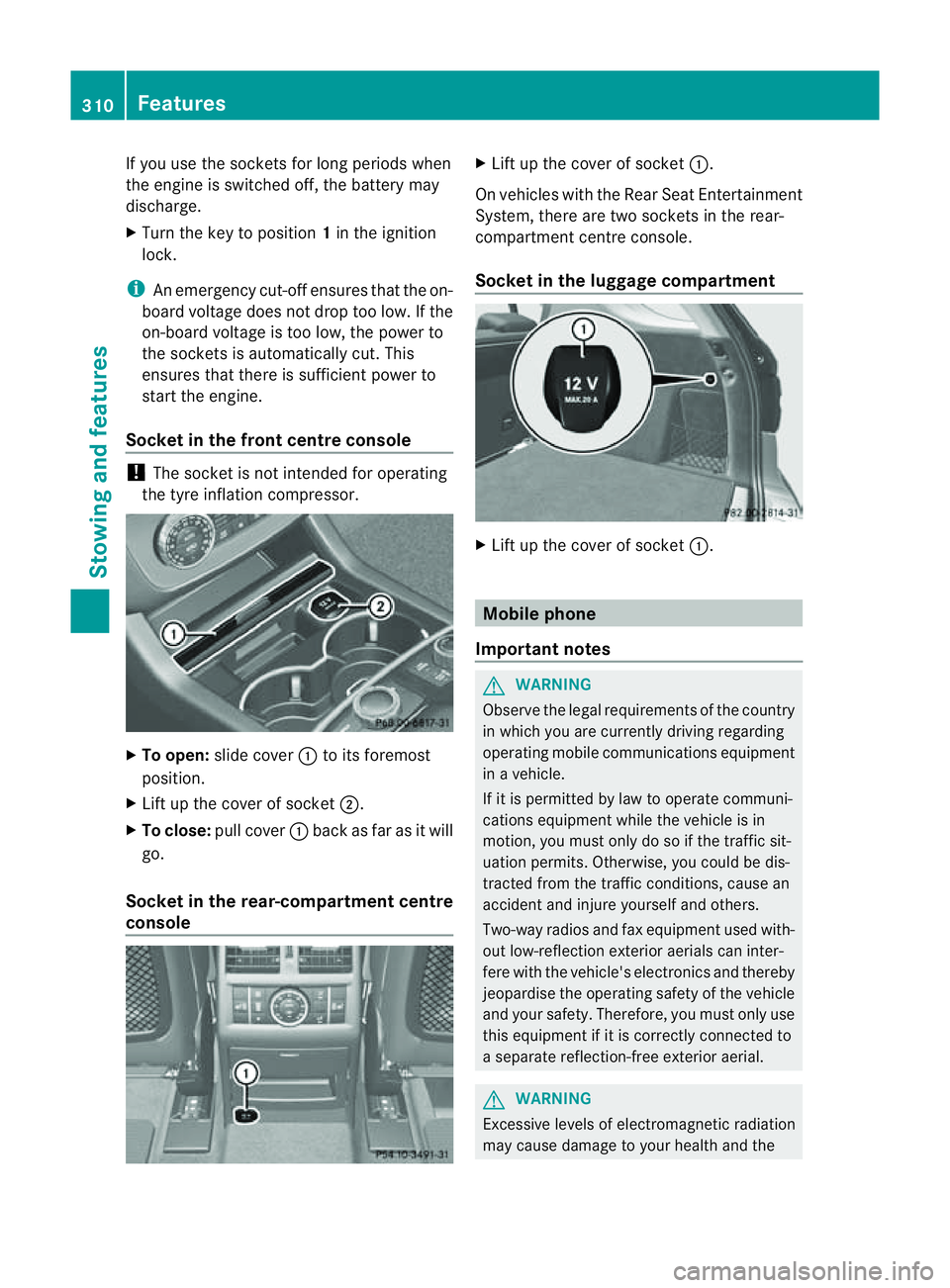
Socket in th efront centre console !
The socke tisn ot intended for operating
the tyr einflation compresso r.X
To open: slide cover :to its foremost
position.
X Lift up the cover of socket ;.
X To clos e:pull cover :back as far as it will
go.
Socket in the rear-compartment centre
console X
Lift up the cover of socket :.
On vehicles with the Rear Seat Entertainment
System, there are two sockets in the rear-
compartment centre console.
Socket in the luggage compartment X
Lift up the cover of socket :. Mobile phone
Important notes G
WARNING
Observe the legal requirements of the country
in which you are currently driving regarding
operating mobile communications equipment
in av ehicle.
If it is permitted by law to operat ecommuni-
cations equipment while the vehicle is in
motion ,you must only do so if the traffic sit-
uation permits. Otherwise, you coul dbedis-
trac tedf rom th etraffic conditions ,cause an
accident and injure yourself and others.
Two-way radios and fax equipment used with-
out low-reflection exterior aerials can inter-
fere with the vehicle's electronics and thereby
jeopardise the operating safety of the vehicle
and your safety. Therefore, you must only use
this equipment if it is correctly connected to
as eparate reflection-f reee xterior aerial. G
WARNING
Excessive level sofelectromagnetic radiation
may cause damage to your health and the 310
FeaturesStowing and features
Page 319 of 389
Frequencies for th
egarage doo ropener Th
er adio typ eapproval number and th efrequency range for th egarag edoor opener can be
fou ndonthe Interne tat: http://www.mercedes-benz.de/betriebsanleitung. Floormats
G
WARNING
Make sure that there is sufficient clearance
around the pedals when floormats are used,
and that the floormats are properly secured.
The floormats must be correctly secured at all
times using retainer sand press-studs.
Before you drive off ,chec kthe floormats and
secur eifnecessary. Afloormat which is not
properly secured can slip and, thereby, inter-
fere with the movemen tofthe pedals.
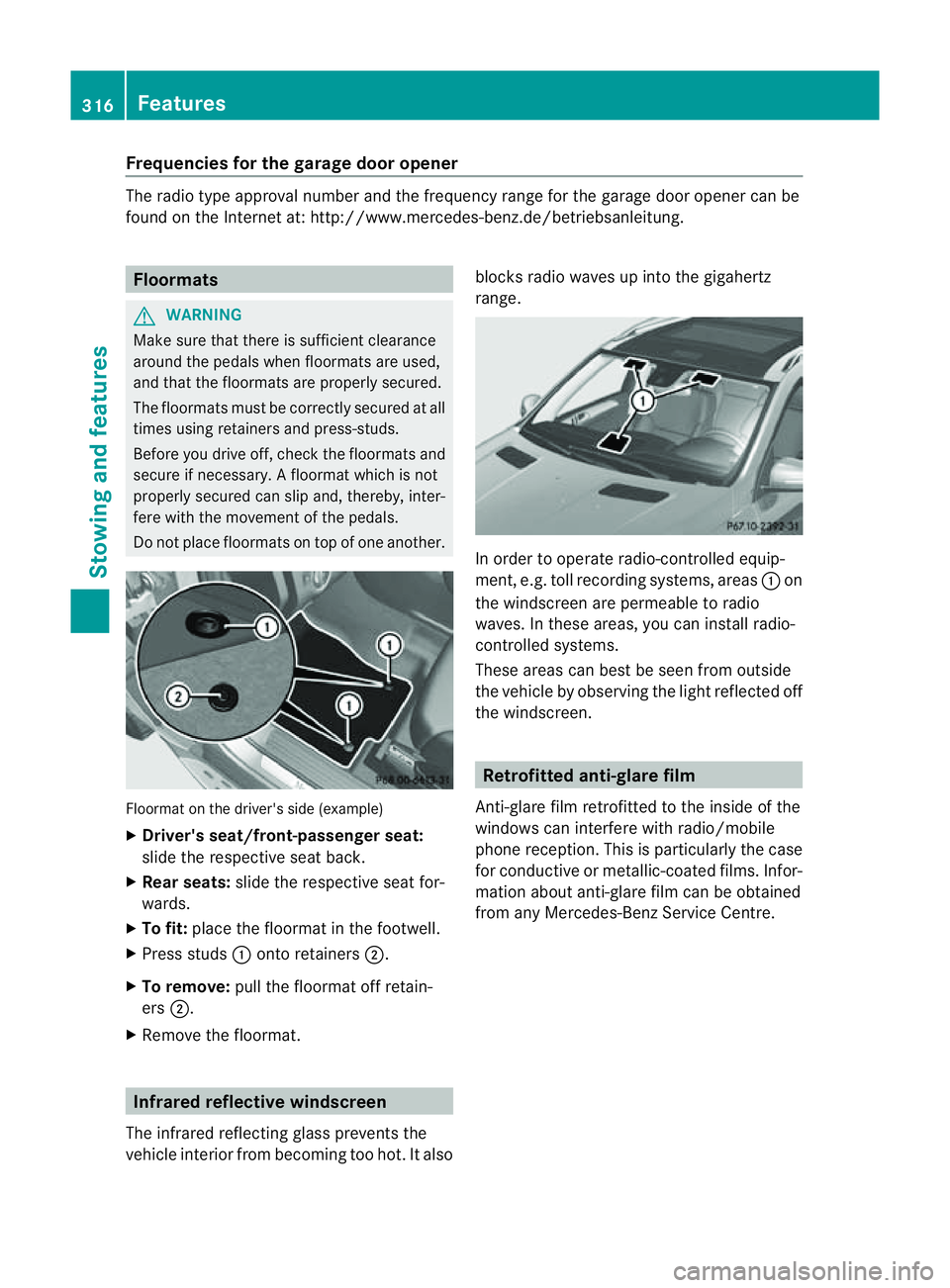
Do not plac efloormats on top of one another. Floormat on the driver's side (example)
X
Driver's seat/front-passenger seat:
slide the respective seat back.
X Rear seats: slide the respective seat for-
wards.
X To fit: place the floorma tinthe footwell.
X Press studs :ontoretainers ;.
X To remove: pull the floormat off retain-
ers ;.
X Remov ethe floormat. Infrared reflective windscreen
The infrared reflecting glass prevents the
vehicle interior from becoming too hot. It also blocks radio waves up int
othe gigahertz
range. In orde
rtooperateradio-controlled equip-
ment, e.g. toll recording systems, areas :on
the windscreen are permeable to radio
waves. In these areas, you can install radio-
controlled systems.
Thes earea scan best be seen from outside
the vehicle by observing the light reflected off
the windscreen. Retrofitted anti-glar
efilm
Anti-glar efilm retrofitted to the inside of the
windows can interfer ewith radio/mobile
phone reception. This is particularly the case
for conductive or metallic-coated films. Infor-
mation about anti-glar efilm can be obtained
from any Mercedes-Ben zService Centre. 316
FeaturesStowing and features
Page 347 of 389
R
make sure that yo udonot create an elec-
trostati ccharge, e.g. by wearing synthetic
clothing or as aresul toff riction on fabrics.
Therefore, you should not pul lorslide the
battery over carpets or other synthetic
materials.
R never touc hthe battery fir st. To discharge
ap ossible electrostatic charge, ste pout of
the vehicle firs tand touch the bodywork.
R do not wipe the battery using acloth. The
battery may explode as aresul tofe lectro-
static charge or due to flying sparks.
! Switch off the engin eand remove the key
befo redisconnecting the terminal clamps
from the battery. On vehicles with KEY-
LESS-GO, mak esure that the ignition is
switched off .Check that all the indicator
lamps in the instrumen tcluster are off .You
ma yotherwis edestroy electronic compo-
nents, such as the alternator.
i When you park the vehicle, remove the
key if you do not require any electrical con-
sumers. The vehicle will then use ver ylittle
energy, thus conserving battery power.
Mercedes-Benz recom mends that you do not
carry out work on batteries yourself, e.g.
removing or charging. Have this work per-
formed at aqualified specialist workshop, e.g.
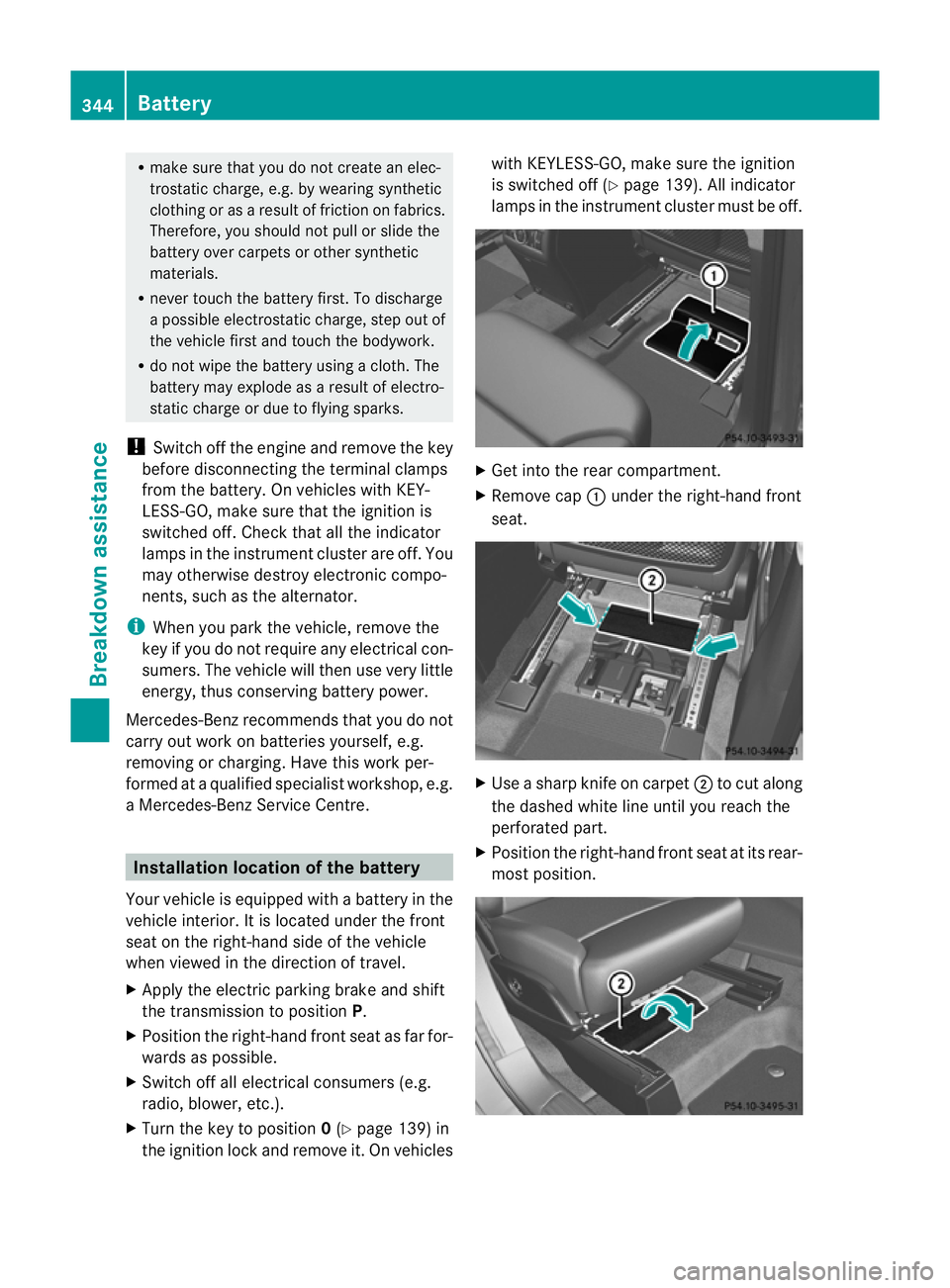
aM ercedes-Benz Servic eCentre. Installation location of the battery
Your vehicle is equipped with abattery in the
vehicle interior. It is located under the front
seat on the right-hand side of the vehicle
when viewed in the direction of travel.
X Apply the electric parking brake and shift
the transmission to position P.
X Position the right-hand front seat as far for-
wards as possible.
X Switch off all electrical consumer s(e.g.
radio, blower, etc.).
X Turn the key to position 0(Y page 139) in
the ignition lock and remove it. On vehicles with KEYLESS-GO, mak
esure the ignition
is switched off (Y page 139). All indicator
lamps in the instrument cluster must be off. X
Get into the rear compartment.
X Remove cap :under the right-hand front
seat. X
Use ashar pknifeonc arpet;to cut along
the dashe dwhite line until you reach the
perforated part.
X Position the right-hand front seat at its rear-
most position. 344
Ba
tteryBreakdown assistance
Page 350 of 389
X
Switch off al lelec trical consumers (e.g.
radio ,blow er, etc.).
X Connec tthe positive terminal clamp and
secure the cov er.
X Connect the negative terminal clamp.
i If the power supply ha sbeeninterrupted,
e.g. if yo ureconnect the battery, you will
have to:
R set the clock; see the separate operat ing
instructions.
R rese tthe function for automatically fold-
ing the exterior mirror sin/out by foldi ng
the mirrors out onc e(Ypage 10 1). Charging th
ebattery G
WARNING
Onl ycharge the battery in awell-ventilated
area .Ast he battery is being charged, gases
can escap eand generat eminor explosions.
This could injure you and other person sor
caus edamage to the paintwork or acid cor-
rosion on the vehicle.
You can obtain information about battery
chargers which allow the batter ytobe
charged while still installed from aqualified
specialist workshop ,e.g. aM ercedes-Benz
Ser vice Centre. G
WARNING
There is arisk of acid burns during the charg-
ing process due to the gases which escape
from the battery. Do not lean over the battery
during the chargin gprocess. G
WARNING
Battery aci discaustic. Avoid contact with the
skin, eyes or clothing.
! Only charge the installed batter ywith a
batter ycharger whic hhas been tested and
approved by Mercedes -Benz .These battery
chargers allow the battery to be charged
while still installed. !
Only use battery chargers with amaxi-
mum charging voltage of 14.8 V.
! Only charge the battery using the jump-
start connection point.
The jump-starting connection point is in the
engine compartmen t(Ypage 348).
X Open the bonnet (Y page 318).
X Connec tthe battery charger to the positive
terminal and earth point in the sam eorder
as when connecting th edonor battery in
the jump-startin gprocedure
(Y page 348).
X Read th ebattery charger's operating
instructions before charging the battery. Battery
347Breakdown assistanc e Z
Page 352 of 389
X
Switch off al lelec trical consumers (e.g. radio ,blow er, etc.).
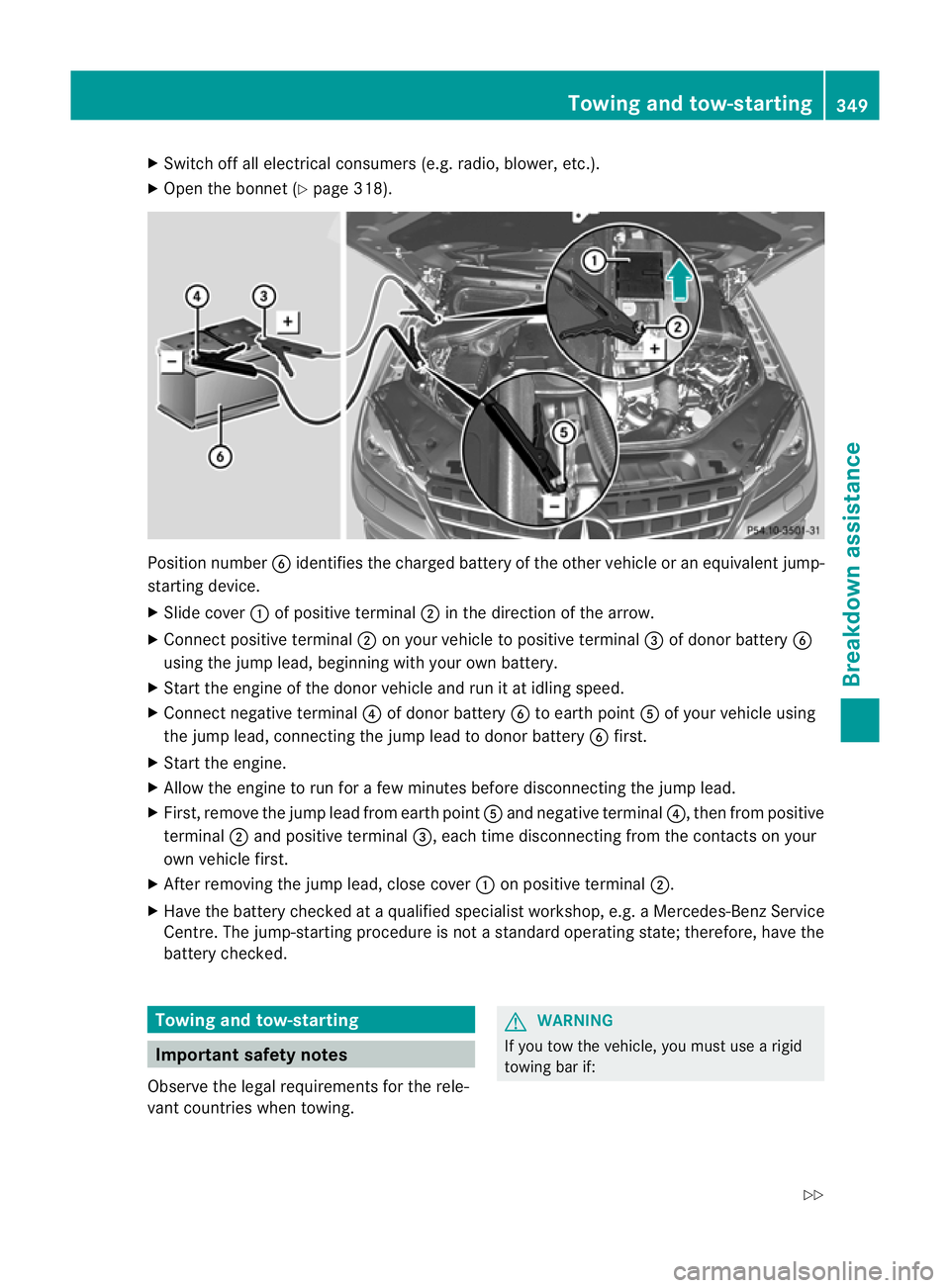
X Ope nthe bonnet (Y page 318). Position number
Bidentifies the charged battery of the other vehicle or an equivalent jump-
startin gdevice.
X Slide cover :of positiv eterminal ;in the direction of the arrow.
X Connect positiv eterminal ;on your vehicle to positiv eterminal =of donor battery B
using the jum plead, beginning with your own battery.
X Start the engine of the donor vehicle and run it at idling speed.
X Connect negative terminal ?of donor battery Bto eart hpoint Aof your vehicle using
the jum plead, connectin gthe jum plead to donor battery Bfirst.
X Start the engine.
X Allow the engine to run for afew minutes befor edisconnecting the jump lead.
X First, remov ethe jum plead from eart hpoint Aand negative terminal ?,then from positive
terminal ;and positive terminal =,each time disconnecting from the contacts on your
own vehicle first.
X After removing the jump lead, close cover :on positive terminal ;.
X Have the battery checked at aqualified specialist workshop, e.g. aMercedes-Ben zService
Cent re.T he jump-star ting procedure is not astandard operatin gstate; therefore, have the
battery checked. Towing and tow-starting
Important safet
ynotes
Observe the legal requirements for the rele-
vant countries when towing. G
WARNING
If you tow the vehicle, you must use arigid
towing bar if: Towing and tow-starting
349Breakdown assis tance
Z
Page 365 of 389
tyre is penetrated by
aforeign object .Inthe
event of asudden loss of pressure, bring the
vehicl etoah altbyb rakingcarefully. Do not
make any sudden steering movements when
doing so.
Informatio nontyre pressures is displayed in
the multifunction display. After afew minutes
of driv ing, the curren ttyre pressure of each
tyre is sho wn inthe multifunction display.
i Thet yre pressure values indicated by the
on-board computer may differ from those
measured at afilling station with apressure
gauge. Th etyre pressures shown by the on-
board computer refer to thos emeasured at
sea level. At high altitudes, the tyr epres-
sure values indicated by apressure gauge
are higher than thos eshown by the on-
boar dcomputer .Inthis case ,donot reduce
the tyr epressures.
i Theo peration of the tyr epressure moni-
to rc an be affected by interference from
radio transmitting equipment (e.g. radio
headphones ,two-way radios) that may be
being operated in or near the vehicle.
Checking tyr epressure electronically X
Make sure that the key is in position 2
(Y page 139) in the ignitio nlock.
X Press the =or; button on the steer-
ing wheel to select the Serv. menu.
X Press the 9or: button to select
Tyre pressure .
X Press the abutton.
The curren ttyre pressure for each wheel
will be displayed in the multifunction dis-
play.
If the vehicle has been parked for longe rthan
20 minutes, the Tyre pressures will be
displaye
dafter afew minutes of driving message appe
ars.
After ateach-in period, the tyr epressure
monito rautomatically recognise snew
wheels or new sensors. As long as aclear
allocation of the tyre pressure values to the individual wheels is not possible
,the Tyre pressure monito
ractive displa
ymes-
sage is shown instead of the tyr epressure
display. Th etyre pressures are already being
monitored.
i Ifas pare wheel/emergenc yspare wheel
is fitted, the system may continue to show
the tyr epressure of th ewheel that has
been removed for afew minutes. If this
occurs, note that the value displayed for
the position where the spare wheel/emer-
gency spare wheel is fitted is not the same
as the spare wheel/emergenc yspare
wheel's current tyr epressure.
Tyre pressure monito rwarning mes-
sages If the tyre pressure monitor detects
asignifi-
cant pressure loss on one or more tyres, a
warnin gmessage is shown in the multifunc-
tion display. Awarning ton ealso sounds and
th et yrep ressure warning lamp ligh tsup in
the instrumen tcluster.
Eac htyret hat is affected by asignificant loss
of pressure is highlighted in th epressure dis-
play.
If the Please correc ttyrep ressure messag
eappear sinthe multifunctio ndis-
play:
X Chec kthe tyr epressure on all fou rwheels
and correc titifn ecessary.
i If the wheel positions on the vehicle are
inter changed, the tyre pressures may be
displ ayed for th ewrong positions for a
short time .This is rectified after afew
minutes of driving, and the tyr epressures
are displayed for th ecorrect positions.
Restarting th etyre pressure monitor When yo
urestar tthe tyr epressure monitor,
all existing warning message sare deleted and
th ew arning lamps go out. The monitor uses
the currently set tyre pressures as the refer-
ence values for monitoring. In most cases, the
tyre pressure monitor will automatically 362
Tyr
epressureWheels and tyres