LED MERCEDES-BENZ M-CLASS SUV 2011 Service Manual
[x] Cancel search | Manufacturer: MERCEDES-BENZ, Model Year: 2011, Model line: M-CLASS SUV, Model: MERCEDES-BENZ M-CLASS SUV 2011Pages: 389, PDF Size: 9.22 MB
Page 199 of 389
the turn si
gnal on the driver' sside is activa-
ted. If you wish to park in aspace on the driv-
er' ss ide, the indicator on the driver' sside
must remain on. This must remain switched
on until you acknowledge the use of Active
Parking Assist by pressin gthe a button
on the multifunction steeri ngwheel.
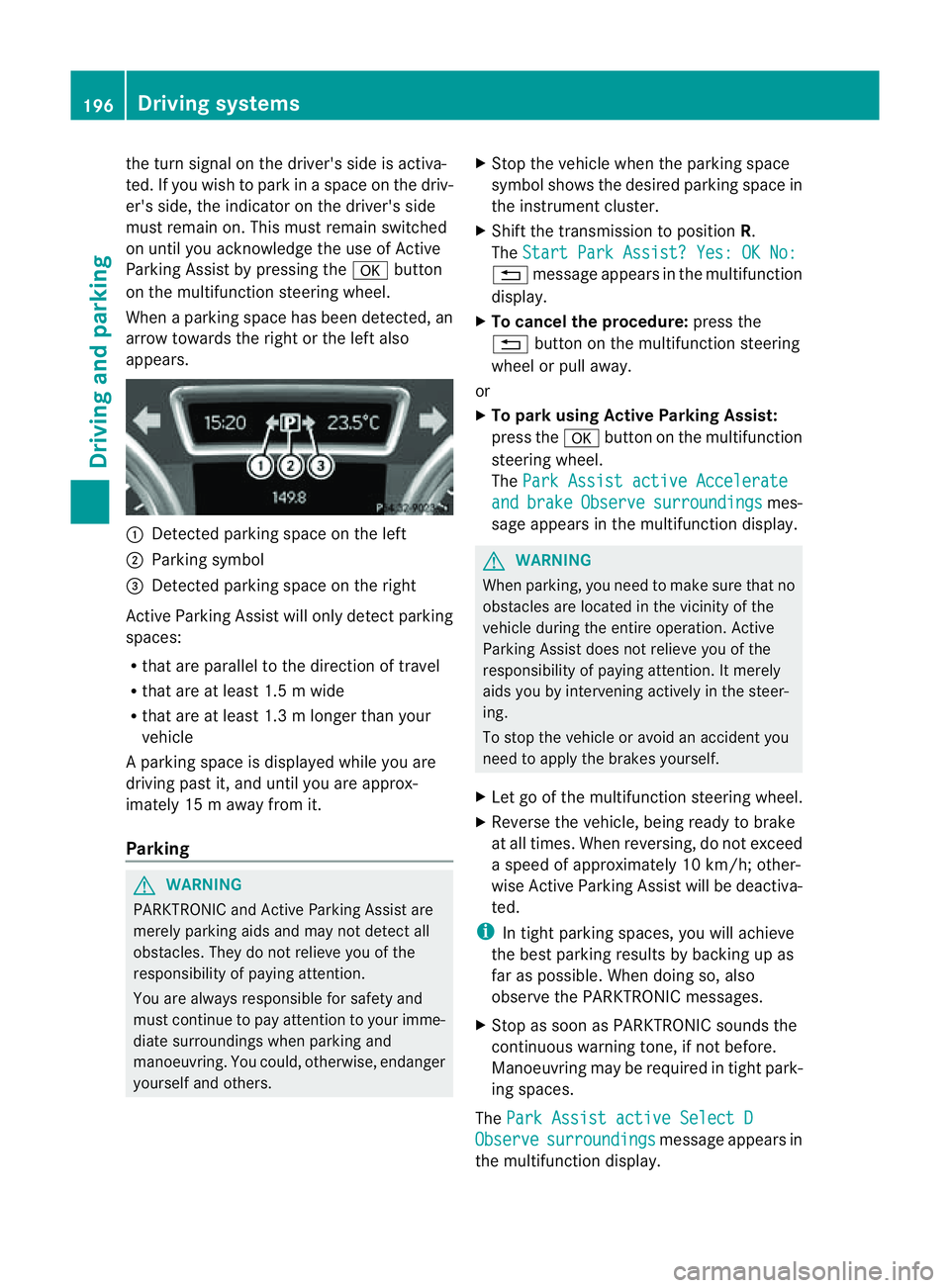
When aparking space has been detected, an
arrow towards the right or the left also
appears. :
Detected parking space on the left
; Parking symbol
= Detected parking space on the right
Activ eParking Assist will only detect parking
spaces:
R that are parallel to the direction of travel
R that are at least 1. 5mwide
R that are at least 1. 3mlonger than your
vehicle
Ap arking space is displayed while you are
driving past it, and until you are approx-
imately 15 maway from it.
Parking G
WARNING
PARKTRONI Cand Activ eParking Assist are
merely parking aids and may not detec tall
obstacles. They do not reliev eyou of the
responsibili tyof paying attention.
You are alway sresponsible for safet yand
must continue to pay attention to your imme-
diate surroundings whe nparking and
manoeuvring. You could, otherwise, endanger
yourself and others. X
Stop the vehicle when the parking space
symbol shows the desired parking space in
the instrumen tcluster.
X Shif tthe transmission to position R.
The Star tPark Assist? Yes: OK No: %
message appe arsint he multifunction
display.
X To cancel th eprocedure: press the
% button on the multifunction steering
whee lorp ull away.
or
X To par kusing Active Parking Assist:
press the abutton on the multifunction
steeri ngwheel.
The Park Assist active Accelerate and brake Observe surroundings mes-
sage appears in the multifunction display. G
WARNING
When parking, you need to make sure that no
obstacles are located in the vicinit yofthe
vehicle during the entire operation .Active
Parkin gAssist does not reliev eyou of the
responsibilit yofpaying attention. It merely
aids you by intervenin gactivel yinthe steer-
ing.
To stop the vehicle or avoid an accident you
need to apply the brakes yourself.
X Let go of the multifunction steerin gwheel.
X Reverse the vehicle, being ready to brake
at all times. When reversi ng,don ot exceed
as peed of approximately 10 km/h; other-
wise Active Parking Assist will be deactiva-
ted.
i In tight parking spaces, you will achieve
the best parking result sbybackingupas
far as possible .When doing so, also
observe the PARKTRONIC messages.
X Stop as soon as PARKTRONIC sound sthe
continuous warnin gtone, if not before.
Manoeuvring ma yberequired in tight park-
ing spaces.
The Park Assist active Select D Observe surroundings message appear
sin
the multifunction display. 196
Drivin
gsystemsDrivin gand parking
Page 200 of 389
X
Shift the transmissio ntoposition Dwhile
the vehicle is stationary.
Active Parkin gAssist immediately steer sin
the othe rdirection.
The Park Assist active Accelerate and brake Observe surroundings mes-
sage appears in the multifunction display.
i You will achieve the best parkin gresults
by waiting for the steerin gprocedure to
complete before moving forwards.
X Drive forward sand be ready to brake at all
times.
X Stop as soon as PARKTRONIC sounds the
continuou swarning tone, if not before.
The Park Assist active Select R Observe surroundings message appears in
the multifunc tion display.
X Further transmission shift smay be neces-
sary.
As soon as the parking procedure is com-
plete, the Park Assist switched off mes-
sage appears in the multifunc tion display.
PARKTRONIC con tinues to be available.
X Manoeuvre if necessary.
X Always observe the warning message sdis-
played by PARKTRONI C(Ypage 192).
Cancell ingA ctive Parking Assist You can cancel Active Parking Assist at any
time.
X Stop the movemen tofthe multifunc tion
steerin gwheel or steer yourself.
Ac tive Parkin gAssist will be cancelled at
once. The Park Assist cancelled mes-
sage appears in the multifunc tion display.
or
X Press the PARKTRONIC button on the
cen trec onsole (Y page 192).
PARKTRONIC is switched off and Active
Parkin gAssist is immediately cancelled.
The Park Assist cancelled message
appears in the multifunc tion display. Active Parkin
gAssist is cancelled automati-
cally if:
R parkin gusing Ac tive Parkin gAssist is no
longe rpossible.
R you ar edriving faster than 10 km/h.
R aw heel spins and ESP ®
intervenes or fails.
The ä warnin glamp lights up in the
instrument cluster.
Aw arning ton esounds. The par king spa ce
sym boldisappear sand the ParkA ssist cancelled messag
eappear sinthe multi-
functio ndisplay.
When Activ eParking Assist is cancelled, you
must steer again yourself.
Towing atrailer For vehicles with
atrailer to whitch, the min-
imum length for parking spaces is slightly
increased.
If yo uhavea ttache datrailer to your vehicle,
yo us houl dnot us eActiv eParking Assist.
Once the electrica lconnection is established
between your vehicl eand the trailer, Active
Parking Assist is no longer available .PARK-
TRONIC is deactivated for the rear area. Reversin
gcamera
Important safety notes Th
er eversing camera is an optica lparking
and manoeuvring aid. It shows the area
behind your vehicle with guide lines in the
COMAND displ ay. G
WARNING
Make sure tha tnopersons or animals are in
the manoeuvring range. Otherwise, they
could be injured.
The reversing camera is in the handle on the
tailgate. Driving systems
197Drivingand park ing Z
Page 201 of 389
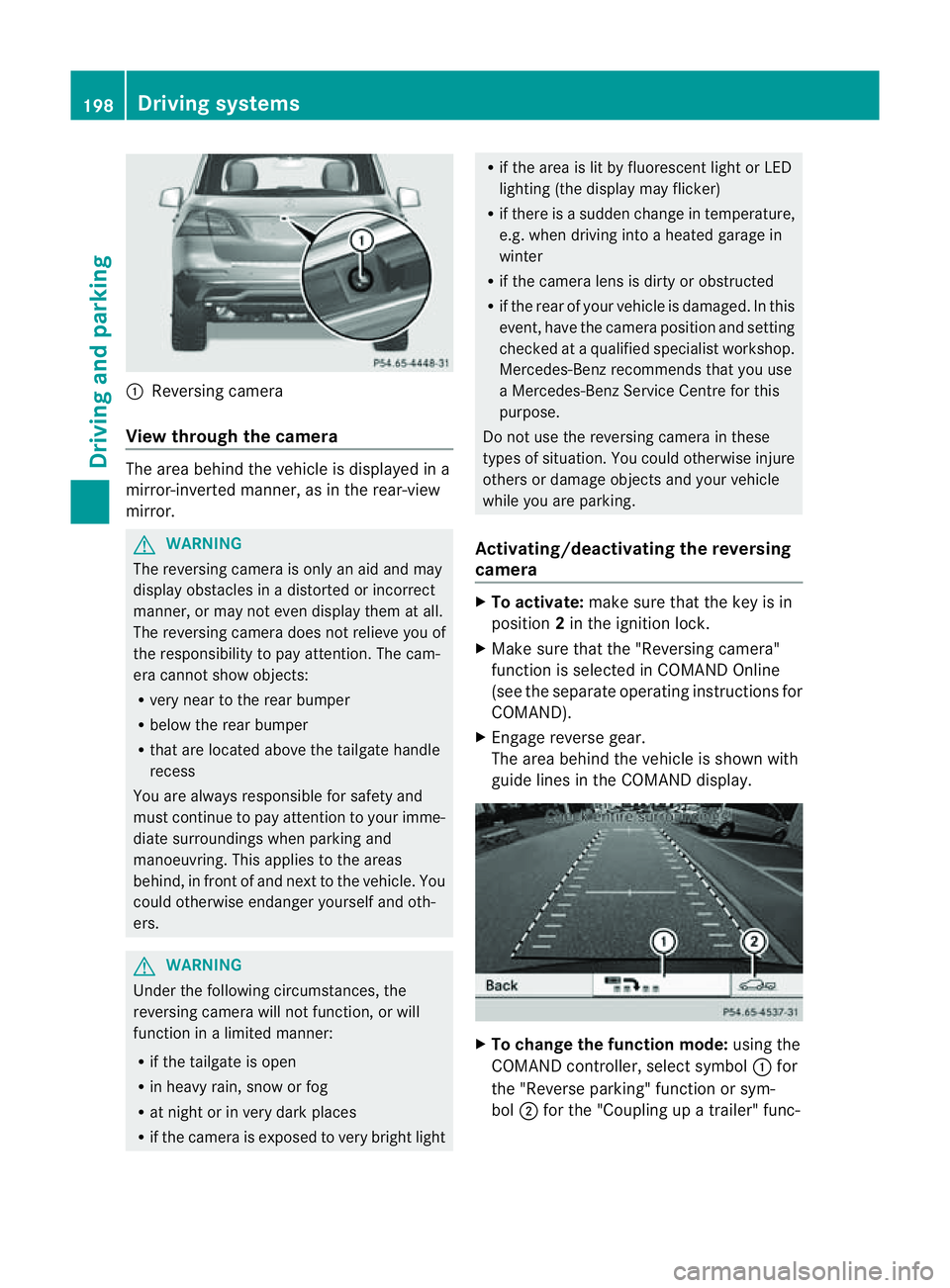
:
Reversin gcamera
View through th ecamera Th
ea rea behind the vehicle is displaye dina
mirror-inverted manner, as in the rea r-view
mirror. G
WARNING
The reversin gcamera is only an aid and may
display obstacles in adistorted or incorrect
manner, or may no teven display them at all.
Th er eversing camera does not relieve you of
the responsibility to pay attention. The cam-
era cannot show objects:
R ver ynear to the rear bumper
R belo wthe rea rbumper
R that are located above the tailgate handle
recess
You are alway sresponsible for safet yand
must continue to pay attentio ntoyourimme-
di at es urroundings when parking and
manoeuvring. This applie stothe areas
behind, in front of and nex ttothe vehicle. You
coul dotherwise endang er yourself and oth-
ers. G
WARNING
Under the following circumstances, the
reversing camera will not function, or will
function in alimited manner:
R if the tailgate is open
R in heavy rain, snow or fog
R at night or in very dark places
R if the camer aisexposed to very brigh tlight R
if the area is lit by fluorescen tlight or LED
lighting (the display may flicker)
R if there is asudden change in temperature,
e.g. when driving into aheated garage in
winter
R if the camera lens is dirt yorobstruc ted
R if the rear of your vehicle is damaged. In this
event ,have the camera positio nand setting
checked at aqualified specialist workshop.
Mercedes-Benz recommends that you use
aM ercedes-Benz Servic eCentr efor this
purpose.
Do not use the reversin gcamera in these
types of situation. You could otherwise injure
others or damage objects and your vehicle
while you are parking.
Activating/deactivating the reversing
camera X
To activate: make sure that the key is in
position 2in the ignition lock.
X Make sure that the "Reversing camera"
function is selected in COMAND Online
(see the separate operating instructions for
COMAND).
X Engage reverse gear.
The area behind the vehicle is shown with
guide lines in the COMAND display. X
To change the function mode: using the
COMAND controller, select symbol :for
the "Reverse parking" function or sym-
bol ;for the "Coupling up atrailer" func- 198
Dri
ving systemsDriving and parking
Page 228 of 389
From LOW RANGE to HIG
HRANGE
! Only carry out the gear change process if:
R the engin eisrunning
R the transmission is in position N
R you are not driving above 70 km/h
X Press LOW RANG Ebutton :.
Indicato rlamp ;flashes.
When the gear change is complete, indica-
tor lamp ;goes out. In th emultifunction
display, the LOWR ANGE Off message
appears and status indica tor=goes out.
While indica torlamp ;is flashing, you can
cancel the gear change by pressin gLOW
RANGE button :agai n.
Me ssages in th emultif un ction display
If ag ear chang eprocess ha snot been suc-
cessful, th efollowin gmessages may be dis-
played in the multifunction display:
LOW RANGE Max. speed 40 km/h :Y
ou have
been drivin gabove 40 km/h. Indicator
lamp ;also flashes.
X Drive mor eslowly to carr yout the gear
change process.
LO WR ANGE Shift to position N briefly :T
he transmission is in position D
and you ar enow drivin gatbelow 40 km/h.
X Shif tthe transmission to Nto complete the
gear change process.
LOW RANGE Shifting cancelled Please
reactivate :T
he shifting process has not
been completed.
X Maintai nall gear change condition sand
carry out the gea rchange process again.
LO WR ANGE Stop Apply parking brake :
Aw arning ton eisalso heard. The gear change
proces shas not been completed. LOW
RANGE is in the neut ralp osition .There is no
con nectio nbetween the engine and the drive
wheels.
! Do not driv eany further, otherwis eyou
coul ddamage the vehicle's drive train. X
Stop the vehicle. Take into account the
road and traffic conditions when doing this.
X Apply the electric parking brake
(Y page 161).
X Carry out the gear change process again.
If the gear change process has been carried
out, the LOWR ANGE Stop Apply park‐ ing brake message disapp
ears. ON&OFFROAD men
uint he COMAND
display (vehicles wit hthe ON&OFF-
ROA Dpackage)
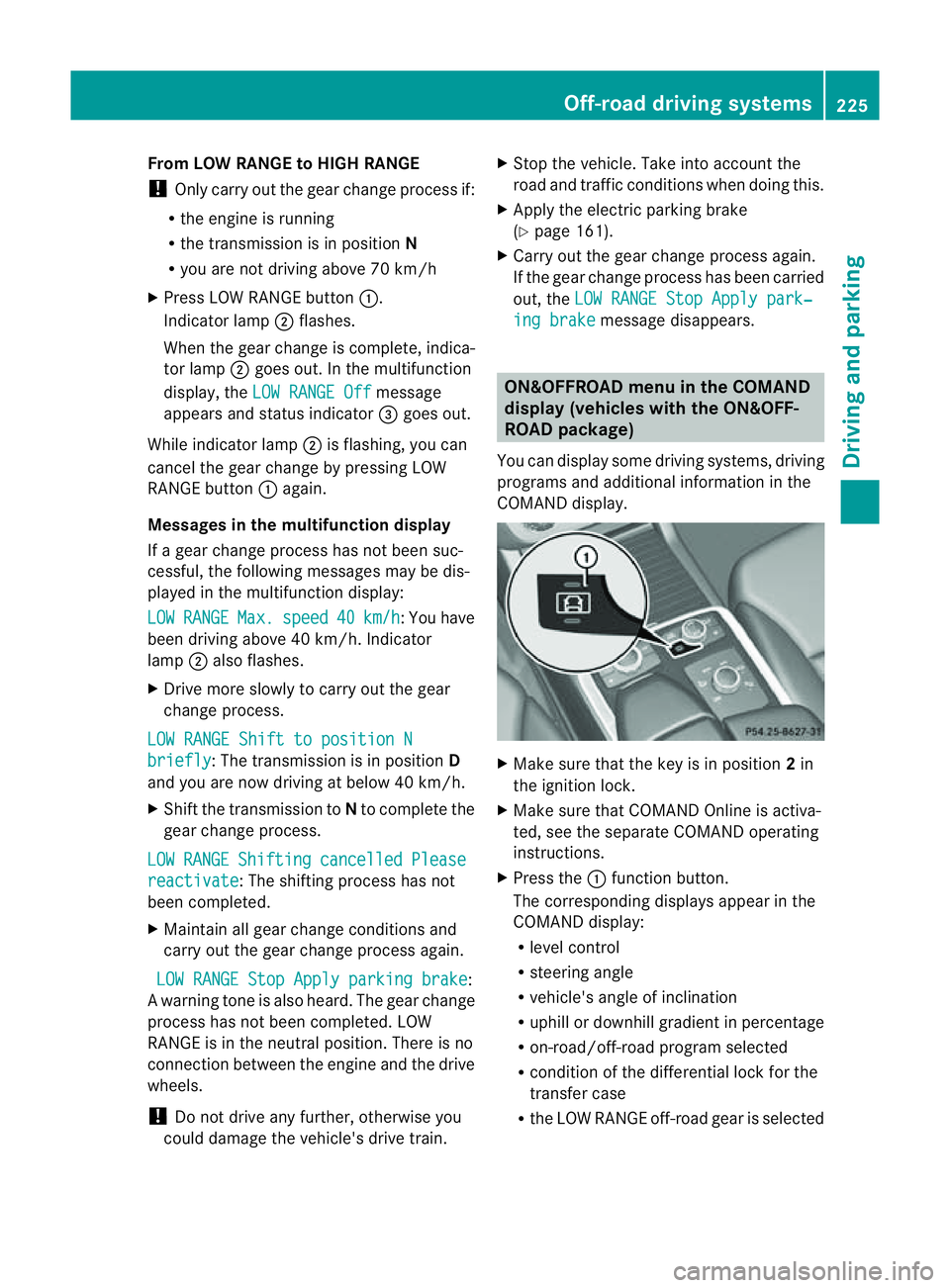
Yo uc an displ ay some driving systems ,driving
programs and additional information in the
COMAND display. X
Make sure that th ekey is in position 2in
the ignition lock.
X Make sure that COMAN DOnline is activa-
ted, see the separate COMAND operating
instructions.
X Pres sthe : func tion button.
The corresponding displays appear in the
CO MAN Ddisplay:
R level control
R steering angle
R vehicle' sangle of inclination
R uphill or downhil lgradient in percentage
R on- road/off-road program selected
R condition of the differential lock for the
transfer case
R the LOW RANGE off-road gear is selected Off-road driving systems
225Drivingand parking Z
Page 231 of 389
Driving tips
R
Maintain agreater distanc efrom th evehi-
cle in front than when driv ingw ithou ta
trailer.
R Avoid braking abruptly .Ifpossible, brake
gentl yatfirst to allow the trailer to run on.
Then, increase the brakin gforc erapidly.
R The values given for gradient-climbing
capabilities from astandstill refer to sea
level. Whe ndriving in mountainou sareas,
note that th epower outpu tofthe engine,
and consequen tlyt he vehicle' sgradient-
climbing capability ,decrease with increas-
ing altitude.
If the trailer swings from side to side:
X Do not accelerate.
X Do not coun ter-steer.
X Brake if necessary. Folding ou
tthe bal lcoupling G
WARNING
Make sure that no persons or animals are in
the pivoting range of the ball coupling. Other-
wise, they could be injured.
Before you can tow atrailer wit hyour vehicle,
you must fold out the ball coupling.
X Make sure that the vehicle is stationary.
X Open the tailgate. G
WARNING
Make sur ethat the ball coupling is engaged,
either in its folded-ou torfolded-i nposition.
The indicator lam ponthe release knob is off.
Do not pull the ball coupling release switch
when atrailer is coupled or abicycle rack is
fitted.
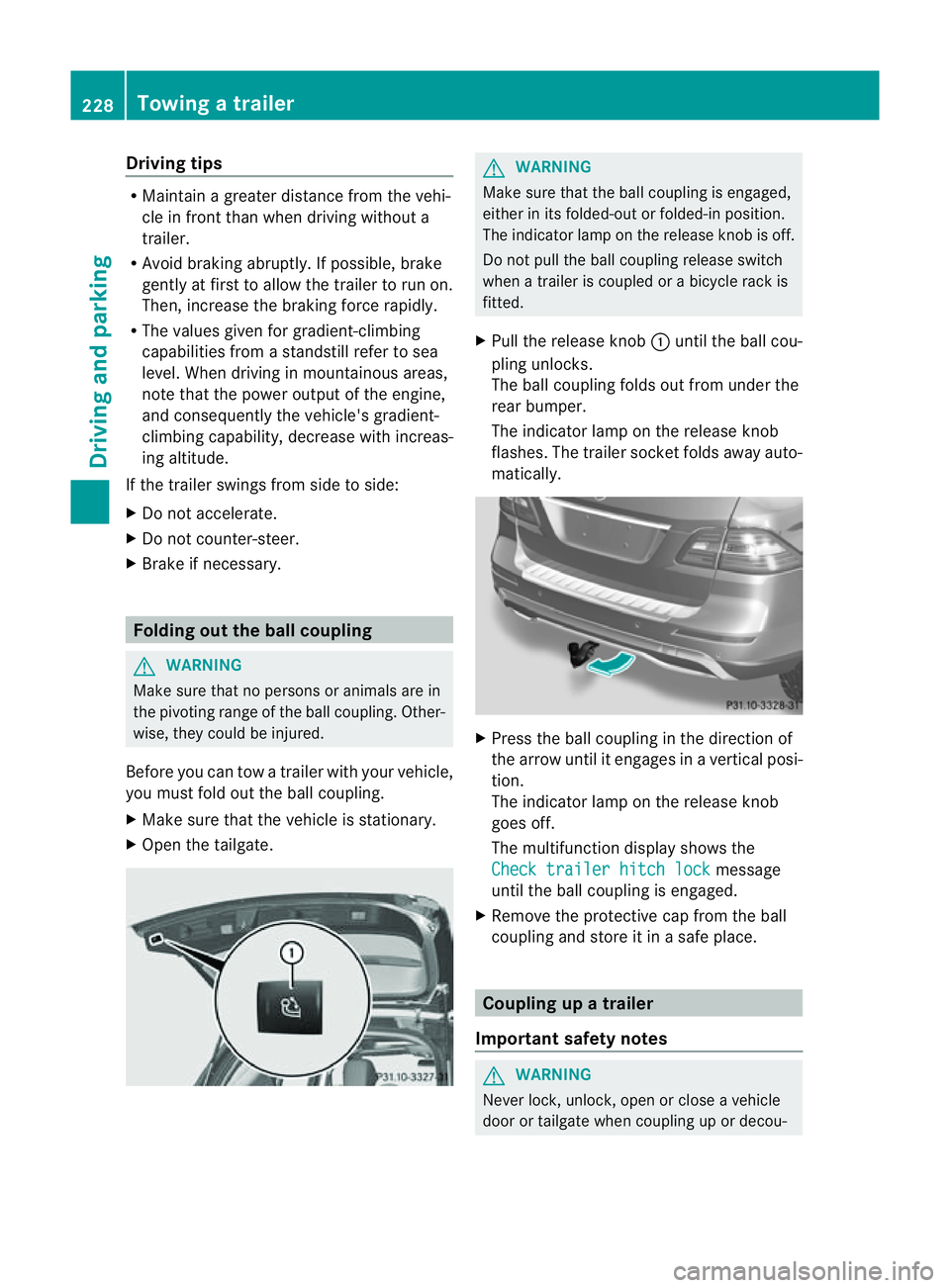
X Pull the release knob :until the ball cou-
pling unlocks.
The ball coupling folds out from under the
rear bumper.
The indicator lamp on the release knob
flashes. The trailer socket folds away auto-
matically. X
Press the ball coupling in the direction of
the arrow until it engages in avertical posi-
tion.
The indicator lam ponthe release knob
goes off.
The multifunc tion display shows the
Chec ktrailer hitch lock message
until th eball coupling is engaged.
X Remove the protective cap from the ball
coupling and store it in asafe place. Coupling up
atrai ler
Impor tant safety notes G
WARNI
NG
Neve rlock, unlock, open or close avehicle
door or tailgat ewhen coupling up or decou- 228
Towing
atrailerDriving and parking
Page 232 of 389
pling
atrailer. Th evehicle level could change
and you could endanger yourself or others.
Never press the ADS button or operate the
leve lcontrol while you are coupling up or
decoupling atrailer.
Steel-spring vehicles X
Make sure that th etransmission is in posi-
tion P.
X Engag ethe electric parkin gbrake.
X Positio nthe trailer level behind the vehicle.
X Coupl eupthe trailer.
X Establish the electrical con nection
betwee nthe vehicle and the trailer.
X Chec kthat the trailer lighting system is
working.
Vehicles wit hthe AIRMATIC package X
Make sure that th etransmission is in posi-
tion P.
X Engag ethe electric parkin gbrake.
X Start th eengine.
X Set the vehicl etohighway level
(Y page 189).
X Set the Adaptive Dampin gSystem (ADS )to
AUTO orCOMF(Y page 188).
X Switch off the engine.
X Close the doors and tailgate.
X Position the trailer level behind the vehicle.
X Couple up the trailer.
X Establish the electrical connection
betwee nthe vehicle and the trailer.
X Chec kthat the trailer lighting system is
working.
i If you hav ecoupled atrailer, th evehicle
will remain at highway level.
The vehicle automatically lowers to high-
way level if you driv efaster than 30 km/h
with atrailer. Th evehicle is not lowered to
high-speed level even if you are travelling
at higher speeds. This also applies when using accessories
that are plugged into the socket of the
trailer tow hitch (e.g. abicycle rack). Decoupling
atrailer
Important safety notes G
WARNING
Do not disconnect atrailer with an engaged
overru nbrake .Otherwise, you rhand could
becom etrapped between th ebumpe rand
drawbar. G
WARNING
As soo nasyou raise the trailer drawbar, the
unladen vehicle rises slightly .The vehicle then
lower stod riving level.
Make sure that nobod yisinthe vicinit yofthe
wheel arch or the underbody. You coul doth-
erwise trap yoursel forothers. G
WARNING
Th ev ehicle is lowered as soo nasyou discon-
nec tthe trailer cable. Make sur ethat nobody
is in the vicinit yofthe wheel arch or the
underbody. You coul dotherwis etrap yourse lf
or othe rs.
As soon as you decoupl ethe trailer ,the unla-
den vehicle rise sslightly. Make sure that you
or others are not injured in the process.
! Do not disconnect atrailer wit han
engaged overrun brake. Otherwise, your
vehicle could be damage dbythe rebound-
ing of the overru nbrake.
Steel-spring vehic les X
Ma ke sure that the transmission is in posi-
tion P.
X Engag ethe electric parkin gbrake.
X Secure th etrailer agains trollin gaway.
X Remove the trailer cable and decouple the
trailer. Towing
atrailer
229Driving andparki ng Z
Page 234 of 389
X
To switc hthe conn ected powe rsupply
on or off: turn thekey in the ignition lock
to position 2or 0respectivel y. Bulb failure indi
cator for LE Dlamps
i If LED lamps are fitte dinthe trailer, an
error message ma yappear in the multi-
function display even if there is no fault. The
reason for the error message may be that
the current has fallen below the minimum
of 50 milliamper es(mA).
To ensure reliabl eoperation of the bul bfailure
indicator, each LED chai ninthe trailer lighting
must be guaranteed aminimum current of
50 mA. Trailer with 7-pin connector
Genera linforma tion If your trailer has
a7-pin connector, you can
connect it to the 13-pin socket on the ball
coupling using an adapter or, if necessary, an
adapter cable .Both of these can be obtained
at aq ualified specialist workshop, e.g. at a
Mercedes-Ben zService Centre.
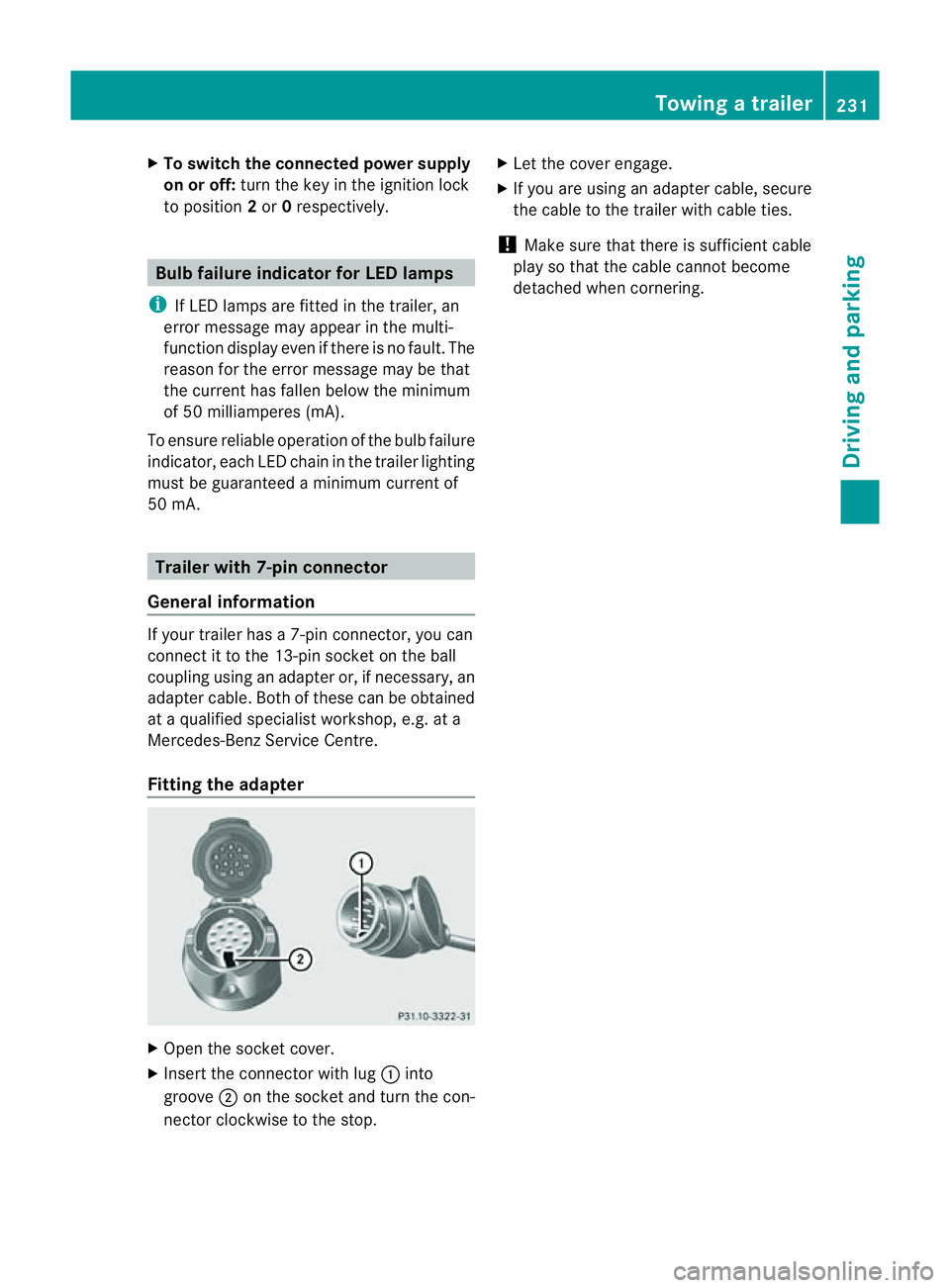
Fitting the adapter X
Open the socket cover.
X Insert the connector with lug :into
groove ;on the socket and tur nthe con-
nec torc lockwise to the stop. X
Let the cover engage.
X If you are using an adapter cable, secure
the cable to the trailer with cable ties.
! Make sure that there is sufficient cable
play so that the cable cannot become
detached when cornering. Towing
atrailer
231Driving andparki ng Z
Page 235 of 389
Problems wit
htrailer towing Problem Possible causes/consequences and
M Solutions
The released ball cou-
pling cannot be
engaged. X
Visit aqualified specialist workshop. The ball coupling does
not unlock, even
though:
R the vehicle is station-
ary.
R no trailer cable is
connected.
R the release knob to
unlock the ball cou-
pling has been pulled
for more than asec-
ond. The on-boar
dvoltage is insufficient.
X Start the engine.
If the ball coupling still does not unlock:
X Visit aqualified specialist workshop. 232
Towin
gatrailerDriving and parking
Page 242 of 389
The
Audio ,
Navi and
Tel menus differ slightly in vehicles with an audio system and vehicles
with COMAN DOnline. The example sgiven in this Owner' sManual apply to vehicles equipped
with COMAND Online. Trip menu
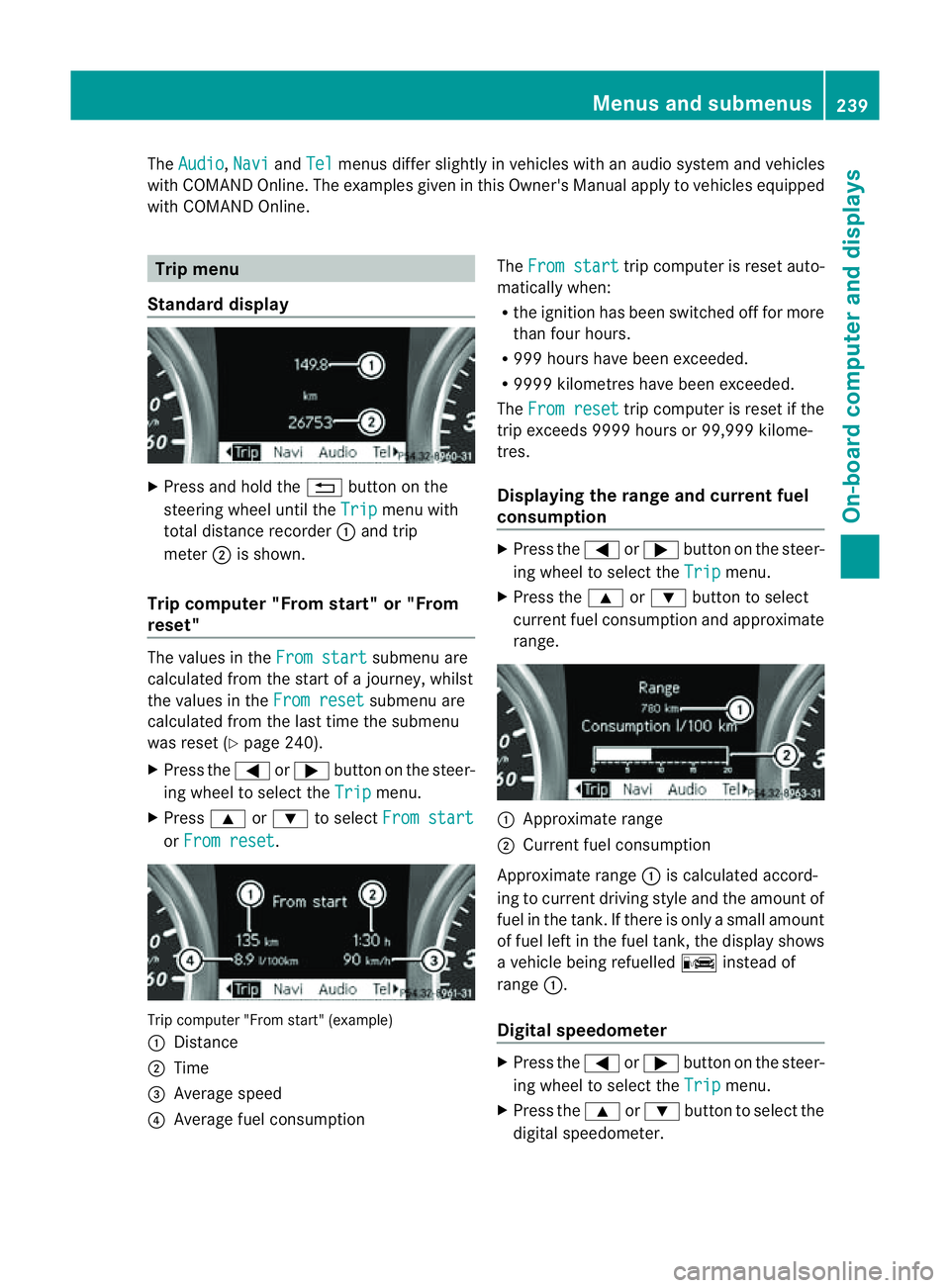
Standard display X
Press and hold the %button on the
steering wheel until the Trip menu with
total distance recorder :and trip
meter ;is shown.
Trip computer "From start" or "From
reset" The values in the
From start submenu are
calculated from the start of ajourney, whilst
the values in the From reset submenu are
calculated from the last tim ethe submenu
was reset (Y page 240).
X Press the =or; button on the steer-
ing wheel to selec tthe Trip menu.
X Press 9or: to select From start or
From reset .
Tri
pc omputer "From star t"(example)
: Distance
; Time
= Average speed
? Average fuel consumption The
From start trip computer is reset auto-
matically when:
R the ignition has been switched off for more
than four hours.
R 999 hours have been exceeded.
R 999 9kilometres have been exceeded.
The From reset trip computer is reset if the
trip exceeds 999 9hour sor9 9,999 kilome-
tres.
Displaying the rang eand cur rent fuel
consumption X
Press the =or; button on the steer-
ing wheel to select the Trip menu.
X Press the 9or: button to select
curren tfuel consumption and approximate
range. :
Approximate range
; Current fuel consumption
Approximate range :is calculated accord-
ing to curren tdriving style and th eamount of
fue lint he tank. If ther eisonlyasmal lamount
of fue lleft in the fuel tank ,the display shows
av ehicle being refuelled Cinstead of
range :.
Digital speedometer X
Press the =or; button on the steer-
ing whee ltoselect the Trip menu.
X Press the 9or: button to select the
digital speedometer. Menus and submenus
239On-boardcomputer and displays Z
Page 245 of 389
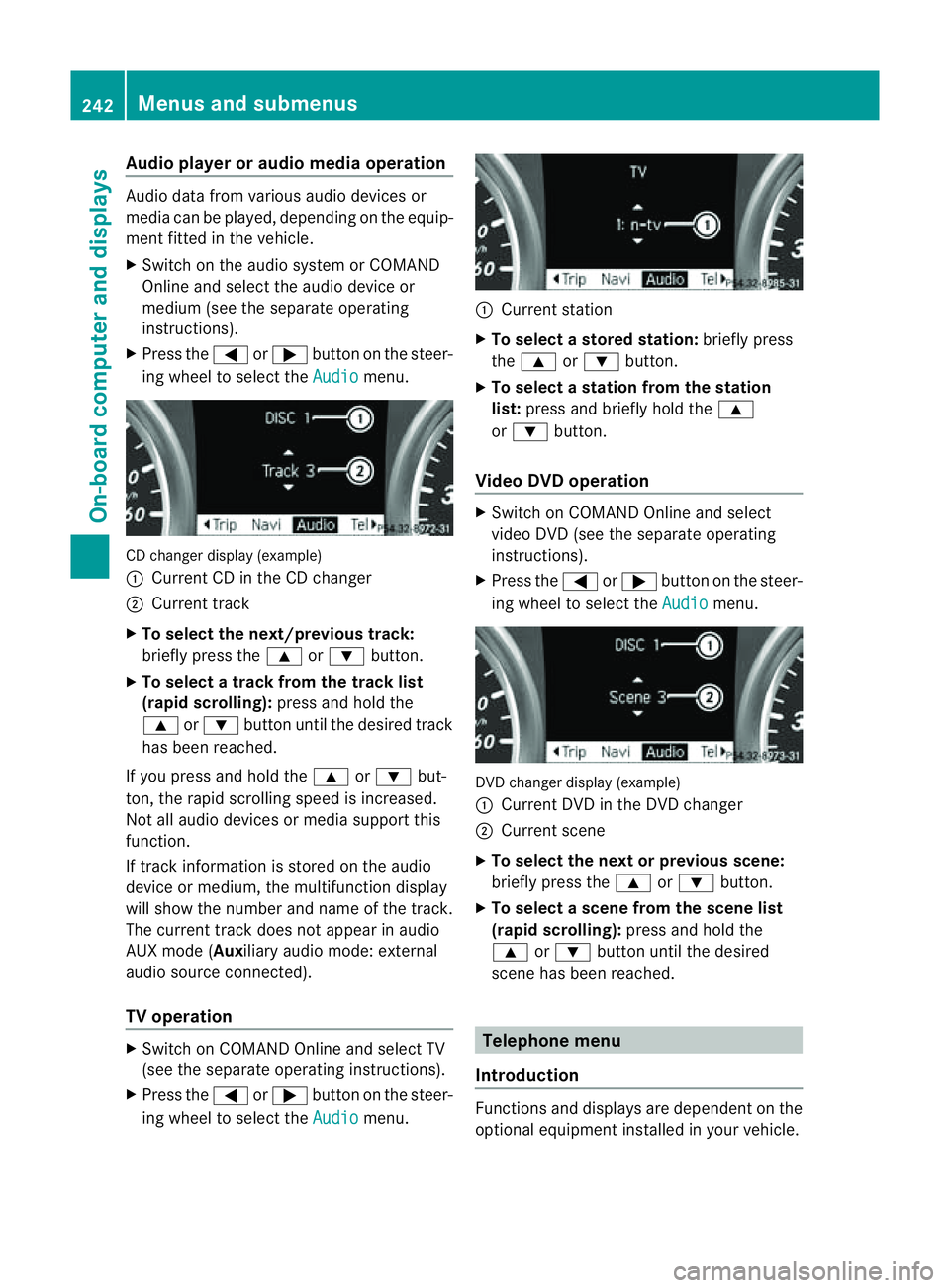
Audio player or audio media operation
Audio dat
afromv arious audio device sor
media can be played, depending on the equip-
ment fitted in the vehicle.
X Switch on the audio system or COMAND
Online and select the audio de vice or
medium (see the separat eoperating
instructions).
X Press the =or; buttononthe steer-
ing wheel to selec tthe Audio menu.
CD changer display (example)
:
Curren tCDint he CD changer
; Curren ttrack
X To sele ctthe next/previous track:
bri efly press the 9or: button.
X To select atrack from the track list
(rapid scrolling): press and holdthe
9 or: button until the desired track
has been reached.
If you press and hold the 9or: but-
ton ,the rapi dscrolling spee disincreased.
Not al laudi od evices or media support this
function.
If track information is stored on the audio
device or medium, the multifunction display
will show the numbe rand name of the track.
The current track does no tappear in audio
AU Xm ode (Auxiliar yaudio mode: external
audio source connected).
TV operation X
Switch on COMAND Online and select TV
(see the separate operating instructions).
X Press the =or; button on the steer-
ing wheel to select the Audio menu. :
Current station
X To select astore dstation: brieflypress
the 9 or: button.
X To select astation from the station
list: press and briefl yholdt he 9
or : button.
Vid eoDVD operation X
Switch on COMAND Online and select
video DVD (see the separate operating
instructions).
X Press the =or; button on the steer-
ing whee ltoselect the Audio men
u. DVD change
rdisplay (example)
: Curren tDVD in th eDVD changer
; Current scene
X To select the next or previous scene:
briefl ypres sthe 9 or: button.
X To selec tascene from th escene list
(rapid scrolling): press and hold the
9 or: button until th edesired
scene ha sbeenr eached. Telephon
emenu
Introdu ction Functions and display
sare dependen tonthe
optional equipmen tinstalled in your vehicle. 242
Menus and submenusOn-board computer and displays