engine MERCEDES-BENZ M-CLASS SUV 2011 Repair Manual
[x] Cancel search | Manufacturer: MERCEDES-BENZ, Model Year: 2011, Model line: M-CLASS SUV, Model: MERCEDES-BENZ M-CLASS SUV 2011Pages: 389, PDF Size: 9.22 MB
Page 171 of 389
bodywork structure, steering, chassis and
exhaust system for damage.
X After driving for extended periods across
sand, mud, gravel, water or in similarly dirty
conditions, have the brak ediscs, wheels,
brake pads/linings and axle joints checked
and cleaned.
X If you detec tstrong vibrations afte roff-road
travel ,check for foreign objects in the
wheels and drive train and remov ethem if
nec essary. Foreign object scan disturb the
balance and cause vibrations.
Driving on sand Observe the following rules when driving on
sand:
R vehicles with the ON&OFFROAD pack-
age: select off-road program 1
(Y page 222).
R vehicles without the ON&OFFROAD
package: select the off-road program
(Y page 222).
R select ahigher vehicle level.
R select ashift range appropriate to the ter-
rain.
R drive quickly to overcom ethe rolling resist-
ance. Otherwise, the vehicle could dig itself
int ot he sand.
R drive in the track sofother vehicle sifpos-
sible. Make sure that the ruts ar enot too
deep, that the sand is fir menoug hand that
your vehicl ehas sufficient ground clear-
ance.
Rut sand gravel roa ds Observe the followin
grules when driving
along ruts in off-road terrain or on roads with
loos egravel:
! Check that th eruts are not too deep and
that your vehicle has sufficient clearance.
Otherwise, your vehicle could be damaged
or bottom out and get stuck. R
activate the off-road program
(Y page 222).
R vehicles with the AIRMATI Cpackage:
select araised vehicle level.
R avoid high engine speeds.
R restrict the shift range to 1.
R drive slowly.
R where ruts are too deep, drive with the
wheels on one side on the middle section
of turf if possible.
Driving over obstacles !
Obstacles could damage the floor of the
vehicle or components of the chassis .Ask
passenger sfor guidance when drivin gover
larg eobstacles. Any damage to the vehicle
always increases the risk of an accident.
Observe the followin grules when driving over
tree stumps, large stones and other obsta-
cles:
R Select the off-road program (Y page 222)
or the LOW RANGE off-road gear
(Y page 223).
R Raise the vehicle level.
R Avoid high engine speeds.
R Restrict the shift range to 1.
R Drive very slowly.
R Drive straight over the centre of obstacles. Travellin
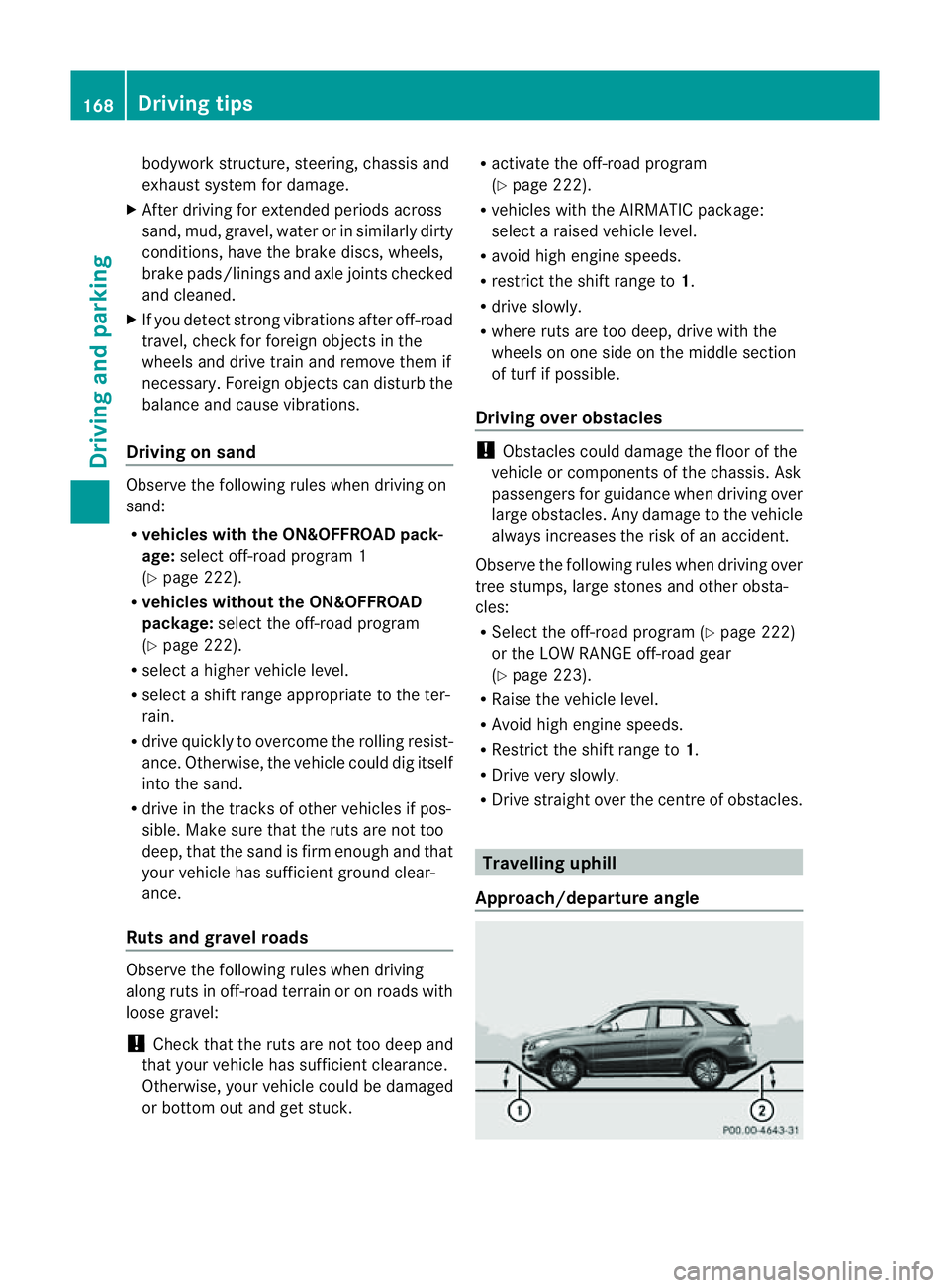
guphill
Approach/departur eangle 168
Driving tipsDriving and parking
Page 173 of 389
erwise, the vehicle could slip sideways, tip
and over turn.
R Before tackling steep downhill gradients,
select shift range 1.
R Activat eDSR. If this is not suffici ent, brake
gently. Whe ndoing so, make sure that the
vehicle is facing in the direction of the line
of fall.
R Check that the brakes ar eworking normally
after along downhil lstretch.
i Off-road ABS is activated when the off-
road program or LOW RANGE off-road gear
is selected.
At speeds belo w30km/h, th efront wheels
lock cyclicall yduring braking. The digging-
in effect achieved in the process reduces
the stopping distance when driving off-
road. The steerability of the vehicle is con-
siderably reduced if the wheel slock. Driving systems
Cruise control
Important safety notes G
WARNING
Do not change down for additiona lengine
braking on aslippery road surface. This could
cause the drive wheels to lose their grip and
the vehicle could skid. G
WARNING
Cruise control cannot take account of road
and traffic conditions.
Always pay attention to traffic conditions
even when cruise control is activated.
Cruise control is only an aid designed to assist
driving. You are responsible for the vehicle's
speed and for braking in good time. G
WARNING
Do not use cruise control
R in traffic conditions that do not allow you to
drive at aconstant speed (e.g. heavy traffic or winding roads). You may otherwise
cause an accident.
R on slipper yroads. The driv ewheels may
lose their grip when brakin goraccelerating
and the vehicle may skid.
R whe nthere is low visibility, e.g. due to fog,
heav yrain or snow.
General notes Cruise control maintains
aconstant road
speed for you. It brakes automatically in order
to avoid exceeding the set speed. On long and
steep downhil lgradients ,especially if the
vehicle is laden or towing atrailer, yo umust
select shift range 1,2or 3in good time. By
doing so, you will make use of the braking
effect of the engine. This relieves the load on
the brake system and prevent sthe brakes
from overheating and wearing too quickly.
Use cruise con trol only if roa dand traffic con-
ditions make it appropriate to maintain a
steady speed for aprolonged period. Yo ucan
store any road spee dabove 30 km/h.
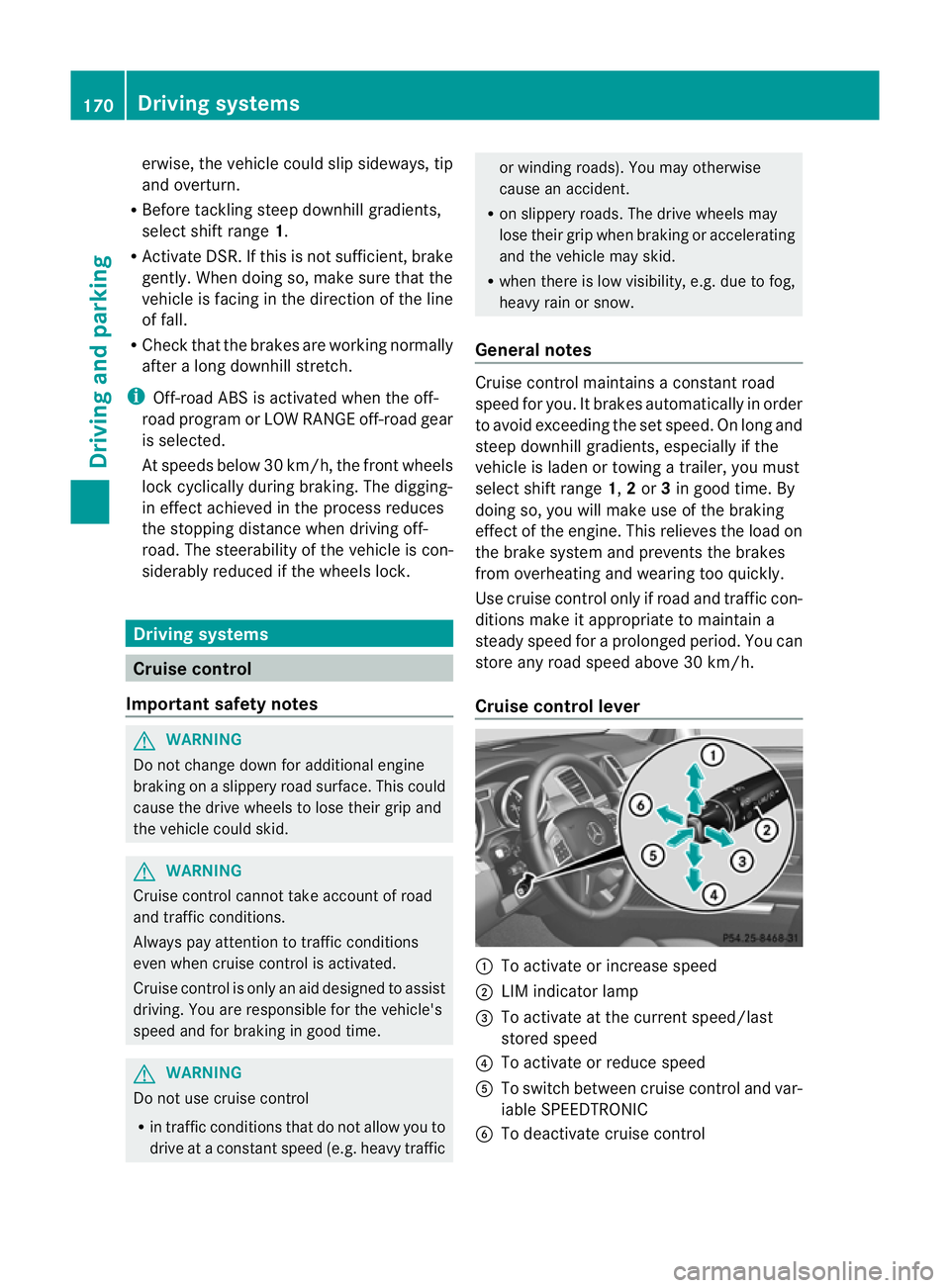
Cruise contro llever :
To activate or increase speed
; LIMi ndicato rlamp
= To activate at the current speed/last
stored speed
? To activate or reduce speed
A To switch between cruise control and var-
iable SPEEDTRONIC
B To deactivate cruise control 170
Driving systemsDriving and parking
Page 175 of 389
X
Makin gadjustments in 1km/h incre-
ments: briefly press the cruise control
leve rtot he pressur epoint.
The last stored speed increases or decrea-
ses in 1km/h increments.
X Makin gadjustments in 10 km/h incre-
ments: briefly pres sthe cruise con trol
leve rbeyond the pressur epoint.
The last stored speed increases or decrea-
ses in 10 km /hincrements.
i Cruise control is not deactivated if you
depress the accelerator pedal. For exam-
ple, if you accelerate briefly to overta ke,
cruis econtrol adjusts the vehicle' sspeed
to the last speed stored after you have fin-
ished overtaking.
Deactivating cruise control There are several ways to deactivat
ecruise
con trol:
X Briefl ypres sthe cruise con trol leve rfor-
wards B.
or
X Brake
or
X Briefl ypres sthe cruise con trol leve rinthe
direction of arrow A.
Variable SPE EDTRONIC is selected. LIM
indicator lamp ;in the cruise control lever
lights up.
Cruise control is automatically deactivated if:
R you engage the electric parkin gbrake.
R yo ua re driving at less than 30 km/h.
R ESP ®
intervenes or if yo udeactivate ESP ®
.
R you activate DSR.
R you activate off-road program 2onvehicles
with the ON&OFFROA Dpackage.
R you shift the transmissio ntoposition N
while driving.
If cruise control is deactiva ted, you will hear
aw arning tone. You will see the Cruisecontro
loff message in th
emultifunction
display for approximately five seconds. i
When you switch off the engine, the last
spee dstored is cleared. SPEEDTRONIC
Important safet ynotes G
WARNING
Never depress the brake pedal continuously
while the vehicle is in motion ,e.g. never cause
the brakes to rub by applying constant slight
pedal pressure. This causes the brake system
to ove rheat, increases the braking distance
and can lead to the brakes failing completely. G
WAR
NING
Do not change down for additional engine
braking on aslippery road surface. This could
cause the drive wheels to lose their grip and
the vehicle could skid. G
WARNING
SPEEDTRONIC is only an aid designed to
assist driving. You are responsible for the
vehicle's speed and for braking in good time. G
WARNING
If ther eisac hange of drivers, advise the new
drive rofthe limit speed stored.
Only use variable SPE EDTRONI Cifyou will not
have to accelerate suddenl ytoaspeed above
that stored as the limit speed. You could oth-
erwise cause an accident.
You can only exceed the limit speed stored if
you deactivate variable SPE EDTRONIC:
R using the cruise control lever
R by depressin gthe accelerator pedal
beyon dthe pressure point (kickdown)
It is not possible to deactivate variable
SPE EDTRONI Cbybraking.
General notes SPE
EDTRONIC brakes automatically so that
you do not exceed the set speed. On long and
steep downhil lgradients ,especially if the 172
Driving systemsDriving and parking
Page 176 of 389
vehicl
eisladen or towing atrailer, yo umust
select shift range 1,2or 3in good time. By
doing so, you wil lmake use of the braking
effect of the engine. This relieves the loa don
the brake syste mand prevents the brakes
from overheating and wearing too quickly. If
you need additiona lbraking, depress the
brake peda lrepeatedly rather than continu-
ously.
You can set avariable or permanent limit
speed:
R variable for speedlimits, e.g. in built-up
areas
R permanent for long-term spee drestric-
tions, e.g. when driv ingw ith winter tyres
fitted (Y page174)
i Thes pee dindicated in the spe edometer
ma ydiffer slightly from the limit speed
sto red.
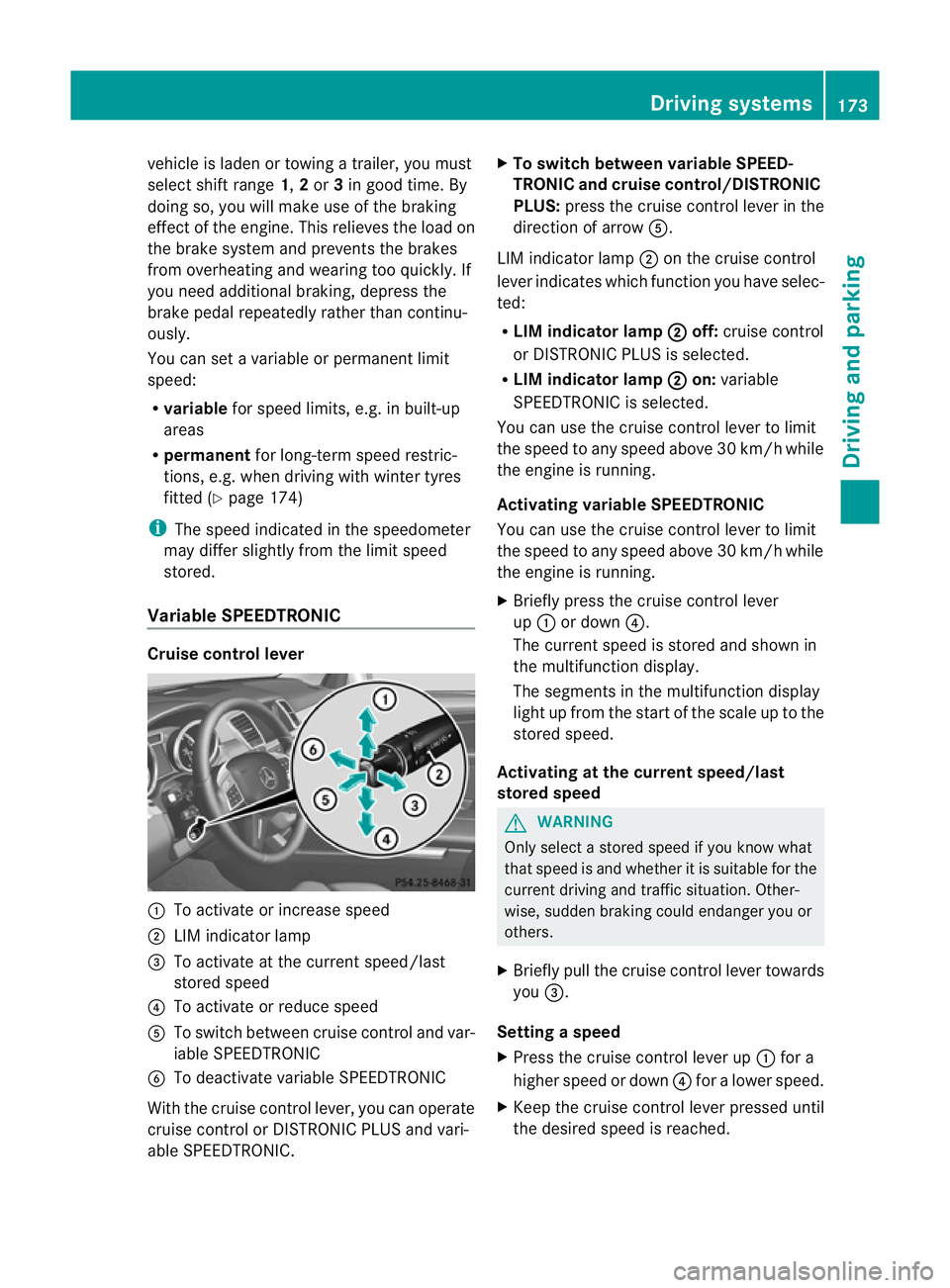
Variable SPEEDTRONIC Cruise control lever
:
To acti vate or increase speed
; LIM indicator lamp
= To activate at the curren tspeed/last
stored speed
? To acti vate or reduce speed
A To switch between cruise control and var-
iable SPEEDTRONIC
B To deactivate variable SPEEDTRONIC
With the cruise control lever, you can operate
cruise control or DISTRONIC PLUS and vari-
able SPEEDTRONIC. X
To switch between variable SPEED-
TRONIC and cruise control/DISTRONIC
PLUS: press the cruise control lever in the
direction of arrow A.
LIM indicator lamp ;on the cruise control
lever indicates which function you have selec-
ted:
R LIM indicator lamp ; off:
cruise control
or DISTRONIC PLUS is selected.
R LIM indicator lamp ; on:
variable
SPEEDTRONIC is selected.
You can use the cruise control lever to limit
the speed to any speed above 30 km/ hwhile
the engin eisrunning.
Activating variable SPEEDTRONIC
You can use the cruise control lever to limit
the spee dtoany speed above 30 km/h while
the engine is running.
X Briefly pres sthe cruise con trollever
up : or down ?.
The curren tspeed is stored and shown in
the multifunction display.
The segment sinthe multifunction display
light up from the star tofthe scal euptot he
stored speed.
Activating at th ecurren tspeed/last
store dspeed G
WARNING
Only select astored speed if you know what
that speed is and whether it is suitable for the
current driving and traffic situation. Other-
wise ,sudden braking could endanger you or
others.
X Briefly pull the cruise control lever towards
you =.
Setting aspeed
X Press the cruise contro llev er up :for a
higher speed or down ?for alower speed.
X Keep th ecruis econtr ol leve rpresse duntil
the desired speed is reached. Drivin
gsystems
173Drivingand park ing Z
Page 177 of 389
X
Release the cruise con trol lever.
The ne wspeed is stored.
X Makin gadjustments in1k m/ hincre-
ments: brieflypress the cruis econtrol
lever to the pressurepoint.
The last store dspeed increase sordecrea-
ses in 1km/ hincre ments.
X Mak ing adjustment sin10km/hincre-
ments: brieflypress the cruis econtrol
lever beyon dthe pressur epoint.
The last store dspeed increase sordecrea-
ses in 10 km/h increments.
Deactivating variabl eSPEED TRONIC G
WARNING
It is not possible to deactivate variable Speed-
tronic by braking.
There are severa lways to deactivate variable
SPEEDTRONIC:
X Briefly press the cruise control lever for-
wards B.
or
X Briefly press the cruise control lever in the
direction of arrow A.
LIM indicator lamp ;in the cruise control
lever goes out. Variable SPEEDTRONIC is
deactivated.
Cruise control or DISTRONIC PLUS is selec-
ted.
Variable SPEEDTRONIC is automatically
deactivated if:
R you depress the accelerator pedal beyond
the pressure point (kickdown), but only if
your current spee ddoes not differ by more
than 20 km /h from the stored speed. You
will hear awarning tone if this is the case.
R you activate DSR.
R you activate off-road program 2(vehicles
wit hthe ON&OFFROAD package).
i When you switch off the engine, the last
speed stored is cleared. Permane
nt SPEEDTRONIC You can use the on-board computer to limit
the speed permanently to
avalue between
16 0k m/ h(e.g. for driving on winter tyres)
and th emaximum speed ( Ypage 249).
Shor tlyb efore th estore dspeed is reached, it
appear sinthe multifunction display.
Permanent SPEEDTRONIC remain sactive,
even if variabl eSPEEDTRONI Cisdeactivated.
You can note xceed the sto redl imit speed,
even if you depress the accelerator pedal
beyond the pressure point (kickdown). DISTRONIC PLUS
Importan tsafety notes G
WARNING
Do not change down for additiona lengine
braking on aslippery road surface. This could
cause the drive wheels to lose their grip and
the vehicle could skid. G
WARNING
DISTRONIC PLU Siso nly an aid designe dto
assis tdriving. Th edrive rremain sfully respon-
sible for the vehicle's distance from other
vehicles, the vehicle's spee dand for braking
in goo dtime.
DISTRONIC PLU Sdoes not react in particular
to:
R pedestrians
R stationar yobstacles on the road, e.g. stop-
ped or parked vehicles
R oncoming and crossin gtraffic
DISTRONIC PLUS may not detect narrow vehi-
cle sdriving in front, e.g .motorcycles, or vehi-
cles driving on adifferen tline. Therefore,
always pay attention to traffic condition seven
when DISTRO NICP LUS is activated. Other-
wise ,you may fai ltorecognise danger sin
time, cause an accident and injure yourself
and others. 174
Drivin
gsystemsDrivin gand parking
Page 178 of 389
G
WARNING
DISTRONIC PLUS canno ttake account of road
and traffic conditions. If DISTRONI Cdoes not
recognise or no longer recognises the vehicle
in front, do not activate DISTRONIC or, if it is
alr eady active, deactivate it. This is especially
the case:
R befor ecorners
R on filter lanes
R when changing to alane with faster moving
traffic
R in comple xdriving situations or where lanes
are diverte d,e.g. at roadworks on amotor-
way
DISTRONIC PLU Sotherwise maintains the
current spe ed setbyyou or accelerates up to
the set speed.
DISTRONIC PLU Scannot take account of
weather conditions. Deactivate, or do not
activate, DISTRONI CPLUS:
R if th eroads are slippery, snow-covered or
icy .The wheels coul dlose their grip when
brakin goraccelerating .The vehicle could
star ttos kid.
R if the sensors are dirty or there is poo rvis-
ibility, e.g. due to snow, rain or fog. Dis-
tance control may be impaired.
Always pay attention to traffic conditions
even when DISTRONIC PLU Sisactivate d.
Otherwise, you ma yfail to recognise dangers
in time, caus eanaccident and injure yourself
and others. G
WARNING
DISTRONIC PLUS brake syourvehicle up to a
maximu mof4m /s2
depending on its speed.
This corresponds to approximately 40% of
your vehicle's maximum braking power. You
must als oapply the brakes yourself if this
braking power is not sufficient.
If DISTRONI CPLUS detects arisk of collision
with avehicle in front, an intermit tent warning
tone sounds. In addition, the ·distance
warning lamp in the instrument cluste rlights
up. Brak etoavoidac ollision. G
WAR
NING
The vehicle can be braked when DISTRONIC
PLUS is activated. For this reason, deactivate
DISTRONIC PLUS if the vehicle is to be set in
motion by othe rmeans (e.g. in acar wash or
by towing).
The radar senso rsystem is automatically
deactivated near radio teles cope facilities
(Y page 38 0).
If you want DISTRONIC PLUS to assist you,
the radar sensor syste mmust be activated
(Y page 249 )and operational.
General notes DISTRONIC PLUS regulates the speed and
automati cally helps you maintain the dis-
tanc etot he vehicle detected in front. It
brakes automatically in orde rtoavoid
exceedi ngthe set speed.
On long and stee pdownhil lgradients, espe-
ciall yifthe vehicle is laden or towing atrailer,
yo um ust select shift range 1,2or 3in good
time. By doing so, you will make use of the
braking effec tofthe engine. This relieves the
load on the brake system and prevents the
brakes from overheating and wearing too
quickly.
If DI STRONIC PLUS detects aslower-moving
vehicle in front ,your vehicle is braked in order
to maintain the preset distance to the vehicle
in front.
If ther eisnov ehicle in front ,DISTRONIC
PLUS operate sinthe sam eway as cruise
control in the spee drange between
30 km/h and 200 km/h. If avehicle is driving
in fron tofyou, DI STRONIC operates in the
speed range betwee n0km/h and
200 km/h.
Do not us eDISTRONIC PLUS on roa dswith
steep gradients. Driving systems
175Drivingand parking Z
Page 182 of 389
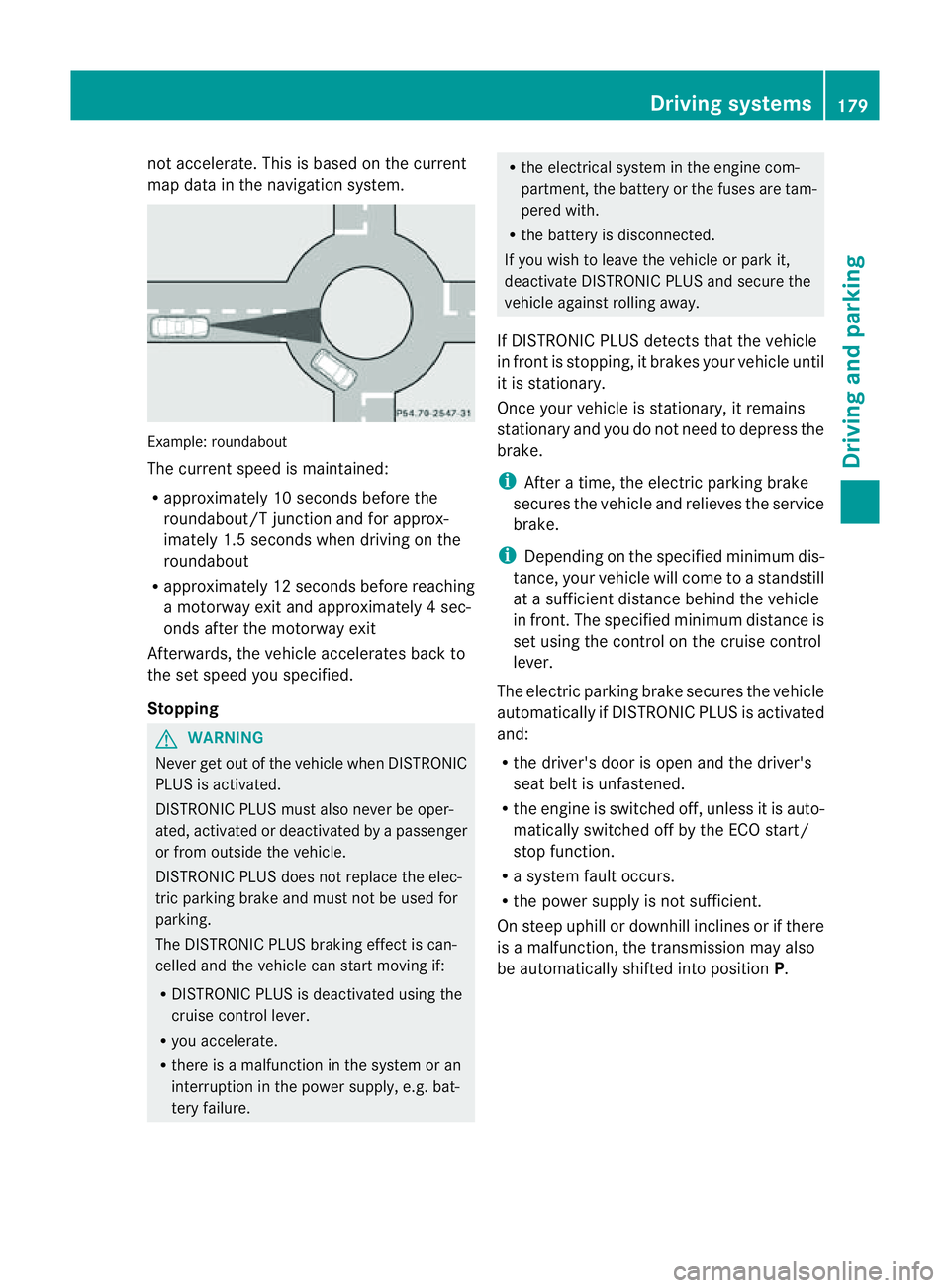
not accelerate. Thi
sisbasedonthe current
map data in the navigation system. Example: roundabout
The current speed is maint
ained:
R approximatel y10second sbefore the
roundabout/T junction and for approx-
imatel y1.5 second swhend riving on the
roundabout
R approximatel y12second sbefore reaching
am otorwa yexita nd approximatel y4sec-
onds after the motorwa yexit
Afterwards ,the vehicle accelerates bac kto
the set speed you specified.
Stopping G
WARNING
Never get out of the vehicle when DISTRONIC
PLUS is activated.
DISTRONIC PLUS must also never be oper-
ated, activated or deactivated by apassenger
or from outside the vehicle.
DISTRONIC PLUS does not replace the elec-
tric parkin gbrake and mus tnot be used for
parking.
The DI STRONIC PLUS brakin geffect is can-
celle dand the vehicl ecan start movin gif:
R DISTRONIC PLUS is deactivated using the
cruis econtrol lever.
R you accelera te.
R there is amalfunction in the system or an
interruption in the power supply, e.g. bat-
tery failure. R
the electrical system in the engine com-
partment, the batter yorthe fuses ar etam-
pered with.
R the batter yisdisconnected.
If you wish to leave the vehicle or park it,
deactiva teDISTRONIC PLUS and secure the
vehicle agains trolling away.
If DI STRONIC PLUS detects that the vehicle
in fron tisstopping, it brakes your vehicle until
it is stationary.
Once your vehicle is stationary, it remains
stationary and you do not need to depress the
brake.
i After atime, the electric parkin gbrake
secure sthe vehicle and relieves the service
brake.
i Depending on the specifie dminimum dis-
tance, your vehicle will come to astandstill
at as ufficient distance behind the vehicle
in front .The specifie dminimum distance is
set using the control on the cruise control
lever.
The electric parkin gbrake secure sthe vehicle
automatically if DI STRONIC PLUS is activated
and:
R the driver's doo risopen and the driver's
seat belt is unfastened.
R the engine is switched off ,unles sitisa uto-
matically switched off by the ECO start/
stop function.
R as ystem fault occurs.
R the powe rsupply is not sufficient.
On steep uphill or downhill inclines or if there
is am alfunction, the transmission may also
be automatically shifted into position P. Driving systems
179Drivingand parking Z
Page 184 of 389
or
X
Briefl ypres sthe cruise con trol leve rinthe
direction of arrow =.
Variable SPE EDTRONIC is selected. LIM
indicator lamp ;in the cruise control lever
lights up.
When you deactivate DI STRONIC PLUS, the
DISTRONIC PLU Soff message is show
nin
the multifunction display for approximately
five seconds.
i The last speed stored remains stored until
you switch off the engine.
i DISTRONIC PLUS is not deactivated if you
depress the accelerator pedal. If you accel-
erate to overtake, DISTRONIC PLUS
adjusts the vehicle's speed to the last
speed stored after you have finished over-
taking.
DISTRONIC PLUS is automatically deactiva-
ted if:
R you engag ethe electric parkin gbrake or if
th ev ehicle is automatically secured with
the electric parking brake.
R you are driving slower than 25 km /hand
there is no vehicle in front ,orifthe vehicle
in front is no longer detec ted.
R ESP ®
intervenes or if you deactivat eESP®
.
R the transmission is in the P,Ror Nposition.
R the vehicle is near aradio telescop efacility
(Y page 380).
R you switch off the radar senso rsystem
(Y page 249).
R you pull the cruise control lever towards
you in order to pull away and the front-
passenger doo rorone of the rear doors is
open.
R you activate DSR.
R you activate off-road program 2onvehicles
with the ON&OFFROA Dpackage.
R the vehicle has skidded.
If DISTRONIC PLUS is deactivated, you will
hear awarning tone. The DISTRONICP LUS off message is show
ninthe multifunction
displa yfor approximately fiv eseconds.
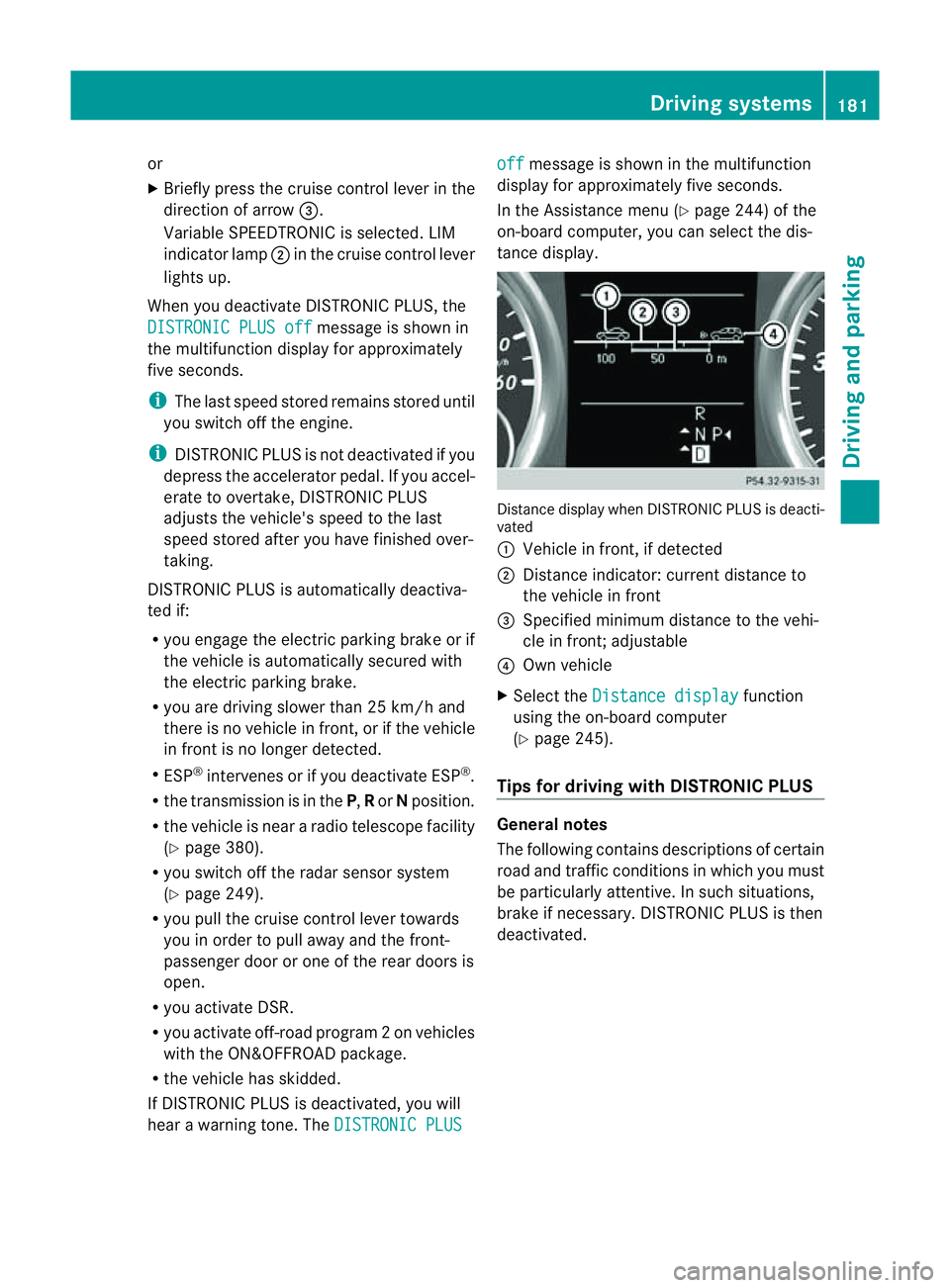
In the Assistanc emenu (Y page 24 4)of the
on-boar dcompu ter,you can select the dis-
tanc edisplay. Distance display when DISTRONI
CPLUS is deacti-
vated
: Vehicl einfront, if detected
; Distance indicator: curre ntdistanc eto
the vehicle in front
= Specified minimum distanc etothe vehi-
cle in front; adjustable
? Own vehicle
X Select the Distancedisplay function
usin gthe on-boar dcompu ter
( Y page 24 5).
Tips for driving with DISTRO NICP LUS Genera
lnotes
The following contains descriptions of certain
road and traf ficc ondition sinwhich you must
be particularly attentive. In such situations,
brake if necessary. DI STRONIC PLUS is then
deactivated. Driving systems
181Drivingand park ing Z
Page 187 of 389
R
Off-road level 2: 60 mm abov ehighway
level
R Off-road level 3: 90 mm above highway
level
Highway/high-speed level !
Make sure there is enough ground clear-
ance when the vehicle is being lowered .It
could oth erwise hit the ground, damaging
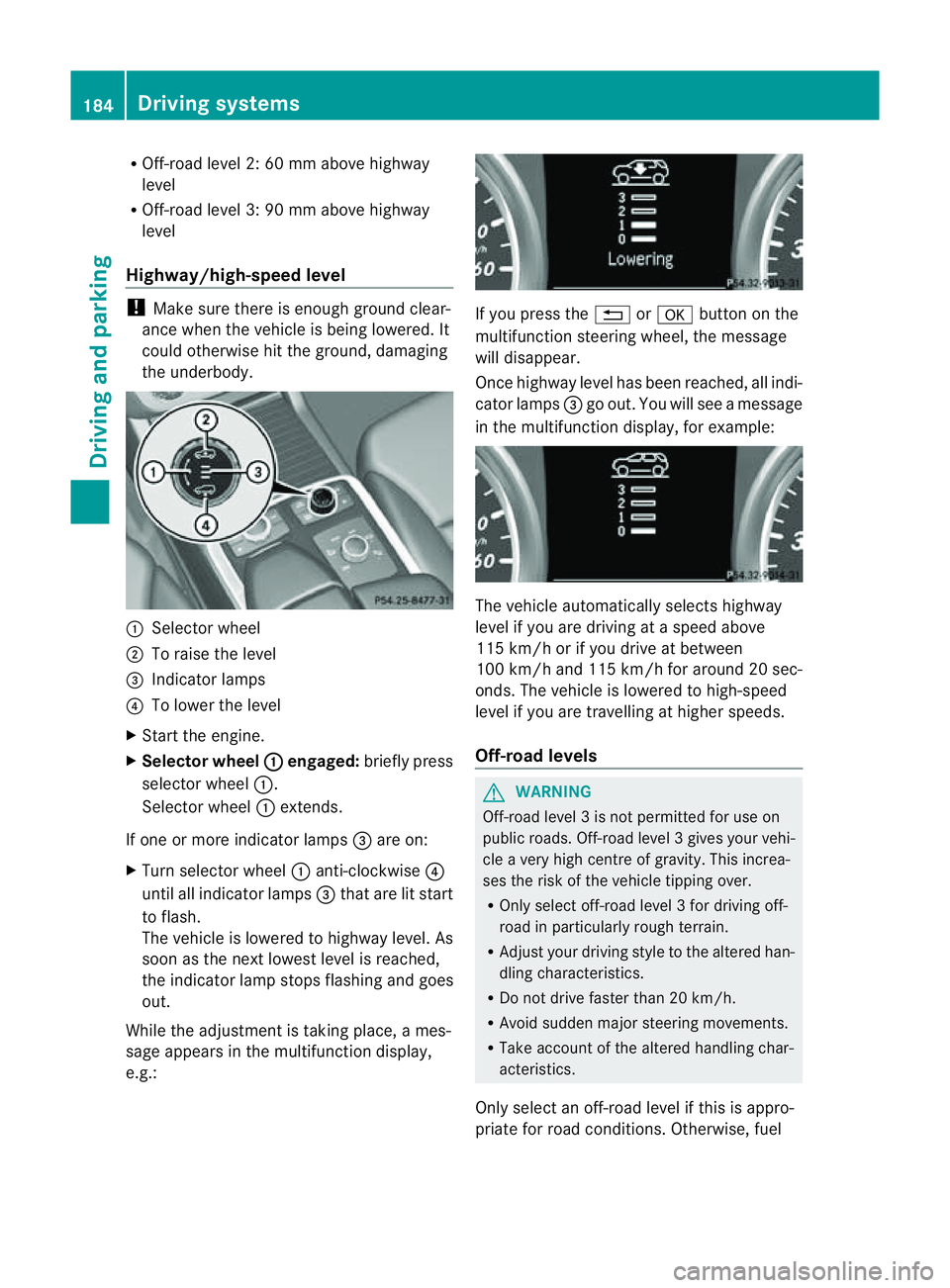
the underbody. :
Selector wheel
; To raise the level
= Indicator lamps
? To lowe rthe level
X Star tthe engine.
X Selector wheel : engaged:
brieflypress
selecto rwheel :.
Selector wheel :extends.
If one or mor eindicato rlamps =are on:
X Turn selector wheel :anti-clockwise ?
until all indicator lamps =that are lit start
to flash.
The vehicle is lowered to highway level. As
soon as the next lowes tlevel is reached,
the indicator lam pstops flashing and goes
out.
While the adjustment is taking place, ames-
sage appears in the multifunction display,
e.g.: If you press the
%ora button on the
multifunction steerin gwheel, the message
will disappear.
Onc ehighway level has been reached, all indi-
cator lamps =go out. You will see amessage
in the multifunction display, for example: The vehicle automatically select
shighway
level if you are drivin gataspeed above
11 5k m/ horify ou drive at between
10 0k m/ hand 11 5km/ hfor aroun d20sec-
onds. The vehicle is lowered to high-speed
level if you are travelling at higher speeds.
Off-road levels G
WARNING
Off-road level 3isnot perm itted for use on
public roads. Off-road leve l3gives your vehi-
cle avery high centr eofgravity. This increa-
se st he risk of the vehi clet ippin gover.
R Onl yselec toff-road level 3for drivin goff-
road in particularl yrough terrain.
R Adjust your drivin gstyle to the altered han-
dling charac teristics.
R Do not drive faster than 20 km/h.
R Avoid sudden majo rsteering movements.
R Take account of th ealtered handling char-
acteristics.
Only select an off-road level if this is appro-
priate for road conditions. Otherwise, fuel 184
Drivin
gsystemsDrivin gand parking
Page 188 of 389
cons
umption may incr easeand handling per-
formance may be affected. X
Start the engine.
X Selecto rwheel : en
gaged: briefly press
selector wheel :.
Selector wheel :extends.
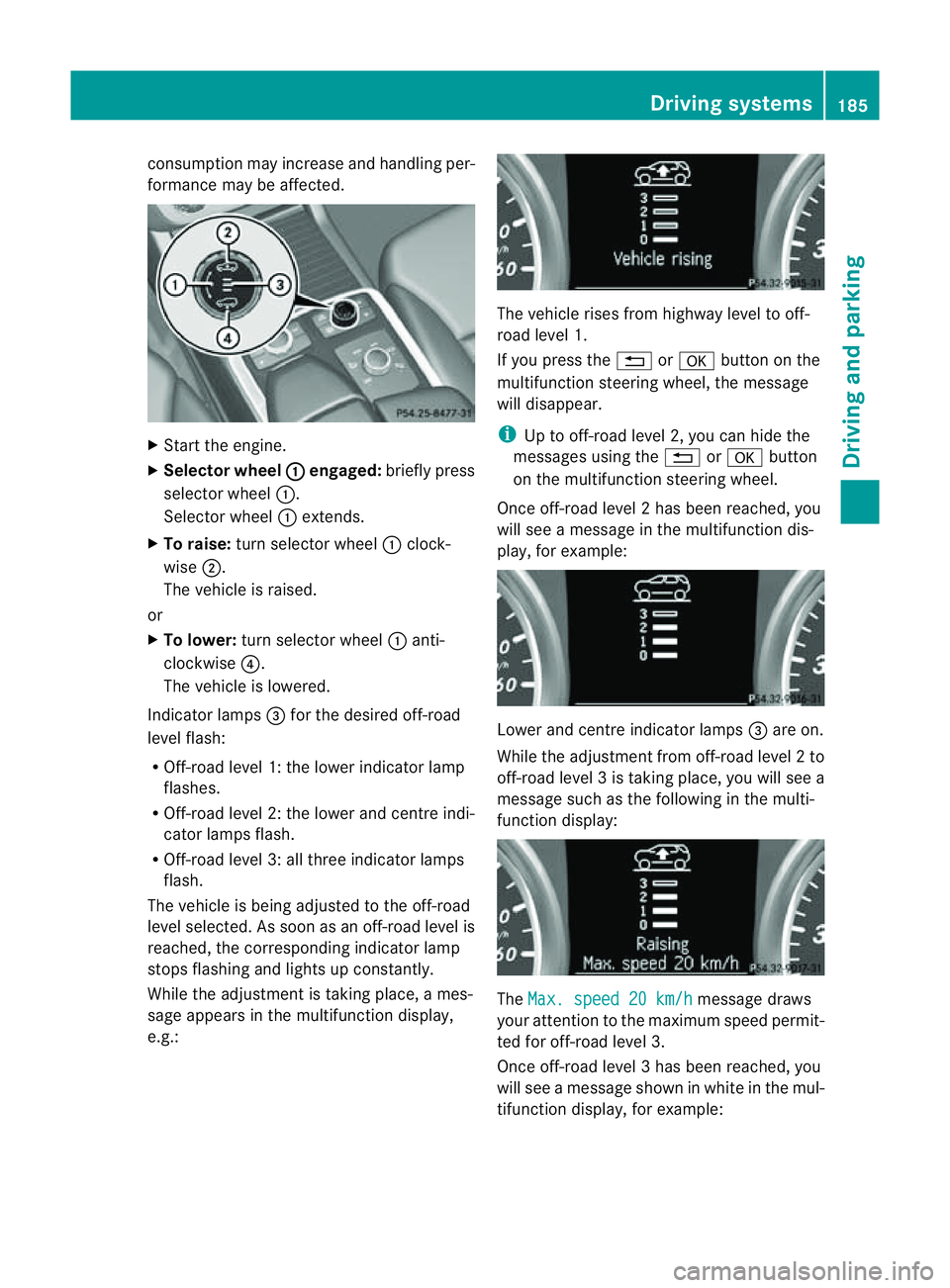
X To raise: turns elector wheel :clock-
wise ;.
The vehicle is raised.
or
X To lower: turns elector wheel :anti-
clockwise ?.
The vehicle is lowered.
Indicator lamps =for the desired off-road
level flash:
R Off-road level 1: thel ower indicator lamp
flashes.
R Off-road level 2: thel ower and centr eindi-
cator lamps flash.
R Off-road leve l3:allthree indicator lamps
flash.
The vehicle is being adjusted to the off-road
leve lselected. As soon as an off-road level is
reached, the corresponding indicator lamp
stops flashing and lights up constantly.
Whil ethe adjustment is taking place, ames-
sage appears in the multifunction display,
e.g.: The vehicle rises from highway level to off-
road level 1.
If you press the %ora button on the
multifunction stee ring wheel, the message
will disappear.
i Up to off-road level 2, you can hid ethe
messages usin gthe % ora button
on the multifunction steering wheel.
Onc eoff-roa dlevel 2has been reached, you
will see amessage in th emultifunction dis-
play, for example: Lower and
centre indicator lamps =areo n.
While the adjustment from off-ro adlevel 2to
off -ro ad level 3istaking place, you will see a
message such as the following in the multi-
function displ ay: The
Max. speed 20 km/h message draws
your attentio ntothe maximum speed permit-
ted for off-road level 3.
Onc eoff-roa dlevel 3has been reached, you
will see amessage shown in whit einthe mul-
ti fu nction display, for example: Driving systems
185Drivingand pa rking Z