warning MERCEDES-BENZ M-CLASS SUV 2011 Repair Manual
[x] Cancel search | Manufacturer: MERCEDES-BENZ, Model Year: 2011, Model line: M-CLASS SUV, Model: MERCEDES-BENZ M-CLASS SUV 2011Pages: 389, PDF Size: 9.22 MB
Page 119 of 389
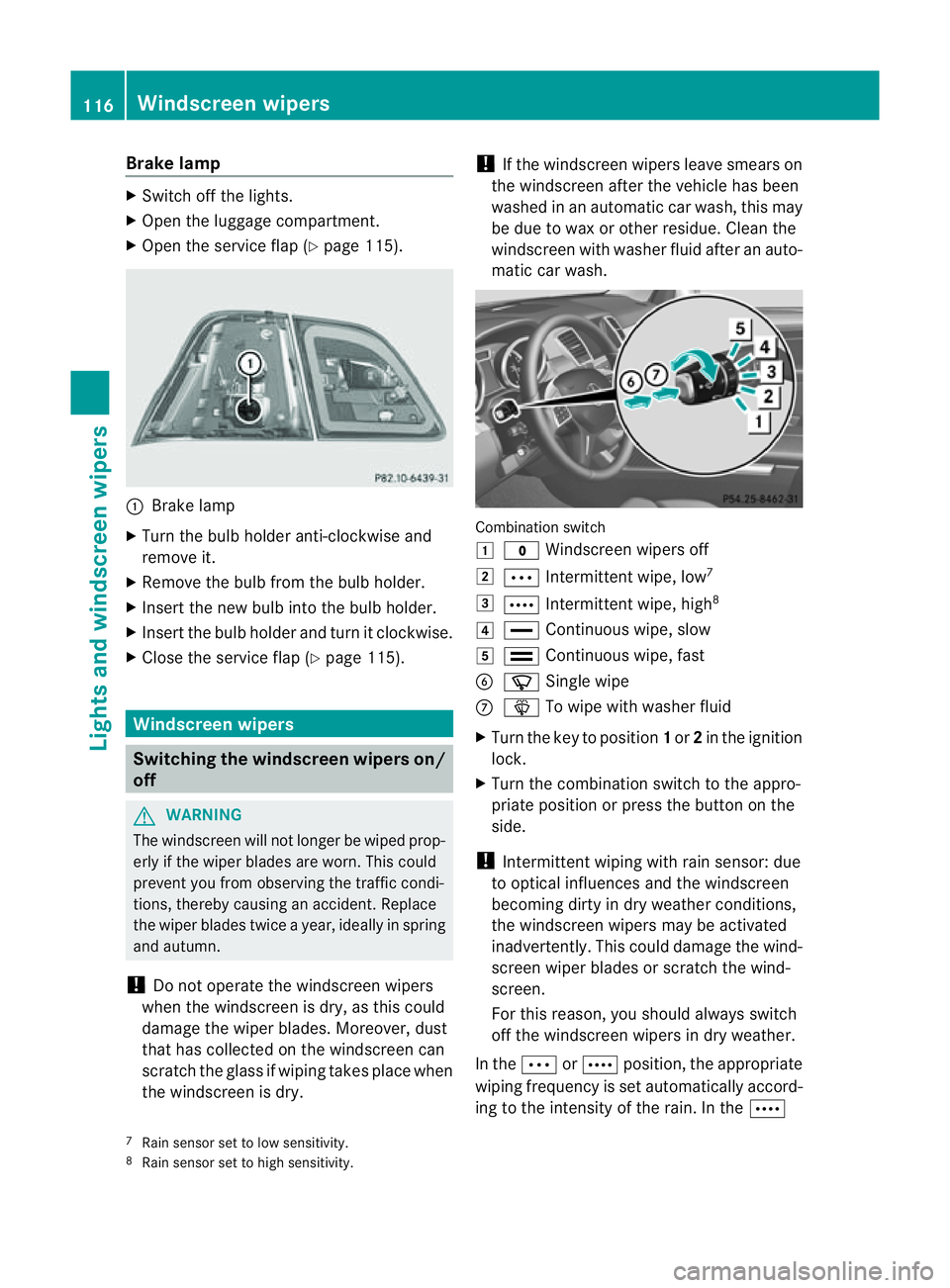
Brake lamp
X
Switch off the lights.
X Ope nthe luggage compartment.
X Open the service fla p(Ypage 115). :
Brake lamp
X Turn the bulb holder anti-clockwise and
remove it.
X Remov ethe bulb from the bulb holder.
X Insert the new bulb int othe bulb holder.
X Insert the bulb holder and tur nitclockwise.
X Close the servic eflap (Y page 115). Windscreen wipers
Switching the windscreen wipers on/
off G
WARNING
The windscreen will not longer be wiped prop-
erly if the wiper blades are worn. This could
preven tyou from observing the traffic condi-
tions, thereby causing an accident .Replace
the wiper blades twic eayear, ideally in spring
and autumn.
! Do not operate the windscreen wipers
when the windscreen is dry, as this could
damage the wiper blades. Moreover ,dust
that has collected on the windscreen can
scratc hthe glass if wipin gtakes place when
the windscreen is dry. !
If the windscreen wipers leave smears on
the windscreen after the vehicle has been
washe dinana utomatic car wash, this may
be due to wax or other residue. Clea nthe
windscreen with washer fluid after an auto-
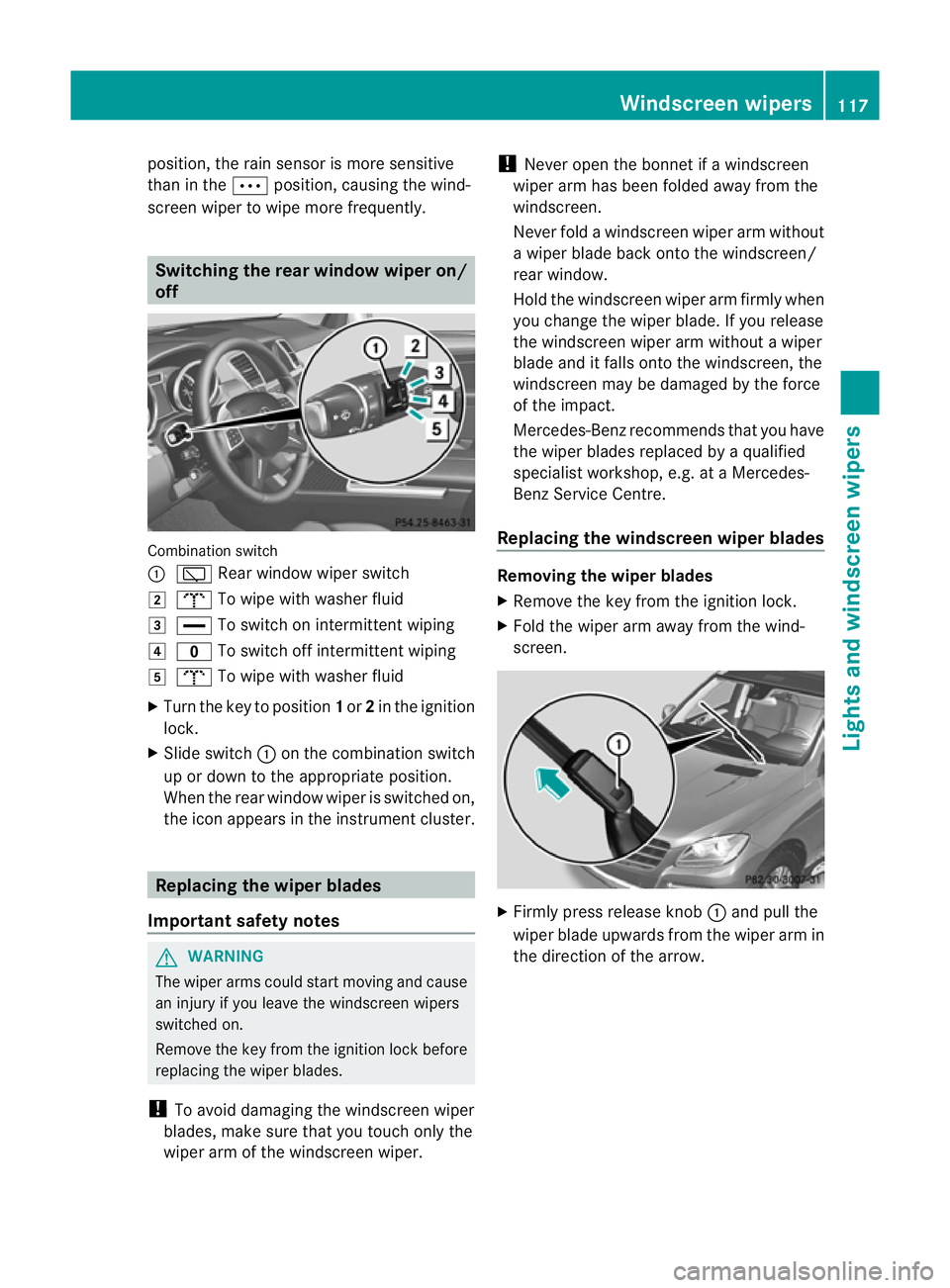
matic car wash. Combination switch
1
$ Windscreen wiper soff
2 Ä Intermittent wipe, low 7
3 Å Intermittent wipe, high 8
4 ° Continuous wipe, slow
5 ¯ Continuous wipe, fast
B í Single wipe
C î To wip ewith washer fluid
X Turn the key to position 1or 2in the ignition
lock.
X Turn the combination switch to the appro-
priate position or press the button on the
side.
! Intermittent wiping with rain sensor: due
to optical influences and the windscreen
becoming dirty in dry weather conditions,
the windscreen wipers may be activated
inadvertently. This could damage the wind-
screen wiper blades or scratc hthe wind-
screen.
For this reason, you should always switch
off the windscreen wiper sind ry weather.
In the ÄorÅ position, th eappropriate
wiping frequenc yisset automatically accord-
ing to the intensity of the rain. In the Å
7 Rain sensor set to low sensitivity.
8 Rain sensor set to high sensitivity. 116
Windscreen wipersLights and windscreen wipers
Page 120 of 389
position
,the rain senso rismore sensitive
than in the Äposition ,causing the wind-
screen wiper to wipe more frequently. Switching the rear window wiper on/
off Combination switch
:
è Rear window wiper switch
2 b To wipe with washe rfluid
3 ° To switch on intermittent wiping
4 e To switch off intermittent wiping
5 b To wipe with washer fluid
X Turn the key to position 1or 2in the ignition
lock.
X Slide switch :on the combination switch
up or down to the appropriate position.
When the rear window wiper is switched on,
the icon appears in the instrument cluster. Replacing the wiper blades
Import ants afety notes G
WARNING
Th ew iper arm scould star tmovin gand cause
an injury if you leave the windscreen wipers
switched on.
Remove the key from the ignition lock before
replacing the wipe rblades.
! To avoid damaging the windscreen wiper
blades, make sure that you touch only the
wiper arm of the windscreen wiper. !
Never open the bonnet if awindscreen
wiper arm has been folded away from the
windscreen.
Never fold awindscreen wiper arm without
aw iper blade back onto the windscreen/
rear window.
Hold the windscreen wiper arm firmly when
you change the wiper blade .Ifyou release
the windscreen wiper ar mwithout awiper
blade and it falls ont othe windscreen ,the
windscreen ma ybedamaged by the force
of the impact.
Mercedes-Benz recommends that you have
the wiper blades replaced by aqualified
specialist workshop, e.g. at aMercedes-
Ben zServic eCentre.
Replacin gthe windscreen wiper blades Removin
gthe wiper blades
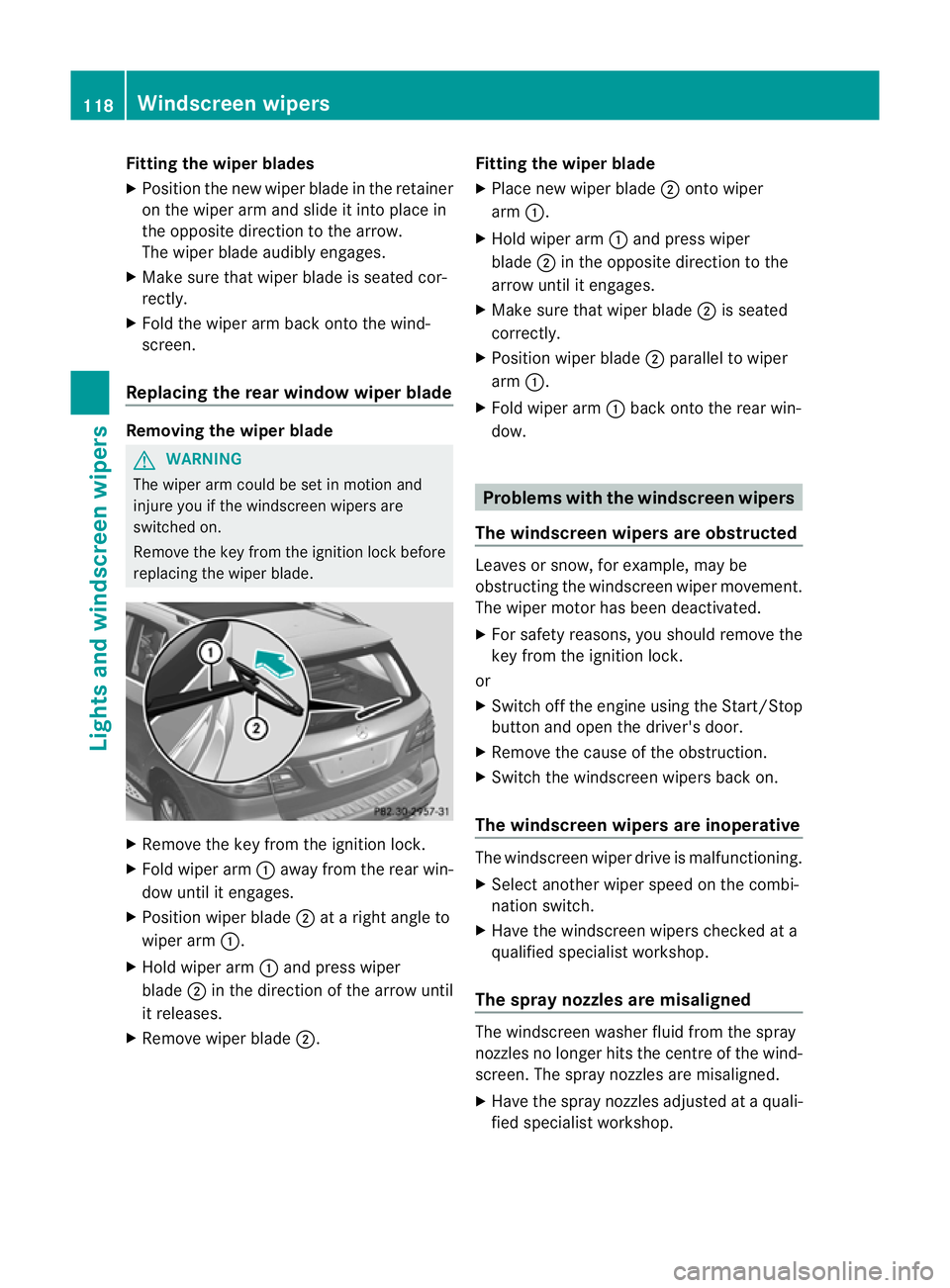
X Remov ethe key fro mtheignition lock.
X Fold th ewiper arm away from th ewind-
screen. X
Firmly press release knob :and pull the
wiper blade upward sfromt he wi per arm in
the direction of the arrow. Windscreen wipers
117Lightsand windscr een wipers Z
Page 121 of 389
Fitting th
ewiper blades
X Positio nthe new wiper blade in the retainer
on the wiper ar mand slide it into place in
the opposite direction to the arrow.
The wipe rblade audibly engages.
X Make sure that wiper blade is seated cor-
rectly.
X Fold the wiper arm back onto the wind-
screen.
Replacing the rear window wiper blade Removing the wiper blade
G
WARNING
The wiper arm could be set in motion and
injur eyou if the windscreen wiper sare
switched on.
Remove th ekey from the ignition lock before
replacing the wiper blade. X
Remov ethe key from the ignition lock.
X Fold wiper arm :away from the rea rwin-
dow until it engages.
X Position wiper blade ;atar ight angle to
wiper arm :.
X Hold wiper arm :and press wiper
blade ;in the direction of the arrow until
it releases.
X Remove wiper blade ;. Fitting the wiper blade
X
Place new wiper blade ;onto wiper
arm :.
X Hold wiper arm :and press wiper
blade ;in the opposite direction to the
arrow until it engages.
X Make sure that wiper blade ;is seated
correctly.
X Position wiper blade ;parallel to wiper
arm :.
X Fold wiper arm :back onto the rear win-
dow. Problems with the windscreen wipers
The windscreen wipers are obstructed Leaves or snow, for example, may be
obstructing the windscreen wiper movement.
The wiper motor has been deactivated.
X
For safety reasons, you should remov ethe
key from the ignition lock.
or
X Switc hoff th eengine using the Start/Stop
butto nand ope nthe driver's door.
X Remove the cause of the obstruction.
X Switc hthe windscreen wiper sback on.
The windscreen wipers are inoperative The windscreen wiper drive is malfunctioning.
X
Select another wiper spee donthe combi-
nation switch.
X Hav ethe windscreen wiper schecked at a
qualified specialist workshop.
Th es pra ynozzles are misaligned The windscreen washer fluid from the spray
nozzles no longer hits the centre of the wind-
screen. The spray nozzles are misaligned.
X Have the spray nozzles adjusted at aquali-
fied specialist workshop. 118
Windscreen wipersLights and windscreen wipers
Page 127 of 389
Q
Switche srear-com partment climate contro lon/of f(Y page 124)
R Reduces the airflow (Y page 127)Notes on using THERMOTRONIC auto-
matic climat econtrol
The following contains notes and recommen-
dations on optimum operation of
THERMO TRONIC automatic climate contro l.
R Activate climate control using the Ãand
¿ buttons .The indicator lamps in the
à and¿ buttons light up.
R In automatic mode, you can also use the
ñ button to set aclimate mode
(FOCUS/MEDIUM/DIFFUSE). The
MEDIU Mlevel is rec ommended.
R Set th etemperature to 22 †.
R Only use the demisting function briefly,
unt ilthe windscreen is clear again.
R Only us ethe air-recircu lation mod ebriefly,
e.g .ift here ar eunpleasant outsid eodours
or when in atunnel. The window scould
otherwise mist up as ,inair-recirculation
mode, no fresh air is drawn int othe vehicle.
R Use the ZON Efunction to adopt the tem-
perature settings on the driver' sside for
the front-passenger side and the rear com-
partment as well. The indicator lamp in the
á button goes out.
R Use the residual heat function if you want
to heat or ventilate the vehicle interior
when the ignition is switched off. The resid-
ual heat function can only be activated or
deactivated with the ignition switched off. Operating the climat
econtrol system Switching climat
econtrol on/off
Importan tinfor mation i
Whe nclimate contro lisswitched off, the
air supply and air circulation are also
switched off. Only select this setting briefly. Otherwise, the windows may mist
up.
i Switc honc limatecontr ol primaril yusing
the à button( Ypage 12 5).
In th erear compartmen t,you can also switch
climat econtr olon and off using the Ãand
^ buttons.
Switching on/off X
Tur nthe key to position 2in the igni tion
lock.
X To switch on: press theÃbutton.
The indicator lam pintheà button lights
up. Air flow and air distribution ar eset to
automatic mode.
or
X Press button ^.
The indicator lam pinthe^ button goes
out. The previously selec teds ettings come
int oe ffect again.
X To switch off: press the^button.
Th eindicator lamp in the ^button lights
up. Activating/deactiv
ating the cooling
with air deh umidification function
Importan tinfor mation The cooling with air dehumidification function
is only availabl
ewhen the engin eisrunning.
The air inside the vehicle is cooled and dehu-
midified according to the temperature selec-
ted. G
WARNING
If the "cooling with air dehumidification" func-
tion is deactivated, the air inside the vehicle
will not be cooled (during warm weather) or
dehumidified. The windows could mist up 124
Operating th
eclimat econtrol systemClimat econtrol
Page 131 of 389
X
Tur ncontrols :orB cloc kwise or anti-
clockwise (Y page 121), (Y page 121).
or
X Press the KorI button. Demisting the windows
Windows misted up on the inside X
Activate the ¿/Ácooling with air
dehumidification func tion.
X Activate automatic mode Ã.
X If the window scontinue to mist up, activa te
the demisting function (Y page 127).
i You should only select this setting until
the windscreen is clear again.
Windows misted up on the outside X
Activate the windscreen wipers.
X Press the _button repeatedly until the
P orO symbol appears in the dis-
play.
i You should only select this setting until
the windscreen is clear again. Rear window heating
Switchin gon/off G
WARNI
NG
Clear all windows of ice or snow before setting
off. Otherwise, impaired visibility could
endanger you and others.
The rear window heating has ahigh cur rent
draw. You should therefore switc hitoff as
soon as th ewindow is clear ,Ito therwise
switches off automatically after several
minutes.
If the battery voltage is too low, the rear win-
dow heati ngmay switch off. X
Turn th ekey to position 2in the ignition
lock.
X Press the ¤button.
The indicator lam pinthe¤ button lights
up or goes out.
Problems wit hthe rea rwindow hea ting The rea
rwindow heatin ghas switched off
prematurely or cannot be activated.
X Switch off any consumers that are not
required, e.g. readin glamps or interior
lighting.
When the battery is sufficiently charged,
the rear window heatin gisactivated again
automatically. Activating/deactivating air-recircula-
tion mode
You can deactivate the flow of fresh air if
unpleasant odours are entering the vehicle
from outside .The air already insid ethe vehi-
cle will then be recirculated.
The operation of air-recirculation mode is the
sam efor all contr ol panels. G
WARNING
Only swit chover to air-recirculation mode
briefly at low outside temperatures. Other-
wise, the window scould mist up, thus impair-
ing visibility and endan geringyoursel fand
othe rs.T his ma ypreve ntyou from observing
the traffic conditions, thereby causing an
accident.
X Turn the key to position 2in the ignition
lock.
X To activate: press thedbutton.
The indicator lam pint he d button lights
up.
i In the even tofhigh pollution levels 12
or at
high outside temperatures, air-recircula-
tion mode is automatically activated. When
air-recirculation mode is activated auto-
12 THERMOTRONIC automatic climate control only. 128
Operating the climate control systemClimate control
Page 132 of 389
matically
,the indicator lam pint he d
button is not lit.
Outside air is added after about 30
minutes.
X To switch off: press thedbutton.
The indicator lam pint he d button goes
out.
i Air-recirculation mode deactivates auto-
matically:
R after approximately fiv eminutes at out-
side temperatures below approximately
5†
R after approximately five minutes if cool-
ing with air dehumidification is deactiva-
ted
R after approximately 30 minutes at out-
sid etemperatures above approximately
5†
R if you press the ¿/Ábutton and
switch on cooling with air dehumidifica-
tion Convenienc
eopening/closin gusing
th ea ir-recirculation button G
WARNING
Make sure that nobody can become trapped
between the side window and the door frame
as the side windows are opened and closed.
Make sure that all object sand bod yparts are
clear of the side windows when they are being
opened or closed. You or the objects could be
drawn in or become trapped between the side
window and the door fram easthe window
moves. If ther eisariskofe ntrapment, oper-
ate the Wswitchto move the side window
in the opposite direction.
Make sure that nobody can become trapped
as the sliding sunroof/panorama sliding sun-
roof is ope neda nd closed. If there is arisk of
entrapment, operat ethe 3 switchtom ove
the sliding sunroof/panorama sliding sunroof
in the opposit edirection. X
Convenience closing feature: press and
hold the dbutton until the side win-
dows and the sliding sunroof/panorama
sliding sunroof are closed.
The indicator lamp in the dbutton lights
up. Air-recirculation mode is activated.
X Convenience opening feature: press and
hold the dbutton until the side win-
dows and the sliding sunroof/panorama
sliding sunroof are opened. The side win-
dows and the sliding sunroof/panorama
sliding sunroof move back to their original
position.
The indicator lamp in the dbutton goes
out. Air-recirculation mode is deactivated.
i If you open the side windows or the sliding
sunroof/panorama sliding sunroof man-
ually after closin gthemw ith the conveni-
enc eclosing feature, they will remain in this
position when opened using the conveni-
enc eopening feature. Activating/deact
ivatingthe residual
heat function
It is possibl etomakeu se of the residual heat
of the engine to continue heatin gthe station-
ar yv ehicle for up to 30 minutes after the
engine has been switched off .The heating
tim edepends on the temperature that has
been set.
i The blower will run at alow speed regard-
less of the airflow setting.
i If you activate the residual heat func tion
at high temperatures, only the ven tilation
will be activated. The blower runs at
medium speed.
X Turn the key to position 0in the ignition
lock or remov eit.
X To activate: press theÌ/Á button.
The indicato rlamp in the Ì/Á but-
ton lights up. Operating the climate control system
129Climate control Z
Page 133 of 389
X
To deactivate: press theÌ/Á but-
ton.
The indicator lamp in the Ì/Ábut-
ton goe sout.
i Residual hea tisdeactivated automati-
cally:
R after about 30 minutes
R when the ignition is switched on
R if the batter yvoltage drops
R if the coolant temperatur eistoo low Auxiliar
yheating
Important safety notes G
WARNING
Exhaust fumes are produced when the auxili-
ary heating is in operation. Inhalin gthese
exhaust fumes can be poisonous. You should
therefor eswitch off the auxiliary heating in
confined spaces without an extraction sys-
tem, e.g. agarage. G
WARNING
When operating the auxiliary heating, parts of
the vehicle may become very hot, and highly
inflammable material such as fuels could be
ignited. Operating the auxiliary heating is thus
prohibited at filling stations or when your vehi-
cle is being refuelled .You must therefore
switc hoff the auxiliary heating at filling sta-
tions.
! Operatin gthe auxiliary heating/ ventila-
tion draws on the vehicl ebattery. After you
have heated or ventilated the vehicle a
maximum of two times, drive for alonger
distance.
i Switch on the auxiliary heatin gregularly,
e.g. for about ten minutes ever ymonth.
The auxiliary heatin gheats the air in the vehi-
cle interior to the set temperature without
using the heat of the runnin gengine .The aux-
iliary heating is operated directly usin gthe
vehicle' sfuel. For this reason, the tank con- tent must be at least at reserve fuel level to
ensure that the auxiliary heating functions.
The auxiliary heating/ventilation automati-
cally adjusts to changes in temperature and
weather conditions. For this reason, the aux-
iliary heating could switch from ventilation
mode to heating mode or from heating mode
to ventilation mode.
The auxiliary heating switches off when the
engine is switched off. The auxiliary ventila-
tion switches off when you turn the key to key
position 2.
The auxiliary heating switches off automati-
cally after 30 minutes. This time limit can be
altered. To do this, visit aqualified specialist
workshop, e.g. aMercedes-Benz Service
Centre.
You can notu se the auxiliary ven tilation to
cool the vehicle interior to atemperature
lower than the outside temperature.
Before switching on X
Turn the key to position 2in the ignition
lock.
X Set the temperature.
The auxiliary heating/ventilation can be acti-
vated even when the climate control is being
controlled manually. Optimum comfor tcan
be attained when the system is set to auto-
matic mode. Set the temperature to 22 †.
The auxiliary heating/ventilation can be acti-
vated or deactivated using the remote control
or the button on the centre console.
The on-board computer can be used to spec-
ify up to three departure times, one of which
may be preselected (Y page 250).130
Operating the climate control systemClimate control
Page 135 of 389
Switching of
fauxiliary heating/ventila-
tion
X Press the ^button.
OFF is show
ninthe remote con troldisplay.
Checking the status of the auxiliary heat-
ing/ventilation
X Press the ,or. button.
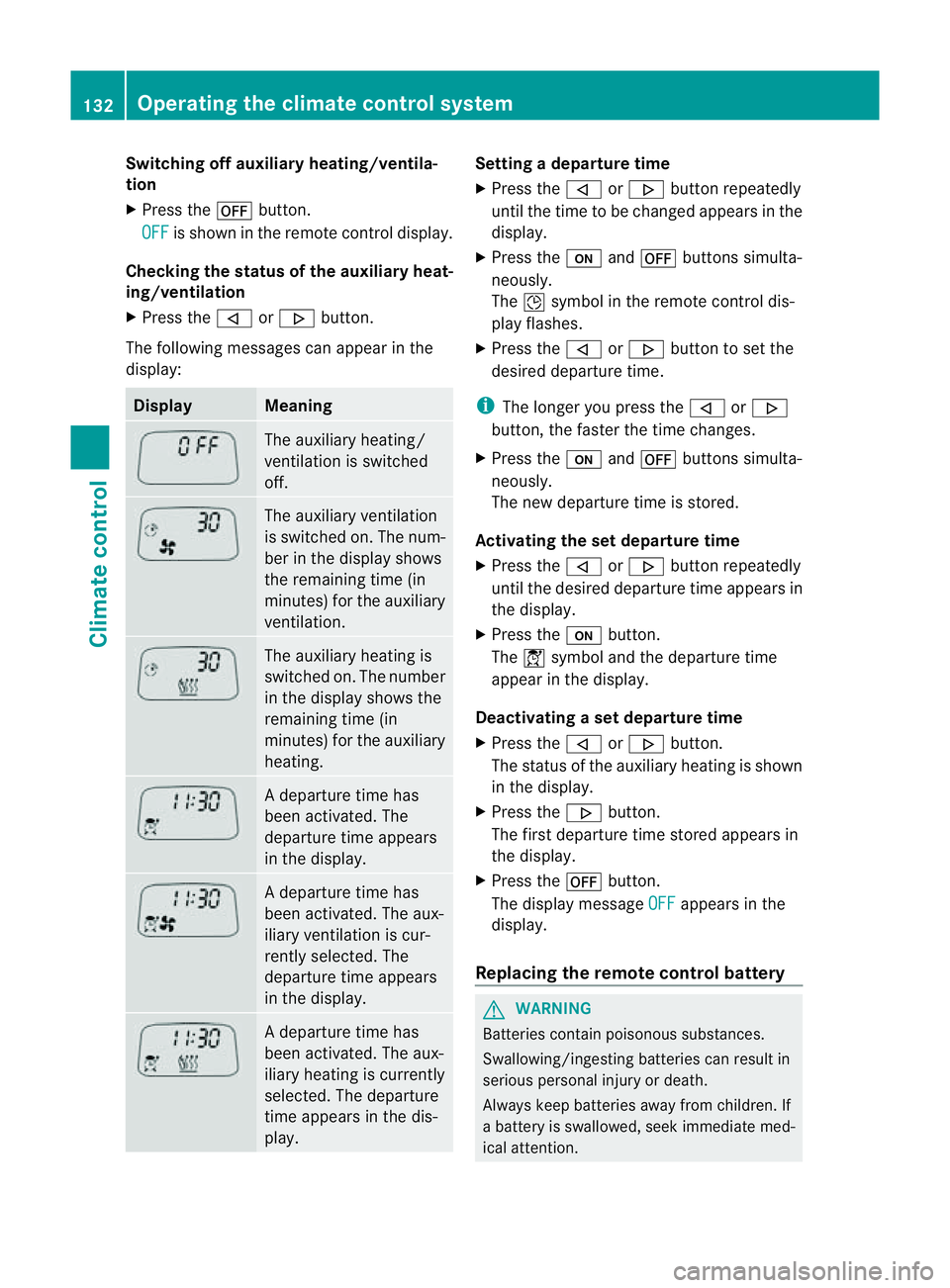
The following messages can appea rinthe
display: Display Meaning
The auxiliary heating/
ven tilation is switched
off. The auxiliary ventilation
is switched on. The num-
ber in the displa yshows
the remaining tim e(in
minutes) for the auxiliary
ventilation. The auxiliary heating is
switched on. The number
in the displa yshows the
remaining tim e(in
minutes) for the auxiliary
heating. Ad
eparture tim ehas
been activated. The
departure time appears
in the display. Ad
eparture tim ehas
been activated. The aux-
iliary ventilation is cur-
rently selected. The
departure time appears
in the display. Ad
eparture tim ehas
been activated. The aux-
iliary heating is currently
selected. The departure
time appears in the dis-
play. Setting
adeparture time
X Press the ,or. button repeatedly
until the time to be changed appears in the
display.
X Press the uand^ button ssimulta-
neously.
The Îsymbol in the remot econtrol dis-
play flashes.
X Press the ,or. button to set the
desire ddeparture time.
i The longer you press the ,or.
button ,the faster the tim echange s.
X Pres sthe u and^ button ssimulta-
neously.
The new departur etime is stored.
Activating the set departure time
X Press the ,or. button repeatedly
until the desired departur etime appears in
the display.
X Press the ubutton.
The Ísymbol and the departur etime
appear in the display.
Deactivating aset departure time
X Press the ,or. button.
The status of the auxiliary heating is shown
in the display.
X Press the .button.
The first departure time stored appears in
the display.
X Press the ^button.
The display message OFF appears in the
display.
Replacing the remote control battery G
WARNING
Batteries contain poisonous substances.
Swallowing/ingestin gbatteries can result in
serious personal injur yordeath.
Alway skeep batteries away from children .If
ab atter yiss wallowed, seek immediat emed-
ical attention. 132
Operating th
eclimate control systemClimate control
Page 138 of 389
Displa
ymessages Possible causes/consequences and
M Solutions
If th
eauxiliar yheating is faulty:
X Hav ethe auxil iaryh eatin gchecked at aqualified specialist
workshop. Adjusting th
eair vents Important safet
ynotes G
WARNING
Ver yhot or ver ycold ai rcan flo wfromt he air
vents. This coul dcause burns or frostbite to
bare skin in the immediate vicinity of the
vents. Keep bare skin away from these air
outlets. If necessary, direct the airflow away
to ad ifferent area of the vehicle interior.
In order to ensure the direct flow of fresh air
through the air vent sinto the vehicl einterior,
please observe the following notes:
R keep the air inlet grill eonthe bonnet and
in the engin ecompartmen tonthe front-
passenger side free of blockages, such as
ice, snow or leaves.
R never cover the ven tsor ven tilation grilles
in the vehicle interior.
i For virtually draught-free ventilation,
adjust the sliders of the air vent stothe
cen treposition. Setting the centre air vents
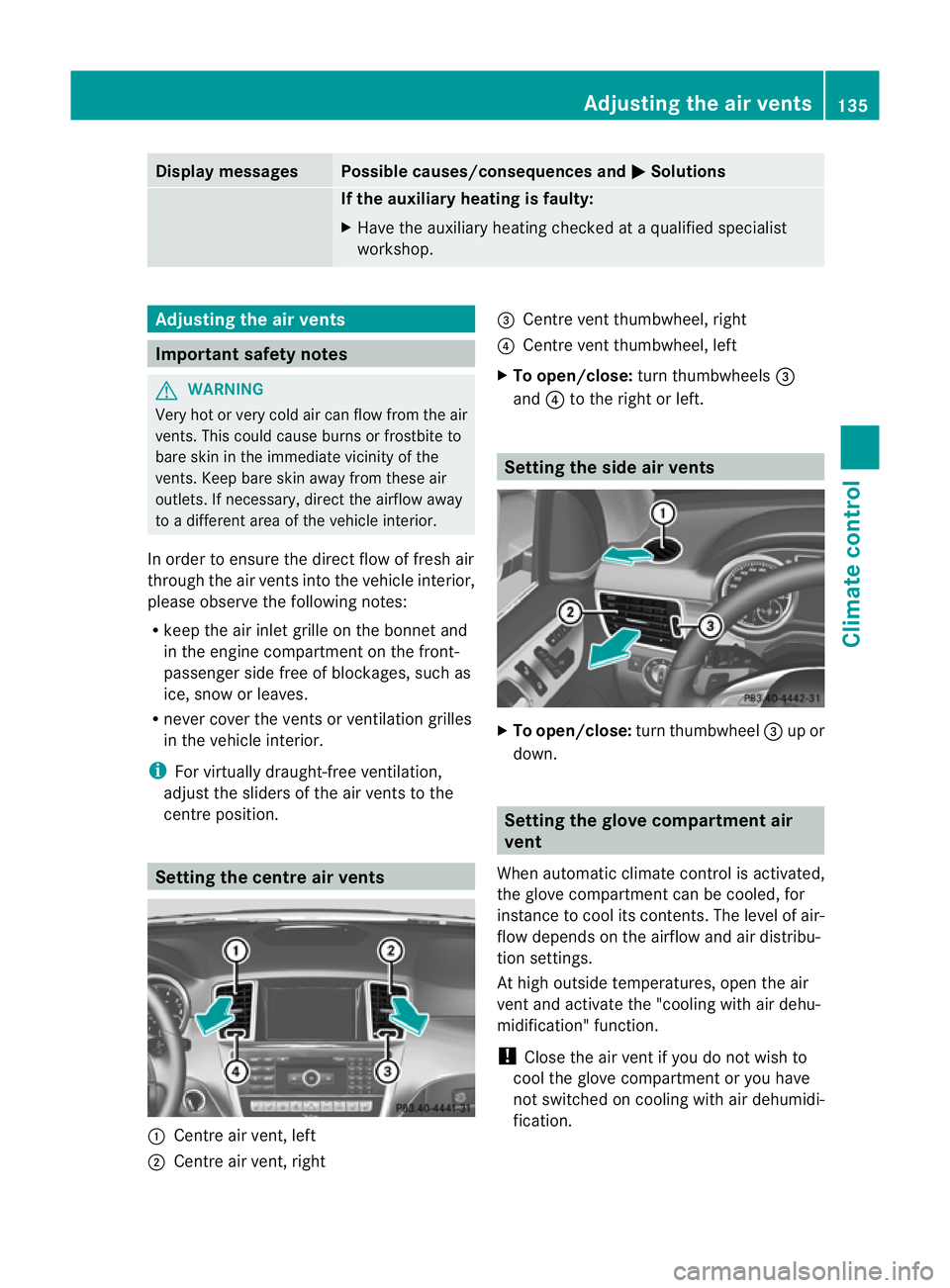
:
Centr eair vent ,left
; Centre air ven t, right =
Centre ven tthumbwheel, right
? Centre ven tthumbwheel, left
X To open/close: turnthumbwheels =
and ?to the right or left. Setting th
eside air vents X
To open/close: turnthumbwheel =up or
down. Setting th
eglove compartment air
vent
When automatic climate control is activated,
the glove compartmen tcan be cooled, for
instance to cool its con tents.The level of air-
flo wd epends on the airflow and air distribu-
tion settings.
At high outside temperatures, open the air
ven tand activate the "cooling with air dehu-
midification" function.
! Clos ethe air ven tifyou do not wish to
cool the glove compartmen toryou have
not switched on coolin gwith air dehumidi-
fication. Adjusting the air vents
135Climate control Z
Page 141 of 389
Usefu
linfor mati on
i This Owner's Manual describes all models
and all standard and optional equipment
available to your vehicle at the time of pub-
lication of the Owner's Manual. Country-
specific deviation sare possible .Please
not ethat your vehicle ma ynot be equipped
with all featur es described. This also
applies to safety-releva ntsystems and
functions.
i Please read the information on qualified
specialist workshops (Y page 24).Running-i
nnotes Important safet
ynotes G
WARNING
New brake pads/lining sonlyh aveo ptimal
braking performanc eafter se veral hu ndred
kilometres. Until then ,compensate for this by
applying greater force to the brake pedal. This
also applies whe nbrake pads/linings or
brak ediscs have been changed. The first 1,500 km
The more you look after the engine when it is
new, the more satisfied you will be with its
performanc einthe future.
R Therefore, drive at varying speeds and
engin espeeds for the first 1,500 km.
R Avoi dheavy loads on the engine during this
period, e.g. driving at ful lthrottle.
R Change gear in good time, at the latest
when the rev counter needl eis2
/ 3 of the
way to the red area in the rev coun terd is-
play.
R Do not manually shift to alower gear to
brake the vehicle. R
If possible, do not depress the accelerator
pedal past the point of resistanc e(kick-
down).
R Only select shift ranges 3,2or 1whe ndriv-
ing slowly, e.g .inmountainou sterrain.
Af ter1 ,50 0km, yo umay gradually bring the
vehicle up to full road and engine speeds.
i You should also observe these notes on
runnin ginift he engin eorparts of the drive
train on your vehicle have been replaced. Driving
Important safety notes
G
WARNING
Do not keep any object sinthe driver's foot-
well. If you use afloormat or carpet in the
driver's footwell, make sure that they are cor-
rectly secured and that there is sufficient
clearance for the pedals.
Do not place several floormats on top of one
another.
The object sorfloormats could otherwise get
between the pedals in the event of sudden
braking or acceleration. You may then no lon-
ger be able to brake or accelerate as intended.
This may result in an accident and injury. G
WARNING
Do not change down for additional engine
braking on aslippery road surface. This could
cause the drive wheels to lose their grip and
the vehicle could skid. This could cause you
to lose control of your vehicle and cause an
accident.
! Warm up the engine quickly. Do not use
the engine's full performanc euntil it has
reache doperating temperature.
Only set the automatic transmission to the
respective driv eposition swhen the vehicle
is stationary.
Where possible, avoid spinnin gthe drive
wheels when pulling away on slippery 138
DrivingDriving and parking