abs MERCEDES-BENZ METRIS 2016 MY16 Operator’s Manual
[x] Cancel search | Manufacturer: MERCEDES-BENZ, Model Year: 2016, Model line: METRIS, Model: MERCEDES-BENZ METRIS 2016Pages: 310, PDF Size: 7.28 MB
Page 64 of 310
the electricslidin gdoorusing the corresponding
Å orÆ sliding door button in the center
consol e(
Ypage 75).
Pets in the vehicle
GWARNING
If yo uleave animals unattended or unsecured
in the vehicle, theyc ould press buttons or
switches ,for example.
As aresult, theyc ould:
Ractivate vehicl eequipment and become
trapped ,for example
Ractivate or deactivate systems, thereby
endangering othe rroa du sers
Unsecured animals could also be flung around
the vehicl einthe event of an accident or sud-
de ns teering or braking ,thereb yinjurin gvehi-
cle occupants. There is ariskofana ccident
and injury.
Never leav eanimals unattended in the vehi-
cle .Alway ssecurea nimals properly during
the journey ,e.g.u se asuitabl eanimalt rans-
port box.
Driving safety systems
Overview
In thiss ection, yo uwillf indi nformation about
the following drivin gsafety systems:
REBD ( Ele ctronic Brake Force Distribution)
RABS ( Anti-lock Braking Sys tem)
RBAS ( Brake Assist System)
RESP®(E le ctronic Stability Program)
Important safety notes
If yo ufailtoa dapt your drivin gstyle or if yo uare
inattentive, the drivin gsafety systems can nei-
therr educe the ris kofaccident nor override the
laws of physics .Drivin gsafety systems are
merel yaidsd esig nedtoa ssistdriving. Yo uare
responsibl efor the distance to the vehicl ein
front, for vehicl espeed, braking in good time
and for staying in your lane. Alway sadapt your drivin
gstyle to the prevailing roa dand weather
conditions and maintain asufficient, safe dis-
tance fromo therroa du sers.D rive carefully.
Please note thatt he drivingsafety systems
describe donlyw orko ptimally when:
Rthere is adequate contact between the tires
and the roa dsurface
Ryo uu sewinter tire s(M+ Stires),w iths now
chains if necessary,w hent he roa dconditions
ar ew intry
Rthe spee dinformation determine dbythe
vehicl eiswithint he legall yprescribe ddisplay
accuracy
Pa yp articular attentio ntothe information
regarding tires, coding of the whee lsizeg roups,
tire trea dand winter operatio nunder "Wheels
and tires" (
Ypage 267).
ABS (Anti-lock Braking System)
General notes
ABS regulate sbrake pressure in such awaythat
the wheels do not lock when yo ubrake. This
allows yo utocontinue steering the vehicl ewhen
braking.
The ò warning lamp in the instrument cluster
lights up when the ignition is switched on. The
lamp goes ou twhent he engine starts running.
Important safety notes
Observe the important safety guideline sfor the
drivin gsafety system(Ypage 62).
ABS works fromas peedof abou t5mph
(8 km/h), regardles sofroad-surface conditions.
ABS works on slippery surfaces ,evenw heny ou
onl ybrake gently.
GWARNING
If ABS is faulty, the wheels could lock when
braking .The steerability an dbraking charac-
teristics maybes everel yimpaired. Addition-
ally ,fur the rdrivin gsafety systems ar edeac-
tivated .Ther eisani ncreasedd angerofs kid-
ding and accidents.
Drive on carefully. Hav eABS checked imme-
diately at aquali fied specialis tworkshop.
62Driving safet ysystems
Safety
Page 65 of 310
If ABS is malfunctioning, theòwarning lamp
(Ypage 221) lights up whil ethe engine is run-
ning and the display shows amessage:
Ron vehiclesw ithoutsteering wheel buttons
(Ypage 189)
Ron vehiclesw ith steering wheel buttons
(Ypage 203)
BAS, Hill Start Assist and ESP®and its driving
safety systems and other driving systems also
fail .Observe the notes on the òwarning
lamp and the display messages.
Braking
If ABS intervenes when braking, you wil lfeel a
pulsating in the brake pedal.
The pulsating brake pedalc an be an indication
of hazardous road conditions and functions as a
reminder to take extra care whiled riving.
XIf ABS intervenes:continue to depresst he
brake pedalw ith force until the braking sit-
uatio niso ver.
XTo make afull brake application: depress
the brake pedalw ith full force.
BAS (Brake Assist System)
General notes
BAS operates in emergency braking situations.
If you depresst he brake pedalq uickly, BAS
automatically boosts the braking force, thus
shortening the stopping distance.
Important safety notes
Observe the important safety guidelines for the
driving safety system (Ypage 62).
GWARNING
If BAS is malfunctioning, the braking distance
in an emergency braking situation is
increased .There is arisk of an accident.
In an emergency braking situation, depress
the brake pedalw ith full force. ABS prevents
the wheel sfrom locking.
If BAS is malfunctioning, the ÷warning lamp
lights up whil ethe engine is running
(
Ypage 221) and the display shows amessage:
Ron vehiclesw ithoutsteering wheel buttons
(Ypage 193)
Ron vehiclesw ith steering wheel buttons
(Ypage 207)
Braking
XKeep the brake pedalf irmly depressed until
the emergency braking situation is over.
ABS prevents the wheel sfrom locking.
The brakes willf unction as usual once you
release the brake pedal. BAS is deactivated.
EBD (electroni cbrake force distribu-
tion)
General notes
EBD monitors and controls the brake pressure
to the rear wheels. This enables EBD to improve handling during braking.
Important safety notes
Observe the important safety guidelines for the
driving safety system (Ypage 62).
GWARNING
If EBD is malfunctioning, the rear wheelsc an
lock, e.g. under full braking. This increases the
risk of skidding and an accident.
You shoul dtherefore adapt you rdriving style
to the different handling characteristics. Have
the brake system checked at aqualifieds pe-
cialist workshop.
If EBD is malfunctioning, the $warning lamp
(
Ypage 220) lights up whil ethe engine is run-
ning and the display shows amessage.
Ron vehiclesw ithoutsteering wheel buttons
(Ypage 192)
Ron vehiclesw ith steering wheel buttons
(Ypage 206)
Other driving systems and driving safety sys-
tems then also fail.
Driving safety systems63
Safety
Z
Page 90 of 310
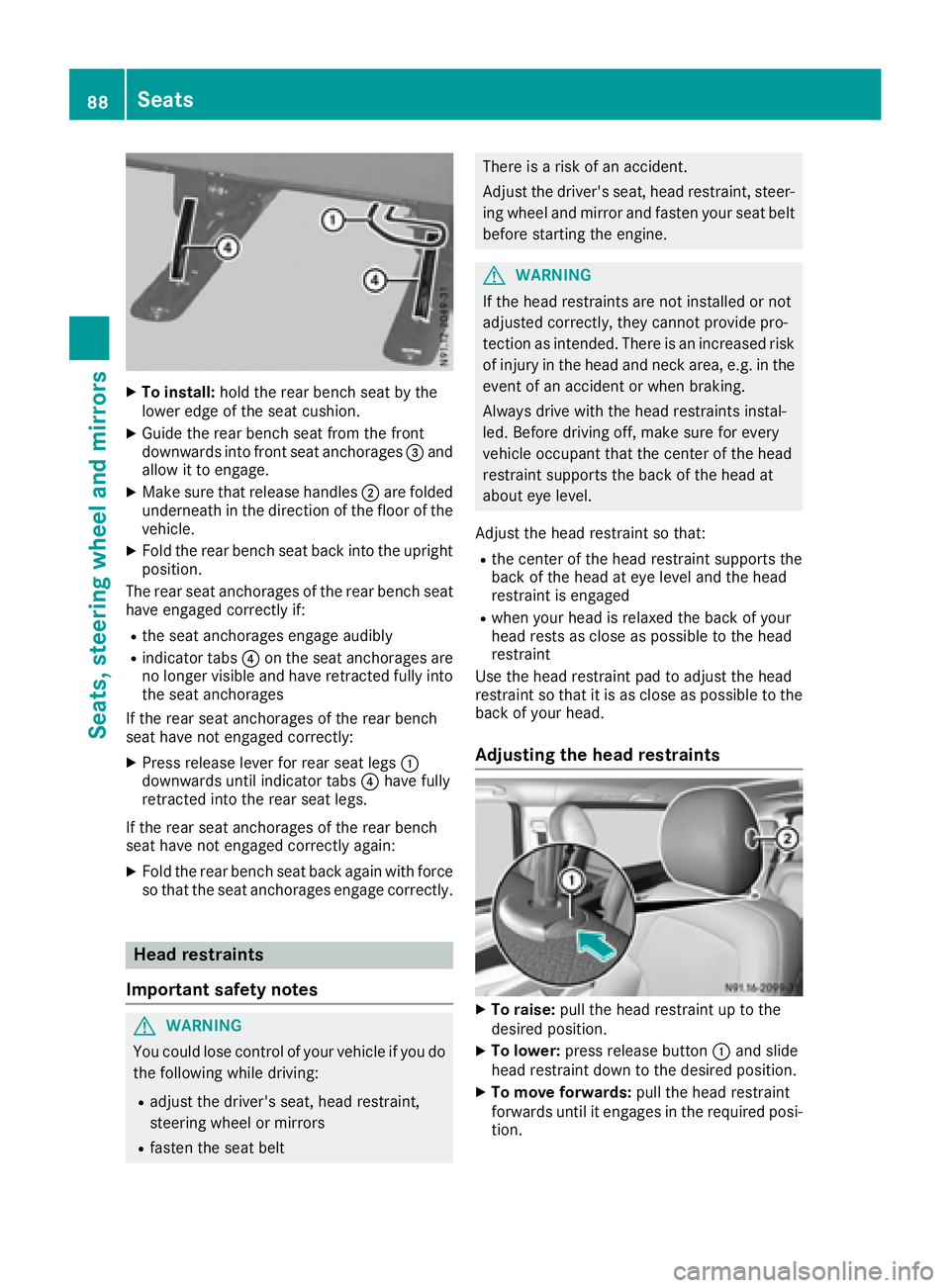
XTo install:holdthe rea rbench sea tbythe
lowe redgeoft he sea tcushion.
XGuid ethe rea rbench sea tfrom the front
downward sinto front sea tanchorages =and
allo wittoe ngage.
XMake sure thatr elease handles;are folded
underneath in the direction of the floor of the
vehicle.
XFol dthe rea rbench sea tbackinto the upright
position.
The rea rseata nchorages of the rea rbench seat
have engaged correctl yif:
Rthe sea tanchorages engage audibly
Rindicator tabs ?on the sea tanchorages are
no longer visible and have retracted fully into
the sea tanchorages
If the rea rseata nchorages of the rea rbench
sea thaven ot engaged correctly:
XPress release lever for rea rseatleg s:
downward suntilindicator tabs ?have fully
retracted into the rea rseatleg s.
If the rea rseata nchorages of the rea rbench
sea thaven ot engaged correctl yagain :
XFoldthe rea rbench sea tbacka gain with force
so thatt he seatanchorages engage correctly.
Hea drestraints
Important safety notes
GWARNING
Yo uc ould lose contro lofyourvehicl eifyoudo
the following whil edriving:
Radjus tthe driver's seat, hea drestraint,
steering whee lormirrors
Rfasten the sea tbelt
There is ariskofana ccident.
Adjust the driver' sseat, hea drestraint, steer-
ing whee land mirror and fasten your sea tbelt
before starting the engine.
GWARNING
If the hea drestraints are not installe dornot
adjusted correctly, they canno tprovid epro-
tection as intended. There is an increased risk
of injury in the hea dand neck area, e.g .inthe
event of an accident or when braking.
Alway sdrive with the hea drestraints instal-
led. Before driving off, make sure for every
vehicl eoccupant thatt he centerofthe head
restraint supports the back of the hea dat
aboute yelevel.
Adjust the hea drestraint so that:
Rthe cente rofthe hea drestraint supports the
back of the hea dateyelevel and the head
restraint is engaged
Rwhen your hea disrelaxe dthe back of your
hea drests as close as possibl etothe head
restraint
Use the hea drestraint pa dtoadjus tthe head
restraint so thatiti sasclose as possibl etothe
back of your head.
Adjustin gthe hea drestraints
XTo raise: pull the hea drestraint up to the
desired position.
XTo lower: press release button :and slide
hea drestraint down to the desired position.
XTo mov eforwards: pull the hea drestraint
forward suntilite ngages in the required posi-
tion.
88Seats
Seats, steering wheel andmirrors
Page 145 of 310
RESP®intervenes or youdeactivate ESP®
Rthere is amalfunctio ninthe ESP®or ABS sys-
tem
If cruis econtro lautomaticall ydeactivates, a
warning tone sounds and the Cruise
ControlOffmessage appearsbriefl yint he display.
The V symbo land the displa yofthe stored
spee dint he header or in the status area of the
displa yarethenn ot shown.
Problems with cruis econtrol
The spee dcanno tbes et when cruis econtro lis
activated.
The displa yisshowing amessage of high priority
and canno ttherefore sho wachange in speed.
XProcee dasinstructed by the message in the
display.
COLLISIO NPREVENTION ASSIST
General notes
COLLISION PREVENTION ASSIST help syou:
Rto minimize the ris kofafront-end collision
with adetecte dobstacle in the path of your
vehicle
Rto reduce the consequences of afront-end
collision
The system uses rada rsensor stod etect vehi-
cle sinf ront.
COLLISION PREVENTION ASSIST consists of the
distance warning functio nand Adaptive Brake
Assist.
If COLLISION PREVENTION ASSIST is malfunc-
tioning ,the displa yshows acorresponding mes-
sage (
Ypage 213).
Distance warning function
Important safety notes
GWARNING
The distance warning functio ndoesn ot react:
Rto people or animals
Rto oncomin gvehicles
Rto crossing traffic
Rwhen cornering
Thus, the distance warning functio ncannot
provid eawarning in al lcritica lsituations.
There is ariskofana ccident.
Alway spaycarefu lattentio ntothe traffics it-
uatio nand be ready to brake.
GWARNING
The distance warning functio ncanno talway s
clearly identify objects and comple xtraffic
situations.
In such cases, the distance warning function
may:
Rgive an unnecessary warning
Rnot give awarning
There is ariskofana ccident.
Alway spaycarefu lattentio ntothe traffics it-
uatio nand do not rel ysolel yont he distance
warning function.
In particular ,the detection of obstacle scan be
impaired in the cas eof:
Rdirt on the sensor soranything else covering
the sensors
Rit is snowing or raining heavily
Rthere is interferenc efromo therradar sources
Rthe possibility of strong rada rreflections, for
example, in parkin ggarages .
Ranarrow vehicl etraveling in front, e.g .a
motorbike
Rav ehicl etraveling in front on adifferent line
Due to the nature of the system ,particularly
complicate dbutnon-critical drivin gconditions
maya lsoc ause the system to displa yawarning.
If yo ufailtoa dapt your drivin gstyle ,the dis-
tance warning functio ncan neitherr educe the
ris kofana ccident nor override the laws of phys-
ics .The distance warning functio ncanno ttake
into account road, weather or trafficc onditions.
The distance warning functio ni
so nlyana id.
You
ar er esponsibl efor the distance to the vehicl ein
front, for vehicl espeed, braking in good time
and for staying in your lane.
Following damage to the front end of the vehicle,
have the configuratio nand operatio nofthe
rada rsensor checked at aquali fied specialist
workshop .Thisa lsoa pplies to collisions at slow
speeds where there is no visible damage to the
front of the vehicle.
Driving system s143
Driving an dparking
Z
Page 147 of 310
Alwayspaycarefu lattentio ntothe traffic sit-
uatio nand be ready to brake. Terminate the
interventio ninanon-critica ldriving situation.
In particular, the detection of obstacle scan be
impaired in the cas eof:
Rdirt on the sensors or anything else covering
the sensors
Rsnow or heavy rain
Rinterference from othe rradar sources
Rstrong rada rreflections, for example, in park-
ing garages
Ran arrow vehicl etraveling in front, e.g .a
motorbike
Rav ehicl etraveling in front on adifferent line
Due to the nature of the system ,particularly
complicate dbutnon-critica ldriving conditions
maya lsoc ause Adaptive Brake Assist to inter-
vene.
If yo ufailtoa dapt your driving style ,Adaptive
Brake Assist can neither reduce the ris kofacci-
dent nor override the laws of physics. Adaptive
Brake Assist canno ttake into account road,
weather or traffic conditions. Adaptive Brake
Assist is onlyana id.Y ou arer esponsibl efor the
distance to the vehicl einfront, for vehicle
speed ,braking in goo dtime and for staying in
your lane.
Following damage to the front end of the vehicle,
have the configuratio nand operatio nofthe
rada rsensor checked at aquali fied specialist
workshop.T hisa lsoa pplies to collisions at slow
speed swhe
re the rei
snov isible damage to the
front of the vehicle.
If yo uchange whee lsize, make sure they corre-
spond to the correct whee lsizec ategory
(
Ypage 267). If the categor yischangedw ithout
recoding the contro lunits in the vehicle, the
functioning of Adaptive Brake Assist mayb e
impaired .COL LISION PREVENTION ASSIST may
then detect amalfunctio nand switch itsel foff.
If Adaptive Brake Assist is not availabl edueto a
malfunctio ninthe rada rsensor system ,the
brake system remains availabl ewithf ullb rake
boosting effect and BAS.
Operation
With the hel pofthe rada rsensor system ,Adap-
tive Brake Assist can detect obstacle sthath ave
been in the path of your vehicl efor an extended
perio doft ime.Adaptive Brake Assist does not
react to stationar yobstacles. If Adaptive Brake Assist detects
ariskofc ollision with avehicle
traveling in front or with astationar yobstacle,
the system calculate sthe braking forc eneces-
sary to avoidt hiscollision. If yo uapply the
brakes forcefully, Adaptive Brake Assist will
automaticall yincrease the braking forc etoa
level suitabl efor the traffic conditions.
XBrake unti lthe distance to the obstacle
increases and the ris kofacollision passes.
ABS
prevents the wheels from locking.
The brakes functio nasusual againif:
Ryour elease the brake pedal
Rther eisnol ongera ny dangerofac ollision
Rno obstacle is detecte dinfront of your vehicle
Braking assistance is then ended.
Blind SpotA ssist
General notes
Blind Spo tAssist monitors the area soneither
side of the vehicl ethata renot visible to the
driver with two lateral, rear-facing rada rsensors
in the bumper. It supports yo ufrom speed sof
approximately20m ph (30 km/h).Awarning
display in the exterio rmirrors draws your atten-
tio ntov ehicles detecte dinthe monitore darea.
If yo uthen switch on the corresponding turn
signaltoc hange lane, yo uwilla lsor eceive an
optica land audibl ecollision warning.
Important safety notes
GWARNING
Blind Spo tAssist does not react to:
Rvehicles overtake ntoo closel yonthe side,
placing them in the blind spo tarea
Rvehicles which approach with alarge speed
differential and overtake your vehicle
As aresult, Blind Spo tAssist mayn ot give
warning sinsuchs ituations. There is arisko f
an accident.
Alway sobserve the traffic conditions care-
fully, and maintain asafel atera ldistance.
Blind Spo tAssist is onlyana id.Itm ayfailto
detect som evehicles and is no substitute for
attentive driving .Alway sensure thatt hereis
Driving systems145
Driving an dparking
Z
Page 150 of 310
If you fail to adapt yourdriving style, Lane Keep-
ing Assist can neither reduce the risk of accident
nor override the law sofphysics. Lane Keeping
Assist cannot take into account road, weather or
traffic conditions. Lane Keeping Assist is only an aid .You are responsible for the distance to the
vehicle in front, for vehicle speed,b raking in
good time and for staying in you rlane.
Lane Keeping Assist does not keep you rvehicle
in its lane.
The system may be impaired or may not function
if:
Rthere is poor visibility, e.g. due to insufficient
illuminatio nofthe road, or due to snow, rain,
fog or spray
Rthere is glare ,e.g. from oncoming traffic, the
sun or reflection from other vehicles( e.g. if
the road surface is wet)
Rthe windshield is dirty, fogged up, damaged or
covered, for instance by asticker, in the vicin-
ity of the camera
Rno, or several ,unclea rlane markings are pres-
ent for one lane, e.g. in aconstruction area
Rthe lane markings are worn away, dark or cov-
ered up, e.g. by dirt or snow
Rthe distance to the vehicle in front is too small
and the lane markings thus cannot be detec-
ted
Rthe lane markings change quickly, e.g. lanes
branch off, cross one another or merge
Rthe road is narrow and winding
Rthere are highlyv ariable shade conditions on
the road
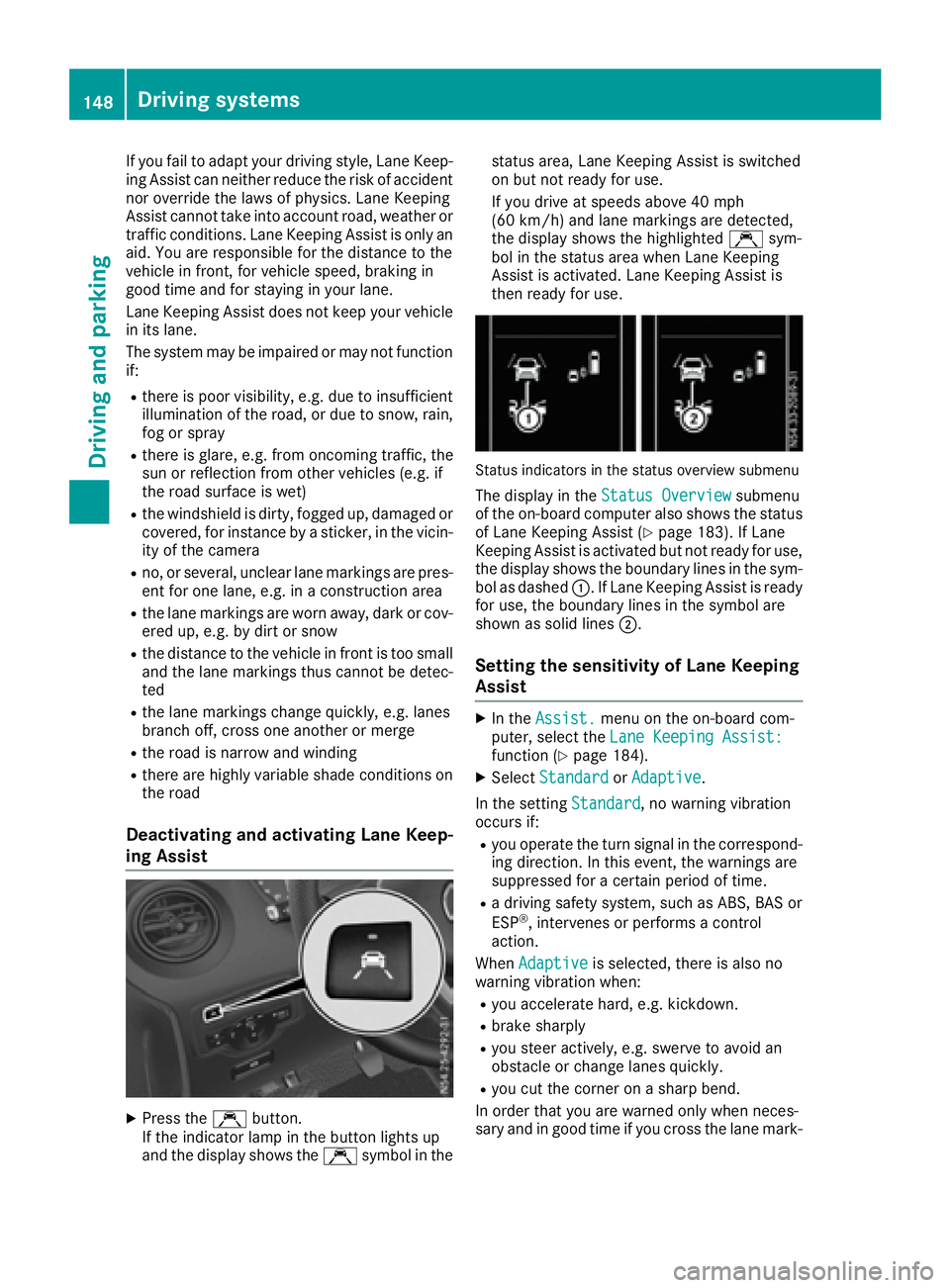
Deactivating and activating Lane Keep-
ing Assist
XPress the Çbutton.
If the indicator lamp in the button lights up
and the display shows the Çsymbo linthe status area
,Lane Keeping Assist is switched
on but not ready for use.
If you drive at speedsa bove 40 mph
(60 km/h) and lane markings are detected,
the display shows the highlighted Çsym-
bol in the status area when Lane Keeping
Assist is activated. Lane Keeping Assist is
then ready for use.
Status indicators in the status overview submenu
The display in the Status Overviewsubmenu
of the on-board computer also shows the status
of Lane Keeping Assist (
Ypage 183). If Lane
Keeping Assist is activated but not ready for use,
the display shows the boundary lines in the sym-
bol as dashed :.IfLane Keeping Assist is ready
for use, the boundary lines in the symbo lare
shown as solid lines ;.
Setting the sensitivity of Lane Keeping
Assist
XIn theAssist.menu on the on-board com-
puter, select the Lane Keeping Assist:
function (Ypage 184).
XSelectStandardorAdaptive.
In the setting Standard
,now arning vibration
occurs if:
Ryou operate the turn signal in the correspond-
ing direction. In this event, the warnings are
suppressed for acertain period of time.
Rad riving safety system, such as ABS, BAS or
ESP®,i ntervenes or performs acontrol
action.
When Adaptive
is selected, there is also no
warning vibratio nwhen:
Ryou accelerate hard, e.g. kickdown.
Rbrake sharply
Ryou steer actively ,e.g. swerve to avoid an
obstacle or change lanes quickly.
Ryou cut the corner on asharp bend.
In order that you are warned only when neces-
sary and in good time if you cross the lane mark-
148Driving systems
Driving and parking
Page 191 of 310
Safety systems
Display messagesPossible causes/consequences andMSolutions
ABS,ESPInoperative
+
ABS,BAS,hill start assist, and ESP®as well as its driving safety sys-
tems are unavailable due to amalfunction.
ATTENTION ASSIST is deactivated and other driving systems could be
automatically deactivated.
GWARNING
The brake system continues to function normally, but without the
functions listed above. The wheels could therefore lock if you brake
hard, for example.
This causes steerability and braking to be greatly impaired. The brak-
ing distance can increase in emergency braking situations.
If ESP
®is not operational, ESP®will not stabilize the vehicle.
There is an increased risk of skidding and accidents.
XDrive on with care.
XVisit aqualified specialist workshop immediately.
ABS, ESP Curr.Unavail.
+
ABS,B AS,hill start assist, and ESP®as well as its driving safety sys-
tems are temporarily unavailable.
ATTENTION ASSIST is deactivated and other driving systems could be
automatically deactivated.
For example, the on-board voltage may be insufficient.
GWARNING
The brake system continues to function normally, but without the
functions listed above. The wheels could therefore lock if you brake
hard, for example.
This causes steerability and braking to be greatly impaired. The brak-
ing distance can increase in emergency braking situations.
If ESP
®is not operational, ESP®will not stabilize the vehicle.
There is an increased risk of skidding and accidents.
XDrive on with care and on asuitable stretch of road make slight
steering movementsatas peed above 12 mph (20 km/h).
If the display message continues to be displayed:
XDrive on with care.
XVisit aqualified specialist workshop.
Display messages (vehicles without steering wheel buttons)189
On-board computer and displays
Z
Page 194 of 310
Display messagesPossible causes/consequences andMSolutions
Further information on theOccupant Classification Syste m(OCS )can
be found under "Occupant Classification Syste m(OCS)" (Ypage 51).
#
CheckBrakePadWear
The brak epads/linings hav ereached their wear limit.
XVisit aqualified specialist workshop .
$(USA
only)
J(Canada
only)
Check Brake Fluid
Level
There is insufficien tbrak efluidint hebrak efluid reservoir .
GWARNING
Braking performance can be impaired.
There is ariskofana ccident.
XStop thevehicl eimmediately, payin gattention to roa dand traffic
conditions. Do no tcontinue drivingunder any circumstances.
XSecur ethe vehicl etopreventitfromr ollin gaway (Ypage 132).
XDo no tadd brak efluid .Addingm orew ill no tremedy th emalfunc -
tion .
XConsult aqualified specialist workshop .
EBD,ABS,E SP Inop‐erativ e
+
EBDisu navailable due to amalfunction .ABS ,BAS ,hill start assist and
ES P®as well as it sdrivin gsafet ysystems ,for example, are therefor e
also unavailable .
ATTENTION ASSIST is deactivated and other drivin gsystems could be
automatically deactivated.
GWARNIN G
The brak esystem continues to function normally, but without th e
function slisted above. The wheels could therefor eloc kp rematurel yif
you brak ehard, for example.
This causes steerabilit yand braking to be greatl yimpaired. The brak -
ing distanc ecan increas einemergenc ybraking situations.
If ES P
®is no toperational, ES P®will notstabiliz ethe vehicle.
There is an increased ris kofskiddin gand accidents .
XDrive on withcare.
XVisit aqualified specialist workshop immediately.
192Display message s(vehicles withou tsteering wheelbuttons)
On-board computera nd displays
Page 205 of 310
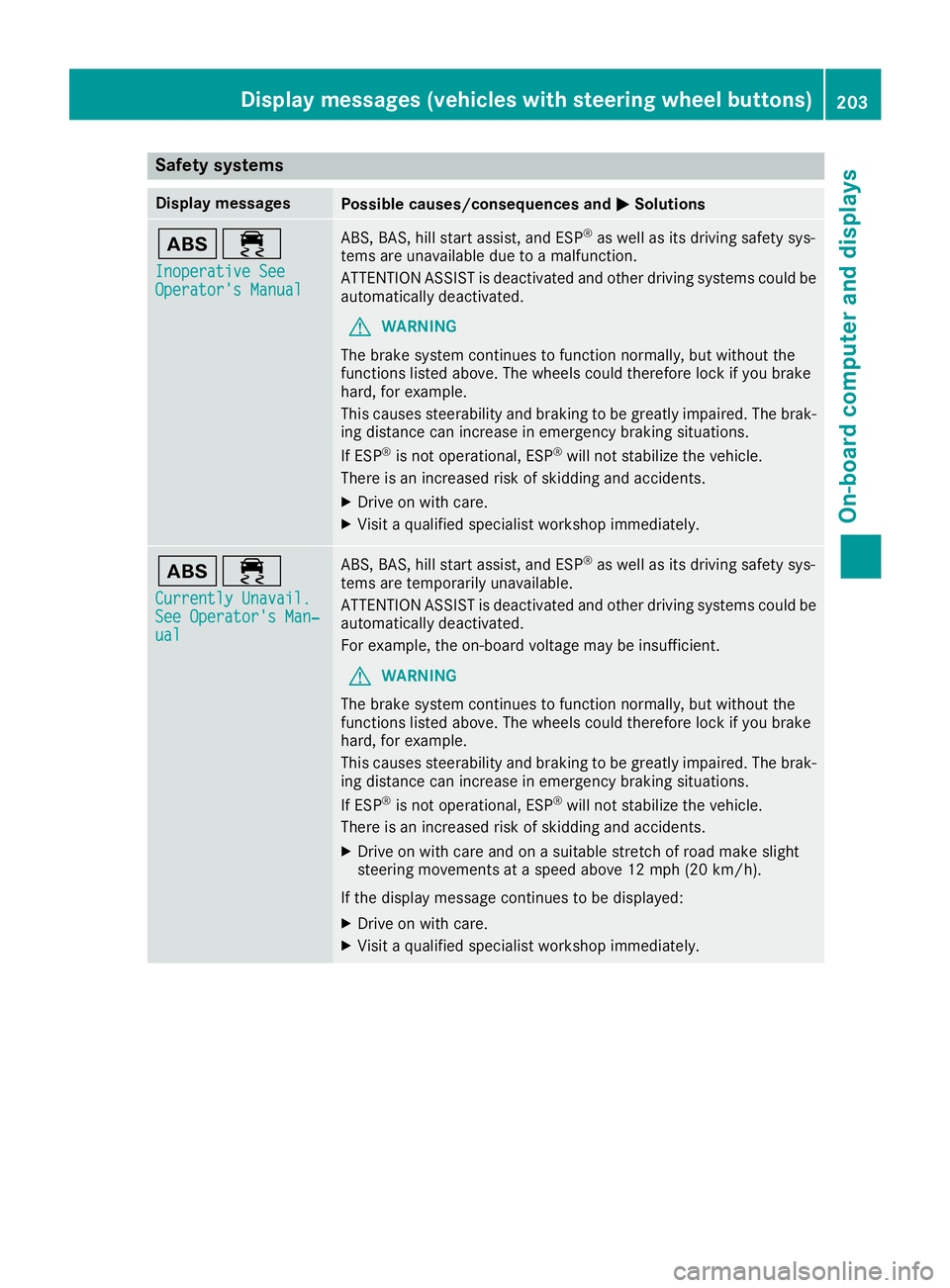
Safety systems
Display messagesPossible causes/consequences andMSolutions
ò÷
Inoperative SeeOperator's Manual
ABS,BAS,hill start assist, and ESP®as well as its driving safety sys-
tems are unavailable due to amalfunction.
ATTENTION ASSIST is deactivated and other driving systems could be
automatically deactivated.
GWARNING
The brake system continues to function normally, but without the
functions listed above. The wheels could therefore lock if you brake
hard, for example.
This causes steerability and braking to be greatly impaired. The brak-
ing distance can increase in emergency braking situations.
If ESP
®is not operational, ESP®will not stabilize the vehicle.
There is an increased risk of skidding and accidents.
XDrive on with care.
XVisit aqualified specialist workshop immediately.
ò÷
Currently Unavail.See Operator's Man‐ual
ABS,B AS,hill start assist, and ESP®as well as its driving safety sys-
tems are temporarily unavailable.
ATTENTION ASSIST is deactivated and other driving systems could be
automatically deactivated.
For example, the on-board voltage may be insufficient.
GWARNING
The brake system continues to function normally, but without the
functions listed above. The wheels could therefore lock if you brake
hard, for example.
This causes steerability and braking to be greatly impaired. The brak-
ing distance can increase in emergency braking situations.
If ESP
®is not operational, ESP®will not stabilize the vehicle.
There is an increased risk of skidding and accidents.
XDrive on with care and on asuitable stretch of road make slight
steering movementsatas peed above 12 mph (20 km/h).
If the display message continues to be displayed:
XDrive on with care.
XVisit aqualified specialist workshop immediately.
Display messages (vehicles with steering wheel buttons)203
On-board computer and displays
Z
Page 208 of 310
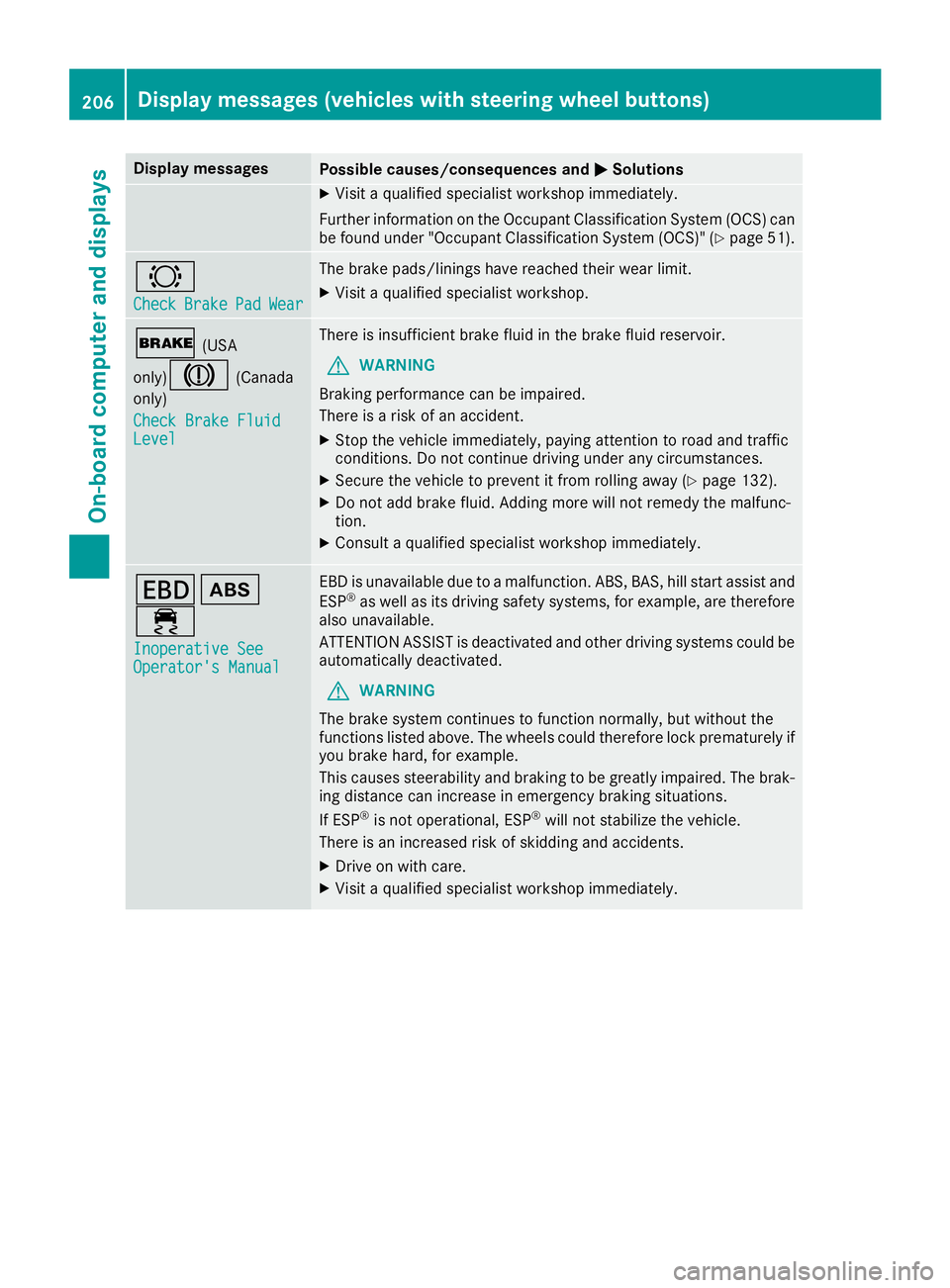
Display messagesPossible causes/consequences andMSolutions
XVisitaqualified specialist workshop immediately.
Further information on th eOccupant Classification Syste m(OCS )can
be found under "Occupant Classification Syste m(OCS)" (
Ypage 51) .
#
CheckBrakePadWear
The brak epads/linings hav ereached their wear limit.
XVisit aqualified specialist workshop .
$(USA
only)
J(Canada
only)
Check Brake Fluid
Level
There is insufficien tbrak efluidint hebrak efluid reservoir .
GWARNING
Braking performance can be impaired.
There is ariskofana ccident.
XStop thevehicl eimmediately, payin gattention to roa dand traffic
conditions. Do no tcontinue drivingunder any circumstances.
XSecur ethe vehicl etopreventitfromr ollin gaway (Ypage 132).
XDo no tadd brak efluid .Addingm orew ill no tremedy th emalfunc -
tion .
XConsult aqualified specialist workshop immediately.
Tò
÷
Inoperative SeeOperator' sManual
EBDisu navailable due to amalfunction .ABS ,BAS ,hill start assist and
ES P®as well as it sdrivin gsafet ysystems ,for example, are therefor e
also unavailable .
ATTENTION ASSIST is deactivated and other drivin gsystems could be
automatically deactivated.
GWARNIN G
The brak esystem continues to function normally, but without th e
function slisted above. The wheels could therefor eloc kp rematurel yif
you brak ehard, for example.
This causes steerabilit yand braking to be greatl yimpaired. The brak -
ing distanc ecan increas einemergenc ybraking situations.
If ES P
®is no toperational, ES P®will notstabiliz ethe vehicle.
There is an increased ris kofskiddin gand accidents .
XDrive on withcare.
XVisit aqualified specialist workshop immediately.
206Display message s(vehicles wit hsteering whee lbuttons)
On-board computera nd displays