change wheel MERCEDES-BENZ METRIS 2016 MY16 Operator’s Manual
[x] Cancel search | Manufacturer: MERCEDES-BENZ, Model Year: 2016, Model line: METRIS, Model: MERCEDES-BENZ METRIS 2016Pages: 310, PDF Size: 7.28 MB
Page 140 of 310
have sufficient tread depth, depending on the
depth of water on the road. There isarisk of
an accident.
For this reason, avoid tire ruts and brake care-
fully.
Therefore, in heavy rain or other conditions in
which hydroplaning can occur, drive as follows:
Rreduce your speed
Ravoid tire ruts
Rapply the brakes with care
Driving on flooded roads
!Do not drive through flooded areas. Check
the depth of any water before driving through
it. Drive slowly through standing water. Oth-
erwise, water may enter the vehicle interior or
the engine compartment. This can damage
the electronic components in the engine or
the automatic transmission. Water can also
be drawn in by the engine's air suction nozzles
and this can cause engine damage.
If you have to drive on stretches of road on which
water has collected, please bear in mind that:
Rthe water level of standing water should not
be above the lower edge of the front bumper
Rdo not drive faster than walking speed
Driving in winter
GWARNING
If you shift down on aslippery road surface in
an attempt to increase the engine's braking
effect,t he drive wheels could lose their grip.
There is an increased danger of skidding and
accidents.
Do not shift down for additional engine brak-
ing on aslippery road surface.
!Vehicles with automatic transmission may
roll only briefly in the neutral position N.Pro-
longed rolling of the wheels, e.g. when being
towed, will result in transmission damage.
Have your vehicle winterproofed at aqualified
specialist workshop at the onset of winter. Drive particularly carefully on slippery roads.
Avoid sudden acceleration, steering and braking
maneuvers. Do not use cruise control.
If the vehicle threaten stoskid or cannot be
stopped when moving at low speed:
XShift the transmission to position N.
XTry to maintain control of the vehicle using
corrective steering.
The outside temperature indicator is not
designed to serve as an ice-warning device and
is therefore unsuitable for that purpose.
Changes in the outside temperature are dis-
played after ashort delay.
Indicated temperatures just above the freezing
point do not guarantee that the road surface is
free of ice. The road may still be icy, especially in
wooded areas or on bridges. If you do not adjust
your driving style, the vehicle may start to skid.
Always adapt your driving style and drive at a
speed to suit the prevailing weather conditions.
You should pay special attention to road condi-
tions when temperatures are around freezing
point.
You can find further information under:
R"M+S tires" (Ypage 269)
R"Snow chains" (Ypage 270)
R"Driving with summer tires" (Ypage 269)
Also observe the notes under "Winter operation" (
Ypage 269).
Driving off-road
Important safety notes
GWARNING
If you drive on asteep incline at an angle or
turn when driving on an incline, the vehicle
could slip sideways, tip and rollover. There is a risk of an accident.
Always drive on asteep incline in the line of
fall (straight up or down) and do not turn the
vehicle.
GWARNING
When driving off-road, your body is subject to
forces from all directions, due to the uneven
surface. You could be thrown from your seat,
for instance. There is arisk of injury.
138Driving tips
Driving and parking
Page 141 of 310
Alwayswearas eatb elt, eve nwhend riving off-
road.
GWARNING
If yo udrive ove robstacle sorinr uts, the steer-
ing whee lmayjerk outofy ourg rip, causing
injury to your hands.
Alway sholdt he steering whee lfirmly with
both hands. Whe ndriving ove robstacles, you
must expect steering forces to increase
briefl yand suddenly.
GWARNING
Flammabl ematerial such as leaves, grass or
twigs mayi gnite if they come into contact with
hot parts of the exhaus tsystem .There is arisk
of fire.
Whe ndriving off roa doronunpaved roads,
check the vehicle's undersid eregularly .In
particular, remove parts of plants or other
flammabl ematerial swhich have become
trapped. In the cas eofdamage, contact a
qualified specialist workshop.
!Whe ndriving off-roadoronu npaved surfa-
ces ,check the undersid eofthe vehicl eand
the wheels and tire satregular intervals .In
particular, remove any trappe dforeign
objects, e.g .stone sand branches.
Such foreig nobjects may:
Rdamage the chassis, the fuel tank or the
brake system
Rcause imbalance sand thusv ibrations
Rbe flung outw heny ou continue driving
If ther eisany damage, inform aquali fied spe-
cialist workshop.
Whe ndriving off-roada nd on construction sites,
sand, muda nd water mixe dwitho il,f or exam-
ple, mayg et into the brakes. Thi smaylead to a
reduction in braking performance or totalb rake
failure, also as aresul tofi ncreased wear .The
braking characteristics will vary depending on
the material thath asgot into the system .Clean
the brakes afte rdriving o
ff-road. If yo uth
en
notice reduce dbraking performance or hear
scraping noises ,hav et he brake system checked
at aq uali fied specialist workshop.A djust your
driving style to the changedb raking character-
istics. Driving off-roadoronc
onstruction sites increa-
ses the possibility of vehicl edamag ewhich may
in turn lead to the failure of certain assemblies
and systems. Adapt your driving style to the off- roa ddriving conditions. Driv ecarefully. Have
any vehicl edamag erectifie dataq ualified spe-
cialist workshop as soo naspossible.
Whe nloadin gyourvehicl efor driving off-roado r
on aconstruction site, kee pthe vehicle's center
of gravity as lo waspossible.
Rule sfor drivin goff-road
!Alway sbearthe vehicle's ground clearance
in mind and avoido bstacles, e.g .deepr uts.
Obstacles mayd amagethe following parts of
the vehicle:
Rthe chassis
Rthe drive train
Rthe fuel and supply tanks
For thisr eason, yo ushoul dalway sdrive
slowly when driving off-road. If yo uhavet o
drive ove robstacles, have the front
passengerd irect you.
iWe recommend thaty ouadditionally carry a
shovel and arecover yrop ew iths hackle in the
vehicle.
REnsure thatl oadsand items of luggage are
securel ystowed or lashe ddown
(
Ypage 232).
RBefore driving off-road, stop the vehicl eand
shift to alow gear.
RIf the surface requires ,temporaril ydeactivate
ESP®when pulling away (Ypage 64).
ROnlyd rive off-roadw itht he engine running
and ageare ngaged.
RDriv eslowly and smoothly. Walking pace is
necessary in many situations.
RAvoi dspinning the drive wheels.
RMake sure thatt he wheels always remai nin
contact with the ground.
RDriv ewithe xtreme car eoveru nknown terrain
where yo ucan onlys ee forashort distance.
As aprecaution, get outoft he vehicletotake
al oo katt he route to be take ninadvance.
RCheck the water depth before fording.
RWatch outf or obstacles(e.g. rocks ,holes,
tree stumps and ruts).
RAvoi dedges where the surface could crumble
or break away.
Driving tips139
Driving an dparking
Z
Page 143 of 310
Cruisecontro lmaybe unab leto maintain the
storeds peedonu phillgradients .The stored
speedisr esumedifth eu phill gradiente vens out
and th evehicle 's speedd oes notfall below
20 mph (30 km/ h).C ruise control maintains the
storeds peed on downhil lgradients by automat-
icall yapplyin gthe brakes. Observe the addi-
tiona ldriving tip s(
Ypage 136).
Important safety notes
Observe the notes on braking (Ypage 136).
If yo ufailtoa dapt your driving style or if yo uare
inattentive ,cruise control can neither reduce
the ris kofana ccident nor override the laws of
physics .Cruise control canno ttake road,
weathe rand traffic conditions into account.
Cruise control is only an aid. Yo uare responsible
for the distance to the vehicl einfront, for vehi-
cle speed, for braking in goo dtime and for stay-
ing in lane.
If yo uchange wheel size ,make sure they corre-
spond to the correct wheel size category
(
Ypage 267). If the categor yischanged without
recoding the control units in the vehicle, the
functioning of cruise control may be impaired.
Do not us ecruise control:
Rin traffic conditions that are unsuitable for
driving at aconstant speed, e.g. in heavy traf-
fic, on winding roads or off-road.
Ron slippery roads. Braking or accelerating
may cause the drive wheel stoloset raction
and the vehicl ecould then skid.
Rwhen there is poo rvisibility ,e.g. du etofog,
heavy rai norsnow.
If there is achange of drivers ,make sure that
yo ui nform the new driver aboutt he set cruise
speed.
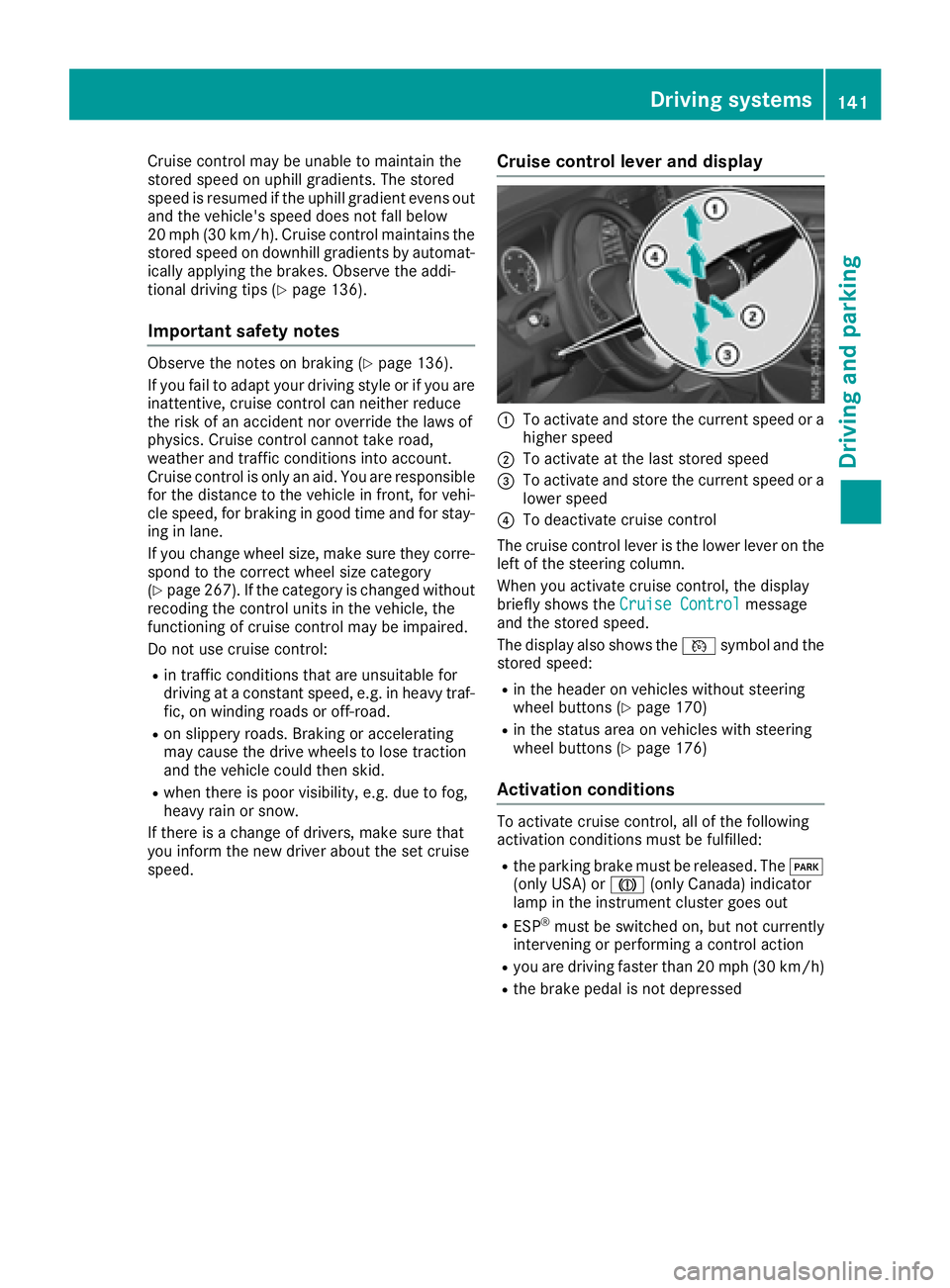
Cruise control levera nd display
:To activate and store the current speed or a
higher speed
;To activate at the last storeds peed
=To activate and store the current speed or a
lowerspeed
?To deactivate cruise control
The cruise control lever is the lowe rlev er on the
left of the steering column.
Whe nyou activate cruise control ,the display
briefl yshows the Cruise Control
message
and the storeds peed.
The display also shows the Vsymbo land the
storeds peed:
Rin the header on vehicles withou tsteering
wheel buttons (Ypage 170)
Rin the statu sareaonv ehicles with steering
wheel buttons (Ypage 176)
Activation conditions
To activate cruise control ,allof the following
activation conditions mus tbefulfilled:
Rthe parking brake mus tbereleased .The F
(onl yUSA) or J(onlyCanada) indicator
lamp in the instrument cluster goe sout
RESP®mus tbes witched on, bu tnot currently
intervening or performing acontrol action
Ryoua re driving faster than 20 mph (30 km/h)
Rthe brake pedal is not depressed
Driving systems141
Driving and parking
Z
Page 146 of 310
If you change wheel size, make sure they corre-
spond to the correct wheel size category
(
Ypage 267). If the category is changed without
recoding the control units in the vehicle,t he
functioning of the distance warning feature may
be impaired. COLLISION PREVENTION ASSIST
may then detect amalfunction and switch itself
off.
Operation
XTo activate/deactivate: activate or deacti-
vate the distance warning function in the on-
board computer (
Ypage 184).
If the distance warning function of the COL-
LISION PREVENTION ASSISTisa ctivated, the
display shows the Äsymbol:
Rin the header
Rin the Status Overviewof the Assist.menu (Ypage 183)
At speedsuptoa pprox20m ph (30 km/h) the
display in vehiclesw ith Active Parking Assist
first shows the ístatus indicator. Only from
as peed of abou t20m ph (30 km/h )does the
display show the Äsymbolinstead of the
í status indicator.
The distance warning function can help you to
minimize the risk of afront-end collision with a
vehicle ahea dorreduce the effects of such a
collision. With the help of the rada rsensor sys-
tem, the distance warning function can detect
obstacles that are in the path of you rvehicle for
an extended period of time. If the distance warn-
ing function detects that there is arisk of acol-
lision, you wil lbewarned visually and, where
necessary ,acoustically.W ithout yourinterven-
tion, the distance warning function cannot pre-
vent acollision.
The distance warning function issues awarning
at speeds:
Rfrom abou t4mph (7 km/h) if you approach a
vehicle traveling in front or astationary vehi-
cle very quickly. The ·warning lamp in the
instrument cluster flashe sand an intermittent
warning tone also sounds.
At speedsuptoa bout45mph (70 km/h), the
system also detects stationary obstacles ,for
example stationary or parked vehicles.
XBrake immediately until the distance to the
obstacle increases and the risk of acollision
has passed.
or
XTake evasive action, provideditiss afe to do
so.
Adaptive Brake Assist
General notes
Adaptive Brake Assist evaluates the traffic sit-
uatio nwith the help of the rada rsensor system
and can detect obstacle swhich have been in
you rvehicle's path for an extended period of
time. From speedsa bove4mph (7 km/h), Adap-
tive Brake Assist aid syou in braking during haz-
ardou ssituations.
Up to aspeed of approximately 125 mph
(200 km/h), Adaptive Brake Assist is capable of
reacting to moving obstacle sthat have already
been detected as such at least once over the
period of observation.
Important safety notes
GWARNING
Adaptive Brake Assist does not react:
Rto peopleora nimals
Rto oncoming vehicles
Rto crossing traffic
Rto stationary obstacles
Rwhen cornering
As aresult, the Adaptive Brake Assist may not
intervene in all critical conditions. There is a
risk of an accident.
Alway spay careful attention to the traffic sit-
uatio nand be ready to brake.
GWARNING
Adaptive Brake Assist cannot always clearly
identify objects and complex traffic situa-
tions.
In such cases, Adaptive Brake Assist can:
Rintervene unnecessarily
Rnot intervene
There is arisk of an accident.
144Driving systems
Driving and parking
Page 147 of 310
Alwayspaycarefu lattentio ntothe traffic sit-
uatio nand be ready to brake. Terminate the
interventio ninanon-critica ldriving situation.
In particular, the detection of obstacle scan be
impaired in the cas eof:
Rdirt on the sensors or anything else covering
the sensors
Rsnow or heavy rain
Rinterference from othe rradar sources
Rstrong rada rreflections, for example, in park-
ing garages
Ran arrow vehicl etraveling in front, e.g .a
motorbike
Rav ehicl etraveling in front on adifferent line
Due to the nature of the system ,particularly
complicate dbutnon-critica ldriving conditions
maya lsoc ause Adaptive Brake Assist to inter-
vene.
If yo ufailtoa dapt your driving style ,Adaptive
Brake Assist can neither reduce the ris kofacci-
dent nor override the laws of physics. Adaptive
Brake Assist canno ttake into account road,
weather or traffic conditions. Adaptive Brake
Assist is onlyana id.Y ou arer esponsibl efor the
distance to the vehicl einfront, for vehicle
speed ,braking in goo dtime and for staying in
your lane.
Following damage to the front end of the vehicle,
have the configuratio nand operatio nofthe
rada rsensor checked at aquali fied specialist
workshop.T hisa lsoa pplies to collisions at slow
speed swhe
re the rei
snov isible damage to the
front of the vehicle.
If yo uchange whee lsize, make sure they corre-
spond to the correct whee lsizec ategory
(
Ypage 267). If the categor yischangedw ithout
recoding the contro lunits in the vehicle, the
functioning of Adaptive Brake Assist mayb e
impaired .COL LISION PREVENTION ASSIST may
then detect amalfunctio nand switch itsel foff.
If Adaptive Brake Assist is not availabl edueto a
malfunctio ninthe rada rsensor system ,the
brake system remains availabl ewithf ullb rake
boosting effect and BAS.
Operation
With the hel pofthe rada rsensor system ,Adap-
tive Brake Assist can detect obstacle sthath ave
been in the path of your vehicl efor an extended
perio doft ime.Adaptive Brake Assist does not
react to stationar yobstacles. If Adaptive Brake Assist detects
ariskofc ollision with avehicle
traveling in front or with astationar yobstacle,
the system calculate sthe braking forc eneces-
sary to avoidt hiscollision. If yo uapply the
brakes forcefully, Adaptive Brake Assist will
automaticall yincrease the braking forc etoa
level suitabl efor the traffic conditions.
XBrake unti lthe distance to the obstacle
increases and the ris kofacollision passes.
ABS
prevents the wheels from locking.
The brakes functio nasusual againif:
Ryour elease the brake pedal
Rther eisnol ongera ny dangerofac ollision
Rno obstacle is detecte dinfront of your vehicle
Braking assistance is then ended.
Blind SpotA ssist
General notes
Blind Spo tAssist monitors the area soneither
side of the vehicl ethata renot visible to the
driver with two lateral, rear-facing rada rsensors
in the bumper. It supports yo ufrom speed sof
approximately20m ph (30 km/h).Awarning
display in the exterio rmirrors draws your atten-
tio ntov ehicles detecte dinthe monitore darea.
If yo uthen switch on the corresponding turn
signaltoc hange lane, yo uwilla lsor eceive an
optica land audibl ecollision warning.
Important safety notes
GWARNING
Blind Spo tAssist does not react to:
Rvehicles overtake ntoo closel yonthe side,
placing them in the blind spo tarea
Rvehicles which approach with alarge speed
differential and overtake your vehicle
As aresult, Blind Spo tAssist mayn ot give
warning sinsuchs ituations. There is arisko f
an accident.
Alway sobserve the traffic conditions care-
fully, and maintain asafel atera ldistance.
Blind Spo tAssist is onlyana id.Itm ayfailto
detect som evehicles and is no substitute for
attentive driving .Alway sensure thatt hereis
Driving systems145
Driving an dparking
Z
Page 159 of 310
Maneuvering may be required in tight parking
spaces. The display shows thePark Assist
Active: Select DObs. Surroundingsmes-
sage.
XWhile the vehicle is stationary, shift the trans-
mission to position D.
Active Parking Assist immediately steers in
the other direction. The display shows the
Park Assist Active: Accelerate and
BrakeObs. Surroundingsmessage.
iYou will achieve the best results by waiting
for the steering procedure to complete before
pulling away.
XDrive forwards and be ready to brake at all
times.
Active Parking Assist brakes the vehicle to a
standstill.
The display shows the Park
AssistActive:Select RObs. Surroundingsmessage.
As soon as the parking procedure is complete,
the Park Assist Finished
message appears
in the display and atone sounds. The parking
assistance function of Active Parking Assist is
stopped. The vehicle is parked and kept station-
ary without the driver having to depress the
brake pedal. The braking effect is canceled
when you depress the accelerator pedal.
Active Parking Assist no longer supports you
with steering interventions and brake applica-
tions. Once active parking assistance has been
stopped, you must steer and brake again your-
self. PARKTRONIC is still available.
Parking tips:
RThe way your vehicle is positioned in the park- ing space after parking is dependent on vari-
ous factors. These include the position and
shape of the vehicles parked in front and
behind it and the conditionsoft he location. It
may be the case that Active Parking Assist
guides you too far into aparking space, or not
far enough into it. In some cases, it may also
lead you across or onto the curb. In this case,
cancel the active parking assistance.
RYou can also preselect transmission position
D.T he vehicle redirects and does not drive as
far into the parking space. If you change direc-
tion too early, parking assistance is canceled
and Active Parking Assist is stopped. It is then
not possible to achieve asensible parking
position from the current position.
Exiting aparking space
In order that Active Parking Assist can support
you when you exit the parking space:
Rthe border of the parking space must be high
enough at the front and the rear. Acurb is too
small, for example.
Rthe border of the parking space must not be
too wide. Your vehicle can be maneuvered
into aposition at amaximum of 45° to the
startin gposition in the parking space.
Ram aneuvering distance of at least 3.3 ft
(1.0 m) must be available.
Active Parking Assist can only assist you with
exiting aparking space if you have parked the
vehicle parallel to the direction of travel using
Active Parking Assist.
If PARKTRONIC detects obstacles, Active Park-
ing Assist brakes automatically when exiting
from the parking space. You are responsible for
braking in good time.
XStart the engine.
XSwitch on the turn signal in the direction in
which you are pulling away.
XShift the transmission to position Dor R.
The display shows the Start
ParkAssist?Yes: OKNo:%message.
XTo cancel the process: press the%but-
ton on the steering wheel or drive off.
or
XTo exit the parking space using active
parking assistance: press theabutton
on the steering wheel.
The display shows the Park Assist
Active: Accelerate and BrakeObs.Surroundingsmessage.
XLet go of the steering wheel.
XPull away,being ready to brake at all times.
Exit the parking space slowly and do not drive
faster than 6mph (10 km/h). Otherwise park-
ing assistance is canceled and Active Parking
Assist is stopped.
Active Parking Assist brakes the vehicle to a
standstill when the vehicle approaches abor-
der of the parking space.
XWhile the vehicle is stationary, shift the trans-
mission to position Dor Ras required or
according to the message.
Active Parking Assist immediately steers in
the other direction. The display shows the
Park Assist Active: Accelerate and
BrakeObs. Surroundingsmessage.
Driving systems157
Driving and parking
Z
Page 161 of 310
The rear view camera may show obstacles in
perspectival distortion, incorrectly or not at all.
The rear view camera cannot display all objects
located very near and/or under the rear
bumper. It does not warn you ofacollision, per-
sons or objects.
Under the following circumstances, the rear
view camera will not function, or will function in
al imited manner:
Rif the tailgate or rear door is open
Rif it is raining very heavily or snowing, or it is
foggy.
Rat night or in very dark places
Rif the camera is exposed to very bright light.
White lines may appear in the camera image.
Rif the area is lit by fluorescent light or LED
lighting. The camera image may flicker.
Rif the camera lens fogs up, e.g. when driving
into aheated garage in winter, causing arapid
change in temperature.
Rif the camera lens is dirty or obstructed.
Observe the notes on cleaning (Ypage 257).
Rif the rear of the vehicle is damaged. In this
case, have the camera position and setting
checked at aqualified specialist workshop.
Do not use the rear view camera in these situa-
tions. You could otherwise injure others or dam-
age object sand the vehicle while parking and
maneuvering.
The field of vision and other functions of the rear
view camera may be restricted due to additional accessories on the rear of the vehicle (e.g.
license plate holder, rear-mounted bicycle
rack).
Guide lines are alwayss hown at road level. In
trailer mode, the guide lines are shown at the
level of the trailer coupling.
If you change wheel size, make sure they corre-
spond to the correctw heel size category
(
Ypage 267). If the category is changed without
recoding the control units in the vehicle, the rear
view camera cannot be precisely calibrated. The
guide lines at road level or at the level of the
trailer tow hitch will not be displayed correctly.
In vehicles with atailgate, the rear view camera
is protected from raindrops and dust by means
of aflap. When the rear view camera is activa-
ted, this flap opens.
The flap closes again when:
Ryou have finished the maneuvering process
Ryou switch off the engine For technical reasons, the flap may remain open
briefly after the rear view camera has been
deactivated.
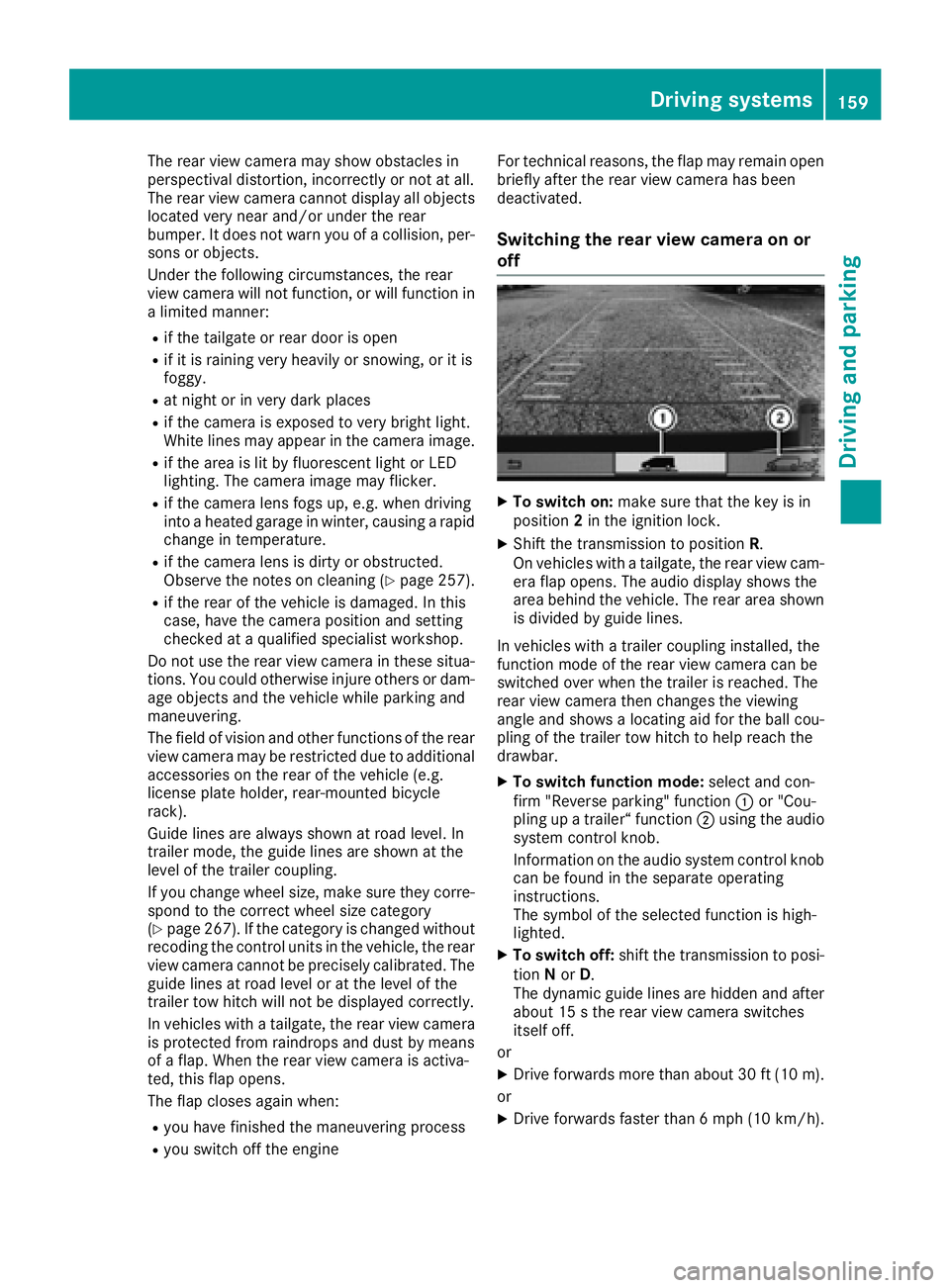
Switching the rear view camera on or
off
XTo switch on: make sure that the key is in
position 2in the ignition lock.
XShift the transmission to position R.
On vehicles with atailgate, the rear view cam-
era flap opens. The audio display shows the
area behind the vehicle. The rear area shown
is divided by guide lines.
In vehicles with atrailer coupling installed, the
function mode of the rear view camera can be
switched over when the trailer is reached. The
rear view camera then changes the viewing
angle and shows alocating aid for the ball cou-
pling of the trailer tow hitch to help reach the
drawbar.
XTo switch function mode: select and con-
firm "Reverse parking" function :or "Cou-
pling up atrailer“ function ;using the audio
system control knob.
Information on the audio system control knob
can be found in the separate operating
instructions.
The symbol of the selected function is high-
lighted.
XTo switch off: shift the transmission to posi-
tion Nor D.
The dynamic guide lines are hidden and after
about 15 sthe rear view camera switches
itself off.
or
XDrive forwards more than about 30 ft (10 m).
or
XDrive forwards faster than 6mph (10 km/h) .
Driving system s159
Driving an dparking
Z
Page 167 of 310
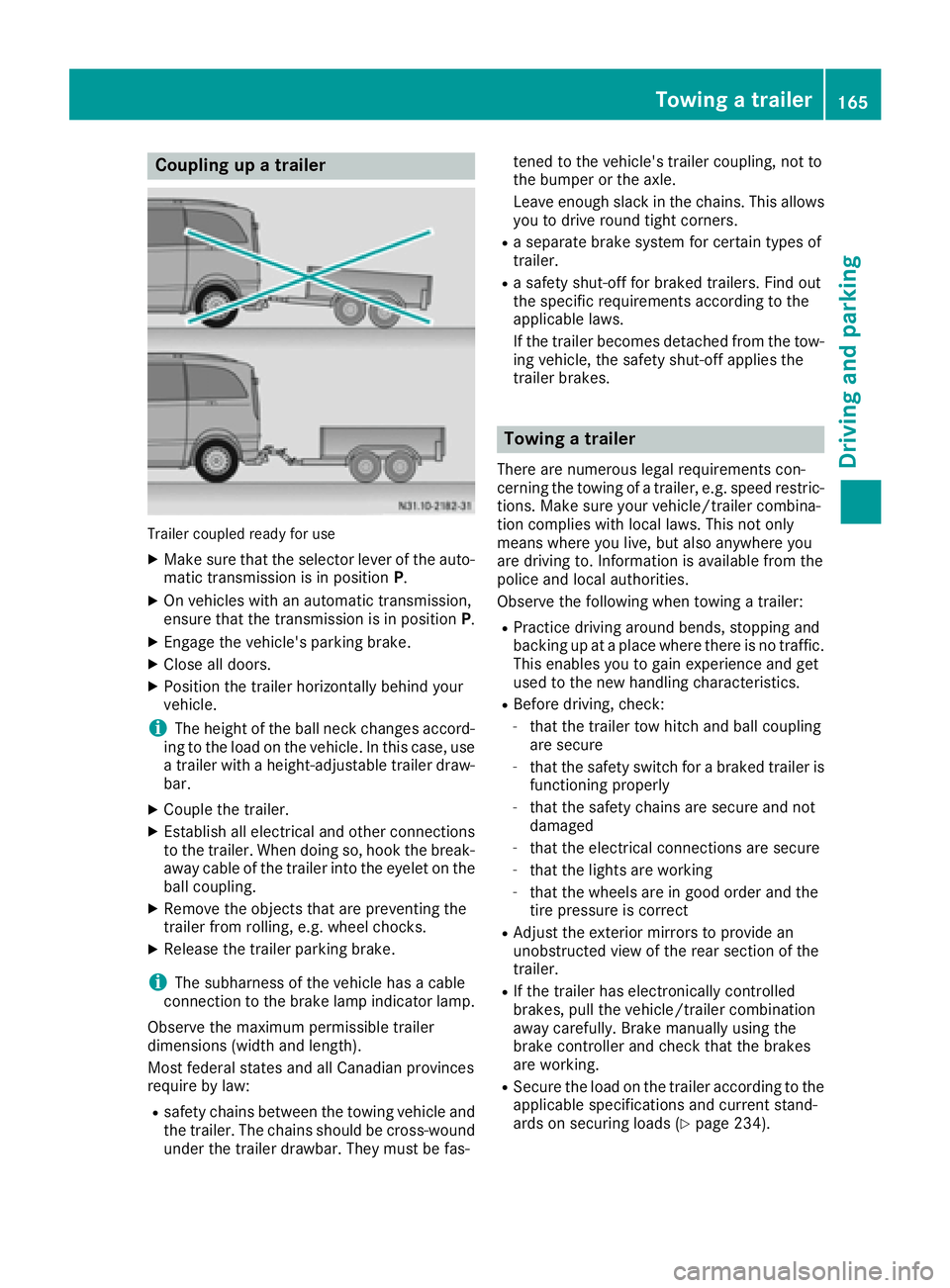
Coupling upatrailer
Trailer coupled read yfor use
XMakes ure that th eselecto rleveroft heauto-
matic transmission is in position P.
XOn vehicleswithana utomatic transmission,
ensure that th etransmission is in position P.
XEngage thevehicle's parking brake.
XClose all doors.
XPositio nthe trailer horizontally behindy our
vehicle.
iThe height of th eball neck changes accord-
ing to th eload on th evehicle .Inthisc ase, use
at railer withah eight-adjustable trailer draw-
bar.
XCouple th etrailer.
XEstablish all electrical and other connections
to th etrailer.W hen doings o, hook thebreak-
away cabl eofthetrailer int othe eyelet on the
ball coupling.
XRemove th eobject sthata re preventin gthe
trailer from rolling ,e.g.w heel chocks.
XRelease th etrailer parking brake.
iThe subharness of th evehicle has acable
connection to th ebrak elamp indicator lamp.
Observ ethe maximum permissible trailer
dimensions( widthand length).
Mostf ederal state sand all Canadian provinces
require by law:
Rsafety chains between th etow ing vehicle and
th et railer.T he chains should be cross-wound
unde rthe trailer drawbar. They must be fas- tene
dtot hevehicle's trailer coupling, no tto
th eb umpe rortheaxle.
Leavee nough slackint hechains .This allows
you to driv eroun dtight corn
ers.
Raseparate brak esystem for certain type sof
trailer.
Ras afety shut-off for braked trailers. Fin dout
th es pecific requirements according to the
applicable laws.
If th etrailer become sdetached from th etow -
ing vehicle ,the safety shut-off applies the
trailer brakes.
Towin gatrailer
Therea re numerous legal requirements con-
cernin gthe towing of atrailer,e .g.s peedr estric-
tions .Makes ure your vehicle/traile rcombina-
tio nc omplies withl ocal laws. This no tonly
mean swherey ou live ,but also anywhere you
are driving to .Inf ormation is available from the
policea nd local authorities.
Observ ethe followingw hen towing atrailer:
RPractic edriving aroun dbends, stoppinga nd
backing up at aplacew herethere is no traffic.
This enables you to gain experience and get
used to th enew handlingc haracteristics.
RBefore driving ,che ck:
-that th etrailer to whitch and ball coupling
are secure
-that th esafety switch for abraked trailer is
functioning properly
-that th esafety chains are secure and not
damaged
-that th eelectrical connectionsa re secure
-that thelightsa re working
-that thewheelsa re in good order and the
tir ep ressure is correct
RAdjus tthe exterior mirror stoprovide an
unobstructe dview of th erear sectio nofthe
trailer.
RIf th etrailer has electronicall ycontrolled
brakes, pull th evehicle/traile rcombination
away carefully. Brake manually usingt he
brak econtroller and check that th ebrakes
are working.
RSecure th eload on th etrailer according to the
applicable specifications an d currentst and-
ards on securin gloads (Ypage 234).
Towing atrailer165
Driving and parking
Z
Page 170 of 310
Useful information
This Operator's Manual describes all models as
well as standard and optional equipment of your
vehicle that were available at the time of going
to print.Country-specific variation sare possi-
ble. Note that your vehicle may not be equipped
with all of the described functions. This also
applies to system sand function srelevantt o
safety.
Read the information on qualified specialist
workshops (
Ypage 29).
Important safetyn otes
GWARNING
If you operate information system sand com-
munication equipment integrated in the vehi-
cle while driving, you will be distracted from
traffic conditions. You could also lose control
of the vehicle. There is arisk of an accident.
Only operate the equipment when the traffic
situatio npermits. If you are not sure that this
is possible, park the vehicle paying attention
to traffic condition sand operate the equip-
ment when the vehicle is stationary.
GWARNING
If you are drivinga nd reach through the steer-
ing wheel to operate the adjustment knob,
you could lose contro lofthe vehicle. There is
ar isk of an acciden tand injury.
Only operate the adjustment knobs when the vehicle is stationary. Do not reach through the
steering wheel when driving.
You must observet he legal requirements for the
country in which you are currently drivingw hen
operatin gthe on-board computer.
GWARNING
If the instrumentc luster has failed or mal-
functioned, you may not recogniz efunction
restrictions in system srelevanttos afety. The
operatin gsafetyofy our vehicle may be
impaired. There is arisk of an accident.
Driv eonc arefully. Have the vehicle checked
at aq ualified specialist workshop immedi-
ately.
The on-board computer display only shows mes-
sages and warnings from certain systems. You
should therefore make sure your vehicle is oper-
ating safely at all times .Ifthe operatin gsafetyo f
your vehicle is impaired, stop the vehicle as
soon as possible, paying attention to road and
traffic conditions. Then consult aqualified spe-
cialist workshop.
The accurac yofthe speedometer and odometer
displays is legally prescribed. Determining the
speed is dependen tonthe wheel size or the
rolling circumference of the wheels. If you
change the wheel size on your vehicle, make
sure it is assigned to the correct wheel size cat-
egory (
Ypage 267). If you change wheel size
category without recoding the contro lunit, the
speedometer indication will be inaccurate. Driv-
ing safetya nd drivings ystemsmay be impaired
or detec tamalfunction and shut down.
An overview of the instrumentc luster can be
found under "Instrumentc luster":
Rfor vehicles without steering wheel buttons
(Ypage 35)
Rfor vehicles with steering wheel buttons
(Ypage 37)
Display and operation
Instrument lighting
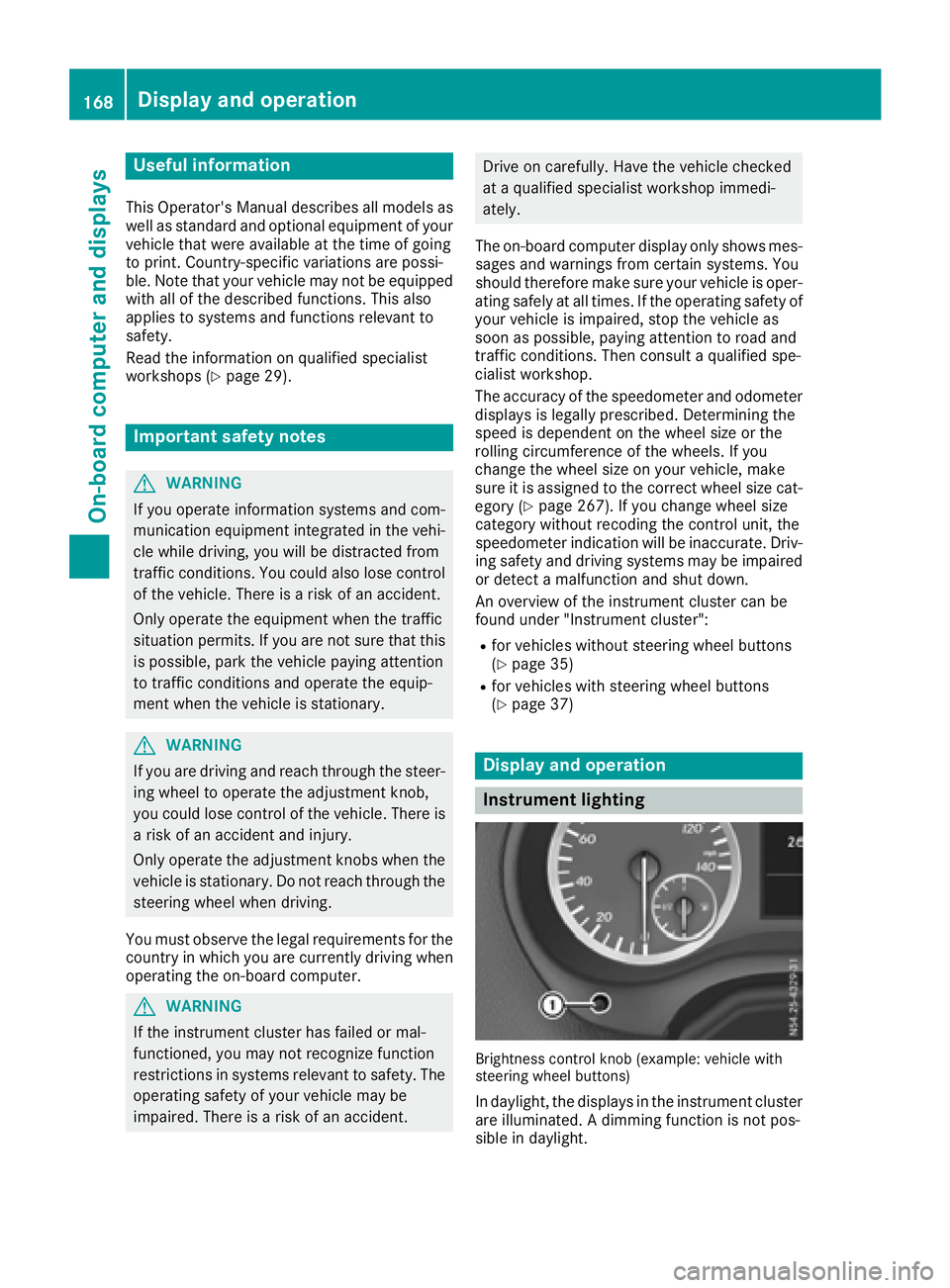
Brightness controlkno b( example: vehicle with
steering wheel buttons)
In daylight, the displays in the instrumentc luster
are illuminated. Adimmingf unction is not pos-
sible in daylight.
168Display and operation
On-boardc omputer and displays
Page 171 of 310
On vehicles with steering wheel buttons, the
light sensor in the instrument cluster automati-
cally controls the brightness of the displaylight-
ing.
While the lights are on, the brightness is depend-
ent upon the brightness of the ambient light.
You can also adjust the brightness of the instru-
ment lighting and the displayl ighting
Rby pressing thefand gbuttons on the
instrument cluster on vehicles without steer-
ing wheel buttons (not in the Settings
menu)
Rby turning control:on vehicles with steer-
ing wheel buttons.
Speedometer
If you change the wheel size on your vehicle,
make sure it is assigned to the correct wheel
size category (
Ypage 267). If you change wheel
size category without recoding the control unit,
the speedometer indication will be inaccurate.
The current vehicle speed may then be higher
than the speed displayed in the speedometer.
The speed can also be shown in the displayi n
the form of adigital speedometer:
Ron vehicles without steering wheel buttons
(Ypage 172)
Ron vehicles with steering wheel buttons
(Ypage 178)
iIn some countries, awarning sounds and/or
the displays howsamessage when the vehi-
cle reaches the maximum legally permissible
speed limit, e.g. at 75 mph (120 km/h).
Tachometer
!
Do not drive in the overrevving range, as this
could damage the engine.
HEnvironmental note
Avoid driving at high engine speeds. This
unnecessarily increases the fuel consumption
of your vehicle and harms the environment as
ar esult of increased emissions.
The red band in the tachometer indicates the
engine's overrevving range.
To protect the engine, the fuel supply is inter-
rupted when the red band is reached.
Outside temperatured isplay
You should pay special attention to road condi-
tions when temperatures are around freezing
point.
Please bear in mind that the outside tempera-
ture displayshows the air temperature meas-
ured and not the road temperature.
The displays hows the outside temperature in
the header:
Ron vehicles without steering-wheel buttons
(Ypage 170)
Ron vehicles with steering wheel buttons
(Ypage 176).
Changes in the outside temperature are dis-
played after ashort delay.
Coolant temperatureg auge
GWARNING
Opening the hood when the engine is over-
heated or when there is afire in the engine
compartment could expose you to hot gases
or other service products. There is arisk of
injury.
Let an overheated engine cool down before
opening the hood. If there is afire in the
engine compartment,k eep the hood closed
and contact the fire department.
On vehicles without steering wheel buttons, you
can have the coolant temperature shown in the
display(
Ypage 172).
On vehicles with steering wheel buttons, an ana-
log coolant temperature gage is located in the
tachometer in the instrument cluster
(
Ypage 37).
Under normal operating conditions and with the
specified coolant level, the gage may rise to
248 ‡(120† ).
Display and operation169
On-board computer and displays
Z