trailer MERCEDES-BENZ METRIS 2016 MY16 Operator’s Manual
[x] Cancel search | Manufacturer: MERCEDES-BENZ, Model Year: 2016, Model line: METRIS, Model: MERCEDES-BENZ METRIS 2016Pages: 310, PDF Size: 7.28 MB
Page 24 of 310
Permissible trailer loads and
drawbar noseweights ..................... 166
Transmission
see Automatic transmission
Transmission oil ........................ 299, 300
Transmission positions
Automatic transmission ................. 127
Display (DIRECT SELECT lever) ...... 127
Transmission programs
Automatic transmission ................. 128
Display (DIRECT SELECT lever) ...... 127
Transport
Lashing straps ...............................2 35
Loading guidelines ......................... 232
Stickers ......................................... 235
Vehicle ...........................................2 66
Transport by rail ................................ 136
Transportation
Rail ................................................ 136
Transportation aids
Load protectio nnet ....................... 237
Transporting
Cargo compartment variations ...... 234
Load distribution ............................ 233
Securing aloa d. ............................. 234
Trim pieces (cleaning instruc-
tions) ..................................................2 59
Trip computer
Displaying (vehicle with steering
wheel buttons) ............................... 178
Displaying (vehicle without steer-
ing wheel buttons) ......................... 171
Resetting (vehicle with steering
wheel buttons) ............................... 178
Resetting (vehicle without steer-
ing wheel buttons) ......................... 171
Selecting the displa yunits (vehi-
cle with steering wheel buttons) .... 185
Selecting the displa yunits (vehi-
cle without steering wheel but-
tons) .............................................. 174
Trip odometer
Displaying (vehicle with steering
wheel buttons) ............................... 177
Displaying (vehicle without steer-
ing wheel buttons) ......................... 171
Resetting (vehicle with steering
wheel buttons) ............................... 178 Resetting (vehicle without steer-
ing wheel buttons) ......................... 171
Setting the displa
yunit (vehicle
wi th steering w
he
el buttons) ......... 185
Setting the displa yunit (vehicle
without steering wheel buttons) .... 174
Turn signal
Changing bulbs (additional turn
signals) .......................................... 100
Turn signals
Display messages (vehicle with
steering wheel buttons) ................. 209
Display messages (vehicle with-
out steering wheel buttons) ........... 195
Replacing bulbs (front) ................... 100
Replacing bulbs (rear) .................... 101
Switching on/off .............................. 94
Trailer displa ymessages (vehicle
with steering wheel buttons) ......... 208
Trailer displa ymessages (vehicle
without steering wheel buttons) .... 194
Two-way radios
Typeapproval/frequency .............. 294
TWR (Tongue Weight Rating) (defi-
nition) ................................................. 286
Type identification plate
see Vehicle identification plate
U
UnlockingEmergency unlocking ....................... 69
From insid ethe vehicle (central
unlocking button) .............................7 2
With emergency key element ........... 68
USB (audio)
Playing ...........................................1 81
V
Vanity mirror
Changing abulb( mirror lamp) ......... 97
Sun viso r........................................ 229
Vehicle
Data acquisition ............................... 32
Display messages (vehicle with
steering wheel buttons) ................. 217
Display messages (vehicle with-
out steering wheel buttons) ........... 200
22Index
Page 67 of 310
The spinningofthe wheels results in acutting
action for better traction on loose surfaces.
RTraction control is still activated
RESP®still provides support when you brake.
Dependin gonthe equipment in the vehicle, you
can activate or deactivate ESP
®when the
engine is runnin gbyusing the åbutton or by
using the on-board computer:
Ron vehicles without steerin gwheel buttons
(Ypage 173)
Ron vehicles with steerin gwheel buttons
(Ypage 183)
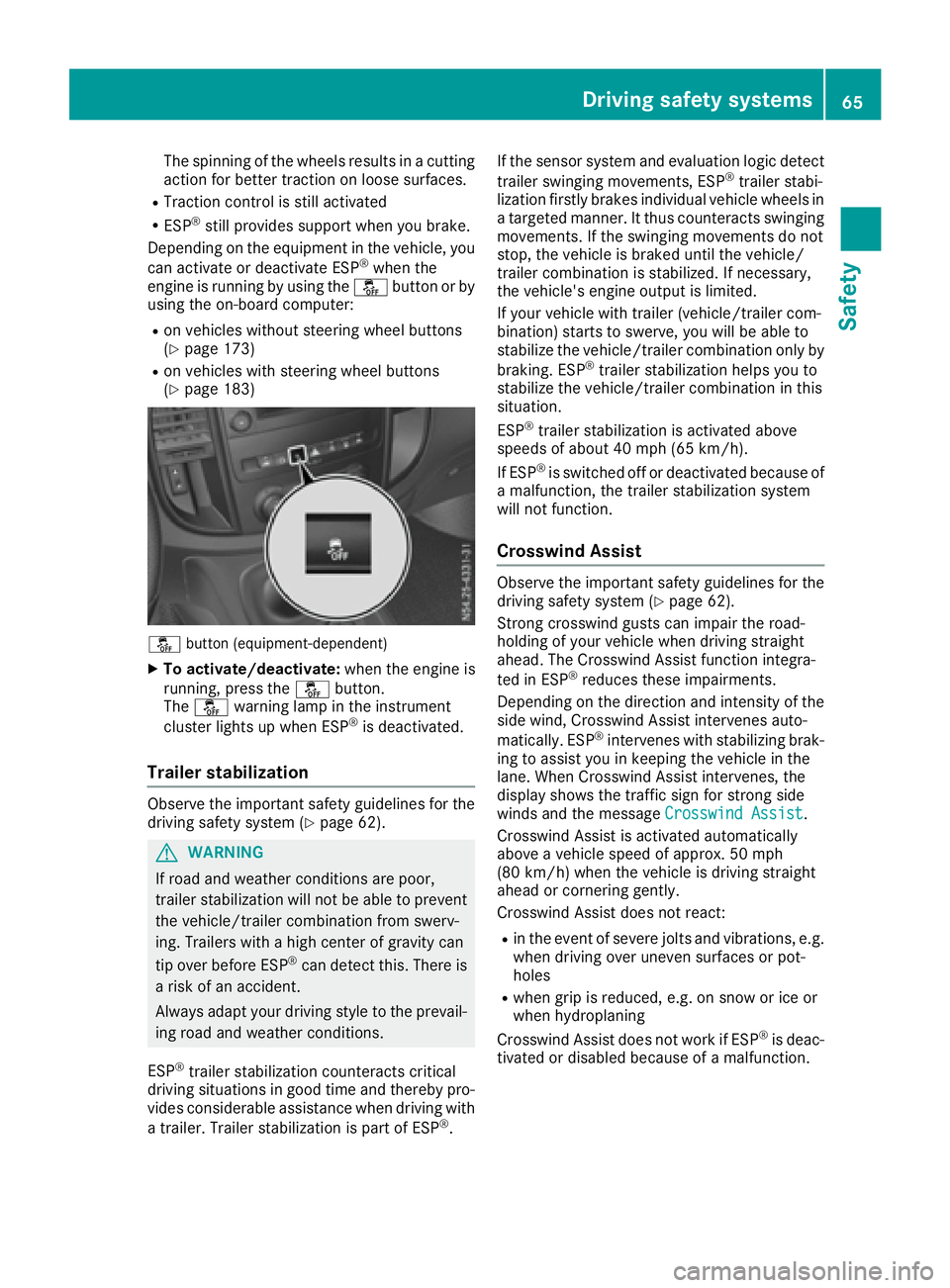
å button (equipment-dependent)
XTo activate/deactivate: when the engine is
running, press the åbutton.
The å warning lamp in the instrument
cluster lights up when ESP
®is deactivated.
Trailer stabilization
Observe the important safety guidelines for the
driving safety system (Ypage 62).
GWARNING
If road and weather conditions are poor,
trailer stabilization will not be able to prevent
the vehicle/trailer combination from swerv-
ing. Trailers with ahigh center of gravity can
tip over before ESP
®can detect this. There is
ar isk of an accident.
Always adapt your driving style to the prevail-
ing road and weather conditions.
ESP
®trailer stabilization counteracts critical
driving situations in good time and thereby pro- vides considerable assistance when driving with
at railer. Trailer stabilization is part of ESP
®. If the sensor system and evaluation logic detect
trailer swinging movements, ESP
®trailer stabi-
lization firstly brakes individual vehicle wheels in
at argeted manner .Itthus counteracts swinging
movements. If the swinging movements do not
stop, the vehicle is braked until the vehicle/
trailer combination is stabilized. If necessary,
the vehicle's engine output is limited.
If your vehicle with trailer (vehicle/trailer com-
bination) start stoswerve, you will be able to
stabilize the vehicle/trailer combination only by
braking. ESP
®trailer stabilization helps you to
stabilize the vehicle/trailer combination in this
situation.
ESP
®trailer stabilization is activated above
speeds of about 40 mph (65 km/h).
If ESP
®is switched off or deactivated because of
am alfunction, the trailer stabilization system
will not function.
Crosswind Assist
Observe the important safety guidelines for the
driving safety system (Ypage 62).
Strong crosswind gusts can impair the road-
holding of your vehicle when driving straight
ahead. The Crosswind Assist function integra-
ted in ESP
®reduces these impairments.
Dependin gonthe direction and intensity of the
side wind, Crosswind Assist intervenes auto-
matically. ESP
®intervenes with stabilizing brak-
ing to assist you in keeping the vehicle in the
lane. When Crosswind Assist intervenes, the
display shows the traffic sign for stron gside
winds and the message Crosswind Assist
.
Crosswind Assist is activated automatically
above avehicle speed of approx. 50 mph
(80 km/h) when the vehicle is driving straight
ahead or cornering gently.
Crosswind Assist does not react:
Rin the event of severe jolts and vibrations, e.g.
when driving over uneven surfaces or pot-
holes
Rwhen grip is reduced, e.g. on snow or ice or
when hydroplaning
Crosswind Assist does not work if ESP
®is deac-
tivated or disabled because of amalfunction.
Driving safety systems65
Safety
Z
Page 122 of 310
Key positions
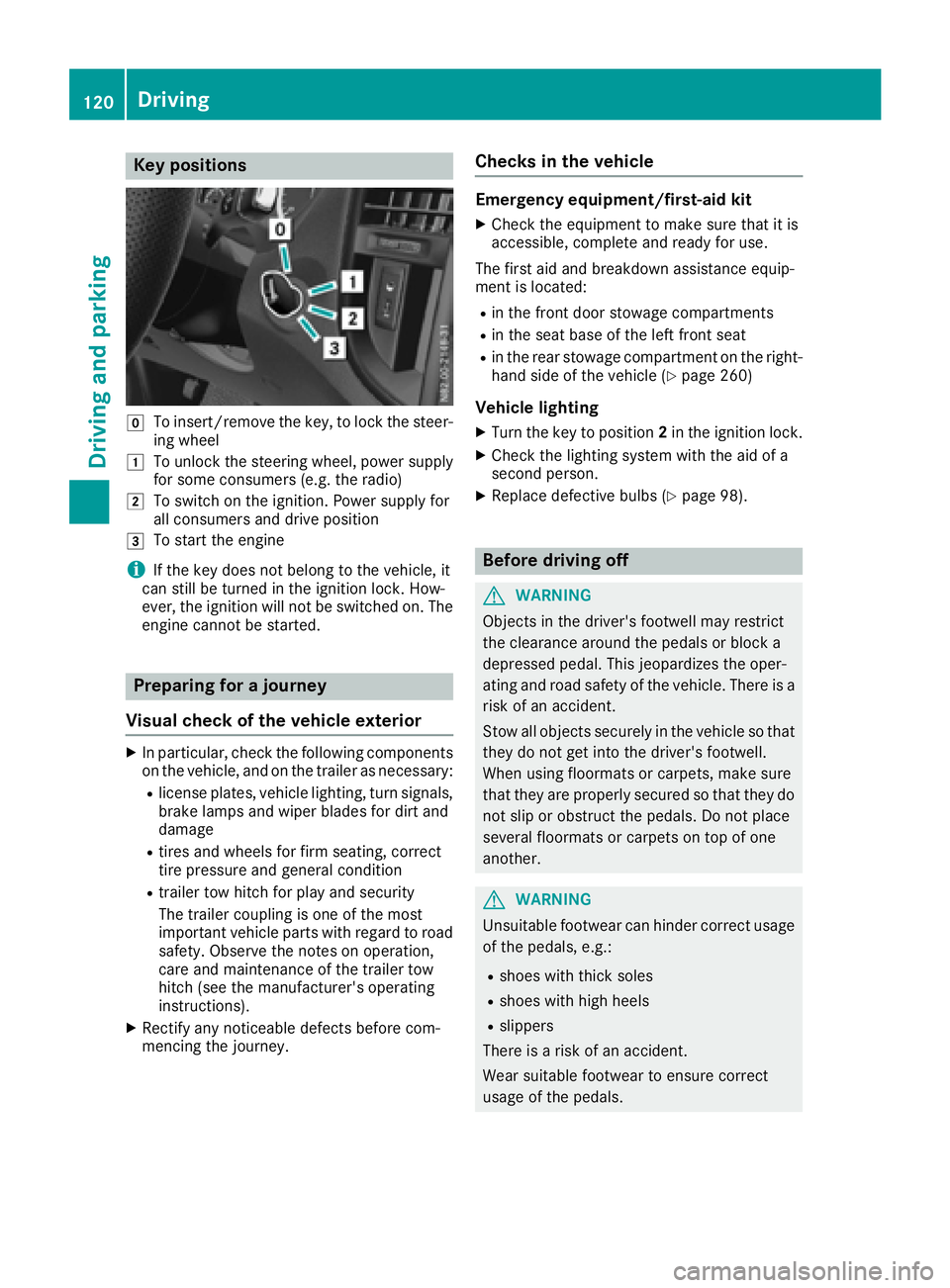
gTo insert/remove thekey,tol oc kt he steer -
ing whee l
1To unlockthe steering wheel, powe rsupply
for som econsum ers( e.g. th eradio)
2To switch on th eignition .Powe rsupply for
all consumer sand drive position
3To start th eengine
iIf th ekeydoes no tbelong to th evehicle, it
can still be turne dintheignition lock. How-
ever, th eignition will no tbeswitched on .The
engin ecanno tbes tarted.
Prepa ring for ajourne y
Visua lcheck ofthev ehicle exteri or
XIn particular, chec kthe followin gcom ponent s
on th evehicle, and on th etrailer as necessary:
Rlicense plates, vehicl elighting ,tur ns ignals,
brak elamp sand wiper blade sfor dir tand
damag e
Rtires and wheels for fir mseating ,correct
tire pressur eand general condition
Rtrailer to whitch for play and securit y
The trailer couplin gisoneof th emost
important vehicl epartsw ithr egard to roa d
safety. Observ ethe note sono peration ,
car eand maintenance of th etrailer to w
hitch (see th emanufacturer' soperating
instructions).
XRectify any noticeable defects before com-
mencin gthe journey.
Check sinthevehicle
Emergency equipment/first-aid kit
XChec kthe equipmen ttomakes uret hatiti s
accessible, complet eand read yfor use.
The first aid and breakdown assistanc eequip -
men tislocated:
Rin th efront door stowage compartments
Rin theseat base of th eleftf ront seat
Rin therear stowage compartmen tontheright -
han dside of th evehicl e(Ypage 260)
Vehicle lighting
XTurn th ekeyto position 2in th eignition lock.
XChec kthe lighting system wit hthe aid of a
secon dperson .
XReplac edefective bulbs (Ypage 98).
Before drivingo ff
GWARNING
Objects in th edriver's footwell may restrict
th ec learance around th epedal sorb locka
depressed pedal .This jeopardizes th eoper -
ating and roa dsafet yoft hevehicle. There is a
ris kofana ccident.
Stow all objects securel yint he vehicl esothat
they do no tget int othe driver's footwell.
Whe nusingfloormats or carpets, mak esure
that they are properly secured so that they do no tslip or obstruct th epedals. Do no tplac e
several floormats or carpet sontopof on e
another.
GWARNIN G
Unsuitable footwear can hinder correc tusage
of th epedals, e.g. :
Rshoes withthick sole s
Rshoes wit hhigh heel s
Rslippers
There is ariskofana ccident.
Wear suitable footwear to ensur ecorrect
usage of th epedals.
120Driving
Driving and parking
Page 132 of 310
Rockingthe vehicle free
At speeds up to 5mph (9 km/h )you can switch
back and forth between drive position Dand
reverse gear Rwithou tapplyin gthe brakes. This
helps when rocking the vehicl eoutof snow or
slush.
XPush the DIREC TSELECT lever alternately up
and dow nbeyond the firs tpoint of resistance.
Towin gatrailer
XDepending on the downhil lgradient, limit the
shift rang e(Ypage 128 )orshift manually into
al ower gear (Ypag e130) in which the engine
wil loperate in the middle of the engine speed
range. This als oapplie sifcruise control is
activated.
Manual gearshifting
General notes
If you select transmission program M,automatic
gearshifting is deactivated and manua lgear-
shifting is automatically activated .You must
then permanently change geary ourself for as
long as the transmission programiss elected.
Permanent manua lgearshifting is deactivated
automatically when you switch from transmis-
sion program Mto another transmission pro-
gram. The automatic transmission then shifts
gears automatically. The display shows the
selected transmission programa nd transmis-
sion position Dagain.
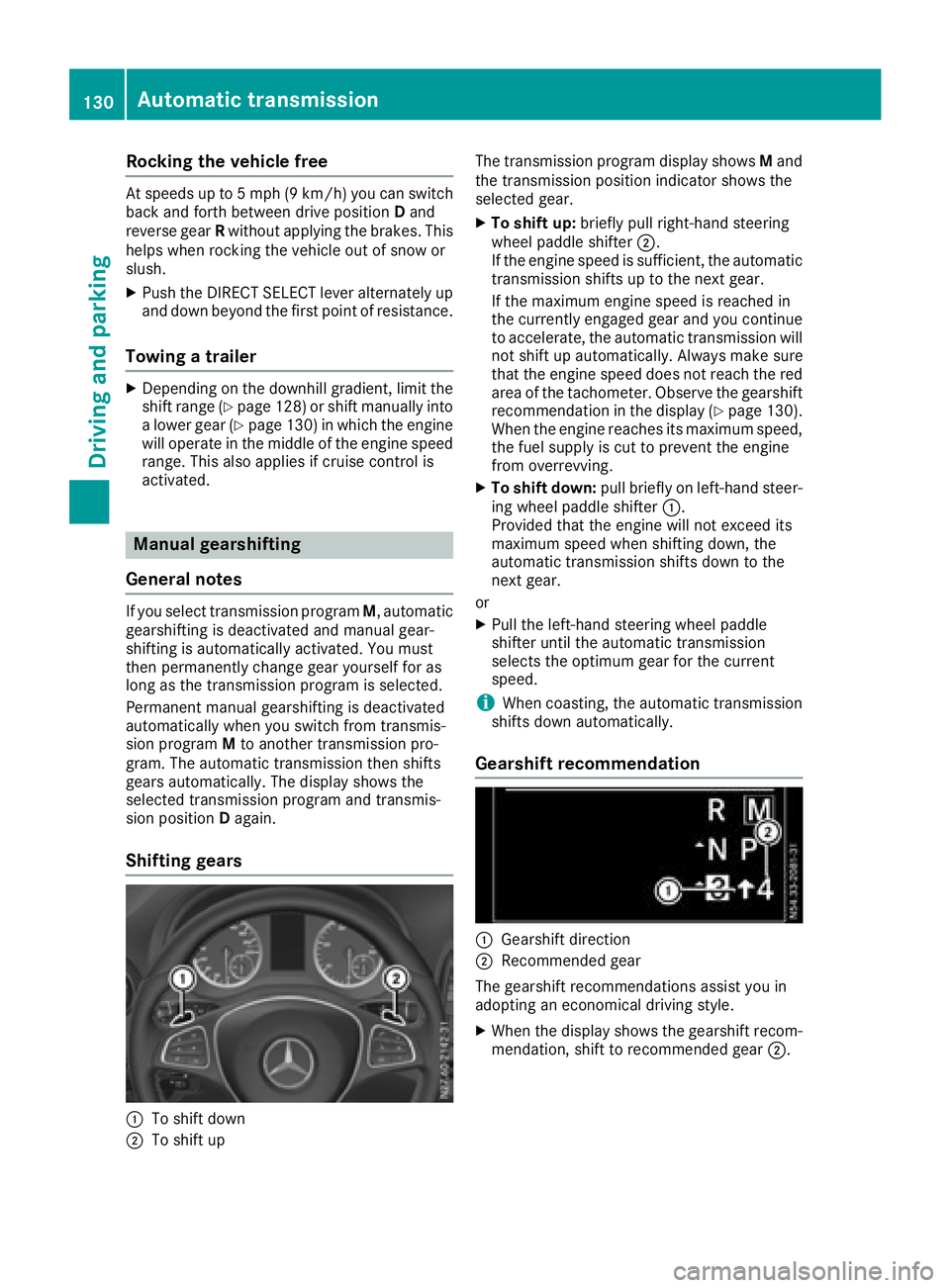
Shifting gears
:To shift down
;To shift up The transmission programd
isplay showsMand
the transmission position indicator shows the
selected gear.
XTo shift up: brieflypullr ight-hand steering
whee lpaddle shifter ;.
If the engine speediss ufficient, the automatic
transmission shifts up to the next gear.
If the maximu mengine speedisr eachedin
the currently engage dgear and you continue
to accelerate, the automatic transmission will
not shift up automatically. Always make sure
that the engine speedd oes not reach the red
area of the tachometer. Observe the gearshift
recommendation in the display (
Ypag e130).
When the engine reache sits maximu mspeed,
the fuel supply is cut to prevent the engine
from overrevving.
XTo shift down: pullbriefl yonl eft-hand steer-
ing whee lpaddle shifter :.
Provided that the engine wil lnot exceed its
maximu mspeedw hen shifting down, the
automatic transmission shifts down to the
next gear.
or
XPul lthe left-hand steering whee lpaddle
shifter until the automatic transmission
selects the optimumg ear for the current
speed.
iWhen coasting, the automatic transmission
shifts down automatically.
Gearshift recommendation
:Gearshift direction
;Recommended gear
The gearshift recommendations assist you in
adopting an economicald riving style.
XWhen the display shows the gearshift recom-
mendation, shift to recommended gear ;.
130Automatic transmission
Driving and parking
Page 138 of 310
Mercedes-Benzrecommends that you have the
maximum permissible speed programed at a
Mercedes-BenzC ommercial Van Center.
Before overtaking, take into consideration that
the engine speed limiter prevents the speed
increasing beyond the programed maximum
speed.
Driving abroad
Service
An extensive network of authorized Mercedes-
Benz Centers is also at your disposal when you
are traveling abroad. Nevertheless, please bear
in mind that service facilities or replacement
parts may not always be immediately available.
The relevant workshop directories are available
from any Mercedes-BenzC ommercial Van Cen-
ter.
Fuel
In some countries, only fuels with ahigher sulfur
content are available.
Unsuitable fuel can cause engine damage. You
will find information about fuel under "Service
products and capacities" (
Ypage 296).
Low-beam headlamps
General notes
When driving in countries in which traffic drives
on the opposite side of the road to the country
where the vehicle is registered, you must switch
the headlamps to symmetrical low beam. This
prevents oncomingt raffic from being blinded.
Symmetrical low beam does not illuminate as
large an area of the edge of the road.
Vehicles with halogen headlamps
The headlamps do not need to be switched to
symmetrical low beam. The legal requirements
of countries in which traffic drives on the oppo- site side of the road to the countryw here the
vehicle is registered are met without the need to
convert the headlamps.
Transport by rail
Transporting your vehicle by rail may be subject to certain restrictions or require special meas- ures to be taken in some countries due to vary-
ing tunnel heights and loading standards.
You can obtain information on this from any
Mercedes-BenzC
ommercial Van Center.
Brakes
Important safety notes
GWARNING
If you shift down on aslippery road surface in
an attempt to increase the engine's braking
effect,t he drive wheels could lose their grip.
There is an increased danger of skidding and
accidents.
Do not shift down for additional engine brak-
ing on aslippery road surface.
Downhill gradients
!Depressing the brake pedal constantly
results in excessive and premature wear to
the brake pads.
This also applies to automatic braking if you
have activated cruise control.
On long and steep downhill gradients, you
should change down to shift range 2or1 in
good time (
Ypage 128).
This should be observed in particular when driv-
ing with aladen vehicle and when towing a
trailer.
You thereby make use of the braking effect of
the engine and do not have to brake as often to
maintain the speed. This relieves the load on the
service brake and prevents the brakes from
overheating and wearing too quickly.
Heavy and light loads
GWARNING
If you rest your foot on the brake pedal while
driving, the braking system can overheat. This increases the stopping distance and can even
cause the braking system to fail. There is a
risk of an accident.
Never use the brake pedal as afootrest.N ever
depress the brake pedal and the accelerator
pedal at the same time.
136Driving tips
Driving and parking
Page 142 of 310
Checklist after driving off-road
!If you detect damagetothevehicle after
driving off-road, have th evehicle checked
immediately at aqualified specialist work-
shop.
Off-road driving places ahigher demand on your
vehicle than normal road operation. Checky our
vehicle after driving on roug hterra in. By doing
so you will notic eany damageing ood timeand
reduc ethe riskofana ccidentf or yourself and
other road users. Clean your vehicle thoroughly
before driving on public roads.
Observ ethe followingp oints after driving off-
road ,onc onstructio nsites and before driving on
public roads:
XActivate ESP®(Ypage 64).
XClean th eheadlamps and tail lamps and
check them for damage.
XClean th efront and rear licens eplates.
XClean th ewindshield, windows and exterior
mirrors.
XClean th esteps, door sills and grab handles.
This increases safety of footing.
XClean th ewheels/tires, wheel housing sand
th eu nderbody of th evehicle withaw aterjet .
This increases road grip ,especiall yonw et
road surfaces.
XCheckt hewheels/tires and wheel housings
for trapped foreign object sand remove them.
Trapped foreign object scan damaget he
wheels/tires and may be flun gout from the
vehicle when you continue driving.
XCheckt heunderbody for trapped branches or
other part sofplants and remove them.
Trapped branches or other part sofplants
increas ethe riskoff irea nd can caus ed
am-
age
to fuel lines, brak ehoses and th erubber
bellows of axle joint sand driv eshafts.
XClean th ebrak edisks, brak epads and axle
joints, particularly after operatio ninsand,
mud, grit/gravel, wate rorsimilarly dirt ycon-
ditions.
XCheckt heentir efloo rassembly, th etires,
wheels, bodywork structure, brakes, steering,
chassis and exhaust system for any damage.
XCheckt heservic ebrak efor operatin gsafety,
e.g .carry out abrak etest.
XIf you notic estron gv ibrations after driving off-
road ,che ck th ewheelsa nd drivetrain for for-
eign object sagain.R emove any foreign object
swhichc an lead to imbalances and
thus caus evibrations.
Driving in mountainous areas
When driving in mountainous areas ,notet hat
th ep ower output of th eengine, and withiti ts
gradientc limbingcapability, decreas ewith
increasing altitude. Pleaset aken oteoft hisp ar-
ticularly when driving withat railer in mountain-
ous areas.
The maximum permissible trailer loads are valid
for journeys at altitudes up to 1100 yds
(1000 m) aboves ea levelwithg radients up to
12%.
Information on maximum permissible trailer
loads can be foun dinyour vehicle registration
papersa nd on thevehicle identification plate
(
Ypage 294) or unde r"Trailer loads"
(Ypage 305).
When driving at altitudes of 2700 yds (2500 m)
aboves ea level, th eECO start/sto pfunction is
no longer available.
Notes on braking on downhill gradients can be
foun dint he"Braking" sectio n(
Ypage 136).
Driving systems
Cruise control
General notes
Cruise control maintain sthe speedoft hevehi-
cle for you. It brakes automatically in orde rto
avoid exceedingt heset speed.
Use cruise control if road and traffic conditions
makeita ppropriat etomaintain asteady speed
for aprolonged period. You can set any speed
from 30 km/h upwards in increment sof1km/h
and 10 km/h.
If you have set Miles
as theunit for th edigital
speedometer, you can set any speeda bove
20 mph in increment sof1mph and5mph.
Changingt hedisplay unit for th edigital speed-
omete rand th edistance:
Ron vehicle swithout steering wheel buttons
(Ypage 174)
Ron vehicle swith steering wheel buttons
(Ypage 185)
Cruise control shouldn otbe activated when
driving off-road or on constructio nsites.
140Driving systems
Driving and parking
Page 149 of 310
The intensity of warning lamps:depends on
the brightness of the ambient light and is con-
trolled automatically.
Collision warning
If av ehicle is detected in the monitoring range of
Blind Spot Assist and you switch on the corre-
sponding turn signal, adouble warning tone
sounds once. The warning lamp in the corre-
sponding exterior mirror flashes. If the turn sig-
nal remains on, detected vehicles are indicated
by the flashing of the warning lamp in the exte-
rior mirror. There are no further warning tones.
Activating Blind Spot Assist
XMake sure that Blind Spot Assist is activated
in the on-board computer (Ypage 184).
XTurn the key to position 2in the ignition lock.
The warning lamps in the exterior mirrors light
up for approximately 1.5 seconds.
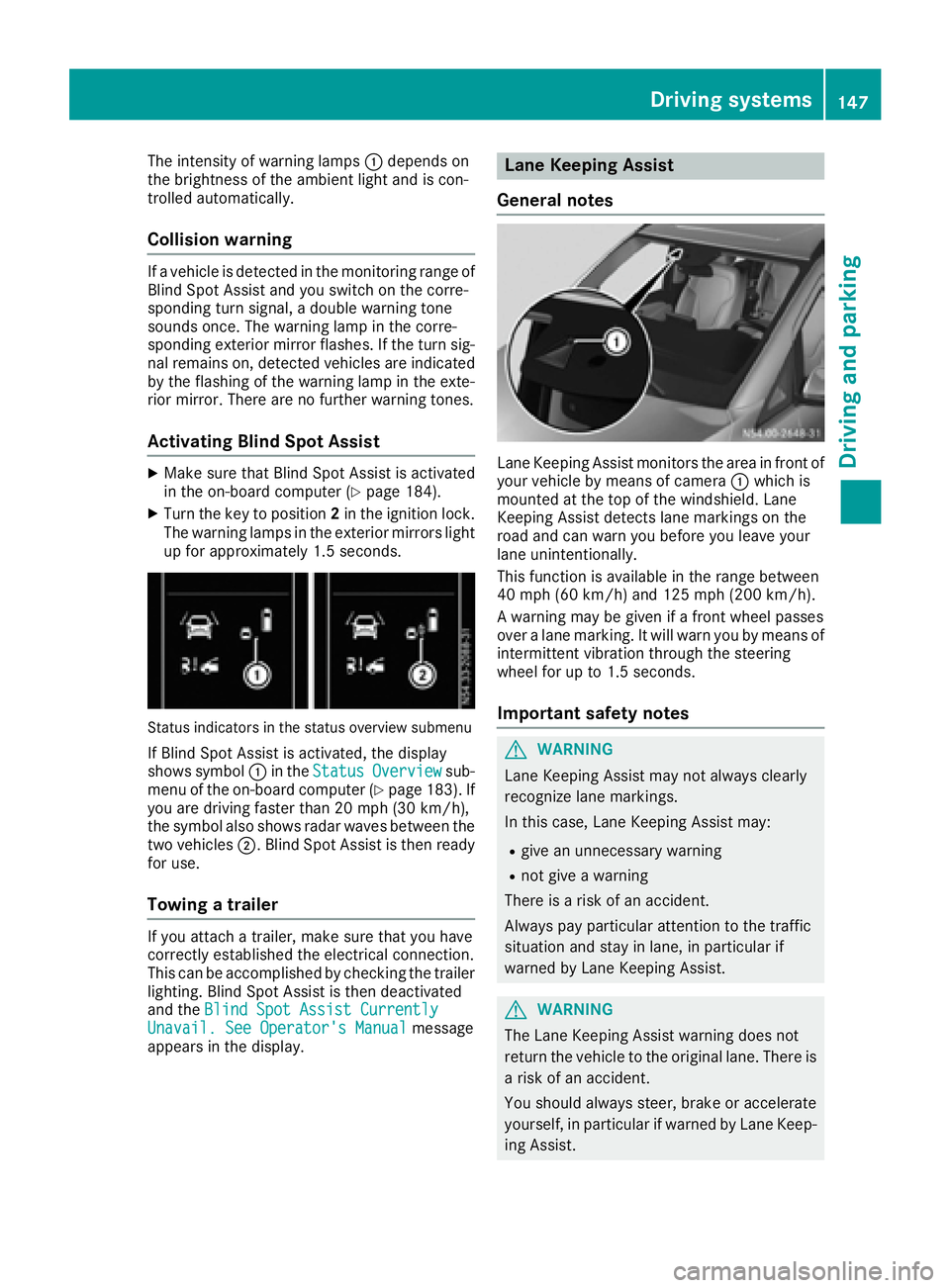
Status indicators in the status overview submenu
If Blind Spot Assist is activated, the display
shows symbol :in the StatusOverviewsub-
menu of the on-board computer (Ypage 183). If
you are driving faster than 20 mph (30 km/h) ,
the symbo lalsos hows rada rwaves between the
two vehicles ;.Blind Spo tAssist is thenr eady
for use.
Towin gatrailer
If youattach atrailer, make sure thaty ouhave
correctl yestablishe dthe electrical connection.
Thi scan be accomplishe dbychecking the trailer
lighting. Blind Spo tAssist is thend eactivated
and the Blind Spo tAssist Currently
Unavail. See Operator' sManualmessage
appear sinthe display.
Lane Keeping Assist
General notes
Lane Keeping Assist monitors the area in front of
your vehicl ebymeans of camera :which is
mounted at the top of the windshield. Lane
Keeping Assist detects lane markings on the
roa dand can warn yo ubefor ey ou leav eyour
lane unintentionally.
This functio nisa vailable in the range between
40 mph (60 km/h )and 125 mph (20 0km/h).
Aw arning maybeg iven if afront whee lpasses
ove ralanem arking. It will warn yo ubymeans of
intermittent vibratio nthroug hthe steering
whee lfor up to 1.5 second s.
Importan tsafety notes
GWARNING
Lane Keeping Assist may not always clearly
recognize lane markings.
In this case, Lane Keeping Assist may:
Rgive an unnecessary warning
Rnot give awarning
There is ariskofana ccident.
Alway spayparticula rattention to the traffic
situation and stay in lane, in particula rif
warned by Lane Keeping Assist.
GWARNING
The Lane Keeping Assist warning doe snot
return the vehicl etothe original lane. There is
ar iskofana ccident.
Yo us houl dalway ssteer, brake or accelerate
yourself, in particula rifwarned by Lane Keep-
ing Assist.
Driving systems147
Driving and parking
Z
Page 152 of 310
Standard:the sensitivity with which the sys-
tem determines the attention level is set to
normal.
Sensitive: the sensitivity is set higher. The
driver is warned earlier.
When ATTENTION ASSIST is switched on and
the vehicle engine is running:
Ron vehicles without steering wheel buttons,
the À indicator lamp in the instrument
cluster lights up
Ron vehicles with steering-wheel buttons, the
display shows the Àsymbol:
-in the status area
-in the Status Overviewof the Assist.menu (Ypage 183)
For vehicles with steering wheel buttons, if you
deactivate ATTENTION ASSIST, the system is
automatically re-activated when you start the
engine. The system sensitivity then corresponds to the last selection activated –standard or sen-
sitive.
If you switch off ATTENTION ASSIST in avehicle
without steering wheel buttons, the system
remains switched off even after you start the
engine. The status of the system after switching
on the engine always corresponds to the status
last selected.
Warning in the display
If the system detectst iredness or increasing
lapses in concentration, the warning Atten‐
tion Assist: TakeaBreak!orAttent.Asst: Take Break!is shown in the display.
An additional warning tone sounds.
XIf necessary, take abreak.
XConfirm the message by pressing the a
button on the steering wheel.
On long journeys, take regular breaks in good
time to allow yourself to rest. If you do not take
ab reak and ATTENTION ASSIST continues to
detect increasing lapses in concentration, you
will be warned again after 15 minutes at the
earliest. This will only happen if ATTEN-
TION ASSIST still detectst ypical indicators of
fatigue or increasing lapses in concentration.
PARKTRONIC
General notes
PARKTRONIC is an electronic parking aid. The
system is equipped with ultrasonic sensors in
the front and rear bumpers to monitor the area
around your vehicle. PARKTRONIC indicates vis-
uallya nd audibly the distance between your
vehicle and an object.
Your vehicle features two separate sound emit-
ters with different frequencies for the warning
tones. The warning ranges in front of and behind the vehicle are indicated by different warning
tones.
PARKTRONIC is activated automatically when
you:
Rturn the key to position 2in the ignition lock
Rrelease the parking brake and
Rmove the selector lever to D,Nor R
PARKTRONIC is deactivated at speeds above
11 mph (18 km/h). PARKTRONIC is reactivated
at speeds below 10 mph (16 km/h).
Important safety notes
PARKTRONIC is only an aid. It cannot replace
your own awareness of the immediate surround-
ings. You are responsible for safe maneuvering,
parking and pulling away.W hen maneuvering,
parking and pulling away,m ake sure that there
are no persons, animals or object sinthe maneu-
vering area.
!Pay particular attention to obstacles above
or below the sensors when parking, such as
flower pots or trailer towbars. PARKTRONIC
does not recognizes uch objectswhen they
are in the immediate vicinity of the vehicle.
You could damage the vehicle or objects.
PARKTRONIC can suffer interference from:
Rultrasonic sources such as atruck's
compressed-air brakes, an automatic car
wash or apneumatic drill
Rattachments to the vehicle, e.g. rear moun-
ted racks
Rnumber plates (vehicle license plates) that
are not affixed flat against the bumper
Rdirty or icy sensors
Remove adetachable trailer coupling if it is no
longer required. PARKTRONIC measures the
minimum detection range to an obstacle from
the bumper, not the ball coupling.
150Driving systems
Driving and parking
Page 155 of 310
Towingatrailer
PARKTRONI Cdetects acoupled trailer if your
vehicl eisequippe dwitht he corresponding elec-
trical installations for trailer towing.
PARKTRONI Cisd eactivated for the rea rarea
when yo uestablis hanelectrical connection
between your vehicl eand atrailer. If yo uusean
adapter for the socket, remove it fromt he
socket after detaching the trailer. Otherwise,
PARKTRONI Cremains deactivated for the rear
area.
Driving system s153
Driving an dparking
Z
Page 156 of 310
Problems with PARKTRONIC
ProblemPossible causes/consequences andMSolutions
Only the red segments in
the PARKTRONIC warn-
ing displaysare lit.
Aw arning tone also
sounds for approx-
imately 2seconds.
PARKTRONIC is then
deactivated.
The indicator lamp of the
f button lights up
and the red segments in
the PARKTRONIC warn-
ing display go out.PARKTRONIC has malfunctioned and has switched itself off.
XIf problems persist, have PARKTRONIC checked at aqualified spe-
cialist workshop.
The PARKTRONIC warn-
ing displaysi mplausible
distances.
For example, all the seg-
mentsm ay be lit even
though there is no obsta-
cle present.The PARKTRONIC sensors are dirty or iced up.
XClean the PARKTRONIC sensors (Ypage 257).
XTurn the key to position 2again in the ignition lock.
The license plate or other parts attached near the sensors may not be
secured correctly.
XCheck the license plate and attachmentp arts near the sensors for
correct seating.
An external radio or ultrasonic source may be causing interference.
XCheck PARKTRONIC functions in adifferent location.
Active Parking Assist
General notes
Active Parking Assist is an electronic parking
aid. The system uses ultrasound sensors to
measure the road on both sides of the vehicle
and indicates suitable parking spaces. It can
then actively steer and brake the vehicle to help
you to park and exit the parking space.
Active Parking Assist includes the PARKTRONIC
parking aid which indicates visuallya nd audibly
the distance between your vehicle and an
object .Todot his, PARKTRONIC uses the ultra-
sonic sensors of the Active Parking Assist
(
Ypage 150).
Important safety notes
Active Parking Assist is only an aid. It is not a
substitute for your attention to the immediate
surroundings. You are responsible for safe maneuvering, parking and pulling away.M
ake
sure that no persons, animals or object sare in
the maneuvering range.
When you deactivate PARKTRONIC, Active Park-
ing Assist will also be deactivated.
For vehicles with atrailer coupling installed, the
minimum length for parking spaces will be
slightly increased.
If you have attached atrailer to your vehicle, you
should not use Active Parking Assist. Once the
electrical connection is established between
your vehicle and the trailer, Active Parking
Assist is no longer available. PARKTRONIC is
then deactivated for the rear area.
GWARNING
While parking or pulling out of aparking
space, the vehicle swings out and can drive
onto areas of the oncomingl ane. This could
result in acollision with another road user.
There is arisk of an accident.
154Driving systems
Driving and parking