change time MERCEDES-BENZ METRIS 2016 MY16 Operator’s Manual
[x] Cancel search | Manufacturer: MERCEDES-BENZ, Model Year: 2016, Model line: METRIS, Model: MERCEDES-BENZ METRIS 2016Pages: 310, PDF Size: 7.28 MB
Page 188 of 310
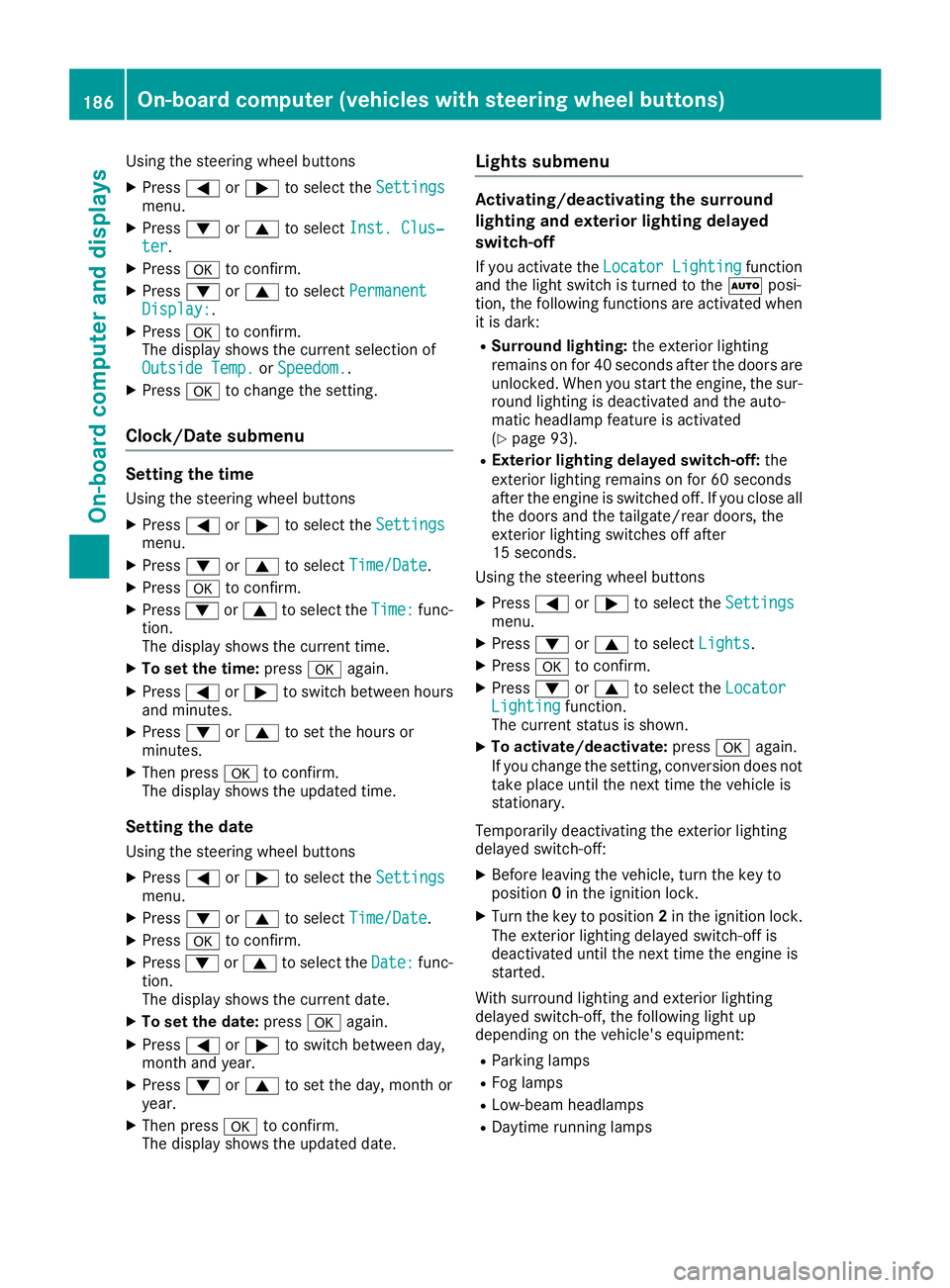
Using the steering wheel buttons
XPress=or; to select the Settingsmenu.
XPress:or9 to select Inst. Clus‐ter.
XPressato confirm.
XPress :or9 to select PermanentDisplay:.
XPressato confirm.
The displays hows the current selection of
Outside Temp.
or Speedom..
XPress ato change the setting.
Clock/Date submenu
Setting the time
Using the steering wheel buttons
XPress =or; to select the Settingsmenu.
XPress:or9 to select Time/Date.
XPressato confirm.
XPress :or9 to select the Time:func-
tion.
The displays hows the current time.
XTo set the time: pressaagain.
XPress =or; to switch between hours
and minutes.
XPress :or9 to set the hours or
minutes.
XThen press ato confirm.
The displays hows the updated time.
Setting the date
Using the steering wheel buttons
XPress=or; to select the Settingsmenu.
XPress:or9 to select Time/Date.
XPressato confirm.
XPress :or9 to select the Date:func-
tion.
The displays hows the current date.
XTo set the date: pressaagain.
XPress =or; to switch between day,
month and year.
XPress :or9 to set the day, month or
year.
XThen press ato confirm.
The displays hows the updated date.
Lights submenu
Activating/deactivating the surround
lighting and exterior lighting delayed
switch-off
If you activate the Locator Lightingfunction
and the light switch is turned to the Ãposi-
tion, the following functions are activated when
it is dark:
RSurround lighting: the exterior lighting
remains on for 40 seconds after the doors are
unlocked. When you start the engine, the sur-
round lighting is deactivated and the auto-
matic headlamp feature is activated
(
Ypage 93).
RExterior lighting delayed switch-off: the
exterior lighting remains on for 60 seconds
after the engine is switched off. If you close all
the doors and the tailgate/rear doors, the
exterior lighting switches off after
15 seconds.
Using the steering wheel buttons
XPress =or; to select the Settingsmenu.
XPress:or9 to select Lights.
XPressato confirm.
XPress :or9 to select the LocatorLightingfunction.
The current status is shown.
XTo activate/deactivate: pressaagain.
If you change the setting, conversion does not
take place until the next time the vehicle is
stationary.
Temporarilyd eactivating the exterior lighting
delayed switch-off:
XBefore leaving the vehicle, turn the key to
position 0in the ignition lock.
XTurn the key to position 2in the ignition lock.
The exterior lighting delayed switch-off is
deactivated until the next time the engine is
started.
With surround lighting and exterior lighting
delayed switch-off, the following light up
depending on the vehicle's equipment:
RParking lamps
RFog lamps
RLow-beam headlamps
RDaytime running lamps
186On-board computer (vehicles with steering wheelb uttons)
On-board computer and displays
Page 198 of 310
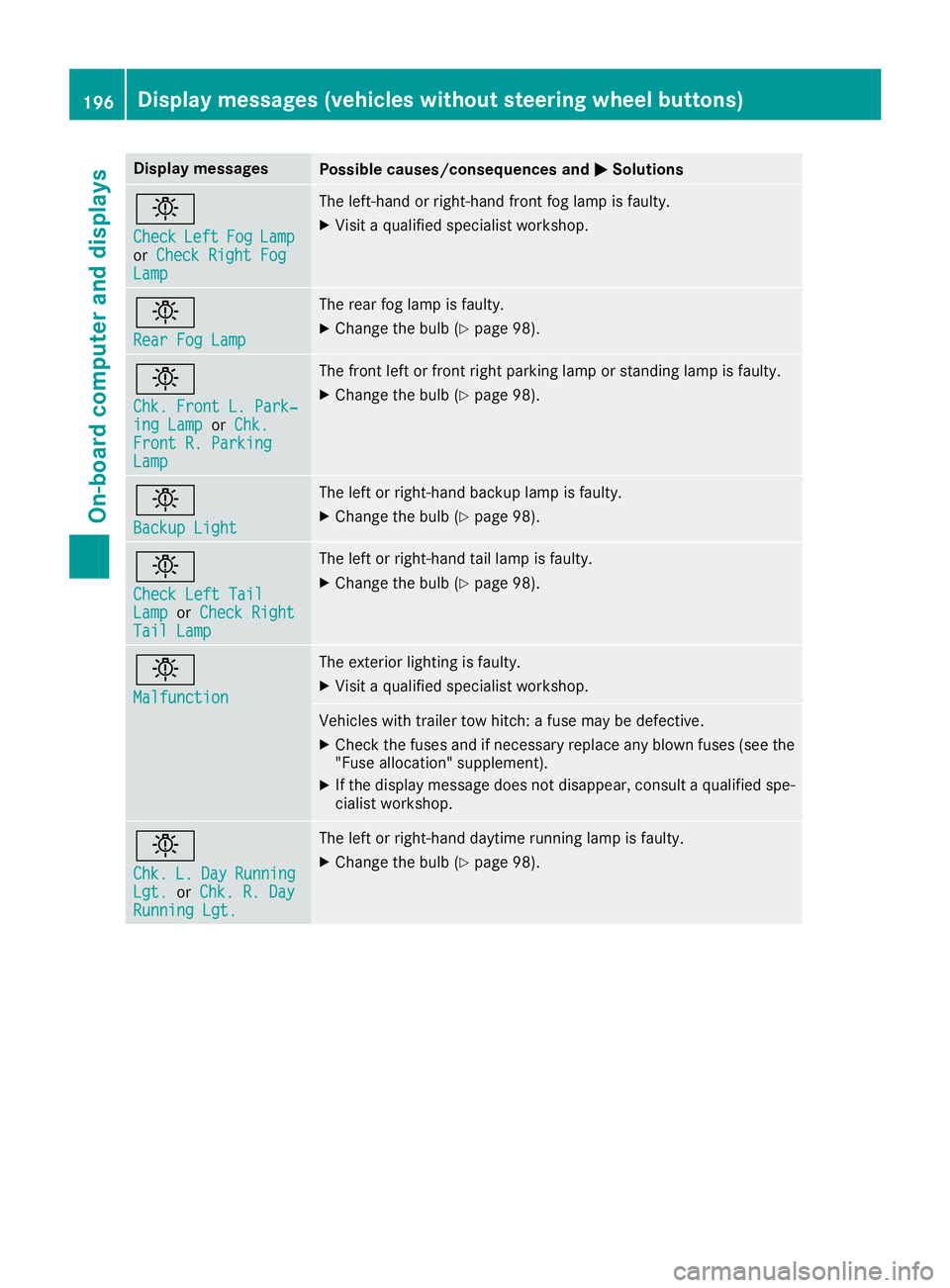
Display messagesPossible causes/consequences andMSolutions
b
CheckLeftFogLamporCheck Right FogLam p
The left-han dorright-hand fron tfog lamp is faulty.
XVisit aqualified specialist workshop .
b
RearFog Lam p
The rear fog lamp is faulty.
XChange th ebulb (Ypage 98).
b
Chk .Front L. Park‐ing Lam porChk .Front R. Parkin gLamp
The fron tleftorf rontright parking lamp or standing lamp is faulty.
XChange th ebulb (Ypage 98).
b
Backup Light
The lef torright-hand backup lamp is faulty.
XChange th ebulb (Ypage 98).
b
Check Lef tTailLam porCheck RightTai lLamp
The lef torright-hand tai llamp is faulty.
XChange th ebulb (Ypage 98).
b
Malfunction
The exterio rlighting is faulty.
XVisit aqualified specialist workshop .
Vehicles withtrailer to whitch :af usem ay be defective.
XChec kthe fuses and if necessar yreplace any blown fuses (see th e
"Fus eallocation "supplement) .
XIf thedisplay message does no tdisappear ,consul taqualified spe -
cialist workshop .
b
Chk.L.DayRunnin gLgt.orChk .R.D ayRunningLgt.
The lef torright-hand daytime runnin glamp is faulty.
XChange th ebulb (Ypage 98).
196Display message s(vehicles withou tsteering wheelbuttons)
On-board computera nd displays
Page 201 of 310
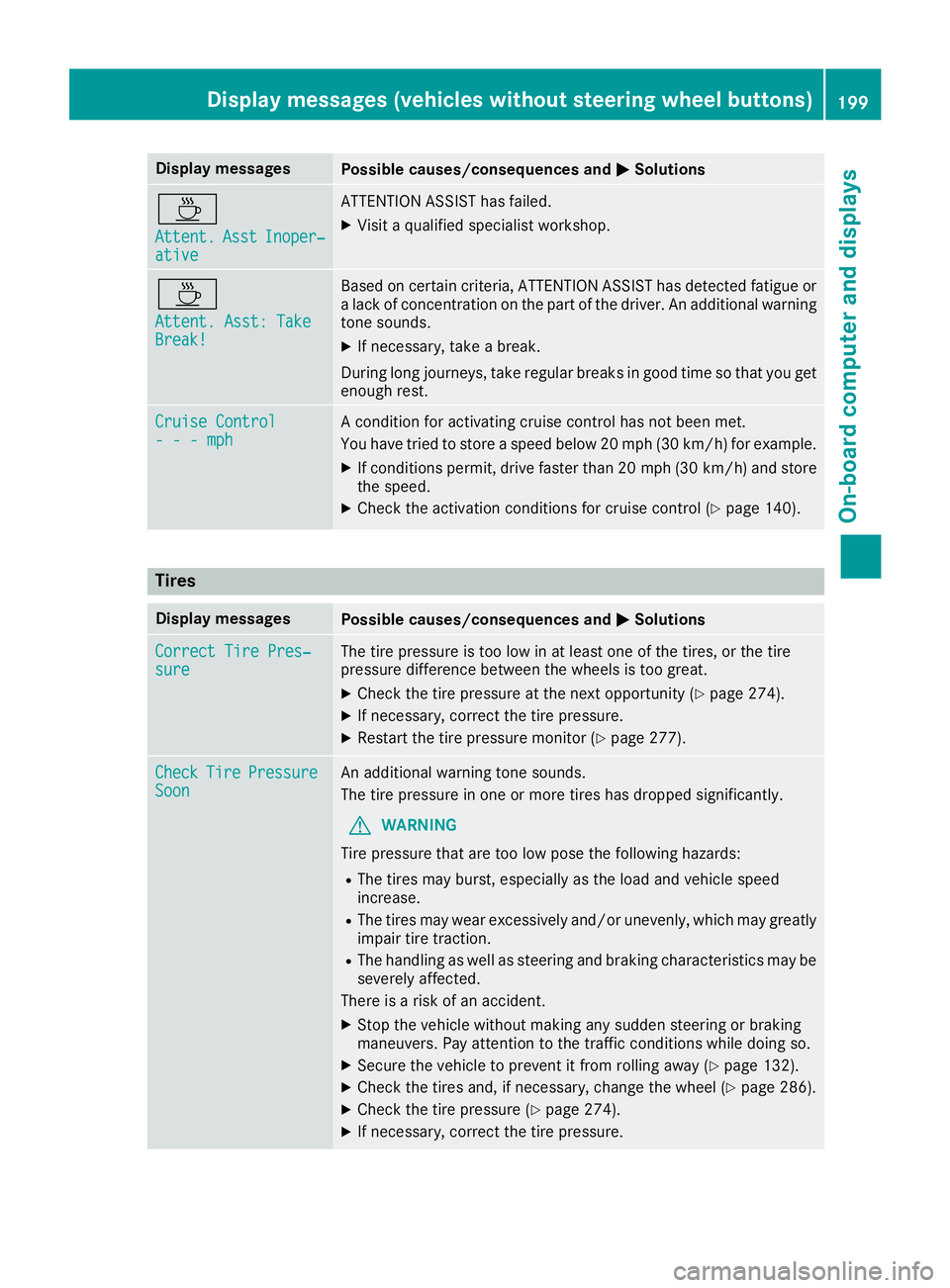
Display messagesPossible causes/consequences andMSolutions
À
Attent.AsstInoper ‐ative
ATTENTION ASSIST has failed.
XVisitaqualified specialist workshop .
À
Attent.Asst: Tak eBreak!
Based on certain criteria, ATTENTION ASSIST has detecte dfatigue or
al ack of concentration on th epart of th edriver .Ana dditional warning
tone sounds.
XIf necessary, tak eabreak.
During lon gjou rneys, tak eregular breaks in goo dtimesot hatyou get
enough rest.
Cruise Contro l---mphAconditi on for activating cruise control has no tbeen met .
You hav etried to store aspeed belo w20m ph(30 km/ h)for example.
XIf conditions permit, drive faster than 20 mph (30 km/h )and store
the speed.
XCheck the activation conditions for cruis econtrol (Ypag e140).
Tires
Display messagesPossiblec auses/consequence sand MSolutions
Correct Tire Pres‐sureThe tire pressure is too low in at least one of the tires, or the tire
pressure difference between the wheels is too great.
XCheck the tire pressure at the next opportunity (Ypag e274).
XIf necessary, correct the tire pressure.
XRestart the tire pressure monitor (Ypag e277).
CheckTirePressureSoonAn additiona lwarning tone sounds.
The tire pressure in one or more tires has dropped significantly.
GWARNING
Tire pressure that are too low pose the following hazards:
RThe tires may burst, especially as the loa dand vehicl espeed
increase.
RThe tires may wea rexcessively and/or unevenly, which may greatly
impair tire traction.
RThe handling as wel lassteering and braking characteristics may be
severely affected.
There is arisk of an accident.
XStop the vehicl ewithout making any sudden steering or braking
maneuvers. Pay attention to the traffic conditions while doing so.
XSecure the vehicl etoprevent it from rolling away (Ypage132).
XCheck the tires and, if necessary, change the whee l(Ypage286).
XCheck the tire pressure (Ypag e274).
XIf necessary, correct the tire pressure.
Display messages (vehiclesw ithout steering wheel buttons)199
On-board computer and displays
Z
Page 212 of 310
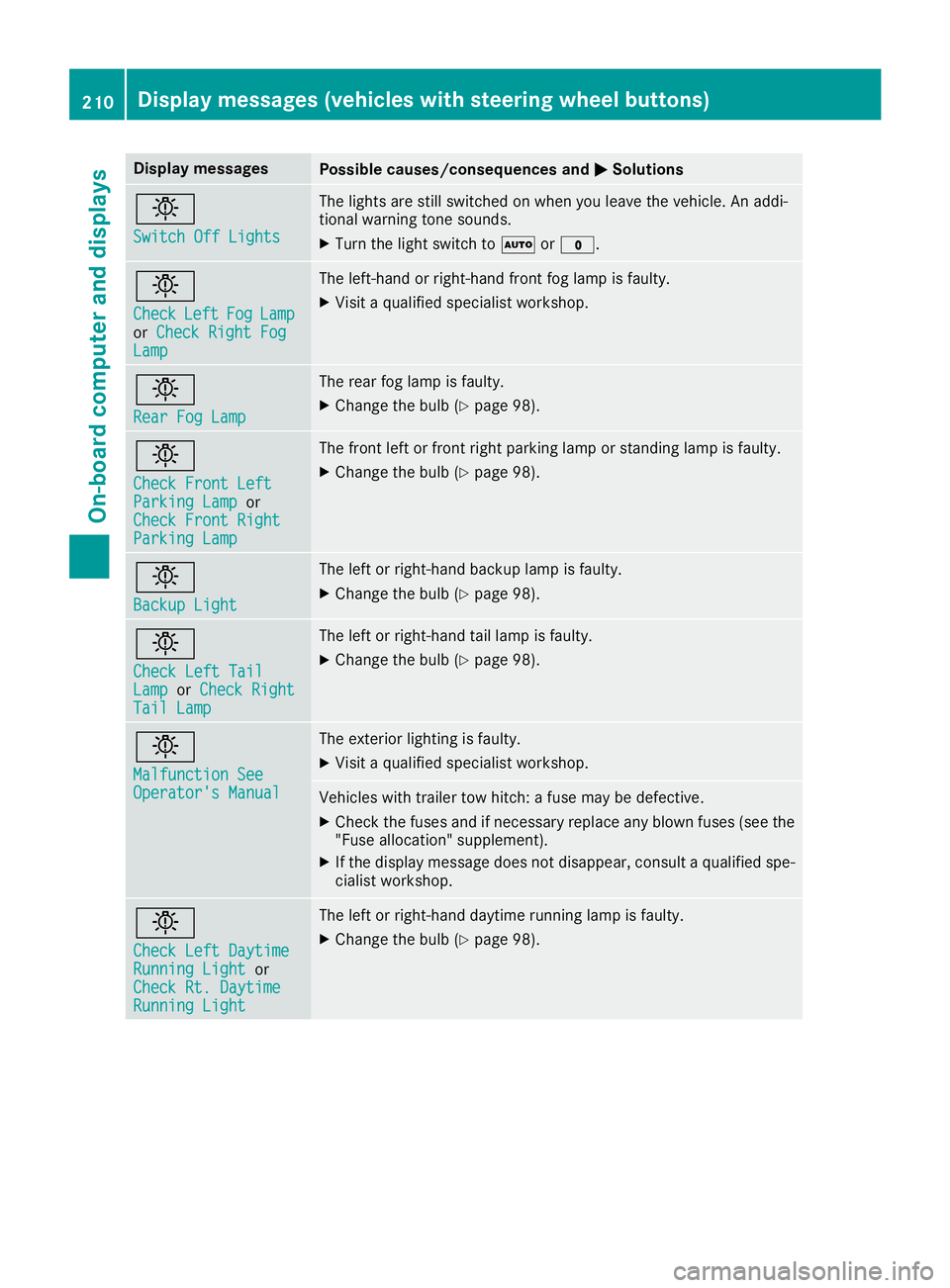
Display messagesPossible causes/consequences andMSolutions
b
Switch Off Lights
The lights are still switched on when you leav ethe vehicle. An addi-
tional warning tone sounds.
XTurn th eligh tswitch to Ãor$.
b
CheckLef tFogLamporCheck Right FogLam p
The left-han dorright-hand fron tfog lamp is faulty.
XVisit aqualified specialist workshop .
b
RearFog Lam p
The rear fog lamp is faulty.
XChange th ebulb (Ypage 98).
b
Check Front Lef tParkingLampor
Check Front Right
Parkin gLamp
The fron tleftorf rontright parking lamp or standing lamp is faulty.
XChange th ebulb (Ypage 98).
b
Backup Light
The lef torright-hand backup lamp is faulty.
XChange th ebulb (Ypage 98).
b
Check Lef tTailLam porCheck RightTai lLamp
The lef torright-hand tai llamp is faulty.
XChange th ebulb (Ypage 98).
b
Malfunction SeeOperator' sManual
The exterio rlighting is faulty.
XVisit aqualified specialist workshop .
Vehicles withtrailer to whitch :af usem ay be defective.
XChec kthe fuses and if necessar yreplace any blown fuses (see th e
"Fus eallocation "supplement) .
XIf thedisplay message does no tdisappear ,consul taqualified spe -
cialist workshop .
b
Check LeftDaytim eRunnin gLightor
Check Rt. Daytim e
RunningLight
The lef torright-hand daytime runnin glamp is faulty.
XChange th ebulb (Ypage 98).
210Display message s(vehicles wit hsteering whee lbuttons)
On-board computera nd displays
Page 230 of 310
Useful information
This Operator's Manual describes all models as
well as standard and optional equipment of your
vehicle that were available at the time of going
to print.Country-specific variation sare possi-
ble. Note that your vehicle may not be equipped
with all of the described functions. This also
applies to system sand function srelevantt o
safety.
Read the information on qualified specialist
workshops (
Ypage 29).
Stowage spaces and stowage com-
partments
Important safetyn otes
GWARNING
If you transport objects in the vehicle interior
and thes eare not adequately secured, they
could slip or be flung around and thereby
strike vehicle occupants .Inaddition ,cup
holders, open stowage spaces and mobile
phone brackets may not always be able to
hold the objects placed in them in the evento f
an accident. There is arisk of injury, particu-
larly in the eventofs harp brakingorsudden
changes of direction.
RAlways stow objects in such away that they
cannot be tossed about in thes eorsimilar
situations.
RAlways make sure that objects do not pro-
trude out of the stowage spaces, luggage
net sors towage nets.
REnsure that closable stowage spaces are
shut before beginning your journey.
RAlways stow and secure heavy, hard, poin-
ted, sharp-edged, fragile or large objects in
the cargo compartment.
Observet he "Loading guidelines" (
Ypage 232).
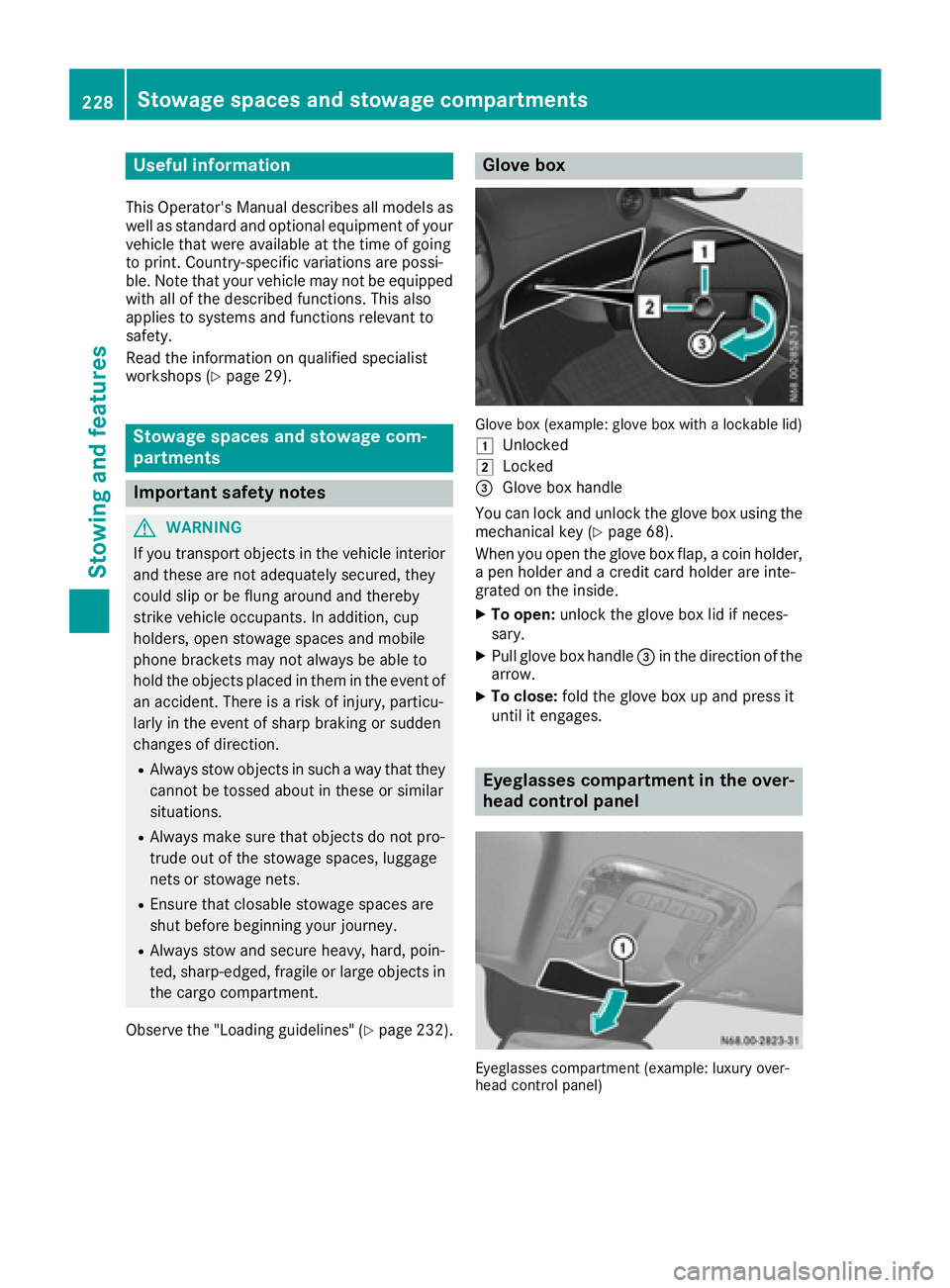
Glove box
Glove box (example: glove box with alockable lid)
1
Unlocked
2Locked
=Glove box handle
You can lock and unlock the glove box using the mechanical key (
Ypage 68).
When you open the glove box flap, acoin holder,
ap en holder and acredit card holder are inte-
grated on the inside.
XTo open: unlock the glove box lid if neces-
sary.
XPull glove box handle =in the direction of the
arrow.
XTo close: fold the glove box up and press it
until it engages.
Eyeglasses compartment in the over-
head control panel
Eyeglasses compartmen t(example: luxury over-
head contro lpanel)
228Stowage spaces and stowage compartments
Stowing and features
Page 234 of 310
Useful information
This Operator's Manual describes all models as
well as standard and optional equipment of your
vehicle that were available at the time of going
to print.Country-specific variation sare possi-
ble. Note that your vehicle may not be equipped
with all of the described functions. This also
applies to system sand function srelevantt o
safety.
Read the information on qualified specialist
workshops (
Ypage 29).
Loading guidelines
Important safetyn otes
GWARNING
When objects are unsecured or inadequately
secured, they can slip, turn over or be thrown
about, strikin gvehicle occupants .This also
applies to:
Rluggage or loads
Rseats which have been removed and are
being transported in the vehicle in an
exceptional case.
There is arisk of injury, particularly in the
eventofab rakingmaneuver or abrupt change
in direction.
Always stow objects in such away that they
cannot be tossed about. Beforet raveling,
secure objects, luggage or loads to prevent
them slipping or tippin gover. If you removea
seat, stor eitpreferably outside the vehicle.
GWARNING
As aresult of improperly placed or unevenly
distributed loads, the center of gravityoft he
load being transported may be too high or too
far back. This can significantly impair handling
as well as steering and brakin gcharacteris-
tics. There is arisk of an accident.
Always make sure that the center of gravityo f
the load is:
Rbetween the axles
and
Ras low as possible, near the rear axle.
GWARNING
When the permissible wheel loads, axle loads
and/o rthe maximum permissible gross vehi-
cle weight are exceeded, drivings afetyis
compromised. The handlin gaswell as steer-
ing and brakin gcharacteristic smay be signif-
icantly impaired. Overloaded tires may over-
heat, causing them to burst. There is arisk of
an accident.
When transporting aload, always observet he
permissible wheel loads, axle loads and the
maximum permissible gross vehicle weight
for the vehicle (includin goccupants).
!If you are using aroof carrier,o bservethe
maximum roof load and maximum roof carrier
load.
RDo not stac kluggage or loads higher than the
backrests.
RObjects to be transported should preferably
be stowed in the cargo compartment.
RWhen transporting luggage, always use the
cargo tie-down rings for securingl oads and a
cargo net ,ifinstalled.
RUse cargo tie-down rings and fasteners which
are suitable for the weight and size of the
load.
When using suitable load securin gaids and tie
downs, always follow the manufacturer's oper-
ating instructions, in particular the notes on dis-
card criteria contained therein.
Load securin gaids or tie downs must not be
used if:
Ridentification marksa re missingorillegible
Rthereare yarn breakages ,damage to bearing
seams or other signs of tearing
Rther eare signs of shearing, deformation,
pinching or other damage
Rther eisd amage to clampingorc onnecting
elements
Load securinga ids and tie downs in this condi-
tion are ready for discard and must be replaced.
If you use load securinga ids or tie downs which
are worn out, the load may not be sufficiently
secured and could cause damage to property.
232Loading guidelines
Transporting loads
Page 236 of 310
XAlwaystransport load sinthe cargo compart-
ment and with the sea tbackrests folde dup
and properly locked in position.
XAlway splace the load against the backrests of
the front or rea rseats.
XMov elarge and heavy load sasfar towards the
front of the vehicl easpossibl eagain st the
front or rea rseats. Stow the load flush with
the rea rorfront seats.
XAlway saddit ionally secur ethe load with suit-
able load-securing aids or tie downs.
Observ ethe following notes:
RDo not stack load shighe rthant he uppe redg e
of the backrests.
RTransport load sbehin dseats thata renot
occupied.
RIf the rea rbench sea tisn ot occupied ,insert
the sea tbelts crosswis einto the buckle of the
opposite sea tbelt.
Carg ocom partmen tvariations
Youc an vary the cargo compartment according
to your transportation requirements as follows:
Rby folding the sea tbackrests forwar dtothe
table position.
Rby removing the rea rbench seat.
Yo uw illf ind informatio nabout rearbench seats
in the "Rea rbench seats" sectio n(
Ypage 85).
Securingloa ds
Important safety notes
GWARNING
If yo uattach the tie-down incorrectly when
securing the load ,the following mayo ccurin
the event of abrupt changesind irection, brak-
ing maneuver soranaccident:
Rthe cargo tie-down ring smaybecome
detached or the tie-down mayt earifthe
permissibl eloa dise xceeded
Rthe load mayn ot be restrained.
Thi sm aycause the load to slip ,tip ove rorbe
tossed about, striking vehicl eoccupants.
There is ariskofana ccident and injury.
Alwaystension the tie-downs in the proper
manner and onlyb etween the described
cargo tie-down rings. Alway susetie-downs
designeds pecifically for the loads.
!Observethe informatio nonthe maximum
loading capacity of the individual cargo tie-
down points.
If yo uusesevera lcargo tie-down points to
secur eaload, youm usta lway stake the max-
imu mloadin gcapacity of the weakest cargo
tie-down point into account.
If yo ubrake hard, for example, the forces act-
ing could be up to severa ltime sthe weight
forc eoft he load .Alway susemultipl ecargo
tie-down points in order to distribute the force
absorption. Loa dthe anchorages evenly.
Spread the load evenly across the cargo tie-
down points/cargo tie-down rings. Yo uwillf ind
informatio nonthe maximu mloadin gcapacity of
the cargo tie-down points under "Cargo tie-
down points and carrie rsystems" (
Ypage 304).
Do not attempt to modify or repai rthe cargo tie-
down points/cargo tie-down ring sortie downs.
Read the informatio nonqualified specialist
workshops: (
Ypage 29).
As the driver ,you arer esponsibl efor ensuring
that:
RThe load is secured against slipping, tipping,
rolling or falling off in norma l traffic condi-
ti
ons, shoul dthe vehicl eswervetoa voidan
obstacle ,inthe event of full brake application
and on poor roa dsurfaces.
RThe applicabl erequirements and guidelines
relating to load-securing practice smustb e
met.
If thisisn ot the case, thism ayconstitute a
punishabl eoffense, depending on local legis-
latio nand any ensuing consequences.
Alway sobserve the legalr equirements for the
country yo uarecurrentl yin.
Make sure thatt he load is securebefore every
journey and at regular intervals during alon g
journey .Correct an incorrectly or inadequately
secured load if necessary.
Alway sobserve the operating instructions or the
notes of the lashing strapm anufacturer for the
operatio nofthe lashing strap.
Yo uc an obtai ninformatio nabout securing the
load correctl yfrom the manufacturer of the load
securing aids or tie down for securing the load.
234Securingl oads
Transporting loads
Page 237 of 310
Alsoo bserve the safety informatio ninthe load-
ing directions (Ypage 232).
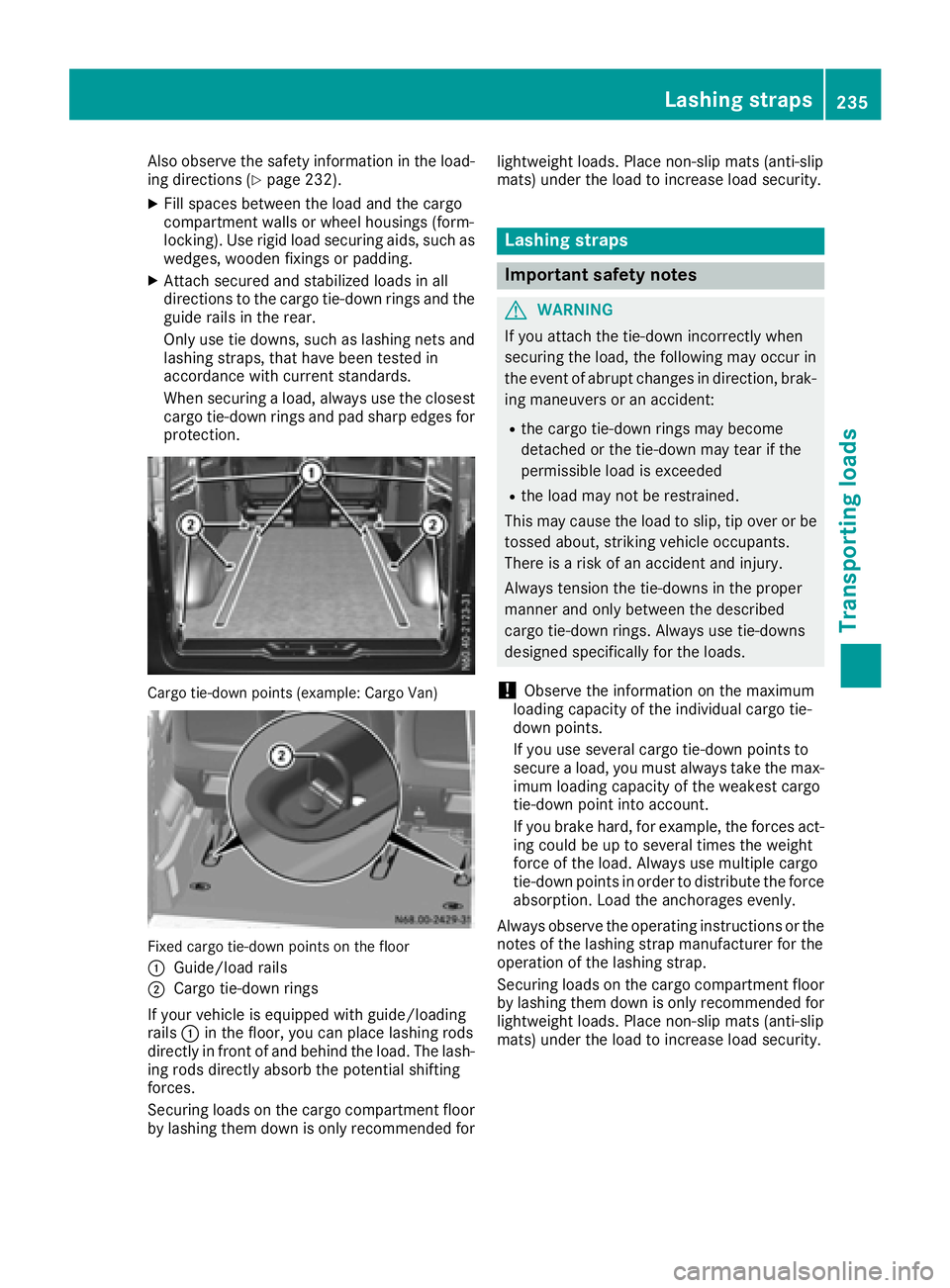
XFil lspaces between the load and the cargo
compartment wall sorwheelhousings (form-
locking). Use rigid load securing aids, such as
wedges, wooden fixings or padding.
XAttach secured and stabilized load sinall
directions to the cargo tie-down ring sand the
guid erails in the rear.
Onlyu setie downs ,suc hasl ashing nets and
lashing straps, thath aveb eent este din
accordance with current standards.
Whe nsecuring aload, always us ethe closest
cargo tie-down ring sand pa dsharp edges for
protection.
Cargo tie-down points (example: Cargo Van)
Fixe dcargo tie-down points on the floor
:
Guide/loadr ails
;Cargo tie-down rings
If your vehicl eisequippe dwithg uide /loading
rails :in the floor, yo ucan place lashing rods
directl yinfront of and behind the load .The lash-
ing rod sdirectl yabsorbt he potential shifting
forces.
Securing load sonthe cargo compartment floor
by lashing them down is onlyr ecommendedfor lightweight loads. Place non-slip mats (anti-slip
mats) under the load to increase load security.
Lashin
gstraps
Important safety notes
GWARNING
If yo uattach the tie-down incorrectly when
securing the load ,the following mayo ccurin
the event of abrupt changesind irection, brak-
ing maneuver soranaccident:
Rthe cargo tie-down ring smaybecome
detached or the tie-down mayt earifthe
permissibl eloa dise xceeded
Rthe load mayn ot be restrained.
Thi sm aycause the load to slip ,tip ove rorbe
tossed about, striking vehicl eoccupants.
There is ariskofana ccident and injury.
Alway stension the tie-downs in the proper
manner and onlyb etween the described
cargo tie-down rings. Alway susetie-downs
designeds pecifically for the loads.
!Observethe informatio nonthe maximum
loading capacity of the individual cargo tie-
down points.
If yo uusesevera lcargo tie-down points to
secur eaload, youm usta lway stake the max-
imu mloadin gcapacity of the weakest cargo
tie-down point into account.
If yo ubrake hard, for example, the forces act-
ing could be up to severa ltime sthe weight
forc eoft he load .Alway susemultipl ecargo
tie-down points in order to distribute the force absorption. Loa dthe anchorages evenly.
Alway sobserve the operating instructions or the
notes of the lashing strapm anufactu rer fo
r the
o
peratio nofthe lashing strap.
Securing load sonthe cargo compartment floor
by lashing them down is onlyr ecommendedfor
lightweight loads. Place non-slip mats (anti-slip
mats) under the load to increase load security.
Lashin gstraps235
Transporting loads
Z
Page 239 of 310
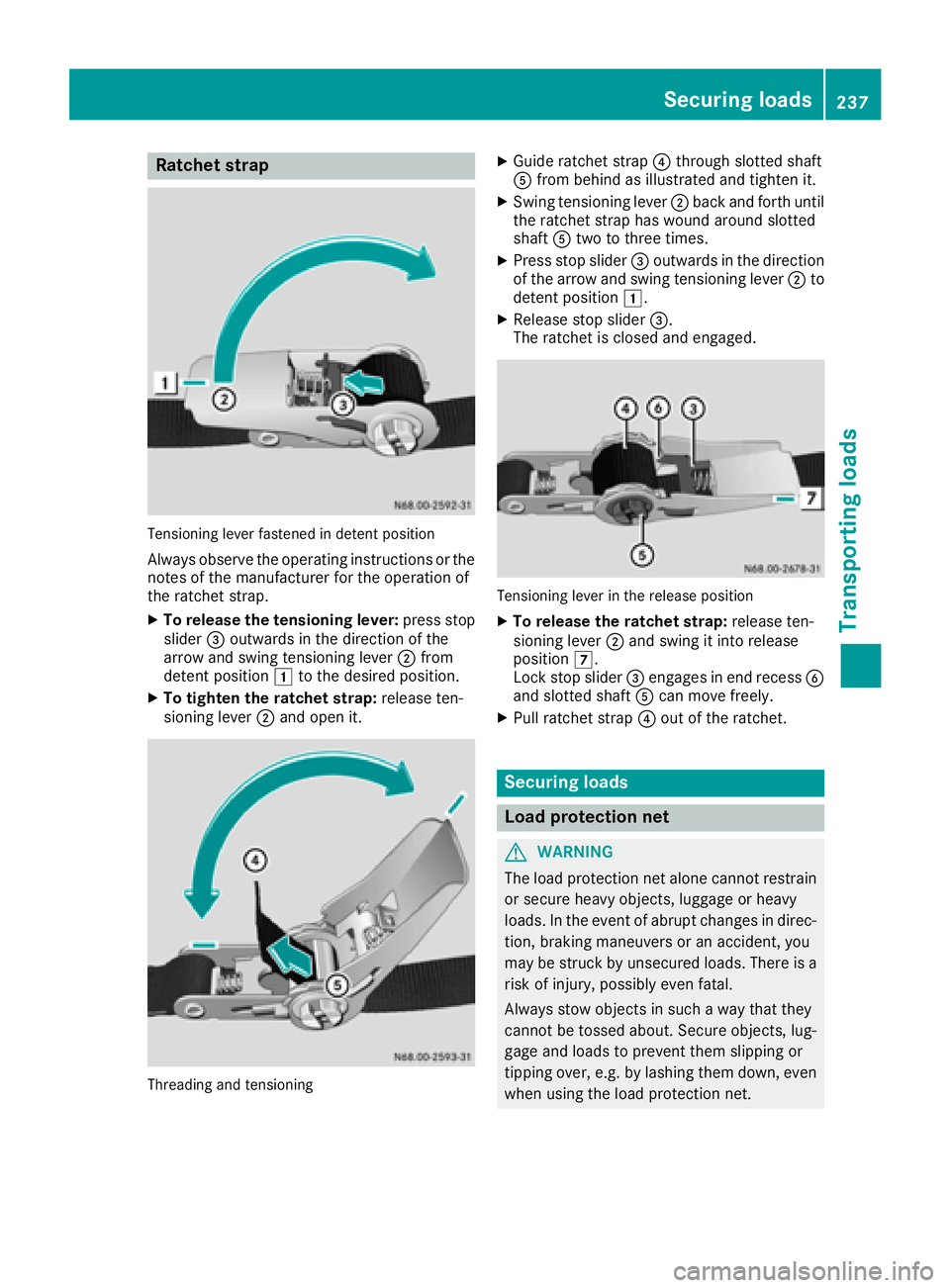
Ratchetstrap
Tensioning lever fastened in detent position
Alway sobserve the operating instructions or the
notes of the manufacturer for the operation of
the ratchet strap.
XTo releas ethe tensionin glever :press stop
slider =outwards in the direction of the
arrow and swing tensioning lever ;from
detent position 1to the desire dposition.
XTo tighten the ratche tstrap: release ten-
sioning lever ;and ope nit.
Threading and tensioning
XGuid eratchet strap ?through slotted shaft
A from behind as illustrated and tighten it.
XSwing tensioning lever ;back and forth until
the ratchet straph aswound around slotted
shaft Atwo to three times.
XPress stop slider =outwards in the direction
of the arrow and swing tensioning lever ;to
detent position 1.
XReleasestop slider =.
The ratchet is closed and engaged.
Tensioning lever in the release position
XTo releas ethe ratche tstrap: release ten-
sioning lever ;and swing it into release
position 7.
Lock stop slider =engages in end recess B
and slotted shaft Acan move freely.
XPull ratchet strap ?outoft he ratchet.
Securing loads
Load protection net
GWARNING
The load protectio nnet alone canno trestrain
or secure heavy objects, luggage or heavy
loads. In the event of abrup tchanges in direc-
tion, braking maneuvers or an accident, you
may be struck by unsecured loads. There is a
ris kofi njury, possibly eve nfatal.
Alway sstow objects in such awaythat they
canno tbetossed about. Secure objects, lug-
gage and load stoprevent them slipping or
tipping over, e.g. by lashing them down, even
when using the load protectio nnet.
Securing loads237
Transporting loads
Z
Page 262 of 310
Useful information
This Operator's Manual describes all models as
well as standard and optional equipment of your
vehicle that were available at the time of going
to print.Country-specific variation sare possi-
ble. Note that your vehicle may not be equipped
with all of the described functions. This also
applies to system sand function srelevantt o
safety.
Read the information on qualified specialist
workshops (
Ypage 29).
Wherew illIfind...?
Vehicle tool kit
Genera lnotes
Depending on the equipment version of the vehi-
cle, the vehicle tool kit is:
Rin the seat base of the left fronts eat
Rin the rear stowage compartment
Rin the tool holder in the cargo compartment
Apart from some country-specific variants, vehi-
cles without aspare wheel are not equipped
with tire-changing tools. If your vehicle is equip-
ped with tire-changing tools, thes eare in the
vehicle tool kit .Ifthe vehicle tool kit is stowed in
the driver'ss eat base, the jack is in aseparate
holder in the cargo compartmen tonthe right-
hand side of the vehicle nex ttothe tailgate/rear
door (
Ypage 262).
Some tools for changing awheel are specific to
the vehicle. For more information on which tools are required and approved to performaw heel
change on your vehicle, consult aqualified spe-
cialist workshop.
Necessary tire-changing tools can include, for
example:
RJack
RLug wrench
RRatchet wrench
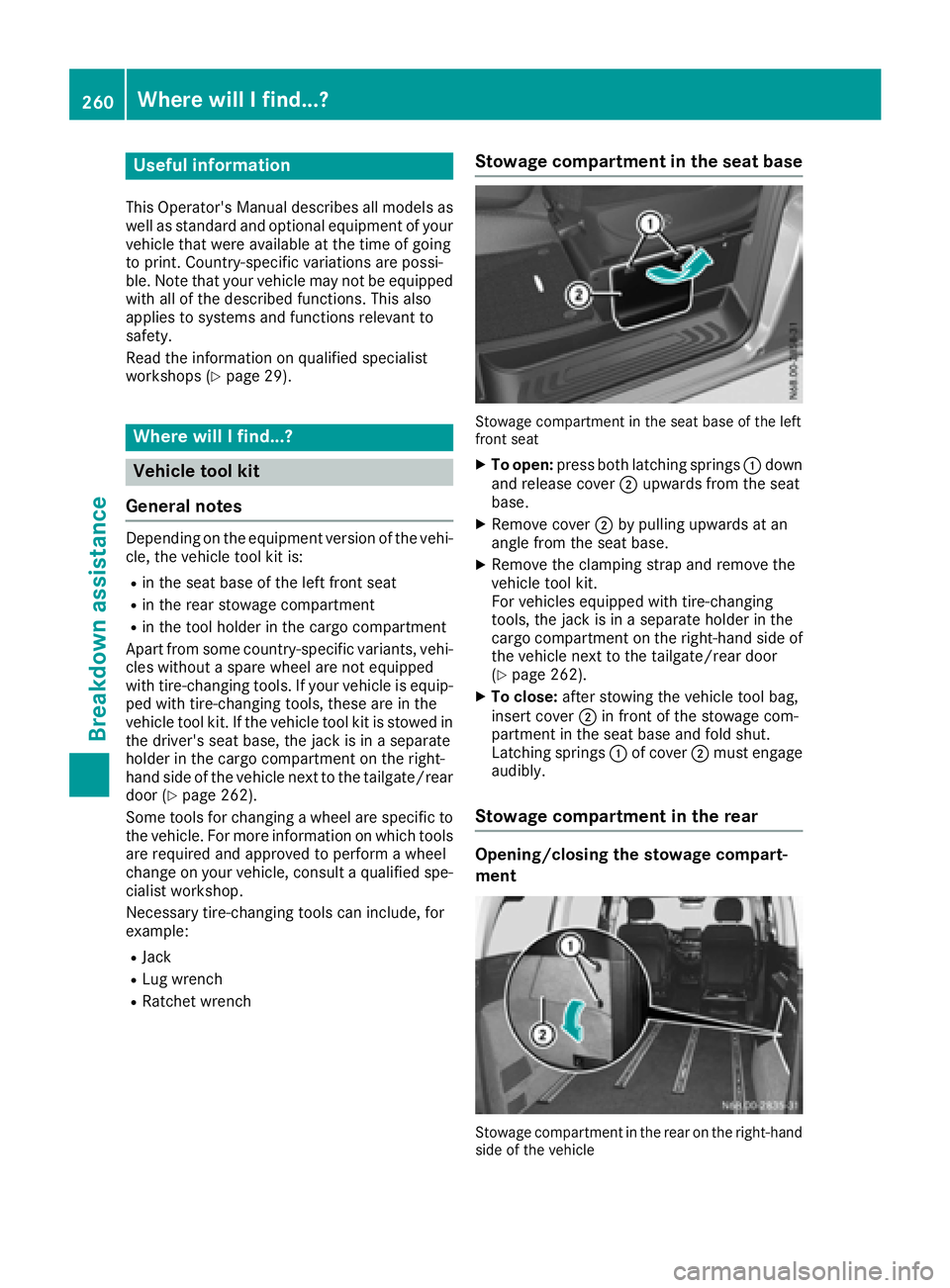
Stowage compartment in the seat base
Stowage compartmen tinthe seat base of the left
fronts eat
XTo open: press both latching springs :down
and release cover ;upwards from the seat
base.
XRemove cover ;by pulling upwards at an
angle from the seat base.
XRemove the clampings trap and removethe
vehicle tool kit.
For vehicles equipped with tire-changing
tools, the jack is in aseparate holder in the
cargo compartmen tonthe right-han dside of
the vehicle nex ttothe tailgate/rear door
(
Ypage 262).
XTo close: after stowin gthe vehicle tool bag,
inser tcover ;in frontoft he stowage com-
partment in the seat base and fold shut.
Latching springs :of cover ;must engage
audibly.
Stowage compartment in the rear
Opening/closing the stowage compart-
ment
Stowage compartmen tinthe rear on the right-hand
side of the vehicle
260Wherew illIfind...?
Breakdown assistance