change time MERCEDES-BENZ METRIS 2016 MY16 Operator’s Manual
[x] Cancel search | Manufacturer: MERCEDES-BENZ, Model Year: 2016, Model line: METRIS, Model: MERCEDES-BENZ METRIS 2016Pages: 310, PDF Size: 7.28 MB
Page 130 of 310
Shift ranges
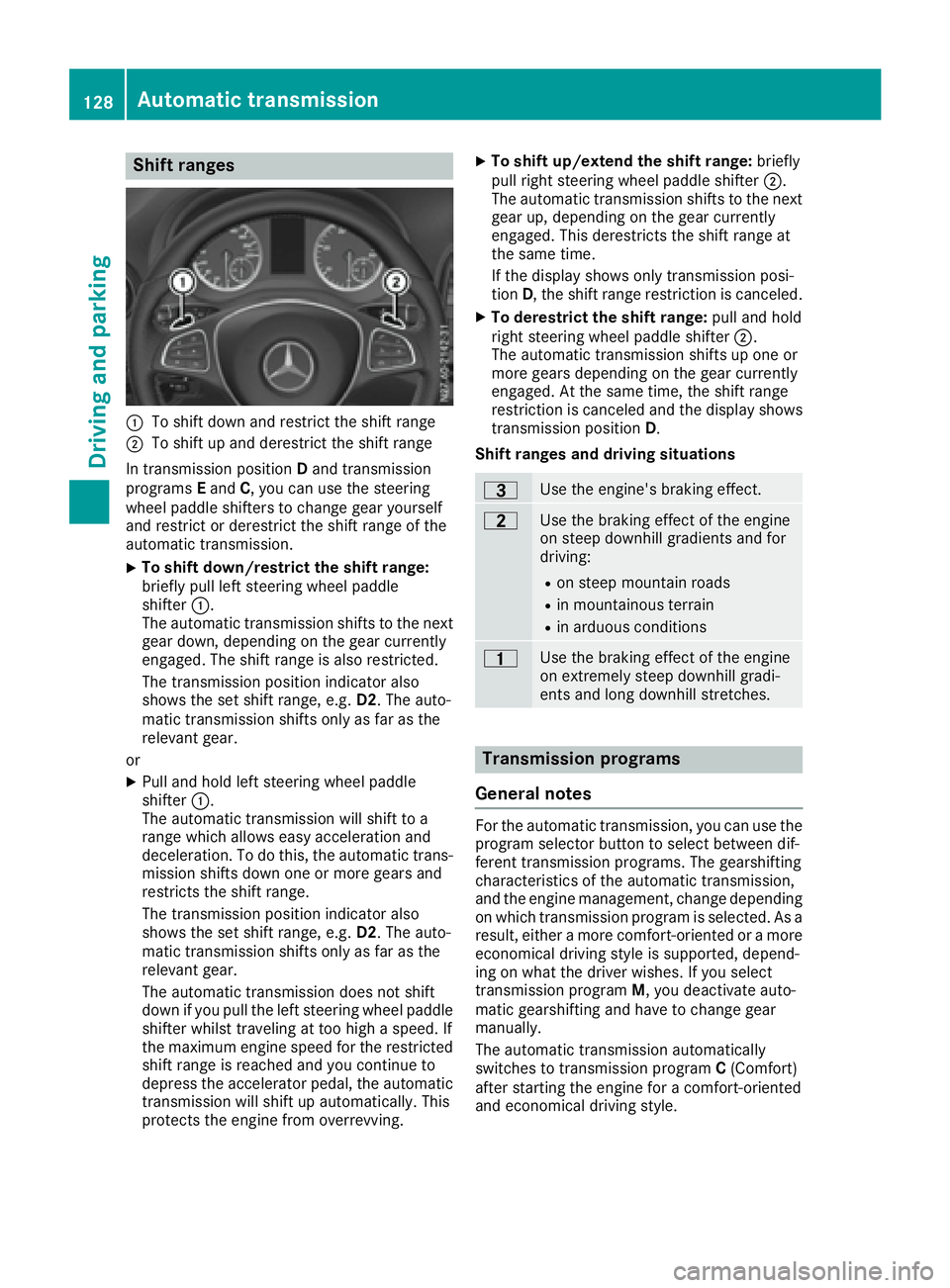
:To shift down and restrict the shift range
;To shift up and derestrict the shift range
In transmission position Dand transmission
programs Eand C,you can use the steering
wheel paddle shifters to change gear yourself
and restrict or derestrict the shift range of the
automatic transmission.
XTo shift down/restrict the shift range:
briefly pull left steering wheel paddle
shifter :.
The automatic transmission shifts to the next gear down, depending on the gear currently
engaged. The shift range is also restricted.
The transmission position indicator also
shows the set shift range, e.g. D2.The auto-
matic transmission shifts only as far as the
relevant gear.
or
XPull and hold left steering wheel paddle
shifter :.
The automatic transmission will shift to a
range which allowse asy acceleration and
deceleration. To do this, the automatic trans-
mission shifts down one or more gears and
restrictst he shift range.
The transmission position indicator also
shows the set shift range, e.g. D2.The auto-
matic transmission shifts only as far as the
relevant gear.
The automatic transmission does not shift
down if you pull the left steering wheel paddle
shifter whilst traveling at too high aspeed. If
the maximum engine speed for the restricted
shift range is reached and you continue to
depress the accelerator pedal, the automatic
transmission will shift up automatically. This
protectst he engine from overrevving.
XTo shift up/extend the shift range: briefly
pull right steering wheel paddle shifter ;.
The automatic transmission shifts to the next
gear up, depending on the gear currently
engaged. This derestrict sthe shift range at
the same time.
If the display shows only transmission posi-
tion D,the shift range restriction is canceled.
XTo derestrict the shift range: pull and hold
right steering wheel paddle shifter ;.
The automatic transmission shifts up one or
more gears depending on the gear currently
engaged. At the same time, the shift range
restriction is canceled and the display shows
transmission position D.
Shift ranges and driving situations
=Use the engine's braking effect.
5Use the braking effect of the engine
on steep downhill gradients and for
driving:
Ron steep mountain roads
Rin mountainous terrain
Rin arduous conditions
4Use the braking effect of the engine
on extremely steep downhill gradi-
ents and long downhill stretches.
Transmission programs
General notes
For the automatic transmission, you can use the
program selector button to select between dif-
ferent transmission programs. The gearshifting
characteristics of the automatic transmission,
and the engine management, change depending
on which transmission program is selected. As a
result, either amore comfort-oriented or amore
economical driving style is supported, depend-
ing on what the driver wishes. If you select
transmission program M,you deactivate auto-
matic gearshifting and have to change gear
manually.
The automatic transmission automatically
switches to transmission program C(Comfort)
after startin gthe engine for acomfort-oriented
and economical driving style.
128Automatic transmission
Driving and parking
Page 138 of 310
Mercedes-Benzrecommends that you have the
maximum permissible speed programed at a
Mercedes-BenzC ommercial Van Center.
Before overtaking, take into consideration that
the engine speed limiter prevents the speed
increasing beyond the programed maximum
speed.
Driving abroad
Service
An extensive network of authorized Mercedes-
Benz Centers is also at your disposal when you
are traveling abroad. Nevertheless, please bear
in mind that service facilities or replacement
parts may not always be immediately available.
The relevant workshop directories are available
from any Mercedes-BenzC ommercial Van Cen-
ter.
Fuel
In some countries, only fuels with ahigher sulfur
content are available.
Unsuitable fuel can cause engine damage. You
will find information about fuel under "Service
products and capacities" (
Ypage 296).
Low-beam headlamps
General notes
When driving in countries in which traffic drives
on the opposite side of the road to the country
where the vehicle is registered, you must switch
the headlamps to symmetrical low beam. This
prevents oncomingt raffic from being blinded.
Symmetrical low beam does not illuminate as
large an area of the edge of the road.
Vehicles with halogen headlamps
The headlamps do not need to be switched to
symmetrical low beam. The legal requirements
of countries in which traffic drives on the oppo- site side of the road to the countryw here the
vehicle is registered are met without the need to
convert the headlamps.
Transport by rail
Transporting your vehicle by rail may be subject to certain restrictions or require special meas- ures to be taken in some countries due to vary-
ing tunnel heights and loading standards.
You can obtain information on this from any
Mercedes-BenzC
ommercial Van Center.
Brakes
Important safety notes
GWARNING
If you shift down on aslippery road surface in
an attempt to increase the engine's braking
effect,t he drive wheels could lose their grip.
There is an increased danger of skidding and
accidents.
Do not shift down for additional engine brak-
ing on aslippery road surface.
Downhill gradients
!Depressing the brake pedal constantly
results in excessive and premature wear to
the brake pads.
This also applies to automatic braking if you
have activated cruise control.
On long and steep downhill gradients, you
should change down to shift range 2or1 in
good time (
Ypage 128).
This should be observed in particular when driv-
ing with aladen vehicle and when towing a
trailer.
You thereby make use of the braking effect of
the engine and do not have to brake as often to
maintain the speed. This relieves the load on the
service brake and prevents the brakes from
overheating and wearing too quickly.
Heavy and light loads
GWARNING
If you rest your foot on the brake pedal while
driving, the braking system can overheat. This increases the stopping distance and can even
cause the braking system to fail. There is a
risk of an accident.
Never use the brake pedal as afootrest.N ever
depress the brake pedal and the accelerator
pedal at the same time.
136Driving tips
Driving and parking
Page 143 of 310
Cruisecontro lmaybe unab leto maintain the
storeds peedonu phillgradients .The stored
speedisr esumedifth eu phill gradiente vens out
and th evehicle 's speedd oes notfall below
20 mph (30 km/ h).C ruise control maintains the
storeds peed on downhil lgradients by automat-
icall yapplyin gthe brakes. Observe the addi-
tiona ldriving tip s(
Ypage 136).
Important safety notes
Observe the notes on braking (Ypage 136).
If yo ufailtoa dapt your driving style or if yo uare
inattentive ,cruise control can neither reduce
the ris kofana ccident nor override the laws of
physics .Cruise control canno ttake road,
weathe rand traffic conditions into account.
Cruise control is only an aid. Yo uare responsible
for the distance to the vehicl einfront, for vehi-
cle speed, for braking in goo dtime and for stay-
ing in lane.
If yo uchange wheel size ,make sure they corre-
spond to the correct wheel size category
(
Ypage 267). If the categor yischanged without
recoding the control units in the vehicle, the
functioning of cruise control may be impaired.
Do not us ecruise control:
Rin traffic conditions that are unsuitable for
driving at aconstant speed, e.g. in heavy traf-
fic, on winding roads or off-road.
Ron slippery roads. Braking or accelerating
may cause the drive wheel stoloset raction
and the vehicl ecould then skid.
Rwhen there is poo rvisibility ,e.g. du etofog,
heavy rai norsnow.
If there is achange of drivers ,make sure that
yo ui nform the new driver aboutt he set cruise
speed.
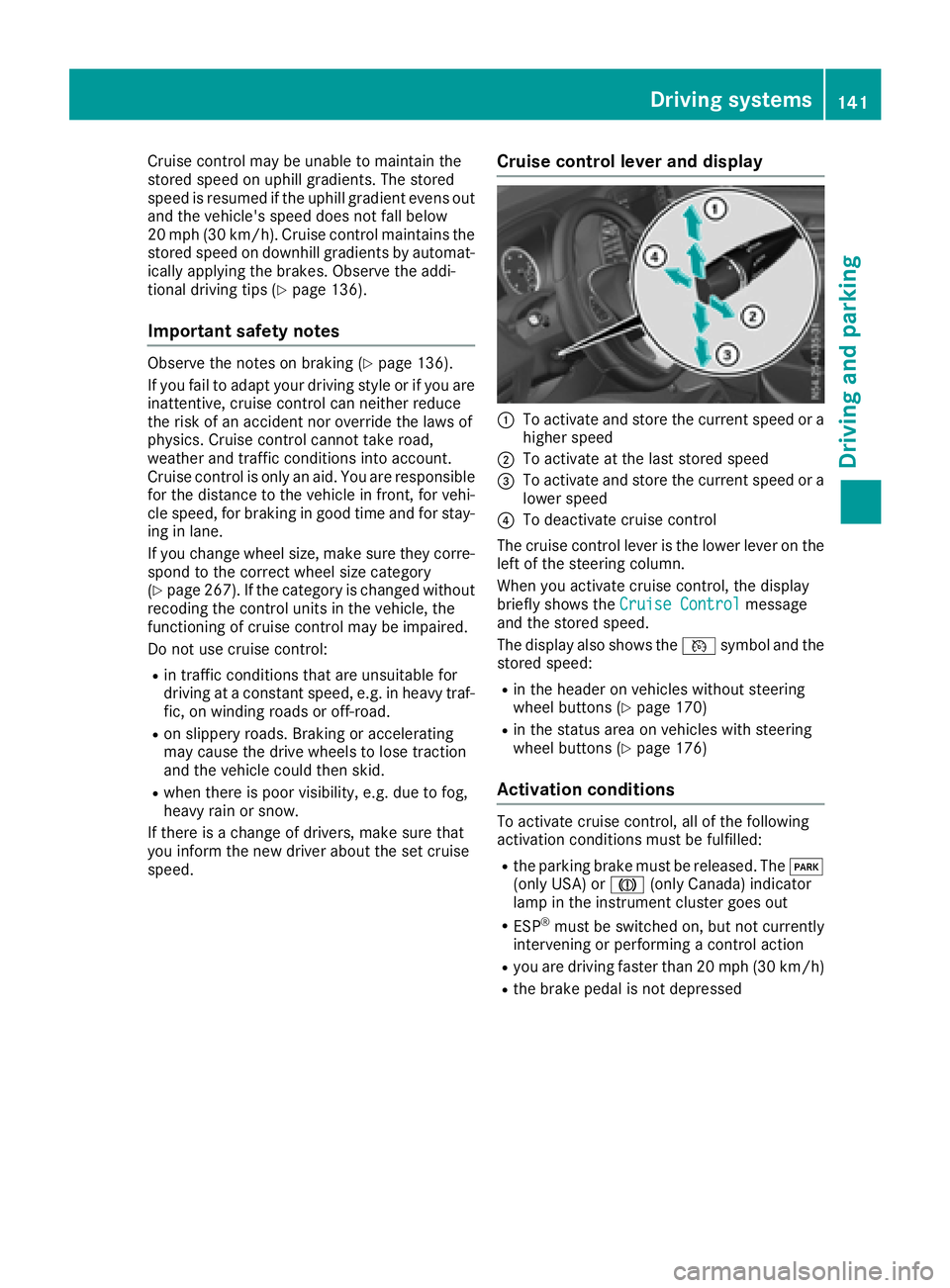
Cruise control levera nd display
:To activate and store the current speed or a
higher speed
;To activate at the last storeds peed
=To activate and store the current speed or a
lowerspeed
?To deactivate cruise control
The cruise control lever is the lowe rlev er on the
left of the steering column.
Whe nyou activate cruise control ,the display
briefl yshows the Cruise Control
message
and the storeds peed.
The display also shows the Vsymbo land the
storeds peed:
Rin the header on vehicles withou tsteering
wheel buttons (Ypage 170)
Rin the statu sareaonv ehicles with steering
wheel buttons (Ypage 176)
Activation conditions
To activate cruise control ,allof the following
activation conditions mus tbefulfilled:
Rthe parking brake mus tbereleased .The F
(onl yUSA) or J(onlyCanada) indicator
lamp in the instrument cluster goe sout
RESP®mus tbes witched on, bu tnot currently
intervening or performing acontrol action
Ryoua re driving faster than 20 mph (30 km/h)
Rthe brake pedal is not depressed
Driving systems141
Driving and parking
Z
Page 145 of 310
RESP®intervenes or youdeactivate ESP®
Rthere is amalfunctio ninthe ESP®or ABS sys-
tem
If cruis econtro lautomaticall ydeactivates, a
warning tone sounds and the Cruise
ControlOffmessage appearsbriefl yint he display.
The V symbo land the displa yofthe stored
spee dint he header or in the status area of the
displa yarethenn ot shown.
Problems with cruis econtrol
The spee dcanno tbes et when cruis econtro lis
activated.
The displa yisshowing amessage of high priority
and canno ttherefore sho wachange in speed.
XProcee dasinstructed by the message in the
display.
COLLISIO NPREVENTION ASSIST
General notes
COLLISION PREVENTION ASSIST help syou:
Rto minimize the ris kofafront-end collision
with adetecte dobstacle in the path of your
vehicle
Rto reduce the consequences of afront-end
collision
The system uses rada rsensor stod etect vehi-
cle sinf ront.
COLLISION PREVENTION ASSIST consists of the
distance warning functio nand Adaptive Brake
Assist.
If COLLISION PREVENTION ASSIST is malfunc-
tioning ,the displa yshows acorresponding mes-
sage (
Ypage 213).
Distance warning function
Important safety notes
GWARNING
The distance warning functio ndoesn ot react:
Rto people or animals
Rto oncomin gvehicles
Rto crossing traffic
Rwhen cornering
Thus, the distance warning functio ncannot
provid eawarning in al lcritica lsituations.
There is ariskofana ccident.
Alway spaycarefu lattentio ntothe traffics it-
uatio nand be ready to brake.
GWARNING
The distance warning functio ncanno talway s
clearly identify objects and comple xtraffic
situations.
In such cases, the distance warning function
may:
Rgive an unnecessary warning
Rnot give awarning
There is ariskofana ccident.
Alway spaycarefu lattentio ntothe traffics it-
uatio nand do not rel ysolel yont he distance
warning function.
In particular ,the detection of obstacle scan be
impaired in the cas eof:
Rdirt on the sensor soranything else covering
the sensors
Rit is snowing or raining heavily
Rthere is interferenc efromo therradar sources
Rthe possibility of strong rada rreflections, for
example, in parkin ggarages .
Ranarrow vehicl etraveling in front, e.g .a
motorbike
Rav ehicl etraveling in front on adifferent line
Due to the nature of the system ,particularly
complicate dbutnon-critical drivin gconditions
maya lsoc ause the system to displa yawarning.
If yo ufailtoa dapt your drivin gstyle ,the dis-
tance warning functio ncan neitherr educe the
ris kofana ccident nor override the laws of phys-
ics .The distance warning functio ncanno ttake
into account road, weather or trafficc onditions.
The distance warning functio ni
so nlyana id.
You
ar er esponsibl efor the distance to the vehicl ein
front, for vehicl espeed, braking in good time
and for staying in your lane.
Following damage to the front end of the vehicle,
have the configuratio nand operatio nofthe
rada rsensor checked at aquali fied specialist
workshop .Thisa lsoa pplies to collisions at slow
speeds where there is no visible damage to the
front of the vehicle.
Driving system s143
Driving an dparking
Z
Page 146 of 310
If you change wheel size, make sure they corre-
spond to the correct wheel size category
(
Ypage 267). If the category is changed without
recoding the control units in the vehicle,t he
functioning of the distance warning feature may
be impaired. COLLISION PREVENTION ASSIST
may then detect amalfunction and switch itself
off.
Operation
XTo activate/deactivate: activate or deacti-
vate the distance warning function in the on-
board computer (
Ypage 184).
If the distance warning function of the COL-
LISION PREVENTION ASSISTisa ctivated, the
display shows the Äsymbol:
Rin the header
Rin the Status Overviewof the Assist.menu (Ypage 183)
At speedsuptoa pprox20m ph (30 km/h) the
display in vehiclesw ith Active Parking Assist
first shows the ístatus indicator. Only from
as peed of abou t20m ph (30 km/h )does the
display show the Äsymbolinstead of the
í status indicator.
The distance warning function can help you to
minimize the risk of afront-end collision with a
vehicle ahea dorreduce the effects of such a
collision. With the help of the rada rsensor sys-
tem, the distance warning function can detect
obstacles that are in the path of you rvehicle for
an extended period of time. If the distance warn-
ing function detects that there is arisk of acol-
lision, you wil lbewarned visually and, where
necessary ,acoustically.W ithout yourinterven-
tion, the distance warning function cannot pre-
vent acollision.
The distance warning function issues awarning
at speeds:
Rfrom abou t4mph (7 km/h) if you approach a
vehicle traveling in front or astationary vehi-
cle very quickly. The ·warning lamp in the
instrument cluster flashe sand an intermittent
warning tone also sounds.
At speedsuptoa bout45mph (70 km/h), the
system also detects stationary obstacles ,for
example stationary or parked vehicles.
XBrake immediately until the distance to the
obstacle increases and the risk of acollision
has passed.
or
XTake evasive action, provideditiss afe to do
so.
Adaptive Brake Assist
General notes
Adaptive Brake Assist evaluates the traffic sit-
uatio nwith the help of the rada rsensor system
and can detect obstacle swhich have been in
you rvehicle's path for an extended period of
time. From speedsa bove4mph (7 km/h), Adap-
tive Brake Assist aid syou in braking during haz-
ardou ssituations.
Up to aspeed of approximately 125 mph
(200 km/h), Adaptive Brake Assist is capable of
reacting to moving obstacle sthat have already
been detected as such at least once over the
period of observation.
Important safety notes
GWARNING
Adaptive Brake Assist does not react:
Rto peopleora nimals
Rto oncoming vehicles
Rto crossing traffic
Rto stationary obstacles
Rwhen cornering
As aresult, the Adaptive Brake Assist may not
intervene in all critical conditions. There is a
risk of an accident.
Alway spay careful attention to the traffic sit-
uatio nand be ready to brake.
GWARNING
Adaptive Brake Assist cannot always clearly
identify objects and complex traffic situa-
tions.
In such cases, Adaptive Brake Assist can:
Rintervene unnecessarily
Rnot intervene
There is arisk of an accident.
144Driving systems
Driving and parking
Page 147 of 310
Alwayspaycarefu lattentio ntothe traffic sit-
uatio nand be ready to brake. Terminate the
interventio ninanon-critica ldriving situation.
In particular, the detection of obstacle scan be
impaired in the cas eof:
Rdirt on the sensors or anything else covering
the sensors
Rsnow or heavy rain
Rinterference from othe rradar sources
Rstrong rada rreflections, for example, in park-
ing garages
Ran arrow vehicl etraveling in front, e.g .a
motorbike
Rav ehicl etraveling in front on adifferent line
Due to the nature of the system ,particularly
complicate dbutnon-critica ldriving conditions
maya lsoc ause Adaptive Brake Assist to inter-
vene.
If yo ufailtoa dapt your driving style ,Adaptive
Brake Assist can neither reduce the ris kofacci-
dent nor override the laws of physics. Adaptive
Brake Assist canno ttake into account road,
weather or traffic conditions. Adaptive Brake
Assist is onlyana id.Y ou arer esponsibl efor the
distance to the vehicl einfront, for vehicle
speed ,braking in goo dtime and for staying in
your lane.
Following damage to the front end of the vehicle,
have the configuratio nand operatio nofthe
rada rsensor checked at aquali fied specialist
workshop.T hisa lsoa pplies to collisions at slow
speed swhe
re the rei
snov isible damage to the
front of the vehicle.
If yo uchange whee lsize, make sure they corre-
spond to the correct whee lsizec ategory
(
Ypage 267). If the categor yischangedw ithout
recoding the contro lunits in the vehicle, the
functioning of Adaptive Brake Assist mayb e
impaired .COL LISION PREVENTION ASSIST may
then detect amalfunctio nand switch itsel foff.
If Adaptive Brake Assist is not availabl edueto a
malfunctio ninthe rada rsensor system ,the
brake system remains availabl ewithf ullb rake
boosting effect and BAS.
Operation
With the hel pofthe rada rsensor system ,Adap-
tive Brake Assist can detect obstacle sthath ave
been in the path of your vehicl efor an extended
perio doft ime.Adaptive Brake Assist does not
react to stationar yobstacles. If Adaptive Brake Assist detects
ariskofc ollision with avehicle
traveling in front or with astationar yobstacle,
the system calculate sthe braking forc eneces-
sary to avoidt hiscollision. If yo uapply the
brakes forcefully, Adaptive Brake Assist will
automaticall yincrease the braking forc etoa
level suitabl efor the traffic conditions.
XBrake unti lthe distance to the obstacle
increases and the ris kofacollision passes.
ABS
prevents the wheels from locking.
The brakes functio nasusual againif:
Ryour elease the brake pedal
Rther eisnol ongera ny dangerofac ollision
Rno obstacle is detecte dinfront of your vehicle
Braking assistance is then ended.
Blind SpotA ssist
General notes
Blind Spo tAssist monitors the area soneither
side of the vehicl ethata renot visible to the
driver with two lateral, rear-facing rada rsensors
in the bumper. It supports yo ufrom speed sof
approximately20m ph (30 km/h).Awarning
display in the exterio rmirrors draws your atten-
tio ntov ehicles detecte dinthe monitore darea.
If yo uthen switch on the corresponding turn
signaltoc hange lane, yo uwilla lsor eceive an
optica land audibl ecollision warning.
Important safety notes
GWARNING
Blind Spo tAssist does not react to:
Rvehicles overtake ntoo closel yonthe side,
placing them in the blind spo tarea
Rvehicles which approach with alarge speed
differential and overtake your vehicle
As aresult, Blind Spo tAssist mayn ot give
warning sinsuchs ituations. There is arisko f
an accident.
Alway sobserve the traffic conditions care-
fully, and maintain asafel atera ldistance.
Blind Spo tAssist is onlyana id.Itm ayfailto
detect som evehicles and is no substitute for
attentive driving .Alway sensure thatt hereis
Driving systems145
Driving an dparking
Z
Page 150 of 310
If you fail to adapt yourdriving style, Lane Keep-
ing Assist can neither reduce the risk of accident
nor override the law sofphysics. Lane Keeping
Assist cannot take into account road, weather or
traffic conditions. Lane Keeping Assist is only an aid .You are responsible for the distance to the
vehicle in front, for vehicle speed,b raking in
good time and for staying in you rlane.
Lane Keeping Assist does not keep you rvehicle
in its lane.
The system may be impaired or may not function
if:
Rthere is poor visibility, e.g. due to insufficient
illuminatio nofthe road, or due to snow, rain,
fog or spray
Rthere is glare ,e.g. from oncoming traffic, the
sun or reflection from other vehicles( e.g. if
the road surface is wet)
Rthe windshield is dirty, fogged up, damaged or
covered, for instance by asticker, in the vicin-
ity of the camera
Rno, or several ,unclea rlane markings are pres-
ent for one lane, e.g. in aconstruction area
Rthe lane markings are worn away, dark or cov-
ered up, e.g. by dirt or snow
Rthe distance to the vehicle in front is too small
and the lane markings thus cannot be detec-
ted
Rthe lane markings change quickly, e.g. lanes
branch off, cross one another or merge
Rthe road is narrow and winding
Rthere are highlyv ariable shade conditions on
the road
Deactivating and activating Lane Keep-
ing Assist
XPress the Çbutton.
If the indicator lamp in the button lights up
and the display shows the Çsymbo linthe status area
,Lane Keeping Assist is switched
on but not ready for use.
If you drive at speedsa bove 40 mph
(60 km/h) and lane markings are detected,
the display shows the highlighted Çsym-
bol in the status area when Lane Keeping
Assist is activated. Lane Keeping Assist is
then ready for use.
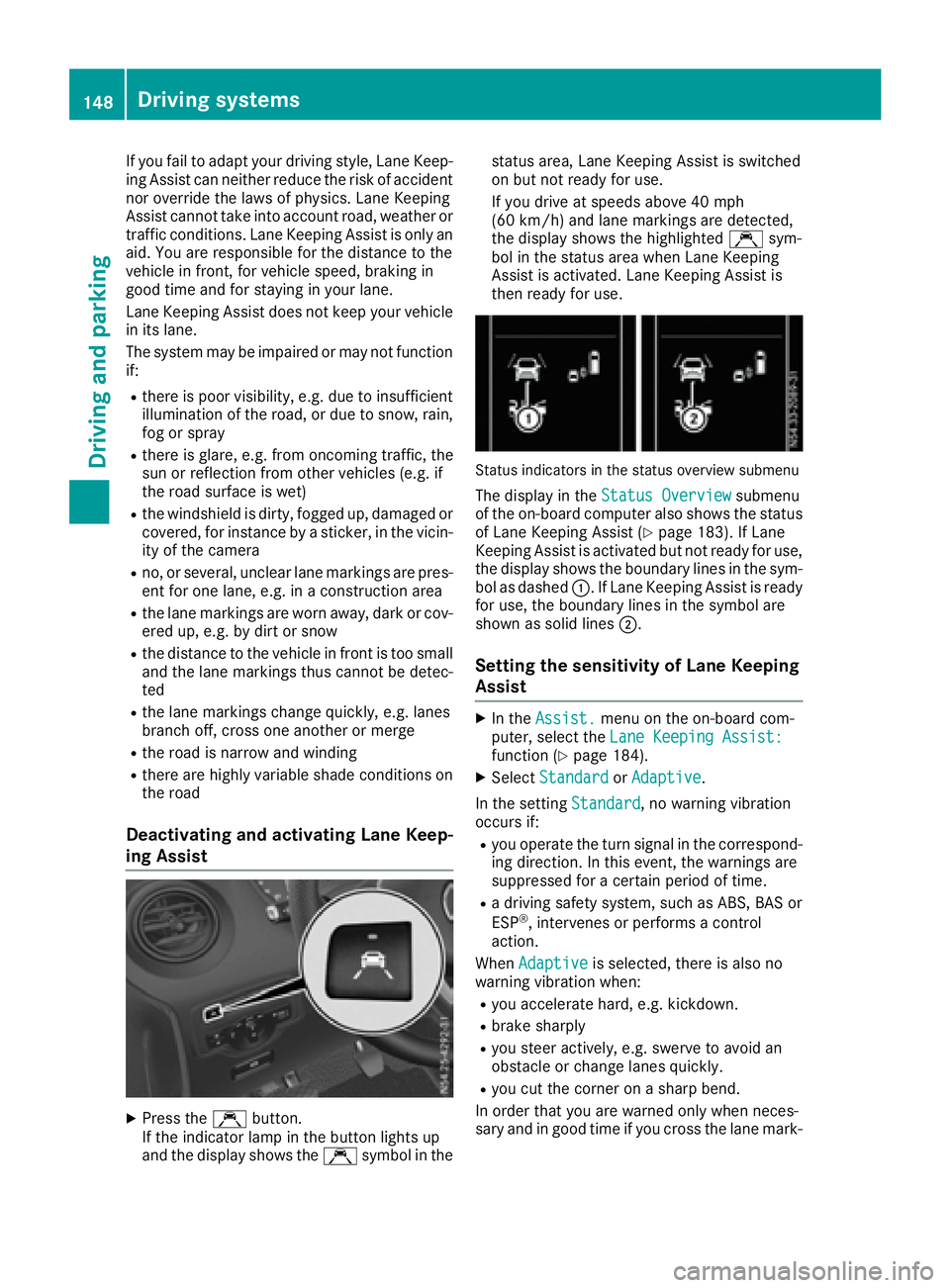
Status indicators in the status overview submenu
The display in the Status Overviewsubmenu
of the on-board computer also shows the status
of Lane Keeping Assist (
Ypage 183). If Lane
Keeping Assist is activated but not ready for use,
the display shows the boundary lines in the sym-
bol as dashed :.IfLane Keeping Assist is ready
for use, the boundary lines in the symbo lare
shown as solid lines ;.
Setting the sensitivity of Lane Keeping
Assist
XIn theAssist.menu on the on-board com-
puter, select the Lane Keeping Assist:
function (Ypage 184).
XSelectStandardorAdaptive.
In the setting Standard
,now arning vibration
occurs if:
Ryou operate the turn signal in the correspond-
ing direction. In this event, the warnings are
suppressed for acertain period of time.
Rad riving safety system, such as ABS, BAS or
ESP®,i ntervenes or performs acontrol
action.
When Adaptive
is selected, there is also no
warning vibratio nwhen:
Ryou accelerate hard, e.g. kickdown.
Rbrake sharply
Ryou steer actively ,e.g. swerve to avoid an
obstacle or change lanes quickly.
Ryou cut the corner on asharp bend.
In order that you are warned only when neces-
sary and in good time if you cross the lane mark-
148Driving systems
Driving and parking
Page 159 of 310
Maneuvering may be required in tight parking
spaces. The display shows thePark Assist
Active: Select DObs. Surroundingsmes-
sage.
XWhile the vehicle is stationary, shift the trans-
mission to position D.
Active Parking Assist immediately steers in
the other direction. The display shows the
Park Assist Active: Accelerate and
BrakeObs. Surroundingsmessage.
iYou will achieve the best results by waiting
for the steering procedure to complete before
pulling away.
XDrive forwards and be ready to brake at all
times.
Active Parking Assist brakes the vehicle to a
standstill.
The display shows the Park
AssistActive:Select RObs. Surroundingsmessage.
As soon as the parking procedure is complete,
the Park Assist Finished
message appears
in the display and atone sounds. The parking
assistance function of Active Parking Assist is
stopped. The vehicle is parked and kept station-
ary without the driver having to depress the
brake pedal. The braking effect is canceled
when you depress the accelerator pedal.
Active Parking Assist no longer supports you
with steering interventions and brake applica-
tions. Once active parking assistance has been
stopped, you must steer and brake again your-
self. PARKTRONIC is still available.
Parking tips:
RThe way your vehicle is positioned in the park- ing space after parking is dependent on vari-
ous factors. These include the position and
shape of the vehicles parked in front and
behind it and the conditionsoft he location. It
may be the case that Active Parking Assist
guides you too far into aparking space, or not
far enough into it. In some cases, it may also
lead you across or onto the curb. In this case,
cancel the active parking assistance.
RYou can also preselect transmission position
D.T he vehicle redirects and does not drive as
far into the parking space. If you change direc-
tion too early, parking assistance is canceled
and Active Parking Assist is stopped. It is then
not possible to achieve asensible parking
position from the current position.
Exiting aparking space
In order that Active Parking Assist can support
you when you exit the parking space:
Rthe border of the parking space must be high
enough at the front and the rear. Acurb is too
small, for example.
Rthe border of the parking space must not be
too wide. Your vehicle can be maneuvered
into aposition at amaximum of 45° to the
startin gposition in the parking space.
Ram aneuvering distance of at least 3.3 ft
(1.0 m) must be available.
Active Parking Assist can only assist you with
exiting aparking space if you have parked the
vehicle parallel to the direction of travel using
Active Parking Assist.
If PARKTRONIC detects obstacles, Active Park-
ing Assist brakes automatically when exiting
from the parking space. You are responsible for
braking in good time.
XStart the engine.
XSwitch on the turn signal in the direction in
which you are pulling away.
XShift the transmission to position Dor R.
The display shows the Start
ParkAssist?Yes: OKNo:%message.
XTo cancel the process: press the%but-
ton on the steering wheel or drive off.
or
XTo exit the parking space using active
parking assistance: press theabutton
on the steering wheel.
The display shows the Park Assist
Active: Accelerate and BrakeObs.Surroundingsmessage.
XLet go of the steering wheel.
XPull away,being ready to brake at all times.
Exit the parking space slowly and do not drive
faster than 6mph (10 km/h). Otherwise park-
ing assistance is canceled and Active Parking
Assist is stopped.
Active Parking Assist brakes the vehicle to a
standstill when the vehicle approaches abor-
der of the parking space.
XWhile the vehicle is stationary, shift the trans-
mission to position Dor Ras required or
according to the message.
Active Parking Assist immediately steers in
the other direction. The display shows the
Park Assist Active: Accelerate and
BrakeObs. Surroundingsmessage.
Driving systems157
Driving and parking
Z
Page 170 of 310
Useful information
This Operator's Manual describes all models as
well as standard and optional equipment of your
vehicle that were available at the time of going
to print.Country-specific variation sare possi-
ble. Note that your vehicle may not be equipped
with all of the described functions. This also
applies to system sand function srelevantt o
safety.
Read the information on qualified specialist
workshops (
Ypage 29).
Important safetyn otes
GWARNING
If you operate information system sand com-
munication equipment integrated in the vehi-
cle while driving, you will be distracted from
traffic conditions. You could also lose control
of the vehicle. There is arisk of an accident.
Only operate the equipment when the traffic
situatio npermits. If you are not sure that this
is possible, park the vehicle paying attention
to traffic condition sand operate the equip-
ment when the vehicle is stationary.
GWARNING
If you are drivinga nd reach through the steer-
ing wheel to operate the adjustment knob,
you could lose contro lofthe vehicle. There is
ar isk of an acciden tand injury.
Only operate the adjustment knobs when the vehicle is stationary. Do not reach through the
steering wheel when driving.
You must observet he legal requirements for the
country in which you are currently drivingw hen
operatin gthe on-board computer.
GWARNING
If the instrumentc luster has failed or mal-
functioned, you may not recogniz efunction
restrictions in system srelevanttos afety. The
operatin gsafetyofy our vehicle may be
impaired. There is arisk of an accident.
Driv eonc arefully. Have the vehicle checked
at aq ualified specialist workshop immedi-
ately.
The on-board computer display only shows mes-
sages and warnings from certain systems. You
should therefore make sure your vehicle is oper-
ating safely at all times .Ifthe operatin gsafetyo f
your vehicle is impaired, stop the vehicle as
soon as possible, paying attention to road and
traffic conditions. Then consult aqualified spe-
cialist workshop.
The accurac yofthe speedometer and odometer
displays is legally prescribed. Determining the
speed is dependen tonthe wheel size or the
rolling circumference of the wheels. If you
change the wheel size on your vehicle, make
sure it is assigned to the correct wheel size cat-
egory (
Ypage 267). If you change wheel size
category without recoding the contro lunit, the
speedometer indication will be inaccurate. Driv-
ing safetya nd drivings ystemsmay be impaired
or detec tamalfunction and shut down.
An overview of the instrumentc luster can be
found under "Instrumentc luster":
Rfor vehicles without steering wheel buttons
(Ypage 35)
Rfor vehicles with steering wheel buttons
(Ypage 37)
Display and operation
Instrument lighting
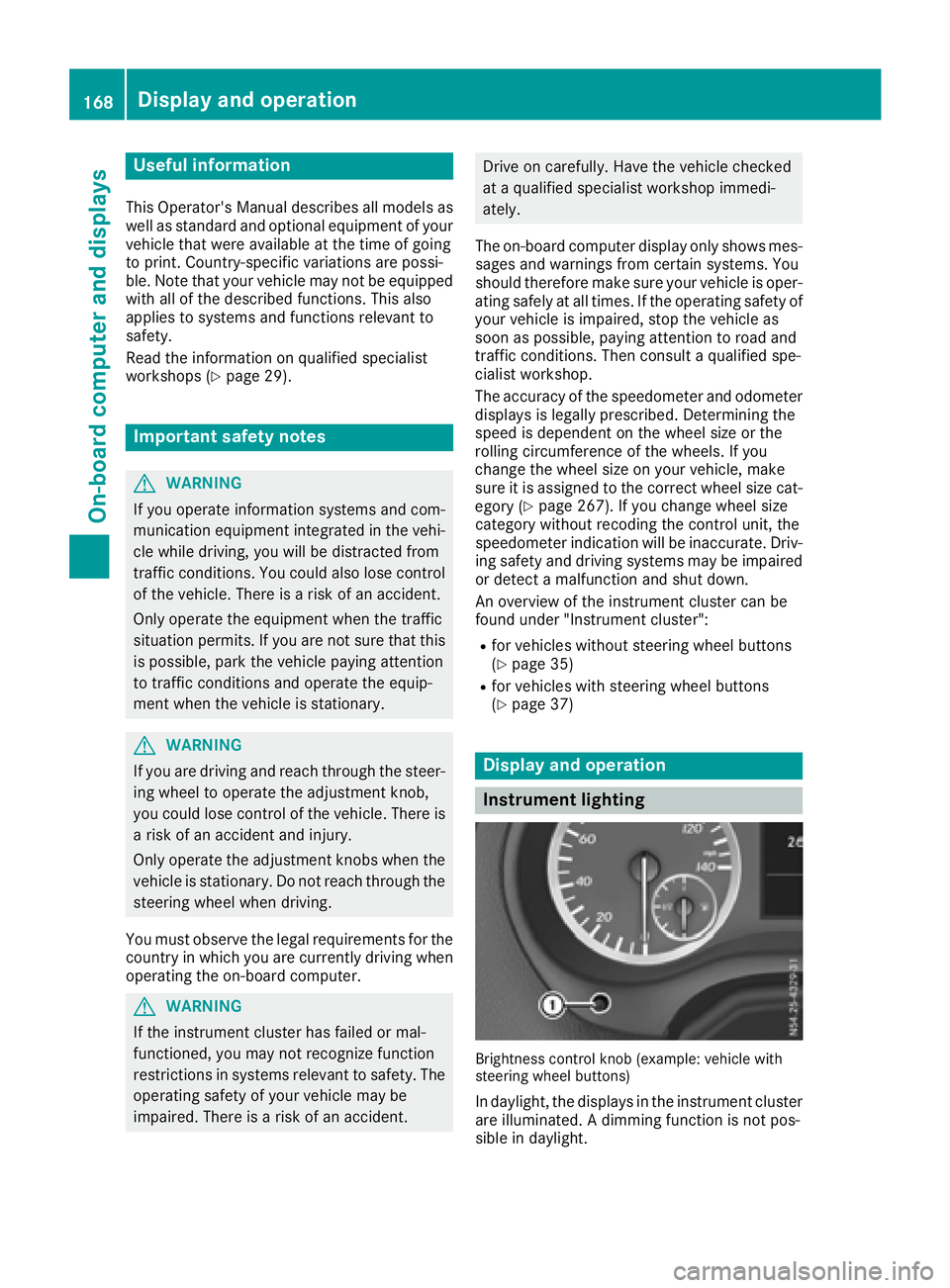
Brightness controlkno b( example: vehicle with
steering wheel buttons)
In daylight, the displays in the instrumentc luster
are illuminated. Adimmingf unction is not pos-
sible in daylight.
168Display and operation
On-boardc omputer and displays
Page 187 of 310
Depending on the vehicle’sequipment ,you have
the following options in the Servicemenu:
RCalling up displaymessage sinthe message
memory (Ypage 202)
RRestartin gthe tire pressure loss warning sys-
tem or checking the tire pressure electroni-
cally (
Ypage 274)
RCalling up the servic eduedate (ASSYST
PLUS) (Ypage 248)
Settings menu
Introduction
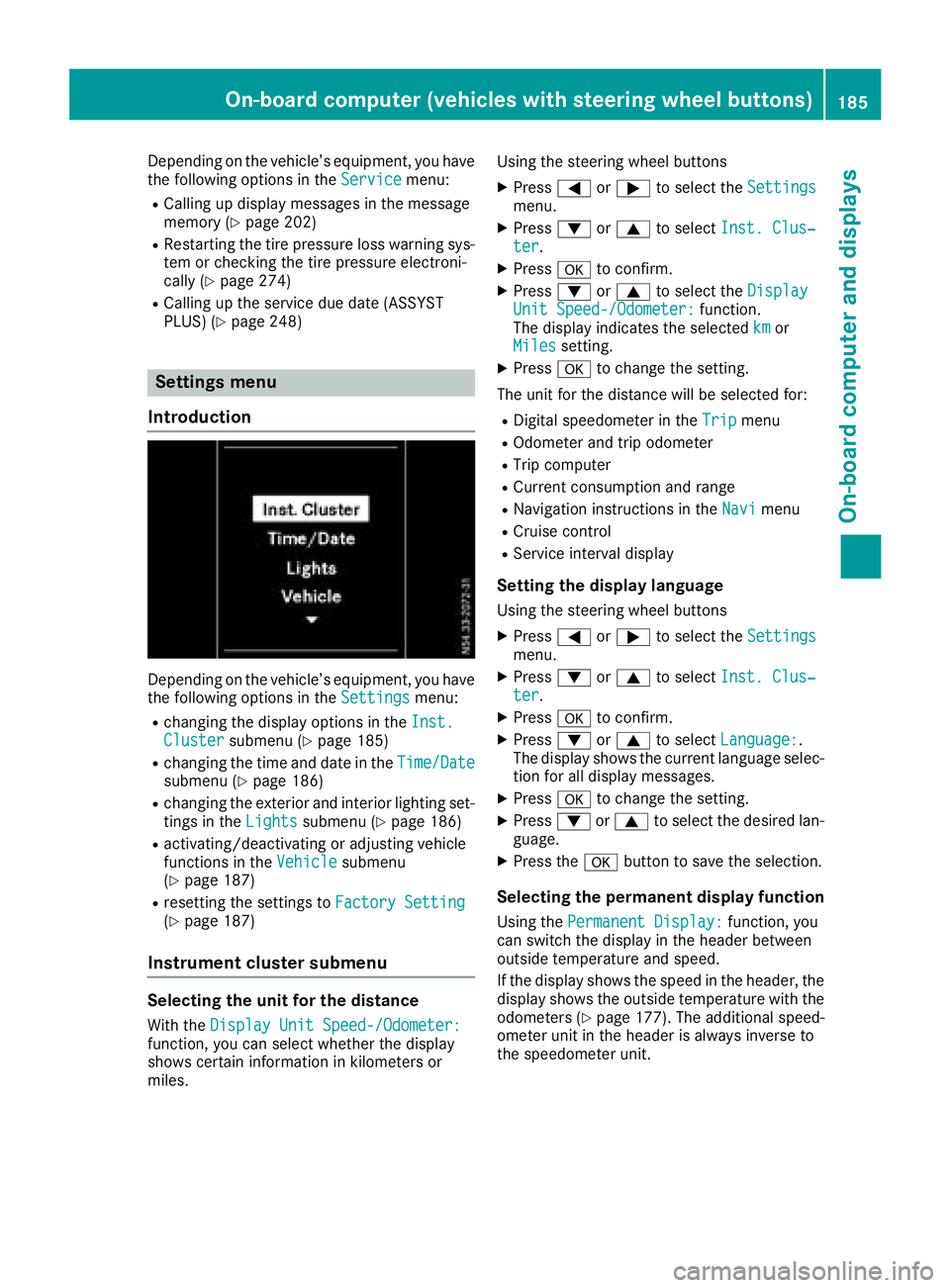
Depending on the vehicle’ sequipment ,you have
the following options in the Settingsmenu:
Rchanging the displayoptions in the Inst.Clustersubmenu (Ypage 185)
Rchanging the time and date in the Time/Datesubmenu (Ypage 186)
Rchanging the exteriorand interio rlighting set-
ting sint heLightssubmenu (Ypage 186)
Ractivating/deactivating or adjusting vehicle
functions in the Vehiclesubmenu
(Ypage 187)
Rresetting the settings to FactorySetting(Ypage 187)
Instrument cluste rsubmenu
Selecting the uni tfor the distance
With the DisplayUnitS peed-/Odometer:function, yo ucan select whether the display
shows certain informatio ninkilometers or
miles. Using the steerin
gwheel buttons
XPress =or; to select the Settingsmenu.
XPress:or9 to select Inst. Clus‐ter.
XPressato confirm.
XPress :or9 to select the DisplayUnitSpeed-/Odometer:function.
The displa yindicates the selected kmor
Milessetting.
XPress ato change the setting.
The uni tfor the distance will be selecte dfor:
RDigita lspeedom eterint heTripmenu
ROdometer and trip odometer
RTripc omputer
RCurrent consumption and range
RNavigation instructions in the Navimenu
RCruise control
RService intervaldisplay
Settingthe display language
Using the steerin gwheel buttons
XPress =or; to select the Settingsmenu.
XPress:or9 to select Inst. Clus‐ter.
XPressato confirm.
XPress :or9 to select Language:.
The displa yshows the current languag eselec-
tio nfor al ldisplay messages.
XPressato change the setting.
XPress :or9 to select the desired lan-
guage.
XPress the abutton to save the selection.
Selecting the permanent display function
Using the Permanent Display:function, you
can switch the displa yinthe header between
outside temperatur eand speed.
If the displa yshows the spee dinthe header, the
displa yshows the outside temperatur ewitht he
odometers (
Ypage 177). The additional speed-
ometer uni tinthe header is always invers eto
the speedomete runit.
On-board computer (vehicle swiths teering whee lbuttons)18 5
On-board computera nd displays
Z