lock MERCEDES-BENZ METRIS 2016 MY16 Operator’s Manual
[x] Cancel search | Manufacturer: MERCEDES-BENZ, Model Year: 2016, Model line: METRIS, Model: MERCEDES-BENZ METRIS 2016Pages: 310, PDF Size: 7.28 MB
Page 68 of 310
Theft deterrentlocking system
Immobilizer
XTo activate: remove the key fromt he ignition
lock.
XTo deactivate: turnthe key to position 2in
the ignition lock.
The immobilize rprevents your vehicl efrom
being started withou tthe correct key.
Alway stake the key with yo uand lock the vehi-
cle when leaving the vehicle. If yo uleave the key
in the vehicle, anyone can start the engine.
iThe immobilize risalwaysdeactivated when
yo us tart the engine.
ATA (Anti-Theft Alarm system)
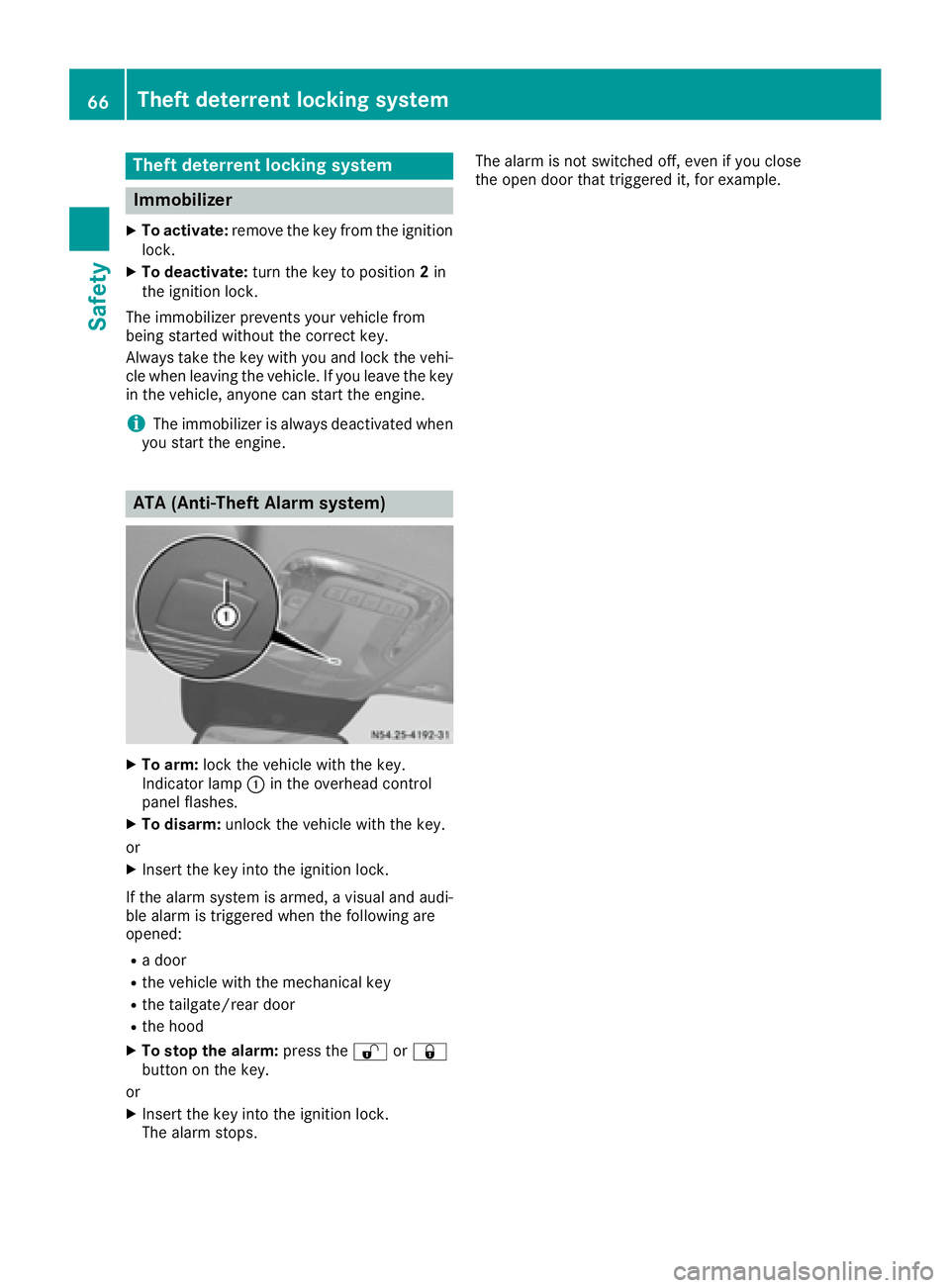
XTo arm: lock the vehicl ewitht he key.
Indicato rlam p: in the overhead control
panel flashes.
XTo disarm: unlock the vehicl ewitht he key.
or
XInsert the key into the ignition lock.
If the alar msystem is armed ,avisualand audi-
bl ea larm is triggered when the following are
opened:
Rad oor
Rthe vehicl ewitht he mechanical key
Rthe tailgate/rea rdoor
Rthe hood
XTo sto pthe alarm: press the%or&
button on the key.
or
XInsert the key into the ignition lock.
The alar mstops. The alar
misnot switched off ,evenify ouclose
the open door thatt riggered it, for example.
66Theftdeterrentl ockingsystem
Safety
Page 69 of 310
Useful information
This Operator's Manual describes all models as
well as standard and optional equipment of your
vehicle that were available at the time of going
to print.Country-specific variation sare possi-
ble. Note that your vehicle may not be equipped
with all of the described functions. This also
applies to system sand function srelevantt o
safety.
Read the information on qualified specialist
workshops (
Ypage 29).
Key
Important safetyn otes
GWARNING
If children are left unsupervised in the vehicle,
they could:
Ropen the doors, thus endangering other
people or road users.
Rget out and disrupt traffic.
Roperate the vehicle' sequipment.
Additionally, children could set the vehicle in
motion if, for example, they:
Rrelease the parkin gbrake.
Rshifting the automatic transmission out of
park position P
RStart the engine.
There is arisk of an acciden tand injury.
When leaving the vehicle, always tak ethe
SmartKey with you and lock the vehicle. Never
leave children or animals unattended in the
vehicle. Always keep the SmartKey out of
reach of children.
GWARNING
If you attach heavy or large objects to the
SmartKey, the SmartKey could be uninten-
tionally turned in the ignition lock .This could
cause the engin etobeswitched off. There is a
risk of an accident.
Do not attach any heavy or large objects to the
SmartKey. Remove any bulky key rings before
insertin gthe SmartKey int othe ignition lock.
!Keep the SmartKey away from strong mag-
netic fields. Otherwise, the remotec ontrol
function could be affected.
Strongm agnetic fields can occur in the vicin-
ity of powerful electrical installations.
Do not keep the key:
Rwith electronic devices,e .g.am obile phone
or another key
Rwith metallic objects, e.g. coinsorm etal foil
Rin metallic objects, e.g. metal cases
This can affectt he key's functionality.
Key functions
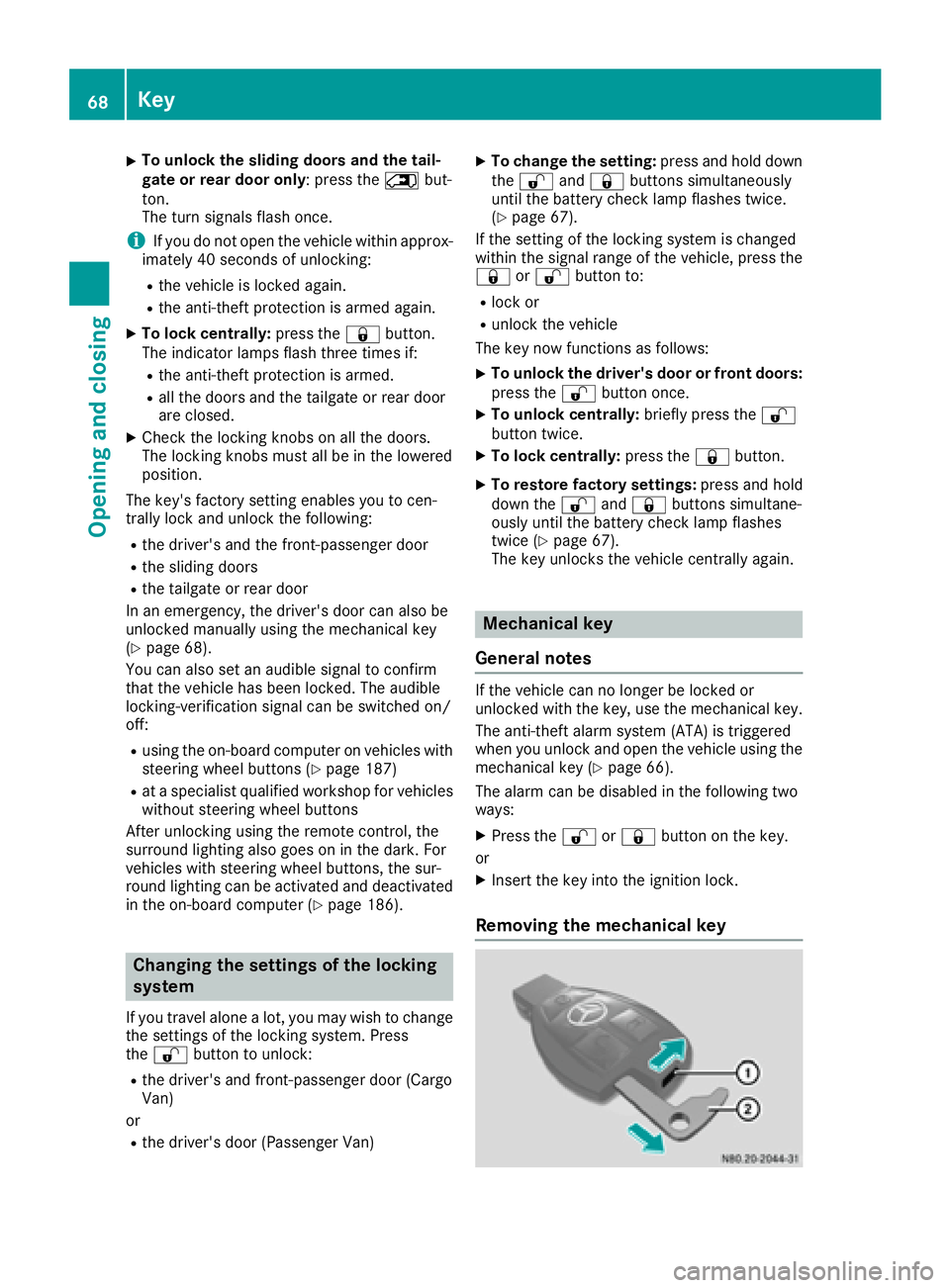
:Battery checklamp
;&To lock the vehicle centrally
=5To unlock the sliding doors and the
tailgate or rear door or to unlock and open or
close the electric sliding door
?Mechanical key
A% To unlock the vehicle centrally or
unlock the frontd oor(s) only
The vehicle’s equipment includes 2keys. There
is an mechanical key in each key.
The key can be used to unlock the vehicle from
some distance. To preventt heft, only use the
key in the immediatev icinity of the vehicle.
Change the batteries immediately if battery
checkl amp:does not light up briefly with
every press of abutton (
Ypage 69).
XTo unlock centrally: press the%button.
The turn signals flash once.
Key67
Opening and closing
Z
Page 70 of 310
XTo unlockthe sliding doors and the tail-
gate or rear doo ronly:p ress the 5but-
ton.
The turn signals flash once.
iIf yo udon ot open the vehicl ewithina pprox-
imately40s econds of unlocking:
Rthe vehicleislocked again.
Rthe anti-thef tprotection is armed again.
XTo lock centrally: press the&button.
The indicator lamps flash thre etime sif:
Rthe anti-thef tprotection is armed.
Rallt he doors and the tailgate or rea rdoor
are closed.
XCheck the locking knobs on al lthe doors.
The locking knobs must al lbeinthe lowered
position.
The key's factory setting enables yo utocen-
trally lock and unlock the following:
Rthe driver's and the front-passenger door
Rthe sliding doors
Rthe tailgate or rea rdoor
In an emergency, the driver's door can also be
unlocke dmanuall yusing the mechanical key
(
Ypage 68).
Yo uc an also set an audibl esignaltoc onfirm
thatt he vehicl ehasbeen locked .The audible
locking-verification signalc an be switched on/
off:
Rusing the on-board compute ronvehicles with
steering whee lbuttons (Ypage 187)
Rat as pecialist qualified workshop for vehicles
withou tsteering whee lbuttons
After unlocking using the remote control, the
surround lighting also goe sonint
he dark. For
ve
hicles with steering whee lbuttons, the sur-
round lighting can be activate dand deactivated
in the on-board compute r(
Ypage 186).
Changingthe settings of the locking
system
If yo utravel alone alot,y ou mayw ishtoc hange
the settings of the locking system .Press
the % button to unlock:
Rthe driver's and front-passenger door (Cargo
Van)
or
Rthe driver's door (Passenger Van)
XTo chang ethe setting: press and hol ddown
the % and& buttons simultaneously
unti lthe battery check lamp flashe stwice.
(
Ypage 67).
If the setting of the locking system is changed
withint he signalr angeoft he vehicle, press the
& or% button to:
Rlock or
Runlock the vehicle
The key now functions as follows:
XTo unloc kthe driver' sdoororf rontdoors:
press the %button once.
XTo unloc kcentrally: brieflypress the %
button twice.
XTo lock centrally: press the&button.
XTo restore factory settings: press and hold
down the %and& buttons simultane-
ouslyu ntilthe battery check lamp flashes
twice (
Ypage 67).
The key unlocks the vehicl ecentrall yagain .
Mechanical key
General notes
If the vehicl ecan no longer be locked or
unlocke dwitht he key,u sethe mechanical key.
The anti-thef talarm system (ATA) is triggered
when yo uunlock and open the vehicl eusing the
mechanical key (
Ypage 66).
The alarm can be disabled in the following two
ways:
XPress the %or& button on the key.
or
XInsert the key into the ignition lock.
Removing the mechanical key
68Key
Opening and closing
Page 71 of 310
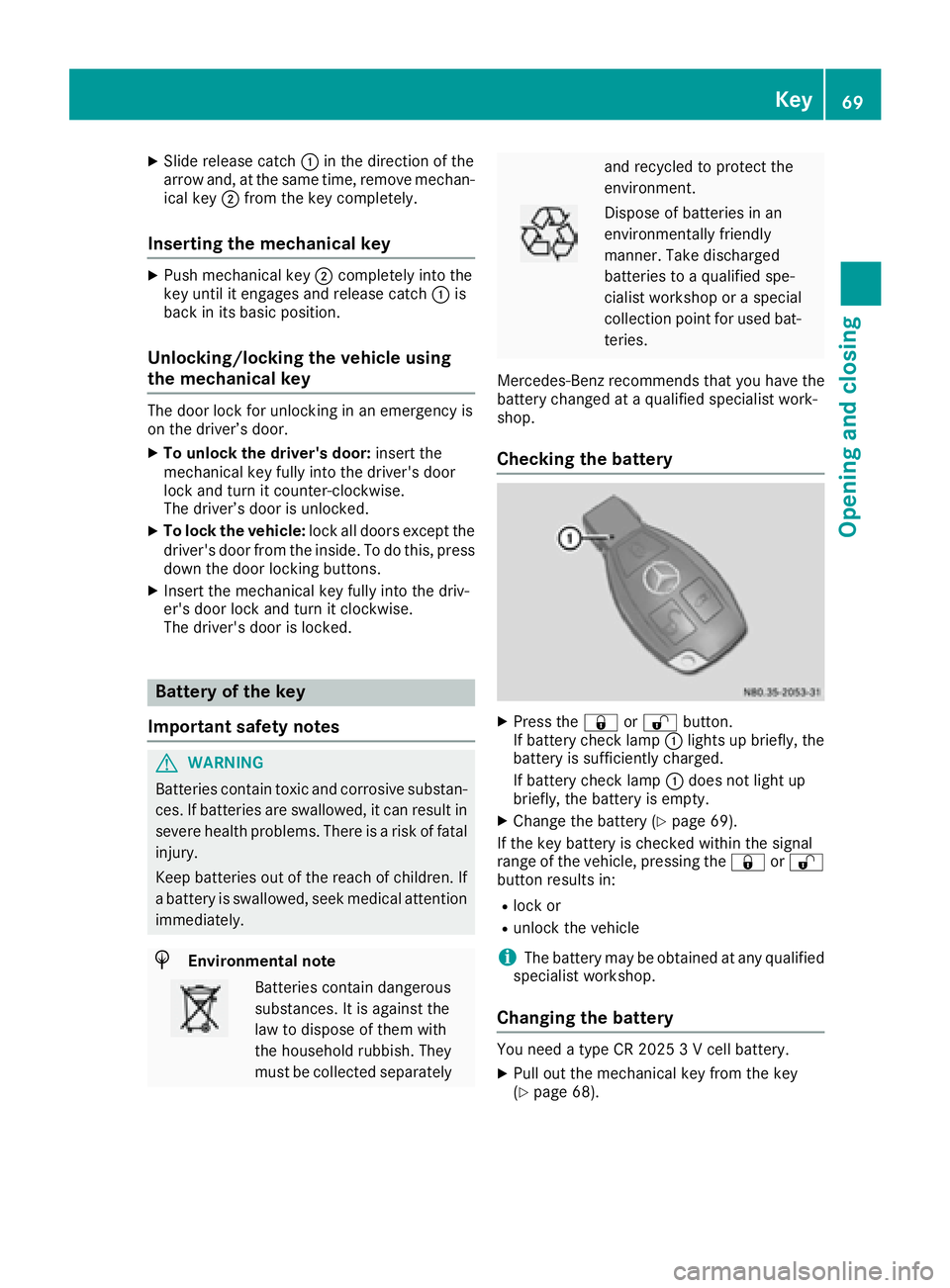
XSlide release catch:in the direction of the
arrow and ,atthe same time ,remove mechan-
ica lkey ; from the key completely.
Inserting the mechanical key
XPush mechanical key ;completely into the
key unti litengages and release catch :is
back in its basic position.
Unlocking/locking the vehicle using
the mechanical key
The doo rloc kf or unlocking in an emergency is
on the driver’ sdoor.
XTo unloc kthe driver's door: insert the
mechanical key fully into the driver' sdoor
lock and turn it counter-clockwise.
The driver’ sdoorisu nlocked.
XTo lock the vehicle: lock alldoors excep tthe
driver' sdoorfrom the inside. To do this ,press
dow nthe doo rloc king buttons.
XInsert the mechanical key fully into the driv-
er's doo rloc ka nd turn it clockwise.
The driver' sdoorisl ocked.
Battery of the key
Important safety notes
GWARNING
Batterie scontai ntoxic and corrosiv esubstan-
ces. If batteries are swallowed, it can result in
severe health problems .There is ariskoff atal
injury.
Kee pbatteries outoft he reach of children. If
ab attery is swallowed, see kmedica lattention
immediately.
HEnvironmental note
Batterie scontai ndangerous
substances. It is against the
la wtod ispose of them with
the householdr ubbish. They
mus tbec ollected separately
and recycle dtoprotect the
environment.
Dispose of batteries in an
environmentally friendly
manner. Take discharged
batteries to aquali fied spe-
cialist workshoporas pecial
collection point for used bat-
teries.
Mercedes-Benz recommend sthat yo uhavet he
battery changed at aquali fied specialist work-
shop.
Checking the battery
XPress the &or% button.
If battery check lamp :lights up briefly, the
battery is sufficiently charged.
If battery check lamp :doe snot light up
briefly, the battery is empty.
XChang ethe battery (Ypage 69).
If the key battery is checke dwithin the signal
rang eoft he vehicle, pressing the &or%
button results in:
Rlock or
Runlock the vehicle
iThe battery may be obtaine datany qualified
specialist workshop.
Changing the battery
You need atypeC R2 025 3Vc ellbattery.
XPull outt he mechanical key from the key
(Ypage 68).
Key69
Opening and closing
Z
Page 73 of 310
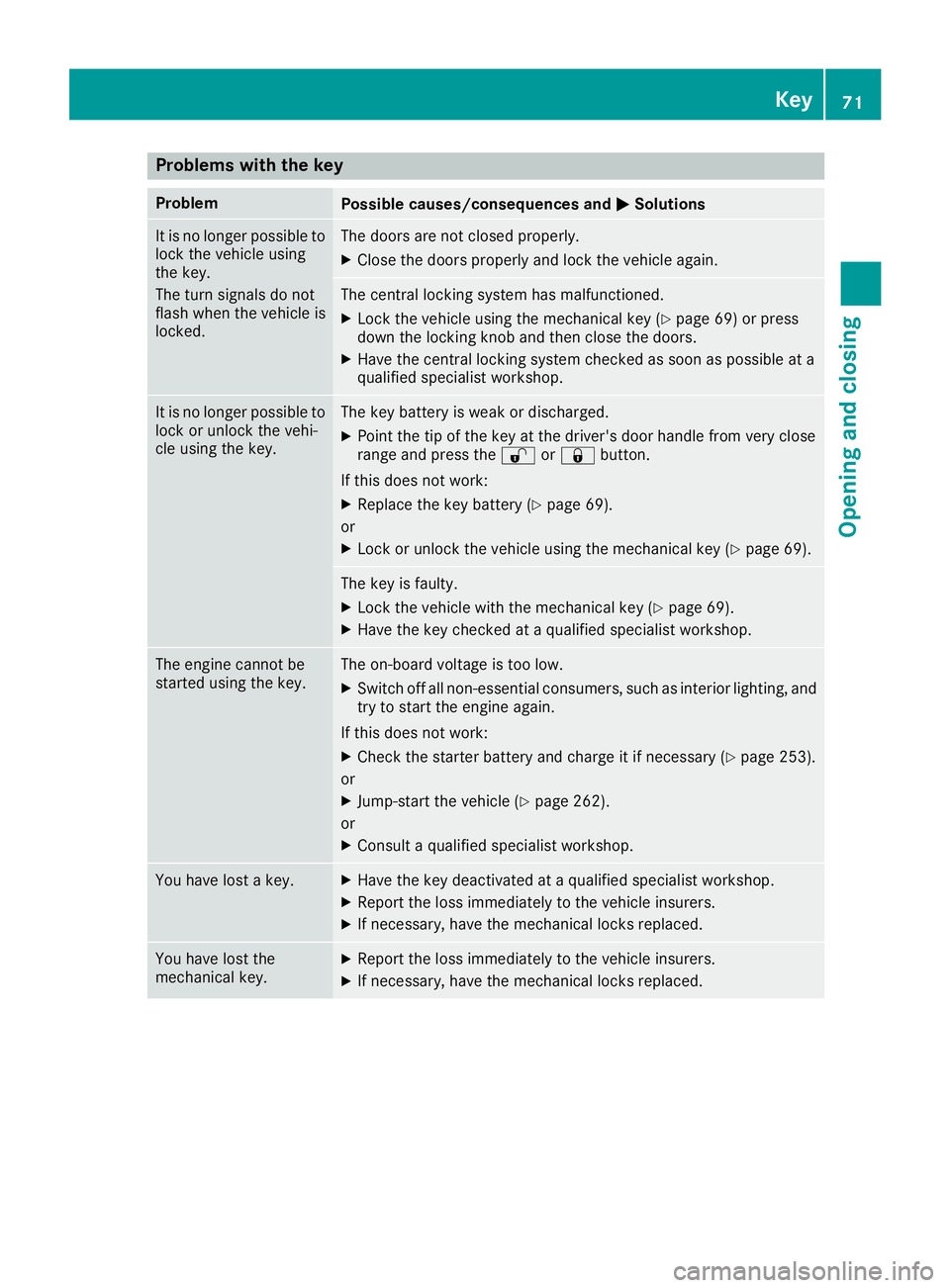
Problems with the key
ProblemPossible causes/consequences andMSolutions
It is no longer possible to
lock the vehicle using
the key.
The turn signals do not
flash when the vehicle is
locked.The doors are not closed properly.
XClose the doors properly and lock the vehicle again.
The central locking system has malfunctioned.
XLock the vehicle using the mechanical key (Ypage 69) or press
down the locking knob and then close the doors.
XHave the central locking system checked as soon as possible at a
qualified specialist workshop.
It is no longer possible to
lock or unlock the vehi-
cle using the key.The key battery is weak or discharged.
XPoint the tip of the key at the driver's door handle from very close
range and press the %or& button.
If this does not work:
XReplace the key battery (Ypage 69).
or
XLock or unlock the vehicle using the mechanical key (Ypage 69).
The key is faulty.
XLock the vehicle with the mechanical key (Ypage 69).
XHave the key checked at aqualified specialist workshop.
The engine cannot be
started using the key.The on-board voltage is too low.
XSwitch off all non-essential consumers, such as interior lighting, and
try to start the engine again.
If this does not work:
XCheck the starter battery and charge it if necessary (Ypage 253).
or
XJump-start the vehicle (Ypage 262).
or
XConsult aqualified specialist workshop.
You have lost akey.XHave the key deactivated at aqualified specialist workshop.
XReport the loss immediately to the vehicle insurers.
XIf necessary, have the mechanical locks replaced.
You have lost the
mechanical key.XReport the loss immediately to the vehicle insurers.
XIf necessary, have the mechanical locks replaced.
Key71
Opening and closing
Z
Page 74 of 310
Centrallocking
Important safety notes
GWARNING
If childre nare left unsupervised in th evehicle,
they could:
Ropen th edoors, thus endangering other
peopleorr oad users.
Rget out and disrupt traffic.
Roperate thevehicle's equipment.
Additionally, childre ncoul dset th evehicle in
motion if, for example ,the y:
Rrelease th eparking brake.
Rshiftin gthe automatic transmission out of
park position P
RStart theengine.
Thereisar iskofana ccidenta nd injury.
When leaving th evehicle ,always tak ethe
SmartKey withy ou and lockthevehicle .Never
leave childre noranimals unattende dinthe
vehicle .Always keep th eSmartKey out of
reac hofc hildren.
GWARNING
If persons, particularly childre nare subjected
to prolonged exposuretoe xtremeheat or
cold, there is ariskofi njury, possibly even
fatal. Never leave childre nunattende dinthe
vehicle.
You can open alocke ddoor from th einside at
any time. For th eslidingd oors, th echild-proof
locks must be deactivated.
Centrally lockinga nd unlocking the
vehicle from th einside
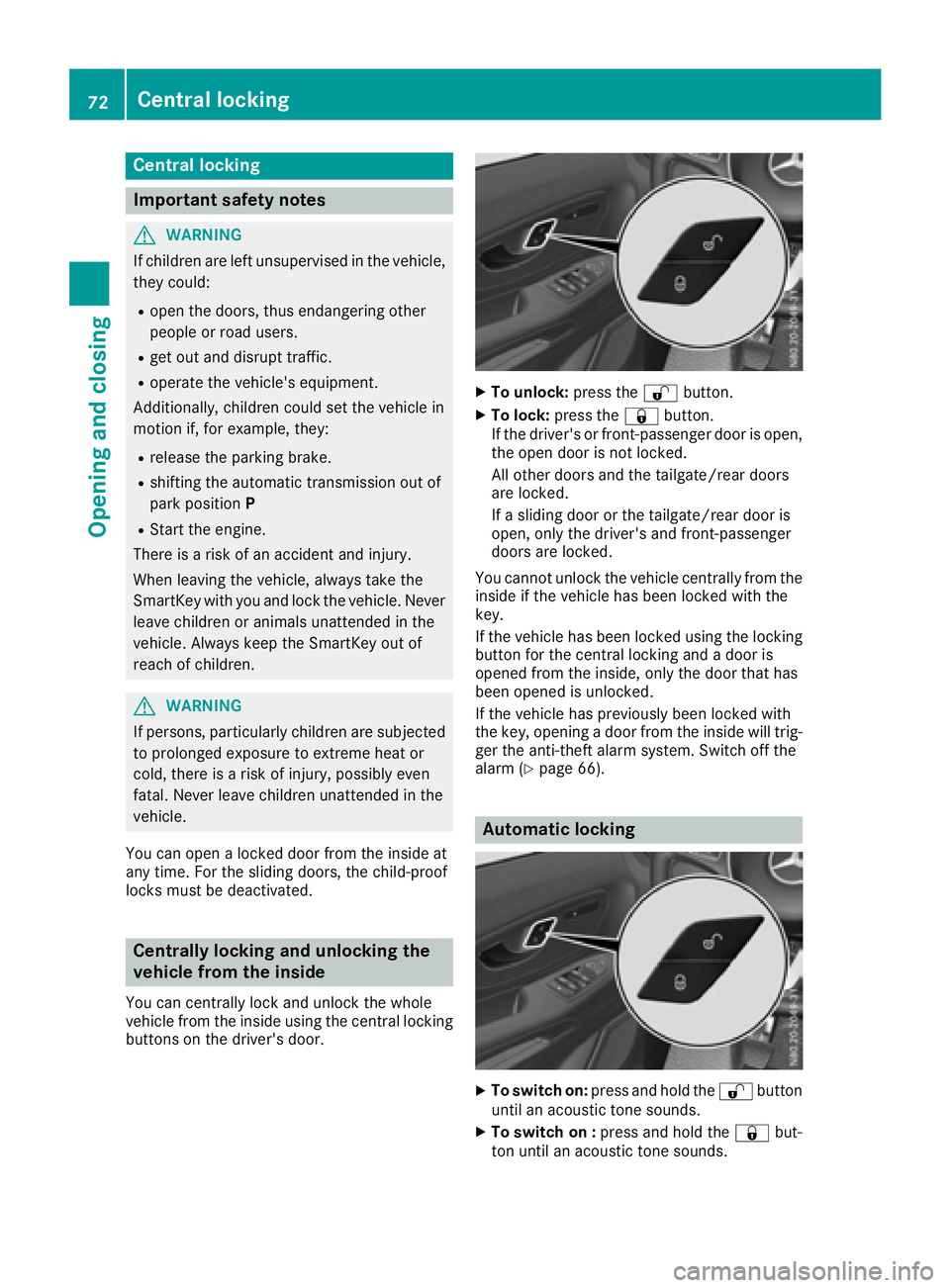
You can centrally locka nd unlock thewhole
vehicle from th einside usingt hecentral locking
buttons on th edriver'sd oor.
XTo unlock: pressthe % button.
XTo lock: pressthe & button.
If th edriver'sorf ront-passenger door is open,
th eo pen door is no tlocked.
All other doorsa nd thetailgate/rear doors
are locked.
If as lidingd oor or th etailgate/rear door is
open,o nlyt he driver'sa nd front-passenger
doorsa re locked.
You canno tunlock th evehicle centrally from the
inside if th evehicle has been locke dwitht he
key.
If th evehicle has been locke dusingt helocking
butto nfor th ecentral lockin gand adoor is
opened from th einside, only th edoor that has
been opened is unlocked.
If th evehicle has previously been locke dwith
th ek ey,o pening adoor from th einside will trig-
ger th eanti-thefta larm system. Switch off the
alarm (
Ypage 66).
Automatic locking
XTo switch on: pressand hold the %button
until an acoustic tone sounds.
XTo switch on : pressand hold the &but-
to nu ntil an acoustic tone sounds.
72Centra llocking
Opening and closing
Page 75 of 310
When the ignition is switched on, the vehicle will
lock automatically fromaspeed of approx-
imately 9mph (15 km/h).
You could therefore be locked out if:
Rthe vehicle is being pushed.
Rthe vehicle is being towed.
Rthe vehicle is being tested on adynamometer.
If the vehicle has been automatically locked and
af rontd oor is opened from the interior while the
vehicle is stationary, the vehicle unlock scen-
trally.
Driver's door and front-passenger
door
Door handle (example driver's door)
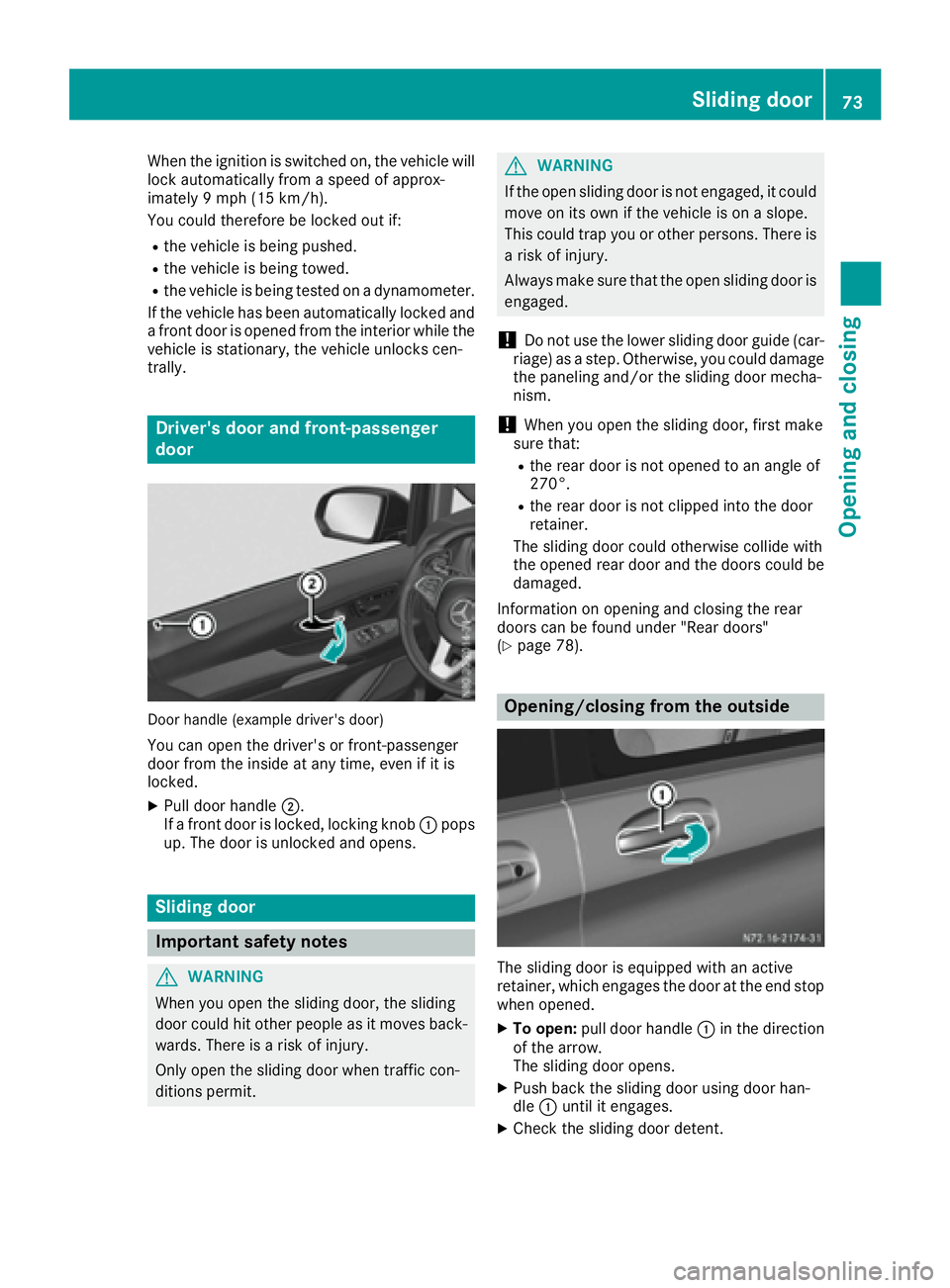
You can open the driver's or front-passenger
door from the inside at any time, even if it is
locked.
XPull door handle ;.
If af rontd oor is locked, lockingk nob: pops
up. The door is unlocked and opens.
Sliding door
Important safety notes
GWARNING
When you open the sliding door, the sliding
door could hit other people as it moves back- wards. There is arisk of injury.
Only open the sliding door when traffic con-
ditions permit.
GWARNING
If the open sliding door is not engaged, it could
move on its own if the vehicle is on aslope.
This could trap you or other persons.T here is
ar isk of injury.
Always make sure that the open sliding door is
engaged.
!Do not use the lower sliding door guide (car-
riage) as astep. Otherwise, you could damage
the paneling and/or the sliding door mecha-
nism.
!When you open the sliding door, first make
sure that:
Rthe rear door is not opened to an angle of
270°.
Rthe rear door is not clipped into the door
retainer.
The sliding door could otherwise collide with
the opened rear door and the doors could be damaged.
Information on opening and closing the rear
doors can be found under "Rear doors"
(
Ypage 78).
Opening/closing from the outside
The sliding door is equipped with an active
retainer ,which engages the door at the end stop
when opened.
XTo open: pull door handle :in the direction
of the arrow.
The sliding door opens.
XPush back the sliding door using door han-
dle :until it engages.
XCheck the sliding door detent.
Sliding door73
Opening and closing
Z
Page 76 of 310
XTo close:pull door handle :in the direction
of the arrow.
The sliding door is released from its lock.
XPush the sliding door forward susing door
handle :and close.
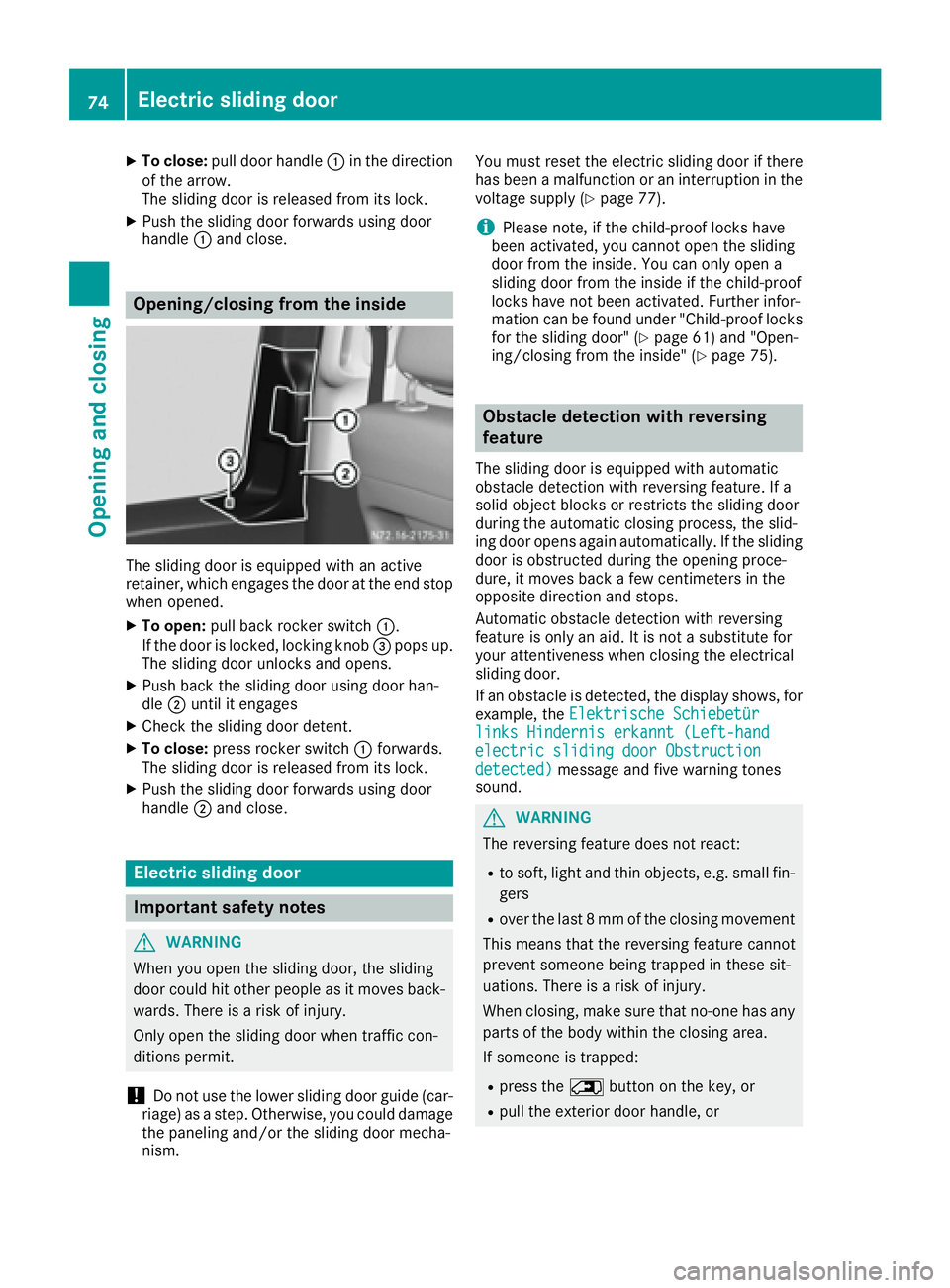
Opening/closing from the inside
The sliding door is equipped with an active
retainer, which engages the door at the end stop
when opened.
XTo open: pull back rocke rswitch :.
If the door is locked ,loc king knob =pops up.
The sliding door unlocks and opens.
XPush back the sliding door using door han-
dle ;unti lite ngages
XCheck the sliding door detent.
XTo close: press rocke rswitch :forwards.
The sliding door is released from its lock.
XPush the sliding door forward susing door
handle ;and close.
Electric sliding door
Important safety notes
GWARNING
Whe nyou open the sliding door, the sliding
door could hito therpeopl easitm ovesback-
wards .There is ariskofi njury.
Onlyo pent he sliding door when traffic con-
ditions permit.
!Do not us ethe lowe rslidin gdoorguide (car-
riage) as astep .Otherwise, yo ucould damage
the paneling and/or the sliding door mecha-
nism. Yo
um ustreset the electri cslidin gdoorift here
hasb eenam alfunctio norani nterruption in the
voltag esuppl y(
Ypage 77).
iPlease note, if the child-proof locks have
been activated, yo ucanno topent he sliding
door from the inside. Yo ucan onlyo pena
sliding door from the insid eifthe child-proof
locks have not been activated. Further infor-
matio ncan be found under "Child-proof locks
for the sliding door" (
Ypage 61 )and "Open-
ing/closing from the inside" (Ypage 75).
Obstacle detection with reversing
feature
The sliding door is equipped with automatic
obstacle detection with reversing feature .Ifa
solid object blocks or restricts the sliding door
during the automatic closing process ,the slid-
ing door opens agai nautomatically. If the sliding
door is obstructed during the opening proce-
dure, it move sbackaf ew centimeters in the
opposite direction and stops.
Automatic obstacle detection with reversing
feature is onlyana id.Itisn otas ubstitute for
your attentiveness when closing the electrical
sliding door.
If an obstacle is detected, the display shows ,for
example, the Elektrische Schiebetür
links Hindernis erkannt( Left-handelectric slidingdoorObstructiondetected)message and fiv ewarning tones
sound.
GWARNING
The reversing feature does not react:
Rto soft, light and thino bjects, e.g.small fin-
gers
Rove rthe last 8mmoft he closing movement
Thi sm eans thatt he reversing feature cannot
prevent someone being trappe dinthesesit-
uations. There is ariskofi njury.
Whe nclosing, make sure thatn o-one hasany
parts of the body withint he closing area.
If someone is trapped:
Rpress the 5button on the key,o r
Rpull the exteriordoorh andle, or
74Electric sliding door
Opening and closing
Page 77 of 310
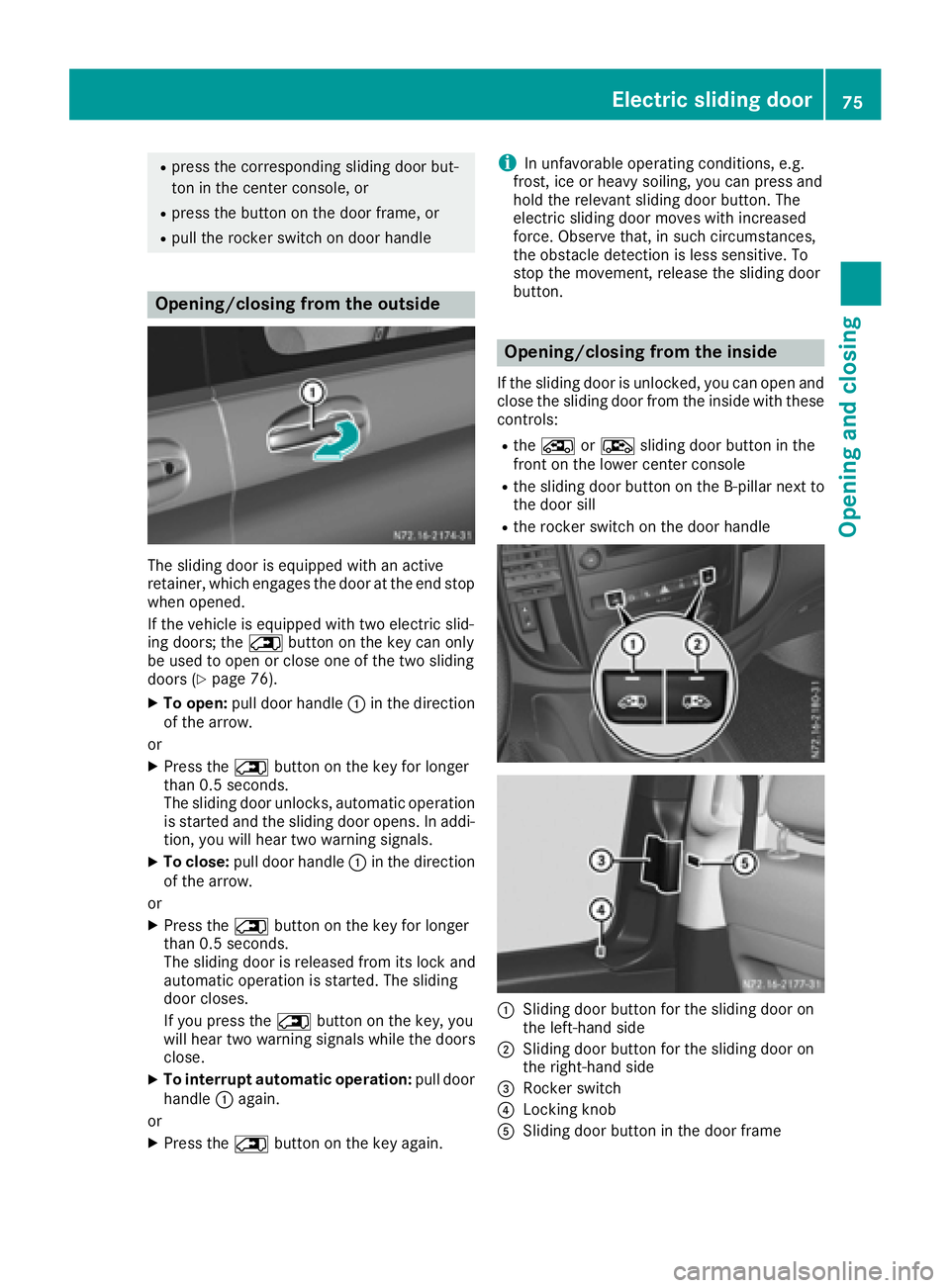
Rpress the correspondingsliding door but-
ton in the center console, or
Rpress the butto nonthe door frame, or
Rpull the rocker switch on door handle
Opening/closing from the outside
The sliding door is equipped with an active
retainer, which engages the door at the end stop
when opened.
If the vehicle is equipped with two electric slid-
ing doors; the 5buttonont he key can only
be used to open or close one of the two sliding
doors (
Ypage 76).
XTo open: pull door handle :in the direction
of the arrow.
or
XPress the 5buttonont he key for longer
than 0.5 seconds.
The sliding door unlocks, automatic operation
is started and the sliding door opens. In addi-
tion ,you will hear two warning signals.
XTo close: pull door handle :in the direction
of the arrow.
or
XPress the 5buttonont he key for longer
than 0.5 seconds.
The sliding door is released from its lock and
automatic operation is started. The sliding
door closes.
If you press the 5buttonont he key, you
will hear two warning signals while the doors
close.
XTo interrupt automatic operation: pull door
handle :again.
or
XPress the 5buttonont he key again.
iIn unfavorable operatin gconditions, e.g.
frost,i ce or heavy soiling, you can press and
hold the relevant sliding door button. The
electric sliding door moves with increased
force. Observe that ,insuch circumstances,
the obstacle detection is less sensitive. To
stop the movement ,release the sliding door
button.
Opening/closing from the inside
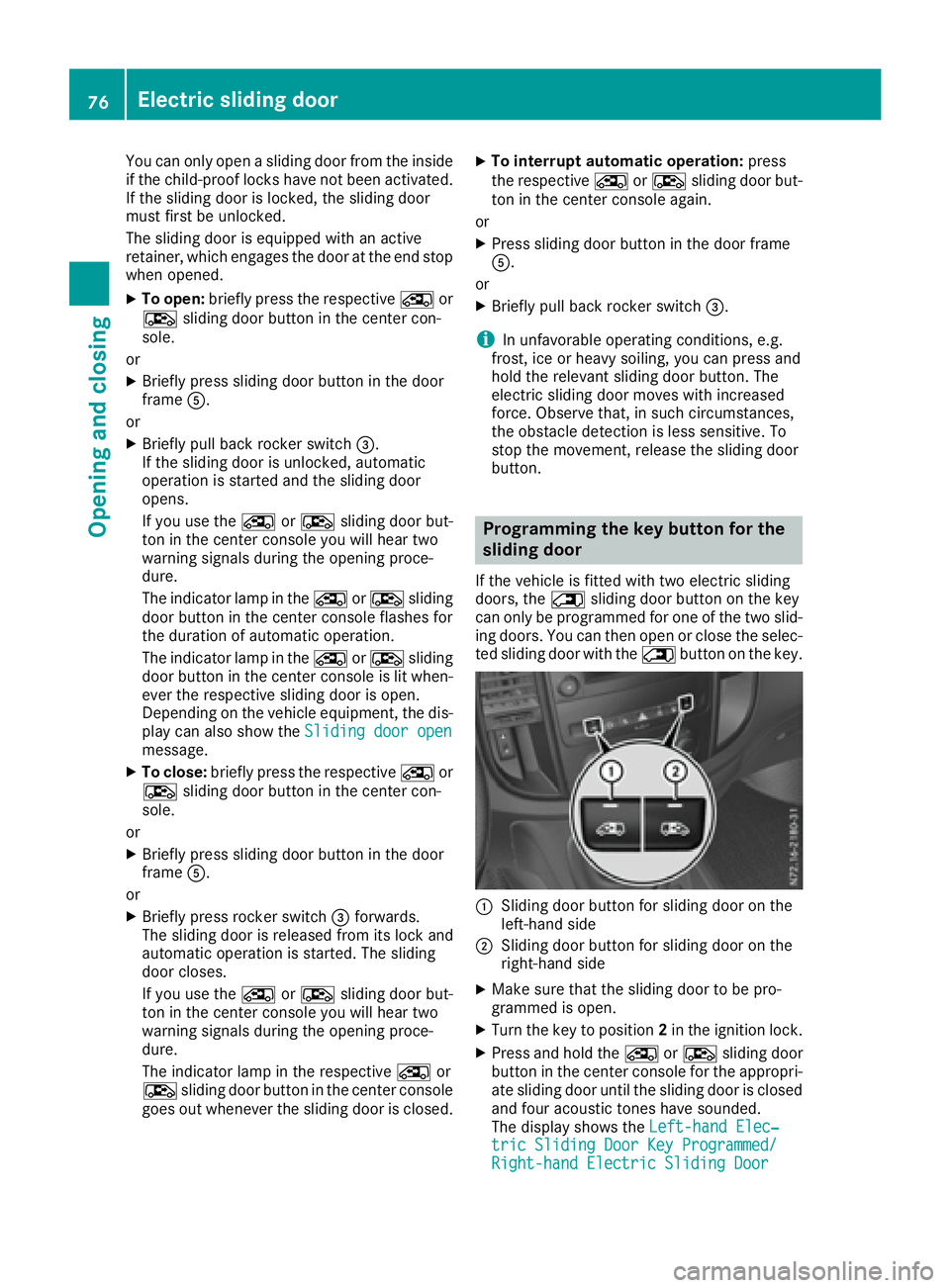
If the sliding door is unlocked, you can open and close the sliding door from the inside with these
controls:
Rthe Å orÆ sliding door butto ninthe
frontont he lower center console
Rthe sliding door butto nonthe B-pillar nex tto
the door sill
Rthe rocker switch on the door handle
:Sliding door butto nfor the sliding door on
the left-hand side
;Sliding door butto nfor the sliding door on
the right-han dside
=Rocker switch
?Locking knob
ASliding door butto ninthe door frame
Electric sliding door75
Opening and closing
Z
Page 78 of 310
You can only openasliding door from the inside
if the child-proof lock shave not been activated.
If the sliding door is locked, the sliding door
must firstbeu nlocked.
The sliding door is equipped with an active
retainer, which engage sthe door at the end stop
when opened.
XTo open: briefly press the respective Åor
Æ sliding door button in the center con-
sole.
or
XBriefly press sliding door button in the door
frame A.
or
XBriefly pull back rocker switch =.
If the sliding door is unlocked, automatic
operation is started and the sliding door
opens.
If you use the ÅorÆ sliding door but-
ton in the center console you will hear two
warnin gsignals during the openin gproce-
dure.
The indicator lamp in the ÅorÆ sliding
door button in the center console flashes for
the duratio nofautomatic operation.
The indicator lamp in the ÅorÆ sliding
door button in the center console is lit when-
ever the respectiv esliding door is open.
Depending on the vehicle equipment, the dis-
play can also show the Sliding door open
message.
XTo close:briefly press the respective Åor
Æ sliding door button in the center con-
sole.
or
XBriefly press sliding door button in the door
frame A.
or
XBriefly press rocker switch =forwards.
The sliding door is released from its lock and
automatic operation is started. The sliding
door closes.
If you use the ÅorÆ sliding door but-
ton in the center console you will hear two
warnin gsignals during the openin gproce-
dure.
The indicator lamp in the respective Åor
Æ sliding door button in the center console
goes out whenever the sliding door is closed.
XTo interrupt automatic operation: press
the respective ÅorÆ sliding door but-
ton in the center console again.
or
XPress sliding door button in the door frame
A.
or
XBriefly pull back rocker switch =.
iIn unfavorable operating conditions, e.g.
frost, ice or heavy soiling ,you can press and
hold the relevants liding door button. The
electric sliding door movesw ith increased
force. Observe that ,insuch circumstances,
the obstacle detection is less sensitive. To
sto pthe movement, release the sliding door
button.
Programming th ekey button for the
sliding door
If the vehicle is fitted with two electric sliding
doors,t he5 sliding door button on the key
can only be programmed for one of the two slid-
ing doors.Y ou can thenopen or close the selec-
ted sliding door with the 5button on the key.
:Slidingdoor button for sliding door on the
left-han dside
;Slidin gdoor button for sliding door on the
right-han dside
XMake sure that the sliding door to be pro-
grammed is open.
XTurn the key to position 2in the ignition lock.
XPress and hold the ÅorÆ sliding door
button in the center console for the appropri-
ate sliding door until the sliding door is closed
and four acoustic tones have sounded.
The display shows the Left-handElec‐
tric Sliding Door Key Programmed/Right-hand Electric Sliding Door
76Electric sliding door
Opening and closing