lock MERCEDES-BENZ METRIS 2016 MY16 Operator’s Manual
[x] Cancel search | Manufacturer: MERCEDES-BENZ, Model Year: 2016, Model line: METRIS, Model: MERCEDES-BENZ METRIS 2016Pages: 310, PDF Size: 7.28 MB
Page 101 of 310
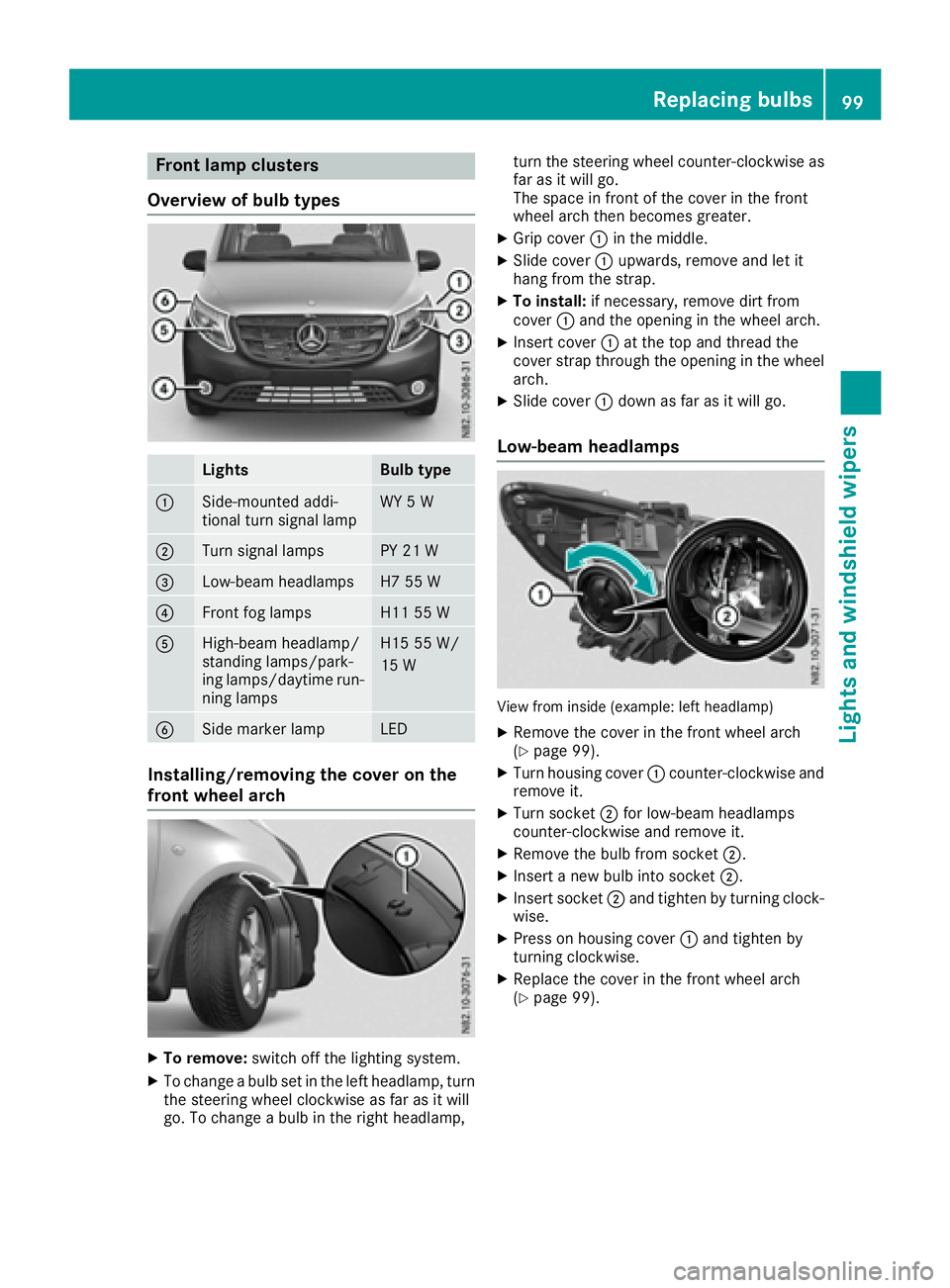
Frontlam pclusters
Overview of bul btypes
LightsBulb type
:Side-mounte daddi-
tional tur nsignal lampWY 5W
;Turn signal lamp sPY 21W
=Low-beam headlampsH7 55 W
?Frontfog lamp sH1155W
AHigh-beam headlamp/
standing lamps/park -
ing lamps/daytime run -
nin glamp sH1555W /
15 W
BSidem arke rlampLE D
Installing/removing th ecover on the
front wheel arch
XTo remove: switch off thelighting system.
XTo chang eabulb set in th elefth eadlamp, tur n
th es teering whee lclockwise as far as it will
go. To chang eabulb in th eright headlamp, tur
nthe steering whee lcou nter-clockwise as
far as it will go.
The spac einfrontof thecover in th efront
whee larcht henb ecome sgreater.
XGrip cover :in th emiddle.
XSlide cover :upwards, remove and let it
han gfromt hestrap.
XTo install: if necessary, remove dirt from
cover :and th eopening in th ewhee larch.
XInser tcover : at th etop and thread th e
cover strap throug hthe opening in th ewhee l
arch.
XSlide cover :down as far as it will go.
Low-beam headlamps
View from inside (example: lef theadlamp )
XRemove th ecover in th efront whee larch
(Ypage 99).
XTurn housing cover :counter-clockwise and
remove it .
XTurn socke t; for low-beam headlamps
counter-clockwise and remove it .
XRemove thebulb from socke t;.
XInser tanewbulb int osocke t;.
XInser tsocke t; and tighten by turnin gclock -
wise.
XPress on housing cover :and tighten by
turnin gclockwise.
XReplac ethe cover in th efront whee larch
(Ypage 99).
Replacingb ulbs99
Lightsand windshield wipers
Z
Page 102 of 310
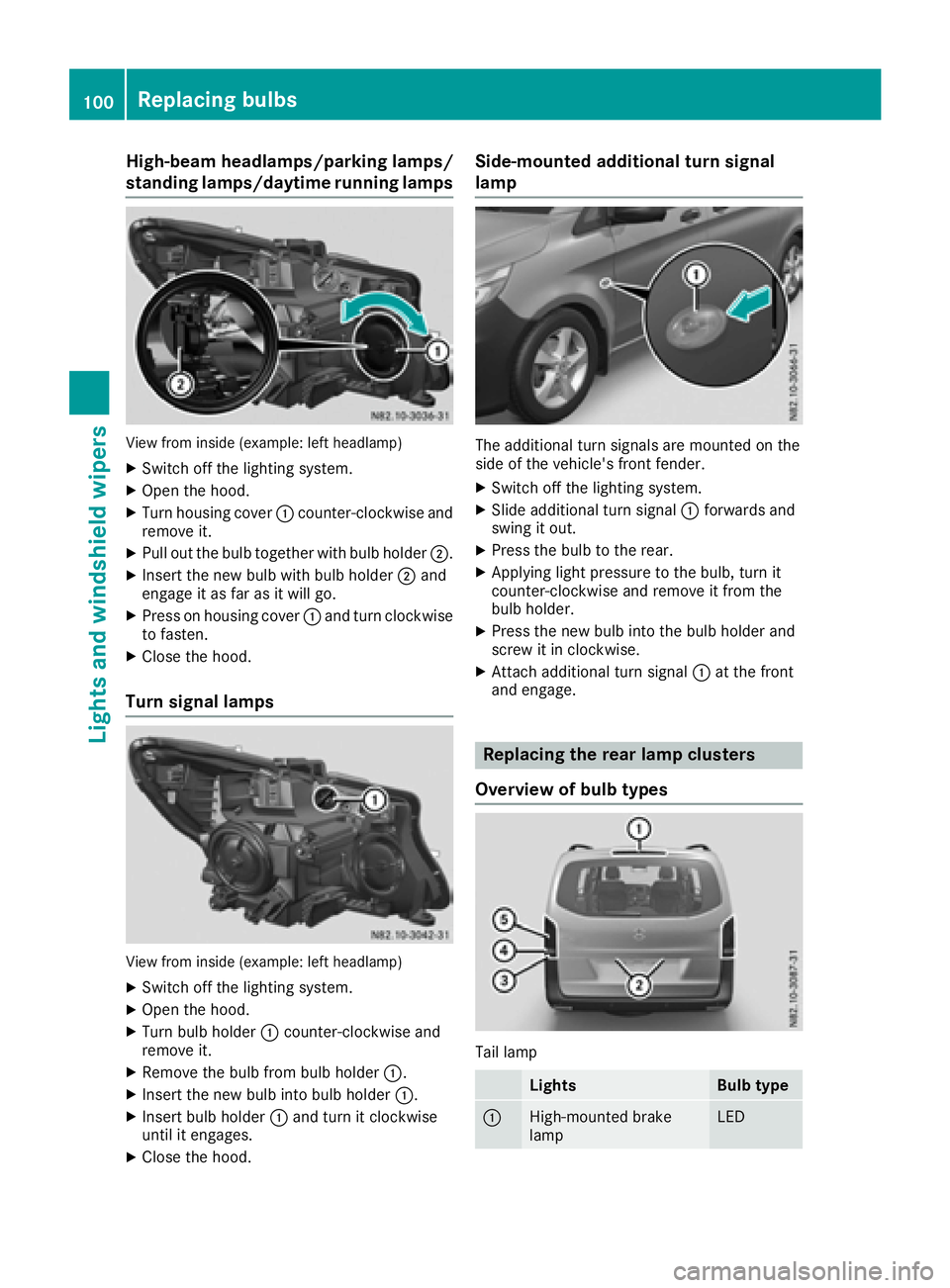
High-beam headlamps/parkinglamps/
standing lamps/daytime running lamps
View from insid e(example: left headlamp)
XSwitch off the lighting system.
XOpen the hood.
XTurn housing cover :counter-clockwise and
remove it.
XPul lout the bul btogether with bul bholder ;.
XInsert the new bul bwith bul bholder ;and
engag eitasf ar as it wil lgo.
XPress on housing cover :and turn clockwise
to fasten.
XClose the hood.
Turn signal lamps
View from insid e(example: left headlamp)
XSwitch off the lighting system.
XOpen the hood.
XTurn bul bholder :counter-clockwise and
remove it.
XRemove the bul bfrom bul bholder :.
XInsert the new bul binto bul bholder :.
XInsert bul bholder :and turn it clockwise
until it engages.
XClose the hood.
Side-mounted additional turn signal
lamp
The additiona lturn signals are mounted on the
side of the vehicle's front fender.
XSwitch off the lighting system.
XSlide additiona lturn signal :forwards and
swing it out.
XPress the bul btothe rear.
XApplying light pressure to the bulb, turn it
counter-clockwise and remove it from the
bulbh older.
XPress the new bul binto the bul bholder and
screw it in clockwise.
XAttach additiona lturn signal :at the front
and engage.
Replacing the rear lamp clusters
Overview of bulb types
Tai llamp
LightsBulb type
:High-mounted brake
lampLED
100Replacing bulbs
Lights and windshield wipers
Page 103 of 310
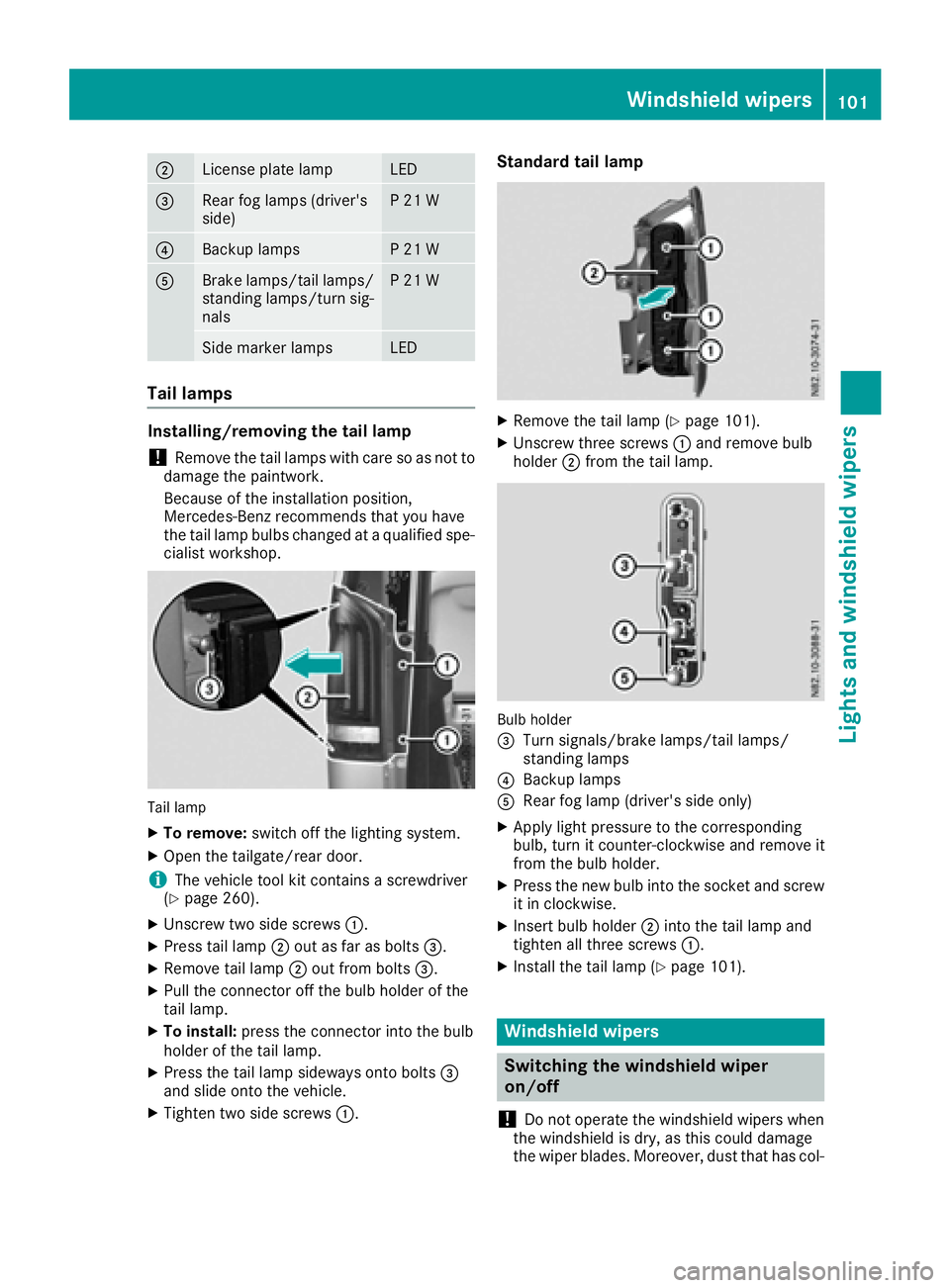
;License plate lampLED
=Rearfog lamp s(driver's
side)P21W
?Backup lampsP21W
ABrake lamps/tail lamps/
standing lamps/turn sig-
nalsP21W
Side marker lampsLED
Tail lamps
Installing/removing the tail lamp
!Remove the tail lamp swith care so as not to
damage the paintwork.
Because of the installation position,
Mercedes-Benz recommends that you have
the tail lamp bulbs changed at aqualifieds pe-
cialist workshop.
Tail lamp
XTo remove: switch off the lighting system.
XOpen the tailgate/rear door.
iThe vehicle tool kit contains ascrewdriver
(Ypage 260).
XUnscrew two side screws :.
XPress tail lamp;out as far as bolts =.
XRemove tail lamp;out from bolts =.
XPullthe connector off the bul bholderoft he
tail lamp.
XTo install: press the connector into the bulb
holderoft he tail lamp.
XPress the tail lamp sideways onto bolts =
and slideo nto the vehicle.
XTighten two side screws :.
Standard tail lamp
XRemove the tail lamp (Ypage 101).
XUnscrew three screws:and remove bulb
holder ;from the tail lamp.
Bulb holder
=
Turn signals/brake lamps/tail lamps/
standing lamps
?Backup lamps
ARea rfog lamp (driver's side only)
XApply lightp ressure to the corresponding
bulb, turn it counter-clockwise and remove it
from the bul bholder.
XPress the new bul binto the socket and screw
it in clockwise.
XInsert bul bholder ;into the tail lamp and
tighten all three screws :.
XInstall the tail lamp (Ypage 101).
Windshield wipers
Switching the windshieldw iper
on/off
!
Do not operate the windshield wipers when
the windshield is dry, as this could damage
the wiper blades. Moreover, dust that has col-
Windshield wipers101
Lights and windshield wipers
Z
Page 104 of 310
lected on the windshield can scratchthe glass
if wiping takes place when the windshield is
dry.
If it is necessary to switc honthe windshield
wipers in dry weathe rconditions, always use
washer fluid when operating the windshield
wipers.
!If the windshield wipers leave smearsont he
windshield after the vehicle has been washed
in an automatic car wash, wax or other resi-
dues may be the reason for this .Clean the
windshield using washer fluid after washing
the vehicle in an automatic car wash.
!Intermitten twiping with rain sensor: due to
optical influences and the windshield becom-
ing dirtyind ry weatherconditions, the wind-
shield wipers may be activate dinadvertently.
This could the ndamage the windshield wiper
blades or scratc hthe windshield.
For this reason,y ou should always switc hoff
the windshield wipers in dry weather.
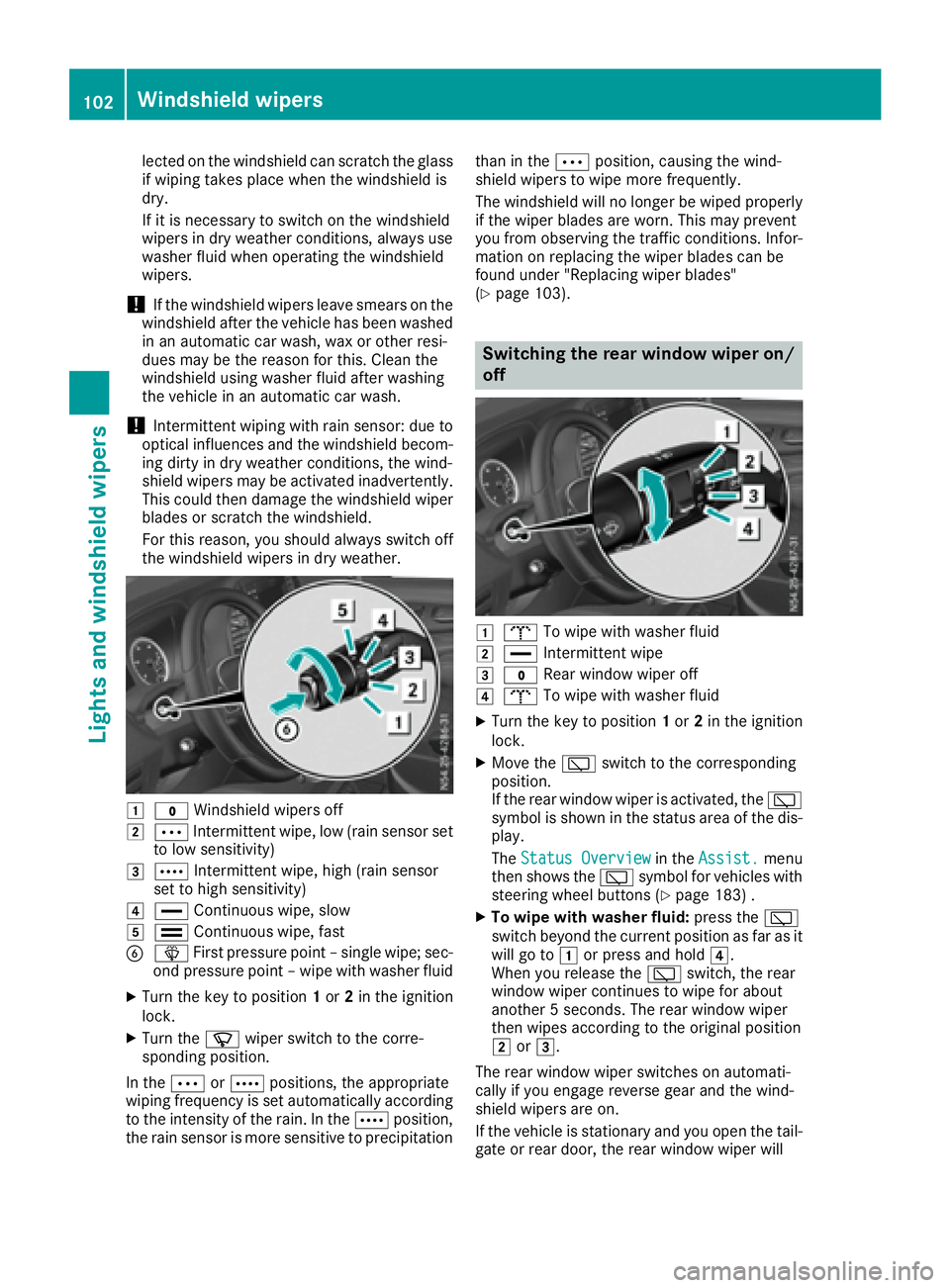
1$ Windshield wipers off
2ÄIntermitten twipe, low (rain sensor set
to low sensitivity)
3Å Intermitten twipe, high (rain sensor
set to high sensitivity)
4° Continuous wipe, slow
5¯Continuous wipe, fast
BîFirstpressure point –single wipe; sec-
ond pressure point –wipe with washer fluid
XTurn the key to position 1or 2in the ignition
lock.
XTurn the íwiper switc htothe corre-
sponding position.
In the ÄorÅ positions ,the appropriate
wiping frequenc yisset automatically according
to the intensity of the rain. In the Åposition,
the rain sensor is more sensitiv etoprecipitation than in the
Äposition, causin gthe wind-
shield wipers to wipe more frequently.
The windshield will no longer be wiped properly
if the wiper blades are worn.T his may prevent
you fromo bservingthe traffic conditions. Infor-
matio nonr eplacing the wiper blades can be
foundu nder "Replacingw iper blades"
(
Ypage 103).
Switchin gthe rea rwindow wiper on/
off
1b To wipe with washer fluid
2°Intermitten twipe
3$ Rear window wiper off
4bTo wipe with washer fluid
XTurn the key to position 1or 2in the ignition
lock.
XMove the èswitchtot he corresponding
position.
If the rear window wiper is activated, the è
symbol is shown in the status area of the dis-
play.
The Status Overview
in the Assist.menu
the nshows the èsymbol for vehicles with
steeringw heel buttons (
Ypage 183) .
XTo wipe with washer fluid: press theè
switc hbeyond the current position as far as it
will go to 1or press and hold 4.
When you release the èswitch, the rear
window wiper continues to wipe for about
another 5seconds. The rear window wiper
the nw ipes accordingtot he original position
2 or3.
The rear window wiper switches on automati-
cally if you engag ereverse gear and the wind-
shield wipers are on.
If the vehicle is stationar yand you open the tail-
gate or rear door, the rear window wiper will
102Windshield wipers
Lightsa nd windshield wipers
Page 108 of 310
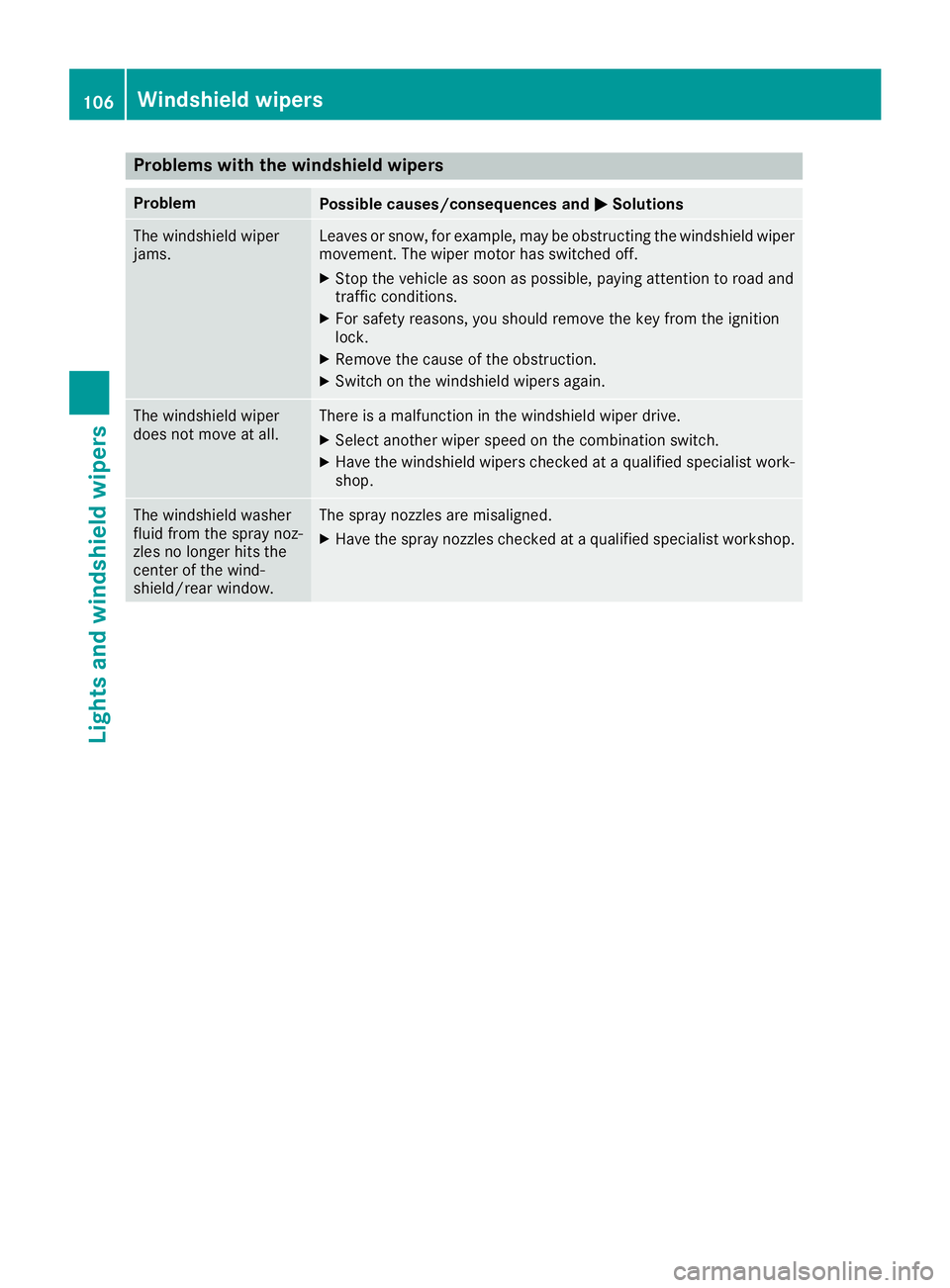
Problems with the windshield wipers
ProblemPossible causes/consequences andMSolutions
The windshield wiper
jams.Leaves or snow, for example, may be obstructing the windshield wiper
movement.The wiper motor has switched off.
XStop the vehicle as soon as possible, paying attention to road and
traffic conditions.
XFor safety reasons, you should remove the key from the ignition
lock.
XRemove the cause of the obstruction.
XSwitch on the windshield wipers again.
The windshield wiper
does not move at all.There isamalfunction in the windshield wiper drive.
XSelect another wiper speed on the combination switch.
XHave the windshield wipers checked at aqualified specialist work-
shop.
The windshield washer
fluid from the spray noz-
zles no longer hits the
center of the wind-
shield/rear window.The spray nozzles are misaligned.
XHave the spray nozzles checked at aqualified specialist workshop.
106Windshield wipers
Lights and windshieldw ipers
Page 112 of 310
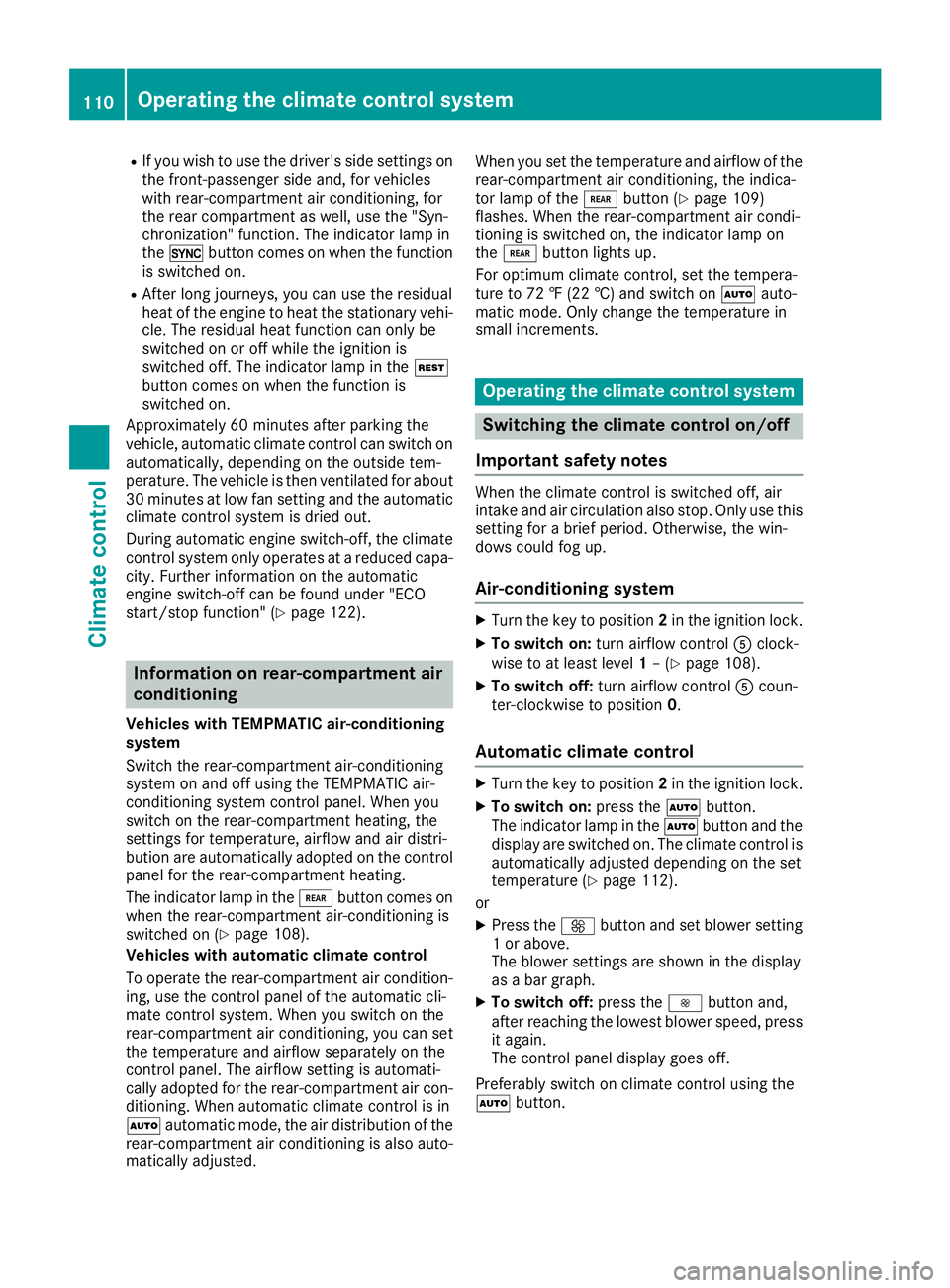
RIf you wish to use the driver's side settings on
the front-passenger side and, for vehicles
with rear-compartment air conditioning, for
the rear compartment as well,use the "Syn-
chronization" function. The indicator lamp in
the 0 button comes on when the function
is switched on.
RAfter long journeys, you can use the residual
heat of the engine to heat the stationary vehi-
cle. The residual heat function can only be
switched on or off whilet he ignition is
switched off. The indicator lamp in the Ì
button comes on when the function is
switched on.
Approximatel y60minutes after parking the
vehicle,a utomatic climate control can switch on
automatically ,depending on the outsid etem-
perature. The vehicle is then ventilated for about
30 minutes at low fan setting and the automatic
climate control system is dried out.
During automatic engine switch-off, the climate control system only operates at areduced capa-
city. Further information on the automatic
engine switch-off can be found under "ECO
start/stop function" (
Ypage 122).
Information on rear-compartment air
conditioning
Vehicles with TEMPMATIC air-conditioning
system
Switch the rear-compartment air-conditioning
system on and off using the TEMPMATIC air-
conditioning system control panel. When you
switch on the rear-compartment heating, the
settings for temperature ,airflow and air distri-
bution are automatically adopted on the control
panel for the rear-compartment heating.
The indicator lamp in the /button comes on
when the rear-compartment air-conditioning is
switched on (
Ypage 108).
Vehicles with automatic climate control
To operate the rear-compartment air condition-
ing, use the control panel of the automatic cli-
mate control system. When you switch on the
rear-compartment air conditioning, you can set
the temperature and airflow separately on the
control panel .The airflow setting is automati-
cally adopted for the rear-compartment air con-
ditioning. When automatic climate control is in
à automatic mode, the air distribution of the
rear-compartment air conditioning is also auto-
matically adjusted. When you set the temperature and airflow of the
rear-compartment air conditioning, the indica-
tor lamp of the
/button (
Ypage 109)
flashes. When the rear-compartment air condi-
tioning is switched on, the indicator lamp on
the / button lights up.
For optimum climate control, set the tempera-
ture to 72 ‡(22 †) and switch on Ãauto-
matic mode. Only change the temperature in
small increments.
Operating the climate control system
Switching the climate control on/off
Important safety notes
When the climate control is switched off, air
intake and air circulation also stop. Only use this
setting for abrief period.O therwise,the win-
dows could fog up.
Air-conditioning system
XTurn the key to position 2in the ignition lock.
XTo switch on: turn airflow control Aclock-
wise to at least level 1–(Ypage 108).
XTo switch off: turn airflow control Acoun-
ter-clockwise to position 0.
Automatic climate control
XTurn the key to position2in the ignition lock.
XTo switch on: press theÃbutton.
The indicator lamp in the Ãbutton and the
display are switched on. The climate control is
automatically adjusted depending on the set
temperature (
Ypage 112).
or
XPress the Kbutton and set blower setting
1ora bove.
The blower settings are shown in the display
as ab ar graph.
XTo switch off: press theIbutton and,
after reaching the lowest blower speed,p ress
it again.
The control panel display goes off.
Preferably switch on climate control using the
à button.
110Operating the climatec ontrol system
Climate control
Page 114 of 310
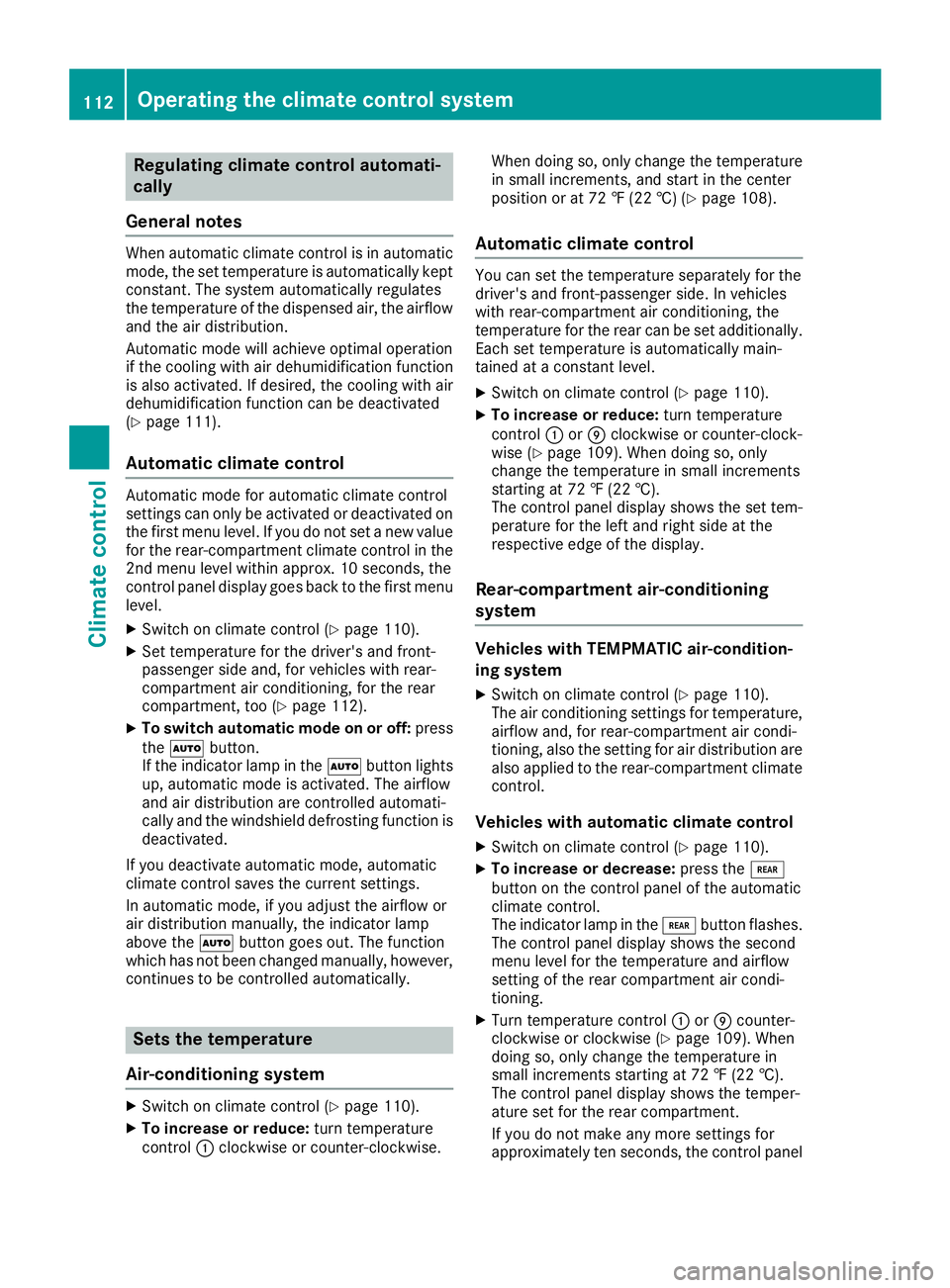
Regulating climate control automati-
cally
General notes
Whe nautomatic climate control is in automatic
mode, the set temperature is automaticall ykept
constant. The system automaticall yregulates
the temperature of the dispensed air, the airflow
and the ai rdistribution.
Automati cmodew illa chieve optimal operation
if the cooling with ai rdehumidification function
is also activated. If desired, the cooling with air
dehumidification function can be deactivated
(
Ypage 111).
Automatic climate control
Automati cmodef or automatic climate control
settings can only be activate dordeactivated on
the firs tmenu level .Ifyoudo not set anew value
for the rear-compartment climate control in the
2nd menu level within approx. 10 seconds, the
control panel display goe sbacktot he firs tmenu
level.
XSwitch on climate control (Ypage 110).
XSet temperature for the driver' sand front-
passenger sid eand,for vehicles with rear-
compartment ai rconditioning, for the rear
compartment, too (
Ypage 112).
XTo switc hautomati cmode on or off: press
the à button.
If the indicator lamp in the Ãbutton lights
up ,automatic mod eisactivated. The airflow
and ai rdistribution are controlle dautomati-
cally and the windshield defrosting function is
deactivated.
If yo udeactivate automatic mode, automatic
climate control saves the current settings.
In automatic mode, if yo uadjust the airflo wor
ai rd istribution manually ,the indicator lamp
above the Ãbutton goe sout.T he function
which hasn ot beenchanged manually ,however,
continues to be controlle dautomatically.
Sets the temperature
Air-conditioning system
XSwitch on climate control (Ypage 110).
XTo increase or reduce: turn temperature
control :clockwise or counter-clockwise. Whe
ndoing so, only change the temperature
in small increments, and star tinthe center
position or at 72 ‡(22 †) (
Ypage 108).
Automatic climate control
Youc an set the temperature separately for the
driver' sand front-passenger side. In vehicles
with rear-compartment ai rconditioning, the
temperature for the rea rcan be set additionally.
Each set temperature is automaticall ymain-
tained at aconstant level.
XSwitch on climate control (Ypage 110).
XTo increase or reduce: turn temperature
control :orE clockwise or counter-clock-
wise (
Ypage 109). Whe ndoing so, only
change the temperature in small increments
starting at 72 ‡(22 †).
The control panel display shows the set tem-
perature for the left and right sid eatthe
respective edg eofthe display.
Rear-compartmen tair-conditioning
system
Vehicles with TEMPMATI Cair-condition-
in gs ystem
XSwitch on climate control (Ypage 110).
The ai rconditioning settings for temperature,
airflo wand,for rear-compartment ai rcondi-
tioning, also the setting for ai rdistribution are
also applie dtothe rear-compartment climate
control.
Vehicles with automati cclimate control
XSwitch on climate control (Ypage 110).
XTo increase or decrease: press the/
button on the control panel of the automatic
climate control.
The indicator lamp in the /button flashes.
The control panel display shows the second
menu level for the temperature and airflow
setting of the rea rcompartment ai rcondi-
tioning.
XTurn temperature control :orE counter-
clockwise or clockwise (Ypage 109). When
doing so, only change the temperature in
small increments starting at 72 ‡(22 †).
The control panel display shows the temper-
ature set for the rea rcompartment.
If yo udon ot make any more settings for
approximately ten seconds, the control panel
112Operating the climate control system
Climate control
Page 115 of 310
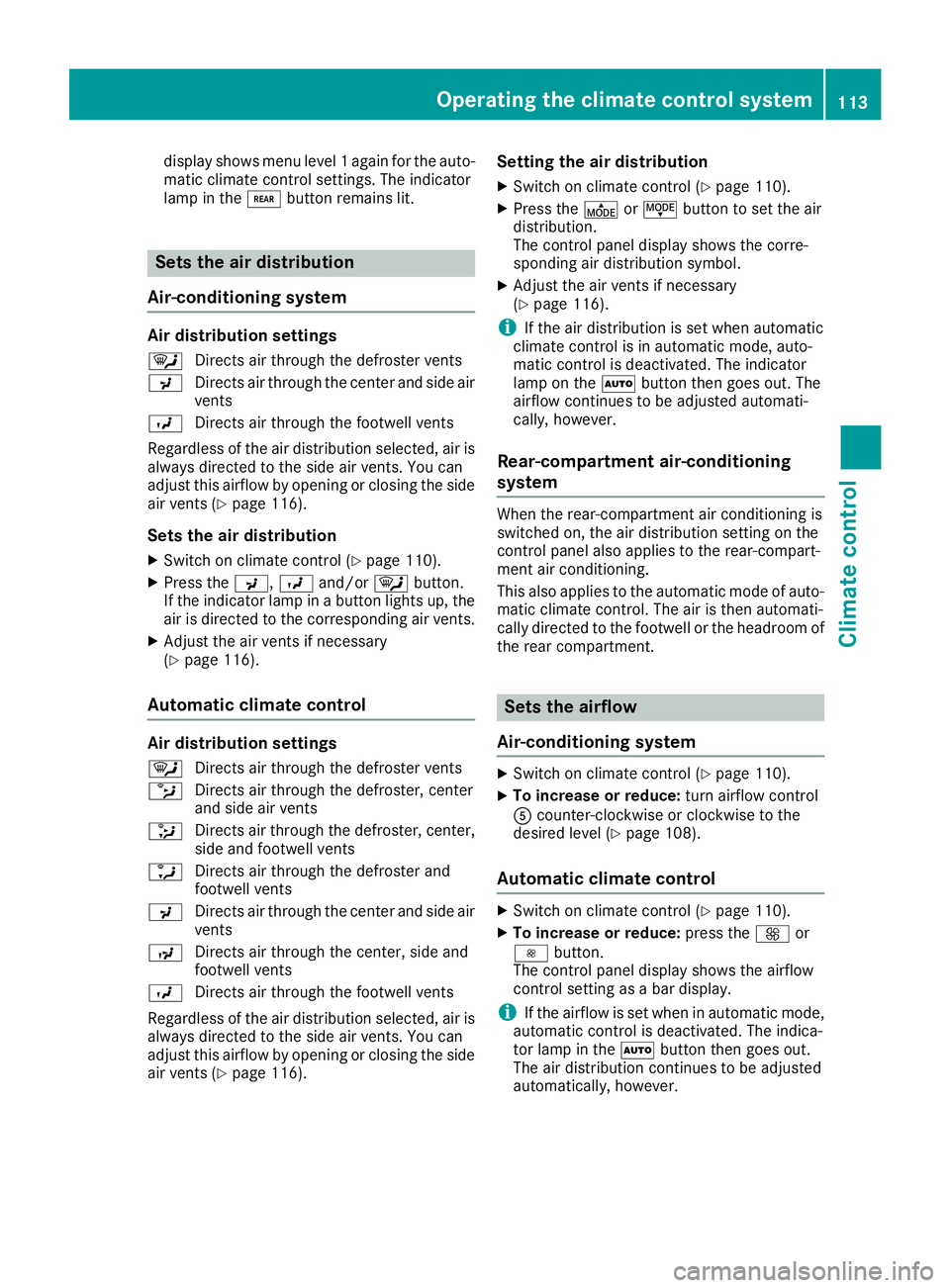
display shows menu level1again for the auto-
matic climate control settings. The indicator
lamp in the /buttonremains lit.
Sets the air distribution
Air-conditioning system
Air distribution settings
¯ Directs air through the defroster vents
P Directs air through the center and side air
vents
O Directs air through the footwell vents
Regardless of the air distribution selected, air is
always directed to the side air vents. You can
adjust this airflow by openin gorclosingthe side
air vent s(
Ypage 116).
Sets the air distribution
XSwitchonc limate control (Ypage 110).
XPress the P,Oand/or ¯button.
If the indicator lamp in abutto nlights up, the
air is directed to the correspondin gair vents.
XAdjust the air vent sifnecessary
(Ypage 116).
Automatic climat econtrol
Air distribution settings
¯
Directs air through the defroster vents
b Directs air through the defroster, center
and side air vents
_ Directs air through the defroster, center,
side and footwell vents
a Directs air through the defroster and
footwell vents
P Directs air through the center and side air
vents
N Directs air through the center, side and
footwell vents
O Directs air through the footwell vents
Regardless of the air distribution selected, air is
always directed to the side air vents. You can
adjust this airflow by openin gorclosingthe side
air vent s(
Ypage 116).
Setting the air distribution
XSwitchonc limate control (Ypage 110).
XPress the ÉorË buttontos et the air
distribution.
The control panel display shows the corre-
spondin gair distribution symbol.
XAdjust the air vent sifnecessary
(Ypage 116).
iIf the air distribution is set when automatic
climate control is in automatic mode, auto-
matic control is deactivated. The indicator
lamp on the Ãbuttonthen goes out. The
airflow continues to be adjusted automati-
cally, however.
Rear-compartment air-conditioning
system
When the rear-compartment air conditioning is
switched on, the air distribution setting on the
control panel also applies to the rear-compart-
ment air conditioning.
This also applies to the automatic mode of auto-
matic climate control. The air is then automati-
cally directed to the footwell or the headroom of
the rear compartment.
Sets the airflow
Air-conditioning system
XSwitc honc limate control (Ypage 110).
XTo increase or reduce: turn airflow control
A counter-clockwise or clockwise to the
desired level (
Ypage 108).
Automatic climat econtrol
XSwitc honc limate control (Ypage 110).
XTo increase or reduce: press theKor
I button.
The control panel display shows the airflow
control setting as abar display.
iIf the airflow is set when in automatic mode,
automatic control is deactivated. The indica-
tor lamp in the Ãbuttonthen goes out.
The air distribution continues to be adjusted
automatically, however.
Operating th eclimatec ontrol system113
Climatecontrol
Page 116 of 310
Rear-compartmentair-conditioning
system
Vehicles with TEMPMATI Cair-condition-
in gs ystem
XSwitch on climate control (Ypage 110).
The ai rconditioning settings for temperature,
airflo wand,for rear-compartment ai rcondi-
tioning, also the setting for ai rdistribution are
also applie dtothe rear-compartment climate
control.
Vehicles with automati cclimate control
XSwitch on climate control (Ypage 110).
XTo increase or decrease: press the/
button on the control panel of the automatic
climate control.
The indicator lamp in the /button flashes.
The control panel display shows the second
menu level for the temperature and airflow
setting of the rea rcompartment ai rcondi-
tioning.
XPress the KorI button.
The control panel display shows the rear-
compartment airflo wcontrol setting as abar
display.
If yo udon ot make any more settings for
approximately ten seconds, the control panel
display shows menu level 1again for the auto-
mati cclimate control settings. The indicator
lamp in the /button remains lit.
Activating/deactivatin gthe synchro-
nizatio nfunction
General notes
The automatic climate control system can be set
centrall yusing the synchronization function.
The temperature setting for the driver' ssidei s
then adopte dfor the front-passenger sid eand,
on vehicles with rear-compartment ai rcondi-
tioning, the rea rcompartment too.
Automatic climate control
XSwitch on climate control (Ypage 110).
XPress the 0button.
If the indicator lamp in the 0button lights
up ,the function is switched on. The display
then shows the temperature set on the driv-
er' ss idef or the front-passenger side. The synchronization function switches off if
the temperature setting for the front-
passenger sid
eorfor the rea rcompartment is
altered. The indicator lamp on the 0but-
ton then goe sout.
Defrosting the windshield
General notes
Yo uc an us ethe following settings to defrost the
windshield or to defrost the inside of the wind-
shielda nd the front sid ewindows.
Only us ethe following settings unti lthe wind-
shieldisc lear.
Air-conditioning system
XSwitch on climate control (Ypage 110).
XTurn temperature control :and airflo wcon-
trol Aclockwise to the zsetting
(
Ypage 108).
XSelect the ¯aird istribution setting
(Ypage 113).
Only the indicator lamp in the ¯button
lights up .The indicator lamps on the Pand
O buttons are off.
Automatic climate control
XSwitch on climate control (Ypage 110).
XTo activate/deactivate the windshield
defrostin gfunction: press the ¬button.
The indicator lamp in the ¬button comes
on when the windshield defrosting function is switched on. Temperature, airflo wand ai rdis-
tribution are automaticall yset to the optimum
defrosting effect. Air-recirculation mod eis
deactivated.
Whe nyou activate automatic mode, the wind-
shieldd efrosting function is automatically
deactivated.
Whe nyou deactivate the windshield defrosting
function, the previous automatic climate control
settings are reactivated with the exception of
air-recirculation mode. Air-recirculation mode
remains deactivated.
114Operating the climate control system
Climate control
Page 117 of 310
Clearing condensation from thewin-
dows
Windows fogged up on th einside
Air-conditioning system
You should only selectt hiss ettin guntil th ewin-
dows are clear again.
XSwitch on th erear window defroste rifnec-
essary (Ypage 115).
XSwitch on climate control (Ypage 110).
XSwitch off air-recirculation mode
(Ypage 115).
XTurn temperatur econtrol :clockwise to a
higher temperatur eand air flow control Ato
ab lower speedb etween3and 6
(
Ypage 108).
XIf possible, only selectt he¯ settingofthe
air distribution (Ypage 113).
Only th eindicator lamp in the ¯button
lightsu p.
XSwitch on th ecoolingw ithair dehumidifica-
tio nfunction (Ypage 111).
XIf th ewindows still fog up, set th eclimate
control functionsasd escribedfor defrosting
of th ewindshield (
Ypage 114).
Automatic climat econtrol
You should only selectt hiss ettin guntil th ewin-
dows are clear again.
XSwitch on th erear window defroste rifnec-
essary (Ypage 115).
XSwitch on climate control (Ypage 110).
XSwitch off air-recirculation mode
(Ypage 115).
XSwitch on th ecoolingw ithair dehumidifica-
tio nfunction (Ypage 111).
XSwitch on automatic mod e(Ypage 112).
XIf thewindows continue to fog up, switch on
th ew indshield defrostin gfunction
(
Ypage 114).
Windows fogged up on th eoutside
You should only selectt hiss ettin guntil the
windshield is clear again.
XSwitch on th ewindshield wipers
(Ypage 101).
XSwitch on climate control (Ypage 110).
XIn warm and damp weather,don otallow cold
air to flow onto th ewindows. Close th eside
air vents if required (
Ypage 116).
Switching th erearw indow defroster
on/off
General notes
The rear window defroste rconsume salot of
power.Y ou should therefor eswitch off th erear
window defroste rassoon as th erear window is
clear.
XTurn th ekeyto position 2in th eignition lock.
XPress the ¤buttonont hecontrol panel.
If th eindicator lamp in the ¤buttonlights
up, th erear window defroste risswitched on.
The rear window defroste rswitches off auto-
maticall yafter afew minutes.
Problemsw ith therearw indow
defroster
The rear window defroste rhas switched off pre-
maturely or canno tbeactivated.
The vehicle starter battery is no tsufficiently
charged.
XSwitch off any consumers that are not
required, e.g .reading lamps ,interiorl ighting
or seat heating.
When th ebattery is sufficiently charged, the
rear window defroste rcan be activated again.
Switching air-recirculation mode
on/off
Important safety notes
You can deactivate th eintake of fresh air if
unpleasanto dorsenterthev ehicle from out-
side. The air inside th evehicle will only be cir-
culated.
When you switch on air-recirculation mode, the
side windows and windows coul dfog up more
quickly, in particular at low outside tempera-
tures. Only switch on air-recirculation mod efor
as hort time.
Operatin gthe climatec ontrol system115
Climate control