start stop button MERCEDES-BENZ METRIS 2016 MY16 Operator’s Manual
[x] Cancel search | Manufacturer: MERCEDES-BENZ, Model Year: 2016, Model line: METRIS, Model: MERCEDES-BENZ METRIS 2016Pages: 310, PDF Size: 7.28 MB
Page 177 of 310
Setting the time and date
The vehicle must be stationary. Use the buttonsin the instrumentc luster.
XPressÈto select the Settingsmenu.
XPress3to select the time and date display.
XPress forg to set the hours and press 3
to confirm.
XPress forg to set the minutes and press
3 to confirm.
XPress forg to set the day and press 3to
confirm.
XPress forg to set the montha nd press3
to confirm.
XPress forg to set the year and press 3to
confirm.
The display shows the Settings
menu again.
On-board computer (vehicles with
steering wheel buttons)
Operating the on-board computer
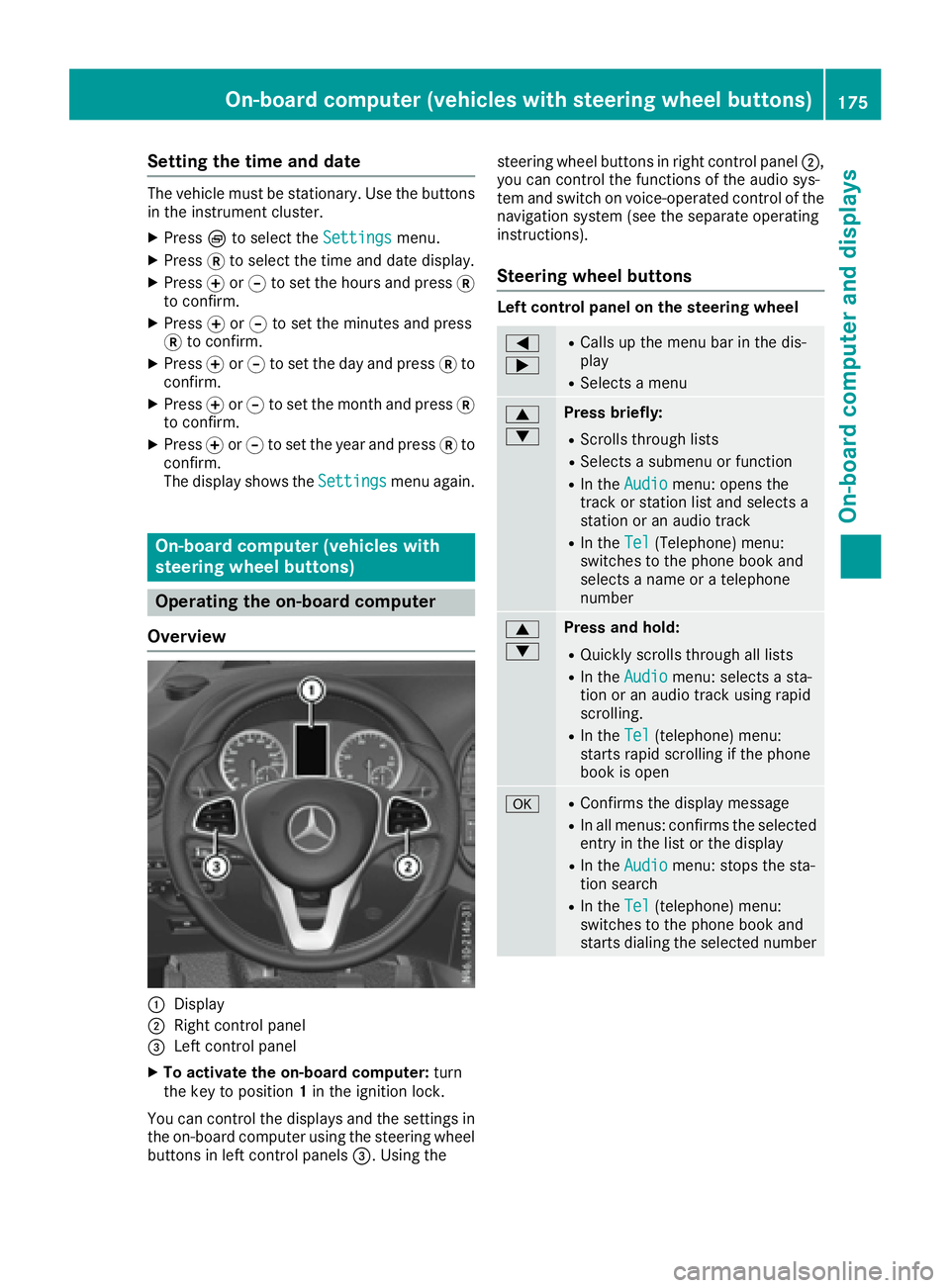
Overview
:Display
;Right control panel
=Left control panel
XTo activate the on-board computer: turn
the key to position 1in the ignition lock.
You can control the displaysa nd the settings in
the on-board computer using the steering wheel
buttons in left control panels =.Using the steering wheel buttons in right control panel
;,
you can control the functions of the audio sys-
tem and switch on voice-operated control of the
navigation system (see the separate operating
instructions).
Steering wheel buttons
Left control panel on the steering wheel
=
;RCallsupt he menu bar in the dis-
play
RSelects amenu
9
:Press briefly:
RScrolls through lists
RSelects asubmenu or function
RIn the Audiomenu: opens the
track or station list and selects a
station or an audio track
RIn the Tel(Telephone) menu:
switches to the phone book and
selects aname or atelephone
number
9
:Press and hold:
RQuickly scrolls through all lists
RIn the Audiomenu: selects asta-
tion or an audio track using rapid
scrolling.
RIn the Tel(telephone) menu:
starts rapid scrolling if the phone
book is open
aRConfirms the display message
RIn all menus: confirmst he selected
entryint he list or the display
RIn theAudiomenu: stops the sta-
tion search
RIn the Tel(telephone) menu:
switches to the phone book and
starts dialing the selected number
On-board computer (vehicles with steering wheel buttons)175
On-board computer and displays
Z
Page 179 of 310
In status areaD,the display can show the sta-
tus of the following driving systems:
À ATTENTION ASSIST(
Ypage 149)
à Lane Keeping Assist (
Ypage 147)
V Cruise control (
Ypage 140)
è Rearwindow wiper (
Ypage 102)
è ECO start/stop function (
Ypage 122)
Menu overview
You can think of the order of the menus as a
circle. Use the =or; steering wheel
buttons to show the menu bar and scroll through
the menus. Use the :or9 steering
wheel buttons to scroll through their submenus and functions.
Operatio ninformation can be found under
"Operating the on-board computer"
(
Ypage 175).
Depending on the vehicle equipment, you can
call up the following menus:
RTripmenu (Ypage 177)
RNavimenu (navigation instructions)
(Ypage 179)
RAudiomenu (Ypage 180)
RTel(telephone) menu (Ypage 181)
RAssist.(assistance) menu (Ypage 182)
RServicemenu (Ypage 184)
RSettingsmenu (Ypage 185)
Trip menu
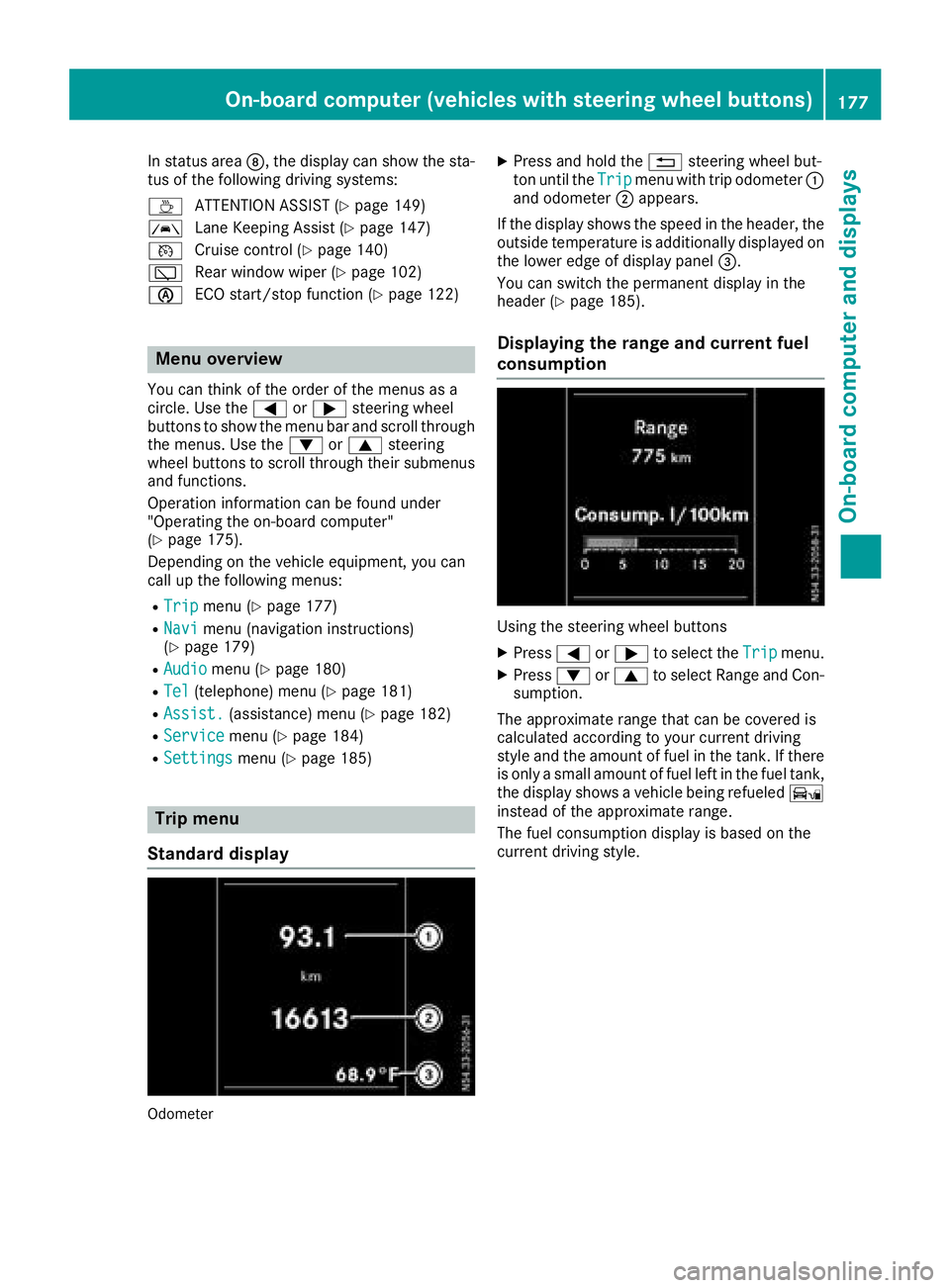
Standard display
Odometer
XPress and hold the %steering wheel but-
ton until the Tripmenu with trip odometer :
and odometer ;appears.
If the display shows the speed in the header, the
outsid etemperature is additionall ydisplaye don
the lowere dge of display panel =.
You can switch the permanent display in the
header (
Ypage 185).
Displaying the range and current fuel
consumption
Using the steering wheel buttons
XPress =or; to select the Tripmenu.
XPress:or9 to select Range and Con-
sumption.
The approximate range that can be covered is
calculated according to you rcurrent driving
style and the amount of fuel in the tank. If there
is only asmall amount of fuel left in the fuel tank,
the display shows avehicle being refueled Ï
instead of the approximate range.
The fuel consumption display is base donthe
current driving style.
On-board computer (vehicles with steeringw heel buttons)177
On-board computer and displays
Z
Page 184 of 310
Acceptingacall
XPress th e6 buttontoa nswer acall.
If someon ecallsy ou when you are in th eTel
menu, acorre sponding display message
appear sinthemultifunction display.
Rejects orendsac all
XPress the~ steering whee lbutton.
Dialing anumber fr omthep hone book
Using th esteering whee lbuttons
XPress =or; to select th eTelmenu.
XPress :, 9ora to switch to th e
phone book .
XPress:or9 to select names succes-
sively.
If you press and hold th ebutto nfor longer
than 1second, th enames in th etelephon e
book are shown rapidly on eafter another.
or
XPress and hold :or9 for longer than
5s econds.
Rapid scrollin g—thenam etha tstartsw itht he
next lette rortheprevious lette rinthealpha-
bet is displayed. Rapid scrollin gstops when
you release th ebutto norr eachthe endoft he
list .
XIf only one telephone number is store dfor
an ame: press 6ora to start dialing.
or
XIf there is mor ethano ne number for a
particular name: press the6 ora
butto ntod isplay th enumbers.
XPress :or9 to select atelephon e
number .
XPress6ora to start dialing. or
XTo exit th
etelephone book :press ~or
%.
Redialing
The on-board computer saves th elast names or
number sdialed in th eredial memory. Using th e
steering whee lbuttons
XPress =or; to select th eTelmenu.
XPress th e6 buttontos witch to th eredial
memory.
XPress :or9 to select names or tele-
phone numbers.
XPress th e6 ora buttontostart dialing.
or
XTo exit th eredial memory :press th e~
or % button.
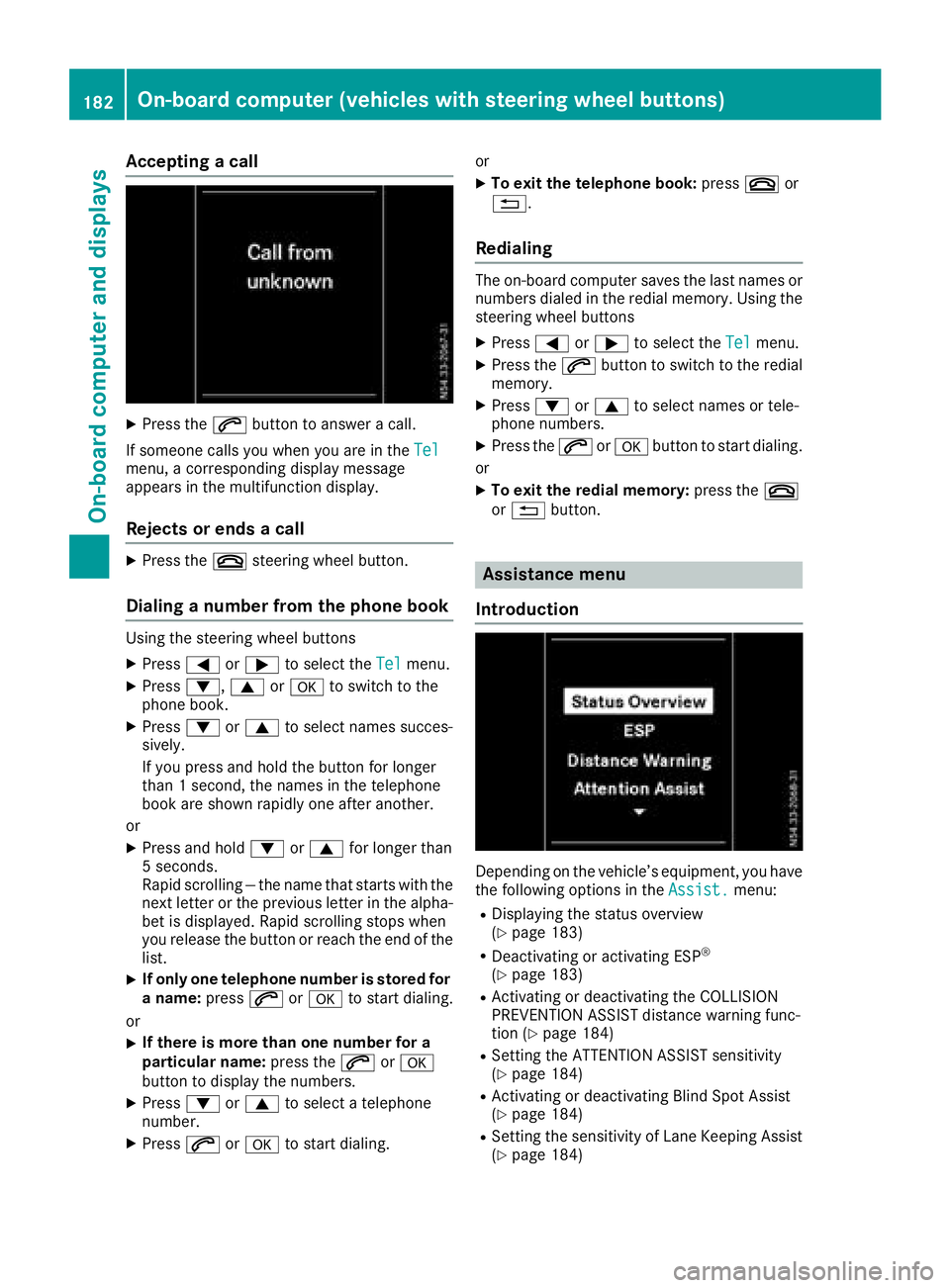
Assistance menu
Introd uction
Dependin gonthevehicle’s equipment, you hav e
th ef ollowin goption sintheAssist .menu:
RDisplaying th estatus overview
(Ypage 183)
RDeactivating or activating ES P®
(Ypage 183)
RActivating or deactivating theCOLLISION
PREVENTION ASSIST distanc ewarning func-
tion (
Ypage 184)
RSetting th eATTEN TION ASSIST sensitivit y
(Ypage 184)
RActivating or deactivating Blind Spot Assis t
(Ypage 184)
RSetting th esensitivit yofLaneK eepin gAssist
(Ypage 184)
182On-boar dcomputer (vehicles with steering wheel buttons)
On-boar dcomputer and displays
Page 190 of 310
Display messages (vehicles withoutsteering wheel buttons)
Introduction
Important safet ynotes
GWARNING
If th einstrument cluster has failed or malfunctioned, you may no trecogniz efunction restriction s
in systems relevant to safety. The operatin gsafet yofyour vehicle may be impaired. There is arisk
of an accident.
Drive on carefully. Hav ethe vehicle checke dataqualified specialis tworkshop immediately.
The on-boar dcom pute ronlys hows messages or warnings from certain systems in th einstrument
cluster display. You should therefore mak esurey our vehicle is operatin gsafely at all times .Ifthe
operatin gsafet yofyour vehicle is impaired, stop th evehicle as soo naspossible, payin gattenti on
to road and traffic conditions. The nconsu ltaq ualified specialis tworkshop .
Display messages wit hgraphi csymbols are simplified in th eOperator's Manual and may diffe rfro m
th es ymbols in th edisplay. Awarnin gtones ounds wit hcertai ndisplay messages.
Please respon dinaccordance wit hthe display messages and follow th eadditional note sinthis
Operator's Manual.
You can hide low-priorit ydisplay messages usin gthe 3 butto nont heinstrumen tcluster. The
display messages are then stored in th emessag ememory. Rectify th ecause of adisplay mess
age
a
s soo nasp ossible.
High-priorit ydisplay messages canno tbehidden .These messages will continue to be shown in th e
display until their cause has bee neliminated.
Message memory
The on-boar dcom pute rstore scertai ndisplay messages in th emessag ememory. You can cal lup
th es tore ddisplay messages. Use th ebuttons in th einstrument cluster.
XPressÈto selec tthe messag ememory.
If there are display messages, th edisplay shows th enumber of saved messages.
If there are no display messages, th edisplay shows No Messages
.
XPress3to scroll forwards through th edisplay messages.
Afte rthe last saved display message, th edisplay again shows th emessag ememor ystart scree n
wit hthe number of saved messages.
Press Èto exit th edisplay messages and jump directl ytot he messag ememor ystart screen.
188Display message s(vehicles withou tsteering wheelbuttons)
On-board computera nd displays
Page 194 of 310
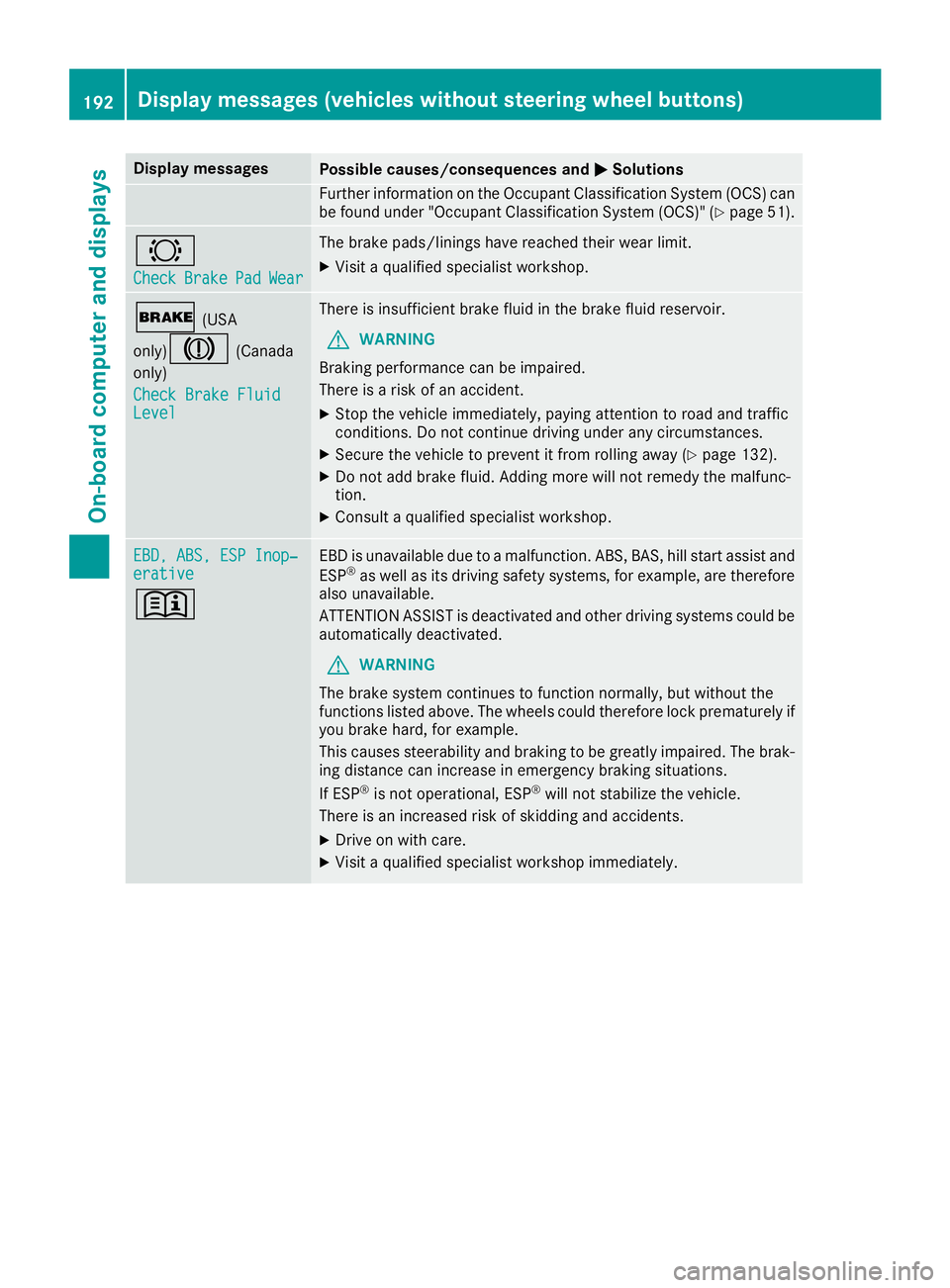
Display messagesPossible causes/consequences andMSolutions
Further information on theOccupant Classification Syste m(OCS )can
be found under "Occupant Classification Syste m(OCS)" (Ypage 51).
#
CheckBrakePadWear
The brak epads/linings hav ereached their wear limit.
XVisit aqualified specialist workshop .
$(USA
only)
J(Canada
only)
Check Brake Fluid
Level
There is insufficien tbrak efluidint hebrak efluid reservoir .
GWARNING
Braking performance can be impaired.
There is ariskofana ccident.
XStop thevehicl eimmediately, payin gattention to roa dand traffic
conditions. Do no tcontinue drivingunder any circumstances.
XSecur ethe vehicl etopreventitfromr ollin gaway (Ypage 132).
XDo no tadd brak efluid .Addingm orew ill no tremedy th emalfunc -
tion .
XConsult aqualified specialist workshop .
EBD,ABS,E SP Inop‐erativ e
+
EBDisu navailable due to amalfunction .ABS ,BAS ,hill start assist and
ES P®as well as it sdrivin gsafet ysystems ,for example, are therefor e
also unavailable .
ATTENTION ASSIST is deactivated and other drivin gsystems could be
automatically deactivated.
GWARNIN G
The brak esystem continues to function normally, but without th e
function slisted above. The wheels could therefor eloc kp rematurel yif
you brak ehard, for example.
This causes steerabilit yand braking to be greatl yimpaired. The brak -
ing distanc ecan increas einemergenc ybraking situations.
If ES P
®is no toperational, ES P®will notstabiliz ethe vehicle.
There is an increased ris kofskiddin gand accidents .
XDrive on withcare.
XVisit aqualified specialist workshop immediately.
192Display message s(vehicles withou tsteering wheelbuttons)
On-board computera nd displays
Page 195 of 310
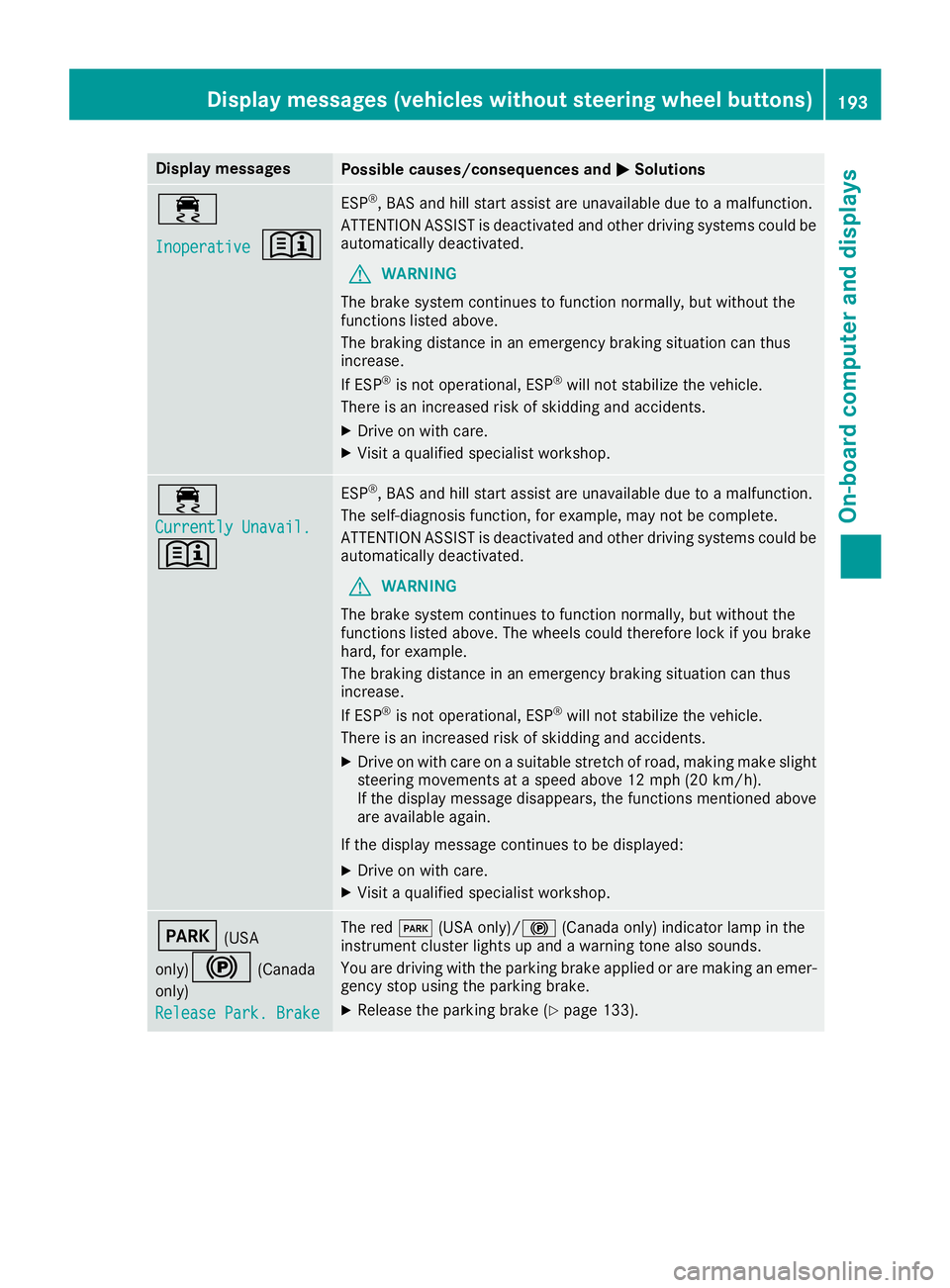
Display messagesPossible causes/consequences andMSolutions
÷
Inoperative+
ESP®,BAS and hill start assist are unavailable due to amalfunction .
ATTENTION ASSIST is deactivated and other drivin gsystems could be
automatically deactivated.
GWARNIN G
The brak esystem continues to function normally, but without th e
function slisted above.
The braking distanc einanemergenc ybraking situation can thus
increase.
If ES P
®is no toperational, ES P®will notstabiliz ethe vehicle.
There is an increased ris kofskiddin gand accidents .
XDrive on withcare.
XVisit aqualified specialist workshop .
÷
Currently Unavail.
+
ESP®,BAS and hill start assist are unavailable due to amalfunction .
The self-diagnosis function ,for example, may no tbecomplete.
ATTENTION ASSIST is deactivated and other drivin gsystems could be
automatically deactivated.
GWARNIN G
The brak esystem continues to function normally, but without th e
function slisted above. The wheels could therefor eloc kify ou brak e
hard, for example.
The braking distanc einanemergenc ybraking situation can thus
increase.
If ES P
®is no toperational, ES P®will notstabiliz ethe vehicle.
There is an increased ris kofskiddin gand accidents .
XDrive on withcareonas uitable stretch of road, making mak eslight
steering movement sataspeed abov e12mph(20 km/ h).
If the display messag edisappears, the functions mentioned above
are available again.
If the display message continues to be displayed:
XDrive on with care.
XVisit aqualifieds pecialist workshop.
F(USA
only)
!(Canada
only)
Release Park. Brake
The red F(USA only)/! (Canada only) indicator lamp in the
instrument cluster lights up and awarning tone also sounds.
You are driving with the parking brake applied or are making an emer-
gency stop using the parking brake.
XRelease the parking brake (Ypage 133).
Display messages( vehicles without steeringw heel buttons)193
On-board computer and displays
Z
Page 199 of 310
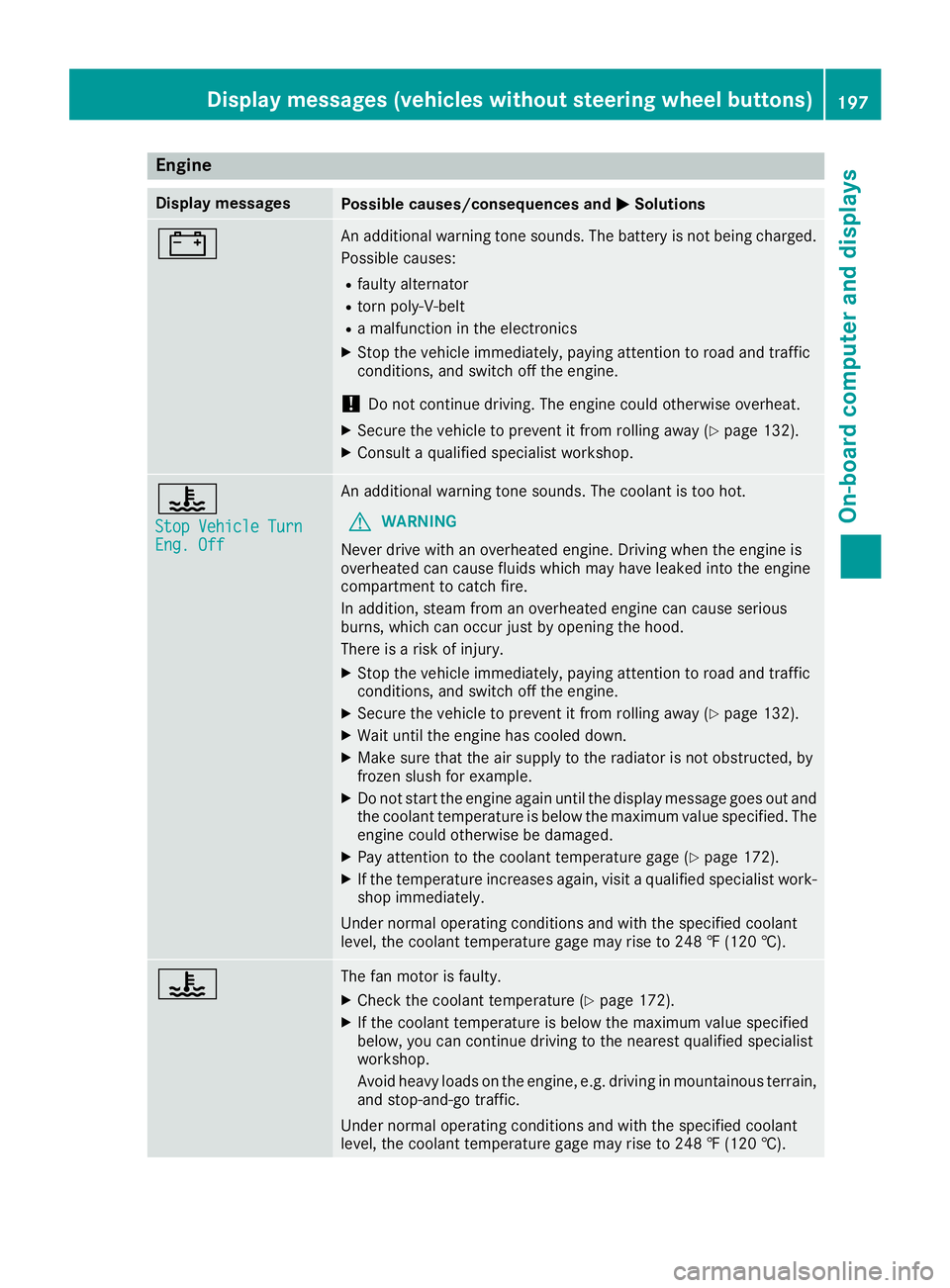
Engine
Display messagesPossible causes/consequences andMSolutions
#An additional warning tone sounds. The battery is no tbeingc harged.
Possible causes:
Rfault yalternator
Rtorn poly-V-belt
Ram alfunctio nintheelectronics
XStop th evehicle immediately, payinga ttention to road and traffic
conditions, and switch off th eengine.
!Do no tcontinue driving .The engine coul dotherwise overheat.
XSecure th evehicle to prevent it from rolling away (Ypage 132).
XConsult aqualified specialist workshop.
?
StopV ehicleT urnEng.Off
An additional warning tone sounds. The coolant is to ohot.
GWARNING
Never driv ewith an overheate dengine .Drivin gw hen th eengine is
overheate dcan caus efluids whichm ay have leaked int othe engine
compartmen ttocatch fire.
In addition,s team from an overheate dengine can caus eserious
burns, whichc an occur justbyopening th ehood.
Thereisar isk of injury.
XStop thevehicle immediately, payinga ttention to road and traffic
conditions, and switch off th eengine.
XSecure th evehicle to prevent it from rolling away (Ypage 132).
XWait until th eengine has cooled down.
XMakes ure that th eair supply to th eradiator is no tobstructed, by
frozen slush for example.
XDo no tstart th eengine again until th edisplay message goes out and
th ec oolant temperatur eisbelow th emaximum value specified. The
engine coul dotherwise be damaged.
XPay attention to th ecoolant temperatur egage (Ypage 172).
XIf th etem peratur eincreases again,v isitaq ualified specialist work-
shop immediately.
Under normal operatin gconditionsa nd with thespecifie dcoolant
level, th ecoolant temperatur egage may rise to 24 8‡(120† ).
?The fan motor is faulty.
XCheckt hecoolant temperatur e(Ypage 172).
XIf thecoolant temperatur eisbelow th emaximum value specified
below, you can continue driving to th enearest qualified specialist
workshop.
Avoid heavyl oads on theengine ,e.g.d riving in mountainous terrain,
and stop-and-go traffic.
Under normal operatin gconditionsa nd with thespecifie dcoolant
level, th ecoolant temperatur egage may rise to 24 8‡(120† ).
Displa ymessages (vehicles without steerin gwheel buttons)197
On-boardc omputer and displays
Z
Page 201 of 310
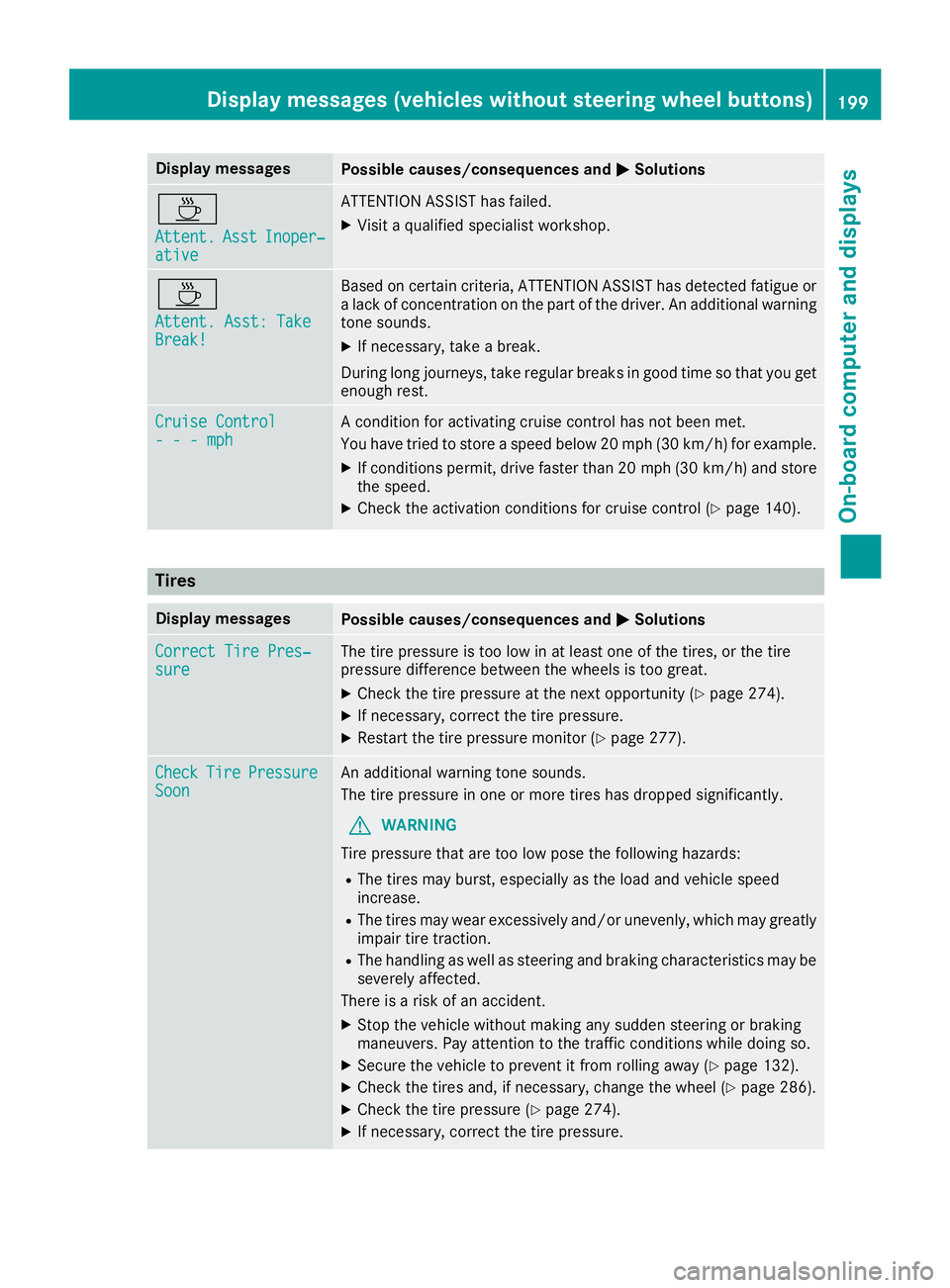
Display messagesPossible causes/consequences andMSolutions
À
Attent.AsstInoper ‐ative
ATTENTION ASSIST has failed.
XVisitaqualified specialist workshop .
À
Attent.Asst: Tak eBreak!
Based on certain criteria, ATTENTION ASSIST has detecte dfatigue or
al ack of concentration on th epart of th edriver .Ana dditional warning
tone sounds.
XIf necessary, tak eabreak.
During lon gjou rneys, tak eregular breaks in goo dtimesot hatyou get
enough rest.
Cruise Contro l---mphAconditi on for activating cruise control has no tbeen met .
You hav etried to store aspeed belo w20m ph(30 km/ h)for example.
XIf conditions permit, drive faster than 20 mph (30 km/h )and store
the speed.
XCheck the activation conditions for cruis econtrol (Ypag e140).
Tires
Display messagesPossiblec auses/consequence sand MSolutions
Correct Tire Pres‐sureThe tire pressure is too low in at least one of the tires, or the tire
pressure difference between the wheels is too great.
XCheck the tire pressure at the next opportunity (Ypag e274).
XIf necessary, correct the tire pressure.
XRestart the tire pressure monitor (Ypag e277).
CheckTirePressureSoonAn additiona lwarning tone sounds.
The tire pressure in one or more tires has dropped significantly.
GWARNING
Tire pressure that are too low pose the following hazards:
RThe tires may burst, especially as the loa dand vehicl espeed
increase.
RThe tires may wea rexcessively and/or unevenly, which may greatly
impair tire traction.
RThe handling as wel lassteering and braking characteristics may be
severely affected.
There is arisk of an accident.
XStop the vehicl ewithout making any sudden steering or braking
maneuvers. Pay attention to the traffic conditions while doing so.
XSecure the vehicl etoprevent it from rolling away (Ypage132).
XCheck the tires and, if necessary, change the whee l(Ypage286).
XCheck the tire pressure (Ypag e274).
XIf necessary, correct the tire pressure.
Display messages (vehiclesw ithout steering wheel buttons)199
On-board computer and displays
Z
Page 202 of 310
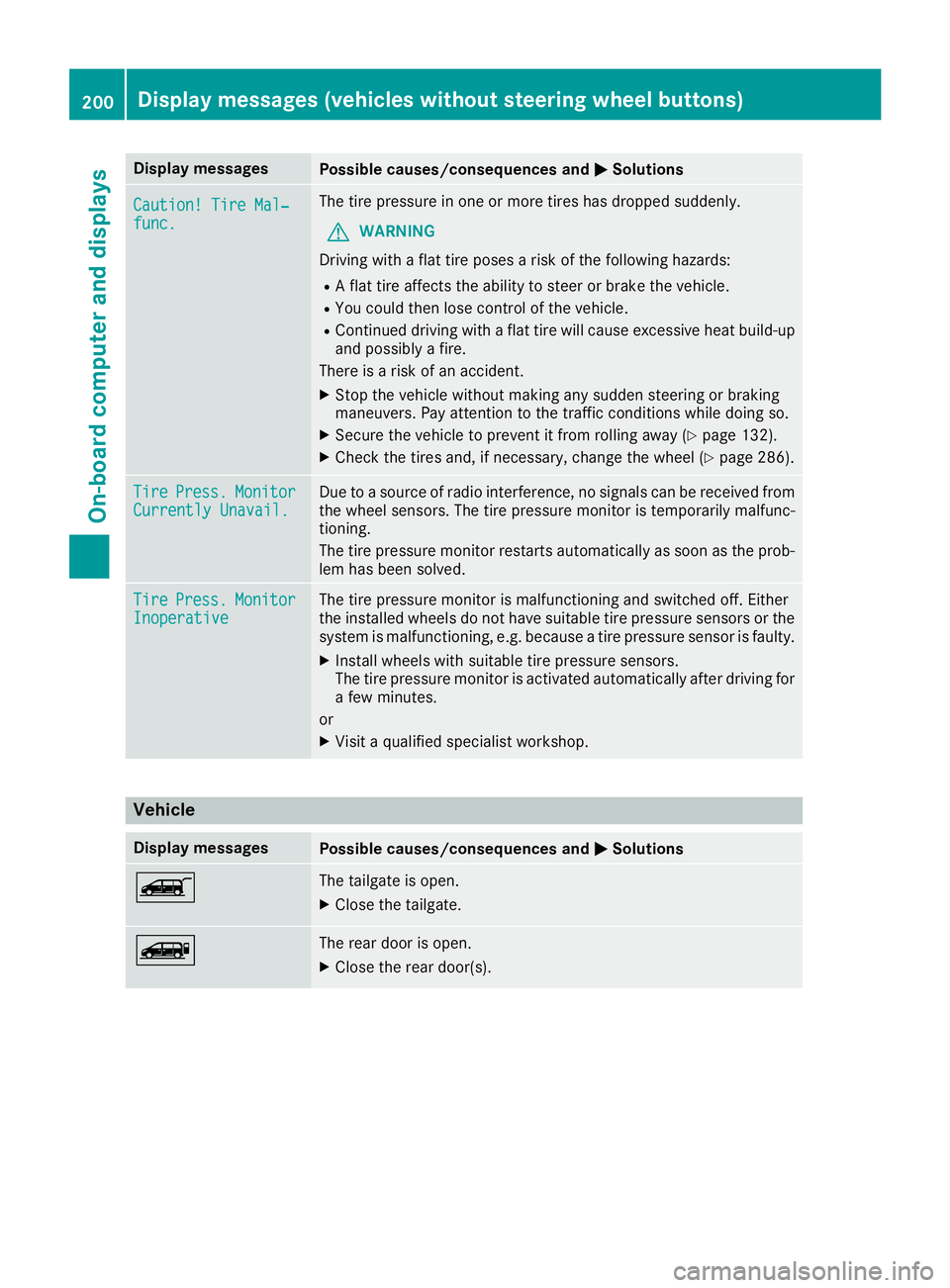
Display messagesPossible causes/consequences andMSolutions
Caution! TireMal‐func.
The tire pressur einoneor mor etires has dropped suddenly.
GWARNIN G
Drivin gwithaf lat tire poses ariskoft hefollowin ghazards :
RAflat tire affects th eabilit ytos teer or brak ethe vehicle.
RYou could then lose control of th evehicle.
RContinue ddrivin gwithaf lat tire will caus eexces sive heat build-up
and possibl yafire.
There is ariskofana ccident.
XStop thevehicl ewithout making any sudden steering or braking
maneuvers .Pay attention to th etraffic condition swhile doin gso.
XSecur ethe vehicl etopreventitfromr ollin gaway (Ypage 132).
XChec kthe tires and ,ifneces sary, chang ethe whee l(Ypage 286).
TirePress.Monito rCurrently Unavail.Due toasource of radi ointerference, no signals can be received from
th ew hee lsensors. The tire pressur emonitor is temporarily malfunc -
tioning .
The tire pressur emonitor restarts automatically as soo nastheprob-
lem has been solved.
Tir ePress.Monito rInoperativeThe tire pressur emonitor is malfunctioning and switched off .Either
th ei nstalled wheels do no thaves uitable tire pressur esensor sorthe
system is malfunctioning ,e.g.b ecause atirep ressur esensor is faulty.
XInstall wheels wit hsuitable tire pressur esensors.
The tire pressur emonitor is activated automatically after drivin gfor
af ew minutes.
or
XVisit aqualified specialist workshop .
Vehicle
Display messagesPossible causes/consequences and MSolutions
ÒThe tailgateisopen.
XClos ethe tailgate.
ÑThe rear door is open .
XClosethe rear door(s).
200Display message s(vehicles withou tsteering wheelbuttons)
On-board computera nd displays
Page 208 of 310
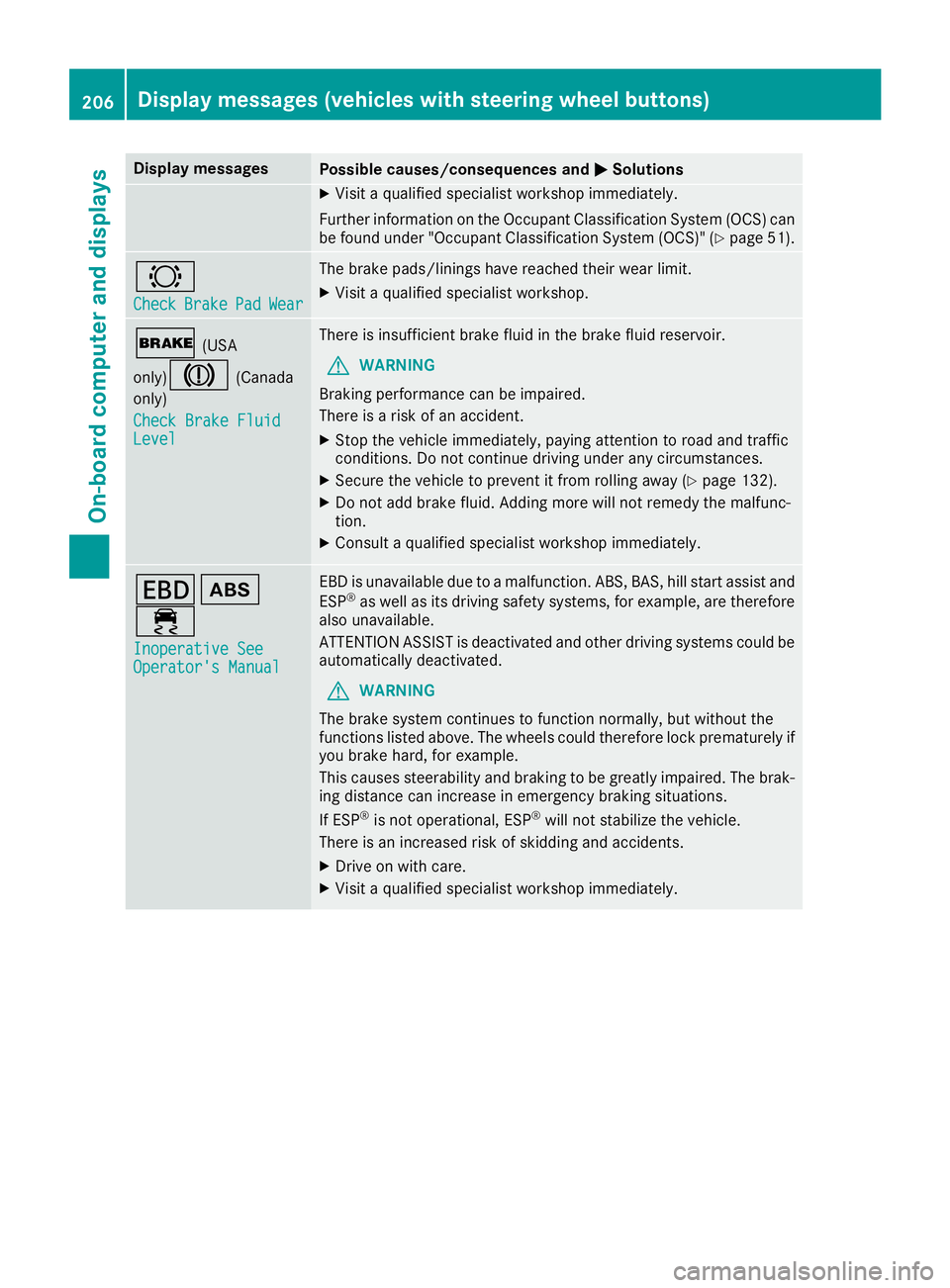
Display messagesPossible causes/consequences andMSolutions
XVisitaqualified specialist workshop immediately.
Further information on th eOccupant Classification Syste m(OCS )can
be found under "Occupant Classification Syste m(OCS)" (
Ypage 51) .
#
CheckBrakePadWear
The brak epads/linings hav ereached their wear limit.
XVisit aqualified specialist workshop .
$(USA
only)
J(Canada
only)
Check Brake Fluid
Level
There is insufficien tbrak efluidint hebrak efluid reservoir .
GWARNING
Braking performance can be impaired.
There is ariskofana ccident.
XStop thevehicl eimmediately, payin gattention to roa dand traffic
conditions. Do no tcontinue drivingunder any circumstances.
XSecur ethe vehicl etopreventitfromr ollin gaway (Ypage 132).
XDo no tadd brak efluid .Addingm orew ill no tremedy th emalfunc -
tion .
XConsult aqualified specialist workshop immediately.
Tò
÷
Inoperative SeeOperator' sManual
EBDisu navailable due to amalfunction .ABS ,BAS ,hill start assist and
ES P®as well as it sdrivin gsafet ysystems ,for example, are therefor e
also unavailable .
ATTENTION ASSIST is deactivated and other drivin gsystems could be
automatically deactivated.
GWARNIN G
The brak esystem continues to function normally, but without th e
function slisted above. The wheels could therefor eloc kp rematurel yif
you brak ehard, for example.
This causes steerabilit yand braking to be greatl yimpaired. The brak -
ing distanc ecan increas einemergenc ybraking situations.
If ES P
®is no toperational, ES P®will notstabiliz ethe vehicle.
There is an increased ris kofskiddin gand accidents .
XDrive on withcare.
XVisit aqualified specialist workshop immediately.
206Display message s(vehicles wit hsteering whee lbuttons)
On-board computera nd displays