engine MERCEDES-BENZ METRIS 2016 MY16 Operator’s Manual
[x] Cancel search | Manufacturer: MERCEDES-BENZ, Model Year: 2016, Model line: METRIS, Model: MERCEDES-BENZ METRIS 2016Pages: 310, PDF Size: 7.28 MB
Page 136 of 310
Switching off the engine
Important safety notes
GWARNING
The automatic transmission switches to neu-
tral position Nwhen you switch off the engine.
The vehicle may roll away.T here isarisk of an
accident.
After switching off the engine, always switch
to parking position P.Prevent the parked vehi-
cle from rolling away by applying the parking
brake.
!If the coolant temperature is very high, e.g.
after driving on hilly roads, leave the engine
running at idle speed for about two minutes
before turning it off.
This allowst he coolant temperature to return
to normal.
Vehicles with automatic transmission
XStop the vehicle.
XShift the transmission to position P.
XApply the parking brake.
XTurn key to position0in the ignition lock and
remove it.
The immobilizer is activated.
If you switch the engine off with the trans-
mission in position Ror D,t he automatic
transmission shifts to Nautomatically.
If you then open one of the front doors or
remove the key from the ignition, the auto-
matic transmission automatically shifts to P.
If you shift the automatic transmission to N
before switching off the engine, the automatic
transmission remains in Neven if afront door
is opened.
XSecure the vehicle to prevent it from rolling
away (Ypage 132).
Parking the vehicle for along period
If you leave the vehicle parked for longer than
4w eeks, the battery may be damaged by
exhaustive discharging.
XDisconnect the battery (Ypage 250).
or
XConnect the battery to atrickle charger.
Be sure to observe the notes on charging the batteries (
Ypage 253).
You can obtain information about trickle
chargers from aqualified specialist work-
shop.
If you leave the vehicle parked for longer than
6w eeks, the vehicle may suffer damage as a
result of lack of use.
XVisit aqualified specialist workshop and seek
advice.
Driving tips
General notes
Important safety notes
GWARNING
If you switch off the ignition while driving,
safety-relevant functions are only available
with limitations, or not at all. This could affect, for example, the power steering and the brake
boosting effect.Y ou will require considerably
more effort to steer and brake. There is arisk
of an accident.
Do not switch off the ignition while driving.
GWARNING
If you operate mobile communication equip-
ment while driving, you will be distracted from traffic conditions. You could also lose control
of the vehicle. There is arisk of an accident.
Only operate this equipment when the vehicle
is stationary.
Observe the legal requirements of the countryi n
which you are driving. Some jurisdictions pro-
hibit the driver from using amobile phone while
driving avehicle.
134Driving tips
Driving and parking
Page 137 of 310
Alwaysusethe hands-free system for telephon-
ing whil edriving .Onlyu sethe telephone if road
traffic conditions permit. If thisisn ot the case,
pull ove rtoasafel oc ation before using the tele-
phone.
Bea rinm ind thatata speed of just30mph
(approximately5 0km/h), your vehicl eiscov-
ering adistance of 44 fee t(approximately 14 m)
every second.
Drive sensibly –save fuel
In order to save fuel, observe the following tips:
XThe tires should alwaysbei nflated to the rec-
ommended tire pressure.
XRemove unnecessary loads.
XRemove roof carriers when they are not nee-
ded.
XWarm up the engine at low engine speeds.
XAvoid frequent acceleration or braking.
XHave all maintenanc ework carried out as
indicated by the servicei ntervals in the Main-
tenance Booklet or by the servicei nterval dis-
play.
Fuel consumption also increases when driving in cold weather, in stop-start traffic and in moun-
tainous terrain.
Overrun cutoff
If you are in overrun mode and take your foot off
the accelerator pedal, the fuel supply is cut off
when the engine speed is out of the idle speed
control range.
Drinking and driving
GWARNING
Drinking and driving and/or takin gdrugs and
driving are very dangerous combinations.
Even asmall amount of alcohol or drugs can
affect your reflexes ,perceptions and judg-
ment.
The possibility of aserious or even fatal acci-
dent is greatly increased when you drink or
take drugs and drive.
Do not drink or take drugs and drive or allow
anyone to drive who has been drinking or tak-
ing drugs.
Emission control
GWARNING
Combustion engines emit poisonous exhaust
gases such as carbon monoxide. Inhaling
these exhaust gases leads to poisoning. There
is ar isk of fatal injury. Thereforen ever leave
the engine running in enclosed spaces with-
out sufficien tventilation.
Certain engine systems are designed to keep
the level of poisonous substances in exhaust
fumes within legal limits.
These systems only work optimally if they are
maintained exactly in accordance with the man-
ufacturer's specifications. An ywork on the
engine should therefore be carried out by quali-
fied and authorized Mercedes-Benz technicians.
The engine settings must not be changed under
any circumstances. In addition, all specific
maintenanc ework must be carried out at regu-
lar intervals and in accordance with the service
requirement softhe dealer listed here on the
inside title page. Details can be found in the
Maintenance Booklet.
Speed limiter
GWARNING
Exceeding the stated tire load-bearing capa-
city and the approved maximum speed could
lead to tire damage or the tire bursting. There is ar isk of accident.
Therefore, only use tire types and sizes
approved for your vehicle model. Observe the
tire load ratin gand speed ratin grequired for
your vehicle.
As the driver, you must be aware of the maxi-
mum design speed of the vehicle and the maxi- mum permissible speed based on the tires (tire
and tire pressure). In particular, also observe the tire approval regulations for each country.
You must, under no circumstances, exceed the
speed limit for the tires specified by the speed
index. The speed ratin gisstated in the tire
tables (
Ypage 291).
You can permanently limit the maximum speed
of your vehicle, e.g. for driving on winter tires.
Driving tips135
Driving and parking
Z
Page 138 of 310
Mercedes-Benzrecommends that you have the
maximum permissible speed programed at a
Mercedes-BenzC ommercial Van Center.
Before overtaking, take into consideration that
the engine speed limiter prevents the speed
increasing beyond the programed maximum
speed.
Driving abroad
Service
An extensive network of authorized Mercedes-
Benz Centers is also at your disposal when you
are traveling abroad. Nevertheless, please bear
in mind that service facilities or replacement
parts may not always be immediately available.
The relevant workshop directories are available
from any Mercedes-BenzC ommercial Van Cen-
ter.
Fuel
In some countries, only fuels with ahigher sulfur
content are available.
Unsuitable fuel can cause engine damage. You
will find information about fuel under "Service
products and capacities" (
Ypage 296).
Low-beam headlamps
General notes
When driving in countries in which traffic drives
on the opposite side of the road to the country
where the vehicle is registered, you must switch
the headlamps to symmetrical low beam. This
prevents oncomingt raffic from being blinded.
Symmetrical low beam does not illuminate as
large an area of the edge of the road.
Vehicles with halogen headlamps
The headlamps do not need to be switched to
symmetrical low beam. The legal requirements
of countries in which traffic drives on the oppo- site side of the road to the countryw here the
vehicle is registered are met without the need to
convert the headlamps.
Transport by rail
Transporting your vehicle by rail may be subject to certain restrictions or require special meas- ures to be taken in some countries due to vary-
ing tunnel heights and loading standards.
You can obtain information on this from any
Mercedes-BenzC
ommercial Van Center.
Brakes
Important safety notes
GWARNING
If you shift down on aslippery road surface in
an attempt to increase the engine's braking
effect,t he drive wheels could lose their grip.
There is an increased danger of skidding and
accidents.
Do not shift down for additional engine brak-
ing on aslippery road surface.
Downhill gradients
!Depressing the brake pedal constantly
results in excessive and premature wear to
the brake pads.
This also applies to automatic braking if you
have activated cruise control.
On long and steep downhill gradients, you
should change down to shift range 2or1 in
good time (
Ypage 128).
This should be observed in particular when driv-
ing with aladen vehicle and when towing a
trailer.
You thereby make use of the braking effect of
the engine and do not have to brake as often to
maintain the speed. This relieves the load on the
service brake and prevents the brakes from
overheating and wearing too quickly.
Heavy and light loads
GWARNING
If you rest your foot on the brake pedal while
driving, the braking system can overheat. This increases the stopping distance and can even
cause the braking system to fail. There is a
risk of an accident.
Never use the brake pedal as afootrest.N ever
depress the brake pedal and the accelerator
pedal at the same time.
136Driving tips
Driving and parking
Page 140 of 310
have sufficient tread depth, depending on the
depth of water on the road. There isarisk of
an accident.
For this reason, avoid tire ruts and brake care-
fully.
Therefore, in heavy rain or other conditions in
which hydroplaning can occur, drive as follows:
Rreduce your speed
Ravoid tire ruts
Rapply the brakes with care
Driving on flooded roads
!Do not drive through flooded areas. Check
the depth of any water before driving through
it. Drive slowly through standing water. Oth-
erwise, water may enter the vehicle interior or
the engine compartment. This can damage
the electronic components in the engine or
the automatic transmission. Water can also
be drawn in by the engine's air suction nozzles
and this can cause engine damage.
If you have to drive on stretches of road on which
water has collected, please bear in mind that:
Rthe water level of standing water should not
be above the lower edge of the front bumper
Rdo not drive faster than walking speed
Driving in winter
GWARNING
If you shift down on aslippery road surface in
an attempt to increase the engine's braking
effect,t he drive wheels could lose their grip.
There is an increased danger of skidding and
accidents.
Do not shift down for additional engine brak-
ing on aslippery road surface.
!Vehicles with automatic transmission may
roll only briefly in the neutral position N.Pro-
longed rolling of the wheels, e.g. when being
towed, will result in transmission damage.
Have your vehicle winterproofed at aqualified
specialist workshop at the onset of winter. Drive particularly carefully on slippery roads.
Avoid sudden acceleration, steering and braking
maneuvers. Do not use cruise control.
If the vehicle threaten stoskid or cannot be
stopped when moving at low speed:
XShift the transmission to position N.
XTry to maintain control of the vehicle using
corrective steering.
The outside temperature indicator is not
designed to serve as an ice-warning device and
is therefore unsuitable for that purpose.
Changes in the outside temperature are dis-
played after ashort delay.
Indicated temperatures just above the freezing
point do not guarantee that the road surface is
free of ice. The road may still be icy, especially in
wooded areas or on bridges. If you do not adjust
your driving style, the vehicle may start to skid.
Always adapt your driving style and drive at a
speed to suit the prevailing weather conditions.
You should pay special attention to road condi-
tions when temperatures are around freezing
point.
You can find further information under:
R"M+S tires" (Ypage 269)
R"Snow chains" (Ypage 270)
R"Driving with summer tires" (Ypage 269)
Also observe the notes under "Winter operation" (
Ypage 269).
Driving off-road
Important safety notes
GWARNING
If you drive on asteep incline at an angle or
turn when driving on an incline, the vehicle
could slip sideways, tip and rollover. There is a risk of an accident.
Always drive on asteep incline in the line of
fall (straight up or down) and do not turn the
vehicle.
GWARNING
When driving off-road, your body is subject to
forces from all directions, due to the uneven
surface. You could be thrown from your seat,
for instance. There is arisk of injury.
138Driving tips
Driving and parking
Page 141 of 310
Alwayswearas eatb elt, eve nwhend riving off-
road.
GWARNING
If yo udrive ove robstacle sorinr uts, the steer-
ing whee lmayjerk outofy ourg rip, causing
injury to your hands.
Alway sholdt he steering whee lfirmly with
both hands. Whe ndriving ove robstacles, you
must expect steering forces to increase
briefl yand suddenly.
GWARNING
Flammabl ematerial such as leaves, grass or
twigs mayi gnite if they come into contact with
hot parts of the exhaus tsystem .There is arisk
of fire.
Whe ndriving off roa doronunpaved roads,
check the vehicle's undersid eregularly .In
particular, remove parts of plants or other
flammabl ematerial swhich have become
trapped. In the cas eofdamage, contact a
qualified specialist workshop.
!Whe ndriving off-roadoronu npaved surfa-
ces ,check the undersid eofthe vehicl eand
the wheels and tire satregular intervals .In
particular, remove any trappe dforeign
objects, e.g .stone sand branches.
Such foreig nobjects may:
Rdamage the chassis, the fuel tank or the
brake system
Rcause imbalance sand thusv ibrations
Rbe flung outw heny ou continue driving
If ther eisany damage, inform aquali fied spe-
cialist workshop.
Whe ndriving off-roada nd on construction sites,
sand, muda nd water mixe dwitho il,f or exam-
ple, mayg et into the brakes. Thi smaylead to a
reduction in braking performance or totalb rake
failure, also as aresul tofi ncreased wear .The
braking characteristics will vary depending on
the material thath asgot into the system .Clean
the brakes afte rdriving o
ff-road. If yo uth
en
notice reduce dbraking performance or hear
scraping noises ,hav et he brake system checked
at aq uali fied specialist workshop.A djust your
driving style to the changedb raking character-
istics. Driving off-roadoronc
onstruction sites increa-
ses the possibility of vehicl edamag ewhich may
in turn lead to the failure of certain assemblies
and systems. Adapt your driving style to the off- roa ddriving conditions. Driv ecarefully. Have
any vehicl edamag erectifie dataq ualified spe-
cialist workshop as soo naspossible.
Whe nloadin gyourvehicl efor driving off-roado r
on aconstruction site, kee pthe vehicle's center
of gravity as lo waspossible.
Rule sfor drivin goff-road
!Alway sbearthe vehicle's ground clearance
in mind and avoido bstacles, e.g .deepr uts.
Obstacles mayd amagethe following parts of
the vehicle:
Rthe chassis
Rthe drive train
Rthe fuel and supply tanks
For thisr eason, yo ushoul dalway sdrive
slowly when driving off-road. If yo uhavet o
drive ove robstacles, have the front
passengerd irect you.
iWe recommend thaty ouadditionally carry a
shovel and arecover yrop ew iths hackle in the
vehicle.
REnsure thatl oadsand items of luggage are
securel ystowed or lashe ddown
(
Ypage 232).
RBefore driving off-road, stop the vehicl eand
shift to alow gear.
RIf the surface requires ,temporaril ydeactivate
ESP®when pulling away (Ypage 64).
ROnlyd rive off-roadw itht he engine running
and ageare ngaged.
RDriv eslowly and smoothly. Walking pace is
necessary in many situations.
RAvoi dspinning the drive wheels.
RMake sure thatt he wheels always remai nin
contact with the ground.
RDriv ewithe xtreme car eoveru nknown terrain
where yo ucan onlys ee forashort distance.
As aprecaution, get outoft he vehicletotake
al oo katt he route to be take ninadvance.
RCheck the water depth before fording.
RWatch outf or obstacles(e.g. rocks ,holes,
tree stumps and ruts).
RAvoi dedges where the surface could crumble
or break away.
Driving tips139
Driving an dparking
Z
Page 142 of 310
Checklist after driving off-road
!If you detect damagetothevehicle after
driving off-road, have th evehicle checked
immediately at aqualified specialist work-
shop.
Off-road driving places ahigher demand on your
vehicle than normal road operation. Checky our
vehicle after driving on roug hterra in. By doing
so you will notic eany damageing ood timeand
reduc ethe riskofana ccidentf or yourself and
other road users. Clean your vehicle thoroughly
before driving on public roads.
Observ ethe followingp oints after driving off-
road ,onc onstructio nsites and before driving on
public roads:
XActivate ESP®(Ypage 64).
XClean th eheadlamps and tail lamps and
check them for damage.
XClean th efront and rear licens eplates.
XClean th ewindshield, windows and exterior
mirrors.
XClean th esteps, door sills and grab handles.
This increases safety of footing.
XClean th ewheels/tires, wheel housing sand
th eu nderbody of th evehicle withaw aterjet .
This increases road grip ,especiall yonw et
road surfaces.
XCheckt hewheels/tires and wheel housings
for trapped foreign object sand remove them.
Trapped foreign object scan damaget he
wheels/tires and may be flun gout from the
vehicle when you continue driving.
XCheckt heunderbody for trapped branches or
other part sofplants and remove them.
Trapped branches or other part sofplants
increas ethe riskoff irea nd can caus ed
am-
age
to fuel lines, brak ehoses and th erubber
bellows of axle joint sand driv eshafts.
XClean th ebrak edisks, brak epads and axle
joints, particularly after operatio ninsand,
mud, grit/gravel, wate rorsimilarly dirt ycon-
ditions.
XCheckt heentir efloo rassembly, th etires,
wheels, bodywork structure, brakes, steering,
chassis and exhaust system for any damage.
XCheckt heservic ebrak efor operatin gsafety,
e.g .carry out abrak etest.
XIf you notic estron gv ibrations after driving off-
road ,che ck th ewheelsa nd drivetrain for for-
eign object sagain.R emove any foreign object
swhichc an lead to imbalances and
thus caus evibrations.
Driving in mountainous areas
When driving in mountainous areas ,notet hat
th ep ower output of th eengine, and withiti ts
gradientc limbingcapability, decreas ewith
increasing altitude. Pleaset aken oteoft hisp ar-
ticularly when driving withat railer in mountain-
ous areas.
The maximum permissible trailer loads are valid
for journeys at altitudes up to 1100 yds
(1000 m) aboves ea levelwithg radients up to
12%.
Information on maximum permissible trailer
loads can be foun dinyour vehicle registration
papersa nd on thevehicle identification plate
(
Ypage 294) or unde r"Trailer loads"
(Ypage 305).
When driving at altitudes of 2700 yds (2500 m)
aboves ea level, th eECO start/sto pfunction is
no longer available.
Notes on braking on downhill gradients can be
foun dint he"Braking" sectio n(
Ypage 136).
Driving systems
Cruise control
General notes
Cruise control maintain sthe speedoft hevehi-
cle for you. It brakes automatically in orde rto
avoid exceedingt heset speed.
Use cruise control if road and traffic conditions
makeita ppropriat etomaintain asteady speed
for aprolonged period. You can set any speed
from 30 km/h upwards in increment sof1km/h
and 10 km/h.
If you have set Miles
as theunit for th edigital
speedometer, you can set any speeda bove
20 mph in increment sof1mph and5mph.
Changingt hedisplay unit for th edigital speed-
omete rand th edistance:
Ron vehicle swithout steering wheel buttons
(Ypage 174)
Ron vehicle swith steering wheel buttons
(Ypage 185)
Cruise control shouldn otbe activated when
driving off-road or on constructio nsites.
140Driving systems
Driving and parking
Page 144 of 310
Storing and maintaining the current
speed
XAccelerate the vehicle to the desired speed
above 20 mph (30 km/h).
XBriefly push the cruise control lever up:or
down =.
XRelease the accelerator pedal.
Cruise control is activated. The current speed
is stored and shown briefly in the display's
text field.
The display also shows the Vsymbol and
the stored speed:
Rin the header on vehicles without steering
wheel buttons (Ypage 170)
Rin the status area on vehicles with steering
wheel buttons (Ypage 176)
Resuming the stored speed
GWARNING
If you call up the stored speed and it differs
from the current speed, the vehicle acceler-
ates or decelerates. If you do not know the
stored speed, the vehicle could accelerate or brake unexpectedly. There is arisk of an acci-
dent.
Pay attention to the road and traffic condi-
tions before calling up the stored speed. If you
do not know the stored speed, store the
desired speed again.
XBriefly pull the cruise control lever towards
you ;.
XRelease the accelerator pedal.
Cruise control is activated and resumes the
vehicle's speed to the last speed stored.
The stored speed is shown briefly in the dis-
play.
The display also shows the Vsymbol and
the stored speed:
Rin the header on vehicles without steering
wheel buttons (Ypage 170)
Rin the status area on vehicles with steering
wheel buttons (Ypage 176)
iWhen you pull the cruise control lever
towards you for the first time after startin gthe
engine, cruise control adopts the current
speed.
Setting the speed
It may be amoment before the vehicle starts to
accelerate or brake to the set speed. Take this
delay into account when settingt he speed.
XPress the cruise control lever up:to
increase the speed or down =to reduce the
speed.
The vehicle will accelerate or decelerate. The
speed is shown in the display.
XRelease the cruise control lever once the
desired speed is reached.
The displayed speed is stored.
or
XBriefly press the cruise control lever as far as
the 1st pressure point up :or down =.
The last speed stored is increased/reduced in increments of 1mph (1 km/h).
or
XBriefly press the cruise control lever beyond
the pressure point up :or down =.
The last speed stored is increased/reduced in increments of 5mph (10 km/h).
iCruise control is not deactivated if you
depress the accelerator pedal. If you acceler-
ate briefly to overtake, for example, cruise
control resumes the vehicle’s speed to the
last speed stored after you have finished over-
taking.
To deactivatec ruise control
There are various ways to deactivate cruise con-
trol:
XBriefly press the cruise control lever for-
wards?.
or
XApply the brakes.
The last speed set remains stored. The last
speed stored is deleted when you switch off the
engine.
Cruise control is deactivated automatically
when:
Ryou apply the brakes
Ryou apply the parking brake and the F
(only USA) or J(only Canada) indicator
lamp in the instrumentc luster lights up
Ryou are driving slower than 20 mph (30 km/h)
Ryou shift the automatic transmission to neu-
tral positionNwhile the vehicle is in motion
142Driving systems
Driving and parking
Page 151 of 310
ing, the system recognizes certain conditions
and warns you accordingly.
The warningvibration occurs earlier if:
Ryou approacht he outer lane marking on a
bend.
Rthe road has very wide lanes, e.g. afreeway.
Rthe system recognizes solid lane markings.
The warnin gvibration occurs later if:
Rthe road has narrow lanes.
Ryou cut the corner on abend.
Alertness Assistant ATTENTION
ASSIST
General notes
ATTENTIONA SSISTh elps you duringl ong,
monotonous journeys such as on freeways and
interstate highways. It is active in the 40 mph
(60 km/h) to 125 mph (200 km/h )range. If
ATTENTIONA SSISTd etect stypical indicator sof
fatigue or increasingl apses in concentration on
the part of the driver, it suggestst akingabreak.
Important safetyn otes
ATTENTIONASSISTiso nly an aid. The system
may not always detect fatigue or lapses in con-
centration until too late, or may not detect them
at all. ATTENTIONA SSISTisn otas ubstitut efor
aw ell-rested and attentive driver.
The functionality of ATTENTIONA SSISTi s
restricted, and warnings may be delayed or not
occur at all:
Rif the lengt hofthe journey is less than approx-
imately 30 minutes
Rif the road condition is poor, e.g. if the surface is uneven or if there are potholes
Rif there is astrong side wind
Rif you have adopte dasportyd rivings tyle with
high cornering speeds or high rate sofaccel-
eration
Rif you are predominantly drivingatas peed
below 40 mph (6 0km/ h)or above 125 mph
(200 km/h)
Rif the tim ehas been set incorrectly
Rin active drivings ituations,such as when you
change lanes or change your speed ATTENTIONA
SSISTisr eset and starts assessing
your attention again when you continue your
journey if:
Ryou switc hoff the engine
Ryou tak eoff your seat belt and open the driv-
er's door, e.g. for achange of drivers or to
tak eab reak
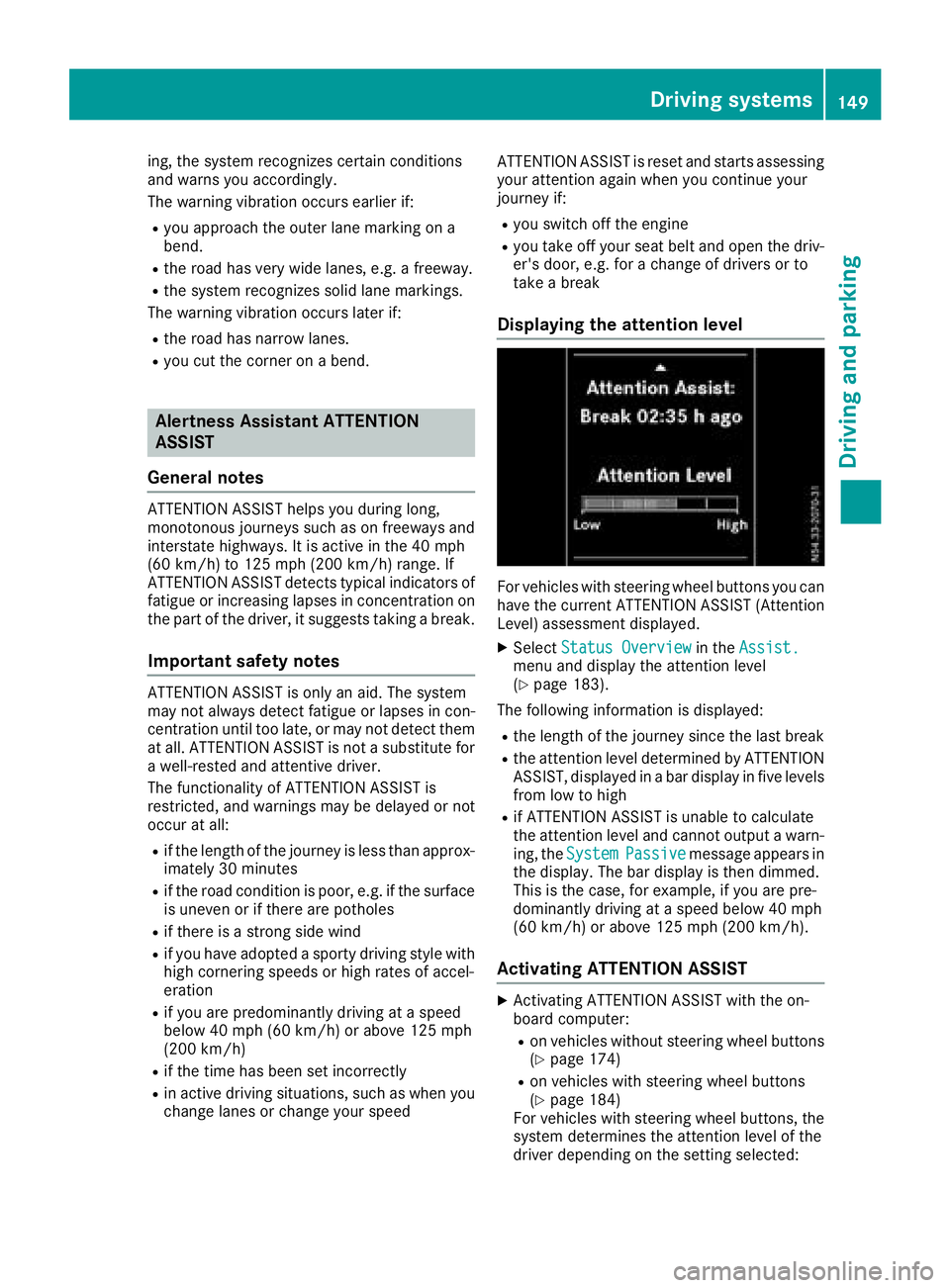
Displaying th eattention level
For vehicles with steeringw heel buttons you can
have the current ATTENTIONA SSIST( Attention
Level) assessmentd isplayed.
XSelectStatus Overviewin theAssist.menua nd display the attention level
(Ypage 183).
The followingi nformation is displayed:
Rthe lengthofthe journey sinc ethe last break
Rthe attention level determined by ATTENTION
ASSIST, displayed in abar display in five levels
froml ow to high
Rif ATTENTIONA SSISTisu nable to calculate
the attention level and cannot output awarn-
ing, the System
Passivemessage appears in
the display. The bar display is the ndimmed.
This is the case, for example, if you are pre-
dominantly drivingatas peed below 40 mph
(60 km/h) or above 125 mph (200 km/h).
Activating ATTENTION ASSIST
XActivatin gATTENTIONA SSISTw ith the on-
board computer:
Ron vehicles without steeringw heel buttons
(Ypage 174)
Ron vehicles with steeringw heel buttons
(Ypage 184)
For vehicles with steeringw heel buttons,the
system determines the attention level of the
driverd epending on the settin gselected:
Driving systems149
Driving and parking
Z
Page 152 of 310
Standard:the sensitivity with which the sys-
tem determines the attention level is set to
normal.
Sensitive: the sensitivity is set higher. The
driver is warned earlier.
When ATTENTION ASSIST is switched on and
the vehicle engine is running:
Ron vehicles without steering wheel buttons,
the À indicator lamp in the instrument
cluster lights up
Ron vehicles with steering-wheel buttons, the
display shows the Àsymbol:
-in the status area
-in the Status Overviewof the Assist.menu (Ypage 183)
For vehicles with steering wheel buttons, if you
deactivate ATTENTION ASSIST, the system is
automatically re-activated when you start the
engine. The system sensitivity then corresponds to the last selection activated –standard or sen-
sitive.
If you switch off ATTENTION ASSIST in avehicle
without steering wheel buttons, the system
remains switched off even after you start the
engine. The status of the system after switching
on the engine always corresponds to the status
last selected.
Warning in the display
If the system detectst iredness or increasing
lapses in concentration, the warning Atten‐
tion Assist: TakeaBreak!orAttent.Asst: Take Break!is shown in the display.
An additional warning tone sounds.
XIf necessary, take abreak.
XConfirm the message by pressing the a
button on the steering wheel.
On long journeys, take regular breaks in good
time to allow yourself to rest. If you do not take
ab reak and ATTENTION ASSIST continues to
detect increasing lapses in concentration, you
will be warned again after 15 minutes at the
earliest. This will only happen if ATTEN-
TION ASSIST still detectst ypical indicators of
fatigue or increasing lapses in concentration.
PARKTRONIC
General notes
PARKTRONIC is an electronic parking aid. The
system is equipped with ultrasonic sensors in
the front and rear bumpers to monitor the area
around your vehicle. PARKTRONIC indicates vis-
uallya nd audibly the distance between your
vehicle and an object.
Your vehicle features two separate sound emit-
ters with different frequencies for the warning
tones. The warning ranges in front of and behind the vehicle are indicated by different warning
tones.
PARKTRONIC is activated automatically when
you:
Rturn the key to position 2in the ignition lock
Rrelease the parking brake and
Rmove the selector lever to D,Nor R
PARKTRONIC is deactivated at speeds above
11 mph (18 km/h). PARKTRONIC is reactivated
at speeds below 10 mph (16 km/h).
Important safety notes
PARKTRONIC is only an aid. It cannot replace
your own awareness of the immediate surround-
ings. You are responsible for safe maneuvering,
parking and pulling away.W hen maneuvering,
parking and pulling away,m ake sure that there
are no persons, animals or object sinthe maneu-
vering area.
!Pay particular attention to obstacles above
or below the sensors when parking, such as
flower pots or trailer towbars. PARKTRONIC
does not recognizes uch objectswhen they
are in the immediate vicinity of the vehicle.
You could damage the vehicle or objects.
PARKTRONIC can suffer interference from:
Rultrasonic sources such as atruck's
compressed-air brakes, an automatic car
wash or apneumatic drill
Rattachments to the vehicle, e.g. rear moun-
ted racks
Rnumber plates (vehicle license plates) that
are not affixed flat against the bumper
Rdirty or icy sensors
Remove adetachable trailer coupling if it is no
longer required. PARKTRONIC measures the
minimum detection range to an obstacle from
the bumper, not the ball coupling.
150Driving systems
Driving and parking
Page 158 of 310
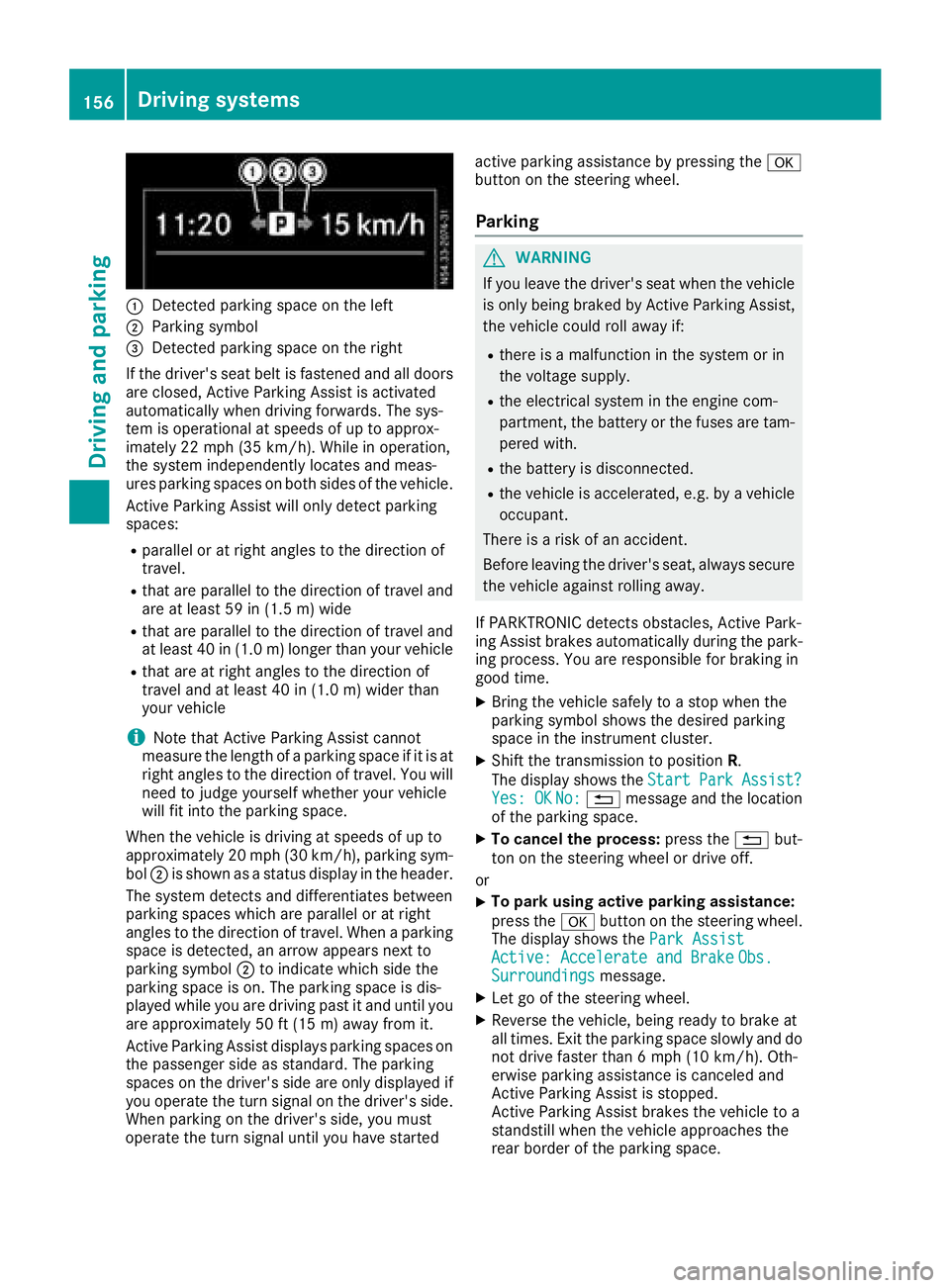
:Detected parkingspace on the left
;Parkin gsym bol
=Detected parkin gspace on the right
If the driver's sea tbeltisf astened and al ldoo rs
ar ec losed ,Activ eParkin gA ssist is activated
automaticall ywhend rivin gforwards .The sys-
tem is operational at speeds of up to approx-
imatel y22m ph (35 km/h). Whil einoperation,
the system independentl yloc ate sand meas-
ures parkin gspacesonb oths ides of the vehicle.
Activ eParkin gA ssist will onl ydetect parking
spaces:
Rparallel or at right angle stothe direction of
travel.
Rthata reparallel to the direction of travel and
ar eatl east59 in (1.5 m) wide
Rthatareparallel to the direction of travel and
at leas t40in( 1.0m) lo nger thany ourvehicle
Rthata re at right angle stothe direction of
travel and at leas t40in( 1.0 m) wider than
your vehicle
iNote thatA ctiveParking Assist cannot
measure the length of aparking space if it is at
right angle stothe direction of travel .You will
nee dtoj udge yourself whether your vehicle
will fit into the parking space.
When the vehicl eisdrivingats peeds of up to
approximately 20 mph (30 km/h), parking sym-
bol ;is shown as astatus dis
pla y
int he header.
The systemd etects and differentiate sbetween
parking space swhich ar eparalle loratr ight
angle stothe direction of travel .Whenap arking
space is detected, an arrow appear snext to
parking symbol ;to indicate which side the
parking space is on. The parking space is dis-
played whil eyou ared rivin gpastita nd unti lyou
ar ea pproximately 50 ft (15 m) awayfromi t.
Active Parkin gAssist display sparking spaces on
the passengers ideass tandard. The parking
spaces on the driver's side ar eonlyd isplayed if
yo uo perate the turn signalont he driver's side.
Whe nparking on the driver's side ,you must
operate the turn signalu ntilyou have started active parking assistance by pressing the
a
button on the steering wheel.
Parking
GWARNING
If yo uleave the driver's sea twhent he vehicle
is onlyb eing braked by Active Parking Assist,
the vehicl ecould rol lawa yif:
Rther eisam alfunctio ninthe system or in
the voltag esupply.
Rthe electrical system in the engine com-
partment, the battery or the fuses ar etam-
pered with.
Rthe battery is disconnected.
Rthe vehicl eisaccelerated,e .g.b yav ehicle
occupant.
There is ariskofana ccident.
Before leaving the driver's seat, always secure the vehicl eagain st rolling away.
If PARKTRONICd etects obstacles, Active Park-
ing Assist brakes automaticall yduring the park-
ing process. Yo uareresponsibl efor braking in
goo dtime.
XBring the vehicl esafelytoas top when the
parking symbo lshows the desired parking
space in the instrument cluster.
XShift the transmission to position R.
The display shows the Start
ParkAssist?Yes:OKNo:% message and the location
of the parking space.
XTo cance lthe process: press the%but-
ton on the steering whee lordrive off.
or
XTo park using active parking assistance:
press the abutton on the steering wheel.
The display shows the ParkAssist
Active :Accelerat eand BrakeObs.Surroundingsmessage.
XLet go of the steering wheel.
XReverse the vehicle, being ready to brake at
allt imes. Exit the parking space slowly and do
not drive faster than6m ph (10 km/h). Oth-
erwis eparking assistance is cancele dand
Active Parking Assist is stopped.
Active Parking Assist brakes the vehicl etoa
standstill when the vehicl eapproaches the
rea rborde roft he parking space.
156Driving systems
Driving an dparking