engine MERCEDES-BENZ METRIS 2016 MY16 Operator’s Manual
[x] Cancel search | Manufacturer: MERCEDES-BENZ, Model Year: 2016, Model line: METRIS, Model: MERCEDES-BENZ METRIS 2016Pages: 310, PDF Size: 7.28 MB
Page 159 of 310
Maneuvering may be required in tight parking
spaces. The display shows thePark Assist
Active: Select DObs. Surroundingsmes-
sage.
XWhile the vehicle is stationary, shift the trans-
mission to position D.
Active Parking Assist immediately steers in
the other direction. The display shows the
Park Assist Active: Accelerate and
BrakeObs. Surroundingsmessage.
iYou will achieve the best results by waiting
for the steering procedure to complete before
pulling away.
XDrive forwards and be ready to brake at all
times.
Active Parking Assist brakes the vehicle to a
standstill.
The display shows the Park
AssistActive:Select RObs. Surroundingsmessage.
As soon as the parking procedure is complete,
the Park Assist Finished
message appears
in the display and atone sounds. The parking
assistance function of Active Parking Assist is
stopped. The vehicle is parked and kept station-
ary without the driver having to depress the
brake pedal. The braking effect is canceled
when you depress the accelerator pedal.
Active Parking Assist no longer supports you
with steering interventions and brake applica-
tions. Once active parking assistance has been
stopped, you must steer and brake again your-
self. PARKTRONIC is still available.
Parking tips:
RThe way your vehicle is positioned in the park- ing space after parking is dependent on vari-
ous factors. These include the position and
shape of the vehicles parked in front and
behind it and the conditionsoft he location. It
may be the case that Active Parking Assist
guides you too far into aparking space, or not
far enough into it. In some cases, it may also
lead you across or onto the curb. In this case,
cancel the active parking assistance.
RYou can also preselect transmission position
D.T he vehicle redirects and does not drive as
far into the parking space. If you change direc-
tion too early, parking assistance is canceled
and Active Parking Assist is stopped. It is then
not possible to achieve asensible parking
position from the current position.
Exiting aparking space
In order that Active Parking Assist can support
you when you exit the parking space:
Rthe border of the parking space must be high
enough at the front and the rear. Acurb is too
small, for example.
Rthe border of the parking space must not be
too wide. Your vehicle can be maneuvered
into aposition at amaximum of 45° to the
startin gposition in the parking space.
Ram aneuvering distance of at least 3.3 ft
(1.0 m) must be available.
Active Parking Assist can only assist you with
exiting aparking space if you have parked the
vehicle parallel to the direction of travel using
Active Parking Assist.
If PARKTRONIC detects obstacles, Active Park-
ing Assist brakes automatically when exiting
from the parking space. You are responsible for
braking in good time.
XStart the engine.
XSwitch on the turn signal in the direction in
which you are pulling away.
XShift the transmission to position Dor R.
The display shows the Start
ParkAssist?Yes: OKNo:%message.
XTo cancel the process: press the%but-
ton on the steering wheel or drive off.
or
XTo exit the parking space using active
parking assistance: press theabutton
on the steering wheel.
The display shows the Park Assist
Active: Accelerate and BrakeObs.Surroundingsmessage.
XLet go of the steering wheel.
XPull away,being ready to brake at all times.
Exit the parking space slowly and do not drive
faster than 6mph (10 km/h). Otherwise park-
ing assistance is canceled and Active Parking
Assist is stopped.
Active Parking Assist brakes the vehicle to a
standstill when the vehicle approaches abor-
der of the parking space.
XWhile the vehicle is stationary, shift the trans-
mission to position Dor Ras required or
according to the message.
Active Parking Assist immediately steers in
the other direction. The display shows the
Park Assist Active: Accelerate and
BrakeObs. Surroundingsmessage.
Driving systems157
Driving and parking
Z
Page 161 of 310
The rear view camera may show obstacles in
perspectival distortion, incorrectly or not at all.
The rear view camera cannot display all objects
located very near and/or under the rear
bumper. It does not warn you ofacollision, per-
sons or objects.
Under the following circumstances, the rear
view camera will not function, or will function in
al imited manner:
Rif the tailgate or rear door is open
Rif it is raining very heavily or snowing, or it is
foggy.
Rat night or in very dark places
Rif the camera is exposed to very bright light.
White lines may appear in the camera image.
Rif the area is lit by fluorescent light or LED
lighting. The camera image may flicker.
Rif the camera lens fogs up, e.g. when driving
into aheated garage in winter, causing arapid
change in temperature.
Rif the camera lens is dirty or obstructed.
Observe the notes on cleaning (Ypage 257).
Rif the rear of the vehicle is damaged. In this
case, have the camera position and setting
checked at aqualified specialist workshop.
Do not use the rear view camera in these situa-
tions. You could otherwise injure others or dam-
age object sand the vehicle while parking and
maneuvering.
The field of vision and other functions of the rear
view camera may be restricted due to additional accessories on the rear of the vehicle (e.g.
license plate holder, rear-mounted bicycle
rack).
Guide lines are alwayss hown at road level. In
trailer mode, the guide lines are shown at the
level of the trailer coupling.
If you change wheel size, make sure they corre-
spond to the correctw heel size category
(
Ypage 267). If the category is changed without
recoding the control units in the vehicle, the rear
view camera cannot be precisely calibrated. The
guide lines at road level or at the level of the
trailer tow hitch will not be displayed correctly.
In vehicles with atailgate, the rear view camera
is protected from raindrops and dust by means
of aflap. When the rear view camera is activa-
ted, this flap opens.
The flap closes again when:
Ryou have finished the maneuvering process
Ryou switch off the engine For technical reasons, the flap may remain open
briefly after the rear view camera has been
deactivated.
Switching the rear view camera on or
off
XTo switch on: make sure that the key is in
position 2in the ignition lock.
XShift the transmission to position R.
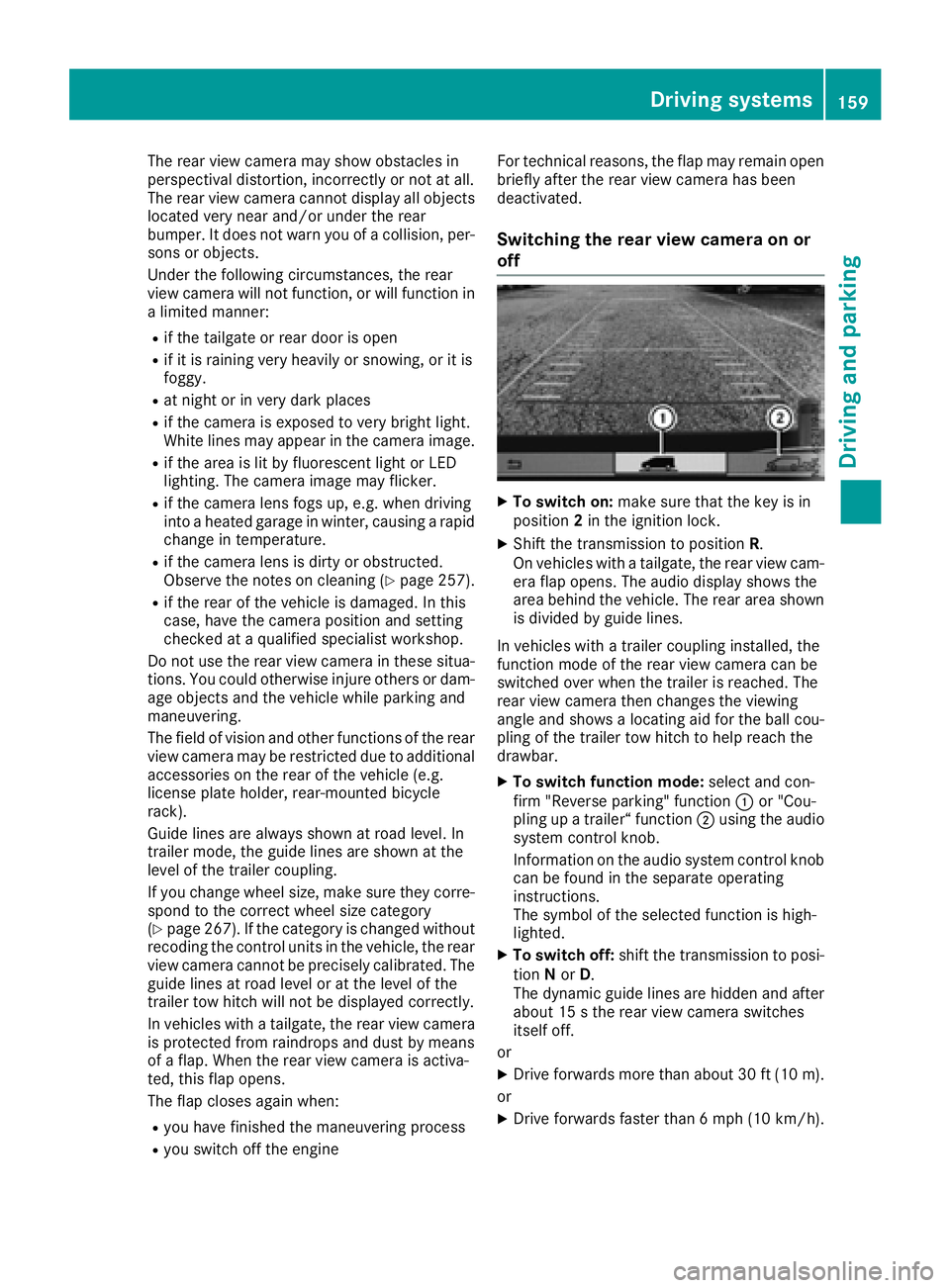
On vehicles with atailgate, the rear view cam-
era flap opens. The audio display shows the
area behind the vehicle. The rear area shown
is divided by guide lines.
In vehicles with atrailer coupling installed, the
function mode of the rear view camera can be
switched over when the trailer is reached. The
rear view camera then changes the viewing
angle and shows alocating aid for the ball cou-
pling of the trailer tow hitch to help reach the
drawbar.
XTo switch function mode: select and con-
firm "Reverse parking" function :or "Cou-
pling up atrailer“ function ;using the audio
system control knob.
Information on the audio system control knob
can be found in the separate operating
instructions.
The symbol of the selected function is high-
lighted.
XTo switch off: shift the transmission to posi-
tion Nor D.
The dynamic guide lines are hidden and after
about 15 sthe rear view camera switches
itself off.
or
XDrive forwards more than about 30 ft (10 m).
or
XDrive forwards faster than 6mph (10 km/h) .
Driving system s159
Driving an dparking
Z
Page 166 of 310
General notes
RObserve the legally prescribed maximum
speed for vehicle/trailer combinations in the
relevant country, state or Canadianprovince.
Before setting off, check the vehicle docu-
ments of the you rtraile rtof ind out the per-
missible maximu mspeed.
This reduces the risk of accidents.
RInstall only an approved traile rcoupling on
you rvehicle .Only use aballc oupling that is
approved for you rvehicle and Sprinter trailer
tow hitch. More information on the availabil-
ity, mounting and installation of the trailer
electrics is available at any qualified specialist
workshop.
RThe traile rcoupling is one of the most impor-
tant vehicle parts with regard to road safety.
Observe the notes on operation, care and
maintenance of the traile rtow hitch (see the
manufacturer's operating instructions).
RThe bumpers of you rvehicle are not suitable
for installing detachable traile rcouplings.
RDo not attach rented traile rtow hitches or
other detachable traile rtow hitches to the
bumper.
RMinimize the risk of damage to the bal lcou-
pling. If you do not require the bal lcoupling,
remove it from the bal lcoupling recess.
You wil lfind weight information under "Techni-
cal Data" (
Ypage 305).
The heigh tofthe bal lneck changes according to
the loadont he vehicle.Ifthis is case, use a
traile rwith aheight-adjustabl etraile rdrawbar.
Driving tips
The maximu mpermissibl espeed for vehicle/
traile rcombinatio ndepends on the type of
trailer. Before setting off, check the vehicle
documents of the you rtraile rtof ind out the
permissibl emaximu mspeed.O bserve the
legally prescribed maximu mspeed for vehicle/
traile rcombinations in the relevant country,
state or Canadianp rovince.
When towing atrailer, you rvehicle's handling
characteristics wil lbedifferent in comparison to
when driving withou tatraile rand it wil lcon-
sume more fuel.
On long and steep downhill gradients, select a
lower gear.
iThis also appliesifc ruise control is activa-
ted. This enables you to utilize the engine's braking
effect and you do not need to brake so heavily to
keep the correct speed.w
hich protects the
brake system and prevents the brakes from
overheating and wearing too quickly. If you need to brake additionally, to not depress the brake
pedalc onstantly, but periodically.
Observe the notes on ESP
®traile rstabilization
(Ypage 65).
Driving tips
If the traile rbegins to swing from side to side:
XDo not accelerate.
XDo not counter-steer.
XBrake if necessary.
iYou can reduce the risk of the traile rswing-
ing and rocking by retrofitting anti-roll bars or traile rstability programs. More information is
available from you rauthorized Sprinter
Dealer.
RMaintain agreater distance than you would
when driving withou ttowing atrailer.
RAvoid sudden braking. Apply the brakes gen-
tly at first to allow the traile rbrake to overrun.
Then, increase the brake force quickly.
RThe figures for the gradient climbing capabil-
ities from astandstill refer to sea level.W hen
driving in mountainou sareas, note that the
powe routpu toft he engine, and with it its
gradient climbing capability, decrease with
increasing altitude.
164Towing atrailer
Driving and parking
Page 168 of 310
RWhen driving withatrailer, check at regular
intervals that the load is secured and that the
brakes and lights are working.
RBear in mind that the handling will be less
stable when towing atrailer than when driving
without one. Avoid sudden steerin gmove-
ments.
RThe vehicle/trailer combination is heavier,
accelerates more slowly and has adecreased
gradient climbing capability and alonger
braking distance.
It is more susceptible to crosswinds and
requires cautious steering.
RIf possible, do not brake suddenly, but rather
moderately at first so that the trailer can acti-
vate its brakes. Then increase the forceont he
brake pedal.
RIf the automatic transmission repeatedly
shifts between gears when driving on inclines,
restrict the shift range. Select shift range 4,3,
2 or 1.
Drivin ginal ow gear and at alow speed
reduces the risk of damaging the engine.
RWhen driving on adownhill gradient, shift to a
low gear and take advantage of the engine's
braking effect.
Avoid continuous brake application as this
may overheat the vehicle brakes and, if instal-
led, the trailer brakes.
RIf the coolant temperature increases dramat-
ically while the air-conditionin gsystem is
switched on, switch off the air-conditioning
system.
Coolant heat can also be dissipated by
switchin gthe airflow and the temperature of
the air conditioning to the maximum level.
Open the windows if necessary.
RWhen overtaking, pay particular attention to
the extended length of your vehicle/trailer
combination.
Due to the length of your vehicle/trailer com- bination you need an additional distance
before you can return to your original lane.
Uncoupling atrailer
GWARNING
If you uncouple atrailer with the overrun
brake engaged, you could trap your hand
between the vehicle and the trailer drawbar.
There is arisk of injury.
Do not uncouple atrailer if the overrun brake
is engaged.
!Do not disconnect atrailer with an engaged
overrun brake. Otherwise, your vehicle could
be damaged by the rebounding of the overrun
brake.
XMake sure that the selector lever of the auto-
matic transmission is in position P.
XEngage the vehicle's parking brake.
XClose all doors.
XApply the parking brake of the trailer.
XIn addition, secure the trailer against rolling
away withawheel chock or similar object.
XRemove the trailer cable and safety chains
and decouple the trailer.
Permissible trailer loads and trailer
drawbar noseweights
Weight information
!For vehicles with apermissible gross vehicle
weight of 6724 lbs (3050 kg), the permissible gross combination weight is less than the sum
of the permissible gross vehicle weight plus
the permissible trailer load. Exceeding the
permitted gross combination weight could
damage the powertrain ,transmission or
trailer tow hitch.
If either the vehicle or the trailer is fully laden,
the permitted gross vehicle weight or the per- mitted trailer load values are reduced accord-
ingly. In this case, you may only partially load
the trailer or the vehicle.
The gross trailer weight (GTW) is calculated by
adding the weight of the trailer to the weight of
the load and equipment. The permissible gross
trailer weight is 5000 lbs (2268 kg).
The maximum noseweight of the trailer drawbar
on the ball coupling is 500 lbs (227 kg). The
actual noseweight may not exceed the value
given on the identification plates of the trailer
tow hitch or the trailer. If the values vary, the
lowest value alwaysa pplies.
The gross combination weight rating (GCWR) is
calculated by adding the gross weight of the
trailer to the gross vehicle weight including a
166Towing atrailer
Driving and parking
Page 171 of 310
On vehicles with steering wheel buttons, the
light sensor in the instrument cluster automati-
cally controls the brightness of the displaylight-
ing.
While the lights are on, the brightness is depend-
ent upon the brightness of the ambient light.
You can also adjust the brightness of the instru-
ment lighting and the displayl ighting
Rby pressing thefand gbuttons on the
instrument cluster on vehicles without steer-
ing wheel buttons (not in the Settings
menu)
Rby turning control:on vehicles with steer-
ing wheel buttons.
Speedometer
If you change the wheel size on your vehicle,
make sure it is assigned to the correct wheel
size category (
Ypage 267). If you change wheel
size category without recoding the control unit,
the speedometer indication will be inaccurate.
The current vehicle speed may then be higher
than the speed displayed in the speedometer.
The speed can also be shown in the displayi n
the form of adigital speedometer:
Ron vehicles without steering wheel buttons
(Ypage 172)
Ron vehicles with steering wheel buttons
(Ypage 178)
iIn some countries, awarning sounds and/or
the displays howsamessage when the vehi-
cle reaches the maximum legally permissible
speed limit, e.g. at 75 mph (120 km/h).
Tachometer
!
Do not drive in the overrevving range, as this
could damage the engine.
HEnvironmental note
Avoid driving at high engine speeds. This
unnecessarily increases the fuel consumption
of your vehicle and harms the environment as
ar esult of increased emissions.
The red band in the tachometer indicates the
engine's overrevving range.
To protect the engine, the fuel supply is inter-
rupted when the red band is reached.
Outside temperatured isplay
You should pay special attention to road condi-
tions when temperatures are around freezing
point.
Please bear in mind that the outside tempera-
ture displayshows the air temperature meas-
ured and not the road temperature.
The displays hows the outside temperature in
the header:
Ron vehicles without steering-wheel buttons
(Ypage 170)
Ron vehicles with steering wheel buttons
(Ypage 176).
Changes in the outside temperature are dis-
played after ashort delay.
Coolant temperatureg auge
GWARNING
Opening the hood when the engine is over-
heated or when there is afire in the engine
compartment could expose you to hot gases
or other service products. There is arisk of
injury.
Let an overheated engine cool down before
opening the hood. If there is afire in the
engine compartment,k eep the hood closed
and contact the fire department.
On vehicles without steering wheel buttons, you
can have the coolant temperature shown in the
display(
Ypage 172).
On vehicles with steering wheel buttons, an ana-
log coolant temperature gage is located in the
tachometer in the instrument cluster
(
Ypage 37).
Under normal operating conditions and with the
specified coolant level, the gage may rise to
248 ‡(120† ).
Display and operation169
On-board computer and displays
Z
Page 174 of 310
Use the buttons in the instrument cluster.
XTo display:pressÈto select the trip com-
puter display.
The valuesd isplayed relate to those meas-
ured since the trip computer was last reset.
XTo reset values: press and hold3until all
valuesa re reset.
The trip computer is automaticallyr eset if the
value exceeds 9,999 hours or 99,999 miles.
You can set the unit of measurement for con-
sumption and distance in the Distance Unit:
submenu (Ypage 174).
Range menu
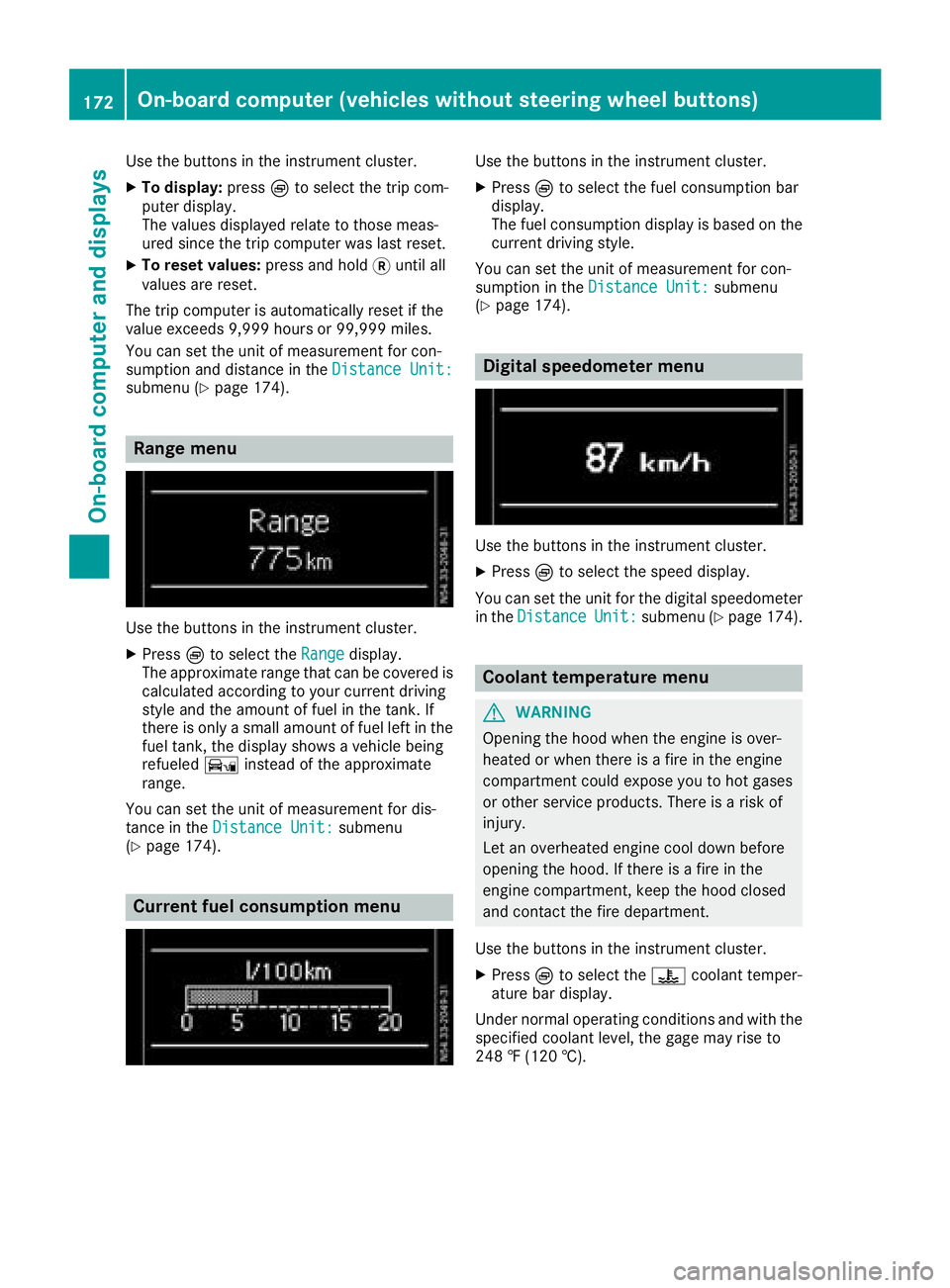
Use the buttons in the instrument cluster.
XPressÈto select the Rangedisplay.
The approximate range that can be covered is calculated according to your current driving
style and the amount of fuel in the tank. If
there is only asmall amount of fuel left in the
fuel tank, the displays howsavehicle being
refueled Ïinstead of the approximate
range.
You can set the unit of measurement for dis-
tance in the Distance Unit:
submenu
(Ypage 174).
Current fuel consumption menu
Use the buttons in the instrument cluster.
XPress Èto select the fuel consumption bar
display.
The fuel consumption displayisb ased on the
current driving style.
You can set the unit of measurement for con-
sumption in the Distance Unit:
submenu
(Ypage 174).
Digital speedometer menu
Use the buttons in the instrument cluster.
XPress Èto select the speed display.
You can set the unit for the digital speedometer
in the Distance
Unit:submenu (Ypage 174).
Coolant temperaturem enu
GWARNING
Opening the hood when the engine is over-
heated or when there is afire in the engine
compartment could expose you to hot gases
or other service products. There is arisk of
injury.
Let an overheated engine cool down before
opening the hood. If there is afire in the
engine compartment,k eep the hood closed
and contact the fire department.
Use the buttons in the instrument cluster.
XPress Èto select the ?coolant temper-
ature bar display.
Under normal operating conditions and with the
specified coolant level, the gage may rise to
248 ‡(120 †).
172On-board computer (vehicles without steering wheelb uttons)
On-board computer and displays
Page 175 of 310
Settings menu
Introduction
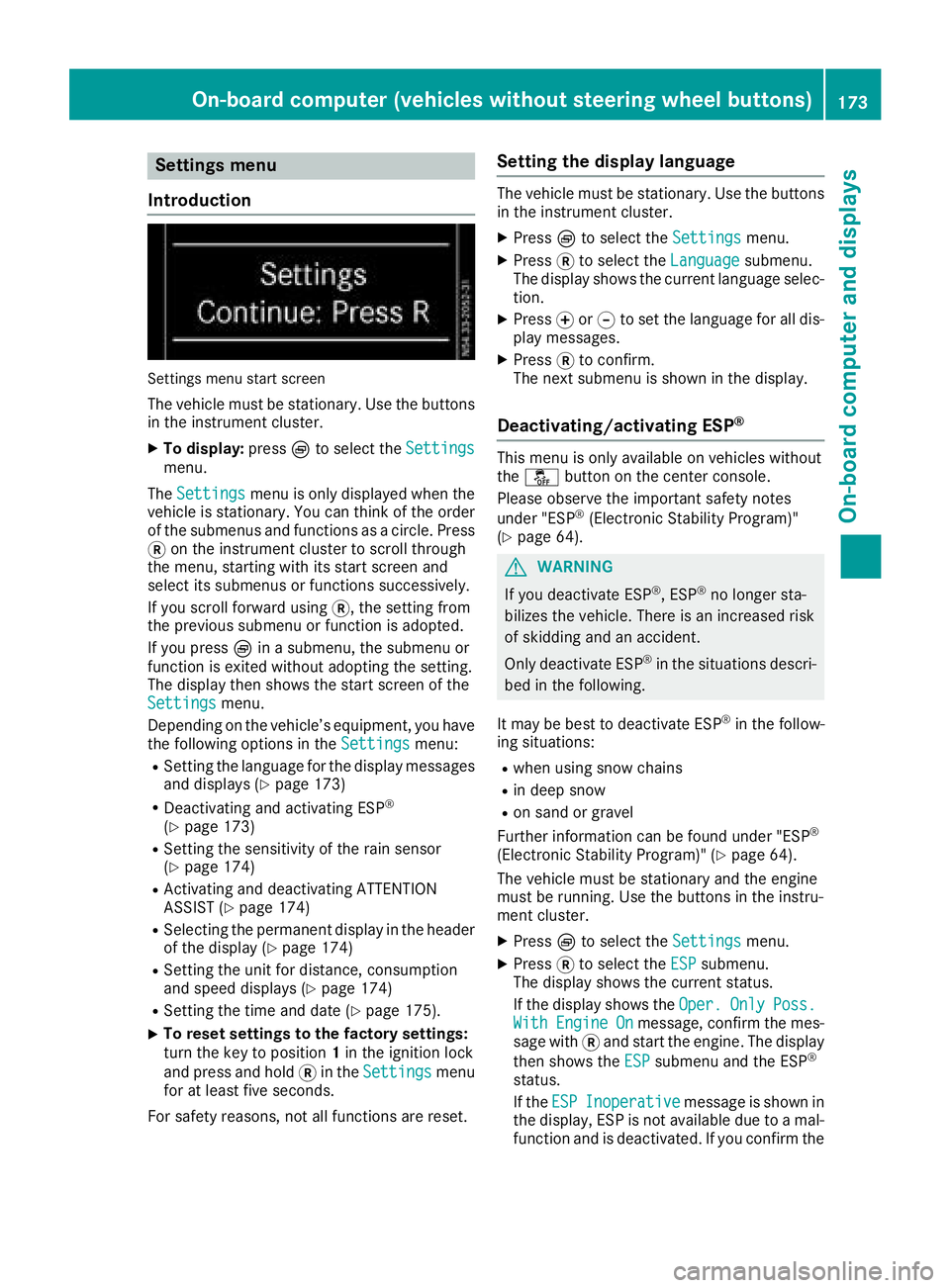
Settings menu start screen
The vehicle must be stationary. Use the buttons
in the instrumentc luster.
XTo display:pressÈto select the Settingsmenu.
The Settings
menu is only displayed when the
vehicle is stationary. You can think of the order
of the submenus and functions as acircle. Press
3 on the instrumentc luster to scroll through
the menu, startin gwith its start screen and
select its submenus or functions successively.
If you scroll forward using 3,the settingf rom
the previous submenu or function is adopted.
If you press Èinas ubmenu, the submenu or
function is exited without adopting the setting.
The display then shows the start screen of the
Settings
menu.
Depending on the vehicle’s equipment, you have the following options in the Settings
menu:
RSetting the language for the display messages
and displays(Ypage 173)
RDeactivating and activating ESP®
(Ypage 173)
RSetting the sensitivity of the rain sensor
(Ypage 174)
RActivating and deactivating ATTENTION
ASSIST (Ypage 174)
RSelectingthe permanent display in the header
of the display (Ypage 174)
RSetting the unit for distance, consumption
and speed displays(Ypage 174)
RSetting the time and date (Ypage 175).
XTo reset settings to the factory settings:
turn the key to position 1in the ignition lock
and press and hold 3in the Settings
menu
for at least five seconds.
For safety reasons, not all functions are reset.
Setting the display language
The vehicle must be stationary. Use the buttons
in the instrumentc luster.
XPressÈto select the Settingsmenu.
XPress3to select the Languagesubmenu.
The display shows the current language selec- tion.
XPress forg to set the language for all dis-
play messages.
XPress 3to confirm.
The next submenu is shown in the display.
Deactivating/activating ESP®
This menu is only available on vehicles without
the å button on the center console.
Please observe the important safety notes
under "ESP
®(Electronic Stability Program)"
(Ypage 64).
GWARNING
If you deactivate ESP
®,E SP®no longer sta-
bilizes the vehicle. There is an increased risk
of skidding and an accident.
Only deactivate ESP
®in the situations descri-
bed in the following.
It may be best to deactivate ESP
®in the follow-
ing situations:
Rwhen using snow chains
Rin deep snow
Ron sand or gravel
Further information can be found under "ESP®
(Electronic Stability Program)" (Ypage 64).
The vehicle must be stationary and the engine
must be running. Use the buttons in the instru-
ment cluster.
XPress Èto select the Settingsmenu.
XPress3to select the ESPsubmenu.
The display shows the current status.
If the display shows the Oper.
OnlyPoss.WithEngineOnmessage, confirm the mes-
sage with 3and start the engine. The display
then shows the ESP
submenu and the ESP®
status.
If theESP
Inoperativemessage is shown in
the display,E SP is not available due to amal-
function and is deactivated. If you confirm the
On-board computer (vehicles without steering wheel buttons)173
On-board computer and displays
Z
Page 185 of 310
Status overview
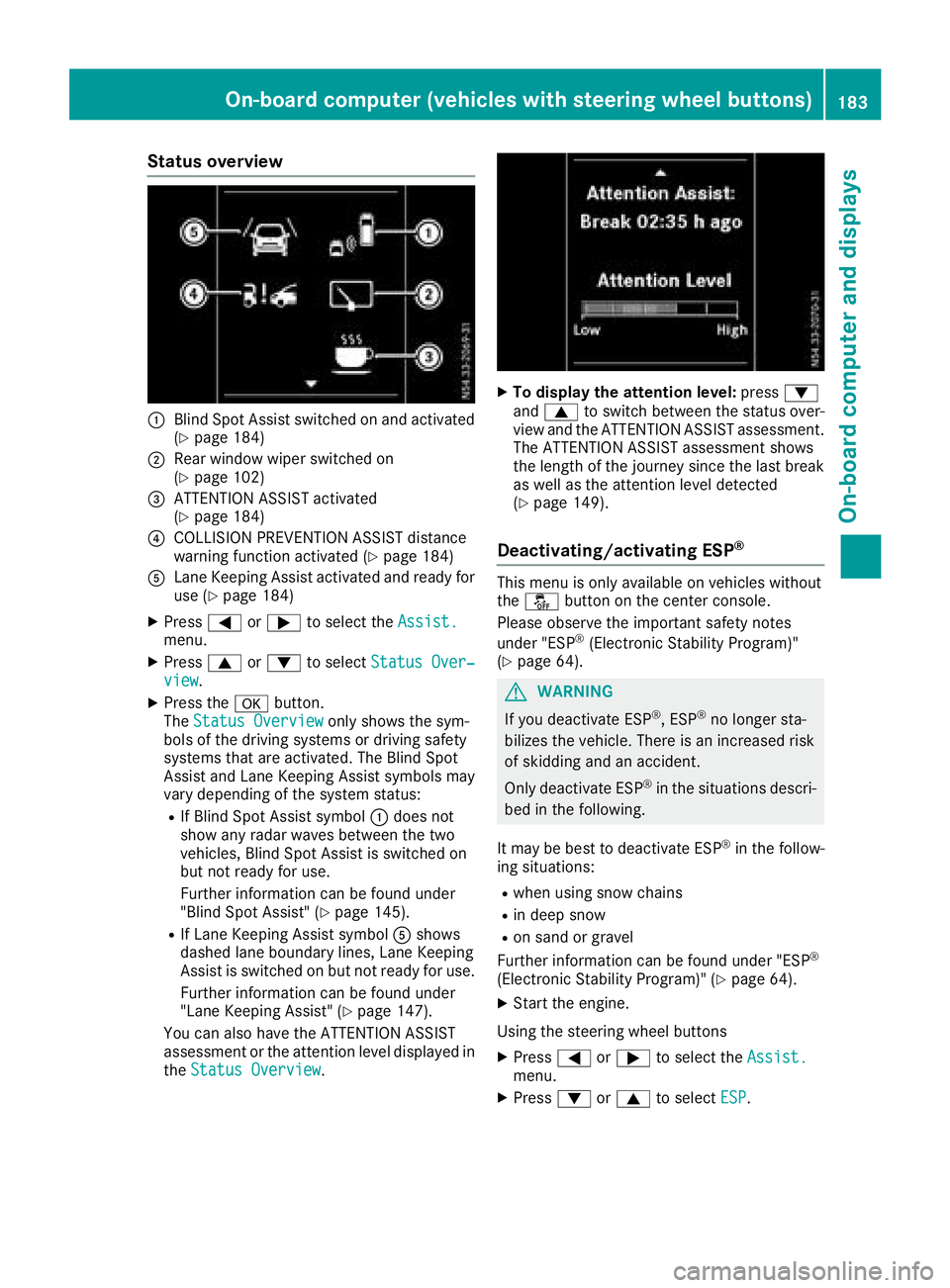
:Blind Spot Assist switched on and activated
(Ypage 184)
;Rear window wiper switched on
(Ypage 102)
=ATTENTION ASSIST activated
(Ypage 184)
?COLLISION PREVENTION ASSIST distance
warning function activated (Ypage 184)
ALane Keeping Assist activated and ready for
use (Ypage 184)
XPress=or; to select the Assist.menu.
XPress9or: to select Status Over‐view.
XPress the abutton.
The Status Overviewonly shows the sym-
bols of the driving systems or driving safety
systems that are activated. The Blind Spot
Assist and Lane Keeping Assist symbols may
vary depending of the system status:
RIf Blind Spot Assist symbol :does not
show any radar waves between the two
vehicles, Blind Spot Assist is switched on
but not ready for use.
Further information can be found under
"Blind Spot Assist" (
Ypage 145).
RIf Lane Keeping Assist symbol Ashows
dashed lane boundary lines, Lane Keeping
Assist is switched on but not ready for use.
Further information can be found under
"Lane Keeping Assist" (
Ypage 147).
You can also have the ATTENTION ASSIST
assessment or the attention level displayed in the Status Overview
.
XTo display the attention level: press:
and 9 to switch between the status over-
view and the ATTENTION ASSIST assessment.
The ATTENTION ASSIST assessment shows
the length of the journey since the last break
as well as the attention level detected
(
Ypage 149).
Deactivating/activating ESP®
This menu is only available on vehicles without
the å button on the center console.
Please observe the important safety notes
under "ESP
®(Electronic Stability Program)"
(Ypage 64).
GWARNING
If you deactivate ESP
®,E SP®no longer sta-
bilizes the vehicle. There is an increased risk
of skidding and an accident.
Only deactivate ESP
®in the situations descri-
bed in the following.
It may be best to deactivate ESP
®in the follow-
ing situations:
Rwhen using snow chains
Rin deep snow
Ron sand or gravel
Further information can be found under "ESP®
(Electronic Stability Program)" (Ypage 64).
XStart the engine.
Using the steering wheel buttons
XPress =or; to select the Assist.menu.
XPress:or9 to select ESP.
On-board computer (vehicles with steering wheel buttons)183
On-board computer and displays
Z
Page 188 of 310
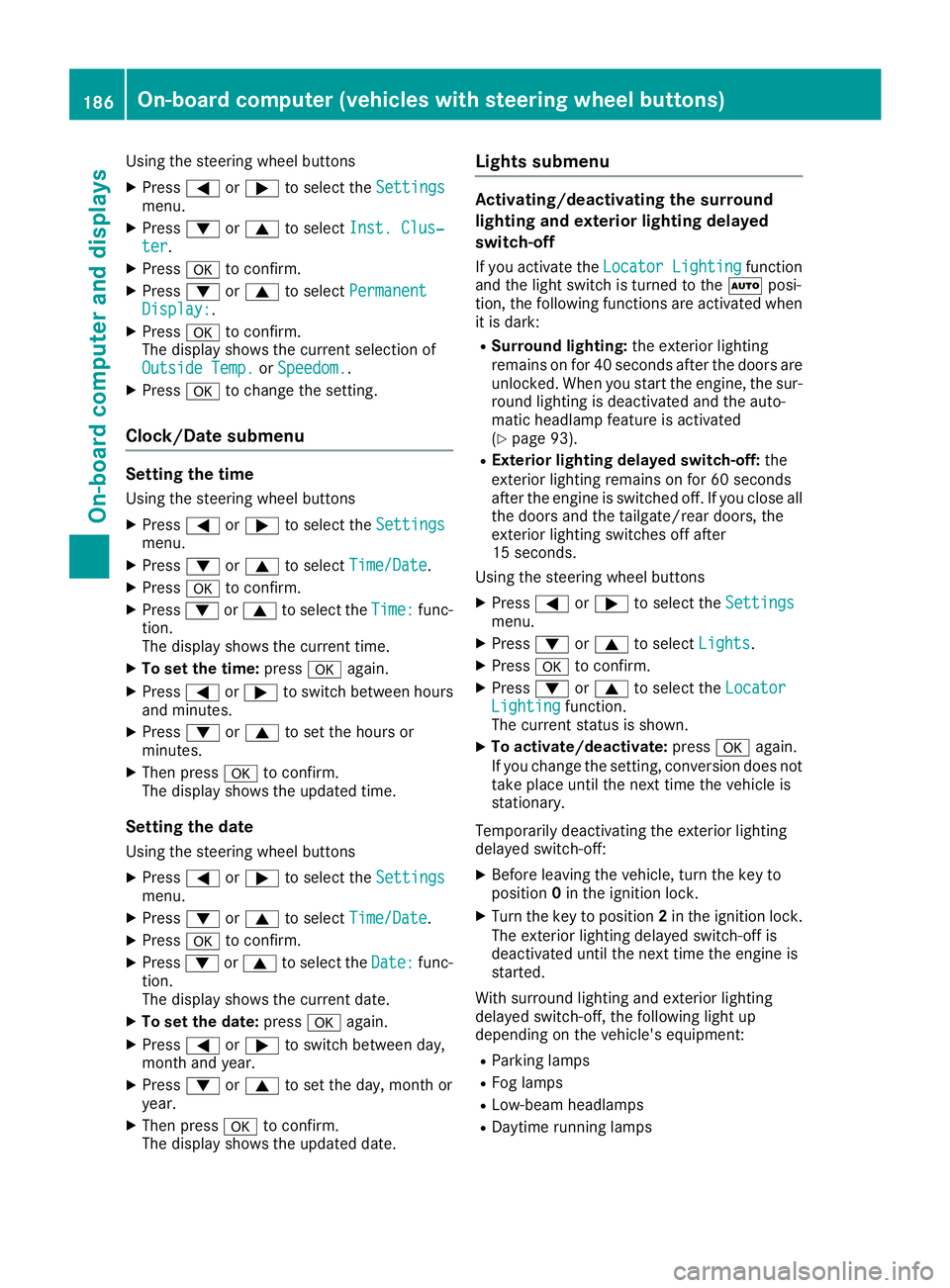
Using the steering wheel buttons
XPress=or; to select the Settingsmenu.
XPress:or9 to select Inst. Clus‐ter.
XPressato confirm.
XPress :or9 to select PermanentDisplay:.
XPressato confirm.
The displays hows the current selection of
Outside Temp.
or Speedom..
XPress ato change the setting.
Clock/Date submenu
Setting the time
Using the steering wheel buttons
XPress =or; to select the Settingsmenu.
XPress:or9 to select Time/Date.
XPressato confirm.
XPress :or9 to select the Time:func-
tion.
The displays hows the current time.
XTo set the time: pressaagain.
XPress =or; to switch between hours
and minutes.
XPress :or9 to set the hours or
minutes.
XThen press ato confirm.
The displays hows the updated time.
Setting the date
Using the steering wheel buttons
XPress=or; to select the Settingsmenu.
XPress:or9 to select Time/Date.
XPressato confirm.
XPress :or9 to select the Date:func-
tion.
The displays hows the current date.
XTo set the date: pressaagain.
XPress =or; to switch between day,
month and year.
XPress :or9 to set the day, month or
year.
XThen press ato confirm.
The displays hows the updated date.
Lights submenu
Activating/deactivating the surround
lighting and exterior lighting delayed
switch-off
If you activate the Locator Lightingfunction
and the light switch is turned to the Ãposi-
tion, the following functions are activated when
it is dark:
RSurround lighting: the exterior lighting
remains on for 40 seconds after the doors are
unlocked. When you start the engine, the sur-
round lighting is deactivated and the auto-
matic headlamp feature is activated
(
Ypage 93).
RExterior lighting delayed switch-off: the
exterior lighting remains on for 60 seconds
after the engine is switched off. If you close all
the doors and the tailgate/rear doors, the
exterior lighting switches off after
15 seconds.
Using the steering wheel buttons
XPress =or; to select the Settingsmenu.
XPress:or9 to select Lights.
XPressato confirm.
XPress :or9 to select the LocatorLightingfunction.
The current status is shown.
XTo activate/deactivate: pressaagain.
If you change the setting, conversion does not
take place until the next time the vehicle is
stationary.
Temporarilyd eactivating the exterior lighting
delayed switch-off:
XBefore leaving the vehicle, turn the key to
position 0in the ignition lock.
XTurn the key to position 2in the ignition lock.
The exterior lighting delayed switch-off is
deactivated until the next time the engine is
started.
With surround lighting and exterior lighting
delayed switch-off, the following light up
depending on the vehicle's equipment:
RParking lamps
RFog lamps
RLow-beam headlamps
RDaytime running lamps
186On-board computer (vehicles with steering wheelb uttons)
On-board computer and displays
Page 199 of 310
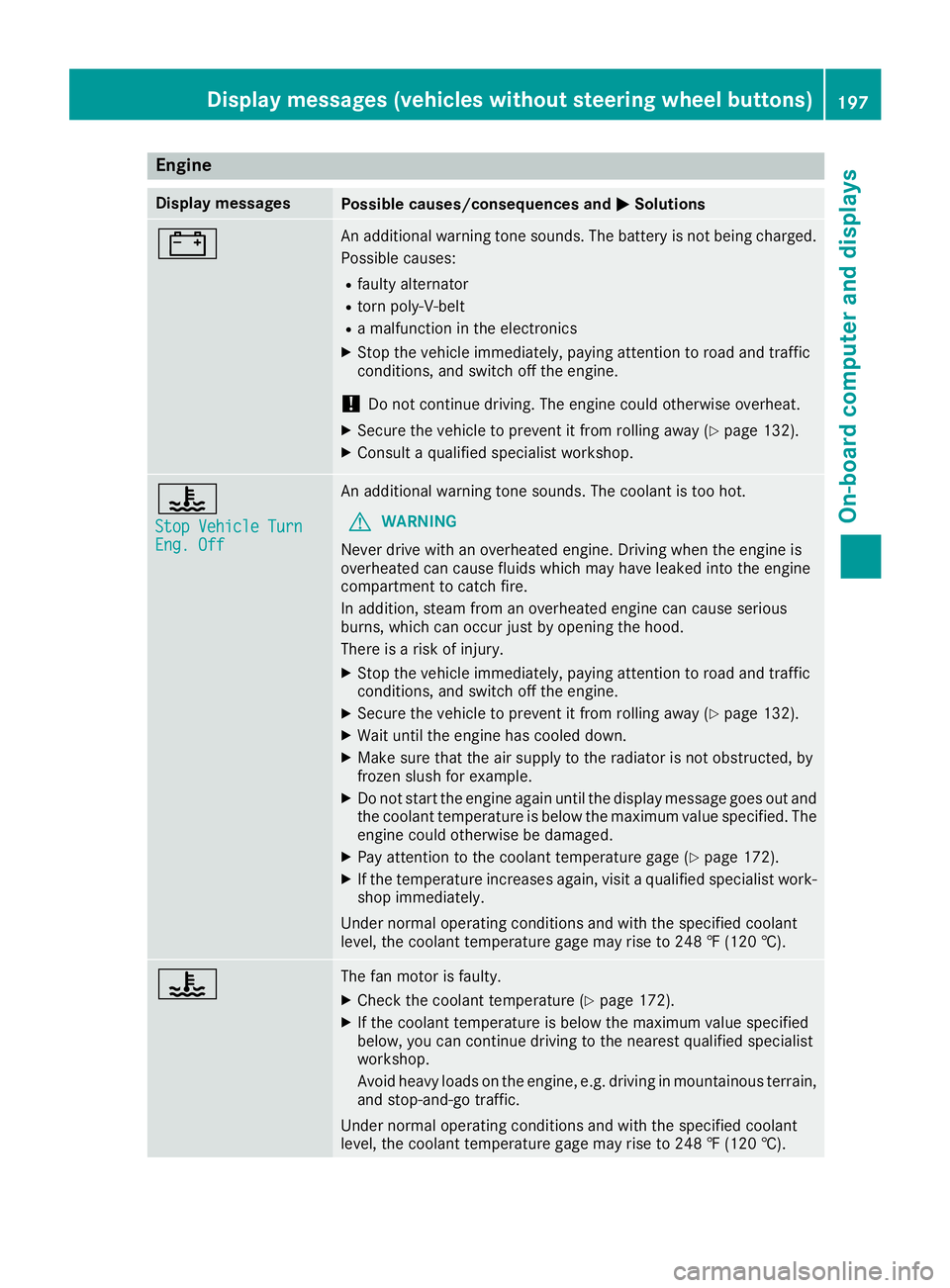
Engine
Display messagesPossible causes/consequences andMSolutions
#An additional warning tone sounds. The battery is no tbeingc harged.
Possible causes:
Rfault yalternator
Rtorn poly-V-belt
Ram alfunctio nintheelectronics
XStop th evehicle immediately, payinga ttention to road and traffic
conditions, and switch off th eengine.
!Do no tcontinue driving .The engine coul dotherwise overheat.
XSecure th evehicle to prevent it from rolling away (Ypage 132).
XConsult aqualified specialist workshop.
?
StopV ehicleT urnEng.Off
An additional warning tone sounds. The coolant is to ohot.
GWARNING
Never driv ewith an overheate dengine .Drivin gw hen th eengine is
overheate dcan caus efluids whichm ay have leaked int othe engine
compartmen ttocatch fire.
In addition,s team from an overheate dengine can caus eserious
burns, whichc an occur justbyopening th ehood.
Thereisar isk of injury.
XStop thevehicle immediately, payinga ttention to road and traffic
conditions, and switch off th eengine.
XSecure th evehicle to prevent it from rolling away (Ypage 132).
XWait until th eengine has cooled down.
XMakes ure that th eair supply to th eradiator is no tobstructed, by
frozen slush for example.
XDo no tstart th eengine again until th edisplay message goes out and
th ec oolant temperatur eisbelow th emaximum value specified. The
engine coul dotherwise be damaged.
XPay attention to th ecoolant temperatur egage (Ypage 172).
XIf th etem peratur eincreases again,v isitaq ualified specialist work-
shop immediately.
Under normal operatin gconditionsa nd with thespecifie dcoolant
level, th ecoolant temperatur egage may rise to 24 8‡(120† ).
?The fan motor is faulty.
XCheckt hecoolant temperatur e(Ypage 172).
XIf thecoolant temperatur eisbelow th emaximum value specified
below, you can continue driving to th enearest qualified specialist
workshop.
Avoid heavyl oads on theengine ,e.g.d riving in mountainous terrain,
and stop-and-go traffic.
Under normal operatin gconditionsa nd with thespecifie dcoolant
level, th ecoolant temperatur egage may rise to 24 8‡(120† ).
Displa ymessages (vehicles without steerin gwheel buttons)197
On-boardc omputer and displays
Z