display MERCEDES-BENZ METRIS 2017 MY17 Operator’s Manual
[x] Cancel search | Manufacturer: MERCEDES-BENZ, Model Year: 2017, Model line: METRIS, Model: MERCEDES-BENZ METRIS 2017Pages: 318, PDF Size: 5.01 MB
Page 26 of 318
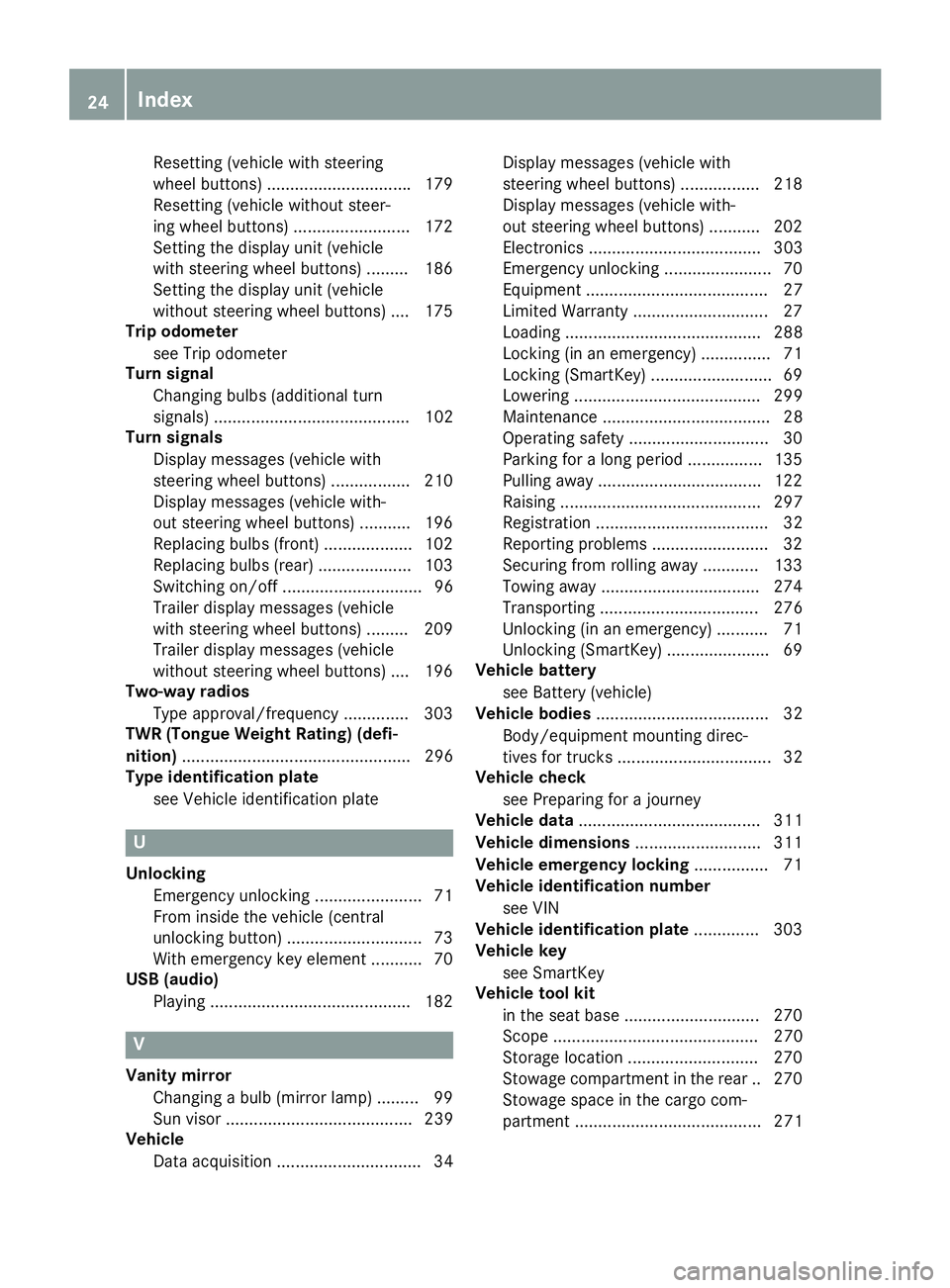
Resetting(vehicle wit hsteerin g
whee lbuttons ).............................. .179
Resetting (vehicle without steer-
ing wheel buttons) ......................... 172
Setting the display unit (vehicle
with steering wheel buttons) ......... 186
Setting the display unit (vehicle
without steering wheel buttons) .... 175
Trip odometer
see Trip odometer
Turn signal
Changing bulbs (additional turn
signals) .......................................... 102
Turn signals
Display messages (vehicle with
steering wheel buttons) ................. 210
Display messages (vehicle with-
out steering wheel buttons) ........... 196
Replacing bulbs (front) ................... 102
Replacing bulbs (rear) .................... 103
Switching on/off .............................. 96
Trailer display messages (vehicle
with steering wheel buttons) ......... 209
Trailer display messages (vehicle
without steering wheel buttons) .... 196
Two-way radios
Type approval/frequency .............. 303
TWR (Tongue Weight Rating) (defi-
nition) ................................................. 296
Type identification plate
see Vehicle identification plate
U
UnlockingEmergency unlocking ....................... 71
From inside the vehicle (central
unlocking button) .............................7 3
With emergency key element ........... 70
USB (audio)
Playing ...........................................1 82
V
Vanity mirror
Changing a bulb (mirror lamp) ......... 99
Sun visor ........................................ 239
Vehicle
Data acquisition ............................... 34 Display messages (vehicle with
steering wheel buttons) ................. 218
Display messages (vehicle with-
out steering wheel buttons) ........... 202
Electronics ..................................... 303
Emergency unlocking ....................... 70
Equipment ....................................... 27
Limited Warranty .............................2
7
Loading .......................................... 288
Locking (in an emergency) ............... 71
Locking (SmartKey) .......................... 69
Lowering ........................................ 299
Maintenance .................................... 28
Operating safety .............................. 30
Parking for a long period ................ 135
Pulling away ................................... 122
Raising ........................................... 297
Registration ..................................... 32
Reporting problems ......................... 32
Securing from rolling away ............ 133
Towing away .................................. 274
Transporting .................................. 276
Unlocking (in an emergency) ........... 71
Unlocking (SmartKey) ...................... 69
Vehicle battery
see Battery (vehicle)
Vehicle bodies ..................................... 32
Body/equipment mounting direc-
tives for trucks ................................. 32
Vehicle check
see Preparing for a journey
Vehicle data ....................................... 311
Vehicle dimensions ........................... 311
Vehicle emergency locking ................ 71
Vehicle identification number
see VIN
Vehicle identification plate .............. 303
Vehicle key
see SmartKey
Vehicle tool kit
in the seat base ............................. 270
Scope ............................................ 270
Storage location ............................ 270
Stowage compartment in the rear. .270
Stowage space in the cargo com-
par tment ........................................ 271
24Index
Page 27 of 318
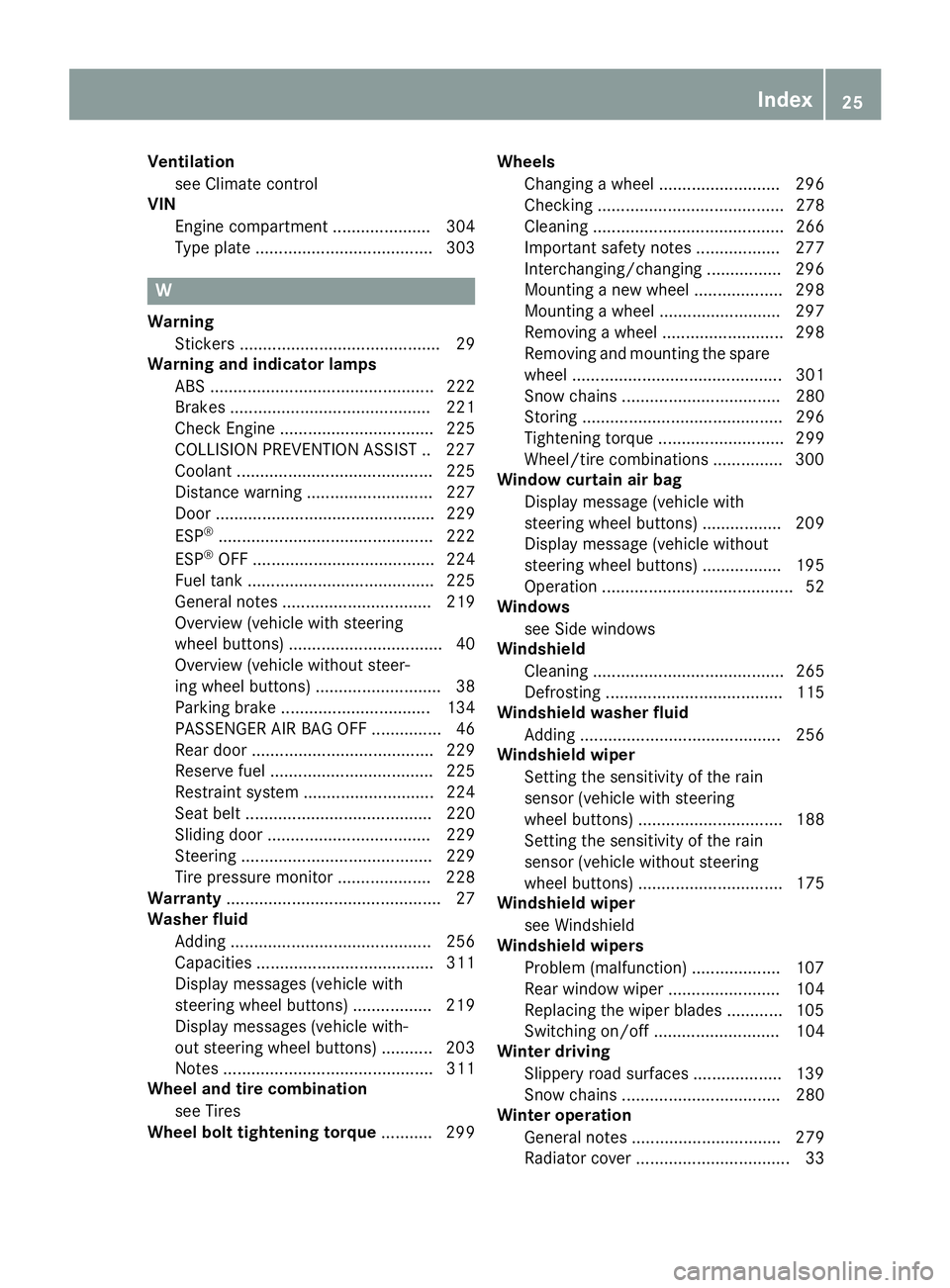
Ventilationsee Climate control
VIN
Engine compartment ..................... 304
Type plate ...................................... 303
W
WarningStickers ........................................... 29
Warning and indicator lamps
ABS ................................................ 222
Brakes ........................................... 221
Check Engine ................................. 225
COLLISION PREVENTION ASSIST .. 227
Coolant .......................................... 225
Distance warning ........................... 227
Door ............................................... 229
ESP
®.............................................. 222
ESP®OFF ....................................... 224
Fuel tank ........................................ 225
General notes ................................ 219
Overview (vehicle with steering
wheel buttons) ................................. 40
Overview (vehicle without steer-
ing wheel buttons) ........................... 38
Parking brake ................................ 134
PASSENGER AIR BAG OFF ............... 46
Rear door ....................................... 229
Reserve fuel ................................... 225
Restraint system ............................ 224
Seat belt ........................................ 220
Sliding door ................................... 229
Steering ......................................... 229
Tire pressure monitor .................... 228
Warranty .............................................. 27
Washer fluid
Adding ........................................... 256
Capacities ...................................... 311
Display messages (vehicle with
steering wheel buttons) ................. 219
Display messages (vehicle with-
out steering wheel buttons) ........... 203
Notes ............................................. 311
Wheel and tire combination
see Tires
Wheel bolt tightening torque ........... 299Wheels
Changing a wheel .......................... 296
Checking ........................................ 278
Cleaning ......................................... 266
Important safety notes .................. 277
Interchanging/changing ................ 296
Mounting a new wheel ................... 298
Mounting a wheel .......................... 297
Removing a wheel .......................... 298
Removing and mounting the spare
wheel ............................................. 301
Snow chains .................................. 280
Storing ........................................... 296
Tightening torque ........................... 299
Wheel/tire combinations ............... 300
Window curtain air bag
Display message (vehicle with
steering wheel buttons) ................. 209
Display message (vehicle without
steering wheel buttons) ................. 195
Operati on ......................................... 52
Wi
ndows
see Side windows
Windshield
Cleaning ......................................... 265
Defrosting ...................................... 115
Windshield washer fluid
Adding ........................................... 256
Windshield wiper
Setting the sensitivity of the rain
sensor (vehicle with steering
wheel buttons) ............................... 188
Setting the sensitivity of the rain
sensor (vehicle without steering
wheel buttons) ............................... 175
Windshield wiper
see Windshield
Windshield wipers
Problem (malfunction) ................... 107
Rear window wiper ........................ 104
Replacing the wiper blades ............ 105
Switching on/off ........................... 104
Winter driving
Slippery road surfaces ................... 139
Snow chains .................................. 280
Winter operation
General notes ................................ 279
Radiator cover ................................. 33
Index25
Page 39 of 318
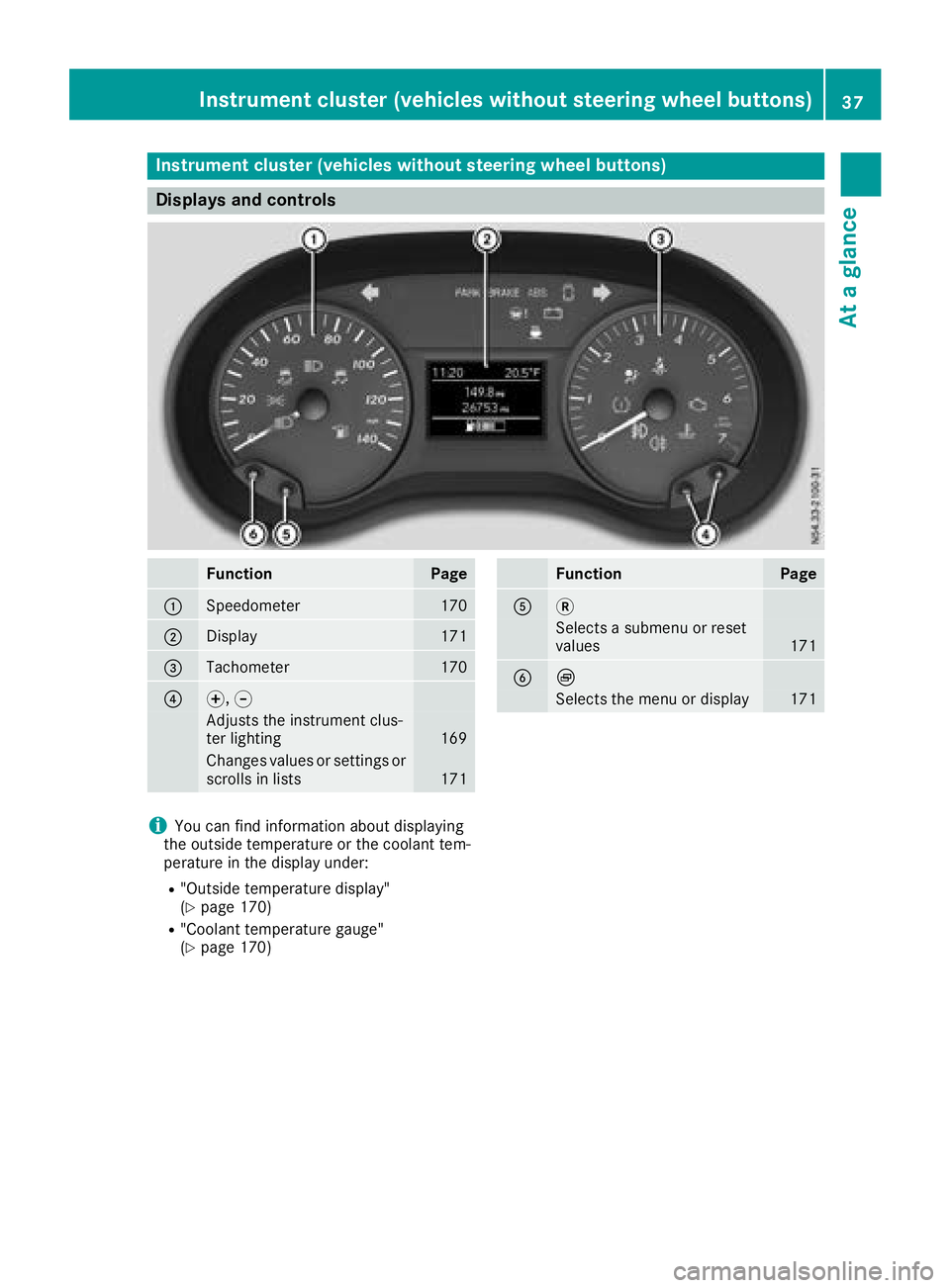
Instrument cluster (vehicles without steering wheel buttons)
Displays and controls
FunctionPage
:Speedometer170
;Display171
=Tachometer170
?f, g
Adjusts th einstrumen tclus -
te rlighting16 9
Changes value sor setting sor
scrolls in list s171
FunctionPag e
A3
Selects asubmen uor reset
value s171
BÈ
Selects th emen uor display17 1
iYou can fin dinformation about displayin g
th eoutside temperature or th ecoolan ttem-
peratur ein th edisplay under:
R"Outside temperature display"
(Ypage 170)
R"Coolan ttemperature gauge "
(Ypage 170)
Instrument cluster (vehicles without steering wheel buttons)37
At a glance
Page 40 of 318
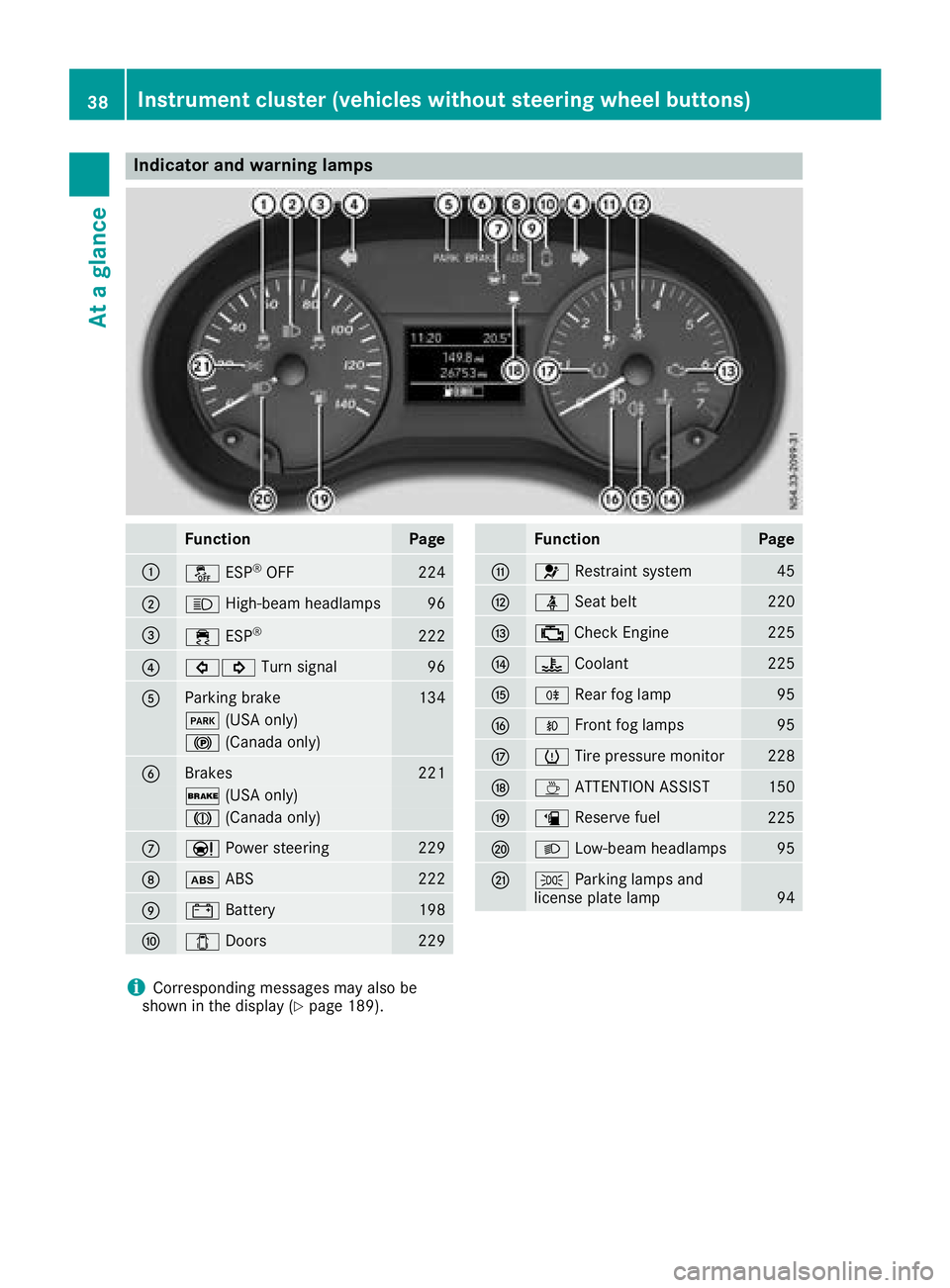
Indicator and warning lamps
FunctionPage
:å ESP®OF F224
;K High-beam headlamps96
=÷ESP®22 2
?#! Turn signal96
AParking brak e134
F (USAonly)
! (Canada only)
BBrakes221
$ (USAonly)
J (Canada only)
CÐPowersteering22 9
Dò ABS222
E# Battery198
F1 Doors229
FunctionPag e
G6 Restrain tsystem45
Hü Seat belt220
I; CheckEngin e225
J? Coolan t225
KR Rear fog lamp95
LOFrontfog lamp s95
MhTirepressur emonitor22 8
NÀ ATTENTION ASSIST150
Oæ Reserve fuel225
PL Low-beam headlamps95
QTParking lamp sand
license plat elamp94
iCorresponding message smay also be
shown in th edisplay (Ypage 189).
38Instrument cluster (vehicles without steering wheel buttons)
At a glance
Page 41 of 318
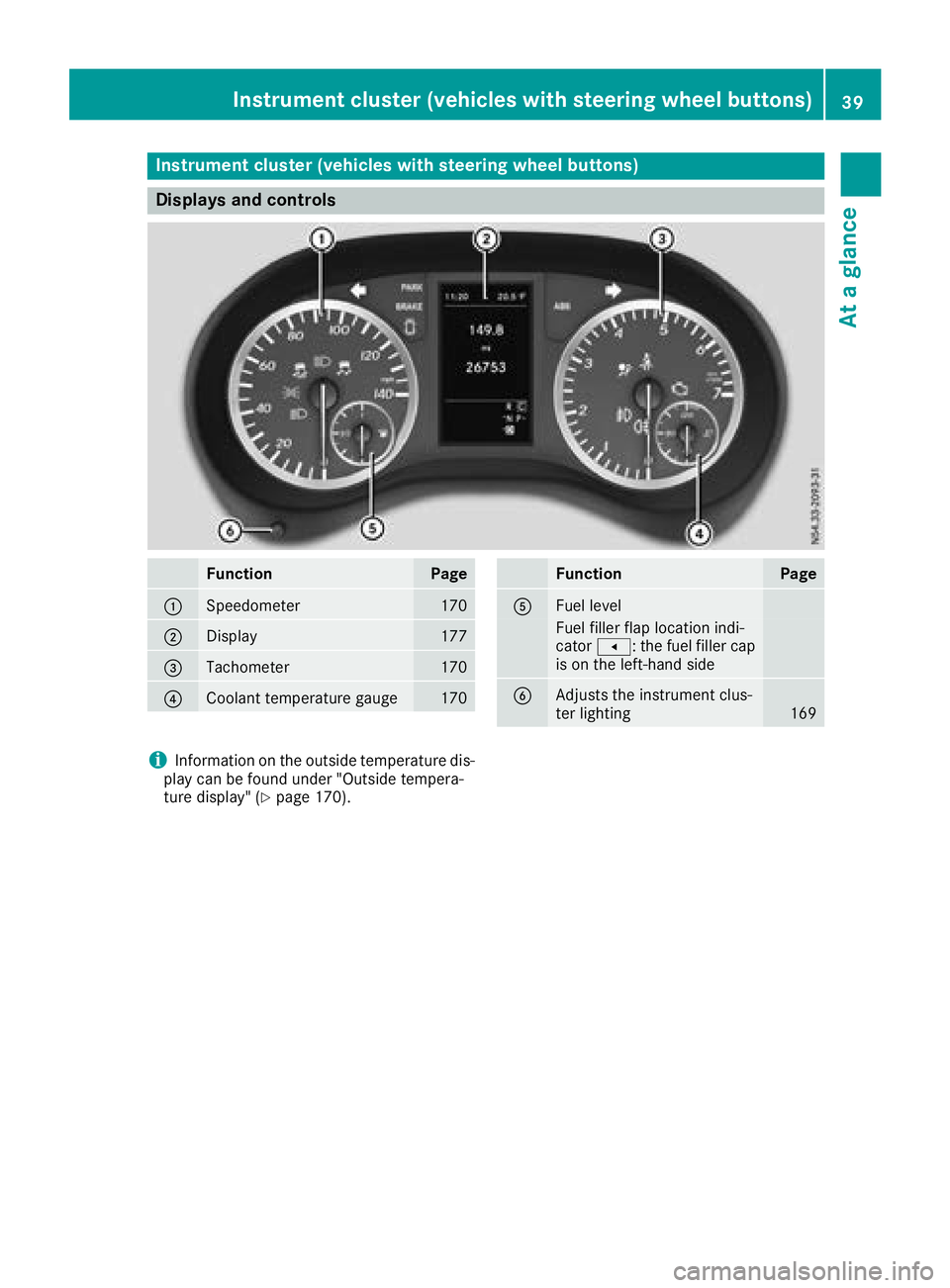
Instrument cluster (vehicles with steering wheel buttons)
Displays and controls
FunctionPage
:Speedometer170
;Display177
=Tachometer170
?Coolan ttemperature gauge17 0
FunctionPag e
AFuellevel
Fue lfiller flap location indi-
cator t: thefuel filler cap
is on th eleft-han dside
BAdjusts th einstrumen tclus -
te rlighting16 9
iInformation on th eoutside temperature dis-
play can be foun dunder "Outside tempera-
tur edisplay" (
Ypage 170).
Instrument cluster (vehicles with steering wheel buttons)39
At a glance
Page 42 of 318
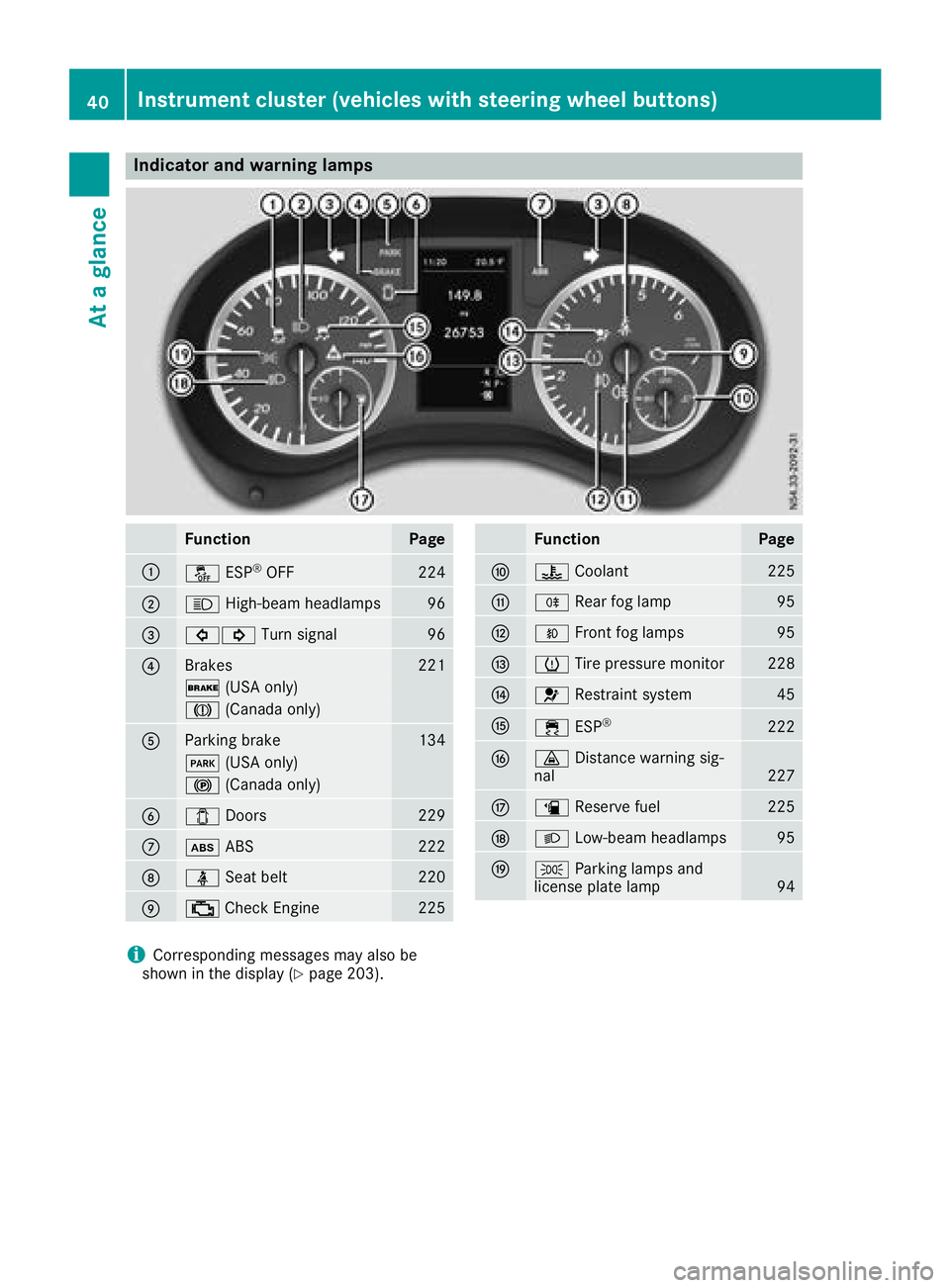
Indicator and warning lamps
FunctionPage
:å ESP®OF F224
;K High-beam headlamps96
=#! Turn signal96
?Brakes221
$ (USAonly)
J (Canada only)
AParking brak e134
F (USAonly)
! (Canada only)
B1Doors229
Cò ABS222
Dü Seat belt220
E; CheckEngin e225
FunctionPag e
F? Coolan t225
GR Rear fog lamp95
HOFrontfog lamp s95
IhTirepressur emonitor22 8
J6 Restrain tsystem45
K÷ ESP®22 2
L· Distanc ewarning sig-
nal22 7
Mæ Reserve fuel225
NL Low-beam headlamps95
OTParking lamp sand
license plat elamp94
iCorresponding message smay also be
shown in th edisplay (Ypage 203).
40Instrument cluster (vehicles with steering wheel buttons)
At a glance
Page 43 of 318
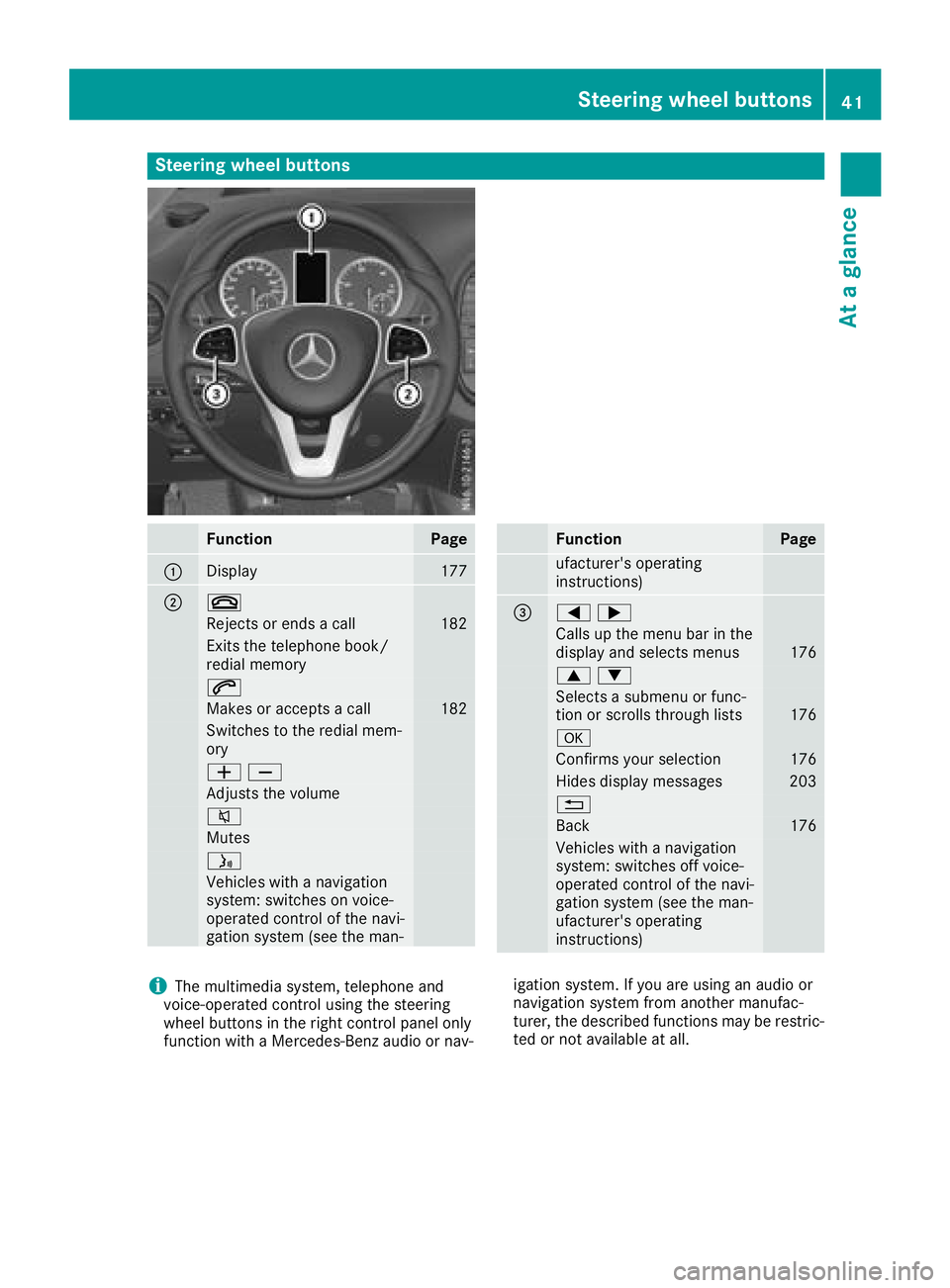
Steering wheel buttons
FunctionPage
:Display177
;~
Rejects or ends a call182
Exits the telephone book/
redial memory
6
Makes or accepts a call182
Switches to the redial mem-
ory
WX
Adjusts the volume
8
Mutes
ó
Vehicles with a navigation
system: switches on voice-
operated control of the navi-
gation system (see the man-
FunctionPage
ufacturer's operating
instructions)
==;
Calls up the menu barinthe
display and selects menus176
9:
Selects a submenu or func-
tion or scrolls through lists176
a
Confirms your selection176
Hides display messages203
%
Back176
Vehicles with a navigation
system: switches off voice-
operated control of the navi-
gation system (see the man-
ufacturer's operating
instructions)
iThe multimedia system, telephone and
voice-operated control using the steering
wheel buttons in the right control panel only
function with a Mercedes-Benz audio or nav- igation system. If you are using an audio or
navigation system from another manufac-
turer, the described functions may be restric-
ted or not available at all.
Steering wheel buttons41
At a glance
Page 55 of 318
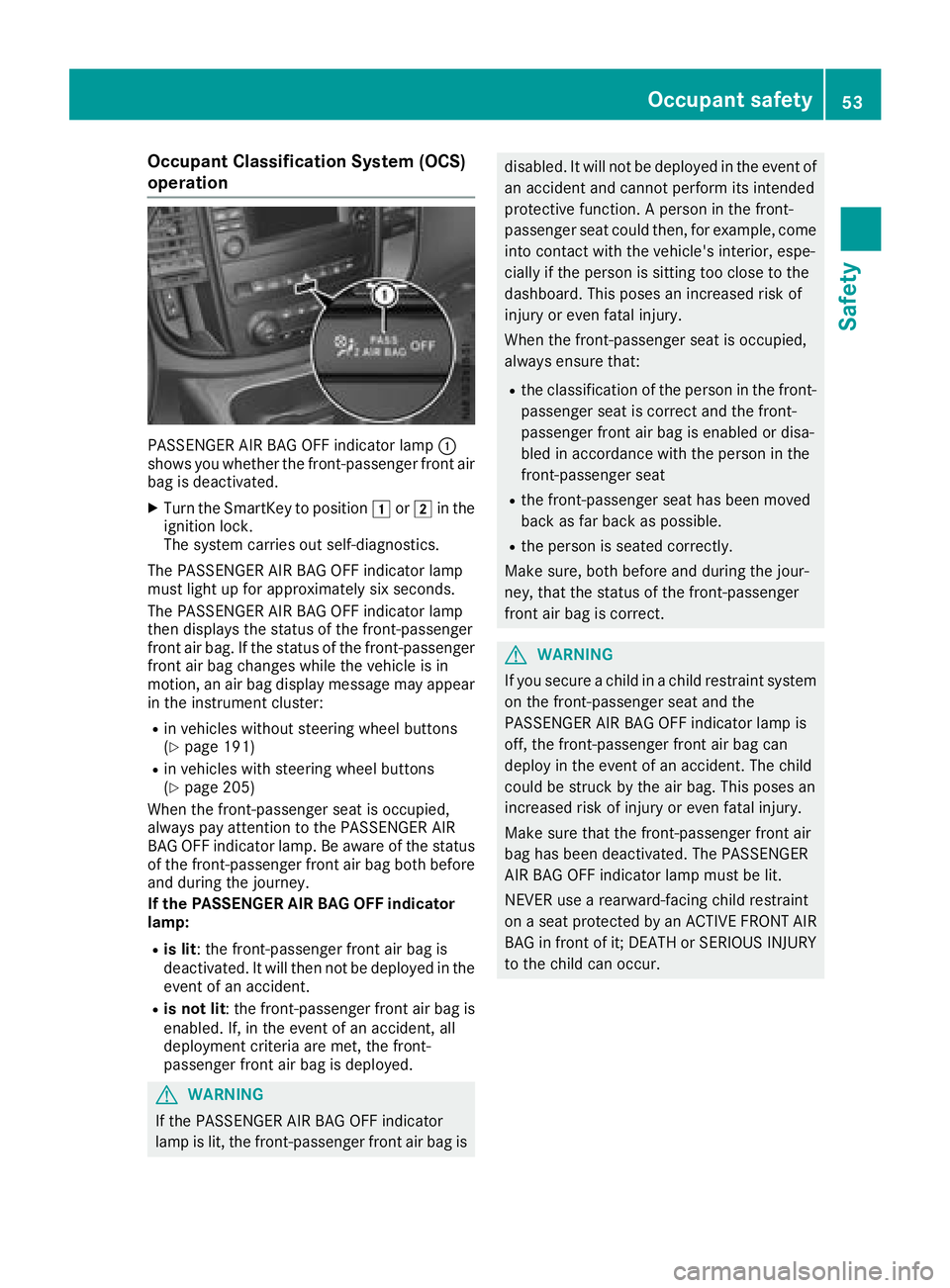
Occupant Classification System (OCS)
operation
PASSENGER AIR BAG OFF indicator lamp:
shows you whether the front-passenger front air
bag is deactivated.
XTurn the SmartKey to position 1or2 in the
ignition lock.
The system carries out self-diagnostics.
The PASSENGER AIR BAG OFF indicator lamp
must light up for approximately six seconds.
The PASSENGER AIR BAG OFF indicator lamp
then displays the status of the front-passenger
front air bag. If the status of the front-passenger
front air bag changes while the vehicle is in
motion, an air bag display message may appear
in the instrument cluster:
Rin vehicles without steering wheel buttons
(Ypage 191)
Rin vehicles with steering wheel buttons
(Ypage 205)
When the front-passenger seat is occupied,
always pay attention to the PASSENGER AIR
BAG OFF indicator lamp. Be aware of the status
of the front-passenger front air bag both before
and during the journey.
If the PASSENGER AIR BAG OFF indicator
lamp:
Ris lit : the front-passenger front air bag is
deactivated. It will then not be deployed in the
event of an accident.
Ris not lit : the front-passenger front air bag is
enabled. If, in the event of an accident, all
deployment criteria are met, the front-
passenger front air bag is deployed.
GWARNING
If the PASSENGER AIR BAG OFF indicator
lamp is lit, the front-passenger front air bag is
disabled. It will not be deployed in the event of an accident and cannot perform its intended
protective function. A person in the front-
passenger seat could then, for example, come
into contact with the vehicle's interior, espe-
cially if the person is sitting too close to the
dashboard. This poses an increased risk of
injury or even fatal injury.
When the front-passenger seat is occupied,
always ensure that:
Rthe classification of the person in the front-passenger seat is correct and the front-
passenger front air bag is enabled or disa-
bled in accordance with the person in the
front-passenger seat
Rthe front-passenger seat has been moved
back as far back as possible.
Rthe person is seated correctly.
Make sure, both before and during the jour-
ney, that the status of the front-passenger
front air bag is correct.
GWARNING
If you secure a child in a child restraint system on the front-passenger seat and the
PASSENGER AIR BAG OFF indicator lamp is
off, the front-passenger front air bag can
deploy in the event of an accident. The child
could be struck by the air bag. This poses an
increased risk of injury or even fatal injury.
Make sure that the front-passenger front air
bag has been deactivated. The PASSENGER
AIR BAG OFF indicator lamp must be lit.
NEVER use a rearward-facing child restraint
on a seat protected by an ACTIVE FRONT AIR
BAG in front of it; DEATH or SERIOUS INJURY
to the child can occur.
Occupant safety53
Safety
Z
Page 66 of 318
the electric sliding door using the corresponding
ÅorÆ sliding door button in the center
console (
Ypage 77).
Pets in the vehicle
GWARNING
If you leave animals unattended or unsecured
in the vehicle, they could press buttons or
switches, for example.
As a result, they could:
Ractivate vehicle equipment and become
trapped, for example
Ractivate or deactivate systems, thereby
endangering other road users
Unsecured animals could also be flung around
the vehicle in the event of an accident or sud-
den steering or braking, thereby injuring vehi-
cle occupants. There is a risk of an accident
and injury.
Never leave animals unattended in the vehi-
cle. Always secure animals properly during
the journey, e.g. use a suitable animal trans-
port box.
Driving safety systems
Overview
In this section, you will find information about
the following driving safety systems:
REBD ( Electronic Brake Force Distribution)
RABS ( Anti-lock Braking System)
RBAS ( Brake Assist System)
RESP®(E lectronic Stability Program)
Important safety notes
If you fail to adapt your driving style or if you are
inattentive, the driving safety systems can nei-
ther reduce the risk of accident nor override the
laws of physics. Driving safety systems are
merely aids designed to assist driving. You are
responsible for the distance to the vehicle in
front, for vehicle speed, braking in good time
and for staying in your lane. Always adapt your driving style to the prevailing road and weather
conditions and maintain a sufficient, safe dis-
tance from other road users. Drive carefully.
Please note that the driving safety systems
described only work optimally when:
Rthere is adequate contact between the tires
and the road surface
Ryou use winter tires (M+S tires), with snow
chains if necessary, when the road conditions
are wintry
Rthe speed information determined by the
vehicle is within the legally prescribed display
accuracy
Pay particular attention to the information
regarding tires, tire tread and winter operation
under "Wheels and tires" (
Ypage 277).
ABS (Anti-lock Braking System)
General notes
ABS regulates brake pressure in such a way that the wheels do not lock when you brake. This
allows you to continue steering the vehicle when
braking.
The ò warning lamp in the instrument cluster
lights up when the ignition is switched on. The
lamp goes out when the engine starts running.
Important safety notes
Observe the important safety guidelines for the
driving safety system (Ypage 64).
ABS works from a speed of about 5 mph
(8 km/h), regardless of road-surface conditions. ABS works on slippery surfaces, even when you
only brake gently.
GWARNING
If ABS is faulty, the wheels could lock when
braking. The steerability and braking charac-
teristics may be severely impaired. Addition-
ally, further driving safety systems are deac-
tivated. There is an increased danger of skid-
ding and accidents.
Drive on carefully. Have ABS checked imme-
diately at a qualified specialist workshop.
If ABS is malfunctioning, the òwarning lamp
(
Ypage 222) lights up while the engine is run-
ning and the display shows a message:
64Driving safet ysystem s
Safety
Page 67 of 318
Ron vehicles without steering wheel buttons
(Ypage 190)
Ron vehicles with steering wheel buttons
(Ypage 204)
BAS, Hill Start Assist and ESP®and its driving
safety systems and other driving systems also
fail. Observe the notes on the òwarning
lamp and the display messages.
Braking
If ABS intervenes when braking, you will feel a
pulsating in the brake pedal.
The pulsating brake pedal can be an indication
of hazardous road conditions and functions as a
reminder to take extra care while driving.
XIf ABS intervenes: continue to depress the
brake pedal with force until the braking sit-
uation is over.
XTo make a full brake application: depress
the brake pedal with full force.
BAS (Brake Assist System)
General notes
BAS operates in emergency braking situations.
If you depress the brake pedal quickly, BAS
automatically boosts the braking force, thus
shortening the stopping distance.
Important safety notes
Observe the important safety guidelines for the
driving safety system (Ypage 64).
GWARNING
If BAS is malfunctioning, the braking distance
in an emergency braking situation is
increased. There is a risk of an accident.
In an emergency braking situation, depress
the brake pedal with full force. ABS prevents
the wheels from locking.
If BAS is malfunctioning, the ÷warning lamp
lights up while the engine is running
(
Ypage 222) and the display shows a message:
Ron vehicles without steering wheel buttons
(Ypage 194)
Ron vehicles with steering wheel buttons
(Ypage 208)
Brakes
XKeep the brake pedal firmly depressed until
the emergency braking situation is over.
ABS prevents the wheels from locking.
The brakes will function as usual once you
release the brake pedal. BAS is deactivated.
EBD (electronic brake force distribu-
tion)
General notes
EBD monitors and controls the brake pressure
to the rear wheels. This enables EBD to improve
handling during braking.
Important safety notes
Observe the important safety guidelines for the
driving safety system (Ypage 64).
GWARNING
If EBD is malfunctioning, the rear wheels can
lock, e.g. under full braking. This increases the
risk of skidding and an accident.
You should therefore adapt your driving style
to the different handling characteristics. Have
the brake system checked at a qualified spe-
cialist workshop.
If EBD is malfunctioning, the $warning lamp
(
Ypage 221) lights up while the engine is run-
ning and the display shows a message.
Ron vehicles without steering wheel buttons
(Ypage 193)
Ron vehicles with steering wheel buttons
(Ypage 207)
Other driving systems and driving safety sys-
tems then also fail.
ESP®(Electronic Stability Program)
General notes
ESP®monitors driving stability and detects a
tendency of the vehicle to understeer or over-
steer (skidding) in good time. If ESP
®detects
that the vehicle is deviating from the direction
desired by the driver, one or more wheels are
braked to stabilize the vehicle. The engine out-
Driving safety systems65
Safety
Z