display MERCEDES-BENZ METRIS 2017 MY17 Operator’s Manual
[x] Cancel search | Manufacturer: MERCEDES-BENZ, Model Year: 2017, Model line: METRIS, Model: MERCEDES-BENZ METRIS 2017Pages: 318, PDF Size: 5.01 MB
Page 125 of 318
Hill start assist
Hill start assist helps you when pulling away for-
wards or in reverse on an uphill gradient. Hill
start assist automatically maintains the brake
pressure for about another second, after you
have taken your foot off the brake pedal. This
gives you enough time to move your foot from
the brake pedal to the accelerator pedal and
depress it before the vehicle begins to roll.
GWARNING
After a short time, hill start assist will no lon-
ger brake your vehicle and it could roll away.
There is a risk of an accident and injury.
Therefore, quickly move your foot from the
brake pedal to the accelerator pedal. Never
leave the vehicle when it is held by hill start
assist.
Hill start assist is not active if:
Ryou are pulling away on a level road or a
downhill gradient
Rthe transmission is in position N
Rthe parking brake is applied
RESP®is malfunctioning
Reverse warning device
GWARNING
Other road users may ignore or fail to hear the warning tone of the reverse warning feature.
There is a risk of injury if you fail to ensure that
the area in which you are maneuvering is
clear.
Make sure that there are no persons or
objects in the area in which you are maneu-
vering. It may be necessary to enlist the help
of a second person when maneuvering.
The reverse warning feature is a system
designed to assist you in ensuring the safety of
other road users.
A warning signal sounds to alert other road
users when reverse gear is engaged. The volume
of the warning tone can be reduced for night-
time driving.
XTo reduce the volume of the warning tone:
engage reverse gear twice in quick succes-
sion.
The warning tone is now quieter.
iThe warning tone sounds at a normal vol-
ume by default. The volume of the warning
tone has to be reduced each time you engage
reverse gear if necessary.
ECO start/stop function
General notes
When the ECO start/stop function is opera-
tional, it switches the engine off automatically if
the vehicle is slowed to a stop under certain
conditions.
When pulling away again, it starts the engine
automatically. The ECO start/stop function
thereby helps you to reduce the fuel consump-
tion and emissions of your vehicle.
The stop/start function is automatically activa-
ted each time you start the engine with the key.
In drive program Mthe ECO start/stop function
is automatically deactivated. You can manually
activate the ECO start/stop function if required.
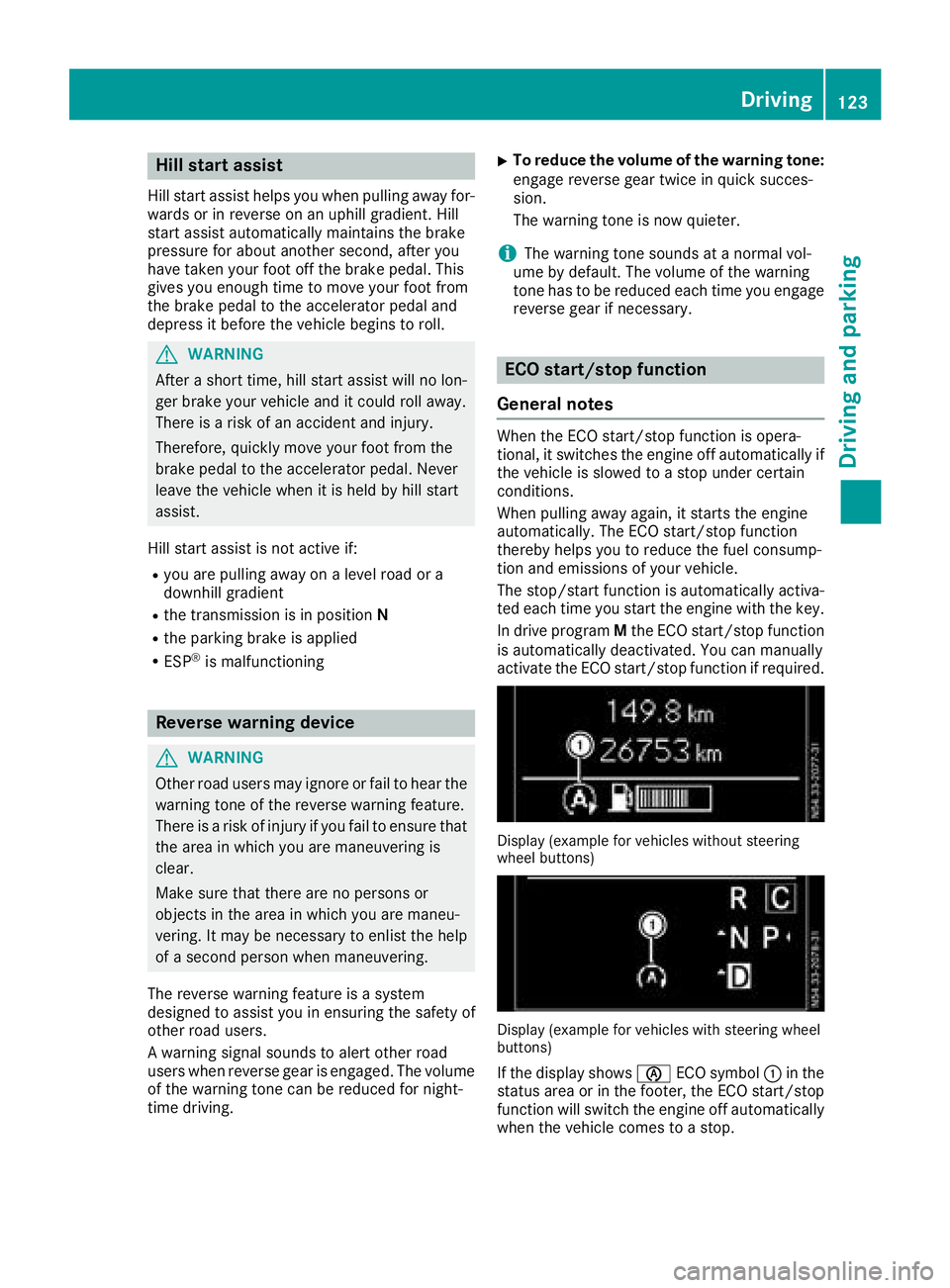
Display (example for vehicles without steering
wheel buttons)
Display (example for vehicles with steering wheel
buttons)
If the display shows èECO symbol :in the
status area or in the footer, the ECO start/stop
function will switch the engine off automatically
when the vehicle comes to a stop.
Driving123
Driving and parking
Z
Page 126 of 318
Important safety notes
GWARNING
If th eengin eis switched off automatically and
you exit th evehicle, th eengin eis restarte d
automatically. The vehicl emay begi nmoving .
Ther eis aris kof acciden tand injury.
If you wish to exit th evehicle, always tur noff
th eignition and secure th evehicl eagainst
rollin gaway.
Automatic engine switch-off
Gene ral notes
The ECO start/sto pfunction is operational
when th eè ECO symbol is shown in th esta-
tus bar of th edisplay.
Fo rthis to happen, various conditions, includin g
th efollowing, must be met :
RtheECO start/sto pfunction is switched on .
The indicator lamp in th eè ECO butto nis
lit (
Ypage 125).
Rtheoutside temperature is abov e32 ‡(0 †).
Rthe engine has reached its operating temper-
ature.
Rthe set temperature for the vehicle interior
has been reached.
Rthe condition of charge of the starter battery
is sufficient.
Rthe system detects that the windshield is not
fogged up when the air-conditioning system
or automatic climate control is switched on.
Rthe hood is closed.
Rthe driver's seat belt is fastened.
Rthe driver's door is closed.
Rthere is no danger of immediately rolling
backwards, e.g. when stopped on a steep gra-dient.
If a trailer is attached and/or a rear carrier
system is installed and connected electri-
cally, this danger is detected on less steep
gradients.
Only if all the conditions for automatic engine
switch-off are fulfilled, does the display show
the è ECO symbol.
All of the vehicle's systems remain active when
the engine is switched off automatically.
The engine can be switched off automatically a
maximum of four times (initial stop, then three subsequent stops) in succession. After that, the
display hides the èECO symbol. Automatic
engine switch-off is not possible again until the
è ECO symbol is shown again.
If you open the hood after an a
utomatic engine
switch-off, the automatic engine start is deacti-
vated. Once the hood is closed, you have to start
the engine manually.
If the vehicle is stopped in Dor N, the ECO start/
stop function switches off the engine automat-
ically once the vehicle is stationary.
Automatic engine start
General notes
The engine is started automatically if:
Ryou switch off the ECO start/stop function by
pressing the èECO button The indicator
lamp in the èECO button then goes out.
(
Ypage 125)
Ryou depress the accelerator pedal.
Ryou engage reverse gear R.
Ryou unfasten your seat belt.
Ryou open the driver's door.
Rthe vehicle begins to roll away.
Rthe brake system requires this.
Rthe temperature in the vehicle interior
increasingly deviates from the set value.
Rthe system detects moisture on the wind-
shield when the air-conditioning system is
switched on.
Rthe battery's condition of charge is too low.
The engine is started automatically if you:
Rswitch to drive program M(Ypage 129)
Rrelease the brake pedal when in transmission
position Dor N
Rswitch to transmission position P
After shifting from transmission position Rto D,
the ECO start/stop function is not available until
the è ECO symbol is shown in the display.
124Driving
Driving and parking
Page 127 of 318
Activating and deactivating the ECO
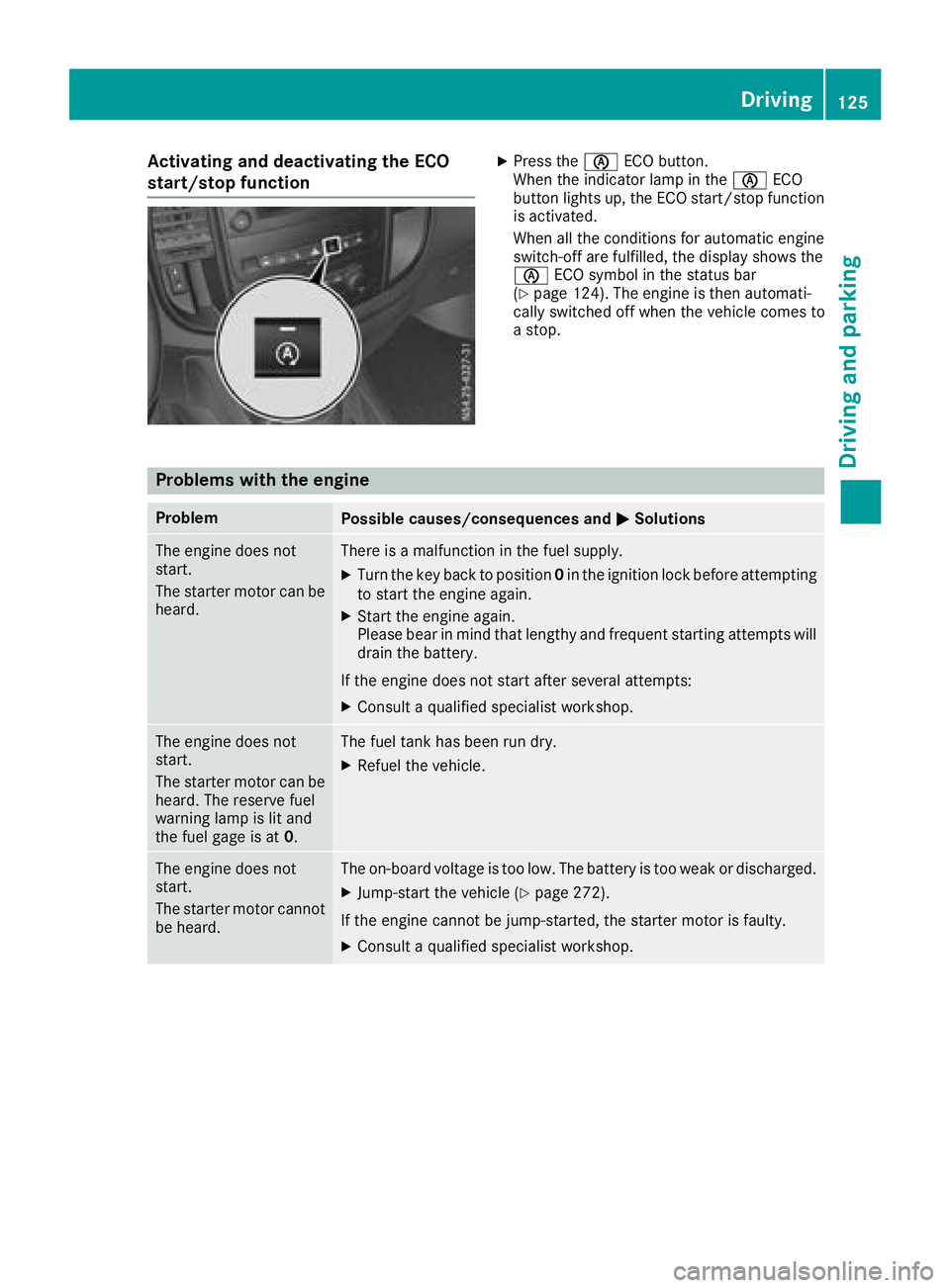
start/stop functionXPress theè ECO button.
When th eindicator lamp in th eè ECO
butto nlights up, th eECO start/sto pfunction
is activated.
When all th econdition sfor automatic engin e
switch-off are fulfilled ,th edisplay shows th e
è ECO symbol in th estatus bar
(
Ypage 124). The engin eis then automati-
call yswitched off when th evehicl ecomes to
a stop.
Problems with the engine
ProblemPossible causes/consequences and MSolutions
The enginedoes no t
start .
The starter motor can be
heard.There is amalfunction in th efuel supply.
XTurn th eke ybac kto position 0in th eignition loc kbefore attempting
to start th eengin eagain .
XStart th eengin eagain .
Pleas ebear in min dthat lengthy and frequen tstarting attempts will
drai nth ebattery.
If th eengin edoes no tstart after several attempts :
XConsultaqualified specialist workshop .
The enginedoes no t
start .
The starter motor can be
heard. The reserv efuel
warning lamp is lit and
th efuel gage is at 0.The fuel tankhas been run dry.
XRefue lth evehicle.
The engin edoes no t
start .
The starter motor canno t
be heard.The on-board voltag eis to olow. The battery is to oweak or discharged.
XJump-start th evehicl e (Ypage 272).
If th eengin ecanno tbe jump-started, th estarter motor is faulty.
XConsult aqualified specialist workshop .
Driving125
Driving and parking
Z
Page 128 of 318
ProblemPossible causes/consequences andMSolutions
The engine does not
start.
The starter motor cannot
be heard.The battery is discharged or faulty.
XCheck the battery for damage.
XCharge the battery (Ypage 262).
The engine is not running
smoothly and is misfir-
ing.There is a malfunction in the engine electronics or a mechanical com-
ponent of the engine management system.
XOnly depress the accelerator pedal slightly.
Unburnt fuel may otherwise get into the catalytic converter and
damage it.
XHave the cause rectified immediately at a qualified specialist work-
shop.
Automatic transmission
Important safety notes
GWARNING
If the engine speed is above the idling speed
and you engage transmission position Dor R,
the vehicle could pull away suddenly. There is
a risk of an accident.
When engaging transmission position Dor R,
always firmly depress the brake pedal and do not simultaneously accelerate.
GWARNING
The automatic transmission switches to neu-
tral position Nwhen you switch off the engine.
The vehicle may roll away. There is a risk of an
accident.
Before switching off the engine, always switch
to parking position P. Prevent the parked vehi-
cle from rolling away by applying the parking
brake.
!If the engine is switched off, rolling in neutral
N can damage the power transmission and
result in transmission damage.
Always observe the instructions and safety
notes under "Tow starting and towing away"
(
Ypage 274).
Bear in mind that power transmission between
the engine and the transmission is interrupted
when the engine is switched off. For this reason,
shift the automatic transmission to Pbefore the engine is switched off and with the vehicle is
stationary. Apply the parking brake to prevent
the vehicle from rolling away.
DIRECT SELECT lever
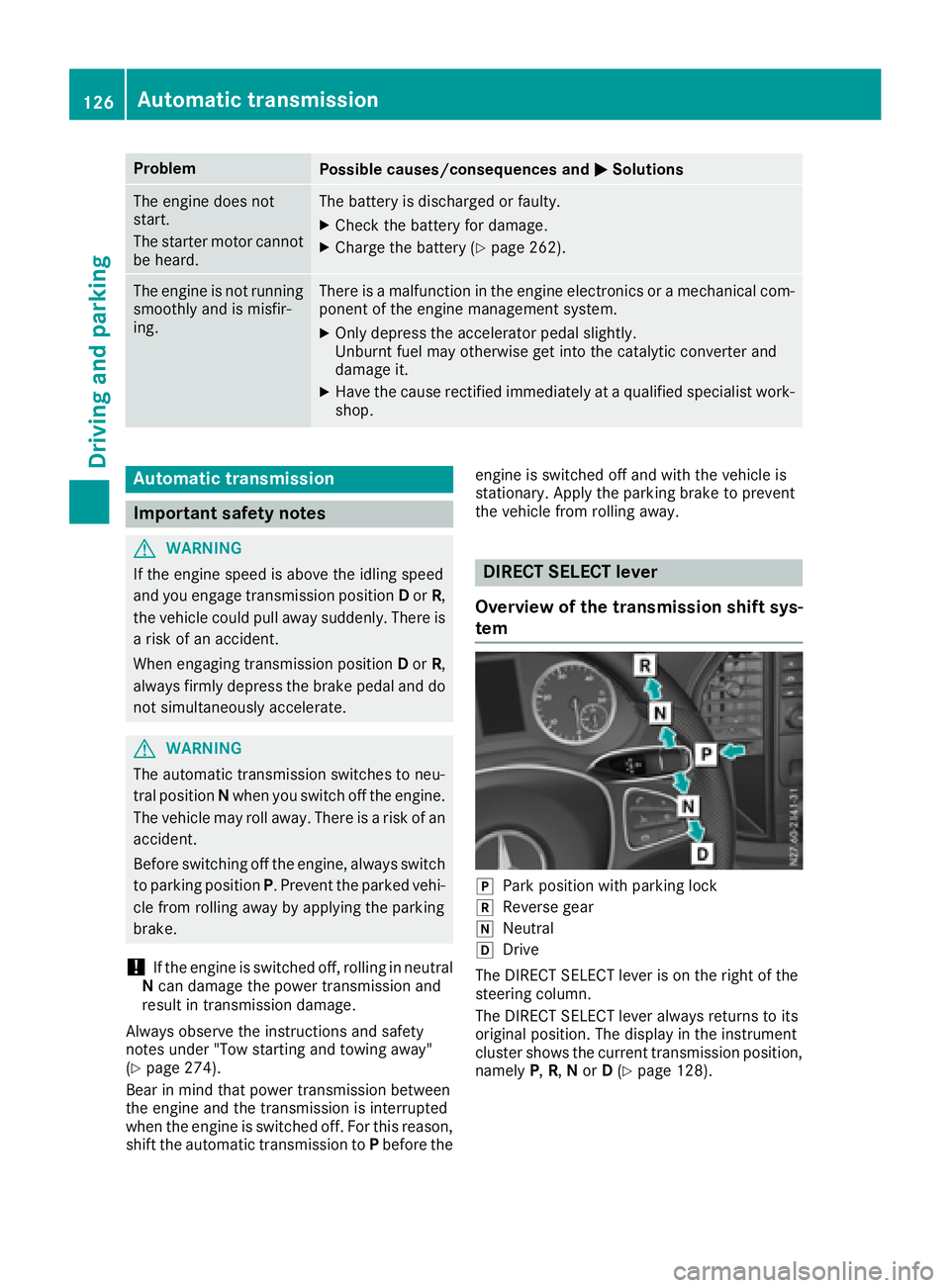
Overview of the transmission shift sys-
tem
jPark position with parking lock
kReverse gear
iNeutral
hDrive
The DIRECT SELECT lever is on the right of the
steering column.
The DIRECT SELECT lever always returns to its
original position. The display in the instrument
cluster shows the current transmission position,
namely P,R, Nor D(
Ypage 128).
126Automatic transmission
Driving and parking
Page 130 of 318
Transmission position and drive pro-
gram display
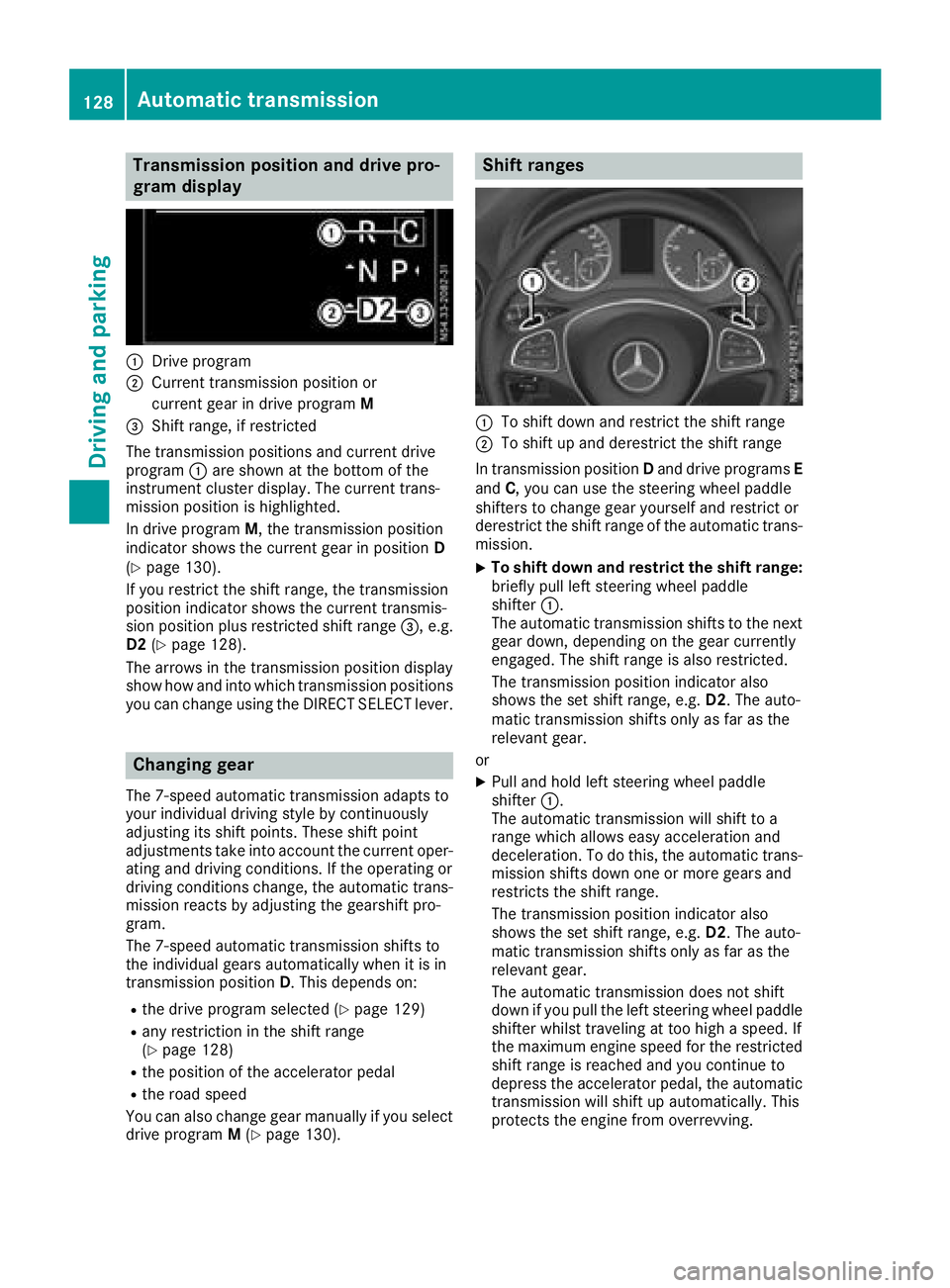
:Drive program
;Current transmission position orcurrent gear in drive program M
=Shift range, if restricted
The transmission positions and current drive
program :are shown at the bottom of the
instrument cluster display. The current trans-
mission position is highlighted.
In drive program M, the transmission position
indicator shows the current gear in position D
(
Ypage 130).
If you restrict the shift range, the transmission
position indicator shows the current transmis-
sion position plus restricted shift range =, e.g.
D2 (
Ypage 128).
The arrows in the transmission position display
show how and into which transmission positions
you can change using the DIRECT SELECT lever.
Changing gear
The 7-speed automatic transmission adapts to
your individual driving style by continuously
adjusting its shift points. These shift point
adjustments take into account the current oper-
ating and driving conditions. If the operating or
driving conditions change, the automatic trans-
mission reacts by adjusting the gearshift pro-
gram.
The 7-speed automatic transmission shifts to
the individual gears automatically when it is in
transmission position D. This depends on:
Rthe drive program selected (Ypage 129)
Rany restriction in the shift range
(Ypage 128)
Rthe position of the accelerator pedal
Rthe road speed
You can also change gear manually if you select
drive program M(
Ypage 130).
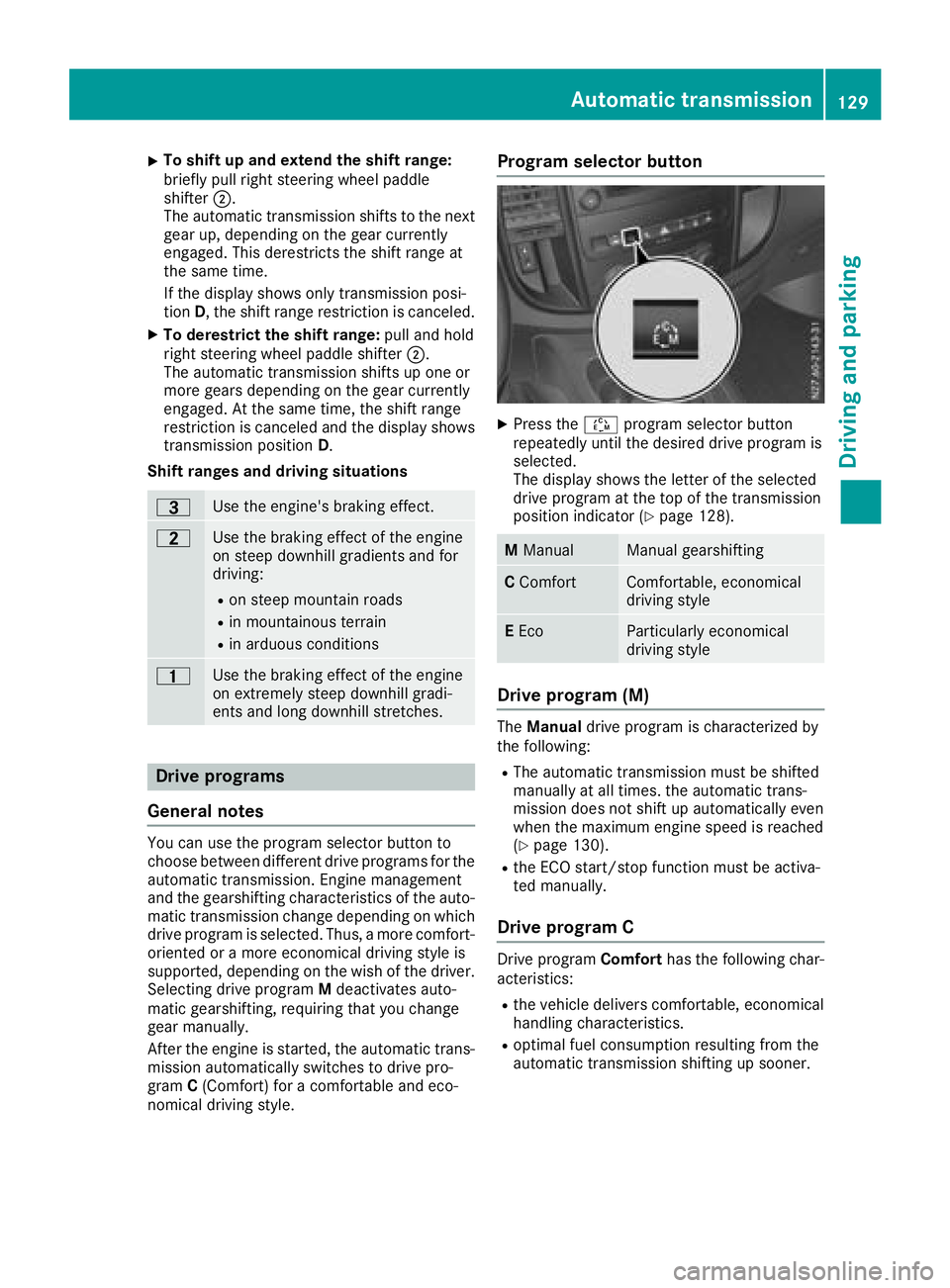
Shift ranges
:To shift down and restrict the shift range
;To shift up and derestrict the shift range
In transmission position Dand drive programs E
and C, you can use the steering wheel paddle
shifters to change gear yourself and restrict or
derestrict the shift range of the automatic trans-
mission.
XTo shift down and restrict the shift range:
briefly pull left steering wheel paddle
shifter :.
The automatic transmission shifts to the next
gear down, depending on the gear currently
engaged. The shift range is also restricted.
The transmission position indicator also
shows the set shift range, e.g. D2. The auto-
matic transmission shifts only as far as the
relevant gear.
or
XPull and hold left steering wheel paddle
shifter :.
The automatic transmission will shift to a
range which allows easy acceleration and
deceleration. To do this, the automatic trans-
mission shifts down one or more gears and
restricts the shift range.
The transmission position indicator also
shows the set shift range, e.g. D2. The auto-
matic transmission shifts only as far as the
relevant gear.
The automatic transmission does not shift
down if you pull the left steering whee l p
addle
shifter whilst traveling at too high a speed. If
the maximum engine speed for the restricted
shift range is reached and you continue to
depress the accelerator pedal, the automatic transmission will shift up automatically. This
protects the engine from overrevving.
128Automatic transmission
Driving an d parking
Page 131 of 318
XTo shift up and extend the shift range:
briefly pull right steering wheel paddle
shifter;.
The automatic transmission shifts to the next gear up, depending on the gear currently
engaged. This derestricts the shift range at
the same time.
If the display shows only transmission posi-
tion D, the shift range restriction is canceled.
XTo derestrict the shift range: pull and hold
right steering wheel paddle shifter ;.
The automatic transmission shifts up one or
more gears depending on the gear currently
engaged. At the same time, the shift range
restriction is canceled and the display shows
transmission position D.
Shift ranges and driving situations
=Use the engine's braking effect.
5Use the braking effect of the engine
on steep downhill gradients and for
driving:
Ron steep mountain roads
Rin mountainous terrain
Rin arduous conditions
4Use the braking effect of the engine
on extremely steep downhill gradi-
ents and long downhill stretches.
Drive programs
General notes
You can use the program selector button to
choose between different drive programs for the
automatic transmission. Engine management
and the gearshifting characteristics of the auto-
matic transmission change depending on which
drive program is selected. Thus, a more comfort-
oriented or a more economical driving style is
supported, depending on the wish of the driver.
Selecting drive program Mdeactivates auto-
matic gearshifting, requiring that you change
gear manually.
After the engine is started, the automatic trans-
mission automatically switches to drive pro-
gram C(Comfort) for a comfortable and eco-
nomical driving style.
Program selector button
XPress the Éprogram selector button
repeatedly until the desired drive program is
selected.
The display shows the letter of the selected
drive program at the top of the transmission
position indicator (
Ypage 128).
M ManualManual gearshifting
CComfortComfortable, economical
driving style
EEcoParticularly economical
driving style
Drive program (M)
The Manual drive program is characterized by
the following:
RThe automatic transmission must be shifted
manually at all times. the automatic trans-
mission does not shift up automatically even
when the maximum engine speed is reached
(
Ypage 130).
Rthe ECO start/stop function must be activa-
ted manually.
Drive program C
Drive program Comforthas the following char-
acteristics:
Rthe vehicle delivers comfortable, economical
handling characteristics.
Roptimal fuel consumption resulting from the
automatic transmission shifting up sooner.
Automatic transmission129
Driving an d parking
Z
Page 132 of 318
Rincreased sensitivity. This improves driving
stability on slippery road surfaces, for exam-
ple.
Rthe automatic transmission shifts up sooner.
The vehicle thus maintains lower engine
speeds.
Drive program E
Drive programEcohas the following character-
istics:
Rthe vehicle exhibits particularly economical
handling characteristics.
Rthe maximum available engine torque is
reduced.
Roptimal fuel consumption resulting from the
automatic transmission shifting down signifi-
cantly later and up significantly sooner, even
at full-load operation.
No shift point adjustment for adapting to indi-
vidual, dynamic driving styles.
In kickdown, the automatic transmission
automatically shifts to drive program C.
Rincreased sensitivity. This improves driving
stability on slippery road surfaces, for exam-
ple.
Driving tips
Accelerator pedal position
Your style of driving influences how the auto-
matic transmission shifts gear:
Rlittle throttle: early upshifts
Rlots of throttle: later upshifts
Kickdown
Use kickdown for maximum acceleration:
XDepress the accelerator pedal beyond the
pressure point.
The automatic transmission shifts to the next
gear down, depending on the engine speed.
XEase off on the accelerator pedal once the
desired speed is reached.
The automatic transmission shifts up again.
Rocking the vehicle free
At speeds up to 5 mph (9 km/h) you can switch
back and forth between drive position Dand
reverse gear Rwithout applying the brakes. This
helps when rocking the vehicle out of snow or
slush.
XPush the DIRECT SELECT lever alternately up
and down beyond the first point of resistance.
Towing a trailer
XDepending on the downhill gradient, limit the
shift range (Ypage 128) or shift manually into
a lower gear (Ypage 130) in which the engine
will operate in the middle of the engine speed
range. This also applies if cruise control is
activated.
Manual gearshifting
General notes
If you select drive program M, automatic gear-
shifting is deactivated and manual gearshifting
is automatically activated. You must then per-
manently change gear yourself for as long as the
drive program is selected.
Permanent manual gearshifting is deactivated
automatically when you switch from drive pro-
gram Mto another drive program. The auto-
matic transmission then shifts gears automati-
cally. The display shows the selected drive pro-
gram and transmission position Dagain.
Shifting gears
:To shift down
;To shift up
130Automatic transmission
Driving and parking
Page 133 of 318
The drive program display showsMand the
transmission position indicator shows the selec-
ted gear.
XTo shift up: briefly pull right-hand steering
wheel paddle shifter ;.
If the engine speed is sufficient, the automatic
transmission shifts up to the next gear.
If the maximum engine speed is reached in
the currently engaged gear and you continue
to accelerate, the automatic transmission will
not shift up automatically. Always make sure
that the engine speed does not reach the red
area of the tachometer. Observe the gearshift
recommendation in the display (
Ypage 131).
When the engine reaches its maximum speed, the fuel supply is cut to prevent the engine
from overrevving.
XTo shift down: pull briefly on left-hand steer-
ing wheel paddle shifter :.
Provided that the engine will not exceed its
maximum speed when shifting down, the
automatic transmission shifts down to the
next gear.
or
XPull the left-hand steering wheel paddle
shifter until the automatic transmission
selects the optimum gear for the current
speed.
iWhen coasting, the automatic transmission
shifts down automatically.
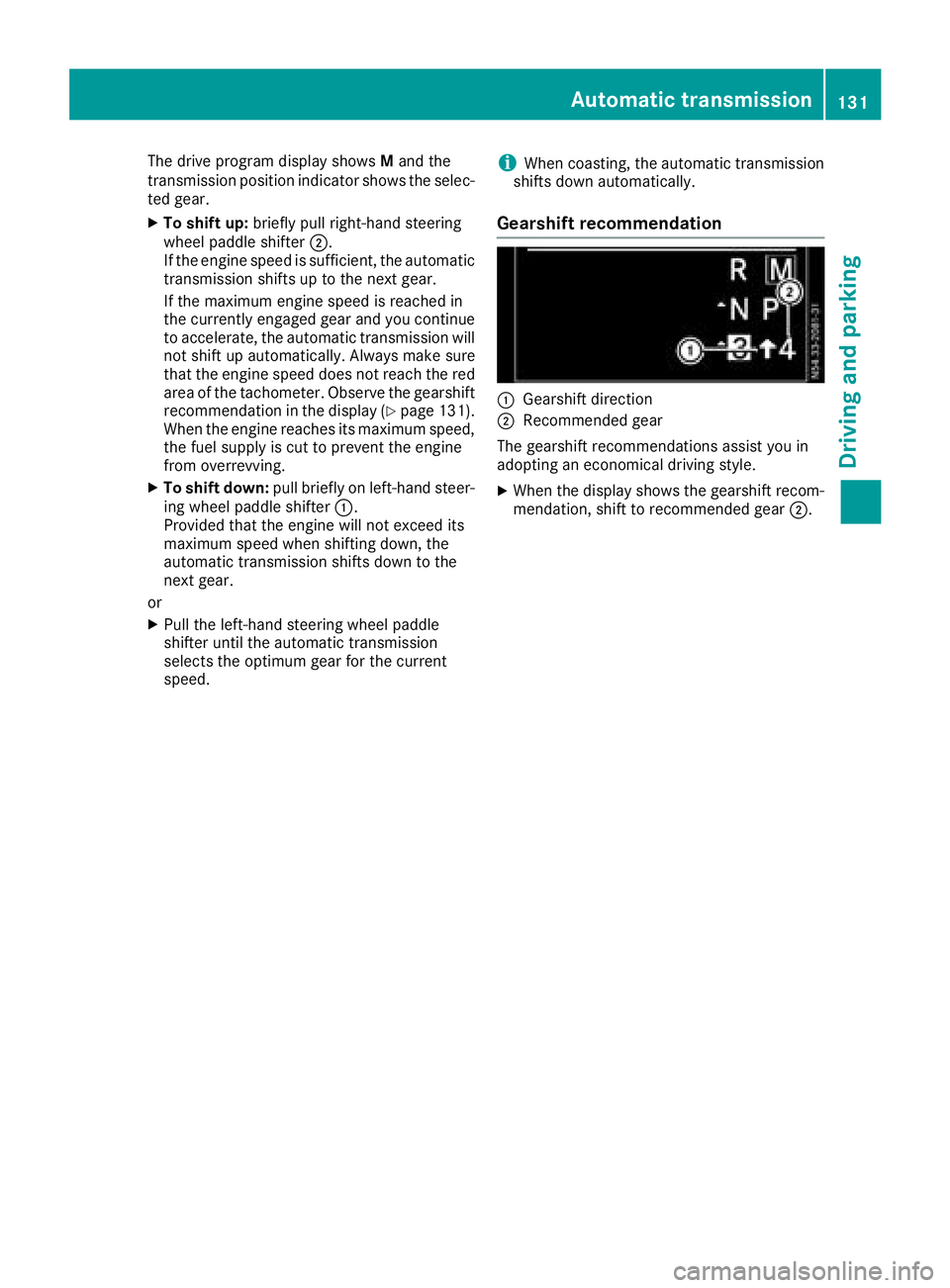
Gearshift recommendation
:Gearshift direction
;Recommended gear
The gearshift recommendations assist you in
adopting an economical driving style.
XWhen the display shows the gearshift recom-
mendation, shift to recommended gear ;.
Automatic transmission131
Driving and parking
Z
Page 140 of 318
!Depressing the brake pedal constantly
results in excessive and premature wear to
the brake pads.
If the brakes have been subjected to a heavy
load, do not stop the vehicle immediately. Drive
on for a short while. The brakes are cooled down
more quickly in the airflow.
Wet road surfaces
If you have been driving for a long time in heavy
rain without braking, there may be a delayed
response when you first apply the brakes. This
may also occur after driving through a car wash
or deep water.
You must depress the brake pedal more firmly.
Maintain a longer distance to the vehicle in
front.
While paying attention to the traffic conditions,
you should brake the vehicle firmly after driving
on a wet road surface or through a car wash. This
heats the brake discs, so that they dry more
quickly, which protects them against corrosion.
Limited braking performance on salt-
treated roads
When driving on salted roads, salt may start to
build up on the brake disks and brake pads. This can increase braking distances considerably.
Maintain a greater distance to the vehicle in
front.
To remove any build-up of salt that may have
formed:
XApply the brakes at the start of the journey,
occasionally during journey and at the end of
the journey. Make sure that you do not endan-
ger other road users when doing so.
Checking the brake pad thickness
In addition to monitoring using the brake pad
wear sensor, regularly monitor and check all of
the brake pads by performing a visual inspection
to look for pad material wear.
If you are unable to check the brake wear on the
inside of the wheels, remove the wheels with the tools provided.
Make sure that the brake pad material thickness
never falls below 0.12 in (3 mm). Have the brake pads checked and replaced at a qualified spe-
cialist workshop, if necessary. Do not solely rely on the brake pad wear sensor.
It is strongly recommended that you have the
brake pads checked at a qualified specialist
workshop at every service displayed in the main-
tenance interval indicator, prior to long journeys
and whenever the wheels are removed.
New brake discs and brake pads/
linings
New brake pads and brake discs only reach their
optimal braking effect after about 60 miles
(100 kilometers). Until then, compensate for
this by applying greater force to the brake pedal.
For safety reasons, Mercedes-Benz recom-
mends only installing the following brake discs
and brake pads/linings:
Rbrake discs that have been approved by
Mercedes-Benz
Rbrake pads/linings that have been approved
by Mercedes-Benz or are of an equivalent
standard of quality
Other brake discs or brake pads/linings can
compromise the safety of your vehicle.
Always replace all brake discs or brake pads/
linings on an axle at the same time and only have
them replaced at a qualified specialist work-
shop. When replacing the brake discs, always
have the brake pads/linings replaced at the
same time.
Parking brake
GWARNING
If you must brake the vehicle with the parking brake, the braking distance is considerably
longer and the wheels could lock. There is an
increased danger of skidding and accidents.
Only use the parking brake to brake the vehi-
cle when the service brake is faulty. Do not
apply the parking brake too firmly. If the
wheels lock, release the parking brake until
the wheels begin turning again.
When driving on wet roads or dirt-covered sur-
faces, road salt and/or dirt may get into the
parking brake. This causes corrosion and a
reduction of braking force.
In order to prevent this, drive with the parking
brake lightly applied from time to time. When
doing so, drive for a distance of approximately
138Driving tips
Driving and parking
Page 144 of 318
When driving at altitudes of 2700 yds (2500m)
above sea level, the ECO start/stop function is
no longer available.
Notes on braking on downhill gradients can be
found in the "Braking" section (
Ypage 137).
Driving systems
Cruise control
General notes
Cruise control maintains the speed of the vehi-
cle for you. It brakes automatically in order to
avoid exceeding the set speed.
Use cruise control if road and traffic conditions
make it appropriate to maintain a steady speed
for a prolonged period. You can set any speed
from 30 km/h upwards in increments of 1 km/h
and 10 km/h.
If you have set Miles
as the unit for the digital
speedometer, you can set any speed above
20 mph in increments of 1 mph and 5 mph.
Changing the display unit for the digital speed-
ometer and the distance:
Ron vehicles without steering wheel buttons
(Ypage 175)
Ron vehicles with steering wheel buttons
(Ypage 186)
Cruise control should not be activated when
driving off-road or on construction sites.
Cruise control may be unable to maintain the
stored speed on uphill gradients. The stored
speed is resumed if the uphill gradient evens out
and the vehicle's speed does not fall below
20 mph (30 km/ h). Cruise control maintains the
stored speed on downhill gradients by automat-
ically applying the brakes. Observe the addi-
tional driving tips (
Ypage 137).
Important safety notes
Observe the notes on braking (Ypage 137).
If you fail to adapt your driving style or if you are inattentive, cruise control can neither reduce
the risk of an accident nor override the laws of
physics. Cruise control cannot take road,
weather and traffic conditions into account.
Cruise control is only an aid. You are responsible
for the distance to the vehicle in front, for vehi-
cle speed, for braking in good time and for stay-
ing in lane. If you change wheel size, make sure they corre-
spond to the correct wheel size category
(
Ypage 277). If the category is changed without
recoding the control units in the vehicle, the
functioning of cruise control may be impaired.
Do not use cruise control:
Rin traffic conditions that are unsuitable for
driving at a constant speed, e.g. in heavy traf-
fic, on winding roads or off-road.
Ron slippery roads. Braking or accelerating
may cause the drive wheels to lose traction
and the vehicle could then skid.
Rwhen there is poor visibility, e.g. due to fog,
heavy rain or snow.
If there is a change of drivers, make sure that
you inform the new driver about the set cruise
speed.
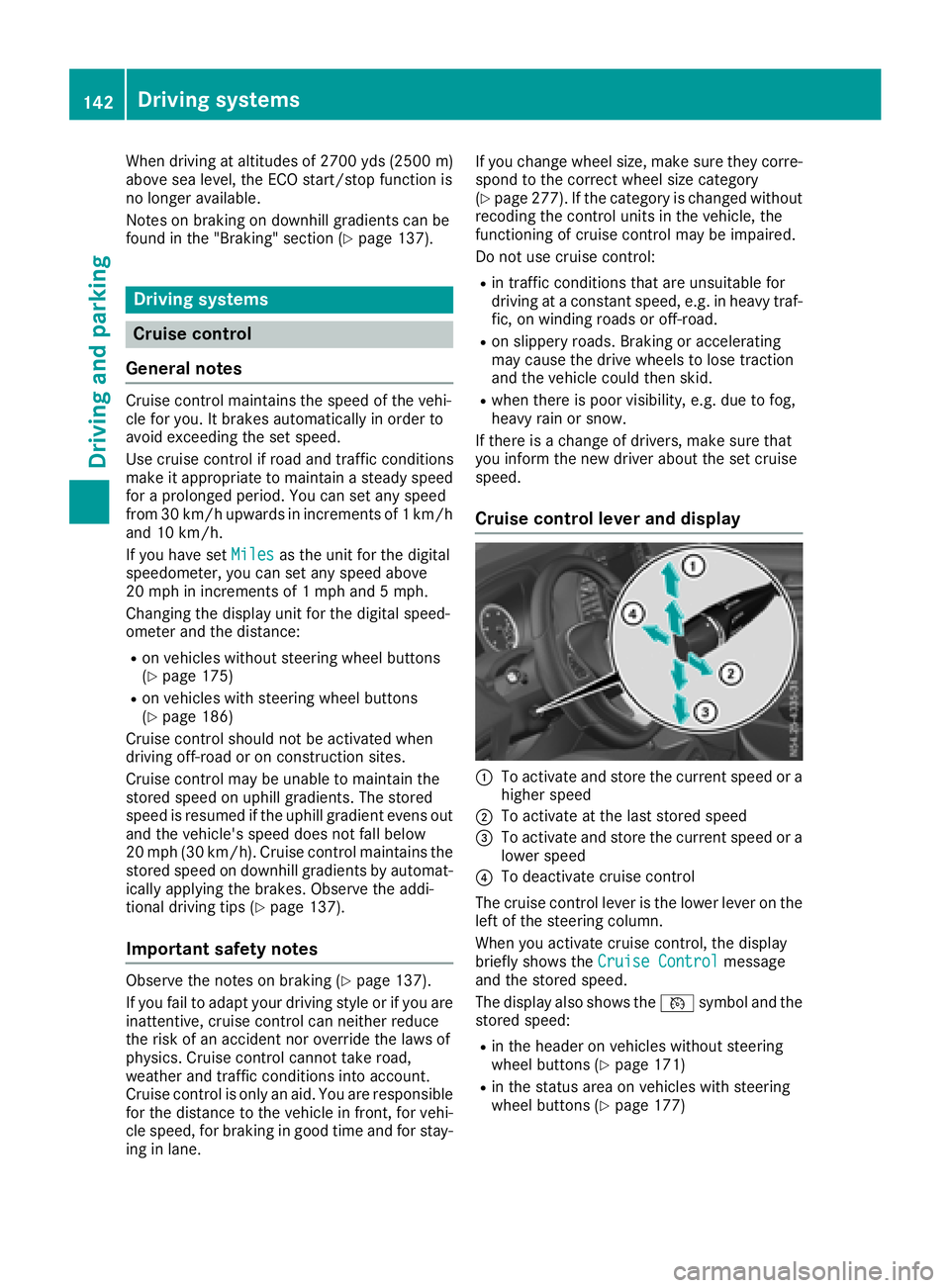
Cruise control lever and display
:To activate and store the current speed or a
higher speed
;To activate at the last stored speed
=To activate and store the current speed or a
lower speed
?To deactivate cruise control
The cruise control lever is the lower lever on the
left of the steering column.
When you activate cruise control, the display
briefly shows the Cruise Control
message
and the stored speed.
The display also shows the Vsymbol and the
stored speed:
Rin the header on vehicles without steering
wheel buttons (Ypage 171)
Rin the status area on vehicles with steering
wheel buttons (Ypage 177)
142Driving systems
Driving and parking