transmission MERCEDES-BENZ METRIS 2017 MY17 Operator’s Manual
[x] Cancel search | Manufacturer: MERCEDES-BENZ, Model Year: 2017, Model line: METRIS, Model: MERCEDES-BENZ METRIS 2017Pages: 318, PDF Size: 5.01 MB
Page 131 of 318
XTo shift up and extend the shift range:
briefly pull right steering wheel paddle
shifter;.
The automatic transmission shifts to the next gear up, depending on the gear currently
engaged. This derestricts the shift range at
the same time.
If the display shows only transmission posi-
tion D, the shift range restriction is canceled.
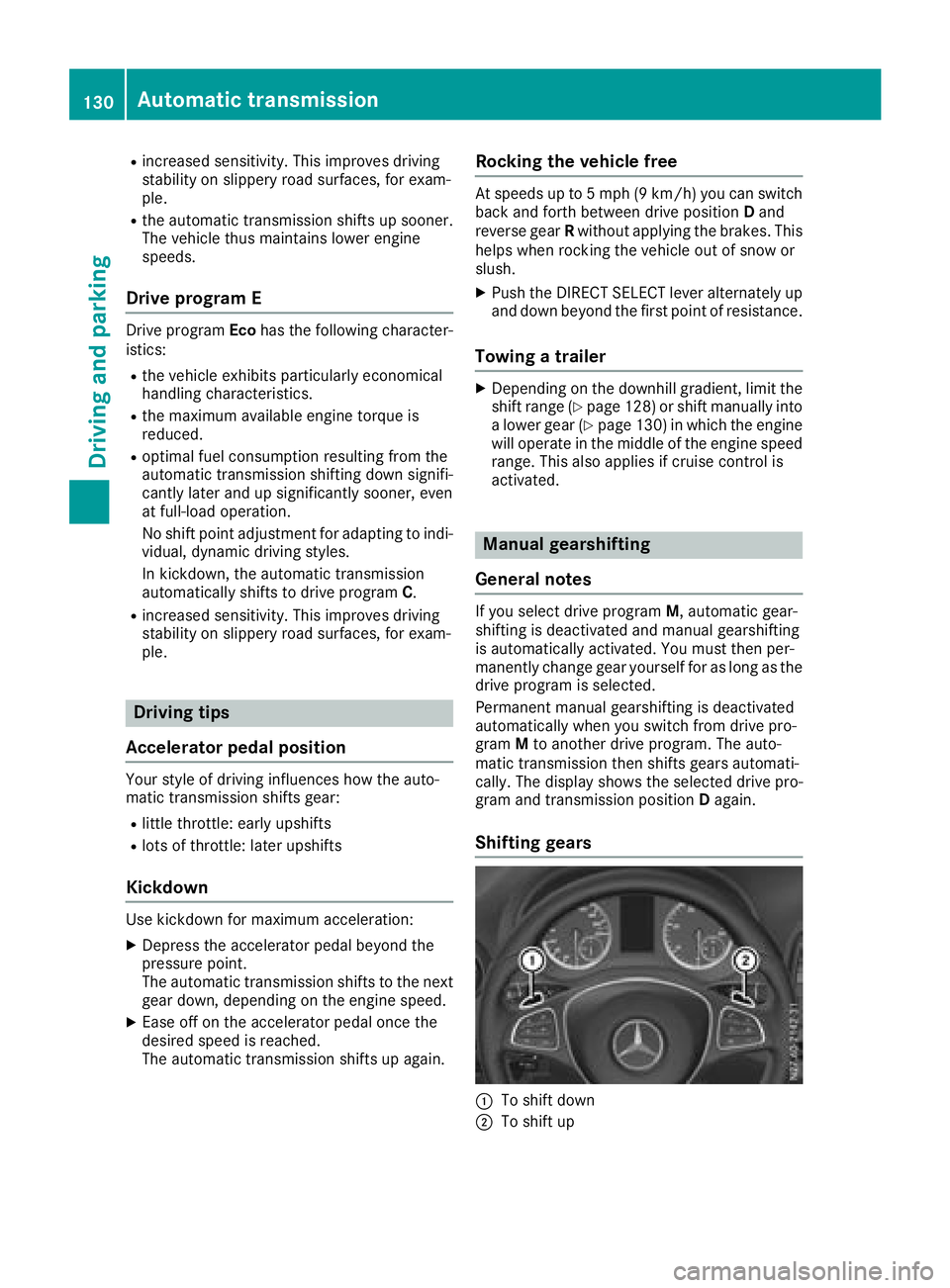
XTo derestrict the shift range: pull and hold
right steering wheel paddle shifter ;.
The automatic transmission shifts up one or
more gears depending on the gear currently
engaged. At the same time, the shift range
restriction is canceled and the display shows
transmission position D.
Shift ranges and driving situations
=Use the engine's braking effect.
5Use the braking effect of the engine
on steep downhill gradients and for
driving:
Ron steep mountain roads
Rin mountainous terrain
Rin arduous conditions
4Use the braking effect of the engine
on extremely steep downhill gradi-
ents and long downhill stretches.
Drive programs
General notes
You can use the program selector button to
choose between different drive programs for the
automatic transmission. Engine management
and the gearshifting characteristics of the auto-
matic transmission change depending on which
drive program is selected. Thus, a more comfort-
oriented or a more economical driving style is
supported, depending on the wish of the driver.
Selecting drive program Mdeactivates auto-
matic gearshifting, requiring that you change
gear manually.
After the engine is started, the automatic trans-
mission automatically switches to drive pro-
gram C(Comfort) for a comfortable and eco-
nomical driving style.
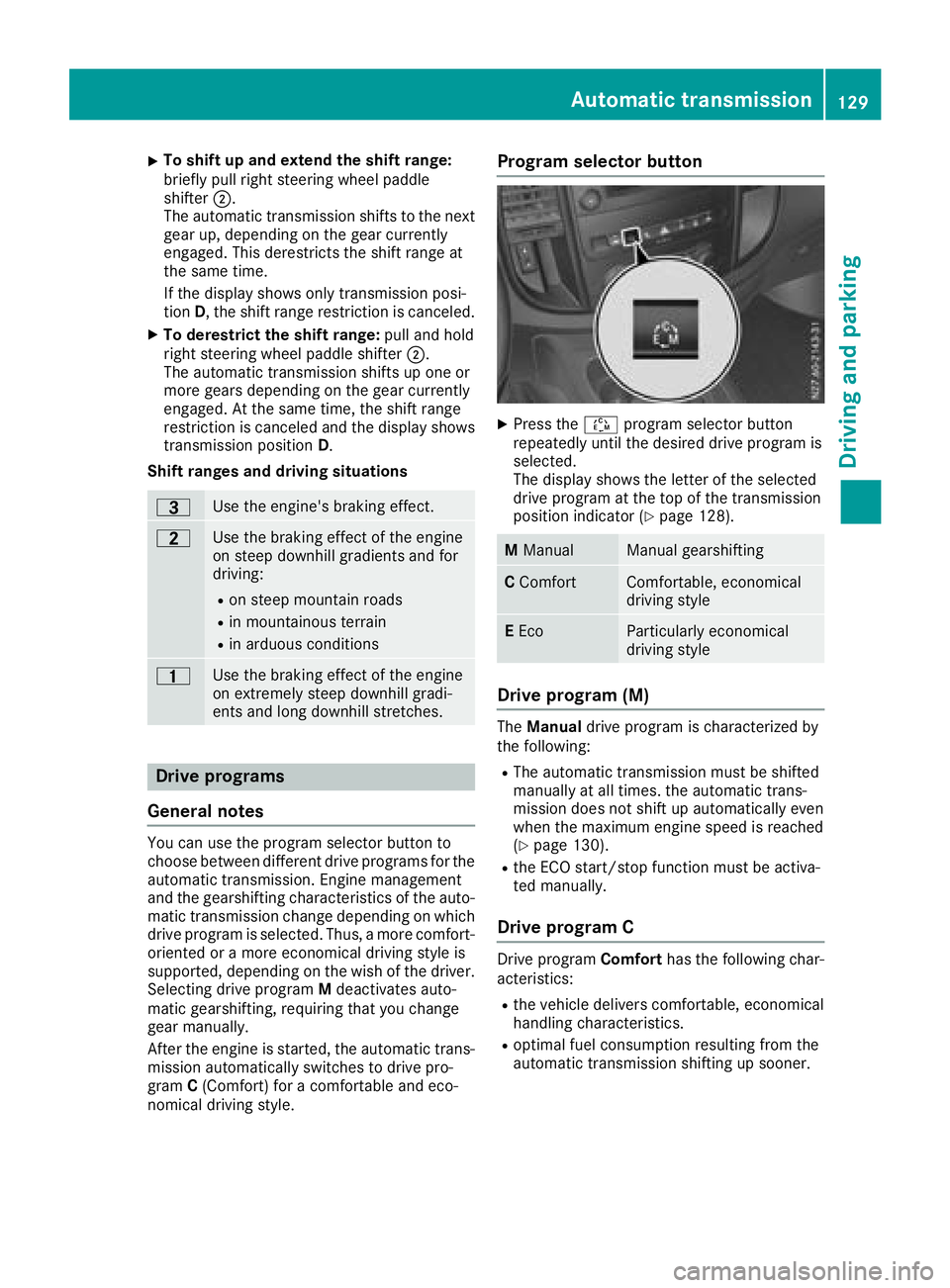
Program selector button
XPress the Éprogram selector button
repeatedly until the desired drive program is
selected.
The display shows the letter of the selected
drive program at the top of the transmission
position indicator (
Ypage 128).
M ManualManual gearshifting
CComfortComfortable, economical
driving style
EEcoParticularly economical
driving style
Drive program (M)
The Manual drive program is characterized by
the following:
RThe automatic transmission must be shifted
manually at all times. the automatic trans-
mission does not shift up automatically even
when the maximum engine speed is reached
(
Ypage 130).
Rthe ECO start/stop function must be activa-
ted manually.
Drive program C
Drive program Comforthas the following char-
acteristics:
Rthe vehicle delivers comfortable, economical
handling characteristics.
Roptimal fuel consumption resulting from the
automatic transmission shifting up sooner.
Automatic transmission129
Driving an d parking
Z
Page 132 of 318
Rincreased sensitivity. This improves driving
stability on slippery road surfaces, for exam-
ple.
Rthe automatic transmission shifts up sooner.
The vehicle thus maintains lower engine
speeds.
Drive program E
Drive programEcohas the following character-
istics:
Rthe vehicle exhibits particularly economical
handling characteristics.
Rthe maximum available engine torque is
reduced.
Roptimal fuel consumption resulting from the
automatic transmission shifting down signifi-
cantly later and up significantly sooner, even
at full-load operation.
No shift point adjustment for adapting to indi-
vidual, dynamic driving styles.
In kickdown, the automatic transmission
automatically shifts to drive program C.
Rincreased sensitivity. This improves driving
stability on slippery road surfaces, for exam-
ple.
Driving tips
Accelerator pedal position
Your style of driving influences how the auto-
matic transmission shifts gear:
Rlittle throttle: early upshifts
Rlots of throttle: later upshifts
Kickdown
Use kickdown for maximum acceleration:
XDepress the accelerator pedal beyond the
pressure point.
The automatic transmission shifts to the next
gear down, depending on the engine speed.
XEase off on the accelerator pedal once the
desired speed is reached.
The automatic transmission shifts up again.
Rocking the vehicle free
At speeds up to 5 mph (9 km/h) you can switch
back and forth between drive position Dand
reverse gear Rwithout applying the brakes. This
helps when rocking the vehicle out of snow or
slush.
XPush the DIRECT SELECT lever alternately up
and down beyond the first point of resistance.
Towing a trailer
XDepending on the downhill gradient, limit the
shift range (Ypage 128) or shift manually into
a lower gear (Ypage 130) in which the engine
will operate in the middle of the engine speed
range. This also applies if cruise control is
activated.
Manual gearshifting
General notes
If you select drive program M, automatic gear-
shifting is deactivated and manual gearshifting
is automatically activated. You must then per-
manently change gear yourself for as long as the
drive program is selected.
Permanent manual gearshifting is deactivated
automatically when you switch from drive pro-
gram Mto another drive program. The auto-
matic transmission then shifts gears automati-
cally. The display shows the selected drive pro-
gram and transmission position Dagain.
Shifting gears
:To shift down
;To shift up
130Automatic transmission
Driving and parking
Page 133 of 318
The drive program display showsMand the
transmission position indicator shows the selec-
ted gear.
XTo shift up: briefly pull right-hand steering
wheel paddle shifter ;.
If the engine speed is sufficient, the automatic
transmission shifts up to the next gear.
If the maximum engine speed is reached in
the currently engaged gear and you continue
to accelerate, the automatic transmission will
not shift up automatically. Always make sure
that the engine speed does not reach the red
area of the tachometer. Observe the gearshift
recommendation in the display (
Ypage 131).
When the engine reaches its maximum speed, the fuel supply is cut to prevent the engine
from overrevving.
XTo shift down: pull briefly on left-hand steer-
ing wheel paddle shifter :.
Provided that the engine will not exceed its
maximum speed when shifting down, the
automatic transmission shifts down to the
next gear.
or
XPull the left-hand steering wheel paddle
shifter until the automatic transmission
selects the optimum gear for the current
speed.
iWhen coasting, the automatic transmission
shifts down automatically.
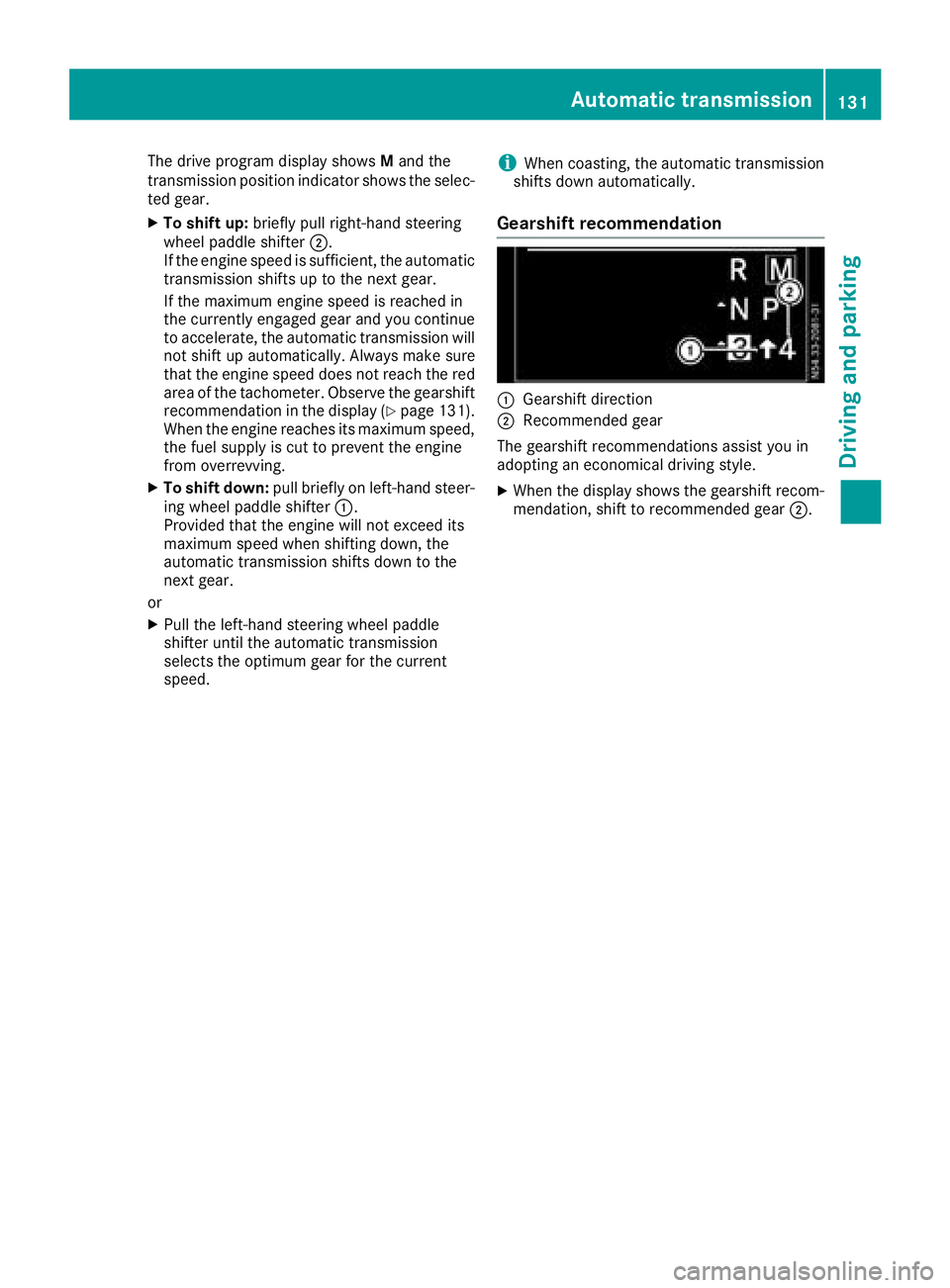
Gearshift recommendation
:Gearshift direction
;Recommended gear
The gearshift recommendations assist you in
adopting an economical driving style.
XWhen the display shows the gearshift recom-
mendation, shift to recommended gear ;.
Automatic transmission131
Driving and parking
Z
Page 134 of 318
Problems with the transmission
ProblemPossible causes/consequences andMSolutions
The transmission is
locked in positionP.The vehicle electronics are malfunctioning.
XHave the vehicle electronics checked immediately at a qualified
specialist workshop.
The acceleration charac-
teristics have deteriora-
ted noticeably.
The transmission does
not shift.The transmission is in emergency mode.
It is only possible to shift into second gear or reverse gear R.
XStop the vehicle.
XDepress the brake pedal.
XMove the selector lever to positionP.
XSwitch off the engine.
XWait at least ten seconds before restarting the engine.
XDepress the brake pedal.
XMove the selector lever to positionDor R.
In position D, the transmission shifts into second gear; in position R,
the transmission shifts into reverse gear.
XHave the transmission checked immediately at a qualified specialist
workshop.
Refueling
Important safety notes
GWARNING
Fuel is highly flammable. Improper handling of
fuel creates a risk of fire and explosion.
Avoid fire, open flames, smoking and creating
sparks under all circumstances. Switch off the
engine and, if applicable, the auxiliary heating
before refueling.
GWARNING
Fuel is poisonous and hazardous to health.
There is a risk of injury.
You must make sure that fuel does not come into contact with your skin, eyes or clothing
and that it is not swallowed. Do not inhale fuel
vapors. Keep fuel away from children.
If you or others come into contact with fuel,
observe the following:
RWash away fuel from skin immediately
using soap and water.
RIf fuel comes into contact with your eyes,
immediately rinse them thoroughly with
clean water. Seek medical assistance with-
out delay.
RIf fuel is swallowed, seek medical assis-
tance without delay. Do not induce vomit-
ing.
RImmediately change out of clothing which
has come into contact with fuel.
GWARNING
Electrostatic buildup can create sparks and
ignite fuel vapors. There is a risk of fire and
explosion.
Always touch the vehicle body before opening
the fuel filler flap or touching the fuel pump
nozzle. Any existing electrostatic buildup is
thereby discharged.
132Refueling
Driving and parking
Page 136 of 318
GWARNING
If you leave children unsupervised in the vehi-
cle, they could set it in motion by, for example:
Rrelease the parking brake.
Rshift the automatic transmission out of the
parking position P.
Rstart the engine.
In addition, they may operate vehicle equip-
ment and become trapped. There is a risk of
an accident and injury.
When leaving the vehicle, always take the
SmartKey with you and lock the vehicle. Never
leave children unsupervised in the vehicle.
!Always secure the vehicle correctly against
rolling away. Otherwise, the vehicle or its driv-
etrain could be damaged.
!When the vehicle is parked, always remove
the key to prevent the battery from becoming
discharged.
Always park your vehicle safely and secure it
against rolling away. When parking, observe the
legal requirements of the country in which you
are currently driving.
To ensure that the vehicle is properly secured
against rolling away unintentionally:
Rthe parking brake must be firmly applied
Rthe transmission must be in position Pand the
key must be removed from the ignition lock
Ron steep uphill or downhill gradients, the front
wheels must be turned towards the curb
Parking brake
GWARNING
If you leave children unsupervised in the vehi-
cle, they could set it in motion by, for example:
Rrelease the parking brake.
Rshift the automatic transmission out of the
parking position P.
Rstart the engine.
In addition, they may operate vehicle equip-
ment and become trapped. There is a risk of
an accident and injury.
When leaving the vehicle, always take the
SmartKey with you and lock the vehicle. Never
leave children unsupervised in the vehicle.
GWARNING
If you must brake the vehicle with the parking brake, the braking distance is considerably
longer and the wheels could lock. There is an
increased danger of skidding and accidents.
Only use the parking brake to brake the vehi-
cle when the service brake is faulty. Do not
apply the parking brake too firmly. If the
wheels lock, release the parking brake until
the wheels begin turning again.
The brake lamps are not illuminated when you
brake the vehicle using the parking brake.
As a rule, you may only apply the parking brake
when the vehicle is stationary.
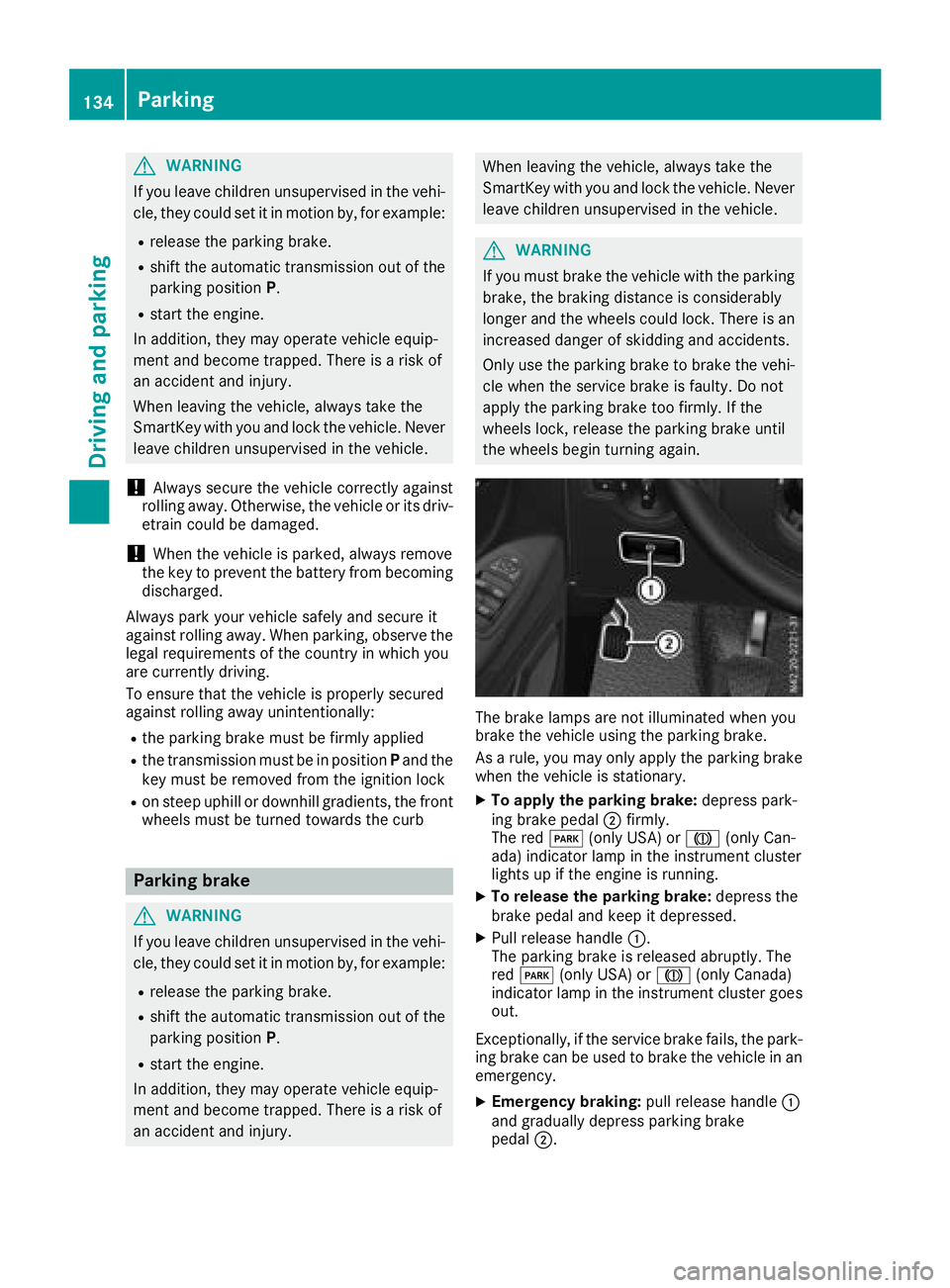
XTo apply the parking brake: depress park-
ing brake pedal ;firmly.
The red F(only USA) or J(only Can-
ada) indicator lamp in the instrument cluster
lights up if the engine is running.
XTo release the parking brake: depress the
brake pedal and keep it depressed.
XPull release handle :.
The parking brake is released abruptly. The
red F (only USA) or J(only Canada)
indicator lamp in the instrument cluster goes
out.
Exceptionally, if the service brake fails, the park-
ing brake can be used to brake the vehicle in an
emergency.
XEmergency braking: pull release handle:
and gradually depress parking brake
pedal ;.
134Parking
Driving and parking
Page 137 of 318
Switching off the engine
Important safety notes
GWARNING
The automatic transmission switches to neu-
tral position Nwhen you switch off the engine.
The vehicle may roll away. There is a risk of an
accident.
After switching off the engine, always switch
to parking position P. Prevent the parked vehi-
cle from rolling away by applying the parking
brake.
!If the coolant temperature is very high, e.g.
after driving on hilly roads, leave the engine
running at idle speed for about two minutes
before turning it off.
This allows the coolant temperature to return
to normal.
Vehicles with automatic transmission
XStop the vehicle.
XShift the transmission to position P.
XApply the parking brake.
XTurn the key to position0in the ignition lock
and remove it.
The immobilizer is activated.
If you switch the engine off with the trans-
mission in position Ror D, the automatic
transmission shifts to Nautomatically.
If you then open one of the front doors or
remove the key from the ignition, the auto-
matic transmission automatically shifts to P.
If you shift the automatic transmission to N
before switching off the engine, the automatic
transmission remains in Neven if a front door
is opened.
XSecure the vehicle to prevent it from rolling
away (Ypage 133).
Parking the vehicle for a long period
If you leave the vehicle parked for longer than
four weeks, the battery may be damaged by
exhaustive discharging.
XDisconnect the battery (Ypage 259).
or
XConnect the battery to a trickle charger.
Be sure to observe the notes on charging the batteries (
Ypage 262).
You can obtain information about trickle
chargers from a qualified specialist work-
shop.
If you leave the vehicle parked for longer than 6
weeks, the vehicle may suffer damage as a
result of lack of use.
XVisit a qualified specialist workshop and seek
advice.
Driving tips
General notes
Important safety notes
GWARNING
If you switch off the ignition while driving,
safety-relevant functions are only available
with limitations, or not at all. This could affect, for example, the power steering and the brake
boosting effect. You will require considerably
more effort to steer and brake. There is a risk
of an accident.
Do not switch off the ignition while driving.
GWARNING
If you operate mobile communication equip-
ment while driving, you will be distracted from traffic conditions. You could also lose control
of the vehicle. There is a risk of an accident.
Only operate this equipment when the vehicle
is stationary.
Observe the legal requirements of the country in
which you are driving. Some jurisdictions pro-
hibit the driver from using a mobile phone while driving a vehicle.
Driving tips135
Driving and parking
Z
Page 141 of 318
110 yds (100 m) at a maximum speed of 12 mph(20 km/h).
The brake lamps are not illuminated when you
brake the vehicle using the parking brake.
Driving in wet conditions
Hydroplaning
GWARNING
There is a danger of hydroplaning occurring,
even if you are driving slowly and your tires
have sufficient tread depth, depending on the
depth of water on the road. There is a risk of
an accident.
For this reason, avoid tire ruts and brake care-
fully.
Therefore, in heavy rain or other conditions in
which hydroplaning can occur, drive as follows:
Rreduce your speed
Ravoid tire ruts
Rapply the brakes with care
Driving on flooded roads
!Do not drive through flooded areas. Check
the depth of any water before driving through
it. Drive slowly through standing water. Oth-
erwise, water may enter the vehicle interior or
the engine compartment. This can damage
the electronic components in the engine or
the automatic transmission. Water can also
be drawn in by the engine's air suction nozzles
and this can cause engine damage.
If you have to drive on stretches of road on which
water has collected, please bear in mind that:
Rthe water level of standing water should not
be above the lower edge of the front bumper
Rdo not drive faster than walking speed
Driving in winter
GWARNING
If you shift down on a slippery road surface in an attempt to increase the engine's braking
effect, the drive wheels could lose their grip.
There is an increased danger of skidding and
accidents.
Do not shift down for additional engine brak-
ing on a slippery road surface.
!An accumulation of snow and ice, particu-
larly when frozen, caught in the area around
the air intake slots, moving parts, the axles
and the wheel arches may:
Rrestrict air intake
Rdamage vehicle parts
Rcause malfunctions by restricting the mobi-
lity intended by the design (e.g. reduced
possible steering input).
Regularly check the vehicle and remove snow
or ice when traveling in wintry conditions.
If there is any damage, inform a qualified spe-
cialist workshop.
!Vehicles with automatic transmission may
roll only briefly in the neutral position N. Pro-
longed rolling of the wheels, e.g. when being
towed, will result in transmission damage.
Have your vehicle winterproofed at a qualified
specialist workshop at the onset of winter.
Drive particularly carefully on slippery roads.
Avoid sudden acceleration, steering and braking
maneuvers. Do not use cruise control.
If the vehicle threatens to skid or cannot be
stopped when moving at low speed:
XShift the transmission to position N.
XTry to maintain control of the vehicle using
corrective steering.
The outside temperature indicator is not
designed to serve as an ice-warning device and is therefore unsuitable for that purpose.
Changes in the outside temperature are dis-
played after a short delay.
Indicated temperatures just above the freezing
point do not guarantee that the road surface is
free of ice. The road may still be icy, especially in
wooded areas or on bridges. If you do not adjust
your driving style, the vehicle may start to skid.
Al
ways adapt your driving style and drive at a
speed to suit the prevailing weather conditions.
You should pay special attention to road condi-
tions when temperatures are around freezing
point.
Driving tips139
Driving and parking
Z
Page 146 of 318
The last speed set remains stored. The last
speed stored is deleted when you switch off the
engine.
Cruise control is deactivated automatically
when:
Ryou apply the brakes
Ryou apply the parking brake and theF
(only USA) or J(only Canada) indicator
lamp in the instrument cluster lights up
Ryou are driving slower than 20 mph (30 km/h)
Ryou shift th eautomati ctransmission to neu-
tral position Nwhile th evehicl eis in motion
RES P®intervenes or you deactivat eES P®
Rthere is amalfunction in th eES P®or AB Ssys-
te m
If cruise control automatically deactivates, a
warnin gtone sounds and th eCruise
Contro lOffmessage appears briefl yin th edisplay.
The V symbol and th edisplay of th estore d
speed in th eheader or in th estatu sarea of th e
display are then no tshown.
Problems with cruise contro l
The speed cannotbe set when cruise control is
activated.
The display is showin g amessage of high priority
and canno ttherefor esho w a chang ein speed.
XProceed as instructe dby th emessage in th e
display.
COLLISION PREVENTION ASSIST
Gene ral notes
COLLISION PREVENTION ASSIST help syou:
Rto minimiz eth eris kof afront-en dcollision
wit h a detecte dobstacle in th epat hof your
vehicl e
Rto reduce th econsequence sof afront-en d
collision
The system uses rada rsensor sto detec tvehi-
cle sin front.
COLLISION PREVENTION ASSIST consist sof th e
distanc ewarnin gfunction and Adaptive Brake
Assist.
If COLLISION PREVENTION ASSIST is malfunc -
tioning, th edisplay shows acorrespondin gmes -
sage (
Ypage 214).
Distance warning function
Important safety notes
GWARNIN G
The distanc ewarnin gfunction does no treact:
Rto people or animals
Rto oncomin gvehicles
Rto crossin gtraffic
Rwhen cornering
Thus ,th edistanc ewarnin gfunction canno t
provid e awarnin gin all critica lsituations.
There is aris kof an accident.
Always pay careful attention to th etraffic sit -
uation and be read yto brake.
GWARNIN G
The distanc ewarnin gfunction canno talways
clearly identify objects and complex traffic
situations.
In suc hcases, th edistanc ewarnin gfunction
may:
Rgiv ean unnecessary warnin g
Rnotgiv e a warnin g
There is aris kof an accident.
Always pay careful attention to th etraffic sit -
uation and do no trel ysolely on th edistanc e
warnin gfunction .
In particular, th edetection of obstacles can be
impaire din th ecas eof:
Rdir ton th esensor sor anythin gelse coverin g
th esensor s
Rsnow or heav yrain
Rinterferenc efrom other rada rsource s
Rstrongrada rreflections, for example, in park -
in g garages
Ranarrow vehicl etravelin gin front, e.g. a
motorbik e
Ravehicl etravelin gin fron ton adifferen tlin e
Due to th enature of th esystem, particularly
complicate dbut non-critica ldrivin gcondition s
may also caus eth esystem to display awarning.
If you fail to adapt your drivin gstyle, th edis-
tance warnin gfunction can neither reduce th e
ris kof an acciden tno roverride th elaws of phys -
ics .The distanc ewarnin gfunction canno ttak e
144Driving systems
Driving and parking
Page 155 of 318
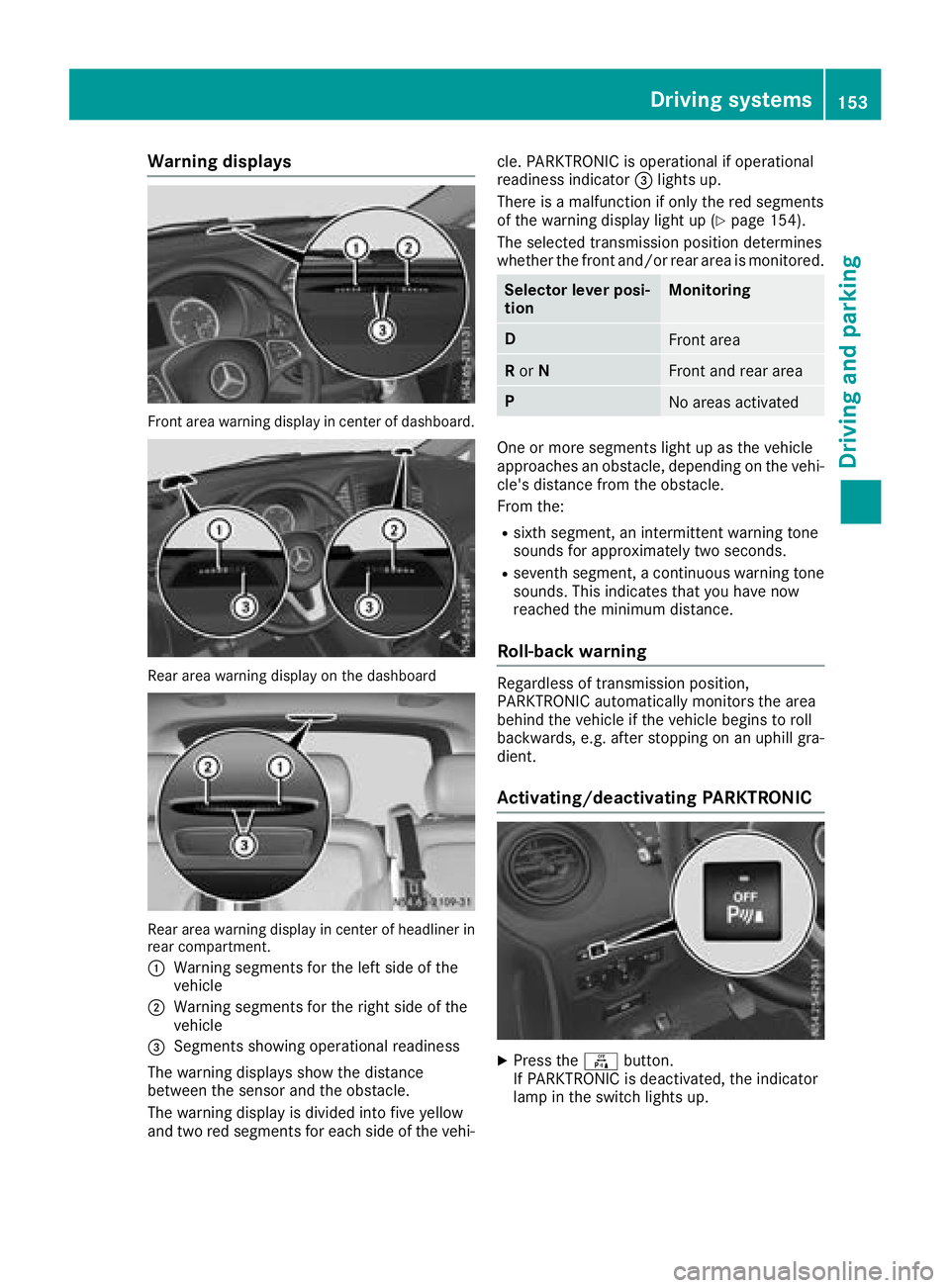
Warning displays
Front area warning display in center of dashboard.
Rear area warning display on the dashboard
Rear area warning display in center of headliner in
rear compartment.
:
Warning segments for the left side of the
vehicle
;Warning segments for the right side of the
vehicle
=Segments showing operational readiness
The warning displays show the distance
between the sensor and the obstacle.
The warning display is divided into five yellow
and two red segments for each side of the vehi- cle. PARKTRONIC is operational if operational
readiness indicator
=lights up.
There is a malfunction if only the red segments
of the warning display light up (
Ypage 154).
The selected transmission position determines
whether the front and/or rear area is monitored.
Selector lever posi-
tionMonitoring
DFront area
R or NFront and rear area
PNo areas activated
One or more segments light up as the vehicle
approaches an obstacle, depending on the vehi-
cle's distance from the obstacle.
From the:
Rsixth segment, an intermittent warning tone
sounds for approximately two seconds.
Rseventh segment, a continuous warning tone
sounds. This indicates that you have now
reached the minimum distance.
Roll-back warning
Regardless of transmission position,
PARKTRONIC automatically monitors the area
behind the vehicle if the vehicle begins to roll
backwards, e.g. after stopping on an uphill gra-
dient.
Activating/deactivating PARKTRONIC
XPress the fbutton.
If PARKTRONIC is deactivated, the indicator
lamp in the switch lights up.
Driving systems153
Driving and parking
Z
Page 159 of 318
XBring the vehicle safely to a stop when the
parking symbol shows the desired parking
space in the instrument cluster.
XShift the transmission to positionR.
The display shows the Start
ParkAssist?Yes: OKNo:%message and the location
of the parking space.
XTo cancel the process: press the%but-
ton on the steering wheel or drive off.
or
XTo park using active parking assistance:
press the abutton on the steering wheel.
The display shows the Park Assist
Active: Accelerate and BrakeObs.Surroundingsmessage.
XLet go of the steering wheel.
XReverse the vehicle, being ready to brake at
all times. Exit the parking space slowly and do
not drive faster than 6 mph (10 km/h). Oth-
erwise parking assistance is canceled and
Active Parking Assist is stopped.
Active Parking Assist brakes the vehicle to a
standstill when the vehicle approaches the
rear border of the parking space.
Maneuvering may be required in tight parking
spaces. The display shows the Park Assist
Active: Select DObs. Surroundingsmes-
sage.
XWhile the vehicle is stationary, shift the trans-
mission to position D.
Active Parking Assist immediately steers in
the other direction. The display shows the
Park Assist Active: Accelerate and
BrakeObs. Surroundingsmessage.
iYou will achieve the best results by waiting
for the steering procedure to complete before
pulling away.
XDrive forwards and be ready to brake at all
times.
Active Parking Assist brakes the vehicle to a
standstill.
The Park Assist Active: Select R
Obs.Surroundingsmessage is shown in the display.
As soon as the parking procedure is complete,
the Park Assist Finished
message appears
in the display and a tone sounds. The parking
assistance function of Active Parking Assist is
stopped. The vehicle is parked and kept station-
ary without the driver having to depress the
brake pedal. The braking effect is canceled
when you depress the accelerator pedal. Active Parking Assist no longer supports you
with steering interventions and brake applica-
tions. Once active parking assistance has been
stopped, you must steer and brake again your-
self. PARKTRONIC is still available.
Parking tips:
RThe way your vehicle is positioned in the park-
ing space after parking is dependent on vari-
ous factors. These include the position and
shape of the vehicles parked in front and
behind it and the conditions of the location. It
may be the case that Active Parking Assist
guides you too far into a parking space, or not
far enough into it. In some cases, it may also
lead you across or onto the curb. In this case,
cancel the active parking assistance.
RYou can also select transmission position D
prematurely. The vehicle redirects and does
not drive as far into the parking space. If you
change direction too early, parking assis-
tance is canceled and Active Parking Assist is
stopped. It is then not possible to achieve a
sensible parking position from the current
position.
Exiting a parking space
In order that Active Parking Assist can assist you
when exiting the parking space:
Rthe border of the parking space must be high
enough at the front and the rear. A curb is too
small, for example.
Rthe border of the parking space must not be
too wide. Your vehicle can be maneuvered
into a position at a maximum of 45° to the
starting position in the parking space.
Ra maneuvering distance of at least 3.3 ft
(1.0 m) must be available .
Active Parking Assist can only assist you with
exiting a parking space if you have parked the
vehicle parallel to the direction of travel using
Active Parking Assist.
If PARKTRONIC detects obstacles, Active Park-
ing Assist brakes automatically when exiting
from the parking space. You are responsible for
braking in good time.
XStart the engine.
XSwitch on the turn signal in the direction in
which you are pulling away.
XShift the transmission to position Dor R.
The display shows the Start
ParkAssist?Yes: OKNo:%message.
Driving systems157
Driving an d parking
Z